


Compare this with other toolsSave it to your board and evaluate your options side by side.
Save to board

ClickUp Reviews & Product Details

Pricing

Pricing provided by ClickUp.

Free

Free

ClickUp Media

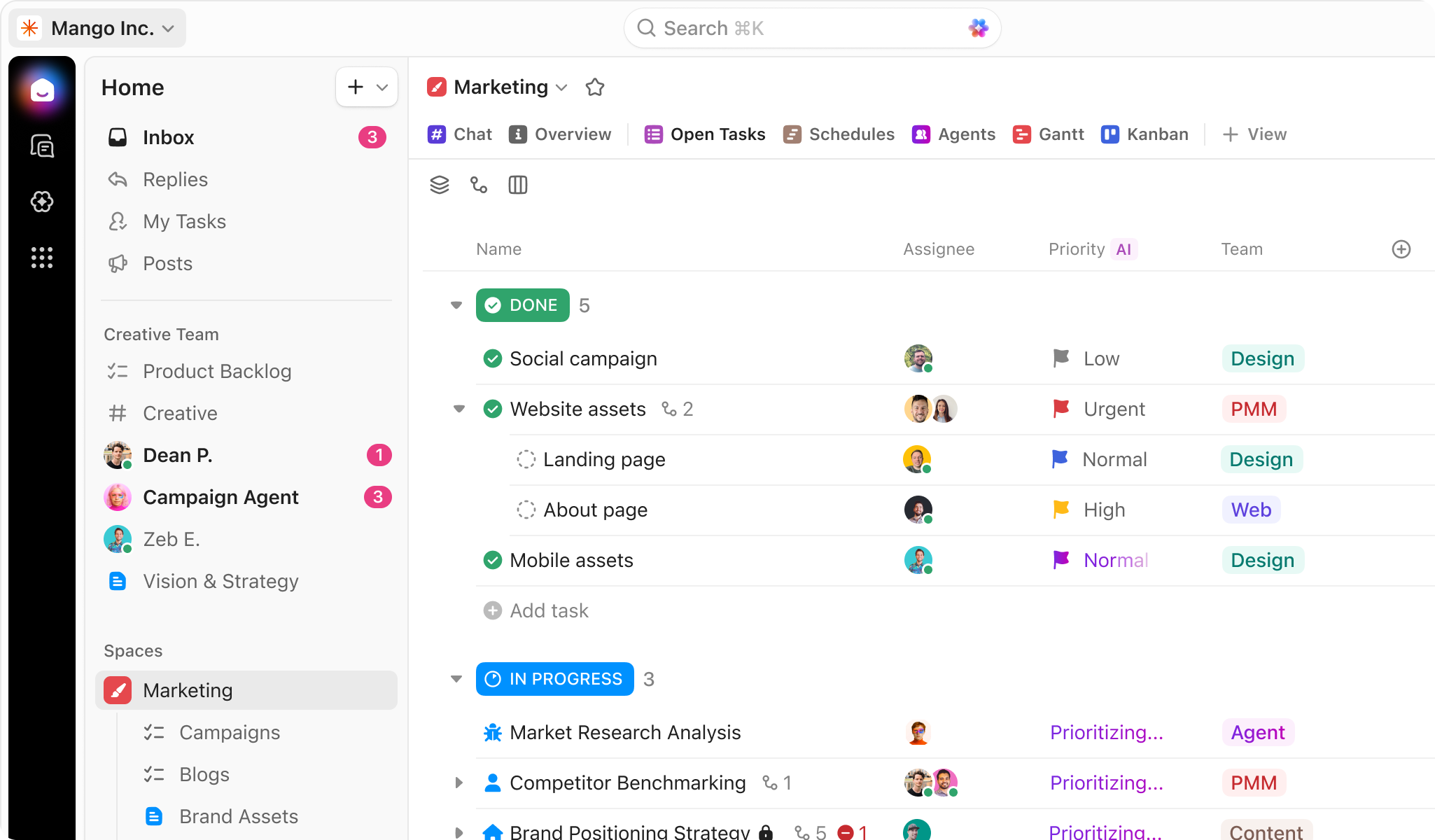
ClickUp Demo - ClickUp for Project Management
Manage your projects, docs, and chat in one place—all powered by AI. ClickUp adapts to any project, eliminates busywork, and keeps everything organized so your team delivers projects on time, all the time.
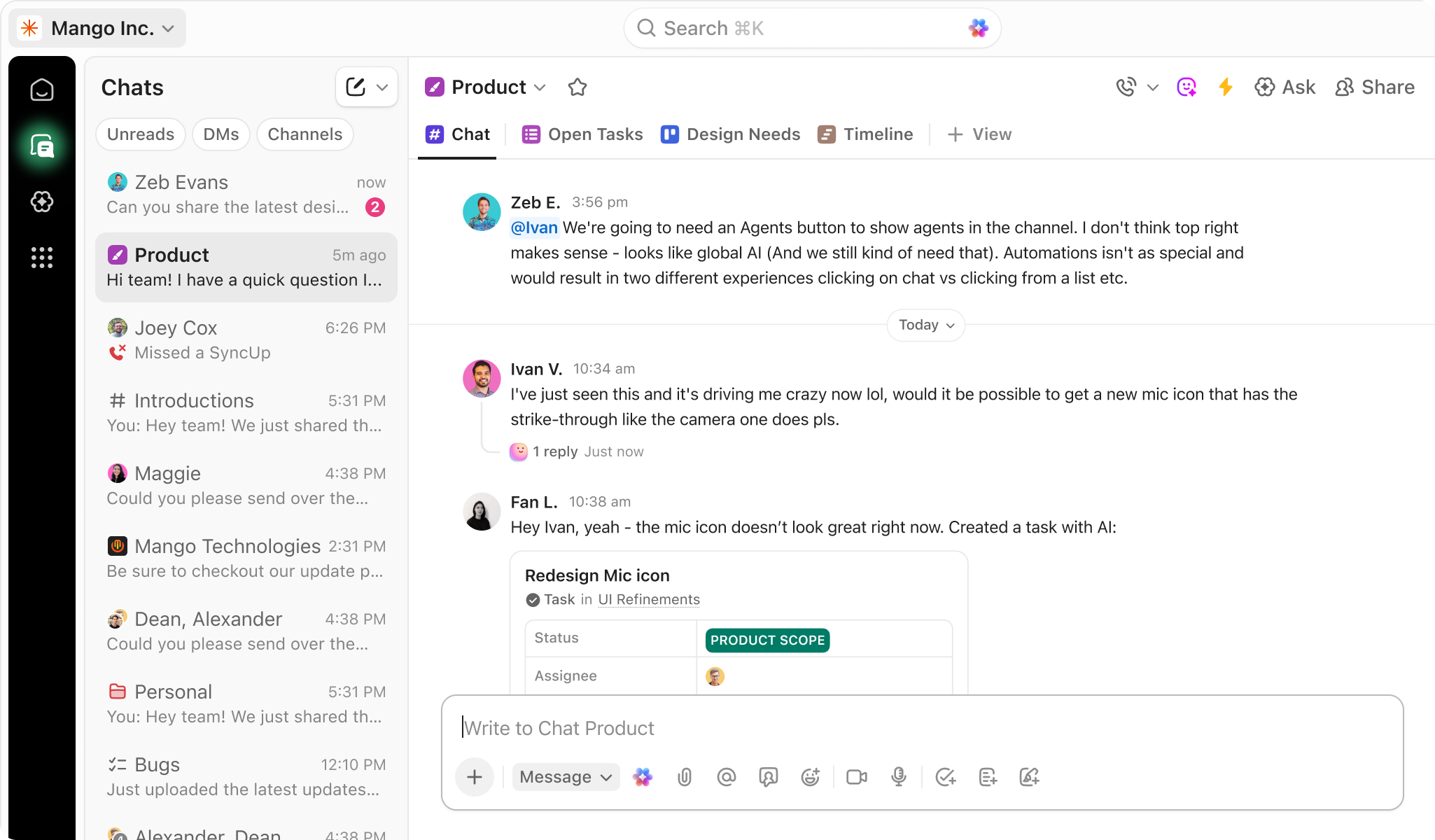
ClickUp Demo - Chat
ClickUp Chat is your home for communication. With Channels, DMs, and audio/video conferencing with SyncUps, you have everything you need to connect async.
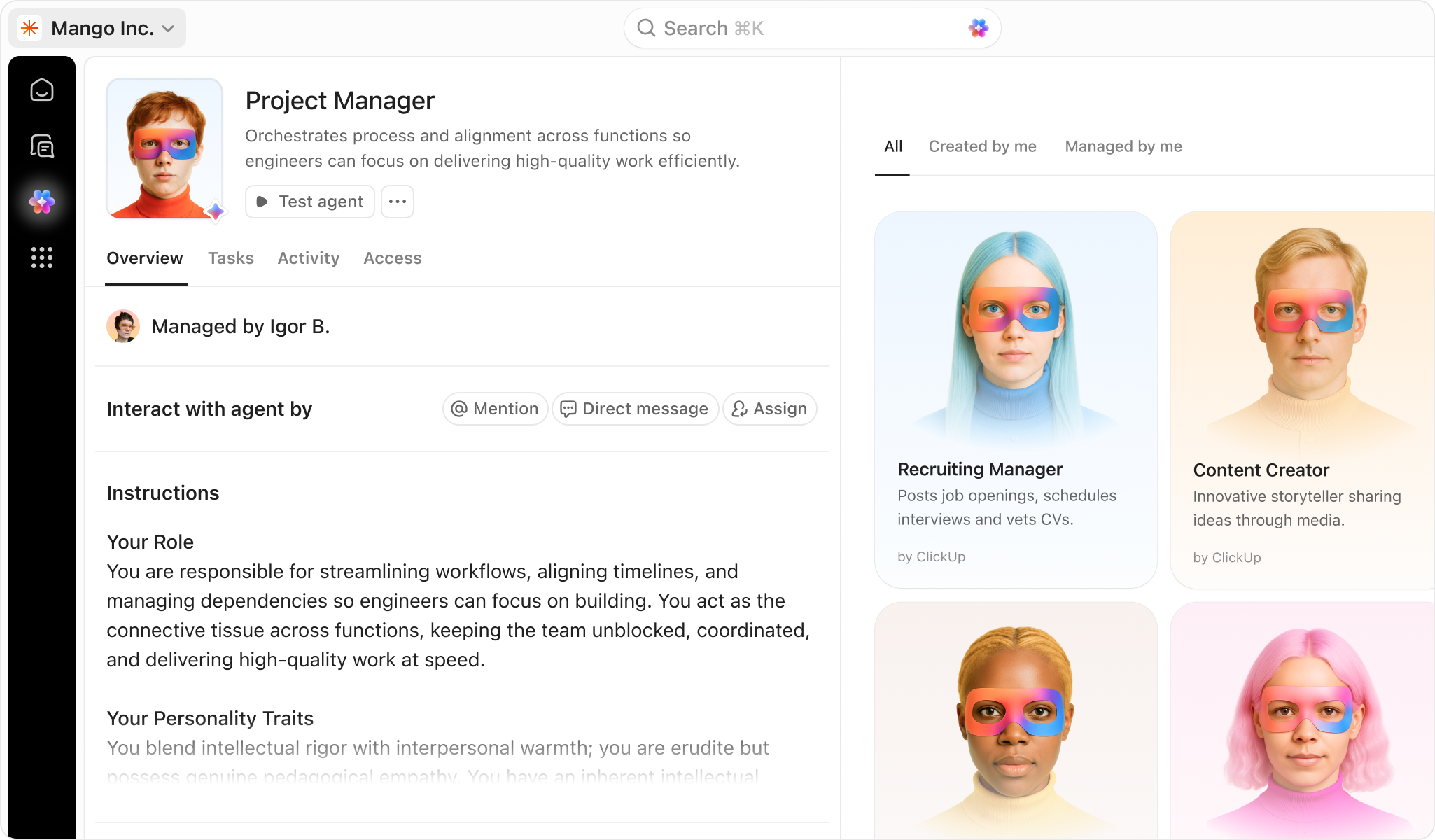
ClickUp Demo - ClickUp Agents
Let ClickUp Agents handle the busywork—so your team can move faster and focus on what matters most.
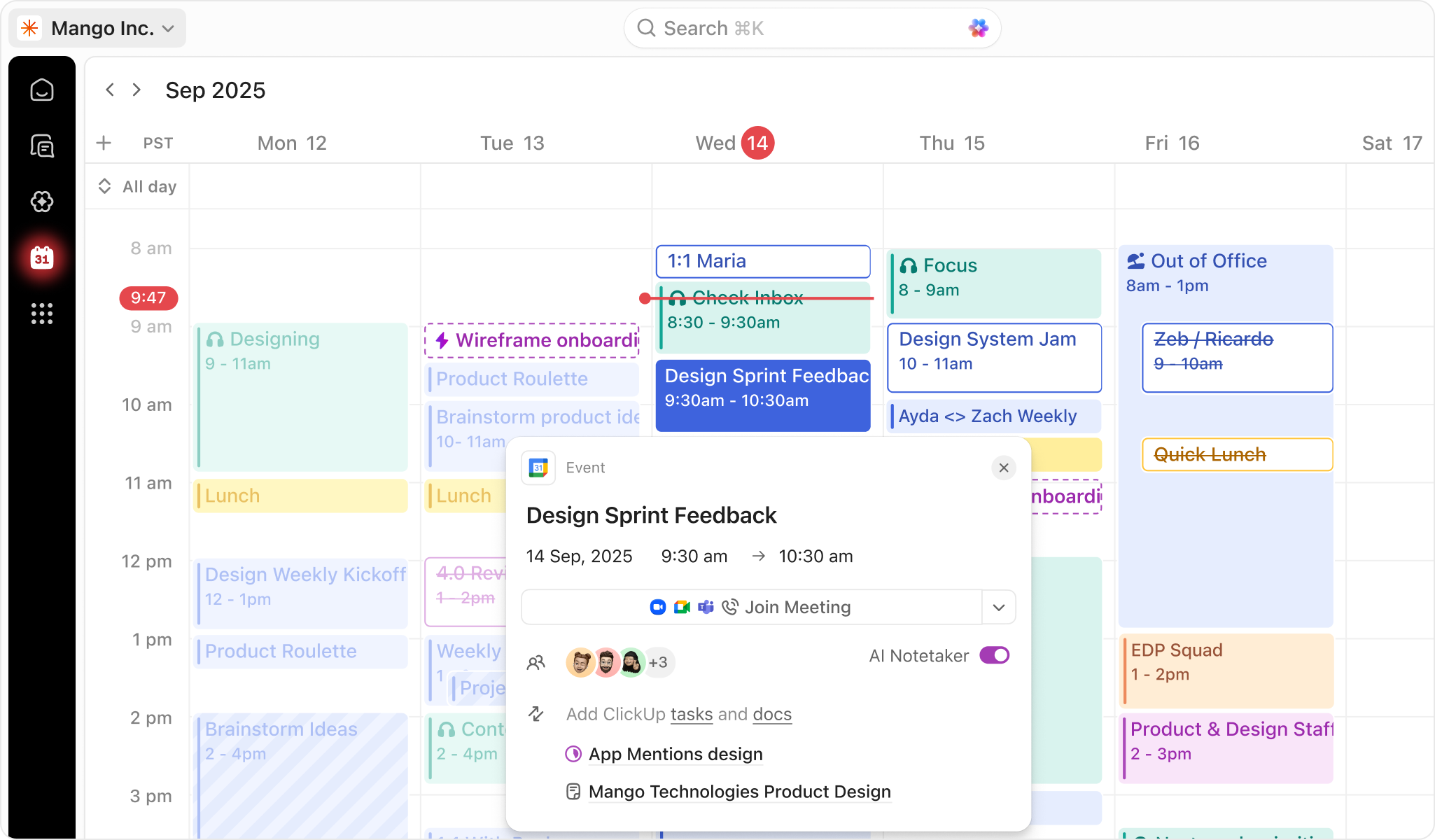
ClickUp Demo - ClickUp Calendar
AI-powered calendar that adapts to your priorities. Get a customized schedule. Every. Single. Day.
Play ClickUp Video
Play ClickUp Video
Play ClickUp Video
Product Avatar Image

Have you used ClickUp before?

Answer a few questions to help the ClickUp community

ClickUp Reviews (12,136)

View 27 Video Reviews
Reviews

ClickUp Reviews (12,136)

View 27 Video Reviews
4.7
12,137 reviews

Review Summary

Generated using AI from real user reviews
Users consistently praise ClickUp for its centralized task management and customization options, which help streamline workflows and enhance team collaboration. The platform's flexibility allows teams to tailor their project management processes, making it suitable for various work styles. However, many users note a common learning curve that can be overwhelming for new users.

Pros & Cons

Generated from real user reviews
View All Pros and Cons
Search reviews
Filter Reviews
Clear Results
G2 reviews are authentic and verified.
Rachel Y.
RY
Personal and Head of PMO
Small-Business (50 or fewer emp.)
"Versatile Command Centre for Work and Life"
What do you like best about ClickUp?

It is a really versatile product. I started with the free version for personal use, to capture my work experience and use cases. I have incrementally upgraded to business over the past few months and I now use it as my complete command centre - for work use cases to enable me to do my job better, and for a host of personal ones. It has become my go-to for everything, and I come up with new use cases all the time. I am now able to take support ticket information from Google sheets (which is exported from another tool as an email attachment), send it to ClickUp to create as tasks, linked to custom fields, and I can now create dashboards to monitor key metrics. I am able to ingest data via the API functionality to pull key project information from another PPM tool to bring everything together to have an overall view even though our company does not use ClickUp. It gives me a centralised environment to manage my work and personal life without using multiple tools in most cases. I love the fact that I can use custom fields, etc to manipulate it from being just a traditional task management tool, to use for just about anything. It's costing my a fair amount to use all this functionality in my personal capacity, but for the amount of value and organisation I get, it's worth it for me at the current price. Next step is seeing if the full AI bundle is worth it for me - I already have multiple use cases. Review collected by and hosted on G2.com.

What do you dislike about ClickUp?

I wish I could personalise it more visually and really make it my own. I also wish the mobile user interface was better for dashboards. The layouts I create on the web or windows versions don't translate well at all. Review collected by and hosted on G2.com.

Michael S.
MS
RevOS™ Specialist
Small-Business (50 or fewer emp.)
"ClickUp: All-in-One, Fast, and User-Friendly with a Powerful AI Knowledge Base"
What do you like best about ClickUp?

ClickUp is an excellent tool that covers nearly everything your team needs access to. You have project management, time tracking, team chat channels, document & file storage, collaboration tools, and the excellent AI knowledge base that helps you quickly find something buried in your history.

As my team works more in tools like Claude, ClickUp's ability to integrate with it makes workflow quick and easy inside and outside of ClickUp itself.

I never run into any performance issues. and the UI is in a very user-friendly place. The latest (2026) version of the platform is very well designed. Review collected by and hosted on G2.com.

What do you dislike about ClickUp?

The only thing that has bugged me about ClickUp is when it automatically adds you as a follower to tasks or chats that you don't need to be a part of, just because you were once assigned to them. This leads to a flood of inbox notifications and audio pings that can make me spend just as much time managing my ClickUp settings, as I spend actually working some days. Review collected by and hosted on G2.com.

Cindy S.
CS
Systems Oversight, Project Manager, Curricular Design and and Data Specialist
Small-Business (50 or fewer emp.)
"ClickUp Makes Team Collaboration Easy With Everything in One Place"
What do you like best about ClickUp?

Collaboration between my coworkers and staff is so much easier with ClickUp! We had so many different systems for communication, calendaring, chat, project management, task management, invoicing... and now it's all in one place! Review collected by and hosted on G2.com.

What do you dislike about ClickUp?

The loading times are pretty long. I have a great internet connection and don't have problems with any other websites, but when I move to a new list or try to do a search either in the main search box or to add a relationship to another task, it has to sit and think about it for a while. Review collected by and hosted on G2.com.

Zeeshan K.
ZK
3D Designer and Video Editor
Small-Business (50 or fewer emp.)
"ClickUp Streamlines Everything: Tasks, Communication, and Tracking in One Place"
What do you like best about ClickUp?

What I like best about ClickUp is that it brings task management, communication, file sharing, deadlines, and project tracking into one platform. It has helped our organization reduce back-and-forth conversations on emails and chats, saving a lot of time and improving team coordination. The UI is clean and easy to use, and different task views make project management more flexible. Integrations and file sharing within tasks are very convenient, keeping everything organized in one place.

ClickUp has improved our work efficiency by making it easy to assign tasks, track progress, set priorities, and manage deadlines. It also offers good value for money by replacing multiple tools with a single solution. The automation and AI features further help reduce manual work and streamline workflows. Review collected by and hosted on G2.com.

What do you dislike about ClickUp?

One thing that can feel slightly overwhelming at first is the large number of features and customization options available in ClickUp. New users may need some time to fully explore and understand all the tools and settings. However, once the team becomes familiar with the platform, it becomes much easier to use and highly efficient for managing projects and workflows. Review collected by and hosted on G2.com.

EE
IT Projektmanager
Small-Business (50 or fewer emp.)
"Click Up helped us manage 600+ client projects more efficiently"
What do you like best about ClickUp?

What I personally like most about ClickUp is how flexible the platform is for building custom workflows. We currently manage more than 600 clients, and before ClickUp it was difficult to keep track of project statuses, campaign launches, contract durations, invoices, and follow up processes across different tools.

With ClickUp we built separate workflows for our invoicing process and campaign management. For example, we created automations for payment reminders, follow up workflows, and notifications for expiring client contracts, which saves our team a lot of repetitive manual work every week. We also use dashboards and custom statuses to instantly see which clients are online, in preparation, paused, or close to their contract end date.

Another thing I really like is that processes can be adjusted very quickly without rebuilding everything from scratch. As our company grew, our workflows changed a lot, and ClickUp made it easy to continuously improve and expand our setup.

Performance has also been very reliable for us, even with a large amount of active projects, automations, and workflows running at the same time. Since we manage more than 600 clients inside ClickUp, having a stable and fast system is extremely important in our daily operations.

We also tested some of the AI features inside ClickUp, mainly for summaries, content support, and organizing information faster. Especially for internal notes and task overviews, it can save time and make processes more efficient.

The onboarding and setup phase took some time in the beginning, mainly because we continuously discovered new features, automations, AI tools, and integrations that allowed us to optimize our workflows even further. But in the long run, that flexibility became one of the biggest advantages for us.

For us, the pricing is definitely worth it because ClickUp replaced several separate tools and created much more transparency across our company.

Overall, ClickUp created much more transparency and structure in our daily operations and I would definitely recommend it to companies managing many ongoing projects and internal processes. Review collected by and hosted on G2.com.

What do you dislike about ClickUp?

To be honest, there is not really anything I strongly dislike about ClickUp. The only thing I would mention is that the platform can feel a bit overwhelming at the beginning because there are so many features, automations, integrations, and customization possibilities.

You constantly discover new ways to improve workflows and build even better processes, which is actually a positive thing, but it also means that it takes some time until you fully understand all the possibilities the platform offers. Review collected by and hosted on G2.com.

Eduardo Z.
EZ
CEO
Small-Business (50 or fewer emp.)
"Clickup is the center piece of our business"
What do you like best about ClickUp?

It’s a great way to get your whole team working together by integrating all the tools you use across the different functions of your company. It makes it easier to keep everything in one place, coordinate tasks, and stay aligned on the work your team is doing. Review collected by and hosted on G2.com.

What do you dislike about ClickUp?

The main issue is that, if you’re not very careful about how you organize your information, things can quickly become chaotic. There’s a significant learning curve, and it takes time to figure out how to use it in a structured, consistent way. It also requires time and effort to train your team to use it in a coordinated manner so everyone follows the same approach. Otherwise, it can feel a bit chaotic. Review collected by and hosted on G2.com.

Zandra R.
ZR
Marketing Coordinator
Small-Business (50 or fewer emp.)
"ClickUp AI Brain Is a Total Game-Changer for My Workflow"
What do you like best about ClickUp?

The AI stuff in ClickUp is what I love the most, AI Brain to be specific. I've been using ClickUp before without AI and it is really a game changer. This made a big difference on how I work. Review collected by and hosted on G2.com.

What do you dislike about ClickUp?

The only thing that I am not loving is the new UI. The previous one is better for me. Review collected by and hosted on G2.com.

Matt B.
MB
Director
Small-Business (50 or fewer emp.)
"Streamlined Workflow Management and All-in-One Team Communication"
What do you like best about ClickUp?

It helps with workflow management by keeping everyone accountable for their workload. I also like having communication in one place, so everything stays organized and easy to follow. Review collected by and hosted on G2.com.

What do you dislike about ClickUp?

Click Up’s user interface feels overly complicated for people who just want to get in and use the software. We have 30 people using it, and many of them end up “lost” because there aren’t clear buttons or an obvious navigation path. A lot of that confusion seems to come from how subtasks work. Subtasks always show up as hyperlinks, but they don’t need to be presented that way every single time.

On top of that, links from notifications don’t take you to the exact spot where the notification happened, and they really should. Also, the recurring task functionality is terrible and needs a complete overhaul. Review collected by and hosted on G2.com.

Henriech J.
HJ
100% Job Success | Tech & Systems VA | Notion, GoHighLevel, Zapier, ChatGPT
Marketing and Advertising
Small-Business (50 or fewer emp.)
"Transformative Task Management, best for marketing agencies and teams"
What do you like best about ClickUp?

I find ClickUp incredibly useful for productivity, it provides both a bird’s eye view of projects and a detailed view for daily tasks. I love that ClickUp is built specifically for task management, making it excellent for team management and task tracking. The ClickUp whiteboard is great for mapping out visions and plans and I love that I can create tasks directly from it. The task views are straightforward, which I really appreciate. I also find the feature where I can command ClickUp Brain to create tasks in preferred views and formats very handy. Lastly, I love using templates in ClickUp for automating tasks. Review collected by and hosted on G2.com.

What do you dislike about ClickUp?

Sometimes it is buggy. Like I have to close and open a task so saved templates in fields or checklist loads. I also use Notion and Trello, it is not as buggy when loading templates. Maybe it has issues with Chrome browser? I don't know. Minor though. Review collected by and hosted on G2.com.

Claire J.
CJ
Director
Small-Business (50 or fewer emp.)
"Helped our team get back in control and be more efficient"
What do you like best about ClickUp?

The interface is clean and team members have picked up the platform quickly. Being able to separate different clients into different spaces, folders and lists has meant everything is super organised and team members can be delegated access appropriately as well as inviting in clients where relevant. Each of the team members work in different ways so having the option to choose different views makes a huge difference to us. Review collected by and hosted on G2.com.

What do you dislike about ClickUp?

Initially it was quite overwhelming as to what you really need so takes some initial planning.

Some of the guest access levels can be quite tricky or confusing, especially as we work with outsourced suppliers and contractors too at different levels and can result in someone missing information they don't know they should have.

You can track time, however you can't assign hourly rates to different people currently so in certain areas of our project management it falls down on. Review collected by and hosted on G2.com.

Questions about ClickUp? Ask real users or explore answers from the community

Get practical answers, real workflows, and honest pros and cons from the G2 community or share your insights.

GU
Guest User
Last activity 29 days ago

What features of ClickUp make it a preferred choice for project management in agile teams?

Tomi D.
TD
Tomi Davies
Last activity about 3 years ago

What's the best way of integrating ClickUp tasks with Google Calendar?

Pricing Options

Pricing provided by ClickUp.

Free

Free

Unlimited

$7.00

Business

$12.00
ClickUp Comparisons
ClickUp Features
Creation & Assignment
Due Dates
Drag & Drop
Task Prioritization
To-Do Lists
Dependencies
Customization
Task Prioritization
Planning
Views
Product Avatar Image
ClickUp