Best Project and Portfolio Management Software

How Many Project and Portfolio Management Software Products Does G2 Track?

Total Products under this Category: 219

Category Stats (Oct 2026)

  • Average Rating: 4.33/5 The average rating of products in this category, based on all submitted ratings
  • Top Trending Product: Plane (+1.23%) - Among all products in this category, Plane recorded the largest rating increase compared to last month

Last updated: October 14, 2026

How Does G2 Rank Project and Portfolio Management Software Products?

Why You Can Trust G2's Software Rankings:

  • 30 Analysts and Data Experts
  • 77,900+ Authentic Reviews
  • 219+ Products
  • Unbiased Rankings

G2's software rankings are built on verified user reviews, rigorous moderation, and a consistent research methodology maintained by a team of analysts and data experts. Each product is measured using the same transparent criteria, with no paid placement or vendor influence. While reviews reflect real user experiences, which can be subjective, they offer valuable insight into how software performs in the hands of professionals. Together, these inputs power the G2 Score, a standardized way to compare tools within every category.

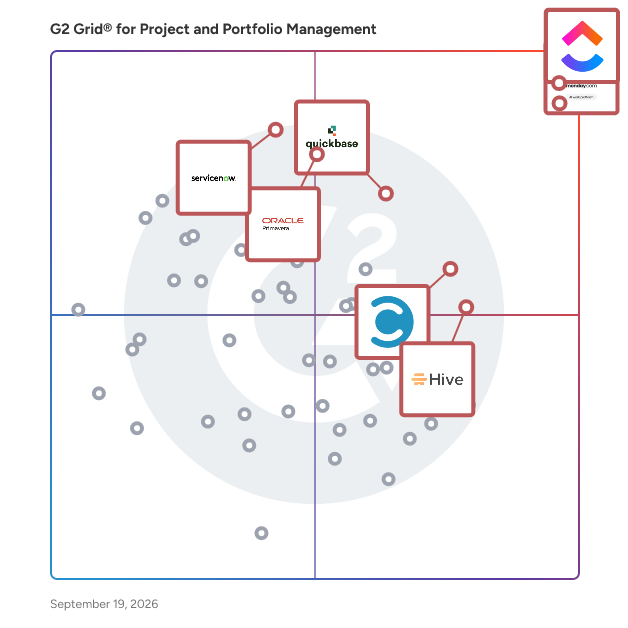
G2 Grid® for Project and Portfolio Management Software

G2 Grid® for Project and Portfolio Management Software plotting products by satisfaction and market presence

Highlighted products: ClickUp, Smartsheet, monday AI Work Platform, Quickbase, Celoxis, Oracle Primavera, Hive, and ServiceNow Strategic Portfolio Management.

Underlying data: [Grid® JSON](https://www.g2.com/categories/project-and-portfolio-management/grids.json?focus%5B%5D=clickup&focus%5B%5D=smartsheet&focus%5B%5D=monday-com&focus%5B%5D=quickbase&focus%5B%5D=celoxis&focus%5B%5D=oracle-primavera&focus%5B%5D=hive-hive-hive&focus%5B%5D=servicenow-strategic-portfolio-management)

ClickUp

ClickUp is the world’s first Converged AI Workspace, bringing together all work apps, data, and workflows. ClickUp eliminates all forms of work sprawl to provide 100% context and a single place for humans and agents to work, together. Trusted by more than 20 million users worldwide, ClickUp is on a mission to maximize human productivity.

Average Rating: 4.6/5.0

Total Reviews: 14,184

How Do G2 Users Rate ClickUp?

  • Has the product been a good partner in doing business?: 9.0/10 (Category avg: 9.1/10)
  • Optimization: 8.5/10 (Category avg: 8.4/10)
  • Alignment: 8.6/10 (Category avg: 8.6/10)
  • Performance: 8.2/10 (Category avg: 8.6/10)

Who Is the Company Behind ClickUp?

  • Seller: ClickUp
  • Company Website:
  • Year Founded: 2017
  • HQ Location: San Diego, California
  • Twitter: @clickup
    69,539 Twitter followers
  • LinkedIn® Page: www.linkedin.com
    7,082 employees on LinkedIn®

Who Uses This Product?

  • Who Uses This: CEO, Project Manager
  • Top Industries: Marketing and Advertising, Computer Software
  • Company Size: 77% Small, 19% Medium

What Do G2 Reviewers Say About ClickUp?

AI-generated summary from verified user reviews

Pros
  • Users find ClickUp to be incredibly easy and simple to use, streamlining tasks and enhancing productivity effortlessly.
  • Users value the flexibility in task management, enabling customized workflows for personal, team, and project tasks.
  • Users appreciate the abundance of features in ClickUp, making task management seamless and efficient.
  • Users appreciate ClickUp for its streamlined management tasks, enabling better organization and efficiency in project handling.
  • Users appreciate ClickUp for its streamlined organization, making team management and project tracking efficient and effortless.
Cons
  • Users find the missing features in ClickUp frustrating, particularly the lack of basic tools like subfolders.
  • Users experience a learning curve with ClickUp, finding the plethora of features daunting at first.
  • Users note limited features in ClickUp, with missing basic options and a complex setup process hindering ease of use.
  • Users find ClickUp not intuitive, feeling overwhelmed by its many features and struggling with initial setup and performance.
  • Users experience slow loading times in ClickUp, which affects their productivity when managing multiple tasks and fields.

What Are Recent G2 Reviews of ClickUp?

What Are G2 Users Discussing About ClickUp?

Smartsheet

Smartsheet revolutionizes how you manage projects, portfolios, and processes. The Smartsheet AI-powered platform delivers adaptability, sophisticated experiences, and enterprise-grade rigor to support work across industries — from service delivery to construction, clinical trials, and marketing campaigns. Designed to meet demanding requirements, it helps organizations drive efficiency, accelerate innovation, and stay competitive. Over 85% of Fortune 500 companies trust Smartsheet to align their resources to improve efficiency, agility, and collaboration in today’s ever-changing world of work.

Average Rating: 4.4/5.0

Total Reviews: 22,361

How Do G2 Users Rate Smartsheet?

  • Has the product been a good partner in doing business?: 8.6/10 (Category avg: 9.1/10)
  • Optimization: 7.9/10 (Category avg: 8.4/10)
  • Alignment: 8.1/10 (Category avg: 8.6/10)
  • Performance: 8.2/10 (Category avg: 8.6/10)

Who Is the Company Behind Smartsheet?

  • Seller: Smartsheet
  • Company Website:
  • Year Founded: 2005
  • HQ Location: Bellevue, WA
  • Twitter: @Smartsheet
    26,366 Twitter followers
  • LinkedIn® Page: www.linkedin.com
    4,034 employees on LinkedIn®

Who Uses This Product?

  • Who Uses This: Project Manager, Senior Project Manager
  • Top Industries: Information Technology and Services, Construction
  • Company Size: 41% Medium, 34% Small

What Do G2 Reviewers Say About Smartsheet?

AI-generated summary from verified user reviews

Pros
  • Users appreciate the ease of use of Smartsheet, enabling intuitive project management for all team skill levels.
  • Users value the streamlined collaboration and automation features of Smartsheet, enhancing project management efficiency and flexibility.
  • Users value the real-time collaboration features in Smartsheet, enhancing team synergy across remote locations.
  • Users value the comprehensive project tracking capabilities of Smartsheet, enhancing collaboration and project management efficiency.
  • Users appreciate the automation capabilities of Smartsheet, enhancing collaboration and streamlining project management processes.
Cons
  • Users find missing features in Smartsheet, causing challenges in tracking information and utilizing advanced functionalities.
  • Users face a steep learning curve with Smartsheet due to its limited formulas and unintuitive features.
  • Users find Smartsheet not intuitive, making navigation and mastering functions a challenging experience for many.
  • Users find that limited features hinder collaboration and escalate costs, especially for small businesses trying to scale.
  • Users find the limited customization options of Smartsheet restrictive, impacting collaboration and user experience.

What Are Recent G2 Reviews of Smartsheet?

What Are G2 Users Discussing About Smartsheet?

monday AI Work Platform

monday.com is the AI Work Platform where people and agents operate as one team - with shared cross-department context, enterprise-grade trust, and an easy-to-use interface built for adoption at scale. With monday.com, agents work alongside teams in the same boards, workflows, and goals they already use every day, creating a new kind of teamwork where people and agents move work forward together. Beyond agents, monday.com gives every team more ways to turn AI into real business impact. With monday vibe, teams can build custom work apps for their specific needs, and with monday sidekick, every user gets a personal AI assistant to help solve business challenges, move faster, and get more done. monday.com gives organizations the visibility, permissions, human oversight, and compliance standards they need to deploy AI with confidence. AI doesn’t operate in a black box - it operates within the same trusted guardrails teams already rely on. Because monday.com is already used across departments, agents can access the broader context of how work connects across marketing, sales, product, IT, HR, operations, and more. That means smarter decisions, faster execution, and fewer silos - all in one place. Today, over 250,000 customers and more than 60% of Fortune 500 companies trust monday.com with how they run their business.

Average Rating: 4.7/5.0

Total Reviews: 16,805

How Do G2 Users Rate monday AI Work Platform?

  • Has the product been a good partner in doing business?: 9.1/10 (Category avg: 9.1/10)
  • Optimization: 8.4/10 (Category avg: 8.4/10)
  • Alignment: 8.3/10 (Category avg: 8.6/10)
  • Performance: 8.4/10 (Category avg: 8.6/10)

Who Is the Company Behind monday AI Work Platform?

  • Seller: monday.com
  • Company Website:
  • Year Founded: 2012
  • HQ Location: Tel Aviv
  • Twitter: @mondaydotcom
    40,761 Twitter followers
  • LinkedIn® Page: www.linkedin.com
    10,589 employees on LinkedIn®

Who Uses This Product?

  • Who Uses This: Project Manager, CEO
  • Top Industries: Marketing and Advertising, Information Technology and Services
  • Company Size: 61% Small, 30% Medium

What Do G2 Reviewers Say About monday AI Work Platform?

AI-generated summary from verified user reviews

Pros
  • Users find the ease of use of monday AI Work Platform essential for staying organized and productive.
  • Users appreciate the team collaboration features of monday AI Work Platform, enhancing project management across various business segments.
  • Users value the easy project management features of monday AI Work Platform, enhancing collaboration and workflow efficiency.
  • Users value how monday AI Work Platform enhances organization, making important information easily accessible and manageable.
  • Users appreciate the efficient task management in monday AI Work Platform, making collaboration and project tracking seamless.
Cons
  • Users note the missing features in monday AI Work Platform, expressing frustration over limitations like messaging contacts and seat requirements.
  • Users find the learning curve steep, especially when implementing across departments and managing large datasets effectively.
  • Users find the limited features of monday AI Work Platform restrict useful functionality and increase costs unnecessarily.
  • Users find the interface not intuitive, struggling with complex workflows and lacking straightforward functionality.
  • Users find the limited customization in monday AI Work Platform hampers their ability to streamline tasks effectively.

What Are Recent G2 Reviews of monday AI Work Platform?

What Are G2 Users Discussing About monday AI Work Platform?

AI can help you find the answers. G2 helps you trust them.

Connect G2 to Claude or ChatGPT for answers grounded in G2's trusted reviews, comparisons, and pricing from real user insights.

How it works

Quickbase

Quickbase is an AI-driven platform designed to help businesses streamline their operations by adapting to their unique workflows and processes. Unlike traditional off-the-shelf software, which often requires users to conform to predefined structures, Quickbase empowers organizations to create customized solutions that align with their specific needs. This flexibility is crucial for companies seeking to eliminate inefficiencies and reduce the burden of 'Gray Work' - what we call the time-consuming tasks and manual processes that arise from using rigid software systems. The target audience for Quickbase includes businesses of all sizes across various industries that are looking to enhance their operational efficiency. Whether it's a 50 person small business or a large enterprise, organizations can benefit from a platform that allows them to connect disparate data sources, automate repetitive tasks, and scale their competitive advantages. Quickbase is particularly valuable for teams that rely on collaboration and data-driven decision-making, as it fosters an environment where information flows seamlessly and processes are optimized. Key features of Quickbase include its intuitive interface, which allows users to build custom applications without extensive coding knowledge. This user-friendly design enables teams to quickly adapt the platform to their specific workflows, ensuring that they can address unique challenges without the need for extensive IT support. Additionally, Quickbase offers powerful automation capabilities, allowing users to set up triggers and workflows that reduce manual effort and streamline operations. The platform also supports integration with various data sources, enabling businesses to consolidate their information and gain valuable insights. One of the standout benefits of Quickbase is its ability to scale with your business. As organizations grow and evolve, their processes often become more complex. Quickbase's adaptable nature ensures that users can modify their applications and workflows as needed, without the constraints typically associated with traditional software. This flexibility not only saves time but also fosters innovation, as teams can experiment with new processes and tools that enhance their productivity. By prioritizing user-centric design and adaptability, Quickbase stands out in the crowded landscape of business software solutions. It provides organizations with the tools they need to optimize their operations, reduce inefficiencies, and ultimately drive growth. With Quickbase, businesses can focus on what truly matters—leveraging their unique processes to gain a competitive edge in their respective markets.

Average Rating: 4.5/5.0

Total Reviews: 1,567

How Do G2 Users Rate Quickbase?

  • Has the product been a good partner in doing business?: 8.8/10 (Category avg: 9.1/10)
  • Optimization: 8.4/10 (Category avg: 8.4/10)
  • Alignment: 8.4/10 (Category avg: 8.6/10)
  • Performance: 8.6/10 (Category avg: 8.6/10)

Who Is the Company Behind Quickbase?

  • Seller: Quickbase
  • Company Website:
  • Year Founded: 2012
  • HQ Location: Boston, MA
  • Twitter: @quickbase
    5,146 Twitter followers
  • LinkedIn® Page: www.linkedin.com
    806 employees on LinkedIn®

Who Uses This Product?

  • Who Uses This: Project Manager, Data Analyst
  • Top Industries: Information Technology and Services, Construction
  • Company Size: 43% Medium, 31% Small

What Do G2 Reviewers Say About Quickbase?

AI-generated summary from verified user reviews

Pros
  • Users love the ease of use of Quickbase, finding it user-friendly and adaptable for various business needs.
  • Users value the customization options in Quickbase, enhancing adaptability and efficiency in managing their databases.
  • Users love the customizability of Quickbase, enabling tailored applications to fit specific business needs effectively.
  • Users appreciate the flexibility of Quickbase, enabling high customization and adaptation to diverse business needs.
  • Users love the customization options in Quickbase, tailoring databases to fit unique business needs effectively.
Cons
  • Users struggle with the learning curve due to enforced changes and lack of tailored training options.
  • Users feel the missing features in Quickbase limit its effectiveness for tasks like document management and reporting.
  • Users find Quickbase to be not intuitive, with a confusing interface that affects overall usability and experience.
  • Users find Quickbase's limited features hinder effective integration, mobile usability, and overall flexibility in development.
  • Users note limited customization options that can hinder flexibility, especially for those seeking advanced functionality and control.

What Are Recent G2 Reviews of Quickbase?

What Are G2 Users Discussing About Quickbase?

Celoxis

Celoxis is an all-in-one project management tool with deep, built-in capabilities for projects, resources, financials, and processes. Everything works out of the box, no add-ons or automations needed. Our reports and dashboards are the best in the industry, fully customizable and easy to use. Getting started is easy, our experts set everything up with your workflows and data and walk you through exactly how it works. Zero risk. Zero stress. Just results. Yes, and unlike others, it stays fast as your data grows.

Average Rating: 4.6/5.0

Total Reviews: 508

How Do G2 Users Rate Celoxis?

  • Has the product been a good partner in doing business?: 8.8/10 (Category avg: 9.1/10)
  • Optimization: 9.0/10 (Category avg: 8.4/10)
  • Alignment: 9.1/10 (Category avg: 8.6/10)
  • Performance: 9.0/10 (Category avg: 8.6/10)

Who Is the Company Behind Celoxis?

  • Seller: Celoxis
  • Year Founded: 2001
  • HQ Location: Pune, India
  • Twitter: @celoxis
    17,125 Twitter followers
  • LinkedIn® Page: www.linkedin.com
    63 employees on LinkedIn®

Who Uses This Product?

  • Who Uses This: Software Engineer, Project Manager
  • Top Industries: Information Technology and Services, Computer Software
  • Company Size: 50% Medium, 37% Small

What Do G2 Reviewers Say About Celoxis?

AI-generated summary from verified user reviews

Pros
  • Users value the intuitive and comprehensive project management capabilities of Celoxis, streamlining their workflow significantly.
  • Users appreciate the project tracking capabilities of Celoxis, enabling seamless management and real-time insights across all tasks.
  • Users appreciate the ease of use in Celoxis, enabling efficient project management with everything connected in one place.
  • Users appreciate the intuitive time tracking features of Celoxis, enabling efficient resource management and budget control.
  • Users appreciate the customizable dashboards of Celoxis, enhancing visibility and tracking for complex project management.
Cons
  • Users find the learning curve steep with Celoxis, requiring time to fully grasp its complex features and settings.
  • Users often find the steep learning curve of Celoxis challenging, particularly due to its extensive features and customization.
  • Users find Celoxis to be not intuitive, as the interface can feel cluttered and overwhelming for newcomers.
  • Users find the beginner difficulty challenging, as the interface can be confusing and requires extensive training.
  • Users find the complex UI of Celoxis overwhelming, particularly due to its steep learning curve for newcomers.

What Are Recent G2 Reviews of Celoxis?

What Are G2 Users Discussing About Celoxis?

Oracle Primavera

For more than 30 years, successful projects around the world have relied on Oracle Construction and Engineering's Primavera solutions to plan, build, and operate critical assets. It is the only solution that integrates project and portfolio planning and delivery teams for planning, resourcing, risk mitigation, scheduling, and program management. Manage projects of any size. Robust and easy-to-use. Key Benefits - Cloud-based, delivering fast time to value - One platform for planning, prioritizing, executing, and monitoring projects and programs - Optimization and oversight of capital spend to maximize return and align with strategies - Enhanced risk mitigation; better visibility of project and portfolio health - Comprehensive, integrated planning - critical path method (CPM) and Lean scheduling, plus upstream portfolio planning and downstream risk mitigation - Total resource management – maintain optimal staffing levels to improve delivery efficiency - Collaboration and control across teams – drive efficiency and quality, reduce waste - Connect teams with access from any device, create and update activities and tasks, and view portfolios and files with offline support - Risk mitigation – avoid delays and cost overruns

Average Rating: 4.4/5.0

Total Reviews: 346

How Do G2 Users Rate Oracle Primavera?

  • Has the product been a good partner in doing business?: 8.0/10 (Category avg: 9.1/10)
  • Optimization: 8.4/10 (Category avg: 8.4/10)
  • Alignment: 8.2/10 (Category avg: 8.6/10)
  • Performance: 8.2/10 (Category avg: 8.6/10)

Who Is the Company Behind Oracle Primavera?

  • Seller: Oracle
  • Year Founded: 1977
  • HQ Location: Austin, TX
  • Twitter: @Oracle
    827,997 Twitter followers
  • LinkedIn® Page: www.linkedin.com
    207,576 employees on LinkedIn®
  • Ownership: NYSE:ORCL

Who Uses This Product?

  • Who Uses This: Planning Engineer, Project Manager
  • Top Industries: Construction, Oil & Energy
  • Company Size: 38% Large, 38% Medium

What Do G2 Reviewers Say About Oracle Primavera?

AI-generated summary from verified user reviews

Pros
  • Users value the essential project management capabilities of Oracle Primavera, keeping large projects organized and on track.
  • Users value the centralization of Oracle Primavera, which keeps large projects organized and on track.
  • Users value the comprehensive coverage of Oracle Primavera, facilitating effective project management from start to finish.
  • Users value the comprehensive features of Oracle Primavera for effective project planning, execution, and monitoring.
  • Users find Oracle Primavera essential for keeping projects organized and on track, even under high-stakes conditions.
Cons
  • Users struggle with the complex setup of Oracle Primavera, facing challenges with its steep learning curve and outdated interface.
  • Users find Oracle Primavera expensive, with complex features that may overwhelm small or simple projects.
  • Users find Oracle Primavera expensive, feeling its extensive features may be unnecessary for smaller projects.
  • Users find the limited features of Oracle Primavera inadequate for straightforward projects, leading to dissatisfaction.
  • Users find the limited functionality of Oracle Primavera excessive for smaller or simpler project needs.

What Are Recent G2 Reviews of Oracle Primavera?

What Are G2 Users Discussing About Oracle Primavera?

Hive

Hive is an all-in-one project management software platform that helps teams plan, collaborate, automate workflows, and deliver projects faster. Designed for organizations of every size, Hive combines powerful project planning, task management, team collaboration, and workflow automation tools in one customizable workspace. Whether you're managing marketing campaigns, product launches, creative projects, client work, or cross-functional initiatives, Hive adapts to your team's unique processes. Unlike rigid project management tools, Hive offers flexible workflows, customizable dashboards, and multiple project views so every team can work the way they work best. Hive empowers marketing, operations, product, IT, creative, and remote teams with the tools they need to stay organized and aligned. With customizable workflows and powerful collaboration features, teams can centralize work, reduce manual tasks, and improve visibility across every project. Key capabilities include: - Multiple project views, including Kanban boards, Gantt charts, calendars, tables, and lists - Task management with custom fields, dependencies, milestones, and priorities - Workflow automation to eliminate repetitive work - Real-time team collaboration with messaging, comments, and file sharing - Time tracking, reporting, and analytics - Integrations with hundreds of popular business applications Every organization works differently, which is why Hive is built to be one of the most customizable project management platforms available. Teams can create workflows tailored to their business processes using custom fields, project templates, automations, approvals, and integrations. Instead of forcing teams to change how they work, Hive adapts to existing workflows — helping organizations improve efficiency without disrupting productivity. Hive gives teams the flexibility to manage projects from the perspective that works best for them. Switch seamlessly between: - Kanban boards for agile workflows - Gantt charts for timeline planning - Calendar views for scheduling - Table and List views for detailed task management These flexible project views help teams track deadlines, manage resources, identify bottlenecks, and keep projects moving forward. Hive brings projects, communication, and documentation together in one centralized workspace. Team members can collaborate in real time, assign tasks, share files, provide feedback, and monitor project progress without switching between multiple tools. By combining project planning, collaboration, automation, and reporting in a single platform, Hive helps teams reduce busywork and focus on delivering results. Hive is more than just task management software—it's a scalable work management platform built to evolve alongside your business. As your needs change, Hive continues to expand through new features, integrations, and customer-driven enhancements. With flexible customization, powerful automation, and dedicated customer support, Hive enables organizations to streamline workflows, improve cross-functional collaboration, and execute projects with greater speed and confidence.

Average Rating: 4.6/5.0

Total Reviews: 655

G2 Deal: Get 20% off Hive

Get 20% off Hive Starter or Hive Teams plans. Customize your project management experience with the best tools & functionality for every budget.

Price: ~~$5 per user/month~~ → $4 per user/month

View this exclusive G2 deal

How Do G2 Users Rate Hive?

  • Has the product been a good partner in doing business?: 9.4/10 (Category avg: 9.1/10)
  • Optimization: 8.8/10 (Category avg: 8.4/10)
  • Alignment: 8.7/10 (Category avg: 8.6/10)
  • Performance: 8.7/10 (Category avg: 8.6/10)

Who Is the Company Behind Hive?

  • Seller: Hive
  • Company Website:
  • Year Founded: 2016
  • HQ Location: New York, New York
  • Twitter: @hive
    3,353 Twitter followers
  • LinkedIn® Page: www.linkedin.com
    63 employees on LinkedIn®

Who Uses This Product?

  • Who Uses This: Project Manager, Graphic Designer
  • Top Industries: Marketing and Advertising, Information Technology and Services
  • Company Size: 63% Small, 29% Medium

What Do G2 Reviewers Say About Hive?

AI-generated summary from verified user reviews

Pros
  • Users appreciate the versatile project tracking capabilities of Hive, enhancing organization and timely documentation across projects.
  • Users appreciate the ease of use of Hive, enabling quick project setup and valuable features right away.
  • Users value the strong team collaboration features of Hive, enhancing interaction and streamlining workflows effectively.
  • Users appreciate the collaborative and efficient features of Hive, enhancing project management and workflow execution.
  • Users appreciate the effective organization of projects and timelines, enhancing overall workflow and documentation.
Cons
  • Users find the missing features in Hive frustrating, such as limited calendar views and inadequate text formatting options.
  • Users note a challenging learning curve initially, but supportive resources help ease navigation through Hive.
  • Users find Hive's limited features a drawback, wishing for more customization and bulk actions to enhance usability.
  • Users find Hive's interface not intuitive, feeling overwhelmed with project organization and mobile app usability issues.
  • Users experience a learning curve with Hive due to its complexity and differences from other project management tools.

What Are Recent G2 Reviews of Hive?

ServiceNow Strategic Portfolio Management

ServiceNow Strategic Portfolio Management (SPM) is a comprehensive solution designed to align organizational strategies with business outcomes by integrating planning, execution, and delivery processes on a unified platform. It enables organizations to prioritize investments, optimize resources, and accelerate value delivery, ensuring that all initiatives are strategically aligned and effectively managed. Key Features and Functionality: - Portfolio Management: Provides complete visibility into project, program, and portfolio performance, allowing organizations to prioritize and align investments with strategic goals. - Demand Management: Captures, evaluates, and prioritizes demands across the organization, automating the intake process with workflows for assessment and approval. - Resource Management: Optimizes resource allocation with advanced planning and scheduling tools, monitoring utilization and capacity to ensure project success. - Financial Management: Tracks budgets, forecasts, and expenses to ensure financial alignment with business objectives, offering insights into portfolio ROI for informed decision-making. - Scenario Planning: Models and analyzes various scenarios to evaluate potential outcomes, enabling dynamic strategy adjustments based on real-time data and shifting priorities. - Roadmap Planning: Visualizes and communicates project timelines, dependencies, and milestones with intuitive roadmaps, aligning stakeholders with clear views of priorities and progress. - Risk and Compliance Management: Identifies, assesses, and mitigates risks across projects and portfolios, ensuring compliance with industry standards and organizational policies. - Integration with IT and Business Tools: Seamlessly integrates with ServiceNow ITSM, ITOM, and other business applications for unified operations. - Performance Analytics and Dashboards: Provides actionable insights with real-time dashboards and performance metrics, tracking key performance indicators (KPIs) to measure success and identify areas for improvement. - Collaboration and Workflows: Enables cross-functional collaboration with automated workflows and task management, facilitating updates and alignment among teams. Primary Value and Solutions Provided: ServiceNow SPM empowers organizations to make informed, data-driven decisions by providing real-time insights into project and portfolio performance. It ensures that all work is strategically aligned, resources are optimally utilized, and financial investments are effectively managed. By consolidating processes and increasing visibility on a single platform, SPM enhances efficiency, accelerates value delivery, and fosters cross-team collaboration. Ultimately, it enables organizations to achieve their strategic objectives with agility and precision, adapting to changing business needs and market dynamics.

Average Rating: 4.1/5.0

Total Reviews: 270

How Do G2 Users Rate ServiceNow Strategic Portfolio Management?

  • Has the product been a good partner in doing business?: 8.5/10 (Category avg: 9.1/10)
  • Optimization: 8.7/10 (Category avg: 8.4/10)
  • Alignment: 8.9/10 (Category avg: 8.6/10)
  • Performance: 8.0/10 (Category avg: 8.6/10)

Who Is the Company Behind ServiceNow Strategic Portfolio Management?

  • Seller: ServiceNow
  • Company Website:
  • Year Founded: 2004
  • HQ Location: Santa Clara, CA
  • Twitter: @servicenow
    55,548 Twitter followers
  • LinkedIn® Page: www.linkedin.com
    35,078 employees on LinkedIn®

Who Uses This Product?

  • Who Uses This: ServiceNow Developer, Project Manager
  • Top Industries: Information Technology and Services, Hospital & Health Care
  • Company Size: 49% Large, 27% Medium

What Do G2 Reviewers Say About ServiceNow Strategic Portfolio Management?

AI-generated summary from verified user reviews

Pros
  • Users value the robust project management features of ServiceNow SPM, enhancing coordination and support for complex projects.
  • Users appreciate the ease of use of ServiceNow Strategic Portfolio Management, benefiting from its engaging UI and extensive tutorials.
  • Users value the seamless project tracking capabilities of ServiceNow SPM, ensuring alignment with business strategy and objectives.
  • Users commend the exceptional visibility offered by ServiceNow Strategic Portfolio Management, enhancing strategic alignment and decision-making.
  • Users appreciate the rich visualization options in ServiceNow SPM, enhancing portfolio data representation and decision-making.
Cons
  • Users find the steep learning curve of ServiceNow SPM challenging, hindering adoption and effective utilization across teams.
  • Users often find learning difficult due to a steep curve and overwhelming features, complicating effective use of ServiceNow SPM.
  • Users find the interface not intuitive, leading to confusion and complexity, especially for new or non-technical users.
  • Users find the platform overwhelming due to its complexity and steep learning curve for new users.
  • Users find the steep learning curve challenging for new users, requiring significant technical expertise for effective use.

What Are Recent G2 Reviews of ServiceNow Strategic Portfolio Management?

What Are G2 Users Discussing About ServiceNow Strategic Portfolio Management?

Scoro

Scoro is a professional services automation (PSA) software purpose-built for consultancies, agencies, IT firms, architecture companies, and other professional services businesses. It unites projects, resources, and finances in one system, so you don’t need to juggle multiple tools for planning, tracking, and billing for your work. Core features include: - CRM & pipeline – Get a complete overview of your sales funnel and upcoming work - Quote-to-cash – Estimate scope, track progress and budget burn, and bill for work in one system - Capacity & resource planning – Plan ahead with live heatmaps and utilization forecasts - Time & expense tracking – Log time with built-in timers and auto-populated timesheets - Cost & profit forecasts – Understand margins with role or service-level insights - Billing & invoicing – Automate time & material, fixed-fee, and retainer billing - Revenue forecasting – Track project income based on pipeline and committed work - AI-powered insights & actions – Save time with automation and data-driven suggestions - Live dashboards – Monitor progress, profitability, and capacity in real time Scoro’s pricing is modular, built around core apps rather than fixed tiers, so you can shape a package to match your actual workflow. You choose which apps you need and price is shaped by the chosen combination, billed per user per month.

Average Rating: 4.5/5.0

Total Reviews: 487

How Do G2 Users Rate Scoro?

  • Has the product been a good partner in doing business?: 9.0/10 (Category avg: 9.1/10)
  • Optimization: 8.6/10 (Category avg: 8.4/10)
  • Alignment: 8.5/10 (Category avg: 8.6/10)
  • Performance: 8.7/10 (Category avg: 8.6/10)

Who Is the Company Behind Scoro?

  • Seller: Scoro
  • Company Website:
  • Year Founded: 2013
  • HQ Location: London
  • Twitter: @ScoroSoftware
    8,204 Twitter followers
  • LinkedIn® Page: www.linkedin.com
    141 employees on LinkedIn®

Who Uses This Product?

  • Who Uses This: Project Manager, CEO
  • Top Industries: Marketing and Advertising, Information Technology and Services
  • Company Size: 67% Small, 25% Medium

What Do G2 Reviewers Say About Scoro?

AI-generated summary from verified user reviews

Pros
  • Users commend the ease of use of Scoro, benefiting from its streamlined, all-in-one platform for various needs.
  • Users find Scoro's all-in-one project management capabilities essential for tracking and streamlining their business operations.
  • Users value the comprehensive project tracking of Scoro, seamlessly integrating tasks, time, and finance in one place.
  • Users value the effective time tracking feature in Scoro, enhancing productivity and simplifying task management.
  • Users love the integrated task management of Scoro, connecting projects, finances, and CRM seamlessly in one platform.
Cons
  • Users find the learning curve steep with Scoro, especially during initial setup and task creation.
  • Users find Scoro's interface not intuitive, often needing assistance to navigate its complex functionalities.
  • Users find missing features in Scoro, particularly in the mobile version and integration capabilities.
  • Users face a steep learning curve with Scoro, often requiring extensive training to navigate its complexities.
  • Users feel that the complexity of Scoro requires extensive training, potentially hindering a smooth onboarding experience.

What Are Recent G2 Reviews of Scoro?

What Are G2 Users Discussing About Scoro?

Wrike

Wrike is the trusted work delivery platform where AI extends what people can accomplish. By centralizing all work in one governed, context-rich environment, Wrike helps organizations streamline collaboration, project planning, and task execution while maintaining the control and accountability that complex work demands. Wrike serves project managers, team leaders, and organizations of all sizes across marketing, IT, product development, professional services, and beyond. Teams use Wrike to track work progress, assign tasks, set deadlines, and facilitate communication, eliminating silos and fostering a culture of transparency and accountability that is crucial for successful delivery. Key features include AI Agents, Wrike Copilot, Wrike MCP Server, workflow automations, customizable dashboards, real-time collaboration tools, and advanced reporting capabilities. Teams can build and automate tailored workflows that reflect their unique processes, visualize timelines through Gantt charts and Kanban boards, and integrate seamlessly with tools like Slack, Google Drive, and Microsoft Teams. Wrike's MCP server extends this further, allowing AI assistants to connect directly to the platform where execution actually happens so AI-driven actions become part of the auditable record of how work gets done, not disconnected outputs living outside the system. And powered by the Wrike Work Intelligence® Graph, the platform gives AI the structured context it needs to act reliably inside the same roles, permissions, and access controls as your people. The result goes far beyond task management. Wrike reduces time spent on administrative work, scales alongside growing organizations, and gives teams the governed foundation they need to put AI to work on their most consequential workflows without losing control. With more than 20,000 organizations worldwide, including Siemens, Walmart, NVIDIA, and The Estée Lauder Companies, trusting Wrike to deliver their most important work, the platform has earned its place as a reliable partner for organizations to deliver without doubt

Average Rating: 4.2/5.0

Total Reviews: 4,465

How Do G2 Users Rate Wrike?

  • Has the product been a good partner in doing business?: 8.5/10 (Category avg: 9.1/10)
  • Optimization: 7.9/10 (Category avg: 8.4/10)
  • Alignment: 7.8/10 (Category avg: 8.6/10)
  • Performance: 7.5/10 (Category avg: 8.6/10)

Who Is the Company Behind Wrike?

  • Seller: Wrike, Inc.
  • Company Website:
  • Year Founded: 2006
  • HQ Location: San Diego, CA
  • Twitter: @wrike
    13,574 Twitter followers
  • LinkedIn® Page: www.linkedin.com
    1,257 employees on LinkedIn®

Who Uses This Product?

  • Who Uses This: Project Manager, Marketing Manager
  • Top Industries: Marketing and Advertising, Information Technology and Services
  • Company Size: 43% Medium, 35% Small

What Do G2 Reviewers Say About Wrike?

AI-generated summary from verified user reviews

Pros
  • Users value the effective project tracking capabilities of Wrike, enhancing organization and teamwork for successful project management.
  • Users value team collaboration in Wrike, facilitating seamless workflow and enhancing productivity across diverse projects.
  • Users value the customizable dashboards and real-time tracking features of Wrike for improved team collaboration and efficiency.
  • Users appreciate the organization and clarity that Wrike provides, enhancing team collaboration and task management effectively.
  • Users praise the ease of use of Wrike, enabling efficient task management and streamlined team collaboration.
Cons
  • Users find the learning curve steep with Wrike, struggling with complexity and navigation challenges initially.
  • Users find Wrike not intuitive, making training and navigation difficult, especially for less quick learners.
  • Users note a lack of built-in templates and user-friendly design in Wrike, making it challenging for newcomers.
  • Users note the limited features of Wrike, finding it less effective for comprehensive project management compared to competitors.
  • Users find Wrike's interface initially overwhelming and complex, making it challenging to navigate and utilize effectively.

What Are Recent G2 Reviews of Wrike?

What Are G2 Users Discussing About Wrike?

Deltek Replicon Time

Deltek Replicon Time is an AI-powered time intelligence software that helps project- based firms recover missed billable hours, reduce revenue leakage, and speed up billing cycles. It unifies project time capture, workforce management, time off, and labour compliance in one configurable, cloud-based application — part of the Deltek platform. ZeroTime™, powered by Dela, auto-captures time from 100+ work applications and translates activity into accurate, ready-to-submit timesheets. Best for: Project-based firms — from growing consultancies to global enterprises — managing distributed teams, complex billing models, and evolving labour regulations across multiple regions. Use cases:  Track project billable hours automatically to improve margins and accelerate invoicing  Manage workforce attendance, schedules, overtime, and gross pay calculations in one place  Navigate labour compliance across 145+ jurisdictions in 75+ countries using preconfigured rules  Consolidate disconnected time-tracking systems into a single, scalable application  Capture project expenses and map them to jobs for on-time billing and reimbursement Key Features:  ZeroTime™ intelligent timesheets — AI-powered time capture from 100+ work apps  Configurable project time tracking with flexible approval workflows  Global labour compliance with preconfigured rules for overtime, breaks, leave, and gross pay  CloudClock with facial recognition and voice commands for field and frontline teams  Workforce management — attendance, scheduling, and time-off administration  Seamless integration with ERP, CRM, HCM, payroll, and project management systems  Advanced analytics with custom dashboards, reports, and connections to Tableau and Power BI Why project-based firms choose Replicon Time:  AI captures every billable hour so revenue stops slipping through the cracks. ZeroTime™ auto-populates timesheets from 100+ work apps — eliminating the end-of-week scramble and recovering hours that manual entry misses.  One application replaces fragmented time-tracking systems across the business. Replicon Time brings project time, workforce management, leave, and compliance together — cutting silos and reducing manual errors at source.  Global teams stay compliant without adding operational overhead. Preconfigured rules cover labour laws in 145+ jurisdictions across 75+ countries, with intelligent validation and complete audit trails built in. Used by: Professional services, consulting, government contracting, and technology firms — from mid-market to Fortune 500 — managing complex projects and distributed workforces globally. Replicon Time is FedRAMP Moderate authorized and supports 30+ languages and multiple currencies. Backed by 25+ years of industry leadership in time tracking and workforce management.

Average Rating: 4.3/5.0

Total Reviews: 787

How Do G2 Users Rate Deltek Replicon Time?

  • Has the product been a good partner in doing business?: 8.9/10 (Category avg: 9.1/10)
  • Optimization: 7.5/10 (Category avg: 8.4/10)
  • Alignment: 7.6/10 (Category avg: 8.6/10)
  • Performance: 8.3/10 (Category avg: 8.6/10)

Who Is the Company Behind Deltek Replicon Time?

  • Seller: Deltek
  • Company Website:
  • Year Founded: 1983
  • HQ Location: Herndon, VA
  • Twitter: @Deltek
    6,574 Twitter followers
  • LinkedIn® Page: www.linkedin.com
    4,856 employees on LinkedIn®

Who Uses This Product?

  • Who Uses This: Controller, Office Manager
  • Top Industries: Information Technology and Services, Computer Software
  • Company Size: 43% Medium, 41% Small

What Do G2 Reviewers Say About Deltek Replicon Time?

AI-generated summary from verified user reviews

Pros
  • Users highlight the intuitive user interface of Deltek Replicon Time, making tracking time and leave effortless.
  • Users appreciate the effective time tracking of Deltek Replicon, enhancing accuracy and efficiency in managing project hours.
  • Users value the advanced reporting options of Deltek Replicon Time, enhancing efficiency and audit capabilities.
  • Users appreciate the efficiency of Deltek Replicon for streamlining time tracking and improving project budget management.
  • Users value the excellent customer support from Deltek Replicon Time, noting prompt resolutions and outstanding service.
Cons
  • Users often face reporting issues with Deltek Replicon Time, including confusion, accuracy flaws, and limited customization.
  • Users find the limited customization options in Deltek Replicon frustrating, impacting their ability to optimize usage efficiently.
  • Users find the data management to be lacking, with issues like empty timesheets and unhelpful logs.
  • Users find the learning curve steep, noting that initial setup and reporting features can be complex.
  • Users find the limited features of Deltek Replicon Time hinder effective organization and accurate reporting.

What Are Recent G2 Reviews of Deltek Replicon Time?

What Are G2 Users Discussing About Deltek Replicon Time?

GanttPRO

GanttPRO is intuitive online Gantt chart software for robust project management. The tool meets the needs of project, product, and portfolio managers from different spheres. GanttPRO offers task, deadline, cost, resource, and portfolio management, team collaboration, time logging, baselines, advanced export and sharing features. Robust import from MS Project and Excel as well as ready-made professional templates allows starting projects right away.

Average Rating: 4.8/5.0

Total Reviews: 530

How Do G2 Users Rate GanttPRO?

  • Has the product been a good partner in doing business?: 9.1/10 (Category avg: 9.1/10)

Who Is the Company Behind GanttPRO?

  • Seller: GanttPRO
  • Year Founded: 2015
  • HQ Location: Krakow, PL
  • Twitter: @GanttPROcom
    745 Twitter followers
  • LinkedIn® Page: www.linkedin.com
    23 employees on LinkedIn®

Who Uses This Product?

  • Who Uses This: Student, Project Manager
  • Top Industries: Higher Education, Computer Software
  • Company Size: 76% Small, 11% Large

What Do G2 Reviewers Say About GanttPRO?

AI-generated summary from verified user reviews

Pros
  • Users rave about GanttPRO's user-friendly interface, making project management simple and efficient without complex tutorials.
  • Users appreciate the intuitive interface of GanttPRO, which simplifies project management and enhances overall efficiency.
  • Users value the team collaboration features of GanttPRO, enhancing communication and productivity among project members.
  • Users highlight GanttPRO's intuitive interface, making project management simple and efficient without complex tutorials.
  • Users love the intuitive user interface of GanttPRO, simplifying project management and boosting productivity effortlessly.
Cons
  • Users find significant missing features in GanttPRO, including options for scenario planning and project duplication.
  • Users find GanttPRO's pricing to be expensive, particularly challenging for students and small businesses on a budget.
  • Users find GanttPRO's steep learning curve challenging, particularly for beginners navigating its extensive features.
  • Users feel the limited customization options of GanttPRO hinder their ability to tailor the platform to their needs.
  • Users find the billing issues with GanttPRO challenging, particularly with high prices and limited payment flexibility for students.

What Are Recent G2 Reviews of GanttPRO?

What Are G2 Users Discussing About GanttPRO?

Epicflow

Epicflow is a predictive project portfolio management platform for complex, resource-constrained organisations. It gives PMO, portfolio and finance leaders a shared decision layer that shows what the portfolio can realistically deliver and how resource constraints, priorities and schedule changes affect business and financial outcomes. By connecting finite specialist capacity and feasible delivery dates with approved budgets, actual costs, contractual bonuses and penalties, revenue and profit, Epicflow helps leaders detect bottlenecks, trace the affected commitments, quantify the exposure, compare alternative interventions and act before delivery risk becomes financial loss. Epicflow complements existing planning, execution, ERP and accounting systems rather than replacing them. It adds predictive portfolio intelligence above those systems, while financial and execution platforms remain systems of record.

Average Rating: 4.4/5.0

Total Reviews: 14

How Do G2 Users Rate Epicflow?

  • Has the product been a good partner in doing business?: 9.0/10 (Category avg: 9.1/10)

Who Is the Company Behind Epicflow?

  • Seller: Epicflow
  • Year Founded: 2007
  • HQ Location: Amsterdam, Netherlands
  • Twitter: @Epicflow_Power
    266 Twitter followers
  • LinkedIn® Page: www.linkedin.com
    26 employees on LinkedIn®

Who Uses This Product?

  • Company Size: 60% Medium, 40% Small

What Do G2 Reviewers Say About Epicflow?

AI-generated summary from verified user reviews

Pros
  • Users find the dashboard features of Epicflow essential for monitoring projects and proactively addressing resource issues.
  • Users highly value the automatic report generation in Epicflow, significantly saving time and enhancing project management efficiency.
  • Users value the automation features of Epicflow, especially for saving time and streamlining project management tasks.
  • Users find Epicflow's ease of understanding crucial for resolving project management challenges and streamlining daily tasks.
  • Users love the efficiency and comprehensive features of Epicflow for streamlining project management tasks effortlessly.
Cons
  • Users find the complex UI challenging at first, but training and support help overcome this barrier.

What Are Recent G2 Reviews of Epicflow?

What Are G2 Users Discussing About Epicflow?

Bordio

Bordio is work management software for teams across all industries. Here you can add teams and invite your teammates, create projects, manage tasks and events and organize your teamwork. Whether you're working with people inside your team or bringing in outside partners and clients, Bordio has got you covered. It's designed to handle everything from your daily tasks to those big projects, keeping everything running smoothly so you can focus on what really matters. Bordio doesn't just stop at organizing your tasks; it goes the extra mile by helping you manage your team's workload effectively. With features that let you track the time spent on tasks and meetings, setting up recurring tasks, and keeping an eye on daily progress, it's easier than ever to keep everyone on track. Plus, with the ability to chat right in the task window, you'll never lose track of those important conversations and decisions. Keep the communication clear and make sure everyone's on the same page. Say goodbye to juggling multiple apps for notes, file storage, and calendars. With Bordio, you can upload files directly to tasks, keep all your project-related notes tidy, and even sync up with your Google Calendar. And with the mobile app, you can keep tabs on everything, no matter where you are. Bordio makes managing your team's work not just doable but downright easy.

Average Rating: 5.0/5.0

Total Reviews: 59

How Do G2 Users Rate Bordio?

  • Has the product been a good partner in doing business?: 10.0/10 (Category avg: 9.1/10)
  • Optimization: 10.0/10 (Category avg: 8.4/10)
  • Alignment: 10.0/10 (Category avg: 8.6/10)
  • Performance: 10.0/10 (Category avg: 8.6/10)

Who Is the Company Behind Bordio?

  • Seller: Bordio
  • Year Founded: 2021
  • HQ Location: Riga, LV
  • LinkedIn® Page: www.linkedin.com
    6 employees on LinkedIn®

Who Uses This Product?

  • Top Industries: Automotive, Building Materials
  • Company Size: 98% Small, 2% Medium

What Do G2 Reviewers Say About Bordio?

AI-generated summary from verified user reviews

Pros
  • Users appreciate the ease of use of Bordio, allowing quick organization of teams and schedules in one board.
  • Users appreciate the flexibility of Bordio, allowing quick adjustments to teams and schedules on one board.
  • Users love the management ease of Bordio, simplifying team organization and quick adjustments for schedules.
  • Users appreciate the multi-user access of Bordio, allowing efficient management of teams and schedules on one board.
  • Users appreciate the efficient project management of Bordio, allowing quick adjustments and organized team visibility.
Cons
  • Users struggle with limited app functionality during low signal strength, needing alternative methods for offline updates.
  • Users find the mobile functionality limited in low signal areas, making offline usage challenging and cumbersome.
  • Users face connectivity issues with Bordio, especially in low signal areas, affecting mobile and offline functionality.
  • Users experience issues with glitches in mobile and offline functionality, disrupting their ability to stay organized.
  • Users find the limited mobile and offline functionality of Bordio frustrating, often needing alternatives for recording updates.

What Are Recent G2 Reviews of Bordio?

Oracle EBS Projects

Oracle EBS Projects applications supports the full lifecycle of project and portfolio management with a single, accurate view of all project-related activities.

Average Rating: 3.7/5.0

Total Reviews: 18

How Do G2 Users Rate Oracle EBS Projects?

  • Has the product been a good partner in doing business?: 9.2/10 (Category avg: 9.1/10)
  • Optimization: 7.1/10 (Category avg: 8.4/10)
  • Alignment: 7.5/10 (Category avg: 8.6/10)
  • Performance: 7.5/10 (Category avg: 8.6/10)

Who Is the Company Behind Oracle EBS Projects?

  • Seller: Oracle
  • Year Founded: 1977
  • HQ Location: Austin, TX
  • Twitter: @Oracle
    827,997 Twitter followers
  • LinkedIn® Page: www.linkedin.com
    207,576 employees on LinkedIn®
  • Ownership: NYSE:ORCL

Who Uses This Product?

  • Company Size: 75% Large, 30% Medium

What Are Recent G2 Reviews of Oracle EBS Projects?

What Are G2 Users Discussing About Oracle EBS Projects?

Subhransu Sahu
SS
Researched and written by Subhransu Sahu
Updated October 3, 2024

Learn More About Project and Portfolio Management Software

What is Project and Portfolio Management Software?

As opposed to project management software which focuses mostly on execution, project and portfolio management (PPM) software helps companies create and implement strategies for project portfolios. A portfolio is a mix of interrelated projects, meaning they have a similar scope and shared resources. For instance, an architecture, engineering, and construction (AEC) company may have three portfolios: one for architecture and design, another one for civil and industrial engineering projects, and a third for residential and commercial construction. Each portfolio may include dozens or hundreds of projects which need to be managed and monitored as a whole.

The high number of projects that are part of a portfolio makes it difficult for companies to plan, allocate resources, execute, and monitor performance. Typical project management software is used to manage individual projects but usually doesn’t include robust features for portfolio management.

Key Benefits of Project and Portfolio Management Software

  • Customer experience and satisfaction are essential to companies focused on delivering projects. Customer loyalty is achieved only when the company constantly delivers good quality work at reasonable prices. Project quality is difficult to manage across multiple portfolios and PPM helps to address this challenge.
  • Project and portfolio visibility allow stakeholders across the company as well as partners and customers to track milestones, deliverables, and identify potential issues. While tracking individual projects is relatively easy, only PPM software is able to monitor hundreds of projects simultaneously. Also, since the projects in a portfolio are interrelated, unexpected changes in one task may propagate across multiple projects and harm the entire portfolio.
  • Tracking costs and profitability avoids unnecessary spending, compares estimated and actual costs, and provides insights on how to improve revenues. There are many costs related to project portfolios (resources, contractors, labor, etc.), and each one of them needs to be monitored closely. At the project level or for each task, the expenses may seem insignificant; but when analyzed by portfolio, they may accumulate into a noteworthy amount.
  • Improves business agility and accelerates project delivery across a company or group of companies. Agility helps companies adapt to customer demand and market changes, and improved deliverability makes the business more efficient.

Why Use Project and Portfolio Management Software?

The main benefit of PPM platforms is their ability to manage portfolios of numerous projects and maintain the relationships between them. This helps companies plan and execute dozens or hundreds of projects simultaneously. Additional benefits of PPM software include the following:

Collaboration across projects and portfolios — Collaboration between multiple teams and external stakeholders is difficult without robust software. PPM systems allow everyone involved in projects to communicate and share data without overwhelming them with unnecessary information.

Analytics and performance — Portfolios of projects are the main revenue driver for many professional services providers and their performance directly impacts profitability. It is therefore essential that companies use analytics to track portfolio performance, identify bottlenecks and risks, and find opportunities for improvement.

Strategic alignment across the company — Medium and large companies tend to be bureaucratic and rigid, negatively impacting the performance of the business. PPM provides features to define and monitor common goals which improves business alignment and company performance.

Who Uses Project and Portfolio Management Software?

PPM software can be used by anyone in the company and even by external users such as partners and customers. It is therefore critical to clearly define user roles and access rights to protect intellectual property, confidential data, and the privacy of all the parties involved.

Head of project management office (PMO) — A PMO is a team or department within a company that defines and implements standards for project management. For large companies, PMO employees also need to create standards for project portfolios. Once created, the standards are enforced across the company to ensure compliance and communication with customers and partners. PPM standards need to be updated regularly to keep up with changing regulations. PMO teams also use PPM software to monitor how standards are implemented and take corrective actions when required.

Project managers — Project managers use PPM to plan and execute projects that are part of various portfolios. They also need to ensure that everyone working on a project follows the standards defined by the PMO department. Project managers also use PPM to maintain direct communications with customers, identify risks, and escalate issues to managers and executives.

Executives — Managers and executives benefit from data analysis, reporting, and dashboards that provide information on the status of projects, associated costs, risks, and compliance. Data is also used to identify how to optimize portfolios as well as new business opportunities. Also, historical project portfolio information is the starting point of any budgeting and forecasting activity.

Partners and contractors — Large portfolios of projects often require the involvement of third-party companies, vendors, suppliers, and independent contractors. Companies are also partnering with freelancers increasingly when it is too expensive to hire and train employees for tasks that aren’t critical for project success. All these external stakeholders need to access project and portfolio information, ideally through a portal rather than documents and spreadsheets. Companies need to be careful to protect their intellectual property and customers’ privacy when sharing data externally.

Kinds of Project and Portfolio Management Software

There aren’t many PPM solutions available in the market and buyers only have a few delivery options to choose from.

Best of breed — Refers to a single integrated solution that delivers all functionality to manage portfolios and associated projects. While all best-of-breed PPM software delivers robust portfolio features, the level of support for project and resource management varies significantly from one product to another.

Suites — Includes multiple products, one of which focuses on portfolio management. The other products may be used for resource and project management. Companies may choose between buying and using all products together or separately. A PPM suite is advantageous because it provides comprehensive features and a single repository of project portfolio data.

Point solutions — Such solutions focus on creating and monitoring portfolios and do not include robust features for project management. Integration with project management software is therefore critical to plan and execute projects. It is also important to integrate with project cost management software when this type of functionality isn’t provided. Point solutions for PPM are beneficial for small and medium-sized businesses (SMBs) and small teams of large companies.

Industry-specific PPM — Includes best practices for complex industries such as energy, aerospace and defense, or for government contractors. This type of software ensures compliance with regulations and industry standards which isn’t always the case for most PPM products.

Project and Portfolio Management Software Features

PPM is more than advanced project management. Its focus is to identify business opportunities, match them with projects and portfolios, and ensure that the company adjusts its portfolios based on market changes.

Portfolio management and monitoring — Project portfolios are defined based on customer demand and the ability of the company to deliver projects. Since demand changes constantly, portfolios need to be updated to stay relevant. Changes to a portfolio may also be triggered by executive decisions to provide new services or discontinue unprofitable offerings.

Resource planning and allocation — Capacity planning allows users to identify which resources are available and when. This type of functionality is also leveraged to reallocate resources based on unexpected changes. Any changes must be reflected across the entire project portfolio so that everyone gets a clear picture of their work.

Project management and execution — Traditional project management software is used to execute individual projects, while PPM allows for the planning and management of portfolios. Ideally, PPM should provide functionality for both project and portfolio management. Project tasks, deadlines, and resources should be consolidated by portfolio.

Project and portfolio risk — Project risks tend to increase for complex projects and portfolios. PPM identifies and mitigates risk at the portfolio and project level. While some risks are preventable, others may occur unexpectedly, which is why companies define and implement corrective actions.

Collaboration — Collaboration features vary from simple chat to advanced document management and authoring. For portfolio management, collaboration should allow internal and external users to communicate and share information at each stage of the project. Executives and the PMO team need to work together on defining and aligning business strategies, or on creating budgets and forecasting finances.

Financial analysis — While PPM does not include accounting features, it provides options to create budgets and monitor project costs. The cost of the resources used to deliver projects represents the majority of the spending on professional services companies. Other costs are expenses for travel and consumables as well as indirect costs for utilities or administration. All these costs need to be allocated to projects and portfolios and analyzed by each team and business unit.

Other Features of Project and Portfolio Management Software: Alignment Capabilities, Lean Management, Performance, Portfolio Mix, Priorities Capabilities, Risk Analysis

Additional Project and Portfolio Management Features

Project portfolio optimization — Like any other product or service, a project portfolio has a lifecycle that starts with inception, followed by testing, deployment, maturity, and ends with obsolescence. To remain competitive, a business should constantly evaluate and improve its portfolios. Even though the main goal is to achieve maximum profitability, decision makers also need to take into account market changes and socio-economic challenges such as automation or climate change.

Potential Issues with Project and Portfolio Management Software

Complexity — PPM includes many features and functions which are be delivered as one single product or as a suite of multiple solutions. As vendors acquired multiple products and tried to integrate them, the result was sometimes a system with inconsistent user experience and complicated workflows.

Cost — Due to its complexity, PPM software isn’t as affordable as project management. While the new cloud solutions are more accessible, there are extra costs for configuration or customization as well as professional services such as implementation and change management.

Compliance — Companies using PPM need to ensure that they comply with project management standards as well as regulations to protect privacy and prevent financial fraud.

Flexibility — While companies using PPM require robust and advanced features, they also need flexible systems that have the potential to adapt to their business. To address this challenge, vendors are trying to offer configurable user interfaces and the ability to modify workflows without disrupting work.