Best AI Note-Taking Software

How Many AI Note-Taking Software Products Does G2 Track?

Total Products under this Category: 533

Category Stats (Sep 2026)

  • Average Rating: 4.49/5 (↓0.06 vs Aug 2026) The average rating of products in this category, based on all submitted ratings
  • Top Trending Product: Ask Your PDF (+5.56%) - Among all products in this category, Ask Your PDF recorded the largest rating increase compared to last month

Last updated: September 01, 2026

How Does G2 Rank AI Note-Taking Software Products?

Why You Can Trust G2's Software Rankings:

  • 30 Analysts and Data Experts
  • 164,900+ Authentic Reviews
  • 533+ Products
  • Unbiased Rankings

G2's software rankings are built on verified user reviews, rigorous moderation, and a consistent research methodology maintained by a team of analysts and data experts. Each product is measured using the same transparent criteria, with no paid placement or vendor influence. While reviews reflect real user experiences, which can be subjective, they offer valuable insight into how software performs in the hands of professionals. Together, these inputs power the G2 Score, a standardized way to compare tools within every category.

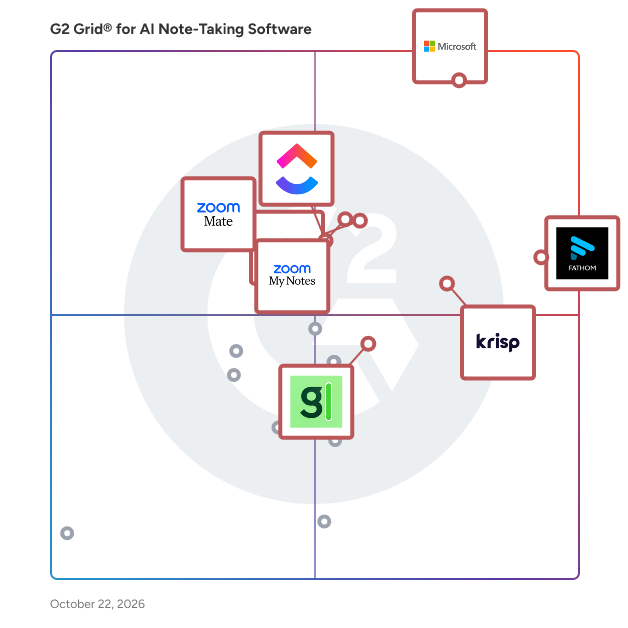
G2 Grid® for AI Note-Taking Software

G2 Grid® for AI Note-Taking Software plotting products by satisfaction and market presence

Highlighted products: Microsoft Teams, Zoom Workplace, Fathom, Krisp, Slack, ClickUp, ZoomMate, and Otter.ai.

Underlying data: [Grid® JSON](https://www.g2.com/categories/ai-note-taking-software/grids.json?focus%5B%5D=microsoft-teams&focus%5B%5D=zoom-workplace&focus%5B%5D=fathom-video&focus%5B%5D=krisp&focus%5B%5D=slack&focus%5B%5D=clickup&focus%5B%5D=zoommate&focus%5B%5D=otter-ai)

Microsoft Teams

Microsoft Teams is a comprehensive collaboration platform developed by Microsoft, designed to streamline communication and teamwork within organizations. It integrates chat, video conferencing, file storage, and application integration into a single interface, facilitating seamless collaboration across various devices and operating systems. As part of the Microsoft 365 suite, Teams enhances productivity by providing a centralized hub for team interactions and project management. Key Features and Functionality: - Chat and Messaging: Facilitates real-time text communication with individuals or groups, supporting rich text, emojis, stickers, and GIFs. - Video Conferencing: Offers high-quality video meetings with features like screen sharing, custom backgrounds, and live captions, accommodating both small team huddles and large webinars. - File Sharing and Collaboration: Enables secure file storage and sharing through integration with OneDrive and SharePoint, allowing multiple users to co-author documents simultaneously. - Integration with Applications: Supports integration with a wide range of Microsoft and third-party applications, enhancing workflow efficiency by bringing various tools into one platform. - Security and Compliance: Provides enterprise-grade security measures, including data encryption for meetings, chats, calls, and files, ensuring compliance with industry standards. Primary Value and Solutions Provided: Microsoft Teams addresses the challenges of modern workplace collaboration by unifying communication channels, reducing the need for multiple disparate tools. It enhances team productivity by centralizing resources, facilitating real-time collaboration, and ensuring secure information sharing. By integrating with the broader Microsoft 365 ecosystem, Teams offers a cohesive environment that supports remote work, hybrid teams, and in-person collaboration, adapting to the diverse needs of today's workforce.

Average Rating: 4.4/5.0

Total Reviews: 17,688

G2 Deal: % off Microsoft Teams

Our partnership with Pax8 brings you Microsoft 365 Teams directly. Click claim offer to get started!

View this exclusive G2 deal

Who Is the Company Behind Microsoft Teams?

  • Seller: Microsoft
  • Year Founded: 1975
  • HQ Location: Redmond, Washington
  • Twitter: @microsoft
    13,091,739 Twitter followers
  • LinkedIn® Page: www.linkedin.com
    232,750 employees on LinkedIn®
  • Ownership: MSFT

Who Uses This Product?

  • Who Uses This: Software Engineer, Project Manager
  • Top Industries: Information Technology and Services, Computer Software
  • Company Size: 39% Large, 38% Medium

What Do G2 Reviewers Say About Microsoft Teams?

AI-generated summary from verified user reviews

Pros
  • Users find Microsoft Teams very easy to use, enhancing daily communication and collaboration across different platforms effortlessly.
  • Users find team collaboration seamless with Microsoft Teams, integrating meetings, chats, and file sharing efficiently.
  • Users find Microsoft Teams to be a superb tool for communication, enhancing collaboration through integrated features and organization.
  • Users value the easy file sharing in Microsoft Teams, enhancing collaboration and streamlining communication across teams.
  • Users value the easy communication features of Microsoft Teams, enhancing collaboration and availability awareness among team members.
Cons
  • Users often experience slow loading with Microsoft Teams, especially when using multiple applications or during video meetings.
  • Users experience performance issues with Teams, including high resource consumption and difficulties in low-bandwidth situations.
  • Users report the user interface can be overwhelming and slow, complicating their navigation and experience during usage.
  • Users often face connectivity issues with Microsoft Teams, particularly during low-bandwidth situations disrupting their experience.
  • Users experience performance delays with Microsoft Teams, leading to frustration, particularly on older machines and low-bandwidth connections.

What Are Recent G2 Reviews of Microsoft Teams?

What Are G2 Users Discussing About Microsoft Teams?

Zoom Workplace

Goodbye app overload. Hello effortless work. Work can be complicated. Your tools shouldn't be. Zoom Workplace connects all the ways you collaborate — from meetings to docs to chat and more — with built-in AI and seamless integrations that help teams focus and work flawlessly. Zoom Communications: Unified, Effortless Connection for Modern Work Bring every way your teams communicate—meetings, chat, calls, email, and scheduling—into one seamless experience. With Zoom, collaboration happens faster and more naturally across channels, without switching apps or losing context. From spontaneous chats to scheduled meetings and calls, everything stays connected, searchable, and secure—powered by one intuitive platform built for how modern teams work. Zoom Productivity: Workflows Connected, Work Effortless Transform how work gets done with AI-first collaboration that keeps people, content, and actions in one place. From brainstorming on whiteboards to co-creating in docs, sharing clips, and automating follow-ups, Zoom connects every step of your workflow. With Zoom Hub and integrated video management, knowledge stays organized, accessible, and actionable—so teams can move from idea to outcome without friction. Zoom Spaces: Smarter, Connected Workplaces for Every Team Bring your physical and hybrid environments to life with intelligent, connected spaces. Zoom Spaces unifies meeting rooms, desk reservations, digital signage, and visitor management into one seamless experience—making it simple to collaborate, navigate, and manage the workplace. Whether employees are remote, hybrid, or on-site, Zoom creates a consistent, secure, and flexible environment that keeps teams connected wherever work happens. Zoom Employee Engagement: Connect, Inspire, and Empower Every Employee Foster belonging and alignment with Workvivo by Zoom—a modern employee experience platform that unites communication, culture, and community in one place. From company-wide updates to recognition, feedback, and social engagement, Workvivo gives every employee a voice and a sense of connection. Built right into Zoom Workplace, it helps organizations strengthen culture, boost engagement, and keep teams informed and inspired—no matter where they work.

Average Rating: 4.5/5.0

Total Reviews: 53,598

Who Is the Company Behind Zoom Workplace?

  • Seller: Zoom
  • Company Website:
  • Year Founded: 2011
  • HQ Location: San Jose, CA
  • Twitter: @zoom
    1,042,714 Twitter followers
  • LinkedIn® Page: www.linkedin.com
    14,013 employees on LinkedIn®

Who Uses This Product?

  • Who Uses This: Owner, Software Engineer
  • Top Industries: Information Technology and Services, Computer Software
  • Company Size: 51% Small, 31% Medium

What Do G2 Reviewers Say About Zoom Workplace?

AI-generated summary from verified user reviews

Pros
  • Users love the ease of use of Zoom Workplace, enjoying seamless access to features with just a click.
  • Users appreciate the ease of collaboration in Zoom Workplace, especially with breakout rooms and seamless screen sharing.
  • Users value the reliability of Zoom Workplace, ensuring seamless connectivity and stability even during adverse conditions.
  • Users find the ease of use for meetings in Zoom Workplace invaluable for seamless collaboration and productivity.
  • Users enjoy the easy-to-use video conferencing features of Zoom, facilitating smooth communication and collaboration in hybrid work settings.
Cons
  • Users note the limited features of Zoom Workplace, expressing a need for improved built-in collaboration tools.
  • Users experience Zoom issues like fatigue, connectivity problems, and confusing configurations that hinder their overall meeting effectiveness.
  • Users experience Zoom fatigue, notification overload, and connectivity issues, making long meetings feel overwhelming and impersonal.
  • Users find missing features in Zoom Workplace, like improved sharing links and chat access post-calls, frustrating.
  • Users often face connection issues with Zoom Workplace, leading to a frustrating and less seamless experience.

What Are Recent G2 Reviews of Zoom Workplace?

What Are G2 Users Discussing About Zoom Workplace?

Fathom

Fathom is the #1-rated AI meeting partner that captures what matters and turns every conversation into clear, actionable outcomes. It surfaces decisions, makes every meeting searchable, and syncs insights directly into CRM and productivity tools – eliminating manual work. Named to G2’s 2026 Best Software Awards Top 100, and recognized by HubSpot as its 2025 Most Used App of the Year, Fathom is trusted by hundreds of thousands of companies worldwide to help individuals stay focused, teams stay aligned, and organizations move faster.

Average Rating: 5.0/5.0

Total Reviews: 7,006

Who Is the Company Behind Fathom?

  • Seller: Fathom
  • Company Website:
  • Year Founded: 2020
  • HQ Location: San Francisco, CA
  • Twitter: @fathomdotai
    2,469 Twitter followers
  • LinkedIn® Page: www.linkedin.com
    183 employees on LinkedIn®

Who Uses This Product?

  • Who Uses This: CEO, Founder
  • Top Industries: Marketing and Advertising, Computer Software
  • Company Size: 78% Small, 20% Medium

What Do G2 Reviewers Say About Fathom?

AI-generated summary from verified user reviews

Pros
  • Users praise Fathom for its incredible accuracy in note-taking, enhancing engagement and efficiency during meetings.
  • Users love the simple setup and seamless integration of Fathom across various meeting platforms, enhancing productivity.
  • Users appreciate the helpfulness of Fathom, enabling productive meetings with automatic note-taking and efficient task assignments.
  • Users appreciate the ease of use of Fathom, enjoying its intuitive interface and efficient navigation for productivity.
  • Users value the accuracy and efficiency of Fathom's note-taking, enhancing focus during meetings and facilitating recaps.
Cons
  • Users face challenges with meeting report accuracy, along with limitations on advanced features in the free version.
  • Users experience recording issues with Fathom, including inaccurate transcripts and unnecessary constant recording.
  • Users face call attribution issues that hinder reporting and tracking of important call details during unscheduled meetings.
  • Users express frustration with constant recording limitations that affect meeting setup and participation flexibility.
  • Users express concerns about joining issues with Fathom, wishing for more seamless integration during meetings.

What Are Recent G2 Reviews of Fathom?

Krisp

Krisp is a voice productivity and real-time AI communication platform that helps teams, contact centers, and developers deliver clearer conversations through real-time noise suppression, accent conversion, voice translation, transcription, summarization, and other AI-driven voice features. It provides a privacy-first, scalable audio solutions for calls, meetings, customer support, and embedded voice applications. Krisp brings together three AI-powered products in one platform—AI Meeting Assistant, AI Call Center, and Real-Time AI Voice SDK. It runs on-device or in the cloud and integrates seamlessly with all major conferencing platforms and developer environments. AI Meeting Assistant - Live transcription and recording without required bots - AI-generated meeting summaries, action items, and CRM sync - Noise, echo, and background voice cancellation for crisp audio - Multilingual support and custom vocabulary for industry terms AI Call Center - Real-time accent conversion for global customer communication - Instant voice translation across 80+ languages - AI Agent Assist for live knowledge prompts, after-call summaries, and coaching - Advanced noise, echo, and voice cancellation for clear, effective calls Real-Time AI Voice SDK - Voice isolation and turn-taking for natural voice AI interactions - Outbound Background Voice Cancellation (BVC) for real-time communication - Inbound and outbound Noise Cancellation (NC) - Accent Conversion for calls - Cross-platform libraries and wrappers for web, mobile, desktop, and server deployments Krisp is SOC 2, GDPR, HIPAA, and PCI-DSS certified and does not store voice data. Deployed on more than 200 million devices and processing over 80 billion minutes of conversations each month, it gives organizations a unified way to improve meeting productivity, raise contact center performance, and build advanced voice-enabled products

Average Rating: 4.7/5.0

Total Reviews: 1,591

Who Is the Company Behind Krisp?

  • Seller: Krisp Technologies, Inc.
  • Company Website:
  • Year Founded: 2017
  • HQ Location: Berkeley, California
  • Twitter: @krispHQ
    6,531 Twitter followers
  • LinkedIn® Page: www.linkedin.com
    393 employees on LinkedIn®

Who Uses This Product?

  • Who Uses This: Software Engineer, CEO
  • Top Industries: Computer Software, Information Technology and Services
  • Company Size: 53% Small, 20% Medium

What Do G2 Reviewers Say About Krisp?

AI-generated summary from verified user reviews

Pros
  • Users appreciate the ease of use of Krisp, finding the setup simple and integration seamless in daily meetings.
  • Users appreciate the effective noise cancellation of Krisp, enhancing focus during online meetings in noisy environments.
  • Users value the efficient voice transcription of Krisp, which enhances meeting management and note-taking significantly.
  • Users value Krisp's high reliability for noise cancellation, ensuring clear communication even in noisy environments.
  • Users commend Krisp for its easy setup, facilitating seamless integration with various platforms and enhancing focus on meetings.
Cons
  • Users experience audio issues like choppy sound and latency, especially when using heavy filtering on Krisp.
  • Users report inaccurate transcription, particularly in Hindi, limiting effectiveness and raising concerns over pricing in India.
  • Users find the transcription accuracy to be poor, often resulting in incorrect transcriptions during meetings.
  • Users note that AI inaccuracy can disrupt meetings with incorrect transcripts and misidentified speakers.
  • Users report noise issues with Krisp, including mic problems and occasional distortion during meetings.

What Are Recent G2 Reviews of Krisp?

What Are G2 Users Discussing About Krisp?

FAQs About AI Note-Taking Software

Generated using AI

Last updated: June 3, 2026

AI Note-Taking Software that makes notes searchable and shareable within minutes after meetings end

Based on G2 reviews, these products are most often associated with fast, searchable meeting notes and easy sharing workflows.

  • Microsoft Teams — searchable summaries for internal collaboration.
  • Zoom Workplace — quick AI meeting minutes and recaps.
  • Fathom — instant transcripts with action items.
  • Otter.ai — searchable notes for missed details.

Which AI Note-Taking Software prevent meeting data breaches and ensure compliance with data protection laws

Based on G2 reviews, buyers most often mention these products when secure meeting records, controlled sharing, and compliant environments matter.

  • Microsoft Teams — secure internal meetings and monitored data.
  • Fathom — detailed records for compliant documentation.
  • Slack — centralized communication with searchable history.

Which AI Note-Taking Software protect meeting privacy and comply with GDPR requirements

Based on G2 reviews, these products are the clearest options for privacy-sensitive note capture and controlled meeting documentation workflows.

  • Fathom — supports detailed records for regulated workflows.
  • Microsoft Teams — secure collaboration inside managed environments.
  • Fellow — privacy-respecting meeting notes and recaps.

What should buyers look for in ai note taking tools

According to verified users, the most important buying criteria are accurate transcription, clear summaries, searchable history, and reliable action item capture. Reviewers also value quick sharing after meetings, strong calendar or meeting-platform integrations, and the ability to revisit exact moments in a transcript or recording. Many mention that the best experience lets them stay focused on the conversation instead of typing notes. Common pain points to watch for include speaker mix-ups, weak handling of accents or overlapping voices, limited free plans, and bots or prompts that feel intrusive in meetings. Buyers also often prefer tools that organize follow-ups clearly and fit into existing workflows.

How do teams use AI Note-Taking Software for action items

According to verified users, teams mainly use AI note-taking software to turn conversations into clear next steps right after meetings. Reviewers describe using these tools to capture decisions, assign follow-up tasks, draft recap emails, and keep a searchable record of what was agreed. This is especially useful for sales calls, client meetings, project reviews, interviews, and cross-functional updates where details can get lost quickly. Users consistently mention that action item extraction helps reduce manual note-taking, improves accountability, and makes it easier to hand work off across teams. Many also value being able to return to transcripts or summaries later to confirm ownership, deadlines, and discussion context.

Slack

Slack is your single workspace that connects you with the people and tools you work with everyday, no matter where you are or what you do. With Slack you get real-time messaging through calls and chat, a searchable record of all your files and conversations, and integrations with a growing number of handy bots and apps. Now everyone can finally be on the same page and get their work done. Slack: It’s where work happens.

Average Rating: 4.5/5.0

Total Reviews: 37,547

G2 Deal: 25% off eligible upgrades to Slack Pro and Business+ for 12 months

Slack goes beyond chat and video—it empowers teams to work more efficiently by automating everyday tasks, putting your most important conversations at the center, and connecting everyone instantly (right where they're already working). Limited time offer for companies with 200 or fewer users.

View this exclusive G2 deal

Who Is the Company Behind Slack?

  • Seller: Salesforce
  • Company Website:
  • Year Founded: 1999
  • HQ Location: San Francisco, CA
  • Twitter: @salesforce
    579,511 Twitter followers
  • LinkedIn® Page: www.linkedin.com
    89,711 employees on LinkedIn®

Who Uses This Product?

  • Who Uses This: Software Engineer, Project Manager
  • Top Industries: Computer Software, Information Technology and Services
  • Company Size: 41% Small, 41% Medium

What Do G2 Reviewers Say About Slack?

AI-generated summary from verified user reviews

Pros
  • Users find Slack to be extremely easy to use, facilitating seamless collaboration and integration across teams.
  • Users love the effective team collaboration in Slack, finding huddles and organized channels enhance communication and task management.
  • Users love Slack for its efficient communication, enabling quick responses and seamless team collaboration across time zones.
  • Users love the seamless integrations of Slack, enhancing collaboration and automating tasks effortlessly across the platform.
  • Users appreciate the ease of coordination and integrations in Slack, enhancing team communication and productivity.
Cons
  • Users often face notification issues in Slack, causing missed messages and overwhelming alerts from multiple channels.
  • Users find the missing features in Slack lead to confusion and difficulty in organizing channels efficiently.
  • Users are frustrated by Slack's limited message history and lack of intuitive organization for shared assets.
  • Users find the overwhelming experience of constant alerts and message volume to be stressful and distracting.
  • Users find the overwhelming number of channels and limited message history challenging for project tracking and communication.

What Are Recent G2 Reviews of Slack?

What Are G2 Users Discussing About Slack?

ClickUp

ClickUp is the world’s first Converged AI Workspace, bringing together all work apps, data, and workflows. ClickUp eliminates all forms of work sprawl to provide 100% context and a single place for humans and agents to work, together. Trusted by more than 20 million users worldwide, ClickUp is on a mission to maximize human productivity.

Average Rating: 4.6/5.0

Total Reviews: 13,484

Who Is the Company Behind ClickUp?

  • Seller: ClickUp
  • Company Website:
  • Year Founded: 2017
  • HQ Location: San Diego, California
  • Twitter: @clickup
    69,539 Twitter followers
  • LinkedIn® Page: www.linkedin.com
    7,082 employees on LinkedIn®

Who Uses This Product?

  • Who Uses This: CEO, Project Manager
  • Top Industries: Marketing and Advertising, Computer Software
  • Company Size: 77% Small, 19% Medium

What Do G2 Reviewers Say About ClickUp?

AI-generated summary from verified user reviews

Pros
  • Users find ClickUp to be incredibly easy and simple to use, streamlining tasks and enhancing productivity effortlessly.
  • Users value the flexibility in task management, enabling customized workflows for personal, team, and project tasks.
  • Users appreciate the abundance of features in ClickUp, making task management seamless and efficient.
  • Users appreciate ClickUp for its streamlined management tasks, enabling better organization and efficiency in project handling.
  • Users appreciate ClickUp for its streamlined organization, making team management and project tracking efficient and effortless.
Cons
  • Users find the missing features in ClickUp frustrating, particularly the lack of basic tools like subfolders.
  • Users experience a learning curve with ClickUp, finding the plethora of features daunting at first.
  • Users note limited features in ClickUp, with missing basic options and a complex setup process hindering ease of use.
  • Users find ClickUp not intuitive, feeling overwhelmed by its many features and struggling with initial setup and performance.
  • Users experience slow loading times in ClickUp, which affects their productivity when managing multiple tasks and fields.

What Are Recent G2 Reviews of ClickUp?

What Are G2 Users Discussing About ClickUp?

ZoomMate

ZoomMate is an AI workspace integrated into Zoom Workplace, designed to enhance productivity by transforming discussions into actionable outcomes. This innovative solution serves as a personal AI teammate that comprehensively understands, learns from, and acts on your daily tasks. By bridging the gap between conversation and execution, ZoomMate ensures that the decisions made during meetings and chats are effectively followed through, allowing users to focus on their core responsibilities. The target audience for ZoomMate includes professionals and teams who rely on collaborative tools to manage their workflows. Whether in corporate environments, remote teams, or educational institutions, users benefit from a seamless integration of AI capabilities into their existing Zoom ecosystem. ZoomMate is particularly useful for individuals who often find themselves juggling multiple tasks and tools, as it streamlines the process of tracking and completing work initiated during discussions. One of the standout features of ZoomMate is its ability to operate within the context of ongoing conversations. Unlike traditional AI assistants that require users to input specific commands, ZoomMate actively engages in the workflow by understanding the nuances of discussions and identifying next steps without needing explicit instructions. This proactive approach not only saves time but also reduces the cognitive load on users, allowing them to concentrate on strategic decision-making rather than administrative follow-ups. Additionally, ZoomMate consolidates various functions into a single platform, eliminating the need for multiple applications and licenses. This integration enhances data security by keeping sensitive information within the Zoom environment, reducing the risk associated with using disparate tools. The orchestration capabilities of ZoomMate allow it to manage tasks across different systems, ensuring that all team members are aligned and informed about project developments. In essence, ZoomMate redefines how teams collaborate and execute tasks by embedding AI directly into the workflow. Its unique ability to learn from interactions and provide context-aware assistance makes it a valuable asset for any organization looking to enhance productivity and streamline operations. By focusing on the follow-through of conversations, ZoomMate empowers users to achieve their goals more efficiently, transforming meetings into tangible results.

Average Rating: 4.6/5.0

Total Reviews: 258

Who Is the Company Behind ZoomMate?

  • Seller: Zoom
  • Company Website:
  • Year Founded: 2011
  • HQ Location: San Jose, CA
  • Twitter: @zoom
    1,042,714 Twitter followers
  • LinkedIn® Page: www.linkedin.com
    14,013 employees on LinkedIn®

Who Uses This Product?

  • Top Industries: Computer Software, Information Technology and Services
  • Company Size: 41% Small, 35% Medium

What Do G2 Reviewers Say About ZoomMate?

AI-generated summary from verified user reviews

Pros
  • Users value the ease of use of ZoomMate, appreciating its intuitive setup and user-friendly interface for efficient meetings.
  • Users value the ease of use of Zoom AI Companion, enhancing productivity and simplifying meeting management.
  • Users find the ease of use of Zoom AI Companion invaluable for improving productivity and enhancing team communication.
  • Users find the AI Companion's meeting minute recording invaluable for enhancing productivity and streamlining communication.
  • Users find the efficiency of ZoomMate impressive, saving time and streamlining tasks effortlessly during meetings.
Cons
  • Users are frustrated by the missing features in ZoomMate, affecting functionality and usability during important tasks.
  • Users express frustration over the limited features of ZoomMate, which restricts functionality and often requires third-party tools.
  • Users note that the transcription accuracy needs improvement, particularly for multi-language calls affecting meeting summaries' utility.
  • Users express concern over accuracy issues with ZoomMate's transcription and summaries, particularly in multilingual contexts.
  • Users face Zoom issues like limited meeting duration, connectivity problems, and difficulties with chat tracking and AI transcription.

What Are Recent G2 Reviews of ZoomMate?

Otter.ai

Otter.ai is the leading AI Meeting Assistant that helps sales, marketing, product, finance, operations design, customer success, customer support and cross functional teams automatically record, transcribe, and summarize all their meetings, making it easy to recall action items and easily share key insights. Otter integrates with leading video conference platforms, including Zoom, Microsoft Teams, and Google Meet, to automatically join and generate meeting notes. Otter AI Chat is like having ChatGPT for your meetings, it allows meeting participants to ask Otter questions about the meeting, including “what did I miss”, or “write a follow-up email to all participants”. Otter offers iOS and Android Apps to make it easy to record and transcribe in-person meetings. Otter also allows users to import and transcribe pre-recorded audio and video files. Designed specifically for the workflow of sales teams, OtterPilot for Sales shortens sales cycles by capturing critical information in real-time and automating follow-up emails and sentiment analysis. OtterPilot for Sales integrates with Salesforce and Hubspot to help automate call reporting. Improve win rates by sharing best practices and coaching reps based on data-driven insights. Boost productivity and free up time by automating tedious tasks like note-taking and data entry so SDRs, Sale Reps, Account Executives, Customer Success Managers, Sales Leaders and CROs can focus all of their attention on the customer and closing more deals. Otter.ai has over 15 million registered users and has transcribed over a billion meetings. Otter was named a top AI App by The Wall Street Journal in June 2023.

Average Rating: 4.4/5.0

Total Reviews: 499

Who Is the Company Behind Otter.ai?

  • Seller: Otter.ai
  • Company Website:
  • HQ Location: Mountain View, California
  • Twitter: @otter_ai
    17,074 Twitter followers
  • LinkedIn® Page: www.linkedin.com
    298 employees on LinkedIn®

Who Uses This Product?

  • Who Uses This: CEO, Account Executive
  • Top Industries: Computer Software, Marketing and Advertising
  • Company Size: 70% Small, 20% Medium

What Do G2 Reviewers Say About Otter.ai?

AI-generated summary from verified user reviews

Pros
  • Users appreciate the ease of use of Otter.ai, finding it simple to transcribe and summarize conversations.
  • Users appreciate the helpfulness of Otter.ai, streamlining note-taking and enhancing meeting summaries for easy reference.
  • Users appreciate the high accuracy of Otter.ai's transcripts, ensuring reliable and precise speech-to-text conversions.
  • Users find Otter.ai's efficient transcription invaluable for summarizing meetings and accurately capturing speaker discussions.
  • Users value the effective meeting organization by Otter.ai, relishing easy access to notes and key action points.
Cons
  • Users often face recording issues with Otter.ai, leading to confusion and manual recording requirements for accuracy.
  • Users experience accuracy issues with heavy accents, background noise, and overlapping speech, affecting transcription quality.
  • Users experience accuracy issues with Otter.ai, especially with accents, background noise, and multiple speakers.
  • Users report AI inaccuracy in transcriptions with accents, simultaneous speakers, and challenging terminology impacting their experience.
  • Users find that Otter.ai has missing features in post-meeting summaries and speaker identification, affecting usability and efficiency.

What Are Recent G2 Reviews of Otter.ai?

What Are G2 Users Discussing About Otter.ai?

monday AI Work Platform

monday.com is the AI Work Platform where people and agents operate as one team - with shared cross-department context, enterprise-grade trust, and an easy-to-use interface built for adoption at scale. With monday.com, agents work alongside teams in the same boards, workflows, and goals they already use every day, creating a new kind of teamwork where people and agents move work forward together. Beyond agents, monday.com gives every team more ways to turn AI into real business impact. With monday vibe, teams can build custom work apps for their specific needs, and with monday sidekick, every user gets a personal AI assistant to help solve business challenges, move faster, and get more done. monday.com gives organizations the visibility, permissions, human oversight, and compliance standards they need to deploy AI with confidence. AI doesn’t operate in a black box - it operates within the same trusted guardrails teams already rely on. Because monday.com is already used across departments, agents can access the broader context of how work connects across marketing, sales, product, IT, HR, operations, and more. That means smarter decisions, faster execution, and fewer silos - all in one place. Today, over 250,000 customers and more than 60% of Fortune 500 companies trust monday.com with how they run their business.

Average Rating: 4.7/5.0

Total Reviews: 16,731

Who Is the Company Behind monday AI Work Platform?

  • Seller: monday.com
  • Company Website:
  • Year Founded: 2012
  • HQ Location: Tel Aviv
  • Twitter: @mondaydotcom
    40,761 Twitter followers
  • LinkedIn® Page: www.linkedin.com
    10,589 employees on LinkedIn®

Who Uses This Product?

  • Who Uses This: Project Manager, CEO
  • Top Industries: Marketing and Advertising, Information Technology and Services
  • Company Size: 61% Small, 30% Medium

What Do G2 Reviewers Say About monday AI Work Platform?

AI-generated summary from verified user reviews

Pros
  • Users find the ease of use of monday AI Work Platform essential for staying organized and productive.
  • Users appreciate the team collaboration features of monday AI Work Platform, enhancing project management across various business segments.
  • Users value the easy project management features of monday AI Work Platform, enhancing collaboration and workflow efficiency.
  • Users value how monday AI Work Platform enhances organization, making important information easily accessible and manageable.
  • Users appreciate the efficient task management in monday AI Work Platform, making collaboration and project tracking seamless.
Cons
  • Users note the missing features in monday AI Work Platform, expressing frustration over limitations like messaging contacts and seat requirements.
  • Users find the learning curve steep, especially when implementing across departments and managing large datasets effectively.
  • Users find the limited features of monday AI Work Platform restrict useful functionality and increase costs unnecessarily.
  • Users find the interface not intuitive, struggling with complex workflows and lacking straightforward functionality.
  • Users find the limited customization in monday AI Work Platform hampers their ability to streamline tasks effectively.

What Are Recent G2 Reviews of monday AI Work Platform?

What Are G2 Users Discussing About monday AI Work Platform?

Fellow

Fellow is the only AI meeting assistant built from the ground up with privacy and security at its core. With both bot and botless recording options, Fellow gives teams full control over how meetings are captured — whether through a visible meeting bot or seamless, native recording with no bot required. Every recording, transcript, and summary is protected by enterprise-grade privacy and access controls, ensuring only the right people see the right information. Fellow delivers the most accurate AI meeting notes, transcripts, and summaries — and with Ask Fellow, you can instantly search across all your past meetings to surface key decisions, action items, and context without digging through notes. Leaders at Shopify, Aledade, Vidyard, and HubSpot trust Fellow to save their teams time and money by revolutionizing the way they meet.

Average Rating: 4.7/5.0

Total Reviews: 2,427

Who Is the Company Behind Fellow?

Who Uses This Product?

  • Who Uses This: Team Lead, Product Manager
  • Top Industries: Computer Software, Information Technology and Services
  • Company Size: 38% Medium, 33% Small

What Do G2 Reviewers Say About Fellow?

AI-generated summary from verified user reviews

Pros
  • Users value the ease of use of Fellow, benefiting from its seamless organization and integration features for meetings.
  • Users appreciate the organized meeting notes feature of Fellow, enhancing collaboration and consistency during discussions.
  • Users appreciate the easy note-taking and organizational features of Fellow, enhancing their workflow and team collaboration.
  • Users find the action item tracking in Fellow invaluable for organizing tasks and enhancing meeting effectiveness.
  • Users value the organization features of Fellow, effectively managing meeting notes and action items in one place.
Cons
  • Users experience joining issues with Fellow and wish for compatibility with more meeting platforms.
  • Users find that action item management is cumbersome, leading to overlooked tasks and inefficiencies in tracking responsibilities.
  • Users face issues with calendar integration, limiting functionality and causing missed meetings across different platforms.
  • Users find the template issues frustrating, citing lack of intuitiveness and difficulty in customization for meetings.
  • Users face integration issues with Fellow, limiting its functionality across various meeting platforms and tools.

What Are Recent G2 Reviews of Fellow?

What Are G2 Users Discussing About Fellow?

tl;dv

tl;dv is an AI meeting assistant and official partner of Anthropic. It automatically records video, transcribes and get AI Insights from Google Meet, Zoom and MS Teams for FREE. With tl;dv you can: 🎥 Video record meetings automatically in top quality 💬 Receive highly accurate transcription with speaker tags 🌎 Transcribe into 40+ languages 📌 Timestamp and highlight important call moments 🔗 Share links to recordings automatically to Slack and e-mail 🔍 Search your call library for any word spoken in meetings 💡 Integrate call insights into CRMs like Salesforce or Hubspot 🎞 Edit recording & create clips ✔ Revisit and edit meeting action points and takeaways 🙋‍♀️ Tag stakeholders and colleagues at any point during call 📝 Generate AI Notes following popular templates (or your own) ✍ Generate insights across 100s of meetings 💡 Improve team performance with BANT/MEDDIC scorecards (or your own) 💡 Improve how your team handles customer objections. At tl;dv we are committed to protecting the confidentiality, integrity, and availability of your data at all times. Our services are designed with a privacy-first approach and are encrypted & GDPR compliant. Keeping your data safe is our priority. Over two million users have already levelled up their calls with tl;dv 🙌 tl;dv is not only a free alternative to other meeting recorders, but also the one that makes the most use of AI to surface insights and help you onboard faster and improve your team performance in an efficient way. tl;dv offers a very generous free plan, as well as a plan for AI enthusiasts and another for scaling Sales & CS teams.

Average Rating: 4.7/5.0

Total Reviews: 536

Who Is the Company Behind tl;dv?

  • Seller: tldx Solutions GmbH
  • Company Website:
  • Year Founded: 2021
  • HQ Location: Aachen, NRW
  • Twitter: @tldview
    9,784 Twitter followers
  • LinkedIn® Page: www.linkedin.com
    64 employees on LinkedIn®

Who Uses This Product?

  • Who Uses This: CEO, Founder
  • Top Industries: Computer Software, Marketing and Advertising
  • Company Size: 71% Small, 23% Medium

What Do G2 Reviewers Say About tl;dv?

AI-generated summary from verified user reviews

Pros
  • Users appreciate the ease of use of tl;dv, making it simple to focus on meetings without stress.
  • Users love the productivity boost from tl;dv, enhancing meeting efficiency and personal development through transcripts and AI features.
  • Users love the meeting productivity enhancement of tl;dv, allowing full focus without the distraction of note-taking.
  • Users find tl;dv to be invaluable for productivity, allowing focus during meetings without the distraction of note-taking.
  • Users value the accuracy of transcriptions, enhancing efficiency in reviewing meetings and generating content swiftly.
Cons
  • Users find the recording limitations of tl;dv inconvenient, requiring extra steps for capturing meetings effectively.
  • Users experience AI inaccuracy issues, with misinterpretations and inconsistent speaker differentiation necessitating manual fixes.
  • Users find the lack of essential features, like transcript downloads and multi-account support, limiting for their needs.
  • Users feel the meeting management features can be overwhelming and have encountered issues with launching during important meetings.
  • Users note accuracy issues with transcriptions, finding inconsistencies and challenges in locating specific meetings.

What Are Recent G2 Reviews of tl;dv?

What Are G2 Users Discussing About tl;dv?

HappyScribe

HappyScribe is an AI Notetaker designed specifically for conversation intelligence, enabling users to effectively capture and manage the outcomes of meetings. This innovative solution records discussions, identifies speakers, and transforms lengthy conversations into actionable insights, including decisions, assigned tasks, and deadlines. With a commitment to data privacy, HappyScribe is a European company that adheres to GDPR regulations and is SOC 2 Type II certified, ensuring that user data is securely stored and managed. Targeted at professionals and teams across various sectors, HappyScribe is particularly beneficial for organizations that rely heavily on virtual meetings and collaborative discussions. The AI Notetaker seamlessly integrates with popular platforms such as Zoom, Google Meet, and Microsoft Teams, automatically joining calls based on user-defined calendar rules. Additionally, the mobile application for iOS and Android allows for the recording of in-person conversations, ensuring that all discussions are captured and archived for future reference. One of the standout features of HappyScribe is its ability to generate speaker-accurate transcripts and concise summaries using 19 customizable templates tailored for different meeting types, from discovery calls to retrospectives. Users can easily extract commitments and decisions from these meetings, streamlining the follow-up process. The AI-powered transcription boasts an impressive accuracy rate of 85 to 95%, which can reach up to 99% with expert-reviewed checks, making it a reliable tool for capturing critical information. Furthermore, HappyScribe supports over 150 languages and dialects, automatically detecting languages and adapting to multilingual conversations. Beyond its meeting capabilities, HappyScribe serves as a comprehensive platform for audio and video content. It offers features such as transcription, subtitles, captions, translation, and an intuitive editing interface, allowing users to refine their results effortlessly. The platform integrates with various tools, including Zapier, YouTube, Google Drive, and HubSpot, and provides a public API for custom solutions, ensuring that it fits seamlessly into existing workflows. HappyScribe is trusted by a diverse range of organizations, including newsrooms, market research firms, and corporate teams, providing a shared, searchable record of every conversation. This balance of AI efficiency and human accuracy empowers teams to record, transcribe, summarize, and act on their discussions, all within a single platform. Users can be assured that their content remains private, as it is not utilized for AI training unless they explicitly opt in.

Average Rating: 4.6/5.0

Total Reviews: 104

Who Is the Company Behind HappyScribe?

  • Seller: HappyScribe
  • Company Website:
  • Year Founded: 2017
  • HQ Location: Barcelona, Catalonia
  • Twitter: @happy_scribe
    2,059 Twitter followers
  • LinkedIn® Page: www.linkedin.com
    205 employees on LinkedIn®

Who Uses This Product?

  • Who Uses This: CEO
  • Top Industries: Marketing and Advertising, Information Technology and Services
  • Company Size: 75% Small, 17% Medium

What Do G2 Reviewers Say About HappyScribe?

AI-generated summary from verified user reviews

Pros
  • Users praise the accuracy of HappyScribe, especially in transcribing various accents and providing efficient subtitles.
  • Users appreciate the ease of use of HappyScribe, enjoying smooth and straightforward transcription processes.
  • Users find HappyScribe's interface simple and smooth, making transcribing podcasts and videos an effortless experience.
  • Users value the user-friendly interface of HappyScribe, noting its easy setup and efficient subtitle generation.
  • Users find the easy recording functionality of HappyScribe makes transcribing podcasts simple and efficient.
Cons
  • Users experience user confusion when editing, especially if they rely more on the mouse than keyboard shortcuts.

What Are Recent G2 Reviews of HappyScribe?

What Are G2 Users Discussing About HappyScribe?

Lindy

Lindy is an AI workflow automation platform that helps businesses streamline operations by handling repetitive tasks at scale. With Lindy, you can build AI agents—without writing a single line of code—to automate tasks like responding to emails, scheduling meetings, enriching leads, recording and summarizing calls, and more. Key Features: ✅ No-Code AI Agent Builder – Create custom AI-powered assistants in minutes. ✅ 200+ App Integrations – Connect seamlessly with your CRM, email, calendar, and other business tools. ✅ End-to-End Automation – Automate outreach, data entry, meeting summaries, and follow-ups. ✅ Get Started with a Template – Hundred of templates to help you deploy AI agents as executive assistants, customer support chatbots, medical scribes, sales assistants, and more. ✅ Scalable & Adaptable – Customize workflows to fit your business needs, from small teams to enterprises. Check it out at lindy.ai

Average Rating: 4.9/5.0

Total Reviews: 171

Who Is the Company Behind Lindy?

  • Seller: Lindy
  • Year Founded: 2023
  • HQ Location: San Francisco, California, United States
  • Twitter: @getlindy
    24,175 Twitter followers
  • LinkedIn® Page: fr.linkedin.com
    50 employees on LinkedIn®

Who Uses This Product?

  • Who Uses This: CEO, Founder
  • Top Industries: Marketing and Advertising, Consulting
  • Company Size: 79% Small, 5% Medium

What Do G2 Reviewers Say About Lindy?

AI-generated summary from verified user reviews

Pros
  • Users value the effortless ease of use of Lindy, simplifying AI agent setup and workflow automation seamlessly.
  • Users love the automation capabilities of Lindy, enabling efficient task management and seamless workflows for enhanced productivity.
  • Users commend Lindy for its intuitive interface, making task automation easy and accessible for beginners.
  • Users value the time-saving capabilities of Lindy, enabling quick setup and efficient task management for their businesses.
  • Users find Lindy's easy setup remarkably efficient, enabling quick agent deployment and enhanced productivity.
Cons
  • Users find Lindy to be expensive, especially due to limited credits and high costs for error corrections.
  • Users find the high subscription cost of Lindy challenging, especially for scaling and non-US users.
  • Users find the learning curve steep, complicating the onboarding process despite the “no-code” marketing claims.
  • Users find the limited features of Lindy restrictive, making it hard to fully explore the software before upgrading.
  • Users are frustrated with Lindy's AI inaccuracy, leading to costly errors and frequent misunderstandings during usage.

What Are Recent G2 Reviews of Lindy?

Jamie

Jamie is your AI meeting assistant that turns conversations into clear notes, highlights action items, and identifies speakers – all without joining as a bot. It works across all video platforms and offline, supports 90+ languages, and integrates with tools like Notion, Asana, Google Docs, and OneNote. Jamie keeps your data encrypted, GDPR-compliant, and secure in Europe, so you can focus on your meetings and never miss a key point.

Average Rating: 4.7/5.0

Total Reviews: 49

Who Is the Company Behind Jamie?

  • Seller: Jamie
  • Year Founded: 2021
  • HQ Location: Cologne, DE
  • Twitter: @meetjamie_ai
    457 Twitter followers
  • LinkedIn® Page: www.linkedin.com
    36 employees on LinkedIn®

Who Uses This Product?

  • Top Industries: Marketing and Advertising, Computer Software
  • Company Size: 80% Small, 8% Medium

What Do G2 Reviewers Say About Jamie?

AI-generated summary from verified user reviews

Pros
  • Users love the ease of use of Jamie, appreciating its seamless integration and topic-based meeting notes.
  • Users appreciate Jamie's seamless note management, effortlessly organizing topic-based notes from meetings without requiring bots or plugins.
  • Users value Jamie for its high transcription accuracy, ensuring precise note-taking and reliable summaries compared to other tools.
  • Users love Jamie for its accurate transcriptions and user-friendly design, enhancing their note-taking experience effortlessly.
  • Users appreciate the seamless meeting management of Jamie, benefiting from precise notes and enhanced team collaboration.
Cons
  • Users note that the speaker identification feature is not entirely reliable, impacting the effectiveness of Jamie's performance.
  • Users face significant inaccurate transcription issues, often resulting in lost meetings and troublesome voice capture.
  • Users report that poor audio quality significantly affects their experience and transcription accuracy during meetings.
  • Users report significant recording issues, including lock-ups and inaccurate transcript details that hinder effective usage.
  • Users experience frequent audio issues, leading to frustrating bugs and a need for constant troubleshooting and support.

What Are Recent G2 Reviews of Jamie?

Fireflies.ai

Fireflies is an AI voice assistant that helps transcribe, summarize take notes, and complete actions during meetings. Our AI assistant, Fred, integrates with all the leading web-conferencing platforms in the world like Zoom, Google Meet, Webex, & Microsoft Teams along with business applications like Hubspot, Slack, Trello, Asana, Salesforce, and more. Record: Instantly record meetings across all major web-conferencing platforms. Invite Fireflies or have it automatically capture them. Transcribe: Fireflies can transcribe live meetings or audio files that you upload. Skim the transcripts & listen to the audio simultaneously. Summarize: AI Super Summaries provides you with detailed meeting overviews, outlines, meeting notes, keywords and action items. Quickly track and skim through an entire meeting in 5 minutes! Collaborate: Add comments & flag important moments on calls for teammates to easily review. Search: Review an hour long call in less than 5 minutes. Filter to action items, dates, metrics, and other important topics. Integrate: Your meeting notes, transcripts, and recordings are more valuable when they are automatically synced with tools and platforms you already use. Log meeting notes, transcripts, and recordings in your CRM & collaboration apps like Salesforce, Hubspot, Slack, Zapier, and lots more. Analyze: Conversation Intelligence generates insights around talk time, topic trends, sentiment, and much more. The conversation intelligence suite allows you to identify what’s working and what is not on calls. Insights help you coach your sales team to close more deals. They help your recruiters hire top talent faster by identifying trends across candidate interviews. Your entire organization can build better products by tuning into the voice of your customer. Discover what messaging works and what doesn’t from customer and team interactions.

Average Rating: 4.7/5.0

Total Reviews: 750

Who Is the Company Behind Fireflies.ai?

  • Seller: Fireflies.ai
  • Year Founded: 2016
  • HQ Location: San Francisco, CA
  • Twitter: @firefliesai
    7,516 Twitter followers
  • LinkedIn® Page: www.linkedin.com
    136 employees on LinkedIn®

Who Uses This Product?

  • Who Uses This: CEO, Founder
  • Top Industries: Consulting, Marketing and Advertising
  • Company Size: 78% Small, 18% Medium

What Do G2 Reviewers Say About Fireflies.ai?

AI-generated summary from verified user reviews

Pros
  • Users find Fireflies.ai to be a game changer with its real-time transcription and efficient task management.
  • Users highlight the ease of use of Fireflies.ai, significantly improving their meeting efficiency and productivity.
  • Users appreciate the high accuracy of Fireflies.ai, noting it significantly outperforms competitors in transcribing audio files.
  • Users love Fireflies.ai for its time-saving capabilities, streamlining meeting notes and enhancing productivity effortlessly.
  • Users love the high accuracy of Fireflies.ai transcripts, achieving 95% correctness and improving workflow drastically.
Cons
  • Users note occasional AI inaccuracy in action items and live suggestions, but find overall performance satisfactory.
  • Users struggle with navigation and privacy concerns, finding it difficult to manage meeting invites and captured data effectively.
  • Users find Fireflies.ai to be somewhat expensive, especially for personal purchases and additional AI features.
  • Users express concerns about AI limitations regarding data privacy, storage, and the lack of streamlined features for meetings.
  • Users criticize the poor summarization which includes unnecessary details and complicates the editing process.

What Are Recent G2 Reviews of Fireflies.ai?

What Are G2 Users Discussing About Fireflies.ai?

Shalaka Joshi
SJ
Researched and written by Shalaka Joshi
Updated April 9, 2026