
2026 Best Software Awards are here!See the list

ClickUp Reviews & Product Details

Pricing

Pricing provided by ClickUp.

Free

Free

ClickUp Integrations

(120)
Verified by ClickUp

ClickUp Media

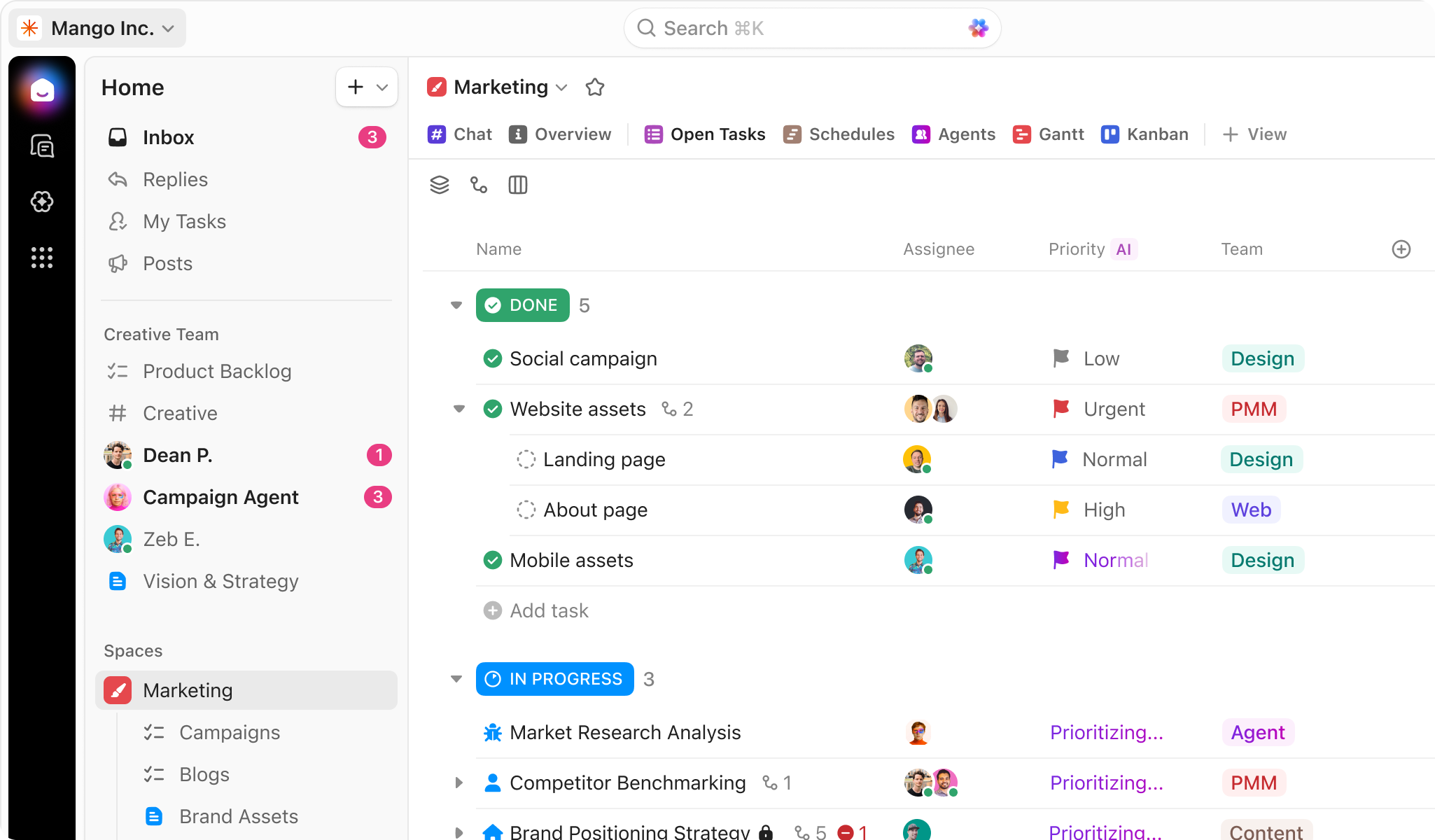
ClickUp Demo - ClickUp for Project Management
Manage your projects, docs, and chat in one place—all powered by AI. ClickUp adapts to any project, eliminates busywork, and keeps everything organized so your team delivers projects on time, all the time.
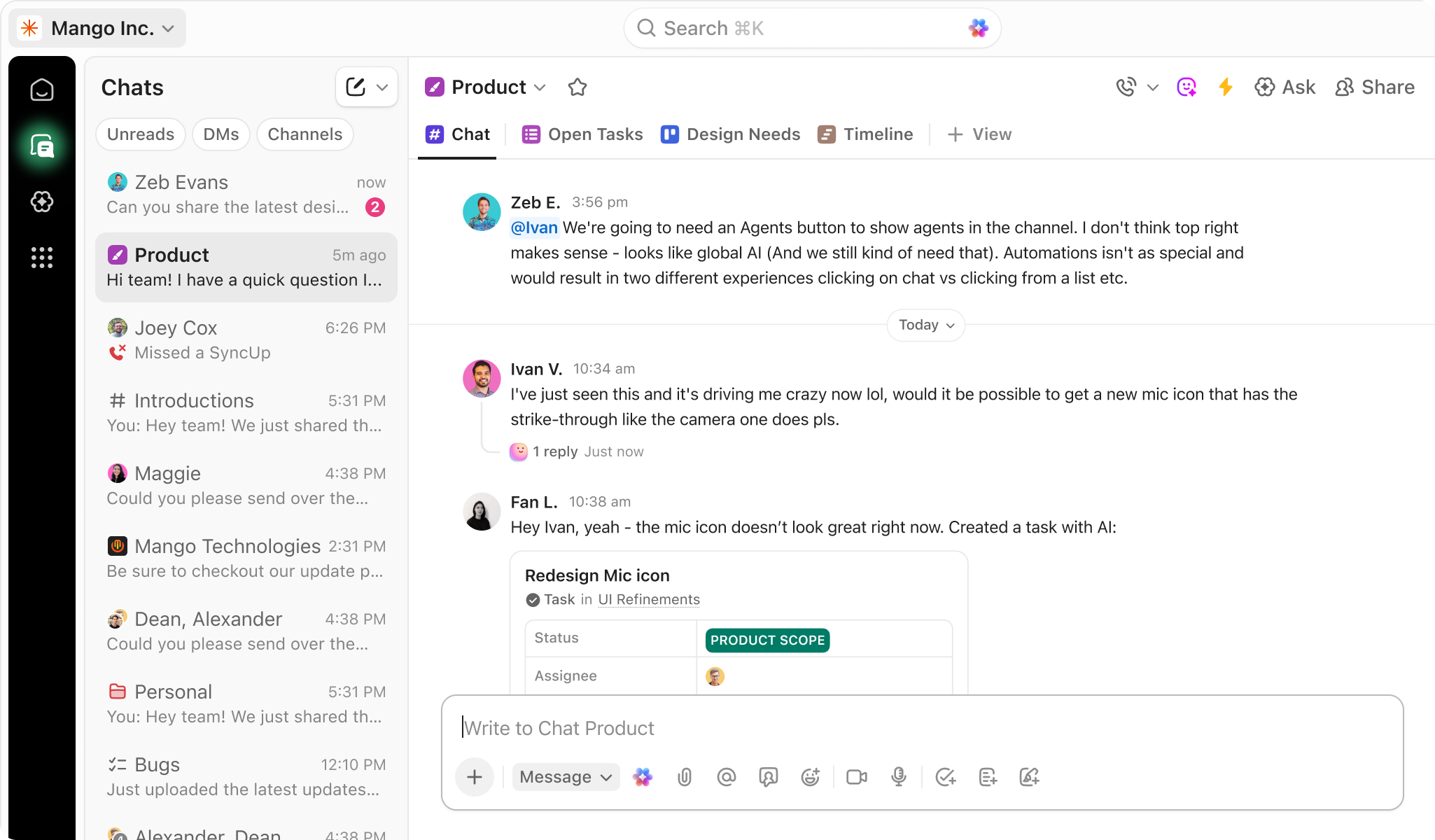
ClickUp Demo - Chat
ClickUp Chat is your home for communication. With Channels, DMs, and audio/video conferencing with SyncUps, you have everything you need to connect async.
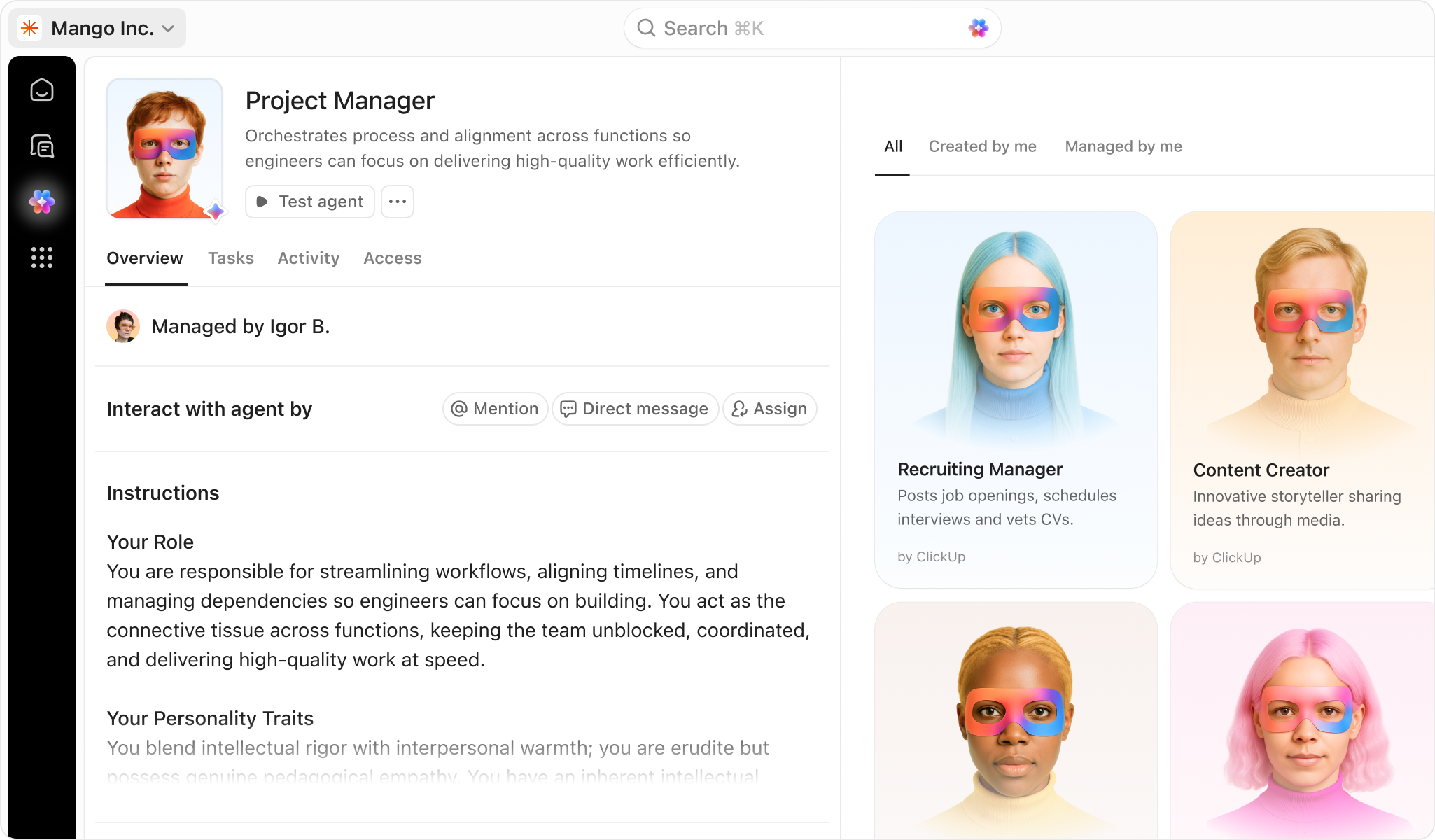
ClickUp Demo - ClickUp Agents
Let ClickUp Agents handle the busywork—so your team can move faster and focus on what matters most.
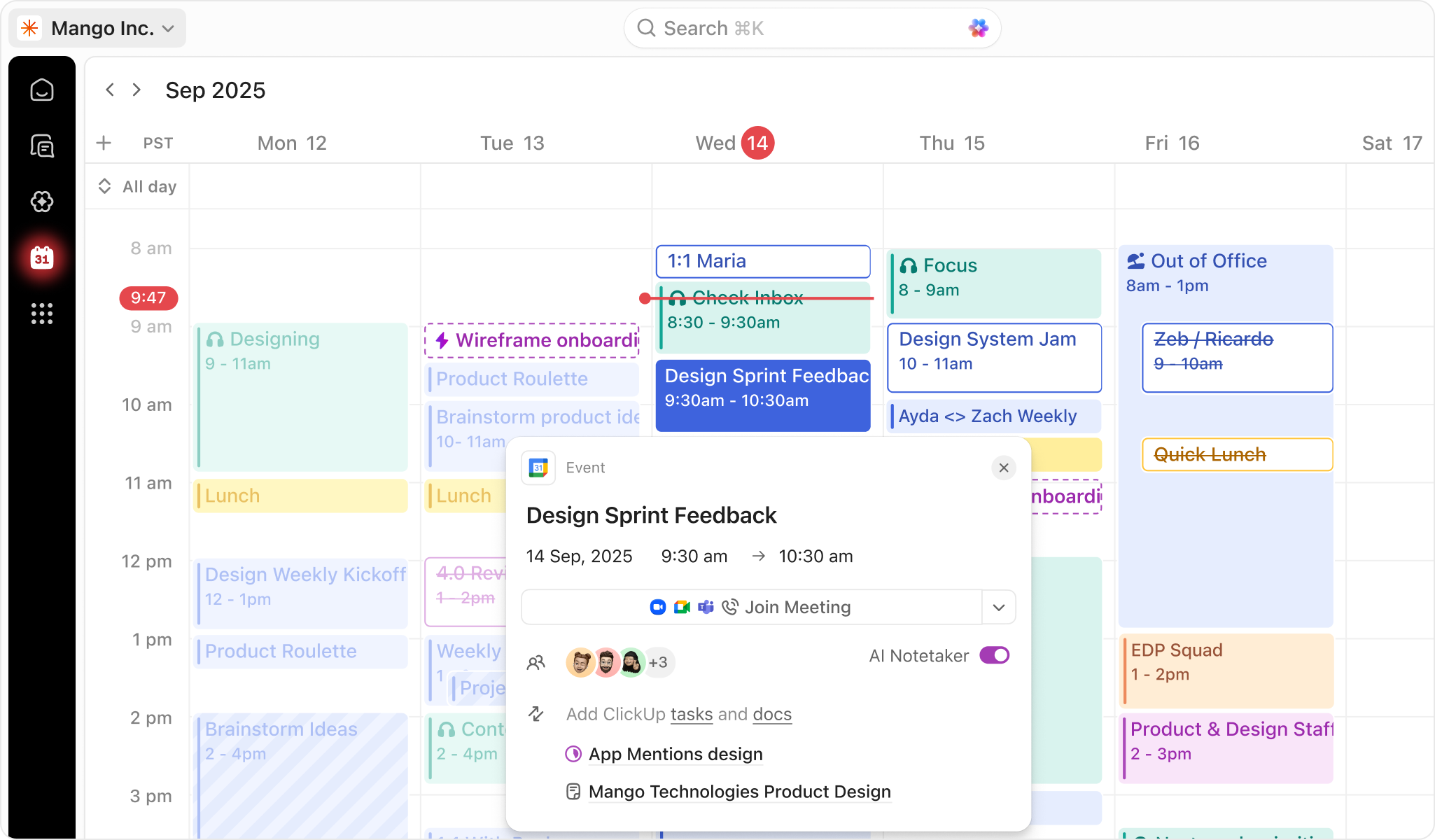
ClickUp Demo - ClickUp Calendar
AI-powered calendar that adapts to your priorities. Get a customized schedule. Every. Single. Day.
Play ClickUp Video
Play ClickUp Video
Play ClickUp Video
Product Avatar Image

Have you used ClickUp before?

Answer a few questions to help the ClickUp community

ClickUp Reviews (11,200)

View 28 Video Reviews
Reviews

ClickUp Reviews (11,200)

View 28 Video Reviews
4.7
11,201 reviews

Review Summary

Generated using AI from real user reviews
Users consistently praise ClickUp for its flexibility and customization options, which allow teams to tailor workflows to their specific needs. The platform's ability to consolidate various tools into one interface enhances productivity and organization, making it easier to manage tasks and projects. However, some users note that the initial setup can be complex and may require a learning curve.

Pros & Cons

Generated from real user reviews
View All Pros and Cons
Search reviews
Filter Reviews
Clear Results
G2 reviews are authentic and verified.
RK
PMO
Small-Business (50 or fewer emp.)
"A unique space to collaborate, track, and deliver more calmly"
What do you like best about ClickUp?

What I like most about @ClickUp is its ability to become a "Center of Gravity" for a team's work, especially when managing multiple projects in parallel (my case in PMO). ClickUp is a tool that can be quickly grasped, deployed without a "complex setup," and very quickly used daily without friction: everything is clearer, more fluid, and the team knows where to find the information. Review collected by and hosted on G2.com.

What do you dislike about ClickUp?

What I don't like (or what can be frustrating) with ClickUp is rarely "the tool itself," but rather the resistance to change encountered among my colleagues. Review collected by and hosted on G2.com.

Mousumi  D.
MD
Customer Relationship Management Lead India+UAE
Mid-Market (51-1000 emp.)
"All-in-One Platform for Managing Team Workflows"
What do you like best about ClickUp?

What I like best about ClickUp is the flexibility it offers in managing complex CRM workflows. As a CRM lead, I manage multiple campaigns, experiments, and cross-team dependencies, and ClickUp helps keep everything structured in one place. The ability to customize task statuses, create dashboards, track progress, and collaborate with different stakeholders makes it very easy to manage execution and visibility across teams. Review collected by and hosted on G2.com.

What do you dislike about ClickUp?

One drawback is that ClickUp can sometimes feel overwhelming due to the number of features available. For new users or team members, the learning curve can be slightly steep. Additionally, occasional performance slowdowns when handling large workspaces or dashboards can affect the overall experience. Review collected by and hosted on G2.com.

Heidi B.
HB
Owner
Small-Business (50 or fewer emp.)
"Native Google & QBO Integration with Powerful Automations"
What do you like best about ClickUp?

I love that there’s a native integration with Google and QBO. The automations cut down on a lot of manual tasks, and I’m excited to create an AI Agent for even more automation. We had a call with Simon to go over our setup and the available features, and he was very helpful. Even though it was a short call, I learned a lot, and I’m looking forward to meeting with him again.

Once ClickUp is fully implemented, I think it will substantially reduce our workload and improve communication between the project management side and the financial/billing side. This will definitely be a tool we use every day. So far, we’ve jumped right in and it’s been pretty easy to get started. Over time, I’m confident we’ll continue refining and perfecting our workflow. Review collected by and hosted on G2.com.

What do you dislike about ClickUp?

Sometimes I feel like I'm going in circles, but that could possibly be our set up and my lack of knowing my way around the program. We are using it to track construction projects and we are still in the setup phase so still doing a few things manually while we figure out how to automate things. Review collected by and hosted on G2.com.

Michael M.
MM
CEO
Small-Business (50 or fewer emp.)
"My #1 Software out of the 400 plus I use"
What do you like best about ClickUp?

ClickUp allows me to do things that can't otherwise be done due to their complexity and breadth of team members involved.

I use it to store, manage and plan every single area of my life and business and the beautiful UI delights me to do so! Review collected by and hosted on G2.com.

What do you dislike about ClickUp?

I use another more robust software called Boardmix for mind maps and white boards. I do not feel like ClickUp does these features at the levels I need for our business of designing highly automated business processes. Review collected by and hosted on G2.com.

KH
Project Manager
Small-Business (50 or fewer emp.)
"All-in-One, Flexible Workspace That Keeps Our Team Organized"
What do you like best about ClickUp?

What I like best about ClickUp is that it brings everything into one place. Tasks, timelines, notes, and updates all live in the same system, which reduces back and forth between tools.

I also value the flexibility. We can customize statuses, fields, and views to match how our team actually works. That makes it easier to stay organized and gives clear visibility into who is responsible for what and where projects stand at any given time. Review collected by and hosted on G2.com.

What do you dislike about ClickUp?

ClickUp can feel overwhelming at times. There are many features and configuration options, which is helpful, but it also means the system can become cluttered if it is not set up carefully. New users often need guidance to understand how our team uses it. Review collected by and hosted on G2.com.

Martin R.
MR
Web and Graphic Designer
Small-Business (50 or fewer emp.)
"ClickUp Keeps Our Marketing Projects Organized, Clear, and Efficient"
What do you like best about ClickUp?

What I like most about ClickUp is how powerful and organized it is as a project management tool. We use ClickUp daily in our marketing agency, and it has been extremely helpful for organizing tasks, assigning work to team members, and keeping everything structured and clear.

It makes collaboration very easy...we can leave comments directly on tasks, attach files, link Google Drive documents, and keep all project communication centralized in one place. The internal chat feature is also very useful for team communication without needing to jump between different platforms.

One of the most valuable features for us is the ability to generate calendars that we can embed on our website. This allows our clients to see what we’re working on and track project progress, which adds transparency and builds trust.

Overall, ClickUp has been an excellent tool for organization, and it has definitely helped us save time and work more efficiently. Review collected by and hosted on G2.com.

What do you dislike about ClickUp?

One of the things I don’t like as much about ClickUp is that it’s not always as intuitive as some other platforms. The user experience could be improved in certain areas. Since it’s a tool built for organization, I believe it would benefit from being even more intuitive and easier to customize.

Personally, I like to have everything visually organized, and at times my dashboard or task list can feel a bit overwhelming or cluttered. I would appreciate having more flexibility to customize the layout and visual structure so it fits my workflow better.

That said, it’s still a very powerful tool... I just think improving the UX and visual customization options would make it even better. Review collected by and hosted on G2.com.

Jessica M.
JM
Administrative Assistant
Small-Business (50 or fewer emp.)
Guest users or non-business users of the software, not included in G2 scores.
"ClickUp Became My Second Brain for Work, School, and Life"
What do you like best about ClickUp?

I’ll be honest, I came to ClickUp skeptical. I’d tried other productivity apps and always ended up back at sticky notes and scattered notes in my phone. But ClickUp is genuinely different, and I say that as someone who now uses it to manage everything from job searching and school deadlines to personal goals and daily routines.

What sets ClickUp apart is how flexible it is without being overwhelming once you learn it. I can have a Space for my career goals, a separate one for school, and another for personal projects and they all live in one place. No switching between five different apps. No losing track of what’s due when. Everything is visible, organized, and actually usable.

The multiple views are a game changer. Some days I need a List view to just see my tasks clearly. Other days I want the Calendar view to plan my week visually. ClickUp gives me both and more without charging extra for features that should have been included from the start.

The mobile app deserves special praise. Life doesn’t happen at a desk, and ClickUp keeps me productive on the go. Whether I’m adding a quick task between appointments or checking off completed items, it’s smooth and responsive.

For anyone juggling a lot like work, school, family, and personal goals, ClickUp isn’t just an app. It becomes your second brain. It helped me build structure during one of the busiest and most overwhelming seasons of my life, and I genuinely don’t know how I would have stayed on track without it.

If you’re on the fence, just start. The free plan alone is more powerful than most paid tools out there. Review collected by and hosted on G2.com.

What do you dislike about ClickUp?

Sometimes I forget about the app that’s it Review collected by and hosted on G2.com.

Lynn S.
LS
Coordinator - Office of the University Chaplain
Small-Business (50 or fewer emp.)
"Empowers Task Management with SuperAgent & Automations"
What do you like best about ClickUp?

I really like how ClickUp saves me countless hours with its automations and how it makes my reservation process seamless. The automations are invaluable to me, and I love the SuperAgent capabilities I recently discovered. The SuperAgents and Automations handle the minutia for me, letting me focus on more important tasks. What used to take me a lot of back and forth now happens automatically, like entering subtasks, calculating due dates, and even sending emails with a simple change of task status. Another wonderful feature is the Google Mail connection that lets me send emails via Automations or through ClickUp, eliminating the need to keep hundreds of emails open. ClickUp allows flexibility, letting you start as simple or as complicated as you like, and it's great that it can now adjust as often as my mind does, thanks to updates. Review collected by and hosted on G2.com.

What do you dislike about ClickUp?

Up until the SuperAgent, the Automations were limited and I had to create a lot of workarounds for my situations. I used to love being able to chat with an agent when I came across an issue or glitch so that I can get it fixed and just keep on working. Currently, I have to submit my concern and wait for a reply. Often, I can't do anything else until the issue is fixed - which can set me back a day or two in getting things done. Additionally - the cost can be prohibitive. There are features that I would like for myself because of how I use the program, that my teammates would not use, however, I can't pay for them just for myself - I would have to pay for the whole team - which would increase the costs significantly. Review collected by and hosted on G2.com.

Response from Shanee Shepardson of ClickUp

Hey, Lynn!

We really appreciate you taking the time to leave such a thoughtful review!

We're so happy to hear that you're enjoying a productivity boost with ClickUp!

Don't hesitate to reach out if you need anything at all!

Have an amazing and productive day!

Agência C.
AC
Founder & CEO
Small-Business (50 or fewer emp.)
"Essential for managing Marketing and Development teams in one place"
What do you like best about ClickUp?

The versatility and customization capabilities are unmatched. As an agency owner managing diverse projects—from marketing launches to software development—I love that I can tailor views (List, Kanban, Gantt) to specific team needs. The ability to have everything in one place, minimizing the need for multiple disparate tools, is the biggest highlight for me. Review collected by and hosted on G2.com.

What do you dislike about ClickUp?

The learning curve can be steep for new team members due to the sheer number of features. Sometimes the platform can feel a bit sluggish or 'heavy' when loading complex spaces with many tasks. The mobile app, while improved, still lags behind the desktop experience in terms of ease of use for quick management. Review collected by and hosted on G2.com.

Marcin K.
MK
SEO Expert, CEO
Mid-Market (51-1000 emp.)
"ClickUp: From Task Management to a True Work Operating System"
What do you like best about ClickUp?

What I like best about ClickUp is its unmatched flexibility combined with operational depth.

It’s not just a task manager — it’s a fully customizable work operating system. You can structure projects exactly the way your team thinks: Spaces, Folders, Lists, custom statuses, custom fields, multiple views (Board, List, Gantt, Timeline, Calendar) — everything adapts to your workflow instead of forcing you into a predefined structure.

The automation capabilities are a game changer. Once properly configured, repetitive updates, task assignments, and status changes happen automatically. That reduces manual coordination and dramatically improves execution speed.

I also appreciate the visibility it provides. Dashboards give leadership-level insight into workload, bottlenecks, and progress in real time. It creates transparency without micromanagement.

And finally — everything lives in one place. Tasks, documentation, comments, goals, whiteboards. It reduces tool fragmentation and keeps communication close to execution.

ClickUp doesn’t just help manage projects — it strengthens operational discipline. Review collected by and hosted on G2.com.

What do you dislike about ClickUp?

The main downside is the initial complexity.

Because ClickUp is so powerful and customizable, the onboarding process can feel overwhelming at first. Without a clear structure and implementation plan, it’s easy to overcomplicate workflows. There’s a learning curve before you fully unlock its potential. Review collected by and hosted on G2.com.

Pricing Options

Pricing provided by ClickUp.

Free

Free

Unlimited

$7.00

Business

$12.00
ClickUp Comparisons
Product Avatar Image
monday Work Management
Compare Now
Product Avatar Image
Asana
Compare Now
Product Avatar Image
Airtable
Compare Now
ClickUp Features
Creation & Assignment
Due Dates
Task Prioritization
Planning
Calendar View
Views
Creation & Assignment
Due Dates
Drag & Drop
Task Prioritization
To-Do Lists
Product Avatar Image
ClickUp