

Workday HCM

By Workday

4.1 out of 5 stars

How would you rate your experience with Workday HCM?

Compare this with other toolsSave it to your board and evaluate your options side by side.
Save to board

Workday HCM Reviews & Product Details

Value at a Glance

Averages based on real user reviews.

Time to Implement

7 months

Workday Solutions
(1)

See how Workday products can work together to solve real problems.

Workday HCM Media

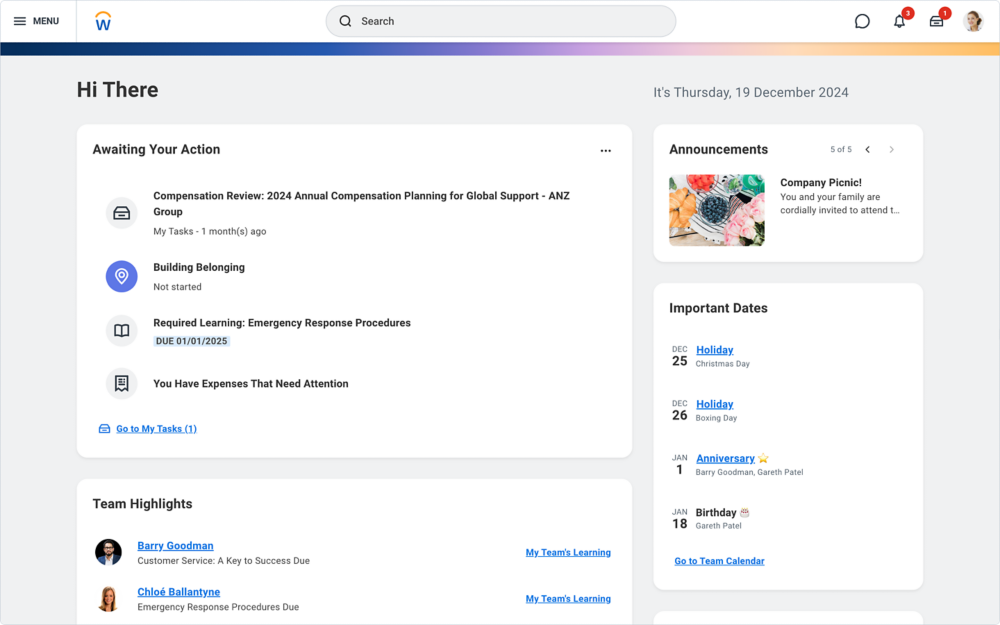
Workday HCM Demo - Workday Human Capital Management Homepage
Workday Human Capital Management Homepage
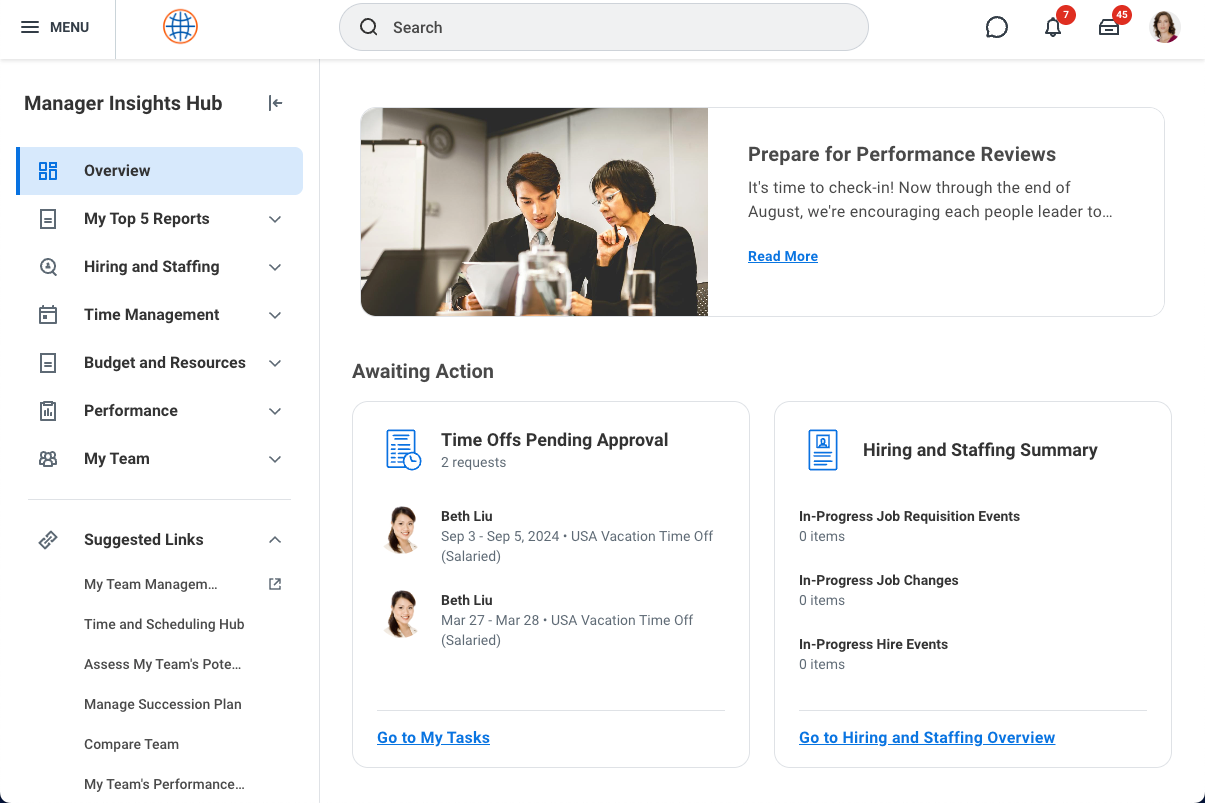
Workday HCM Demo - Workday Human Capital Management Manager Insights Hub
Workday Human Capital Management Insights Hub
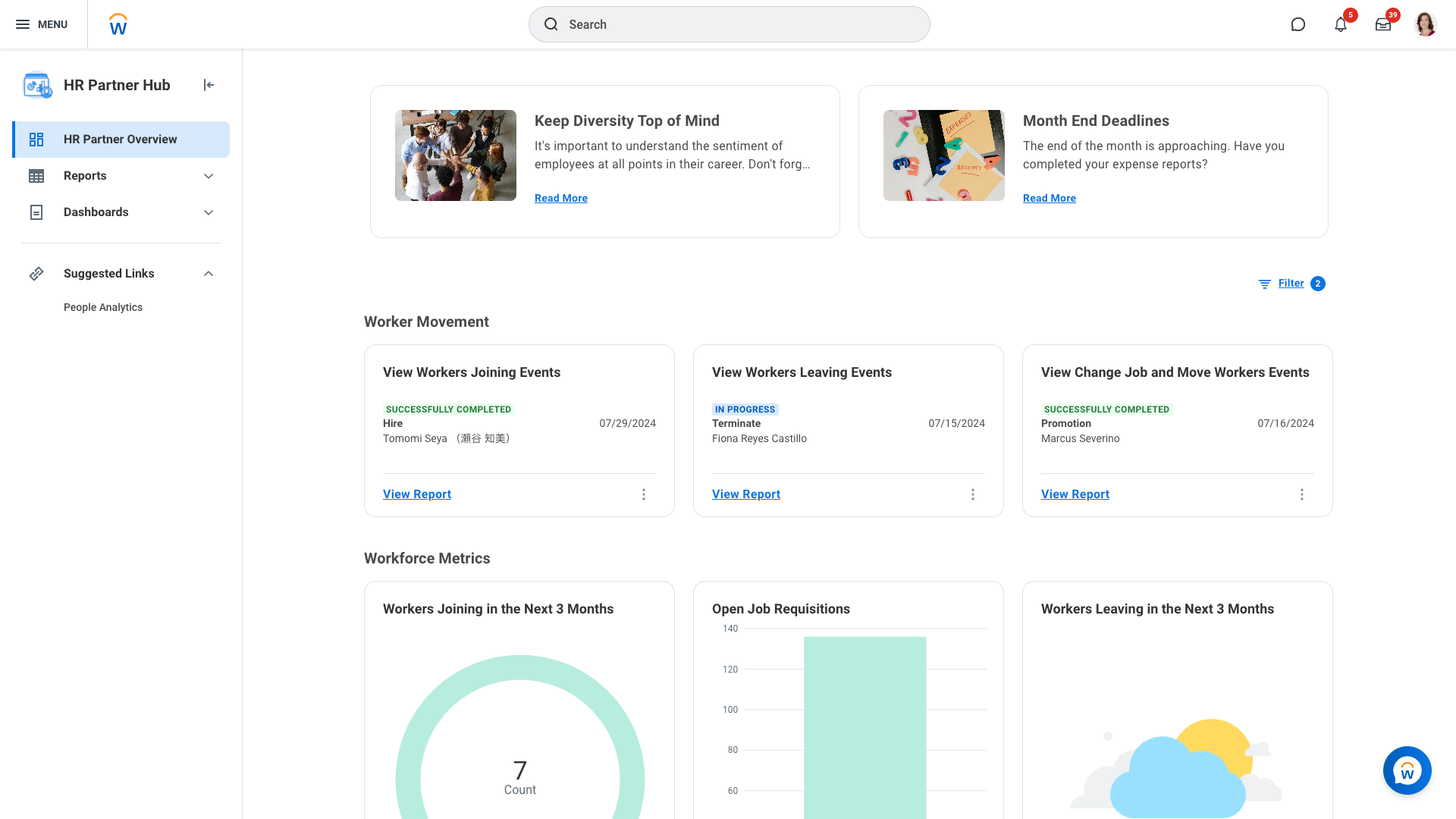
Workday HCM Demo - Workday Human Capital Management HR Partners Hub
Workday Human Capital Management HR Partners Hub
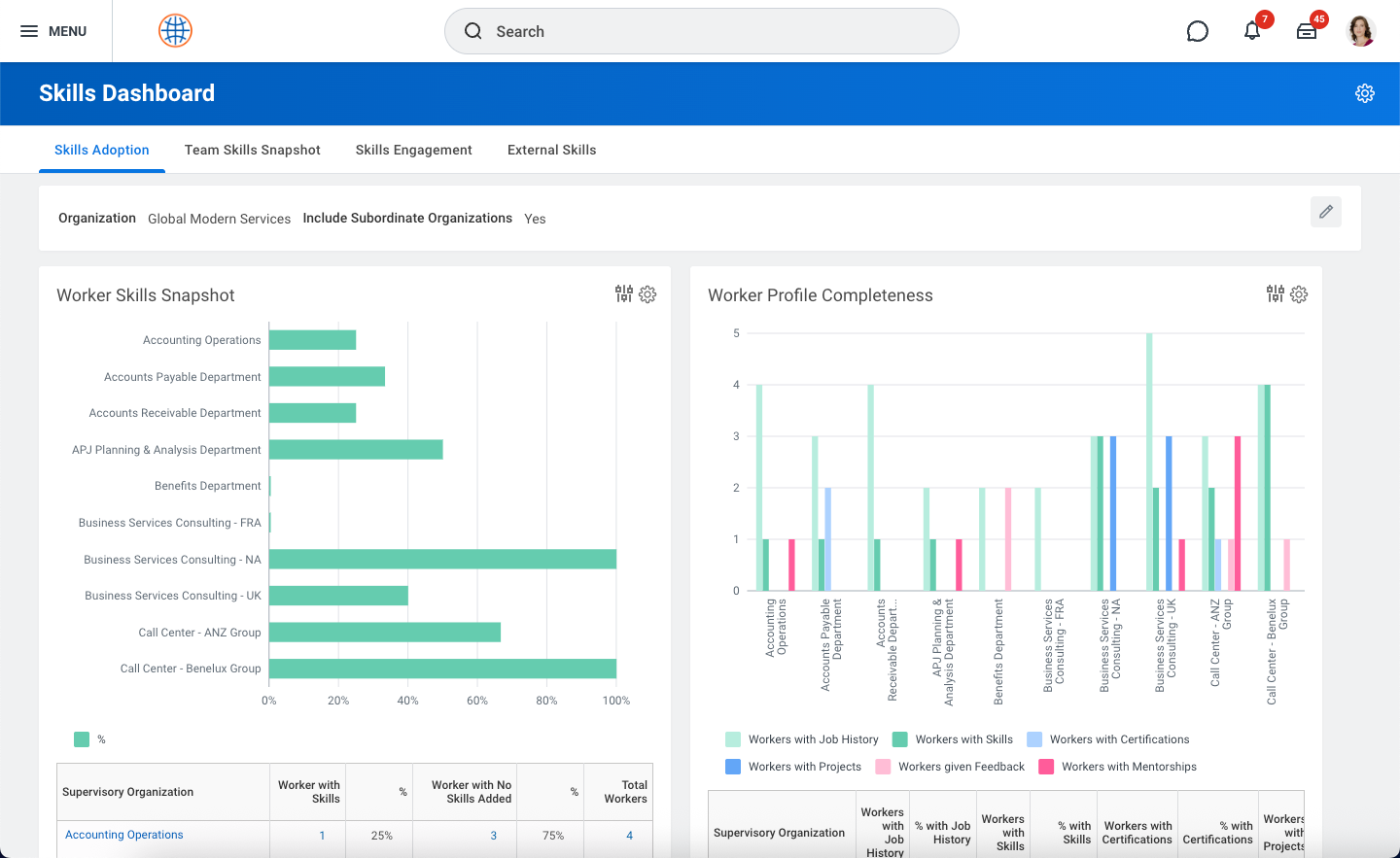
Workday HCM Demo - Workday Human Capital Management Skills Dashboard
Workday Human Capital Management Skills Dashboard
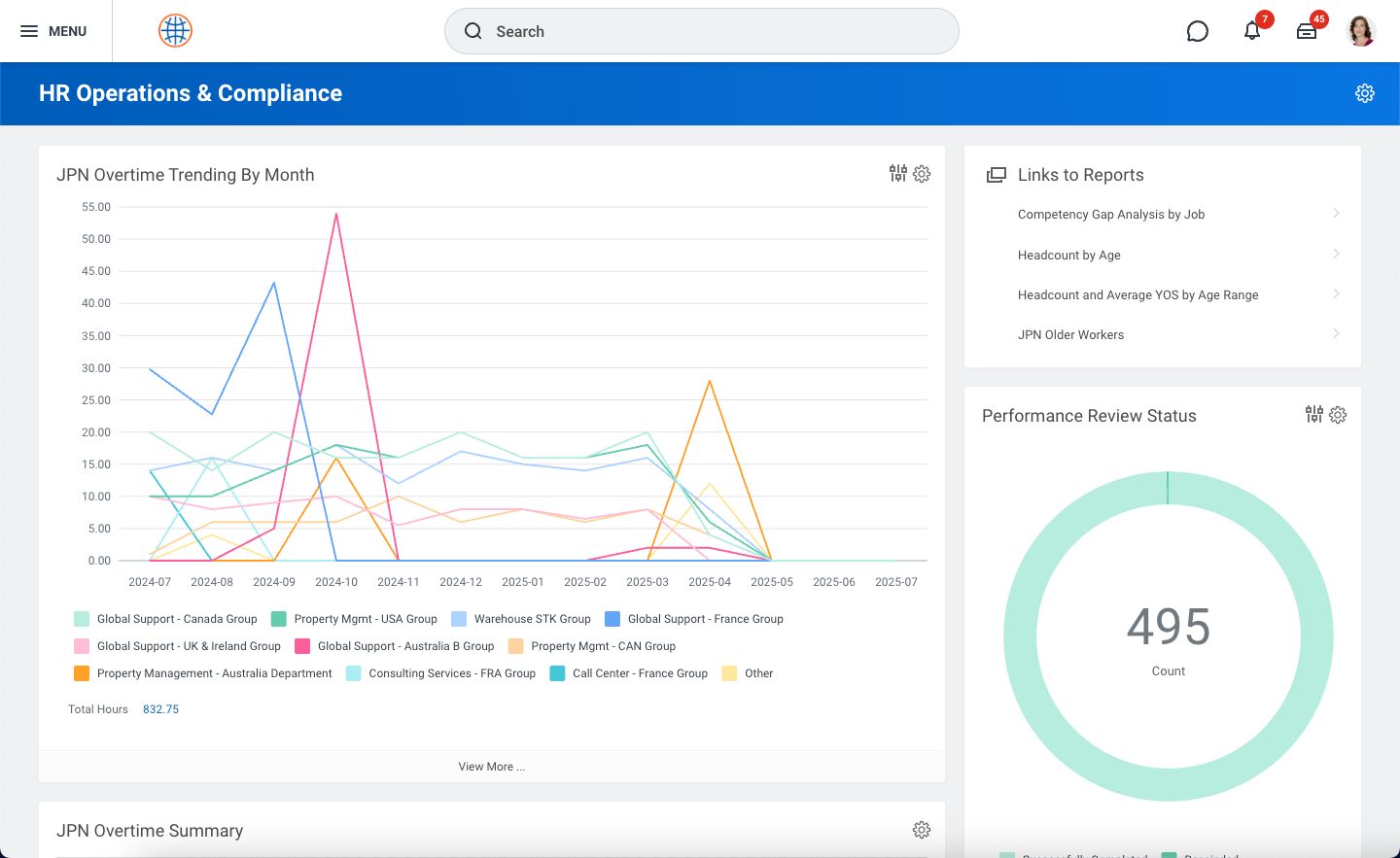
Workday HCM Demo - Workday Human Capital Management HR Operations and Compliance Dashboard
Workday Human Capital Management HR Operations and Compliance Dashboard
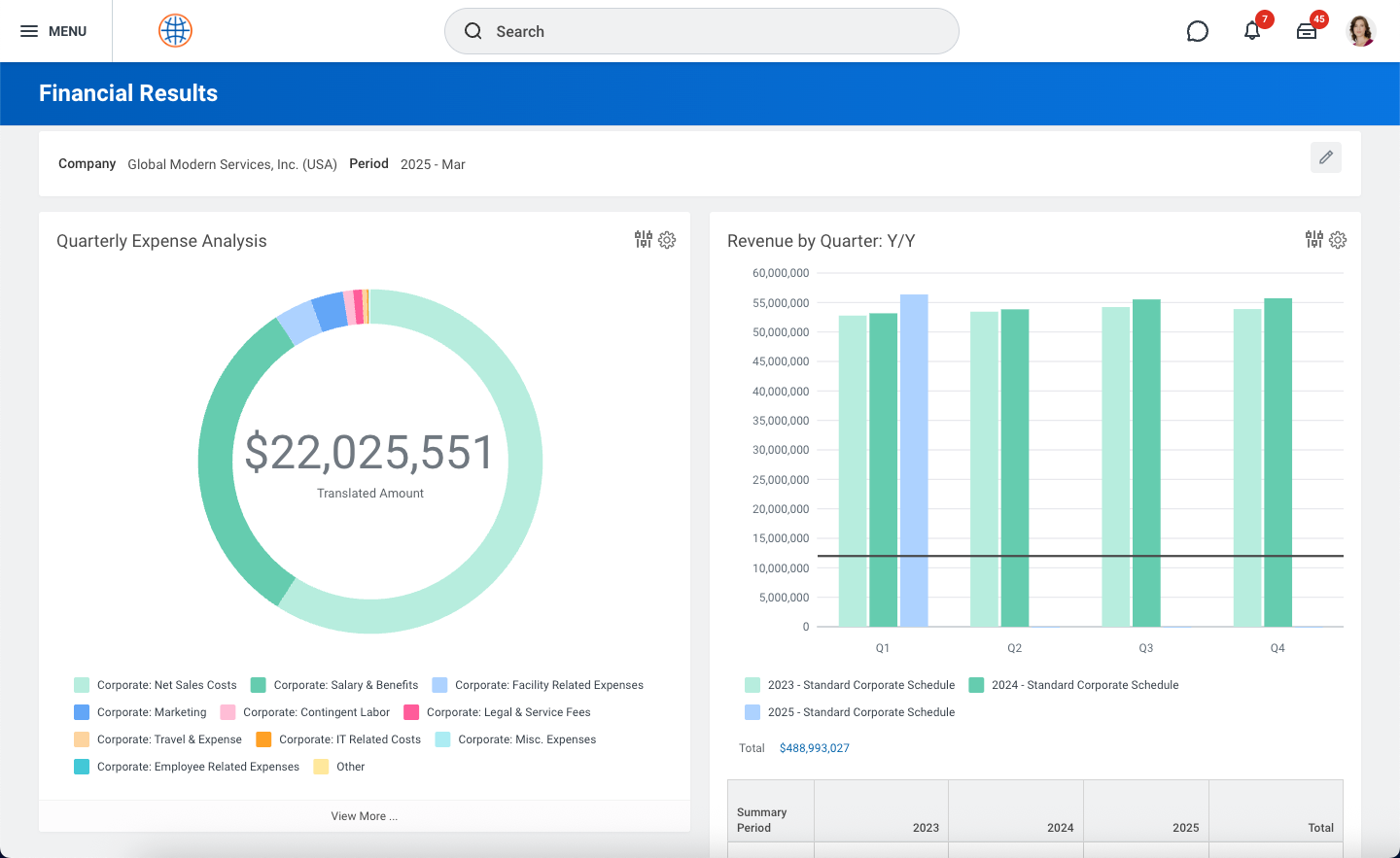
Workday HCM Demo - Workday Human Capital Management Expense Analysis
Workday Human Capital Management Expense Analysis
Workday Human Capital Management (HCM) Quick Demo
Play Workday HCM Video
Workday Human Capital Management (HCM) Quick Demo
Product Avatar Image

Have you used Workday HCM before?

Answer a few questions to help the Workday HCM community

Workday HCM Reviews (1,498)

View 7 Video Reviews
Reviews

Workday HCM Reviews (1,498)

View 7 Video Reviews
4.1
1,498 reviews

Review Summary

Generated using AI from real user reviews
Users consistently praise the intuitive interface and centralized HR management capabilities of Workday HCM, which streamline various HR processes and enhance user experience. The platform's ability to integrate multiple functions into one system allows for efficient data management and reporting, making it easier for teams to operate. However, some users note a common limitation in the complex navigation required for certain tasks, which can hinder efficiency.

Pros & Cons

Generated from real user reviews
View All Pros and Cons
Search reviews
Filter Reviews
Clear Results
G2 reviews are authentic and verified.
NM
Sr. Corporate Trainer/ Consultant
Enterprise (> 1000 emp.)
Guest users or non-business users of the software, not included in G2 scores.
"Unified HR Data, But a Steep Learning Curve and Clunky Search"
What do you like best about Workday HCM?

What I appreciate most is the unified data architecture. Having HR, payroll, and talent management all in one place eliminates the need for messy integrations. It ensures that when a change is made to an employee record, it reflects across every module instantly, which drastically reduces data entry errors. Review collected by and hosted on G2.com.

What do you dislike about Workday HCM?

The platform has a steep learning curve for new administrators. Because it is so highly configurable, the initial setup and ongoing maintenance require specialized knowledge or expensive consultants. For casual users, the search functionality can sometimes be non-intuitive, requiring multiple clicks to find relatively simple tasks or documents. Review collected by and hosted on G2.com.


Luisa B.
LB
Cash Application Specialist
Mid-Market (51-1000 emp.)
"Efficient, intuitive, and great for everyday HR self-service"
What do you like best about Workday HCM?

What I like most about Workday HCM is how it centralizes all my essential work tools into one intuitive platform. I can easily log my hours, download my pay stubs, and request time off in just a few clicks. The self-service functionality is excellent, giving me full autonomy over my personal information and HR tasks without any hassle. It’s rare to find an enterprise tool that is this user-friendly and reliable. Review collected by and hosted on G2.com.

What do you dislike about Workday HCM?

The navigation can occasionally feel a bit convoluted. While the interface is clean, some specific information is buried under multiple layers of sub-tabs and menus. It sometimes requires more clicks than expected to find a particular document or setting, which can be slightly frustrating when you're in a hurry. Review collected by and hosted on G2.com.

Aman S.
AS
HR Service Delivery Representative
Human Resources
Enterprise (> 1000 emp.)
"Workday Makes HR Service Delivery Fast, Easy, and Well-Integrated"
What do you like best about Workday HCM?

I work in HR service delivery, and Workday is very easy to use—everything is set up nicely. I can quickly view employee information, including payslips and benefits. I’m also able to process many types of job changes and post jobs both internally and externally. It makes it straightforward to manage time off and leaves of absence as well. I can generate different types of letters, and I can track time and payments too. Overall, it’s the best HCM for what I need. It’s also connected to our other Microsoft tools like Outlook and Teams, as well as ServiceNow. Review collected by and hosted on G2.com.

What do you dislike about Workday HCM?

Security! Although it’s a good thing that people can have different security levels and their access can be limited, sometimes, working in HR, if you aren’t given the correct security you simply can’t do your job. For example, in Workday Learning, you need Learning Admin access to manage employees’ learning, but if you’re not granted that access, you end up having to rely on the internal Workday/HRIS team and go back and forth just to complete the reporting requests from stakeholders. Review collected by and hosted on G2.com.

Arya P.
AP
HR Analyst- Global Benefits Operations
Enterprise (> 1000 emp.)
"Streamlined HR Processes with Powerful Automation"
What do you like best about Workday HCM?

What I appreciate the most about Workday HCM is how much can be automated. Routine HR tasks like approval, notification, and workflow can be set up to run smoothly without constant manual intervention. I also like the flexibility to create custom reports and tailored notifications, which makes it easier to get the exact insights we need and keep the right people informed. It saves time and reduces repetitive work while still giving us control over how the system supports our processes. Additionally, the ability to integrate Workday HCM with other systems helps reduce manual work and keeps information consistent across HR systems, making processes more efficient and less error-prone. Review collected by and hosted on G2.com.

What do you dislike about Workday HCM?

While Workday is powerful, some areas could be more user-friendly. Reporting is flexible but can feel complicated if you're not already familiar with the systems, and it sometimes takes extra efforts to get the exact data you need. Navigation can also feel a bit click-heavy, with multiple steps required for simple tasks. Users who are not technical feel it more complex. A more guided or simplified reporting interface would make it easier to quickly pull the insights we need without relying on advance knowledge. Review collected by and hosted on G2.com.

Viral S.
VS
IT SecOps Manager
Oil & Energy
Enterprise (> 1000 emp.)
"Workday HCM: Seamless All-in-One HR Experience with an Intuitive Interface"
What do you like best about Workday HCM?

Workday HCM’s biggest strength is how seamlessly it brings everything together in one place—HR data, payroll, benefits, time tracking, and employee self-service all feel connected and easy to navigate. The interface is clean and intuitive, which makes routine tasks quick to complete, and the self-service features empower employees to manage their own information without needing constant HR support. Overall, it creates a smoother, more efficient experience for both users and administrators. Review collected by and hosted on G2.com.

What do you dislike about Workday HCM?

Workday HCM is a strong platform overall, but some parts can feel less intuitive than expected. Certain workflows require too many steps or are buried under multiple menus, which can slow users down. The system can also have a noticeable learning curve, especially for employees who don't use it often. While powerful, some features feel overly rigid or limited in customization, making it harder to tailor processes to specific business needs. Review collected by and hosted on G2.com.

Steven B.
SB
Campus Facilities Technical Manager
Small-Business (50 or fewer emp.)
"Great for Interviews, Candidate Tracking, and Easy Approvals"
What do you like best about Workday HCM?

It was great for interviews and candidate tracking, and I never had an issue with that. Approvals were easy as well. We didn’t have Slack integration set up, although that might have been possible. For staff 1:1s and annual review meeting notes, we kept everything in Google Docs and didn’t store them in Workday; it would have been nice to have all of that in one place. Review collected by and hosted on G2.com.

What do you dislike about Workday HCM?

We didn’t have our meeting notes in there, and our KPIs or performance plans were all kept as separate documents in Google Drive. It would be much better if all of these could be stored together in Workday. Review collected by and hosted on G2.com.

Akshitha K.
AK
Mid-Market (51-1000 emp.)
"Game-Changer for HR Management with Some Room for Improvement"
What do you like best about Workday HCM?

I use Workday HCM primarily for payroll processing, and it has genuinely transformed how we manage our workforce. The standout feature for me is the reporting and analytics, giving us visibility into headcount and payroll trends. I appreciate that Workday HCM automates workflows significantly and makes payroll much faster. If I had to pick one thing I love most, it would be the real-time workforce data. Having instant, up-to-date visibility into headcount and turnover is invaluable. Workday connects the dots between HR, payroll, and recruiting data in a way that no other platform I've used has. This has a direct impact on faster decision-making and better workforce planning. The integration with Teams works overall well, and the initial setup required very minimal effort. The user experience and the all-in-one platform capability were better than other tools I've used, like ADP and BambooHR. Review collected by and hosted on G2.com.

What do you dislike about Workday HCM?

Workday HCM has a steep learning curve for first-time users, making it initially complex to navigate. The high implementation costs and licensing could be a barrier for smaller organizations with limited budgets. Additionally, a more intuitive interface and navigation could make it more user-friendly, along with improvements in system performance and load times. Review collected by and hosted on G2.com.

Verified User in Computer Software
UC
Enterprise (> 1000 emp.)
"Workday: Simple Self-Service HR with Great Enterprise Performance"
What do you like best about Workday HCM?

Workday keeps everything under one roof, which actually removes a lot of integration pain once faces with the usual HR setup. The UI is very simple to use employees can quickly self-service without the HR team's help. The onboarding is very flexible and not overly customised. Since, it's a enterprise ready product the performance is really great. The pricing is friendly since we are a enterprise company. Review collected by and hosted on G2.com.

What do you dislike about Workday HCM?

The licensing cost will be a lot if you are from a small commercial company. Ai is only good as per your data, sometimes the recommendations can be little generic. Review collected by and hosted on G2.com.

Verified User in Marketing and Advertising
GM
Enterprise (> 1000 emp.)
Guest users or non-business users of the software, not included in G2 scores.
"Simple, Efficient HR Tasks in One Centralized Workday HCM Hub"
What do you like best about Workday HCM?

What I like best about Workday HCM is how simple and efficient it is to handle everyday HR tasks. It makes it easy to request time off, view pay statements, update personal information, and check benefits all in one centralized place. The interface is intuitive and saves time, since everything is clearly organized and easy to find without needing to dig through multiple systems or reach out for support.

I also like that updates and approvals happen quickly and I can track the status of requests in real time, which makes things feel more transparent. Overall, it reduces a lot of back-and-forth and helps keep everything related to HR organized in one system. Review collected by and hosted on G2.com.

What do you dislike about Workday HCM?

What I don’t like about Workday HCM is that while it’s very functional, it can sometimes feel a bit complex when trying to find less frequently used features. Some menus and navigation paths aren’t always immediately intuitive, so it can take a few extra clicks or some searching to get where I need to go.

At times, certain tasks like making updates or reviewing detailed information can feel a bit repetitive because of the multiple steps involved. It works well overall, but there are moments where the workflow feels heavier than it needs to be for simple actions. Review collected by and hosted on G2.com.

deepankar c.
DC
Lead Engineer
Mid-Market (51-1000 emp.)
"Streamlines HR Operations with Room for Improvement"
What do you like best about Workday HCM?

I like that Workday HCM is an all-in-one platform for managing HR tasks. It provides a clean interface, which makes it easy to navigate and complete tasks quickly without much training, saving time in day-to-day use. I appreciate the easy access to employee data, which ensures I can find important information like team details, leave balances, or performance updates without switching between multiple systems, making decision-making and coordination much more efficient. It streamlines processes like leave requests, performance tracking, and approvals, making everything more efficient and organized. Workday HCM simplifies HR processes by centralizing employee data and automating tasks like leave management, performance tracking, and approvals, reducing manual work and improving visibility into team information. Review collected by and hosted on G2.com.

What do you dislike about Workday HCM?

Some areas could be improved, such as system speed and navigation for certain tasks, which can feel a bit slow or require multiple clicks. The search functionality can also be inconsistent at times, making it harder to quickly find specific information. Review collected by and hosted on G2.com.

Questions about Workday HCM? Ask real users or explore answers from the community

Get practical answers, real workflows, and honest pros and cons from the G2 community or share your insights.

HM
Harold Martin
Last activity almost 3 years ago

Can you explain workday financial in more detail?

GU
Guest User
Last activity 5 days ago

What is Workday HCM used for?

Pricing Insights

Averages based on real user reviews.

Time to Implement

7 months

Return on Investment

13 months

Average Discount

11%

Workday HCM Comparisons
Workday HCM Features
Organization Management
Time, Attendance, and PTO
Salary Structures
User, Role, and Access Management
Performance and Reliability
Ease of Completing Timesheets
Time Off Accrual
Direct Deposit
Product Avatar Image
Workday HCM