Learn More About AI Sales Assistant Software
AI sales assistant software buying insights at a glance
AI Sales Assistant Software brings together automation, conversation intelligence, and predictive guidance to help sales teams run outreach and deal execution with less manual effort. Instead of juggling multiple point solutions, these platforms centralize the “work between the work”, capturing activity data, generating sales-ready content, summarizing conversations, prioritizing next steps, and syncing outcomes back to systems like CRM. As buying journeys become longer, the number of stakeholders increases, and teams remain distributed, AI sales assistant software has become a practical way to maintain consistency, coverage, and momentum without inflating headcount.
Based on G2 review data, buyers most often adopt these tools to reduce administrative drag and speed up follow-through. The strongest review patterns point to a few recurring wins: noticeable time savings from automated follow-ups and workflow assistance, stronger call outcomes driven by summaries, action items, and coaching-style insights, and cleaner pipeline hygiene because activity and notes are captured more reliably. Many teams also emphasize that the AI sales tools they keep long-term are the ones that blend into everyday selling motions rather than forcing constant context switching.
Pricing typically follows a subscription model (monthly or annual), most often priced per user and tiered by AI capabilities (e.g., conversation intelligence, agent automation, scoring, forecasting) and data access limits (minutes analyzed, messages generated, contact volume). Common cost drivers include CRM/meeting integrations, advanced analytics, admin controls, and enterprise-grade security or compliance needs. Some vendors also charge for onboarding, enablement services, or custom integration work when sales workflows are complex or highly governed.
Top 5 FAQs from software buyers:
- How does an AI sales assistant pull data from our CRM and meetings?
- What does it take to get accurate AI summaries and recommended next steps?
- Can the platform automate follow-ups without risking brand voice and compliance?
- Which integrations matter most for day-one value (CRM, email, dialer, calendar)?
- How do teams measure ROI beyond “time saved”?
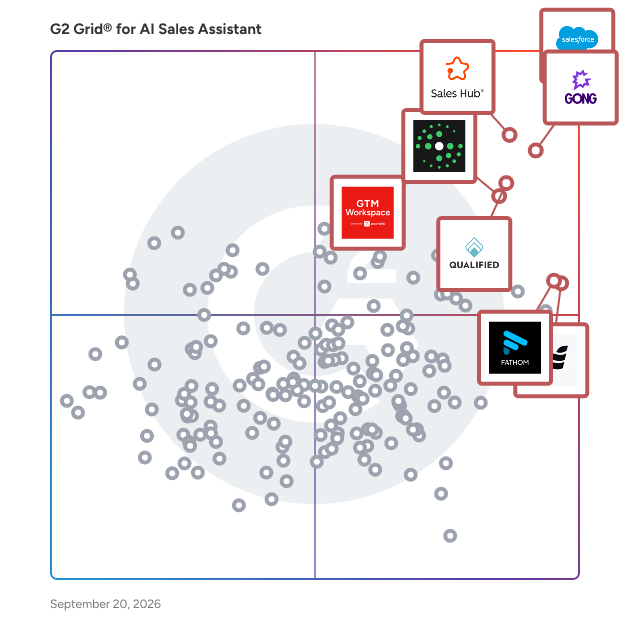
G2’s top-rated AI Sales Assistant Software, based on verified reviews, includes Salesforce Sales Cloud, Gong, HubSpot Sales Hub, and Apollo.io. (Source 2)
What are the top-reviewed AI Sales Assistant Software on G2?
Salesforce Sales Cloud
- Reviews: 1782
- Satisfaction: 99
- Market Presence: 99
- G2 Score: 99
Gong
- Reviews: 443
- Satisfaction: 98
- Market Presence: 84
- G2 Score: 91
HubSpot Sales Hub
- Reviews: 1599
- Satisfaction: 88
- Market Presence: 89
- G2 Score: 88
Apollo.io
- Reviews: 988
- Satisfaction: 99
- Market Presence: 68
- G2 Score: 84
ZoomInfo Sales
- Reviews: 897
- Satisfaction: 84
- Market Presence: 83
- G2 Score: 83
Satisfaction reflects user-reported ratings, including ease of use, support, and feature fit. (Source 2)
Market Presence scores combine review and external signals that indicate market momentum and footprint. (Source 2)
G2 Score is a weighted composite of Satisfaction and Market Presence. (Source 2)
Learn how G2 scores products. (Source 1)
What I Often See in AI Sales Assistant Software
Feedback Pros: What Users Consistently Appreciate
- Fast time savings from automated follow-ups and task reminders
-
“I truly appreciate how this AI sales tool effortlessly integrates into my workflow by allowing me to record and watch sales meetings. This feature not only enables me to gain insights from my colleagues' meetings, but it also significantly aids in learning best practices and understanding how they pitch our solutions effectively. By observing these meetings, I've been able to tweak my sales pitch to be more effective. Moreover, I am impressed by Gong's auto-generated meeting follow-ups, which streamline the after-meeting process, saving me time and ensuring no details are overlooked.” - Alexander Saad, Gong Review
- Clear, easy-to-use interface that reduces daily selling friction
-
“This AI sales assistant software is easy to work with and didn't take long to set up. I like how quickly i can filter and find the right prospects without wasting time scrolling through irrelevant results. I use it regularly, like almost every day to research companies and decision makers, and the range of features from intent data to company insights makes prospecting much faster. It is easy to use interface, and the integration with out CRM was smooth, and now i can push leads directly without extra manual steps.” - Verified User, ZoomInfo Review
- Meeting summaries and action items that streamline handoffs
-
“I like how quickly and accurately it creates meeting summaries and breaks them down into meeting purpose, topics discussed, actions etc. It also removes unnecessary topics or social chit-chat that occurs throughout the meeting, leaving the summary with only the relevant and work-related topics.” - Maz Barkley, Fathom Review
Cons: Where Many Platforms Fall Short
- Complex workflows create a learning curve for new users
-
“This AI Sales assistant system can also be a bit hard to work with if your team does sales, in a different way. It can be tough to make the pipelines and workflows fit your teams sales process. It can feel a bit stiff and not very flexible. Additionally, while the platform is powerful, there’s a learning curve for new users, and initial setup can take time to ensure everything from deal stages to reporting is configured correctly.” - Feleecia Kerr, HubSpot Sales Hub Review
- Reporting speed and dashboards lag behind high-volume team needs
-
“Reporting exports can be slow for large datasets, and a few less-common integrations need deeper documentation for easier initial setup.” - Mohammad Amro, Rocket Review
- Limited customization for filters, scoring logic, and health views
-
“I wish there was a better way to measure account health, like a graph or chart. It would be helpful to have something on the home screen to flag opportunities or customers that may be at risk of churning. A dashboard with numbers and graphs would be great.” - Courtney Warner, Gong Review
AI Sales Assistant software FAQs
What are the best AI assistants for sales?
Here are some of the best-rated AI assistant software tools for sales:
-
Salesforce Sales Cloud – Powerful CRM platform with embedded AI sales agents, lead management, and automation to drive revenue growth
-
ZoomInfo Sales – AI-driven sales intelligence platform for prospecting, lead prioritization, and workflow automation
-
Gong – Leading AI revenue operating system providing conversation intelligence, deal insights, and forecasting for sales teams
-
Fathom – Free AI assistant for sales meetings, providing instant transcription, summaries, and CRM sync
-
Fellow – AI meeting assistant focused on accurate notes, actionable items, and sales-team privacy
What are the best AI tools for sales GTM?
Here are some of the best AI tools for supporting sales go-to-market (GTM) strategies:
-
Salesforce Sales Cloud – Integrated platform with AI agents for pipeline management, automation, forecasting, and revenue intelligence
-
Apollo.io – AI-powered B2B sales platform for lead generation, enriched data, automated outreach, and end-to-end GTM execution
-
ZoomInfo Sales – Combines sales intelligence, buyer intent signals, and an AI-driven GTM Workspace to optimize prospect targeting and engagement
-
Zoho CRM – Cloud CRM with AI assistant “Zia” for predictions, pipeline analytics, GTM automation, and deep integrations
-
SalesHood – AI-enabled sales enablement and coaching platform, ideal for ramping teams and accelerating GTM content delivery and readiness
How to choose the best AI sales assistant software?
Start by mapping your highest-friction selling moments (follow-ups, meeting notes, lead prioritization, CRM updates) and prioritize tools that automate those workflows inside the systems your team already uses. Validate accuracy on real calls/emails, confirm that CRM and email/calendar integrations work reliably, and ensure that admins can set guardrails for permissions, tone, and compliance. Finally, run a short pilot with reps across roles to confirm adoption and measurable lift (time saved, activity completion, pipeline hygiene).
What features define the best AI sales tools?
The best platforms combine strong workflow automation with reliable data capture: meeting summaries and action items, next-step recommendations, automated follow-ups, and clean CRM sync. Look for customization (fields, triggers, templates), quality controls (editing/approvals, audit trails), and analytics that tie AI usage to outcomes (activity completion, conversion rates, pipeline health). Enterprise-ready security, role-based access, and integration depth are also key differentiators.
What’s the typical ROI timeline for AI sales tools?
Most teams achieve early ROI within 30-90 days of reclaiming selling time, through faster follow-ups and cleaner CRM data. More meaningful revenue impact (higher conversion rates, shorter sales cycles, improved forecast accuracy) often appears over 3-6 months, once workflows are standardized and adoption is consistent across the team. Faster ROI typically happens when integrations are set up correctly, and reps use the tool daily in core selling motions.
Most Popular FAQs
Which AI Sales Assistant Software has the best reviews?
Based on thousands of verified G2 reviews, these AI sales assistant platforms consistently earn the highest ratings across real user experiences:
-
Fathom — An AI meeting assistant that automatically records, transcribes, and summarizes sales calls—then syncs key takeaways directly to CRM—earning near-perfect ratings from sales teams of all sizes for eliminating manual note-taking and helping reps focus entirely on the conversation.
-
Qualified — A pipeline generation platform that uses AI to engage website visitors in real time, qualifying and routing prospects to the right sales rep the moment they show buying intent, consistently top-rated for the speed at which it converts web traffic into pipeline.
-
Substrata — An AI-powered conversational intelligence platform that analyzes the subtext and sentiment of sales communications to give reps real-time guidance on deal dynamics, stakeholder relationships, and the optimal next move to advance an opportunity.
-
Breakout — An AI sales coaching and conversation analysis platform that provides sales managers with deal-level insights and rep performance metrics derived from recorded sales conversations, earning perfect ratings for its accuracy and actionability.
What is AI sales assistant software?
AI sales assistant software applies machine learning and natural language processing to automate, augment, and accelerate the activities that consume a sales rep's working day—from prospecting and outreach personalization to meeting follow-up, CRM data entry, and deal risk forecasting.
The category spans several distinct use cases that often overlap in a single platform. Conversation intelligence tools record and analyze sales calls to surface coaching moments, track competitor mentions, and automatically update CRM records with deal intelligence. AI prospecting tools identify ideal-fit accounts and contacts, generate personalized outreach sequences, and automate follow-up cadences to keep pipeline development moving without manual effort.
Revenue intelligence platforms aggregate data across the full sales cycle—calls, emails, calendar, CRM—to give sales managers a forecast-grade view of deal health and rep performance. Real-time guidance tools surface relevant content, battle cards, or objection responses during live calls based on what prospects say. What unifies the category is the core value proposition: giving sales teams back the hours previously consumed by administrative work so they can spend more time in front of buyers—and giving them better information when they are.
Affordable AI sales assistants for medium businesses
Mid-market companies—typically between 200 and 1,000 employees—need AI sales assistant tools that deliver measurable ROI without the six-figure enterprise contracts or extensive IT implementation timelines that come with legacy sales technology. These platforms offer strong AI sales capabilities at price points accessible to mid-market sales teams:
-
Instantly — An AI-powered outbound sales and email automation platform with flat-rate pricing that gives mid-market sales teams unlimited sending infrastructure, AI-personalized sequences, and deliverability tools without per-seat costs that escalate with headcount.
-
Humantic AI — A buyer intelligence platform that builds personality profiles for prospects using publicly available data, giving mid-market sales reps and managers actionable guidance on communication style and outreach approach without requiring enterprise data contracts.
-
Amplemarket — An AI sales platform that combines prospecting data, outbound sequencing, and conversation intelligence in a single subscription, designed for mid-market revenue teams that need an all-in-one solution without purchasing and integrating three separate tools.
-
Close — A CRM with built-in AI sales assistant features—including automated calling, email sequencing, and activity tracking—that mid-market inside sales teams use as an affordable all-in-one alternative to combining Salesforce with separate sales engagement tools.
Best-rated AI sales assistant tools
The highest-rated AI sales assistant tools combine accurate AI outputs—transcriptions that are actually reliable, summaries that capture what matters, signals that reflect real deal dynamics—with interfaces that sales reps adopt without being forced to. These platforms consistently top G2's ratings across the full category:
-
Gong — The market-leading revenue intelligence platform that records and analyzes every customer interaction across calls, emails, and web conferences, giving sales leaders AI-powered deal inspection, forecast accuracy, and rep coaching insights that revenue teams at scale depend on.
-
Lindy — An AI agent platform that lets sales teams build customized AI assistants for specific sales workflows—from lead qualification to follow-up sequencing to CRM enrichment—without requiring engineering support to configure or deploy.
-
GTM Buddy — A sales enablement and AI guidance platform that surfaces the right content, playbooks, and competitive insights during live sales conversations, consistently top-rated by enterprise sales teams for the speed and relevance of its in-meeting recommendations.
-
ZoomInfo Sales — An AI-powered sales intelligence platform combining a deep B2B contact and company database with buying intent signals, predictive scoring, and workflow automation that helps sales teams prioritize the accounts most likely to convert.
What's the top AI sales app for increasing leads?
Increasing lead volume with AI means automating the identification, enrichment, and outreach activities that manual prospecting can't scale—finding more ideal-fit accounts faster, engaging them with personalized messaging at volume, and converting more website visitors and inbound signals into qualified pipeline. These platforms are most frequently cited by G2 reviewers specifically for lead generation and pipeline growth results:
-
Apollo.io — A sales intelligence and engagement platform combining one of the largest B2B contact databases with AI-powered outreach sequencing, consistently cited by sales teams for dramatically increasing the volume of qualified prospects in their pipeline without adding headcount.
-
B2B Rocket — An AI-powered outbound sales automation platform that deploys autonomous AI agents to identify target accounts, personalize outreach at scale, and book meetings directly into sales reps' calendars—purpose-built for teams that need to fill pipeline fast.
-
Jeeva AI — An AI sales agent platform that automates the full top-of-funnel workflow—account identification, contact enrichment, personalized outreach, and follow-up sequencing—enabling sales teams to operate outbound programs at scale without a large SDR team.
-
Qualified — A pipeline generation platform that uses AI to identify high-intent website visitors in real time and engage them with personalized chat experiences, dramatically increasing the rate at which inbound traffic converts into qualified sales meetings.
Small Business FAQs
What is the most affordable AI Sales Assistant Software for SMBs?
Small businesses need AI sales tools that deliver real productivity gains without enterprise-tier pricing—ideally tools that replace manual tasks immediately rather than requiring weeks of configuration or CRM customization. Based on G2 review data from companies under 200 employees, these platforms offer the strongest combination of AI sales capability and SMB-accessible pricing:
-
Fathom — An AI meeting assistant with a generous free tier that automatically captures and summarizes sales calls, syncs key moments to CRM, and eliminates post-call admin—making it one of the most immediate and cost-effective AI sales investments a small sales team can make.
-
Instantly — An AI outbound sales platform with unlimited-sending plans at flat-rate pricing that small sales teams use to run personalized cold email campaigns at scale without per-contact costs that add up quickly in other prospecting tools.
-
lemlist — A sales engagement and outreach automation platform with competitive pricing for small teams, offering AI-powered email personalization, multichannel sequencing, and deliverability tools that help small business sales reps punch above their weight in outbound prospecting.
-
Reply — An AI-powered sales engagement platform with SMB-friendly pricing that combines email sequencing, AI email writing, and contact discovery to help small sales teams automate outbound outreach without requiring a dedicated sales ops function to manage.
What is the best AI Sales Assistant Software for startups?
Startups need AI sales tools that deploy without a dedicated sales ops team, integrate with the CRM stack they're already using, and produce measurable results in pipeline or productivity within weeks rather than quarters. These platforms are consistently top-rated by startup-stage reviewers on G2:
-
Fathom — The highest-rated AI sales assistant among startup reviewers, offering instant value from the first meeting with automatic call transcription, AI-generated summaries, and CRM sync—freeing founders and early sales reps from the manual documentation that slows down small, fast-moving teams.
-
Substrata — An AI sales intelligence platform that helps startup sales teams decode the signals in their email and meeting conversations—identifying where deals are stalling, which stakeholders are engaged, and what actions are most likely to move opportunities forward.
-
B2B Rocket — An AI outbound platform that lets startups run automated prospecting and outreach campaigns without hiring an SDR team, deploying AI agents that identify, contact, and qualify prospects so early-stage sales reps can focus on closing rather than sourcing.
-
Autobound — An AI personalization platform that generates highly researched, contextually relevant outreach messages at scale, enabling startup sales reps to send the kind of personalized cold outreach that actually gets responses without spending hours on research per prospect.
Which AI Sales Assistant Software is the most user-friendly for startups?
In a startup environment where every sales tool needs to prove its value immediately and adoption can't be mandated, ease of use is a genuine competitive differentiator. These platforms earn the highest ease-of-use scores from startup-size reviewers on G2:
-
Fathom — Startup reviewers consistently cite Fathom as the most frictionless AI sales tool they've used, noting that it works immediately after installation with zero configuration and delivers accurate meeting summaries and CRM entries without any manual input.
-
Breakout — An AI sales coaching platform that startup sales managers describe as remarkably intuitive to set up and use, with a clean interface that surfaces deal insights and coaching moments without requiring users to build dashboards or configure data pipelines.
-
Lindy — An AI agent platform that startup reviewers highlight for its no-code agent builder, which lets non-technical sales team members create custom AI workflows—like automated follow-up sequences or meeting prep briefings—without engineering support.
-
Autobound — A personalized outreach platform that startup sales reps cite for its fast onboarding and intuitive Chrome extension workflow, noting that it requires almost no setup to start generating relevant, personalized emails directly within their existing prospecting workflow.
What is the best AI sales assistant for solopreneurs and freelancers?
Solo operators running their own sales outreach face a unique challenge: they need enterprise-grade prospecting and follow-up capabilities without the budget, team, or time to manage complex sales stacks. Explore purpose-built options on G2's AI sales assistant software for small businesses page. These platforms are most frequently adopted and highly rated by independent professionals and solo business owners on G2:
-
Fathom — An AI meeting assistant with a free tier that solopreneurs use to capture, summarize, and share meeting notes automatically—eliminating the post-call documentation that disproportionately burdens solo operators who don't have support staff to handle follow-up admin.
-
Crystal — A personality intelligence platform that solopreneurs and freelancers use to understand how each prospect prefers to communicate, enabling more resonant outreach and sales conversations without the relationship history that experienced enterprise reps use to guide their approach.
-
Instantly — An outbound email platform with unlimited sending plans that solo operators use to run personalized cold email campaigns without the per-contact costs that make similar tools prohibitively expensive for small-volume, high-personalization prospecting.
-
lemlist — A multichannel outreach platform that freelancers and solopreneurs use to manage personalized email, LinkedIn, and phone outreach sequences from a single interface, enabling consistent follow-up without the manual overhead of tracking each touchpoint individually.
What is the best AI tool for sales teams transitioning from manual prospecting?
Teams moving from spreadsheet-based or fully manual prospecting to AI-assisted outbound need tools that augment existing habits rather than requiring a complete workflow overhaul. The most successful transitions use platforms that integrate with the CRM already in place, automate the most time-consuming prospecting tasks first—list building, personalization, and follow-up sequencing—and provide enough transparency in their AI outputs that reps can trust and verify results.
Explore options tailored to this transition on G2's small business AI sales assistant page. Platforms like Apollo.io, Amplemarket, and Autobound are frequently cited by reviewers making this transition for their clean onboarding experience, strong CRM integrations, and the immediate, measurable time savings they produce from the first week of use—without requiring a complete change to how reps structure their selling day.
Enterprise FAQs
What is the best-rated AI Sales Assistant Software for tech enterprises?
Technology companies at enterprise scale operate large, complex sales motions—long B2B sales cycles, multiple stakeholders, technical evaluation processes, and revenue teams distributed across geographies. Based on G2 review data from IT and software companies at enterprise scale, these platforms earn the strongest ratings:
-
Qualified — A pipeline generation platform purpose-built for B2B tech companies running account-based sales motions, combining real-time website visitor intelligence with AI-powered engagement that routes high-value accounts to the right rep the moment buying intent is detectable.
-
Poggio — An AI-powered account research and strategic selling platform that enterprise tech sales teams use to build deep account context—org charts, priorities, stakeholder dynamics, and key initiatives—that enables more relevant, executive-level conversations.
-
Fathom — The top-rated AI meeting assistant among tech enterprise reviewers, praised for its reliable transcription accuracy, automated CRM sync, and ability to integrate seamlessly into complex Salesforce and HubSpot environments without administrative overhead.
-
GTM Buddy — A sales enablement and AI guidance platform highly rated by tech enterprise sales teams for its ability to surface the right competitive intelligence, objection handling guidance, and content recommendations during live discovery and demo calls.
What is the most reliable AI Sales Assistant Software for enterprises?
Enterprise reliability for AI sales tools means consistent AI output quality, stable integrations with Salesforce and other revenue systems, and a vendor track record that enterprise IT and revenue operations teams can depend on for multi-year deployments. These platforms earn the strongest trust signals from large enterprise reviewers on G2:
-
Gong — The most widely deployed enterprise revenue intelligence platform, with a long track record of stable performance at scale, consistent AI accuracy across millions of recorded sales interactions, and enterprise-grade security and compliance controls that large organizations' IT teams require for production deployment.
-
Agentforce Sales (formerly Salesforce Sales Cloud) — The most broadly adopted enterprise sales platform, providing the foundational CRM infrastructure and AI capabilities that large revenue teams depend on, backed by Salesforce's enterprise support commitments and the deep integration ecosystem that enterprise sales operations are built around.
-
Clari — A revenue operations and AI forecasting platform trusted by enterprise revenue leaders for its consistent deal inspection accuracy, reliable pipeline analytics, and the kind of forecast credibility that CFOs and CROs depend on for financial planning and board reporting.
-
ZoomInfo Sales — A market-leading B2B intelligence platform that enterprise sales and marketing teams rely on for consistently accurate contact data, intent signals, and workflow integrations—with a data quality and compliance infrastructure that enterprise procurement teams evaluate rigorously before approving.
What is the best-reviewed AI Sales Assistant Software for enterprise app integration?
Integration reliability determines whether an AI sales tool can serve as the connective intelligence layer across a complex enterprise revenue stack—syncing data between CRM, sales engagement, marketing automation, and conversation intelligence tools without creating reconciliation gaps or requiring manual data management. These platforms are most frequently cited by enterprise reviewers for integration quality:
-
Agentforce Sales (formerly Salesforce Sales Cloud) — The most integration-mentioned AI sales platform in the category by a significant margin, with native Einstein AI capabilities and a vast AppExchange ecosystem that enterprise teams use to build fully connected revenue technology architectures with Salesforce as the system of record.
-
HubSpot Sales Hub — An AI-powered sales CRM with deep native integrations across marketing, service, and operations hubs, praised by enterprise reviewers for bidirectional data sync reliability and the ability to build unified revenue reporting across the full customer journey without custom engineering.
-
Fathom — An AI meeting assistant with integration mentions among the highest in the category, consistently praised by enterprise reviewers for its reliable Salesforce, HubSpot, and Notion sync that keeps CRM records current from every sales conversation without requiring reps to manually update fields.
-
Substrata — An AI sales intelligence platform with strong enterprise integration marks, recognized for its reliable email and calendar integration that feeds deal signal data directly into the CRM workflows enterprise sales teams already use to manage opportunities and forecast pipeline.
What is the best AI sales assistant for enterprise revenue intelligence and forecasting?
Revenue intelligence and forecasting is one of the highest-stakes AI applications in enterprise sales—CROs and CFOs depend on forecast accuracy for headcount decisions, financial planning, and board communication. Explore how leading platforms compare on G2's enterprise AI sales assistant software page. These platforms are most highly rated by enterprise revenue operations and sales leadership teams for AI-powered forecasting and deal inspection:
-
Gong — The market-leading revenue intelligence platform that enterprise sales leaders use to get a data-driven view of pipeline health, risk-adjusted forecasts, and deal-level insights derived from actual buyer engagement data—replacing gut-feel and rep-reported status with AI-analyzed conversation and activity signals.
-
Clari — A revenue operations platform that enterprise RevOps, sales leadership, and finance teams use for AI-powered pipeline inspection, forecast submission and rollup, and revenue analytics that give organizations a single, reliable number to plan and report against.
-
Aviso — An AI revenue intelligence platform with predictive forecasting capabilities that enterprise teams use to model deal outcomes, identify at-risk pipeline, and give sales managers the account-level insights needed to intervene on deals before they slip.
-
Substrata — A conversational intelligence platform that enterprise revenue leaders use to understand the sentiment and engagement patterns underlying their pipeline data—surfacing the relationship dynamics and stakeholder signals that activity-based forecasting tools miss.
What should enterprise revenue teams evaluate when selecting AI sales assistant software?
Enterprise AI sales assistant selection is meaningfully different from other software evaluations—AI output quality, model training data, and the platform's approach to data privacy all require scrutiny that typical feature checklists don't surface.
Explore how top enterprise solutions compare on G2's enterprise AI sales assistant software page. Key evaluation dimensions that emerge consistently in enterprise reviewer feedback include: CRM integration depth and bidirectionality (particularly Salesforce and HubSpot), AI accuracy and transparency (can reps verify and correct outputs?), data security and privacy posture for recorded sales conversations, time-to-value from initial deployment, adoption support and change management capabilities, and alignment between the platform's AI focus (conversation intelligence vs. prospecting vs. forecasting) and the team's primary productivity bottleneck.
Enterprise reviewers of platforms like Gong, Qualified, and Clari consistently note that the quality of the vendor's onboarding program and ongoing strategic support are as important to realized value as the platform's AI capabilities—because even the most powerful AI tools fail without strong organizational adoption.