Introducing G2.ai, the future of software buying.Try now

Best Email Software

Nana Serwah Nkrahene
NSN
Researched and written by Nana Serwah Nkrahene

Email software facilitates the transmission of electronic mail from one user to another. Email provides businesses a fast, accessible way to communicate important information and conduct business with clients, prospective buyers, and coworkers.

Email software includes a web-based or desktop email client that manages and formats emails by communicating with an email server. This software facilitates various business tasks, including disseminating promotional information, distributing company newsletters, and sharing onboarding information.

Email enables the secure transmission of documents, contact information, and other large-scale attachments internally and externally. It remains one of the most efficient means of internal and external communication and is used by all personnel within a business regardless of their team. Usually, the company email system is managed by IT specialists who help block spam and unwanted senders, ensure secure gateways for internal communication, and monitor for any security issues that may arise.

Email software integrates with products such as email management software and email verification software, which add functionality to the basic features of email. email marketing software enables marketing teams to leverage email for promoting campaigns. Tools like secure email gateway software, email anti-spam software, and intelligent email protection software are integrated with email platforms to enhance security.

To qualify for inclusion in the Email category, a product must:

Have an inbox where messages can be received, searched, sorted, and managed
Allow the transmission of both text and attachments
Allow a user to archive messages
Have an address book or contact list feature
Alert users about a message’s delivery status
Integrate with calendar, instant messaging, reminder, or note-taking software
Show More
Show Less

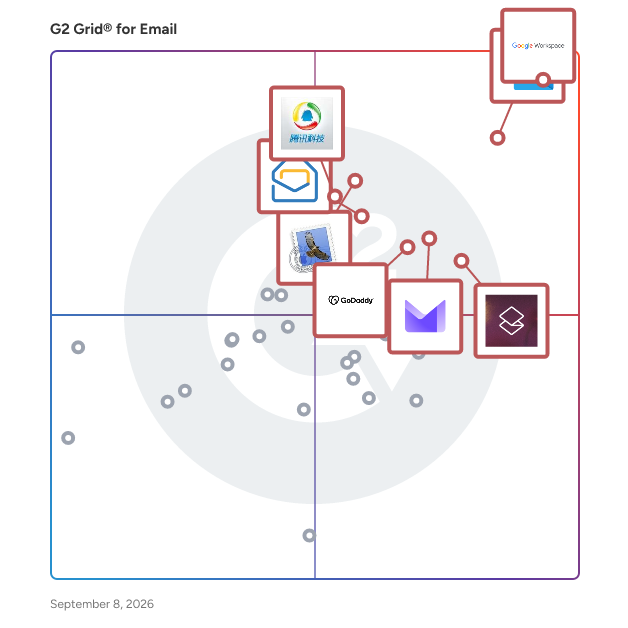
Best Email Software At A Glance

Highest Performer:
Easiest to Use:
Top Trending:
Best Free Software:
Show LessShow More
Easiest to Use:
Top Trending:
Best Free Software:

G2 takes pride in showing unbiased reviews on user satisfaction in our ratings and reports. We do not allow paid placements in any of our ratings, rankings, or reports. Learn about our scoring methodologies.

Coming Soon
Get Trending Email Products in Your Inbox

A weekly snapshot of rising stars, new launches, and what everyone's buzzing about.

Sample Trending Products Newsletter
No filters applied
121 Listings in Email Available
(46,926)4.6 out of 5
2nd Easiest To Use in Email software
View top Consulting Services for Google Workspace
Save to My Lists
Entry Level Price:$6.00
  • Overview
    Expand/Collapse Overview
  • Product Description
    How are these determined?Information
    This description is provided by the seller.

    Google Workspace is a comprehensive productivity and collaboration solution designed to help users streamline their work processes by integrating essential tools such as email, chat, file storage, and

    Users
    • Student
    • Teacher
    Industries
    • Information Technology and Services
    • Education Management
    Market Segment
    • 46% Small-Business
    • 35% Mid-Market
    User Sentiment
    How are these determined?Information
    These insights, currently in beta, are compiled from user reviews and grouped to display a high-level overview of the software.
    • Google Workspace is a suite of productivity tools, including Gmail, Docs, and Meet, designed to enhance collaboration and streamline workflows within organizations.
    • Users like the seamless integration of tools, real-time editing capabilities, and the convenience of having all documents automatically saved and easily accessible from one account.
    • Reviewers experienced issues with the platform's reliance on a stable internet connection, potential compatibility issues with Microsoft Office files, and the cost for larger teams.
  • Pros and Cons
    Expand/Collapse Pros and Cons
  • Google Workspace Pros and Cons
    How are these determined?Information
    Pros and Cons are compiled from review feedback and grouped into themes to provide an easy-to-understand summary of user reviews.
    Pros
    Ease of Use
    1,795
    Team Collaboration
    1,008
    Integrations
    968
    Intuitive
    783
    Google Integration
    738
    Cons
    Missing Features
    676
    Limited Features
    646
    Lacking Features
    329
    Limited Customization
    266
    Expensive
    260
  • User Satisfaction
    Expand/Collapse User Satisfaction
  • Google Workspace features and usability ratings that predict user satisfaction
    9.0
    Has the product been a good partner in doing business?
    Average: 8.6
    9.3
    Ease of Use
    Average: 8.4
    8.6
    Quality of Support
    Average: 8.3
    9.1
    Ease of Admin
    Average: 8.4
  • Seller Details
    Expand/Collapse Seller Details
  • Seller Details
    Seller
    Google
    Company Website
    Year Founded
    1998
    HQ Location
    Mountain View, CA
    Twitter
    @google
    31,497,617 Twitter followers
    LinkedIn® Page
    www.linkedin.com
    325,307 employees on LinkedIn®
Product Description
How are these determined?Information
This description is provided by the seller.

Google Workspace is a comprehensive productivity and collaboration solution designed to help users streamline their work processes by integrating essential tools such as email, chat, file storage, and

Users
  • Student
  • Teacher
Industries
  • Information Technology and Services
  • Education Management
Market Segment
  • 46% Small-Business
  • 35% Mid-Market
User Sentiment
How are these determined?Information
These insights, currently in beta, are compiled from user reviews and grouped to display a high-level overview of the software.
  • Google Workspace is a suite of productivity tools, including Gmail, Docs, and Meet, designed to enhance collaboration and streamline workflows within organizations.
  • Users like the seamless integration of tools, real-time editing capabilities, and the convenience of having all documents automatically saved and easily accessible from one account.
  • Reviewers experienced issues with the platform's reliance on a stable internet connection, potential compatibility issues with Microsoft Office files, and the cost for larger teams.
Google Workspace Pros and Cons
How are these determined?Information
Pros and Cons are compiled from review feedback and grouped into themes to provide an easy-to-understand summary of user reviews.
Pros
Ease of Use
1,795
Team Collaboration
1,008
Integrations
968
Intuitive
783
Google Integration
738
Cons
Missing Features
676
Limited Features
646
Lacking Features
329
Limited Customization
266
Expensive
260
Google Workspace features and usability ratings that predict user satisfaction
9.0
Has the product been a good partner in doing business?
Average: 8.6
9.3
Ease of Use
Average: 8.4
8.6
Quality of Support
Average: 8.3
9.1
Ease of Admin
Average: 8.4
Seller Details
Seller
Google
Company Website
Year Founded
1998
HQ Location
Mountain View, CA
Twitter
@google
31,497,617 Twitter followers
LinkedIn® Page
www.linkedin.com
325,307 employees on LinkedIn®
(3,251)4.5 out of 5
3rd Easiest To Use in Email software
View top Consulting Services for Microsoft Outlook
Save to My Lists
  • Overview
    Expand/Collapse Overview
  • Product Description
    How are these determined?Information
    This description is provided by the seller.

    Work efficiently with email, calendar, contacts, tasks, and more—together in one place. Office integration lets you share attachments right from OneDrive, access contacts, and view LinkedIn profiles.

    Users
    • Software Engineer
    • Project Manager
    Industries
    • Information Technology and Services
    • Computer Software
    Market Segment
    • 40% Enterprise
    • 37% Mid-Market
    User Sentiment
    How are these determined?Information
    These insights, currently in beta, are compiled from user reviews and grouped to display a high-level overview of the software.
    • Microsoft Outlook is a communication and organization tool that integrates email, calendar, contacts, and tasks management in one platform.
    • Reviewers appreciate its clean, organized layout, seamless integration with Microsoft 365, and the ability to manage multiple calendars and email rules efficiently.
    • Reviewers noted that Outlook can feel slow or laggy, especially when managing large inboxes, and the search function doesn’t always return the most accurate results.
  • Pros and Cons
    Expand/Collapse Pros and Cons
  • Microsoft Outlook Pros and Cons
    How are these determined?Information
    Pros and Cons are compiled from review feedback and grouped into themes to provide an easy-to-understand summary of user reviews.
    Pros
    Ease of Use
    262
    Integrations
    141
    Calendar Integration
    117
    Scheduling
    115
    Features
    103
    Cons
    Slow Performance
    78
    Slow Loading
    74
    Missing Features
    69
    Email Management
    53
    Learning Curve
    36
  • User Satisfaction
    Expand/Collapse User Satisfaction
  • Microsoft Outlook features and usability ratings that predict user satisfaction
    8.9
    Has the product been a good partner in doing business?
    Average: 8.6
    9.0
    Ease of Use
    Average: 8.4
    8.6
    Quality of Support
    Average: 8.3
    8.6
    Ease of Admin
    Average: 8.4
  • Seller Details
    Expand/Collapse Seller Details
  • Seller Details
    Seller
    Microsoft
    Year Founded
    1975
    HQ Location
    Redmond, Washington
    Twitter
    @microsoft
    13,133,301 Twitter followers
    LinkedIn® Page
    www.linkedin.com
    220,934 employees on LinkedIn®
    Ownership
    MSFT
Product Description
How are these determined?Information
This description is provided by the seller.

Work efficiently with email, calendar, contacts, tasks, and more—together in one place. Office integration lets you share attachments right from OneDrive, access contacts, and view LinkedIn profiles.

Users
  • Software Engineer
  • Project Manager
Industries
  • Information Technology and Services
  • Computer Software
Market Segment
  • 40% Enterprise
  • 37% Mid-Market
User Sentiment
How are these determined?Information
These insights, currently in beta, are compiled from user reviews and grouped to display a high-level overview of the software.
  • Microsoft Outlook is a communication and organization tool that integrates email, calendar, contacts, and tasks management in one platform.
  • Reviewers appreciate its clean, organized layout, seamless integration with Microsoft 365, and the ability to manage multiple calendars and email rules efficiently.
  • Reviewers noted that Outlook can feel slow or laggy, especially when managing large inboxes, and the search function doesn’t always return the most accurate results.
Microsoft Outlook Pros and Cons
How are these determined?Information
Pros and Cons are compiled from review feedback and grouped into themes to provide an easy-to-understand summary of user reviews.
Pros
Ease of Use
262
Integrations
141
Calendar Integration
117
Scheduling
115
Features
103
Cons
Slow Performance
78
Slow Loading
74
Missing Features
69
Email Management
53
Learning Curve
36
Microsoft Outlook features and usability ratings that predict user satisfaction
8.9
Has the product been a good partner in doing business?
Average: 8.6
9.0
Ease of Use
Average: 8.4
8.6
Quality of Support
Average: 8.3
8.6
Ease of Admin
Average: 8.4
Seller Details
Seller
Microsoft
Year Founded
1975
HQ Location
Redmond, Washington
Twitter
@microsoft
13,133,301 Twitter followers
LinkedIn® Page
www.linkedin.com
220,934 employees on LinkedIn®
Ownership
MSFT

This is how G2 Deals can help you:

  • Easily shop for curated – and trusted – software
  • Own your own software buying journey
  • Discover exclusive deals on software
Entry Level Price:$30.00
  • Overview
    Expand/Collapse Overview
  • Product Description
    How are these determined?Information
    This description is provided by the seller.

    Superhuman Mail is the AI-native email app that helps high-performing teams fly through their inboxes and focus on what matters. Built for speed, clarity, and collaboration, Superhuman helps profes

    Users
    • CEO
    • Founder
    Industries
    • Computer Software
    • Information Technology and Services
    Market Segment
    • 77% Small-Business
    • 17% Mid-Market
    User Sentiment
    How are these determined?Information
    These insights, currently in beta, are compiled from user reviews and grouped to display a high-level overview of the software.
    • Superhuman Mail is an email management tool that offers features such as AI-powered auto-draft, auto-reminder, and keyboard shortcuts to enhance user productivity.
    • Reviewers frequently mention the effectiveness of the Inbox Zero workflow, the speed of the app, and the convenience of the AI reply feature in improving their email management experience.
    • Users reported issues with the initial learning curve, lack of visual customization options, and the need to log in again on new devices.
  • Pros and Cons
    Expand/Collapse Pros and Cons
  • Superhuman Mail Pros and Cons
    How are these determined?Information
    Pros and Cons are compiled from review feedback and grouped into themes to provide an easy-to-understand summary of user reviews.
    Pros
    Time-saving
    255
    Ease of Use
    252
    Keyboard Shortcuts
    189
    Speed
    187
    Inbox Management
    154
    Cons
    Learning Curve
    77
    Expensive
    71
    Steep Learning Curve
    67
    Missing Features
    64
    Email Management
    36
  • User Satisfaction
    Expand/Collapse User Satisfaction
  • Superhuman Mail features and usability ratings that predict user satisfaction
    9.4
    Has the product been a good partner in doing business?
    Average: 8.6
    9.2
    Ease of Use
    Average: 8.4
    9.6
    Quality of Support
    Average: 8.3
    9.3
    Ease of Admin
    Average: 8.4
  • Seller Details
    Expand/Collapse Seller Details
  • Seller Details
    Company Website
    HQ Location
    San Francisco, California
    LinkedIn® Page
    www.linkedin.com
    195 employees on LinkedIn®
Product Description
How are these determined?Information
This description is provided by the seller.

Superhuman Mail is the AI-native email app that helps high-performing teams fly through their inboxes and focus on what matters. Built for speed, clarity, and collaboration, Superhuman helps profes

Users
  • CEO
  • Founder
Industries
  • Computer Software
  • Information Technology and Services
Market Segment
  • 77% Small-Business
  • 17% Mid-Market
User Sentiment
How are these determined?Information
These insights, currently in beta, are compiled from user reviews and grouped to display a high-level overview of the software.
  • Superhuman Mail is an email management tool that offers features such as AI-powered auto-draft, auto-reminder, and keyboard shortcuts to enhance user productivity.
  • Reviewers frequently mention the effectiveness of the Inbox Zero workflow, the speed of the app, and the convenience of the AI reply feature in improving their email management experience.
  • Users reported issues with the initial learning curve, lack of visual customization options, and the need to log in again on new devices.
Superhuman Mail Pros and Cons
How are these determined?Information
Pros and Cons are compiled from review feedback and grouped into themes to provide an easy-to-understand summary of user reviews.
Pros
Time-saving
255
Ease of Use
252
Keyboard Shortcuts
189
Speed
187
Inbox Management
154
Cons
Learning Curve
77
Expensive
71
Steep Learning Curve
67
Missing Features
64
Email Management
36
Superhuman Mail features and usability ratings that predict user satisfaction
9.4
Has the product been a good partner in doing business?
Average: 8.6
9.2
Ease of Use
Average: 8.4
9.6
Quality of Support
Average: 8.3
9.3
Ease of Admin
Average: 8.4
Seller Details
Company Website
HQ Location
San Francisco, California
LinkedIn® Page
www.linkedin.com
195 employees on LinkedIn®
(152)3.9 out of 5
9th Easiest To Use in Email software
Save to My Lists
  • Overview
    Expand/Collapse Overview
  • Product Description
    How are these determined?Information
    This description is provided by the seller.

    Mail makes it easy to manage all your email from a single, ad-free inbox. It features powerful search capabilities. Supports Gmail, MS Exchange, and others.

    Users
    No information available
    Industries
    • Computer Software
    • Information Technology and Services
    Market Segment
    • 57% Small-Business
    • 33% Mid-Market
  • Pros and Cons
    Expand/Collapse Pros and Cons
  • Apple Mail Pros and Cons
    How are these determined?Information
    Pros and Cons are compiled from review feedback and grouped into themes to provide an easy-to-understand summary of user reviews.
    Pros
    Ease of Use
    2
    Clean Interface
    1
    Integrations
    1
    Intuitive
    1
    Navigation Ease
    1
    Cons
    Inefficient Search Functionality
    1
    Missing Features
    1
    Poor Interface Design
    1
    Update Issues
    1
  • User Satisfaction
    Expand/Collapse User Satisfaction
  • Apple Mail features and usability ratings that predict user satisfaction
    7.8
    Has the product been a good partner in doing business?
    Average: 8.6
    8.4
    Ease of Use
    Average: 8.4
    8.0
    Quality of Support
    Average: 8.3
    7.9
    Ease of Admin
    Average: 8.4
  • Seller Details
    Expand/Collapse Seller Details
  • Seller Details
    Seller
    Apple
    Year Founded
    1976
    HQ Location
    Cupertino, CA
    Twitter
    @Apple
    9,944,883 Twitter followers
    LinkedIn® Page
    www.linkedin.com
    165,067 employees on LinkedIn®
    Ownership
    NASDAQ:AAPL
Product Description
How are these determined?Information
This description is provided by the seller.

Mail makes it easy to manage all your email from a single, ad-free inbox. It features powerful search capabilities. Supports Gmail, MS Exchange, and others.

Users
No information available
Industries
  • Computer Software
  • Information Technology and Services
Market Segment
  • 57% Small-Business
  • 33% Mid-Market
Apple Mail Pros and Cons
How are these determined?Information
Pros and Cons are compiled from review feedback and grouped into themes to provide an easy-to-understand summary of user reviews.
Pros
Ease of Use
2
Clean Interface
1
Integrations
1
Intuitive
1
Navigation Ease
1
Cons
Inefficient Search Functionality
1
Missing Features
1
Poor Interface Design
1
Update Issues
1
Apple Mail features and usability ratings that predict user satisfaction
7.8
Has the product been a good partner in doing business?
Average: 8.6
8.4
Ease of Use
Average: 8.4
8.0
Quality of Support
Average: 8.3
7.9
Ease of Admin
Average: 8.4
Seller Details
Seller
Apple
Year Founded
1976
HQ Location
Cupertino, CA
Twitter
@Apple
9,944,883 Twitter followers
LinkedIn® Page
www.linkedin.com
165,067 employees on LinkedIn®
Ownership
NASDAQ:AAPL
(666)4.4 out of 5
6th Easiest To Use in Email software
Save to My Lists
Entry Level Price:$1.00
  • Overview
    Expand/Collapse Overview
  • Product Description
    How are these determined?Information
    This description is provided by the seller.

    What does Zoho Mail offer? With 16 million happy users and more than a decade of experience, Zoho Mail is packed with useful features. It nails down the basics and also caters to demanding businesses

    Users
    • Founder
    • CEO
    Industries
    • Information Technology and Services
    • Marketing and Advertising
    Market Segment
    • 76% Small-Business
    • 20% Mid-Market
    User Sentiment
    How are these determined?Information
    These insights, currently in beta, are compiled from user reviews and grouped to display a high-level overview of the software.
    • Zoho Mail is an email service that provides tools for organizing and managing emails, integrating with other Zoho apps, and offering features like filters, rules, folders, and tags.
    • Reviewers appreciate the clean, ad-free interface, the seamless integration with other Zoho apps, the strong security features, and the ability to use their own domain for emails, which enhances professionalism.
    • Reviewers noted issues with slow syncing of emails, a less smooth mobile app experience, hidden advanced features, a dated and clunky user interface, and difficulties with initial setup and domain connection.
  • Pros and Cons
    Expand/Collapse Pros and Cons
  • Zoho Mail Pros and Cons
    How are these determined?Information
    Pros and Cons are compiled from review feedback and grouped into themes to provide an easy-to-understand summary of user reviews.
    Pros
    Ease of Use
    42
    Email Management
    28
    Integrations
    21
    Intuitive
    15
    User Interface
    15
    Cons
    Slow Performance
    10
    Email Issues
    9
    Limited Storage
    8
    Integration Issues
    7
    Learning Curve
    7
  • User Satisfaction
    Expand/Collapse User Satisfaction
  • Zoho Mail features and usability ratings that predict user satisfaction
    8.8
    Has the product been a good partner in doing business?
    Average: 8.6
    9.0
    Ease of Use
    Average: 8.4
    8.4
    Quality of Support
    Average: 8.3
    8.7
    Ease of Admin
    Average: 8.4
  • Seller Details
    Expand/Collapse Seller Details
  • Seller Details
    Seller
    Zoho
    Year Founded
    1996
    HQ Location
    Austin, TX
    Twitter
    @Zoho
    136,319 Twitter followers
    LinkedIn® Page
    www.linkedin.com
    29,500 employees on LinkedIn®
    Phone
    +1 (888) 900-9646
Product Description
How are these determined?Information
This description is provided by the seller.

What does Zoho Mail offer? With 16 million happy users and more than a decade of experience, Zoho Mail is packed with useful features. It nails down the basics and also caters to demanding businesses

Users
  • Founder
  • CEO
Industries
  • Information Technology and Services
  • Marketing and Advertising
Market Segment
  • 76% Small-Business
  • 20% Mid-Market
User Sentiment
How are these determined?Information
These insights, currently in beta, are compiled from user reviews and grouped to display a high-level overview of the software.
  • Zoho Mail is an email service that provides tools for organizing and managing emails, integrating with other Zoho apps, and offering features like filters, rules, folders, and tags.
  • Reviewers appreciate the clean, ad-free interface, the seamless integration with other Zoho apps, the strong security features, and the ability to use their own domain for emails, which enhances professionalism.
  • Reviewers noted issues with slow syncing of emails, a less smooth mobile app experience, hidden advanced features, a dated and clunky user interface, and difficulties with initial setup and domain connection.
Zoho Mail Pros and Cons
How are these determined?Information
Pros and Cons are compiled from review feedback and grouped into themes to provide an easy-to-understand summary of user reviews.
Pros
Ease of Use
42
Email Management
28
Integrations
21
Intuitive
15
User Interface
15
Cons
Slow Performance
10
Email Issues
9
Limited Storage
8
Integration Issues
7
Learning Curve
7
Zoho Mail features and usability ratings that predict user satisfaction
8.8
Has the product been a good partner in doing business?
Average: 8.6
9.0
Ease of Use
Average: 8.4
8.4
Quality of Support
Average: 8.3
8.7
Ease of Admin
Average: 8.4
Seller Details
Seller
Zoho
Year Founded
1996
HQ Location
Austin, TX
Twitter
@Zoho
136,319 Twitter followers
LinkedIn® Page
www.linkedin.com
29,500 employees on LinkedIn®
Phone
+1 (888) 900-9646
  • Overview
    Expand/Collapse Overview
  • Product Description
    How are these determined?Information
    This description is provided by the seller.

    QQ Mail is an enterprise email solution from Tencent.

    Users
    No information available
    Industries
    No information available
    Market Segment
    • 54% Small-Business
    • 38% Mid-Market
  • User Satisfaction
    Expand/Collapse User Satisfaction
  • Tencent Exmail features and usability ratings that predict user satisfaction
    9.4
    Has the product been a good partner in doing business?
    Average: 8.6
    7.8
    Ease of Use
    Average: 8.4
    8.3
    Quality of Support
    Average: 8.3
    7.5
    Ease of Admin
    Average: 8.4
  • Seller Details
    Expand/Collapse Seller Details
  • Seller Details
    Seller
    QQ Mail
    HQ Location
    N/A
    LinkedIn® Page
    www.linkedin.com
    1 employees on LinkedIn®
    Ownership
    OTC: TCEHY
Product Description
How are these determined?Information
This description is provided by the seller.

QQ Mail is an enterprise email solution from Tencent.

Users
No information available
Industries
No information available
Market Segment
  • 54% Small-Business
  • 38% Mid-Market
Tencent Exmail features and usability ratings that predict user satisfaction
9.4
Has the product been a good partner in doing business?
Average: 8.6
7.8
Ease of Use
Average: 8.4
8.3
Quality of Support
Average: 8.3
7.5
Ease of Admin
Average: 8.4
Seller Details
Seller
QQ Mail
HQ Location
N/A
LinkedIn® Page
www.linkedin.com
1 employees on LinkedIn®
Ownership
OTC: TCEHY
(125)4.7 out of 5
1st Easiest To Use in Email software
Save to My Lists
Entry Level Price:$1.99
  • Overview
    Expand/Collapse Overview
  • Product Description
    How are these determined?Information
    This description is provided by the seller.

    Neo is an email and growth suite designed to accelerate the online growth of small businesses and entrepreneurs. Over 130,000 small businesses trust Neo. Neo is an all-in-one business email platfo

    Users
    • Director
    • CEO
    Industries
    • Marketing and Advertising
    • Consulting
    Market Segment
    • 88% Small-Business
    • 5% Mid-Market
    User Sentiment
    How are these determined?Information
    These insights, currently in beta, are compiled from user reviews and grouped to display a high-level overview of the software.
    • Neo is a platform that provides email and website hosting services, allowing users to create professional emails and websites for their businesses.
    • Reviewers like the user-friendly interface, affordability, and the platform's ability to integrate with other emails and platforms, which has significantly improved their business activities and given their businesses a more polished online presence.
    • Reviewers mentioned issues with setting up their email clients, the need to upgrade to block spam emails, the lack of advanced customization options, and the absence of certain features in the app version of the platform.
  • Pros and Cons
    Expand/Collapse Pros and Cons
  • Neo Pros and Cons
    How are these determined?Information
    Pros and Cons are compiled from review feedback and grouped into themes to provide an easy-to-understand summary of user reviews.
    Pros
    Ease of Use
    69
    Customer Support
    28
    User Interface
    25
    Pricing
    23
    Easy Setup
    22
    Cons
    Missing Features
    15
    Limited Features
    14
    Pricing Issues
    12
    Expensive
    10
    Difficult Setup
    5
  • User Satisfaction
    Expand/Collapse User Satisfaction
  • Neo features and usability ratings that predict user satisfaction
    9.4
    Has the product been a good partner in doing business?
    Average: 8.6
    9.4
    Ease of Use
    Average: 8.4
    9.2
    Quality of Support
    Average: 8.3
    9.4
    Ease of Admin
    Average: 8.4
  • Seller Details
    Expand/Collapse Seller Details
  • Seller Details
    Seller
    Neo
    Company Website
    HQ Location
    Boston, US
    LinkedIn® Page
    www.linkedin.com
    4 employees on LinkedIn®
Product Description
How are these determined?Information
This description is provided by the seller.

Neo is an email and growth suite designed to accelerate the online growth of small businesses and entrepreneurs. Over 130,000 small businesses trust Neo. Neo is an all-in-one business email platfo

Users
  • Director
  • CEO
Industries
  • Marketing and Advertising
  • Consulting
Market Segment
  • 88% Small-Business
  • 5% Mid-Market
User Sentiment
How are these determined?Information
These insights, currently in beta, are compiled from user reviews and grouped to display a high-level overview of the software.
  • Neo is a platform that provides email and website hosting services, allowing users to create professional emails and websites for their businesses.
  • Reviewers like the user-friendly interface, affordability, and the platform's ability to integrate with other emails and platforms, which has significantly improved their business activities and given their businesses a more polished online presence.
  • Reviewers mentioned issues with setting up their email clients, the need to upgrade to block spam emails, the lack of advanced customization options, and the absence of certain features in the app version of the platform.
Neo Pros and Cons
How are these determined?Information
Pros and Cons are compiled from review feedback and grouped into themes to provide an easy-to-understand summary of user reviews.
Pros
Ease of Use
69
Customer Support
28
User Interface
25
Pricing
23
Easy Setup
22
Cons
Missing Features
15
Limited Features
14
Pricing Issues
12
Expensive
10
Difficult Setup
5
Neo features and usability ratings that predict user satisfaction
9.4
Has the product been a good partner in doing business?
Average: 8.6
9.4
Ease of Use
Average: 8.4
9.2
Quality of Support
Average: 8.3
9.4
Ease of Admin
Average: 8.4
Seller Details
Seller
Neo
Company Website
HQ Location
Boston, US
LinkedIn® Page
www.linkedin.com
4 employees on LinkedIn®
Entry Level Price:Starting at $2.99
  • Overview
    Expand/Collapse Overview
  • Product Description
    How are these determined?Information
    This description is provided by the seller.

    HostArmada is a privately owned and independently funded web hosting provider that started in November 2019 with a team dedicated to providing fast, secure, and reliable web hosting services. HostAr

    Users
    • Owner
    • CEO
    Industries
    • Marketing and Advertising
    • Computer Software
    Market Segment
    • 98% Small-Business
    • 2% Mid-Market
    User Sentiment
    How are these determined?Information
    These insights, currently in beta, are compiled from user reviews and grouped to display a high-level overview of the software.
    • HostArmada is a hosting service that provides server speed, customer service, and security for its users.
    • Reviewers appreciate the quick and knowledgeable customer support, the reliable and fast server performance, and the ease of site migration.
    • Reviewers noted limitations such as the storage limit on certain plans, the lack of phone support on Sundays, and the desire for more advanced features or tutorials for non-tech users.
  • Pros and Cons
    Expand/Collapse Pros and Cons
  • HostArmada Pros and Cons
    How are these determined?Information
    Pros and Cons are compiled from review feedback and grouped into themes to provide an easy-to-understand summary of user reviews.
    Pros
    Customer Support
    168
    Helpful
    117
    Quick Response
    97
    Reliability
    74
    Technical Support
    72
    Cons
    Expensive
    14
    Pricing Issues
    10
    High Cost
    9
    Poor Customer Support
    9
    Confusing
    8
  • User Satisfaction
    Expand/Collapse User Satisfaction
  • HostArmada features and usability ratings that predict user satisfaction
    9.8
    Has the product been a good partner in doing business?
    Average: 8.6
    9.7
    Ease of Use
    Average: 8.4
    10.0
    Quality of Support
    Average: 8.3
    9.7
    Ease of Admin
    Average: 8.4
  • Seller Details
    Expand/Collapse Seller Details
  • Seller Details
    Year Founded
    2019
    HQ Location
    Delaware, Wilmington
    Twitter
    @HostArmada
    158 Twitter followers
    LinkedIn® Page
    www.linkedin.com
    14 employees on LinkedIn®
Product Description
How are these determined?Information
This description is provided by the seller.

HostArmada is a privately owned and independently funded web hosting provider that started in November 2019 with a team dedicated to providing fast, secure, and reliable web hosting services. HostAr

Users
  • Owner
  • CEO
Industries
  • Marketing and Advertising
  • Computer Software
Market Segment
  • 98% Small-Business
  • 2% Mid-Market
User Sentiment
How are these determined?Information
These insights, currently in beta, are compiled from user reviews and grouped to display a high-level overview of the software.
  • HostArmada is a hosting service that provides server speed, customer service, and security for its users.
  • Reviewers appreciate the quick and knowledgeable customer support, the reliable and fast server performance, and the ease of site migration.
  • Reviewers noted limitations such as the storage limit on certain plans, the lack of phone support on Sundays, and the desire for more advanced features or tutorials for non-tech users.
HostArmada Pros and Cons
How are these determined?Information
Pros and Cons are compiled from review feedback and grouped into themes to provide an easy-to-understand summary of user reviews.
Pros
Customer Support
168
Helpful
117
Quick Response
97
Reliability
74
Technical Support
72
Cons
Expensive
14
Pricing Issues
10
High Cost
9
Poor Customer Support
9
Confusing
8
HostArmada features and usability ratings that predict user satisfaction
9.8
Has the product been a good partner in doing business?
Average: 8.6
9.7
Ease of Use
Average: 8.4
10.0
Quality of Support
Average: 8.3
9.7
Ease of Admin
Average: 8.4
Seller Details
Year Founded
2019
HQ Location
Delaware, Wilmington
Twitter
@HostArmada
158 Twitter followers
LinkedIn® Page
www.linkedin.com
14 employees on LinkedIn®
(16)4.7 out of 5
7th Easiest To Use in Email software
Save to My Lists
Entry Level Price:Free
  • Overview
    Expand/Collapse Overview
  • Product Description
    How are these determined?Information
    This description is provided by the seller.

    Spark for Teams is a collaborative email platform builds on the foundation of the Spark email app, which is widely recognized for its smart features that help users manage their email more efficiently

    Users
    No information available
    Industries
    No information available
    Market Segment
    • 88% Small-Business
    • 6% Mid-Market
  • Pros and Cons
    Expand/Collapse Pros and Cons
  • Spark for Teams Pros and Cons
    How are these determined?Information
    Pros and Cons are compiled from review feedback and grouped into themes to provide an easy-to-understand summary of user reviews.
    Pros
    Email Management
    10
    Collaboration
    9
    Conversations
    8
    Ease of Use
    8
    Communication
    7
    Cons
    Bug Issues
    3
    Missing Features
    3
    Software Bugs
    3
    Infrequent Updates
    2
    Poor Management
    2
  • User Satisfaction
    Expand/Collapse User Satisfaction
  • Spark for Teams features and usability ratings that predict user satisfaction
    9.6
    Has the product been a good partner in doing business?
    Average: 8.6
    9.4
    Ease of Use
    Average: 8.4
    10.0
    Quality of Support
    Average: 8.3
    9.8
    Ease of Admin
    Average: 8.4
  • Seller Details
    Expand/Collapse Seller Details
  • Seller Details
    Seller
    Readdle
    Year Founded
    2007
    HQ Location
    Odessa, Ukraine
    Twitter
    @Readdle
    25,944 Twitter followers
    LinkedIn® Page
    www.linkedin.com
    294 employees on LinkedIn®
Product Description
How are these determined?Information
This description is provided by the seller.

Spark for Teams is a collaborative email platform builds on the foundation of the Spark email app, which is widely recognized for its smart features that help users manage their email more efficiently

Users
No information available
Industries
No information available
Market Segment
  • 88% Small-Business
  • 6% Mid-Market
Spark for Teams Pros and Cons
How are these determined?Information
Pros and Cons are compiled from review feedback and grouped into themes to provide an easy-to-understand summary of user reviews.
Pros
Email Management
10
Collaboration
9
Conversations
8
Ease of Use
8
Communication
7
Cons
Bug Issues
3
Missing Features
3
Software Bugs
3
Infrequent Updates
2
Poor Management
2
Spark for Teams features and usability ratings that predict user satisfaction
9.6
Has the product been a good partner in doing business?
Average: 8.6
9.4
Ease of Use
Average: 8.4
10.0
Quality of Support
Average: 8.3
9.8
Ease of Admin
Average: 8.4
Seller Details
Seller
Readdle
Year Founded
2007
HQ Location
Odessa, Ukraine
Twitter
@Readdle
25,944 Twitter followers
LinkedIn® Page
www.linkedin.com
294 employees on LinkedIn®
(558)4.6 out of 5
8th Easiest To Use in Email software
Save to My Lists
Entry Level Price:$2.00
  • Overview
    Expand/Collapse Overview
  • Product Description
    How are these determined?Information
    This description is provided by the seller.

    Titan is the first customer-centric email suite created specifically for professionals and small business owners, with features designed to enable deeper, more meaningful relationships with customers.

    Users
    • CEO
    • Owner
    Industries
    • Marketing and Advertising
    • Computer Software
    Market Segment
    • 98% Small-Business
    • 2% Mid-Market
  • Pros and Cons
    Expand/Collapse Pros and Cons
  • Titan Pros and Cons
    How are these determined?Information
    Pros and Cons are compiled from review feedback and grouped into themes to provide an easy-to-understand summary of user reviews.
    Pros
    Customer Support
    6
    Ease of Use
    4
    Customer Experience
    2
    Inbox Management
    2
    Intuitive
    2
    Cons
    Difficult Setup
    1
    Folder Management
    1
    Inbox Management
    1
    Learning Curve
    1
    Limited Features
    1
  • User Satisfaction
    Expand/Collapse User Satisfaction
  • Titan features and usability ratings that predict user satisfaction
    9.4
    Has the product been a good partner in doing business?
    Average: 8.6
    9.3
    Ease of Use
    Average: 8.4
    9.4
    Quality of Support
    Average: 8.3
    9.3
    Ease of Admin
    Average: 8.4
  • Seller Details
    Expand/Collapse Seller Details
  • Seller Details
    Seller
    Titan
    Year Founded
    2018
    HQ Location
    Mumbai, IN
    Twitter
    @TitanEmail
    634 Twitter followers
    LinkedIn® Page
    www.linkedin.com
    550 employees on LinkedIn®
Product Description
How are these determined?Information
This description is provided by the seller.

Titan is the first customer-centric email suite created specifically for professionals and small business owners, with features designed to enable deeper, more meaningful relationships with customers.

Users
  • CEO
  • Owner
Industries
  • Marketing and Advertising
  • Computer Software
Market Segment
  • 98% Small-Business
  • 2% Mid-Market
Titan Pros and Cons
How are these determined?Information
Pros and Cons are compiled from review feedback and grouped into themes to provide an easy-to-understand summary of user reviews.
Pros
Customer Support
6
Ease of Use
4
Customer Experience
2
Inbox Management
2
Intuitive
2
Cons
Difficult Setup
1
Folder Management
1
Inbox Management
1
Learning Curve
1
Limited Features
1
Titan features and usability ratings that predict user satisfaction
9.4
Has the product been a good partner in doing business?
Average: 8.6
9.3
Ease of Use
Average: 8.4
9.4
Quality of Support
Average: 8.3
9.3
Ease of Admin
Average: 8.4
Seller Details
Seller
Titan
Year Founded
2018
HQ Location
Mumbai, IN
Twitter
@TitanEmail
634 Twitter followers
LinkedIn® Page
www.linkedin.com
550 employees on LinkedIn®
  • Overview
    Expand/Collapse Overview
  • Product Description
    How are these determined?Information
    This description is provided by the seller.

    When you sign up for Professional Email, every time you send @your business.com emails, you're getting your business name and website out there.

    Users
    No information available
    Industries
    • Marketing and Advertising
    Market Segment
    • 84% Small-Business
    • 16% Mid-Market
  • User Satisfaction
    Expand/Collapse User Satisfaction
  • GoDaddy Email & Office features and usability ratings that predict user satisfaction
    8.9
    Has the product been a good partner in doing business?
    Average: 8.6
    8.1
    Ease of Use
    Average: 8.4
    7.9
    Quality of Support
    Average: 8.3
    8.7
    Ease of Admin
    Average: 8.4
  • Seller Details
    Expand/Collapse Seller Details
  • Seller Details
    Seller
    GoDaddy
    Year Founded
    1997
    HQ Location
    Scottsdale, AZ
    Twitter
    @GoDaddy
    275,651 Twitter followers
    LinkedIn® Page
    www.linkedin.com
    8,667 employees on LinkedIn®
    Ownership
    NYSE:GDDY
Product Description
How are these determined?Information
This description is provided by the seller.

When you sign up for Professional Email, every time you send @your business.com emails, you're getting your business name and website out there.

Users
No information available
Industries
  • Marketing and Advertising
Market Segment
  • 84% Small-Business
  • 16% Mid-Market
GoDaddy Email & Office features and usability ratings that predict user satisfaction
8.9
Has the product been a good partner in doing business?
Average: 8.6
8.1
Ease of Use
Average: 8.4
7.9
Quality of Support
Average: 8.3
8.7
Ease of Admin
Average: 8.4
Seller Details
Seller
GoDaddy
Year Founded
1997
HQ Location
Scottsdale, AZ
Twitter
@GoDaddy
275,651 Twitter followers
LinkedIn® Page
www.linkedin.com
8,667 employees on LinkedIn®
Ownership
NYSE:GDDY
  • Overview
    Expand/Collapse Overview
  • Product Description
    How are these determined?Information
    This description is provided by the seller.

    Namecheap's Professional Business Email hosting offers a secure, reliable, and feature-rich email solution tailored for businesses seeking to establish a professional online presence. By utilizing you

    Users
    No information available
    Industries
    No information available
    Market Segment
    • 83% Small-Business
    • 8% Mid-Market
  • User Satisfaction
    Expand/Collapse User Satisfaction
  • Namecheap email features and usability ratings that predict user satisfaction
    6.1
    Has the product been a good partner in doing business?
    Average: 8.6
    9.2
    Ease of Use
    Average: 8.4
    8.3
    Quality of Support
    Average: 8.3
    7.2
    Ease of Admin
    Average: 8.4
  • Seller Details
    Expand/Collapse Seller Details
  • Seller Details
    Seller
    namecheap
    Year Founded
    2001
    HQ Location
    Phoenix , Arizona
    Twitter
    @Namecheap
    123,990 Twitter followers
    LinkedIn® Page
    www.linkedin.com
    1,637 employees on LinkedIn®
Product Description
How are these determined?Information
This description is provided by the seller.

Namecheap's Professional Business Email hosting offers a secure, reliable, and feature-rich email solution tailored for businesses seeking to establish a professional online presence. By utilizing you

Users
No information available
Industries
No information available
Market Segment
  • 83% Small-Business
  • 8% Mid-Market
Namecheap email features and usability ratings that predict user satisfaction
6.1
Has the product been a good partner in doing business?
Average: 8.6
9.2
Ease of Use
Average: 8.4
8.3
Quality of Support
Average: 8.3
7.2
Ease of Admin
Average: 8.4
Seller Details
Seller
namecheap
Year Founded
2001
HQ Location
Phoenix , Arizona
Twitter
@Namecheap
123,990 Twitter followers
LinkedIn® Page
www.linkedin.com
1,637 employees on LinkedIn®
Entry Level Price:$5 per month
  • Overview
    Expand/Collapse Overview
  • Product Description
    How are these determined?Information
    This description is provided by the seller.

    ProtonMail is the world's largest encrypted email company, serving millions of users worldwide. We protect your communications against modern day cyber attacks.

    Users
    No information available
    Industries
    • Internet
    • Information Technology and Services
    Market Segment
    • 57% Small-Business
    • 31% Mid-Market
  • Pros and Cons
    Expand/Collapse Pros and Cons
  • Proton Mail For Business Pros and Cons
    How are these determined?Information
    Pros and Cons are compiled from review feedback and grouped into themes to provide an easy-to-understand summary of user reviews.
    Pros
    Encryption
    2
    Security
    2
    Customer Support
    1
    Daily Usage
    1
    Data Security
    1
    Cons
    Compatibility Issues
    1
    Email Issues
    1
    Improvement Needed
    1
    Inefficient Search Functionality
    1
    Poor Interface Design
    1
  • User Satisfaction
    Expand/Collapse User Satisfaction
  • Proton Mail For Business features and usability ratings that predict user satisfaction
    9.3
    Has the product been a good partner in doing business?
    Average: 8.6
    8.8
    Ease of Use
    Average: 8.4
    8.1
    Quality of Support
    Average: 8.3
    9.1
    Ease of Admin
    Average: 8.4
  • Seller Details
    Expand/Collapse Seller Details
  • Seller Details
    Seller
    Proton AG
    Year Founded
    2014
    HQ Location
    Plan-les-Ouates, Geneva, Switzerland
    Twitter
    @ProtonPrivacy
    346,143 Twitter followers
    LinkedIn® Page
    www.linkedin.com
    633 employees on LinkedIn®
Product Description
How are these determined?Information
This description is provided by the seller.

ProtonMail is the world's largest encrypted email company, serving millions of users worldwide. We protect your communications against modern day cyber attacks.

Users
No information available
Industries
  • Internet
  • Information Technology and Services
Market Segment
  • 57% Small-Business
  • 31% Mid-Market
Proton Mail For Business Pros and Cons
How are these determined?Information
Pros and Cons are compiled from review feedback and grouped into themes to provide an easy-to-understand summary of user reviews.
Pros
Encryption
2
Security
2
Customer Support
1
Daily Usage
1
Data Security
1
Cons
Compatibility Issues
1
Email Issues
1
Improvement Needed
1
Inefficient Search Functionality
1
Poor Interface Design
1
Proton Mail For Business features and usability ratings that predict user satisfaction
9.3
Has the product been a good partner in doing business?
Average: 8.6
8.8
Ease of Use
Average: 8.4
8.1
Quality of Support
Average: 8.3
9.1
Ease of Admin
Average: 8.4
Seller Details
Seller
Proton AG
Year Founded
2014
HQ Location
Plan-les-Ouates, Geneva, Switzerland
Twitter
@ProtonPrivacy
346,143 Twitter followers
LinkedIn® Page
www.linkedin.com
633 employees on LinkedIn®
Entry Level Price:Free
  • Overview
    Expand/Collapse Overview
  • Product Description
    How are these determined?Information
    This description is provided by the seller.

    Canary learns how you email. It can write your emails, surface what needs attention, silence spam, and much more. Say hello to your Inbox Copilot.

    Users
    No information available
    Industries
    • Marketing and Advertising
    • Consulting
    Market Segment
    • 85% Small-Business
    • 10% Mid-Market
  • Pros and Cons
    Expand/Collapse Pros and Cons
  • Canary Mail Pros and Cons
    How are these determined?Information
    Pros and Cons are compiled from review feedback and grouped into themes to provide an easy-to-understand summary of user reviews.
    Pros
    AI Integration
    1
    Customer Support
    1
    Ease of Use
    1
    Easy Implementation
    1
    Easy Integrations
    1
    Cons
    Attachment Issues
    1
    Confusing Interface
    1
    Email Management
    1
    Learning Curve
    1
  • User Satisfaction
    Expand/Collapse User Satisfaction
  • Canary Mail features and usability ratings that predict user satisfaction
    9.1
    Has the product been a good partner in doing business?
    Average: 8.6
    9.2
    Ease of Use
    Average: 8.4
    9.2
    Quality of Support
    Average: 8.3
    9.3
    Ease of Admin
    Average: 8.4
  • Seller Details
    Expand/Collapse Seller Details
  • Seller Details
    Year Founded
    2017
    HQ Location
    San Francisco, US
    Twitter
    @CanaryMailApp
    7,719 Twitter followers
    LinkedIn® Page
    www.linkedin.com
    22 employees on LinkedIn®
Product Description
How are these determined?Information
This description is provided by the seller.

Canary learns how you email. It can write your emails, surface what needs attention, silence spam, and much more. Say hello to your Inbox Copilot.

Users
No information available
Industries
  • Marketing and Advertising
  • Consulting
Market Segment
  • 85% Small-Business
  • 10% Mid-Market
Canary Mail Pros and Cons
How are these determined?Information
Pros and Cons are compiled from review feedback and grouped into themes to provide an easy-to-understand summary of user reviews.
Pros
AI Integration
1
Customer Support
1
Ease of Use
1
Easy Implementation
1
Easy Integrations
1
Cons
Attachment Issues
1
Confusing Interface
1
Email Management
1
Learning Curve
1
Canary Mail features and usability ratings that predict user satisfaction
9.1
Has the product been a good partner in doing business?
Average: 8.6
9.2
Ease of Use
Average: 8.4
9.2
Quality of Support
Average: 8.3
9.3
Ease of Admin
Average: 8.4
Seller Details
Year Founded
2017
HQ Location
San Francisco, US
Twitter
@CanaryMailApp
7,719 Twitter followers
LinkedIn® Page
www.linkedin.com
22 employees on LinkedIn®
  • Overview
    Expand/Collapse Overview
  • Product Description
    How are these determined?Information
    This description is provided by the seller.

    Yahoo Mail is a web-based email app accessible on desktops and mobile devices, including iOS and Android devices. Users can stay connected to their email with one-tap access to their inbox, multiple Y

    Users
    No information available
    Industries
    • Information Technology and Services
    • Internet
    Market Segment
    • 67% Small-Business
    • 17% Mid-Market
  • Pros and Cons
    Expand/Collapse Pros and Cons
  • Yahoo! Mail Pros and Cons
    How are these determined?Information
    Pros and Cons are compiled from review feedback and grouped into themes to provide an easy-to-understand summary of user reviews.
    Pros
    Ease of Use
    2
    Intuitive
    1
    Navigation Ease
    1
    Security
    1
    Storage Capacity
    1
    Cons
    Spam Issues
    2
    Slow Performance
    1
  • User Satisfaction
    Expand/Collapse User Satisfaction
  • Yahoo! Mail features and usability ratings that predict user satisfaction
    7.2
    Has the product been a good partner in doing business?
    Average: 8.6
    9.0
    Ease of Use
    Average: 8.4
    8.0
    Quality of Support
    Average: 8.3
    8.6
    Ease of Admin
    Average: 8.4
  • Seller Details
    Expand/Collapse Seller Details
  • Seller Details
    Year Founded
    2005
    HQ Location
    San Francisco, CA
    Twitter
    @FlurryMobile
    16,302 Twitter followers
    LinkedIn® Page
    www.linkedin.com
    12 employees on LinkedIn®
Product Description
How are these determined?Information
This description is provided by the seller.

Yahoo Mail is a web-based email app accessible on desktops and mobile devices, including iOS and Android devices. Users can stay connected to their email with one-tap access to their inbox, multiple Y

Users
No information available
Industries
  • Information Technology and Services
  • Internet
Market Segment
  • 67% Small-Business
  • 17% Mid-Market
Yahoo! Mail Pros and Cons
How are these determined?Information
Pros and Cons are compiled from review feedback and grouped into themes to provide an easy-to-understand summary of user reviews.
Pros
Ease of Use
2
Intuitive
1
Navigation Ease
1
Security
1
Storage Capacity
1
Cons
Spam Issues
2
Slow Performance
1
Yahoo! Mail features and usability ratings that predict user satisfaction
7.2
Has the product been a good partner in doing business?
Average: 8.6
9.0
Ease of Use
Average: 8.4
8.0
Quality of Support
Average: 8.3
8.6
Ease of Admin
Average: 8.4
Seller Details
Year Founded
2005
HQ Location
San Francisco, CA
Twitter
@FlurryMobile
16,302 Twitter followers
LinkedIn® Page
www.linkedin.com
12 employees on LinkedIn®

Learn More About Email Software

What is Email Software?

Email is the main gateway for internal and external communication within a company. As such, it’s crucial to implement a software that is intuitive, organized, secure, and efficient.

Email software can achieve a variety of other tasks for your company, such as deploying marketing campaigns, engaging consumers, setting task reminders, chatting with other employees, keeping a schedule for meetings, and more. Considerations for what email software to use should depend on your company size, business industry, security requirements, storage space, and pricing.

Key Benefits of Email Software:

  • Send and receive important business messages between employees
  • Improve outreach with email marketing campaigns
  • Keep a permanent record of all messages that are sent and received
  • Send and receive important business messages from anywhere at any time

Why Use Email Software?

There are infinite reasons to implement email software at your company, but the most important one is communication. Whether this means conveying an important message to coworkers or delivering your brand message to prospective customers, the main function is to relay a message.

Email can also help with customer engagement. Customizable email platforms allow companies to illustrate their brand and communicate their company’s mission statement. When a client or a prospective lead receives an email from your company, you can deliver your marketing message with taglines, logos, and customizable email signatures. This helps keep your brand in the spotlight.

Email software is also the vehicle for all of your email marketing campaigns, which can help generate leads and drive more business to your company. Email marketing tactics such as customer targeting and calls to action can help gain more subscribers and translate to a higher ROI.

Who Uses Email Software?

All employees in your company can benefit from email software, since it’s the main form of communication for important documents and messages. However, some employees will be sending out more emails than others. Those employees may work in departments such as:

Marketing

Email has the built-in capability of being sent in bulk, which makes it the perfect software to use for mass marketing campaigns. Marketing teams often gather leads from the company’s CRM and send out marketing campaigns. This is a great way to elicit a meaningful call to action for prospective buyers. Oftentimes, email marketing is also integrated with AI software to automate email marketing on a scheduled basis. This benefits the marketing team by making the process less tedious and more efficient.

Customer Service

Customer service and success teams constantly answer inquiries via email. A business’ email software should include auto-generated responses these teams can use to alert customers that their inquiry will be answered promptly. Most email software will vary with their ability to customize auto-generated responses, so make sure to evaluate this before choosing an email software.

HR

HR teams use email to inform employees of any updates related to the office. This can include calendar updates, payroll changes, and much more. HR teams need a streamlined email solution so they can easily prioritize their schedules.

Kinds of Email Software

Email Client

An email client is a software platform that allows you to access your email without logging onto the web. Email client software works through POP3 and IMAP addressing. This means that you can access your email through your desktop programs. Email clients offer the benefit of extra security with more encryption to protect your emails. The main drawback here is that users will find it difficult to access their email from other computers, since an email client is usually installed on the user’s desktop.

Webmail

Webmail is a software platform that allows users to access emails through a web browser. The main benefit of webmail is mobile access. If you are travelling somewhere and forget to bring your laptop, you can easily access your email on any other computer as long as you have internet access. Furthermore, most webmail software has built-in suites that feature document creation, video conferencing, and other tools that can be accessed via the internet.

Email Features

Storage Space

Most email software offers a free amount of storage space just by signing up for the software. This can typically range between 15 and 50 GB. Depending on your budget and company size, email software will offer your company more or less storage space for varying prices. The main aspect to consider here is the amount of email you receive on a daily basis and how that quantity of email can overwhelm your server over time. If your email software only offers a limited amount of free space, this can easily burden the server and cause it to slow down.

Address Books

Having a list of all your client contacts is a great way for your company to stay organized. Client information and email lists can easily be kept within an email solution’s built-in address book.

Email Filters

A key feature of most email platforms is the ability to filter your inbox so you can easily find the most relevant messages. The main benefit for businesses is to block any potential threats from entering the company’s server as well as filter out any unwanted messages.

App-Based Integration Tools

Many forms of email software provide productivity and collaboration suites that are beneficial additions to signing up for their software. Lots of these features can help increase office efficiency with tools such as video conferencing, spreadsheets, and document creation. Depending on your company’s size, this can be a great way to centralize all of your office needs in one place.

File Attachment

Email software allows users to attach files when sending messages. Files can range from simple Word documents to detailed presentations and videos. The major benefit to businesses is the removal of the need for a USB to transport data. Instead, anyone can send large files via the internet to accelerate efficiency.

Email Automation

An example of email automation is when a new user receives a welcome email when they sign up, which may indicate instructions on how to start using the site as well as any new features that the company has been working on. This is a great benefit for businesses, as they no longer have to manually send out emails to every new user. It also helps grow your company’s subscriber list, which will help improve sales.

IMAP

An Internet Message Access Protocol (IMAP) is responsible for the mobile access that virtually every email solution provides. This feature is vital to organizations with a remote workforce or employees who travel frequently.

Potential Issues with Email Software

Businesses looking for email software should be mindful of these potential issues:

Spam

Perhaps the biggest issue with using email software is the potential for receiving unsolicited emails, also known as spam. Spam emails can range from unwanted commercial emails to malicious emails that try to spread viruses to your computer. This issue can be harmful to the security of your messages.

Email Attachment Size

It is sometimes critical to send emails with large attachments. Some email software does not allow for emails to send attachments over 25–30 MB, while other solutions allow emails to be up to 300 MB. If your company sends emails that use lots of space, you may want to consider email software that allows for larger limits on attachments.

Security

The biggest issue with sending mail electronically is the potential for malware. This invasive and threatening software, also referred to as ransomware, is a type of virus that can only be eradicated through monetary payment. Companies should ensure they have an active security team in order to stay vigilant, or they need to install proper precautions.

Deliverability

Email deliverability is the number of emails you send that actually reach an inbox. This is important for business initiatives (like marketing campaigns) that need to reach a long list of prospective buyers. Reputable email software will be more likely to send emails through trusted ISPs. This will ensure emails are not bouncing and have a high deliverability rate.