2026 Best Software Awards are here!See the list

Best VoIP Providers

Nana Serwah Nkrahene
NSN
Researched and written by Nana Serwah Nkrahene

Voice over Internet Protocol (VoIP) software transmits phone calls over an IP network without relying on traditional telephone infrastructure, functioning as a modern alternative to private branch exchange (PBX) systems. It helps organizations cut communication costs, support remote work, and maintain secure calling capabilities.

Core Capabilities of Voice over Internet Protocol (VoIP) Software

To qualify for inclusion in the VoIP category, a product must:

  • Provide VoIP PBX systems for businesses or offer a VoIP softphone application
  • Include features that help manage incoming calls, such as call forwarding, call transferring, and routing
  • Enable real-time network monitoring via dashboards
  • Offer integration compatibility with communication and CRM platforms

Common use cases for Voice over Internet Protocol (VoIP) Software

VoIP software supports scalable, reliable communication for internal collaboration and customer-facing interactions. It also benefits teams using related tools such as video conferencing software, UCaaS platforms, contact center software, and CRM systems.

How Voice over Internet Protocol (VoIP) Software Differs from Other Tools

VoIP differs from traditional PBX by replacing legacy on-premises telephony systems with IP-based calling, reducing infrastructure and maintenance costs while improving flexibility for remote and hybrid teams. Compared with broader UCaaS platforms, VoIP primarily focuses on voice calling, softphones, and SIP-based PBX functionality, though VoIP is typically a core component of most UCaaS offerings.

Insights from G2 Reviews on Voice over Internet Protocol (VoIP) Software

According to G2 review data, users highlight VoIP’s reliability, cost savings, ease of remote access, and the convenience of softphone options that replace or supplement physical desk phones.

Show More
Show Less

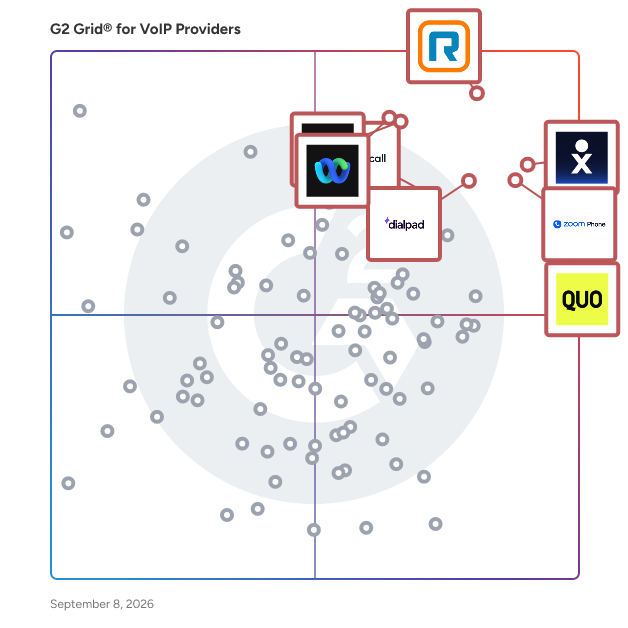
Featured VoIP Providers At A Glance

Leader:
Highest Performer:
Easiest to Use:
Top Trending:
Show LessShow More
Highest Performer:
Easiest to Use:
Top Trending:

G2 takes pride in showing unbiased reviews on user satisfaction in our ratings and reports. We do not allow paid placements in any of our ratings, rankings, or reports. Learn about our scoring methodologies.

No filters applied
409 Listings in VoIP Providers Available
(2,640)4.6 out of 5
Optimized for quick response
10th Easiest To Use in VoIP Providers software
View top Consulting Services for Zoom Phone
Entry Level Price:$15.00
  • Overview
    Expand/Collapse Overview
  • Product Description
    How are these determined?Information
    This description is provided by the seller.

    The AI-first cloud phone system built for modern work. Zoom Phone brings reliable calling, collaboration, and AI together in one simple app that keeps teams connected, from wherever they work.

    Users
    • Software Engineer
    • President
    Industries
    • Information Technology and Services
    • Computer Software
    Market Segment
    • 50% Small-Business
    • 32% Mid-Market
  • Pros and Cons
    Expand/Collapse Pros and Cons
  • Zoom Phone Pros and Cons
    How are these determined?Information
    Pros and Cons are compiled from review feedback and grouped into themes to provide an easy-to-understand summary of user reviews.
    Pros
    Ease of Use
    1,227
    Video Conferencing
    617
    Reliability
    595
    Easy Communication
    499
    Video Quality
    412
    Cons
    Limited Features
    306
    Zoom Issues
    278
    Meeting Issues
    232
    Missing Features
    202
    Connection Issues
    176
  • User Satisfaction
    Expand/Collapse User Satisfaction
  • Zoom Phone features and usability ratings that predict user satisfaction
    9.0
    Has the product been a good partner in doing business?
    Average: 8.7
    9.1
    Phone Calls
    Average: 9.1
    8.8
    VOiP Number
    Average: 9.0
    9.1
    Desk-to-Desk Calls
    Average: 8.5
  • Seller Details
    Expand/Collapse Seller Details
  • Seller Details
    Seller
    Zoom
    Company Website
    Year Founded
    2011
    HQ Location
    San Jose, CA
    Twitter
    @zoom
    1,045,642 Twitter followers
    LinkedIn® Page
    www.linkedin.com
    12,688 employees on LinkedIn®
Product Description
How are these determined?Information
This description is provided by the seller.

The AI-first cloud phone system built for modern work. Zoom Phone brings reliable calling, collaboration, and AI together in one simple app that keeps teams connected, from wherever they work.

Users
  • Software Engineer
  • President
Industries
  • Information Technology and Services
  • Computer Software
Market Segment
  • 50% Small-Business
  • 32% Mid-Market
Zoom Phone Pros and Cons
How are these determined?Information
Pros and Cons are compiled from review feedback and grouped into themes to provide an easy-to-understand summary of user reviews.
Pros
Ease of Use
1,227
Video Conferencing
617
Reliability
595
Easy Communication
499
Video Quality
412
Cons
Limited Features
306
Zoom Issues
278
Meeting Issues
232
Missing Features
202
Connection Issues
176
Zoom Phone features and usability ratings that predict user satisfaction
9.0
Has the product been a good partner in doing business?
Average: 8.7
9.1
Phone Calls
Average: 9.1
8.8
VOiP Number
Average: 9.0
9.1
Desk-to-Desk Calls
Average: 8.5
Seller Details
Seller
Zoom
Company Website
Year Founded
2011
HQ Location
San Jose, CA
Twitter
@zoom
1,045,642 Twitter followers
LinkedIn® Page
www.linkedin.com
12,688 employees on LinkedIn®
(1,310)4.2 out of 5
Optimized for quick response
Entry Level Price:$30.00
  • Overview
    Expand/Collapse Overview
  • Product Description
    How are these determined?Information
    This description is provided by the seller.

    RingEX is the all-in-one business communications platform that connects teams, customers, and conversations across voice, video, messaging, and SMS, all powered by AI. Designed for organizations that

    Users
    • Office Manager
    • Owner
    Industries
    • Computer Software
    • Information Technology and Services
    Market Segment
    • 56% Small-Business
    • 34% Mid-Market
  • Pros and Cons
    Expand/Collapse Pros and Cons
  • RingEX Pros and Cons
    How are these determined?Information
    Pros and Cons are compiled from review feedback and grouped into themes to provide an easy-to-understand summary of user reviews.
    Pros
    Ease of Use
    216
    Customer Support
    127
    Phone Calls
    109
    Helpful
    108
    Reliability
    107
    Cons
    Poor Customer Support
    55
    Complex Processes
    49
    Customer Service
    49
    Call Issues
    47
    Customer Support
    47
  • User Satisfaction
    Expand/Collapse User Satisfaction
  • RingEX features and usability ratings that predict user satisfaction
    8.3
    Has the product been a good partner in doing business?
    Average: 8.7
    9.1
    Phone Calls
    Average: 9.1
    9.0
    VOiP Number
    Average: 9.0
    9.0
    Desk-to-Desk Calls
    Average: 8.5
  • Seller Details
    Expand/Collapse Seller Details
  • Seller Details
    Company Website
    Year Founded
    1999
    HQ Location
    Belmont, CA
    Twitter
    @RingCentral
    62,229 Twitter followers
    LinkedIn® Page
    www.linkedin.com
    6,678 employees on LinkedIn®
Product Description
How are these determined?Information
This description is provided by the seller.

RingEX is the all-in-one business communications platform that connects teams, customers, and conversations across voice, video, messaging, and SMS, all powered by AI. Designed for organizations that

Users
  • Office Manager
  • Owner
Industries
  • Computer Software
  • Information Technology and Services
Market Segment
  • 56% Small-Business
  • 34% Mid-Market
RingEX Pros and Cons
How are these determined?Information
Pros and Cons are compiled from review feedback and grouped into themes to provide an easy-to-understand summary of user reviews.
Pros
Ease of Use
216
Customer Support
127
Phone Calls
109
Helpful
108
Reliability
107
Cons
Poor Customer Support
55
Complex Processes
49
Customer Service
49
Call Issues
47
Customer Support
47
RingEX features and usability ratings that predict user satisfaction
8.3
Has the product been a good partner in doing business?
Average: 8.7
9.1
Phone Calls
Average: 9.1
9.0
VOiP Number
Average: 9.0
9.0
Desk-to-Desk Calls
Average: 8.5
Seller Details
Company Website
Year Founded
1999
HQ Location
Belmont, CA
Twitter
@RingCentral
62,229 Twitter followers
LinkedIn® Page
www.linkedin.com
6,678 employees on LinkedIn®
G2 Advertising
Sponsored
G2 Advertising
Get 2x conversion than Google Ads with G2 Advertising!
G2 Advertising places your product in premium positions on high-traffic pages and on targeted competitor pages to reach buyers at key comparison moments.
Entry Level Price:Starting at $15.00
  • Overview
    Expand/Collapse Overview
  • Product Description
    How are these determined?Information
    This description is provided by the seller.

    Nextiva is a Unified CXM company that provides AI-powered customer experience solutions. Nextiva powers 100,000+ businesses and billions of conversations every year with its all-in-one customer exp

    Users
    • Owner
    • President
    Industries
    • Hospital & Health Care
    • Insurance
    Market Segment
    • 78% Small-Business
    • 21% Mid-Market
  • Pros and Cons
    Expand/Collapse Pros and Cons
  • Nextiva Pros and Cons
    How are these determined?Information
    Pros and Cons are compiled from review feedback and grouped into themes to provide an easy-to-understand summary of user reviews.
    Pros
    Customer Support
    135
    Ease of Use
    128
    Helpful
    111
    Easy Setup
    94
    Reliability
    90
    Cons
    Difficult Configuration
    27
    Complexity
    25
    Number Issues
    22
    Complex Processes
    20
    Difficult Setup
    19
  • User Satisfaction
    Expand/Collapse User Satisfaction
  • Nextiva features and usability ratings that predict user satisfaction
    8.9
    Has the product been a good partner in doing business?
    Average: 8.7
    9.2
    Phone Calls
    Average: 9.1
    9.1
    VOiP Number
    Average: 9.0
    9.1
    Desk-to-Desk Calls
    Average: 8.5
  • Seller Details
    Expand/Collapse Seller Details
  • Seller Details
    Seller
    Nextiva
    Year Founded
    2008
    HQ Location
    Scottsdale, Arizona
    Twitter
    @Nextiva
    21,316 Twitter followers
    LinkedIn® Page
    www.linkedin.com
    1,629 employees on LinkedIn®
Product Description
How are these determined?Information
This description is provided by the seller.

Nextiva is a Unified CXM company that provides AI-powered customer experience solutions. Nextiva powers 100,000+ businesses and billions of conversations every year with its all-in-one customer exp

Users
  • Owner
  • President
Industries
  • Hospital & Health Care
  • Insurance
Market Segment
  • 78% Small-Business
  • 21% Mid-Market
Nextiva Pros and Cons
How are these determined?Information
Pros and Cons are compiled from review feedback and grouped into themes to provide an easy-to-understand summary of user reviews.
Pros
Customer Support
135
Ease of Use
128
Helpful
111
Easy Setup
94
Reliability
90
Cons
Difficult Configuration
27
Complexity
25
Number Issues
22
Complex Processes
20
Difficult Setup
19
Nextiva features and usability ratings that predict user satisfaction
8.9
Has the product been a good partner in doing business?
Average: 8.7
9.2
Phone Calls
Average: 9.1
9.1
VOiP Number
Average: 9.0
9.1
Desk-to-Desk Calls
Average: 8.5
Seller Details
Seller
Nextiva
Year Founded
2008
HQ Location
Scottsdale, Arizona
Twitter
@Nextiva
21,316 Twitter followers
LinkedIn® Page
www.linkedin.com
1,629 employees on LinkedIn®
(3,292)4.7 out of 5
Optimized for quick response
5th Easiest To Use in VoIP Providers software
View top Consulting Services for Quo
Entry Level Price:$15.00
  • Overview
    Expand/Collapse Overview
  • Product Description
    How are these determined?Information
    This description is provided by the seller.

    Trusted by 90,000+ businesses, Quo (formerly OpenPhone) brings your team’s calls, texts, and contacts into one AI-powered workspace — helping you respond instantly and win more customers. Bring cla

    Users
    • Owner
    • CEO
    Industries
    • Real Estate
    • Construction
    Market Segment
    • 92% Small-Business
    • 7% Mid-Market
  • Pros and Cons
    Expand/Collapse Pros and Cons
  • Quo Pros and Cons
    How are these determined?Information
    Pros and Cons are compiled from review feedback and grouped into themes to provide an easy-to-understand summary of user reviews.
    Pros
    Ease of Use
    835
    Customer Support
    412
    Call Recording
    325
    Features
    319
    Easy Setup
    301
    Cons
    Connection Issues
    215
    Call Disconnections
    101
    Missing Features
    90
    Performance Issues
    83
    Delays
    82
  • User Satisfaction
    Expand/Collapse User Satisfaction
  • Quo features and usability ratings that predict user satisfaction
    9.5
    Has the product been a good partner in doing business?
    Average: 8.7
    9.4
    Phone Calls
    Average: 9.1
    9.4
    VOiP Number
    Average: 9.0
    8.8
    Desk-to-Desk Calls
    Average: 8.5
  • Seller Details
    Expand/Collapse Seller Details
  • Seller Details
    Seller
    Quo
    Company Website
    Year Founded
    2018
    HQ Location
    San Francisco, California
    Twitter
    @openphone
    9 Twitter followers
    LinkedIn® Page
    www.linkedin.com
    77 employees on LinkedIn®
Product Description
How are these determined?Information
This description is provided by the seller.

Trusted by 90,000+ businesses, Quo (formerly OpenPhone) brings your team’s calls, texts, and contacts into one AI-powered workspace — helping you respond instantly and win more customers. Bring cla

Users
  • Owner
  • CEO
Industries
  • Real Estate
  • Construction
Market Segment
  • 92% Small-Business
  • 7% Mid-Market
Quo Pros and Cons
How are these determined?Information
Pros and Cons are compiled from review feedback and grouped into themes to provide an easy-to-understand summary of user reviews.
Pros
Ease of Use
835
Customer Support
412
Call Recording
325
Features
319
Easy Setup
301
Cons
Connection Issues
215
Call Disconnections
101
Missing Features
90
Performance Issues
83
Delays
82
Quo features and usability ratings that predict user satisfaction
9.5
Has the product been a good partner in doing business?
Average: 8.7
9.4
Phone Calls
Average: 9.1
9.4
VOiP Number
Average: 9.0
8.8
Desk-to-Desk Calls
Average: 8.5
Seller Details
Seller
Quo
Company Website
Year Founded
2018
HQ Location
San Francisco, California
Twitter
@openphone
9 Twitter followers
LinkedIn® Page
www.linkedin.com
77 employees on LinkedIn®
(619)4.5 out of 5
Optimized for quick response
Entry Level Price:$0 user/mo
  • Overview
    Expand/Collapse Overview
  • Product Description
    How are these determined?Information
    This description is provided by the seller.

    Webex Calling is a premium, cloud-based phone system designed to meet the demands of modern, hybrid workforces. Built on the secure and reliable Cisco infrastructure, it provides a comprehensive enter

    Users
    • Software Engineer
    • Associate
    Industries
    • Information Technology and Services
    • Computer Software
    Market Segment
    • 42% Mid-Market
    • 32% Small-Business
  • Pros and Cons
    Expand/Collapse Pros and Cons
  • Webex Calling Pros and Cons
    How are these determined?Information
    Pros and Cons are compiled from review feedback and grouped into themes to provide an easy-to-understand summary of user reviews.
    Pros
    Ease of Use
    69
    Reliability
    50
    Call Quality
    41
    Video Conferencing
    31
    Integrations
    30
    Cons
    Complex Processes
    18
    Lack of Intuitiveness
    18
    Slow Performance
    17
    Performance Issues
    16
    Limited Customization
    13
  • User Satisfaction
    Expand/Collapse User Satisfaction
  • Webex Calling features and usability ratings that predict user satisfaction
    8.8
    Has the product been a good partner in doing business?
    Average: 8.7
    9.3
    Phone Calls
    Average: 9.1
    9.0
    VOiP Number
    Average: 9.0
    9.0
    Desk-to-Desk Calls
    Average: 8.5
  • Seller Details
    Expand/Collapse Seller Details
  • Seller Details
    Seller
    Cisco
    Company Website
    Year Founded
    1984
    HQ Location
    San Jose, CA
    Twitter
    @Cisco
    721,514 Twitter followers
    LinkedIn® Page
    www.linkedin.com
    95,386 employees on LinkedIn®
Product Description
How are these determined?Information
This description is provided by the seller.

Webex Calling is a premium, cloud-based phone system designed to meet the demands of modern, hybrid workforces. Built on the secure and reliable Cisco infrastructure, it provides a comprehensive enter

Users
  • Software Engineer
  • Associate
Industries
  • Information Technology and Services
  • Computer Software
Market Segment
  • 42% Mid-Market
  • 32% Small-Business
Webex Calling Pros and Cons
How are these determined?Information
Pros and Cons are compiled from review feedback and grouped into themes to provide an easy-to-understand summary of user reviews.
Pros
Ease of Use
69
Reliability
50
Call Quality
41
Video Conferencing
31
Integrations
30
Cons
Complex Processes
18
Lack of Intuitiveness
18
Slow Performance
17
Performance Issues
16
Limited Customization
13
Webex Calling features and usability ratings that predict user satisfaction
8.8
Has the product been a good partner in doing business?
Average: 8.7
9.3
Phone Calls
Average: 9.1
9.0
VOiP Number
Average: 9.0
9.0
Desk-to-Desk Calls
Average: 8.5
Seller Details
Seller
Cisco
Company Website
Year Founded
1984
HQ Location
San Jose, CA
Twitter
@Cisco
721,514 Twitter followers
LinkedIn® Page
www.linkedin.com
95,386 employees on LinkedIn®
(4,065)4.4 out of 5
Optimized for quick response
12th Easiest To Use in VoIP Providers software
Entry Level Price:$25 Per user, per mont...
  • Overview
    Expand/Collapse Overview
  • Product Description
    How are these determined?Information
    This description is provided by the seller.

    Dialpad elevates every conversation with the leading Ai-powered customer communications platform. Tap into real-time Ai insights to enhance and streamline every interaction. With Dialpad Connect,

    Users
    • Owner
    • CEO
    Industries
    • Information Technology and Services
    • Marketing and Advertising
    Market Segment
    • 57% Small-Business
    • 32% Mid-Market
    User Sentiment
    How are these determined?Information
    These insights, currently in beta, are compiled from user reviews and grouped to display a high-level overview of the software.
    • Dialpad Connect is a communication platform that allows users to manage calls, messages, and meetings on one platform, with features such as AI-powered call transcription and voicemail.
    • Reviewers frequently mention the ease of use, flexibility of having the same business number on both desktop and mobile, and the usefulness of call transcripts for catching missed details.
    • Users reported issues with call quality dropping with weak internet connection, limitations in analytics and customization unless upgraded, and the messaging feature not being as robust as dedicated team chat tools.
  • Pros and Cons
    Expand/Collapse Pros and Cons
  • Dialpad Connect Pros and Cons
    How are these determined?Information
    Pros and Cons are compiled from review feedback and grouped into themes to provide an easy-to-understand summary of user reviews.
    Pros
    Ease of Use
    130
    Call Management
    71
    Helpful
    60
    Call Recording
    56
    Features
    52
    Cons
    Call Issues
    57
    Connection Issues
    43
    Missing Functionality
    29
    Recording Issues
    28
    Call Quality Issues
    26
  • User Satisfaction
    Expand/Collapse User Satisfaction
  • Dialpad Connect features and usability ratings that predict user satisfaction
    8.9
    Has the product been a good partner in doing business?
    Average: 8.7
    9.3
    Phone Calls
    Average: 9.1
    9.3
    VOiP Number
    Average: 9.0
    9.2
    Desk-to-Desk Calls
    Average: 8.5
  • Seller Details
    Expand/Collapse Seller Details
  • Seller Details
    Seller
    Dialpad
    Company Website
    Year Founded
    2011
    HQ Location
    San Ramon, California
    Twitter
    @DialpadHQ
    61 Twitter followers
    LinkedIn® Page
    www.linkedin.com
    1,448 employees on LinkedIn®
Product Description
How are these determined?Information
This description is provided by the seller.

Dialpad elevates every conversation with the leading Ai-powered customer communications platform. Tap into real-time Ai insights to enhance and streamline every interaction. With Dialpad Connect,

Users
  • Owner
  • CEO
Industries
  • Information Technology and Services
  • Marketing and Advertising
Market Segment
  • 57% Small-Business
  • 32% Mid-Market
User Sentiment
How are these determined?Information
These insights, currently in beta, are compiled from user reviews and grouped to display a high-level overview of the software.
  • Dialpad Connect is a communication platform that allows users to manage calls, messages, and meetings on one platform, with features such as AI-powered call transcription and voicemail.
  • Reviewers frequently mention the ease of use, flexibility of having the same business number on both desktop and mobile, and the usefulness of call transcripts for catching missed details.
  • Users reported issues with call quality dropping with weak internet connection, limitations in analytics and customization unless upgraded, and the messaging feature not being as robust as dedicated team chat tools.
Dialpad Connect Pros and Cons
How are these determined?Information
Pros and Cons are compiled from review feedback and grouped into themes to provide an easy-to-understand summary of user reviews.
Pros
Ease of Use
130
Call Management
71
Helpful
60
Call Recording
56
Features
52
Cons
Call Issues
57
Connection Issues
43
Missing Functionality
29
Recording Issues
28
Call Quality Issues
26
Dialpad Connect features and usability ratings that predict user satisfaction
8.9
Has the product been a good partner in doing business?
Average: 8.7
9.3
Phone Calls
Average: 9.1
9.3
VOiP Number
Average: 9.0
9.2
Desk-to-Desk Calls
Average: 8.5
Seller Details
Seller
Dialpad
Company Website
Year Founded
2011
HQ Location
San Ramon, California
Twitter
@DialpadHQ
61 Twitter followers
LinkedIn® Page
www.linkedin.com
1,448 employees on LinkedIn®
  • Overview
    Expand/Collapse Overview
  • Product Description
    How are these determined?Information
    This description is provided by the seller.

    Webex Suite is an all-in-one, AI-powered collaboration suite built to increase productivity and maximize teamwork in today’s hybrid work. With 8 powerful individual workflows – Meetings, Messaging, Ca

    Users
    • Software Engineer
    • Senior Software Engineer
    Industries
    • Information Technology and Services
    • Computer Software
    Market Segment
    • 51% Enterprise
    • 31% Mid-Market
  • Pros and Cons
    Expand/Collapse Pros and Cons
  • Webex Suite Pros and Cons
    How are these determined?Information
    Pros and Cons are compiled from review feedback and grouped into themes to provide an easy-to-understand summary of user reviews.
    Pros
    Ease of Use
    283
    Video Conferencing
    198
    Reliability
    192
    Features
    178
    Video Quality
    166
    Cons
    Slow Loading
    107
    Not User-Friendly
    97
    Performance Issues
    97
    Lack of Intuitiveness
    86
    User Interface
    84
  • User Satisfaction
    Expand/Collapse User Satisfaction
  • Webex Suite features and usability ratings that predict user satisfaction
    8.7
    Has the product been a good partner in doing business?
    Average: 8.7
    8.8
    Phone Calls
    Average: 9.1
    8.6
    VOiP Number
    Average: 9.0
    8.6
    Desk-to-Desk Calls
    Average: 8.5
  • Seller Details
    Expand/Collapse Seller Details
  • Seller Details
    Seller
    Cisco
    Company Website
    Year Founded
    1984
    HQ Location
    San Jose, CA
    Twitter
    @Cisco
    721,514 Twitter followers
    LinkedIn® Page
    www.linkedin.com
    95,386 employees on LinkedIn®
Product Description
How are these determined?Information
This description is provided by the seller.

Webex Suite is an all-in-one, AI-powered collaboration suite built to increase productivity and maximize teamwork in today’s hybrid work. With 8 powerful individual workflows – Meetings, Messaging, Ca

Users
  • Software Engineer
  • Senior Software Engineer
Industries
  • Information Technology and Services
  • Computer Software
Market Segment
  • 51% Enterprise
  • 31% Mid-Market
Webex Suite Pros and Cons
How are these determined?Information
Pros and Cons are compiled from review feedback and grouped into themes to provide an easy-to-understand summary of user reviews.
Pros
Ease of Use
283
Video Conferencing
198
Reliability
192
Features
178
Video Quality
166
Cons
Slow Loading
107
Not User-Friendly
97
Performance Issues
97
Lack of Intuitiveness
86
User Interface
84
Webex Suite features and usability ratings that predict user satisfaction
8.7
Has the product been a good partner in doing business?
Average: 8.7
8.8
Phone Calls
Average: 9.1
8.6
VOiP Number
Average: 9.0
8.6
Desk-to-Desk Calls
Average: 8.5
Seller Details
Seller
Cisco
Company Website
Year Founded
1984
HQ Location
San Jose, CA
Twitter
@Cisco
721,514 Twitter followers
LinkedIn® Page
www.linkedin.com
95,386 employees on LinkedIn®
  • Overview
    Expand/Collapse Overview
  • Product Description
    How are these determined?Information
    This description is provided by the seller.

    Work smarter with Vonage Business Communications, our unified communications platform: seamlessly connect via voice, messaging and video, virtually anywhere globally. Over 40 powerful features give yo

    Users
    • President
    • Office Manager
    Industries
    • Staffing and Recruiting
    • Information Technology and Services
    Market Segment
    • 61% Small-Business
    • 32% Mid-Market
  • Pros and Cons
    Expand/Collapse Pros and Cons
  • Vonage Business Communications Pros and Cons
    How are these determined?Information
    Pros and Cons are compiled from review feedback and grouped into themes to provide an easy-to-understand summary of user reviews.
    Pros
    Ease of Use
    21
    Reliability
    10
    Calling Features
    9
    Customer Support
    9
    Messaging Features
    9
    Cons
    Texting Limitations
    8
    Call Drops
    4
    Customer Service
    4
    Call Connectivity Issues
    3
    Connection Issues
    3
  • User Satisfaction
    Expand/Collapse User Satisfaction
  • Vonage Business Communications features and usability ratings that predict user satisfaction
    8.9
    Has the product been a good partner in doing business?
    Average: 8.7
    9.3
    Phone Calls
    Average: 9.1
    9.3
    VOiP Number
    Average: 9.0
    9.3
    Desk-to-Desk Calls
    Average: 8.5
  • Seller Details
    Expand/Collapse Seller Details
  • Seller Details
    Seller
    Vonage
    Year Founded
    2001
    HQ Location
    Holmdel, NJ
    Twitter
    @Vonage
    11,165 Twitter followers
    LinkedIn® Page
    www.linkedin.com
    2,761 employees on LinkedIn®
Product Description
How are these determined?Information
This description is provided by the seller.

Work smarter with Vonage Business Communications, our unified communications platform: seamlessly connect via voice, messaging and video, virtually anywhere globally. Over 40 powerful features give yo

Users
  • President
  • Office Manager
Industries
  • Staffing and Recruiting
  • Information Technology and Services
Market Segment
  • 61% Small-Business
  • 32% Mid-Market
Vonage Business Communications Pros and Cons
How are these determined?Information
Pros and Cons are compiled from review feedback and grouped into themes to provide an easy-to-understand summary of user reviews.
Pros
Ease of Use
21
Reliability
10
Calling Features
9
Customer Support
9
Messaging Features
9
Cons
Texting Limitations
8
Call Drops
4
Customer Service
4
Call Connectivity Issues
3
Connection Issues
3
Vonage Business Communications features and usability ratings that predict user satisfaction
8.9
Has the product been a good partner in doing business?
Average: 8.7
9.3
Phone Calls
Average: 9.1
9.3
VOiP Number
Average: 9.0
9.3
Desk-to-Desk Calls
Average: 8.5
Seller Details
Seller
Vonage
Year Founded
2001
HQ Location
Holmdel, NJ
Twitter
@Vonage
11,165 Twitter followers
LinkedIn® Page
www.linkedin.com
2,761 employees on LinkedIn®
(1,534)4.4 out of 5
Optimized for quick response
View top Consulting Services for Aircall
Entry Level Price:$30 User/Month (Billed...
  • Overview
    Expand/Collapse Overview
  • Product Description
    How are these determined?Information
    This description is provided by the seller.

    Connect, Empower, and Grow with Aircall. We're not just a business phone system; we're an AI-powered platform for customer conversations. Aircall seamlessly integrates voice, SMS, WhatsApp, and social

    Users
    • Sales Development Representative
    • CEO
    Industries
    • Computer Software
    • Information Technology and Services
    Market Segment
    • 53% Small-Business
    • 40% Mid-Market
    User Sentiment
    How are these determined?Information
    These insights, currently in beta, are compiled from user reviews and grouped to display a high-level overview of the software.
    • Aircall is a cloud-based phone system designed to simplify team communication and customer support.
    • Users like Aircall's user-friendly interface, easy setup, seamless integration with CRM tools, and features such as call recording, analytics, and transcriptions.
    • Reviewers experienced occasional issues with call quality, slow loading times, limited customization options, and some found the initial setup and integration with certain platforms challenging.
  • Pros and Cons
    Expand/Collapse Pros and Cons
  • Aircall Pros and Cons
    How are these determined?Information
    Pros and Cons are compiled from review feedback and grouped into themes to provide an easy-to-understand summary of user reviews.
    Pros
    Ease of Use
    263
    Easy Integration
    112
    Features
    112
    Call Recording
    105
    Reliability
    104
    Cons
    Connection Issues
    71
    Call Issues
    58
    Missing Features
    53
    Dialer Issues
    46
    Slow Loading
    44
  • User Satisfaction
    Expand/Collapse User Satisfaction
  • Aircall features and usability ratings that predict user satisfaction
    8.2
    Has the product been a good partner in doing business?
    Average: 8.7
    8.9
    Phone Calls
    Average: 9.1
    8.9
    VOiP Number
    Average: 9.0
    8.7
    Desk-to-Desk Calls
    Average: 8.5
  • Seller Details
    Expand/Collapse Seller Details
  • Seller Details
    Seller
    Aircall
    Company Website
    Year Founded
    2014
    HQ Location
    New York
    Twitter
    @aircall
    4,976 Twitter followers
    LinkedIn® Page
    www.linkedin.com
    810 employees on LinkedIn®
Product Description
How are these determined?Information
This description is provided by the seller.

Connect, Empower, and Grow with Aircall. We're not just a business phone system; we're an AI-powered platform for customer conversations. Aircall seamlessly integrates voice, SMS, WhatsApp, and social

Users
  • Sales Development Representative
  • CEO
Industries
  • Computer Software
  • Information Technology and Services
Market Segment
  • 53% Small-Business
  • 40% Mid-Market
User Sentiment
How are these determined?Information
These insights, currently in beta, are compiled from user reviews and grouped to display a high-level overview of the software.
  • Aircall is a cloud-based phone system designed to simplify team communication and customer support.
  • Users like Aircall's user-friendly interface, easy setup, seamless integration with CRM tools, and features such as call recording, analytics, and transcriptions.
  • Reviewers experienced occasional issues with call quality, slow loading times, limited customization options, and some found the initial setup and integration with certain platforms challenging.
Aircall Pros and Cons
How are these determined?Information
Pros and Cons are compiled from review feedback and grouped into themes to provide an easy-to-understand summary of user reviews.
Pros
Ease of Use
263
Easy Integration
112
Features
112
Call Recording
105
Reliability
104
Cons
Connection Issues
71
Call Issues
58
Missing Features
53
Dialer Issues
46
Slow Loading
44
Aircall features and usability ratings that predict user satisfaction
8.2
Has the product been a good partner in doing business?
Average: 8.7
8.9
Phone Calls
Average: 9.1
8.9
VOiP Number
Average: 9.0
8.7
Desk-to-Desk Calls
Average: 8.5
Seller Details
Seller
Aircall
Company Website
Year Founded
2014
HQ Location
New York
Twitter
@aircall
4,976 Twitter followers
LinkedIn® Page
www.linkedin.com
810 employees on LinkedIn®
  • Overview
    Expand/Collapse Overview
  • Product Description
    How are these determined?Information
    This description is provided by the seller.

    Crexendo®, Inc. (NASDAQ:CXDO) is an award-winning premier provider of Unified Communications as a Service (UCaaS), Call Center as a Service (CCaaS), communication platform software solutions, and coll

    Users
    • Owner
    • Office Manager
    Industries
    • Non-Profit Organization Management
    • Construction
    Market Segment
    • 77% Small-Business
    • 21% Mid-Market
  • Pros and Cons
    Expand/Collapse Pros and Cons
  • Crexendo Pros and Cons
    How are these determined?Information
    Pros and Cons are compiled from review feedback and grouped into themes to provide an easy-to-understand summary of user reviews.
    Pros
    Customer Support
    83
    Helpful
    75
    Customer Service
    52
    Ease of Use
    47
    Easy Setup
    44
    Cons
    Call Issues
    7
    Complex Processes
    6
    Customer Service
    5
    Difficult Navigation
    5
    Number Issues
    5
  • User Satisfaction
    Expand/Collapse User Satisfaction
  • Crexendo features and usability ratings that predict user satisfaction
    9.8
    Has the product been a good partner in doing business?
    Average: 8.7
    9.9
    Phone Calls
    Average: 9.1
    9.6
    VOiP Number
    Average: 9.0
    9.7
    Desk-to-Desk Calls
    Average: 8.5
  • Seller Details
    Expand/Collapse Seller Details
  • Seller Details
    Company Website
    Year Founded
    1995
    HQ Location
    Tempe, Arizona
    Twitter
    @Crexendo
    3,299 Twitter followers
    LinkedIn® Page
    www.linkedin.com
    148 employees on LinkedIn®
Product Description
How are these determined?Information
This description is provided by the seller.

Crexendo®, Inc. (NASDAQ:CXDO) is an award-winning premier provider of Unified Communications as a Service (UCaaS), Call Center as a Service (CCaaS), communication platform software solutions, and coll

Users
  • Owner
  • Office Manager
Industries
  • Non-Profit Organization Management
  • Construction
Market Segment
  • 77% Small-Business
  • 21% Mid-Market
Crexendo Pros and Cons
How are these determined?Information
Pros and Cons are compiled from review feedback and grouped into themes to provide an easy-to-understand summary of user reviews.
Pros
Customer Support
83
Helpful
75
Customer Service
52
Ease of Use
47
Easy Setup
44
Cons
Call Issues
7
Complex Processes
6
Customer Service
5
Difficult Navigation
5
Number Issues
5
Crexendo features and usability ratings that predict user satisfaction
9.8
Has the product been a good partner in doing business?
Average: 8.7
9.9
Phone Calls
Average: 9.1
9.6
VOiP Number
Average: 9.0
9.7
Desk-to-Desk Calls
Average: 8.5
Seller Details
Company Website
Year Founded
1995
HQ Location
Tempe, Arizona
Twitter
@Crexendo
3,299 Twitter followers
LinkedIn® Page
www.linkedin.com
148 employees on LinkedIn®
(1,389)4.4 out of 5
Optimized for quick response
11th Easiest To Use in VoIP Providers software
Entry Level Price:Starting at $27.00
  • Overview
    Expand/Collapse Overview
  • Product Description
    How are these determined?Information
    This description is provided by the seller.

    GoTo Connect is the ultimate business communications solution for small, midsize, and multi-location organizations, delivering powerful cloud-based voice, video, and messaging—plus advanced features—a

    Users
    • Owner
    • President
    Industries
    • Information Technology and Services
    • Hospital & Health Care
    Market Segment
    • 70% Small-Business
    • 24% Mid-Market
  • Pros and Cons
    Expand/Collapse Pros and Cons
  • GoTo Connect Pros and Cons
    How are these determined?Information
    Pros and Cons are compiled from review feedback and grouped into themes to provide an easy-to-understand summary of user reviews.
    Pros
    Ease of Use
    128
    Customer Support
    46
    Reliability
    44
    Easy Setup
    40
    Features
    34
    Cons
    Call Issues
    30
    Limitations
    20
    Limited Features
    19
    Customer Service
    18
    Poor Customer Support
    18
  • User Satisfaction
    Expand/Collapse User Satisfaction
  • GoTo Connect features and usability ratings that predict user satisfaction
    9.1
    Has the product been a good partner in doing business?
    Average: 8.7
    9.2
    Phone Calls
    Average: 9.1
    9.1
    VOiP Number
    Average: 9.0
    9.1
    Desk-to-Desk Calls
    Average: 8.5
  • Seller Details
    Expand/Collapse Seller Details
  • Seller Details
    Seller
    GoTo
    Company Website
    Year Founded
    2003
    HQ Location
    Boston, MA
    Twitter
    @goto
    41,347 Twitter followers
    LinkedIn® Page
    www.linkedin.com
    1,028 employees on LinkedIn®
Product Description
How are these determined?Information
This description is provided by the seller.

GoTo Connect is the ultimate business communications solution for small, midsize, and multi-location organizations, delivering powerful cloud-based voice, video, and messaging—plus advanced features—a

Users
  • Owner
  • President
Industries
  • Information Technology and Services
  • Hospital & Health Care
Market Segment
  • 70% Small-Business
  • 24% Mid-Market
GoTo Connect Pros and Cons
How are these determined?Information
Pros and Cons are compiled from review feedback and grouped into themes to provide an easy-to-understand summary of user reviews.
Pros
Ease of Use
128
Customer Support
46
Reliability
44
Easy Setup
40
Features
34
Cons
Call Issues
30
Limitations
20
Limited Features
19
Customer Service
18
Poor Customer Support
18
GoTo Connect features and usability ratings that predict user satisfaction
9.1
Has the product been a good partner in doing business?
Average: 8.7
9.2
Phone Calls
Average: 9.1
9.1
VOiP Number
Average: 9.0
9.1
Desk-to-Desk Calls
Average: 8.5
Seller Details
Seller
GoTo
Company Website
Year Founded
2003
HQ Location
Boston, MA
Twitter
@goto
41,347 Twitter followers
LinkedIn® Page
www.linkedin.com
1,028 employees on LinkedIn®
(819)4.2 out of 5
Optimized for quick response
  • Overview
    Expand/Collapse Overview
  • Product Description
    How are these determined?Information
    This description is provided by the seller.

    8x8 Work – Business Phone System + VoIP, Video, and Messaging in One App 8x8 Work is a modern business phone system that unifies VoIP calling, video conferencing, and team messaging into one secure

    Users
    • Owner
    • Office Manager
    Industries
    • Information Technology and Services
    • Financial Services
    Market Segment
    • 58% Small-Business
    • 32% Mid-Market
  • Pros and Cons
    Expand/Collapse Pros and Cons
  • 8x8 Work Pros and Cons
    How are these determined?Information
    Pros and Cons are compiled from review feedback and grouped into themes to provide an easy-to-understand summary of user reviews.
    Pros
    Ease of Use
    110
    Easy Communication
    60
    Reliability
    55
    Customer Support
    45
    Features
    36
    Cons
    Customer Service
    25
    Customer Support
    22
    Poor Customer Support
    19
    Limited Features
    18
    Technical Issues
    17
  • User Satisfaction
    Expand/Collapse User Satisfaction
  • 8x8 Work features and usability ratings that predict user satisfaction
    8.5
    Has the product been a good partner in doing business?
    Average: 8.7
    9.0
    Phone Calls
    Average: 9.1
    9.1
    VOiP Number
    Average: 9.0
    9.0
    Desk-to-Desk Calls
    Average: 8.5
  • Seller Details
    Expand/Collapse Seller Details
  • Seller Details
    Seller
    8x8
    Company Website
    Year Founded
    1987
    HQ Location
    San Jose, CA
    Twitter
    @8x8
    11,073 Twitter followers
    LinkedIn® Page
    www.linkedin.com
    2,847 employees on LinkedIn®
Product Description
How are these determined?Information
This description is provided by the seller.

8x8 Work – Business Phone System + VoIP, Video, and Messaging in One App 8x8 Work is a modern business phone system that unifies VoIP calling, video conferencing, and team messaging into one secure

Users
  • Owner
  • Office Manager
Industries
  • Information Technology and Services
  • Financial Services
Market Segment
  • 58% Small-Business
  • 32% Mid-Market
8x8 Work Pros and Cons
How are these determined?Information
Pros and Cons are compiled from review feedback and grouped into themes to provide an easy-to-understand summary of user reviews.
Pros
Ease of Use
110
Easy Communication
60
Reliability
55
Customer Support
45
Features
36
Cons
Customer Service
25
Customer Support
22
Poor Customer Support
19
Limited Features
18
Technical Issues
17
8x8 Work features and usability ratings that predict user satisfaction
8.5
Has the product been a good partner in doing business?
Average: 8.7
9.0
Phone Calls
Average: 9.1
9.1
VOiP Number
Average: 9.0
9.0
Desk-to-Desk Calls
Average: 8.5
Seller Details
Seller
8x8
Company Website
Year Founded
1987
HQ Location
San Jose, CA
Twitter
@8x8
11,073 Twitter followers
LinkedIn® Page
www.linkedin.com
2,847 employees on LinkedIn®
(524)4.7 out of 5
Optimized for quick response
7th Easiest To Use in VoIP Providers software
Entry Level Price:Pay As You Go
  • Overview
    Expand/Collapse Overview
  • Product Description
    How are these determined?Information
    This description is provided by the seller.

    Telnyx is a next-gen communications and connectivity platform that offers carrier-grade services on a private, global IP network. Our Mission Control portal and API mean you can easily integrate voice

    Users
    • CEO
    • Owner
    Industries
    • Telecommunications
    • Information Technology and Services
    Market Segment
    • 81% Small-Business
    • 16% Mid-Market
  • Pros and Cons
    Expand/Collapse Pros and Cons
  • Telnyx CPaaS Pros and Cons
    How are these determined?Information
    Pros and Cons are compiled from review feedback and grouped into themes to provide an easy-to-understand summary of user reviews.
    Pros
    Customer Support
    50
    Ease of Use
    40
    Customer Service
    36
    Easy Setup
    32
    Pricing
    26
    Cons
    Complex Processes
    20
    High Cost
    11
    Customer Service
    10
    Long Waiting
    8
    Not User-Friendly
    8
  • User Satisfaction
    Expand/Collapse User Satisfaction
  • Telnyx CPaaS features and usability ratings that predict user satisfaction
    9.3
    Has the product been a good partner in doing business?
    Average: 8.7
    9.6
    Phone Calls
    Average: 9.1
    9.5
    VOiP Number
    Average: 9.0
    8.5
    Desk-to-Desk Calls
    Average: 8.5
  • Seller Details
    Expand/Collapse Seller Details
  • Seller Details
    Seller
    Telnyx
    Company Website
    Year Founded
    2009
    HQ Location
    600 Congress Avenue 14th Floor Austin, TX 78701
    Twitter
    @telnyx
    4,260 Twitter followers
    LinkedIn® Page
    www.linkedin.com
    339 employees on LinkedIn®
Product Description
How are these determined?Information
This description is provided by the seller.

Telnyx is a next-gen communications and connectivity platform that offers carrier-grade services on a private, global IP network. Our Mission Control portal and API mean you can easily integrate voice

Users
  • CEO
  • Owner
Industries
  • Telecommunications
  • Information Technology and Services
Market Segment
  • 81% Small-Business
  • 16% Mid-Market
Telnyx CPaaS Pros and Cons
How are these determined?Information
Pros and Cons are compiled from review feedback and grouped into themes to provide an easy-to-understand summary of user reviews.
Pros
Customer Support
50
Ease of Use
40
Customer Service
36
Easy Setup
32
Pricing
26
Cons
Complex Processes
20
High Cost
11
Customer Service
10
Long Waiting
8
Not User-Friendly
8
Telnyx CPaaS features and usability ratings that predict user satisfaction
9.3
Has the product been a good partner in doing business?
Average: 8.7
9.6
Phone Calls
Average: 9.1
9.5
VOiP Number
Average: 9.0
8.5
Desk-to-Desk Calls
Average: 8.5
Seller Details
Seller
Telnyx
Company Website
Year Founded
2009
HQ Location
600 Congress Avenue 14th Floor Austin, TX 78701
Twitter
@telnyx
4,260 Twitter followers
LinkedIn® Page
www.linkedin.com
339 employees on LinkedIn®
(2,066)4.6 out of 5
Optimized for quick response
13th Easiest To Use in VoIP Providers software
Entry Level Price:Contact Us
  • Overview
    Expand/Collapse Overview
  • Product Description
    How are these determined?Information
    This description is provided by the seller.

    Podium is an AI native communications platform that deploys AI Employees to help local businesses turn every conversation—text, call, or web chat—into revenue. Trusted by over 100,000 local businesses

    Users
    • Owner
    • General Manager
    Industries
    • Automotive
    • Retail
    Market Segment
    • 59% Small-Business
    • 35% Mid-Market
    User Sentiment
    How are these determined?Information
    These insights, currently in beta, are compiled from user reviews and grouped to display a high-level overview of the software.
    • Podium is a customer communication platform that consolidates messages, reviews, and customer interactions into one place for efficient management.
    • Reviewers frequently mention the simplicity and effectiveness of Podium in streamlining customer communication, improving response times, and enhancing overall customer engagement.
    • Users mentioned that Podium can be expensive for small businesses, with some advanced features and customization options only available on higher-tier plans, and integrations with other tools can be restrictive.
  • Pros and Cons
    Expand/Collapse Pros and Cons
  • Podium Pros and Cons
    How are these determined?Information
    Pros and Cons are compiled from review feedback and grouped into themes to provide an easy-to-understand summary of user reviews.
    Pros
    Ease of Use
    393
    Helpful
    352
    Easy Communication
    314
    Communication
    312
    Useful
    224
    Cons
    Missing Features
    95
    Messaging Issues
    94
    Limited Features
    77
    Expensive
    71
    Poor Customer Support
    65
  • User Satisfaction
    Expand/Collapse User Satisfaction
  • Podium features and usability ratings that predict user satisfaction
    9.2
    Has the product been a good partner in doing business?
    Average: 8.7
    8.4
    Phone Calls
    Average: 9.1
    8.1
    VOiP Number
    Average: 9.0
    7.3
    Desk-to-Desk Calls
    Average: 8.5
  • Seller Details
    Expand/Collapse Seller Details
  • Seller Details
    Seller
    Podium
    Company Website
    Year Founded
    2014
    HQ Location
    Lehi, UT
    Twitter
    @PodiumHQ
    4,194 Twitter followers
    LinkedIn® Page
    www.linkedin.com
    1,493 employees on LinkedIn®
Product Description
How are these determined?Information
This description is provided by the seller.

Podium is an AI native communications platform that deploys AI Employees to help local businesses turn every conversation—text, call, or web chat—into revenue. Trusted by over 100,000 local businesses

Users
  • Owner
  • General Manager
Industries
  • Automotive
  • Retail
Market Segment
  • 59% Small-Business
  • 35% Mid-Market
User Sentiment
How are these determined?Information
These insights, currently in beta, are compiled from user reviews and grouped to display a high-level overview of the software.
  • Podium is a customer communication platform that consolidates messages, reviews, and customer interactions into one place for efficient management.
  • Reviewers frequently mention the simplicity and effectiveness of Podium in streamlining customer communication, improving response times, and enhancing overall customer engagement.
  • Users mentioned that Podium can be expensive for small businesses, with some advanced features and customization options only available on higher-tier plans, and integrations with other tools can be restrictive.
Podium Pros and Cons
How are these determined?Information
Pros and Cons are compiled from review feedback and grouped into themes to provide an easy-to-understand summary of user reviews.
Pros
Ease of Use
393
Helpful
352
Easy Communication
314
Communication
312
Useful
224
Cons
Missing Features
95
Messaging Issues
94
Limited Features
77
Expensive
71
Poor Customer Support
65
Podium features and usability ratings that predict user satisfaction
9.2
Has the product been a good partner in doing business?
Average: 8.7
8.4
Phone Calls
Average: 9.1
8.1
VOiP Number
Average: 9.0
7.3
Desk-to-Desk Calls
Average: 8.5
Seller Details
Seller
Podium
Company Website
Year Founded
2014
HQ Location
Lehi, UT
Twitter
@PodiumHQ
4,194 Twitter followers
LinkedIn® Page
www.linkedin.com
1,493 employees on LinkedIn®
(1,737)4.4 out of 5
Optimized for quick response
14th Easiest To Use in VoIP Providers software
Entry Level Price:$19.00
  • Overview
    Expand/Collapse Overview
  • Product Description
    How are these determined?Information
    This description is provided by the seller.

    CloudTalk is the leading global AI business calling software for growing SMBs, offering unparalleled call quality and country coverage. Over 4,000 modern SMBs rely on CloudTalk's crystal-clear call qu

    Users
    • CEO
    • Account Executive
    Industries
    • Computer Software
    • Information Technology and Services
    Market Segment
    • 64% Small-Business
    • 32% Mid-Market
  • Pros and Cons
    Expand/Collapse Pros and Cons
  • CloudTalk Pros and Cons
    How are these determined?Information
    Pros and Cons are compiled from review feedback and grouped into themes to provide an easy-to-understand summary of user reviews.
    Pros
    Ease of Use
    358
    Reliability
    170
    Intuitive
    162
    Helpful
    155
    Calling Features
    152
    Cons
    Call Issues
    176
    Connection Issues
    81
    Call Management
    69
    Missing Features
    68
    Poor Connectivity
    50
  • User Satisfaction
    Expand/Collapse User Satisfaction
  • CloudTalk features and usability ratings that predict user satisfaction
    8.9
    Has the product been a good partner in doing business?
    Average: 8.7
    9.0
    Phone Calls
    Average: 9.1
    8.9
    VOiP Number
    Average: 9.0
    8.0
    Desk-to-Desk Calls
    Average: 8.5
  • Seller Details
    Expand/Collapse Seller Details
  • Seller Details
    Seller
    CloudTalk
    Company Website
    Year Founded
    2016
    HQ Location
    New York
    LinkedIn® Page
    www.linkedin.com
    192 employees on LinkedIn®
Product Description
How are these determined?Information
This description is provided by the seller.

CloudTalk is the leading global AI business calling software for growing SMBs, offering unparalleled call quality and country coverage. Over 4,000 modern SMBs rely on CloudTalk's crystal-clear call qu

Users
  • CEO
  • Account Executive
Industries
  • Computer Software
  • Information Technology and Services
Market Segment
  • 64% Small-Business
  • 32% Mid-Market
CloudTalk Pros and Cons
How are these determined?Information
Pros and Cons are compiled from review feedback and grouped into themes to provide an easy-to-understand summary of user reviews.
Pros
Ease of Use
358
Reliability
170
Intuitive
162
Helpful
155
Calling Features
152
Cons
Call Issues
176
Connection Issues
81
Call Management
69
Missing Features
68
Poor Connectivity
50
CloudTalk features and usability ratings that predict user satisfaction
8.9
Has the product been a good partner in doing business?
Average: 8.7
9.0
Phone Calls
Average: 9.1
8.9
VOiP Number
Average: 9.0
8.0
Desk-to-Desk Calls
Average: 8.5
Seller Details
Seller
CloudTalk
Company Website
Year Founded
2016
HQ Location
New York
LinkedIn® Page
www.linkedin.com
192 employees on LinkedIn®

Learn More About VoIP Providers

What is VoIP software?

Voice-over-internet protocol, or VoIP, is a communication technology that allows audio and video interaction over the internet. It is a mode of phone transmission that enables internet phone calls using any smart device as opposed to traditional telephone services.

VoIP, often pronounced as “vŏy'p” or “V-O-I-P,” is also commonly called voice-over IP. VoIP software enables online calling using digital signals, making it a more cost-effective alternative to traditional phone lines. It includes functions such as automated calls, phone and video calls, call queuing, and screen sharing. VoIP relies on a fast and dependable internet connection, and it can be understood as an “internet telephone" in layman’s terms.

VoIP providers, also known as virtual phone systems, can help companies significantly improve call quality and reduce communication costs. VoIP solutions streamline communications and standardize the workflow, enabling companies to make international or overseas audio and video calls without expensive payments. It’s also a more flexible solution that allows employees to communicate long distances when away from their typical office space.

Who uses VoIP software?

Generally, VoIP calls can be accessed by everyone. Although most people use video calling platforms for personal use, VoIP products are adopted by large corporations. More options are available with advancements in technology and VoIP itself, especially regarding professional solutions for meetings and conferences with ethernet. VoIP software is often used in the following industries: 

  • Customer service: VoIP services have nearly taken over this industry, with customer service centered on phone lines. It reduces wait time by automatically redirecting calls to available people. It also has live monitoring and data-collecting capabilities, making it ideal for this type of work.
  • Hotel and tourism: The backbones of this sector are effective communication and 24-hour service. For best customer satisfaction, hotels use VoIP services to assist in managing calls and avoiding congestion on a single line at a time.
  • Healthcare: Healthcare industries use cloud-based VoIP phone systems to book online consultations with doctors, patient registrations, floor-to-floor communications, inventory management, etc. 
  • Financial institutions: Besides assisting with encrypted communication and authentication, VoIP allows finance professionals to communicate in real-time with their peers and customers. It also provides its consumers with financial data, news, and evaluations, which is necessary for making informed investment decisions.
  • Manufacturing: Manufacturing includes a variety of fields such as finance, accounting, sales, and warehouse, making it an industry for VoIP networks. Employees benefit significantly from VoIP software features like instant messaging, video conferencing, file sharing, advanced voice call management, etc., which enable effective telecommunication and collaboration. 

What types of VoIP software exist?

Five types of VoIP services are available in the market for interested buyers. 

  • Residential VoIP services: The landline phone is linked to a Wi-Fi modem via an adapter to make and receive internet calls. Charges are set according to different plans. Example: VoIP.com and Lingo.
  • Device-based VoIP services: To make free calls within the United States involves purchasing a VoIP device from a service provider and connecting it to an already-owned device. This removes the requirement for equipment other than a conventional landline phone and a monthly fee. Example: MagicJack and Ooma.
  • Software-based VoIP services: This is the most commonly used VoIP service. It requires a web-based application online or installed PC software. It’s then used via the computer's audio input and output devices. Example: Skype and Zoom.
  • Mobile VoIP services: Mobile VoIP is an application installed on mobile phones, allowing call access from anywhere with a reliable internet connection. Example: WhatsApp and Google Hangouts
  • Business VoIP services: The two VoIP choices for businesses are on-premises and cloud-based. Both offer far more cost-effective communication options than traditional landlines and have several valuable features. These include video and audio conferencing services, screen-sharing, interactive voice response, automated attendants, call queues, and call reports. These often expandable features come with comprehensive technical assistance.

What are the benefits of VoIP software?

  • Cost-effective: An important advantage of VoIP technology is its low-cost hardware and software. This also decreases the need to buy more smartphones and or other gadgets.
  • Reliable: While traditional or regular phone systems can be prone to failures, unified communication systems (UCaas) are often backed by multiple data centers, preventing an outage. Even if a business has issues with its internet connection, incoming calls can always be routed to mobile devices, even if the power or internet connection fails.
  • Flexibility: Users of VoIP systems can add and remove phone lines as required, and unlike traditional landline phone systems, removing or adding VoIP lines requires little effort and time.
  • Integration: IP phone systems integrate seamlessly with several existing business platforms. Many VoIP systems, for example, integrate with customer relationship management (CRM) tools, benefitting both large and small enterprises. Businesses can reap the benefits of VoIP software without modifying current applications or IT infrastructure.
  • Remote access: VoIP makes calling from anywhere using any device possible. This is becoming more important with remote work. Every user in the VoIP system has a unique VoIP number assigned to them. Using this number, the user can place and receive calls in the office or from home. VoIP software can be used on any mobile device, including phones and laptops across Apple and Microsoft.
  • Advanced features and settings: VoIP can offer premium company management services such as auto attendants, call recording, and call queuing. With custom VoIP services, companies can design a system to match their needs. 

What are the challenges with VoIP software?

  • Network dependency: VoIP tools require a reliable network infrastructure for successful integration. VoIP relies on an internet connection to exchange voice data packets, and network failures can significantly impact call quality and reliability. Businesses should assess the stability of their network infrastructure and identify potential bottlenecks such as insufficient bandwidth, network overload, or unreliable connections. 
  • Bandwidth and internet connection: Insufficient bandwidth or inconsistent internet access while using VoIP solutions leads to poor phone service, failed calls, and latency issues. Working with an internet service provider (ISP) that provides dedicated bandwidth or employing traffic prioritization techniques such as quality of service (QoS) can enhance VoIP speed.
  • Security and firewall configuration: VoIP deployments are prone to eavesdropping, toll fraud, denial-of-service attacks, and other security issues. Robust security strategies such as encryption protocols, firewalls, and intrusion detection systems must be implemented to protect VoIP networks. Since configuring these can be challenging, businesses must work with IT specialists or VoIP service providers to ensure correct firewall settings and security best practices are implemented.
  • Power supply and backup: Unlike traditional private branch exchange (PBX), VoIP requires a consistent power source. Power outages can render VoIP systems inoperable, causing communication routes to be disrupted and company operations to suffer. Power outages can be reduced by deploying uninterruptible power supply (UPS) devices or backup power generators. Furthermore, organizations should consider establishing failover solutions, such as automated call routing to mobile devices or alternate sites, to ensure ongoing availability during power outages.
  • Staff training and user adoption: Effective training and user acceptance approaches are essential when adopting a new communication system. Employees may be inexperienced with VoIP systems instead of traditional phone systems, resulting in reluctance or difficulties adapting to the latest technology. In addition, due to protocol differences, data formats, or compatibility issues, integrating VoIP systems with existing corporate applications may be problematic. Provide substantial training sessions, user manuals, and regular assistance to employees using VoIP solutions. 

What are the common features of VoIP software?

VoIP provides a variety of features that facilitate communication. While specific features differ between providers and plans, the following are some common features found within UCaaS platforms and VoIP:

  • Phone calls: VoIP telephony allows users to place phone calls online. As a result, organizations can benefit from a low-cost, dependable, and portable solution. Internet calls are ideal for businesses with remote or field employees.
  • Instant messaging: Users of VoIP software can send and receive instant messages over the internet, which benefits customer support and internal communication. Employees can discuss an action item or touch base informally via texting, improving cooperation, productivity, and team engagement.
  • Screen sharing: VoIP software allows users to share screens in real-time, saving time and increasing productivity. Screen sharing is often used for collaboration and presentations, which is helpful for hybrid and remote workers.
  • Call monitoring: VoIP software allows businesses to monitor, record, and track calls, helping companies simplify customer service and enhance performance.
  • Caller ID: VoIP service providers display the name and phone number of incoming callers, allowing users to see who is calling.
  • Video conferencing: Users can utilize VoIP software to make video calls via the Internet, which can lower operational and travel expenses by eliminating the need to travel for meetings. Video conferencing also benefits users by boosting distant worker engagement and cooperation.
  • Desk-to-desk calls: VoIP software enables users to contact one another through mobile phones and landlines. This helps maintain communication flow, which is important when multiple users handle a single call. For example, a call center would benefit from VoIP technology as transferring customers on time would be much easier. 
  • Conference calls: Users can host conference calls – which enables multiple users to make phone or video calls over the internet at once. This is essential for team collaboration and communication with remote workers.
  • VoIP phone number: VoIP telephony offers users a unique phone number that can be dialed anywhere. Unique numbers are great for businesses that don’t have a landline but want to have a number that reflects their location.

Many VoIP providers will also offer the following features: 

VoIP software pricing

A VoIP phone system typically costs between $25 and $35 per line monthly. Call recording, toll-free lines, and equipment rentals are optional extras. 

These expenses can be divided into "recurring" and "one-time" charges. Subscription fees and per-user or per-line prices are the most common recurring expenses, whereas setup and equipment costs are often one-time expenses.

Call forwarding, voicemail, and domestic calling are common VoIP features included in the standard subscription rates. It is expected to have unlimited outgoing and receiving calls across the country.

Advanced features such as CRM integration, complex analytics, unlimited calling, international calls, and premium customer support will entail extra charges. Defining and budgeting for the fundamental components of business operations is critical.

How to choose the best VoIP software?

When purchasing a VoIP solution, it is crucial to determine if an on-premises or cloud-based solution is better suited for the business. Cloud-based or hosted VoIP software typically requires no additional hardware and delivers calls to phones installed at the business, but it comes with a higher monthly cost than onsite VoIP options. Furthermore, most cloud-based VoIP products offer mobile applications that integrate with business phones, allowing users to make and receive calls using a data connection while traveling.

On-premises or onsite VoIP systems require supplemental hardware that must be purchased upfront. Still, it can compensate for this by offering a lower monthly cost, additional security, and more flexibility during setup. Onsite VoIP systems need an IP-PBX and a public switched telephone network (PSTN) gateway device to function correctly. The IP-PBX routes calls to the correct phones on the web, while the PSTN gateway device converts calls from the analog voice signals of the PSTN to digital signals for the IP-PBX and back, as necessary.

Whether a company is just starting to explore VoIP software or is looking for a more appropriate solution for their needs, G2 can help inform buyers of the market and assist them in selecting the best software product for their business.

Requirements gathering (RFI/RFP) for VoIP software

A buyer should assess the needs of their organization when deciding on the kind of VoIP software to purchase. Does the organization already use this kind of software? Is this the first time the organization will be using VoIP software? If that’s the case, buyers must determine how they plan to implement this software and what features the organization will need. 

Some points to consider are:

Company size 

Buyers will need to ensure that the products they are looking at will suit the size and needs of the organization. Ensuring the product has the appropriate flexibility and scalability to adapt to changing conditions is essential when purchasing software.

Integration requirements

Buyers must know which business systems require integration with a new VoIP system beforehand. For example, will the product need to be integrated within existing systems, such as CRM or ERP platforms? Some VoIP products may come with application programming interfaces (APIs) for integration with specific software. However, other phone systems do not offer this capability.

Compare VoIP software products

Create a long list

The first step to finding the perfect software solution is to create a preliminary list of products that fit the buyer’s general needs. The next step is to narrow down the list by selecting specific features that are must-haves or requirements for the buyer. G2.com provides information about the best VoIP software, allowing buyers to filter options and user reviews to help narrow the product list to a more relevant selection.

Create a short list

Shortlisting software products is an essential step in buying. While it may be daunting to filter through various products, users can get help by utilizing G2’s compare feature. This feature will take products of choice and display them side by side so the buyer can quickly determine which software ticks the essential boxes on the list. 

Conduct demos

Once the buyer has narrowed down the product list, the next step is to conduct a demo. Demos allow buyers to see a product and its features in more detail. Buyers should have a business scenario ready to test the product thoroughly. Additionally, buyers should inquire about cost, vendor support, and any concerns about the product.

Selection of VoIP software

Choose a selection team

VoIP software is efficient and widely used in many businesses. With that in mind, a good starting point would be to select three to five team members from various departments (such as IT, management, sales, etc.) and seniority levels to be part of the selection team. The more varied the selection team is, the better a company can assess how well a product will meet their needs. 

Negotiation

Once the selection team has narrowed their software picks, it’s time to discuss customization options, pricing, and the type of support the vendor needs. It’s always important to address pricing options, even when they are listed on a vendor’s website. Many software vendors will provide discounts and custom pricing options based on what the buyer is looking to purchase. 

Final decision

Before making the final decision on a product and moving forward with a purchase, utilizing a free trial and conducting a last demo can give a buyer an additional sense of security and confidence when making a final decision.

What are the most reliable VoIP systems for office communications?

Here are some of the most reliable VoIP systems to ensure smooth and consistent office communications:

  • RingEX delivers enterprise-grade call quality and unified communications, making it a dependable choice for office teams across locations.
  • Nextiva offers a highly stable VoIP platform with built-in team messaging and call routing tailored for office workflows.
  • Dialpad Connect combines voice, AI-powered transcriptions, and seamless integrations to keep office communications efficient and context-aware.
  • GoTo Connect provides a reliable cloud phone system with intuitive admin controls, ideal for office teams managing hybrid or remote setups.
  • Ooma Office designed for small to mid-sized offices, it offers easy setup and consistent call quality without heavy IT requirements.

What are the top-rated VoIP providers for tech startups?

Here are some of the best VoIP providers tailored to meet the fast-changing needs of tech startups and small businesses:

  • OpenPhone is built for startups. It offers flexible VoIP features, such as shared numbers and CRM integrations, to streamline team communications.
  • Aircall provides scalable VoIP with strong app integrations, making it ideal for sales and support teams in fast-moving tech startups.
  • Dialpad Connect combines voice, messaging, and AI-driven transcription tools to help startups stay organized and responsive.
  • JustCall offers powerful outbound calling and automation features that empower growth-focused teams to engage users globally.
  • CloudTalk is optimized for customer-facing teams, and it delivers reliable call quality and performance analytics to support startup scaling.