Best Agentic AI Browser Software

How Many Agentic AI Browser Software Products Does G2 Track?

Total Products under this Category: 26

Category Stats (Sep 2026)

  • Average Rating: 4.55/5 (↑0.05 vs Aug 2026) The average rating of products in this category, based on all submitted ratings
  • Top Trending Product: Genspark AI (+10.88%) - Among all products in this category, Genspark AI recorded the largest rating increase compared to last month

Last updated: September 13, 2026

How Does G2 Rank Agentic AI Browser Software Products?

Why You Can Trust G2's Software Rankings:

  • 30 Analysts and Data Experts
  • 2,300+ Authentic Reviews
  • 26+ Products
  • Unbiased Rankings

G2's software rankings are built on verified user reviews, rigorous moderation, and a consistent research methodology maintained by a team of analysts and data experts. Each product is measured using the same transparent criteria, with no paid placement or vendor influence. While reviews reflect real user experiences, which can be subjective, they offer valuable insight into how software performs in the hands of professionals. Together, these inputs power the G2 Score, a standardized way to compare tools within every category.

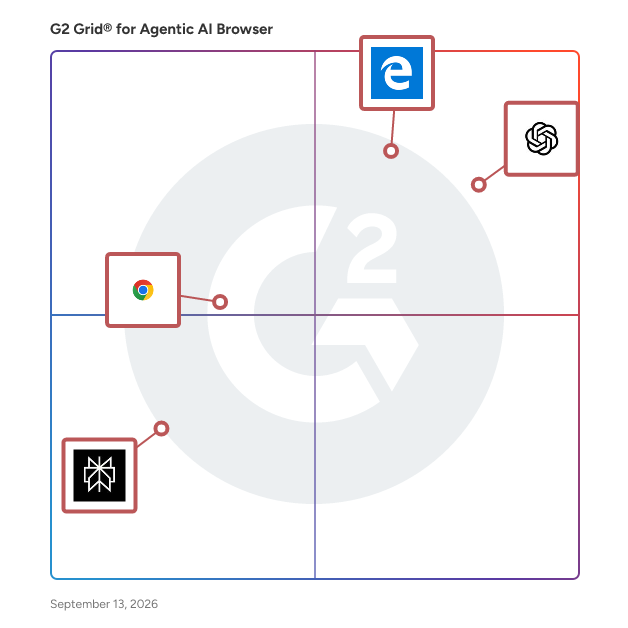
G2 Grid® for Agentic AI Browser Software

G2 Grid® for Agentic AI Browser Software plotting products by satisfaction and market presence

Highlighted products: ChatGPT Atlas, Microsoft Edge, Chrome Enterprise, and Comet.

Underlying data: [Grid® JSON](https://www.g2.com/categories/agentic-ai-browser/grids.json?focus%5B%5D=chatgpt-atlas&focus%5B%5D=microsoft-edge&focus%5B%5D=chrome-enterprise&focus%5B%5D=perplexity-ai-comet)

ChatGPT Atlas

ChatGPT Atlas combines a modern web browser with an embedded AI assistant that understands the content of the pages you're viewing. Users can ask questions about webpages, summarize articles, compare products, rewrite selected text, conduct research, and automate repetitive web-based tasks—all from within the browser. Its optional Agent Mode can perform actions such as opening tabs, navigating websites, filling forms, or assisting with online shopping and scheduling, while keeping users in control through confirmation prompts for sensitive actions. Atlas also includes optional browser memory, allowing ChatGPT to remember relevant browsing context and previous interactions to provide more personalized assistance over time. Privacy controls let users decide which websites ChatGPT can access, manage stored memories, use incognito mode, and opt in or out of using browsing data for model improvement. By default, browsing content is not used to train OpenAI's models. Key Features - AI-powered browsing with ChatGPT integrated into every tab - Context-aware assistance for webpages, documents, and web applications - AI-powered search, summarization, and content analysis - In-line writing, editing, and rewriting assistance - Agent Mode for browser task automation (available for eligible paid plans) - Optional browser memory for personalized assistance - User-controlled privacy settings, site visibility controls, and incognito browsing - Chromium-based browser with support for importing bookmarks, passwords, and browsing history from other browsers Primary Use Cases - Research and competitive intelligence - Content summarization and analysis - Writing and editing emails, documents, and reports - Product comparison and shopping assistance - Workflow automation for repetitive browser tasks - Knowledge work and productivity enhancement across web applications

Average Rating: 4.6/5.0

Total Reviews: 54

Who Is the Company Behind ChatGPT Atlas?

  • Seller: OpenAI
  • Year Founded: 2015
  • HQ Location: San Francisco, CA
  • Twitter: @OpenAI
    4,941,980 Twitter followers
  • LinkedIn® Page: www.linkedin.com
    10,438 employees on LinkedIn®

Who Uses This Product?

  • Top Industries: Computer Software
  • Company Size: 35% Medium, 33% Large

What Are Recent G2 Reviews of ChatGPT Atlas?

Microsoft Edge

Microsoft Edge is a proprietary, cross-platform web browser developed by Microsoft, designed to deliver a fast, secure, and user-friendly browsing experience. Initially released in 2015, Edge has evolved significantly, transitioning to a Chromium-based architecture in 2020 to enhance compatibility and performance. It is available on multiple platforms, including Windows, macOS, Linux, Android, and iOS. Key Features and Functionality: - Copilot Mode: An AI-powered assistant integrated directly into the browser, enabling users to perform tasks such as summarizing web content, managing tabs, and completing online activities efficiently. - Performance Enhancements: Features like "Startup Boost" and "Sleeping Tabs" improve browser launch times and resource management, leading to faster performance and reduced system resource usage. - Online Safety: Built-in security measures, including Microsoft Defender SmartScreen, help protect users from phishing and malware attacks. Additionally, Edge offers password management and an integrated VPN service for enhanced privacy. - Cross-Platform Availability: Edge is accessible on various operating systems, ensuring a consistent browsing experience across devices. - Gaming Integration: The browser includes features tailored for gamers, such as the in-game browser "Game Assist," allowing access to guides and favorite sites without leaving the game. Primary Value and User Solutions: Microsoft Edge addresses the need for a high-performance, secure, and versatile web browser. Its integration of AI through Copilot Mode streamlines online tasks, enhancing productivity. The browser's focus on security features provides users with a safer browsing environment, while performance optimizations ensure efficient use of system resources. Cross-platform support allows users to maintain a seamless experience across different devices, and specialized features cater to specific user groups, such as gamers, enhancing their online activities.

Average Rating: 4.3/5.0

Total Reviews: 406

Who Is the Company Behind Microsoft Edge?

  • Seller: Microsoft
  • Year Founded: 1975
  • HQ Location: Redmond, Washington
  • Twitter: @microsoft
    13,091,739 Twitter followers
  • LinkedIn® Page: www.linkedin.com
    232,750 employees on LinkedIn®
  • Ownership: MSFT

Who Uses This Product?

  • Who Uses This: Data Engineer, Software Engineer
  • Top Industries: Information Technology and Services, Computer Software
  • Company Size: 34% Medium, 33% Large

What Do G2 Reviewers Say About Microsoft Edge?

AI-generated summary from verified user reviews

Pros
  • Users value the seamless Microsoft integration of Edge, enhancing productivity while managing multiple tasks effortlessly.
  • Users appreciate the ease of use in Microsoft Edge, enjoying seamless navigation and integration with Microsoft products.
  • Users enjoy the easy accessibility of Microsoft Edge, benefiting from seamless integration and user-friendly navigation across devices.
  • Users appreciate the security features of Microsoft Edge, ensuring safe and efficient browsing for sensitive operations.
  • Users appreciate the vertical tabs feature in Microsoft Edge, enhancing productivity while managing multiple tasks effortlessly.
Cons
  • Users experience feature issues with Edge, including hidden options and cluttered interfaces affecting overall usability.
  • Users find the cluttered interface and overwhelming homepage ads detract from the overall browsing experience in Microsoft Edge.
  • Users find limited customization in Microsoft Edge, often feeling frustrated by its inflexible settings and unnecessary tools.
  • Users find Microsoft Edge's update issues frustrating, as settings frequently reset and unnecessary features are forced upon them.
  • Users find the persistent ads and prompts to use Microsoft services annoying and intrusive during browsing.

What Are Recent G2 Reviews of Microsoft Edge?

What Are G2 Users Discussing About Microsoft Edge?

Chrome Enterprise

Chrome Enterprise is a suite of business offerings that includes Chrome browser, Chrome's cloud management tool Chrome Enterprise Core, and the advanced security capabilities in Chrome Enterprise Premium.

Average Rating: 4.7/5.0

Total Reviews: 1,810

Who Is the Company Behind Chrome Enterprise?

  • Seller: Google
  • Year Founded: 1998
  • HQ Location: Mountain View, CA
  • Twitter: @google
    31,899,995 Twitter followers
  • LinkedIn® Page: www.linkedin.com
    301,144 employees on LinkedIn®
  • Ownership: NASDAQ:GOOG

Who Uses This Product?

  • Who Uses This: Software Engineer, Software Developer
  • Top Industries: Information Technology and Services, Computer Software
  • Company Size: 40% Small, 37% Medium

What Do G2 Reviewers Say About Chrome Enterprise?

AI-generated summary from verified user reviews

Pros
  • Users love the user-friendly interface of Chrome Enterprise, making navigation quick and effortless while saving time.
  • Users value the seamless Google integration in Chrome Enterprise, enhancing productivity and ensuring data security effortlessly.
  • Users appreciate the strong security and centralized management of Chrome Enterprise, enhancing safety and data protection effortlessly.
  • Users value the robust security features of Chrome Enterprise, providing peace of mind and simplifying device management.
  • Users appreciate the reliability of Chrome Enterprise, enjoying its seamless performance and consistent experience across devices.
Cons
  • Users experience slow performance with Chrome Enterprise, particularly when multitasking with multiple tabs and using advanced tools.
  • Users find the high RAM consumption of Chrome Enterprise a major drawback, causing slow performance on older systems.
  • Users feel that the high RAM usage of Chrome Enterprise leads to slower performance in other applications.
  • Users express concerns about data privacy with Chrome Enterprise, particularly regarding its data collection practices.
  • Users express frustration with the limited customization options in Chrome Enterprise, impacting usability and accessibility.

What Are Recent G2 Reviews of Chrome Enterprise?

What Are G2 Users Discussing About Chrome Enterprise?

Comet

Comet is an AI-powered browser that acts as a personal assistant and thinking partner. Boost your focus, streamline your workflow, and turn curiosity into momentum.

Average Rating: 4.4/5.0

Total Reviews: 14

Who Is the Company Behind Comet?

  • Seller: Perplexity AI
  • Year Founded: 2022
  • HQ Location: San Francisco, California
  • Twitter: @perplexity_ai
    494,413 Twitter followers
  • LinkedIn® Page: www.linkedin.com
    1,372 employees on LinkedIn®

Who Uses This Product?

  • Company Size: 79% Small, 14% Medium

What Are Recent G2 Reviews of Comet?

Genspark AI

Genspark is an agentic AI workspace that turns complex goals into finished deliverables. The platform orchestrates 70+ frontier AI models and 150+ custom tools to complete end-to-end workflows across research, writing, analysis, automation, presentations, spreadsheets, documents, websites, apps, and more. Genspark helps users produce business-ready outputs from a single workspace, from boardroom presentations and financial models to client-ready documents, full-stack web applications, workflow automations, mobile apps, and more. By combining multi-model intelligence, specialized agents, and productivity tools, Genspark helps individuals, teams, and organizations move from idea to execution faster.

Average Rating: 4.3/5.0

Total Reviews: 8

Who Is the Company Behind Genspark AI?

Who Uses This Product?

  • Company Size: 67% Small, 22% Medium

What Are Recent G2 Reviews of Genspark AI?

Browser Memory

Browser Memory is a platform for reusable browser Skills that helps AI agents automate websites without rediscovering them on every session. Instead of spending time exploring the DOM, identifying selectors, and learning website workflows from scratch, agents can download pre-built Skills from a shared community catalog and execute them immediately. Browser Skills encapsulate common website interactions such as authentication, search, navigation, data extraction, form completion, and content publishing. By reusing existing Skills, developers can build faster, more reliable browser automation workflows while significantly reducing exploration time and token usage. Unlike traditional browser automation scripts, Browser Memory creates a collaborative ecosystem where Skills can be shared, improved, and reused across projects. When developers create a new Skill for a website or workflow, they can publish it to the community so others can benefit instead of solving the same problem again. As the catalog grows, AI agents become more capable without requiring repeated website exploration. Browser Memory works with modern AI coding assistants and browser agents, including Claude Code, Codex, Cursor, OpenHands, and custom AI agents. Whether you're building lead generation tools, research assistants, customer support agents, data collection pipelines, or browser-based workflows, Browser Memory helps your agents interact with websites more efficiently and consistently. The platform is open source and designed for developers who want to build reliable browser automation without maintaining fragile scripts for every website. Every Skill includes installation instructions, inputs, outputs, permissions, and implementation details, making them transparent, reusable, and easy to customize. Browser Memory's mission is to create the largest open catalog of browser Skills on the web, enabling AI agents to reuse knowledge instead of repeatedly rediscovering the same websites. The result is faster browser automation, lower token consumption, and a community-driven ecosystem where every new Skill benefits everyone building AI-powered browser workflows.

Average Rating: 4.5/5.0

Total Reviews: 1

Who Is the Company Behind Browser Memory?

Who Uses This Product?

  • Company Size: 100% Small

What Are Recent G2 Reviews of Browser Memory?

Island

Island is the enterprise work platform, built for a world where people, AI, and agents operate side by side. Island enables organizations to eliminate the trade-off between security and productivity, giving IT and security teams full control while removing the friction that has slowed productivity. Millions of users rely on Island to securely adopt AI, support modern work, and simplify infrastructure. Island's backers include world-class investors such as Coatue Management, Insight Partners, Sequoia Capital, and Cyberstarts. Island - The future of work just arrived early. Visit island.io for more information.

Average Rating: 4.7/5.0

Total Reviews: 22

Who Is the Company Behind Island?

  • Seller: Island.Io
  • Company Website:
  • Year Founded: 2020
  • HQ Location: Dallas, TX
  • Twitter: @island_io
    3,022 Twitter followers
  • LinkedIn® Page: www.linkedin.com
    1,338 employees on LinkedIn®

Who Uses This Product?

  • Company Size: 36% Large, 36% Medium

What Do G2 Reviewers Say About Island?

AI-generated summary from verified user reviews

Pros
  • Users value the enterprise-grade security of Island, enjoying a seamless and secure browsing experience with robust data protection.
  • Users love the ease of use of Island, enjoying a smooth browsing experience and simple rule setup.
  • Users appreciate the robust enterprise-grade security of Island, ensuring safe access to sensitive resources with ease.
  • Users love the fast speed of Island, enjoying quick access to features and an intuitive browsing experience.
  • Users appreciate the flexibility and all-in-one features of Island, making web management effortlessly efficient.
Cons
  • Users note missing features in the Island RDP client compared to Microsoft, seeking improvements for better functionality.
  • Users experience slow loading times and frustrating lag, negatively impacting their overall efficiency and workflow.
  • Users experience frustrating compatibility issues that hinder overall performance, affecting speed and responsiveness in their workflows.
  • Users express frustration over limited customization options, alongside occasional slow browsing speeds affecting their experience.
  • Users feel limited extensions on Island restrict their ability to transition completely from Chrome for work tasks.

What Are Recent G2 Reviews of Island?

Web4 Browser

Web4 Browser is an AI-native fingerprint browser workspace for multi-account teams. It helps teams create and manage isolated browser environments, organize proxies, monitor environment health, check proxy-fingerprint consistency, manage account assets, run AI web task templates, extract structured web data, and keep team operations reviewable. Inconsistent browser environments can lead to account flags, unexpected verification prompts, blocked workflows, or difficult incident reviews. Web4 Browser helps teams identify these risks earlier with environment health scoring, proxy-fingerprint consistency checks, AI anomaly diagnosis, audit trails, and safe execution controls. Unlike traditional fingerprint browsers that mainly focus on profile creation and switching, Web4 Browser is designed for the full multi-account workflow: environment intelligence, AI web operations, Team Skills, daily operation reports, audit trails, incident review, and safe execution controls. Web4 Browser is built for e-commerce teams, advertising teams, marketing teams, social media operations teams, affiliate teams, digital agencies, entrepreneurs, research teams, automation teams, and multi-account operation teams.

Average Rating: 5.0/5.0

Total Reviews: 1

Who Is the Company Behind Web4 Browser?

Who Uses This Product?

  • Company Size: 100% Small

What Are Recent G2 Reviews of Web4 Browser?

BrowserOS

BrowserOS is an open-source, AI-powered browser designed to transform user instructions into automated actions, enhancing productivity and privacy. By simply describing tasks in natural language, users can automate processes such as web scraping, form filling, and more, without any coding knowledge. This privacy-first alternative to traditional browsers is reimagined for the AI era, ensuring that user data remains secure and local. Key Features and Functionality: - Natural Language Automation: Users can build agents that perform tasks by describing their objectives in plain language, allowing BrowserOS to translate these instructions into repeatable, local automations. - Integrated AI Models: The browser supports side-panel integration with popular AI models like ChatGPT, Gemini, Claude, and Grok, enabling users to summarize articles, draft documents, or obtain answers without leaving their current webpage. - Extensive Integrations: BrowserOS comes with pre-installed MCP servers for tools such as Gmail, Calendar, Docs, Sheets, and Notion. Users can install additional MCP servers with a single click, transforming the browser into a centralized hub for various work applications. - Enhanced Productivity Tools: The browser functions as a "second brain," allowing users to search history and bookmarks by meaning rather than keywords. A built-in highlighter keeps important information accessible, reducing the chances of losing valuable research. - Privacy-Centric Design: Users have the option to run AI models locally using tools like Ollama or connect their own API keys for cloud models, ensuring that company and work data remain on the user's machine unless explicitly shared. - Built-in Executive Assistant: The AI assistant integrates with work applications like Gmail and Calendar to draft replies and schedule meetings, allowing users to focus on critical tasks while the browser manages routine activities. Primary Value and User Solutions: BrowserOS addresses the need for efficient, secure, and user-friendly automation in web browsing. By enabling task automation through natural language, it eliminates the complexity of coding, making advanced functionalities accessible to a broader audience. Its integration with various AI models and work tools streamlines workflows, enhancing productivity. The emphasis on privacy ensures that sensitive data remains under user control, providing a secure browsing experience. Overall, BrowserOS empowers users to automate tasks, manage information effectively, and maintain privacy, all within a single, cohesive platform.

Who Is the Company Behind BrowserOS?

Ceki Browser

Ceki Browser is a peer-to-peer marketplace for real browser sessions. AI agents that need a genuine residential Chrome — not a headless datacenter instance — connect to a browser running on a real person's machine, with a real fingerprint and a real home IP. Sites that block automated browsers, throw captchas, or flag datacenter proxies treat the session as an ordinary human visitor. Hosts install a browser extension, set their rate, and earn crypto while agents use their idle browser. Billing is pay-as-you-go from $0.01 to $0.10 per minute, settled in cryptocurrency. Agents connect via MCP, Python, TypeScript, or CLI. Typical uses: web scraping on sites that block Selenium, geo-targeted data collection without proxies, automated testing, and form-filling.

Who Is the Company Behind Ceki Browser?

  • Seller: Ceki
  • Year Founded: 2023
  • HQ Location: N/A
  • LinkedIn® Page: www.linkedin.com
    1 employees on LinkedIn®

Dia

Dia is an AI-powered web browser developed by The Browser Company, designed to enhance user productivity by integrating artificial intelligence directly into the browsing experience. It offers real-time assistance across various tasks, eliminating the need for context switching and streamlining workflows. Key Features and Functionality: - Writing Assistance: Provides in-line copy editing, suggests optimal wording, and helps share meeting takeaways efficiently. - Learning Support: Acts as a tutor within each tab, offering instant summaries, breaking down complex concepts, and providing YouTube timestamps for targeted information. - Planning Tools: Functions as a personal assistant, generating immediate to-do lists, translating content on demand, and organizing group activities seamlessly. - Shopping Guidance: Serves as a retail concierge, analyzing products, comparing prices, and summarizing customer reviews to inform purchasing decisions. - Customization and Skills: Allows users to create and utilize custom "Skills" to automate frequent tasks, enhancing efficiency and personalization. Primary Value and User Solutions: Dia addresses the challenge of managing multiple tasks and information sources by embedding AI directly into the browser. This integration enables users to perform tasks such as writing, learning, planning, and shopping more effectively without leaving their current workflow. By reducing the need for external tools and minimizing context switching, Dia enhances productivity and provides a more cohesive and efficient browsing experience.

Who Is the Company Behind Dia?

Who Uses This Product?

  • Company Size: 100% Small

What Are Recent G2 Reviews of Dia?

ego lite

ego lite is a Chromium browser for macOS that lets developers and power users work with external AI agents in isolated Spaces. Agents can complete logged-in web tasks while the user continues browsing normally. It supports Apple Silicon and Intel Macs.

Who Is the Company Behind ego lite?

Neeraja Prakash
NP
Researched and written by Neeraja Prakash
Updated June 15, 2026