Learn More About Compensation Management Software
What is Compensation Management Software?
Compensation management software helps HR personnel design and manage compensation plans, from budget creation to award allocations. These solutions increase communication between HR, individual employees, and the entire workforce at large. They also provide managers with the insight necessary to make award decisions based on employee performance and development within the company. Furthermore, these solutions provide human resources with increased visibility into company-wide compensation decisions and employee salary benchmarks. Meanwhile, compensation management software provides security for sensitive wage information and prepares company financial information for audits. These solutions often integrate with performance management, core HR, and payroll software.
Develop Strategies — Compensation management software delivers real-time insights about the current state of employee compensation within the entire marketplace. This solution structures the process of compensation, allowing a company’s rules to be applied to the software’s database. This solution structures compensation by providing features like payment dates, administration of salaries, consideration of merit, scaling of pay, raises, and bonuses. Compensation management software takes market standards into consideration and aligns the scale of pay and commission to those standards. Additionally, because compensation management software automates the creation of reports and budgets, users are able to apply all that data as they update and edit their compensation strategies. Furthermore, some products provide data analytics, which provide further insight into both the company’s employee population as well as market comparisons.
Reduce Time — One can liken compensation management software to a self-service people-information management solution. Prior to the development of this tool, human resource management had to record employee hours, travel time, bonuses, cost of living, market standards, etc., in spreadsheets, much like expense reporting. Not only did this paper-driven, outdated method take up precious time and energy, but preparing for audits was a difficult, time-consuming process.
Additionally, compensation management software created a singular database system for users to manage and review all employee salary information. The software automatically calculates rates and raises based on cost of living and competitive markets, which facilitates transparency within an organization. These new processes save HR and payroll managers energy and resources by shortening the processing time of a previously exhaustive task. The software also bundles up benchmarking and forecasting capabilities with its other automated self-service management features.
Why Use Compensation Management Software?
Compensation management software helps companies create, define, and manage their compensation strategy. Companies use compensation management software to view and adjust compensation policies, plan employee bonuses, and recommend wage adjustments. Compensation management systems enable human resource management to develop streamlined compensation strategies for their teams, optimizing salary budgets.
Compensation management software facilitates an easier, more manageable system for strategizing competitive employee wages and compensation. The software helps HR and payroll departments move from an overwhelming, paper-driven management method to a streamlined, electronic one. Users have said another main business problem that the software solves is the sheer amount of time needed with the manual, traditional methods of managing compensation.
Who Uses Compensation Management Software?
Compensation management software is great for businesses and HR departments of all sizes looking to streamline, manage, or expand compensation management initiatives. All companies, large or small, rely on compensation management to manage their organization’s pay strategy. It’s vital that companies of every size manage their compensation accurately and fairly. Especially as companies grow in size, hire new talent, and promote internally, it may become more difficult to manage their employee compensation. This tool provides compensation solutions for wages to be adjusted, increase with employee growth, and remain equitable across the company and sector.
Compensation management software streamlines the management of various types of compensation such as base pay, commissions, overtime pay, bonuses, profit sharing, merit pay, and stock options, to name a few.
Which is the Most Recommended Compensation Management Software for Large Enterprises?
-
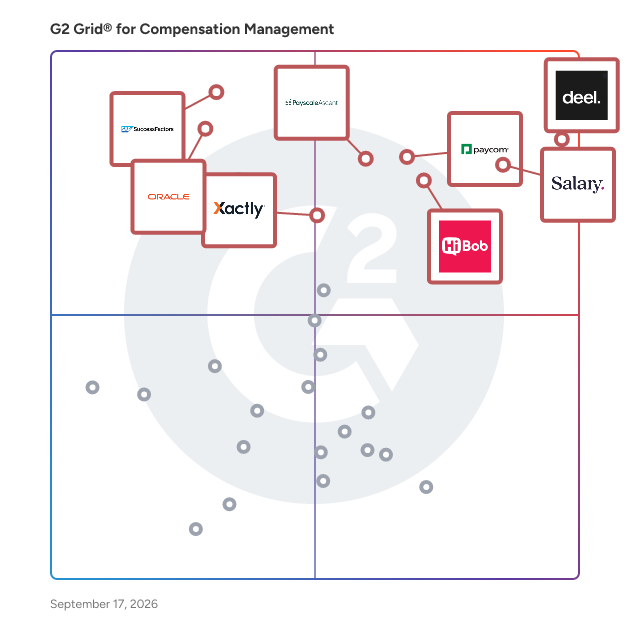
Xactly Incent: Recognized as a leader in enterprise compensation management, Xactly Incent offers robust incentive compensation solutions, helping organizations align sales performance with business objectives.
-
Payfactors: Provides comprehensive compensation data and analytics, assisting large organizations in making informed pay decisions and maintaining competitive salary structures.
-
Oracle Talent Management Cloud: Offers a unified platform for managing global compensation processes, integrating seamlessly with other HR functions to support large-scale enterprises.
-
CompUp: A full-stack compensation management software that helps total rewards teams eliminate pay disparities and make fair pay a reality, featuring compensation benchmarking, merit planning, and appraisal cycles.
-
UKG Pro: Combines compensation planning with workforce analytics, helping large businesses align pay strategies with organizational goals.
-
Anaplan: Offers advanced modeling and scenario planning capabilities, allowing enterprises to forecast and manage compensation strategies effectively.
Compensation Management Software Features
Reward Structuring — Define compensation packages and allowance plans within the system. Specify the various components of compensation, including base salary, bonuses, and equity. Structure compensation pools and hierarchies for continual planning.
Event Management — Coordinate new hire, transfer, promotion, and termination events within the system using rules to automatically facilitate the associated compensation adjustments.
Workflow Automation — Streamline the flow of work processes by establishing triggers and alerts that notify and route information to the appropriate people when their action is required within the compensation process.
Compensation History — Access employee compensation history and talent records when evaluating compensation adjustments to inform decision making.
Automated Compliance — Maintain compliance with corporate policies, state mandates, and federal regulations regarding compensation with built-in compliance features, including automated identification and flagging of unapproved behaviors.
Performance Management Integration — Integrate employee performance data from a third-party performance management solution to supplement compensation history and establish pay-for-performance compensation structures.
Embedded Analytics — View budgetary allocations across the organization, compensation information related to individual employees or departments, and underlying compensation trends in analytics dashboards embedded in the system.
Reporting Capabilities — Create standard and ad-hoc reports of compensation data within the system. These reports can include trends and other graphical representations of data displayed by analytics dashboards.
Compensation Data Management — Easily import or export data and access workers’ compensation data quickly within the system. Create compensation hierarchies so that managers can access relevant team information.
Internationalization — Extend compensation configurations around the globe using flexible location profiles, multiple language options, and automatic currency conversion tools within the system.
Other Features of Compensation Management Software: All-in-one HR suite, Standalone
Which Compensation Software is the Best for Managing Employee Benefits?
-
HiBob: All-in-one HR platform with tools for managing salary, benefits, and employee engagement—great for modern, growing teams.
-
Salary.com: Delivers market data and analytics to support compensation planning, enabling organizations to align employee benefits with industry standards.
-
Deel: A global HR platform with built-in compensation tools for managing salaries, benefits, and equity across 150+ countries—ideal for companies with international teams.
Compensation Management Software FAQs
Most Popular FAQs
Which Compensation Management Software has the best reviews?
Several platforms stand out for consistently high satisfaction across star ratings, ease of use, and support quality. Based on verified reviewer feedback, the top-rated options are:
-
Paycom — A comprehensive HCM platform with strong compensation management functionality, praised for its unified employee data model and self-service capabilities across large user bases.
-
Deel Payroll — A global payroll and compensation platform that earns top marks for its ease of use and ability to manage cross-border compensation with minimal administrative friction.
-
Payfactors — A compensation data and analytics platform recognized for helping HR teams make defensible pay decisions using market benchmarking and compensation planning tools.
-
HiBob HRIS — A modern HRIS platform with built-in compensation management modules, frequently praised for its clean interface and strong people analytics capabilities.
What does compensation management software do?
Compensation management software helps organizations plan, administer, and analyze employee pay programs — from base salary and bonuses to equity, commissions, and benefits. Core capabilities typically include salary benchmarking against external market data, merit and bonus cycle planning, pay equity analysis, and compensation reporting for finance and HR leadership. More advanced platforms extend into total rewards communication, variable pay modeling, and integration with HRIS or payroll systems to ensure data consistency across the employee lifecycle.
What are the leading compensation management solutions in the market?
The market includes platforms that range from standalone compensation planning tools to full HCM suites with embedded pay management. Platforms with strong presence and user validation include:
-
Paycom — One of the most widely reviewed compensation management platforms, offering an all-in-one HCM solution with integrated payroll, benefits, and compensation planning.
-
Salary.com — A market-data-first compensation platform used by HR teams to benchmark roles, build pay structures, and conduct pay equity analyses using curated salary survey data.
-
SAP SuccessFactors HCM — An enterprise-grade HCM suite with robust compensation management capabilities, well-suited for global organizations with complex pay program requirements.
-
Xactly — A sales performance and incentive compensation management platform purpose-built for organizations that need to model, automate, and analyze commission and variable pay plans.
What is the best compensation software for managing employee benefits?
Organizations looking for platforms that manage compensation holistically — including benefits administration alongside base pay and incentives — tend to gravitate toward full-suite HR solutions. Top-reviewed options for this use case include:
-
Paycom — Widely used for its integrated approach to compensation and benefits administration within a single HCM platform, reducing the need for manual data transfers between systems.
-
HiBob HRIS — Combines compensation planning with benefits tracking and workforce analytics in a single, modern interface that HR teams find easy to manage and configure.
-
Deel Payroll — Extends beyond payroll to manage contractor and employee benefits across multiple countries, making it a strong option for globally distributed teams.
What tools are used for compensation management?
Compensation management typically involves a mix of tools depending on organizational maturity. At the core are platforms like Paycom and SAP SuccessFactors HCM for full HR and compensation cycle management; market data tools like Salary.com and Payfactors for benchmarking and pay equity analysis; and variable/incentive pay platforms like Xactly for commission and bonus plan automation. Many organizations also use HiBob HRIS or Deel Payroll as the connective layer between compensation data and broader HR or finance workflows.
Small Business FAQs
What is the most affordable Compensation Management Software for SMBs?
Small business buyers in the compensation management space consistently prioritize low administrative overhead, transparent pricing, and fast time to value. The platforms most frequently reviewed and recommended by SMBs include:
-
Deel Payroll — Offers flexible pricing based on headcount and contractor volume, making it one of the most accessible options for small teams managing global payroll and compensation without a dedicated HR ops function.
-
HiBob HRIS — A modern people platform with compensation modules that scales affordably for growing SMBs, frequently cited for delivering enterprise-grade functionality at a manageable cost.
-
OpenComp — A compensation management platform built specifically for high-growth startups and SMBs, offering market benchmarking and offer management without the complexity of legacy enterprise tools.
What is the best Compensation Management Software for startups?
Startups need compensation tools that are fast to implement, easy for lean HR teams to manage, and capable of supporting competitive offer creation and equity modeling as they scale. Top-reviewed options among early-stage and growth-stage companies include:
-
Deel Payroll — A go-to platform for startups hiring globally, offering integrated payroll, equity management, and contractor compensation in a single system that requires minimal setup.
-
OpenComp — Designed with startups in mind, OpenComp provides real-time compensation benchmarking and total rewards modeling to help founders and HR leads make competitive, data-backed pay decisions.
-
HiBob HRIS — Widely adopted by venture-backed companies for its modern UX, compensation cycle management, and strong integrations with the recruiting and payroll tools startups already use.
Which Compensation Management Software is the most user-friendly for startups?
Ease of use is a decisive factor for startups where HR teams are small and time for training is limited. Platforms that score highest on usability among smaller organizations include:
-
Deel Payroll — Earns maximum ease-of-use scores from SMB reviewers, with an interface designed to make complex global compensation simple to execute for non-specialists.
-
OpenComp — Praised by startup users for its intuitive compensation benchmarking workflows that require no prior compensation analyst experience to operate effectively.
-
HiBob HRIS — Consistently highlighted for its clean, consumer-grade interface that makes compensation reviews and approvals accessible to managers and employees alike, not just HR admins.
What is the most recommended Compensation Management Software for remote-first small businesses?
Remote-first SMBs face unique compensation challenges — managing pay equity across geographies, handling multi-currency payroll, and staying compliant with local labor laws. Platforms built for this reality include:
-
Deel Payroll — The most cited platform among remote-first businesses for its ability to manage compensation across 150+ countries, handle entity-free hiring, and automate compliance in a single dashboard.
-
HiBob HRIS — Integrates compensation management with remote-friendly HR workflows including async onboarding, distributed team analytics, and time-off tracking across time zones.
-
OpenComp — Helps distributed startups establish location-based or location-agnostic pay bands with real-time market data, reducing guesswork in remote offer creation.
Which Compensation Management Software is best for companies switching from spreadsheets?
A significant portion of SMBs managing compensation in spreadsheets eventually hit walls around version control, audit trails, and scalability. Platforms that reviewers most frequently cite as their first structured compensation tool include:
-
Paycom — For SMBs ready to move compensation into a full HCM system, Paycom offers a structured environment for merit cycles, bonus planning, and manager workflows that spreadsheets can't replicate.
-
HiBob HRIS — A natural first step for teams graduating from spreadsheets, with compensation review workflows that feel familiar but add the structure, audit history, and approvals that manual tools lack.
-
Salary.com — Bridges the gap between manual benchmarking and a structured compensation platform, offering market data access and pay structure tools that replace the patchwork of survey exports and spreadsheet models.
Enterprise FAQs
What is the best-rated Compensation Management Software for tech enterprises?
Technology companies at enterprise scale need compensation platforms that handle high-volume merit cycles, integrate with existing HR tech stacks, and support equity and variable pay programs. Top-rated tools among tech enterprise reviewers include:
-
Xactly — The leading incentive compensation management platform for enterprise sales organizations, with deep capabilities for modeling commission plans, automating payouts, and auditing variable pay at scale.
-
Marketpay — A market pricing and compensation analytics platform used by enterprise compensation teams in tech to build and maintain defensible pay structures using current survey data.
-
SAP SuccessFactors HCM — Widely deployed across large tech organizations for its enterprise-grade compensation planning, global pay management, and integration with core HR and finance systems.
What is the most reliable Compensation Management Software tool for enterprises?
Reliability for enterprise buyers means consistent uptime, strong administrative controls, audit trails, and a vendor with proven scale. The platforms enterprise reviewers cite most for dependability are:
-
Paycom — A high-volume platform trusted by enterprises for its unified data architecture, which eliminates the reconciliation errors that plague multi-system compensation environments.
-
SAP SuccessFactors HCM — Backed by SAP's global infrastructure, SuccessFactors is consistently chosen by enterprises in regulated industries for its compliance controls and enterprise SLA commitments.
-
Xactly — Earns high marks from enterprise compensation and sales ops teams for its audit-ready incentive compensation records and reliable payout calculation engine.
What is the best-reviewed Compensation Management Software for enterprise app integration?
Integration capability is a top evaluation criterion for enterprise HR teams, who need compensation platforms to connect seamlessly with HRIS, ATS, ERP, and finance systems. Platforms most frequently praised for integration depth include:
-
Deel Payroll — Leads enterprise integration reviews for its pre-built connectors to leading HRIS, accounting, and equity management platforms, enabling compensation data to flow across systems without manual exports.
-
HiBob HRIS — Consistently cited for its open API and native integrations with payroll providers, equity tools, and ATS platforms, making it a strong compensation hub for enterprises running modern HR tech stacks.
-
Payfactors — Praised by enterprise compensation analysts for integrating market benchmarking data directly into compensation planning workflows, reducing the friction between survey data and pay decisions.
What is the most recommended Compensation Management Software for enterprises managing global compensation?
Global enterprises managing pay across multiple countries face compounding complexity — currency variance, local pay regulations, and the need to maintain internal equity across markets. Platforms with strong global compensation capabilities include:
-
Deel Payroll — Frequently selected by global enterprises for its ability to run payroll, manage contractor compensation, and maintain compliance across 150+ countries in a single platform.
-
SAP SuccessFactors HCM — The enterprise standard for managing total compensation globally, with multi-currency support, localization capabilities, and the governance controls that multinational HR teams require.
-
Xactly — For enterprises with global sales organizations, Xactly provides territory-aware incentive compensation management that accounts for regional quota structures and currency-adjusted commission plans.
Which Compensation Management Software is best-reviewed for pay equity and compliance at the enterprise level?
Pay equity has become a board-level priority for enterprise organizations, with increasing regulatory scrutiny across the US, EU, and beyond. Platforms that enterprise reviewers highlight for pay equity and compliance support include:
-
Salary.com — A dedicated compensation analytics platform with purpose-built pay equity analysis tools, enabling enterprise HR and legal teams to identify and remediate pay disparities before they become compliance issues.
-
Payfactors — Used by enterprise compensation teams for its combination of market benchmarking and internal pay analysis, providing the data foundation needed to build and defend equitable pay structures.
-
SAP SuccessFactors HCM — Offers built-in pay equity reporting and compensation governance workflows that align with enterprise compliance requirements in regulated industries and multinational jurisdictions.
Last updated on April 24, 2026