Best Auto Dialer Software

How Many Auto Dialer Software Products Does G2 Track?

Total Products under this Category: 295

Category Stats (Nov 2026)

  • Average Rating: 4.48/5 (↑0.01 vs Oct 2026) The average rating of products in this category, based on all submitted ratings
  • Top Trending Product: SKIPCALL (+3.52%) - Among all products in this category, SKIPCALL recorded the largest rating increase compared to last month

Last updated: November 01, 2026

How Does G2 Rank Auto Dialer Software Products?

Why You Can Trust G2's Software Rankings:

  • 30 Analysts and Data Experts
  • 58,200+ Authentic Reviews
  • 295+ Products
  • Unbiased Rankings

G2's software rankings are built on verified user reviews, rigorous moderation, and a consistent research methodology maintained by a team of analysts and data experts. Each product is measured using the same transparent criteria, with no paid placement or vendor influence. While reviews reflect real user experiences, which can be subjective, they offer valuable insight into how software performs in the hands of professionals. Together, these inputs power the G2 Score, a standardized way to compare tools within every category.

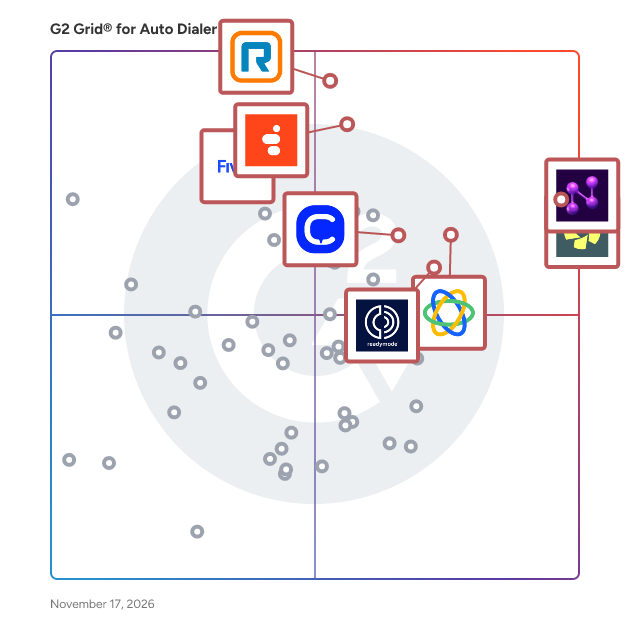
G2 Grid® for Auto Dialer Software

G2 Grid® for Auto Dialer Software plotting products by satisfaction and market presence

Highlighted products: Orum, Nooks, RingCentral Contact Center, Genesys Cloud CX, Close, Five9 Intelligent Cloud Contact Center Platform, CloudTalk, and Readymode.

Underlying data: [Grid® JSON](https://www.g2.com/categories/auto-dialer/grids.json?focus%5B%5D=orum&focus%5B%5D=nooks&focus%5B%5D=ringcentral-contact-center&focus%5B%5D=genesys-cloud-cx&focus%5B%5D=close&focus%5B%5D=five9-intelligent-cloud-contact-center-platform&focus%5B%5D=cloudtalk&focus%5B%5D=readymode)

Nooks

Nooks is the Agent Workspace for intelligent outbound. We pair human judgment with AI execution so reps spend less time on busywork and more time building real relationships that turn into pipeline. Nooks brings signals, account history, and next-best actions into one multi-channel system for AI sequencing so outbound stays relevant as you scale. Over 100 teams have switched from legacy sequencing tools to Nooks, more than doubling email-sourced pipeline, cutting research time by 90%, and consolidating multiple vendors into one platform. Over 1200 customers, including sophisticated sales orgs at HubSpot, Deel, ZoomInfo, and Rippling use Nooks to generate more pipeline with less context switching.

Average Rating: 4.8/5.0

Total Reviews: 1,720

How Do G2 Users Rate Nooks?

  • Has the product been a good partner in doing business?: 9.6/10 (Category avg: 9.0/10)
  • Omnichannel: 8.9/10 (Category avg: 8.6/10)
  • API / Integrations: 9.0/10 (Category avg: 8.6/10)
  • Progressive Dialing: 9.0/10 (Category avg: 8.7/10)

Who Is the Company Behind Nooks?

  • Seller: Nooks
  • Company Website:
  • HQ Location: San Francisco, California
  • LinkedIn® Page: www.linkedin.com
    425 employees on LinkedIn®

Who Uses This Product?

  • Who Uses This: SDR, Business Development Representative
  • Top Industries: Computer Software, Information Technology and Services
  • Company Size: 50% Medium, 26% Small

What Do G2 Reviewers Say About Nooks?

AI-generated summary from verified user reviews

Pros
  • Users appreciate the time-saving features of Nooks, enhancing call activity and team collaboration significantly.
  • Users value the ease of use of Nooks, enabling quick access to essential prospect information and team collaboration.
  • Users value the efficiency of Nooks, enabling seamless dialing and effective pipeline management with ease of use.
  • Users praise the helpful support team and the ease of use of Nooks' features and interface.
  • Users highlight effective lead generation with Nooks, significantly improving call activity and team momentum.
Cons
  • Users experience call issues, such as choppy connections and missing contact details, leading to frustration during use.
  • Users experience dialer issues where not all phone numbers show up, impacting their calling efficiency.
  • Users express frustration over missing features like note integration and insufficient sync with other tools in Nooks.
  • Users report dialer limitations with incomplete number population and reduced pickup rates, affecting their calling experience.
  • Users often experience connection issues, including dropped calls and delays in call connections, affecting communication quality.

What Are Recent G2 Reviews of Nooks?

Orum

Orum is an AI calling and coaching platform built to help sales teams connect with more prospects and convert conversations into qualified pipeline. Orum serves more than 1,200 sales organizations, from fast-growing startups to global enterprises, including IBM, Samsung, Epicor, SentinelOne, Ramp, and Crunchbase. As the pioneer of AI dialing technology, Orum was built for high-volume outbound teams that rely on live conversations to drive revenue. By combining intelligent dialing automation, real-time collaboration, and native AI coaching, Orum helps reps focus on what matters most, having more meaningful conversations with the right prospects. At the core of the platform is Orum’s AI Dialer, powered by insights from the largest calling dataset on the market with over one billion real sales calls. It eliminates manual dialing, instantly detects real humans, enabling reps to get into 5x more live conversations. Orum also includes a full AI Coaching Suite with AI Call Scorecards, personalized Coaching Portals, and AI Roleplay, helping teams ramp 50% faster with targeted insights and 24/7 simulated practice. Alongside this, the Virtual Salesfloor brings reps together to collaborate, listen to live calls, and learn in real time, rebuilding the shared energy and accountability of a true salesfloor culture.

Average Rating: 4.6/5.0

Total Reviews: 1,103

How Do G2 Users Rate Orum?

  • Has the product been a good partner in doing business?: 9.5/10 (Category avg: 9.0/10)
  • Omnichannel: 8.5/10 (Category avg: 8.6/10)
  • API / Integrations: 8.8/10 (Category avg: 8.6/10)
  • Progressive Dialing: 9.0/10 (Category avg: 8.7/10)

Who Is the Company Behind Orum?

  • Seller: Orum
  • Company Website:
  • Year Founded: 2018
  • HQ Location: Austin, Texas
  • LinkedIn® Page: www.linkedin.com
    178 employees on LinkedIn®

Who Uses This Product?

  • Who Uses This: Sales Development Representative, SDR
  • Top Industries: Computer Software, Information Technology and Services
  • Company Size: 48% Medium, 23% Small

What Do G2 Reviewers Say About Orum?

AI-generated summary from verified user reviews

Pros
  • Users praise the ease of use of Orum, appreciating the simple setup and efficient cold-calling features.
  • Users find Orum to be highly efficient for cold calling, enhancing productivity with quick connections and valuable prospect insights.
  • Users value the time-saving features of Orum, significantly enhancing their cold-calling efficiency and productivity.
  • Users praise Orum's fast dialing speed and seamless integration, significantly boosting productivity and call efficiency.
  • Users praise Orum's fast cold calling capabilities, allowing for efficient outreach and enhanced productivity in their calling efforts.
Cons
  • Users experience call issues with slow connections and limited voicemail functionality, impacting overall effectiveness.
  • Users express a need for improved voicemail features and reporting capabilities in Orum to enhance functionality.
  • Users experience connection issues with Orum, facing slow dials and flagged caller IDs impacting customer reach.
  • Users face integration issues with Orum, particularly with Salesforce and Gong, leading to time-consuming challenges.
  • Users face dialer limitations with slow connections, poor layout, and lack of past call information integration.

What Are Recent G2 Reviews of Orum?

What Are G2 Users Discussing About Orum?

RingCentral Contact Center

RINGCENTRAL CONTACT CENTER PRODUCT DESCRIPTION RingCentral Contact Center is an enterprise-grade cloud contact center solution designed to deploy and scale customer operations globally. Built for large-scale organizations that demand flexibility and high performance, the platform unifies enterprise communications and contact center capabilities to deliver effortless customer experiences across the entire customer journey. GLOBAL OMNICHANNEL ENGAGEMENT AND ADVANCED ROUTING RingCentral Contact Center enables businesses to connect with customers on voice and over 30 digital channels globally. The solution utilizes sophisticated attribute-based routing to ensure customers are automatically paired with the right agent based on their specific needs and skills. By offering comprehensive omnichannel integration and seamless journey tracking, enterprises can maintain continuous, context-rich support across every international touchpoint. CONVERSATIONAL AI AND SELF-SERVICE AUTOMATION The platform features built-in AI Agents to streamline customer journeys and reduce operational costs. Through advanced AI self-service and AI-powered virtual agents, organizations can deliver personalized, data-driven conversations 24/7. These intelligent tools handle routine inquiries autonomously while generating deep interaction insights, providing instant assistance, and ensuring a smooth transition to live agents when necessary. NATIVE WORKFORCE ENGAGEMENT MANAGEMENT Optimize team performance and control costs with a native, AI-driven workforce optimization solution. RingCentral Contact Center encompasses full workforce engagement management (WEM) tools, including native scheduling and predictive forecasting to align team hours precisely with call traffic, vacations, and training. It also provides robust quality management features such as call recording, interaction analytics, and fair agent scoring, paired with interactive gamification and performance dashboards to boost agent satisfaction and productivity. COMPREHENSIVE ANALYTICS AND CUSTOM INTEGRATIONS Make business-critical decisions using granular historical reports and live analytics. The platform features an intuitive drag-and-drop interface to build customizable real-time dashboards, allowing managers to monitor key performance indicators like handle time, first contact resolution, and queue time instantly. Designed for bespoke deployments, the solution integrates deeply with over 120 marketplace tools and offers more than 400 available APIs to tailor workflows to any enterprise technology stack. WHY CHOOSE RINGCENTRAL CONTACT CENTER Global enterprises choose RingCentral Contact Center to deliver better customer service at scale and lift customer and employee satisfaction.. By combining powerful omnichannel routing, native workforce engagement management, and open API flexibility, RingCentral provides a secure, reliable cloud foundation that transforms traditional customer support into a strategic revenue driver.

Average Rating: 4.2/5.0

Total Reviews: 251

How Do G2 Users Rate RingCentral Contact Center?

  • Has the product been a good partner in doing business?: 8.1/10 (Category avg: 9.0/10)
  • Omnichannel: 7.8/10 (Category avg: 8.6/10)
  • API / Integrations: 7.6/10 (Category avg: 8.6/10)
  • Progressive Dialing: 8.1/10 (Category avg: 8.7/10)

Who Is the Company Behind RingCentral Contact Center?

  • Seller: RingCentral
  • Company Website:
  • Year Founded: 1999
  • HQ Location: Belmont, CA
  • LinkedIn® Page: www.linkedin.com
    6,675 employees on LinkedIn®
  • Ownership: NYSE:RNG

Who Uses This Product?

  • Top Industries: Consumer Services, Information Technology and Services
  • Company Size: 50% Small, 38% Medium

What Do G2 Reviewers Say About RingCentral Contact Center?

AI-generated summary from verified user reviews

Pros
  • Users value the ease of use of RingCentral Contact Center, appreciating its intuitive setup and customizable features.
  • Users appreciate the helpful customer support at RingCentral Contact Center, ensuring swift issue resolution and seamless communication.
  • Users praise the intuitive interface of RingCentral Contact Center, enabling seamless communication and effortless setup.
  • Users appreciate the helpful customer support at RingCentral Contact Center, resolving requests efficiently and pleasantly.
  • Users commend the AI-powered efficiency of RingCentral Contact Center, streamlining customer interactions across various channels.
Cons
  • Users often face call issues with RingCentral, including disconnections and slow support for timely resolutions.
  • Users experience issues with call connectivity, including disconnections mid-call and difficulties answering via mobile.
  • Users experience call quality issues with RingCentral, including disconnections and challenges with mobile connectivity.
  • Users face significant connection issues with RingCentral Contact Center, affecting calls and overall user experience.
  • Users experience poor customer support, often facing delayed responses and inconsistent assistance during critical issues.

What Are Recent G2 Reviews of RingCentral Contact Center?

What Are G2 Users Discussing About RingCentral Contact Center?

AI can help you find the answers. G2 helps you trust them.

Connect G2 to Claude or ChatGPT for answers grounded in G2's trusted reviews, comparisons, and pricing from real user insights.

How it works

Genesys Cloud CX

Genesys Cloud CX® is an AI-Powered Experience Orchestration solution that enables organizations to coordinate customer and employee interactions across every touchpoint. By connecting data, systems and workflows in real time, it helps businesses deliver more consistent, personalized experiences that improve loyalty, efficiency and overall business outcomes. The solution brings together AI; voice and digital engagement; intelligent routing and automation; workforce engagement management; and end-to-end journey orchestration in a single, unified cloud solution. Its open, flexible architecture allows organizations to integrate easily with existing systems, reducing complexity while creating a more connected experience across channels and enabling innovation without disruption. Organizations use Genesys Cloud CX to accelerate time to value through rapid deployment and easy-to-deploy capabilities, while reducing cost to serve with AI-driven automation. Real-time personalization and context-aware interactions help improve customer satisfaction, while native AI capabilities enhance agent productivity, streamline workflows and support faster, more informed decision-making. A unified data layer provides real-time insights and ensures seamless experiences across channels, eliminating silos and improving visibility across operations. Built-in AI governance supports secure, compliant and explainable adoption, which is especially important for regulated industries. Designed for enterprise scale, the platform delivers high availability, stability and security, with the scalability and flexibility to support global operations and evolving business needs while maintaining resilience. Genesys Cloud CX is widely used by organizations of all sizes to orchestrate personalized customer experiences at scale, improve efficiency, simplify the technology stack and drive measurable ROI.

Average Rating: 4.4/5.0

Total Reviews: 1,496

How Do G2 Users Rate Genesys Cloud CX?

  • Has the product been a good partner in doing business?: 8.6/10 (Category avg: 9.0/10)
  • Omnichannel: 8.8/10 (Category avg: 8.6/10)
  • API / Integrations: 8.9/10 (Category avg: 8.6/10)
  • Progressive Dialing: 8.9/10 (Category avg: 8.7/10)

Who Is the Company Behind Genesys Cloud CX?

  • Seller: Genesys
  • Company Website:
  • Year Founded: 1990
  • HQ Location: Menlo Park, CA
  • LinkedIn® Page: www.linkedin.com
    8,740 employees on LinkedIn®
  • Phone: +1 650 466 - 1100

Who Uses This Product?

  • Who Uses This: Case Advocate, Manager
  • Top Industries: Information Technology and Services, Financial Services
  • Company Size: 45% Medium, 41% Large

What Do G2 Reviewers Say About Genesys Cloud CX?

AI-generated summary from verified user reviews

Pros
  • Users appreciate the ease of use of Genesys Cloud CX, benefiting from simple setup and effective management of interactions.
  • Users appreciate the robust omnichannel capabilities of Genesys Cloud CX, which enhance customer interaction management and agent efficiency.
  • Users appreciate the reliability of Genesys Cloud CX, enjoying its efficiency in managing customer interactions effectively.
  • Users commend the efficiency of Genesys Cloud CX, enhancing agent productivity with streamlined workflows and automation.
  • Users value the intuitive interface of Genesys Cloud CX, enhancing day-to-day operations and agent efficiency seamlessly.
Cons
  • Users express frustration over limited features, hindering their operational efficiency and impacting essential tasks.
  • Users find the absence of essential features like Shared Line Appearance and sorting options frustrating and limiting.
  • Users find the admin complexity of Genesys Cloud CX challenging, which can hinder user experience and setup efficiency.
  • Users find the inadequate reporting in Genesys Cloud CX limits insights and complicates data analysis.
  • Users find the steep learning curve for Genesys Cloud CX's features can lead to frustrating experiences, especially for newcomers.

What Are Recent G2 Reviews of Genesys Cloud CX?

What Are G2 Users Discussing About Genesys Cloud CX?

Close

Close is the AI CRM built for businesses that grow through conversations. It brings powerful sales dialing, email, SMS, pipeline management, automation, and AI agents together in one platform. Connect with more prospects, win more deals, and scale without the complexity of traditional CRMs. Reach more prospects. Have more conversations. A powerful sales dialer is built right into your CRM. Power and Predictive Dialers help reps make more calls in less time, while Local Presence and Branded Calling help improve connection rates. With email, SMS, and outreach sequences in the same platform, your team can engage leads, follow up consistently, and manage opportunities without juggling tools. Make every conversation count. Call recording, transcription, AI Notetaker, and automatic summaries capture important details so reps can focus on selling. AI-assisted email drafting, SMS follow-ups, and automatic CRM updates help turn conversations into action. Sales Playbooks, workflow automation, lead routing, Smart Views, and reporting help teams standardize what works, automate follow-through, and manage more opportunities as they grow. Chloe helps you. AI agents work for you. Chloe is your built-in AI assistant. Ask her about a lead, your pipeline, or a recent conversation. She can find answers, update records, build reports, and help you create AI agents. Give those agents a job on your sales team. They can call and qualify prospects, book meetings, follow up with leads, coach reps, and prepare daily briefings. Because they work inside Close, they can use your customer history, conversations, and workflows to take action. Built to grow with your business. From founder-led startups to established sales organizations, Close supports businesses where conversations drive revenue. That includes software, financial and professional services, insurance, home services, coaching, education, and more. Get started quickly, then scale with sophisticated dialing, automation, AI agents, reporting, and customizable workflows. An open API, MCP, and integrations let you connect existing tools, build custom sales processes, and work with AI platforms like ChatGPT and Claude. For 13 years, we've focused on helping businesses turn more conversations into customers. Today, more than 11,500 businesses use Close to sell and grow. Close. Built for selling. Made for scaling.

Average Rating: 4.7/5.0

Total Reviews: 2,145

G2 Deal: 20% off for new Close customers

Close is the sales engagement CRM designed to help SMBs turn more leads into revenue. G2 users receive a 20%, one-time discount off first billing cycle for new Close customers. Offer expires December 31, 2026.

Offer expires: 31 December 2026

View this exclusive G2 deal

How Do G2 Users Rate Close?

  • Has the product been a good partner in doing business?: 9.3/10 (Category avg: 9.0/10)
  • Omnichannel: 8.9/10 (Category avg: 8.6/10)
  • API / Integrations: 9.0/10 (Category avg: 8.6/10)
  • Progressive Dialing: 9.2/10 (Category avg: 8.7/10)

Who Is the Company Behind Close?

  • Seller: Close
  • Company Website:
  • Year Founded: 2013
  • HQ Location: 111 Congress Avenue, Suite 500 Austin, Texas 78701 United States
  • LinkedIn® Page: www.linkedin.com
    214 employees on LinkedIn®

Who Uses This Product?

  • Who Uses This: CEO, Founder
  • Top Industries: Marketing and Advertising, Computer Software
  • Company Size: 77% Small, 19% Medium

What Do G2 Reviewers Say About Close?

AI-generated summary from verified user reviews

Pros
  • Users find Close to be extremely user-friendly, enabling quick access to essential features for efficient business management.
  • Users find Close to be incredibly helpful, especially with its intuitive design and fast customer support.
  • Users love the simplicity and user-friendliness of Close, making customer management and prospect tracking effortless.
  • Users appreciate the enhanced communication management features of Close, streamlining client interactions effectively and efficiently.
  • Users love the intuitive design of Close, finding it user-friendly and efficient for their needs.
Cons
  • Users note the missing features in Close, like mobile app limitations and no WhatsApp integration, affecting usability.
  • Users experience call issues, including unexpected charges and recording failures, which can hinder effective usage.
  • Users find the limited features of Close restrictive, particularly for B2C needs and advanced functionalities.
  • Users find the learning curve steep, with challenges in merging leads and managing custom reports effectively.
  • Users find the limited customization of Close frustrating, particularly for tailored reports and advanced dashboards.

What Are Recent G2 Reviews of Close?

What Are G2 Users Discussing About Close?

Five9 Intelligent Cloud Contact Center Platform

Founded in 2001 and headquartered in San Ramon, California, Five9 has evolved into a global CX leader with over 2,500 customers worldwide. As a pioneer in cloud contact center technology, Five9 serves organizations across industries looking to transform customer experiences through intelligent, personalized interactions. With over 1,400 partners globally and 2,700 employees, Five9 combines deep CX expertise with innovative technology to help brands deliver better business outcomes. The Five9 Intelligent CX Platform provides a comprehensive suite of solutions, including omnichannel engagement, agent assistance, workforce engagement, and AI-powered automation. Five9 Genius AI embeds practical artificial intelligence across the platform, enabling hyper-personalized customer journeys where AI Agents and Human Agents work hand in hand. Our open, cloud-native platform integrates effortlessly with leading CRM and enterprise systems, ensuring businesses can personalize experiences while maximizing operational agility. Five9 transforms CX from fragmented, frustrating experiences into seamless, AI-driven journeys that anticipate customer needs. By combining AI's efficiency with the human touch, businesses can deliver better experiences at lower costs, turning their contact centers from cost centers into strategic assets. With industry-leading reliability (99.999% uptime), deep CX expertise, and a consultative partnership approach, Five9 helps businesses unlock efficiency, boost customer satisfaction, and drive long-term loyalty. With Five9, the New CX Starts Here—where customer joy becomes a driving force for business growth.

Average Rating: 4.2/5.0

Total Reviews: 639

How Do G2 Users Rate Five9 Intelligent Cloud Contact Center Platform?

  • Has the product been a good partner in doing business?: 8.6/10 (Category avg: 9.0/10)
  • Omnichannel: 8.8/10 (Category avg: 8.6/10)
  • API / Integrations: 8.6/10 (Category avg: 8.6/10)
  • Progressive Dialing: 8.9/10 (Category avg: 8.7/10)

Who Is the Company Behind Five9 Intelligent Cloud Contact Center Platform?

  • Seller: Five9
  • Company Website:
  • Year Founded: 2001
  • HQ Location: San Ramon, CA
  • LinkedIn® Page: www.linkedin.com
    3,127 employees on LinkedIn®
  • Ownership: NASDAQ:FIVN

Who Uses This Product?

  • Who Uses This: Customer Service Representative, Manager
  • Top Industries: Consumer Services, Financial Services
  • Company Size: 56% Medium, 24% Small

What Do G2 Reviewers Say About Five9 Intelligent Cloud Contact Center Platform?

AI-generated summary from verified user reviews

Pros
  • Users find the ease of use of Five9 Intelligent Cloud Contact Center Platform enhances agent productivity and customer experience.
  • Users commend the accommodating customer support of Five9, enhancing their overall experience with the platform.
  • Users value the accommodating support and versatile features of Five9, greatly enhancing their contact center experience.
  • Users appreciate the impressive features and integrations of Five9, enhancing both agent and customer experiences remarkably.
  • Users value the efficiency of Five9, enhancing operations and significantly reducing agent documentation time and costs.
Cons
  • Users face call issues due to inaccurate detection and automatic logouts, impacting overall user experience and efficiency.
  • Users find the platform's complexity and learning curve challenging, especially for new users navigating advanced features.
  • Users find the missing features frustrating, particularly regarding outdated self-help resources and delayed enhancements.
  • Users face technical issues like call clarity and disposition codes that hinder efficient call management and reporting.
  • Users report poor customer support, with inadequate assistance for daily issues and slow response times during outages.

What Are Recent G2 Reviews of Five9 Intelligent Cloud Contact Center Platform?

What Are G2 Users Discussing About Five9 Intelligent Cloud Contact Center Platform?

Readymode

Readymode is a cloud-based outbound customer engagement platform for sales teams. Our all-in-one platform empowers businesses to engage smarter, connect more, and grow their revenue. Along with an industry-leading predictive dialer, our outbound calling solutions include advanced features like fully integrated CRM, built-in compliance tools, and real-time reporting and analytics. With Readymode, you get crystal-clear voice with Tier 1 carriers, unlimited outbound minutes, $0 set-up fees, and complete implementation so you’re up and running quickly. Readymode is at the core of the conversation: we’re designed for businesses that want to maximize productivity and scale affordably. See why we’re the leading choice for customer outreach.

Average Rating: 4.6/5.0

Total Reviews: 265

How Do G2 Users Rate Readymode?

  • Has the product been a good partner in doing business?: 9.5/10 (Category avg: 9.0/10)
  • Omnichannel: 8.4/10 (Category avg: 8.6/10)
  • API / Integrations: 8.7/10 (Category avg: 8.6/10)
  • Progressive Dialing: 9.3/10 (Category avg: 8.7/10)

Who Is the Company Behind Readymode?

  • Seller: Readymode
  • Company Website:
  • Year Founded: 2014
  • HQ Location: Vancouver, CA
  • LinkedIn® Page: www.linkedin.com
    77 employees on LinkedIn®

Who Uses This Product?

  • Who Uses This: Customer Service Representative, Appointment Setter
  • Top Industries: Real Estate, Insurance
  • Company Size: 61% Small, 36% Medium

What Do G2 Reviewers Say About Readymode?

AI-generated summary from verified user reviews

Pros
  • Users appreciate the efficiency of Readymode, particularly its effective KPI tracking and swift customer support.
  • Users value the ease of use in Readymode, enhancing productivity and streamlining communication for remote teams.
  • Users value Readymode for its effective KPI tracking and responsive support, enhancing business decision-making and outcomes.
  • Users value the time-saving features of Readymode, enhancing efficiency in outbound marketing and call management.
  • Users love the dynamic automation and user-friendly dashboard of Readymode, enhancing outbound marketing efficiency.
Cons
  • Users face a steep learning curve with Readymode's advanced features, requiring significant time and practice to master.
  • Users experience call scheduling issues and cumbersome user permissions, impacting efficiency and complicating compliance checks.
  • Users find the difficult learning curve of Readymode challenging, requiring considerable time and effort to master.
  • Users find limited customization frustrating, as it complicates the creation of personalized reports and workflows.
  • Users experience slow loading, which hinders agent productivity and can affect revenue generation significantly.

What Are Recent G2 Reviews of Readymode?

What Are G2 Users Discussing About Readymode?

CloudTalk

CloudTalk is the leading AI-powered business calling software for growing SMBs. CloudTalk helps more than 4,000 modern SMBs talk to more customers, close more deals, and resolve issues faster, without enterprise pricing or complexity. Over 30,000 sales and support professionals at SMBs across 160+ countries rely on CloudTalk to: Talk to 10x more people - Our AI Sales Dialer combines preview, power and parallel (up to 5 lines) dialing that filters out voicemails and dead lines automatically. Automate the calls humans shouldn't have to make - Build AI Voice Agents and AI Receptionist in minutes for appointment scheduling, lead qualification, after-hours coverage, payment reminders and more. Turn every conversation into structured data - Use AI Conversation Intelligence to get automatic call summaries, AI notes, sentiment analysis, topic extraction, call scoring, multi-lingual transcription, and talk/listen ratios. Run their full business phone system in one cloud platform - With Call Flow Designer, IVR, call queuing, call recording, real-time monitoring, analytics, international SMS, WhatsApp messaging, and workflow automation. Handle global calling without the infrastructure headache - Local numbers in 160+ countries, 99.999% uptime, multi-carrier redundancy, and crystal-clear call quality. Plug into the tools they already use - 100+ native integrations including HubSpot (Certified), Salesforce, Pipedrive, Zoho CRM, MS Dynamics, Intercom, Zendesk, Salesloft, Outreach, Bullhorn, monday, Shopify, and more. Most CloudTalk customers are live in a few days. No hardware, no PBX, no months of consulting. Just sign up, port numbers (or buy new ones), connect your CRM, and start calling — with AI doing the busywork from day one. CloudTalk is GDPR, SOC 2, ISO 27001, HIPAA, and CCPA compliant. Customers like Bit2Me reduced missed calls from 80% to 16%, cut wait times by 85%, and scaled from 2 to 20+ agents — without adding complexity. https://hubs.li/Q04n2f7L0 Learn how we can boost your calling on a 1:1 personalized demo: https://hubs.li/Q04n2f4C0

Average Rating: 4.4/5.0

Total Reviews: 1,919

How Do G2 Users Rate CloudTalk?

  • Has the product been a good partner in doing business?: 8.9/10 (Category avg: 9.0/10)
  • Omnichannel: 8.2/10 (Category avg: 8.6/10)
  • API / Integrations: 8.3/10 (Category avg: 8.6/10)
  • Progressive Dialing: 8.5/10 (Category avg: 8.7/10)

Who Is the Company Behind CloudTalk?

  • Seller: CloudTalk
  • Company Website:
  • Year Founded: 2016
  • HQ Location: New York
  • LinkedIn® Page: www.linkedin.com
    228 employees on LinkedIn®

Who Uses This Product?

  • Who Uses This: CEO, Account Executive
  • Top Industries: Computer Software, Information Technology and Services
  • Company Size: 65% Small, 31% Medium

What Do G2 Reviewers Say About CloudTalk?

AI-generated summary from verified user reviews

Pros
  • Users appreciate the ease of use of CloudTalk, enjoying its user-friendly interface and reliable performance.
  • Users praise the reliability of CloudTalk, noting its consistent performance and smooth operation without connectivity issues.
  • Users appreciate the intuitive design of CloudTalk, enjoying its user-friendly interface and smooth functionality.
  • Users appreciate the user-friendly interface of CloudTalk, highlighting its ease of use and reliable performance.
  • Users praise CloudTalk's intuitive calling features, highlighting ease of use and efficient call management for businesses.
Cons
  • Users often face call issues, such as registering calls properly and complexities in setting up calling campaigns.
  • Users experience occasional connection issues with CloudTalk, leading to delays in call connectivity at times.
  • Users find the call management cumbersome, requiring multiple clicks and lacks integration with their CRM for seamless use.
  • Users find the missing features in CloudTalk, such as text messaging and CRM integration, quite limiting.
  • Users face poor connectivity issues with CloudTalk, impacting their overall experience despite helpful customer support.

What Are Recent G2 Reviews of CloudTalk?

What Are G2 Users Discussing About CloudTalk?

Talkdesk

Talkdesk provides a customer experience platform that helps organizations operate a human-AI hybrid workforce across service, sales, and support. The platform includes enterprise-grade Contact Center as a Service (CCaaS) to support the human workforce and Customer Experience Automation (CXA) to build and manage the AI workforce and orchestrate work across both. CXA can work with Talkdesk CCaaS or an existing third-party contact center. CXA uses agentic AI and multi-agent orchestration to automate and coordinate how customer needs are resolved. Agentic AI can reason through goals, use tools and enterprise systems, take action, and execute multi-step work, while orchestration coordinates specialized AI agents and human workflows, including decisions, escalations, and handoffs. AI agents can complete work such as processing a claim, updating a billing record, scheduling an appointment, or resolving a service case rather than only answering questions or routing interactions. Talkdesk Data Cloud provides unified, real-time context from customer interactions, enterprise systems, and knowledge sources. Built-in guardrails and governance help organizations control how AI operates as automation scales. Talkdesk CCaaS and CXA both support omnichannel customer interactions across voice and digital channels. Talkdesk CCaaS provides capabilities for the human workforce, including omnichannel routing, workforce engagement management, real-time agent guidance, employee collaboration, and customer experience analytics. CXA orchestrates work across the human-AI workforce, coordinating human agents, AI agents, data, knowledge, workflows, enterprise systems, and governance to move customer needs toward resolution while preserving context across channels and handoffs. *Key capabilities include: -Agentic end-to-end automation: Automate customer interactions and the underlying work required to resolve them across front- and back-office systems, using agentic AI that can reason, act, and complete work rather than simply respond or assist. -Human-AI and multi-agent orchestration: Coordinate specialized AI agents, human employees, data, knowledge, workflows, and enterprise systems as work moves through complex customer journeys with intelligent decisions, escalations, and handoffs, while maintaining the context required for resolution. -Continuous automation lifecycle: Analyze previous customer interactions and performance data to discover high-impact automation opportunities, build and customize agentic AI agents using natural language, test them before they engage customers, orchestrate them in production, and continuously monitor and optimize performance and outcomes. -Industry-aware data and automation: Connect industry-specific systems and data sources with purpose-built AI agents, workflows, integrations, and preconfigured use cases, giving humans and AI relevant industry context and knowledge to address customer journeys and operational requirements across more than 12 industries. -Unified data, knowledge, and governance: Use Talkdesk Data Cloud to unify customer interactions, enterprise data, knowledge, and systems of record, providing real-time context for AI agents, human employees, and workflows. Apply guardrails, permissions, monitoring, and governance to help improve accuracy, consistency, decision-making, and control as automation scales. Talkdesk is a registered trademark of Talkdesk, Inc. All product and company names are trademarks™ or registered® trademarks of their respective holders. Use of them does not imply any affiliation with or endorsement by them.

Average Rating: 4.4/5.0

Total Reviews: 2,517

How Do G2 Users Rate Talkdesk?

  • Has the product been a good partner in doing business?: 8.9/10 (Category avg: 9.0/10)
  • Omnichannel: 9.0/10 (Category avg: 8.6/10)
  • API / Integrations: 8.9/10 (Category avg: 8.6/10)
  • Progressive Dialing: 9.2/10 (Category avg: 8.7/10)

Who Is the Company Behind Talkdesk?

  • Seller: Talkdesk
  • Company Website:
  • Year Founded: 2011
  • HQ Location: Palo Alto, CA
  • LinkedIn® Page: www.linkedin.com
    1,395 employees on LinkedIn®

Who Uses This Product?

  • Who Uses This: Supervisor, Customer Service Representative
  • Top Industries: Consumer Services, Computer Software
  • Company Size: 60% Medium, 20% Small

What Do G2 Reviewers Say About Talkdesk?

AI-generated summary from verified user reviews

Pros
  • Users appreciate the ease of use of Talkdesk, highlighting its convenience for calling and scheduling.
  • Users appreciate the efficiency of Talkdesk, enhanced by new features and reliable call quality for long durations.
  • Users appreciate the value-added features of Talkdesk, enhancing convenience and efficiency in communications.
  • Users love the ease of call management with Talkdesk, enhancing customer support and simplifying workflows effectively.
  • Users value the ease of use and convenience offered by Talkdesk for managing customer support effectively.
Cons
  • Users experience call issues with Talkdesk, particularly in low network areas and when using mobile hotspots.
  • Users experience technical issues including connectivity problems and slow support response, affecting overall satisfaction with Talkdesk.
  • Users find the missing features in Talkdesk frustrating, especially the lack of Italian support and customization options.
  • Users face significant connection issues with Talkdesk, impacting audio quality and causing disruptions during calls.
  • Users experience poor connectivity with Talkdesk, noting slow performance and frustrating tech issues during peak times.

What Are Recent G2 Reviews of Talkdesk?

What Are G2 Users Discussing About Talkdesk?

GTM Workspace - Powered by ZoomInfo

Note: GTM Workspace is the upgraded version of ZoomInfo Sales and ZoomInfo Copilot. GTM Workspace is a unified sales execution platform that empowers account executives and account managers to run their entire book of business from a single workspace. By bringing together CRM data, ZoomInfo intelligence, engagement history, and buying signals into one consolidated view, GTM Workspace eliminates the constant context-switching that prevents sellers from doing their best work. At the core of GTM Workspace is an AI assistant that understands the full context of a rep's territory - their accounts, open opportunities, past conversations, and real-time signals - enabling natural language commands that drive real action. Sellers can instantly prepare for meetings, monitor account health, prioritize pipeline, and identify the best prospects to pursue, all without leaving a single interface. GTM Workspace integrates directly with Salesforce, maintaining bidirectional, real-time sync so CRM data stays current automatically. Flexible, spreadsheet-style Views allow reps to slice and analyze their accounts, contacts, leads, and opportunities exactly the way they work - with ZoomInfo firmographic, technographic, and intent data enriched directly alongside CRM fields. Purpose-built for the way modern sales teams operate, GTM Workspace requires no training, no agent building, and no engineering projects. It works immediately out of the box, delivering day-one value on top of the data foundation teams already rely on. The result: sellers spend less time stitching together information across disconnected tools and more time doing what they do best - building relationships and closing deals.

Average Rating: 4.5/5.0

Total Reviews: 9,005

How Do G2 Users Rate GTM Workspace - Powered by ZoomInfo?

  • Has the product been a good partner in doing business?: 8.6/10 (Category avg: 9.0/10)
  • Omnichannel: 8.1/10 (Category avg: 8.6/10)
  • API / Integrations: 8.4/10 (Category avg: 8.6/10)
  • Progressive Dialing: 8.6/10 (Category avg: 8.7/10)

Who Is the Company Behind GTM Workspace - Powered by ZoomInfo?

  • Seller: ZoomInfo
  • Company Website:
  • Year Founded: 2000
  • HQ Location: Vancouver, WA
  • LinkedIn® Page: www.linkedin.com
    9,779 employees on LinkedIn®

Who Uses This Product?

  • Who Uses This: Account Executive, Sales Development Representative
  • Top Industries: Computer Software, Information Technology and Services
  • Company Size: 48% Medium, 26% Small

What Do G2 Reviewers Say About GTM Workspace - Powered by ZoomInfo?

AI-generated summary from verified user reviews

Pros
  • Users value accurate business data for finding reliable prospect information.
  • Users find it intuitive and easy to navigate, with accessible tools that are easy to use without specialized expertise.
  • Users save time on prospect research by quickly locating contact information and speeding up prospecting tasks.
  • Users appreciate the easy setup and smooth implementation, which help them get started quickly.
  • Users like how easily they can find relevant decision-makers and contact details, helping them reach the right prospects quickly.
Cons
  • Users find contact and company information outdated, with updates not arriving frequently enough.
  • Users find the pricing high, especially for small teams and businesses, with costs sometimes outweighing the value.
  • Users say contact details are often inaccurate or outdated, especially email addresses and phone numbers.
  • Users find the interface overwhelming and cluttered, with dense features and information making navigation difficult.
  • Users find search filters difficult to use and too limited to reliably narrow results to relevant records.

What Are Recent G2 Reviews of GTM Workspace - Powered by ZoomInfo?

What Are G2 Users Discussing About GTM Workspace - Powered by ZoomInfo?

NICE CXone

NiCE (NASDAQ: NICE) is transforming the world with AI that puts people first. Our purpose-built AI-powered platforms automate engagements into proactive, safe, intelligent actions, empowering individuals and organizations to innovate and act, from interaction to resolution. Trusted by organizations throughout 150+ countries worldwide, NiCE’s platforms are widely adopted across industries connecting people, systems, and workflows to work smarter at scale, elevating performance across the organization, delivering proven measurable outcomes. www.nice.com

Average Rating: 4.3/5.0

Total Reviews: 1,604

How Do G2 Users Rate NICE CXone?

  • Has the product been a good partner in doing business?: 8.2/10 (Category avg: 9.0/10)
  • Omnichannel: 8.9/10 (Category avg: 8.6/10)
  • API / Integrations: 9.0/10 (Category avg: 8.6/10)
  • Progressive Dialing: 9.0/10 (Category avg: 8.7/10)

Who Is the Company Behind NICE CXone?

  • Seller: NiCE
  • Year Founded: 1986
  • HQ Location: Hoboken, New Jersey
  • LinkedIn® Page: www.linkedin.com
    14,296 employees on LinkedIn®
  • Ownership: NASDAQ: NICE
  • Total Revenue (USD mm): $1,583

Who Uses This Product?

  • Who Uses This: Customer Service Representative, Customer Service Agent
  • Top Industries: Consumer Services, Information Technology and Services
  • Company Size: 52% Medium, 34% Large

What Do G2 Reviewers Say About NICE CXone?

AI-generated summary from verified user reviews

Pros
  • Users appreciate the ease of use of NICE CXone, allowing efficient management of schedules and performance tracking.
  • Users value the enhanced analytics and customizable dashboard of NICE CXone for improved visibility and performance tracking.
  • Users value the efficient performance tracking of NICE CXone, enhancing customer interaction management and productivity.
  • Users find NICE CXone very helpful for managing schedules and enhancing visibility into performance and customer interactions.
  • Users appreciate the intuitive interface of NICE CXone, enabling efficient management of customer interactions and workflows.
Cons
  • Users face call issues with NICE CXone, including dropped calls, agent status problems, and lag in scripts.
  • Users often face technical issues with NICE CXone, including glitches and lack of support during critical operations.
  • Users find the learning curve steep due to unclear documentation and complex processes impacting overall usability.
  • Users express concerns over missing features like customizable dashboards and meaningful support options in NICE CXone.
  • Users experience poor customer support with insufficient help options and challenges contacting service departments directly.

What Are Recent G2 Reviews of NICE CXone?

What Are G2 Users Discussing About NICE CXone?

PhoneBurner

PhoneBurner is a power dialer that powers millions of conversations for 3000+ clients, and averages > 10% answer rates. Unlike traditional dialers that prioritize speed, PhoneBurner balances speed and quality - so teams connect more and close more deals. No awkward lag. No dropped calls. Award-winning spam protection. Premium Tier 1 call network. Unmatched workflow automation. Built-in pickup probability. Designed for Total Call Deliverability, clients make more calls, achieve higher answer rates, and drive more positive call outcomes - while protecting the reputation of their numbers. Why PhoneBurner? - Unlimited power dialing - Up to 4x more calls and conversations - Instant, no-delay connections - Award-winning ARMOR® spam protection - Connect Scores pickup probability - Blended voice, email and SMS - 1-click voicemails - Post-call workflow automation - Real-time coaching - AI call transcription - Smart lead distribution - Cutting-edge analytics - The leader in 1-to-1 Responsible Communications™ Use our included CRM or integrate with 100+ apps like Salesforce, Zoho, Hubspot, Clay, SugarCRM, monday.com, Zapier, and more, or create custom integrations through our API. Ready to join thousands of clients hitting double-digit answer rates? Start your free trial today.

Average Rating: 4.7/5.0

Total Reviews: 294

How Do G2 Users Rate PhoneBurner?

  • Has the product been a good partner in doing business?: 9.6/10 (Category avg: 9.0/10)
  • Omnichannel: 8.8/10 (Category avg: 8.6/10)
  • API / Integrations: 8.5/10 (Category avg: 8.6/10)
  • Progressive Dialing: 9.3/10 (Category avg: 8.7/10)

Who Is the Company Behind PhoneBurner?

  • Seller: PhoneBurner, Inc.
  • Company Website:
  • Year Founded: 2008
  • HQ Location: Ladera Ranch, CA
  • LinkedIn® Page: www.linkedin.com
    55 employees on LinkedIn®

Who Uses This Product?

  • Who Uses This: CEO, President
  • Top Industries: Financial Services, Insurance
  • Company Size: 79% Small, 17% Medium

What Do G2 Reviewers Say About PhoneBurner?

AI-generated summary from verified user reviews

Pros
  • Users love the time-saving capabilities of PhoneBurner, making client management and communication efficient and effortless.
  • Users appreciate the ease of use with PhoneBurner, streamlining client management and enhancing overall efficiency.
  • Users praise PhoneBurner's fantastic customer support, highlighting exceptional onboarding and attentive, knowledgeable assistance throughout the process.
  • Users value the efficiency of PhoneBurner, experiencing seamless integration and streamlined processes for team management and calls.
  • Users love the ease of use and efficiency of PhoneBurner, enhancing their B2B client management significantly.
Cons
  • Users express frustration with dialer limitations, particularly the lack of flexible increments and manual dialing requirements.
  • Users find the cost of PhoneBurner to be high, especially without an existing lead system to justify expenses.
  • Users feel the missing features in PhoneBurner, like flexible dialing list increments and better CRM integration, hinder usability.
  • Users experience call issues such as variable audio quality and limitations in dialing options that hinder usability.
  • Users experience integration issues with PhoneBurner, notably with CRM connections and Outlook Calendar, leading to additional work.

What Are Recent G2 Reviews of PhoneBurner?

What Are G2 Users Discussing About PhoneBurner?

RingCX

RINGCX PRODUCT DESCRIPTION RingCX is an AI-first Contact Center as a Service (CCaaS) solution that delivers effortless customer experiences before, during, and after every interaction. Recognized with Metrigy's 2026 MetriStar Top Provider Award for CCaaS, RingCX enables businesses to manage human and AI agents, maximize team performance, and improve customer satisfaction from a single omnichannel platform. AGENTIC VOICE AI AND OMNICHANNEL SUPPORT Agentic Voice AI serves as the core of RingCX, delivering automation, real-time assistance, and insights across every interaction. The platform provides comprehensive omnichannel capabilities, supporting voice calls and over 20 digital channels natively. For total operational simplicity, all 20+ digital channels are included under a single license, letting businesses meet customers where they are without complex tier pricing or hidden channel add-on costs. AI-POWERED SELF-SERVICE AND AVA ASSISTANCE RingCX streamlines operations and drives down wait times with purpose-built AI support. The platform utilizes autonomous AI agents, including AI Receptionist (AIR) and AI Representative (AIR Pro), as well as an open ecosystem for IVAs like Cognigy and Omilia, to provide always-on 24/7 self service. For live interactions, the platform deploys AVA Agent Assist and AVA Supervisor Assist to deliver in-the-moment coaching, dynamic compliance guidelines, and instant conversation visibility, ensuring teams resolve complex inquiries efficiently. NATIVE WORKFORCE ENGAGEMENT MANAGEMENT WITH RINGWEM To continuously optimize customer service teams, the platform features RingWEM, a native AI-powered Workforce Engagement Management suite. This integrated toolkit encompasses automated quality management, advanced interaction analytics, and workforce management. By evaluating customer conversations across channels, RingWEM provides actionable operational insights into agent performance, customer sentiment, and operational efficiency. RAPID DEPLOYMENT AND NATIVE CRM INTEGRATIONS Built for rapid implementation, businesses can fully deploy a new RingCX contact center in just a few days. The solution provides industry-leading 99.999% availability to keep remote and hybrid agents reliably connected from anywhere. Competitively priced for mid-market deployments and easy to manage, RingCX integrates natively with the RingEX unified communications platform and major enterprise CRMs to offer an effortless single-pane-of-glass workspace. WHY CHOOSE RINGCX Modern support and sales organizations choose RingCX to eliminate the friction of fragmented legacy systems. By uniting Agentic Voice AI, autonomous tools like AIR, real-time guidance from AVA Agent Assist and AVA Supervisor Assist, built-in workforce optimization via RingWEM, and an all-inclusive omnichannel footprint into one simple deployment, RingCX delivers modern customer service infrastructure that is highly intelligent and exceptionally reliable.

Average Rating: 4.4/5.0

Total Reviews: 143

How Do G2 Users Rate RingCX?

  • Has the product been a good partner in doing business?: 8.5/10 (Category avg: 9.0/10)

Who Is the Company Behind RingCX?

  • Seller: RingCentral
  • Company Website:
  • Year Founded: 1999
  • HQ Location: Belmont, CA
  • LinkedIn® Page: www.linkedin.com
    6,675 employees on LinkedIn®
  • Ownership: NYSE:RNG

Who Uses This Product?

  • Top Industries: Information Technology and Services, Insurance
  • Company Size: 49% Small, 41% Medium

What Do G2 Reviewers Say About RingCX?

AI-generated summary from verified user reviews

Pros
  • Users appreciate the ease of use of RingCX, finding it accessible and effective for daily operations.
  • Users admire the versatile features of RingCX, appreciating its ease of access and consistent improvements.
  • Users value the excellent customer support from RingCX, making it easy to implement and utilize effectively.
  • Users find the easy setup of RingCX fantastic, enjoying a seamless experience from the start.
  • Users praise the easy implementation of RingCX, highlighting its quick deployment and user-friendly interface.
Cons
  • Users face the issue of using personal phones for work calls, which complicates their work-life balance.
  • Users express concern over having to use their personal phone for work-related calls, affecting their privacy and convenience.
  • Users find limited features of RingCX restrict flexibility, especially for advanced call flows and analytics needs.
  • Users express concerns over missing features, particularly in customization and advanced reporting compared to legacy systems.
  • Users experience slow customer support response times, leading to frustration when resolving urgent communication issues.

What Are Recent G2 Reviews of RingCX?

JustCall

JustCall is the only AI-powered business communication platform that brings calls, texts, email, and WhatsApp together in one place. It helps customer-facing teams work more efficiently, respond faster, and connect better with prospects and customers. 6,000+ businesses worldwide use JustCall to: - Manage all customer conversations from a single platform - Automate routine tasks and workflows - Get real-time AI insights to improve conversations - Ensure 24/7 coverage with inbound AI Voice Agents (outbound support coming soon) Key features: - Calling: Global phone numbers, inbound/outbound calling, smart routing, auto/predictive/power dialers - Messaging: SMS & MMS, workflows, bots, shared WhatsApp inbox, multi-level IVR, shared email inbox - AI tools: Real-time agent assist, AI coaching, sentiment analysis, call scoring, live monitoring, SMS Copilot, inbound AI Voice Agent - Integrations & collaboration: 100+ CRM integrations, collaborative team workspace

Average Rating: 4.3/5.0

Total Reviews: 2,368

How Do G2 Users Rate JustCall?

  • Has the product been a good partner in doing business?: 8.6/10 (Category avg: 9.0/10)
  • Omnichannel: 8.1/10 (Category avg: 8.6/10)
  • API / Integrations: 8.3/10 (Category avg: 8.6/10)
  • Progressive Dialing: 8.5/10 (Category avg: 8.7/10)

Who Is the Company Behind JustCall?

  • Seller: Saas Labs
  • Company Website:
  • Year Founded: 2016
  • HQ Location: Palo Alto, California
  • LinkedIn® Page: www.linkedin.com
    402 employees on LinkedIn®

Who Uses This Product?

  • Who Uses This: CEO, Account Executive
  • Top Industries: Computer Software, Financial Services
  • Company Size: 59% Small, 31% Medium

What Do G2 Reviewers Say About JustCall?

AI-generated summary from verified user reviews

Pros
  • Users find JustCall to have a user-friendly interface, simplifying call management and enhancing overall productivity.
  • Users value the seamless organization of calls and notes in JustCall, enhancing productivity and communication efficiency.
  • Users find JustCall's organization and centralization of communication efficient, streamlining work and enhancing productivity.
  • Users appreciate the centralized call management of JustCall, making communication and follow-ups organized and efficient.
  • Users value the user-friendly and reliable calling features of JustCall, enhancing communication and organization effortlessly.
Cons
  • Users experience call issues with delays, connectivity problems, and difficulty managing call logs effectively.
  • Users experience inconsistent call quality with JustCall, affecting communication and overall user satisfaction.
  • Users experience connection issues with JustCall, impacting call quality and leading to disruption in communication.
  • Users experience poor call quality with JustCall, facing issues like dropped calls and unreliable connections during important conversations.
  • Users experience slow loading times, particularly when navigating extensive call logs, which hinders quick access and efficiency.

What Are Recent G2 Reviews of JustCall?

DialedIn

DialedIn is a powerful and easy-to-use contact center software designed to give you the flexibility to run smarter, more effective campaigns. Rated #1 for Quality of Support, Ease of Admin, Performance Evaluation, Call Monitoring and Whisper Coaching. With multiple dialing modes, you can optimize each campaign for speed, regulatory alignment, or agent experience. DialedIn makes it easy to shift strategies across teams and adjust in real time - without changing systems. That level of flexibility keeps your contact center agile and your campaigns performing at their peak. ✔️ Eliminate SCAM/SPAM Likely tags with our patented CleanCallerID™ technology ✔️ Seamless integration with thousands of third-party tools ✔️ Exceptional US-based customer and technical support ✔️Intelligent Call Routing: Efficiently directs calls to the most suitable agent, maximizing customer satisfaction and optimizing agent workload. ✔️Customizable Tools: Adapts to your specific operational needs, ensuring that the technology works for you, not the other way around. ✔️Automated Processes: DialedIn simplifies workflow through automation, reducing manual tasks and allowing teams to focus on high-value activities. ✔️Scalability: Whether for small businesses or large enterprises, DialedIn's flexible architecture allows for seamless scalability, accommodating growing business needs without compromise. ✔️Data Security: Adhering to the highest security standards, DialedIn ensures that customer and company data are protected at all times.

Average Rating: 4.7/5.0

Total Reviews: 287

How Do G2 Users Rate DialedIn?

  • Has the product been a good partner in doing business?: 9.5/10 (Category avg: 9.0/10)
  • Omnichannel: 9.3/10 (Category avg: 8.6/10)
  • API / Integrations: 9.0/10 (Category avg: 8.6/10)
  • Progressive Dialing: 9.1/10 (Category avg: 8.7/10)

Who Is the Company Behind DialedIn?

  • Seller: ChaseData
  • Company Website:
  • Year Founded: 1996
  • HQ Location: Plantation, Florida
  • LinkedIn® Page: www.linkedin.com
    40 employees on LinkedIn®

Who Uses This Product?

  • Who Uses This: Sales, Insurance Agent
  • Top Industries: Insurance, Telecommunications
  • Company Size: 48% Small, 40% Medium

What Do G2 Reviewers Say About DialedIn?

AI-generated summary from verified user reviews

Pros
  • Users love the ease of use of DialedIn, simplifying tasks and enhancing productivity with its user-friendly design.
  • Users value the efficiency of DialedIn, as it delivers immediate access to customer data, streamlining their tasks.
  • Users highly value the increased motivation DialedIn brings to teams, enhancing engagement and productivity during outbound calls.
  • Users love the auto-dialing and quick connect features of DialedIn, significantly boosting their call efficiency.
  • Users appreciate the time-saving capabilities of DialedIn, enhancing efficiency and reducing manual entry errors significantly.
Cons
  • Users experience call issues such as delays, dropped calls, and difficulties locating voicemails, impacting their communication flow.
  • Users face dialer issues like call delays and drop-offs that hinder the overall experience despite efficiency improvements.
  • Users report slow performance with DialedIn, causing frustrating delays and disrupting workflow during busy periods.
  • Users express frustration with the missing features of DialedIn, impacting flexibility and efficiency in their workflows.
  • Users often experience slow loading times in DialedIn, which disrupts workflow and causes delays during busy periods.

What Are Recent G2 Reviews of DialedIn?

What Are G2 Users Discussing About DialedIn?

Julie Jung
JJ
Researched and written by Julie Jung
Updated October 16, 2026

Auto Dialer Topics

Expand/Collapse

Learn More About Auto Dialer Software

Auto dialer software buying insights at a glance

  • What is auto dialer software? Auto dialer software automatically calls numbers from a contact list and routes answered calls to agents or prerecorded messages, reducing manual dialing.
  • Who uses auto dialer software? Small businesses account for 49% of G2's Auto Dialer customer-size distribution, followed by mid-market companies (40%) and enterprises (11%).
  • What are the key features? Call recording (93%), voice activity detection (88%), and whisper coaching (86%) are among the core capabilities rated by G2 reviewers.
  • What are the key benefits? Auto dialer tools reduce manual dialing, increase agents’ calling capacity, improve follow-up consistency, and provide managers with greater visibility into outbound campaigns.
  • What are the common challenges? Buyers must account for call abandonment, compliance requirements, inaccurate answering-machine detection, CRM synchronization, and call quality.
  • What are the top-rated auto-dialer software options? Nooks, Orum, Close, Genesys Cloud CX, and Talkdesk lead the G2 Grid by G2 Score.
  • What does auto dialer software cost? Pricing typically depends on agent seats, dialing modes, calling minutes, AI capabilities, and CRM integrations, and advanced contact center deployments often require custom quotes.
  • How long does implementation take? Implementation averages 0.5 months for Nooks, 0.5 months for Orum, and 0.9 months for Close, compared with 4.8 months for Genesys Cloud CX.

What is auto dialer software?

Auto dialer software places calls to phone numbers pulled from a saved list, and then routes answered calls to a live agent or a prerecorded message. It removes the manual work of dialing one number at a time, so sales reps and contact center agents spend their time on the conversation itself rather than on the dialing. G2 lists 221 auto-dialer products, with product ratings averaging about 4.4 out of 5 stars. Auto dialer software reviewers on G2 use it for outbound sales, lead generation, appointment scheduling, customer follow-ups, and contact center operations. Some products operate independently, while others are built into CRM software or broader contact center platforms.[1]

For a closer look at how automated calling works, including dialing modes and limitations, see G2's guide to what an auto dialer is.

Who uses auto dialer software?

Auto dialer software serves organizations that regularly contact large groups of prospects or customers. G2's Auto Dialer Grid data shows the following customer-size distribution:[1]

  • By business size: Small businesses account for 49%, mid-market organizations for 40%, and enterprises for 11% of the reported customer distribution. Close (84%) and PhoneBurner (82%) have particularly large small-business shares, while Genesys Cloud CX (38%) and Avaya Contact Center (77%) have stronger enterprise representation.
  • By industry: Computer software and information technology services account for the largest share of reviewers, followed by financial services, marketing and advertising, and insurance. Real estate and telecommunications also show up consistently, reflecting the category’s use in both outbound sales and appointment-heavy service businesses.
  • By profession: Sales development representatives, account executives, outbound sales managers, contact center agents, campaign managers, and sales operations teams use auto dialers. Supervisors and administrators manage dialing rules, campaign assignments, compliance settings, and agent performance.

The distinction matters when choosing software. Smaller sales teams often prioritize rapid deployment and CRM integration, while large contact centers may require predictive dialing, workforce management, detailed reporting, and centralized governance.

What are the key features of auto dialer software rated by G2 reviewers?

Key features of auto dialer software include preview and progressive dialing, call recording, voice activity detection, callback scheduling, and interactive voice response (IVR). These capabilities help teams automate outbound calling, manage conversations, and improve agent productivity. According to G2's Fall 2026 Grid® Report for Auto Dialer software, the following six features have the highest average user ratings across rated products.[2]

  • Call recording (93%): Captures calls for later review, agent training, and compliance documentation.
  • Preview dialing (91%): Surfaces a contact’s details before the call connects, so reps can prepare and personalize the conversation.
  • Progressive dialing (91%): Automatically places the next call the moment the current one ends, keeping reps moving without a manual dial.
  • Voice activity detection (88%): Identifies whether a live person or a voicemail picked up, so only answered calls route to an agent.
  • Callback scheduling (87%): Reschedules a call for a specific time within the dialing solution itself, either through a prompt or the agent.
  • Interactive voice response, or IVR (87%): Routes callers through touch-tone or voice menus to the right destination without needing an agent on every call.

Buyers should also evaluate CRM integrations, predictive dialing, agent availability tracking, campaign dashboards, and consent management. Their availability and performance vary by product and subscription plan. Increasing call volume is only part of effective outreach. Explore these cold calling techniques for improving prospect research, conversations, and follow-ups.

What are the key benefits of auto dialer software based on G2 user reviews?

Based on 2026 G2 reviews pulled across the category’s top platforms, these are the outcomes reviewers credit most:[1]

  • Multiplies outbound call volume without adding headcount. Reviewers describe moving from manual, one-at-a-time dialing to parallel and power dialing, which keeps reps talking rather than waiting.

“Nooks has delivered excellent value for our sales team. The productivity gains alone make it worth the investment. Features like the Power Dialer, AI-powered coaching, analytics, and seamless CRM integration have significantly improved our efficiency and helped us engage with more prospects every day.” - Pramod B., Sales Manager

  • Shortens new-rep ramp time through built-in coaching. Call recording paired with AI-driven feedback lets managers coach on specific moments in specific calls rather than general impressions.

“The AI assistant inside Nooks is the single most valuable piece of the platform for me. I've built prompts that surface the exact personas we want our BDRs to target within large enterprises, and when a rep runs one against a Tier 1 bank or a regional insurance carrier, the output isn't just a name and title. It pulls real context (like an interview where an AI leader talked about needing to self-host an orchestration tool), gives a synopsis, and cites the source. The rep can click dial right from that view with full context, no separate research step required.” - William S., Manager

  • Cuts post-call admin work through automatic CRM logging. Call notes, summaries, and dispositions sync to the CRM on their own, removing a step reps used to do by hand after every call.

“We use Close CRM as the central platform for managing our sales process from lead generation through qualification, demos, follow-ups and conversion. It gives our sales team one place to manage leads, communicate with prospects, track activities and monitor the entire sales pipeline. The biggest advantage for our team is that Close combines CRM, calling, SMS, email and sales pipeline management in one platform.” - Fabian M., Assistant Manager Sales

  • Reduces wasted dials to disconnected or wrong numbers. Voicemail detection and number-enrichment features keep reps from burning time on contacts that were never going to connect.

“Turbo dialing and smart presence are the headlines. What makes it more than just "more lines" is that it scales up or down based on the type of numbers you're dialing, so you're not blowing through a good list at the wrong pace. Smart presence has made a solid impact on top of that: the difference in pickups is real, not marginal.” - Andy L., Senior Business Analyst

What are the main challenges of auto dialer software based on G2 user reviews?

Based on 2026 G2 reviews across the category, these are the most recurring challenges or limitations, along with what buyers can do about each:[1]

Call quality drops during high-volume or parallel dialing. Reviewers describe lag, dropped calls, or audio issues that surface specifically when dialing volume spikes or when connecting over mobile hotspots rather than stable broadband.

“During high-volume or parallel dialing, the platform can occasionally lag or hang, interrupting the flow and wasting time. On the reporting side, I've noticed a mismatch in actual dialing time versus what gets recorded, so making the tracking more accurate would really help. ” - Gunpreet K., Associate

  • Ask your vendor: What’s your platform’s uptime and call-connection reliability under peak concurrent-dialing load, and do you have customers running comparable volume?
  • How to tackle the challenge: Pilot during your actual busiest calling hours, not a quiet demo window, and test on the network conditions your reps will really use (including mobile hotspots if relevant).

Numbers get flagged as “Spam Likely” or blocked by carriers. High call volume from a single number draws carrier spam-detection the same way robocalls do, which can silently tank connect rates even when the dialer itself is working fine. This is enough of a known issue that caller-ID reputation tools (like DialedIn’s CleanCallerID) are sold as a differentiator in the category.

“The only downside is 'spamming' your prospects. But I think that's more of a user mistake than anything. If you understand how to keep your phone numbers from getting marked as spam, prioritize the 'hot' numbers with personalization; the return is 10-fold.” - Charlie R., Business Development Representative

  • Ask your vendor: What do you do to protect caller ID reputation and prevent “Spam Likely” tagging as call volume scales?
  • How to tackle the challenge: Ask about the vendor’s number-rotation and reputation-monitoring approach before signing, and train reps to prioritize higher-value numbers rather than blasting the full list at max volume.

Setup has a learning curve before the dialer runs the way you want. Reviewers describe needing time to configure dialing workflows, campaigns, and settings correctly, even on platforms they describe as easy to use once set up.

“There can be a brief learning curve when first setting up workflows and getting comfortable with all the features. That said, the platform is easy to use once everything is configured, and the support team has been responsive whenever questions come up.” - Sanket S., Senior Account Executive

  • Ask your vendor: What does onboarding actually look like in week one? Is there a dedicated person to help configure dialing campaigns, or is it self-serve documentation?
  • How to tackle the challenge: Budget ramp time into your rollout plan rather than expecting full productivity from day one.

AI features are inconsistent or still maturing, even where they’re central to the product’s pitch. Reviewers across multiple platforms describe AI-driven dialing and transcription features that sound strong in demos but underperform in daily use, or lag behind what competitors are shipping.

“The AI tools need work. Orum's "AI Voice Detection" sounds impressive in a demo, but in practice there's a noticeable lag the system dials multiple lines simultaneously and listens for a split second to determine if it's a human or voicemail, and that delay can cost you the opening of a conversation. Orum Enriched isn't great. The data enrichment features are included in the plan. The quality and accuracy don't match what you'd get from a dedicated enrichment tool.” - Zak B., SDR

  • Ask your vendor: How accurate are your AI-powered voice detection, transcription, and data enrichment features in real-world calling scenarios? What measures are in place to minimize detection delays, transcription errors, and inaccurate prospect data?
  • How to tackle the challenge: Test AI features with actual prospect lists and representative call volumes before committing. Compare human-versus-voicemail detection accuracy, connection delays, transcription quality, and enriched contact data against your existing tools. Prioritize features that demonstrate measurable improvements in daily workflows rather than relying on demo performance.

What are the best auto dialer software solutions on G2?

The following five auto dialer platforms rank highest by G2 Score in G2's Fall 2026 Grid® Report.[2]

  • Nooks: Satisfaction 100; Market Presence 72; G2 Score 86. Nooks combines outbound dialing with sales coaching and agent productivity tools. Its Grid data shows an average user adoption of 89% and an estimated six-month payback period, making it relevant for sales development teams scaling outbound activity.
  • Orum: Satisfaction 100; Market Presence 72; G2 Score 86. Orum focuses on automated outbound dialing for revenue teams. It records an average user adoption of 88%, an estimated five-month payback period, and 93% for ease of use, making it worth evaluating for high-volume prospecting.
  • Close: Satisfaction 80; Market Presence 68; G2 Score 74. Close combines CRM functionality with sales calling workflows. Its customer base is predominantly small business (84%), and its average implementation time is 0.9 months, making it relevant for teams seeking a combined CRM and dialing system.
  • Genesys Cloud CX: Satisfaction 54; Market Presence 91; G2 Score 72. Genesys Cloud CX supports broader contact center operations, including outbound campaigns, agent routing, and customer interaction management. Enterprise organizations account for 38% of its customer base, and its average implementation time is 4.8 months.
  • Talkdesk: Satisfaction 65; Market Presence 76; G2 Score 71. Talkdesk provides cloud contact center capabilities with outbound dialing, agent management, and reporting. Its Grid feature ratings include 95% for call recording and 93% each for whisper coaching and progressive dialing, making it worth evaluating for organizations that need outbound calling alongside broader contact center functionality.

For a deeper comparison of individual products, explore G2's best auto dialer software recommendations based on user reviews and product capabilities.

G2’s research scoring methodology defines each score as follows: Satisfaction reflects overall customer satisfaction, and Net Promoter Score® (NPS) from G2 reviews, normalized within the category; Market Presence combines 15 metrics covering company size, web presence, and social reach; G2 Score is the average of the two. NPS measures how likely reviewers are to recommend the product to others, on a scale from -100 to 100.

How much does auto dialer software cost?

Auto dialer pricing depends on dialing mode (power vs. predictive vs. parallel), user count, and whether calling minutes are bundled or metered. Among the ten Leaders in G2’s Auto Dialer Grid® Report, advertised entry-level paid plans range from approximately $19 to $85 per user per month for seat-based subscriptions depending on billing frequency, though two of the ten highest-scoring products (Nooks, Orum) don’t publish pricing at all. Enterprise and industry-specific deployments can run well past $200 per user per month.[3]

The most common pricing models include:

  • Per-user subscriptions: CloudTalk starts at $25/user/month with annual billing (Starter plan, power dialer not included until a $15/user add-on or the Expert tier); JustCall plans start at $29/user/month, billed annually. It also requires at least two user licenses, and advanced predictive dialing is available through its SalesPro offering.
  • Platform/suite pricing: Genesys Cloud CX and Talkdesk price auto dialing as one feature inside a broader contact-center suite rather than as a standalone product. Genesys runs 75–240 per user per month across four tiers (CX 1–CX 4), and Talkdesk runs 85–225 per user per month (Digital Essentials to Industry Experience Clouds).
  • Higher-volume or usage-based plans: PhoneBurner’s Standard plan runs at approximately $140 per user per month, billed annually, while Convoso runs at approximately $90 per user per month; GTM Workspace (ZoomInfo) does not publish auto-dialer-specific pricing; it’s sold as part of ZoomInfo’s broader sales platform on a custom quote.

What drives cost: The single biggest cost driver in this category is dialing mode — a basic calling plan is usually $20–$30 cheaper per seat than the tier that actually includes power or predictive dialing. AI features (call summaries, coaching, transcription) are increasingly billed as separate add-ons or credit pools rather than bundled into the base seat price, and caller-ID/spam-protection tooling, parallel-line add-ons, and per-minute overages can all add meaningfully to the advertised seat price.

Return on investment: Grid data show an average estimated payback period of 9 months across the 10 leading Auto Dialer products evaluated. PhoneBurner has the shortest estimated payback at 4 months, while Genesys Cloud CX has the longest at 17 months, consistent with the pattern above, where the cheapest, most dialer-focused tools pay back fastest and the broadest enterprise suites take longest. These figures reflect reported payback estimates, not guaranteed returns.[2]

How can businesses compare pricing across auto dialer software and choose the most cost-effective option?

  • Check whether the advertised entry price actually includes a dialer. Several products in this category (CloudTalk, JustCall) sell their cheapest tier without power or predictive dialing at all; the realistic starting cost for an actual auto dialer is usually one tier above the headline number.
  • Ask for a number before you get on a demo call. For quote-only products like Nooks and Orum, get at least a ballpark range in writing early, since per-seat costs in this category can vary by several hundred dollars a month depending on volume and contract term.

Pricing disclaimer: The pricing details above are accurate as of October 2026 and may change over time. For the most up-to-date pricing, plans, and features, refer to the official product websites.

How long does it take to implement auto dialer software?

Auto dialer software takes approximately 1.4 months to implement on average, based on the ten highest-scoring products in G2's Fall 2026 Auto Dialer Grid® Report. Implementation times range from 0.5 months for Nooks, Orum, and PhoneBurner to 4.8 months for Genesys Cloud CX, depending on the platform and deployment requirements.[2]

G2’s implementation data shows notable differences across auto dialer platforms:

  • Faster implementations: Nooks, Orum, and PhoneBurner (0.5 months each), GTM Workspace – Powered by ZoomInfo (0.8 months), and Close (0.9 months) have the shortest reported implementation times among the ten highest-scoring products.
  • Moderate implementations: JustCall (1.0 months), CloudTalk (1.2 months), and Convoso (1.5 months) take somewhat longer to deploy.
  • Longer implementations: Talkdesk (2.2 months) and Genesys Cloud CX (4.8 months) have the longest reported implementation times among these products. Both are broader contact center platforms where outbound dialing may be one component of a larger deployment involving routing, workforce management, and omnichannel operations.

Implementation requirements vary depending on number porting, CRM integration, campaign configuration, compliance settings such as Do Not Call (DNC) scrubbing and calling-hour restrictions, and user training. Organizations should assess these requirements before selecting a platform, particularly when integrating with existing sales systems or configuring compliance controls.

Buyer tip: Ask vendors for an implementation timeline covering number setup/porting, CRM and sales-engagement-tool integration, compliance configuration, and rep onboarding. A shorter deployment period is useful, but the dialer must still be configured correctly to comply with your calling regulations before reps start dialing.

What are the types of auto dialer software?

Auto dialer software breaks down less by customer type (as with CRM) and more by how deeply the dialer is embedded in a broader system. The main types include:

  • Dedicated/standalone dialers: Built specifically around the dialing workflow itself. These include parallel dialing, call coaching, and connect-rate optimization, and are meant to sit alongside whatever CRM a team already uses. Nooks, Orum, and PhoneBurner fall here. Best for outbound sales teams that already have a CRM and just need a faster, smarter way to dial through it.
  • CRM-embedded dialers: A full sales CRM with calling built in natively, rather than a dialer that connects to a separate CRM. Close is the clearest example. Best for smaller or founder-led teams that want pipeline, email, SMS, and calling in one system rather than stitching two tools together.
  • Contact-center-suite dialers: Auto dialing as one module inside a much larger omnichannel platform, including routing, workforce management, quality monitoring, and often inbound support alongside outbound dialing. Genesys Cloud CX, Talkdesk, and NICE CXone fall under this category. Best for larger support or service operations managing many channels, not just outbound calls.
  • Compliance-focused predictive dialers: Built around high-volume, tightly regulated outbound calling, such as for real estate, insurance, debt collection, with DNC scrubbing and calling-hour controls built in from the start. Convoso and Readymode are the clearest examples here. Best for teams where regulatory exposure, not just call volume, is the main risk to manage.

Many products blend more than one of these. Talkdesk and Genesys both sell dedicated outbound-dialing modules within their suites, for instance. So buyers should compare actual dialing capability rather than assume it from the category a vendor markets itself in.

Software related to auto dialer software

  • Contact center software: Enables organizations to run a cloud-hosted customer contact center. This software is closely related to auto dialer software, as it provides similar features. However, contact center software extends further by providing multiple channels for call center reps to leverage in addition to dialing systems.
  • Call center infrastructure (CCI) software: Similar to auto-dialer software, CCI software helps manage inbound and outbound communications. However, CCI software offers additional features for managing operations and back-office tasks compared to auto-dialer solutions, which primarily focus on eliminating manual dials and increasing operational efficiency.
  • Outbound call tracking: Outbound call tracking and auto-dialers have broad overlap in benefits and use cases, but outbound call tracking requires a prompt to call and is primarily focused on storing call data. Alternatively, auto-dialing systems focus on streamlining workflows by automating dials and increasing agent productivity. 

What does auto dialer software integrate with?

Based on 2026 G2 reviews for Auto Dialer solutions, the most commonly mentioned integrations fall into a few categories:[1]

Buyers should verify whether integrations are native, API-based, or third-party connector-dependent. Two-way synchronization, data permissions, recording access, and additional subscription costs are particularly important. Teams coordinating calls, emails, and other prospecting activities can also compare sales engagement software for managing multichannel outreach.

How to choose auto dialer software?

Choosing the right auto dialer software starts with understanding the team's calling volume, campaign requirements, compliance obligations, and existing CRM. G2's Fall 2026 auto-dialer Grid highlights differences across customer segments, implementation timelines, and product capabilities that buyers should consider. Key selection criteria include:

  • Match the platform to the team's calling workflow: Close has 84% small-business representation, while enterprises account for 38% of Genesys Cloud CX's customer distribution. Sales teams should prioritize prospecting efficiency and CRM connectivity, while contact centers may need advanced routing, workforce management, and campaign controls. Buyers can also explore G2's rankings for small-business, mid-market, and enterprise auto dialers.
  • Verify which dialing modes are included in the price: Power, predictive, and parallel dialing may require higher subscription tiers or additional fees. Compare the cost of the specific dialing mode needed rather than relying on advertised entry-level pricing.
  • Balance implementation speed with configuration requirements: Orum and Nooks each average 0.5 months to implement, compared with 4.8 months for Genesys Cloud CX. Evaluate CRM integration, contact migration, telephony setup, and agent training before estimating deployment timelines.
  • Evaluate caller ID reputation and call quality: High-volume outbound campaigns may face spam labeling and connection issues. Ask vendors about number reputation monitoring, caller ID authentication, call quality reporting, and recommended dialing practices.
  • Confirm compliance controls for operating regions: Teams should verify Do Not Call (DNC) scrubbing, consent management, calling-hour restrictions, and abandoned-call monitoring. U.S. buyers should assess TCPA, TSR, and applicable state requirements rather than assuming the platform automatically ensures compliance.
  • Test AI capabilities with real calling workflows: Evaluate answering-machine detection, transcription accuracy, coaching, and call analysis using representative call volumes. Confirm which features are included in the subscription before estimating productivity gains.
  • Verify CRM integrations and reporting: Check compatibility with Salesforce, HubSpot, Outreach, Salesloft, and other existing tools. Confirm whether call outcomes, recordings, and follow-up activities synchronize automatically and whether managers can customize campaign reports.

Recommendations by buyer type:

  • Small businesses (50 or fewer employees): Close, PhoneBurner, and CloudTalk are worth comparing for straightforward outbound calling. Close combines CRM and dialing functionality, while PhoneBurner and CloudTalk offer calling workflows that can connect with existing sales systems. Close's 84% representation of small businesses makes it particularly relevant to this segment.
  • Mid-market companies (51–1,000 employees): Nooks and Orum are relevant for sales teams managing high-volume outbound prospecting, parallel dialing, and coaching. Both hold G2 Scores of 86, the highest in the Grid. Talkdesk is another option for organizations needing broader contact center functionality.
  • Enterprises (more than 1,000 employees): Genesys Cloud CX and Talkdesk are worth evaluating for multi-agent campaign management, routing, reporting, and workforce management. Genesys Cloud CX has 38% enterprise representation, though its 4.8-month average implementation time should be factored into planning.

What are the most frequently asked questions about auto dialer software?

Got more questions? Here are the answers.

Q. Which auto dialer software is most trusted by outbound sales managers based on user reviews?

Nooks, Orum, and Close are strong options to compare. In G2's October 2026 Auto Dialer Grid® Report, they rank among the five highest-scoring platforms, with G2 Scores of 86, 86, and 74, respectively. Nooks and Orum also have Satisfaction scores of 100. These scores reflect overall customer satisfaction and market presence rather than trust specifically among outbound sales managers.

Q. Which auto dialer software platforms are most reliable according to teams running high-volume outbound campaigns?

Nooks and Orum are relevant options for high-volume outbound sales. Both hold G2 Scores of 86, with average user adoption rates of 89% and 88%, respectively. Their parallel dialing capabilities support high-volume prospecting, but buyers should evaluate call quality, connection stability, and uptime separately, since adoption does not directly measure reliability.

Q. What is the highest-rated auto dialer for sales teams seeking fast, low-friction deployment?

Nooks and Orum share the highest G2 Score of 86, and each averages 0.5 months to implement. Close follows with a G2 Score of 74 and an average implementation time of 0.9 months. These relatively short timelines make them worth evaluating for rapid deployment, although CRM integration, telephony configuration, and onboarding requirements can affect actual setup time.

Q. Which auto dialer software do sales development teams keep using well past initial rollout?

Among the five highest-scoring products, Nooks has the highest average user adoption rate at 89%, followed by Orum at 88%. Both support outbound sales development workflows, including automated dialing and coaching. These figures indicate reported adoption levels but do not independently measure retention several months after implementation.

Q. Which auto dialer software integrates with CRM systems and drives team adoption?

Close and Nooks are relevant options for CRM-connected outbound calling. Close combines dialing and CRM functionality, while Nooks integrates with Salesforce and other sales tools. Close reports 82% average user adoption, compared with 89% for Nooks. Buyers should verify two-way synchronization of contact records, call outcomes, and follow-up activities, since the Grid does not establish whether CRM integration directly improves adoption.

Q. Which auto dialer software is built for teams managing agents across multiple campaigns?

Genesys Cloud CX and Talkdesk are relevant options for organizations managing multiple outbound campaigns and agent groups. Genesys Cloud CX has 38% enterprise representation in G2's Grid, reflecting its use among larger organizations. Both provide broader contact center capabilities, but buyers should verify real-time agent availability tracking, campaign assignments, and supervisor dashboards for their specific requirements.

Q. Which auto dialer software uses predictive dialing to maximize agent productivity?

Close, Readymode, Genesys Cloud CX, and Five9 offer predictive dialing capabilities worth evaluating. Close includes predictive dialing in its Scale plan, while Readymode focuses on predictive outbound calling. Predictive dialing can reduce agent idle time by anticipating availability, but buyers should test pacing accuracy and abandoned-call controls. 

Q. What is the best auto dialer software for call recording and performance-metrics visibility?

Talkdesk, Nooks, and Orum are strong options to compare. Call recording is the highest-rated feature in G2's Fall 2026 Auto Dialer Grid® Report, averaging 93% across rated products. Talkdesk scores 95% for call recording, while Nooks and Orum each score 94%. However, these ratings measure satisfaction with call recording, not reporting capabilities. Buyers should evaluate dashboard customization, agent performance metrics, recording accessibility, and reporting features separately.

Q. Which auto dialer software helps reduce call abandonment and maintain compliance?

Genesys Cloud CX, Talkdesk, and Convoso are worth evaluating for managing outbound campaigns and compliance requirements. Genesys Cloud CX and Talkdesk offer broader contact center capabilities, while Convoso focuses on high-volume outbound dialing with campaign management and compliance controls. Buyers should compare predictive dialing settings, agent availability tracking, Do Not Call (DNC) list management, consent tracking, and abandoned-call reporting.

Q. Which auto dialer software is best for sales teams managing multiple deals and campaigns at once?

Nooks and Orum are strong options for sales development teams managing high-volume outreach across prospect lists. Both support automated dialing and CRM-connected workflows, with average user adoption rates of 89% and 88%, respectively. Close is another option for teams that want calling and deal management within the same CRM. Buyers should verify campaign switching, lead assignment, and activity synchronization.

Q. Is there a free auto dialer software option?

Some auto dialer vendors offer free trials or limited calling features, but leading dedicated platforms generally require paid subscriptions for advanced dialing. Nooks and Orum use sales-led pricing, while Close and CloudTalk offer paid plans with different dialing capabilities. Buyers should distinguish between permanent free plans and trials, and confirm whether automated dialing is included before selecting a product.

Q. What is the typical ROI payback period for auto dialer software?

Estimated ROI payback periods vary by platform. According to G2's Fall 2026 Auto Dialer Grid® Report, PhoneBurner has one of the shortest reported payback periods at 4 months, followed by Orum at 5 months and Nooks at 6 months. Genesys Cloud CX reports a longer estimated payback period of 17 months. These figures reflect reported product-level estimates, not guaranteed returns, and actual payback depends on implementation costs, subscription fees, calling volume, and productivity gains.

Q. Does auto dialer software require technical skill to set up?

Not necessarily. Cloud-based sales dialers can often be configured without extensive technical expertise. Nooks and Orum each average 0.5 months to implement, while broader platforms such as Genesys Cloud CX average 4.8 months. Complex CRM integrations, call routing, compliance settings, and data migration may require technical support regardless of the platform.

Q. What is the most reliable auto dialer software for enterprise teams managing multi-team, high-volume operations?

Genesys Cloud CX and Talkdesk are strong options for enterprises managing multiple teams and high-volume outbound campaigns. Genesys Cloud CX has 38% enterprise customer representation in G2's Fall 2026 Auto Dialer Grid® Report and offers capabilities in campaign management, omnichannel routing, and workforce management. Talkdesk is another option for organizations requiring centralized agent management and outbound calling. However, the Grid does not independently establish platform reliability. Buyers should evaluate uptime, call-connection stability, concurrent-dialing capacity, and service-level agreements before making a decision.

Q. What auto dialer software best supports compliance as outbound calling scales?

Genesys Cloud CX and Talkdesk are worth evaluating for organizations requiring centralized contact center governance and campaign controls. Buyers should confirm consent tracking, DNC scrubbing, calling-hour restrictions, recording policies, and abandoned-call monitoring. Compliance with TCPA, TSR, and applicable state or regional regulations depends on the organization's calling practices and platform configuration, not software selection alone.

Sources

  1. G2 Auto Dialer review data, 2026. Review findings are based on verified user reviews of auto-dialer software published in 2026. The review dataset is used to identify common benefits, challenges, integration experiences, and customer use cases. .
  2. G2’s Fall 2026 Grid® Report for Auto Dialer Software. Source for product rankings, Satisfaction, Market Presence, G2 Score, NPS, feature ratings, customer-size distributions, implementation time, user adoption, and estimated ROI payback periods.For more details, read G2’s full scoring methodology
  3. For the “How much does auto dialer software cost?” section, we selected the top 10 products from G2’s Grid Report based on G2 Score and reviewed their publicly available pricing. We then calculated the average pricing and analyzed common pricing models and price ranges to develop the section.

Data as of October 2026.