Introducing G2.ai, the future of software buying.Try now

Best Benefits Administration Software - Page 2

Jeffrey Lin
JL
Researched and written by Jeffrey Lin

Benefits administration software helps organizations plan and administer employee benefits packages and ensure compliance with government regulations. These systems manage employee benefits, such as insurance plans and stock options, and facilitate open enrollment periods through an administrative dashboard.

Organizations also use these tools to view and adjust employee benefits packages. Benefits administration tools frequently offer employee portals and self-service options to enable employees to view, manage, and update personal information and documents.

These systems are most commonly used by HR departments, enabling HR managers to administer benefits packages and encourage healthy usage among employees. Additionally, with benefits administration software, organizations can identify the benefits that provide the most value to employees and reduce overall costs. They also help companies remain compliant with federal and local regulations, including the Affordable Care Act (ACA) and the Health Insurance Portability and Accountability Act (HIPAA).

Benefits administration software can be implemented as a standalone solution or part of an integrated HR management suite. Many benefits administration software providers also function as business process as a service (BPaaS) providers by providing benefits administration and payroll services.

Certain business administration products may overlap with those found in the employee perks software category. However, those products focus on managing benefits outside a standard employee benefits package. Solutions in this category are segmented by a Best of Breed filter to differentiate between products whose core offering is benefits administration and those that do not primarily focus on benefits administration but meet the requirements.

To qualify for inclusion in the Benefits Administration category, a product must:

Provide a centralized administrator dashboard to visualize benefits data
Facilitate access to marketplaces of benefits vendors, such as insurance carriers
Offer a benefits portal through which employers and employees can access benefits plans, update information, and enroll in benefits during and outside of the annual open enrollment period
Enable administrators to create total compensation statements to share with relevant stakeholders
Help HR managers check and report on employee and organizational compliance with government regulations through built-in compliance checking and reporting features
Show More
Show Less

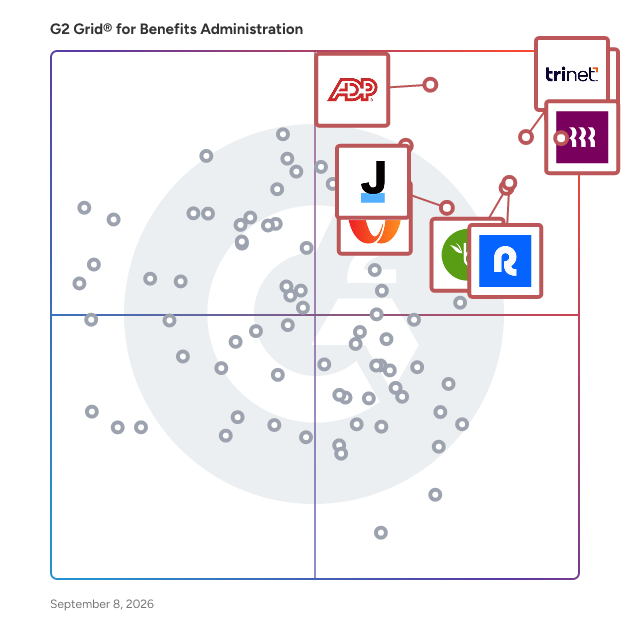
Best Benefits Administration Software At A Glance

Leader:
Highest Performer:
Easiest to Use:
Top Trending:
Best Free Software:
Show LessShow More
Easiest to Use:
Top Trending:
Best Free Software:

G2 takes pride in showing unbiased reviews on user satisfaction in our ratings and reports. We do not allow paid placements in any of our ratings, rankings, or reports. Learn about our scoring methodologies.

Coming Soon
Get Trending Benefits Administration Products in Your Inbox

A weekly snapshot of rising stars, new launches, and what everyone's buzzing about.

Sample Trending Products Newsletter
No filters applied
173 Listings in Benefits Administration Available
(814)4.4 out of 5
Optimized for quick response
Save to My Lists
Entry Level Price:$39.00
  • Overview
    Expand/Collapse Overview
  • Product Description
    How are these determined?Information
    This description is provided by the seller.

    G-P (Globalization Partners) is the recognized leader of Global Employment Platforms, offering the fastest way to onboard and operate global teams with the strongest compliance record in the industry.

    Users
    • HR Manager
    • Human Resources Manager
    Industries
    • Information Technology and Services
    • Computer Software
    Market Segment
    • 49% Mid-Market
    • 32% Small-Business
    User Sentiment
    How are these determined?Information
    These insights, currently in beta, are compiled from user reviews and grouped to display a high-level overview of the software.
    • G-P is a software platform designed to facilitate global employment and payroll management, with features such as document access, expense management, and customer support.
    • Reviewers like the user-friendly interface, quick and informative customer support, and the comprehensive features that aid in managing work-related tasks and compliance.
    • Reviewers noted issues with the platform's mobile accessibility, the speed of the website, and the lack of personalized HR teams for different clients.
  • Pros and Cons
    Expand/Collapse Pros and Cons
  • G-P Pros and Cons
    How are these determined?Information
    Pros and Cons are compiled from review feedback and grouped into themes to provide an easy-to-understand summary of user reviews.
    Pros
    Helpful
    316
    Customer Support
    284
    Ease of Use
    196
    Response Time
    183
    Easy Setup
    161
    Cons
    Poor Customer Support
    78
    Delays
    66
    Poor Interface Design
    54
    Poor Support Services
    53
    High Fees
    51
  • User Satisfaction
    Expand/Collapse User Satisfaction
  • G-P features and usability ratings that predict user satisfaction
    9.1
    Has the product been a good partner in doing business?
    Average: 8.7
    8.6
    Benefits Record Management
    Average: 8.6
    8.4
    Enrollment Planning
    Average: 8.5
    8.3
    Benefits Dashboards
    Average: 8.5
  • Seller Details
    Expand/Collapse Seller Details
  • Seller Details
    Seller
    G-P
    Company Website
    Year Founded
    2012
    HQ Location
    Boston, MA
    Twitter
    @GlobalEOR
    20,034 Twitter followers
    LinkedIn® Page
    www.linkedin.com
    2,002 employees on LinkedIn®
Product Description
How are these determined?Information
This description is provided by the seller.

G-P (Globalization Partners) is the recognized leader of Global Employment Platforms, offering the fastest way to onboard and operate global teams with the strongest compliance record in the industry.

Users
  • HR Manager
  • Human Resources Manager
Industries
  • Information Technology and Services
  • Computer Software
Market Segment
  • 49% Mid-Market
  • 32% Small-Business
User Sentiment
How are these determined?Information
These insights, currently in beta, are compiled from user reviews and grouped to display a high-level overview of the software.
  • G-P is a software platform designed to facilitate global employment and payroll management, with features such as document access, expense management, and customer support.
  • Reviewers like the user-friendly interface, quick and informative customer support, and the comprehensive features that aid in managing work-related tasks and compliance.
  • Reviewers noted issues with the platform's mobile accessibility, the speed of the website, and the lack of personalized HR teams for different clients.
G-P Pros and Cons
How are these determined?Information
Pros and Cons are compiled from review feedback and grouped into themes to provide an easy-to-understand summary of user reviews.
Pros
Helpful
316
Customer Support
284
Ease of Use
196
Response Time
183
Easy Setup
161
Cons
Poor Customer Support
78
Delays
66
Poor Interface Design
54
Poor Support Services
53
High Fees
51
G-P features and usability ratings that predict user satisfaction
9.1
Has the product been a good partner in doing business?
Average: 8.7
8.6
Benefits Record Management
Average: 8.6
8.4
Enrollment Planning
Average: 8.5
8.3
Benefits Dashboards
Average: 8.5
Seller Details
Seller
G-P
Company Website
Year Founded
2012
HQ Location
Boston, MA
Twitter
@GlobalEOR
20,034 Twitter followers
LinkedIn® Page
www.linkedin.com
2,002 employees on LinkedIn®
(1,424)4.1 out of 5
Optimized for quick response
View top Consulting Services for Workday HCM
Save to My Lists
  • Overview
    Expand/Collapse Overview
  • Product Description
    How are these determined?Information
    This description is provided by the seller.

    Workday Human Capital Management is a single, unified system, offering one security model and a seamless user experience. Infused with artificial intelligence, Workday provides a cloud-based platform

    Users
    • Recruiter
    • Account Executive
    Industries
    • Information Technology and Services
    • Computer Software
    Market Segment
    • 74% Enterprise
    • 20% Mid-Market
    User Sentiment
    How are these determined?Information
    These insights, currently in beta, are compiled from user reviews and grouped to display a high-level overview of the software.
    • Workday HCM is a platform designed for human resource management, offering features such as salary slip checking, leave application, employee search, tax-related information updates, and incentive requests.
    • Users frequently mention the platform's user-friendly interface, detailed features, and the ability to streamline various HR processes such as payroll, talent management, and workforce planning.
    • Reviewers mentioned issues with the Workday mobile app lacking some features from the web portal, the platform requiring a lot of customization, and the complexity and high cost of implementation.
  • Pros and Cons
    Expand/Collapse Pros and Cons
  • Workday HCM Pros and Cons
    How are these determined?Information
    Pros and Cons are compiled from review feedback and grouped into themes to provide an easy-to-understand summary of user reviews.
    Pros
    Ease of Use
    86
    Integrations
    27
    Helpful
    26
    User Interface
    26
    HR Management
    24
    Cons
    Poor Interface Design
    26
    Not User-Friendly
    25
    Complexity Issues
    23
    Learning Curve
    19
    Limited Customization
    18
  • User Satisfaction
    Expand/Collapse User Satisfaction
  • Workday HCM features and usability ratings that predict user satisfaction
    8.1
    Has the product been a good partner in doing business?
    Average: 8.7
    8.6
    Benefits Record Management
    Average: 8.6
    8.5
    Enrollment Planning
    Average: 8.5
    8.6
    Benefits Dashboards
    Average: 8.5
  • Seller Details
    Expand/Collapse Seller Details
  • Seller Details
    Seller
    Workday
    Company Website
    Year Founded
    2005
    HQ Location
    Pleasanton, CA
    Twitter
    @Workday
    52,226 Twitter followers
    LinkedIn® Page
    www.linkedin.com
    24,777 employees on LinkedIn®
Product Description
How are these determined?Information
This description is provided by the seller.

Workday Human Capital Management is a single, unified system, offering one security model and a seamless user experience. Infused with artificial intelligence, Workday provides a cloud-based platform

Users
  • Recruiter
  • Account Executive
Industries
  • Information Technology and Services
  • Computer Software
Market Segment
  • 74% Enterprise
  • 20% Mid-Market
User Sentiment
How are these determined?Information
These insights, currently in beta, are compiled from user reviews and grouped to display a high-level overview of the software.
  • Workday HCM is a platform designed for human resource management, offering features such as salary slip checking, leave application, employee search, tax-related information updates, and incentive requests.
  • Users frequently mention the platform's user-friendly interface, detailed features, and the ability to streamline various HR processes such as payroll, talent management, and workforce planning.
  • Reviewers mentioned issues with the Workday mobile app lacking some features from the web portal, the platform requiring a lot of customization, and the complexity and high cost of implementation.
Workday HCM Pros and Cons
How are these determined?Information
Pros and Cons are compiled from review feedback and grouped into themes to provide an easy-to-understand summary of user reviews.
Pros
Ease of Use
86
Integrations
27
Helpful
26
User Interface
26
HR Management
24
Cons
Poor Interface Design
26
Not User-Friendly
25
Complexity Issues
23
Learning Curve
19
Limited Customization
18
Workday HCM features and usability ratings that predict user satisfaction
8.1
Has the product been a good partner in doing business?
Average: 8.7
8.6
Benefits Record Management
Average: 8.6
8.5
Enrollment Planning
Average: 8.5
8.6
Benefits Dashboards
Average: 8.5
Seller Details
Seller
Workday
Company Website
Year Founded
2005
HQ Location
Pleasanton, CA
Twitter
@Workday
52,226 Twitter followers
LinkedIn® Page
www.linkedin.com
24,777 employees on LinkedIn®

This is how G2 Deals can help you:

  • Easily shop for curated – and trusted – software
  • Own your own software buying journey
  • Discover exclusive deals on software
Entry Level Price:$2.95
  • Overview
    Expand/Collapse Overview
  • Product Description
    How are these determined?Information
    This description is provided by the seller.

    Lively is the benefit solutions provider that finally gets it right. Recent years have seen a dramatic shift in the benefits landscape: Employee needs are evolving, and employers that pay attention

    Users
    No information available
    Industries
    • Accounting
    • Construction
    Market Segment
    • 52% Small-Business
    • 37% Mid-Market
  • Pros and Cons
    Expand/Collapse Pros and Cons
  • Lively HSA Pros and Cons
    How are these determined?Information
    Pros and Cons are compiled from review feedback and grouped into themes to provide an easy-to-understand summary of user reviews.
    Pros
    Ease of Use
    14
    Customer Support
    7
    Helpful
    5
    Intuitive
    5
    Implementation Ease
    4
    Cons
    Poor Support Services
    2
    Approval Delays
    1
    Balance Management
    1
    Claim Issues
    1
    Poor Customer Support
    1
  • User Satisfaction
    Expand/Collapse User Satisfaction
  • Lively HSA features and usability ratings that predict user satisfaction
    9.6
    Has the product been a good partner in doing business?
    Average: 8.7
    8.9
    Benefits Record Management
    Average: 8.6
    8.8
    Enrollment Planning
    Average: 8.5
    9.2
    Benefits Dashboards
    Average: 8.5
  • Seller Details
    Expand/Collapse Seller Details
  • Seller Details
    Seller
    Lively
    Company Website
    Year Founded
    2016
    HQ Location
    San Francisco, California, United States
    Twitter
    @Livelyhsa
    655 Twitter followers
    LinkedIn® Page
    www.linkedin.com
    179 employees on LinkedIn®
Product Description
How are these determined?Information
This description is provided by the seller.

Lively is the benefit solutions provider that finally gets it right. Recent years have seen a dramatic shift in the benefits landscape: Employee needs are evolving, and employers that pay attention

Users
No information available
Industries
  • Accounting
  • Construction
Market Segment
  • 52% Small-Business
  • 37% Mid-Market
Lively HSA Pros and Cons
How are these determined?Information
Pros and Cons are compiled from review feedback and grouped into themes to provide an easy-to-understand summary of user reviews.
Pros
Ease of Use
14
Customer Support
7
Helpful
5
Intuitive
5
Implementation Ease
4
Cons
Poor Support Services
2
Approval Delays
1
Balance Management
1
Claim Issues
1
Poor Customer Support
1
Lively HSA features and usability ratings that predict user satisfaction
9.6
Has the product been a good partner in doing business?
Average: 8.7
8.9
Benefits Record Management
Average: 8.6
8.8
Enrollment Planning
Average: 8.5
9.2
Benefits Dashboards
Average: 8.5
Seller Details
Seller
Lively
Company Website
Year Founded
2016
HQ Location
San Francisco, California, United States
Twitter
@Livelyhsa
655 Twitter followers
LinkedIn® Page
www.linkedin.com
179 employees on LinkedIn®
(85)4.2 out of 5
Optimized for quick response
Save to My Lists
Entry Level Price:Contact Us
  • Overview
    Expand/Collapse Overview
  • Product Description
    How are these determined?Information
    This description is provided by the seller.

    PrimePay makes HCM simple. For over 38 years, we’ve combined unwavering service with a unified payroll platform that streamlines time tracking, payroll and tax filing, and compliance. The result? Empl

    Users
    No information available
    Industries
    • Accounting
    • Construction
    Market Segment
    • 65% Small-Business
    • 32% Mid-Market
  • Pros and Cons
    Expand/Collapse Pros and Cons
  • PrimePay Pros and Cons
    How are these determined?Information
    Pros and Cons are compiled from review feedback and grouped into themes to provide an easy-to-understand summary of user reviews.
    Pros
    Customer Support
    10
    Helpful
    10
    Ease of Use
    8
    Efficiency
    6
    Payroll Ease
    6
    Cons
    Missing Features
    6
    Poor Customer Support
    6
    Poor Support Services
    5
    Employee Management
    4
    Payment Issues
    4
  • User Satisfaction
    Expand/Collapse User Satisfaction
  • PrimePay features and usability ratings that predict user satisfaction
    8.4
    Has the product been a good partner in doing business?
    Average: 8.7
    8.2
    Benefits Record Management
    Average: 8.6
    8.3
    Enrollment Planning
    Average: 8.5
    8.5
    Benefits Dashboards
    Average: 8.5
  • Seller Details
    Expand/Collapse Seller Details
  • Seller Details
    Seller
    PrimePay
    Company Website
    Year Founded
    1986
    HQ Location
    West Chester, PA
    Twitter
    @PrimePay
    1,907 Twitter followers
    LinkedIn® Page
    www.linkedin.com
    494 employees on LinkedIn®
Product Description
How are these determined?Information
This description is provided by the seller.

PrimePay makes HCM simple. For over 38 years, we’ve combined unwavering service with a unified payroll platform that streamlines time tracking, payroll and tax filing, and compliance. The result? Empl

Users
No information available
Industries
  • Accounting
  • Construction
Market Segment
  • 65% Small-Business
  • 32% Mid-Market
PrimePay Pros and Cons
How are these determined?Information
Pros and Cons are compiled from review feedback and grouped into themes to provide an easy-to-understand summary of user reviews.
Pros
Customer Support
10
Helpful
10
Ease of Use
8
Efficiency
6
Payroll Ease
6
Cons
Missing Features
6
Poor Customer Support
6
Poor Support Services
5
Employee Management
4
Payment Issues
4
PrimePay features and usability ratings that predict user satisfaction
8.4
Has the product been a good partner in doing business?
Average: 8.7
8.2
Benefits Record Management
Average: 8.6
8.3
Enrollment Planning
Average: 8.5
8.5
Benefits Dashboards
Average: 8.5
Seller Details
Seller
PrimePay
Company Website
Year Founded
1986
HQ Location
West Chester, PA
Twitter
@PrimePay
1,907 Twitter followers
LinkedIn® Page
www.linkedin.com
494 employees on LinkedIn®
(167)4.8 out of 5
Optimized for quick response
Save to My Lists
  • Overview
    Expand/Collapse Overview
  • Product Description
    How are these determined?Information
    This description is provided by the seller.

    Benepass is a flexible benefits platform that allows employers to distribute personalized benefits and Lifestyle Spending Accounts to every employee globally. With one card, employees can spend their

    Users
    No information available
    Industries
    • Computer Software
    • Information Technology and Services
    Market Segment
    • 61% Mid-Market
    • 35% Enterprise
  • Pros and Cons
    Expand/Collapse Pros and Cons
  • Benepass Pros and Cons
    How are these determined?Information
    Pros and Cons are compiled from review feedback and grouped into themes to provide an easy-to-understand summary of user reviews.
    Pros
    Ease of Use
    37
    Employee Benefits
    18
    Convenience
    17
    Reimbursements
    15
    Helpful
    13
    Cons
    Reimbursement Issues
    5
    Approval Delays
    4
    Balance Management
    4
    Category Confusion
    3
    Financial Restrictions
    3
  • User Satisfaction
    Expand/Collapse User Satisfaction
  • Benepass features and usability ratings that predict user satisfaction
    9.2
    Has the product been a good partner in doing business?
    Average: 8.7
    9.7
    Benefits Record Management
    Average: 8.6
    9.2
    Enrollment Planning
    Average: 8.5
    9.7
    Benefits Dashboards
    Average: 8.5
  • Seller Details
    Expand/Collapse Seller Details
  • Seller Details
    Seller
    Benepass
    Company Website
    HQ Location
    New York, US
    Twitter
    @getbenepass
    97 Twitter followers
    LinkedIn® Page
    www.linkedin.com
    79 employees on LinkedIn®
Product Description
How are these determined?Information
This description is provided by the seller.

Benepass is a flexible benefits platform that allows employers to distribute personalized benefits and Lifestyle Spending Accounts to every employee globally. With one card, employees can spend their

Users
No information available
Industries
  • Computer Software
  • Information Technology and Services
Market Segment
  • 61% Mid-Market
  • 35% Enterprise
Benepass Pros and Cons
How are these determined?Information
Pros and Cons are compiled from review feedback and grouped into themes to provide an easy-to-understand summary of user reviews.
Pros
Ease of Use
37
Employee Benefits
18
Convenience
17
Reimbursements
15
Helpful
13
Cons
Reimbursement Issues
5
Approval Delays
4
Balance Management
4
Category Confusion
3
Financial Restrictions
3
Benepass features and usability ratings that predict user satisfaction
9.2
Has the product been a good partner in doing business?
Average: 8.7
9.7
Benefits Record Management
Average: 8.6
9.2
Enrollment Planning
Average: 8.5
9.7
Benefits Dashboards
Average: 8.5
Seller Details
Seller
Benepass
Company Website
HQ Location
New York, US
Twitter
@getbenepass
97 Twitter followers
LinkedIn® Page
www.linkedin.com
79 employees on LinkedIn®
(340)4.7 out of 5
Optimized for quick response
15th Easiest To Use in Benefits Administration software
Save to My Lists
Entry Level Price:$7.00
  • Overview
    Expand/Collapse Overview
  • Product Description
    How are these determined?Information
    This description is provided by the seller.

    Fingercheck is a comprehensive workforce management solution designed to streamline various operational tasks such as payroll, scheduling, and time tracking for businesses across different industries.

    Users
    • CFO
    • Bookkeeper
    Industries
    • Construction
    • Real Estate
    Market Segment
    • 66% Small-Business
    • 31% Mid-Market
    User Sentiment
    How are these determined?Information
    These insights, currently in beta, are compiled from user reviews and grouped to display a high-level overview of the software.
    • Fingercheck is a data system designed for managing payroll, time tracking, and employee onboarding.
    • Reviewers frequently mention the system's user-friendly interface, efficient payroll process, and responsive customer service, along with the ability to customize settings for different roles and locations.
    • Reviewers experienced occasional lags or glitches when switching between screens or approving timesheets, found the user interface could be improved for better readability, and expressed a desire for more customization options during onboarding.
  • Pros and Cons
    Expand/Collapse Pros and Cons
  • Fingercheck Pros and Cons
    How are these determined?Information
    Pros and Cons are compiled from review feedback and grouped into themes to provide an easy-to-understand summary of user reviews.
    Pros
    Ease of Use
    49
    Customer Support
    45
    Helpful
    40
    Payroll Ease
    21
    Payroll Management
    21
    Cons
    Poor Customer Support
    9
    Missing Features
    8
    Not Intuitive
    7
    Limited Customization
    6
    Payroll Issues
    6
  • User Satisfaction
    Expand/Collapse User Satisfaction
  • Fingercheck features and usability ratings that predict user satisfaction
    9.4
    Has the product been a good partner in doing business?
    Average: 8.7
    9.2
    Benefits Record Management
    Average: 8.6
    9.0
    Enrollment Planning
    Average: 8.5
    9.1
    Benefits Dashboards
    Average: 8.5
  • Seller Details
    Expand/Collapse Seller Details
  • Seller Details
    Company Website
    Year Founded
    2013
    HQ Location
    Brooklyn, NY
    Twitter
    @FingerCheck
    1,945 Twitter followers
    LinkedIn® Page
    www.linkedin.com
    125 employees on LinkedIn®
Product Description
How are these determined?Information
This description is provided by the seller.

Fingercheck is a comprehensive workforce management solution designed to streamline various operational tasks such as payroll, scheduling, and time tracking for businesses across different industries.

Users
  • CFO
  • Bookkeeper
Industries
  • Construction
  • Real Estate
Market Segment
  • 66% Small-Business
  • 31% Mid-Market
User Sentiment
How are these determined?Information
These insights, currently in beta, are compiled from user reviews and grouped to display a high-level overview of the software.
  • Fingercheck is a data system designed for managing payroll, time tracking, and employee onboarding.
  • Reviewers frequently mention the system's user-friendly interface, efficient payroll process, and responsive customer service, along with the ability to customize settings for different roles and locations.
  • Reviewers experienced occasional lags or glitches when switching between screens or approving timesheets, found the user interface could be improved for better readability, and expressed a desire for more customization options during onboarding.
Fingercheck Pros and Cons
How are these determined?Information
Pros and Cons are compiled from review feedback and grouped into themes to provide an easy-to-understand summary of user reviews.
Pros
Ease of Use
49
Customer Support
45
Helpful
40
Payroll Ease
21
Payroll Management
21
Cons
Poor Customer Support
9
Missing Features
8
Not Intuitive
7
Limited Customization
6
Payroll Issues
6
Fingercheck features and usability ratings that predict user satisfaction
9.4
Has the product been a good partner in doing business?
Average: 8.7
9.2
Benefits Record Management
Average: 8.6
9.0
Enrollment Planning
Average: 8.5
9.1
Benefits Dashboards
Average: 8.5
Seller Details
Company Website
Year Founded
2013
HQ Location
Brooklyn, NY
Twitter
@FingerCheck
1,945 Twitter followers
LinkedIn® Page
www.linkedin.com
125 employees on LinkedIn®
Entry Level Price:Contact Us
  • Overview
    Expand/Collapse Overview
  • Product Description
    How are these determined?Information
    This description is provided by the seller.

    GoCo is a modern, all-in-one HR solution with top-rated customer support that makes it easy to streamline your HR processes and data. From onboarding and benefits to performance management and payrol

    Users
    • CEO
    • HR Manager
    Industries
    • Hospital & Health Care
    • Computer Software
    Market Segment
    • 49% Small-Business
    • 47% Mid-Market
  • Pros and Cons
    Expand/Collapse Pros and Cons
  • GoCo Pros and Cons
    How are these determined?Information
    Pros and Cons are compiled from review feedback and grouped into themes to provide an easy-to-understand summary of user reviews.
    Pros
    Ease of Use
    16
    Helpful
    16
    Customer Support
    12
    Comprehensive Features
    10
    Easy Access
    7
    Cons
    Missing Features
    5
    Inadequate Reporting
    4
    Poor Customer Support
    4
    Integration Issues
    3
    Limited Customization
    3
  • User Satisfaction
    Expand/Collapse User Satisfaction
  • GoCo features and usability ratings that predict user satisfaction
    9.0
    Has the product been a good partner in doing business?
    Average: 8.7
    9.0
    Benefits Record Management
    Average: 8.6
    9.2
    Enrollment Planning
    Average: 8.5
    9.2
    Benefits Dashboards
    Average: 8.5
  • Seller Details
    Expand/Collapse Seller Details
  • Seller Details
    Seller
    Intuit
    Year Founded
    1983
    HQ Location
    Mountain View, California
    Twitter
    @Intuit
    80,278 Twitter followers
    LinkedIn® Page
    www.linkedin.com
    17,223 employees on LinkedIn®
    Ownership
    VIE:INTU
Product Description
How are these determined?Information
This description is provided by the seller.

GoCo is a modern, all-in-one HR solution with top-rated customer support that makes it easy to streamline your HR processes and data. From onboarding and benefits to performance management and payrol

Users
  • CEO
  • HR Manager
Industries
  • Hospital & Health Care
  • Computer Software
Market Segment
  • 49% Small-Business
  • 47% Mid-Market
GoCo Pros and Cons
How are these determined?Information
Pros and Cons are compiled from review feedback and grouped into themes to provide an easy-to-understand summary of user reviews.
Pros
Ease of Use
16
Helpful
16
Customer Support
12
Comprehensive Features
10
Easy Access
7
Cons
Missing Features
5
Inadequate Reporting
4
Poor Customer Support
4
Integration Issues
3
Limited Customization
3
GoCo features and usability ratings that predict user satisfaction
9.0
Has the product been a good partner in doing business?
Average: 8.7
9.0
Benefits Record Management
Average: 8.6
9.2
Enrollment Planning
Average: 8.5
9.2
Benefits Dashboards
Average: 8.5
Seller Details
Seller
Intuit
Year Founded
1983
HQ Location
Mountain View, California
Twitter
@Intuit
80,278 Twitter followers
LinkedIn® Page
www.linkedin.com
17,223 employees on LinkedIn®
Ownership
VIE:INTU
(14)5.0 out of 5
11th Easiest To Use in Benefits Administration software
Save to My Lists
Entry Level Price:€9.00
  • Overview
    Expand/Collapse Overview
  • Product Description
    How are these determined?Information
    This description is provided by the seller.

    Kota provides simple and borderless access to health, life, and retirement providers globally with real-time enrolment, flexible contributions, and an employee app. ⭑ Control: Set contribution amount

    Users
    No information available
    Industries
    • Computer Software
    Market Segment
    • 79% Small-Business
    • 21% Mid-Market
  • Pros and Cons
    Expand/Collapse Pros and Cons
  • Kota Pros and Cons
    How are these determined?Information
    Pros and Cons are compiled from review feedback and grouped into themes to provide an easy-to-understand summary of user reviews.
    Pros
    Ease of Use
    13
    Customer Support
    8
    Benefits Management
    7
    Easy Setup
    7
    Helpful
    6
    Cons
    Difficult Navigation
    1
    Expensive Healthcare
    1
    Limited International Support
    1
    Not Intuitive
    1
    Poor Interface Design
    1
  • User Satisfaction
    Expand/Collapse User Satisfaction
  • Kota features and usability ratings that predict user satisfaction
    9.8
    Has the product been a good partner in doing business?
    Average: 8.7
    9.2
    Benefits Record Management
    Average: 8.6
    9.3
    Enrollment Planning
    Average: 8.5
    7.9
    Benefits Dashboards
    Average: 8.5
  • Seller Details
    Expand/Collapse Seller Details
  • Seller Details
    Seller
    Kota
    Year Founded
    2022
    HQ Location
    Dublin, IE
    LinkedIn® Page
    www.linkedin.com
    140 employees on LinkedIn®
Product Description
How are these determined?Information
This description is provided by the seller.

Kota provides simple and borderless access to health, life, and retirement providers globally with real-time enrolment, flexible contributions, and an employee app. ⭑ Control: Set contribution amount

Users
No information available
Industries
  • Computer Software
Market Segment
  • 79% Small-Business
  • 21% Mid-Market
Kota Pros and Cons
How are these determined?Information
Pros and Cons are compiled from review feedback and grouped into themes to provide an easy-to-understand summary of user reviews.
Pros
Ease of Use
13
Customer Support
8
Benefits Management
7
Easy Setup
7
Helpful
6
Cons
Difficult Navigation
1
Expensive Healthcare
1
Limited International Support
1
Not Intuitive
1
Poor Interface Design
1
Kota features and usability ratings that predict user satisfaction
9.8
Has the product been a good partner in doing business?
Average: 8.7
9.2
Benefits Record Management
Average: 8.6
9.3
Enrollment Planning
Average: 8.5
7.9
Benefits Dashboards
Average: 8.5
Seller Details
Seller
Kota
Year Founded
2022
HQ Location
Dublin, IE
LinkedIn® Page
www.linkedin.com
140 employees on LinkedIn®
(400)4.8 out of 5
Optimized for quick response
12th Easiest To Use in Benefits Administration software
Save to My Lists
Entry Level Price:Starting at $49.00
  • Overview
    Expand/Collapse Overview
  • Product Description
    How are these determined?Information
    This description is provided by the seller.

    OnPay is designed for people who want to spend more time running their business (and less on back-office tasks). Its award-winning payroll and HR saves business owners over 15 hours a month, and frees

    Users
    • Owner
    • President
    Industries
    • Accounting
    • Non-Profit Organization Management
    Market Segment
    • 97% Small-Business
    • 3% Mid-Market
    User Sentiment
    How are these determined?Information
    These insights, currently in beta, are compiled from user reviews and grouped to display a high-level overview of the software.
    • OnPay is a payroll service that offers solutions for time, service, and pricing issues, and provides a user-friendly experience for small businesses and non-profit organizations.
    • Users like the ease of use, the responsive customer support, the affordability, and the seamless integration with other systems such as QuickBooks, as well as the self-service portal for employees to access their pay stubs and tax forms.
    • Users experienced issues with the lack of a time clock feature, difficulty in using the mobile app, overwhelming contact during the onboarding process, and a lack of flexibility compared to other systems.
  • Pros and Cons
    Expand/Collapse Pros and Cons
  • OnPay Pros and Cons
    How are these determined?Information
    Pros and Cons are compiled from review feedback and grouped into themes to provide an easy-to-understand summary of user reviews.
    Pros
    Ease of Use
    67
    Customer Support
    63
    Helpful
    44
    Payroll Ease
    32
    Payroll
    31
    Cons
    Missing Features
    14
    Poor Customer Support
    13
    Integration Issues
    8
    Poor Support Services
    8
    Not User-Friendly
    6
  • User Satisfaction
    Expand/Collapse User Satisfaction
  • OnPay features and usability ratings that predict user satisfaction
    9.7
    Has the product been a good partner in doing business?
    Average: 8.7
    8.9
    Benefits Record Management
    Average: 8.6
    8.9
    Enrollment Planning
    Average: 8.5
    9.0
    Benefits Dashboards
    Average: 8.5
  • Seller Details
    Expand/Collapse Seller Details
  • Seller Details
    Company Website
    Year Founded
    2011
    HQ Location
    Atlanta, GA
    Twitter
    @onpay_payroll
    21,061 Twitter followers
    LinkedIn® Page
    www.linkedin.com
    182 employees on LinkedIn®
Product Description
How are these determined?Information
This description is provided by the seller.

OnPay is designed for people who want to spend more time running their business (and less on back-office tasks). Its award-winning payroll and HR saves business owners over 15 hours a month, and frees

Users
  • Owner
  • President
Industries
  • Accounting
  • Non-Profit Organization Management
Market Segment
  • 97% Small-Business
  • 3% Mid-Market
User Sentiment
How are these determined?Information
These insights, currently in beta, are compiled from user reviews and grouped to display a high-level overview of the software.
  • OnPay is a payroll service that offers solutions for time, service, and pricing issues, and provides a user-friendly experience for small businesses and non-profit organizations.
  • Users like the ease of use, the responsive customer support, the affordability, and the seamless integration with other systems such as QuickBooks, as well as the self-service portal for employees to access their pay stubs and tax forms.
  • Users experienced issues with the lack of a time clock feature, difficulty in using the mobile app, overwhelming contact during the onboarding process, and a lack of flexibility compared to other systems.
OnPay Pros and Cons
How are these determined?Information
Pros and Cons are compiled from review feedback and grouped into themes to provide an easy-to-understand summary of user reviews.
Pros
Ease of Use
67
Customer Support
63
Helpful
44
Payroll Ease
32
Payroll
31
Cons
Missing Features
14
Poor Customer Support
13
Integration Issues
8
Poor Support Services
8
Not User-Friendly
6
OnPay features and usability ratings that predict user satisfaction
9.7
Has the product been a good partner in doing business?
Average: 8.7
8.9
Benefits Record Management
Average: 8.6
8.9
Enrollment Planning
Average: 8.5
9.0
Benefits Dashboards
Average: 8.5
Seller Details
Company Website
Year Founded
2011
HQ Location
Atlanta, GA
Twitter
@onpay_payroll
21,061 Twitter followers
LinkedIn® Page
www.linkedin.com
182 employees on LinkedIn®
(614)4.4 out of 5
Optimized for quick response
Save to My Lists
  • Overview
    Expand/Collapse Overview
  • Product Description
    How are these determined?Information
    This description is provided by the seller.

    Inova is a fully-unified payroll, HR, and benefits solution that helps you automate your most important workforce management tasks, adapt to evolving employee needs, and stay compliant with changing e

    Users
    • Office Manager
    • HR Manager
    Industries
    • Construction
    • Non-Profit Organization Management
    Market Segment
    • 54% Mid-Market
    • 42% Small-Business
    User Sentiment
    How are these determined?Information
    These insights, currently in beta, are compiled from user reviews and grouped to display a high-level overview of the software.
    • Inova is a payroll system that aims to streamline payroll processes and provide comprehensive HRIS solutions.
    • Reviewers appreciate the exceptional customer support, user-friendly interface, efficient payroll processing, and reliable compliance offered by Inova, with many highlighting the quick resolution of issues and the platform's intuitiveness.
    • Users mentioned some difficulties with the system, including a confusing ticketing system, constant changes in the software's appearance, a lack of user-friendliness, and a complex benefits platform that does not meet all users' needs.
  • Pros and Cons
    Expand/Collapse Pros and Cons
  • Inova Payroll Pros and Cons
    How are these determined?Information
    Pros and Cons are compiled from review feedback and grouped into themes to provide an easy-to-understand summary of user reviews.
    Pros
    Customer Support
    88
    Helpful
    87
    Ease of Use
    37
    Payroll Management
    34
    Payroll Ease
    33
    Cons
    Navigation Difficulty
    19
    Learning Curve
    17
    Difficulty
    15
    Not User-Friendly
    15
    Not Intuitive
    13
  • User Satisfaction
    Expand/Collapse User Satisfaction
  • Inova Payroll features and usability ratings that predict user satisfaction
    9.2
    Has the product been a good partner in doing business?
    Average: 8.7
    8.5
    Benefits Record Management
    Average: 8.6
    8.2
    Enrollment Planning
    Average: 8.5
    8.5
    Benefits Dashboards
    Average: 8.5
  • Seller Details
    Expand/Collapse Seller Details
  • Seller Details
    Company Website
    Year Founded
    2011
    HQ Location
    Nashville, TN
    Twitter
    @InovaPayroll
    574 Twitter followers
    LinkedIn® Page
    www.linkedin.com
    237 employees on LinkedIn®
Product Description
How are these determined?Information
This description is provided by the seller.

Inova is a fully-unified payroll, HR, and benefits solution that helps you automate your most important workforce management tasks, adapt to evolving employee needs, and stay compliant with changing e

Users
  • Office Manager
  • HR Manager
Industries
  • Construction
  • Non-Profit Organization Management
Market Segment
  • 54% Mid-Market
  • 42% Small-Business
User Sentiment
How are these determined?Information
These insights, currently in beta, are compiled from user reviews and grouped to display a high-level overview of the software.
  • Inova is a payroll system that aims to streamline payroll processes and provide comprehensive HRIS solutions.
  • Reviewers appreciate the exceptional customer support, user-friendly interface, efficient payroll processing, and reliable compliance offered by Inova, with many highlighting the quick resolution of issues and the platform's intuitiveness.
  • Users mentioned some difficulties with the system, including a confusing ticketing system, constant changes in the software's appearance, a lack of user-friendliness, and a complex benefits platform that does not meet all users' needs.
Inova Payroll Pros and Cons
How are these determined?Information
Pros and Cons are compiled from review feedback and grouped into themes to provide an easy-to-understand summary of user reviews.
Pros
Customer Support
88
Helpful
87
Ease of Use
37
Payroll Management
34
Payroll Ease
33
Cons
Navigation Difficulty
19
Learning Curve
17
Difficulty
15
Not User-Friendly
15
Not Intuitive
13
Inova Payroll features and usability ratings that predict user satisfaction
9.2
Has the product been a good partner in doing business?
Average: 8.7
8.5
Benefits Record Management
Average: 8.6
8.2
Enrollment Planning
Average: 8.5
8.5
Benefits Dashboards
Average: 8.5
Seller Details
Company Website
Year Founded
2011
HQ Location
Nashville, TN
Twitter
@InovaPayroll
574 Twitter followers
LinkedIn® Page
www.linkedin.com
237 employees on LinkedIn®
(61)4.8 out of 5
10th Easiest To Use in Benefits Administration software
Save to My Lists
  • Overview
    Expand/Collapse Overview
  • Product Description
    How are these determined?Information
    This description is provided by the seller.

    Compt is the all-in-one platform for flexible perks and employee recognition. From wellness stipends and professional development to lifestyle spending accounts (LSAs) and rewards, Compt simplifies ev

    Users
    No information available
    Industries
    • Computer Software
    • Accounting
    Market Segment
    • 54% Mid-Market
    • 30% Small-Business
  • Pros and Cons
    Expand/Collapse Pros and Cons
  • Compt Pros and Cons
    How are these determined?Information
    Pros and Cons are compiled from review feedback and grouped into themes to provide an easy-to-understand summary of user reviews.
    Pros
    Ease of Use
    12
    Customer Support
    6
    Benefits Management
    5
    User Interface
    5
    Convenience
    4
    Cons
    Approval Issues
    2
    Manual Entry
    2
    Feedback Issues
    1
    Insufficient Reminders
    1
    Integration Issues
    1
  • User Satisfaction
    Expand/Collapse User Satisfaction
  • Compt features and usability ratings that predict user satisfaction
    9.9
    Has the product been a good partner in doing business?
    Average: 8.7
    8.3
    Benefits Record Management
    Average: 8.6
    8.3
    Enrollment Planning
    Average: 8.5
    8.3
    Benefits Dashboards
    Average: 8.5
  • Seller Details
    Expand/Collapse Seller Details
  • Seller Details
    Seller
    Compt
    Year Founded
    2018
    HQ Location
    Boston, MA
    Twitter
    @compt
    246 Twitter followers
    LinkedIn® Page
    www.linkedin.com
    44 employees on LinkedIn®
Product Description
How are these determined?Information
This description is provided by the seller.

Compt is the all-in-one platform for flexible perks and employee recognition. From wellness stipends and professional development to lifestyle spending accounts (LSAs) and rewards, Compt simplifies ev

Users
No information available
Industries
  • Computer Software
  • Accounting
Market Segment
  • 54% Mid-Market
  • 30% Small-Business
Compt Pros and Cons
How are these determined?Information
Pros and Cons are compiled from review feedback and grouped into themes to provide an easy-to-understand summary of user reviews.
Pros
Ease of Use
12
Customer Support
6
Benefits Management
5
User Interface
5
Convenience
4
Cons
Approval Issues
2
Manual Entry
2
Feedback Issues
1
Insufficient Reminders
1
Integration Issues
1
Compt features and usability ratings that predict user satisfaction
9.9
Has the product been a good partner in doing business?
Average: 8.7
8.3
Benefits Record Management
Average: 8.6
8.3
Enrollment Planning
Average: 8.5
8.3
Benefits Dashboards
Average: 8.5
Seller Details
Seller
Compt
Year Founded
2018
HQ Location
Boston, MA
Twitter
@compt
246 Twitter followers
LinkedIn® Page
www.linkedin.com
44 employees on LinkedIn®
  • Overview
    Expand/Collapse Overview
  • Product Description
    How are these determined?Information
    This description is provided by the seller.

    EPAY Systems seamless human capital management solution will ease the HR burden right off your shoulders, while reducing your admin costs and—this is important—helping you get more from your workforce

    Users
    • Account Manager
    Industries
    • Facilities Services
    • Hospital & Health Care
    Market Segment
    • 43% Enterprise
    • 31% Mid-Market
  • User Satisfaction
    Expand/Collapse User Satisfaction
  • EPAY HCM features and usability ratings that predict user satisfaction
    9.0
    Has the product been a good partner in doing business?
    Average: 8.7
    9.3
    Benefits Record Management
    Average: 8.6
    9.3
    Enrollment Planning
    Average: 8.5
    9.0
    Benefits Dashboards
    Average: 8.5
  • Seller Details
    Expand/Collapse Seller Details
  • Seller Details
    Year Founded
    2004
    HQ Location
    Chandler, US
    Twitter
    @VensureHR
    599 Twitter followers
    LinkedIn® Page
    www.linkedin.com
    2,147 employees on LinkedIn®
Product Description
How are these determined?Information
This description is provided by the seller.

EPAY Systems seamless human capital management solution will ease the HR burden right off your shoulders, while reducing your admin costs and—this is important—helping you get more from your workforce

Users
  • Account Manager
Industries
  • Facilities Services
  • Hospital & Health Care
Market Segment
  • 43% Enterprise
  • 31% Mid-Market
EPAY HCM features and usability ratings that predict user satisfaction
9.0
Has the product been a good partner in doing business?
Average: 8.7
9.3
Benefits Record Management
Average: 8.6
9.3
Enrollment Planning
Average: 8.5
9.0
Benefits Dashboards
Average: 8.5
Seller Details
Year Founded
2004
HQ Location
Chandler, US
Twitter
@VensureHR
599 Twitter followers
LinkedIn® Page
www.linkedin.com
2,147 employees on LinkedIn®
(1,621)4.1 out of 5
Optimized for quick response
View top Consulting Services for Paychex
Save to My Lists
  • Overview
    Expand/Collapse Overview
  • Product Description
    How are these determined?Information
    This description is provided by the seller.

    Paychex Flex® is an all-in-one HR solution designed with simplicity in mind. With technology that grows and changes with your business, Paychex has the right combination of innovative business solutio

    Users
    • Office Manager
    • Owner
    Industries
    • Non-Profit Organization Management
    • Construction
    Market Segment
    • 75% Small-Business
    • 22% Mid-Market
    User Sentiment
    How are these determined?Information
    These insights, currently in beta, are compiled from user reviews and grouped to display a high-level overview of the software.
    • Paychex is a payroll and HR management software that allows users to manage payroll processes, HR tasks, and employee benefits.
    • Reviewers appreciate the user-friendly interface of Paychex, its robust features, and the convenience it offers in managing payroll and HR tasks, including the ability to easily add new hires, clock in and out, access pay data, and integrate with other software.
    • Reviewers experienced issues with Paychex's customer support, reporting occasional slow response times and lack of expertise, and some users found the platform to be expensive, occasionally glitchy, and lacking in certain features or functionalities.
  • Pros and Cons
    Expand/Collapse Pros and Cons
  • Paychex Pros and Cons
    How are these determined?Information
    Pros and Cons are compiled from review feedback and grouped into themes to provide an easy-to-understand summary of user reviews.
    Pros
    Ease of Use
    81
    Payroll Management
    49
    Helpful
    47
    Payroll
    44
    Payroll Ease
    38
    Cons
    Poor Customer Support
    38
    Payroll Issues
    27
    Expensive
    21
    Not Intuitive
    18
    Poor Support Services
    17
  • User Satisfaction
    Expand/Collapse User Satisfaction
  • Paychex features and usability ratings that predict user satisfaction
    8.5
    Has the product been a good partner in doing business?
    Average: 8.7
    8.2
    Benefits Record Management
    Average: 8.6
    8.0
    Enrollment Planning
    Average: 8.5
    8.3
    Benefits Dashboards
    Average: 8.5
  • Seller Details
    Expand/Collapse Seller Details
  • Seller Details
    Company Website
    Year Founded
    1971
    HQ Location
    Rochester, NY
    Twitter
    @Paychex
    11,914 Twitter followers
    LinkedIn® Page
    www.linkedin.com
    18,427 employees on LinkedIn®
Product Description
How are these determined?Information
This description is provided by the seller.

Paychex Flex® is an all-in-one HR solution designed with simplicity in mind. With technology that grows and changes with your business, Paychex has the right combination of innovative business solutio

Users
  • Office Manager
  • Owner
Industries
  • Non-Profit Organization Management
  • Construction
Market Segment
  • 75% Small-Business
  • 22% Mid-Market
User Sentiment
How are these determined?Information
These insights, currently in beta, are compiled from user reviews and grouped to display a high-level overview of the software.
  • Paychex is a payroll and HR management software that allows users to manage payroll processes, HR tasks, and employee benefits.
  • Reviewers appreciate the user-friendly interface of Paychex, its robust features, and the convenience it offers in managing payroll and HR tasks, including the ability to easily add new hires, clock in and out, access pay data, and integrate with other software.
  • Reviewers experienced issues with Paychex's customer support, reporting occasional slow response times and lack of expertise, and some users found the platform to be expensive, occasionally glitchy, and lacking in certain features or functionalities.
Paychex Pros and Cons
How are these determined?Information
Pros and Cons are compiled from review feedback and grouped into themes to provide an easy-to-understand summary of user reviews.
Pros
Ease of Use
81
Payroll Management
49
Helpful
47
Payroll
44
Payroll Ease
38
Cons
Poor Customer Support
38
Payroll Issues
27
Expensive
21
Not Intuitive
18
Poor Support Services
17
Paychex features and usability ratings that predict user satisfaction
8.5
Has the product been a good partner in doing business?
Average: 8.7
8.2
Benefits Record Management
Average: 8.6
8.0
Enrollment Planning
Average: 8.5
8.3
Benefits Dashboards
Average: 8.5
Seller Details
Company Website
Year Founded
1971
HQ Location
Rochester, NY
Twitter
@Paychex
11,914 Twitter followers
LinkedIn® Page
www.linkedin.com
18,427 employees on LinkedIn®
  • Overview
    Expand/Collapse Overview
  • Product Description
    How are these determined?Information
    This description is provided by the seller.

    A holistic benefits administration solution designed to help your employees achieve better health and financial outcomes while also helping your organization reduce costs and administrative burden. *

    Users
    • Benefits Manager
    Industries
    No information available
    Market Segment
    • 80% Enterprise
    • 17% Mid-Market
  • User Satisfaction
    Expand/Collapse User Satisfaction
  • Benefitfocus features and usability ratings that predict user satisfaction
    8.8
    Has the product been a good partner in doing business?
    Average: 8.7
    8.5
    Benefits Record Management
    Average: 8.6
    9.0
    Enrollment Planning
    Average: 8.5
    9.0
    Benefits Dashboards
    Average: 8.5
  • Seller Details
    Expand/Collapse Seller Details
  • Seller Details
    Year Founded
    2000
    HQ Location
    Charleston, SC
    Twitter
    @Benefitfocus
    8,280 Twitter followers
    LinkedIn® Page
    www.linkedin.com
    1,008 employees on LinkedIn®
    Ownership
    NASDAQ: BNFT
Product Description
How are these determined?Information
This description is provided by the seller.

A holistic benefits administration solution designed to help your employees achieve better health and financial outcomes while also helping your organization reduce costs and administrative burden. *

Users
  • Benefits Manager
Industries
No information available
Market Segment
  • 80% Enterprise
  • 17% Mid-Market
Benefitfocus features and usability ratings that predict user satisfaction
8.8
Has the product been a good partner in doing business?
Average: 8.7
8.5
Benefits Record Management
Average: 8.6
9.0
Enrollment Planning
Average: 8.5
9.0
Benefits Dashboards
Average: 8.5
Seller Details
Year Founded
2000
HQ Location
Charleston, SC
Twitter
@Benefitfocus
8,280 Twitter followers
LinkedIn® Page
www.linkedin.com
1,008 employees on LinkedIn®
Ownership
NASDAQ: BNFT
(1,255)3.9 out of 5
Optimized for quick response
Save to My Lists
  • Overview
    Expand/Collapse Overview
  • Product Description
    How are these determined?Information
    This description is provided by the seller.

    Paycor, a Paychex company, offers the most comprehensive, flexible, and innovative Human Capital Management (HCM) platform on the market. Paycor unifies employee data in a single system while seamless

    Users
    • HR Manager
    • Human Resources Manager
    Industries
    • Hospital & Health Care
    • Non-Profit Organization Management
    Market Segment
    • 74% Mid-Market
    • 17% Small-Business
    User Sentiment
    How are these determined?Information
    These insights, currently in beta, are compiled from user reviews and grouped to display a high-level overview of the software.
    • Paycor is a payroll solution that offers features such as time and attendance tracking, payroll reports, and HR functionalities.
    • Users frequently mention the user-friendly interface, the convenience of having all payroll and HR information in one place, and the ease of accessing pay stubs and job information.
    • Users mentioned issues with customer service, difficulties in navigating the website, and sudden updates to features and functionalities without prior notice.
  • Pros and Cons
    Expand/Collapse Pros and Cons
  • Paycor Pros and Cons
    How are these determined?Information
    Pros and Cons are compiled from review feedback and grouped into themes to provide an easy-to-understand summary of user reviews.
    Pros
    Ease of Use
    372
    Payroll Management
    205
    Easy Access
    182
    Helpful
    169
    Simple
    165
    Cons
    Poor Customer Support
    161
    Missing Features
    94
    Poor Support Services
    93
    Reporting Issues
    90
    Not User-Friendly
    88
  • User Satisfaction
    Expand/Collapse User Satisfaction
  • Paycor features and usability ratings that predict user satisfaction
    7.7
    Has the product been a good partner in doing business?
    Average: 8.7
    7.7
    Benefits Record Management
    Average: 8.6
    7.6
    Enrollment Planning
    Average: 8.5
    7.4
    Benefits Dashboards
    Average: 8.5
  • Seller Details
    Expand/Collapse Seller Details
  • Seller Details
    Seller
    Paycor
    Company Website
    Year Founded
    1990
    HQ Location
    Cincinnati, OH
    Twitter
    @PaycorInc
    3,878 Twitter followers
    LinkedIn® Page
    www.linkedin.com
    2,825 employees on LinkedIn®
Product Description
How are these determined?Information
This description is provided by the seller.

Paycor, a Paychex company, offers the most comprehensive, flexible, and innovative Human Capital Management (HCM) platform on the market. Paycor unifies employee data in a single system while seamless

Users
  • HR Manager
  • Human Resources Manager
Industries
  • Hospital & Health Care
  • Non-Profit Organization Management
Market Segment
  • 74% Mid-Market
  • 17% Small-Business
User Sentiment
How are these determined?Information
These insights, currently in beta, are compiled from user reviews and grouped to display a high-level overview of the software.
  • Paycor is a payroll solution that offers features such as time and attendance tracking, payroll reports, and HR functionalities.
  • Users frequently mention the user-friendly interface, the convenience of having all payroll and HR information in one place, and the ease of accessing pay stubs and job information.
  • Users mentioned issues with customer service, difficulties in navigating the website, and sudden updates to features and functionalities without prior notice.
Paycor Pros and Cons
How are these determined?Information
Pros and Cons are compiled from review feedback and grouped into themes to provide an easy-to-understand summary of user reviews.
Pros
Ease of Use
372
Payroll Management
205
Easy Access
182
Helpful
169
Simple
165
Cons
Poor Customer Support
161
Missing Features
94
Poor Support Services
93
Reporting Issues
90
Not User-Friendly
88
Paycor features and usability ratings that predict user satisfaction
7.7
Has the product been a good partner in doing business?
Average: 8.7
7.7
Benefits Record Management
Average: 8.6
7.6
Enrollment Planning
Average: 8.5
7.4
Benefits Dashboards
Average: 8.5
Seller Details
Seller
Paycor
Company Website
Year Founded
1990
HQ Location
Cincinnati, OH
Twitter
@PaycorInc
3,878 Twitter followers
LinkedIn® Page
www.linkedin.com
2,825 employees on LinkedIn®