# Best Project and Portfolio Management Software

*By [Subhransu Sahu](https://research.g2.com/insights/author/subhransu-sahu)*


Project and portfolio management (PPM) software manages project portfolios and the projects associated with each portfolio. PPM software is used to organize resources and activities across multiple project portfolios as well as maintain interdependencies between portfolios. Companies use PPM solutions to optimize their project portfolios and maximize revenues and return on investment. PPM software is implemented by professional services and project management teams and is mostly used by project controllers and project managers. This type of software can also be used by any other internal or external users involved in delivering projects that are part of the portfolio of the company.

PPM is delivered as a standalone software solution, but does not always include extensive project management features. Some vendors provide separate solutions for portfolio management and project management, which can also be implemented as a suite. PPM products integrate with [accounting software](https://www.g2.com/categories/accounting) and [ERP systems](https://www.g2.com/categories/erp-systems), which allow companies to track costs by portfolio.

To qualify for inclusion in the Project and Portfolio Management category, a product must:

- Define different types of portfolios and the associated projects
- Manage dependencies between portfolios and projects
- Allocate resources across multiple portfolios and projects
- Identify the optimal portfolio mix to achieve business goals
- Monitor the business performance of all portfolio types
- Address and mitigate project risks related to portfolios 


## Top Project and Portfolio Management Software at a Glance
| # | Product | Rating | Best For | What Users Say |
|---|---------|--------|----------|----------------|
| 1 | [Smartsheet](https://www.g2.com/products/smartsheet/reviews) | 4.4/5.0 (22,166 reviews) | Spreadsheet-native cross-team project portfolio visibility | "[Turns Scattered Workflows Into a Clear, Trackable System](https://www.g2.com/survey_responses/smartsheet-review-13093527)" |
| 2 | [ClickUp](https://www.g2.com/products/clickup/reviews) | 4.6/5.0 (12,613 reviews) | Customizable cross-portfolio workflows with automation | "—" |
| 3 | [monday AI Work Platform](https://www.g2.com/products/monday-com/reviews) | 4.7/5.0 (16,484 reviews) | Cross-board portfolio tracking with no-code automation | "[Cross-Department Work Visible &amp; Trackable A Strong Tool for Team Accountability One Shared Place](https://www.g2.com/survey_responses/monday-ai-work-platform-review-13087738)" |
| 4 | [Quickbase](https://www.g2.com/products/quickbase/reviews) | 4.5/5.0 (1,512 reviews) | Custom-built project workflows without dedicated developers | "[A good solution for basic integrations, with the ability to be extended to do heavy lifting.](https://www.g2.com/survey_responses/quickbase-review-9048245)" |
| 5 | [Celoxis](https://www.g2.com/products/celoxis/reviews) | 4.6/5.0 (491 reviews) | Cross-project portfolio tracking with financial visibility | "[Intuitive UI and Custom Dashboards That Streamline Tracking and Reporting](https://www.g2.com/survey_responses/celoxis-review-13034908)" |
| 6 | [Hive](https://www.g2.com/products/hive-hive-hive/reviews) | 4.6/5.0 (651 reviews) | Flexible multi-view portfolio and workload tracking | "[Keeps My Healthcare Content and Projects Organized in One Workspace](https://www.g2.com/survey_responses/hive-review-12848273)" |
| 7 | [ServiceNow Strategic Portfolio Management](https://www.g2.com/products/servicenow-strategic-portfolio-management/reviews) | 4.1/5.0 (249 reviews) | Strategy-to-execution visibility inside ServiceNow ITSM | "[Powerful Strategic-to-Execution Governance and Portfolio Visibility with ServiceNow SPM](https://www.g2.com/survey_responses/servicenow-strategic-portfolio-management-review-12824083)" |
| 8 | [Oracle Primavera](https://www.g2.com/products/oracle-primavera/reviews) | 4.4/5.0 (344 reviews) | CPM scheduling with resource-loaded cost control | "[Promising Tool with Scope for Enhancements](https://www.g2.com/survey_responses/oracle-primavera-review-12906556)" |
| 9 | [GanttPRO](https://www.g2.com/products/ganttpro-ganttpro/reviews) | 4.8/5.0 (527 reviews) | — | "[Clean, Intuitive, and Powerful Project Planning with GanttPRO](https://www.g2.com/survey_responses/ganttpro-review-13110834)" |
| 10 | [Scoro](https://www.g2.com/products/scoro/reviews) | 4.5/5.0 (487 reviews) | Quote-to-invoice project delivery with utilization tracking | "[Subtasks and dependencies made cross-functional delivery planning much easier](https://www.g2.com/survey_responses/scoro-review-13115286)" |


## G2 Grid® for Project and Portfolio Management Software
![G2 Grid® for Project and Portfolio Management Software plotting products by satisfaction and market presence](https://www.g2.com/categories/project-and-portfolio-management/grids.png?focus%5B%5D=530&focus%5B%5D=25675&focus%5B%5D=16194&focus%5B%5D=931&focus%5B%5D=27036&focus%5B%5D=5087&focus%5B%5D=152660&focus%5B%5D=1045)
Highlighted products: Smartsheet, ClickUp, monday AI Work Platform, Quickbase, Hive, Celoxis, ServiceNow Strategic Portfolio Management, and Oracle Primavera.
Underlying data: [Grid® JSON](https://www.g2.com/categories/project-and-portfolio-management/grids.json?focus%5B%5D=smartsheet&amp;focus%5B%5D=clickup&amp;focus%5B%5D=monday-com&amp;focus%5B%5D=quickbase&amp;focus%5B%5D=hive-hive-hive&amp;focus%5B%5D=celoxis&amp;focus%5B%5D=servicenow-strategic-portfolio-management&amp;focus%5B%5D=oracle-primavera)


## How Many Project and Portfolio Management Software Products Does G2 Track?
**Total Products under this Category:** 152

### Category Stats (Jul 2026)
- **Average Rating**: 4.32/5 The average rating of products in this category, based on all submitted ratings
- **Top Trending Product**: SoftExpert Suite (+0.88%) - Among all products in this category, SoftExpert Suite recorded the largest rating increase compared to last month
*Last updated: July 17, 2026*


## How Does G2 Rank Project and Portfolio Management Software Products?

**Why You Can Trust G2's Software Rankings:**

- 30 Analysts and Data Experts
- 69,200+ Authentic Reviews
- 152+ Products
- Unbiased Rankings

G2's software rankings are built on verified user reviews, rigorous moderation, and a consistent research methodology maintained by a team of analysts and data experts. Each product is measured using the same transparent criteria, with no paid placement or vendor influence. While reviews reflect real user experiences, which can be subjective, they offer valuable insight into how software performs in the hands of professionals. Together, these inputs power the G2 Score, a standardized way to compare tools within every category.


## Which Project and Portfolio Management Software Is Best for Your Use Case?

- **Leader:** [Smartsheet](https://www.g2.com/products/smartsheet/reviews)
- **Highest Performer:** [GanttPRO](https://www.g2.com/products/ganttpro-ganttpro/reviews)
- **Easiest to Use:** [Hive](https://www.g2.com/products/hive-hive-hive/reviews)
- **Top Trending:** [ServiceNow Strategic Portfolio Management](https://www.g2.com/products/servicenow-strategic-portfolio-management/reviews)
- **Best Free Software:** [Smartsheet](https://www.g2.com/products/smartsheet/reviews)


---

**Sponsored**

### Wrike

Wrike is the trusted work delivery platform where AI extends what people can accomplish. By centralizing all work in one governed, context-rich environment, Wrike helps organizations streamline collaboration, project planning, and task execution while maintaining the control and accountability that complex work demands. Wrike serves project managers, team leaders, and organizations of all sizes across marketing, IT, product development, professional services, and beyond. Teams use Wrike to track work progress, assign tasks, set deadlines, and facilitate communication, eliminating silos and fostering a culture of transparency and accountability that is crucial for successful delivery. Key features include AI Agents, Wrike Copilot, Wrike MCP Server, workflow automations, customizable dashboards, real-time collaboration tools, and advanced reporting capabilities. Teams can build and automate tailored workflows that reflect their unique processes, visualize timelines through Gantt charts and Kanban boards, and integrate seamlessly with tools like Slack, Google Drive, and Microsoft Teams. Wrike&#39;s MCP server extends this further, allowing AI assistants to connect directly to the platform where execution actually happens so AI-driven actions become part of the auditable record of how work gets done, not disconnected outputs living outside the system. And powered by the Wrike Work Intelligence® Graph, the platform gives AI the structured context it needs to act reliably inside the same roles, permissions, and access controls as your people. The result goes far beyond task management. Wrike reduces time spent on administrative work, scales alongside growing organizations, and gives teams the governed foundation they need to put AI to work on their most consequential workflows without losing control. With more than 20,000 organizations worldwide, including Siemens, Walmart, NVIDIA, and The Estée Lauder Companies, trusting Wrike to deliver their most important work, the platform has earned its place as a reliable partner for organizations to deliver without doubt


[Visit website](https://www.g2.com/external_clickthroughs/record?secure%5Bad_program%5D=paid_promo&amp;secure%5Bad_slot%5D=category_product_list&amp;secure%5Bcategory_id%5D=1431&amp;secure%5Bchosen_at%5D=2026-07-17T20%3A08%3A30Z&amp;secure%5Bmedium%5D=sponsored&amp;secure%5Bprioritized%5D=false&amp;secure%5Bproduct_id%5D=1382&amp;secure%5Bresource_id%5D=1431&amp;secure%5Bresource_type%5D=Category&amp;secure%5Bsource_type%5D=category_page&amp;secure%5Bsource_url%5D=https%3A%2F%2Fwww.g2.com%2Fcategories%2Fproject-and-portfolio-management%2Ff%2Fpriorities&amp;secure%5Btoken%5D=b53028d7023663b017cdbc34b5b29ba52420695611e609c1f247d87f14468f97&amp;secure%5Burl%5D=https%3A%2F%2Fwww.wrike.com%2Fuse-cases%2Fproject-portfolio-management%2F%3Futm_medium%3Dcpc%26utm_campaign%3Dg2_paid%26utm_source%3Dg2crowd%26utm_content%3Dpmo&amp;secure%5Burl_type%5D=paid_promos)

---

## What Are the Top-Rated Project and Portfolio Management Software Products in 2026?
### 1. [Smartsheet](https://www.g2.com/products/smartsheet/reviews)
Smartsheet is an Intelligent Work Management Platform that revolutionizes how you manage projects, portfolios, and processes. The Smartsheet AI-powered platform delivers adaptability, sophisticated experiences, and enterprise-grade rigor to support work across industries — from service delivery to construction, clinical trials, and marketing campaigns. Designed to meet demanding requirements, it helps organizations drive efficiency, accelerate innovation, and stay competitive. Over 85% of Fortune 500 companies trust Smartsheet to align their resources to improve efficiency, agility, and collaboration in today’s ever-changing world of work.


**Average Rating:** 4.4/5.0
**Total Reviews:** 22,166
**How Do G2 Users Rate Smartsheet?**

- **Has the product been a good partner in doing business?:** 8.6/10 (Category avg: 9.0/10)
- **Optimization:** 7.9/10 (Category avg: 8.4/10)
- **Alignment:** 8.1/10 (Category avg: 8.5/10)
- **Performance:** 8.2/10 (Category avg: 8.6/10)

**Who Is the Company Behind Smartsheet?**

- **Seller:** [Smartsheet](https://www.g2.com/sellers/smartsheet)
- **Company Website:** https://www.smartsheet.com/
- **Year Founded:** 2005
- **HQ Location:** Bellevue, WA
- **Twitter:** @Smartsheet (26,366 Twitter followers)
- **LinkedIn® Page:** https://www.linkedin.com/company/167700/ (4,022 employees on LinkedIn®)

**Who Uses This Product?**
- **Who Uses This:** Project Manager, Senior Project Manager
- **Top Industries:** Information Technology and Services, Construction
- **Company Size:** 41% Mid-Market, 34% Small-Business


#### What Are Smartsheet's Pros and Cons?

**Pros:**

- Ease of Use (2360 reviews)
- Project Management (1666 reviews)
- Team Collaboration (1516 reviews)
- Automation (1235 reviews)
- Project Tracking (1229 reviews)

**Cons:**

- Learning Curve (1183 reviews)
- Missing Features (899 reviews)
- Not Intuitive (842 reviews)
- Limited Features (739 reviews)
- Limited Customization (554 reviews)


### What Do G2 Reviewers Say About Smartsheet?
*AI-generated summary from verified user reviews*

**Pros:**

- Users commend the **ease of use** of Smartsheet, appreciating its flexibility across various applications and integration capabilities.
- Users value Smartsheet for its **customizable rows and powerful Control Center** , streamlining project tracking and data management.
- Users love the **effective team collaboration** features of Smartsheet, enhancing productivity and streamlining task management.
- Users value the **automation features** in Smartsheet, which streamline tasks and improve workflow efficiency.
- Users value the **versatile project tracking** capabilities of Smartsheet, facilitating efficient workflow management and data analysis.

**Cons:**

- Users face a **steep learning curve** with Smartsheet, particularly struggling with formulas and the interface&#39;s complexity.
- Users find **missing features** in Smartsheet frustrating, particularly around customization and intuitive use compared to Excel.
- Users find the **interface not intuitive** and face challenges navigating formulas, impacting their overall experience with Smartsheet.
- Users find the **limited features** of Smartsheet restrictive, particularly regarding formulas and collaboration capabilities.
- Users find the **limited customization** options of Smartsheet restrictive, impacting collaboration and user experience.

#### What Are Recent G2 Reviews of Smartsheet?

**"[Turns Scattered Workflows Into a Clear, Trackable System](https://www.g2.com/survey_responses/smartsheet-review-13093527)"**

**Rating:** 4.0/5.0 stars
*— Bhavita T.*

[Read full review](https://www.g2.com/survey_responses/smartsheet-review-13093527)

---

**"[Flexible, Fast, and Reliable—A Powerful All-in-One Project Workflow Tool](https://www.g2.com/survey_responses/smartsheet-review-13088939)"**

**Rating:** 4.5/5.0 stars
*— Seth T.*

[Read full review](https://www.g2.com/survey_responses/smartsheet-review-13088939)

---


#### What Are G2 Users Discussing About Smartsheet?

- [In what ways has Smartsheet transformed project management and team collaboration in your organization?](https://www.g2.com/discussions/in-what-ways-has-smartsheet-transformed-project-management-and-team-collaboration-in-your-organization) - 3 comments, 5 upvotes
- [What is Smartsheet used for?](https://www.g2.com/discussions/what-is-smartsheet-used-for) - 4 comments
- [Can I use smartsheet for free?](https://www.g2.com/discussions/can-i-use-smartsheet-for-free) - 10 comments, 1 upvote
- [Is smartsheet good?](https://www.g2.com/discussions/is-smartsheet-good) - 8 comments, 6 upvotes
- [Why is smartsheet bad?](https://www.g2.com/discussions/why-is-smartsheet-bad) - 34 comments

### 2. [ClickUp](https://www.g2.com/products/clickup/reviews)
ClickUp is the world’s first Converged AI Workspace, bringing together all work apps, data, and workflows. ClickUp eliminates all forms of work sprawl to provide 100% context and a single place for humans and agents to work, together. Trusted by more than 20 million users worldwide, ClickUp is on a mission to maximize human productivity.


**Average Rating:** 4.6/5.0
**Total Reviews:** 12,613
**How Do G2 Users Rate ClickUp?**

- **Has the product been a good partner in doing business?:** 9.0/10 (Category avg: 9.0/10)
- **Optimization:** 8.5/10 (Category avg: 8.4/10)
- **Alignment:** 8.6/10 (Category avg: 8.5/10)
- **Performance:** 8.2/10 (Category avg: 8.6/10)

**Who Is the Company Behind ClickUp?**

- **Seller:** [ClickUp](https://www.g2.com/sellers/clickup)
- **Company Website:** https://ClickUp.com
- **Year Founded:** 2017
- **HQ Location:** San Diego, California
- **Twitter:** @clickup (69,539 Twitter followers)
- **LinkedIn® Page:** https://www.linkedin.com/company/12949663/ (1,526 employees on LinkedIn®)

**Who Uses This Product?**
- **Who Uses This:** CEO, Project Manager
- **Top Industries:** Marketing and Advertising, Computer Software
- **Company Size:** 77% Small-Business, 19% Mid-Market


#### What Are ClickUp's Pros and Cons?

**Pros:**

- Ease of Use (4220 reviews)
- Task Management (3219 reviews)
- Features (3119 reviews)
- Project Management (2788 reviews)
- Organization (2589 reviews)

**Cons:**

- Missing Features (2039 reviews)
- Learning Curve (1751 reviews)
- Limited Features (1334 reviews)
- Not Intuitive (1181 reviews)
- Slow Loading (1156 reviews)


### What Do G2 Reviewers Say About ClickUp?
*AI-generated summary from verified user reviews*

**Pros:**

- Users praise ClickUp for its **ease of use** , enhancing collaboration and project management efficiency effortlessly.
- Users value the **robust task management capabilities** of ClickUp, enhancing organization, productivity, and overall workflow efficiency.
- Users value ClickUp&#39;s **robust features and flexibility** , significantly enhancing productivity and project visibility across teams.
- Users appreciate the **flexibility and comprehensive integration** of ClickUp, enhancing teamwork and project execution efficiency.
- Users appreciate the **effective collaboration** of ClickUp, enabling seamless teamwork and task management on a single platform.

**Cons:**

- Users find **missing features** frustrating in ClickUp, especially when crucial tools are restricted by paywalls and limits.
- Users find the **learning curve for beginners** to be challenging, requiring time to adapt and master the system.
- Users find ClickUp has **limited features** , lacking integrations and complex functionalities, impacting usability and flexibility.
- Users find ClickUp&#39;s interface **not intuitive** , complicating the discovery of features and overall user experience.
- Users report experiencing **slow loading** times in ClickUp, impacting overall efficiency and user experience.

#### What Are Recent G2 Reviews of ClickUp?

**"[Custom Views and Board/List Switching Keep QA on Track Across Client Accounts](https://www.g2.com/survey_responses/clickup-review-13122507)"**

**Rating:** 5.0/5.0 stars
*— Michaela S.*

[Read full review](https://www.g2.com/survey_responses/clickup-review-13122507)

---


**Rating:** 4.0/5.0 stars
*— Vinicius A.*

[Read full review](https://www.g2.com/survey_responses/clickup-review-13122804)

---


#### What Are G2 Users Discussing About ClickUp?

- [What features of ClickUp make it a preferred choice for project management in agile teams?](https://www.g2.com/discussions/what-features-of-clickup-make-it-a-preferred-choice-for-project-management-in-agile-teams) - 6 comments, 6 upvotes
- [What is ClickUp used for?](https://www.g2.com/discussions/what-is-clickup-used-for) - 10 comments, 4 upvotes
- [Does Google use ClickUp?](https://www.g2.com/discussions/does-google-use-clickup) - 4 comments, 3 upvotes
- [Who uses ClickUp?](https://www.g2.com/discussions/who-uses-clickup) - 14 comments, 4 upvotes
- [Is ClickUp really free?](https://www.g2.com/discussions/is-clickup-really-free) - 12 comments, 3 upvotes

### 3. [monday AI Work Platform](https://www.g2.com/products/monday-com/reviews)
monday.com is the AI Work Platform where people and agents operate as one team - with shared cross-department context, enterprise-grade trust, and an easy-to-use interface built for adoption at scale. With monday.com, agents work alongside teams in the same boards, workflows, and goals they already use every day, creating a new kind of teamwork where people and agents move work forward together. Beyond agents, monday.com gives every team more ways to turn AI into real business impact. With monday vibe, teams can build custom work apps for their specific needs, and with monday sidekick, every user gets a personal AI assistant to help solve business challenges, move faster, and get more done. monday.com gives organizations the visibility, permissions, human oversight, and compliance standards they need to deploy AI with confidence. AI doesn’t operate in a black box - it operates within the same trusted guardrails teams already rely on. Because monday.com is already used across departments, agents can access the broader context of how work connects across marketing, sales, product, IT, HR, operations, and more. That means smarter decisions, faster execution, and fewer silos - all in one place. Today, over 250,000 customers and more than 60% of Fortune 500 companies trust monday.com with how they run their business.


**Average Rating:** 4.7/5.0
**Total Reviews:** 16,484
**How Do G2 Users Rate monday AI Work Platform?**

- **Has the product been a good partner in doing business?:** 9.1/10 (Category avg: 9.0/10)
- **Optimization:** 8.3/10 (Category avg: 8.4/10)
- **Alignment:** 8.3/10 (Category avg: 8.5/10)
- **Performance:** 8.3/10 (Category avg: 8.6/10)

**Who Is the Company Behind monday AI Work Platform?**

- **Seller:** [monday.com](https://www.g2.com/sellers/monday-com-d88207e4-9e92-412d-903b-61cd13ca592b)
- **Company Website:** https://monday.com/
- **Year Founded:** 2012
- **HQ Location:** Tel Aviv
- **Twitter:** @mondaydotcom (40,761 Twitter followers)
- **LinkedIn® Page:** https://www.linkedin.com/company/mondaydotcom (3,837 employees on LinkedIn®)

**Who Uses This Product?**
- **Who Uses This:** Project Manager, CEO
- **Top Industries:** Marketing and Advertising, Information Technology and Services
- **Company Size:** 61% Small-Business, 30% Mid-Market


#### What Are monday AI Work Platform's Pros and Cons?

**Pros:**

- Ease of Use (3935 reviews)
- Team Collaboration (2721 reviews)
- Project Management (2666 reviews)
- Organization (2606 reviews)
- Task Management (2368 reviews)

**Cons:**

- Missing Features (1681 reviews)
- Learning Curve (1163 reviews)
- Limited Features (1003 reviews)
- Not Intuitive (822 reviews)
- Limited Customization (728 reviews)


### What Do G2 Reviewers Say About monday AI Work Platform?
*AI-generated summary from verified user reviews*

**Pros:**

- Users find monday AI Work Platform to be **easy to use** , enhancing organization and streamlining project management effectively.
- Users highlight the **effective cross-functional collaboration** in monday AI Work Platform, enhancing project management and team communication.
- Users love the **efficiency of clean workflows and automations** for managing complex projects seamlessly in monday AI Work Platform.
- Users value how monday AI Work Platform enhances **organization** and keeps teams coordinated with easy access to information.
- Users value the **clean workflows and automation** provided by monday AI Work Platform for efficient task management.

**Cons:**

- Users note the **missing messaging features** and challenging upgrade requirements, limiting their overall experience with monday AI.
- Users find a **steep learning curve** due to implementation challenges and slow performance with large datasets.
- Users find the **limited features** of monday AI Work Platform insufficient for comprehensive reporting and essential functionalities.
- Users find the **interface not intuitive** , facing challenges with complex workflows and basic functionalities.
- Users find the **limited customization** options frustrating, hindering efficiency and collaboration across teams.

#### What Are Recent G2 Reviews of monday AI Work Platform?

**"[Cross-Department Work Visible &amp; Trackable A Strong Tool for Team Accountability One Shared Place](https://www.g2.com/survey_responses/monday-ai-work-platform-review-13087738)"**

**Rating:** 5.0/5.0 stars
*— Alicia W.*

[Read full review](https://www.g2.com/survey_responses/monday-ai-work-platform-review-13087738)

---

**"[Best-in-Class Project Management Performance with an Easy-to-Use Interface](https://www.g2.com/survey_responses/monday-ai-work-platform-review-13095078)"**

**Rating:** 5.0/5.0 stars
*— Thomas Lorcan R.*

[Read full review](https://www.g2.com/survey_responses/monday-ai-work-platform-review-13095078)

---


#### What Are G2 Users Discussing About monday AI Work Platform?

- [How do I utilize monday dev&#39;s development features for building custom workflow apps?](https://www.g2.com/discussions/how-do-i-utilize-monday-dev-s-development-features-for-building-custom-workflow-apps)
- [What sets monday.com apart from other project management tools in terms of user experience and customization?](https://www.g2.com/discussions/what-sets-monday-com-apart-from-other-project-management-tools-in-terms-of-user-experience-and-customization) - 3 upvotes
- [What is monday marketer used for?](https://www.g2.com/discussions/what-is-monday-marketer-used-for)
- [Is Monday com any good?](https://www.g2.com/discussions/is-monday-com-any-good) - 10 upvotes
- [Does Monday com have a chat feature?](https://www.g2.com/discussions/does-monday-com-have-a-chat-feature) - 5 upvotes

### 4. [Quickbase](https://www.g2.com/products/quickbase/reviews)
Quickbase is an AI-driven platform designed to help businesses streamline their operations by adapting to their unique workflows and processes. Unlike traditional off-the-shelf software, which often requires users to conform to predefined structures, Quickbase empowers organizations to create customized solutions that align with their specific needs. This flexibility is crucial for companies seeking to eliminate inefficiencies and reduce the burden of &#39;Gray Work&#39; - what we call the time-consuming tasks and manual processes that arise from using rigid software systems. The target audience for Quickbase includes businesses of all sizes across various industries that are looking to enhance their operational efficiency. Whether it&#39;s a 50 person small business or a large enterprise, organizations can benefit from a platform that allows them to connect disparate data sources, automate repetitive tasks, and scale their competitive advantages. Quickbase is particularly valuable for teams that rely on collaboration and data-driven decision-making, as it fosters an environment where information flows seamlessly and processes are optimized. Key features of Quickbase include its intuitive interface, which allows users to build custom applications without extensive coding knowledge. This user-friendly design enables teams to quickly adapt the platform to their specific workflows, ensuring that they can address unique challenges without the need for extensive IT support. Additionally, Quickbase offers powerful automation capabilities, allowing users to set up triggers and workflows that reduce manual effort and streamline operations. The platform also supports integration with various data sources, enabling businesses to consolidate their information and gain valuable insights. One of the standout benefits of Quickbase is its ability to scale with your business. As organizations grow and evolve, their processes often become more complex. Quickbase&#39;s adaptable nature ensures that users can modify their applications and workflows as needed, without the constraints typically associated with traditional software. This flexibility not only saves time but also fosters innovation, as teams can experiment with new processes and tools that enhance their productivity. By prioritizing user-centric design and adaptability, Quickbase stands out in the crowded landscape of business software solutions. It provides organizations with the tools they need to optimize their operations, reduce inefficiencies, and ultimately drive growth. With Quickbase, businesses can focus on what truly matters—leveraging their unique processes to gain a competitive edge in their respective markets.


**Average Rating:** 4.5/5.0
**Total Reviews:** 1,512
**How Do G2 Users Rate Quickbase?**

- **Has the product been a good partner in doing business?:** 8.8/10 (Category avg: 9.0/10)
- **Optimization:** 8.4/10 (Category avg: 8.4/10)
- **Alignment:** 8.4/10 (Category avg: 8.5/10)
- **Performance:** 8.6/10 (Category avg: 8.6/10)

**Who Is the Company Behind Quickbase?**

- **Seller:** [Quickbase](https://www.g2.com/sellers/quickbase)
- **Company Website:** https://quickbase.com/
- **Year Founded:** 2012
- **HQ Location:** Boston, MA
- **Twitter:** @quickbase (5,146 Twitter followers)
- **LinkedIn® Page:** https://www.linkedin.com/company/2845325/ (816 employees on LinkedIn®)

**Who Uses This Product?**
- **Who Uses This:** Project Manager, Project Coordinator
- **Top Industries:** Construction, Information Technology and Services
- **Company Size:** 42% Mid-Market, 31% Small-Business


#### What Are Quickbase's Pros and Cons?

**Pros:**

- Ease of Use (314 reviews)
- Customization (216 reviews)
- Customizability (182 reviews)
- Flexibility (156 reviews)
- Customization Options (146 reviews)

**Cons:**

- Learning Curve (121 reviews)
- Missing Features (93 reviews)
- Not Intuitive (91 reviews)
- Limited Features (90 reviews)
- Limited Customization (74 reviews)


### What Do G2 Reviewers Say About Quickbase?
*AI-generated summary from verified user reviews*

**Pros:**

- Users love the **ease of use** of Quickbase, praising its user-friendly interface and low-code app creation.
- Users appreciate the **customization options** in Quickbase, enabling tailored databases that enhance workflow and efficiency.
- Users love the **customizability** of Quickbase, enabling tailored applications to meet specific business needs efficiently.
- Users value the **high degree of customization** in Quickbase, allowing tailored solutions for diverse business needs.
- Users value the **customization options** of Quickbase, tailoring databases to fit specific business needs and workflows.

**Cons:**

- Users find the **learning curve steep** due to enforced changes and a need for better individualized training.
- Users find the **missing features** in Quickbase, like document upload and flexible forms, limit its overall effectiveness.
- Users find Quickbase **not intuitive** , leading to accidental clicks and a frustrating user experience on mobile.
- Users note **limited features** in Quickbase, such as integration challenges and mobile app limitations, affecting overall usability.
- Users find **limited customization** options can hinder their ability to fully utilize Quickbase&#39;s capabilities effectively.

#### What Are Recent G2 Reviews of Quickbase?

**"[A good solution for basic integrations, with the ability to be extended to do heavy lifting.](https://www.g2.com/survey_responses/quickbase-review-9048245)"**

**Rating:** 4.5/5.0 stars
*— Casey H.*

[Read full review](https://www.g2.com/survey_responses/quickbase-review-9048245)

---

**"[Quickbase Delivers Real Value for Our Customers](https://www.g2.com/survey_responses/quickbase-review-13041718)"**

**Rating:** 5.0/5.0 stars
*— Tyson R.*

[Read full review](https://www.g2.com/survey_responses/quickbase-review-13041718)

---


#### What Are G2 Users Discussing About Quickbase?

- [How much is quick base?](https://www.g2.com/discussions/how-much-is-quick-base) - 3 comments, 1 upvote
- [Is quick base free?](https://www.g2.com/discussions/is-quick-base-free) - 3 comments
- [What is the use of Intuit quick base?](https://www.g2.com/discussions/what-is-the-use-of-intuit-quick-base)
- [What is quick base software?](https://www.g2.com/discussions/what-is-quick-base-software) - 1 comment, 1 upvote

### 5. [Celoxis](https://www.g2.com/products/celoxis/reviews)
Celoxis is an all-in-one project management tool with deep, built-in capabilities for projects, resources, financials, and processes. Everything works out of the box, no add-ons or automations needed. Our reports and dashboards are the best in the industry, fully customizable and easy to use. Getting started is easy, our experts set everything up with your workflows and data and walk you through exactly how it works. Zero risk. Zero stress. Just results. Yes, and unlike others, it stays fast as your data grows.


**Average Rating:** 4.6/5.0
**Total Reviews:** 491
**How Do G2 Users Rate Celoxis?**

- **Has the product been a good partner in doing business?:** 8.8/10 (Category avg: 9.0/10)
- **Optimization:** 9.0/10 (Category avg: 8.4/10)
- **Alignment:** 9.1/10 (Category avg: 8.5/10)
- **Performance:** 9.0/10 (Category avg: 8.6/10)

**Who Is the Company Behind Celoxis?**

- **Seller:** [Celoxis](https://www.g2.com/sellers/celoxis)
- **Company Website:** https://www.celoxis.com/
- **Year Founded:** 2001
- **HQ Location:** Pune, India
- **Twitter:** @celoxis (17,125 Twitter followers)
- **LinkedIn® Page:** https://www.linkedin.com/company/2506502/ (63 employees on LinkedIn®)

**Who Uses This Product?**
- **Who Uses This:** Software Engineer, Project Manager
- **Top Industries:** Information Technology and Services, Computer Software
- **Company Size:** 51% Mid-Market, 35% Small-Business


#### What Are Celoxis's Pros and Cons?

**Pros:**

- Project Management (115 reviews)
- Project Tracking (98 reviews)
- Ease of Use (92 reviews)
- Time Tracking (63 reviews)
- Dashboard Features (55 reviews)

**Cons:**

- Learning Curve (87 reviews)
- Steep Learning Curve (52 reviews)
- Not Intuitive (50 reviews)
- Beginner Difficulty (44 reviews)
- Complex UI (36 reviews)


### What Do G2 Reviewers Say About Celoxis?
*AI-generated summary from verified user reviews*

**Pros:**

- Users find Celoxis to significantly improve **project management efficiency** by centralizing planning, tracking, and reporting seamlessly.
- Users appreciate the **project tracking capabilities** of Celoxis, enabling seamless management and visibility of all project aspects.
- Users value the **ease of use** in Celoxis, facilitating seamless project management with all essential features in one place.
- Users value the **effective time tracking** features of Celoxis, enhancing project visibility and resource management.
- Users appreciate the **customizable dashboards** of Celoxis, enhancing project tracking and visibility for effective management.

**Cons:**

- Users find the **steep learning curve** of Celoxis challenging, requiring significant time and patience for mastery.
- Users find the **steep learning curve** of Celoxis challenging, especially when navigating its complex features and customization options.
- Users find Celoxis to have a **non-intuitive interface** that complicates navigation and overwhelms new users.
- Users find the **beginner difficulty** challenging due to the heavy interface and steep learning curve, requiring additional training.
- Users find Celoxis&#39; **complex UI** overwhelming and cluttered, leading to a steep learning curve for newcomers.

#### What Are Recent G2 Reviews of Celoxis?

**"[Celoxis Unifies Resource Workloads and Real-Time Project Financials](https://www.g2.com/survey_responses/celoxis-review-13066275)"**

**Rating:** 4.0/5.0 stars
*— Krishna K.*

[Read full review](https://www.g2.com/survey_responses/celoxis-review-13066275)

---

**"[Intuitive UI and Custom Dashboards That Streamline Tracking and Reporting](https://www.g2.com/survey_responses/celoxis-review-13034908)"**

**Rating:** 4.5/5.0 stars
*— Shreyas N.*

[Read full review](https://www.g2.com/survey_responses/celoxis-review-13034908)

---


#### What Are G2 Users Discussing About Celoxis?

- [How has Celoxis transformed your project management approach, and what do you like most about it?](https://www.g2.com/discussions/how-has-celoxis-transformed-your-project-management-approach-and-what-do-you-like-most-about-it) - 3 comments, 4 upvotes
- [What is Celoxis used for?](https://www.g2.com/discussions/what-is-celoxis-used-for) - 2 comments, 2 upvotes
- [What is clarizen software?](https://www.g2.com/discussions/celoxis-what-is-clarizen-software)
- [Which software is best for project management?](https://www.g2.com/discussions/which-software-is-best-for-project-management)
- [How do you use Celoxis?](https://www.g2.com/discussions/how-do-you-use-celoxis)

### 6. [Hive](https://www.g2.com/products/hive-hive-hive/reviews)
Hive is an all-in-one project management software platform that helps teams plan, collaborate, automate workflows, and deliver projects faster. Designed for organizations of every size, Hive combines powerful project planning, task management, team collaboration, and workflow automation tools in one customizable workspace. Whether you&#39;re managing marketing campaigns, product launches, creative projects, client work, or cross-functional initiatives, Hive adapts to your team&#39;s unique processes. Unlike rigid project management tools, Hive offers flexible workflows, customizable dashboards, and multiple project views so every team can work the way they work best. Hive empowers marketing, operations, product, IT, creative, and remote teams with the tools they need to stay organized and aligned. With customizable workflows and powerful collaboration features, teams can centralize work, reduce manual tasks, and improve visibility across every project. Key capabilities include: - Multiple project views, including Kanban boards, Gantt charts, calendars, tables, and lists - Task management with custom fields, dependencies, milestones, and priorities - Workflow automation to eliminate repetitive work - Real-time team collaboration with messaging, comments, and file sharing - Time tracking, reporting, and analytics - Integrations with hundreds of popular business applications Every organization works differently, which is why Hive is built to be one of the most customizable project management platforms available. Teams can create workflows tailored to their business processes using custom fields, project templates, automations, approvals, and integrations. Instead of forcing teams to change how they work, Hive adapts to existing workflows — helping organizations improve efficiency without disrupting productivity. Hive gives teams the flexibility to manage projects from the perspective that works best for them. Switch seamlessly between: - Kanban boards for agile workflows - Gantt charts for timeline planning - Calendar views for scheduling - Table and List views for detailed task management These flexible project views help teams track deadlines, manage resources, identify bottlenecks, and keep projects moving forward. Hive brings projects, communication, and documentation together in one centralized workspace. Team members can collaborate in real time, assign tasks, share files, provide feedback, and monitor project progress without switching between multiple tools. By combining project planning, collaboration, automation, and reporting in a single platform, Hive helps teams reduce busywork and focus on delivering results. Hive is more than just task management software—it&#39;s a scalable work management platform built to evolve alongside your business. As your needs change, Hive continues to expand through new features, integrations, and customer-driven enhancements. With flexible customization, powerful automation, and dedicated customer support, Hive enables organizations to streamline workflows, improve cross-functional collaboration, and execute projects with greater speed and confidence.


**Average Rating:** 4.6/5.0
**Total Reviews:** 651
**How Do G2 Users Rate Hive?**

- **Has the product been a good partner in doing business?:** 9.4/10 (Category avg: 9.0/10)
- **Optimization:** 8.8/10 (Category avg: 8.4/10)
- **Alignment:** 8.7/10 (Category avg: 8.5/10)
- **Performance:** 8.7/10 (Category avg: 8.6/10)

**Who Is the Company Behind Hive?**

- **Seller:** [Hive](https://www.g2.com/sellers/hive-a8fc1992-3c13-4b7c-bff1-ccef60fc94b6)
- **Company Website:** https://hive.com/
- **Year Founded:** 2016
- **HQ Location:** New York, New York
- **Twitter:** @hive (3,353 Twitter followers)
- **LinkedIn® Page:** https://www.linkedin.com/company/6473048/ (62 employees on LinkedIn®)

**Who Uses This Product?**
- **Who Uses This:** Project Manager, Graphic Designer
- **Top Industries:** Marketing and Advertising, Information Technology and Services
- **Company Size:** 63% Small-Business, 29% Mid-Market


#### What Are Hive's Pros and Cons?

**Pros:**

- Project Management (167 reviews)
- Ease of Use (159 reviews)
- Team Collaboration (145 reviews)
- Features (126 reviews)
- Organization (108 reviews)

**Cons:**

- Missing Features (77 reviews)
- Learning Curve (49 reviews)
- Limited Features (48 reviews)
- Not Intuitive (38 reviews)
- Complexity (34 reviews)


### What Do G2 Reviewers Say About Hive?
*AI-generated summary from verified user reviews*

**Pros:**

- Users value the **versatility and organization** of Hive, effectively managing multiple projects with robust tracking and reporting features.
- Users appreciate the **ease of use** of Hive, benefiting from its simple interface and efficient project management features.
- Users value the **effective team collaboration** features of Hive, enhancing interaction through comments, file sharing, and chats.
- Users appreciate the **solid functionality** of Hive, benefiting from easy project management, reporting, and collaborative features.
- Users value the **effective organization** capabilities of Hive, streamlining projects and enhancing collaboration effortlessly.

**Cons:**

- Users find **missing features** in Hive, such as lack of calendar view and automatic note saving, disappointing.
- Users face a **steep learning curve** with Hive, requiring adaptation to its unique logic for smoother navigation.
- Users find Hive&#39;s **limited features** restrictive, wanting enhancements like improved search and automation for better usability.
- Users find Hive&#39;s interface **not intuitive** , leading to confusion with features and project management tasks.
- Users find Hive&#39;s **complexity** overwhelming, especially with large projects and cumbersome permission management, affecting overall usability.

#### What Are Recent G2 Reviews of Hive?

**"[Keeps My Healthcare Content and Projects Organized in One Workspace](https://www.g2.com/survey_responses/hive-review-12848273)"**

**Rating:** 5.0/5.0 stars
*— Ishan S.*

[Read full review](https://www.g2.com/survey_responses/hive-review-12848273)

---

**"[Flexible Views That Boost Project Visibility Across Teams](https://www.g2.com/survey_responses/hive-review-12715385)"**

**Rating:** 4.0/5.0 stars
*— Carter  B.*

[Read full review](https://www.g2.com/survey_responses/hive-review-12715385)

---


### 7. [ServiceNow Strategic Portfolio Management](https://www.g2.com/products/servicenow-strategic-portfolio-management/reviews)
ServiceNow Strategic Portfolio Management (SPM) is a comprehensive solution designed to align organizational strategies with business outcomes by integrating planning, execution, and delivery processes on a unified platform. It enables organizations to prioritize investments, optimize resources, and accelerate value delivery, ensuring that all initiatives are strategically aligned and effectively managed. Key Features and Functionality: - Portfolio Management: Provides complete visibility into project, program, and portfolio performance, allowing organizations to prioritize and align investments with strategic goals. - Demand Management: Captures, evaluates, and prioritizes demands across the organization, automating the intake process with workflows for assessment and approval. - Resource Management: Optimizes resource allocation with advanced planning and scheduling tools, monitoring utilization and capacity to ensure project success. - Financial Management: Tracks budgets, forecasts, and expenses to ensure financial alignment with business objectives, offering insights into portfolio ROI for informed decision-making. - Scenario Planning: Models and analyzes various scenarios to evaluate potential outcomes, enabling dynamic strategy adjustments based on real-time data and shifting priorities. - Roadmap Planning: Visualizes and communicates project timelines, dependencies, and milestones with intuitive roadmaps, aligning stakeholders with clear views of priorities and progress. - Risk and Compliance Management: Identifies, assesses, and mitigates risks across projects and portfolios, ensuring compliance with industry standards and organizational policies. - Integration with IT and Business Tools: Seamlessly integrates with ServiceNow ITSM, ITOM, and other business applications for unified operations. - Performance Analytics and Dashboards: Provides actionable insights with real-time dashboards and performance metrics, tracking key performance indicators (KPIs) to measure success and identify areas for improvement. - Collaboration and Workflows: Enables cross-functional collaboration with automated workflows and task management, facilitating updates and alignment among teams. Primary Value and Solutions Provided: ServiceNow SPM empowers organizations to make informed, data-driven decisions by providing real-time insights into project and portfolio performance. It ensures that all work is strategically aligned, resources are optimally utilized, and financial investments are effectively managed. By consolidating processes and increasing visibility on a single platform, SPM enhances efficiency, accelerates value delivery, and fosters cross-team collaboration. Ultimately, it enables organizations to achieve their strategic objectives with agility and precision, adapting to changing business needs and market dynamics.


**Average Rating:** 4.1/5.0
**Total Reviews:** 249
**How Do G2 Users Rate ServiceNow Strategic Portfolio Management?**

- **Has the product been a good partner in doing business?:** 8.6/10 (Category avg: 9.0/10)
- **Optimization:** 8.7/10 (Category avg: 8.4/10)
- **Alignment:** 8.9/10 (Category avg: 8.5/10)
- **Performance:** 8.0/10 (Category avg: 8.6/10)

**Who Is the Company Behind ServiceNow Strategic Portfolio Management?**

- **Seller:** [ServiceNow](https://www.g2.com/sellers/servicenow)
- **Company Website:** https://www.servicenow.com/
- **Year Founded:** 2004
- **HQ Location:** Santa Clara, CA
- **Twitter:** @servicenow (55,548 Twitter followers)
- **LinkedIn® Page:** https://www.linkedin.com/company/29352/ (35,081 employees on LinkedIn®)

**Who Uses This Product?**
- **Who Uses This:** ServiceNow Developer, Software Engineer
- **Top Industries:** Information Technology and Services, Hospital &amp; Health Care
- **Company Size:** 50% Enterprise, 26% Mid-Market


#### What Are ServiceNow Strategic Portfolio Management's Pros and Cons?

**Pros:**

- Project Management (33 reviews)
- Ease of Use (24 reviews)
- Project Tracking (19 reviews)
- Visibility (19 reviews)
- Features (17 reviews)

**Cons:**

- Learning Curve (20 reviews)
- Learning Difficulty (20 reviews)
- Not Intuitive (16 reviews)
- Overwhelming (12 reviews)
- Steep Learning Curve (11 reviews)


### What Do G2 Reviewers Say About ServiceNow Strategic Portfolio Management?
*AI-generated summary from verified user reviews*

**Pros:**

- Users find SPM/SPM+ offers **robust project management features** , enhancing coordination and efficiency for complex projects.
- Users enjoy the **user-friendly interface** of ServiceNow Strategic Portfolio Management, enhancing their daily project management experience.
- Users praise **project tracking capabilities** of ServiceNow SPM for seamless alignment with business objectives and real-time insights.
- Users value the **comprehensive visibility** provided by ServiceNow, enabling effective alignment of strategy with execution in real-time.
- Users appreciate the **rich visualization options** in ServiceNow SPM, enhancing data representation and decision-making across projects.

**Cons:**

- Users find the **steep learning curve** of ServiceNow Strategic Portfolio Management frustrating, requiring significant expertise for effective use.
- Users often find the **learning difficulty** of ServiceNow SPM challenging, noting an overwhelming interface and steep learning curve.
- Users find the interface **not intuitive** , making workflows challenging and overwhelming for non-PMO stakeholders.
- Users find ServiceNow SPM&#39;s interface **overwhelming** due to its complexity and steep learning curve for newcomers.
- Users find the **steep learning curve** of ServiceNow SPM challenging, especially for those unfamiliar with project management tools.

#### What Are Recent G2 Reviews of ServiceNow Strategic Portfolio Management?

**"[Better visibility and control over strategic portfolio planning](https://www.g2.com/survey_responses/servicenow-strategic-portfolio-management-review-12737969)"**

**Rating:** 4.5/5.0 stars
*— Dharamveer p.*

[Read full review](https://www.g2.com/survey_responses/servicenow-strategic-portfolio-management-review-12737969)

---

**"[Powerful Strategic-to-Execution Governance and Portfolio Visibility with ServiceNow SPM](https://www.g2.com/survey_responses/servicenow-strategic-portfolio-management-review-12824083)"**

**Rating:** 4.0/5.0 stars
*— Arkajit D.*

[Read full review](https://www.g2.com/survey_responses/servicenow-strategic-portfolio-management-review-12824083)

---


#### What Are G2 Users Discussing About ServiceNow Strategic Portfolio Management?

- [What is ServiceNow IT Business Management used for?](https://www.g2.com/discussions/what-is-servicenow-it-business-management-used-for)
- [What are the three key aspects of project portfolio management?](https://www.g2.com/discussions/what-are-the-three-key-aspects-of-project-portfolio-management) - 2 comments
- [What are the key components of a portfolio management system?](https://www.g2.com/discussions/what-are-the-key-components-of-a-portfolio-management-system)
- [What is included in agile software development?](https://www.g2.com/discussions/what-is-included-in-agile-software-development) - 1 comment
- [Does ServiceNow have a project management module?](https://www.g2.com/discussions/does-servicenow-have-a-project-management-module) - 1 comment

### 8. [Oracle Primavera](https://www.g2.com/products/oracle-primavera/reviews)
For more than 30 years, successful projects around the world have relied on Oracle Construction and Engineering&#39;s Primavera solutions to plan, build, and operate critical assets. It is the only solution that integrates project and portfolio planning and delivery teams for planning, resourcing, risk mitigation, scheduling, and program management. Manage projects of any size. Robust and easy-to-use. Key Benefits - Cloud-based, delivering fast time to value - One platform for planning, prioritizing, executing, and monitoring projects and programs - Optimization and oversight of capital spend to maximize return and align with strategies - Enhanced risk mitigation; better visibility of project and portfolio health - Comprehensive, integrated planning - critical path method (CPM) and Lean scheduling, plus upstream portfolio planning and downstream risk mitigation - Total resource management – maintain optimal staffing levels to improve delivery efficiency - Collaboration and control across teams – drive efficiency and quality, reduce waste - Connect teams with access from any device, create and update activities and tasks, and view portfolios and files with offline support - Risk mitigation – avoid delays and cost overruns


**Average Rating:** 4.4/5.0
**Total Reviews:** 344
**How Do G2 Users Rate Oracle Primavera?**

- **Has the product been a good partner in doing business?:** 8.0/10 (Category avg: 9.0/10)
- **Optimization:** 8.4/10 (Category avg: 8.4/10)
- **Alignment:** 8.2/10 (Category avg: 8.5/10)
- **Performance:** 8.2/10 (Category avg: 8.6/10)

**Who Is the Company Behind Oracle Primavera?**

- **Seller:** [Oracle](https://www.g2.com/sellers/oracle)
- **Year Founded:** 1977
- **HQ Location:** Austin, TX
- **Twitter:** @Oracle (827,997 Twitter followers)
- **LinkedIn® Page:** https://www.linkedin.com/company/1028/ (208,078 employees on LinkedIn®)
- **Ownership:** NYSE:ORCL

**Who Uses This Product?**
- **Who Uses This:** Planning Engineer, Project Manager
- **Top Industries:** Construction, Oil &amp; Energy
- **Company Size:** 38% Mid-Market, 38% Enterprise


#### What Are Oracle Primavera's Pros and Cons?

**Pros:**

- Project Management (2 reviews)
- Centralization (1 reviews)
- Comprehensive Coverage (1 reviews)
- Comprehensive Features (1 reviews)
- Organization (1 reviews)

**Cons:**

- Complex Setup (1 reviews)
- Cost Issues (1 reviews)
- Expensive (1 reviews)
- Limited Features (1 reviews)
- Limited Functionality (1 reviews)


### What Do G2 Reviewers Say About Oracle Primavera?
*AI-generated summary from verified user reviews*

**Pros:**

- Users find Oracle Primavera&#39;s **project management capabilities** crucial for organizing and tracking large, high-stakes projects effectively.
- Users value the **centralization** of Oracle Primavera, effectively managing large, high-stakes projects with ease and organization.
- Users appreciate the **comprehensive coverage** of Oracle Primavera, facilitating effective project management from start to finish.
- Users value the **comprehensive features** of Oracle Primavera that streamline project planning, scheduling, execution, and monitoring.
- Users find Oracle Primavera essential for **keeping projects organized** and on track, especially in high-stakes situations.

**Cons:**

- Users face a **complex setup** with a steep learning curve and an outdated interface, hindering user experience.
- Users find Oracle Primavera **costly** , with extensive features that may overwhelm smaller or simpler projects.
- Users find Oracle Primavera **expensive** and believe its features may overwhelm smaller projects or simpler needs.
- Users find the **limited features** of Oracle Primavera insufficient for straightforward project needs.
- Users find the **limited functionality** of Oracle Primavera excessive for small or straightforward projects, making it costly.

#### What Are Recent G2 Reviews of Oracle Primavera?

**"[Powerful Project Planning and Scheduling for Large-Scale Projects](https://www.g2.com/survey_responses/oracle-primavera-review-13109116)"**

**Rating:** 4.0/5.0 stars
*— Verified User in Utilities*

[Read full review](https://www.g2.com/survey_responses/oracle-primavera-review-13109116)

---

**"[Promising Tool with Scope for Enhancements](https://www.g2.com/survey_responses/oracle-primavera-review-12906556)"**

**Rating:** 4.5/5.0 stars
*— Valli K.*

[Read full review](https://www.g2.com/survey_responses/oracle-primavera-review-12906556)

---


#### What Are G2 Users Discussing About Oracle Primavera?

- [What is Oracle Primavera used for?](https://www.g2.com/discussions/oracle-primavera-what-is-oracle-primavera-used-for) - 1 comment
- [Is Primavera better than Microsoft Project?](https://www.g2.com/discussions/is-primavera-better-than-microsoft-project)
- [What are the features and applications of Primavera?](https://www.g2.com/discussions/what-are-the-features-and-applications-of-primavera) - 1 comment
- [What is Primavera p6 software used for?](https://www.g2.com/discussions/what-is-primavera-p6-software-used-for) - 1 comment
- [What is Oracle Primavera used for?](https://www.g2.com/discussions/what-is-oracle-primavera-used-for) - 1 comment

### 9. [GanttPRO](https://www.g2.com/products/ganttpro-ganttpro/reviews)
GanttPRO is intuitive online Gantt chart software for robust project management. The tool meets the needs of project, product, and portfolio managers from different spheres. GanttPRO offers task, deadline, cost, resource, and portfolio management, team collaboration, time logging, baselines, advanced export and sharing features. Robust import from MS Project and Excel as well as ready-made professional templates allows starting projects right away.


**Average Rating:** 4.8/5.0
**Total Reviews:** 527
**How Do G2 Users Rate GanttPRO?**

- **Has the product been a good partner in doing business?:** 9.2/10 (Category avg: 9.0/10)

**Who Is the Company Behind GanttPRO?**

- **Seller:** [GanttPRO](https://www.g2.com/sellers/ganttpro)
- **Year Founded:** 2015
- **HQ Location:** Krakow, PL
- **Twitter:** @GanttPROcom (745 Twitter followers)
- **LinkedIn® Page:** https://www.linkedin.com/company/ganttpro/ (22 employees on LinkedIn®)

**Who Uses This Product?**
- **Who Uses This:** Student, Project Manager
- **Top Industries:** Higher Education, Computer Software
- **Company Size:** 76% Small-Business, 11% Enterprise


#### What Are GanttPRO's Pros and Cons?

**Pros:**

- Ease of Use (50 reviews)
- Project Management (48 reviews)
- Team Collaboration (35 reviews)
- Intuitive (27 reviews)
- User Interface (26 reviews)

**Cons:**

- Missing Features (9 reviews)
- Expensive (7 reviews)
- Learning Curve (7 reviews)
- Limited Customization (7 reviews)
- Billing Issues (5 reviews)


### What Do G2 Reviewers Say About GanttPRO?
*AI-generated summary from verified user reviews*

**Pros:**

- Users find GanttPRO&#39;s **ease of use** unmatched, enhancing project management with its intuitive design and clear functionalities.
- Users highlight the **intuitive interface** of GanttPRO, enhancing project management and boosting overall work efficiency.
- Users commend GanttPRO for its **team collaboration features** , enhancing communication and productivity among project members.
- Users find GanttPRO&#39;s **intuitive design** exceptionally easy to use, greatly enhancing their project management efficiency.
- Users praise GanttPRO&#39;s **intuitive user interface** , which simplifies project management and boosts efficiency effortlessly.

**Cons:**

- Users find **missing features** like project duplication and scenario planning limits the functionality of GanttPRO.
- Users find GanttPRO&#39;s pricing **expensive** , posing challenges for students and small businesses with limited budgets.
- Users find GanttPRO&#39;s **steep learning curve** challenging for beginners, making it less accessible than simpler alternatives.
- Users find GanttPRO&#39;s **limited customization** options restrictive, craving for more flexibility and tailored features.
- Users express concerns about **billing issues** , particularly high pricing and unclear trial terms, affecting accessibility for students.

#### What Are Recent G2 Reviews of GanttPRO?

**"[Clean, Intuitive, and Powerful Project Planning with GanttPRO](https://www.g2.com/survey_responses/ganttpro-review-13110834)"**

**Rating:** 5.0/5.0 stars
*— Geoffrey W.*

[Read full review](https://www.g2.com/survey_responses/ganttpro-review-13110834)

---

**"[Great tool for staying on top of complex projects!](https://www.g2.com/survey_responses/ganttpro-review-13115829)"**

**Rating:** 5.0/5.0 stars
*— Verified User in Higher Education*

[Read full review](https://www.g2.com/survey_responses/ganttpro-review-13115829)

---


#### What Are G2 Users Discussing About GanttPRO?

- [How do I convert Excel to Gantt chart?](https://www.g2.com/discussions/how-do-i-convert-excel-to-gantt-chart) - 1 comment
- [How do I create a Gantt chart online?](https://www.g2.com/discussions/how-do-i-create-a-gantt-chart-online) - 1 comment
- [How can I make a Gantt chart online for free?](https://www.g2.com/discussions/how-can-i-make-a-gantt-chart-online-for-free) - 1 comment
- [What is GanttPRO?](https://www.g2.com/discussions/what-is-ganttpro) - 2 comments

### 10. [Scoro](https://www.g2.com/products/scoro/reviews)
Scoro is a professional services automation (PSA) software purpose-built for consultancies, agencies, IT firms, architecture companies, and other professional services businesses. It unites projects, resources, and finances in one system, so you don’t need to juggle multiple tools for planning, tracking, and billing for your work. Core features include: - CRM &amp; pipeline – Get a complete overview of your sales funnel and upcoming work - Quote-to-cash – Estimate scope, track progress and budget burn, and bill for work in one system - Capacity &amp; resource planning – Plan ahead with live heatmaps and utilization forecasts - Time &amp; expense tracking – Log time with built-in timers and auto-populated timesheets - Cost &amp; profit forecasts – Understand margins with role or service-level insights - Billing &amp; invoicing – Automate time &amp; material, fixed-fee, and retainer billing - Revenue forecasting – Track project income based on pipeline and committed work - AI-powered insights &amp; actions – Save time with automation and data-driven suggestions - Live dashboards – Monitor progress, profitability, and capacity in real time By uniting this data, Scoro gives you end-to-end visibility across your business. Helping you spot risks sooner, allocate resources smarter, and protect profitability as you scale.


**Average Rating:** 4.5/5.0
**Total Reviews:** 487
**How Do G2 Users Rate Scoro?**

- **Has the product been a good partner in doing business?:** 9.0/10 (Category avg: 9.0/10)
- **Optimization:** 8.6/10 (Category avg: 8.4/10)
- **Alignment:** 8.5/10 (Category avg: 8.5/10)
- **Performance:** 8.8/10 (Category avg: 8.6/10)

**Who Is the Company Behind Scoro?**

- **Seller:** [Scoro](https://www.g2.com/sellers/scoro)
- **Company Website:** https://www.scoro.com
- **Year Founded:** 2013
- **HQ Location:** London
- **Twitter:** @ScoroSoftware (8,204 Twitter followers)
- **LinkedIn® Page:** https://www.linkedin.com/company/294623/ (143 employees on LinkedIn®)

**Who Uses This Product?**
- **Who Uses This:** Project Manager, CEO
- **Top Industries:** Marketing and Advertising, Information Technology and Services
- **Company Size:** 66% Small-Business, 25% Mid-Market


#### What Are Scoro's Pros and Cons?

**Pros:**

- Ease of Use (54 reviews)
- Project Management (49 reviews)
- Project Tracking (43 reviews)
- Time Tracking (38 reviews)
- Task Management (35 reviews)

**Cons:**

- Learning Curve (28 reviews)
- Not Intuitive (13 reviews)
- Missing Features (12 reviews)
- Steep Learning Curve (12 reviews)
- Complexity (11 reviews)


### What Do G2 Reviewers Say About Scoro?
*AI-generated summary from verified user reviews*

**Pros:**

- Users appreciate the **ease of use** of Scoro, benefiting from its streamlined all-in-one platform for various tasks.
- Users value Scoro for its **integrated project management capabilities** , simplifying task tracking and business conversations significantly.
- Users value the **comprehensive project tracking** in Scoro, enhancing management and profitability for their campaigns.
- Users value the **efficient time tracking** feature of Scoro, enhancing productivity without adding complexity.
- Users find the **task management features** of Scoro invaluable for integrating projects, budgets, and workflows in one platform.

**Cons:**

- Users find the **learning curve** challenging due to complexity and rigidity, impacting workflow efficiency during setup.
- Users find Scoro&#39;s interface **not intuitive** , especially for tasks like creating PTO days and using the mobile app.
- Users note the **missing features** in Scoro&#39;s mobile version and some integrations that limit functionality.
- Users experience a **steep learning curve** with Scoro, challenging for new users due to its complexity and usability issues.
- Users find Scoro&#39;s **complexity** necessitates extensive training, hindering the initial user experience despite its robust features.

#### What Are Recent G2 Reviews of Scoro?

**"[Absolutely essential for time and team management](https://www.g2.com/survey_responses/scoro-review-4620988)"**

**Rating:** 4.5/5.0 stars
*— Anna-Kaisa R.*

[Read full review](https://www.g2.com/survey_responses/scoro-review-4620988)

---

**"[Subtasks and dependencies made cross-functional delivery planning much easier](https://www.g2.com/survey_responses/scoro-review-13115286)"**

**Rating:** 5.0/5.0 stars
*— Yaroslav B.*

[Read full review](https://www.g2.com/survey_responses/scoro-review-13115286)

---


#### What Are G2 Users Discussing About Scoro?

- [What is Scoro used for?](https://www.g2.com/discussions/what-is-scoro-used-for)
- [What features and benefits does project management software provide?](https://www.g2.com/discussions/what-features-and-benefits-does-project-management-software-provide)
- [What are the features of a project?](https://www.g2.com/discussions/what-are-the-features-of-a-project)
- [How much does Scoro cost?](https://www.g2.com/discussions/how-much-does-scoro-cost)
- [What are some unique features of project management software?](https://www.g2.com/discussions/scoro-what-are-some-unique-features-of-project-management-software)

### 11. [Wrike](https://www.g2.com/products/wrike/reviews)
Wrike is the trusted work delivery platform where AI extends what people can accomplish. By centralizing all work in one governed, context-rich environment, Wrike helps organizations streamline collaboration, project planning, and task execution while maintaining the control and accountability that complex work demands. Wrike serves project managers, team leaders, and organizations of all sizes across marketing, IT, product development, professional services, and beyond. Teams use Wrike to track work progress, assign tasks, set deadlines, and facilitate communication, eliminating silos and fostering a culture of transparency and accountability that is crucial for successful delivery. Key features include AI Agents, Wrike Copilot, Wrike MCP Server, workflow automations, customizable dashboards, real-time collaboration tools, and advanced reporting capabilities. Teams can build and automate tailored workflows that reflect their unique processes, visualize timelines through Gantt charts and Kanban boards, and integrate seamlessly with tools like Slack, Google Drive, and Microsoft Teams. Wrike&#39;s MCP server extends this further, allowing AI assistants to connect directly to the platform where execution actually happens so AI-driven actions become part of the auditable record of how work gets done, not disconnected outputs living outside the system. And powered by the Wrike Work Intelligence® Graph, the platform gives AI the structured context it needs to act reliably inside the same roles, permissions, and access controls as your people. The result goes far beyond task management. Wrike reduces time spent on administrative work, scales alongside growing organizations, and gives teams the governed foundation they need to put AI to work on their most consequential workflows without losing control. With more than 20,000 organizations worldwide, including Siemens, Walmart, NVIDIA, and The Estée Lauder Companies, trusting Wrike to deliver their most important work, the platform has earned its place as a reliable partner for organizations to deliver without doubt


**Average Rating:** 4.2/5.0
**Total Reviews:** 4,455
**How Do G2 Users Rate Wrike?**

- **Has the product been a good partner in doing business?:** 8.5/10 (Category avg: 9.0/10)
- **Optimization:** 7.9/10 (Category avg: 8.4/10)
- **Alignment:** 7.8/10 (Category avg: 8.5/10)
- **Performance:** 7.5/10 (Category avg: 8.6/10)

**Who Is the Company Behind Wrike?**

- **Seller:** [Wrike, Inc.](https://www.g2.com/sellers/wrike-inc)
- **Company Website:** https://www.wrike.com
- **Year Founded:** 2006
- **HQ Location:** San Diego, CA
- **Twitter:** @wrike (13,574 Twitter followers)
- **LinkedIn® Page:** https://www.linkedin.com/company/612239/ (1,254 employees on LinkedIn®)

**Who Uses This Product?**
- **Who Uses This:** Project Manager, Marketing Manager
- **Top Industries:** Marketing and Advertising, Information Technology and Services
- **Company Size:** 43% Mid-Market, 36% Small-Business


#### What Are Wrike's Pros and Cons?

**Pros:**

- Project Management (477 reviews)
- Team Collaboration (456 reviews)
- Task Management (450 reviews)
- Organization (383 reviews)
- Ease of Use (331 reviews)

**Cons:**

- Learning Curve (305 reviews)
- Not Intuitive (239 reviews)
- Missing Features (203 reviews)
- Limited Features (190 reviews)
- Complex Usability (171 reviews)


### What Do G2 Reviewers Say About Wrike?
*AI-generated summary from verified user reviews*

**Pros:**

- Users find Wrike to greatly enhance **project tracking and team collaboration** , boosting productivity and organization.
- Users appreciate the **seamless team collaboration** in Wrike, enhancing productivity and simplifying project management processes.
- Users appreciate the **effective task management** in Wrike, enhancing team collaboration and productivity through real-time updates.
- Users value the **organization capabilities** of Wrike, enhancing task management and team collaboration effectively.
- Users appreciate the **ease of use** of Wrike, streamlining task management and enhancing team collaboration effortlessly.

**Cons:**

- Users find Wrike has a steep **learning curve** , making initial navigation and usage quite challenging and overwhelming.
- Users find Wrike&#39;s interface **not intuitive** , making it challenging to train others and leading to frequent user frustration.
- Users find the **lack of built-in templates** and steep learning curve challenging, affecting workflow efficiency in Wrike.
- Users find Wrike&#39;s **limited features** frustrating, desiring more templates and customizability for a smoother experience.
- Users find Wrike&#39;s interface initially **overwhelming and complex** , making it challenging to navigate and utilize effectively.

#### What Are Recent G2 Reviews of Wrike?

**"[Makes Collaboration EASY](https://www.g2.com/survey_responses/wrike-review-10927348)"**

**Rating:** 4.5/5.0 stars
*— Kylee H.*

[Read full review](https://www.g2.com/survey_responses/wrike-review-10927348)

---

**"[Wrike Reduced Small Decision Bottlenecks Across Projects](https://www.g2.com/survey_responses/wrike-review-12897394)"**

**Rating:** 4.0/5.0 stars
*— Sakshi B.*

[Read full review](https://www.g2.com/survey_responses/wrike-review-12897394)

---


#### What Are G2 Users Discussing About Wrike?

- [How is Wrike facilitating project management and team collaboration in fast-paced business environments?](https://www.g2.com/discussions/how-is-wrike-facilitating-project-management-and-team-collaboration-in-fast-paced-business-environments) - 1 comment
- [How is Wrike being used to enhance operational efficiency and user experience in its specific field?](https://www.g2.com/discussions/how-is-wrike-being-used-to-enhance-operational-efficiency-and-user-experience-in-its-specific-field)
- [What is Wrike used for?](https://www.g2.com/discussions/wrike-what-is-wrike-used-for) - 3 comments
- [What should you check for when selecting your tool for a project?](https://www.g2.com/discussions/what-should-you-check-for-when-selecting-your-tool-for-a-project)
- [What are the features of project management?](https://www.g2.com/discussions/wrike-what-are-the-features-of-project-management) - 2 comments

### 12. [Oracle EBS Projects](https://www.g2.com/products/oracle-ebs-projects/reviews)
Oracle EBS Projects applications supports the full lifecycle of project and portfolio management with a single, accurate view of all project-related activities.


**Average Rating:** 3.7/5.0
**Total Reviews:** 18
**How Do G2 Users Rate Oracle EBS Projects?**

- **Has the product been a good partner in doing business?:** 9.2/10 (Category avg: 9.0/10)
- **Optimization:** 7.1/10 (Category avg: 8.4/10)
- **Alignment:** 7.5/10 (Category avg: 8.5/10)
- **Performance:** 7.5/10 (Category avg: 8.6/10)

**Who Is the Company Behind Oracle EBS Projects?**

- **Seller:** [Oracle](https://www.g2.com/sellers/oracle)
- **Year Founded:** 1977
- **HQ Location:** Austin, TX
- **Twitter:** @Oracle (827,997 Twitter followers)
- **LinkedIn® Page:** https://www.linkedin.com/company/1028/ (208,078 employees on LinkedIn®)
- **Ownership:** NYSE:ORCL

**Who Uses This Product?**
- **Company Size:** 75% Enterprise, 30% Mid-Market


#### What Are Recent G2 Reviews of Oracle EBS Projects?

**"[Oracle EBS review 5Years](https://www.g2.com/survey_responses/oracle-ebs-projects-review-6846048)"**

**Rating:** 4.0/5.0 stars
*— Rakesh R.*

[Read full review](https://www.g2.com/survey_responses/oracle-ebs-projects-review-6846048)

---

**"[Solid Product - is meeting our needs](https://www.g2.com/survey_responses/oracle-ebs-projects-review-7233229)"**

**Rating:** 4.0/5.0 stars
*— Jon L.*

[Read full review](https://www.g2.com/survey_responses/oracle-ebs-projects-review-7233229)

---


#### What Are G2 Users Discussing About Oracle EBS Projects?

- [What are the modules in Oracle EBS?](https://www.g2.com/discussions/oracle-ebs-projects-what-are-the-modules-in-oracle-ebs)
- [What is Oracle Projects module?](https://www.g2.com/discussions/what-is-oracle-projects-module)
- [What is EBS project?](https://www.g2.com/discussions/what-is-ebs-project)
- [Does Oracle have project management software?](https://www.g2.com/discussions/does-oracle-have-project-management-software) - 1 comment

### 13. [Bordio](https://www.g2.com/products/bordio/reviews)
Bordio is work management software for teams across all industries. Here you can add teams and invite your teammates, create projects, manage tasks and events and organize your teamwork. Whether you&#39;re working with people inside your team or bringing in outside partners and clients, Bordio has got you covered. It&#39;s designed to handle everything from your daily tasks to those big projects, keeping everything running smoothly so you can focus on what really matters. Bordio doesn&#39;t just stop at organizing your tasks; it goes the extra mile by helping you manage your team&#39;s workload effectively. With features that let you track the time spent on tasks and meetings, setting up recurring tasks, and keeping an eye on daily progress, it&#39;s easier than ever to keep everyone on track. Plus, with the ability to chat right in the task window, you&#39;ll never lose track of those important conversations and decisions. Keep the communication clear and make sure everyone&#39;s on the same page. Say goodbye to juggling multiple apps for notes, file storage, and calendars. With Bordio, you can upload files directly to tasks, keep all your project-related notes tidy, and even sync up with your Google Calendar. And with the mobile app, you can keep tabs on everything, no matter where you are. Bordio makes managing your team&#39;s work not just doable but downright easy.


**Average Rating:** 5.0/5.0
**Total Reviews:** 59
**How Do G2 Users Rate Bordio?**

- **Has the product been a good partner in doing business?:** 10.0/10 (Category avg: 9.0/10)
- **Optimization:** 10.0/10 (Category avg: 8.4/10)
- **Alignment:** 10.0/10 (Category avg: 8.5/10)
- **Performance:** 10.0/10 (Category avg: 8.6/10)

**Who Is the Company Behind Bordio?**

- **Seller:** [Bordio](https://www.g2.com/sellers/bordio)
- **Year Founded:** 2021
- **HQ Location:** Riga, LV
- **LinkedIn® Page:** https://www.linkedin.com/company/bordio/ (7 employees on LinkedIn®)

**Who Uses This Product?**
- **Top Industries:** Automotive, Building Materials
- **Company Size:** 98% Small-Business, 2% Mid-Market


#### What Are Bordio's Pros and Cons?

**Pros:**

- Ease of Use (1 reviews)
- Flexibility (1 reviews)
- Management Ease (1 reviews)
- Multi-User Access (1 reviews)
- Project Management (1 reviews)

**Cons:**

- App Functionality (1 reviews)
- App Limitations (1 reviews)
- Connectivity Issues (1 reviews)
- Glitches (1 reviews)
- Limited Features (1 reviews)


### What Do G2 Reviewers Say About Bordio?
*AI-generated summary from verified user reviews*

**Pros:**

- Users value the **ease of use** of Bordio, efficiently organizing teams and tasks on a single board.
- Users love the **flexibility** of Bordio, easily managing teams and re-scheduling tasks on one intuitive board.
- Users appreciate the **management ease** of Bordio, enabling quick adjustments and clear organization of tasks and teams.
- Users appreciate the **multi-user access** feature of Bordio, streamlining team management and scheduling efficiently.
- Users appreciate how Bordio offers **efficient project management** by organizing teams, tasks, and schedules on one board.

**Cons:**

- Users struggle with **limited app functionality** on mobile, especially with low signal strength and offline limitations.
- Users find the **mobile and offline functionality lacking** , making it difficult to use Bordio without reliable internet access.
- Users experience **connectivity issues** with Bordio, especially during low signal and offline situations, impacting usability.
- Users struggle with **glitches** in mobile functionality and offline capabilities, affecting their overall experience with Bordio.
- Users find the **limited mobile and offline functionality** of Bordio challenging, often resorting to notebooks for updates.

#### What Are Recent G2 Reviews of Bordio?

**"[How Bordio simplified our workflow: a simple solution for our growing team&#39;s needs](https://www.g2.com/survey_responses/bordio-review-9843143)"**

**Rating:** 5.0/5.0 stars
*— Aleksejs .*

[Read full review](https://www.g2.com/survey_responses/bordio-review-9843143)

---

**"[Flexible scheduling board for daily fieldwork activities.](https://www.g2.com/survey_responses/bordio-review-12054950)"**

**Rating:** 5.0/5.0 stars
*— Keith K.*

[Read full review](https://www.g2.com/survey_responses/bordio-review-12054950)

---


### 14. [IBM Targetprocess](https://www.g2.com/products/ibm-targetprocess/reviews)
IBM Targetprocess, is a platform for enterprise agile planning (EAP) and strategic portfolio management (SPM) solutions that allows business and technology planners at all levels to dynamically plan and manage work, resources, investments, programs, and portfolios while ensuring continuous alignment to the enterprise strategy in a single source of truth. IBM Targetprocess is a platform for enterprise agile planning (EAP) and strategic portfolio management (SPM) solutions that allows business and technology planners at all levels to dynamically plan and manage work, resources, investments, programs, and portfolios while ensuring continuous alignment to the enterprise strategy in a single source of truth. The combination of flexible architecture and Solutions Library helps to ensure the fastest time to value for every solution. IBM Targetprocess integrates directly with the financial management platform to provide financial insights into labor allocations, labor capitalization, and labor forecasts to improve how a company measures, plans, and invests in their workforce. Solutions: IBM Targetprocess&#39; solutions-led strategy to make Enterprise Agile easier, allowing teams to take a building-block style approach to their agile transformation. Strategic planning solutions allow business leaders to capture strategy and OKRs in a single source of truth, and even update priorities with confidence that portfolio, product managers, and even autonomous Agile teams will see and align their work to the new priorities. Resource Management solutions allow portfolio and product teams to plan and forecast capacity and dynamically manage resources while minimizing risks and optimizing resource utilization. The Portfolio budgeting solutions enabled by IBM Targetprocess partners financial teams with product and portfolio managers to enable a shift to continuous product funding, and Program Management solutions ensure the successful execution of Agile programs across hybrid and strategic portfolios. Strategic Planning: Align work, labor, and investments to the strategic objectives of the business and maximize execution. • Capture and communicate corporate objectives in a persistent tool visible by the entire organization. • Link specific elements of execution to strategic objectives (i.e. initiatives, epics, features, teams, budgets, etc.). • View the split between Run-the-Business and Change-the-Business goals and pivot investments. • Easily track and view progress of strategic objectives. Portfolio Budgeting: Align with finance as you shift from annual funding of projects to continuous product funding. • View portfolio totals, actuals, OpEx, and CapEx, budgeted costs, and labor and non-labor costs in one place. • One source of truth to view portfolio budgets and their initiatives. • View the split between labor and non-labor actuals on a monthly basis. • Quickly change Funded costs and labor/non-labor costs in the initiative breakdown. Resource Management: Optimize resources, capacity, and demand to reduce risk and maximize utilization of headcount. • Monitor the impact of changes in real-time, with multiple views of reports to minimize inefficiency and overutilization. • Dashboards allow optimization of incoming demand against capacity. • Connect resource bill rates, team rates, and blended rates and utilization with automatic cost forecasting. Program Management: Digitize and automate quarterly business and program increment planning. • Seamlessly setup PI Planning with connected backlogs for Portfolio, Product, and Teams. • Visualize key metrics and flow of value with Flow metrics in a customizable dashboard. • Execute confidently by easily tracking progress in real-time, quickly identifying dependencies, and adapting to changes through the Program Board. Market Differentiators: - Flexible architecture: Targetprocess flexible architecture adapts to your organizations operating models – no matter how unique. - Time to value: Targetprocess Solutions Library minimizes administrative overhead and delivers rapid time to value for every solution. - Holistic financials: Targetprocess and IBM Apptio provide visibility to labor and non-labor costs for planning and managing investments.


**Average Rating:** 4.3/5.0
**Total Reviews:** 236
**How Do G2 Users Rate IBM Targetprocess?**

- **Has the product been a good partner in doing business?:** 9.0/10 (Category avg: 9.0/10)
- **Optimization:** 8.6/10 (Category avg: 8.4/10)
- **Alignment:** 8.4/10 (Category avg: 8.5/10)
- **Performance:** 8.4/10 (Category avg: 8.6/10)

**Who Is the Company Behind IBM Targetprocess?**

- **Seller:** [Apptio, an IBM Company](https://www.g2.com/sellers/apptio-an-ibm-company)
- **Year Founded:** 1996
- **HQ Location:** Bellevue, WA
- **Twitter:** @Apptio (9,662 Twitter followers)
- **LinkedIn® Page:** https://www.linkedin.com/company/apptio/ (1,280 employees on LinkedIn®)

**Who Uses This Product?**
- **Who Uses This:** Software Developer
- **Top Industries:** Computer Software, Information Technology and Services
- **Company Size:** 42% Mid-Market, 35% Small-Business


#### What Are IBM Targetprocess's Pros and Cons?

**Pros:**

- Visibility (6 reviews)
- Flexibility (5 reviews)
- Organization (4 reviews)
- Project Management (4 reviews)
- Team Collaboration (4 reviews)

**Cons:**

- Learning Curve (6 reviews)
- Learning Difficulty (4 reviews)
- Complexity (3 reviews)
- Difficult Navigation (3 reviews)
- Navigation Difficulty (3 reviews)


### What Do G2 Reviewers Say About IBM Targetprocess?
*AI-generated summary from verified user reviews*

**Pros:**

- Users love the **bird&#39;s eye view of projects** , enhancing collaboration and visibility across the enterprise for better decision-making.
- Users appreciate the **flexibility** of IBM Targetprocess, as it adapts well to various frameworks and organizational needs.
- Users appreciate the **comprehensive organization** capabilities of IBM Targetprocess, which enhance project visibility and management efficiency.
- Users appreciate the **ease of use and seamless integration** of IBM Targetprocess, enhancing team management and communication.
- Users commend the **seamless team collaboration** of IBM Targetprocess, enhancing communication and project tracking effectively.

**Cons:**

- Users find the **steep learning curve** challenging, wishing for more documentation and guidance for better tool utilization.
- Users find the **learning difficulty** problematic due to unclear documentation and inadequate training resources, hindering best practices.
- Users find the **complexity** of IBM Targetprocess can hinder setup and usability, especially for Agile newcomers.
- Users find the **difficult navigation** in IBM Targetprocess frustrating, hindering their ability to easily access information.
- Users struggle with **navigation difficulty** in IBM Targetprocess, finding it hard to locate essential features and information.

#### What Are Recent G2 Reviews of IBM Targetprocess?

**"[Single Source of Truth with Clear Visibility Across Teams and Portfolios](https://www.g2.com/survey_responses/ibm-targetprocess-review-12285719)"**

**Rating:** 5.0/5.0 stars
*— Verified User in Automotive*

[Read full review](https://www.g2.com/survey_responses/ibm-targetprocess-review-12285719)

---

**"[Streamlined Project Management, Needs UI Improvements](https://www.g2.com/survey_responses/ibm-targetprocess-review-11647564)"**

**Rating:** 4.0/5.0 stars
*— Anant D.*

[Read full review](https://www.g2.com/survey_responses/ibm-targetprocess-review-11647564)

---


#### What Are G2 Users Discussing About IBM Targetprocess?
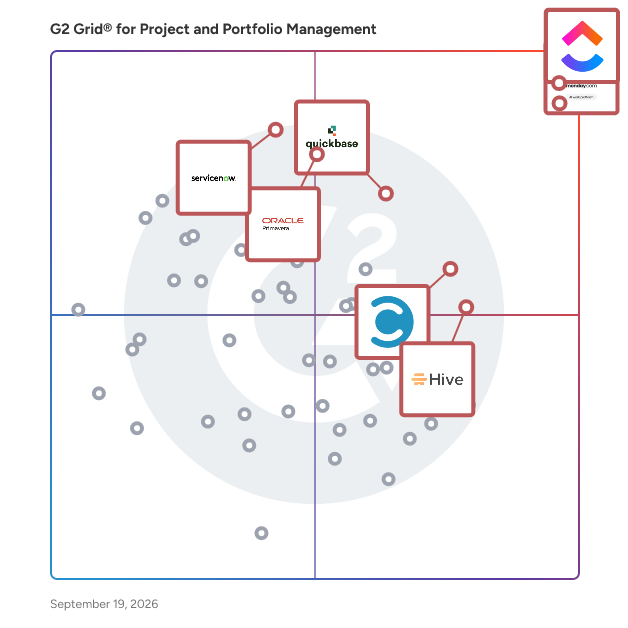
- [What is Apptio Targetprocess used for?](https://www.g2.com/discussions/what-is-apptio-targetprocess-used-for)

### 15. [TeamDynamix IT Service Management](https://www.g2.com/products/teamdynamix-it-service-management/reviews)
TeamDynamix is a no-code AI-powered ITSM/ESM platform with AI-native automation, virtual support agents, and enterprise-wide integration. Deflect 30-60% of tickets, resolve tickets 40-90% faster, eliminate 2-3 months of manual tasks, and reduce overhead.


**Average Rating:** 4.5/5.0
**Total Reviews:** 100
**How Do G2 Users Rate TeamDynamix IT Service Management?**

- **Has the product been a good partner in doing business?:** 9.5/10 (Category avg: 9.0/10)
- **Optimization:** 7.8/10 (Category avg: 8.4/10)
- **Alignment:** 7.2/10 (Category avg: 8.5/10)
- **Performance:** 8.3/10 (Category avg: 8.6/10)

**Who Is the Company Behind TeamDynamix IT Service Management?**

- **Seller:** [TeamDynamix](https://www.g2.com/sellers/teamdynamix)
- **Year Founded:** 2001
- **HQ Location:** Columbus, Ohio
- **Twitter:** @TDXBuzz (1,049 Twitter followers)
- **LinkedIn® Page:** https://www.linkedin.com/company/1494030/ (166 employees on LinkedIn®)

**Who Uses This Product?**
- **Top Industries:** Higher Education, Education Management
- **Company Size:** 46% Mid-Market, 45% Enterprise


#### What Are Recent G2 Reviews of TeamDynamix IT Service Management?

**"[Reliable Web-Based SaaS with Strong Workflows, Integrations, and Helpful AI Features](https://www.g2.com/survey_responses/teamdynamix-it-service-management-review-12915982)"**

**Rating:** 5.0/5.0 stars
*— Kevin M.*

[Read full review](https://www.g2.com/survey_responses/teamdynamix-it-service-management-review-12915982)

---

**"[Highly Configurable Service Desk That Keeps IT Operations Connected](https://www.g2.com/survey_responses/teamdynamix-it-service-management-review-12913261)"**

**Rating:** 5.0/5.0 stars
*— Robert C.*

[Read full review](https://www.g2.com/survey_responses/teamdynamix-it-service-management-review-12913261)

---


#### What Are G2 Users Discussing About TeamDynamix IT Service Management?

- [What is TeamDynamix IT Service Management used for?](https://www.g2.com/discussions/what-is-teamdynamix-it-service-management-used-for)
- [What does Teamdynamix do?](https://www.g2.com/discussions/what-does-teamdynamix-do)
- [How do you manage a project portfolio?](https://www.g2.com/discussions/how-do-you-manage-a-project-portfolio)
- [What is Team dynamics software?](https://www.g2.com/discussions/what-is-team-dynamics-software)
- [Does TeamDynamix have an app?](https://www.g2.com/discussions/does-teamdynamix-have-an-app)

### 16. [Meisterplan](https://www.g2.com/products/meisterplan/reviews)
Meisterplan is a lean and visual project portfolio management software focused on planning resources beyond the short-term. It enables you to reliably deliver on your commitments by guaranteeing optimal resource utilization in line with your priorities. With Meisterplan, you can • Raise your perspective to the portfolio level to get an overview of all projects, bringing in relevant data from any tool your teams are already using. • Add future resource needs with just minimal detail, giving you the right amount of information for confident decisions without unnecessary effort. • Use the most intuitive what-if scenario planning, where you can explore plan alternatives and find the best way forward based on actual resource availability.


**Average Rating:** 4.7/5.0
**Total Reviews:** 26
**How Do G2 Users Rate Meisterplan?**

- **Has the product been a good partner in doing business?:** 9.8/10 (Category avg: 9.0/10)
- **Optimization:** 8.6/10 (Category avg: 8.4/10)
- **Alignment:** 7.1/10 (Category avg: 8.5/10)
- **Performance:** 7.6/10 (Category avg: 8.6/10)

**Who Is the Company Behind Meisterplan?**

- **Seller:** [Meisterplan](https://www.g2.com/sellers/meisterplan)
- **Year Founded:** 1999
- **HQ Location:** Seattle, Washington
- **LinkedIn® Page:** https://www.linkedin.com/company/18462500/ (44 employees on LinkedIn®)

**Who Uses This Product?**
- **Company Size:** 44% Mid-Market, 37% Small-Business


#### What Are Meisterplan's Pros and Cons?

**Pros:**

- Ease of Use (6 reviews)
- Project Management (5 reviews)
- Customer Support (2 reviews)
- Customization (2 reviews)
- Dashboard Features (2 reviews)

**Cons:**

- Data Import (2 reviews)
- Export Issues (2 reviews)
- Export Limitations (2 reviews)
- Learning Curve (2 reviews)
- Project Management Issues (2 reviews)


### What Do G2 Reviewers Say About Meisterplan?
*AI-generated summary from verified user reviews*

**Pros:**

- Users commend the **ease of use** of Meisterplan, appreciating its drag-and-drop features and quick setup.
- Users find Meisterplan&#39;s **ease of use and visibility** to be invaluable for managing projects and resources effectively.
- Users commend the **exceptional customer support** from Meisterplan, enhancing their experience and tool functionality.
- Users value the **customizable fields** in Meisterplan, enhancing their ability to tailor solutions to their business needs.
- Users find the **dashboard features** of Meisterplan essential for managing resources and improving project visibility.

**Cons:**

- Users find the **data import limitations** frustrating, making integration and project tracking cumbersome and inefficient.
- Users face challenges with **export issues** in Meisterplan, limiting their ability to track changes and perform key analytics.
- Users find the **export limitations** in Meisterplan frustrating, hindering necessary portfolio analytics and project tracking.
- Users note a noticeable **learning curve** with Meisterplan, requiring time to become proficient with the tool.
- Users struggle with **project management issues** , including syncing with Jira, clutter, and lack of basic portfolio analytics.

#### What Are Recent G2 Reviews of Meisterplan?

**"[Practical Resource Planning with Meisterplan in a Hybrid Portfolio](https://www.g2.com/survey_responses/meisterplan-review-12009592)"**

**Rating:** 4.5/5.0 stars
*— Verified User in Manufacturing*

[Read full review](https://www.g2.com/survey_responses/meisterplan-review-12009592)

---

**"[Streamlined Resource Management, Worth the Initial Learning Curve](https://www.g2.com/survey_responses/meisterplan-review-11872976)"**

**Rating:** 4.5/5.0 stars
*— Jack N.*

[Read full review](https://www.g2.com/survey_responses/meisterplan-review-11872976)

---


### 17. [Projectum xPM](https://www.g2.com/products/projectum-xpm/reviews)
Projectum xPM is a portfolio, project, and resource management solution built on the Microsoft Power Platform, designed to support multiple ways of working within modern organizations. It enables businesses to plan, execute, and monitor initiatives across diverse work methodologies, from traditional project management approaches to agile and hybrid frameworks. As part of the Microsoft Cloud ecosystem, xPM integrates seamlessly with Microsoft 365 applications and services, providing secure, scalable, and compliant infrastructure for enterprise use. The platform is suitable for organizations managing complex project portfolios, distributed teams, or resource-intensive operations. It addresses scenarios such as strategic portfolio planning, project delivery tracking, resource capacity management, and performance reporting. With built-in AI capabilities, xPM offers automated insights, predictive analytics, and intelligent recommendations to improve decision-making and optimize resource allocation. Key features and capabilities include: Portfolio Management Flexibility – Support for multiple methodologies, enabling organizations to manage traditional, agile, and hybrid portfolios in one unified platform. Microsoft Cloud Integration – Operates within the Microsoft Power Platform, ensuring compatibility with Microsoft 365, Teams, and Power BI, with enterprise-grade security and compliance. AI-Driven Insights – Embedded artificial intelligence provides forecasts, trend analysis, and actionable recommendations to improve planning accuracy and execution efficiency. Comprehensive Resource Management – Tools for tracking availability, skills, and utilization across teams to align resource capacity with strategic priorities. Configurable Workspaces and Processes – Adaptable project templates, workflows, and dashboards to fit organizational needs without extensive custom development. Projectum xPM provides a centralized environment for aligning strategy with execution, ensuring visibility across initiatives, and enabling data-driven decision-making. Its combination of methodological flexibility, Microsoft ecosystem integration, and AI enablement positions it as a versatile solution for organizations seeking to unify portfolio, project, and resource management under a single, adaptable platform.


**Average Rating:** 4.9/5.0
**Total Reviews:** 10
**How Do G2 Users Rate Projectum xPM?**

- **Has the product been a good partner in doing business?:** 8.3/10 (Category avg: 9.0/10)
- **Optimization:** 8.3/10 (Category avg: 8.4/10)
- **Alignment:** 8.7/10 (Category avg: 8.5/10)
- **Performance:** 8.6/10 (Category avg: 8.6/10)

**Who Is the Company Behind Projectum xPM?**

- **Seller:** [Projectum ](https://www.g2.com/sellers/projectum)
- **Year Founded:** 2004
- **HQ Location:** Copenhagen, Capital Region of Denmark, Denmark
- **LinkedIn® Page:** https://www.linkedin.com/company/projectum-aps/ (81 employees on LinkedIn®)

**Who Uses This Product?**
- **Company Size:** 83% Mid-Market, 8% Small-Business


#### What Are Projectum xPM's Pros and Cons?

**Pros:**

- Ease of Use (2 reviews)
- Customer Support (1 reviews)
- Easy Integrations (1 reviews)
- Intuitive (1 reviews)
- Navigation Ease (1 reviews)

**Cons:**

- Intimidation (1 reviews)


### What Do G2 Reviewers Say About Projectum xPM?
*AI-generated summary from verified user reviews*

**Pros:**

- Users find the **ease of use** in Projectum xPM invaluable, appreciating its intuitive UI and seamless onboarding.
- Users appreciate the **excellent customer support** of Projectum xPM, particularly valuing effective onboarding assistance.
- Users value the **easy integrations** of Projectum xPM, seamlessly connecting with other tools to enhance productivity.
- Users love the **intuitive UI** of Projectum xPM, making it easy to adopt and integrate with other tools.
- Users value the **navigation ease** of Projectum xPM, allowing effortless access to portfolio overviews and reports.

**Cons:**

- Users find it challenging to achieve a **comprehensive overview** of resource allocation across multiple projects.

#### What Are Recent G2 Reviews of Projectum xPM?

**"[Flexible and User-Friendly Project Management](https://www.g2.com/survey_responses/projectum-xpm-review-12743087)"**

**Rating:** 5.0/5.0 stars
*— Alexander R.*

[Read full review](https://www.g2.com/survey_responses/projectum-xpm-review-12743087)

---

**"[Complete, Easy-to-Use Portfolio Management with Helpful New AI Features](https://www.g2.com/survey_responses/projectum-xpm-review-12644766)"**

**Rating:** 5.0/5.0 stars
*— Verified User in Computer Games*

[Read full review](https://www.g2.com/survey_responses/projectum-xpm-review-12644766)

---


### 18. [SmartSuite](https://www.g2.com/products/smartsuite-smartsuite/reviews)
SmartSuite is an AI-powered Work Operating System (Work OS) — one platform for GRC &amp; Resilience, IT Service Delivery, Project &amp; Portfolio Management, and Business Operations. Trusted by over 2,000 businesses worldwide, SmartSuite unites data, teams, and systems in a single governed environment, eliminating tool sprawl, reducing manual handoffs, and giving every stakeholder real-time visibility into the work that matters most. Where traditional GRC and ITSM platforms require lengthy build cycles, custom development, and months of professional services before a single team goes live, SmartSuite is built to launch in weeks, not quarters. Purpose-built Solution Suites — spanning Enterprise Risk Management, Compliance, Internal Audit, Cyber &amp; IT Risk, ITSM, IT Asset Management, Portfolio &amp; Financial Management, and more — are ready to deploy from day one, configured without code, and designed to expand as adoption grows across the organization. Underpinned by 8 interconnected platform frameworks — Data Architecture, Workflow Orchestration, Automation, Artificial Intelligence, Secure Collaboration, Enterprise Reporting, Integrations, and Security &amp; Governance — SmartSuite delivers the structural rigor enterprise organizations demand without the total cost of ownership that traditional point solutions carry. SOC 2, ISO 27001, GDPR, and HIPAA compliant out of the box.


**Average Rating:** 4.8/5.0
**Total Reviews:** 43
**How Do G2 Users Rate SmartSuite?**

- **Has the product been a good partner in doing business?:** 9.9/10 (Category avg: 9.0/10)

**Who Is the Company Behind SmartSuite?**

- **Seller:** [SmartSuite](https://www.g2.com/sellers/smartsuite)
- **Company Website:** https://www.smartsuite.com
- **Year Founded:** 2019
- **HQ Location:** Newport Beach, US
- **Twitter:** @hellosmartsuite (494 Twitter followers)
- **LinkedIn® Page:** https://www.linkedin.com/company/hellosmartsuite/ (57 employees on LinkedIn®)

**Who Uses This Product?**
- **Top Industries:** Marketing and Advertising, Information Technology and Services
- **Company Size:** 81% Small-Business, 14% Mid-Market


#### What Are SmartSuite's Pros and Cons?

**Pros:**

- Ease of Use (18 reviews)
- Flexibility (10 reviews)
- Customer Support (9 reviews)
- Intuitive (8 reviews)
- User Interface (8 reviews)

**Cons:**

- Expensive (3 reviews)
- Missing Features (3 reviews)
- Learning Curve (2 reviews)
- App Limitations (1 reviews)
- Complex Functions (1 reviews)


### What Do G2 Reviewers Say About SmartSuite?
*AI-generated summary from verified user reviews*

**Pros:**

- Users appreciate the **ease of use** of SmartSuite, enabling quick tool creation and seamless organization of records.
- Users appreciate the **flexibility** of SmartSuite, enjoying diverse views and seamless integration with other applications.
- Users praise the **exceptional customer support** of SmartSuite, highlighting the responsive and helpful assistance provided.
- Users love the **intuitive design** of SmartSuite, providing a user-friendly experience tailored to individual workflows.
- Users praise SmartSuite for its **beautiful user interface** , enhancing adoption while offering robust functionality and flexibility.

**Cons:**

- Users find SmartSuite **expensive** , noting high costs for upgrades and the lack of a mid-tier plan.
- Users note the **missing features** in SmartSuite, highlighting limitations in formula functions and automation tools.
- Users find the **learning curve steep** , requiring database knowledge and time to navigate and configure SmartSuite effectively.
- Users find the **mobile app lacking** and desire improvements in the &quot;My Tasks&quot; view and Grid View layout.
- Users find the **limited library of formula functions** frustrating, lacking essential tools for data manipulation and text handling.

#### What Are Recent G2 Reviews of SmartSuite?

**"[Awesome Value: Easy Resident Data Collection, Document Management, and 5 Seats per License](https://www.g2.com/survey_responses/smartsuite-review-12706714)"**

**Rating:** 5.0/5.0 stars
*— Jeff G.*

[Read full review](https://www.g2.com/survey_responses/smartsuite-review-12706714)

---

**"[Flexible, Powerful, Easy to Use, and a Game Changer for Our Business](https://www.g2.com/survey_responses/smartsuite-review-12822605)"**

**Rating:** 5.0/5.0 stars
*— Timothy D.*

[Read full review](https://www.g2.com/survey_responses/smartsuite-review-12822605)

---


### 19. [Prism PPM (formerly WorkOtter)](https://www.g2.com/products/prism-ppm-formerly-workotter/reviews)
Prism PPM is a sophisticated Project Portfolio Management (PPM) solution designed to assist organizations in effectively managing their strategic projects. Recognized in the 2025 Gartner Magic Quadrant for Adaptive Project Management and Reporting, Prism PPM addresses the limitations of traditional spreadsheets and task management tools by providing a comprehensive platform that enhances project visibility, reporting accuracy, and overall portfolio management efficiency. Targeted at project management offices (PMOs), project managers, and organizational leaders, Prism PPM is particularly beneficial for those who oversee multiple projects and require a structured approach to resource allocation, capacity planning, and project intake processes. The solution is designed to facilitate informed decision-making by allowing users to prioritize projects that align with their business objectives and resource availability. This capability enables organizations to adapt to changes and understand the potential impacts on their project portfolio. One of the key features of Prism PPM is its robust project management capabilities grounded in PMBOK best practices. Users can efficiently manage resources and track project risks at both the project and portfolio levels. This functionality not only streamlines project execution but also enhances communication among stakeholders, ensuring that everyone is aligned on project goals and potential challenges. The platform’s advanced reporting and analytics dashboards provide critical insights into PPM KPIs, allowing organizations to monitor performance and make data-driven decisions. Prism PPM also emphasizes visibility across all project data. With the option to utilize embedded analytics or integrate with external tools like Power BI and Databricks, users can customize their reporting to meet specific needs. This flexibility ensures that stakeholders have access to relevant information, fostering transparency and accountability throughout the project lifecycle. To further enhance PMO and project governance, Prism PPM offers customizable templates and visual workflows that streamline processes. By establishing standards and feedback loops, organizations can ensure continuity across projects, leading to smoother operations and continuous process improvement. This structured approach not only supports project success but also empowers PMOs to drive strategic initiatives effectively. With a dedicated team of project management professionals available for implementation and support, Prism PPM is committed to helping organizations maximize the benefits of PPM software. Users can reach out for guidance on optimizing their PMO practices and leveraging the full potential of Prism PPM to achieve their project management goals.


**Average Rating:** 4.8/5.0
**Total Reviews:** 52
**How Do G2 Users Rate Prism PPM (formerly WorkOtter)?**

- **Has the product been a good partner in doing business?:** 10.0/10 (Category avg: 9.0/10)
- **Optimization:** 9.3/10 (Category avg: 8.4/10)
- **Alignment:** 9.6/10 (Category avg: 8.5/10)
- **Performance:** 9.5/10 (Category avg: 8.6/10)

**Who Is the Company Behind Prism PPM (formerly WorkOtter)?**

- **Seller:** [Prism PPM (formerly WorkOtter)](https://www.g2.com/sellers/prism-ppm-formerly-workotter)
- **Company Website:** https://prismppm.com/
- **Year Founded:** 1998
- **HQ Location:** St. Louis, US
- **LinkedIn® Page:** https://www.linkedin.com/company/prismppm/ (30 employees on LinkedIn®)

**Who Uses This Product?**
- **Top Industries:** Information Technology and Services
- **Company Size:** 57% Small-Business, 29% Mid-Market


#### What Are Prism PPM (formerly WorkOtter)'s Pros and Cons?

**Pros:**

- Ease of Use (2 reviews)
- Organization (2 reviews)
- Resource Management (2 reviews)
- Automation (1 reviews)
- Customer Support (1 reviews)

**Cons:**

- Limited Features (2 reviews)
- Collaboration Issues (1 reviews)
- Feature Issues (1 reviews)
- Integration Issues (1 reviews)
- Learning Curve (1 reviews)


### What Do G2 Reviewers Say About Prism PPM (formerly WorkOtter)?
*AI-generated summary from verified user reviews*

**Pros:**

- Users find Prism PPM to be **streamlined and easy to navigate** , enhancing efficiency for project management teams.
- Users value the **streamlined organization** of Prism PPM, enhancing efficiency and visibility across all project levels.
- Users value the **streamlined resource management** in Prism PPM, enhancing decision-making and overall project efficiency.
- Users value the **automation features** of Prism PPM, which streamline tasks and enhance project management efficiency.
- Users highlight the **exceptional customer support** from Prism PPM, appreciating the team&#39;s commitment to their satisfaction and improvement.

**Cons:**

- Users point out **limited features** in Prism PPM, affecting advanced planning and necessitating better guidance and enhancements.
- Users are frustrated by **collaboration issues** , including ineffective personalization and inadequate user guidance, impacting overall usability.
- Users experience **feature issues** with Prism PPM, finding personalizations, tracking, and guides lacking in effectiveness.
- Users experience **integration issues** with Jira, limiting feature capabilities and advanced planning functionalities.
- Users find that there is a **steep learning curve** with Prism PPM, as it&#39;s not fully intuitive.

#### What Are Recent G2 Reviews of Prism PPM (formerly WorkOtter)?

**"[Excellent fit for purpose for integrated PPM tool with powerful reporting capabilities!](https://www.g2.com/survey_responses/prism-ppm-formerly-workotter-review-11423681)"**

**Rating:** 4.5/5.0 stars
*— Slobodan V.*

[Read full review](https://www.g2.com/survey_responses/prism-ppm-formerly-workotter-review-11423681)

---

**"[Prism PPM Review](https://www.g2.com/survey_responses/prism-ppm-formerly-workotter-review-11207351)"**

**Rating:** 5.0/5.0 stars
*— Mallory S.*

[Read full review](https://www.g2.com/survey_responses/prism-ppm-formerly-workotter-review-11207351)

---


#### What Are G2 Users Discussing About Prism PPM (formerly WorkOtter)?

- [What is WorkOtter used for?](https://www.g2.com/discussions/what-is-workotter-used-for) - 1 comment

### 20. [Deltek Replicon Time](https://www.g2.com/products/deltek-replicon-time/reviews)
Deltek Replicon Time is an AI-powered time intelligence software that helps project- based firms recover missed billable hours, reduce revenue leakage, and speed up billing cycles. It unifies project time capture, workforce management, time off, and labour compliance in one configurable, cloud-based application — part of the Deltek platform. ZeroTime™, powered by Dela, auto-captures time from 100+ work applications and translates activity into accurate, ready-to-submit timesheets. Best for: Project-based firms — from growing consultancies to global enterprises — managing distributed teams, complex billing models, and evolving labour regulations across multiple regions. Use cases:  Track project billable hours automatically to improve margins and accelerate invoicing  Manage workforce attendance, schedules, overtime, and gross pay calculations in one place  Navigate labour compliance across 145+ jurisdictions in 75+ countries using preconfigured rules  Consolidate disconnected time-tracking systems into a single, scalable application  Capture project expenses and map them to jobs for on-time billing and reimbursement Key Features:  ZeroTime™ intelligent timesheets — AI-powered time capture from 100+ work apps  Configurable project time tracking with flexible approval workflows  Global labour compliance with preconfigured rules for overtime, breaks, leave, and gross pay  CloudClock with facial recognition and voice commands for field and frontline teams  Workforce management — attendance, scheduling, and time-off administration  Seamless integration with ERP, CRM, HCM, payroll, and project management systems  Advanced analytics with custom dashboards, reports, and connections to Tableau and Power BI Why project-based firms choose Replicon Time:  AI captures every billable hour so revenue stops slipping through the cracks. ZeroTime™ auto-populates timesheets from 100+ work apps — eliminating the end-of-week scramble and recovering hours that manual entry misses.  One application replaces fragmented time-tracking systems across the business. Replicon Time brings project time, workforce management, leave, and compliance together — cutting silos and reducing manual errors at source.  Global teams stay compliant without adding operational overhead. Preconfigured rules cover labour laws in 145+ jurisdictions across 75+ countries, with intelligent validation and complete audit trails built in. Used by: Professional services, consulting, government contracting, and technology firms — from mid-market to Fortune 500 — managing complex projects and distributed workforces globally. Replicon Time is FedRAMP Moderate authorized and supports 30+ languages and multiple currencies. Backed by 25+ years of industry leadership in time tracking and workforce management.


**Average Rating:** 4.3/5.0
**Total Reviews:** 776
**How Do G2 Users Rate Deltek Replicon Time?**

- **Has the product been a good partner in doing business?:** 8.9/10 (Category avg: 9.0/10)
- **Optimization:** 7.2/10 (Category avg: 8.4/10)
- **Alignment:** 7.3/10 (Category avg: 8.5/10)
- **Performance:** 8.1/10 (Category avg: 8.6/10)

**Who Is the Company Behind Deltek Replicon Time?**

- **Seller:** [Deltek](https://www.g2.com/sellers/deltek)
- **Company Website:** https://www.deltek.com/
- **Year Founded:** 1983
- **HQ Location:** Herndon, VA
- **Twitter:** @Deltek (6,574 Twitter followers)
- **LinkedIn® Page:** https://www.linkedin.com/company/163414/ (4,828 employees on LinkedIn®)

**Who Uses This Product?**
- **Who Uses This:** Controller, Office Manager
- **Top Industries:** Information Technology and Services, Computer Software
- **Company Size:** 43% Mid-Market, 41% Small-Business


#### What Are Deltek Replicon Time's Pros and Cons?

**Pros:**

- Ease of Use (19 reviews)
- Time Tracking (16 reviews)
- Features (13 reviews)
- Efficiency (9 reviews)
- Customer Support (8 reviews)

**Cons:**

- Reporting Issues (9 reviews)
- Limited Customization (8 reviews)
- Data Management (5 reviews)
- Learning Curve (5 reviews)
- Limited Features (5 reviews)


### What Do G2 Reviewers Say About Deltek Replicon Time?
*AI-generated summary from verified user reviews*

**Pros:**

- Users appreciate the **ease of use** of Deltek Replicon Time, citing its straightforward interface and quick navigation.
- Users appreciate the **straightforward time tracking** of Deltek Replicon Time, simplifying project management and organization.
- Users appreciate the **user-friendly interface** of Deltek Replicon Time, enabling efficient tracking and management of projects and time.
- Users commend the **efficiency** of Deltek Replicon Time, streamlining project management and time tracking effortlessly.
- Users value the **excellent customer support** from Deltek Replicon Time, noting prompt resolutions and outstanding service.

**Cons:**

- Users face **reporting issues** with Deltek Replicon Time, impacting accuracy and customization options in their experience.
- Users express frustration over **limited customization** options in Deltek Replicon, hindering their ability to tailor the system effectively.
- Users find the **data management** to be lacking, with issues like empty timesheets and unhelpful logs.
- Users find the **learning curve steep** , noting that initial setup and reporting features can be complex.
- Users find the **limited features** of Deltek Replicon Time hinder effective organization and accurate reporting.

#### What Are Recent G2 Reviews of Deltek Replicon Time?

**"[Intuitive Time Management That Boosts Productivity and Cuts Billing Errors](https://www.g2.com/survey_responses/deltek-replicon-time-review-12832319)"**

**Rating:** 4.0/5.0 stars
*— Ryan K.*

[Read full review](https://www.g2.com/survey_responses/deltek-replicon-time-review-12832319)

---

**"[Simple, Web-Based UI You Can Access Anywhere](https://www.g2.com/survey_responses/deltek-replicon-time-review-13029867)"**

**Rating:** 4.5/5.0 stars
*— Chris P.*

[Read full review](https://www.g2.com/survey_responses/deltek-replicon-time-review-13029867)

---


#### What Are G2 Users Discussing About Deltek Replicon Time?

- [What is Replicon PSA used for?](https://www.g2.com/discussions/what-is-replicon-psa-used-for) - 1 comment
- [What does Replicon PSA do?](https://www.g2.com/discussions/what-does-replicon-psa-do)
- [What is a PSA tool?](https://www.g2.com/discussions/what-is-a-psa-tool) - 1 comment
- [What is a PSA in technology?](https://www.g2.com/discussions/what-is-a-psa-in-technology) - 2 comments
- [What is Replicon software?](https://www.g2.com/discussions/what-is-replicon-software) - 2 comments

### 21. [Microsoft Project &amp; Portfolio Management](https://www.g2.com/products/microsoft-microsoft-project-portfolio-management/reviews)
Microsoft Project is a project management software that helps users plan, execute, and monitor projects effectively. It includes powerful features for managing tasks, allocating resources and budgeting, all presented in an easy-to-use interface. With seamless integration into Microsoft 365, it supports real-time collaboration and data sharing. The advanced reporting and analytics tools allow users to track progress and make data-driven decisions. Stay organized, focused, and in charge. With Microsoft Project, easily plan your projects with the power of dynamic scheduling based on effort needed, project duration, and allotted team members. Suitable for projects of any size, Microsoft Project offers flexible deployment options, both cloud-based and on-premises, catering to a wide range of organizational needs.


**Average Rating:** 4.0/5.0
**Total Reviews:** 1,578
**How Do G2 Users Rate Microsoft Project &amp; Portfolio Management?**

- **Has the product been a good partner in doing business?:** 7.9/10 (Category avg: 9.0/10)
- **Optimization:** 8.6/10 (Category avg: 8.4/10)
- **Alignment:** 8.9/10 (Category avg: 8.5/10)
- **Performance:** 8.8/10 (Category avg: 8.6/10)

**Who Is the Company Behind Microsoft Project &amp; Portfolio Management?**

- **Seller:** [Microsoft](https://www.g2.com/sellers/microsoft)
- **Year Founded:** 1975
- **HQ Location:** Redmond, Washington
- **Twitter:** @microsoft (13,091,739 Twitter followers)
- **LinkedIn® Page:** https://www.linkedin.com/company/microsoft/ (231,632 employees on LinkedIn®)
- **Ownership:** MSFT

**Who Uses This Product?**
- **Who Uses This:** Project Manager, Program Manager
- **Top Industries:** Information Technology and Services, Computer Software
- **Company Size:** 47% Enterprise, 29% Mid-Market


#### What Are Microsoft Project &amp; Portfolio Management's Pros and Cons?

**Pros:**

- Project Management (9 reviews)
- Ease of Use (7 reviews)
- Resource Management (7 reviews)
- Project Tracking (6 reviews)
- Easy Integration (3 reviews)

**Cons:**

- Limited Customization (5 reviews)
- High Complexity (4 reviews)
- Learning Curve (3 reviews)
- Project Management (3 reviews)
- Budgeting/Accounting Issues (2 reviews)


### What Do G2 Reviewers Say About Microsoft Project &amp; Portfolio Management?
*AI-generated summary from verified user reviews*

**Pros:**

- Users appreciate the **robust features** of Microsoft Project &amp; Portfolio Management for effective project planning and resource management.
- Users find the **ease of use** in Microsoft Project &amp; Portfolio Management highly beneficial for project management tasks.
- Users praise the **effective resource management** in Microsoft Project &amp; Portfolio Management, streamlining project planning and tracking.
- Users value the **effective project tracking** capabilities of Microsoft Project &amp; Portfolio Management, enhancing organization and oversight.
- Users appreciate the **easy integration** with Microsoft tools, enhancing collaboration and streamlining project management workflows.

**Cons:**

- Users face **limited customization** options in Microsoft Project, making it challenging to integrate with multiple tools effectively.
- Users find the **high complexity** of Microsoft Project &amp; Portfolio Management challenging for small or simple projects.
- Users find the **steep learning curve** of Microsoft Project &amp; Portfolio Management difficult, hindering effective use of its features.
- Users find Microsoft Project &amp; Portfolio Management **difficult for small projects** , noting its complexity and limited customization options.
- Users highlight **budgeting/accounting issues** such as complexity, cost, and integration limitations that can hinder effectiveness.

#### What Are Recent G2 Reviews of Microsoft Project &amp; Portfolio Management?

**"[Clean UI, Reliable Performance, and Smooth MS 365 Integration](https://www.g2.com/survey_responses/microsoft-project-portfolio-management-review-12280626)"**

**Rating:** 4.5/5.0 stars
*— Kapil S.*

[Read full review](https://www.g2.com/survey_responses/microsoft-project-portfolio-management-review-12280626)

---

**"[Project management and Smart Cities with native integration in Microsoft](https://www.g2.com/survey_responses/microsoft-project-portfolio-management-review-12744748)"**

**Rating:** 4.0/5.0 stars
*— Antonio H.*

[Read full review](https://www.g2.com/survey_responses/microsoft-project-portfolio-management-review-12744748)

---


#### What Are G2 Users Discussing About Microsoft Project &amp; Portfolio Management?

- [What are the best strategies for using Microsoft Project for complex project planning and resource management?](https://www.g2.com/discussions/what-are-the-best-strategies-for-using-microsoft-project-for-complex-project-planning-and-resource-management)
- [What is Microsoft Project &amp; Portfolio Management used for?](https://www.g2.com/discussions/what-is-microsoft-project-portfolio-management-used-for)
- [What can I do with Microsoft Project?](https://www.g2.com/discussions/what-can-i-do-with-microsoft-project)
- [How much does microsoft project cost?](https://www.g2.com/discussions/how-much-does-microsoft-project-cost) - 1 comment
- [Is Microsoft Project included in Office 365?](https://www.g2.com/discussions/is-microsoft-project-included-in-office-365) - 1 comment

### 22. [Moovila](https://www.g2.com/products/moovila/reviews)
Moovila Perfect Project is an AI-powered project management and automation platform developed by Moovila to help organizations plan, predict, and deliver projects with precision. Built for Managed Service Providers (MSPs), IT service firms, and other project-driven organizations, Moovila enables teams to manage complex, resource-dependent workflows while eliminating uncertainty in project timelines. Unlike traditional project management tools, the platform uses artificial intelligence to dynamically create and maintain optimized project schedules, ensuring that teams can adapt in real time while staying on track for on-time delivery. Moovila is designed for organizations that manage a high volume of concurrent projects, particularly MSPs, consulting firms, and professional services teams that rely on structured workflows and accurate resource planning. Its ideal users are teams working within PSA environments such as ConnectWise PSA, Autotask PSA, and HaloPSA, where alignment between sales, operations, and project delivery is critical. These organizations often face challenges such as missed deadlines, limited visibility into project health, and inefficient resource allocation, all of which Moovila is built to solve through automation and intelligent forecasting. What differentiates Moovila Perfect Project from other platforms is its focus on predictability and real-time intelligence rather than manual tracking. At the core of the platform is its AI-driven Critical Path Engine, which automatically maps task dependencies and continuously recalculates the most efficient path to project completion as conditions evolve. This is paired with real-time risk detection, which monitors projects for potential delays or bottlenecks and proactively alerts teams with recommended actions to mitigate those risks before they impact delivery timelines. Another key advantage of Moovila is its native bi-directional integration with major PSA systems, including ConnectWise PSA, Autotask PSA, and HaloPSA, allowing for seamless, real-time synchronization of project data without the need for middleware or manual data entry. This integration ensures that all teams are working from the same source of truth. In addition, Moovila’s intelligent resource and capacity forecasting capabilities help organizations optimize team utilization by analyzing workloads and availability, preventing overallocation while improving efficiency across projects. The platform also features Smart Scheduling, which automatically generates and adjusts timelines based on real-time inputs, ensuring that project plans remain accurate without constant manual updates. Moovila supports structured, dependency-driven workflows through a waterfall methodology, with optional Gantt chart visualization for teams that require a visual representation of project timelines. Its Project Hub further enhances efficiency by providing a library of pre-built templates, enabling teams to quickly launch standardized, well-structured projects with confidence and consistency. Moovila Perfect Project is used across a variety of use cases, including client project delivery such as onboarding, migrations, and implementations, as well as internal operations management and cross-functional coordination. It is equally effective for both short-term initiatives and long-term strategic projects, making it a flexible solution for organizations that require both structure and adaptability. By automating scheduling, monitoring risks, and optimizing resources, Moovila helps teams stay aligned, accountable, and in control of even the most complex project environments. By combining automation, real-time intelligence, and seamless integration, Moovila Perfect Project enables organizations to move from simply managing projects to delivering them with consistency and precision.


**Average Rating:** 4.8/5.0
**Total Reviews:** 49
**How Do G2 Users Rate Moovila?**

- **Has the product been a good partner in doing business?:** 10.0/10 (Category avg: 9.0/10)
- **Optimization:** 9.4/10 (Category avg: 8.4/10)
- **Alignment:** 8.8/10 (Category avg: 8.5/10)
- **Performance:** 9.1/10 (Category avg: 8.6/10)

**Who Is the Company Behind Moovila?**

- **Seller:** [Moovila](https://www.g2.com/sellers/moovila)
- **Company Website:** https://www.moovila.com/
- **HQ Location:** Mount Pleasant, South Carolina
- **Twitter:** @Moovila_App (767 Twitter followers)
- **LinkedIn® Page:** https://www.linkedin.com/company/6596080 (27 employees on LinkedIn®)

**Who Uses This Product?**
- **Who Uses This:** Project Manager
- **Top Industries:** Information Technology and Services, Computer &amp; Network Security
- **Company Size:** 52% Small-Business, 40% Mid-Market


#### What Are Moovila's Pros and Cons?

**Pros:**

- Project Management (20 reviews)
- Ease of Use (15 reviews)
- Automation (13 reviews)
- Project Tracking (11 reviews)
- Customer Support (10 reviews)

**Cons:**

- Limited Customization (5 reviews)
- Integration Issues (4 reviews)
- Learning Curve (3 reviews)
- Limited Features (3 reviews)
- Not Intuitive (3 reviews)


### What Do G2 Reviewers Say About Moovila?
*AI-generated summary from verified user reviews*

**Pros:**

- Users value the **outstanding project management capabilities** of Moovila, enjoying its user-friendly interface and responsive support.
- Users find Moovila&#39;s **ease of use** remarkable, enhancing project management and simplifying workflow customization seamlessly.
- Users value the **automation capabilities** of Moovila, significantly enhancing efficiency and reducing human error in project management.
- Users value the **effective project tracking** of Moovila, which enhances resource planning and project management clarity.
- Users commend the **outstanding customer support** of Moovila, highlighting their responsiveness and helpfulness throughout the process.

**Cons:**

- Users find the **limited customization** options in Moovila&#39;s interface restrict intuitive use and overall project navigation.
- Users experience **integration issues** with Moovila, particularly with platforms like Teams and delayed updates on others.
- Users find the **learning curve steep** , making it difficult to navigate and fully utilize Moovila effectively.
- Users find Moovila&#39;s **limited features** hinder customization, reporting, and usability, making the interface feel clunky and outdated.
- Users find Moovila&#39;s interface **not intuitive** , with a steep learning curve and overwhelming layout complexity.

#### What Are Recent G2 Reviews of Moovila?

**"[Moovila Made Our Project Management Spot-On and Easy](https://www.g2.com/survey_responses/moovila-review-12387234)"**

**Rating:** 5.0/5.0 stars
*— Jeremy B.*

[Read full review](https://www.g2.com/survey_responses/moovila-review-12387234)

---

**"[Moovila Streamlines Project Flow, Capacity Planning, and On-Time Delivery](https://www.g2.com/survey_responses/moovila-review-12992307)"**

**Rating:** 5.0/5.0 stars
*— Erik K.*

[Read full review](https://www.g2.com/survey_responses/moovila-review-12992307)

---


#### What Are G2 Users Discussing About Moovila?

- [What is Moovila used for?](https://www.g2.com/discussions/what-is-moovila-used-for)

### 23. [Octave Sequence Enterprise](https://www.g2.com/products/octave-sequence-enterprise/reviews)
Octave Sequence Enterprise (formerly EcoSys) is an enterprise project performance solution designed to bring clarity, control, and predictability to complex project environments. It connects project portfolio management, project controls, and project management into a unified platform that helps organizations manage the full lifecycle of their capital programs. Built for complex engineering, construction, and infrastructure projects, Sequence Enterprise provides the structure needed to align strategy with execution. Organizations gain a consistent view of cost, schedule, risk, and performance, allowing teams to act earlier, manage change more effectively, and deliver better outcomes. The platform is highly configurable and easy to use, enabling organizations to adapt workflows, dashboards, and reporting to their delivery models without heavy customization. Sequence Enterprise also integrates with key enterprise systems, including ERP, scheduling, and other critical project data sources, creating a connected ecosystem that replaces fragmented tools and eliminates data silos. With trusted data and enterprise-wide visibility, leaders can better understand performance, allocate resources more effectively, and forecast outcomes with greater confidence. Ultimately, Sequence Enterprise helps organizations move from fragmented project oversight to coordinated performance, empowering teams to deliver projects on time, on budget, and aligned with strategic goals.


**Average Rating:** 4.1/5.0
**Total Reviews:** 58
**How Do G2 Users Rate Octave Sequence Enterprise?**

- **Has the product been a good partner in doing business?:** 8.9/10 (Category avg: 9.0/10)
- **Optimization:** 8.8/10 (Category avg: 8.4/10)
- **Alignment:** 8.5/10 (Category avg: 8.5/10)
- **Performance:** 8.5/10 (Category avg: 8.6/10)

**Who Is the Company Behind Octave Sequence Enterprise?**

- **Seller:** [Octave](https://www.g2.com/sellers/octave-9e5a428c-f303-4735-9417-dff1ef5736d4)
- **Company Website:** https://www.octave.com/
- **HQ Location:** Madison, US
- **LinkedIn® Page:** https://www.linkedin.com/company/octaveintelligence/ (3,001 employees on LinkedIn®)

**Who Uses This Product?**
- **Top Industries:** Construction, Computer Software
- **Company Size:** 40% Mid-Market, 39% Small-Business


#### What Are Octave Sequence Enterprise's Pros and Cons?

**Pros:**

- Ease of Use (22 reviews)
- Project Management (20 reviews)
- Features (15 reviews)
- Easy Integration (14 reviews)
- Project Tracking (14 reviews)

**Cons:**

- Learning Curve (16 reviews)
- Steep Learning Curve (11 reviews)
- Difficult Onboarding (9 reviews)
- Complexity (8 reviews)
- Difficult Learning Curve (8 reviews)


### What Do G2 Reviewers Say About Octave Sequence Enterprise?
*AI-generated summary from verified user reviews*

**Pros:**

- Users appreciate the **ease of use** of Octave Sequence Enterprise, streamlining project management and enhancing productivity significantly.
- Users appreciate the **seamless integration** of EcoSys for efficient project management, enhancing productivity and reducing manual tasks.
- Users appreciate the **seamless integration of project data** , enhancing efficiency and eliminating the need for manual spreadsheets.
- Users appreciate the **easy integration** of EcoSys, streamlining project management and enhancing overall efficiency and productivity.
- Users value the **powerful project tracking** features of Octave Sequence Enterprise, facilitating seamless project management and visibility.

**Cons:**

- Users find the **steep learning curve** of Octave Sequence Enterprise challenging, requiring significant time and patience to master.
- Users find the **steep learning curve** of Octave Sequence Enterprise challenging, requiring significant time and training to master.
- Users find the **difficult onboarding** process of EcoSys challenging, especially due to its complex interface and steep learning curve.
- Users find Octave Sequence Enterprise to be **complex for new users** , requiring significant time for effective learning and adaptation.
- Users find the **difficult learning curve** of Octave Sequence Enterprise challenging, requiring substantial time and patience to master.

#### What Are Recent G2 Reviews of Octave Sequence Enterprise?

**"[Strong Project Financial Management Tool with Room for Improvement](https://www.g2.com/survey_responses/octave-sequence-enterprise-review-12959087)"**

**Rating:** 5.0/5.0 stars
*— ATUL A.*

[Read full review](https://www.g2.com/survey_responses/octave-sequence-enterprise-review-12959087)

---

**"[Unified Project Controls in One Powerful Platform](https://www.g2.com/survey_responses/octave-sequence-enterprise-review-13067060)"**

**Rating:** 4.0/5.0 stars
*— Enrik S.*

[Read full review](https://www.g2.com/survey_responses/octave-sequence-enterprise-review-13067060)

---


#### What Are G2 Users Discussing About Octave Sequence Enterprise?

- [What is a cost control software?](https://www.g2.com/discussions/ecosys-what-is-a-cost-control-software)
- [What is hexagon EcoSys?](https://www.g2.com/discussions/ecosys-what-is-hexagon-ecosys)
- [What is EcoSys EPC?](https://www.g2.com/discussions/ecosys-what-is-ecosys-epc)
- [What is EcoSys used for?](https://www.g2.com/discussions/ecosys-what-is-ecosys-used-for)

### 24. [Clarity](https://www.g2.com/products/broadcom-clarity/reviews)
Speed up your digital transformation with Clarity, the leading investment planning solution for the enterprise. Instead of traditional project management, we help you unite the enterprise with strategic portfolio management (SPM), collaborative work management (CWM) and digital product management (DPM).


**Average Rating:** 3.7/5.0
**Total Reviews:** 85
**How Do G2 Users Rate Clarity?**

- **Has the product been a good partner in doing business?:** 8.0/10 (Category avg: 9.0/10)
- **Optimization:** 9.2/10 (Category avg: 8.4/10)
- **Alignment:** 9.2/10 (Category avg: 8.5/10)
- **Performance:** 9.2/10 (Category avg: 8.6/10)

**Who Is the Company Behind Clarity?**

- **Seller:** [Broadcom](https://www.g2.com/sellers/broadcom-ab3091cd-4724-46a8-ac89-219d6bc8e166)
- **Year Founded:** 1991
- **HQ Location:** San Jose, CA
- **Twitter:** @broadcom (63,909 Twitter followers)
- **LinkedIn® Page:** https://www.linkedin.com/company/broadcom/ (55,094 employees on LinkedIn®)
- **Ownership:** NASDAQ: CA

**Who Uses This Product?**
- **Top Industries:** Information Technology and Services, Hospital &amp; Health Care
- **Company Size:** 75% Enterprise, 26% Mid-Market


#### What Are Clarity's Pros and Cons?

**Pros:**

- Customization (2 reviews)
- Ease of Use (2 reviews)
- Ease of Learning (1 reviews)
- Easy Integration (1 reviews)
- Efficiency (1 reviews)

**Cons:**

- Expensive (1 reviews)
- Learning Curve (1 reviews)
- Offline Limitations (1 reviews)
- Reporting Issues (1 reviews)
- Syncing Issues (1 reviews)


### What Do G2 Reviewers Say About Clarity?
*AI-generated summary from verified user reviews*

**Pros:**

- Users value the **customizability** of Clarity, enabling tailored time management to fit team needs seamlessly.
- Users find Clarity&#39;s **ease of use** invaluable, thanks to its intuitive interface and customizable features.
- Users find Clarity to be highly **customizable and easy to use** , enhancing their overall experience effortlessly.
- Users appreciate the **easy integration** of Clarity with existing tools, enhancing their time management and workflow efficiency.
- Users appreciate the **efficiency** of Clarity, as it simplifies time tracking and management for all organization sizes.

**Cons:**

- Users find Clarity PPM software to be **expensive** , impacting its accessibility for some organizations.
- Users find the **learning curve for advanced features** somewhat steep, necessitating extra training for optimal usage.
- Users face **limited offline functionality** , making it difficult to log hours in areas with poor connectivity.
- Users face **limited offline functionality** with Clarity, making it difficult to log hours in low connectivity areas.
- Users experience **syncing issues** with the mobile app, detracting from the otherwise great performance of the desktop version.

#### What Are Recent G2 Reviews of Clarity?

**"[Clarity PPM](https://www.g2.com/survey_responses/clarity-review-10770565)"**

**Rating:** 4.5/5.0 stars
*— S K.*

[Read full review](https://www.g2.com/survey_responses/clarity-review-10770565)

---

**"[Comprehensive Review of Clarity Time Sheet Management](https://www.g2.com/survey_responses/clarity-review-10383144)"**

**Rating:** 4.0/5.0 stars
*— ABHISHEK K.*

[Read full review](https://www.g2.com/survey_responses/clarity-review-10383144)

---


#### What Are G2 Users Discussing About Clarity?

- [What is HP PPM tool?](https://www.g2.com/discussions/what-is-hp-ppm-tool)
- [What is a PPM tool?](https://www.g2.com/discussions/what-is-a-ppm-tool)
- [What is CA PPM tool?](https://www.g2.com/discussions/what-is-ca-ppm-tool)
- [What is Clarity software used for?](https://www.g2.com/discussions/what-is-clarity-software-used-for) - 1 comment

### 25. [Planview PPM Pro](https://www.g2.com/products/planview-ppm-pro/reviews)
Planview PPM Pro is a project portfolio management (PPM) software solution that helps PMO teams centralize project portfolios, resources, financials, and reporting in one cloud-based system. It gives PMO leaders, project managers, and resource managers a shared system of record for managing project work end to end, replacing manual, spreadsheet-based tracking and fragmented reporting. Primary users include PMO directors, project managers, resource managers, and CIOs and CFOs who need portfolio-level visibility into project status, resource allocation, and financial performance. PPM Pro supports both traditional waterfall and hybrid project delivery methodologies and applies structured governance to work intake, financial tracking, and portfolio reporting. Main capabilities include: • Portfolio and project management with project templates, health scoring, and automatic status rollups across the full project inventory • Resource management through a centralized Resource Workbench that shows demand versus capacity, supports skills-based matching, and covers both employees and contractors • Financial management with budget, forecast, and actuals tracking at the task, project, and portfolio level, including capitalization (capex/opex) tracking • Structured work intake and request management, with configurable forms, approval workflows, and scoring models that route requests before work begins • Reporting and dashboards with configurable health indicators, calculated fields for custom metrics, and Predictive Portfolio Analysis and What-If Analysis tools for scenario planning PPM Pro connects with Planview AgilePlace and Planview ProjectPlace for organizations running hybrid delivery teams, and integrates with external tools including Jira, Azure DevOps, Cherwell, and Tasktop. Planview Anvi, Planview&#39;s AI capability, is being integrated into PPM Pro, including an Anvi Insights Widget for automated portfolio health analysis and an Anvi Chat interface currently available through early access.


**Average Rating:** 3.9/5.0
**Total Reviews:** 28
**How Do G2 Users Rate Planview PPM Pro?**

- **Has the product been a good partner in doing business?:** 8.2/10 (Category avg: 9.0/10)
- **Optimization:** 9.2/10 (Category avg: 8.4/10)
- **Alignment:** 9.3/10 (Category avg: 8.5/10)
- **Performance:** 9.6/10 (Category avg: 8.6/10)

**Who Is the Company Behind Planview PPM Pro?**

- **Seller:** [Planview](https://www.g2.com/sellers/planview)
- **Year Founded:** 1989
- **HQ Location:** Austin, TX
- **Twitter:** @Planview (3,049 Twitter followers)
- **LinkedIn® Page:** https://www.linkedin.com/company/7268/ (1,868 employees on LinkedIn®)

**Who Uses This Product?**
- **Company Size:** 59% Enterprise, 41% Mid-Market


#### What Are Recent G2 Reviews of Planview PPM Pro?

**"[PPM Pro Review for IT Project Management](https://www.g2.com/survey_responses/planview-ppm-pro-review-7099764)"**

**Rating:** 5.0/5.0 stars
*— Cindy C.*

[Read full review](https://www.g2.com/survey_responses/planview-ppm-pro-review-7099764)

---

**"[Fast Weekly Timesheets with Helpful Line-Item Autofill, with Easy Improvements Possible](https://www.g2.com/survey_responses/planview-ppm-pro-review-12960239)"**

**Rating:** 5.0/5.0 stars
*— Arka R.*

[Read full review](https://www.g2.com/survey_responses/planview-ppm-pro-review-12960239)

---


#### What Are G2 Users Discussing About Planview PPM Pro?

- [What is Planview PPM Pro used for?](https://www.g2.com/discussions/what-is-planview-ppm-pro-used-for)
- [Is Planview cloud based?](https://www.g2.com/discussions/is-planview-cloud-based)
- [How much does Planview cost?](https://www.g2.com/discussions/how-much-does-planview-cost)
- [What is a PPM role?](https://www.g2.com/discussions/what-is-a-ppm-role)
- [What is Planview PPM pro?](https://www.g2.com/discussions/what-is-planview-ppm-pro)


## What Is Project and Portfolio Management Software?

[Project, Portfolio &amp; Program Management Software](https://www.g2.com/categories/project-portfolio-program-management)

## What Software Categories Are Similar to Project and Portfolio Management Software?

- [Project Management Software](https://www.g2.com/categories/project-management)
- [Work Management Software](https://www.g2.com/categories/work-management)
- [Strategic Portfolio Management Software](https://www.g2.com/categories/strategic-portfolio-management)


---

## How Do You Choose the Right Project and Portfolio Management Software?

### What You Should Know About Project and Portfolio Management Software

### What is Project and Portfolio Management Software?

As opposed to project management software which focuses mostly on execution, project and portfolio management (PPM) software helps companies create and implement strategies for project portfolios. A portfolio is a mix of interrelated projects, meaning they have a similar scope and shared resources. For instance, an architecture, engineering, and construction (AEC) company may have three portfolios: one for architecture and design, another one for civil and industrial engineering projects, and a third for residential and commercial construction. Each portfolio may include dozens or hundreds of projects which need to be managed and monitored as a whole.

The high number of projects that are part of a portfolio makes it difficult for companies to plan, allocate resources, execute, and monitor performance. Typical project management software is used to manage individual projects but usually doesn’t include robust features for portfolio management.

Key Benefits of Project and Portfolio Management Software

- Customer experience and satisfaction are essential to companies focused on delivering projects. Customer loyalty is achieved only when the company constantly delivers good quality work at reasonable prices. Project quality is difficult to manage across multiple portfolios and PPM helps to address this challenge.
- Project and portfolio visibility allow stakeholders across the company as well as partners and customers to track milestones, deliverables, and identify potential issues. While tracking individual projects is relatively easy, only PPM software is able to monitor hundreds of projects simultaneously. Also, since the projects in a portfolio are interrelated, unexpected changes in one task may propagate across multiple projects and harm the entire portfolio.
- Tracking costs and profitability avoids unnecessary spending, compares estimated and actual costs, and provides insights on how to improve revenues. There are many costs related to project portfolios (resources, contractors, labor, etc.), and each one of them needs to be monitored closely. At the project level or for each task, the expenses may seem insignificant; but when analyzed by portfolio, they may accumulate into a noteworthy amount.
- Improves business agility and accelerates project delivery across a company or group of companies. Agility helps companies adapt to customer demand and market changes, and improved deliverability makes the business more efficient.

### Why Use Project and Portfolio Management Software?

The main benefit of PPM platforms is their ability to manage portfolios of numerous projects and maintain the relationships between them. This helps companies plan and execute dozens or hundreds of projects simultaneously. Additional benefits of PPM software include the following:

**Collaboration across projects and portfolios —** Collaboration between multiple teams and external stakeholders is difficult without robust software. PPM systems allow everyone involved in projects to communicate and share data without overwhelming them with unnecessary information.

**Analytics and performance —** Portfolios of projects are the main revenue driver for many professional services providers and their performance directly impacts profitability. It is therefore essential that companies use analytics to track portfolio performance, identify bottlenecks and risks, and find opportunities for improvement.

**Strategic alignment across the company —** Medium and large companies tend to be bureaucratic and rigid, negatively impacting the performance of the business. PPM provides features to define and monitor common goals which improves business alignment and company performance.

### Who Uses Project and Portfolio Management Software?

PPM software can be used by anyone in the company and even by external users such as partners and customers. It is therefore critical to clearly define user roles and access rights to protect intellectual property, confidential data, and the privacy of all the parties involved.

**Head of project management office (PMO) —** A PMO is a team or department within a company that defines and implements standards for project management. For large companies, PMO employees also need to create standards for project portfolios. Once created, the standards are enforced across the company to ensure compliance and communication with customers and partners. PPM standards need to be updated regularly to keep up with changing regulations. PMO teams also use PPM software to monitor how standards are implemented and take corrective actions when required.

**Project managers —** Project managers use PPM to plan and execute projects that are part of various portfolios. They also need to ensure that everyone working on a project follows the standards defined by the PMO department. Project managers also use PPM to maintain direct communications with customers, identify risks, and escalate issues to managers and executives.

**Executives —** Managers and executives benefit from data analysis, reporting, and dashboards that provide information on the status of projects, associated costs, risks, and compliance. Data is also used to identify how to optimize portfolios as well as new business opportunities. Also, historical project portfolio information is the starting point of any budgeting and forecasting activity.

**Partners and contractors —** Large portfolios of projects often require the involvement of third-party companies, vendors, suppliers, and independent contractors. Companies are also partnering with freelancers increasingly when it is too expensive to hire and train employees for tasks that aren’t critical for project success. All these external stakeholders need to access project and portfolio information, ideally through a portal rather than documents and spreadsheets. Companies need to be careful to protect their intellectual property and customers’ privacy when sharing data externally.

### Kinds of Project and Portfolio Management Software

There aren’t many PPM solutions available in the market and buyers only have a few delivery options to choose from.

**Best of breed —** Refers to a single integrated solution that delivers all functionality to manage portfolios and associated projects. While all best-of-breed PPM software delivers robust portfolio features, the level of support for project and resource management varies significantly from one product to another.

**Suites —** Includes multiple products, one of which focuses on portfolio management. The other products may be used for resource and project management. Companies may choose between buying and using all products together or separately. A PPM suite is advantageous because it provides comprehensive features and a single repository of project portfolio data.

**Point solutions —** Such solutions focus on creating and monitoring portfolios and do not include robust features for project management. Integration with project management software is therefore critical to plan and execute projects. It is also important to integrate with project cost management software when this type of functionality isn’t provided. Point solutions for PPM are beneficial for small and medium-sized businesses (SMBs) and small teams of large companies.

**Industry-specific PPM —** Includes best practices for complex industries such as energy, aerospace and defense, or for government contractors. This type of software ensures compliance with regulations and industry standards which isn’t always the case for most PPM products.

### Project and Portfolio Management Software Features

PPM is more than advanced project management. Its focus is to identify business opportunities, match them with projects and portfolios, and ensure that the company adjusts its portfolios based on market changes.

**Portfolio management and monitoring —** Project portfolios are defined based on customer demand and the ability of the company to deliver projects. Since demand changes constantly, portfolios need to be updated to stay relevant. Changes to a portfolio may also be triggered by executive decisions to provide new services or discontinue unprofitable offerings.

**Resource planning and allocation —** Capacity planning allows users to identify which resources are available and when. This type of functionality is also leveraged to reallocate resources based on unexpected changes. Any changes must be reflected across the entire project portfolio so that everyone gets a clear picture of their work.

**Project management and execution —** Traditional project management software is used to execute individual projects, while PPM allows for the planning and management of portfolios. Ideally, PPM should provide functionality for both project and portfolio management. Project tasks, deadlines, and resources should be consolidated by portfolio.

**Project and portfolio risk —** Project risks tend to increase for complex projects and portfolios. PPM identifies and mitigates risk at the portfolio and project level. While some risks are preventable, others may occur unexpectedly, which is why companies define and implement corrective actions.

**Collaboration —** Collaboration features vary from simple chat to advanced document management and authoring. For portfolio management, collaboration should allow internal and external users to communicate and share information at each stage of the project. Executives and the PMO team need to work together on defining and aligning business strategies, or on creating budgets and forecasting finances.

**Financial analysis —** While PPM does not include accounting features, it provides options to create budgets and monitor project costs. The cost of the resources used to deliver projects represents the majority of the spending on professional services companies. Other costs are expenses for travel and consumables as well as indirect costs for utilities or administration. All these costs need to be allocated to projects and portfolios and analyzed by each team and business unit.

Other Features of Project and Portfolio Management Software: [Alignment Capabilities](https://www.g2.com/categories/project-and-portfolio-management/f/alignment), [Lean Management](https://www.g2.com/categories/project-and-portfolio-management/f/lean-management), [Performance](https://www.g2.com/categories/project-and-portfolio-management/f/performance), [Portfolio Mix](https://www.g2.com/categories/project-and-portfolio-management/f/portfolio-mix), [Priorities Capabilities](https://www.g2.com/categories/project-and-portfolio-management/f/priorities), [Risk Analysis](https://www.g2.com/categories/project-and-portfolio-management/f/risk-analysis)

#### Additional Project and Portfolio Management Features

[**Project portfolio optimization**](https://www.g2.com/categories/project-and-portfolio-management/f/optimization) **—** Like any other product or service, a project portfolio has a lifecycle that starts with inception, followed by testing, deployment, maturity, and ends with obsolescence. To remain competitive, a business should constantly evaluate and improve its portfolios. Even though the main goal is to achieve maximum profitability, decision makers also need to take into account market changes and socio-economic challenges such as automation or climate change.

### Trends Related to Project and Portfolio Management Software

**Cloud —** Most PPM products were developed decades ago and are delivered both on premises and in the cloud. While the cloud is gaining traction in the market, many enterprise companies still host and manage the product on their premises. Cloud-native PPM software is mostly used by medium-sized companies that prefer not to invest in hardware and specialized IT personnel.

**Work management —** Work management refers to the evolution of project management software to expand outside of its traditional reach. This is done by providing features for employees who are not project managers but are involved in projects. The lines between work management, PPM, and project management are very blurry, so buyers need to be careful when choosing between them. Work management software is rarely a good alternative to PPM because it lacks features for portfolio management but it provides important additional features such as advanced collaboration.

**Automation —** Intelligent technologies such as artificial intelligence (AI) or robots have the potential to automate many of the tasks performed using PPM software. At the same time, this type of technology isn’t yet ready to define and monitor business strategies. While project management and execution are very likely to be automated, human involvement will still be essential for portfolio management.

**Globalization —** Since PPM is used by enterprise companies with multiple geographical locations, the software should be supported in countries all over the world. This means that PPM needs to comply with a multitude of national and international privacy laws and provide multilingual and multicurrency support. Furthermore, integration with [video conferencing](https://www.g2.com/categories/video-conferencing) and [team collaboration](https://www.g2.com/categories/team-collaboration) software is needed to allow global teams to work together.

### Potential Issues with Project and Portfolio Management Software

**Complexity —** PPM includes many features and functions which are be delivered as one single product or as a suite of multiple solutions. As vendors acquired multiple products and tried to integrate them, the result was sometimes a system with inconsistent user experience and complicated workflows.

**Cost —** Due to its complexity, PPM software isn’t as affordable as project management. While the new cloud solutions are more accessible, there are extra costs for configuration or customization as well as professional services such as implementation and change management.

**Compliance —** Companies using PPM need to ensure that they comply with project management standards as well as regulations to protect privacy and prevent financial fraud.

**Flexibility —** While companies using PPM require robust and advanced features, they also need flexible systems that have the potential to adapt to their business. To address this challenge, vendors are trying to offer configurable user interfaces and the ability to modify workflows without disrupting work.

### Software and Services Related to Project and Portfolio Management Software

PPM doesn’t include features for front and back office such as accounting or CRM, which are usually provided through integration.

[**Project management**](https://www.g2.com/categories/project-management) **—** While PPM usually includes features for project management, they may not always be robust enough and companies may choose to buy separate software to manage projects. Also, deploying PPM in multiple locations is difficult and costly, which is why some teams or departments choose to use project management software instead and integrate it with PPM.

[**Professional services automation (PSA)**](https://www.g2.com/categories/professional-services-automation) **—** PSA software doesn’t always include portfolio management functionality, therefore companies that use PSA and PPM need to integrate the two solutions. There are only a few PPM suites that may also be used for front office and back office operations in professional services.

[**Strategic planning**](https://www.g2.com/categories/strategic-planning) **—** While PPM manages the strategic project and portfolio planning, it doesn’t always cover the other departments of a company, from sales and marketing to finance and IT. Strategic planning software aligns all teams to ensure that they have common goals and follow corporate strategic plans.

[**Process automation**](https://www.g2.com/categories/process-automation) **—** While PPM provides features for workflow management, managing complex business activities may require integration with [business process management](https://www.g2.com/categories/business-process-management) software. Also, companies that want to automate repetitive tasks benefit from using [robotic process automation (RPA)](https://www.g2.com/categories/robotic-process-automation-rpa) software.