# Best Project and Portfolio Management Software - Page 8

*By [Subhransu Sahu](https://research.g2.com/insights/author/subhransu-sahu)*


Project and portfolio management (PPM) software manages project portfolios and the projects associated with each portfolio. PPM software is used to organize resources and activities across multiple project portfolios as well as maintain interdependencies between portfolios. Companies use PPM solutions to optimize their project portfolios and maximize revenues and return on investment. PPM software is implemented by professional services and project management teams and is mostly used by project controllers and project managers. This type of software can also be used by any other internal or external users involved in delivering projects that are part of the portfolio of the company.

PPM is delivered as a standalone software solution, but does not always include extensive project management features. Some vendors provide separate solutions for portfolio management and project management, which can also be implemented as a suite. PPM products integrate with [accounting software](https://www.g2.com/categories/accounting) and [ERP systems](https://www.g2.com/categories/erp-systems), which allow companies to track costs by portfolio.

To qualify for inclusion in the Project and Portfolio Management category, a product must:

- Define different types of portfolios and the associated projects
- Manage dependencies between portfolios and projects
- Allocate resources across multiple portfolios and projects
- Identify the optimal portfolio mix to achieve business goals
- Monitor the business performance of all portfolio types
- Address and mitigate project risks related to portfolios 


## Top Project and Portfolio Management Software at a Glance
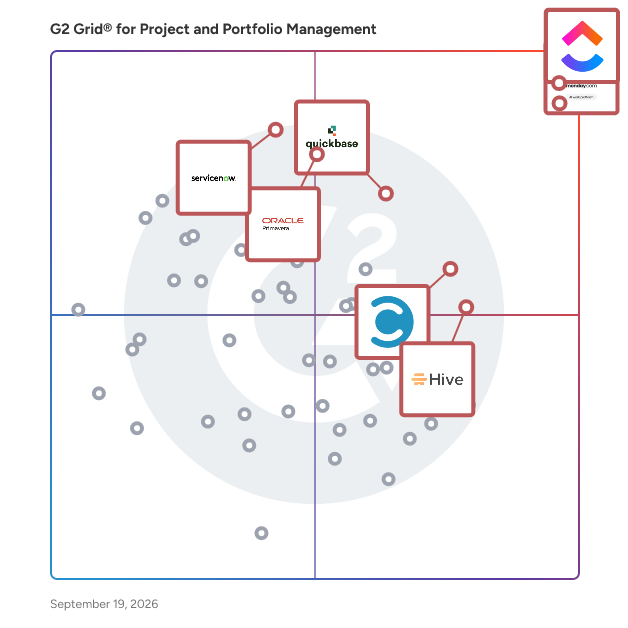
| # | Product | Rating | Best For | What Users Say |
|---|---------|--------|----------|----------------|
| 1 | [Smartsheet](https://www.g2.com/products/smartsheet/reviews) | 4.4/5.0 (21,993 reviews) | Spreadsheet-native cross-team project portfolio visibility | "[Smartsheet Streamlines Project Tracking with Automations](https://www.g2.com/survey_responses/smartsheet-review-12999654)" |
| 2 | [ClickUp](https://www.g2.com/products/clickup/reviews) | 4.6/5.0 (12,286 reviews) | Customizable cross-portfolio workflows with automation | "[Intuitive Interface but Slow Performance with Tasks](https://www.g2.com/survey_responses/clickup-review-12993610)" |
| 3 | [monday AI Work Platform](https://www.g2.com/products/monday-com/reviews) | 4.7/5.0 (15,093 reviews) | Cross-board portfolio tracking with no-code automation | "[Our Go-To Platform for Marketing Projects](https://www.g2.com/survey_responses/monday-ai-work-platform-review-12980779)" |
| 4 | [Quickbase](https://www.g2.com/products/quickbase/reviews) | 4.5/5.0 (1,493 reviews) | Custom-built project workflows without dedicated developers | "[The app to overcome any challenge that anyone can build!](https://www.g2.com/survey_responses/quickbase-review-351540)" |
| 5 | [Hive](https://www.g2.com/products/hive-hive-hive/reviews) | 4.6/5.0 (650 reviews) | Flexible multi-view portfolio and workload tracking | "[Flexible Views That Boost Project Visibility Across Teams](https://www.g2.com/survey_responses/hive-review-12715385)" |
| 6 | [Celoxis](https://www.g2.com/products/celoxis/reviews) | 4.6/5.0 (471 reviews) | Cross-project portfolio tracking with financial visibility | "[A Complete Platform for Smarter Project Execution . A Reliable Solution for Multi-Project Teams](https://www.g2.com/survey_responses/celoxis-review-12816433)" |
| 7 | [ServiceNow Strategic Portfolio Management](https://www.g2.com/products/servicenow-strategic-portfolio-management/reviews) | 4.1/5.0 (243 reviews) | Strategy-to-execution visibility inside ServiceNow ITSM | "[Better visibility and control over strategic portfolio planning](https://www.g2.com/survey_responses/servicenow-strategic-portfolio-management-review-12737969)" |
| 8 | [GanttPRO](https://www.g2.com/products/ganttpro-ganttpro/reviews) | 4.8/5.0 (527 reviews) | — | "[Intuitive Tool for University Project Management](https://www.g2.com/survey_responses/ganttpro-review-12929359)" |
| 9 | [Oracle Primavera](https://www.g2.com/products/oracle-primavera/reviews) | 4.4/5.0 (341 reviews) | CPM scheduling with resource-loaded cost control | "[Promising Tool with Scope for Enhancements](https://www.g2.com/survey_responses/oracle-primavera-review-12906556)" |
| 10 | [Scoro](https://www.g2.com/products/scoro/reviews) | 4.5/5.0 (479 reviews) | Quote-to-invoice project delivery with utilization tracking | "[All-in-One Solution That Enhances Agency Efficiency](https://www.g2.com/survey_responses/scoro-review-12668796)" |


## How Many Project and Portfolio Management Software Products Does G2 Track?
**Total Products under this Category:** 151

### Category Stats (Jun 2026)
- **Average Rating**: 4.33/5 (↑0.01 vs May 2026) The average rating of products in this category, based on all submitted ratings
- **Top Trending Product**: Project Insight (+0.57) - Among all products in this category, Project Insight recorded the largest rating increase compared to last month
*Last updated: June 01, 2026*


## How Does G2 Rank Project and Portfolio Management Software Products?

**Why You Can Trust G2's Software Rankings:**

- 30 Analysts and Data Experts
- 67,000+ Authentic Reviews
- 151+ Products
- Unbiased Rankings

G2's software rankings are built on verified user reviews, rigorous moderation, and a consistent research methodology maintained by a team of analysts and data experts. Each product is measured using the same transparent criteria, with no paid placement or vendor influence. While reviews reflect real user experiences, which can be subjective, they offer valuable insight into how software performs in the hands of professionals. Together, these inputs power the G2 Score, a standardized way to compare tools within every category.


## Which Project and Portfolio Management Software Is Best for Your Use Case?

- **Leader:** [Smartsheet](https://www.g2.com/products/smartsheet/reviews)
- **Highest Performer:** [GanttPRO](https://www.g2.com/products/ganttpro-ganttpro/reviews)
- **Easiest to Use:** [Hive](https://www.g2.com/products/hive-hive-hive/reviews)
- **Top Trending:** [ServiceNow Strategic Portfolio Management](https://www.g2.com/products/servicenow-strategic-portfolio-management/reviews)
- **Best Free Software:** [Smartsheet](https://www.g2.com/products/smartsheet/reviews)


---

**Sponsored**

### Screendragon

Screendragon is an enterprise work management and orchestrated intelligence platform built for complex marketing, and agency operations.​ It combines structured work management with AI-powered workflow orchestration, giving organisations real-time operational intelligence across projects, people, budgets, approvals, and performance. By connecting planning, execution, governance, and reporting in one platform, Screendragon helps teams run work with confidence at scale.​ Designed for organisations managing high volumes of work, multiple stakeholders, and strict governance requirements, Screendragon is commonly used by enterprise content teams, in-house agencies, external agencies, and marketing project teams that need visibility, control, and automation beyond basic task management.​ Key capabilities include configurable workflows, automated and AI-assisted approvals, resource and capacity planning, financial forecasting, and advanced operational reporting. The platform adapts to existing processes rather than forcing rigid templates, making it well suited to complex or regulated environments.​ Screendragon is designed to work as part of a broader enterprise ecosystem. It integrates with existing tools and platforms and provides an open API, enabling organisations to extend workflows, automate data exchange, and connect Screendragon to their wider technology stack.​ Trusted by global organisations including Kellogg’s, BP, the International Olympic Committee, TBWA, and McCann Worldgroup.


[Visit website](https://www.g2.com/external_clickthroughs/record?secure%5Bad_program%5D=ppc&amp;secure%5Bad_slot%5D=category_product_list&amp;secure%5Bcategory_id%5D=1431&amp;secure%5Bdisplayable_resource_id%5D=1902&amp;secure%5Bdisplayable_resource_type%5D=Category&amp;secure%5Bmedium%5D=sponsored&amp;secure%5Bplacement_reason%5D=neighbor_category&amp;secure%5Bplacement_resource_ids%5D%5B%5D=1902&amp;secure%5Bprioritized%5D=false&amp;secure%5Bproduct_id%5D=61482&amp;secure%5Bresource_id%5D=1431&amp;secure%5Bresource_type%5D=Category&amp;secure%5Bsource_type%5D=category_page&amp;secure%5Bsource_url%5D=https%3A%2F%2Fwww.g2.com%2Fcategories%2Fproject-and-portfolio-management%2Ff%2Falignment&amp;secure%5Btoken%5D=1eb5523efe08581d222a7696a30170950540bcb7fe1dca23e2c0568eecc309c7&amp;secure%5Burl%5D=https%3A%2F%2Fwww.screendragon.com%2Frequest-a-demo%2F%3Futm_campaign%3D27671461-G2%2520Promo%26utm_source%3Dppc%26utm_medium%3Dppc%26utm_term%3Dg2_demo&amp;secure%5Burl_type%5D=book_demo)

---


## What Is Project and Portfolio Management Software?

[Project, Portfolio &amp; Program Management Software](https://www.g2.com/categories/project-portfolio-program-management)

## What Software Categories Are Similar to Project and Portfolio Management Software?

- [Project Management Software](https://www.g2.com/categories/project-management)
- [Task Management Software](https://www.g2.com/categories/task-management-software)
- [Project Cost Management Software](https://www.g2.com/categories/project-cost-management)
- [Resource Management Software](https://www.g2.com/categories/resource-management)
- [Work Management Software](https://www.g2.com/categories/work-management)
- [Project Collaboration Software](https://www.g2.com/categories/project-collaboration)
- [Strategic Portfolio Management Software](https://www.g2.com/categories/strategic-portfolio-management)


---

## How Do You Choose the Right Project and Portfolio Management Software?

### What You Should Know About Project and Portfolio Management Software

### What is Project and Portfolio Management Software?

As opposed to project management software which focuses mostly on execution, project and portfolio management (PPM) software helps companies create and implement strategies for project portfolios. A portfolio is a mix of interrelated projects, meaning they have a similar scope and shared resources. For instance, an architecture, engineering, and construction (AEC) company may have three portfolios: one for architecture and design, another one for civil and industrial engineering projects, and a third for residential and commercial construction. Each portfolio may include dozens or hundreds of projects which need to be managed and monitored as a whole.

The high number of projects that are part of a portfolio makes it difficult for companies to plan, allocate resources, execute, and monitor performance. Typical project management software is used to manage individual projects but usually doesn’t include robust features for portfolio management.

Key Benefits of Project and Portfolio Management Software

- Customer experience and satisfaction are essential to companies focused on delivering projects. Customer loyalty is achieved only when the company constantly delivers good quality work at reasonable prices. Project quality is difficult to manage across multiple portfolios and PPM helps to address this challenge.
- Project and portfolio visibility allow stakeholders across the company as well as partners and customers to track milestones, deliverables, and identify potential issues. While tracking individual projects is relatively easy, only PPM software is able to monitor hundreds of projects simultaneously. Also, since the projects in a portfolio are interrelated, unexpected changes in one task may propagate across multiple projects and harm the entire portfolio.
- Tracking costs and profitability avoids unnecessary spending, compares estimated and actual costs, and provides insights on how to improve revenues. There are many costs related to project portfolios (resources, contractors, labor, etc.), and each one of them needs to be monitored closely. At the project level or for each task, the expenses may seem insignificant; but when analyzed by portfolio, they may accumulate into a noteworthy amount.
- Improves business agility and accelerates project delivery across a company or group of companies. Agility helps companies adapt to customer demand and market changes, and improved deliverability makes the business more efficient.

### Why Use Project and Portfolio Management Software?

The main benefit of PPM platforms is their ability to manage portfolios of numerous projects and maintain the relationships between them. This helps companies plan and execute dozens or hundreds of projects simultaneously. Additional benefits of PPM software include the following:

**Collaboration across projects and portfolios —** Collaboration between multiple teams and external stakeholders is difficult without robust software. PPM systems allow everyone involved in projects to communicate and share data without overwhelming them with unnecessary information.

**Analytics and performance —** Portfolios of projects are the main revenue driver for many professional services providers and their performance directly impacts profitability. It is therefore essential that companies use analytics to track portfolio performance, identify bottlenecks and risks, and find opportunities for improvement.

**Strategic alignment across the company —** Medium and large companies tend to be bureaucratic and rigid, negatively impacting the performance of the business. PPM provides features to define and monitor common goals which improves business alignment and company performance.

### Who Uses Project and Portfolio Management Software?

PPM software can be used by anyone in the company and even by external users such as partners and customers. It is therefore critical to clearly define user roles and access rights to protect intellectual property, confidential data, and the privacy of all the parties involved.

**Head of project management office (PMO) —** A PMO is a team or department within a company that defines and implements standards for project management. For large companies, PMO employees also need to create standards for project portfolios. Once created, the standards are enforced across the company to ensure compliance and communication with customers and partners. PPM standards need to be updated regularly to keep up with changing regulations. PMO teams also use PPM software to monitor how standards are implemented and take corrective actions when required.

**Project managers —** Project managers use PPM to plan and execute projects that are part of various portfolios. They also need to ensure that everyone working on a project follows the standards defined by the PMO department. Project managers also use PPM to maintain direct communications with customers, identify risks, and escalate issues to managers and executives.

**Executives —** Managers and executives benefit from data analysis, reporting, and dashboards that provide information on the status of projects, associated costs, risks, and compliance. Data is also used to identify how to optimize portfolios as well as new business opportunities. Also, historical project portfolio information is the starting point of any budgeting and forecasting activity.

**Partners and contractors —** Large portfolios of projects often require the involvement of third-party companies, vendors, suppliers, and independent contractors. Companies are also partnering with freelancers increasingly when it is too expensive to hire and train employees for tasks that aren’t critical for project success. All these external stakeholders need to access project and portfolio information, ideally through a portal rather than documents and spreadsheets. Companies need to be careful to protect their intellectual property and customers’ privacy when sharing data externally.

### Kinds of Project and Portfolio Management Software

There aren’t many PPM solutions available in the market and buyers only have a few delivery options to choose from.

**Best of breed —** Refers to a single integrated solution that delivers all functionality to manage portfolios and associated projects. While all best-of-breed PPM software delivers robust portfolio features, the level of support for project and resource management varies significantly from one product to another.

**Suites —** Includes multiple products, one of which focuses on portfolio management. The other products may be used for resource and project management. Companies may choose between buying and using all products together or separately. A PPM suite is advantageous because it provides comprehensive features and a single repository of project portfolio data.

**Point solutions —** Such solutions focus on creating and monitoring portfolios and do not include robust features for project management. Integration with project management software is therefore critical to plan and execute projects. It is also important to integrate with project cost management software when this type of functionality isn’t provided. Point solutions for PPM are beneficial for small and medium-sized businesses (SMBs) and small teams of large companies.

**Industry-specific PPM —** Includes best practices for complex industries such as energy, aerospace and defense, or for government contractors. This type of software ensures compliance with regulations and industry standards which isn’t always the case for most PPM products.

### Project and Portfolio Management Software Features

PPM is more than advanced project management. Its focus is to identify business opportunities, match them with projects and portfolios, and ensure that the company adjusts its portfolios based on market changes.

**Portfolio management and monitoring —** Project portfolios are defined based on customer demand and the ability of the company to deliver projects. Since demand changes constantly, portfolios need to be updated to stay relevant. Changes to a portfolio may also be triggered by executive decisions to provide new services or discontinue unprofitable offerings.

**Resource planning and allocation —** Capacity planning allows users to identify which resources are available and when. This type of functionality is also leveraged to reallocate resources based on unexpected changes. Any changes must be reflected across the entire project portfolio so that everyone gets a clear picture of their work.

**Project management and execution —** Traditional project management software is used to execute individual projects, while PPM allows for the planning and management of portfolios. Ideally, PPM should provide functionality for both project and portfolio management. Project tasks, deadlines, and resources should be consolidated by portfolio.

**Project and portfolio risk —** Project risks tend to increase for complex projects and portfolios. PPM identifies and mitigates risk at the portfolio and project level. While some risks are preventable, others may occur unexpectedly, which is why companies define and implement corrective actions.

**Collaboration —** Collaboration features vary from simple chat to advanced document management and authoring. For portfolio management, collaboration should allow internal and external users to communicate and share information at each stage of the project. Executives and the PMO team need to work together on defining and aligning business strategies, or on creating budgets and forecasting finances.

**Financial analysis —** While PPM does not include accounting features, it provides options to create budgets and monitor project costs. The cost of the resources used to deliver projects represents the majority of the spending on professional services companies. Other costs are expenses for travel and consumables as well as indirect costs for utilities or administration. All these costs need to be allocated to projects and portfolios and analyzed by each team and business unit.

Other Features of Project and Portfolio Management Software: [Alignment Capabilities](https://www.g2.com/categories/project-and-portfolio-management/f/alignment), [Lean Management](https://www.g2.com/categories/project-and-portfolio-management/f/lean-management), [Performance](https://www.g2.com/categories/project-and-portfolio-management/f/performance), [Portfolio Mix](https://www.g2.com/categories/project-and-portfolio-management/f/portfolio-mix), [Priorities Capabilities](https://www.g2.com/categories/project-and-portfolio-management/f/priorities), [Risk Analysis](https://www.g2.com/categories/project-and-portfolio-management/f/risk-analysis)

#### Additional Project and Portfolio Management Features

[**Project portfolio optimization**](https://www.g2.com/categories/project-and-portfolio-management/f/optimization) **—** Like any other product or service, a project portfolio has a lifecycle that starts with inception, followed by testing, deployment, maturity, and ends with obsolescence. To remain competitive, a business should constantly evaluate and improve its portfolios. Even though the main goal is to achieve maximum profitability, decision makers also need to take into account market changes and socio-economic challenges such as automation or climate change.

### Trends Related to Project and Portfolio Management Software

**Cloud —** Most PPM products were developed decades ago and are delivered both on premises and in the cloud. While the cloud is gaining traction in the market, many enterprise companies still host and manage the product on their premises. Cloud-native PPM software is mostly used by medium-sized companies that prefer not to invest in hardware and specialized IT personnel.

**Work management —** Work management refers to the evolution of project management software to expand outside of its traditional reach. This is done by providing features for employees who are not project managers but are involved in projects. The lines between work management, PPM, and project management are very blurry, so buyers need to be careful when choosing between them. Work management software is rarely a good alternative to PPM because it lacks features for portfolio management but it provides important additional features such as advanced collaboration.

**Automation —** Intelligent technologies such as artificial intelligence (AI) or robots have the potential to automate many of the tasks performed using PPM software. At the same time, this type of technology isn’t yet ready to define and monitor business strategies. While project management and execution are very likely to be automated, human involvement will still be essential for portfolio management.

**Globalization —** Since PPM is used by enterprise companies with multiple geographical locations, the software should be supported in countries all over the world. This means that PPM needs to comply with a multitude of national and international privacy laws and provide multilingual and multicurrency support. Furthermore, integration with [video conferencing](https://www.g2.com/categories/video-conferencing) and [team collaboration](https://www.g2.com/categories/team-collaboration) software is needed to allow global teams to work together.

### Potential Issues with Project and Portfolio Management Software

**Complexity —** PPM includes many features and functions which are be delivered as one single product or as a suite of multiple solutions. As vendors acquired multiple products and tried to integrate them, the result was sometimes a system with inconsistent user experience and complicated workflows.

**Cost —** Due to its complexity, PPM software isn’t as affordable as project management. While the new cloud solutions are more accessible, there are extra costs for configuration or customization as well as professional services such as implementation and change management.

**Compliance —** Companies using PPM need to ensure that they comply with project management standards as well as regulations to protect privacy and prevent financial fraud.

**Flexibility —** While companies using PPM require robust and advanced features, they also need flexible systems that have the potential to adapt to their business. To address this challenge, vendors are trying to offer configurable user interfaces and the ability to modify workflows without disrupting work.

### Software and Services Related to Project and Portfolio Management Software

PPM doesn’t include features for front and back office such as accounting or CRM, which are usually provided through integration.

[**Project management**](https://www.g2.com/categories/project-management) **—** While PPM usually includes features for project management, they may not always be robust enough and companies may choose to buy separate software to manage projects. Also, deploying PPM in multiple locations is difficult and costly, which is why some teams or departments choose to use project management software instead and integrate it with PPM.

[**Professional services automation (PSA)**](https://www.g2.com/categories/professional-services-automation) **—** PSA software doesn’t always include portfolio management functionality, therefore companies that use PSA and PPM need to integrate the two solutions. There are only a few PPM suites that may also be used for front office and back office operations in professional services.

[**Strategic planning**](https://www.g2.com/categories/strategic-planning) **—** While PPM manages the strategic project and portfolio planning, it doesn’t always cover the other departments of a company, from sales and marketing to finance and IT. Strategic planning software aligns all teams to ensure that they have common goals and follow corporate strategic plans.

[**Process automation**](https://www.g2.com/categories/process-automation) **—** While PPM provides features for workflow management, managing complex business activities may require integration with [business process management](https://www.g2.com/categories/business-process-management) software. Also, companies that want to automate repetitive tasks benefit from using [robotic process automation (RPA)](https://www.g2.com/categories/robotic-process-automation-rpa) software.