Best Professional Services Automation Software

Sponsored content: This content is sponsored.

What problems does Screendragon solve as a Professional Services Automation?

Screendragon addresses core Professional Services Automation problems such as centralizing project, resource, and budget management, reducing administrative overhead, and improving visibility across teams. According to reviewers, it enables teams to keep all projects, tasks, estimates, and time tracking in one place, which streamlines operations and saves significant time previously spent managing multiple tools. The platform’s workflow automation and customizable reporting help organizations better allocate resources and plan for future projects, with several reviewers highlighting its ability to aggregate resource availability across multiple projects and automate manual processes. However, some users note that the asset approval/proofing module is less robust than dedicated tools, and initial setup or user training can require extra effort for complex workflows.

What Professional Services Automation features does Screendragon offer?

Screendragon offers a comprehensive set of native Professional Services Automation features, including project planning, revenue recognition, portfolio definition and performance, risk management, portfolio mix, AI text generation and summarization, project accounting, and more. Reviewers specifically mention the value of customizable workflows, resource management, and advanced approval processes, with the platform’s flexibility allowing adaptation to varied organizational needs and evolving requirements. The system’s reporting and budget tracking features are frequently cited as helping teams stay organized and aligned. The main limitation noted by reviewers is that the asset approval/proofing and timesheet modules are not as feature-rich as some specialized competitors, and some users find the report creation system intimidating without prior experience.

How easy is Screendragon to set up, use, and get support for?

Screendragon stands out for its quality of support and ease of doing business, both scoring 9.7, with ease of use rated at 9.2 and ease of admin at 9.0. Reviewers describe the platform as intuitive and user-friendly once familiar, with onboarding and daily use made easier by a clear interface and responsive support team. Several users highlight the flexibility and customization options, though some note that initial setup and learning the system’s more advanced features can be time-consuming, which is reflected in the slightly lower ease of setup score of 8.5 compared to other dimensions.

What does Screendragon integrate with for Professional Services Automation workflows?

Screendragon integrates with Aprimo for Professional Services Automation workflows, as cited by reviewers. Additional integrations mentioned include Personio and connections to ERP systems, with users appreciating the ability to aggregate data from external sources and export information for reporting or data mining. The platform also supports native APIs for broader integration needs, which reviewers find helpful for customizing workflows. However, some users report that implementing integrations or retroactively changing workflows can be time-consuming, and a few express interest in future integrations with tools like Microsoft Teams.

How much does Screendragon cost?

Screendragon uses a custom quote pricing model, with no public entry price listed; prospective buyers are advised to contact Screendragon directly for accurate pricing details. There is no published information on how pricing scales across tiers or which features are unlocked at higher levels, and reviewers do not provide direct feedback on cost or value for money. While several users praise the platform’s flexibility and all-in-one capabilities, there are occasional mentions that setup and customization can be time-intensive, which may impact the overall value depending on organizational needs.

Updated August 2026.

How Many Professional Services Automation Software Products Does G2 Track?

Total Products under this Category: 210

Category Stats (Sep 2026)

  • Average Rating: 4.3/5 (↓0.01 vs Aug 2026) The average rating of products in this category, based on all submitted ratings
  • Top Trending Product: Operating (+1.19%) - Among all products in this category, Operating recorded the largest rating increase compared to last month

Last updated: September 01, 2026

How Does G2 Rank Professional Services Automation Software Products?

Why You Can Trust G2's Software Rankings:

  • 30 Analysts and Data Experts
  • 26,200+ Authentic Reviews
  • 210+ Products
  • Unbiased Rankings

G2's software rankings are built on verified user reviews, rigorous moderation, and a consistent research methodology maintained by a team of analysts and data experts. Each product is measured using the same transparent criteria, with no paid placement or vendor influence. While reviews reflect real user experiences, which can be subjective, they offer valuable insight into how software performs in the hands of professionals. Together, these inputs power the G2 Score, a standardized way to compare tools within every category.

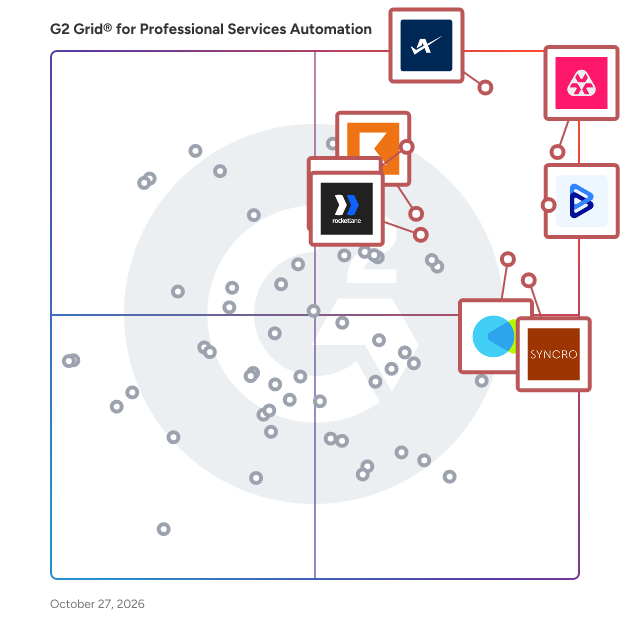
G2 Grid® for Professional Services Automation Software

G2 Grid® for Professional Services Automation Software plotting products by satisfaction and market presence

Highlighted products: Autotask, BigTime, Syncro, CMap, Deltek Vantagepoint, Kantata Professional Services Automation (formerly Mavenlink+ Kimble), SAP Cloud ERP (SAP S/4HANA Cloud), and Planhat.

Underlying data: [Grid® JSON](https://www.g2.com/categories/professional-services-automation/grids.json?focus%5B%5D=autotask&focus%5B%5D=bigtime&focus%5B%5D=syncro&focus%5B%5D=cmap&focus%5B%5D=deltek-vantagepoint&focus%5B%5D=kantata-professional-services-automation-formerly-mavenlink-kimble&focus%5B%5D=sap-cloud-erp-sap-s-4hana-cloud&focus%5B%5D=planhat)

Autotask

Autotask is the intelligent, unified PSA platform that powers high-performing MSP operations. It connects tickets, time, projects, contracts and billing in one seamless workflow — eliminating manual effort, reducing technician friction and ensuring every billable hour is captured automatically. With built-in automation and real-time visibility, Autotask streamlines service delivery, improves profitability and turns operational data into actionable dashboards that drive accountability and demonstrate value. Trusted by growing MSPs worldwide, Autotask helps teams deliver faster, more consistent service while maintaining clarity and control across every part of the business.

Average Rating: 4.3/5.0

Total Reviews: 624

How Do G2 Users Rate Autotask?

  • Has the product been a good partner in doing business?: 8.4/10 (Category avg: 8.8/10)
  • Portfolio Performance: 6.7/10 (Category avg: 7.9/10)
  • Workflow: 8.2/10 (Category avg: 8.4/10)
  • What is your organization's estimated ROI on the product (payback period in months)?: 10/10 (Category avg: 10/10)

Who Is the Company Behind Autotask?

  • Seller: Kaseya
  • Company Website:
  • Year Founded: 2000
  • HQ Location: Miami, FL
  • Twitter: @KaseyaCorp
    17,411 Twitter followers
  • LinkedIn® Page: www.linkedin.com
    5,483 employees on LinkedIn®

Who Uses This Product?

  • Who Uses This: CEO, Owner
  • Top Industries: Information Technology and Services, Computer & Network Security
  • Company Size: 69% Small, 27% Medium

What Do G2 Reviewers Say About Autotask?

AI-generated summary from verified user reviews

Pros
  • Users value the ease of use of Autotask, appreciating its user-friendly interface and quick navigation for efficient management.
  • Users value the extensive integration options in Autotask, allowing for great customization to fit their workflow.
  • Users appreciate the efficient ticket management and automation features of Autotask, enhancing overall operational productivity.
  • Users value the automation features of Autotask, which significantly streamline workflows and enhance efficiency.
  • Users commend Autotask for its efficiency, enabling faster ticket management and enhanced operations support.
Cons
  • Users find the complex usability of Autotask frustrating, particularly due to confusing menus and lengthy processes.
  • Users warn of a steep learning curve in Autotask, making report creation and navigation challenging for newcomers.
  • Users find Autotask's limited functionality frustrating, as it lacks essential features for basic tasks and project management.
  • Users highlight the missing features in Autotask, finding the project management module basic and lacking depth.
  • Users find Autotask to have a not user-friendly interface, making navigation and project management frustrating and unintuitive.

What Are Recent G2 Reviews of Autotask?

What Are G2 Users Discussing About Autotask?

BigTime

BigTime Software: The AI-powered professional services platform enabling intelligent decisions and delivering profitable growth. Too many firms rely on disconnected quoting tools, spreadsheets, and manual handoffs between sales and delivery. This creates misaligned expectations, margin erosion, and frustrated clients. BigTime changes that. We unify the entire professional services journey—from scoping and quoting to staffing and invoicing—so you can sell with confidence, deliver with precision, and grow with profitability.
 BigTime helps professional services firms reduce operational costs, easily align talent to the right projects, and accelerate time to get paid for completed work, all while enabling quicker decision-making by delivering the information you need, when you need it. By streamlining project operations, maximizing resource utilization, accelerating the account receivable cycle, and connecting scattered data sources, BigTime makes it easier for professional services firms to scale and grow. With 2,800+ customers and 20+ years of experience, BigTime is built to get you up and running quickly, operate with flexibility and agility, and enable you to solve today’s challenges while scaling with you for tomorrow’s opportunities.

Average Rating: 4.4/5.0

Total Reviews: 1,736

How Do G2 Users Rate BigTime?

  • Has the product been a good partner in doing business?: 9.1/10 (Category avg: 8.8/10)
  • Portfolio Performance: 8.2/10 (Category avg: 7.9/10)
  • Workflow: 8.1/10 (Category avg: 8.4/10)
  • What is your organization's estimated ROI on the product (payback period in months)?: 10/10 (Category avg: 10/10)

Who Is the Company Behind BigTime?

  • Seller: BigTime
  • Company Website:
  • Year Founded: 2002
  • HQ Location: Chicago, IL
  • Twitter: @BigTimeSoftware
    2,744 Twitter followers
  • LinkedIn® Page: www.linkedin.com
    167 employees on LinkedIn®

Who Uses This Product?

  • Who Uses This: Office Manager, Principal
  • Top Industries: Accounting, Architecture & Planning
  • Company Size: 74% Small, 19% Medium

What Do G2 Reviewers Say About BigTime?

AI-generated summary from verified user reviews

Pros
  • Users value the ease of use of BigTime, finding it simple for time tracking and expense reporting.
  • Users value the user-friendly time tracking of BigTime, facilitating efficient recording and management of hours and resources.
  • Users appreciate the user-friendly interface of BigTime, making time tracking quick and efficient.
  • Users appreciate the ease of tracking time in BigTime, enabling quick and accurate project time management.
  • Users love the intuitive interface of BigTime, making navigation and tracking hours straightforward and simple.
Cons
  • Users are frustrated by missing features like unclear reports, difficult documentation, and lack of internal note options on invoices.
  • Users find the learning curve steep due to unclear documentation, navigation challenges, and inconsistencies in reporting.
  • Users find the manual entry process cumbersome, impacting efficiency due to frequent adjustments and lack of features.
  • Users experience software bugs that occasionally disrupt functionality, causing issues with report windows and timesheet entries.
  • Users find resource management to be time-consuming in BigTime, often requiring trial and error during setup.

What Are Recent G2 Reviews of BigTime?

What Are G2 Users Discussing About BigTime?

CMap

CMap is a PSA software that helps professional services firms, from consultancies to architecture & engineering practices, manage their people, projects, profits and more - all in one place. We help project-based businesses to move on from spreadsheets and retire homegrown, ad-hoc tools to give them complete visibility, clarity, and control over their firm. Whether it’s winning new business, delivering projects, resourcing, billing, or reporting, it can all be done in one easy-to-use platform. CMap is trusted by over 700 service firms around the globe, from executives, operations leaders, finance teams, and project managers, down to individual consultants and architects. We offer four distinct, sector-specific products: CMap Consulting Edition, CMap AEC edition, CMap PIM & CMap Mail. CMap goes far beyond traditional project management or CRM systems. It’s a modular, fully integrated, cloud-based platform designed to support your entire business lifecycle from the first client conversation to the final invoice. Our core features include: - CRM - Win more of the right work. Track opportunities, manage pipelines, and forecast revenue with accuracy. No more fragmented data or endless email chains. - Project Management - Deliver on time and on budget. Plan projects, allocate resources, and monitor progress with live budget-vs-actual insights and milestone tracking. - Resourcing & Capacity Planning - Match the right people to the right projects. Balance workloads, identify bottlenecks early, and make data-driven decisions about hiring and utilization. - Time & Expenses - Give your teams a simple, intuitive way to log time and expenses from any device. Improve compliance and capture billable time effortlessly. - Billing & Financials - Keep cash flowing and admin low. Automate invoicing, track WIP, manage revenue recognition, and connect seamlessly to your accounting software. - Reporting & Business Intelligence - See the full picture. Real-time dashboards and customizable reports turn data into insight, helping you make faster, more confident decisions. CMap helps professional services firms streamline operations, escape
Excel hell, & get back to doing what they do best.

Average Rating: 4.4/5.0

Total Reviews: 307

How Do G2 Users Rate CMap?

  • Has the product been a good partner in doing business?: 8.6/10 (Category avg: 8.8/10)
  • Portfolio Performance: 6.4/10 (Category avg: 7.9/10)
  • Workflow: 7.0/10 (Category avg: 8.4/10)
  • What is your organization's estimated ROI on the product (payback period in months)?: 10/10 (Category avg: 10/10)

Who Is the Company Behind CMap?

  • Seller: CMAP Software Ltd
  • Company Website:
  • Year Founded: 2000
  • HQ Location: Alderley Edge, GB
  • Twitter: @CMAPSoftware
    396 Twitter followers
  • LinkedIn® Page: www.linkedin.com
    231 employees on LinkedIn®

Who Uses This Product?

  • Who Uses This: Director, Associate Director
  • Top Industries: Architecture & Planning, Consulting
  • Company Size: 57% Small, 41% Medium

What Do G2 Reviewers Say About CMap?

AI-generated summary from verified user reviews

Pros
  • Users love the ease of use of CMap, simplifying project management and enhancing clarity in complex information.
  • Users appreciate the ease of use and centralized information in CMap, which enhances project management efficiency.
  • Users praise CMap's helpful and responsive customer support, enhancing their overall experience and satisfaction with the product.
  • Users value the intuitive interface of CMap, enhancing navigation and simplifying complex processes effectively.
  • Users highlight the intuitive organization and visual clarity of CMap, making complex information easy to manage and understand.
Cons
  • Users find CMap's limited features particularly frustrating, especially regarding reporting and integration functionalities.
  • Users experience integration issues with CMap, leading to difficulties in connecting finance and resource data effectively.
  • Users find CMap's limited functionality frustrating, especially with inconsistent page designs and complex reporting tools.
  • Users find the report builder's complexity challenging, making it hard to efficiently create and visualize data.
  • Users face significant limitations in reporting and design consistency, hindering effective data retrieval and usability.

What Are Recent G2 Reviews of CMap?

What Are G2 Users Discussing About CMap?

Syncro

Syncro unifies RMM, PSA, and Microsoft 365 security management in a single platform for MSPs and internal IT departments. Built-in AI handles the repetitive work that fills a technician's day, from alert triage to ticket updates and reporting, so teams deliver services faster and scale profitably instead of absorbing the cost of tool sprawl that creates security gaps and slows them down. RMM Built for MSPs and IT Teams Syncro's RMM delivers unlimited endpoint management with complete visibility across every client environment and internal network from a single console. Automated patch management, real-time alerting, PowerShell scripting, and remote access via Splashtop let technicians identify and resolve issues before users are impacted. Network Discovery detects unmanaged devices on client networks automatically. PSA That Connects Service Delivery Syncro's built-in PSA routes RMM alerts directly into tickets, keeps SLAs on track, and gives technicians a single queue instead of multiple portals. MSPs spend less time on manual coordination and more time on billable work. IT teams gain the same service desk efficiency, integrated ticketing, automated workflows, and invoicing, without the overhead of a standalone PSA tool. Microsoft 365 Security Built In Most RMM tools stop at the physical device. Syncro extends protection into Microsoft 365 with Security Snapshot (instant tenant risk assessment, zero configuration), CIS-aligned security baseline enforcement, Entra ID backup and restoration, and Cloud Backup covering Exchange, OneDrive, SharePoint, Teams, Planner, OneNote, and Entra ID. Security and endpoint management run through the same platform, not separate tools. Available for both MSPs managing multi-tenant environments and IT departments securing a single organization. AI Access Through the Syncro MCP Server The Syncro MCP Server connects the AI assistants you’re already using to your live Syncro data, including tickets, assets, alerts, billing records, appointments, and client records. Technicians can prompt in natural language and take action: create, assign, and update tickets, log time, escalate issues, book appointments, and generate client-ready reports and QBRs all within AI tools like Claude, ChatGPT, and Microsoft Copilot. Native Integrations and Vendor Marketplace Syncro connects to 50+ AV, EDR, and identity protection tools through a unified alert queue. Native integrations include Splashtop (remote access, included at no extra cost), Huntress, QuickBooks, IT Glue, Pax8, Domotz, Hudu, Zapier, and ConnectWise Control. The Syncro Marketplace lets you add best-in-class security, backup, and productivity apps directly to your platform, including Bitdefender, Acronis, Proofpoint, Threatdown, Guardz, Ironscales, Webroot, and Autoelevate. No minimums, no long-term contracts. Browse, activate, and manage vendor costs from a single bill, with direct access to vendor support when you need it. Pricing That Scales With Your Team Syncro uses flat per-technician pricing with no per-device fees. Costs scale with your headcount, not your device count. Whether you run an MSP with hundreds of endpoints or an IT department managing company infrastructure.

Average Rating: 4.5/5.0

Total Reviews: 552

How Do G2 Users Rate Syncro?

  • Has the product been a good partner in doing business?: 9.1/10 (Category avg: 8.8/10)
  • Portfolio Performance: 6.2/10 (Category avg: 7.9/10)
  • Workflow: 7.3/10 (Category avg: 8.4/10)
  • What is your organization's estimated ROI on the product (payback period in months)?: 6.8/10 (Category avg: 10/10)

Who Is the Company Behind Syncro?

Who Uses This Product?

  • Who Uses This: Owner, President
  • Top Industries: Information Technology and Services, Computer & Network Security
  • Company Size: 80% Small, 9% Medium

What Do G2 Reviewers Say About Syncro?

AI-generated summary from verified user reviews

Pros
  • Users value the ease of use of Syncro, enabling efficient troubleshooting and seamless client communication.
  • Users value Syncro's game-changing features like ticket storage, scripting, and seamless integration for enhanced efficiency.
  • Users find the initial setup easy, making it accessible for first-time users and enhancing overall experience.
  • Users commend Syncro for its intuitive automation features, enhancing workflow efficiency and simplifying asset management.
  • Users value the seamless integrations of Syncro, enhancing their overall workflow and aligning tools with company needs.
Cons
  • Users find many missing features in Syncro, particularly in remote access and automation capabilities, hindering productivity.
  • Users highlight the improvement needed in Syncro's interface and responsiveness for a better overall experience.
  • Users find reporting and invoicing limitations frustrating and seek improvements in UI and Linux support.
  • Users are frustrated with feature issues in Syncro, citing a lack of intuitive design and limited functionality.
  • Users find that Syncro needs improvement in customization, API features, and overall functionality for better management at scale.

What Are Recent G2 Reviews of Syncro?

What Are G2 Users Discussing About Syncro?

Deltek Vantagepoint

Deltek Vantagepoint is an AI-powered, project-based ERP that helps architecture, engineering, and consulting firms manage projects and financials in one application — so teams gain clarity, speed, and profitability across the entire project lifecycle. It connects pipeline, people, projects, and financials from pursuit through to project closeout, eliminating handoffs and data silos. With embedded AI, predictive insights, and intuitive workflows, Vantagepoint enables firms to win the right work, plan smarter, deliver profitable projects, and close the month faster. Best for: Professional services firms in architecture, engineering, and consulting that need a single ERP built for the way project-based businesses actually work — not a generic system with project features bolted on. Use cases:  Build a healthier pipeline by connecting client, pursuit, and resource intelligence in one CRM  Assign the right people to the right projects by balancing workloads and forecasting demand  Keep projects on track with predictive metrics, project-specific KPIs, and automated notifications  Speed up billing cycles and improve cash flow with automated invoice approvals and interactive billing  Simplify time entry and expense capture using AI-powered Timesheet Assist and intelligent character recognition Key Features:  Ask Dela — the AI orchestrator that answers questions, surfaces insights, and completes tasks  Smart Summaries for firms and projects — concise, AI-generated executive briefings  Interactive dashboards and KPIs with Deltek Clarity A&E industry benchmarks  Resource management with skills-based search, capacity planning, and Gantt-based project scheduling  Automated AP invoice processing, draft invoice markups, and Vantagepoint Payments for AR and AP automation Why project-based firms choose Vantagepoint:  One application replaces disconnected systems across the full project lifecycle. Vantagepoint connects pipeline, resource planning, project delivery, and financials — eliminating the data gaps and duplicate work caused by stitching separate tools together.  AI is embedded where teams already work — not added as a separate tool. Ask Dela, Smart Summaries, Dela Insights, Timesheet Assist, and intelligent character recognition operate inside daily workflows to reduce manual effort and surface insights at the point of decision.  Purpose-built for architecture, engineering, and consulting firms. Workflows, financial structures, and reporting are designed around project- based operations — including multi-company, multi-currency project financials — so firms do not need to force-fit a generic ERP. Used by: Architecture, engineering, and consulting firms — from growing practices to large multi-office enterprises — rely on Vantagepoint to run their project-based operations. 98% of the Top 500 Architecture and Engineering firms rely on Deltek, and more than 2,000 companies run their business on Vantagepoint.

Average Rating: 4.1/5.0

Total Reviews: 693

How Do G2 Users Rate Deltek Vantagepoint?

  • Has the product been a good partner in doing business?: 8.3/10 (Category avg: 8.8/10)
  • Portfolio Performance: 7.1/10 (Category avg: 7.9/10)
  • Workflow: 7.4/10 (Category avg: 8.4/10)
  • What is your organization's estimated ROI on the product (payback period in months)?: 10/10 (Category avg: 10/10)

Who Is the Company Behind Deltek Vantagepoint?

  • Seller: Deltek
  • Company Website:
  • Year Founded: 1983
  • HQ Location: Herndon, VA
  • Twitter: @Deltek
    6,574 Twitter followers
  • LinkedIn® Page: www.linkedin.com
    4,828 employees on LinkedIn®

Who Uses This Product?

  • Who Uses This: Controller, Accountant
  • Top Industries: Architecture & Planning, Civil Engineering
  • Company Size: 62% Medium, 16% Small

What Do G2 Reviewers Say About Deltek Vantagepoint?

AI-generated summary from verified user reviews

Pros
  • Users appreciate the exceptional ease of use of Deltek Vantagepoint, enhancing efficiency in project management and resource planning.
  • Users value the ease of project tracking in Deltek Vantagepoint, enhancing operational efficiency and resource planning.
  • Users value the user-friendly functionality of Deltek Vantagepoint, appreciating its efficient reporting and seamless document management.
  • Users value the customizability of Deltek Vantagepoint, enabling tailored fields and dashboards for enhanced insights.
  • Users value the reporting efficiency of Deltek Vantagepoint, highlighting its user-friendly design and streamlined data management.
Cons
  • Users find missing features in Deltek Vantagepoint, hindering tasks like documentation, workflows, and reporting efficiency.
  • Users struggle with poor reporting in Deltek Vantagepoint, finding it cumbersome and inefficient for their needs.
  • Users find the complex usability of Deltek Vantagepoint frustrating, hindering streamlined workflows and efficiency across tasks.
  • Users face access limitations that restrict functionality, making project management less efficient and flexible.
  • Users struggle with a steep learning curve, finding Deltek Vantagepoint complex and lacking adequate training and setup guidance.

What Are Recent G2 Reviews of Deltek Vantagepoint?

What Are G2 Users Discussing About Deltek Vantagepoint?

Kantata Professional Services Automation (formerly Mavenlink+ Kimble)

Kantata helps professional services organizations of 50 to 5,000+ employees ensure consistent excellence and profitability across every project. With a platform that connects everything from scoping to resourcing to forecasting, you can always deliver amazing. The real challenge for most PS organizations is that their projects are so unpredictable. They never really know how an engagement is going to play out until it’s too late to do anything about it. And that undermines profits, strains resources, and leaves clients wondering what they’re really paying for. Kantata PSA puts an end to unpredictable projects by enabling you to: • Instantly assemble the ideal team – so you can deploy resources based on the best match for scope, scheduling, skillsets, and more • Easily amplify institutional knowledge – by turning past experience into real-time intelligence so all your expertise is available to all your people • Confidently forecast every outcome – with an accurate, comprehensive view of everything from revenue and margins to capacity and sentiment Not every services firm operates the same way — and your PSA shouldn’t either. Kantata is the only PSA offering both a Salesforce-native and an open infrastructure option, so you can choose the ecosystem that fits your business. With over 1,200 prebuilt connectors — including Salesforce, NetSuite, HubSpot, Workday, Sage Intacct, Microsoft Dynamics 365, Google Workspace, and Jira — Kantata extends the value of your existing tech stack while keeping all your operational data connected in one AI-powered platform. That’s why professional services organizations across software, IT services, management consulting, and marketing agencies rely on Kantata to operate with greater precision, predictability, and profitability. Leading organizations like Deloitte, Sage, and Hitachi trust Kantata, and our customers consistently achieve a 33% increase in on-time project delivery.

Average Rating: 4.2/5.0

Total Reviews: 1,511

How Do G2 Users Rate Kantata Professional Services Automation (formerly Mavenlink+ Kimble)?

  • Has the product been a good partner in doing business?: 8.6/10 (Category avg: 8.8/10)
  • Portfolio Performance: 7.3/10 (Category avg: 7.9/10)
  • Workflow: 7.4/10 (Category avg: 8.4/10)
  • What is your organization's estimated ROI on the product (payback period in months)?: 10/10 (Category avg: 10/10)

Who Is the Company Behind Kantata Professional Services Automation (formerly Mavenlink+ Kimble)?

Who Uses This Product?

  • Who Uses This: Project Manager, Consultant
  • Top Industries: Information Technology and Services, Marketing and Advertising
  • Company Size: 57% Medium, 30% Small

What Do G2 Reviewers Say About Kantata Professional Services Automation (formerly Mavenlink+ Kimble)?

AI-generated summary from verified user reviews

Pros
  • Users value the integration of project management, resource planning, and finances, streamlining workflows and improving visibility.
  • Users value the effective project tracking of Kantata, enhancing workflow with real-time data and tailored features.
  • Users value the user-friendly interface of Kantata, simplifying project management and enhancing forecasting accuracy effortlessly.
  • Users commend Kantata for its robust reporting efficiency, allowing access to comprehensive data and real-time insights.
  • Users appreciate the custom report generation features of Kantata, which significantly enhance project management and data analysis.
Cons
  • Users find the dashboard creation process challenging and the overall interface unintuitive and overly manual.
  • Users experience a significant learning curve with Kantata PSA, necessitating extensive training and adjustment for optimal use.
  • Users note the not intuitive interface that complicates task management and slows down training for new users.
  • Users find the task management process overly manual, making it cumbersome to mark tasks complete and manage entries.
  • Users find the lack of customization frustrating, especially for unique reporting and intuitive project management tasks.

What Are Recent G2 Reviews of Kantata Professional Services Automation (formerly Mavenlink+ Kimble)?

What Are G2 Users Discussing About Kantata Professional Services Automation (formerly Mavenlink+ Kimble)?

SAP Cloud ERP (SAP S/4HANA Cloud)

SAP Cloud ERP (S/4HANA Cloud) is a modular, cloud-based enterprise resource planning (ERP) solution that brings embedded AI into core business processes to help organizations of any size improve productivity, efficiency, and scalability. It supports critical business functions including finance, supply chain, human resources, and sales, while providing industry best-practice processes, predictable subscription-based costs, and the flexibility to add capabilities, users, and functionality as business needs evolve. With proven implementation tools and preconfigured processes, SAP Cloud ERP enables organizations to go live quickly and confidently while supporting ongoing growth and innovation. For midsize organizations who want to adopt SAP Cloud ERP the primary offering is SAP GROW, which combines SAP Cloud ERP with preconfigured best practices, implementation services, and adoption resources to help businesses achieve rapid, scalable cloud ERP deployment. For even quicker deployment, there’s SAP GROW Fast, a prepackaged offering delivered by SAP partners.

Average Rating: 4.4/5.0

Total Reviews: 945

How Do G2 Users Rate SAP Cloud ERP (SAP S/4HANA Cloud)?

  • Has the product been a good partner in doing business?: 8.7/10 (Category avg: 8.8/10)
  • Portfolio Performance: 8.5/10 (Category avg: 7.9/10)
  • Workflow: 9.0/10 (Category avg: 8.4/10)
  • What is your organization's estimated ROI on the product (payback period in months)?: 10/10 (Category avg: 10/10)

Who Is the Company Behind SAP Cloud ERP (SAP S/4HANA Cloud)?

  • Seller: SAP
  • Company Website:
  • Year Founded: 1972
  • HQ Location: Walldorf
  • Twitter: @SAP
    297,052 Twitter followers
  • LinkedIn® Page: www.linkedin.com
    149,349 employees on LinkedIn®

Who Uses This Product?

  • Who Uses This: Consultant, Senior Consultant
  • Top Industries: Information Technology and Services, Accounting
  • Company Size: 48% Large, 35% Medium

What Do G2 Reviewers Say About SAP Cloud ERP (SAP S/4HANA Cloud)?

AI-generated summary from verified user reviews

Pros
  • Users appreciate the ease of use of SAP Cloud ERP, making it effective and time-saving for daily tasks.
  • Users appreciate the cloud-based architecture of SAP S/4HANA Cloud for its scalability and reduced IT overhead.
  • Users value the real-time processing and industry-specific functionalities of SAP S/4HANA Cloud for enhanced financial management.
  • Users appreciate the real-time efficiency of SAP S/4HANA Cloud, with instant access to reports and accurate data.
  • Users value the real-time data capabilities of SAP S/4HANA Cloud, enhancing decision-making with instant access to analytics.
Cons
  • Users find the complexity and restrictions of SAP Cloud ERP challenging, leading to costly implementations and training needs.
  • Users find the learning curve steep for SAP Cloud ERP, making initial understanding and training challenging.
  • Users find the learning difficulty significant, as the complex system necessitates extensive training for new users.
  • Users find the complex setup of SAP Cloud ERP challenging, often requiring extensive training and expert assistance.
  • Users find the limited customization of SAP Cloud ERP restrictive, hindering adaptation to unique business processes.

What Are Recent G2 Reviews of SAP Cloud ERP (SAP S/4HANA Cloud)?

What Are G2 Users Discussing About SAP Cloud ERP (SAP S/4HANA Cloud)?

Planhat

Planhat is an agentic customer platform, built to give humans and AI agents the full context they need to drive exceptional customer outcomes. Commercial teams at B2B enterprises use Planhat to automate workflows across the entire customer lifecycle, from onboarding and expansion to renewals and scaled customer success, turning better outcomes into revenue growth and enduring profitability. The platform spans three solutions; a category-leading Customer Success Platform (CSP), a comprehensive CRM system, and most recently, an AI-native Professional Services Automation (PSA) offering. The PSA brings resource management, project delivery, and services revenue into the same unified data model that has powered Planhat's category leading CSP for over a decade, helping teams drive adoption, reduce churn, and identify expansion opportunities through Customer 360 profiles, health scoring, and customer analytics. Core capabilities include AI workflows, conversational AI, and customer portals, all based on high-fidelity time-series data. Planhat serves organizations across software, IT and telecoms, healthcare & life sciences, financial services, and security.

Average Rating: 4.5/5.0

Total Reviews: 946

How Do G2 Users Rate Planhat?

  • Has the product been a good partner in doing business?: 9.3/10 (Category avg: 8.8/10)
  • What is your organization's estimated ROI on the product (payback period in months)?: 10/10 (Category avg: 10/10)

Who Is the Company Behind Planhat?

  • Seller: Planhat
  • Company Website:
  • Year Founded: 2015
  • HQ Location: Stockholm, Stockholm County
  • Twitter: @planhat
    1,045 Twitter followers
  • LinkedIn® Page: www.linkedin.com
    248 employees on LinkedIn®

Who Uses This Product?

  • Who Uses This: Customer Success Manager, Head of Customer Success
  • Top Industries: Computer Software, Information Technology and Services
  • Company Size: 60% Medium, 31% Small

What Do G2 Reviewers Say About Planhat?

AI-generated summary from verified user reviews

Pros
  • Users find the ease of use of Planhat exceptional, facilitating smooth integration and team adoption.
  • Users commend the exceptional customer support from Planhat, enhancing their experience and ensuring effective collaboration.
  • Users value the extensive customization options in Planhat, enhancing their experience and streamlining workflows effectively.
  • Users love the automation capabilities of Planhat, as it significantly saves time and enhances team productivity.
  • Users value the efficiency of Planhat for automating workflows and enhancing visibility into customer health.
Cons
  • Users find the learning curve steep, struggling to navigate features and setup pages during initial use of Planhat.
  • Users find the complexity of Planhat daunting, with a challenging learning curve that hinders initial usability.
  • Users face integration issues with Planhat, causing challenges in data management and trustworthiness among teams.
  • Users note a steep learning curve with Planhat, though support accelerates the process and enhances understanding.
  • Users find the formula fields restrictive, desiring greater flexibility and automation for easier customization and efficiency.

What Are Recent G2 Reviews of Planhat?

What Are G2 Users Discussing About Planhat?

Rocketlane

Rocketlane is the world’s first Agentic Professional Services Automation (PSA) platform, built to transform how professional services teams deliver value in the AI-first era. While traditional PSAs focus on recording work, Rocketlane accelerates it through a connected system that unifies the entire front and back office. The platform brings together project delivery, resource management, time tracking, billing, and financial operations alongside collaboration capabilities such as Spaces, real-time chat, a modern client portal, Sheets for structured data, and a powerful Custom Apps framework that lets teams model any workflow inside Rocketlane. Everything lives in a single ecosystem, eliminating tool sprawl and fragmented data that slows down services teams. At the core of this is Nitro, Rocketlane's agentic execution layer: a network of intelligent AI agents that execute real delivery tasks, automate setup, manage workflows, detect risks, enforce governance, and continuously learn from patterns across the organization. This shift unlocks faster go-lives, better utilization, proactive issue detection, consistent delivery quality, and a level of operational resilience that was previously impossible. Over 650 companies, including Retool, Coursera, Postman, Intercom, Glean, AuditBoard, Vercel, Sprinklr, Worldpay, Grafana, OpenGov, and Outreach trust Rocketlane to run their mission-critical delivery processes. Customers across SaaS, services, and consulting use Rocketlane to shorten onboarding timelines, reduce escalations, improve forecasting accuracy, and accelerate moving from booked to consumed revenue. Founded in 2020, headquartered in the US, and operating globally with teams across India and the UK, Rocketlane is backed by leading investors, including Nexus Venture Partners and 8VC. The company’s rapid growth reflects strong market confidence in its category-defining vision for Agentic PSA.

Average Rating: 4.7/5.0

Total Reviews: 840

How Do G2 Users Rate Rocketlane?

  • Has the product been a good partner in doing business?: 9.4/10 (Category avg: 8.8/10)
  • Portfolio Performance: 9.0/10 (Category avg: 7.9/10)
  • Workflow: 9.0/10 (Category avg: 8.4/10)
  • What is your organization's estimated ROI on the product (payback period in months)?: 10/10 (Category avg: 10/10)

Who Is the Company Behind Rocketlane?

  • Seller: Rocketlane Corp
  • Company Website:
  • Year Founded: 2020
  • HQ Location: Walnut, US
  • Twitter: @RocketlaneHQ
    1,470 Twitter followers
  • LinkedIn® Page: www.linkedin.com
    310 employees on LinkedIn®

Who Uses This Product?

  • Who Uses This: Customer Success Manager, Software Engineer
  • Top Industries: Computer Software, Information Technology and Services
  • Company Size: 56% Medium, 27% Small

What Do G2 Reviewers Say About Rocketlane?

AI-generated summary from verified user reviews

Pros
  • Users appreciate the extensive features of Rocketlane, streamlining onboarding and implementation for effective project management.
  • Users find Rocketlane's interface to be extremely user-friendly, allowing for quick report generation and easy customization.
  • Users value the streamlined project management and client collaboration features of Rocketlane, enhancing organization and efficiency.
  • Users value the easy project tracking in Rocketlane, enhancing organization, visibility, and client collaboration effortlessly.
  • Users appreciate the effective task management in Rocketlane, enjoying seamless onboarding and streamlined project setups.
Cons
  • Users are frustrated by the missing features in Rocketlane, hindering effective customer health monitoring and experience.
  • Users experience slow performance with Rocketlane, especially as project complexity and data entry grow.
  • Users face significant filtering issues and bugs, complicating their experience with Rocketlane's project management capabilities.
  • Users find the learning curve steep, requiring dedicated resources and understanding for successful implementation and use.
  • Users find limited customization in reporting features, impacting their ability to adapt the tool to specific needs.

What Are Recent G2 Reviews of Rocketlane?

What Are G2 Users Discussing About Rocketlane?

Keka

Keka is a global People and Project Operations Platform designed for growing businesses to align teams, drive performance, and streamline HR, payroll, and project delivery. From hiring and onboarding to time tracking, performance reviews, payroll, and project billing, Keka brings everything together in one flexible, modular system that works across countries, roles, and industries. Built for real-world adoption across HR, finance, and delivery teams, Keka supports both desk and frontline workforces, simplifies compliance in every region, and offers project-level insights for service businesses. Whether you’re managing people, processing payroll, or running billable projects, Keka helps your business scale with clarity—not complexity.

Average Rating: 4.4/5.0

Total Reviews: 2,144

How Do G2 Users Rate Keka?

  • Has the product been a good partner in doing business?: 8.9/10 (Category avg: 8.8/10)
  • Portfolio Performance: 8.8/10 (Category avg: 7.9/10)
  • Workflow: 8.0/10 (Category avg: 8.4/10)
  • What is your organization's estimated ROI on the product (payback period in months)?: 10/10 (Category avg: 10/10)

Who Is the Company Behind Keka?

  • Seller: Keka Technologies
  • Company Website:
  • Year Founded: 2015
  • HQ Location: Seattle, US
  • Twitter: @kekahr_official
    1,155 Twitter followers
  • LinkedIn® Page: www.linkedin.com
    1,265 employees on LinkedIn®

Who Uses This Product?

  • Who Uses This: HR Manager, HR Executive
  • Top Industries: Information Technology and Services, Computer Software
  • Company Size: 69% Medium, 20% Small

What Do G2 Reviewers Say About Keka?

AI-generated summary from verified user reviews

Pros
  • Users find Keka to offer ease of use, streamlining HR tasks like payroll and attendance tracking effectively.
  • Users enjoy Keka’s intuitive interface, making payroll and compliance management seamless and user-friendly.
  • Users appreciate Keka for its simplicity and accuracy, enhancing payroll management and saving valuable time.
  • Users appreciate Keka for its simple and intuitive interface, making HR tasks efficient and effortless.
  • Users appreciate the simple and user-friendly interface of Keka, making it accessible even for beginners.
Cons
  • Users express frustration over missing features in Keka, such as limited payroll options and inaccurate reporting.
  • Users are frustrated with limited features in Keka, hindering customization and leading to payroll inaccuracies.
  • Users find limited customization in Keka, particularly in payroll, attendance, and reporting features, affecting usability.
  • Users experience slow loading times with Keka, impacting accessibility and efficiency, especially on mobile networks.
  • Users express frustration over poor customer support, limiting assistance and complicating issue resolution after hours.

What Are Recent G2 Reviews of Keka?

What Are G2 Users Discussing About Keka?

Scoro

Scoro is a professional services automation (PSA) software purpose-built for consultancies, agencies, IT firms, architecture companies, and other professional services businesses. It unites projects, resources, and finances in one system, so you don’t need to juggle multiple tools for planning, tracking, and billing for your work. Core features include: - CRM & pipeline – Get a complete overview of your sales funnel and upcoming work - Quote-to-cash – Estimate scope, track progress and budget burn, and bill for work in one system - Capacity & resource planning – Plan ahead with live heatmaps and utilization forecasts - Time & expense tracking – Log time with built-in timers and auto-populated timesheets - Cost & profit forecasts – Understand margins with role or service-level insights - Billing & invoicing – Automate time & material, fixed-fee, and retainer billing - Revenue forecasting – Track project income based on pipeline and committed work - AI-powered insights & actions – Save time with automation and data-driven suggestions - Live dashboards – Monitor progress, profitability, and capacity in real time Scoro’s pricing is modular, built around core apps rather than fixed tiers, so you can shape a package to match your actual workflow. You choose which apps you need and price is shaped by the chosen combination, billed per user per month.

Average Rating: 4.5/5.0

Total Reviews: 486

How Do G2 Users Rate Scoro?

  • Has the product been a good partner in doing business?: 9.0/10 (Category avg: 8.8/10)
  • Portfolio Performance: 8.2/10 (Category avg: 7.9/10)
  • Workflow: 8.6/10 (Category avg: 8.4/10)
  • What is your organization's estimated ROI on the product (payback period in months)?: 10/10 (Category avg: 10/10)

Who Is the Company Behind Scoro?

  • Seller: Scoro
  • Company Website:
  • Year Founded: 2013
  • HQ Location: London
  • Twitter: @ScoroSoftware
    8,204 Twitter followers
  • LinkedIn® Page: www.linkedin.com
    141 employees on LinkedIn®

Who Uses This Product?

  • Who Uses This: Project Manager, CEO
  • Top Industries: Marketing and Advertising, Information Technology and Services
  • Company Size: 67% Small, 24% Medium

What Do G2 Reviewers Say About Scoro?

AI-generated summary from verified user reviews

Pros
  • Users commend the ease of use of Scoro, benefiting from its streamlined, all-in-one platform for various needs.
  • Users find Scoro's all-in-one project management capabilities essential for tracking and streamlining their business operations.
  • Users value the comprehensive project tracking of Scoro, seamlessly integrating tasks, time, and finance in one place.
  • Users value the effective time tracking feature in Scoro, enhancing productivity and simplifying task management.
  • Users love the integrated task management of Scoro, connecting projects, finances, and CRM seamlessly in one platform.
Cons
  • Users find the learning curve steep with Scoro, especially during initial setup and task creation.
  • Users find Scoro's interface not intuitive, often needing assistance to navigate its complex functionalities.
  • Users find missing features in Scoro, particularly in the mobile version and integration capabilities.
  • Users face a steep learning curve with Scoro, often requiring extensive training to navigate its complexities.
  • Users feel that the complexity of Scoro requires extensive training, potentially hindering a smooth onboarding experience.

What Are Recent G2 Reviews of Scoro?

What Are G2 Users Discussing About Scoro?

SuperOps

SuperOps is an AI-native, unified platform built for modern Managed Service Providers (MSPs) and internal IT teams. It addresses one of the biggest operational challenges in IT- tool sprawl. Many organizations rely on multiple disconnected solutions for Professional Services Automation (PSA), Remote Monitoring and Management (RMM), Mobile Device Management (MDM), asset management, help desk, and network monitoring. Managing these separate tools often leads to complex integrations, fragmented data, and increased operational overhead. SuperOps eliminates this complexity by bringing everything together in a single platform built on a unified architecture. Unlike traditional solutions that connect multiple products through integrations, SuperOps is built on a shared data layer, allowing every feature to work seamlessly together. This unified approach enables IT teams to manage their entire environment from one platform while providing AI with the complete operational context needed to automate tasks and improve decision-making. Key Features 1) Professional Services Automation (PSA) for managing MSP business operations, contracts, billing, SLAs, and service delivery. 2) Remote Monitoring & Management (RMM) with unified endpoint management capabilities. 3) Help Desk & Ticketing with ITSM workflows for incidents, service requests, problems, and change management. 4) Mobile Device Management (MDM) for iOS, iPadOS, and Android devices. 5)Asset Management to maintain complete visibility across IT infrastructure. 6) Network Monitoring using SNMP and ICMP across more than **250+ network vendors. 7) Patch Management** for operating systems as well as third-party applications. 8) IT Documentation** and a modern **self-service portal** for end users. 9) Cross-platform endpoint management** supporting Windows, macOS, Linux, iOS, iPadOS, and Android. Monica AI: AI-Native IT Operations At the heart of SuperOps is **Monica AI**, an agentic AI layer designed alongside the platform from day one. Unlike AI assistants that operate as standalone chatbots, Monica has access to the platform's unified data layer, enabling it to understand the complete IT environment. Monica AI helps teams by: 1) Automatically triaging and prioritizing tickets. 2) Summarizing customer conversations and technician communications. 3) Drafting worklogs and technician notes. 4) Recommending relevant knowledge base articles. 5) Proactively identifying patch vulnerabilities and CVE risks. 6) Automating repetitive tasks such as password resets, software access requests, and recurring remediation workflows. Because Monica operates with complete visibility into tickets, devices, assets, patches, and policies, it can take context-aware actions rather than simply making recommendations. Integrations SuperOps integrates with a broad ecosystem of business, security, and productivity applications, including: - Slack - Microsoft Teams - Microsoft Outlook - Azure Active Directory - Okta - QuickBooks - Xero - Bitdefender - SentinelOne - ESET - Acronis - TeamViewer - ConnectWise Control - Chocolatey - Winget The platform also includes Splashtop and ISL Online remote access at no additional cost, helping organizations reduce software licensing expenses. Benefits for MSPs SuperOps enables MSPs to scale efficiently with features designed for operational growth and profitability. 1) Multi-tenant client management. 2) Real-time profitability tracking using live operational data. 3) Contract and SLA management. 4) Automated billing and invoicing. 5) AI-powered workflow automation to reduce manual effort. 6) Operational scalability without increasing headcount proportionally. Benefits for Internal IT Teams For enterprise IT departments, SuperOps provides centralized visibility and control across modern hybrid environments. - Unified endpoint management across multiple operating systems. - Infrastructure monitoring and asset visibility. - Compliance-ready audit trails. - Structured ITSM workflows. - AI-driven automation for routine IT operations. - Improved efficiency for hybrid and distributed workforces. Why Choose SuperOps? SuperOps combines modern architecture with enterprise-grade capabilities in a single platform designed for today's IT operations. - AI-native platform built from the ground up. - Single unified solution replacing multiple standalone tools. - Shared data architecture that eliminates data silos. - Fast implementation, typically measured in days rather than months. - Transparent pricing with no hidden complexity. - 24/5 human customer support. - Dedicated onboarding and migration assistance. - Continuous innovation from a founder-led product company. SuperOps helps MSPs and internal IT teams consolidate their IT operations stack into one unified platform, replacing reactive, tool-driven workflows with proactive, AI-powered service delivery. By reducing operational complexity and automating repetitive work, organizations can improve efficiency, enhance service quality, and scale without adding unnecessary overhead.

Average Rating: 4.4/5.0

Total Reviews: 203

How Do G2 Users Rate SuperOps?

  • Has the product been a good partner in doing business?: 9.2/10 (Category avg: 8.8/10)
  • Portfolio Performance: 6.3/10 (Category avg: 7.9/10)
  • Workflow: 7.7/10 (Category avg: 8.4/10)
  • What is your organization's estimated ROI on the product (payback period in months)?: 10/10 (Category avg: 10/10)

Who Is the Company Behind SuperOps?

  • Seller: SuperOps Inc
  • Company Website:
  • Year Founded: 2020
  • HQ Location: Claymont, US
  • LinkedIn® Page: www.linkedin.com
    172 employees on LinkedIn®

Who Uses This Product?

  • Who Uses This: Owner, Director
  • Top Industries: Information Technology and Services, Computer & Network Security
  • Company Size: 84% Small, 14% Medium

What Do G2 Reviewers Say About SuperOps?

AI-generated summary from verified user reviews

Pros
  • Users highlight the ease of use of SuperOps, allowing quick onboarding and effortless integration for all team members.
  • Users commend SuperOps for its exceptional customer support, highlighting quick responses and practical solutions from the team.
  • Users appreciate the user-friendly interface and feature-rich capabilities of SuperOps, making it an essential MSP tool.
  • Users praise SuperOps for its intuitive and attractive user interface, enhancing the efficiency of IT support operations.
  • Users love the intuitive interface of SuperOps, making multitasking and operations management effortless and efficient.
Cons
  • Users note a lack of features in SuperOps compared to competitors, affecting functionality and user experience.
  • Users note several feature issues with SuperOps, including limited integrations and cumbersome workflows affecting usability.
  • Users note integration issues with SuperOps, suggesting the need for more enhancements to existing integrations.
  • Users find access limitations frustrating, needing to download files and facing constraints with RMM and file size uploads.
  • Users find a lack of integrations in SuperOps, which limits functionality and potential enhancements.

What Are Recent G2 Reviews of SuperOps?

Ruddr Professional Services Automation

Ruddr is an AI-native Professional Services Automation (PSA) platform that helps professional services organizations manage project delivery, resource planning, financial operations, and business performance in a single system. The platform is designed for consulting firms, agencies, IT services companies, and other project-based organizations with 20 to 2,000 billable employees. Our software supports the full professional services lifecycle, including client management, project management, budgeting, task management, resource allocation, time and expense tracking, invoicing, revenue recognition, forecasting, utilization tracking, gross margin analysis, and KPI reporting. The platform also supports more than 150 global currencies, making it suitable for firms operating across multiple regions, subsidiaries, and distributed teams. Ruddr Intelligence, the platform’s embedded AI functionality, enables users to analyze operational data, generate reports and visualizations, answer business questions, and identify trends using natural language prompts. Teams can use AI-powered workflows to reduce manual reporting, improve visibility into project and financial performance, and support faster operational decision-making. Users can also create downloadable custom reports and generate data visualizations for executive reporting and planning. Ruddr is designed to provide enterprise-level functionality with an intuitive user experience and flexible deployment options for growing and established services organizations that need operational visibility, financial oversight, and scalable project management capabilities. Key capabilities include: - Project management, budgeting, forecasting, and resource management - Time tracking, expense management, invoicing, and revenue recognition - AI-powered reporting, analytics, and operational insights through Ruddr Intelligence - Support for multi-currency operations and global professional services teams - Flexible subscription options with monthly or annual billing and free licenses for non-billable users

Average Rating: 4.6/5.0

Total Reviews: 369

How Do G2 Users Rate Ruddr Professional Services Automation?

  • Has the product been a good partner in doing business?: 9.7/10 (Category avg: 8.8/10)
  • Portfolio Performance: 8.9/10 (Category avg: 7.9/10)
  • Workflow: 9.0/10 (Category avg: 8.4/10)
  • What is your organization's estimated ROI on the product (payback period in months)?: 8.5/10 (Category avg: 10/10)

Who Is the Company Behind Ruddr Professional Services Automation?

  • Seller: Ruddr
  • Company Website:
  • Year Founded: 2018
  • HQ Location: Atlanta, Georgia, United States
  • Twitter: @RuddrHQ
    52 Twitter followers
  • LinkedIn® Page: www.linkedin.com
    22 employees on LinkedIn®

Who Uses This Product?

  • Who Uses This: Software Engineer, Account Coordinator
  • Top Industries: Information Technology and Services, Marketing and Advertising
  • Company Size: 51% Small, 45% Medium

What Do G2 Reviewers Say About Ruddr Professional Services Automation?

AI-generated summary from verified user reviews

Pros
  • Users value the ease of use in Ruddr Professional Services Automation, enhancing project management and reporting efficiency.
  • Users value the efficient time tracking features of Ruddr, which streamline project management and enhance productivity.
  • Users find Ruddr's intuitive interface to be user-friendly, facilitating efficient resource allocation and project management.
  • Users love the clean and intuitive interface of Ruddr, enhancing project management efficiency for teams.
  • Users highlight the excellent customer support of Ruddr, noting quick responses and helpful assistance with issues.
Cons
  • Users find report customization limitations hinder their ability to create tailored reports effectively.
  • Users find basic functionality missing in Ruddr, leading to increased workload and usability challenges.
  • Users note limited features can hinder usability, especially with custom reporting and syncing issues.
  • Users find the learning curve steep, especially during initial setup and for some advanced features of Ruddr.
  • Users feel the limited customization in report filters and dashboards hinders their ability to tailor the experience.

What Are Recent G2 Reviews of Ruddr Professional Services Automation?

What Are G2 Users Discussing About Ruddr Professional Services Automation?

Wrike

Wrike is the trusted work delivery platform where AI extends what people can accomplish. By centralizing all work in one governed, context-rich environment, Wrike helps organizations streamline collaboration, project planning, and task execution while maintaining the control and accountability that complex work demands. Wrike serves project managers, team leaders, and organizations of all sizes across marketing, IT, product development, professional services, and beyond. Teams use Wrike to track work progress, assign tasks, set deadlines, and facilitate communication, eliminating silos and fostering a culture of transparency and accountability that is crucial for successful delivery. Key features include AI Agents, Wrike Copilot, Wrike MCP Server, workflow automations, customizable dashboards, real-time collaboration tools, and advanced reporting capabilities. Teams can build and automate tailored workflows that reflect their unique processes, visualize timelines through Gantt charts and Kanban boards, and integrate seamlessly with tools like Slack, Google Drive, and Microsoft Teams. Wrike's MCP server extends this further, allowing AI assistants to connect directly to the platform where execution actually happens so AI-driven actions become part of the auditable record of how work gets done, not disconnected outputs living outside the system. And powered by the Wrike Work Intelligence® Graph, the platform gives AI the structured context it needs to act reliably inside the same roles, permissions, and access controls as your people. The result goes far beyond task management. Wrike reduces time spent on administrative work, scales alongside growing organizations, and gives teams the governed foundation they need to put AI to work on their most consequential workflows without losing control. With more than 20,000 organizations worldwide, including Siemens, Walmart, NVIDIA, and The Estée Lauder Companies, trusting Wrike to deliver their most important work, the platform has earned its place as a reliable partner for organizations to deliver without doubt

Average Rating: 4.2/5.0

Total Reviews: 4,459

How Do G2 Users Rate Wrike?

  • Has the product been a good partner in doing business?: 8.5/10 (Category avg: 8.8/10)
  • Portfolio Performance: 8.0/10 (Category avg: 7.9/10)
  • Workflow: 8.7/10 (Category avg: 8.4/10)
  • What is your organization's estimated ROI on the product (payback period in months)?: 10/10 (Category avg: 10/10)

Who Is the Company Behind Wrike?

  • Seller: Wrike, Inc.
  • Company Website:
  • Year Founded: 2006
  • HQ Location: San Diego, CA
  • Twitter: @wrike
    13,574 Twitter followers
  • LinkedIn® Page: www.linkedin.com
    1,257 employees on LinkedIn®

Who Uses This Product?

  • Who Uses This: Project Manager, Marketing Manager
  • Top Industries: Marketing and Advertising, Information Technology and Services
  • Company Size: 43% Medium, 35% Small

What Do G2 Reviewers Say About Wrike?

AI-generated summary from verified user reviews

Pros
  • Users value the effective project tracking capabilities of Wrike, enhancing organization and teamwork for successful project management.
  • Users value team collaboration in Wrike, facilitating seamless workflow and enhancing productivity across diverse projects.
  • Users value the customizable dashboards and real-time tracking features of Wrike for improved team collaboration and efficiency.
  • Users appreciate the organization and clarity that Wrike provides, enhancing team collaboration and task management effectively.
  • Users praise the ease of use of Wrike, enabling efficient task management and streamlined team collaboration.
Cons
  • Users find the learning curve steep with Wrike, struggling with complexity and navigation challenges initially.
  • Users find Wrike not intuitive, making training and navigation difficult, especially for less quick learners.
  • Users note a lack of built-in templates and user-friendly design in Wrike, making it challenging for newcomers.
  • Users note the limited features of Wrike, finding it less effective for comprehensive project management compared to competitors.
  • Users find the task search challenging and experience navigation issues, particularly with multiple deliverables in Wrike.

What Are Recent G2 Reviews of Wrike?

What Are G2 Users Discussing About Wrike?

Teamwork.com

Combining powerful project management and easily streamlined operations - we’re the only platform built for managing client projects, profitably. Deliver work on time and on budget, eliminate client chaos, and understand profitability, all in one platform. Headquartered in Cork, Ireland and founded by a team who have run an agency before, Teamwork.com has more than 20,000 customers around the world with a global team of over 350 employees. Learn more at teamwork.com.

Average Rating: 4.4/5.0

Total Reviews: 1,176

How Do G2 Users Rate Teamwork.com?

  • Has the product been a good partner in doing business?: 9.0/10 (Category avg: 8.8/10)
  • Portfolio Performance: 8.2/10 (Category avg: 7.9/10)
  • Workflow: 8.9/10 (Category avg: 8.4/10)
  • What is your organization's estimated ROI on the product (payback period in months)?: 10/10 (Category avg: 10/10)

Who Is the Company Behind Teamwork.com?

  • Seller: Teamwork
  • Company Website:
  • Year Founded: 2007
  • HQ Location: Cork
  • Twitter: @teamwork
    1 Twitter followers
  • LinkedIn® Page: www.linkedin.com
    549 employees on LinkedIn®

Who Uses This Product?

  • Who Uses This: Project Manager, Owner
  • Top Industries: Marketing and Advertising, Information Technology and Services
  • Company Size: 57% Small, 31% Medium

What Do G2 Reviewers Say About Teamwork.com?

AI-generated summary from verified user reviews

Pros
  • Users appreciate the comprehensive project management capabilities of Teamwork.com, enhancing task tracking and workflow efficiency.
  • Users value the easy task management features of Teamwork.com, enhancing productivity and project visibility effectively.
  • Users appreciate the effective team collaboration in Teamwork.com, enhancing focus and productivity through user-friendly features.
  • Users value the comprehensive task tracking of Teamwork.com, enhancing project management and improving productivity.
  • Users find Teamwork.com to be exceptionally user-friendly, making task management and tracking seamless and efficient.
Cons
  • Users find the learning curve steep due to overwhelming features and confusing setup processes, hindering adoption.
  • Users find limited features on Teamwork.com hinder performance, navigation, and reporting capabilities, especially on basic tiers.
  • Users find the setup process complex and time-consuming, leading to frustration and delays in utilizing Teamwork.com effectively.
  • Users find the missing invoicing features in Teamwork.com frustrating, impacting their workflow and project management.
  • Users find some views of Teamwork.com to be not intuitive, complicating navigation and discovery of advanced features.

What Are Recent G2 Reviews of Teamwork.com?

What Are G2 Users Discussing About Teamwork.com?

Nathan Calabrese
NC
Researched and written by Nathan Calabrese
Updated October 3, 2024

Learn More About Professional Services Automation Software

Professional Services Automation software buying insights at a glance

Professional Services Automation (PSA) software helps services organizations manage how work is delivered, staffed, and billed across projects and clients. As service models grow more complex, spanning multi-project portfolios, mixed billing structures, and tighter margin pressure, manual coordination across disconnected tools often leads to inefficiency and revenue leakage. A dedicated PSA platform centralizes delivery workflows, enforces consistency, and enables service execution at scale.

Based on G2 reviews, PSA tools are most commonly adopted to reduce operational fragmentation, improve utilization visibility, and strengthen the link between delivery execution and financial outcomes. The category averages a 4.51/5 rating, with 91% of reviewers giving 4+ stars, reflecting strong buyer confidence as teams move beyond spreadsheets and point solutions. Core use cases include project and portfolio management, time and expense tracking, resource capacity planning, billing, and margin reporting.

Reviewers consistently emphasize the need to strike a balance between flexibility and governance. High-performing teams value configurable project and resourcing models, alongside guardrails for time entry, billing rules, and approvals to protect margins. As a result, professional services automation software is increasingly treated not as a back-office admin tool, but as a system of record for forecasting, utilization planning, and executive reporting.

Companies evaluating the leading professional services automation solutions typically prioritize the balance between configurability and out-of-the-box workflows, especially for IT consulting firms managing client delivery across multiple engagements. Based on G2 reviews, services delivery leaders evaluate PSA tools by comparing resource utilization tracking, billing complexity coverage, and integrations with their existing ERP and CRM systems.

Top 5 FAQs from software buyers:

  • What features should I look for in the best professional services automation software?
  • How does PSA software integrate with ERP, CRM, and accounting systems?
  • What’s the typical ROI from implementing professional services automation tools?
  • What are the key differences between leading PSA platforms and ERP-based services modules?
  • How long does it typically take to implement a professional services automation system?

G2’s top-rated Professional Services Automation software includes Autotask, Syncro, SAP S/4HANA Cloud, and Deltek Vantagepoint. (Source 2)

What are the top-reviewed Professional Services Automation on G2?

Autotask

  • Number of Reviews: 360
  • Satisfaction: 97
  • Market Score: 97
  • G2 score: 97

Syncro

  • Number of Reviews: 195
  • Satisfaction: 98
  • Market Score: 72
  • G2 score: 85

SAP S/4HANA Cloud

  • Number of Reviews: 136
  • Satisfaction: 67
  • Market Score: 93
  • G2 score: 80

Rocketlane

  • Number of Reviews: 199
  • Satisfaction: 90
  • Market Score: 66
  • G2 score: 78

Keka

  • Number of Reviews: 194
  • Satisfaction: 81
  • Market Score: 72
  • G2 score: 77

Satisfaction reflects user-reported ratings across various factors, including ease of use, feature fit, and quality of support. (Source 2)

Market Presence scores are calculated based on review volume, third-party signals, and overall market visibility. (Source 2)

G2 Score is a weighted composite of Satisfaction and Market Presence. (Source 2)

Learn how G2 scores products. (Source 1)

What I Often See in Professional Services Automation

Based on G2 reviews, buyers evaluating the leading professional services automation solutions weigh configurability, implementation effort, and how cleanly the platform absorbs the time-tracking, billing, and reporting workflows their teams already run. For consultants and agencies, reviewers consistently call out clean timesheet UX and accurate client invoicing as the workflow features that drive daily adoption across project-based service work. IT consulting firms and MSPs gravitate toward PSA apps that unify ticketing, RMM integration, and contract billing in a single operational hub for managed services delivery. Small IT consulting teams specifically prioritize implementation speed, predictable pricing, and out-of-the-box configurations over deep customization, since most cannot dedicate a full admin to ongoing platform tuning. The reviewer feedback below captures both sides of this tradeoff: what users consistently appreciate, and where leading platforms still fall short.

Feedback Pros: What Users Consistently Appreciate

  • Flexible, flat-fee IT management with easy scripting and broad integrations
  • “Scripting things like new computer setups and installing third party software is very easy. As a one man shop with a break-fix/MSP hybrid model I also appreciate one flat fee, and not having to pay per seat. This makes it easy to throw a Syncro agent on all of my non-managed clients for basic monitoring and alerting, as well as ease of remote support in the future. The number of integrations with commonly used tech products is also helpful.” - Thomas K., Syncro Review
  • Transformative, AI-powered operations with exceptional support
  • Rocketlane has revolutionised out operations and reporting and we use it on a daily basis. It's user-friendly, it allows my Team to do things we've never been able to do before. The AI chat bot is one of the best I've seen and the Support Team who's ready to jump in if AI can't help is outstanding. They're very quick to respond. Our relationship with our CSM and TAM is great too - overall, it's a pleasure to work with Rocketlane!” - Maja B., Rocketlane Review
  • Centralized ticketing, projects, and billing with strong RMM integration
  • Autotask has become an essential part of our daily operations. By keeping all our tickets, projects, and billing centralized, it makes it much easier for our team to stay organized. The integration with Datto RMM functions smoothly, allowing us to connect technical work directly to the service desk. Although it takes a little time to get familiar with the layout, once you do, it proves to be a powerful system that significantly reduces administrative workload.” - Phillip P., Autotask Review

Cons: Where Many Platforms Fall Short

  • Project and opportunity workflows feel rigid and complex to configure
  • I find the project workflow in Autotask could use some updating to better align with our specific needs. Despite discussing this with Kaseya, it remains an area of concern. Additionally, my sales department is dissatisfied with how the opportunities feature functions, as it doesn't fully meet their needs. We are hoping for better guidance on its usage and improvements in managing and viewing opportunities across multiple resources. Moreover, the initial setup of Autotask was challenging due to its size and complexity, requiring a significant investment of time to establish a base configuration.” - David D., Autotask Review
  • Confusing permission setup and unreliable tools impact daily workflow
  • I find it quite challenging to configure different user permissions effectively. My boss has been trying to figure out my user account permissions for a long time, and yet I still cannot access certain aspects of the platform properly. This makes it quite annoying since some essential features remain out of reach, affecting my workflow. Furthermore, the backgrounding tools that I initially found useful have become increasingly unreliable over time. They don't consistently work, which is frustrating. Although I reached out to customer support to resolve these reliability issues, I did not have much success, which adds to the frustration.” - Mahmood I., Syncro Review
  • Powerful platform with usability, customization, and support limitations
  • My main dislike about SAP S/4HANA Cloud is that even though the system is powerful, the ease of use could still be improved. Some Fiori apps feel unintuitive at first and require extra training. Implementation also takes longer than expected because many processes need to fit into the standard, so customization options are limited. Customer support is helpful but sometimes slow to respond for complex issues. I use the system frequently, and while it offers a wide range of features, a few important ones still feel incomplete or require additional add-ons. Integration with other systems works well overall, but it can become complicated when dealing with non-SAP tools. So the platform is strong, but these areas still have room for improvement.” - Harsh J., SAP S/4HANA Cloud Review

My Expert Takeaway on Professional Services Automation Software

Across G2 reviews, professional services automation (PSA) delivers the most value when organizations treat it as an operating discipline rather than a set of loosely connected modules. High-performing teams establish clear ownership over resource planning, time capture, and billing rules early in the rollout, which reduces downstream friction and improves adoption across delivery, finance, and leadership. This pattern is reflected in the dataset, where day-to-day usability and vendor experience score strongly, while setup and administration tend to lag slightly.

Teams that achieve the best outcomes with PSA strike a balance between flexibility and governance. While advanced configuration and automation are powerful, ease of use remains a key differentiator for sustained adoption. In IT services and marketing agencies in particular, successful implementations standardize core templates, projects, roles, and rate cards before expanding into custom fields and advanced workflows. When PSA is tightly integrated across delivery, resourcing, and billing, it reduces handoffs and manual rework, becoming the system of record for utilization, margin, and forecasting.

For buyers evaluating the best professional services automation software, the core challenge is scaling delivery complexity without slowing teams down. The most effective PSA platforms support disciplined configuration upfront, then enable controlled expansion into deeper analytics, reporting, and integrations as organizational maturity grows. This approach improves trust in the data, minimizes administrative bottlenecks, and drives long-term adoption across services, finance, and executive stakeholders.

Professional Services Automation Software FAQs

What is professional services automation software?

Professional services automation (PSA) software helps service organizations run their delivery end-to-end, manage projects, schedule resources, capture time/expense, bill, and report on profitability. Instead of stitching spreadsheets and point tools together, PSA centralizes delivery data, allowing teams to forecast utilization, reduce revenue leakage, and standardize client reporting. It’s most common in consultancies, agencies, and IT services firms.

What are examples of PSA tools?

Examples of PSA tools include platforms built for project delivery operations: project + portfolio management, resource capacity planning, timesheets/expenses, invoicing, and margin reporting in one system. Some are services-first suites; others extend from ERP, CRM, or project management ecosystems. In practice, “best fit” depends on whether you need deep financials, lightweight delivery tracking, or strong integrations.

What is the best PSA software?

The best PSA software depends on how your services organization operates, staffing model, billing complexity, and margin tracking needs. On G2, tools like Kantata (formerly Mavenlink), Certinia (FinancialForce PSA), and BigTime are consistently rated highly for time tracking, resource forecasting, and billing accuracy. Buyers should compare satisfaction and Market Presence on G2, then validate fit through a real-world workflow pilot.

What is the difference between ERP and PSA?

ERP is primarily a finance-and-operations backbone (general ledger, procurement, inventory, company-wide financial controls). PSA is delivery-centric: planning and tracking services work (projects, staffing, timesheets, and client billing) often feeding clean operational data into the finance system. Some ERPs include PSA modules, but many teams adopt dedicated PSA when they need stronger utilization forecasting, delivery reporting, and services-specific workflows.

What is a professional services automation system?

A professional services automation system is the operational hub that standardizes how services are planned, delivered, and billed. It typically includes project templates, role-based staffing and utilization planning, timesheets/expenses, approvals, invoicing rules, and dashboards for revenue and margin. The goal is consistent delivery governance, allowing leadership to forecast capacity and profitability while teams spend less time on administration.

Sources

  1. G2 Scoring Methodologies
  2. G2 Market Presence Score Overview

Researched By: Nathan Calabrese

Last updated on: January 9, 2026