# Best Project and Portfolio Management Software

  *By [Subhransu Sahu](https://research.g2.com/insights/author/subhransu-sahu)*

   Project and portfolio management (PPM) software manages project portfolios and the projects associated with each portfolio. PPM software is used to organize resources and activities across multiple project portfolios as well as maintain interdependencies between portfolios. Companies use PPM solutions to optimize their project portfolios and maximize revenues and return on investment. PPM software is implemented by professional services and project management teams and is mostly used by project controllers and project managers. This type of software can also be used by any other internal or external users involved in delivering projects that are part of the portfolio of the company.

PPM is delivered as a standalone software solution, but does not always include extensive project management features. Some vendors provide separate solutions for portfolio management and project management, which can also be implemented as a suite. PPM products integrate with [accounting software](https://www.g2.com/categories/accounting) and [ERP systems](https://www.g2.com/categories/erp-systems), which allow companies to track costs by portfolio.

To qualify for inclusion in the Project and Portfolio Management category, a product must:

- Define different types of portfolios and the associated projects
- Manage dependencies between portfolios and projects
- Allocate resources across multiple portfolios and projects
- Identify the optimal portfolio mix to achieve business goals
- Monitor the business performance of all portfolio types
- Address and mitigate project risks related to portfolios 


## Category Overview

**Total Products under this Category:** 151

  
## Trust & Credibility Stats

**Why You Can Trust G2's Software Rankings:**

- 30 Analysts and Data Experts
- 65,300+ Authentic Reviews
- 151+ Products
- Unbiased Rankings

G2's software rankings are built on verified user reviews, rigorous moderation, and a consistent research methodology maintained by a team of analysts and data experts. Each product is measured using the same transparent criteria, with no paid placement or vendor influence. While reviews reflect real user experiences, which can be subjective, they offer valuable insight into how software performs in the hands of professionals. Together, these inputs power the G2 Score, a standardized way to compare tools within every category.

  
## Best Project and Portfolio Management Software At A Glance

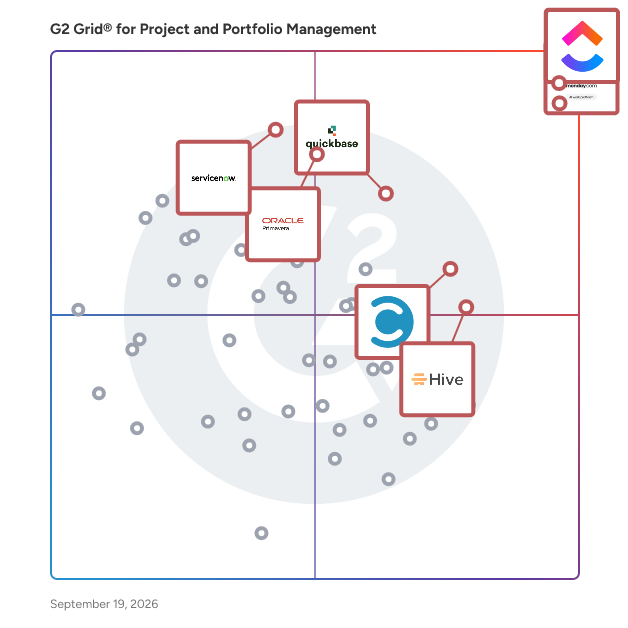
- **Leader:** [Smartsheet](https://www.g2.com/products/smartsheet/reviews)
- **Highest Performer:** [Bordio](https://www.g2.com/products/bordio/reviews)
- **Easiest to Use:** [Hive](https://www.g2.com/products/hive-hive-hive/reviews)
- **Top Trending:** [ClickUp](https://www.g2.com/products/clickup/reviews)
- **Best Free Software:** [Smartsheet](https://www.g2.com/products/smartsheet/reviews)

  
---

**Sponsored**

### Wrike

Wrike is a comprehensive work management platform designed to help teams and organizations streamline their collaboration, project planning, and task execution. By centralizing all work-related activities in one accessible location, Wrike aims to simplify complex workflows, enhance productivity, and empower users to focus on their most impactful tasks. This platform caters to a diverse range of industries and team sizes, making it a versatile solution for any organization looking to improve its operational efficiency. The target audience for Wrike includes project managers, team leaders, and organizations of all sizes seeking to optimize their workflows. Whether in marketing, IT, or product development, teams can leverage Wrike&#39;s features to manage projects more effectively. Specific use cases encompass tracking project progress, assigning tasks, setting deadlines, and facilitating communication among team members. By providing a unified space for collaboration, Wrike helps eliminate silos and fosters a culture of transparency and accountability, which is crucial for successful project execution. Key features of Wrike include customizable dashboards, real-time collaboration tools, and advanced reporting capabilities. Users can create tailored workflows that align with their specific processes, ensuring that the platform adapts to their unique needs. The ability to visualize project timelines through Gantt charts and Kanban boards allows teams to monitor progress at a glance, making it easier to identify bottlenecks and adjust plans accordingly. Furthermore, Wrike&#39;s integration with popular tools such as Slack, Google Drive, and Microsoft Teams enhances its functionality, allowing users to work seamlessly across different applications and improving overall efficiency. The benefits of using Wrike extend beyond mere task management. By centralizing communication and documentation, teams can reduce the time spent on administrative tasks and focus on delivering results. The platform&#39;s scalability means that it can grow alongside an organization, accommodating increasing workloads and team expansions without compromising performance. With over 20,000 customers, including well-known brands like Estée Lauder and Siemens, Wrike has established itself as a reliable partner for organizations aiming to thrive in a competitive landscape, ensuring that teams can work smarter and achieve their goals more effectively.


[Visit website](https://www.g2.com/external_clickthroughs/record?secure%5Bad_program%5D=paid_promo&amp;secure%5Bad_slot%5D=category_product_list&amp;secure%5Bcategory_id%5D=1431&amp;secure%5Bmedium%5D=sponsored&amp;secure%5Bprioritized%5D=false&amp;secure%5Bproduct_id%5D=1382&amp;secure%5Bresource_id%5D=1431&amp;secure%5Bresource_type%5D=Category&amp;secure%5Bsource_type%5D=category_page&amp;secure%5Bsource_url%5D=https%3A%2F%2Fwww.g2.com%2Fcategories%2Fproject-and-portfolio-management%2Ff%2Foptimization&amp;secure%5Btoken%5D=37155590f43f71dd856e8cc6d8154c11a4744ee0bb1fe78360e60fd6d4ff9841&amp;secure%5Burl%5D=https%3A%2F%2Fwww.wrike.com%2Ffeatures%2F&amp;secure%5Burl_type%5D=paid_promos)

---

  ## Top-Rated Products (Ranked by G2 Score)
### 1. [Smartsheet](https://www.g2.com/products/smartsheet/reviews)
  Smartsheet is an Intelligent Work Management Platform that revolutionizes how you manage projects, portfolios, and processes. The Smartsheet AI-powered platform delivers adaptability, sophisticated experiences, and enterprise-grade rigor to support work across industries — from service delivery to construction, clinical trials, and marketing campaigns. Designed to meet demanding requirements, it helps organizations drive efficiency, accelerate innovation, and stay competitive. Over 85% of Fortune 500 companies trust Smartsheet to align their resources to improve efficiency, agility, and collaboration in today’s ever-changing world of work.


  **Average Rating:** 4.4/5.0
  **Total Reviews:** 21,445

**User Satisfaction Scores:**

- **Has the product been a good partner in doing business?:** 8.6/10 (Category avg: 9.0/10)
- **Optimization:** 7.9/10 (Category avg: 8.3/10)
- **Alignment:** 8.1/10 (Category avg: 8.5/10)
- **Performance:** 8.1/10 (Category avg: 8.6/10)


**Seller Details:**

- **Seller:** [Smartsheet](https://www.g2.com/sellers/smartsheet)
- **Company Website:** https://www.smartsheet.com/
- **Year Founded:** 2005
- **HQ Location:** Bellevue, WA
- **Twitter:** @Smartsheet (26,424 Twitter followers)
- **LinkedIn® Page:** https://www.linkedin.com/company/167700/ (4,022 employees on LinkedIn®)

**Reviewer Demographics:**
  - **Who Uses This:** Project Manager, Senior Project Manager
  - **Top Industries:** Information Technology and Services, Construction
  - **Company Size:** 41% Mid-Market, 34% Small-Business


#### Pros & Cons

**Pros:**

- Ease of Use (2360 reviews)
- Project Management (1666 reviews)
- Team Collaboration (1516 reviews)
- Automation (1235 reviews)
- Project Tracking (1229 reviews)

**Cons:**

- Learning Curve (1183 reviews)
- Missing Features (899 reviews)
- Not Intuitive (842 reviews)
- Limited Features (739 reviews)
- Limited Customization (554 reviews)

### 2. [ClickUp](https://www.g2.com/products/clickup/reviews)
  ClickUp is the world’s first Converged AI Workspace, bringing together all work apps, data, and workflows. ClickUp eliminates all forms of work sprawl to provide 100% context and a single place for humans and agents to work, together. Trusted by more than 20 million users worldwide, ClickUp is on a mission to maximize human productivity.


  **Average Rating:** 4.7/5.0
  **Total Reviews:** 11,792

**User Satisfaction Scores:**

- **Has the product been a good partner in doing business?:** 9.0/10 (Category avg: 9.0/10)
- **Optimization:** 8.5/10 (Category avg: 8.3/10)
- **Alignment:** 8.6/10 (Category avg: 8.5/10)
- **Performance:** 8.2/10 (Category avg: 8.6/10)


**Seller Details:**

- **Seller:** [ClickUp](https://www.g2.com/sellers/clickup)
- **Company Website:** https://ClickUp.com
- **Year Founded:** 2017
- **HQ Location:** San Diego, California
- **Twitter:** @clickup (68,900 Twitter followers)
- **LinkedIn® Page:** https://www.linkedin.com/company/12949663/ (1,543 employees on LinkedIn®)

**Reviewer Demographics:**
  - **Who Uses This:** CEO, Project Manager
  - **Top Industries:** Marketing and Advertising, Computer Software
  - **Company Size:** 77% Small-Business, 19% Mid-Market


#### Pros & Cons

**Pros:**

- Ease of Use (4218 reviews)
- Task Management (3218 reviews)
- Features (3115 reviews)
- Project Management (2784 reviews)
- Organization (2587 reviews)

**Cons:**

- Missing Features (2039 reviews)
- Learning Curve (1751 reviews)
- Limited Features (1332 reviews)
- Not Intuitive (1180 reviews)
- Slow Loading (1152 reviews)

### 3. [monday Work Management](https://www.g2.com/products/monday-com/reviews)
  monday work management is a flexible, AI-powered platform that empowers organizations to plan, execute, and scale any type of work in one place. It connects every level of work — from everyday tasks to company-wide initiatives — giving teams the freedom to work their way and leaders the visibility and control to turn strategy into impact.  More than 245K customers worldwide, from fast-growing startups to Fortune 500 emterprises, rely on monday work management to operate smarter, move faster, and collaborate seamlessly across departments. Start your 14-day free trial and see monday work management in action.


  **Average Rating:** 4.7/5.0
  **Total Reviews:** 14,913

**User Satisfaction Scores:**

- **Has the product been a good partner in doing business?:** 9.1/10 (Category avg: 9.0/10)
- **Optimization:** 8.3/10 (Category avg: 8.3/10)
- **Alignment:** 8.3/10 (Category avg: 8.5/10)
- **Performance:** 8.3/10 (Category avg: 8.6/10)


**Seller Details:**

- **Seller:** [monday.com](https://www.g2.com/sellers/monday-com-d88207e4-9e92-412d-903b-61cd13ca592b)
- **Company Website:** https://monday.com/
- **Year Founded:** 2012
- **HQ Location:** Tel Aviv
- **Twitter:** @mondaydotcom (40,861 Twitter followers)
- **LinkedIn® Page:** https://www.linkedin.com/company/mondaydotcom (3,774 employees on LinkedIn®)

**Reviewer Demographics:**
  - **Who Uses This:** Project Manager, CEO
  - **Top Industries:** Marketing and Advertising, Information Technology and Services
  - **Company Size:** 61% Small-Business, 30% Mid-Market


#### Pros & Cons

**Pros:**

- Ease of Use (4036 reviews)
- Team Collaboration (2777 reviews)
- Project Management (2736 reviews)
- Organization (2658 reviews)
- Task Management (2417 reviews)

**Cons:**

- Missing Features (1721 reviews)
- Learning Curve (1186 reviews)
- Limited Features (1036 reviews)
- Not Intuitive (835 reviews)
- Limited Customization (746 reviews)

### 4. [Hive](https://www.g2.com/products/hive-hive-hive/reviews)
  Hive is a type of project management software solution designed to help teams streamline their workflows and enhance collaboration. This platform provides a comprehensive suite of tools that cater to various project management needs, enabling users to manage tasks, track progress, and communicate effectively within their teams. Hive&#39;s flexibility allows organizations to tailor their project management experience to fit their unique requirements, ensuring that teams can work in a way that suits them best. Targeted at businesses of all sizes, Hive is particularly beneficial for teams that require a high level of customization in their project management processes. Whether it&#39;s a marketing team coordinating campaigns, a product development team managing timelines, or a remote team collaborating on deliverables, Hive offers the versatility needed to adapt to different workflows. The platform is designed to accommodate diverse use cases, making it a valuable asset for organizations looking to improve efficiency and productivity. One of the key features of Hive is its flexible project views, which allow users to visualize their work in a manner that aligns with their preferences. Users can choose from various layouts, such as Kanban boards, Gantt charts, or list views, providing multiple ways to manage tasks and deadlines. This adaptability ensures that teams can find the most effective way to organize their projects, leading to increased clarity and focus. Additionally, Hive offers extensive customization options, enabling users to create workflows that reflect their specific processes. This includes the ability to set custom fields, automate repetitive tasks, and integrate with other tools that teams may already be using. Such features not only save time but also enhance the overall project management experience by allowing teams to work more efficiently and effectively. Another standout aspect of Hive is its commitment to user success. The platform is designed with the understanding that every team has unique needs, and Hive is willing to build additional tools or features to meet those needs. This level of support ensures that organizations can fully leverage the capabilities of the software, ultimately leading to improved project outcomes and faster execution of tasks. By adopting Hive, teams can expect to enhance their project management processes and foster a more collaborative work environment.


  **Average Rating:** 4.6/5.0
  **Total Reviews:** 648

**User Satisfaction Scores:**

- **Has the product been a good partner in doing business?:** 9.4/10 (Category avg: 9.0/10)
- **Optimization:** 8.8/10 (Category avg: 8.3/10)
- **Alignment:** 8.7/10 (Category avg: 8.5/10)
- **Performance:** 8.7/10 (Category avg: 8.6/10)


**Seller Details:**

- **Seller:** [Hive](https://www.g2.com/sellers/hive-a8fc1992-3c13-4b7c-bff1-ccef60fc94b6)
- **Company Website:** https://hive.com/
- **Year Founded:** 2016
- **HQ Location:** New York, New York
- **Twitter:** @hive (3,362 Twitter followers)
- **LinkedIn® Page:** https://www.linkedin.com/company/6473048/ (64 employees on LinkedIn®)

**Reviewer Demographics:**
  - **Who Uses This:** Project Manager, Graphic Designer
  - **Top Industries:** Marketing and Advertising, Information Technology and Services
  - **Company Size:** 63% Small-Business, 29% Mid-Market


#### Pros & Cons

**Pros:**

- Project Management (169 reviews)
- Ease of Use (163 reviews)
- Team Collaboration (146 reviews)
- Features (128 reviews)
- Organization (111 reviews)

**Cons:**

- Missing Features (77 reviews)
- Learning Curve (49 reviews)
- Limited Features (49 reviews)
- Not Intuitive (38 reviews)
- Complexity (36 reviews)

### 5. [Celoxis](https://www.g2.com/products/celoxis/reviews)
  Celoxis is an all-in-one project management tool with deep, built-in capabilities for projects, resources, financials, and processes. Everything works out of the box, no add-ons or automations needed. Our reports and dashboards are the best in the industry, fully customizable and easy to use. Getting started is easy, our experts set everything up with your workflows and data and walk you through exactly how it works. Zero risk. Zero stress. Just results. Yes, and unlike others, it stays fast as your data grows.


  **Average Rating:** 4.6/5.0
  **Total Reviews:** 450

**User Satisfaction Scores:**

- **Has the product been a good partner in doing business?:** 8.8/10 (Category avg: 9.0/10)
- **Optimization:** 9.0/10 (Category avg: 8.3/10)
- **Alignment:** 9.0/10 (Category avg: 8.5/10)
- **Performance:** 8.9/10 (Category avg: 8.6/10)


**Seller Details:**

- **Seller:** [Celoxis](https://www.g2.com/sellers/celoxis)
- **Company Website:** https://www.celoxis.com/
- **Year Founded:** 2001
- **HQ Location:** Pune, India
- **Twitter:** @celoxis (17,181 Twitter followers)
- **LinkedIn® Page:** https://www.linkedin.com/company/2506502/ (64 employees on LinkedIn®)

**Reviewer Demographics:**
  - **Who Uses This:** Project Manager, Software Engineer
  - **Top Industries:** Computer Software, Information Technology and Services
  - **Company Size:** 51% Mid-Market, 36% Small-Business


#### Pros & Cons

**Pros:**

- Project Management (125 reviews)
- Project Tracking (104 reviews)
- Ease of Use (101 reviews)
- Time Tracking (68 reviews)
- Dashboard Features (58 reviews)

**Cons:**

- Learning Curve (92 reviews)
- Steep Learning Curve (57 reviews)
- Not Intuitive (53 reviews)
- Beginner Difficulty (48 reviews)
- Complex UI (39 reviews)

### 6. [Quickbase](https://www.g2.com/products/quickbase/reviews)
  Quickbase is an AI-driven platform designed to help businesses streamline their operations by adapting to their unique workflows and processes. Unlike traditional off-the-shelf software, which often requires users to conform to predefined structures, Quickbase empowers organizations to create customized solutions that align with their specific needs. This flexibility is crucial for companies seeking to eliminate inefficiencies and reduce the burden of &#39;Gray Work&#39; - what we call the time-consuming tasks and manual processes that arise from using rigid software systems. The target audience for Quickbase includes businesses of all sizes across various industries that are looking to enhance their operational efficiency. Whether it&#39;s a 50 person small business or a large enterprise, organizations can benefit from a platform that allows them to connect disparate data sources, automate repetitive tasks, and scale their competitive advantages. Quickbase is particularly valuable for teams that rely on collaboration and data-driven decision-making, as it fosters an environment where information flows seamlessly and processes are optimized. Key features of Quickbase include its intuitive interface, which allows users to build custom applications without extensive coding knowledge. This user-friendly design enables teams to quickly adapt the platform to their specific workflows, ensuring that they can address unique challenges without the need for extensive IT support. Additionally, Quickbase offers powerful automation capabilities, allowing users to set up triggers and workflows that reduce manual effort and streamline operations. The platform also supports integration with various data sources, enabling businesses to consolidate their information and gain valuable insights. One of the standout benefits of Quickbase is its ability to scale with your business. As organizations grow and evolve, their processes often become more complex. Quickbase&#39;s adaptable nature ensures that users can modify their applications and workflows as needed, without the constraints typically associated with traditional software. This flexibility not only saves time but also fosters innovation, as teams can experiment with new processes and tools that enhance their productivity. By prioritizing user-centric design and adaptability, Quickbase stands out in the crowded landscape of business software solutions. It provides organizations with the tools they need to optimize their operations, reduce inefficiencies, and ultimately drive growth. With Quickbase, businesses can focus on what truly matters—leveraging their unique processes to gain a competitive edge in their respective markets.


  **Average Rating:** 4.4/5.0
  **Total Reviews:** 1,332

**User Satisfaction Scores:**

- **Has the product been a good partner in doing business?:** 8.7/10 (Category avg: 9.0/10)
- **Optimization:** 8.4/10 (Category avg: 8.3/10)
- **Alignment:** 8.4/10 (Category avg: 8.5/10)
- **Performance:** 8.6/10 (Category avg: 8.6/10)


**Seller Details:**

- **Seller:** [Quickbase](https://www.g2.com/sellers/quickbase)
- **Company Website:** https://quickbase.com/
- **Year Founded:** 2012
- **HQ Location:** Boston, MA
- **Twitter:** @quickbase (5,151 Twitter followers)
- **LinkedIn® Page:** https://www.linkedin.com/company/2845325/ (858 employees on LinkedIn®)

**Reviewer Demographics:**
  - **Who Uses This:** Project Manager, Project Coordinator
  - **Top Industries:** Construction, Information Technology and Services
  - **Company Size:** 43% Mid-Market, 32% Small-Business


#### Pros & Cons

**Pros:**

- Ease of Use (314 reviews)
- Customization (216 reviews)
- Customizability (182 reviews)
- Flexibility (156 reviews)
- Customization Options (146 reviews)

**Cons:**

- Learning Curve (121 reviews)
- Missing Features (93 reviews)
- Not Intuitive (91 reviews)
- Limited Features (90 reviews)
- Limited Customization (74 reviews)

### 7. [ServiceNow Strategic Portfolio Management](https://www.g2.com/products/servicenow-strategic-portfolio-management/reviews)
  ServiceNow Strategic Portfolio Management (SPM) is a comprehensive solution designed to align organizational strategies with business outcomes by integrating planning, execution, and delivery processes on a unified platform. It enables organizations to prioritize investments, optimize resources, and accelerate value delivery, ensuring that all initiatives are strategically aligned and effectively managed. Key Features and Functionality: - Portfolio Management: Provides complete visibility into project, program, and portfolio performance, allowing organizations to prioritize and align investments with strategic goals. - Demand Management: Captures, evaluates, and prioritizes demands across the organization, automating the intake process with workflows for assessment and approval. - Resource Management: Optimizes resource allocation with advanced planning and scheduling tools, monitoring utilization and capacity to ensure project success. - Financial Management: Tracks budgets, forecasts, and expenses to ensure financial alignment with business objectives, offering insights into portfolio ROI for informed decision-making. - Scenario Planning: Models and analyzes various scenarios to evaluate potential outcomes, enabling dynamic strategy adjustments based on real-time data and shifting priorities. - Roadmap Planning: Visualizes and communicates project timelines, dependencies, and milestones with intuitive roadmaps, aligning stakeholders with clear views of priorities and progress. - Risk and Compliance Management: Identifies, assesses, and mitigates risks across projects and portfolios, ensuring compliance with industry standards and organizational policies. - Integration with IT and Business Tools: Seamlessly integrates with ServiceNow ITSM, ITOM, and other business applications for unified operations. - Performance Analytics and Dashboards: Provides actionable insights with real-time dashboards and performance metrics, tracking key performance indicators (KPIs) to measure success and identify areas for improvement. - Collaboration and Workflows: Enables cross-functional collaboration with automated workflows and task management, facilitating updates and alignment among teams. Primary Value and Solutions Provided: ServiceNow SPM empowers organizations to make informed, data-driven decisions by providing real-time insights into project and portfolio performance. It ensures that all work is strategically aligned, resources are optimally utilized, and financial investments are effectively managed. By consolidating processes and increasing visibility on a single platform, SPM enhances efficiency, accelerates value delivery, and fosters cross-team collaboration. Ultimately, it enables organizations to achieve their strategic objectives with agility and precision, adapting to changing business needs and market dynamics.


  **Average Rating:** 4.1/5.0
  **Total Reviews:** 226

**User Satisfaction Scores:**

- **Has the product been a good partner in doing business?:** 8.7/10 (Category avg: 9.0/10)
- **Optimization:** 8.6/10 (Category avg: 8.3/10)
- **Alignment:** 8.8/10 (Category avg: 8.5/10)
- **Performance:** 8.0/10 (Category avg: 8.6/10)


**Seller Details:**

- **Seller:** [ServiceNow](https://www.g2.com/sellers/servicenow)
- **Company Website:** https://www.servicenow.com/
- **Year Founded:** 2004
- **HQ Location:** Santa Clara, CA
- **Twitter:** @servicenow (54,612 Twitter followers)
- **LinkedIn® Page:** https://www.linkedin.com/company/29352/ (32,701 employees on LinkedIn®)

**Reviewer Demographics:**
  - **Who Uses This:** ServiceNow Developer
  - **Top Industries:** Information Technology and Services, Hospital &amp; Health Care
  - **Company Size:** 51% Enterprise, 25% Mid-Market


#### Pros & Cons

**Pros:**

- Project Management (37 reviews)
- Ease of Use (30 reviews)
- Visibility (23 reviews)
- Project Tracking (22 reviews)
- Features (18 reviews)

**Cons:**

- Learning Curve (24 reviews)
- Learning Difficulty (22 reviews)
- Not Intuitive (16 reviews)
- Overwhelming (14 reviews)
- Complexity (13 reviews)

### 8. [Oracle Primavera](https://www.g2.com/products/oracle-primavera/reviews)
  For more than 30 years, successful projects around the world have relied on Oracle Construction and Engineering&#39;s Primavera solutions to plan, build, and operate critical assets. It is the only solution that integrates project and portfolio planning and delivery teams for planning, resourcing, risk mitigation, scheduling, and program management. Manage projects of any size. Robust and easy-to-use. Key Benefits - Cloud-based, delivering fast time to value - One platform for planning, prioritizing, executing, and monitoring projects and programs - Optimization and oversight of capital spend to maximize return and align with strategies - Enhanced risk mitigation; better visibility of project and portfolio health - Comprehensive, integrated planning - critical path method (CPM) and Lean scheduling, plus upstream portfolio planning and downstream risk mitigation - Total resource management – maintain optimal staffing levels to improve delivery efficiency - Collaboration and control across teams – drive efficiency and quality, reduce waste - Connect teams with access from any device, create and update activities and tasks, and view portfolios and files with offline support - Risk mitigation – avoid delays and cost overruns


  **Average Rating:** 4.4/5.0
  **Total Reviews:** 340

**User Satisfaction Scores:**

- **Has the product been a good partner in doing business?:** 8.0/10 (Category avg: 9.0/10)
- **Optimization:** 8.4/10 (Category avg: 8.3/10)
- **Alignment:** 8.2/10 (Category avg: 8.5/10)
- **Performance:** 8.2/10 (Category avg: 8.6/10)


**Seller Details:**

- **Seller:** [Oracle](https://www.g2.com/sellers/oracle)
- **Year Founded:** 1977
- **HQ Location:** Austin, TX
- **Twitter:** @Oracle (827,981 Twitter followers)
- **LinkedIn® Page:** https://www.linkedin.com/company/1028/ (199,301 employees on LinkedIn®)
- **Ownership:** NYSE:ORCL

**Reviewer Demographics:**
  - **Who Uses This:** Planning Engineer, Project Manager
  - **Top Industries:** Construction, Oil &amp; Energy
  - **Company Size:** 38% Mid-Market, 37% Enterprise


#### Pros & Cons

**Pros:**

- Project Management (2 reviews)
- Centralization (1 reviews)
- Comprehensive Coverage (1 reviews)
- Comprehensive Features (1 reviews)
- Organization (1 reviews)

**Cons:**

- Complex Setup (1 reviews)
- Cost Issues (1 reviews)
- Expensive (1 reviews)
- Limited Features (1 reviews)
- Limited Functionality (1 reviews)

### 9. [Scoro](https://www.g2.com/products/scoro/reviews)
  Scoro is a professional services automation (PSA) software purpose-built for consultancies, agencies, IT firms, architecture companies, and other professional services businesses. It unites projects, resources, and finances in one system, so you don’t need to juggle multiple tools for planning, tracking, and billing for your work. Core features include: - CRM &amp; pipeline – Get a complete overview of your sales funnel and upcoming work - Quote-to-cash – Estimate scope, track progress and budget burn, and bill for work in one system - Capacity &amp; resource planning – Plan ahead with live heatmaps and utilization forecasts - Time &amp; expense tracking – Log time with built-in timers and auto-populated timesheets - Cost &amp; profit forecasts – Understand margins with role or service-level insights - Billing &amp; invoicing – Automate time &amp; material, fixed-fee, and retainer billing - Revenue forecasting – Track project income based on pipeline and committed work - AI-powered insights &amp; actions – Save time with automation and data-driven suggestions - Live dashboards – Monitor progress, profitability, and capacity in real time By uniting this data, Scoro gives you end-to-end visibility across your business. Helping you spot risks sooner, allocate resources smarter, and protect profitability as you scale.


  **Average Rating:** 4.5/5.0
  **Total Reviews:** 479

**User Satisfaction Scores:**

- **Has the product been a good partner in doing business?:** 9.0/10 (Category avg: 9.0/10)
- **Optimization:** 8.6/10 (Category avg: 8.3/10)
- **Alignment:** 8.5/10 (Category avg: 8.5/10)
- **Performance:** 8.7/10 (Category avg: 8.6/10)


**Seller Details:**

- **Seller:** [Scoro](https://www.g2.com/sellers/scoro)
- **Company Website:** https://www.scoro.com
- **Year Founded:** 2013
- **HQ Location:** London
- **Twitter:** @ScoroSoftware (8,217 Twitter followers)
- **LinkedIn® Page:** https://www.linkedin.com/company/294623/ (146 employees on LinkedIn®)

**Reviewer Demographics:**
  - **Who Uses This:** Project Manager, CEO
  - **Top Industries:** Marketing and Advertising, Information Technology and Services
  - **Company Size:** 66% Small-Business, 24% Mid-Market


#### Pros & Cons

**Pros:**

- Ease of Use (55 reviews)
- Project Management (49 reviews)
- Project Tracking (44 reviews)
- Time Tracking (38 reviews)
- Task Management (35 reviews)

**Cons:**

- Learning Curve (28 reviews)
- Missing Features (13 reviews)
- Not Intuitive (13 reviews)
- Steep Learning Curve (12 reviews)
- Complexity (11 reviews)

### 10. [Wrike](https://www.g2.com/products/wrike/reviews)
  Wrike is a comprehensive work management platform designed to help teams and organizations streamline their collaboration, project planning, and task execution. By centralizing all work-related activities in one accessible location, Wrike aims to simplify complex workflows, enhance productivity, and empower users to focus on their most impactful tasks. This platform caters to a diverse range of industries and team sizes, making it a versatile solution for any organization looking to improve its operational efficiency. The target audience for Wrike includes project managers, team leaders, and organizations of all sizes seeking to optimize their workflows. Whether in marketing, IT, or product development, teams can leverage Wrike&#39;s features to manage projects more effectively. Specific use cases encompass tracking project progress, assigning tasks, setting deadlines, and facilitating communication among team members. By providing a unified space for collaboration, Wrike helps eliminate silos and fosters a culture of transparency and accountability, which is crucial for successful project execution. Key features of Wrike include customizable dashboards, real-time collaboration tools, and advanced reporting capabilities. Users can create tailored workflows that align with their specific processes, ensuring that the platform adapts to their unique needs. The ability to visualize project timelines through Gantt charts and Kanban boards allows teams to monitor progress at a glance, making it easier to identify bottlenecks and adjust plans accordingly. Furthermore, Wrike&#39;s integration with popular tools such as Slack, Google Drive, and Microsoft Teams enhances its functionality, allowing users to work seamlessly across different applications and improving overall efficiency. The benefits of using Wrike extend beyond mere task management. By centralizing communication and documentation, teams can reduce the time spent on administrative tasks and focus on delivering results. The platform&#39;s scalability means that it can grow alongside an organization, accommodating increasing workloads and team expansions without compromising performance. With over 20,000 customers, including well-known brands like Estée Lauder and Siemens, Wrike has established itself as a reliable partner for organizations aiming to thrive in a competitive landscape, ensuring that teams can work smarter and achieve their goals more effectively.


  **Average Rating:** 4.2/5.0
  **Total Reviews:** 4,447

**User Satisfaction Scores:**

- **Has the product been a good partner in doing business?:** 8.5/10 (Category avg: 9.0/10)
- **Optimization:** 7.9/10 (Category avg: 8.3/10)
- **Alignment:** 7.8/10 (Category avg: 8.5/10)
- **Performance:** 7.5/10 (Category avg: 8.6/10)


**Seller Details:**

- **Seller:** [Wrike, Inc.](https://www.g2.com/sellers/wrike-inc)
- **Company Website:** https://www.wrike.com
- **Year Founded:** 2006
- **HQ Location:** San Diego, CA
- **Twitter:** @wrike (13,589 Twitter followers)
- **LinkedIn® Page:** https://www.linkedin.com/company/612239/ (1,254 employees on LinkedIn®)

**Reviewer Demographics:**
  - **Who Uses This:** Project Manager, Marketing Manager
  - **Top Industries:** Marketing and Advertising, Information Technology and Services
  - **Company Size:** 43% Mid-Market, 35% Small-Business


#### Pros & Cons

**Pros:**

- Project Management (477 reviews)
- Team Collaboration (456 reviews)
- Task Management (450 reviews)
- Organization (383 reviews)
- Ease of Use (331 reviews)

**Cons:**

- Learning Curve (305 reviews)
- Not Intuitive (239 reviews)
- Missing Features (203 reviews)
- Limited Features (190 reviews)
- Complex Usability (171 reviews)

### 11. [Bordio](https://www.g2.com/products/bordio/reviews)
  Bordio is work management software for teams across all industries. Here you can add teams and invite your teammates, create projects, manage tasks and events and organize your teamwork. Whether you&#39;re working with people inside your team or bringing in outside partners and clients, Bordio has got you covered. It&#39;s designed to handle everything from your daily tasks to those big projects, keeping everything running smoothly so you can focus on what really matters. Bordio doesn&#39;t just stop at organizing your tasks; it goes the extra mile by helping you manage your team&#39;s workload effectively. With features that let you track the time spent on tasks and meetings, setting up recurring tasks, and keeping an eye on daily progress, it&#39;s easier than ever to keep everyone on track. Plus, with the ability to chat right in the task window, you&#39;ll never lose track of those important conversations and decisions. Keep the communication clear and make sure everyone&#39;s on the same page. Say goodbye to juggling multiple apps for notes, file storage, and calendars. With Bordio, you can upload files directly to tasks, keep all your project-related notes tidy, and even sync up with your Google Calendar. And with the mobile app, you can keep tabs on everything, no matter where you are. Bordio makes managing your team&#39;s work not just doable but downright easy.


  **Average Rating:** 5.0/5.0
  **Total Reviews:** 59

**User Satisfaction Scores:**

- **Has the product been a good partner in doing business?:** 10.0/10 (Category avg: 9.0/10)
- **Optimization:** 10.0/10 (Category avg: 8.3/10)
- **Alignment:** 10.0/10 (Category avg: 8.5/10)
- **Performance:** 10.0/10 (Category avg: 8.6/10)


**Seller Details:**

- **Seller:** [Bordio](https://www.g2.com/sellers/bordio)
- **Year Founded:** 2021
- **HQ Location:** Riga, LV
- **LinkedIn® Page:** https://www.linkedin.com/company/bordio/ (5 employees on LinkedIn®)

**Reviewer Demographics:**
  - **Top Industries:** Automotive, Building Materials
  - **Company Size:** 98% Small-Business, 2% Mid-Market


#### Pros & Cons

**Pros:**

- Ease of Use (1 reviews)
- Flexibility (1 reviews)
- Management Ease (1 reviews)
- Multi-User Access (1 reviews)
- Project Management (1 reviews)

**Cons:**

- App Functionality (1 reviews)
- App Limitations (1 reviews)
- Connectivity Issues (1 reviews)
- Glitches (1 reviews)
- Limited Features (1 reviews)

### 12. [Oracle EBS Projects](https://www.g2.com/products/oracle-ebs-projects/reviews)
  Oracle EBS Projects applications supports the full lifecycle of project and portfolio management with a single, accurate view of all project-related activities.


  **Average Rating:** 3.7/5.0
  **Total Reviews:** 18

**User Satisfaction Scores:**

- **Has the product been a good partner in doing business?:** 9.2/10 (Category avg: 9.0/10)
- **Optimization:** 7.1/10 (Category avg: 8.3/10)
- **Alignment:** 7.5/10 (Category avg: 8.5/10)
- **Performance:** 7.5/10 (Category avg: 8.6/10)


**Seller Details:**

- **Seller:** [Oracle](https://www.g2.com/sellers/oracle)
- **Year Founded:** 1977
- **HQ Location:** Austin, TX
- **Twitter:** @Oracle (827,981 Twitter followers)
- **LinkedIn® Page:** https://www.linkedin.com/company/1028/ (199,301 employees on LinkedIn®)
- **Ownership:** NYSE:ORCL

**Reviewer Demographics:**
  - **Company Size:** 75% Enterprise, 30% Mid-Market


### 13. [Meisterplan](https://www.g2.com/products/meisterplan/reviews)
  Meisterplan is a lean and visual project portfolio management software focused on planning resources beyond the short-term. It enables you to reliably deliver on your commitments by guaranteeing optimal resource utilization in line with your priorities. With Meisterplan, you can • Raise your perspective to the portfolio level to get an overview of all projects, bringing in relevant data from any tool your teams are already using. • Add future resource needs with just minimal detail, giving you the right amount of information for confident decisions without unnecessary effort. • Use the most intuitive what-if scenario planning, where you can explore plan alternatives and find the best way forward based on actual resource availability.


  **Average Rating:** 4.7/5.0
  **Total Reviews:** 26

**User Satisfaction Scores:**

- **Has the product been a good partner in doing business?:** 9.8/10 (Category avg: 9.0/10)
- **Optimization:** 8.6/10 (Category avg: 8.3/10)
- **Alignment:** 7.1/10 (Category avg: 8.5/10)
- **Performance:** 7.6/10 (Category avg: 8.6/10)


**Seller Details:**

- **Seller:** [Meisterplan](https://www.g2.com/sellers/meisterplan)
- **Year Founded:** 1999
- **HQ Location:** Seattle, Washington
- **LinkedIn® Page:** https://www.linkedin.com/company/18462500/ (43 employees on LinkedIn®)

**Reviewer Demographics:**
  - **Company Size:** 44% Mid-Market, 37% Small-Business


#### Pros & Cons

**Pros:**

- Ease of Use (6 reviews)
- Project Management (5 reviews)
- Customer Support (2 reviews)
- Customization (2 reviews)
- Dashboard Features (2 reviews)

**Cons:**

- Data Import (2 reviews)
- Export Issues (2 reviews)
- Export Limitations (2 reviews)
- Learning Curve (2 reviews)
- Project Management Issues (2 reviews)

### 14. [IBM Targetprocess](https://www.g2.com/products/ibm-targetprocess/reviews)
  IBM Targetprocess, is a platform for enterprise agile planning (EAP) and strategic portfolio management (SPM) solutions that allows business and technology planners at all levels to dynamically plan and manage work, resources, investments, programs, and portfolios while ensuring continuous alignment to the enterprise strategy in a single source of truth. IBM Targetprocess is a platform for enterprise agile planning (EAP) and strategic portfolio management (SPM) solutions that allows business and technology planners at all levels to dynamically plan and manage work, resources, investments, programs, and portfolios while ensuring continuous alignment to the enterprise strategy in a single source of truth. The combination of flexible architecture and Solutions Library helps to ensure the fastest time to value for every solution. IBM Targetprocess integrates directly with the financial management platform to provide financial insights into labor allocations, labor capitalization, and labor forecasts to improve how a company measures, plans, and invests in their workforce. Solutions: IBM Targetprocess&#39; solutions-led strategy to make Enterprise Agile easier, allowing teams to take a building-block style approach to their agile transformation. Strategic planning solutions allow business leaders to capture strategy and OKRs in a single source of truth, and even update priorities with confidence that portfolio, product managers, and even autonomous Agile teams will see and align their work to the new priorities. Resource Management solutions allow portfolio and product teams to plan and forecast capacity and dynamically manage resources while minimizing risks and optimizing resource utilization. The Portfolio budgeting solutions enabled by IBM Targetprocess partners financial teams with product and portfolio managers to enable a shift to continuous product funding, and Program Management solutions ensure the successful execution of Agile programs across hybrid and strategic portfolios. Strategic Planning: Align work, labor, and investments to the strategic objectives of the business and maximize execution. • Capture and communicate corporate objectives in a persistent tool visible by the entire organization. • Link specific elements of execution to strategic objectives (i.e. initiatives, epics, features, teams, budgets, etc.). • View the split between Run-the-Business and Change-the-Business goals and pivot investments. • Easily track and view progress of strategic objectives. Portfolio Budgeting: Align with finance as you shift from annual funding of projects to continuous product funding. • View portfolio totals, actuals, OpEx, and CapEx, budgeted costs, and labor and non-labor costs in one place. • One source of truth to view portfolio budgets and their initiatives. • View the split between labor and non-labor actuals on a monthly basis. • Quickly change Funded costs and labor/non-labor costs in the initiative breakdown. Resource Management: Optimize resources, capacity, and demand to reduce risk and maximize utilization of headcount. • Monitor the impact of changes in real-time, with multiple views of reports to minimize inefficiency and overutilization. • Dashboards allow optimization of incoming demand against capacity. • Connect resource bill rates, team rates, and blended rates and utilization with automatic cost forecasting. Program Management: Digitize and automate quarterly business and program increment planning. • Seamlessly setup PI Planning with connected backlogs for Portfolio, Product, and Teams. • Visualize key metrics and flow of value with Flow metrics in a customizable dashboard. • Execute confidently by easily tracking progress in real-time, quickly identifying dependencies, and adapting to changes through the Program Board. Market Differentiators: - Flexible architecture: Targetprocess flexible architecture adapts to your organizations operating models – no matter how unique. - Time to value: Targetprocess Solutions Library minimizes administrative overhead and delivers rapid time to value for every solution. - Holistic financials: Targetprocess and IBM Apptio provide visibility to labor and non-labor costs for planning and managing investments.


  **Average Rating:** 4.3/5.0
  **Total Reviews:** 236

**User Satisfaction Scores:**

- **Has the product been a good partner in doing business?:** 9.0/10 (Category avg: 9.0/10)
- **Optimization:** 8.6/10 (Category avg: 8.3/10)
- **Alignment:** 8.4/10 (Category avg: 8.5/10)
- **Performance:** 8.4/10 (Category avg: 8.6/10)


**Seller Details:**

- **Seller:** [Apptio, an IBM Company](https://www.g2.com/sellers/apptio-an-ibm-company)
- **Year Founded:** 1996
- **HQ Location:** Bellevue, WA
- **Twitter:** @Apptio (9,676 Twitter followers)
- **LinkedIn® Page:** https://www.linkedin.com/company/apptio/ (1,330 employees on LinkedIn®)

**Reviewer Demographics:**
  - **Who Uses This:** Software Developer
  - **Top Industries:** Computer Software, Information Technology and Services
  - **Company Size:** 42% Mid-Market, 35% Small-Business


#### Pros & Cons

**Pros:**

- Visibility (6 reviews)
- Flexibility (5 reviews)
- Organization (4 reviews)
- Project Management (4 reviews)
- Team Collaboration (4 reviews)

**Cons:**

- Learning Curve (6 reviews)
- Learning Difficulty (4 reviews)
- Complexity (3 reviews)
- Difficult Navigation (3 reviews)
- Navigation Difficulty (3 reviews)

### 15. [GanttPRO](https://www.g2.com/products/ganttpro-ganttpro/reviews)
  GanttPRO is intuitive online Gantt chart software for robust project management. The tool meets the needs of project, product, and portfolio managers from different spheres. GanttPRO offers task, deadline, cost, resource, and portfolio management, team collaboration, time logging, baselines, advanced export and sharing features. Robust import from MS Project and Excel as well as ready-made professional templates allows starting projects right away.


  **Average Rating:** 4.8/5.0
  **Total Reviews:** 523

**User Satisfaction Scores:**

- **Has the product been a good partner in doing business?:** 9.1/10 (Category avg: 9.0/10)


**Seller Details:**

- **Seller:** [GanttPRO](https://www.g2.com/sellers/ganttpro)
- **Year Founded:** 2015
- **HQ Location:** Krakow, PL
- **Twitter:** @GanttPROcom (746 Twitter followers)
- **LinkedIn® Page:** https://www.linkedin.com/company/ganttpro/ (19 employees on LinkedIn®)

**Reviewer Demographics:**
  - **Who Uses This:** Student, Project Manager
  - **Top Industries:** Higher Education, Computer Software
  - **Company Size:** 76% Small-Business, 12% Enterprise


#### Pros & Cons

**Pros:**

- Ease of Use (50 reviews)
- Project Management (48 reviews)
- Team Collaboration (35 reviews)
- Intuitive (27 reviews)
- User Interface (26 reviews)

**Cons:**

- Missing Features (9 reviews)
- Expensive (7 reviews)
- Learning Curve (7 reviews)
- Limited Customization (7 reviews)
- Billing Issues (5 reviews)

### 16. [Projectum xPM](https://www.g2.com/products/projectum-xpm/reviews)
  Projectum xPM is a portfolio, project, and resource management solution built on the Microsoft Power Platform, designed to support multiple ways of working within modern organizations. It enables businesses to plan, execute, and monitor initiatives across diverse work methodologies, from traditional project management approaches to agile and hybrid frameworks. As part of the Microsoft Cloud ecosystem, xPM integrates seamlessly with Microsoft 365 applications and services, providing secure, scalable, and compliant infrastructure for enterprise use. The platform is suitable for organizations managing complex project portfolios, distributed teams, or resource-intensive operations. It addresses scenarios such as strategic portfolio planning, project delivery tracking, resource capacity management, and performance reporting. With built-in AI capabilities, xPM offers automated insights, predictive analytics, and intelligent recommendations to improve decision-making and optimize resource allocation. Key features and capabilities include: Portfolio Management Flexibility – Support for multiple methodologies, enabling organizations to manage traditional, agile, and hybrid portfolios in one unified platform. Microsoft Cloud Integration – Operates within the Microsoft Power Platform, ensuring compatibility with Microsoft 365, Teams, and Power BI, with enterprise-grade security and compliance. AI-Driven Insights – Embedded artificial intelligence provides forecasts, trend analysis, and actionable recommendations to improve planning accuracy and execution efficiency. Comprehensive Resource Management – Tools for tracking availability, skills, and utilization across teams to align resource capacity with strategic priorities. Configurable Workspaces and Processes – Adaptable project templates, workflows, and dashboards to fit organizational needs without extensive custom development. Projectum xPM provides a centralized environment for aligning strategy with execution, ensuring visibility across initiatives, and enabling data-driven decision-making. Its combination of methodological flexibility, Microsoft ecosystem integration, and AI enablement positions it as a versatile solution for organizations seeking to unify portfolio, project, and resource management under a single, adaptable platform.


  **Average Rating:** 4.9/5.0
  **Total Reviews:** 10

**User Satisfaction Scores:**

- **Has the product been a good partner in doing business?:** 8.3/10 (Category avg: 9.0/10)
- **Optimization:** 8.3/10 (Category avg: 8.3/10)
- **Alignment:** 8.7/10 (Category avg: 8.5/10)
- **Performance:** 8.6/10 (Category avg: 8.6/10)


**Seller Details:**

- **Seller:** [Projectum ](https://www.g2.com/sellers/projectum)
- **Year Founded:** 2004
- **HQ Location:** Copenhagen, Capital Region of Denmark, Denmark
- **LinkedIn® Page:** https://www.linkedin.com/company/projectum-aps/ (1 employees on LinkedIn®)

**Reviewer Demographics:**
  - **Company Size:** 83% Mid-Market, 8% Enterprise


#### Pros & Cons

**Pros:**

- Ease of Use (2 reviews)
- Customer Support (1 reviews)
- Easy Integrations (1 reviews)
- Intuitive (1 reviews)
- Navigation Ease (1 reviews)

**Cons:**

- Intimidation (1 reviews)

### 17. [Moovila](https://www.g2.com/products/moovila/reviews)
  Moovila Perfect Project is an AI-powered project management and automation platform developed by Moovila to help organizations plan, predict, and deliver projects with precision. Built for Managed Service Providers (MSPs), IT service firms, and other project-driven organizations, Moovila enables teams to manage complex, resource-dependent workflows while eliminating uncertainty in project timelines. Unlike traditional project management tools, the platform uses artificial intelligence to dynamically create and maintain optimized project schedules, ensuring that teams can adapt in real time while staying on track for on-time delivery. Moovila is designed for organizations that manage a high volume of concurrent projects, particularly MSPs, consulting firms, and professional services teams that rely on structured workflows and accurate resource planning. Its ideal users are teams working within PSA environments such as ConnectWise PSA, Autotask PSA, and HaloPSA, where alignment between sales, operations, and project delivery is critical. These organizations often face challenges such as missed deadlines, limited visibility into project health, and inefficient resource allocation, all of which Moovila is built to solve through automation and intelligent forecasting. What differentiates Moovila Perfect Project from other platforms is its focus on predictability and real-time intelligence rather than manual tracking. At the core of the platform is its AI-driven Critical Path Engine, which automatically maps task dependencies and continuously recalculates the most efficient path to project completion as conditions evolve. This is paired with real-time risk detection, which monitors projects for potential delays or bottlenecks and proactively alerts teams with recommended actions to mitigate those risks before they impact delivery timelines. Another key advantage of Moovila is its native bi-directional integration with major PSA systems, including ConnectWise PSA, Autotask PSA, and HaloPSA, allowing for seamless, real-time synchronization of project data without the need for middleware or manual data entry. This integration ensures that all teams are working from the same source of truth. In addition, Moovila’s intelligent resource and capacity forecasting capabilities help organizations optimize team utilization by analyzing workloads and availability, preventing overallocation while improving efficiency across projects. The platform also features Smart Scheduling, which automatically generates and adjusts timelines based on real-time inputs, ensuring that project plans remain accurate without constant manual updates. Moovila supports structured, dependency-driven workflows through a waterfall methodology, with optional Gantt chart visualization for teams that require a visual representation of project timelines. Its Project Hub further enhances efficiency by providing a library of pre-built templates, enabling teams to quickly launch standardized, well-structured projects with confidence and consistency. Moovila Perfect Project is used across a variety of use cases, including client project delivery such as onboarding, migrations, and implementations, as well as internal operations management and cross-functional coordination. It is equally effective for both short-term initiatives and long-term strategic projects, making it a flexible solution for organizations that require both structure and adaptability. By automating scheduling, monitoring risks, and optimizing resources, Moovila helps teams stay aligned, accountable, and in control of even the most complex project environments. By combining automation, real-time intelligence, and seamless integration, Moovila Perfect Project enables organizations to move from simply managing projects to delivering them with consistency and precision.


  **Average Rating:** 4.8/5.0
  **Total Reviews:** 47

**User Satisfaction Scores:**

- **Has the product been a good partner in doing business?:** 10.0/10 (Category avg: 9.0/10)
- **Optimization:** 9.4/10 (Category avg: 8.3/10)
- **Alignment:** 8.8/10 (Category avg: 8.5/10)
- **Performance:** 9.1/10 (Category avg: 8.6/10)


**Seller Details:**

- **Seller:** [Moovila](https://www.g2.com/sellers/moovila)
- **Company Website:** https://www.moovila.com/
- **HQ Location:** Mount Pleasant, South Carolina
- **Twitter:** @Moovila_App (762 Twitter followers)
- **LinkedIn® Page:** https://www.linkedin.com/company/6596080 (29 employees on LinkedIn®)

**Reviewer Demographics:**
  - **Who Uses This:** Project Manager
  - **Top Industries:** Information Technology and Services, Computer &amp; Network Security
  - **Company Size:** 50% Small-Business, 42% Mid-Market


#### Pros & Cons

**Pros:**

- Project Management (20 reviews)
- Ease of Use (15 reviews)
- Automation (13 reviews)
- Project Tracking (11 reviews)
- Customer Support (10 reviews)

**Cons:**

- Limited Customization (5 reviews)
- Integration Issues (4 reviews)
- Learning Curve (3 reviews)
- Limited Features (3 reviews)
- Not Intuitive (3 reviews)

### 18. [Kytes](https://www.g2.com/products/kytes/reviews)
  At Kytes, we partner closely with our customers, offering AI-enabled Professional Services Automation (PSA) software that digitizes and automates end-to-end project operations for their organization. Tailored for IT/ITES, Pharmaceuticals/Lifesciences, GCC, Professional Services, and Consulting, Kytes PSA software streamlines and accelerates Project Deliveries and Product Development Lifecycle (NPD). Central to our philosophy is a people-first approach. We empower teams to work both independently and collaboratively, ensuring seamless operations. By enhancing operational excellence and maintaining the highest compliance and security standards, our software helps you reduce costs, optimize resources, boost revenue and margins, and build a project management culture in your organization.


  **Average Rating:** 4.4/5.0
  **Total Reviews:** 61

**User Satisfaction Scores:**

- **Has the product been a good partner in doing business?:** 9.4/10 (Category avg: 9.0/10)
- **Optimization:** 8.8/10 (Category avg: 8.3/10)
- **Alignment:** 9.0/10 (Category avg: 8.5/10)
- **Performance:** 9.0/10 (Category avg: 8.6/10)


**Seller Details:**

- **Seller:** [Kytes](https://www.g2.com/sellers/kytes)
- **Company Website:** https://www.kytes.com/
- **Year Founded:** 2006
- **HQ Location:** Pune, Maharashtra
- **LinkedIn® Page:** https://www.linkedin.com/company/productdossier-solutions-india-pvt-ltd/ (160 employees on LinkedIn®)

**Reviewer Demographics:**
  - **Top Industries:** Information Technology and Services, Computer Software
  - **Company Size:** 55% Mid-Market, 31% Enterprise


#### Pros & Cons

**Pros:**

- Ease of Use (9 reviews)
- Project Management (7 reviews)
- Project Tracking (5 reviews)
- Resource Management (5 reviews)
- Team Collaboration (5 reviews)

**Cons:**

- Slow Loading (3 reviews)
- Slow Performance (3 reviews)
- Learning Curve (2 reviews)
- Limited Reporting (2 reviews)
- Missing Features (2 reviews)

### 19. [Clarity](https://www.g2.com/products/broadcom-clarity/reviews)
  Speed up your digital transformation with Clarity, the leading investment planning solution for the enterprise. Instead of traditional project management, we help you unite the enterprise with strategic portfolio management (SPM), collaborative work management (CWM) and digital product management (DPM).


  **Average Rating:** 3.7/5.0
  **Total Reviews:** 85

**User Satisfaction Scores:**

- **Has the product been a good partner in doing business?:** 8.0/10 (Category avg: 9.0/10)
- **Optimization:** 9.2/10 (Category avg: 8.3/10)
- **Alignment:** 9.2/10 (Category avg: 8.5/10)
- **Performance:** 9.2/10 (Category avg: 8.6/10)


**Seller Details:**

- **Seller:** [Broadcom](https://www.g2.com/sellers/broadcom-ab3091cd-4724-46a8-ac89-219d6bc8e166)
- **Year Founded:** 1991
- **HQ Location:** San Jose, CA
- **Twitter:** @broadcom (63,400 Twitter followers)
- **LinkedIn® Page:** https://www.linkedin.com/company/broadcom/ (55,707 employees on LinkedIn®)
- **Ownership:** NASDAQ: CA

**Reviewer Demographics:**
  - **Top Industries:** Information Technology and Services, Hospital &amp; Health Care
  - **Company Size:** 75% Enterprise, 26% Mid-Market


#### Pros & Cons

**Pros:**

- Customization (2 reviews)
- Ease of Use (2 reviews)
- Ease of Learning (1 reviews)
- Easy Integration (1 reviews)
- Efficiency (1 reviews)

**Cons:**

- Expensive (1 reviews)
- Learning Curve (1 reviews)
- Offline Limitations (1 reviews)
- Reporting Issues (1 reviews)
- Syncing Issues (1 reviews)

### 20. [SmartSuite](https://www.g2.com/products/smartsuite-smartsuite/reviews)
  SmartSuite is an AI-powered Work Operating System (Work OS) — one platform for GRC &amp; Resilience, IT Service Delivery, Project &amp; Portfolio Management, and Business Operations. Trusted by over 2,000 businesses worldwide, SmartSuite unites data, teams, and systems in a single governed environment, eliminating tool sprawl, reducing manual handoffs, and giving every stakeholder real-time visibility into the work that matters most. Where traditional GRC and ITSM platforms require lengthy build cycles, custom development, and months of professional services before a single team goes live, SmartSuite is built to launch in weeks, not quarters. Purpose-built Solution Suites — spanning Enterprise Risk Management, Compliance, Internal Audit, Cyber &amp; IT Risk, ITSM, IT Asset Management, Portfolio &amp; Financial Management, and more — are ready to deploy from day one, configured without code, and designed to expand as adoption grows across the organization. Underpinned by 8 interconnected platform frameworks — Data Architecture, Workflow Orchestration, Automation, Artificial Intelligence, Secure Collaboration, Enterprise Reporting, Integrations, and Security &amp; Governance — SmartSuite delivers the structural rigor enterprise organizations demand without the total cost of ownership that traditional point solutions carry. SOC 2, ISO 27001, GDPR, and HIPAA compliant out of the box.


  **Average Rating:** 4.8/5.0
  **Total Reviews:** 42

**User Satisfaction Scores:**

- **Has the product been a good partner in doing business?:** 9.9/10 (Category avg: 9.0/10)


**Seller Details:**

- **Seller:** [SmartSuite](https://www.g2.com/sellers/smartsuite)
- **Year Founded:** 2019
- **HQ Location:** Newport Beach, US
- **Twitter:** @hellosmartsuite (495 Twitter followers)
- **LinkedIn® Page:** https://www.linkedin.com/company/hellosmartsuite/ (49 employees on LinkedIn®)

**Reviewer Demographics:**
  - **Top Industries:** Marketing and Advertising, Information Technology and Services
  - **Company Size:** 81% Small-Business, 14% Mid-Market


#### Pros & Cons

**Pros:**

- Ease of Use (3 reviews)
- Flexibility (3 reviews)
- Efficiency (2 reviews)
- Intuitive (2 reviews)
- Customer Support (1 reviews)

**Cons:**

- Expensive (2 reviews)

### 21. [Prism PPM (formerly WorkOtter)](https://www.g2.com/products/prism-ppm-formerly-workotter/reviews)
  Prism PPM is a sophisticated Project Portfolio Management (PPM) solution designed to assist organizations in effectively managing their strategic projects. Recognized in the 2025 Gartner Magic Quadrant for Adaptive Project Management and Reporting, Prism PPM addresses the limitations of traditional spreadsheets and task management tools by providing a comprehensive platform that enhances project visibility, reporting accuracy, and overall portfolio management efficiency. Targeted at project management offices (PMOs), project managers, and organizational leaders, Prism PPM is particularly beneficial for those who oversee multiple projects and require a structured approach to resource allocation, capacity planning, and project intake processes. The solution is designed to facilitate informed decision-making by allowing users to prioritize projects that align with their business objectives and resource availability. This capability enables organizations to adapt to changes and understand the potential impacts on their project portfolio. One of the key features of Prism PPM is its robust project management capabilities grounded in PMBOK best practices. Users can efficiently manage resources and track project risks at both the project and portfolio levels. This functionality not only streamlines project execution but also enhances communication among stakeholders, ensuring that everyone is aligned on project goals and potential challenges. The platform’s advanced reporting and analytics dashboards provide critical insights into PPM KPIs, allowing organizations to monitor performance and make data-driven decisions. Prism PPM also emphasizes visibility across all project data. With the option to utilize embedded analytics or integrate with external tools like Power BI and Databricks, users can customize their reporting to meet specific needs. This flexibility ensures that stakeholders have access to relevant information, fostering transparency and accountability throughout the project lifecycle. To further enhance PMO and project governance, Prism PPM offers customizable templates and visual workflows that streamline processes. By establishing standards and feedback loops, organizations can ensure continuity across projects, leading to smoother operations and continuous process improvement. This structured approach not only supports project success but also empowers PMOs to drive strategic initiatives effectively. With a dedicated team of project management professionals available for implementation and support, Prism PPM is committed to helping organizations maximize the benefits of PPM software. Users can reach out for guidance on optimizing their PMO practices and leveraging the full potential of Prism PPM to achieve their project management goals.


  **Average Rating:** 4.8/5.0
  **Total Reviews:** 52

**User Satisfaction Scores:**

- **Has the product been a good partner in doing business?:** 10.0/10 (Category avg: 9.0/10)
- **Optimization:** 9.3/10 (Category avg: 8.3/10)
- **Alignment:** 9.6/10 (Category avg: 8.5/10)
- **Performance:** 9.5/10 (Category avg: 8.6/10)


**Seller Details:**

- **Seller:** [Prism PPM (formerly WorkOtter)](https://www.g2.com/sellers/prism-ppm-formerly-workotter)
- **Company Website:** https://prismppm.com/
- **Year Founded:** 1998
- **HQ Location:** St. Louis, US
- **LinkedIn® Page:** https://www.linkedin.com/company/prismppm/ (31 employees on LinkedIn®)

**Reviewer Demographics:**
  - **Top Industries:** Information Technology and Services
  - **Company Size:** 57% Small-Business, 29% Mid-Market


#### Pros & Cons

**Pros:**

- Ease of Use (2 reviews)
- Organization (2 reviews)
- Resource Management (2 reviews)
- Automation (1 reviews)
- Customer Support (1 reviews)

**Cons:**

- Limited Features (2 reviews)
- Collaboration Issues (1 reviews)
- Feature Issues (1 reviews)
- Integration Issues (1 reviews)
- Learning Curve (1 reviews)

### 22. [Deltek Replicon Time](https://www.g2.com/products/deltek-replicon-time/reviews)
  Deltek Replicon Time is an AI-powered time intelligence software that helps project- based firms recover missed billable hours, reduce revenue leakage, and speed up billing cycles. It unifies project time capture, workforce management, time off, and labour compliance in one configurable, cloud-based application — part of the Deltek platform. ZeroTime™, powered by Dela, auto-captures time from 100+ work applications and translates activity into accurate, ready-to-submit timesheets. Best for: Project-based firms — from growing consultancies to global enterprises — managing distributed teams, complex billing models, and evolving labour regulations across multiple regions. Use cases:  Track project billable hours automatically to improve margins and accelerate invoicing  Manage workforce attendance, schedules, overtime, and gross pay calculations in one place  Navigate labour compliance across 145+ jurisdictions in 75+ countries using preconfigured rules  Consolidate disconnected time-tracking systems into a single, scalable application  Capture project expenses and map them to jobs for on-time billing and reimbursement Key Features:  ZeroTime™ intelligent timesheets — AI-powered time capture from 100+ work apps  Configurable project time tracking with flexible approval workflows  Global labour compliance with preconfigured rules for overtime, breaks, leave, and gross pay  CloudClock with facial recognition and voice commands for field and frontline teams  Workforce management — attendance, scheduling, and time-off administration  Seamless integration with ERP, CRM, HCM, payroll, and project management systems  Advanced analytics with custom dashboards, reports, and connections to Tableau and Power BI Why project-based firms choose Replicon Time:  AI captures every billable hour so revenue stops slipping through the cracks. ZeroTime™ auto-populates timesheets from 100+ work apps — eliminating the end-of-week scramble and recovering hours that manual entry misses.  One application replaces fragmented time-tracking systems across the business. Replicon Time brings project time, workforce management, leave, and compliance together — cutting silos and reducing manual errors at source.  Global teams stay compliant without adding operational overhead. Preconfigured rules cover labour laws in 145+ jurisdictions across 75+ countries, with intelligent validation and complete audit trails built in. Used by: Professional services, consulting, government contracting, and technology firms — from mid-market to Fortune 500 — managing complex projects and distributed workforces globally. Replicon Time is FedRAMP Moderate authorized and supports 30+ languages and multiple currencies. Backed by 25+ years of industry leadership in time tracking and workforce management.


  **Average Rating:** 4.3/5.0
  **Total Reviews:** 769

**User Satisfaction Scores:**

- **Has the product been a good partner in doing business?:** 8.9/10 (Category avg: 9.0/10)
- **Optimization:** 7.2/10 (Category avg: 8.3/10)
- **Alignment:** 7.3/10 (Category avg: 8.5/10)
- **Performance:** 8.1/10 (Category avg: 8.6/10)


**Seller Details:**

- **Seller:** [Deltek](https://www.g2.com/sellers/deltek)
- **Company Website:** https://www.deltek.com/
- **Year Founded:** 1983
- **HQ Location:** Herndon, VA
- **Twitter:** @Deltek (6,579 Twitter followers)
- **LinkedIn® Page:** https://www.linkedin.com/company/163414/ (4,787 employees on LinkedIn®)

**Reviewer Demographics:**
  - **Who Uses This:** Controller, Office Manager
  - **Top Industries:** Information Technology and Services, Computer Software
  - **Company Size:** 43% Mid-Market, 41% Small-Business


#### Pros & Cons

**Pros:**

- Ease of Use (18 reviews)
- Time Tracking (15 reviews)
- Features (12 reviews)
- Efficiency (9 reviews)
- Tracking Ease (8 reviews)

**Cons:**

- Reporting Issues (8 reviews)
- Limited Customization (7 reviews)
- Data Management (5 reviews)
- Limited Features (5 reviews)
- Missing Features (5 reviews)

### 23. [Planview AdaptiveWork](https://www.g2.com/products/planview-adaptivework/reviews)
  Planview® AdaptiveWork: Adapt and Deliver with Confidence Any Portfolio, Any Project, Any Team. Planview AdaptiveWork (formerly Clarizen) is a versatile portfolio, project, and work management software embedded with practical AI capabilities that adapts to how you operate so you can proactively plan and deliver any type and size of portfolio, project, and work. Whether you manage IT initiatives, business projects, R&amp;D programs, or professional services, AdaptiveWork provides ready-to-use capabilities whether you’re just starting, expanding and growing, or ready to scale into a full enterprise-wide strategy execution machine. Planview Anvi™, the AI for Connected Work, delivers expert-level guidance and intelligent actions powered by deep domain expertise and contextual data intelligence across your work ecosystem. This AI-driven capability enables strategic work execution by understanding your unique business context, helping organizations make more informed decisions and optimize their workflows. Built for (Nearly) Any Project Type Examples on projects include: - IT Portfolios - Business Projects - R&amp;D Programs - Professional Services Key Capabilities Ready on Day One - Artificial Intelligence - Portfolio Management - Project Management - Resource Planning - Team Collaboration Quick to Start, Ready to Adapt Start with out-of-box templates and workflows, then adjust as needed. AdaptiveWork grows with your organization while maintaining consistency across all portfolios. Thousands of global customers across 124 countries, including industry leaders such as Cognizant, Benifex, Dell, Publicis Groupe, JLL, IBM, and Siemens Energy, rely on AdaptiveWork to drive their business success. The platform&#39;s versatility makes it suitable for various industries, from technology and consulting to manufacturing and professional services. &quot;After successfully implementing core project and program management capabilities over the past few years, we&#39;ve built a solid foundation of data and processes. This positions us very well to leverage Gen AI and Planview Anvi to drive the next wave of transformation - enhancing productivity, accelerating adoption, and achieving higher levels of PPM maturity.&quot; – Estela Lauricella-Thota, Senior Director of Technology Transformation at Cognizant


  **Average Rating:** 4.1/5.0
  **Total Reviews:** 519

**User Satisfaction Scores:**

- **Has the product been a good partner in doing business?:** 8.4/10 (Category avg: 9.0/10)
- **Optimization:** 8.1/10 (Category avg: 8.3/10)
- **Alignment:** 8.4/10 (Category avg: 8.5/10)
- **Performance:** 8.0/10 (Category avg: 8.6/10)


**Seller Details:**

- **Seller:** [Planview](https://www.g2.com/sellers/planview)
- **Company Website:** https://www.planview.com
- **Year Founded:** 1989
- **HQ Location:** Austin, TX
- **Twitter:** @Planview (3,053 Twitter followers)
- **LinkedIn® Page:** https://www.linkedin.com/company/7268/ (1,868 employees on LinkedIn®)

**Reviewer Demographics:**
  - **Who Uses This:** Project Manager, Senior Project Manager
  - **Top Industries:** Information Technology and Services, Computer Software
  - **Company Size:** 49% Mid-Market, 42% Enterprise


### 24. [cplace](https://www.g2.com/products/cplace/reviews)
  cplace is a modern software platform for project and portfolio management (PPM). It revolutionizes and transforms the way people and organizations collaborate, enabling companies to efficiently manage complex projects. cplace combines the reliability of standard software with the flexibility of customized solutions. The adaptive platform with built-in AI provides a unified data foundation, promotes cross-site and cross-functional collaboration, and can be adapted in real time. International industry leaders, including those in the automotive, aerospace, pharmaceutical and life sciences, and mechanical engineering industries, rely on cplace to develop innovative and complex products, utilize resources efficiently, improve decision-making processes, and successfully complete projects. Behind the cplace brand is collaboration Factory GmbH, founded in 2014 and headquartered in Munich, Germany.


  **Average Rating:** 4.7/5.0
  **Total Reviews:** 18

**User Satisfaction Scores:**

- **Has the product been a good partner in doing business?:** 9.6/10 (Category avg: 9.0/10)
- **Optimization:** 6.7/10 (Category avg: 8.3/10)
- **Alignment:** 9.2/10 (Category avg: 8.5/10)
- **Performance:** 8.3/10 (Category avg: 8.6/10)


**Seller Details:**

- **Seller:** [cplace](https://www.g2.com/sellers/cplace)
- **Year Founded:** 2014
- **HQ Location:** Munich, Bavaria
- **LinkedIn® Page:** https://www.linkedin.com/company/10307505/ (174 employees on LinkedIn®)

**Reviewer Demographics:**
  - **Top Industries:** Automotive
  - **Company Size:** 45% Enterprise, 25% Mid-Market


#### Pros & Cons

**Pros:**

- Customization (1 reviews)
- Flexibility (1 reviews)
- Team Collaboration (1 reviews)

**Cons:**

- Intimidation (1 reviews)
- Project Management (1 reviews)

### 25. [TeamDynamix IT Service Management](https://www.g2.com/products/teamdynamix-it-service-management/reviews)
  TeamDynamix is a no-code cloud-based IT Service Management (ITSM) and Project Portfolio Management (PPM) platform with enterprise integration &amp; automation. Whether you are just starting out with ITIL or a best-in-class ITIL shop, the platform can easily be configured to adapt to your needs and methodology – without coding. We offer a full-service white glove implementation team so you do not need to contract with a third party. By providing white-glove service at a lower cost, we can help our customers get up and running quickly with key areas such as a self-service portal, knowledge base, IT asset management, change management, and automation. Using a no-code platform, customers will benefit from low admin overhead, and the ability to easily configure forms, fields, workflows, and automation without the need for technical resources. Easily spin up new applications for other groups such as HR, Marketing &amp; Facilities.


  **Average Rating:** 4.4/5.0
  **Total Reviews:** 62

**User Satisfaction Scores:**

- **Has the product been a good partner in doing business?:** 9.5/10 (Category avg: 9.0/10)
- **Optimization:** 7.8/10 (Category avg: 8.3/10)
- **Alignment:** 7.2/10 (Category avg: 8.5/10)
- **Performance:** 8.3/10 (Category avg: 8.6/10)


**Seller Details:**

- **Seller:** [TeamDynamix](https://www.g2.com/sellers/teamdynamix)
- **Year Founded:** 2001
- **HQ Location:** Columbus, Ohio
- **Twitter:** @TDXBuzz (1,047 Twitter followers)
- **LinkedIn® Page:** https://www.linkedin.com/company/1494030/ (168 employees on LinkedIn®)

**Reviewer Demographics:**
  - **Top Industries:** Higher Education, Education Management
  - **Company Size:** 48% Enterprise, 40% Mid-Market


## Parent Category

[Project, Portfolio &amp; Program Management Software](https://www.g2.com/categories/project-portfolio-program-management)


## Related Categories

- [Project Management Software](https://www.g2.com/categories/project-management)
- [Task Management Software](https://www.g2.com/categories/task-management-software)
- [Project Cost Management Software](https://www.g2.com/categories/project-cost-management)
- [Resource Management Software](https://www.g2.com/categories/resource-management)
- [Work Management Software](https://www.g2.com/categories/work-management)
- [Project Collaboration Software](https://www.g2.com/categories/project-collaboration)
- [Strategic Portfolio Management Software](https://www.g2.com/categories/strategic-portfolio-management)


---

## Buyer Guide

### What You Should Know About Project and Portfolio Management Software

### What is Project and Portfolio Management Software?

As opposed to project management software which focuses mostly on execution, project and portfolio management (PPM) software helps companies create and implement strategies for project portfolios. A portfolio is a mix of interrelated projects, meaning they have a similar scope and shared resources. For instance, an architecture, engineering, and construction (AEC) company may have three portfolios: one for architecture and design, another one for civil and industrial engineering projects, and a third for residential and commercial construction. Each portfolio may include dozens or hundreds of projects which need to be managed and monitored as a whole.

The high number of projects that are part of a portfolio makes it difficult for companies to plan, allocate resources, execute, and monitor performance. Typical project management software is used to manage individual projects but usually doesn’t include robust features for portfolio management.

Key Benefits of Project and Portfolio Management Software

- Customer experience and satisfaction are essential to companies focused on delivering projects. Customer loyalty is achieved only when the company constantly delivers good quality work at reasonable prices. Project quality is difficult to manage across multiple portfolios and PPM helps to address this challenge.
- Project and portfolio visibility allow stakeholders across the company as well as partners and customers to track milestones, deliverables, and identify potential issues. While tracking individual projects is relatively easy, only PPM software is able to monitor hundreds of projects simultaneously. Also, since the projects in a portfolio are interrelated, unexpected changes in one task may propagate across multiple projects and harm the entire portfolio.
- Tracking costs and profitability avoids unnecessary spending, compares estimated and actual costs, and provides insights on how to improve revenues. There are many costs related to project portfolios (resources, contractors, labor, etc.), and each one of them needs to be monitored closely. At the project level or for each task, the expenses may seem insignificant; but when analyzed by portfolio, they may accumulate into a noteworthy amount.
- Improves business agility and accelerates project delivery across a company or group of companies. Agility helps companies adapt to customer demand and market changes, and improved deliverability makes the business more efficient.

### Why Use Project and Portfolio Management Software?

The main benefit of PPM platforms is their ability to manage portfolios of numerous projects and maintain the relationships between them. This helps companies plan and execute dozens or hundreds of projects simultaneously. Additional benefits of PPM software include the following:

**Collaboration across projects and portfolios —** Collaboration between multiple teams and external stakeholders is difficult without robust software. PPM systems allow everyone involved in projects to communicate and share data without overwhelming them with unnecessary information.

**Analytics and performance —** Portfolios of projects are the main revenue driver for many professional services providers and their performance directly impacts profitability. It is therefore essential that companies use analytics to track portfolio performance, identify bottlenecks and risks, and find opportunities for improvement.

**Strategic alignment across the company —** Medium and large companies tend to be bureaucratic and rigid, negatively impacting the performance of the business. PPM provides features to define and monitor common goals which improves business alignment and company performance.

### Who Uses Project and Portfolio Management Software?

PPM software can be used by anyone in the company and even by external users such as partners and customers. It is therefore critical to clearly define user roles and access rights to protect intellectual property, confidential data, and the privacy of all the parties involved.

**Head of project management office (PMO) —** A PMO is a team or department within a company that defines and implements standards for project management. For large companies, PMO employees also need to create standards for project portfolios. Once created, the standards are enforced across the company to ensure compliance and communication with customers and partners. PPM standards need to be updated regularly to keep up with changing regulations. PMO teams also use PPM software to monitor how standards are implemented and take corrective actions when required.

**Project managers —** Project managers use PPM to plan and execute projects that are part of various portfolios. They also need to ensure that everyone working on a project follows the standards defined by the PMO department. Project managers also use PPM to maintain direct communications with customers, identify risks, and escalate issues to managers and executives.

**Executives —** Managers and executives benefit from data analysis, reporting, and dashboards that provide information on the status of projects, associated costs, risks, and compliance. Data is also used to identify how to optimize portfolios as well as new business opportunities. Also, historical project portfolio information is the starting point of any budgeting and forecasting activity.

**Partners and contractors —** Large portfolios of projects often require the involvement of third-party companies, vendors, suppliers, and independent contractors. Companies are also partnering with freelancers increasingly when it is too expensive to hire and train employees for tasks that aren’t critical for project success. All these external stakeholders need to access project and portfolio information, ideally through a portal rather than documents and spreadsheets. Companies need to be careful to protect their intellectual property and customers’ privacy when sharing data externally.

### Kinds of Project and Portfolio Management Software

There aren’t many PPM solutions available in the market and buyers only have a few delivery options to choose from.

**Best of breed —** Refers to a single integrated solution that delivers all functionality to manage portfolios and associated projects. While all best-of-breed PPM software delivers robust portfolio features, the level of support for project and resource management varies significantly from one product to another.

**Suites —** Includes multiple products, one of which focuses on portfolio management. The other products may be used for resource and project management. Companies may choose between buying and using all products together or separately. A PPM suite is advantageous because it provides comprehensive features and a single repository of project portfolio data.

**Point solutions —** Such solutions focus on creating and monitoring portfolios and do not include robust features for project management. Integration with project management software is therefore critical to plan and execute projects. It is also important to integrate with project cost management software when this type of functionality isn’t provided. Point solutions for PPM are beneficial for small and medium-sized businesses (SMBs) and small teams of large companies.

**Industry-specific PPM —** Includes best practices for complex industries such as energy, aerospace and defense, or for government contractors. This type of software ensures compliance with regulations and industry standards which isn’t always the case for most PPM products.

### Project and Portfolio Management Software Features

PPM is more than advanced project management. Its focus is to identify business opportunities, match them with projects and portfolios, and ensure that the company adjusts its portfolios based on market changes.

**Portfolio management and monitoring —** Project portfolios are defined based on customer demand and the ability of the company to deliver projects. Since demand changes constantly, portfolios need to be updated to stay relevant. Changes to a portfolio may also be triggered by executive decisions to provide new services or discontinue unprofitable offerings.

**Resource planning and allocation —** Capacity planning allows users to identify which resources are available and when. This type of functionality is also leveraged to reallocate resources based on unexpected changes. Any changes must be reflected across the entire project portfolio so that everyone gets a clear picture of their work.

**Project management and execution —** Traditional project management software is used to execute individual projects, while PPM allows for the planning and management of portfolios. Ideally, PPM should provide functionality for both project and portfolio management. Project tasks, deadlines, and resources should be consolidated by portfolio.

**Project and portfolio risk —** Project risks tend to increase for complex projects and portfolios. PPM identifies and mitigates risk at the portfolio and project level. While some risks are preventable, others may occur unexpectedly, which is why companies define and implement corrective actions.

**Collaboration —** Collaboration features vary from simple chat to advanced document management and authoring. For portfolio management, collaboration should allow internal and external users to communicate and share information at each stage of the project. Executives and the PMO team need to work together on defining and aligning business strategies, or on creating budgets and forecasting finances.

**Financial analysis —** While PPM does not include accounting features, it provides options to create budgets and monitor project costs. The cost of the resources used to deliver projects represents the majority of the spending on professional services companies. Other costs are expenses for travel and consumables as well as indirect costs for utilities or administration. All these costs need to be allocated to projects and portfolios and analyzed by each team and business unit.

Other Features of Project and Portfolio Management Software: [Alignment Capabilities](https://www.g2.com/categories/project-and-portfolio-management/f/alignment), [Lean Management](https://www.g2.com/categories/project-and-portfolio-management/f/lean-management), [Performance](https://www.g2.com/categories/project-and-portfolio-management/f/performance), [Portfolio Mix](https://www.g2.com/categories/project-and-portfolio-management/f/portfolio-mix), [Priorities Capabilities](https://www.g2.com/categories/project-and-portfolio-management/f/priorities), [Risk Analysis](https://www.g2.com/categories/project-and-portfolio-management/f/risk-analysis)

#### Additional Project and Portfolio Management Features

[**Project portfolio optimization**](https://www.g2.com/categories/project-and-portfolio-management/f/optimization) **—** Like any other product or service, a project portfolio has a lifecycle that starts with inception, followed by testing, deployment, maturity, and ends with obsolescence. To remain competitive, a business should constantly evaluate and improve its portfolios. Even though the main goal is to achieve maximum profitability, decision makers also need to take into account market changes and socio-economic challenges such as automation or climate change.

### Trends Related to Project and Portfolio Management Software

**Cloud —** Most PPM products were developed decades ago and are delivered both on premises and in the cloud. While the cloud is gaining traction in the market, many enterprise companies still host and manage the product on their premises. Cloud-native PPM software is mostly used by medium-sized companies that prefer not to invest in hardware and specialized IT personnel.

**Work management —** Work management refers to the evolution of project management software to expand outside of its traditional reach. This is done by providing features for employees who are not project managers but are involved in projects. The lines between work management, PPM, and project management are very blurry, so buyers need to be careful when choosing between them. Work management software is rarely a good alternative to PPM because it lacks features for portfolio management but it provides important additional features such as advanced collaboration.

**Automation —** Intelligent technologies such as artificial intelligence (AI) or robots have the potential to automate many of the tasks performed using PPM software. At the same time, this type of technology isn’t yet ready to define and monitor business strategies. While project management and execution are very likely to be automated, human involvement will still be essential for portfolio management.

**Globalization —** Since PPM is used by enterprise companies with multiple geographical locations, the software should be supported in countries all over the world. This means that PPM needs to comply with a multitude of national and international privacy laws and provide multilingual and multicurrency support. Furthermore, integration with [video conferencing](https://www.g2.com/categories/video-conferencing) and [team collaboration](https://www.g2.com/categories/team-collaboration) software is needed to allow global teams to work together.

### Potential Issues with Project and Portfolio Management Software

**Complexity —** PPM includes many features and functions which are be delivered as one single product or as a suite of multiple solutions. As vendors acquired multiple products and tried to integrate them, the result was sometimes a system with inconsistent user experience and complicated workflows.

**Cost —** Due to its complexity, PPM software isn’t as affordable as project management. While the new cloud solutions are more accessible, there are extra costs for configuration or customization as well as professional services such as implementation and change management.

**Compliance —** Companies using PPM need to ensure that they comply with project management standards as well as regulations to protect privacy and prevent financial fraud.

**Flexibility —** While companies using PPM require robust and advanced features, they also need flexible systems that have the potential to adapt to their business. To address this challenge, vendors are trying to offer configurable user interfaces and the ability to modify workflows without disrupting work.

### Software and Services Related to Project and Portfolio Management Software

PPM doesn’t include features for front and back office such as accounting or CRM, which are usually provided through integration.

[**Project management**](https://www.g2.com/categories/project-management) **—** While PPM usually includes features for project management, they may not always be robust enough and companies may choose to buy separate software to manage projects. Also, deploying PPM in multiple locations is difficult and costly, which is why some teams or departments choose to use project management software instead and integrate it with PPM.

[**Professional services automation (PSA)**](https://www.g2.com/categories/professional-services-automation) **—** PSA software doesn’t always include portfolio management functionality, therefore companies that use PSA and PPM need to integrate the two solutions. There are only a few PPM suites that may also be used for front office and back office operations in professional services.

[**Strategic planning**](https://www.g2.com/categories/strategic-planning) **—** While PPM manages the strategic project and portfolio planning, it doesn’t always cover the other departments of a company, from sales and marketing to finance and IT. Strategic planning software aligns all teams to ensure that they have common goals and follow corporate strategic plans.

[**Process automation**](https://www.g2.com/categories/process-automation) **—** While PPM provides features for workflow management, managing complex business activities may require integration with [business process management](https://www.g2.com/categories/business-process-management) software. Also, companies that want to automate repetitive tasks benefit from using [robotic process automation (RPA)](https://www.g2.com/categories/robotic-process-automation-rpa) software.