# Best Task Management Software

*By [Subhransu Sahu](https://research.g2.com/insights/author/subhransu-sahu)*


Task management software assists users and teams in managing individual tasks and organizing daily workflows, creating to-do lists with start and end dates, breaking down components of larger tasks, categorizing assignments, and enabling both self-management for individuals and task assignment and monitoring for administrators.

### Core Capabilities of Task Management Software

To qualify for inclusion in the Task Management category, a product must:

- Create individual tasks and assign them to employees based on their role
- Manage interdependencies between tasks based on predefined rules
- Create start and end dates, which can be adjusted manually or automatically
- Allow employees to manage their tasks and report on their progress
- Edit task activity statuses such as open, closed, pending, or on hold
- Focus on single assignments and collaboration, not entire projects

### Common Use Cases for Task Management Software

Individuals and teams across virtually any industry use [task management software](https://learn.g2.com/best-free-task-management-software) to stay organized and on top of daily, weekly, and monthly responsibilities. Common use cases include:

- Tracking personal task progress separate from larger team or project goals
- Breaking down complex deliverables into discrete, assignable subtasks with deadlines
- Enabling administrators to assign work and monitor completion across team members

### How Task Management Software Differs from Other Tools

Task management software is closely related to [project management software](https://www.g2.com/categories/project-management) but differs in scale and scope. Project management software enables users to manage entire teams, balance multiple projects, and analyze productivity across complex initiatives. Task management software focuses on individual effort, outlining discrete assignments, setting due dates, and supporting self-management rather than full project orchestration.

### Insights from G2 on Task Management Software

Based on category trends on G2, simplicity of task creation and deadline tracking stand out as standout features. These platforms deliver improvements in daily productivity and reduced missed deadlines as primary benefits of adoption.


## Top Task Management Software at a Glance
| # | Product | Rating | Best For | What Users Say |
|---|---------|--------|----------|----------------|
| 1 | [Asana](https://www.g2.com/products/asana/reviews) | 4.4/5.0 (13,170 reviews) | Cross-functional project visibility with workflow automation | "[Asana Makes Task Organization and Project Visibility Effortless](https://www.g2.com/survey_responses/asana-review-13000043)" |
| 2 | [Smartsheet](https://www.g2.com/products/smartsheet/reviews) | 4.4/5.0 (21,993 reviews) | Spreadsheet-style project tracking with cross-team visibility | "[Smartsheet Streamlines Project Tracking with Automations](https://www.g2.com/survey_responses/smartsheet-review-12999654)" |
| 3 | [ClickUp](https://www.g2.com/products/clickup/reviews) | 4.6/5.0 (12,286 reviews) | Customizable task hierarchies with cross-functional visibility | "[Intuitive Interface but Slow Performance with Tasks](https://www.g2.com/survey_responses/clickup-review-12993610)" |
| 4 | [monday AI Work Platform](https://www.g2.com/products/monday-com/reviews) | 4.7/5.0 (15,093 reviews) | Visual project boards with cross-team automations | "[Our Go-To Platform for Marketing Projects](https://www.g2.com/survey_responses/monday-ai-work-platform-review-12980779)" |
| 5 | [Trello](https://www.g2.com/products/trello/reviews) | 4.4/5.0 (13,654 reviews) | Visual Kanban boards for cross-functional task tracking | "[Comprehensive, Easy-to-Use Tool for Dynamic Projects](https://www.g2.com/survey_responses/trello-review-12959465)" |
| 6 | [Airtable](https://www.g2.com/products/airtable/reviews) | 4.6/5.0 (3,190 reviews) | Relational task databases with custom interfaces | "[Airtable as a Single Source of Truth for Complex Pipelines](https://www.g2.com/survey_responses/airtable-review-12947870)" |
| 7 | [Wrike](https://www.g2.com/products/wrike/reviews) | 4.2/5.0 (4,452 reviews) | Cross-functional project intake with custom workflows | "[Wrike Made Small Delays Easier to Notice](https://www.g2.com/survey_responses/wrike-review-12985633)" |
| 8 | [Microsoft Planner](https://www.g2.com/products/microsoft-planner/reviews) | 4.2/5.0 (232 reviews) | Team task boards inside Microsoft 365 | "[Lightweight Project Management Made Easy](https://www.g2.com/survey_responses/microsoft-planner-review-12375025)" |
| 9 | [Zoho Mail](https://www.g2.com/products/zoho-mail/reviews) | 4.4/5.0 (689 reviews) | Email-embedded task assignment with Zoho ecosystem integration | "[Best Email Suit for Early Age Companies with free access to Cliq and others](https://www.g2.com/survey_responses/zoho-mail-review-12729028)" |
| 10 | [Zoho Projects](https://www.g2.com/products/zoho-projects/reviews) | 4.3/5.0 (507 reviews) | — | "[Keeps My Clinic and Health Education Work Organized and On Track](https://www.g2.com/survey_responses/zoho-projects-review-12784376)" |


## How Many Task Management Software Products Does G2 Track?
**Total Products under this Category:** 481

### Category Stats (Jun 2026)
- **Average Rating**: 4.46/5 The average rating of products in this category, based on all submitted ratings
- **Top Trending Product**: Things (+0.5%) - Among all products in this category, Things recorded the largest rating increase compared to last month
*Last updated: June 09, 2026*


## How Does G2 Rank Task Management Software Products?

**Why You Can Trust G2's Software Rankings:**

- 30 Analysts and Data Experts
- 114,500+ Authentic Reviews
- 481+ Products
- Unbiased Rankings

G2's software rankings are built on verified user reviews, rigorous moderation, and a consistent research methodology maintained by a team of analysts and data experts. Each product is measured using the same transparent criteria, with no paid placement or vendor influence. While reviews reflect real user experiences, which can be subjective, they offer valuable insight into how software performs in the hands of professionals. Together, these inputs power the G2 Score, a standardized way to compare tools within every category.


## Which Task Management Software Is Best for Your Use Case?

- **Leader:** [Asana](https://www.g2.com/products/asana/reviews)
- **Highest Performer:** [Freedcamp](https://www.g2.com/products/freedcamp/reviews)
- **Easiest to Use:** [Backlog](https://www.g2.com/products/backlog/reviews)
- **Top Trending:** [Rocketlane](https://www.g2.com/products/rocketlane-corp/reviews)
- **Best Free Software:** [Trello](https://www.g2.com/products/trello/reviews)


---

**Sponsored**

### Wrike

Wrike is the trusted work delivery platform where AI extends what people can accomplish. By centralizing all work in one governed, context-rich environment, Wrike helps organizations streamline collaboration, project planning, and task execution while maintaining the control and accountability that complex work demands. Wrike serves project managers, team leaders, and organizations of all sizes across marketing, IT, product development, professional services, and beyond. Teams use Wrike to track work progress, assign tasks, set deadlines, and facilitate communication, eliminating silos and fostering a culture of transparency and accountability that is crucial for successful delivery. Key features include AI Agents, Wrike Copilot, Wrike MCP Server, workflow automations, customizable dashboards, real-time collaboration tools, and advanced reporting capabilities. Teams can build and automate tailored workflows that reflect their unique processes, visualize timelines through Gantt charts and Kanban boards, and integrate seamlessly with tools like Slack, Google Drive, and Microsoft Teams. Wrike&#39;s MCP server extends this further, allowing AI assistants to connect directly to the platform where execution actually happens so AI-driven actions become part of the auditable record of how work gets done, not disconnected outputs living outside the system. And powered by the Wrike Work Intelligence® Graph, the platform gives AI the structured context it needs to act reliably inside the same roles, permissions, and access controls as your people. The result goes far beyond task management. Wrike reduces time spent on administrative work, scales alongside growing organizations, and gives teams the governed foundation they need to put AI to work on their most consequential workflows without losing control. With more than 20,000 organizations worldwide, including Siemens, Walmart, NVIDIA, and The Estée Lauder Companies, trusting Wrike to deliver their most important work, the platform has earned its place as a reliable partner for organizations to deliver without doubt


[Visit website](https://www.g2.com/external_clickthroughs/record?secure%5Bad_program%5D=paid_promo&amp;secure%5Bad_slot%5D=category_product_list&amp;secure%5Bcategory_id%5D=646&amp;secure%5Bmedium%5D=sponsored&amp;secure%5Bprioritized%5D=false&amp;secure%5Bproduct_id%5D=1382&amp;secure%5Bresource_id%5D=646&amp;secure%5Bresource_type%5D=Category&amp;secure%5Bsource_type%5D=category_page&amp;secure%5Bsource_url%5D=https%3A%2F%2Fwww.g2.com%2Fcategories%2Ftask-management-software&amp;secure%5Btoken%5D=d9d62078f45320ae49aa663a713aaf559e6e44c549ac2f48fc33854734e2716f&amp;secure%5Burl%5D=https%3A%2F%2Fwww.wrike.com%2Fuse-cases%2Ftask-management%2F%3Futm_medium%3Dcpc%26utm_campaign%3Dg2_paid%26utm_source%3Dg2crowd%26utm_content%3Dtask&amp;secure%5Burl_type%5D=paid_promos)

---

## What Are the Top-Rated Task Management Software Products in 2026?
### 1. [Asana](https://www.g2.com/products/asana/reviews)
Asana is a leading work management platform for human + AI collaboration. Over 170,000 customers like Accenture, Amazon, Anthropic, and Suzuki rely on Asana to align teams and accelerate organizational impact. Whether it’s managing strategic initiatives, cross-functional programs, or company-wide goals, Asana helps organizations bring clarity to complexity—turning plans into action with AI working alongside teams every step of the way. To learn more, visit www.asana.com.


**Average Rating:** 4.4/5.0
**Total Reviews:** 13,170
**How Do G2 Users Rate Asana?**

- **Has the product been a good partner in doing business?:** 8.7/10 (Category avg: 9.0/10)
- **Task Prioritization:** 8.9/10 (Category avg: 8.7/10)
- **Creation &amp; Assignment:** 9.2/10 (Category avg: 9.0/10)
- **To-Do Lists:** 9.1/10 (Category avg: 8.9/10)

**Who Is the Company Behind Asana?**

- **Seller:** [Asana](https://www.g2.com/sellers/asana)
- **Company Website:** https://asana.com
- **Year Founded:** 2008
- **HQ Location:** San Francisco, CA
- **Twitter:** @Asana (119,913 Twitter followers)
- **LinkedIn® Page:** https://www.linkedin.com/company/807257/ (4,369 employees on LinkedIn®)

**Who Uses This Product?**
- **Who Uses This:** Project Manager, Owner
- **Top Industries:** Marketing and Advertising, Information Technology and Services
- **Company Size:** 57% Small-Business, 31% Mid-Market


#### What Are Asana's Pros and Cons?

**Pros:**

- Ease of Use (1525 reviews)
- Task Management (1464 reviews)
- Project Management (1348 reviews)
- Team Collaboration (1197 reviews)
- Task Tracking (1107 reviews)

**Cons:**

- Learning Curve (605 reviews)
- Missing Features (597 reviews)
- Limited Features (531 reviews)
- Not Intuitive (384 reviews)
- Task Management (374 reviews)


### What Do G2 Reviewers Say About Asana?
*AI-generated summary from verified user reviews*

**Pros:**

- Users appreciate the **ease of use** of Asana, finding it intuitive for managing projects and team collaboration.
- Users value Asana for its **efficient task management** , helping teams stay organized and collaborate effectively.
- Users appreciate Asana&#39;s **user-friendly workflow features** that enhance project management and team collaboration effectively.
- Users value the **strong team collaboration tools** in Asana, enhancing project connections and workflow management.
- Users love Asana&#39;s **user-friendly task tracking** features, making organization and time management seamless and efficient.

**Cons:**

- Users experience a **steep learning curve** with Asana, finding data export chaotic and task management confusing.
- Users find the **missing features** in Asana, such as time tracking and rule duplication, limit their functionality and usability.
- Users find the **limited features** in Asana restrict their experience, particularly with advanced tools behind paywalls.
- Users find the **UI clunky and not intuitive** , making navigation and task management unnecessarily complicated.
- Users express frustration with the **ineffective search bar** that hinders project and task retrieval in Asana.

#### What Are Recent G2 Reviews of Asana?

**"[Asana Makes Task Organization and Project Visibility Effortless](https://www.g2.com/survey_responses/asana-review-13000043)"**

**Rating:** 4.5/5.0 stars
*— Ravindra N.*

[Read full review](https://www.g2.com/survey_responses/asana-review-13000043)

---

**"[Asana’s Customization, Automations, and Outlook Integration Are Huge Time-Savers](https://www.g2.com/survey_responses/asana-review-12981920)"**

**Rating:** 5.0/5.0 stars
*— Anne L.*

[Read full review](https://www.g2.com/survey_responses/asana-review-12981920)

---


#### What Are G2 Users Discussing About Asana?

- [How does Asana help organizations track OKRs and strategic goals?](https://www.g2.com/discussions/how-does-asana-help-organizations-track-okrs-and-strategic-goals) - 1 comment, 2 upvotes
- [What apps and tools does Asana integrate with?](https://www.g2.com/discussions/what-apps-and-tools-does-asana-integrate-with) - 1 comment, 2 upvotes
- [How does Asana use AI to help teams manage work?](https://www.g2.com/discussions/how-does-asana-use-ai-to-help-teams-manage-work) - 1 comment, 2 upvotes
- [What makes Asana different from other project management and work management tools?](https://www.g2.com/discussions/what-makes-asana-different-from-other-project-management-and-work-management-tools) - 1 comment, 2 upvotes
- [Is Asana worth it?](https://www.g2.com/discussions/is-asana-worth-it) - 12 comments, 18 upvotes

### 2. [Smartsheet](https://www.g2.com/products/smartsheet/reviews)
Smartsheet is an Intelligent Work Management Platform that revolutionizes how you manage projects, portfolios, and processes. The Smartsheet AI-powered platform delivers adaptability, sophisticated experiences, and enterprise-grade rigor to support work across industries — from service delivery to construction, clinical trials, and marketing campaigns. Designed to meet demanding requirements, it helps organizations drive efficiency, accelerate innovation, and stay competitive. Over 85% of Fortune 500 companies trust Smartsheet to align their resources to improve efficiency, agility, and collaboration in today’s ever-changing world of work.


**Average Rating:** 4.4/5.0
**Total Reviews:** 21,993
**How Do G2 Users Rate Smartsheet?**

- **Has the product been a good partner in doing business?:** 8.6/10 (Category avg: 9.0/10)
- **Task Prioritization:** 8.5/10 (Category avg: 8.7/10)
- **Creation &amp; Assignment:** 8.7/10 (Category avg: 9.0/10)
- **To-Do Lists:** 8.5/10 (Category avg: 8.9/10)

**Who Is the Company Behind Smartsheet?**

- **Seller:** [Smartsheet](https://www.g2.com/sellers/smartsheet)
- **Company Website:** https://www.smartsheet.com/
- **Year Founded:** 2005
- **HQ Location:** Bellevue, WA
- **Twitter:** @Smartsheet (26,366 Twitter followers)
- **LinkedIn® Page:** https://www.linkedin.com/company/167700/ (4,022 employees on LinkedIn®)

**Who Uses This Product?**
- **Who Uses This:** Project Manager, Senior Project Manager
- **Top Industries:** Information Technology and Services, Construction
- **Company Size:** 41% Mid-Market, 34% Small-Business


#### What Are Smartsheet's Pros and Cons?

**Pros:**

- Ease of Use (2360 reviews)
- Project Management (1666 reviews)
- Team Collaboration (1516 reviews)
- Automation (1235 reviews)
- Project Tracking (1229 reviews)

**Cons:**

- Learning Curve (1183 reviews)
- Missing Features (899 reviews)
- Not Intuitive (842 reviews)
- Limited Features (739 reviews)
- Limited Customization (554 reviews)


### What Do G2 Reviewers Say About Smartsheet?
*AI-generated summary from verified user reviews*

**Pros:**

- Users appreciate the **ease of use** in Smartsheet, making it flexible and accessible for various applications.
- Users value the **ease of customization** in Smartsheet, enhancing project tracking and organization effectively.
- Users appreciate the **strong team collaboration** features of Smartsheet, enhancing communication and productivity across projects.
- Users value the **automation features** in Smartsheet for efficiently managing projects and reminders.
- Users value the **flexibility in project tracking** offered by Smartsheet, enabling quick adjustments and effective data analysis.

**Cons:**

- Users face a **long learning curve** with Smartsheet, with unintuitive formulas and a complex interface challenging new users.
- Users are frustrated by the **missing features** in Smartsheet that limit customization and usability compared to alternatives.
- Users find Smartsheet&#39;s interface and formulas to be **not intuitive** , making it challenging to locate necessary features.
- Users find the **limited features** of Smartsheet restrict their productivity and complicate team collaboration efforts.
- Users find the **limited customization** options in Smartsheet restrictive, impacting collaboration and usability significantly.

#### What Are Recent G2 Reviews of Smartsheet?

**"[Smartsheet Streamlines Project Tracking with Automations](https://www.g2.com/survey_responses/smartsheet-review-12999654)"**

**Rating:** 4.5/5.0 stars
*— Michelle R.*

[Read full review](https://www.g2.com/survey_responses/smartsheet-review-12999654)

---

**"[Reliable Real-Time Dashboards and Seamless ERP Integration with Strong ROI](https://www.g2.com/survey_responses/smartsheet-review-13000105)"**

**Rating:** 4.5/5.0 stars
*— Charles C.*

[Read full review](https://www.g2.com/survey_responses/smartsheet-review-13000105)

---


#### What Are G2 Users Discussing About Smartsheet?

- [In what ways has Smartsheet transformed project management and team collaboration in your organization?](https://www.g2.com/discussions/in-what-ways-has-smartsheet-transformed-project-management-and-team-collaboration-in-your-organization) - 3 comments, 4 upvotes
- [What is Smartsheet used for?](https://www.g2.com/discussions/what-is-smartsheet-used-for) - 4 comments
- [Can I use smartsheet for free?](https://www.g2.com/discussions/can-i-use-smartsheet-for-free) - 10 comments, 1 upvote
- [Is smartsheet good?](https://www.g2.com/discussions/is-smartsheet-good) - 8 comments, 6 upvotes
- [Why is smartsheet bad?](https://www.g2.com/discussions/why-is-smartsheet-bad) - 34 comments

### 3. [ClickUp](https://www.g2.com/products/clickup/reviews)
ClickUp is the world’s first Converged AI Workspace, bringing together all work apps, data, and workflows. ClickUp eliminates all forms of work sprawl to provide 100% context and a single place for humans and agents to work, together. Trusted by more than 20 million users worldwide, ClickUp is on a mission to maximize human productivity.


**Average Rating:** 4.6/5.0
**Total Reviews:** 12,286
**How Do G2 Users Rate ClickUp?**

- **Has the product been a good partner in doing business?:** 9.0/10 (Category avg: 9.0/10)
- **Task Prioritization:** 9.1/10 (Category avg: 8.7/10)
- **Creation &amp; Assignment:** 9.2/10 (Category avg: 9.0/10)
- **To-Do Lists:** 9.2/10 (Category avg: 8.9/10)

**Who Is the Company Behind ClickUp?**

- **Seller:** [ClickUp](https://www.g2.com/sellers/clickup)
- **Company Website:** https://ClickUp.com
- **Year Founded:** 2017
- **HQ Location:** San Diego, California
- **Twitter:** @clickup (69,539 Twitter followers)
- **LinkedIn® Page:** https://www.linkedin.com/company/12949663/ (1,526 employees on LinkedIn®)

**Who Uses This Product?**
- **Who Uses This:** CEO, Project Manager
- **Top Industries:** Marketing and Advertising, Computer Software
- **Company Size:** 77% Small-Business, 19% Mid-Market


#### What Are ClickUp's Pros and Cons?

**Pros:**

- Ease of Use (4219 reviews)
- Task Management (3218 reviews)
- Features (3118 reviews)
- Project Management (2787 reviews)
- Organization (2588 reviews)

**Cons:**

- Missing Features (2038 reviews)
- Learning Curve (1750 reviews)
- Limited Features (1333 reviews)
- Not Intuitive (1180 reviews)
- Slow Loading (1156 reviews)


### What Do G2 Reviewers Say About ClickUp?
*AI-generated summary from verified user reviews*

**Pros:**

- Users love the **intuitive ease of use** in ClickUp, enhancing productivity through seamless collaboration and organization.
- Users value ClickUp for its **robust task management features** , enhancing organization, productivity, and team collaboration effectively.
- Users value ClickUp&#39;s **robust features** , enhancing productivity and streamlining operations with extensive customization and automation.
- Users appreciate the **flexibility and integration** of ClickUp, enabling efficient project management and team collaboration.
- Users commend **ClickUp&#39;s organizational capabilities** , facilitating effective collaboration and streamlined task management for teams.

**Cons:**

- Users find **missing features** in ClickUp frustrating, particularly those locked behind a paywall and limited visibility on quotas.
- Users experience a **steep learning curve** when starting with ClickUp, requiring time to adapt and navigate its features.
- Users find ClickUp has **limited features** , especially in integrations, formulas, and personal plan options.
- Users find ClickUp **not intuitive** , requiring time and effort to understand its features and setup effectively.
- Users often experience **slow loading** times in ClickUp, which can hinder the overall user experience.

#### What Are Recent G2 Reviews of ClickUp?

**"[Intuitive Interface but Slow Performance with Tasks](https://www.g2.com/survey_responses/clickup-review-12993610)"**

**Rating:** 4.0/5.0 stars
*— Daniel C.*

[Read full review](https://www.g2.com/survey_responses/clickup-review-12993610)

---

**"[ClickUp keeps getting better - AI features are a game changer](https://www.g2.com/survey_responses/clickup-review-7811844)"**

**Rating:** 5.0/5.0 stars
*— Miguel O.*

[Read full review](https://www.g2.com/survey_responses/clickup-review-7811844)

---


#### What Are G2 Users Discussing About ClickUp?

- [What features of ClickUp make it a preferred choice for project management in agile teams?](https://www.g2.com/discussions/what-features-of-clickup-make-it-a-preferred-choice-for-project-management-in-agile-teams) - 6 comments, 6 upvotes
- [What is ClickUp used for?](https://www.g2.com/discussions/what-is-clickup-used-for) - 10 comments, 4 upvotes
- [Does Google use ClickUp?](https://www.g2.com/discussions/does-google-use-clickup) - 4 comments, 3 upvotes
- [Who uses ClickUp?](https://www.g2.com/discussions/who-uses-clickup) - 14 comments, 4 upvotes
- [Is ClickUp really free?](https://www.g2.com/discussions/is-clickup-really-free) - 12 comments, 3 upvotes

### 4. [monday AI Work Platform](https://www.g2.com/products/monday-com/reviews)
monday.com is the AI Work Platform where people and agents operate as one team - with shared cross-department context, enterprise-grade trust, and an easy-to-use interface built for adoption at scale. With monday.com, agents work alongside teams in the same boards, workflows, and goals they already use every day, creating a new kind of teamwork where people and agents move work forward together. Beyond agents, monday.com gives every team more ways to turn AI into real business impact. With monday vibe, teams can build custom work apps for their specific needs, and with monday sidekick, every user gets a personal AI assistant to help solve business challenges, move faster, and get more done. monday.com gives organizations the visibility, permissions, human oversight, and compliance standards they need to deploy AI with confidence. AI doesn’t operate in a black box - it operates within the same trusted guardrails teams already rely on. Because monday.com is already used across departments, agents can access the broader context of how work connects across marketing, sales, product, IT, HR, operations, and more. That means smarter decisions, faster execution, and fewer silos - all in one place. Today, over 250,000 customers and more than 60% of Fortune 500 companies trust monday.com with how they run their business.


**Average Rating:** 4.7/5.0
**Total Reviews:** 15,093
**How Do G2 Users Rate monday AI Work Platform?**

- **Has the product been a good partner in doing business?:** 9.1/10 (Category avg: 9.0/10)
- **Task Prioritization:** 9.1/10 (Category avg: 8.7/10)
- **Creation &amp; Assignment:** 9.3/10 (Category avg: 9.0/10)
- **To-Do Lists:** 9.2/10 (Category avg: 8.9/10)

**Who Is the Company Behind monday AI Work Platform?**

- **Seller:** [monday.com](https://www.g2.com/sellers/monday-com-d88207e4-9e92-412d-903b-61cd13ca592b)
- **Company Website:** https://monday.com/
- **Year Founded:** 2012
- **HQ Location:** Tel Aviv
- **Twitter:** @mondaydotcom (40,761 Twitter followers)
- **LinkedIn® Page:** https://www.linkedin.com/company/mondaydotcom (3,837 employees on LinkedIn®)

**Who Uses This Product?**
- **Who Uses This:** Project Manager, CEO
- **Top Industries:** Marketing and Advertising, Information Technology and Services
- **Company Size:** 61% Small-Business, 30% Mid-Market


#### What Are monday AI Work Platform's Pros and Cons?

**Pros:**

- Ease of Use (3935 reviews)
- Team Collaboration (2721 reviews)
- Project Management (2666 reviews)
- Organization (2606 reviews)
- Task Management (2368 reviews)

**Cons:**

- Missing Features (1681 reviews)
- Learning Curve (1163 reviews)
- Limited Features (1003 reviews)
- Not Intuitive (822 reviews)
- Limited Customization (728 reviews)


### What Do G2 Reviewers Say About monday AI Work Platform?
*AI-generated summary from verified user reviews*

**Pros:**

- Users find monday Work Management to be **easy to use** , making organization and task management efficient and straightforward.
- Users value the **effective team collaboration** enabled by Monday, enhancing cross-functional projects and communication effortlessly.
- Users praise the **intuitive project management features** of monday Work Management, enhancing workflow efficiency and team collaboration.
- Users value how monday Work Management promotes **organization** , facilitating access to information and enhancing team collaboration.
- Users appreciate the **efficient task management** features of monday Work Management, enabling smooth collaboration and automation.

**Cons:**

- Users find the **missing messaging features** frustrating, as well as a lack of user-friendly automation options.
- Users find the **learning curve steep** , particularly for implementation across departments and handling large datasets effectively.
- Users find monday Work Management has **limited features** , lacking essential tools and causing confusion over available integrations.
- Users find monday Work Management **not intuitive** , struggling with complex setups and limited user-friendly features.
- Users express frustration over **limited customization** , finding collaboration and task management more challenging than necessary.

#### What Are Recent G2 Reviews of monday AI Work Platform?

**"[Intuitive, Modern Project Management That Keeps Everyone Aligned](https://www.g2.com/survey_responses/monday-ai-work-platform-review-12994940)"**

**Rating:** 5.0/5.0 stars
*— Rebecca W.*

[Read full review](https://www.g2.com/survey_responses/monday-ai-work-platform-review-12994940)

---

**"[Our Go-To Platform for Marketing Projects](https://www.g2.com/survey_responses/monday-ai-work-platform-review-12980779)"**

**Rating:** 4.5/5.0 stars
*— Jenny E.*

[Read full review](https://www.g2.com/survey_responses/monday-ai-work-platform-review-12980779)

---


#### What Are G2 Users Discussing About monday AI Work Platform?

- [What sets monday.com apart from other project management tools in terms of user experience and customization?](https://www.g2.com/discussions/what-sets-monday-com-apart-from-other-project-management-tools-in-terms-of-user-experience-and-customization) - 3 upvotes
- [What is monday marketer used for?](https://www.g2.com/discussions/what-is-monday-marketer-used-for)
- [Is Monday com any good?](https://www.g2.com/discussions/is-monday-com-any-good) - 10 upvotes
- [Does Monday com have a chat feature?](https://www.g2.com/discussions/does-monday-com-have-a-chat-feature) - 5 upvotes
- [What is Monday platform?](https://www.g2.com/discussions/what-is-monday-platform) - 6 upvotes

### 5. [Trello](https://www.g2.com/products/trello/reviews)
Trello is a free product that works like the digital version of a sticky note. Capture your to-do&#39;s as cards on Trello and organize them into lists to stay on top of your tasks and deadlines no matter the undertaking—from planning a wedding to feeling organized at work. Trello is beloved by millions around the world for its easy-to-use, drag-and-drop interface that helps you visualize exactly what needs to get done. Trello lets you take to-do’s from wherever you’re working and consolidate them all into one place: 📩 If you get an email you need to follow up on, forward it to inbox@app.trello.com and it’ll turn into a Trello card that you can drag-and-drop to the right Trello board and add a due date. 🕸️ Download the Trello browser extension for Chrome to clip any aspect of a webpage as a Trello card. 💬 If you use apps like Slack, Teams, Jira or Loom in the workplace, Trello integrates with each to make it easy to capture content and centralize all your work tasks into a single unified view on Trello. 🤳 With Trello on your phone or tablet, you can use the app to create cards on Trello fast while on-the-go. Add a widget to your home screen on iOS or Android, make an “Add to Inbox” shortcut on iOS, or say “Siri, add a card to Trello.” You’ll find everything saved as new cards in your Trello Inbox, ready to be edited and organized onto any board when you’re ready. Add due dates, comments, checklists, and files to individual cards and use colors, labels, images and stickers to create a beautiful kanban board tailored to your needs. You can also add a Google or Outlook calendar account to easily see your entire schedule inside Trello. Drag-and-drop a Trello card onto the Trello Planner tab to block focus time on your calendar to get that task done. Sign up for free at trello.com/home.


**Average Rating:** 4.4/5.0
**Total Reviews:** 13,654
**How Do G2 Users Rate Trello?**

- **Has the product been a good partner in doing business?:** 8.9/10 (Category avg: 9.0/10)
- **Task Prioritization:** 8.9/10 (Category avg: 8.7/10)
- **Creation &amp; Assignment:** 9.1/10 (Category avg: 9.0/10)
- **To-Do Lists:** 9.1/10 (Category avg: 8.9/10)

**Who Is the Company Behind Trello?**

- **Seller:** [Atlassian](https://www.g2.com/sellers/atlassian)
- **Year Founded:** 2002
- **HQ Location:** Sydney and San Francisco
- **Twitter:** @Atlassian (106,496 Twitter followers)
- **LinkedIn® Page:** https://www.linkedin.com/company/atlassian (21,081 employees on LinkedIn®)
- **Ownership:** NASDAQ:TEAM

**Who Uses This Product?**
- **Who Uses This:** Software Engineer, Project Manager
- **Top Industries:** Computer Software, Information Technology and Services
- **Company Size:** 55% Small-Business, 30% Mid-Market


#### What Are Trello's Pros and Cons?

**Pros:**

- Ease of Use (776 reviews)
- Task Management (456 reviews)
- Project Management (455 reviews)
- Team Collaboration (432 reviews)
- Organization (339 reviews)

**Cons:**

- Limited Features (270 reviews)
- Missing Features (259 reviews)
- Limited Functionality (198 reviews)
- Task Management (160 reviews)
- Limited Customization (103 reviews)


### What Do G2 Reviewers Say About Trello?
*AI-generated summary from verified user reviews*

**Pros:**

- Users find Trello to be **easy to use** , streamlining project management with helpful templates and quick setup.
- Users appreciate the **effortless task management** in Trello, enhancing collaboration and organization with its intuitive design.
- Users praise Trello&#39;s **visual simplicity and flexibility** for modern project management, enhancing organization and workflow efficiency.
- Users appreciate the **team collaboration capabilities** of Trello, facilitating task management and seamless communication among team members.
- Users appreciate the **organization** that Trello offers, making project tracking and task management seamless and efficient.

**Cons:**

- Users find Trello&#39;s **limited features** challenging for larger projects, lacking key tools for effective management and tracking.
- Users find that Trello has **missing features** like advanced reporting and checklist assignments, limiting project management efficacy.
- Users find Trello&#39;s **limited functionality** inadequate for large projects, desiring more features and improved search options.
- Users find Trello **overwhelmingly cluttered** as boards fill up quickly, complicating task management for teams.
- Users find **limited customization** options in Trello restrictive, impacting their ability to adapt the tool to diverse needs.

#### What Are Recent G2 Reviews of Trello?

**"[Simple, Visual Project Tracking with Helpful Checklists and Butler Automation](https://www.g2.com/survey_responses/trello-review-12929381)"**

**Rating:** 4.5/5.0 stars
*— Nitin V.*

[Read full review](https://www.g2.com/survey_responses/trello-review-12929381)

---

**"[Comprehensive, Easy-to-Use Tool for Dynamic Projects](https://www.g2.com/survey_responses/trello-review-12959465)"**

**Rating:** 4.0/5.0 stars
*— Suhani S.*

[Read full review](https://www.g2.com/survey_responses/trello-review-12959465)

---


#### What Are G2 Users Discussing About Trello?

- [What are the most effective strategies for utilizing Trello in agile project management?](https://www.g2.com/discussions/what-are-the-most-effective-strategies-for-utilizing-trello-in-agile-project-management) - 3 comments, 4 upvotes
- [What is Trello used for?](https://www.g2.com/discussions/what-is-trello-used-for) - 6 comments, 4 upvotes
- [What does trello integrate with?](https://www.g2.com/discussions/what-does-trello-integrate-with) - 5 comments
- [Can you use Trello for free?](https://www.g2.com/discussions/can-you-use-trello-for-free) - 13 comments, 6 upvotes
- [What kind of software is trello?](https://www.g2.com/discussions/what-kind-of-software-is-trello) - 3 comments

### 6. [Airtable](https://www.g2.com/products/airtable/reviews)
Airtable’s AI app platform is the easiest way to build custom apps to accelerate your business operations. Turn your data into custom apps, automations, and AI agents - no technical expertise required. Your teams can move from idea to impact in minutes. More than 500,000 organizations, including 80% of the Fortune 100, use Airtable to manage, build their businesses and enable citizen development. The result? Faster innovation, better customer experiences, enterprise-grade governance, and a modern way to work across teams. Get the free edition today at airtable.com


**Average Rating:** 4.6/5.0
**Total Reviews:** 3,190
**How Do G2 Users Rate Airtable?**

- **Has the product been a good partner in doing business?:** 8.9/10 (Category avg: 9.0/10)
- **Task Prioritization:** 8.8/10 (Category avg: 8.7/10)
- **Creation &amp; Assignment:** 8.9/10 (Category avg: 9.0/10)
- **To-Do Lists:** 8.6/10 (Category avg: 8.9/10)

**Who Is the Company Behind Airtable?**

- **Seller:** [Airtable](https://www.g2.com/sellers/airtable)
- **Company Website:** https://airtable.com
- **Year Founded:** 2012
- **HQ Location:** San Francisco, California
- **Twitter:** @airtable (63,795 Twitter followers)
- **LinkedIn® Page:** https://www.linkedin.com/company/3991822/ (937 employees on LinkedIn®)

**Who Uses This Product?**
- **Who Uses This:** Owner, Project Manager
- **Top Industries:** Non-Profit Organization Management, Marketing and Advertising
- **Company Size:** 60% Small-Business, 26% Mid-Market


#### What Are Airtable's Pros and Cons?

**Pros:**

- Ease of Use (507 reviews)
- Flexibility (285 reviews)
- Integrations (258 reviews)
- Customization (255 reviews)
- Automation (233 reviews)

**Cons:**

- Learning Curve (261 reviews)
- Missing Features (253 reviews)
- Limited Features (225 reviews)
- Learning Difficulty (154 reviews)
- Limited Customization (96 reviews)


### What Do G2 Reviewers Say About Airtable?
*AI-generated summary from verified user reviews*

**Pros:**

- Users love the **ease of use** of Airtable, appreciating its flexibility and integration capabilities for various projects.
- Users love the **flexibility** of Airtable, enabling easy customization and powerful solutions for diverse needs.
- Users appreciate the **seamless integrations** of Airtable, enhancing collaboration and streamlining business processes effectively.
- Users love the **customization options** in Airtable, enabling tailored solutions and seamless integration with existing tools.
- Users benefit from **powerful automations** in Airtable that enhance data management and streamline operations effectively.

**Cons:**

- Users find the **learning curve steep** , struggling with formulas and navigating the complex interface, especially beginners.
- Users express frustration over **missing features** like automated integrations and ineffective AI, impacting their overall experience.
- Users find Airtable has **limited features** , particularly in automation and design customization options.
- Users find **learning difficulty** in Airtable due to complex formulas and a challenging interface for beginners.
- Users find **limited customization** options in Airtable frustrating, affecting usability and overall experience.

#### What Are Recent G2 Reviews of Airtable?

**"[Airtable as a Single Source of Truth for Complex Pipelines](https://www.g2.com/survey_responses/airtable-review-12947870)"**

**Rating:** 5.0/5.0 stars
*— Yuksel Berk Y.*

[Read full review](https://www.g2.com/survey_responses/airtable-review-12947870)

---

**"[Flexible Yet Challenging for Non-Tech Users](https://www.g2.com/survey_responses/airtable-review-6868099)"**

**Rating:** 5.0/5.0 stars
*— Vykintas G.*

[Read full review](https://www.g2.com/survey_responses/airtable-review-6868099)

---


#### What Are G2 Users Discussing About Airtable?

- [How are companies using Airtable to streamline project management and collaborative database creation?](https://www.g2.com/discussions/how-are-companies-using-airtable-to-streamline-project-management-and-collaborative-database-creation) - 1 comment
- [What is Airtable used for?](https://www.g2.com/discussions/airtable-what-is-airtable-used-for) - 7 comments, 2 upvotes
- [How much does Airtable enterprise cost?](https://www.g2.com/discussions/how-much-does-airtable-enterprise-cost) - 4 comments, 1 upvote
- [Is Airtable Pro worth?](https://www.g2.com/discussions/is-airtable-pro-worth) - 2 comments, 1 upvote
- [Is there a free version of Airtable?](https://www.g2.com/discussions/is-there-a-free-version-of-airtable) - 3 comments

### 7. [Wrike](https://www.g2.com/products/wrike/reviews)
Wrike is the trusted work delivery platform where AI extends what people can accomplish. By centralizing all work in one governed, context-rich environment, Wrike helps organizations streamline collaboration, project planning, and task execution while maintaining the control and accountability that complex work demands. Wrike serves project managers, team leaders, and organizations of all sizes across marketing, IT, product development, professional services, and beyond. Teams use Wrike to track work progress, assign tasks, set deadlines, and facilitate communication, eliminating silos and fostering a culture of transparency and accountability that is crucial for successful delivery. Key features include AI Agents, Wrike Copilot, Wrike MCP Server, workflow automations, customizable dashboards, real-time collaboration tools, and advanced reporting capabilities. Teams can build and automate tailored workflows that reflect their unique processes, visualize timelines through Gantt charts and Kanban boards, and integrate seamlessly with tools like Slack, Google Drive, and Microsoft Teams. Wrike&#39;s MCP server extends this further, allowing AI assistants to connect directly to the platform where execution actually happens so AI-driven actions become part of the auditable record of how work gets done, not disconnected outputs living outside the system. And powered by the Wrike Work Intelligence® Graph, the platform gives AI the structured context it needs to act reliably inside the same roles, permissions, and access controls as your people. The result goes far beyond task management. Wrike reduces time spent on administrative work, scales alongside growing organizations, and gives teams the governed foundation they need to put AI to work on their most consequential workflows without losing control. With more than 20,000 organizations worldwide, including Siemens, Walmart, NVIDIA, and The Estée Lauder Companies, trusting Wrike to deliver their most important work, the platform has earned its place as a reliable partner for organizations to deliver without doubt


**Average Rating:** 4.2/5.0
**Total Reviews:** 4,452
**How Do G2 Users Rate Wrike?**

- **Has the product been a good partner in doing business?:** 8.5/10 (Category avg: 9.0/10)
- **Task Prioritization:** 8.4/10 (Category avg: 8.7/10)
- **Creation &amp; Assignment:** 8.8/10 (Category avg: 9.0/10)
- **To-Do Lists:** 8.5/10 (Category avg: 8.9/10)

**Who Is the Company Behind Wrike?**

- **Seller:** [Wrike, Inc.](https://www.g2.com/sellers/wrike-inc)
- **Company Website:** https://www.wrike.com
- **Year Founded:** 2006
- **HQ Location:** San Diego, CA
- **Twitter:** @wrike (13,574 Twitter followers)
- **LinkedIn® Page:** https://www.linkedin.com/company/612239/ (1,254 employees on LinkedIn®)

**Who Uses This Product?**
- **Who Uses This:** Project Manager, Marketing Manager
- **Top Industries:** Marketing and Advertising, Information Technology and Services
- **Company Size:** 43% Mid-Market, 35% Small-Business


#### What Are Wrike's Pros and Cons?

**Pros:**

- Project Management (477 reviews)
- Team Collaboration (456 reviews)
- Task Management (450 reviews)
- Organization (383 reviews)
- Ease of Use (331 reviews)

**Cons:**

- Learning Curve (305 reviews)
- Not Intuitive (239 reviews)
- Missing Features (203 reviews)
- Limited Features (190 reviews)
- Complex Usability (171 reviews)


### What Do G2 Reviewers Say About Wrike?
*AI-generated summary from verified user reviews*

**Pros:**

- Users value the **streamlined project tracking** of Wrike, enhancing collaboration and productivity across large teams.
- Users find Wrike&#39;s **team collaboration tools** essential for efficient project tracking and seamless teamwork in large groups.
- Users highlight the **efficient task management** in Wrike, empowering teams to collaborate seamlessly and enhance productivity.
- Users appreciate the **centralized organization** of Wrike, enhancing productivity and streamlining project management effortlessly.
- Users find Wrike&#39;s interface to be **intuitive and user-friendly** , allowing efficient project management with minimal training required.

**Cons:**

- Users find the **learning curve steep** , making it challenging for new team members to adapt to Wrike.
- Users find Wrike to be **not intuitive** , struggling to grasp its complexity and navigate its user interface effectively.
- Users find **missing features** in Wrike frustrating, especially for sprint planning and repetitive task management.
- Users find **limited features** in Wrike compared to other platforms, impacting usability and task management capabilities.
- Users find the **initial complexity** of Wrike challenging, making it less user-friendly and harder to navigate.

#### What Are Recent G2 Reviews of Wrike?

**"[Wrike Made Small Delays Easier to Notice](https://www.g2.com/survey_responses/wrike-review-12985633)"**

**Rating:** 4.0/5.0 stars
*— Manoj S.*

[Read full review](https://www.g2.com/survey_responses/wrike-review-12985633)

---

**"[Wrike is an essential part of our Marketing project management. ](https://www.g2.com/survey_responses/wrike-review-4839019)"**

**Rating:** 5.0/5.0 stars
*— Kristen P.*

[Read full review](https://www.g2.com/survey_responses/wrike-review-4839019)

---


#### What Are G2 Users Discussing About Wrike?

- [How is Wrike facilitating project management and team collaboration in fast-paced business environments?](https://www.g2.com/discussions/how-is-wrike-facilitating-project-management-and-team-collaboration-in-fast-paced-business-environments) - 1 comment
- [How is Wrike being used to enhance operational efficiency and user experience in its specific field?](https://www.g2.com/discussions/how-is-wrike-being-used-to-enhance-operational-efficiency-and-user-experience-in-its-specific-field)
- [What is Wrike used for?](https://www.g2.com/discussions/wrike-what-is-wrike-used-for) - 4 comments
- [What should you check for when selecting your tool for a project?](https://www.g2.com/discussions/what-should-you-check-for-when-selecting-your-tool-for-a-project)
- [What are the features of project management?](https://www.g2.com/discussions/wrike-what-are-the-features-of-project-management) - 2 comments

### 8. [Microsoft Planner](https://www.g2.com/products/microsoft-planner/reviews)
Microsoft Planner is a task management tool designed for team collaboration and project organization. It allows users to create plans, assign tasks, set deadlines, and track progress through an intuitive, visual interface. As part of Microsoft 365, Planner enables real-time collaboration and easy communication within teams. Features like drag-and-drop task management, customizable labels, and progress charts help streamline workflows and improve productivity. Ideal for teams of all sizes, Microsoft Planner simplifies project management and enhances teamwork. The Planner app in Microsoft Teams has been updated recently to converge Microsoft To-Do, Planner, and Project into a singular product to streamline collaborative workflows and team organization


**Average Rating:** 4.2/5.0
**Total Reviews:** 232
**How Do G2 Users Rate Microsoft Planner?**

- **Has the product been a good partner in doing business?:** 8.7/10 (Category avg: 9.0/10)
- **Task Prioritization:** 8.6/10 (Category avg: 8.7/10)
- **Creation &amp; Assignment:** 8.8/10 (Category avg: 9.0/10)
- **To-Do Lists:** 8.9/10 (Category avg: 8.9/10)

**Who Is the Company Behind Microsoft Planner?**

- **Seller:** [Microsoft](https://www.g2.com/sellers/microsoft)
- **Year Founded:** 1975
- **HQ Location:** Redmond, Washington
- **Twitter:** @microsoft (13,091,739 Twitter followers)
- **LinkedIn® Page:** https://www.linkedin.com/company/microsoft/ (231,632 employees on LinkedIn®)
- **Ownership:** MSFT

**Who Uses This Product?**
- **Who Uses This:** Project Manager
- **Top Industries:** Information Technology and Services, Computer Software
- **Company Size:** 38% Enterprise, 35% Mid-Market


#### What Are Microsoft Planner's Pros and Cons?

**Pros:**

- Ease of Use (13 reviews)
- Integrations (13 reviews)
- Task Management (11 reviews)
- Project Tracking (10 reviews)
- Team Collaboration (10 reviews)

**Cons:**

- Limited Features (8 reviews)
- Missing Features (8 reviews)
- Time Tracking (4 reviews)
- Inadequate Reporting (3 reviews)
- Limited Customization (3 reviews)


### What Do G2 Reviewers Say About Microsoft Planner?
*AI-generated summary from verified user reviews*

**Pros:**

- Users find MS Planner&#39;s **ease of use** beneficial for seamless collaboration and efficient task management within Microsoft 365.
- Users appreciate the **seamless integration** of Microsoft Planner with Microsoft 365, enhancing task management and collaboration efforts.
- Users value the **easy task assignment and notifications** in Microsoft Planner, enhancing their task management experience.
- Users appreciate the **seamless integration** of Microsoft Planner with Microsoft 365, enhancing collaboration and project tracking.
- Users value the **team collaboration** features of Microsoft Planner, enhancing project tracking and teamwork efficiency.

**Cons:**

- Users note the **limited features** of Microsoft Planner, lacking advanced tools for comprehensive project management.
- Users note the **missing features** in Microsoft Planner, limiting its effectiveness for advanced project management needs.
- Users find the **time tracking features inadequate** , limiting their ability to manage projects effectively compared to other tools.
- Users find **inadequate reporting** in Microsoft Planner, limiting its effectiveness for advanced project management needs.
- Users find the **limited customization options** of Microsoft Planner restrict their ability to manage complex projects effectively.

#### What Are Recent G2 Reviews of Microsoft Planner?

**"[Lightweight Project Management Made Easy](https://www.g2.com/survey_responses/microsoft-planner-review-12375025)"**

**Rating:** 4.0/5.0 stars
*— Jitheesh V.*

[Read full review](https://www.g2.com/survey_responses/microsoft-planner-review-12375025)

---

**"[Intuitive, Seamless Task Tracking with Outlook and MS App Integration](https://www.g2.com/survey_responses/microsoft-planner-review-12845672)"**

**Rating:** 5.0/5.0 stars
*— Rahul s.*

[Read full review](https://www.g2.com/survey_responses/microsoft-planner-review-12845672)

---


#### What Are G2 Users Discussing About Microsoft Planner?

- [What is Microsoft Planner used for?](https://www.g2.com/discussions/what-is-microsoft-planner-used-for) - 2 comments
- [Is there a Microsoft Planner desktop app?](https://www.g2.com/discussions/is-there-a-microsoft-planner-desktop-app)
- [Is Microsoft planner going away?](https://www.g2.com/discussions/is-microsoft-planner-going-away) - 1 comment
- [Is Microsoft Planner any good?](https://www.g2.com/discussions/is-microsoft-planner-any-good)
- [What can Microsoft planner do?](https://www.g2.com/discussions/what-can-microsoft-planner-do) - 1 comment

### 9. [Zoho Mail](https://www.g2.com/products/zoho-mail/reviews)
What does Zoho Mail offer? With 16 million happy users and more than a decade of experience, Zoho Mail is packed with useful features. It nails down the basics and also caters to demanding businesses. Below are some of the bells and whistles that comprise Zoho Mail. ☑️ Custom domain as unique as you Give your brand or business that authentic exterior and increase brand awareness with the option to create a custom domain for your business email. Zoho Mail lets you purchase your own domain and set it up, if you don&#39;t own one already. ☑️ Supercharged email with a suite of apps Crush emails, keep an eye on your calendar, create contextual notes from emails, tick off your to-dos, and more with the suite of apps Zoho Mail comes with. These apps are tightly integrated and talk well with each other so that your workflow is frictionless. ☑️ A truck-load of integrations Zoho Mail cooperates with a host of other third-party applications. Now you can get your project details from Asana, jump into a Zoom meeting, or encrypt your emails using PGP, all within your Zoho Mail inbox. These integrations stay right inside your inbox so that you can quickly access them. ☑️ Take your collaboration up a notch Zoho Mail has a nifty feature called Streams that adds a flavor of social media to your emails. Everyone can come together, ideate, and execute a plan without the hassle of unending email threads. Email delegation ☑️ Delegate and conquer your day with the email delegation feature in Zoho Mail. You can assign people to take care of your inbox while maintaining control by giving role-based access to ensure security and privacy. ☑️ AI assistance Everyone needs a helping hand in their life and Zia does just that. Zia with Zoho Mail is your AI version of a knight in shining armor. With Zia by your side, email efficiency can vastly improve because it can help you with drafting responses and summarizing messages. ☑️ Robust security With great power comes great responsibility. This is where Zoho Mail takes much pride in following best-in-class security, compliance, and privacy practices. These make sure that your emailing experience is secure and your data remains yours truly. ✔️Other features ✔️Admin control ✔️Easy migration ✔️Offline emailing ✔️Native desktop and mobile apps ✔️24/7 support With a privacy-first approach, Zoho Mail can transform the way you go about your emails. Get started with Zoho Mail now!


**Average Rating:** 4.4/5.0
**Total Reviews:** 689
**How Do G2 Users Rate Zoho Mail?**

- **Has the product been a good partner in doing business?:** 8.8/10 (Category avg: 9.0/10)
- **Task Prioritization:** 9.3/10 (Category avg: 8.7/10)
- **Creation &amp; Assignment:** 9.1/10 (Category avg: 9.0/10)
- **To-Do Lists:** 9.4/10 (Category avg: 8.9/10)

**Who Is the Company Behind Zoho Mail?**

- **Seller:** [Zoho](https://www.g2.com/sellers/zoho-b00ca9d5-bca8-41b5-a8ad-275480841704)
- **Year Founded:** 1996
- **HQ Location:** Austin, TX
- **Twitter:** @Zoho (137,880 Twitter followers)
- **LinkedIn® Page:** https://www.linkedin.com/company/38373/ (30,766 employees on LinkedIn®)
- **Phone:** +1 (888) 900-9646 

**Who Uses This Product?**
- **Who Uses This:** Founder, CEO
- **Top Industries:** Information Technology and Services, Marketing and Advertising
- **Company Size:** 75% Small-Business, 20% Mid-Market


#### What Are Zoho Mail's Pros and Cons?

**Pros:**

- Ease of Use (49 reviews)
- Email Management (33 reviews)
- Integrations (26 reviews)
- User Interface (25 reviews)
- Intuitive (20 reviews)

**Cons:**

- Slow Performance (19 reviews)
- Slow Loading (14 reviews)
- Email Issues (12 reviews)
- Limited Storage (12 reviews)
- Learning Curve (11 reviews)


### What Do G2 Reviewers Say About Zoho Mail?
*AI-generated summary from verified user reviews*

**Pros:**

- Users appreciate the **ease of use** of Zoho Mail, enjoying its clean, organized, and distraction-free interface.
- Users value the **clean and distraction-free email management** of Zoho Mail, enjoying its user-friendly interface and organization features.
- Users value the **seamless integration** with other Zoho applications, enhancing functionality and user experience effortlessly.
- Users appreciate the **clean and intuitive interface** of Zoho Mail, ensuring a distraction-free and organized experience.
- Users value the **intuitive interface** of Zoho Mail, enhancing usability and streamlining workflow effectively.

**Cons:**

- Users experience **slow performance** with Zoho Mail, especially during email syncing and mobile app usage.
- Users note the **slow loading** times, particularly when syncing emails and navigating the mobile app experience.
- Users experience **email syncing delays** and attachment limits, leading to reliance on cloud services for large files.
- Users find the **limited storage** in Zoho Mail inadequate for their needs, requiring upgrades for larger email volumes.
- Users find the **learning curve steep** due to confusing setup and a less intuitive UI experience.

#### What Are Recent G2 Reviews of Zoho Mail?

**"[Best Email Suit for Early Age Companies with free access to Cliq and others](https://www.g2.com/survey_responses/zoho-mail-review-12729028)"**

**Rating:** 4.5/5.0 stars
*— Rishabh J.*

[Read full review](https://www.g2.com/survey_responses/zoho-mail-review-12729028)

---

**"[Simple, Secure, and Distraction-Free Email for Professional Use](https://www.g2.com/survey_responses/zoho-mail-review-12812705)"**

**Rating:** 5.0/5.0 stars
*— Muzammil M.*

[Read full review](https://www.g2.com/survey_responses/zoho-mail-review-12812705)

---


#### What Are G2 Users Discussing About Zoho Mail?

- [What is Zoho Mail used for?](https://www.g2.com/discussions/zoho-mail-what-is-zoho-mail-used-for) - 2 comments, 1 upvote
- [Does Zoho one include Zoho Mail?](https://www.g2.com/discussions/does-zoho-one-include-zoho-mail) - 2 comments, 1 upvote
- [Is Zoho Mail free?](https://www.g2.com/discussions/is-zoho-mail-free) - 4 comments, 1 upvote
- [How good is Zoho Mail?](https://www.g2.com/discussions/how-good-is-zoho-mail) - 3 comments
- [What is Zoho Mail used for?](https://www.g2.com/discussions/what-is-zoho-mail-used-for) - 2 comments

### 10. [Zoho Projects](https://www.g2.com/products/zoho-projects/reviews)
Zoho Projects is a cloud based project management software with over 200,000 customers worldwide. It helps you plan your projects, and execute them with perfection. With Projects, you can assign tasks easily, communicate effectively with both your team and clients, be informed on all project updates, get detailed reports on work progress and deliver projects on time, everytime. With a ton of customization capabilities and features such as Gantt Charts, Blueprints and Time sheets, Zoho Projects is a full-fledged project management tool which caters to the business needs of companies of all sizes and industries. With a wide range of in-house and third-party integrations, Projects is one of the most integrated project management tools available and can be a perfect fit for your work ecosystem.


**Average Rating:** 4.3/5.0
**Total Reviews:** 507
**How Do G2 Users Rate Zoho Projects?**

- **Has the product been a good partner in doing business?:** 8.5/10 (Category avg: 9.0/10)
- **Task Prioritization:** 8.8/10 (Category avg: 8.7/10)
- **Creation &amp; Assignment:** 8.7/10 (Category avg: 9.0/10)
- **To-Do Lists:** 8.8/10 (Category avg: 8.9/10)

**Who Is the Company Behind Zoho Projects?**

- **Seller:** [Zoho](https://www.g2.com/sellers/zoho-b00ca9d5-bca8-41b5-a8ad-275480841704)
- **Year Founded:** 1996
- **HQ Location:** Austin, TX
- **Twitter:** @Zoho (137,880 Twitter followers)
- **LinkedIn® Page:** https://www.linkedin.com/company/38373/ (30,766 employees on LinkedIn®)
- **Phone:** +1 (888) 900-9646 

**Who Uses This Product?**
- **Who Uses This:** Project Manager, CEO
- **Top Industries:** Information Technology and Services, Computer Software
- **Company Size:** 59% Small-Business, 31% Mid-Market


#### What Are Zoho Projects's Pros and Cons?

**Pros:**

- Ease of Use (71 reviews)
- Project Management (55 reviews)
- Task Management (37 reviews)
- Project Tracking (34 reviews)
- Time Tracking (34 reviews)

**Cons:**

- Limited Features (26 reviews)
- Missing Features (19 reviews)
- Learning Curve (18 reviews)
- Not Intuitive (13 reviews)
- Slow Performance (13 reviews)


### What Do G2 Reviewers Say About Zoho Projects?
*AI-generated summary from verified user reviews*

**Pros:**

- Users appreciate the **ease of use** of Zoho Projects, facilitating effortless project management through a simple interface.
- Users appreciate the **ease of project management** with Zoho Projects, benefiting from integrated tools and automation features.
- Users appreciate the **task automation and dependency features** of Zoho Projects, ensuring efficient project management and accountability.
- Users appreciate the **straightforward project tracking** in Zoho Projects, finding it enhances task management and collaboration.
- Users appreciate the **efficient time tracking** in Zoho Projects, enhancing transparency and accountability within teams.

**Cons:**

- Users find the **limited features** of Zoho Projects restrictive, especially regarding project-specific customization and functionality.
- Users find the **missing project-level features** in Zoho Projects limit its effectiveness for portfolio management and evaluation.
- Users find a **steep learning curve** with Zoho Projects, especially for advanced features and navigating complexities.
- Users find Zoho Projects to be **not intuitive** , citing a complicated interface and a steep learning curve.
- Users experience **slow performance** during large projects, affecting productivity and user satisfaction in Zoho Projects.

#### What Are Recent G2 Reviews of Zoho Projects?

**"[Keeps My Clinic and Health Education Work Organized and On Track](https://www.g2.com/survey_responses/zoho-projects-review-12784376)"**

**Rating:** 5.0/5.0 stars
*— Ishan S.*

[Read full review](https://www.g2.com/survey_responses/zoho-projects-review-12784376)

---

**"[Friendly UI, Strong Integrations, and Reliable Support for Managing Daily Tasks](https://www.g2.com/survey_responses/zoho-projects-review-12728465)"**

**Rating:** 4.5/5.0 stars
*— Shadrack K.*

[Read full review](https://www.g2.com/survey_responses/zoho-projects-review-12728465)

---


#### What Are G2 Users Discussing About Zoho Projects?

- [What is Zoho Projects used for?](https://www.g2.com/discussions/what-is-zoho-projects-used-for) - 2 comments
- [How much does Zoho Projects Cost?](https://www.g2.com/discussions/how-much-does-zoho-projects-cost)
- [What is Project feature?](https://www.g2.com/discussions/what-is-project-feature)
- [Is Zoho Projects FREE?](https://www.g2.com/discussions/is-zoho-projects-free) - 2 comments, 1 upvote
- [What is Zoho Projects?](https://www.g2.com/discussions/what-is-zoho-projects) - 1 comment

### 11. [Backlog](https://www.g2.com/products/backlog/reviews)
Backlog is an all-in-one online tool designed for project management, task tracking, version control, and bug tracking, now supercharged with an AI Assistant to help you get more done with less effort. This comprehensive solution enables teams to seamlessly integrate project and code management, allowing them to plan work, monitor progress, and release code all within a single platform. By consolidating these functions and letting AI handle the busywork, Backlog enhances collaboration and efficiency, making it an ideal choice for teams looking to streamline their workflows and improve project outcomes. Backlog caters to professionals who require robust tools for managing complex projects. It is particularly beneficial for teams that operate in agile environments, where flexibility and rapid iteration are essential. With its diverse range of features, Backlog supports various use cases, from tracking tasks and managing bugs to overseeing version control and facilitating team communication. This versatility makes it suitable for both small startups and larger organizations, combining project management, issue tracking, and team collaboration into one platform without per-user pricing, so you can scale without the extra cost. One of the standout features of Backlog is its subtask management system, which allows users to break down larger tasks into manageable components. This process is now faster than ever: the AI Assistant can turn chats, notes, or meeting takeaways into clear timelines with actionable tasks at the speed of thought. This functionality promotes clarity and accountability, enabling team members to focus on specific aspects of a project without losing sight of the overall objectives. Additionally, customizable statuses provide teams with the ability to tailor their workflow according to their unique processes. Backlog also adapts to how you work with visual project management tools like Kanban-style boards and Gantt charts. Whether you prefer a big-picture view or detailed tracking, the AI Assistant helps create and update tasks quickly. For developers, built-in Git and SVN allow teams to manage code, review pull requests, and link commits to tasks without switching tools, while AI provides instant project updates and generates progress reports. Furthermore, built-in Wikis and file repositories centralize your team’s knowledge; users can leverage AI to draft, review, and polish well-structured documentation in seconds from raw inputs. Overall, Backlog stands out in the project management category by offering a comprehensive suite of tools built with trust in mind—keeping AI support fully secure by ensuring nothing moves forward without your team’s green light. Its ability to unify project and code management in one platform not only enhances transparency but also breaks down silos, enabling teams to work more efficiently. By providing a structured, AI-powered environment for collaboration, Backlog empowers teams to find answers without the deep dive, achieve their goals, and deliver high-quality results.


**Average Rating:** 4.6/5.0
**Total Reviews:** 384
**How Do G2 Users Rate Backlog?**

- **Has the product been a good partner in doing business?:** 8.9/10 (Category avg: 9.0/10)
- **Task Prioritization:** 9.3/10 (Category avg: 8.7/10)
- **Creation &amp; Assignment:** 9.2/10 (Category avg: 9.0/10)
- **To-Do Lists:** 9.1/10 (Category avg: 8.9/10)

**Who Is the Company Behind Backlog?**

- **Seller:** [Nulab Inc.](https://www.g2.com/sellers/nulab-inc-9c44ff5b-8b59-4627-9703-f685e195f1ff)
- **Year Founded:** 2004
- **HQ Location:** Fukuoka, Japan
- **Twitter:** @nulabinc (2,186 Twitter followers)
- **LinkedIn® Page:** https://www.linkedin.com/company/729787/ (124 employees on LinkedIn®)

**Who Uses This Product?**
- **Who Uses This:** Software Engineer, Software Developer
- **Top Industries:** Information Technology and Services, Computer Software
- **Company Size:** 45% Mid-Market, 44% Small-Business


#### What Are Backlog's Pros and Cons?

**Pros:**

- Task Management (81 reviews)
- Ease of Use (77 reviews)
- Project Management (77 reviews)
- Task Tracking (77 reviews)
- Features (49 reviews)

**Cons:**

- Slow Performance (26 reviews)
- Slow Loading (23 reviews)
- Slow Speed (21 reviews)
- Limited Features (11 reviews)
- Notification Issues (11 reviews)


### What Do G2 Reviewers Say About Backlog?
*AI-generated summary from verified user reviews*

**Pros:**

- Users find **task management and bug tracking** in Backlog effective, simplifying team collaboration and improving productivity.
- Users find **Backlog easy to use** , allowing quick understanding and efficient bug tracking for first-time users.
- Users value the **effective task management and bug tracking** features of Backlog, which greatly enhance productivity.
- Users find **task tracking** in Backlog incredibly efficient, simplifying management and boosting team productivity.
- Users appreciate the **user-friendly interface** of Backlog, simplifying project management and collaboration effectively.

**Cons:**

- Users face **slow performance** issues, including app glitches and delays, which detract from the overall experience.
- Users often experience **slow loading** issues with Backlog, which can hinder productivity and frustrate the user experience.
- Users experience **slow speed** with the Backlog mobile app and sometimes on the website, affecting usability.
- Users note the **limited features** of Backlog, wishing for more customization and improved ease of use.
- Users find the **excessive email notifications** annoying, cluttering their inboxes and detracting from their overall experience.

#### What Are Recent G2 Reviews of Backlog?

**"[I&#39;ve found something much more useful than just a project management tool](https://www.g2.com/survey_responses/backlog-review-13002482)"**

**Rating:** 5.0/5.0 stars
*— Phil J.*

[Read full review](https://www.g2.com/survey_responses/backlog-review-13002482)

---

**"[Simple task management that keeps our team on track](https://www.g2.com/survey_responses/backlog-review-12572285)"**

**Rating:** 4.0/5.0 stars
*— Luong B.*

[Read full review](https://www.g2.com/survey_responses/backlog-review-12572285)

---


#### What Are G2 Users Discussing About Backlog?

- [What is Backlog used for?](https://www.g2.com/discussions/what-is-backlog-used-for) - 1 comment
- [WHAT IS backlog project management?](https://www.g2.com/discussions/what-is-backlog-project-management) - 1 comment
- [What is in a backlog?](https://www.g2.com/discussions/what-is-in-a-backlog) - 1 comment
- [What are product backlog features?](https://www.g2.com/discussions/what-are-product-backlog-features) - 1 comment
- [What is a feature backlog?](https://www.g2.com/discussions/what-is-a-feature-backlog) - 1 comment

### 12. [Linear](https://www.g2.com/products/linear/reviews)
Linear is a purpose-built tool for planning and building products. Streamline issues, projects, and product roadmaps. Linear powers over 25,000 high-impact product teams including OpenAI, Ramp and CashApp.


**Average Rating:** 4.5/5.0
**Total Reviews:** 82
**How Do G2 Users Rate Linear?**

- **Has the product been a good partner in doing business?:** 9.1/10 (Category avg: 9.0/10)
- **Task Prioritization:** 9.4/10 (Category avg: 8.7/10)
- **Creation &amp; Assignment:** 8.3/10 (Category avg: 9.0/10)
- **To-Do Lists:** 9.0/10 (Category avg: 8.9/10)

**Who Is the Company Behind Linear?**

- **Seller:** [Linear](https://www.g2.com/sellers/linear-5ba972df-6c7c-47e5-ae2d-6410c5af12b3)
- **Year Founded:** 2019
- **HQ Location:** San Francisco, California
- **Twitter:** @linear (105,690 Twitter followers)
- **LinkedIn® Page:** https://www.linkedin.com/company/linearapp/about/ (226 employees on LinkedIn®)

**Who Uses This Product?**
- **Top Industries:** Computer Software, Information Technology and Services
- **Company Size:** 74% Small-Business, 21% Mid-Market


#### What Are Linear's Pros and Cons?

**Pros:**

- Ease of Use (33 reviews)
- User Interface (21 reviews)
- Simple (18 reviews)
- Intuitive (16 reviews)
- Integrations (14 reviews)

**Cons:**

- Limited Features (6 reviews)
- Lack of Tools (5 reviews)
- Limited Customization (5 reviews)
- Missing Features (5 reviews)
- Intuitiveness (4 reviews)


### What Do G2 Reviewers Say About Linear?
*AI-generated summary from verified user reviews*

**Pros:**

- Users praise Linear for its **intuitive ease of use** , allowing for a focused and uncomplicated project management experience.
- Users find Linear&#39;s **clean and minimal UI** enhances productivity, making project management efficient and straightforward.
- Users find Linear to be **fast and reliable** , enhancing workflow efficiency and team communication significantly.
- Users enjoy Linear&#39;s **intuitive interface** , which enhances productivity and makes issue tracking seamless and efficient.
- Users enjoy the **impressive integrations** of Linear, enhancing communication and streamlining workflows with tools like Slack and GitHub.

**Cons:**

- Users find the **limited features** of Linear restricting, especially in dashboard-building and automation capabilities.
- Users find the **lack of tools** in Linear especially limiting for project management and time tracking.
- Users find that Linear has **limited customization options** , lacking advanced features for complex workflows and detailed analytics.
- Users find the **missing features** of Linear frustrating, particularly the lack of automation and limited insights.
- Users find the **intuitiveness lacking** in Linear, particularly for non-technical team members navigating its features.

#### What Are Recent G2 Reviews of Linear?

**"[Streamlined Issue Tracking with Unmatched Speed](https://www.g2.com/survey_responses/linear-review-11687465)"**

**Rating:** 4.5/5.0 stars
*— Bob V.*

[Read full review](https://www.g2.com/survey_responses/linear-review-11687465)

---

**"[Linear Keeps Our Projects Organized, Fast, and Effortless to Collaborate On](https://www.g2.com/survey_responses/linear-review-12997454)"**

**Rating:** 5.0/5.0 stars
*— Maud N.*

[Read full review](https://www.g2.com/survey_responses/linear-review-12997454)

---


### 13. [Microsoft To Do](https://www.g2.com/products/microsoft-to-do/reviews)
Microsoft To Do is a cloud-based task management application designed to help users organize and manage their daily activities efficiently. It allows the creation of to-do lists, setting of reminders, and synchronization across multiple devices, ensuring tasks are accessible anytime, anywhere. Integrated seamlessly with Microsoft 365, it offers a personalized daily planner to enhance productivity. Key Features and Functionality: - My Day: A personalized daily planner that provides intelligent suggestions to help prioritize tasks each day. - Cross-Device Synchronization: Access and manage tasks across various platforms, including Windows, macOS, iOS, Android, and the web. - Task Management Tools: Set due dates, reminders, and recurring tasks to stay on track. - List Sharing: Collaborate with others by sharing task lists, making it easier to coordinate on projects or shared responsibilities. - Integration with Microsoft 365: Sync tasks with Outlook and other Microsoft 365 applications for a unified productivity experience. Primary Value and User Solutions: Microsoft To Do simplifies task management by providing a centralized platform to capture, organize, and prioritize tasks. Its integration with Microsoft 365 ensures a cohesive workflow, allowing users to manage tasks alongside emails and calendars. The application&#39;s cross-device compatibility ensures that users can stay organized and productive, whether at home, in the office, or on the go.


**Average Rating:** 4.4/5.0
**Total Reviews:** 94
**How Do G2 Users Rate Microsoft To Do?**

- **Has the product been a good partner in doing business?:** 9.4/10 (Category avg: 9.0/10)
- **Task Prioritization:** 8.9/10 (Category avg: 8.7/10)
- **Creation &amp; Assignment:** 9.2/10 (Category avg: 9.0/10)
- **To-Do Lists:** 9.3/10 (Category avg: 8.9/10)

**Who Is the Company Behind Microsoft To Do?**

- **Seller:** [Microsoft](https://www.g2.com/sellers/microsoft)
- **Year Founded:** 1975
- **HQ Location:** Redmond, Washington
- **Twitter:** @microsoft (13,091,739 Twitter followers)
- **LinkedIn® Page:** https://www.linkedin.com/company/microsoft/ (231,632 employees on LinkedIn®)
- **Ownership:** MSFT

**Who Uses This Product?**
- **Top Industries:** Information Technology and Services, Computer Software
- **Company Size:** 40% Small-Business, 34% Mid-Market


#### What Are Microsoft To Do's Pros and Cons?

**Pros:**

- Ease of Use (7 reviews)
- Daily Use (3 reviews)
- Simple (3 reviews)
- Organization (2 reviews)
- Task Management (2 reviews)

**Cons:**

- Not Intuitive (4 reviews)
- Limited Features (3 reviews)
- Missing Features (3 reviews)
- Lack of Integration (2 reviews)
- Limited Customization (2 reviews)


### What Do G2 Reviewers Say About Microsoft To Do?
*AI-generated summary from verified user reviews*

**Pros:**

- Users appreciate the **ease of use** of Microsoft To Do, enabling efficient organization of daily tasks effortlessly.
- Users appreciate the **effective organization** of daily tasks in Microsoft To Do, enhancing productivity and time management.
- Users find Microsoft To Do&#39;s **simplicity** beneficial for managing tasks effortlessly, thanks to its straightforward interface.
- Users find **Microsoft To Do&#39;s organization features** invaluable for managing tasks, deadlines, and priorities efficiently.
- Users find Microsoft To Do&#39;s **task management features** invaluable for organizing and prioritizing daily office tasks effectively.

**Cons:**

- Users find Microsoft To Do features **not intuitive** , making task management and organization more challenging than expected.
- Users find Microsoft To Do&#39;s **limited features** inadequate for complex projects, hindering effective task management and organization.
- Users find Microsoft To Do lacking in **advanced features** needed for complex project management and team collaboration.
- Users express concern over the **lack of integration** with other apps, hindering synchronization and overall functionality.
- Users find that Microsoft To Do offers **limited customization** , lacking advanced features for more complex project management needs.

#### What Are Recent G2 Reviews of Microsoft To Do?

**"[Great for Task Lists and Checklists—Awesome Included with O365](https://www.g2.com/survey_responses/microsoft-to-do-review-12940466)"**

**Rating:** 5.0/5.0 stars
*— Leonidas R.*

[Read full review](https://www.g2.com/survey_responses/microsoft-to-do-review-12940466)

---

**"[Easy Integration and Collaboration, But Task Management Needs Improvement](https://www.g2.com/survey_responses/microsoft-to-do-review-12201081)"**

**Rating:** 4.0/5.0 stars
*— Sasikumar R.*

[Read full review](https://www.g2.com/survey_responses/microsoft-to-do-review-12201081)

---


#### What Are G2 Users Discussing About Microsoft To Do?

- [What is To-Do used for?](https://www.g2.com/discussions/what-is-to-do-used-for) - 2 comments
- [Is Microsoft to do any good?](https://www.g2.com/discussions/is-microsoft-to-do-any-good)
- [What is the best free task management app?](https://www.g2.com/discussions/what-is-the-best-free-task-management-app)
- [Is Microsoft to do free?](https://www.g2.com/discussions/is-microsoft-to-do-free)
- [What is ToDo app?](https://www.g2.com/discussions/what-is-todo-app)

### 14. [Todoist](https://www.g2.com/products/todoist/reviews)
Todoist is a simple, powerful workspace for individuals and teams to plan projects, manage tasks, and stay focused—trusted by over 50 million users. Capture, assign, and prioritize work, then track progress in list, board, or calendar views with comments, files, reminders, and recurring schedules to keep context clear. Switch seamlessly between personal and team workspaces, connect Todoist to 60+ tools like Slack, Google Calendar, Outlook, and Zapier, and work across web, desktop, mobile, and email with real-time sync. Built with privacy and reliability in mind, Todoist meets GDPR and SOC 2 Type I standards so you can collaborate confidently—without the complexity of traditional project management.


**Average Rating:** 4.5/5.0
**Total Reviews:** 820
**How Do G2 Users Rate Todoist?**

- **Has the product been a good partner in doing business?:** 8.9/10 (Category avg: 9.0/10)
- **Task Prioritization:** 9.3/10 (Category avg: 8.7/10)
- **Creation &amp; Assignment:** 9.4/10 (Category avg: 9.0/10)
- **To-Do Lists:** 9.6/10 (Category avg: 8.9/10)

**Who Is the Company Behind Todoist?**

- **Seller:** [Doist](https://www.g2.com/sellers/doist)
- **Company Website:** https://doist.com
- **Year Founded:** 2007
- **HQ Location:** Palo Alto, CA
- **Twitter:** @doist (19,918 Twitter followers)
- **LinkedIn® Page:** https://www.linkedin.com/company/2934200/ (122 employees on LinkedIn®)

**Who Uses This Product?**
- **Who Uses This:** Project Manager, Software Engineer
- **Top Industries:** Information Technology and Services, Computer Software
- **Company Size:** 52% Small-Business, 29% Mid-Market


#### What Are Todoist's Pros and Cons?

**Pros:**

- Ease of Use (12 reviews)
- Task Management (6 reviews)
- Intuitive (4 reviews)
- Organization (4 reviews)
- Integrations (3 reviews)

**Cons:**

- Lack of Integration (3 reviews)
- Limited Features (3 reviews)
- Missing Features (3 reviews)
- Calendar Issues (2 reviews)
- Expensive (2 reviews)


### What Do G2 Reviewers Say About Todoist?
*AI-generated summary from verified user reviews*

**Pros:**

- Users find Todoist&#39;s interface **intuitive and user-friendly** , allowing quick task management on both desktop and mobile.
- Users appreciate the **task management simplicity** of Todoist, which effectively organizes work across devices and platforms.
- Users praise the **intuitive design** of Todoist, allowing quick thought organization and enhanced productivity.
- Users highlight the **ease of organization** in Todoist, allowing for efficient task management across various projects.
- Users value the **seamless integration** with tools like JIRA and Slack, enhancing their task management experience significantly.

**Cons:**

- Users experience **integration failures** with Google Calendar and limited compatibility with other tools like Notion.
- Users note the **limited features** of Todoist, especially in reporting and project management for complex tasks.
- Users feel that Todoist has **missing features** , lacking essential tools for effective task and project management.
- Users experience **calendar issues** with Todoist, like buggy functionality and poor integration with other tools.
- The **expensive pricing** structure of Todoist can lead teams to explore more affordable alternatives, especially with scaling needs.

#### What Are Recent G2 Reviews of Todoist?

**"[Todoist Keeps My Technical Projects Organized with Agile Task Planning](https://www.g2.com/survey_responses/todoist-review-12385898)"**

**Rating:** 4.5/5.0 stars
*— Brian T.*

[Read full review](https://www.g2.com/survey_responses/todoist-review-12385898)

---

**"[Simple Yet Powerful Task Management Across Devices](https://www.g2.com/survey_responses/todoist-review-12286274)"**

**Rating:** 4.5/5.0 stars
*— Evan L.*

[Read full review](https://www.g2.com/survey_responses/todoist-review-12286274)

---


#### What Are G2 Users Discussing About Todoist?

- [What is Todoist used for?](https://www.g2.com/discussions/what-is-todoist-used-for) - 1 comment
- [Is Todoist free good?](https://www.g2.com/discussions/is-todoist-free-good) - 1 comment
- [Is Todoist the best?](https://www.g2.com/discussions/is-todoist-the-best) - 1 comment
- [What is Todoist app?](https://www.g2.com/discussions/what-is-todoist-app) - 1 comment

### 15. [Teamwork.com](https://www.g2.com/products/teamwork-com/reviews)
Combining powerful project management and easily streamlined operations - we’re the only platform built for managing client projects, profitably. Deliver work on time and on budget, eliminate client chaos, and understand profitability, all in one platform. Headquartered in Cork, Ireland and founded by a team who have run an agency before, Teamwork.com has more than 20,000 customers around the world with a global team of over 350 employees. Learn more at teamwork.com.


**Average Rating:** 4.4/5.0
**Total Reviews:** 1,175
**How Do G2 Users Rate Teamwork.com?**

- **Has the product been a good partner in doing business?:** 9.0/10 (Category avg: 9.0/10)
- **Task Prioritization:** 9.2/10 (Category avg: 8.7/10)
- **Creation &amp; Assignment:** 9.1/10 (Category avg: 9.0/10)
- **To-Do Lists:** 9.1/10 (Category avg: 8.9/10)

**Who Is the Company Behind Teamwork.com?**

- **Seller:** [Teamwork](https://www.g2.com/sellers/teamwork)
- **Company Website:** https://www.teamwork.com
- **Year Founded:** 2007
- **HQ Location:** Cork
- **Twitter:** @teamwork (1 Twitter followers)
- **LinkedIn® Page:** https://www.linkedin.com/company/1042291/ (545 employees on LinkedIn®)

**Who Uses This Product?**
- **Who Uses This:** Project Manager, Owner
- **Top Industries:** Marketing and Advertising, Information Technology and Services
- **Company Size:** 57% Small-Business, 31% Mid-Market


#### What Are Teamwork.com's Pros and Cons?

**Pros:**

- Project Management (44 reviews)
- Task Management (44 reviews)
- Team Collaboration (38 reviews)
- Task Tracking (36 reviews)
- Ease of Use (33 reviews)

**Cons:**

- Learning Curve (17 reviews)
- Limited Features (14 reviews)
- Complexity (13 reviews)
- Missing Features (13 reviews)
- Not Intuitive (12 reviews)


### What Do G2 Reviewers Say About Teamwork.com?
*AI-generated summary from verified user reviews*

**Pros:**

- Users commend the **effective project management tools** of Teamwork.com, enhancing task visibility and productivity tracking.
- Users value the **effective task management** features in Teamwork.com, enabling clear progress tracking and enhanced productivity.
- Users value the **effective team collaboration** in Teamwork.com, enhancing focus and improving project management effortlessly.
- Users appreciate the **comprehensive task tracking** in Teamwork.com, enhancing project visibility and resource efficiency.
- Users appreciate the **ease of use** of Teamwork.com, enjoying the intuitive interface and responsive support.

**Cons:**

- Users find the **learning curve steep** with Teamwork.com, as the new UX and features can be overwhelming.
- Users find **limited features** on Teamwork.com frustrating, impacting navigation, performance visualization, and reporting capabilities.
- Users find the **setup process extremely complex** , leading to delays and frustration with Teamwork.com’s functionality.
- Users find the **missing features** in Teamwork.com limiting, especially for invoicing and task reference with colleagues.
- Users find that the **interface is not intuitive** , making it challenging to navigate and manage tasks effectively.

#### What Are Recent G2 Reviews of Teamwork.com?

**"[Reliable Solution for Team Collaboration and Task Management](https://www.g2.com/survey_responses/teamwork-com-review-12674332)"**

**Rating:** 4.0/5.0 stars
*— Soumyajit B.*

[Read full review](https://www.g2.com/survey_responses/teamwork-com-review-12674332)

---

**"[Managing Daily Tasks and Professional Workflow More Easily](https://www.g2.com/survey_responses/teamwork-com-review-12845447)"**

**Rating:** 4.5/5.0 stars
*— Ishan S.*

[Read full review](https://www.g2.com/survey_responses/teamwork-com-review-12845447)

---


#### What Are G2 Users Discussing About Teamwork.com?

- [How teamwork is important?](https://www.g2.com/discussions/how-teamwork-is-important) - 1 comment
- [How much does teamwork cost?](https://www.g2.com/discussions/how-much-does-teamwork-cost)
- [How do you use teamwork projects?](https://www.g2.com/discussions/how-do-you-use-teamwork-projects)
- [What is teamwork program?](https://www.g2.com/discussions/what-is-teamwork-program)

### 16. [Vendasta AI Platform](https://www.g2.com/products/vendasta-ai-platform/reviews)
From agency to enterprise, the Vendasta platform is the only end-to-end management software for selling digital solutions to local businesses. Consolidate your tech stack, acquire new clients, and bill and fulfill projects—all within a single platform. Vendasta turns complex data and instructions into easy-to-manage AI employees that work across the Vendasta platform, so businesses can grow while staying focused on what they do best. Vendasta’s AI employees come pre-configured with the skills and personality to fit any business. You can easily customize them using simple language too—no coding required. Whether it’s lead capture, automating customer communication, or managing content, the AI employees have you covered.


**Average Rating:** 4.5/5.0
**Total Reviews:** 522
**How Do G2 Users Rate Vendasta AI Platform?**

- **Has the product been a good partner in doing business?:** 9.0/10 (Category avg: 9.0/10)
- **Task Prioritization:** 9.4/10 (Category avg: 8.7/10)
- **Creation &amp; Assignment:** 9.6/10 (Category avg: 9.0/10)
- **To-Do Lists:** 9.5/10 (Category avg: 8.9/10)

**Who Is the Company Behind Vendasta AI Platform?**

- **Seller:** [Vendasta](https://www.g2.com/sellers/vendasta)
- **Company Website:** https://www.vendasta.com
- **Year Founded:** 2008
- **HQ Location:** Saskatchewan
- **Twitter:** @Vendasta (3,930 Twitter followers)
- **LinkedIn® Page:** https://www.linkedin.com/company/203666/ (751 employees on LinkedIn®)

**Who Uses This Product?**
- **Who Uses This:** Owner, CEO
- **Top Industries:** Marketing and Advertising, Management Consulting
- **Company Size:** 84% Small-Business, 10% Mid-Market


#### What Are Vendasta AI Platform's Pros and Cons?

**Pros:**

- Helpful (52 reviews)
- Customer Support (42 reviews)
- Ease of Use (42 reviews)
- Features (28 reviews)
- Customer Service (26 reviews)

**Cons:**

- Learning Curve (24 reviews)
- Limited Features (18 reviews)
- Difficult Learning (16 reviews)
- Missing Features (16 reviews)
- Complexity (13 reviews)


### What Do G2 Reviewers Say About Vendasta AI Platform?
*AI-generated summary from verified user reviews*

**Pros:**

- Users value the **intuitive design and comprehensive support** of Vendasta AI Platform, significantly improving service delivery and client satisfaction.
- Users value the **outstanding customer support** from Vendasta, noting quick responses and a genuinely helpful team.
- Users appreciate the **intuitive design** of the Vendasta AI Platform, enhancing their service delivery and client relationships effortlessly.
- Users appreciate the **integrated tools and support** of Vendasta AI Platform, enhancing their marketing and SEO efforts efficiently.
- Users value the **outstanding customer service** from Vendasta, highlighting dedicated support for onboarding and ongoing assistance.

**Cons:**

- Users find the **learning curve challenging** , as integrations and automations can feel overly complex and confusing.
- Users find Vendasta&#39;s **limited features** frustrating, especially with onboarding and complicated integrations affecting their experience.
- Users find the **difficult learning curve** of Vendasta AI Platform challenging, particularly with integrations and support resources.
- Users are frustrated by **missing features** , such as improved proposals and an intuitive UI without multiple tabs.
- Users find the **complexity** of Vendasta AI Platform challenging, leading to frustrations with setup and integrations.

#### What Are Recent G2 Reviews of Vendasta AI Platform?

**"[Excellent Value, Easy to Use, and AI That Keeps Getting Better](https://www.g2.com/survey_responses/vendasta-ai-platform-review-12695901)"**

**Rating:** 4.5/5.0 stars
*— Zebulon W.*

[Read full review](https://www.g2.com/survey_responses/vendasta-ai-platform-review-12695901)

---

**"[Revolutionized Our Client Marketing with Seamless AI Integration](https://www.g2.com/survey_responses/vendasta-ai-platform-review-12265277)"**

**Rating:** 5.0/5.0 stars
*— Chris H.*

[Read full review](https://www.g2.com/survey_responses/vendasta-ai-platform-review-12265277)

---


#### What Are G2 Users Discussing About Vendasta AI Platform?

- [How has CalendarHero improved your scheduling processes, and what features do you find most useful?](https://www.g2.com/discussions/how-has-calendarhero-improved-your-scheduling-processes-and-what-features-do-you-find-most-useful) - 1 comment
- [What is Vendasta used for?](https://www.g2.com/discussions/what-is-vendasta-used-for)
- [What is About.Me used for?](https://www.g2.com/discussions/what-is-about-me-used-for)
- [What is MatchCraft&#39;s AdVantage used for?](https://www.g2.com/discussions/what-is-matchcraft-s-advantage-used-for)
- [How do you automate zoom?](https://www.g2.com/discussions/calendarhero-how-do-you-automate-zoom) - 1 comment

### 17. [Basecamp](https://www.g2.com/products/basecamp/reviews)
Basecamp is the #1 collaboration tool for hundreds of thousands of teams worldwide. Teams use Basecamp to work on projects, communicate, and get work organized every day. Whether with teammates across the room, or clients across the world, Basecamp is the best tool to get things done. Basecamp makes it easy for teams to see what everyone is working on, collaborate on documents, schedule projects, and more without meetings or emails. Not convinced? Read our thousands of reviews and sign up for free.


**Average Rating:** 4.1/5.0
**Total Reviews:** 5,355
**How Do G2 Users Rate Basecamp?**

- **Has the product been a good partner in doing business?:** 8.7/10 (Category avg: 9.0/10)
- **Task Prioritization:** 8.4/10 (Category avg: 8.7/10)
- **Creation &amp; Assignment:** 8.8/10 (Category avg: 9.0/10)
- **To-Do Lists:** 8.9/10 (Category avg: 8.9/10)

**Who Is the Company Behind Basecamp?**

- **Seller:** [37signals](https://www.g2.com/sellers/37signals)
- **Year Founded:** 1999
- **HQ Location:** Chicago, IL
- **Twitter:** @basecamp (7,061 Twitter followers)
- **LinkedIn® Page:** https://www.linkedin.com/company/98003/ (175 employees on LinkedIn®)

**Who Uses This Product?**
- **Who Uses This:** Project Manager, Marketing Manager
- **Top Industries:** Marketing and Advertising, Information Technology and Services
- **Company Size:** 50% Small-Business, 34% Mid-Market


#### What Are Basecamp's Pros and Cons?

**Pros:**

- Ease of Use (163 reviews)
- Team Collaboration (154 reviews)
- Project Management (128 reviews)
- Task Management (88 reviews)
- Organization (79 reviews)

**Cons:**

- Missing Features (65 reviews)
- Limited Features (49 reviews)
- Limited Functionality (38 reviews)
- Task Management (31 reviews)
- Lack of Features (30 reviews)


### What Do G2 Reviewers Say About Basecamp?
*AI-generated summary from verified user reviews*

**Pros:**

- Users find Basecamp&#39;s **ease of use** invaluable for simplifying project management and enhancing team collaboration effortlessly.
- Users value the **team collaboration features** of Basecamp, which streamline project management and enhance communication effectively.
- Users appreciate how Basecamp provides a **streamlined project management experience** , consolidating tools and enhancing team collaboration effortlessly.
- Users value Basecamp&#39;s **efficient task management** , promoting accountability and organization while streamlining team communication and project tracking.
- Users appreciate the **effective organization** provided by Basecamp, enhancing clarity and accountability in project management.

**Cons:**

- Users find Basecamp&#39;s **missing advanced project management features** limits its effectiveness for complex team dynamics and workflows.
- Users find Basecamp&#39;s **limited features** hinder effective tracking and project management, lacking essential tools for productivity.
- Users find Basecamp&#39;s **limited functionality** inadequate for complex project management, lacking essential features for detailed work.
- Users find the **task management features limited** , leading to occasional loss of tasks and customization challenges.
- Users note a **lack of features** in Basecamp, wishing for more advanced tools like detailed reporting and Gantt charts.

#### What Are Recent G2 Reviews of Basecamp?

**"[Basecamp continues to stick to its simplicity, for better or worse](https://www.g2.com/survey_responses/basecamp-review-12980605)"**

**Rating:** 4.5/5.0 stars
*— Yaroslav B.*

[Read full review](https://www.g2.com/survey_responses/basecamp-review-12980605)

---

**"[Basecamp Keeps Team Communication Streamlined with an Intuitive, Simple Setup](https://www.g2.com/survey_responses/basecamp-review-12868708)"**

**Rating:** 5.0/5.0 stars
*— Rene M.*

[Read full review](https://www.g2.com/survey_responses/basecamp-review-12868708)

---


#### What Are G2 Users Discussing About Basecamp?

- [What makes Basecamp a preferred tool for project management in remote work settings?](https://www.g2.com/discussions/basecamp-what-makes-basecamp-a-preferred-tool-for-project-management-in-remote-work-settings) - 2 comments
- [What makes Basecamp a preferred tool for project management in remote work settings?](https://www.g2.com/discussions/what-makes-basecamp-a-preferred-tool-for-project-management-in-remote-work-settings) - 2 comments
- [What is Basecamp used for?](https://www.g2.com/discussions/basecamp-what-is-basecamp-used-for) - 4 comments
- [Is basecamp the best project management software?](https://www.g2.com/discussions/is-basecamp-the-best-project-management-software) - 3 comments
- [What is the best way to use Basecamp?](https://www.g2.com/discussions/what-is-the-best-way-to-use-basecamp) - 1 comment

### 18. [Hive](https://www.g2.com/products/hive-hive-hive/reviews)
Hive is a type of project management software solution designed to help teams streamline their workflows and enhance collaboration. This platform provides a comprehensive suite of tools that cater to various project management needs, enabling users to manage tasks, track progress, and communicate effectively within their teams. Hive&#39;s flexibility allows organizations to tailor their project management experience to fit their unique requirements, ensuring that teams can work in a way that suits them best. Targeted at businesses of all sizes, Hive is particularly beneficial for teams that require a high level of customization in their project management processes. Whether it&#39;s a marketing team coordinating campaigns, a product development team managing timelines, or a remote team collaborating on deliverables, Hive offers the versatility needed to adapt to different workflows. The platform is designed to accommodate diverse use cases, making it a valuable asset for organizations looking to improve efficiency and productivity. One of the key features of Hive is its flexible project views, which allow users to visualize their work in a manner that aligns with their preferences. Users can choose from various layouts, such as Kanban boards, Gantt charts, or list views, providing multiple ways to manage tasks and deadlines. This adaptability ensures that teams can find the most effective way to organize their projects, leading to increased clarity and focus. Additionally, Hive offers extensive customization options, enabling users to create workflows that reflect their specific processes. This includes the ability to set custom fields, automate repetitive tasks, and integrate with other tools that teams may already be using. Such features not only save time but also enhance the overall project management experience by allowing teams to work more efficiently and effectively. Another standout aspect of Hive is its commitment to user success. The platform is designed with the understanding that every team has unique needs, and Hive is willing to build additional tools or features to meet those needs. This level of support ensures that organizations can fully leverage the capabilities of the software, ultimately leading to improved project outcomes and faster execution of tasks. By adopting Hive, teams can expect to enhance their project management processes and foster a more collaborative work environment.


**Average Rating:** 4.6/5.0
**Total Reviews:** 650
**How Do G2 Users Rate Hive?**

- **Has the product been a good partner in doing business?:** 9.4/10 (Category avg: 9.0/10)
- **Task Prioritization:** 9.4/10 (Category avg: 8.7/10)
- **Creation &amp; Assignment:** 9.5/10 (Category avg: 9.0/10)
- **To-Do Lists:** 9.4/10 (Category avg: 8.9/10)

**Who Is the Company Behind Hive?**

- **Seller:** [Hive](https://www.g2.com/sellers/hive-a8fc1992-3c13-4b7c-bff1-ccef60fc94b6)
- **Company Website:** https://hive.com/
- **Year Founded:** 2016
- **HQ Location:** New York, New York
- **Twitter:** @hive (3,353 Twitter followers)
- **LinkedIn® Page:** https://www.linkedin.com/company/6473048/ (63 employees on LinkedIn®)

**Who Uses This Product?**
- **Who Uses This:** Project Manager, Graphic Designer
- **Top Industries:** Marketing and Advertising, Information Technology and Services
- **Company Size:** 63% Small-Business, 29% Mid-Market


#### What Are Hive's Pros and Cons?

**Pros:**

- Project Management (167 reviews)
- Ease of Use (159 reviews)
- Team Collaboration (145 reviews)
- Features (126 reviews)
- Organization (108 reviews)

**Cons:**

- Missing Features (77 reviews)
- Learning Curve (49 reviews)
- Limited Features (48 reviews)
- Not Intuitive (38 reviews)
- Complexity (34 reviews)


### What Do G2 Reviewers Say About Hive?
*AI-generated summary from verified user reviews*

**Pros:**

- Users appreciate the **versatility and organization** of Hive for managing multiple projects efficiently and effectively.
- Users love Hive for its **ease of use** , thanks to flexible templates and a simple graphical interface.
- Users appreciate the **enhanced team collaboration** in Hive through comments, file sharing, and chats, streamlining workflows.
- Users praise Hive for its **robust project management features** , enhancing collaboration and improving project timelines effectively.
- Users appreciate the **excellent project organization** and timeline management features of Hive for effective workflow.

**Cons:**

- Users express frustration with **missing features** in Hive, including limited calendar views and notes not auto-saving.
- Users find the **learning curve steep** at first, but it becomes manageable with familiarity and understanding of Hive&#39;s logic.
- Users desire **more features** in Hive, including better automation, improved search, and enhanced project management options.
- Users find Hive&#39;s interface **not intuitive** , leading to challenges in managing projects and understanding features.
- Users find Hive&#39;s **complexity challenging** , especially with large projects, clunky permissions, and slow performance during scaling.

#### What Are Recent G2 Reviews of Hive?

**"[Keeps My Healthcare Content and Projects Organized in One Workspace](https://www.g2.com/survey_responses/hive-review-12848273)"**

**Rating:** 5.0/5.0 stars
*— Ishan S.*

[Read full review](https://www.g2.com/survey_responses/hive-review-12848273)

---

**"[Flexible Views That Boost Project Visibility Across Teams](https://www.g2.com/survey_responses/hive-review-12715385)"**

**Rating:** 4.0/5.0 stars
*— Carter  B.*

[Read full review](https://www.g2.com/survey_responses/hive-review-12715385)

---


### 19. [Freedcamp](https://www.g2.com/products/freedcamp/reviews)
The most user-friendly online experience for managing any type of Project. Contains one of the most comprehensive feature sets on the market while allowing you to only install the ones your team really needs. Offers innovative new user interfaces that reduce the amount of time required to stay on top of Projects. Ideal for businesses and freelancers are ready to get organized with ease. Check intro video here - https://www.youtube.com/watch?v=2oTmkmh88Bc&amp;feature=youtu.be


**Average Rating:** 4.5/5.0
**Total Reviews:** 151
**How Do G2 Users Rate Freedcamp?**

- **Has the product been a good partner in doing business?:** 9.3/10 (Category avg: 9.0/10)
- **Task Prioritization:** 9.6/10 (Category avg: 8.7/10)
- **Creation &amp; Assignment:** 9.5/10 (Category avg: 9.0/10)
- **To-Do Lists:** 9.5/10 (Category avg: 8.9/10)

**Who Is the Company Behind Freedcamp?**

- **Seller:** [Freedcamp](https://www.g2.com/sellers/freedcamp)
- **Year Founded:** 2009
- **HQ Location:** Santa Barbara, CA
- **LinkedIn® Page:** https://www.linkedin.com/company/1831132/ (6 employees on LinkedIn®)

**Who Uses This Product?**
- **Top Industries:** Non-Profit Organization Management, Marketing and Advertising
- **Company Size:** 72% Small-Business, 20% Mid-Market


#### What Are Freedcamp's Pros and Cons?

**Pros:**

- Project Management (9 reviews)
- Task Management (8 reviews)
- Ease of Use (7 reviews)
- Task Assignment (7 reviews)
- Task Tracking (7 reviews)

**Cons:**

- Budgeting/Accounting Issues (1 reviews)
- Limited Features (1 reviews)


### What Do G2 Reviewers Say About Freedcamp?
*AI-generated summary from verified user reviews*

**Pros:**

- Users appreciate the **intuitive project management features** of Freedcamp, enhancing productivity and workflow efficiency.
- Users enjoy the **efficient task management** of Freedcamp, which simplifies workflow and enhances project organization.
- Users praise Freedcamp for its **ease of use** , making task management and collaboration effortless and efficient.
- Users appreciate the **organized task assignment** feature of Freedcamp, streamlining collaboration across multiple projects seamlessly.
- Users appreciate the **intuitive task tracking** features of Freedcamp, making project management and progress visualization seamless and efficient.

**Cons:**

- Users express concern over **budgeting/accounting issues** as advanced features are often behind a paywall, limiting accessibility.
- Users find some features of Freedcamp **limited** , particularly in the mobile app, affecting overall usability and accessibility.

#### What Are Recent G2 Reviews of Freedcamp?

**"[Flexible and Powerful project management that&#39;s easy to get in to fast.](https://www.g2.com/survey_responses/freedcamp-review-5465158)"**

**Rating:** 5.0/5.0 stars
*— Alistair D.*

[Read full review](https://www.g2.com/survey_responses/freedcamp-review-5465158)

---

**"[Freedcamp for Small Nonprofit Teams](https://www.g2.com/survey_responses/freedcamp-review-12442559)"**

**Rating:** 5.0/5.0 stars
*— Verified User in Non-Profit Organization Management*

[Read full review](https://www.g2.com/survey_responses/freedcamp-review-12442559)

---


#### What Are G2 Users Discussing About Freedcamp?

- [What is Freedcamp used for?](https://www.g2.com/discussions/what-is-freedcamp-used-for)

### 20. [Rocketlane](https://www.g2.com/products/rocketlane-corp/reviews)
Rocketlane is the world’s first Agentic Professional Services Automation (PSA) platform, built to transform how professional services teams deliver value in the AI-first era. While traditional PSAs focus on recording work, Rocketlane accelerates it through a connected system that unifies the entire front and back office. The platform brings together project delivery, resource management, time tracking, billing, and financial operations alongside collaboration capabilities such as Spaces, real-time chat, a modern client portal, Sheets for structured data, and a powerful Custom Apps framework that lets teams model any workflow inside Rocketlane. Everything lives in a single ecosystem, eliminating tool sprawl and fragmented data that slows down services teams. At the core of this is Nitro, Rocketlane&#39;s agentic execution layer: a network of intelligent AI agents that execute real delivery tasks, automate setup, manage workflows, detect risks, enforce governance, and continuously learn from patterns across the organization. This shift unlocks faster go-lives, better utilization, proactive issue detection, consistent delivery quality, and a level of operational resilience that was previously impossible. Over 650 companies, including Retool, Coursera, Postman, Intercom, Glean, AuditBoard, Vercel, Sprinklr, Worldpay, Grafana, OpenGov, and Outreach trust Rocketlane to run their mission-critical delivery processes. Customers across SaaS, services, and consulting use Rocketlane to shorten onboarding timelines, reduce escalations, improve forecasting accuracy, and accelerate moving from booked to consumed revenue. Founded in 2020, headquartered in the US, and operating globally with teams across India and the UK, Rocketlane is backed by leading investors, including Nexus Venture Partners and 8VC. The company’s rapid growth reflects strong market confidence in its category-defining vision for Agentic PSA.


**Average Rating:** 4.7/5.0
**Total Reviews:** 831
**How Do G2 Users Rate Rocketlane?**

- **Has the product been a good partner in doing business?:** 9.5/10 (Category avg: 9.0/10)
- **Task Prioritization:** 9.2/10 (Category avg: 8.7/10)
- **Creation &amp; Assignment:** 9.3/10 (Category avg: 9.0/10)
- **To-Do Lists:** 9.1/10 (Category avg: 8.9/10)

**Who Is the Company Behind Rocketlane?**

- **Seller:** [Rocketlane Corp](https://www.g2.com/sellers/rocketlane-corp-a131cbb6-f2af-4f5b-a775-6d3bc6cda8e6)
- **Company Website:** https://www.rocketlane.com/
- **Year Founded:** 2020
- **HQ Location:** Walnut, US
- **Twitter:** @RocketlaneHQ (1,470 Twitter followers)
- **LinkedIn® Page:** https://www.linkedin.com/company/rocketlane/ (290 employees on LinkedIn®)

**Who Uses This Product?**
- **Who Uses This:** Customer Success Manager, Software Engineer
- **Top Industries:** Computer Software, Information Technology and Services
- **Company Size:** 56% Mid-Market, 28% Small-Business


#### What Are Rocketlane's Pros and Cons?

**Pros:**

- Ease of Use (78 reviews)
- Project Management (72 reviews)
- Task Management (53 reviews)
- Project Tracking (49 reviews)
- Team Collaboration (42 reviews)

**Cons:**

- Missing Features (31 reviews)
- Slow Performance (21 reviews)
- Learning Curve (18 reviews)
- Limited Customization (18 reviews)
- Not Intuitive (18 reviews)


### What Do G2 Reviewers Say About Rocketlane?
*AI-generated summary from verified user reviews*

**Pros:**

- Users praise the **ease of use** of Rocketlane, appreciating its intuitive design and clear interface for project management.
- Users value the **intuitive interface** and the comprehensive features of Rocketlane, streamlining project management and collaboration.
- Users appreciate the **visibility into tasks** provided by Rocketlane, enabling effective management of multiple projects simultaneously.
- Users appreciate the **streamlined project management** of Rocketlane, enhancing organization and collaboration with clients and teams.
- Users value the **effective team collaboration** in Rocketlane, enhancing organization and alignment for projects and clients.

**Cons:**

- Users note **missing features** in Rocketlane, including limited reporting and a lack of essential tools for better productivity.
- Users experience **slow performance** with delays and latency, especially when managing multiple projects and filters.
- Users find the **learning curve steep** , making it challenging for new users to navigate Rocketlane effectively.
- Users find **limited customization** in Rocketlane, which hampers functionality and complicates user experience significantly.
- Users find Rocketlane **not intuitive** , with confusing filters and lack of straightforward admin features hindering usability.

#### What Are Recent G2 Reviews of Rocketlane?

**"[The definitive &quot;Nerve Center&quot; for our project delivery and resource orchestration.](https://www.g2.com/survey_responses/rocketlane-review-12802223)"**

**Rating:** 5.0/5.0 stars
*— Pablo C.*

[Read full review](https://www.g2.com/survey_responses/rocketlane-review-12802223)

---

**"[End-to-End PSA with Real-Time Reporting, Customization, and Leading AI Automation](https://www.g2.com/survey_responses/rocketlane-review-12717042)"**

**Rating:** 4.5/5.0 stars
*— Kristen R.*

[Read full review](https://www.g2.com/survey_responses/rocketlane-review-12717042)

---


#### What Are G2 Users Discussing About Rocketlane?

- [What is Rocketlane used for?](https://www.g2.com/discussions/what-is-rocketlane-used-for)

### 21. [Workfront](https://www.g2.com/products/workfront/reviews)
Adobe Workfront is the leader in collaborative work management and marketing work management. Workfront connects strategy to delivery, integrating people and data across the enterprise, and manages work from start to finish to help teams deliver measurable outcomes. At every stage of planning, executing, and automating work, Workfront enables the business capabilities companies need to deliver exceptional customer experiences and to connect planning processes to execution workflows.


**Average Rating:** 4.1/5.0
**Total Reviews:** 1,149
**How Do G2 Users Rate Workfront?**

- **Has the product been a good partner in doing business?:** 8.4/10 (Category avg: 9.0/10)
- **Task Prioritization:** 8.5/10 (Category avg: 8.7/10)
- **Creation &amp; Assignment:** 8.9/10 (Category avg: 9.0/10)
- **To-Do Lists:** 8.2/10 (Category avg: 8.9/10)

**Who Is the Company Behind Workfront?**

- **Seller:** [Adobe](https://www.g2.com/sellers/adobe)
- **Company Website:** https://adobe.com
- **Year Founded:** 1982
- **HQ Location:** San Jose, CA
- **Twitter:** @Adobe (956,842 Twitter followers)
- **LinkedIn® Page:** https://www.linkedin.com/company/1480/ (42,087 employees on LinkedIn®)

**Who Uses This Product?**
- **Who Uses This:** Project Manager, Senior Project Manager
- **Top Industries:** Marketing and Advertising, Information Technology and Services
- **Company Size:** 48% Enterprise, 35% Mid-Market


#### What Are Workfront's Pros and Cons?

**Pros:**

- Project Management (117 reviews)
- Ease of Use (100 reviews)
- Team Collaboration (87 reviews)
- Task Management (86 reviews)
- Organization (72 reviews)

**Cons:**

- Learning Curve (83 reviews)
- Not Intuitive (49 reviews)
- Complexity (44 reviews)
- Slow Performance (36 reviews)
- Limited Features (33 reviews)


### What Do G2 Reviewers Say About Workfront?
*AI-generated summary from verified user reviews*

**Pros:**

- Users appreciate the **organized project management** of Workfront, enhancing team alignment and efficiency while reducing confusion.
- Users love the **ease of use** of Workfront, enjoying its clean interface and effective functionality for project management.
- Users value the **smooth collaboration** in Workfront, enhancing communication and coordination among team members effectively.
- Users value the **visibility in task management** provided by Workfront, enhancing organization and collaboration across teams.
- Users highlight the **visibility** Workfront offers, enhancing organization and reducing the need for constant check-ins.

**Cons:**

- Users often struggle with a **steep learning curve** in Workfront, making initial setup and navigation challenging.
- Users find Workfront&#39;s **complex navigation and outdated UI** challenging, often requiring extensive training for effective use.
- Users find the **complexity** of Workfront overwhelming, with a steep learning curve and a cluttered interface hindering usability.
- Users report **slow performance** with Adobe Workfront when handling large datasets, impacting efficiency and project management.
- Users find the **limited features** of Workfront restrictive, affecting customization and overall user experience.

#### What Are Recent G2 Reviews of Workfront?

**"[Workfront Keeps Projects Organized and Team Coordination on Track](https://www.g2.com/survey_responses/workfront-review-12855220)"**

**Rating:** 5.0/5.0 stars
*— Muzammil M.*

[Read full review](https://www.g2.com/survey_responses/workfront-review-12855220)

---

**"[Excellent Workstream Visibility with a Clear Audit Trail and Centralized Proofing](https://www.g2.com/survey_responses/workfront-review-9896893)"**

**Rating:** 4.5/5.0 stars
*— Erick J.*

[Read full review](https://www.g2.com/survey_responses/workfront-review-9896893)

---


#### What Are G2 Users Discussing About Workfront?

- [What is Workfront used for?](https://www.g2.com/discussions/what-is-workfront-used-for) - 1 comment, 1 upvote
- [What is Workfront Fusion?](https://www.g2.com/discussions/what-is-workfront-fusion)
- [What are the advantages and disadvantages of using project management software?](https://www.g2.com/discussions/what-are-the-advantages-and-disadvantages-of-using-project-management-software)
- [What does Workfront cost?](https://www.g2.com/discussions/what-does-workfront-cost)
- [What is Workfront software?](https://www.g2.com/discussions/what-is-workfront-software)

### 22. [GanttPRO](https://www.g2.com/products/ganttpro-ganttpro/reviews)
GanttPRO is intuitive online Gantt chart software for robust project management. The tool meets the needs of project, product, and portfolio managers from different spheres. GanttPRO offers task, deadline, cost, resource, and portfolio management, team collaboration, time logging, baselines, advanced export and sharing features. Robust import from MS Project and Excel as well as ready-made professional templates allows starting projects right away.


**Average Rating:** 4.8/5.0
**Total Reviews:** 527
**How Do G2 Users Rate GanttPRO?**

- **Has the product been a good partner in doing business?:** 9.2/10 (Category avg: 9.0/10)
- **Task Prioritization:** 9.7/10 (Category avg: 8.7/10)
- **Creation &amp; Assignment:** 9.6/10 (Category avg: 9.0/10)
- **To-Do Lists:** 9.6/10 (Category avg: 8.9/10)

**Who Is the Company Behind GanttPRO?**

- **Seller:** [GanttPRO](https://www.g2.com/sellers/ganttpro)
- **Year Founded:** 2015
- **HQ Location:** Krakow, PL
- **Twitter:** @GanttPROcom (745 Twitter followers)
- **LinkedIn® Page:** https://www.linkedin.com/company/ganttpro/ (22 employees on LinkedIn®)

**Who Uses This Product?**
- **Who Uses This:** Student, Project Manager
- **Top Industries:** Higher Education, Computer Software
- **Company Size:** 76% Small-Business, 11% Enterprise


#### What Are GanttPRO's Pros and Cons?

**Pros:**

- Ease of Use (50 reviews)
- Project Management (48 reviews)
- Team Collaboration (35 reviews)
- Intuitive (27 reviews)
- User Interface (26 reviews)

**Cons:**

- Missing Features (9 reviews)
- Expensive (7 reviews)
- Learning Curve (7 reviews)
- Limited Customization (7 reviews)
- Billing Issues (5 reviews)


### What Do G2 Reviewers Say About GanttPRO?
*AI-generated summary from verified user reviews*

**Pros:**

- Users appreciate the **ease of use** of GanttPRO, enjoying its intuitive design and streamlined project management features.
- Users praise GanttPRO for its **intuitive design and efficient task management** , simplifying complex project workflows effortlessly.
- Users value the **team collaboration features** of GanttPRO, enhancing communication and productivity within their projects.
- Users love the **intuitive design** of GanttPRO, making project management simple and efficient without extensive tutorials.
- Users love GanttPRO&#39;s **intuitive and user-friendly interface** , enabling easy project management and enhanced workflow efficiency.

**Cons:**

- Users find **missing features** in GanttPRO, such as project duplication and detailed reports, frustrating for their workflow.
- Users find GanttPRO&#39;s pricing to be **expensive** , making it less accessible for students and small businesses.
- Users find GanttPRO&#39;s **steep learning curve** challenging, especially for beginners navigating its extensive functionality.
- Users find the **limited customization options** in GanttPRO restrictive, hindering flexibility in project management and layout.
- Users highlight the **high pricing** of GanttPRO, which is challenging for students and small businesses to afford.

#### What Are Recent G2 Reviews of GanttPRO?

**"[Intuitive Tool for University Project Management](https://www.g2.com/survey_responses/ganttpro-review-12929359)"**

**Rating:** 4.0/5.0 stars
*— Ebrar P.*

[Read full review](https://www.g2.com/survey_responses/ganttpro-review-12929359)

---

**"[Clean, User-Friendly GanttPRO That Boosts Productivity and Keeps Projects Organized](https://www.g2.com/survey_responses/ganttpro-review-12658468)"**

**Rating:** 4.5/5.0 stars
*— Prashansa M.*

[Read full review](https://www.g2.com/survey_responses/ganttpro-review-12658468)

---


#### What Are G2 Users Discussing About GanttPRO?

- [How do I convert Excel to Gantt chart?](https://www.g2.com/discussions/how-do-i-convert-excel-to-gantt-chart) - 1 comment
- [How do I create a Gantt chart online?](https://www.g2.com/discussions/how-do-i-create-a-gantt-chart-online) - 1 comment
- [How can I make a Gantt chart online for free?](https://www.g2.com/discussions/how-can-i-make-a-gantt-chart-online-for-free) - 1 comment
- [What is GanttPRO?](https://www.g2.com/discussions/what-is-ganttpro) - 2 comments

### 23. [Any.do](https://www.g2.com/products/any-do/reviews)
A Task Management App, At Your Fingertips &amp; On The Web


**Average Rating:** 4.2/5.0
**Total Reviews:** 194
**How Do G2 Users Rate Any.do?**

- **Has the product been a good partner in doing business?:** 8.5/10 (Category avg: 9.0/10)
- **Task Prioritization:** 9.3/10 (Category avg: 8.7/10)
- **Creation &amp; Assignment:** 9.8/10 (Category avg: 9.0/10)
- **To-Do Lists:** 9.8/10 (Category avg: 8.9/10)

**Who Is the Company Behind Any.do?**

- **Seller:** [Any.do](https://www.g2.com/sellers/any-do)
- **Year Founded:** 2011
- **HQ Location:** Tel Aviv, IL
- **Twitter:** @anydo (10,878 Twitter followers)
- **LinkedIn® Page:** https://www.linkedin.com/company/any.do/ (2,095 employees on LinkedIn®)

**Who Uses This Product?**
- **Top Industries:** Information Technology and Services, Computer Software
- **Company Size:** 50% Small-Business, 30% Mid-Market


#### What Are Any.do's Pros and Cons?

**Pros:**

- Ease of Use (2 reviews)
- Chat Functionality (1 reviews)
- Communication (1 reviews)
- Easy Setup (1 reviews)
- Intuitive (1 reviews)

**Cons:**

- Calendar Issues (1 reviews)
- Layout Issues (1 reviews)
- Limited Features (1 reviews)
- Limited Functionality (1 reviews)
- Viewing Issues (1 reviews)


### What Do G2 Reviewers Say About Any.do?
*AI-generated summary from verified user reviews*

**Pros:**

- Users love the **ease of use** of Any.do, making task management and team collaboration effortless.
- Users appreciate the **Chat Functionality** of Any.do, facilitating team communication and enhancing task organization.
- Users appreciate the **effective communication features** of Any.do, enhancing team collaboration and task management.
- Users find the **easy setup** of Any.do beneficial for seamless organization and task management.
- Users find **Any.do&#39;s intuitive design** makes task management effortlessly simple and enjoyable.

**Cons:**

- Users find the **calendar view challenging** when there are numerous tasks on a single day, impacting visibility.
- Users find the **layout issues** in Any.do&#39;s calendar hinder visibility when multiple tasks are scheduled on the same day.
- Users feel Any.do has **limited features** , especially when seeking more power and flexibility in tasks.
- Users often find Any.do to have **limited functionality** , lacking the power and flexibility they require.
- Users find the **calendar view challenging** when overwhelmed with tasks, making organization difficult.

#### What Are Recent G2 Reviews of Any.do?

**"[A Truly Wonderful App for Organizing Daily Tasks](https://www.g2.com/survey_responses/any-do-review-12460761)"**

**Rating:** 5.0/5.0 stars
*— Taha A.*

[Read full review](https://www.g2.com/survey_responses/any-do-review-12460761)

---

**"[Effortless Task Management and Team Collaboration](https://www.g2.com/survey_responses/any-do-review-12072753)"**

**Rating:** 5.0/5.0 stars
*— Fernanda M.*

[Read full review](https://www.g2.com/survey_responses/any-do-review-12072753)

---


#### What Are G2 Users Discussing About Any.do?

- [Is any do app free?](https://www.g2.com/discussions/is-any-do-app-free)
- [What is any do app?](https://www.g2.com/discussions/what-is-any-do-app)
- [Is any do premium worth it?](https://www.g2.com/discussions/is-any-do-premium-worth-it)
- [Does any do have a desktop app?](https://www.g2.com/discussions/does-any-do-have-a-desktop-app)

### 24. [Worksection](https://www.g2.com/products/worksection/reviews)
Worksection — one tool instead of 5: tasks, project timeline, time tracking, work chats, and file storage. When work lives in five apps — tasks in one, chats in another, files somewhere else — things get lost, and nobody sees the full picture. Worksection puts it all in one system, for one per-user price. Free for teams up to 5 users. What Worksection replaces: • Project management tool — tasks with deadlines, assignees, statuses • Planner — Gantt chart, Kanban board, calendar • Time tracker — track hours and bill clients at hourly rates • Work chats — discussions live inside each task • File storage — files stored next to the tasks they belong to Time tracking and client billing are built in — features other tools sell as separate add-ons. Who it fits: teams of 5 to 50+ — agencies, IT, consulting, manufacturing, construction. Especially teams that bill clients for their hours. Worksection has been doing this since 2008. GDPR + ISO 27001 certified, available in 11 languages.


**Average Rating:** 4.8/5.0
**Total Reviews:** 121
**How Do G2 Users Rate Worksection?**

- **Has the product been a good partner in doing business?:** 9.7/10 (Category avg: 9.0/10)
- **Task Prioritization:** 9.9/10 (Category avg: 8.7/10)
- **Creation &amp; Assignment:** 9.8/10 (Category avg: 9.0/10)
- **To-Do Lists:** 9.7/10 (Category avg: 8.9/10)

**Who Is the Company Behind Worksection?**

- **Seller:** [Worksection](https://www.g2.com/sellers/worksection)
- **Year Founded:** 2008
- **HQ Location:** Kyiv, Ukraine
- **Twitter:** @worksection (238 Twitter followers)
- **LinkedIn® Page:** https://www.linkedin.com/company/1230921/ (25 employees on LinkedIn®)

**Who Uses This Product?**
- **Top Industries:** Marketing and Advertising, Civic &amp; Social Organization
- **Company Size:** 76% Small-Business, 20% Mid-Market


#### What Are Worksection's Pros and Cons?

**Pros:**

- Ease of Use (6 reviews)
- Project Management (6 reviews)
- Task Management (6 reviews)
- Task Tracking (6 reviews)
- Management Ease (5 reviews)

**Cons:**

- Limited Features (4 reviews)
- Mobile App Limitations (4 reviews)
- Missing Features (3 reviews)
- Poor Integration (3 reviews)
- App Functionality (2 reviews)


### What Do G2 Reviewers Say About Worksection?
*AI-generated summary from verified user reviews*

**Pros:**

- Users value the **intuitive and user-friendly interface** of Worksection, enhancing team collaboration and project management effectiveness.
- Users value the **intuitive project management** features, which streamline team coordination and enhance productivity across multiple projects.
- Users find **task management efficiency** in Worksection, seamlessly integrating processes and customizing dashboards for team needs.
- Users value the **seamless task tracking** in Worksection, enhancing project management and ensuring deadlines are consistently met.
- Users love the **management ease** of Worksection, facilitating smooth project coordination and team collaboration effortlessly.

**Cons:**

- Users note the **limited features** of Worksection, particularly on mobile, which hinders on-the-go project management.
- Users find the mobile app has **limited functionality** , hindering effective task management compared to the desktop experience.
- Users find the **missing features** of Worksection, especially on mobile, limit their project management capabilities on the go.
- Users find the **poor integration** of Worksection limiting, necessitating manual workarounds for effective project management.
- Users find the **mobile app functionality limited** , lacking essential features available on the desktop version.

#### What Are Recent G2 Reviews of Worksection?

**"[The Perfect Central Hub for All Our Projects](https://www.g2.com/survey_responses/worksection-review-12404200)"**

**Rating:** 5.0/5.0 stars
*— Maxim N.*

[Read full review](https://www.g2.com/survey_responses/worksection-review-12404200)

---

**"[Worksection Keeps Project Management Clean, Simple, and All-in-One](https://www.g2.com/survey_responses/worksection-review-12744735)"**

**Rating:** 4.0/5.0 stars
*— Verified User in Oil &amp; Energy*

[Read full review](https://www.g2.com/survey_responses/worksection-review-12744735)

---


#### What Are G2 Users Discussing About Worksection?

- [What do you recommend for those considering Worksection for project management?](https://www.g2.com/discussions/what-do-you-recommend-for-those-considering-worksection-for-project-management)
- [What is Worksection used for?](https://www.g2.com/discussions/what-is-worksection-used-for) - 1 comment

### 25. [ProjectManager](https://www.g2.com/products/projectmanager-com-projectmanager/reviews)
ProjectManager is a project and portfolio management software that offers unparalleled control, in-depth project data and the most comprehensive planning features on the market. With advanced scheduling, automated cost and time tracking, risk analysis and resource management, our platform ensures flawless execution while providing unbeatable insights at every stage. Trusted by thousands worldwide for seamless collaboration, ProjectManager empowers teams to deliver with precision.


**Average Rating:** 4.4/5.0
**Total Reviews:** 95
**How Do G2 Users Rate ProjectManager?**

- **Has the product been a good partner in doing business?:** 8.7/10 (Category avg: 9.0/10)
- **Task Prioritization:** 9.2/10 (Category avg: 8.7/10)
- **Creation &amp; Assignment:** 9.3/10 (Category avg: 9.0/10)
- **To-Do Lists:** 9.3/10 (Category avg: 8.9/10)

**Who Is the Company Behind ProjectManager?**

- **Seller:** [ProjectManager](https://www.g2.com/sellers/projectmanager)
- **Year Founded:** 2008
- **HQ Location:** Austin, Texas
- **Twitter:** @ProjectTips (52,588 Twitter followers)
- **LinkedIn® Page:** https://www.linkedin.com/company/411289 (90 employees on LinkedIn®)

**Who Uses This Product?**
- **Who Uses This:** Project Manager
- **Top Industries:** Information Technology and Services, Construction
- **Company Size:** 50% Small-Business, 32% Mid-Market


#### What Are ProjectManager's Pros and Cons?

**Pros:**

- Ease of Use (5 reviews)
- Helpful (3 reviews)
- Project Management (3 reviews)
- Centralization (2 reviews)
- Communication (2 reviews)

**Cons:**

- Frequent Refreshing (2 reviews)
- App Crashes (1 reviews)
- App Functionality (1 reviews)
- Bugs (1 reviews)
- Dashboard Issues (1 reviews)


### What Do G2 Reviewers Say About ProjectManager?
*AI-generated summary from verified user reviews*

**Pros:**

- Users find ProjectManager&#39;s **ease of use** remarkable, facilitating smooth project management and effective task control effortlessly.
- Users appreciate the **helpful support** from ProjectManager, enhancing their experience with knowledgeable staff and intuitive features.
- Users value ProjectManager for its **effortless planning and comprehensive task overviews** , ensuring smooth project management throughout.
- Users appreciate the **centralized information** in ProjectManager, making project management smooth and effortless from start to finish.
- Users value ProjectManager&#39;s **effective communication** , greatly improving collaboration and coordination throughout the project management process.

**Cons:**

- Users often face **frequent refreshing** issues due to slow updates, impacting their overall experience with ProjectManager.
- Users often experience **app crashes** , requiring a browser refresh to continue using ProjectManager effectively.
- Users often find the **integration with other programs lacking** , making workflow management more challenging than necessary.
- Users often face **website errors** that necessitate refreshing the browser, disrupting their workflow and experience.
- Users often face **glitches** with the website, requiring frequent browser refreshes for a smooth experience.

#### What Are Recent G2 Reviews of ProjectManager?

**"[Easy Task Tracking and Team Collaboration with Real-Time Dashboard Updates](https://www.g2.com/survey_responses/projectmanager-review-12724498)"**

**Rating:** 4.0/5.0 stars
*— Verified User in Information Technology and Services*

[Read full review](https://www.g2.com/survey_responses/projectmanager-review-12724498)

---

**"[Comprehensive Management with Some Mobile Hiccups](https://www.g2.com/survey_responses/projectmanager-review-12535602)"**

**Rating:** 5.0/5.0 stars
*— Rocio M.*

[Read full review](https://www.g2.com/survey_responses/projectmanager-review-12535602)

---


#### What Are G2 Users Discussing About ProjectManager?

- [What do you like most about ProjectManager for project management, and what could be improved?](https://www.g2.com/discussions/what-do-you-like-most-about-projectmanager-for-project-management-and-what-could-be-improved)
- [Does Google have a project management tool?](https://www.g2.com/discussions/projectmanager-does-google-have-a-project-management-tool) - 1 comment
- [Does Google have a project management tool?](https://www.g2.com/discussions/does-google-have-a-project-management-tool) - 1 comment
- [What are the main features of a Gantt chart?](https://www.g2.com/discussions/projectmanager-what-are-the-main-features-of-a-gantt-chart-4302ea17-adce-42fd-a228-332e12af25cd) - 1 comment
- [What are the main features of a Gantt chart?](https://www.g2.com/discussions/projectmanager-what-are-the-main-features-of-a-gantt-chart)


## What Is Task Management Software?

[Project, Portfolio &amp; Program Management Software](https://www.g2.com/categories/project-portfolio-program-management)

## What Software Categories Are Similar to Task Management Software?

- [Project Management Software](https://www.g2.com/categories/project-management)
- [Work Management Software](https://www.g2.com/categories/work-management)
- [Project Collaboration Software](https://www.g2.com/categories/project-collaboration)


---

## How Do You Choose the Right Task Management Software?

### What You Should Know About Task Management Software

### What is Task Management Software?

Task management software is an effective way for companies to reorganize overarching goals into a series of individual tasks. This enables companies to break down monthly and annual goals into daily and weekly tasks, which helps workers ensure they are contributing to key performance indicators on a daily basis.

Task managers can extract valuable data from task management software, as it will display how long it takes to complete certain tasks and how many resources are needed. This allows task managers to budget and forecast more accurately, which can improve the effectiveness of future projects.

### Why Use Task Management Software?

Task management software can drastically improve the efficiency of your company. Workers that are able to visualize their daily tasks within a project hub are able to stay on track with their work and claim ownership over deadlines. Task management software can also save workers time by attaching all relevant documents and files within each task so workers do not have to spend time searching for them.

Besides saving plenty of time, task management software can also keep company employees happy. By analyzing how long certain tasks take to complete, task managers can better assess how much workers can handle. This way they can evenly distribute tasks among workers. This way, no worker feels overwhelmed, and every worker only takes on as much as they can handle.

### Who Uses Task Management Software?

**Task Managers and Project Managers —** Task management software is beneficial to any task manager that operates on a team. The software allows them to create and assign tasks, set due dates and reminders, and set priority levels on tasks. On a more grand scale, project managers will use task management software to break down long-term projects into daily and weekly tasks. This helps to make project work more manageable for employees.

**Employees —** Employees across all teams will benefit from using task management software. Whether you’re an employee in engineering or sales, it is valuable to visualize your daily tasks and ensure that you are staying on track. Employees within a team can also collaborate on certain tasks within the software, which can help mitigate any roadblocks that may be preventing workers from completing a task.

**Team Managers —** Team managers can extract data from each task and analyze how long it takes and how many resources are needed to complete each task. They can then use this data to consistently improve the overall efficiency of their workers.

### Task Management Software Features

Within task management software are a variety of task management tools that will allow you to optimize task and project efficiency. Some task management apps will focus on certain features over others, so make sure to assess your company&#39;s needs before settling on a task management solution.

**Task Creation and Assignment —** Task creation and assignment features allow users to create task lists for individual users with details and due dates. This is the main function of task management software, as it helps companies achieve deadlines, set to-do lists, and set priority levels on certain tasks.

**Email Notifications —** Because task management software can get cluttered with a barrage of tasks, employees can sometimes overlook certain tasks that may be buried beneath other tasks. With this in mind, task management software includes email notification features that remind you at the beginning of each day which tasks have a high priority and must be completed by the end of the day.

**Collaborative Project Planning —** Task management software allows multiple users to collaborate on the planning and execution of a project. This feature includes a comments section where users can share their ideas and improve communication on certain projects. Users can also access an upload feature, where media can be uploaded, associated with projects or tasks, discussed, and annotated.

**Baselining/KPIs —** Task management software allows users to set and track key performance indicators within the software. This feature allows users to track key performance indicators or baseline assessments throughout a project lifecycle or across multiple projects. Key performance indicators ensure that the tasks that are being assigned are contributing to the overall success of the company.

**Kanban Boards —** Task management software helps users map out the entirety of a project with a project management tool called a kanban board. A kanban board maps out projects with milestones, due dates, deliverables, and interdependencies. This provides users with a better visual on how they are pacing throughout a project, which ensures that they complete the project.

**Portfolio Management —** Task management software often includes features that help with portfolio coordination and budgeting. Portfolio coordination allows users to organize, prioritize, rate, and score projects to best understand your business&#39; progress and initiatives. This helps businesses keep track of goals and metrics they are trying to achieve. Portfolio budgeting allows users to allocate budgets between departments and projects and allow users to control portions for their projects.

**Resource Management —** Resource management features help with the overall management of time and assets used for certain tasks. The feature allows users to maintain a database of resources that contains employment details, skills, and availability. This provides a better visual into which team members can be deployed to complete certain tasks. Users can also monitor workload capacity and track resource workloads in order to dedicate the man-hours of your workforce most effectively. Resource management also includes a time tracking feature where users can associate effort with tasks, including planned versus actual time allocated, and determine global or specific hourly rates for contract work or value to internal man-hours.

**Mobile Access —** Mobile access offers a mobile app or mobile-optimized website to manage projects and tasks on the go. This helps employees keep track of their tasks, even as they are travelling without a computer or commuting to the office. Being able to see your tasks on the go is a great way to be mindful of the amount of work you must complete within a project.

### Trends Related to Task Management Software

**Agile Task Management —** In recent years, many companies have opted to set a series of short-term goals rather than a few big long-term goals. Task managers will assign a variety of tasks to be completed in two week periods, which are labeled as sprints. This method of task management is called agile task management, and it allows for a quick turnaround for projects. The end goal of agile task management is to increase production as workers are more likely to stay focused on certain tasks for a two-week period rather than for months on end.

**AI and Task Management —** A major trend in task management is the integration of artificial intelligence. Artificial intelligence can calculate timelines depending on the task that you enter. It can also help determine certain workers’ efficiencies and deficiencies on certain tasks, which can help assess which workers are falling behind.

### Potential Issues with Task Management Software

**Micromanaging —** Task managers may assign goals that lead workers to become hyper-focused on certain areas. This can lead teams to forget about other goals and not be able to shift priorities in the middle of a task.

**Not Setting Effective Goals —** A task manager’s main function is to assign tasks. That being said, they may feel the pressure to assign tasks just for the sake of it. This can lead to task managers not setting goals that directly contribute to key performance indicators and the overall success of the company. The best way to alleviate this problem is for task managers to routinely meet with management positions that understand which tasks are the most important to complete.
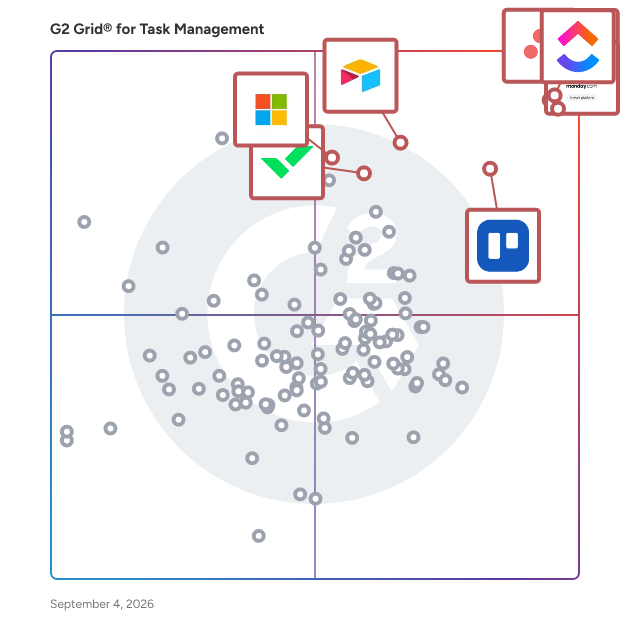
### Software and Services Related to Task Management Software

**Project Management Software —** Project management software assists employees, administrators, and teams with managing team goals and long-term projects. Task management software relates to project management software, in that it simply outlines individual efforts, breaks down components within a project, determines due dates, and allows for self-management. Combining these two software solutions together makes for a more efficient workspace across all teams at a company.

**Time Tracking Software —** Time tracking software (time management software) enables workers to either passively or manually track the time spent on projects, tasks, and other deliverables. Time tracking software increases productivity in employees, because it allows for accountability, helps discover which activities or events waste time, and keeps all time data in one location. It makes sense to integrate time tracking software into task management software so employees can visualize all data relating to their task in one central location.

**Business Process Management Software —** Business process management (BPM) software helps define, automate, and report on processes that are intended to help optimize a business’ ability to deliver on company goals. This complements task management software by clearly defining the processes that span a company’s overall goals. This helps companies with workflow management and making business processes more efficient.


---
## What Are the Most Common Questions About Task Management Software?
*AI-generated · Last updated: June  3, 2026*
### Which tool supports offline task management for remote teams
Based on G2 reviews, buyers looking for remote-friendly task management often compare products that help teams stay aligned, track ownership, and keep work visible across projects. In recent reviews, users frequently mention collaboration, clear task status, due dates, and shared visibility as core needs for distributed work. Some reviews also specifically mention offline or outage-related limitations, so buyers should confirm that requirement directly when evaluating options.

- [Asana](https://www.g2.com/products/asana) — remote team alignment and deadlines.
- [Smartsheet](https://www.g2.com/products/smartsheet) — shared tracking and reminder workflows.
- [ClickUp](https://www.g2.com/products/clickup) — centralized tasks and team communication.
- [monday Work Management](https://www.g2.com/products/monday-com) — cross-team visibility and planning.


### Which vendor offers AI-powered task prioritization
Based on G2 reviews, buyers asking about AI-powered task prioritization usually want products that help teams decide what to tackle first, reduce manual follow-up, and surface the most important work. In recent reviews, users most often connect AI with summarization, automation, reminders, and priority setting rather than fully autonomous planning. Buyers should compare how well each option supports prioritization inside everyday workflows.

- [Asana](https://www.g2.com/products/asana) — AI suggestions and task prioritization.
- [ClickUp](https://www.g2.com/products/clickup) — AI summaries and workload planning.
- [monday Work Management](https://www.g2.com/products/monday-com) — AI automations and workload visibility.
- [Smartsheet](https://www.g2.com/products/smartsheet) — AI assistance with reminders.


### Which vendor provides advanced recurring task automation
Based on G2 reviews, recurring task automation is most often described in terms of reminders, repeatable workflows, templates, and automated follow-up. Buyers in this category tend to value products that reduce manual coordination, keep routine work from being missed, and make repeat processes easier to standardize across teams. Review themes suggest comparing how easily recurring work can be built, assigned, and monitored over time.

- [Asana](https://www.g2.com/products/asana) — recurring workflows and reminders.
- [Smartsheet](https://www.g2.com/products/smartsheet) — automated reminders and form workflows.
- [ClickUp](https://www.g2.com/products/clickup) — automations for repeat admin tasks.
- [monday Work Management](https://www.g2.com/products/monday-com) — automated status and task flows.


### What should buyers look for in task management software
According to verified users, strong task management software helps teams centralize work, assign ownership clearly, and keep deadlines visible without relying on scattered emails or spreadsheets. Recent reviews repeatedly mention customizable task views, subtasks, reminders, timelines, dashboards, and workload visibility as useful capabilities. Buyers also care about how easily a platform supports collaboration, recurring work, and integrations with tools already in use. Common frustrations include steep learning curves, notification overload, and features that feel hidden or hard to configure. For many teams, the best fit is software that balances ease of use with enough structure to manage priorities, progress, and accountability in one place.


### What features define modern task management
According to verified users, modern task management is defined by a mix of visibility, flexibility, and coordination. Across recent reviews, people consistently highlight task assignment, due dates, subtasks, multiple project views, reminders, dashboards, and automation as the features that matter most. Many also value integrations with tools like email, calendars, chat platforms, and file-sharing systems because they reduce switching between apps. Teams use these features to stay aligned, manage workloads, and keep projects moving with less manual follow-up. At the same time, reviewers note that the best tools avoid unnecessary complexity and make it easy to see priorities, ownership, and progress at a glance.