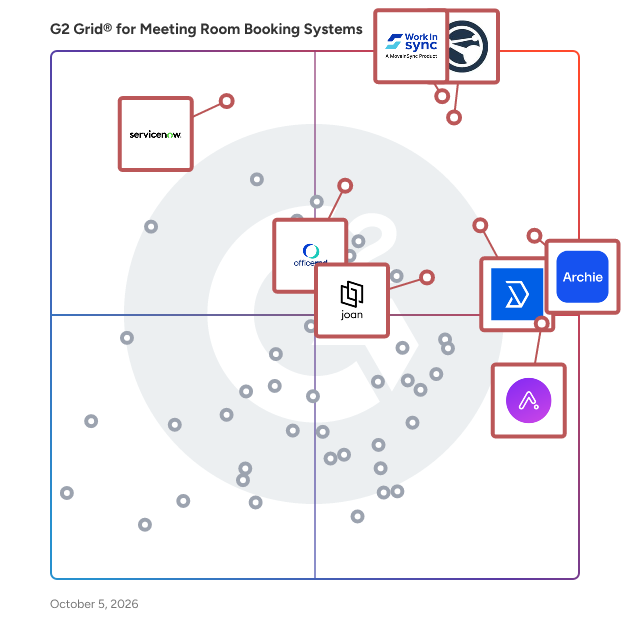
# Best Meeting Room Booking Systems

*By [Neeraja Prakash](https://research.g2.com/insights/author/neeraja-prakash)*


Meeting room booking systems provide simple tools for reserving conference rooms and other spaces or resources within an office or shared workplace. This software ensures that organizers and attendees have the necessary accommodations for important meetings, and at the same time, office managers maintain an accurate, up-to-date view of how company resources are being utilized. Office managers can program these platforms with user permissions and other restrictions to ensure the appropriate usage of these valuable resources. Meeting room booking systems are primarily used for planning out and inviting others to meetings such as team scrums, sales calls, one-on-ones, and brainstorming sessions. They are also used by members and community managers of [coworking spaces](https://www.g2.com/categories/coworking-spaces) for reserving rooms, desks, designated call areas, and quiet spaces. These tools improve workplace efficiency while preventing double bookings or other situations where meeting spaces and resources are unavailable at critical moments. Certain products in this category provide analytics features to offer insight into shared space usage and help refine room scheduling protocol.

Meeting room booking systems commonly integrate with [calendar software](https://www.g2.com/categories/calendar) so meeting organizers and attendees can view or manage meeting details, such as time and location, in relation to their general schedules. These tools also offer integrations with [email software](https://www.g2.com/categories/email), making it easy for organizers to send electronic invites to attendees. These tools often integrate with or share features of [visitor management software](https://www.g2.com/categories/visitor-management) to check in and track information about meeting attendees, particularly those from outside the company. A number of meeting room booking systems provide [digital signage](https://www.g2.com/categories/digital-signage) features to display meeting details outside of conference rooms and allow for streamlined check-in processes. This will usually involve external hardware such as tablets or digital displays, either from a third party or the software vendor themselves.

To qualify for inclusion in the Meeting Room Booking Systems category, a product must:

- Provide an overview of company conference rooms, along with scheduled meeting times and details
- Allow users with the appropriate permissions to book available meeting rooms, modify event details, and invite attendees
- Equip administrators, such as office managers, with tools to modify user permissions, room and resource details, and specific meeting information
- Sync with organizer and attendee calendar and/or email tools


## Top Meeting Room Booking Systems at a Glance
| # | Product | Rating | Best For | What Users Say |
|---|---------|--------|----------|----------------|
| 1 | [Appspace](https://www.g2.com/products/appspace/reviews) | 4.7/5.0 (150 reviews) | Hybrid workplace booking with digital signage | "[Effortless Centralized Digital Signage Control Across Every Screen](https://www.g2.com/survey_responses/appspace-review-12974545)" |
| 2 | [Archie](https://www.g2.com/products/archie-archie/reviews) | 4.9/5.0 (240 reviews) | Hybrid coordination with Microsoft-native workspace booking | "[A complete facility management platform](https://www.g2.com/survey_responses/archie-review-12443865)" |
| 3 | [Skedda](https://www.g2.com/products/skedda/reviews) | 4.8/5.0 (282 reviews) | Visual floor plan booking with hybrid work rules | "[Smooth Onboarding, Easy-to-Use Workflow That Saves Time](https://www.g2.com/survey_responses/skedda-review-12574650)" |
| 4 | [WorkInSync](https://www.g2.com/products/workinsync/reviews) | 4.6/5.0 (239 reviews) | Hybrid office booking with team coordination | "[Convenient tool, helps plan office days better](https://www.g2.com/survey_responses/workinsync-review-12664405)" |
| 5 | [Joan](https://www.g2.com/products/joan/reviews) | 4.5/5.0 (263 reviews) | Battery-powered room displays with calendar sync | "[Effortless Office Seat Reservation with Seamless Integration](https://www.g2.com/survey_responses/joan-review-12547296)" |
| 6 | [UnSpot](https://www.g2.com/products/unspot/reviews) | 5.0/5.0 (320 reviews) | Hybrid desk and meeting room coordination | "[Good tool but check-in rules annoying sometimes](https://www.g2.com/survey_responses/unspot-review-11048444)" |
| 7 | [OfficeRnD Flex](https://www.g2.com/products/officernd-flex/reviews) | 4.6/5.0 (90 reviews) | Coworking operations with integrated membership billing | "[Great Responsive Support and a User-Friendly OfficeRND Experience](https://www.g2.com/survey_responses/officernd-flex-review-12634803)" |
| 8 | [Tactic](https://www.g2.com/products/tactic/reviews) | 4.6/5.0 (553 reviews) | Hybrid workspace coordination with visual floor maps | "[Tactic Review](https://www.g2.com/survey_responses/tactic-review-8109719)" |
| 9 | [OfficeSpace Software](https://www.g2.com/products/officespace-software/reviews) | 4.7/5.0 (124 reviews) | Visual space planning with hybrid desk booking | "[OfficeSpace Streamlines Facilities Management with Customizable, Data-Driven Planning](https://www.g2.com/survey_responses/officespace-software-review-12884933)" |
| 10 | [deskbird](https://www.g2.com/products/deskbird/reviews) | 4.5/5.0 (306 reviews) | — | "[Deskbird Made Desk Booking Easy, Accurate, and Hassle-Free](https://www.g2.com/survey_responses/deskbird-review-12516207)" |


## How Many Meeting Room Booking Systems Products Does G2 Track?
**Total Products under this Category:** 177

### Category Stats (Jun 2026)
- **Average Rating**: 4.47/5 The average rating of products in this category, based on all submitted ratings
- **Top Trending Product**: PULT (+0.61%) - Among all products in this category, PULT recorded the largest rating increase compared to last month
*Last updated: June 30, 2026*


## How Does G2 Rank Meeting Room Booking Systems Products?

**Why You Can Trust G2's Software Rankings:**

- 30 Analysts and Data Experts
- 6,100+ Authentic Reviews
- 177+ Products
- Unbiased Rankings

G2's software rankings are built on verified user reviews, rigorous moderation, and a consistent research methodology maintained by a team of analysts and data experts. Each product is measured using the same transparent criteria, with no paid placement or vendor influence. While reviews reflect real user experiences, which can be subjective, they offer valuable insight into how software performs in the hands of professionals. Together, these inputs power the G2 Score, a standardized way to compare tools within every category.


## Which Meeting Room Booking Systems Is Best for Your Use Case?

- **Leader:** [Appspace](https://www.g2.com/products/appspace/reviews)
- **Highest Performer:** [UnSpot](https://www.g2.com/products/unspot/reviews)
- **Easiest to Use:** [Roomzilla](https://www.g2.com/products/roomzilla/reviews)
- **Top Trending:** [JoinU](https://www.g2.com/products/joinu/reviews)
- **Best Free Software:** [Tactic](https://www.g2.com/products/tactic/reviews)


## What Are the Top-Rated Meeting Room Booking Systems Products in 2026?
### 1. [Appspace](https://www.g2.com/products/appspace/reviews)
Connect your people, places, and spaces. Appspace is the workplace experience platform for your whole team that lets you manage it all – from employee communications to your physical office spaces. So work-from-anywhere becomes an experience everyone loves.


**Average Rating:** 4.7/5.0
**Total Reviews:** 150
**How Do G2 Users Rate Appspace?**

- **Has the product been a good partner in doing business?:** 9.4/10 (Category avg: 9.1/10)
- **Room Booking:** 9.4/10 (Category avg: 9.0/10)
- **Calendar Scheduling:** 9.5/10 (Category avg: 8.6/10)
- **Meeting Management:** 9.4/10 (Category avg: 8.6/10)

**Who Is the Company Behind Appspace?**

- **Seller:** [Appspace](https://www.g2.com/sellers/appspace)
- **Company Website:** https://www.appspace.com/
- **Year Founded:** 2002
- **HQ Location:** Tampa, FL
- **Twitter:** @appspace (781 Twitter followers)
- **LinkedIn® Page:** https://www.linkedin.com/company/appspace/ (488 employees on LinkedIn®)

**Who Uses This Product?**
- **Top Industries:** Consumer Services, Information Technology and Services
- **Company Size:** 52% Mid-Market, 38% Small-Business


#### What Are Appspace's Pros and Cons?

**Pros:**

- Ease of Use (81 reviews)
- Features (40 reviews)
- Navigation Ease (36 reviews)
- Setup Ease (32 reviews)
- Easy Setup (31 reviews)

**Cons:**

- Confusion (15 reviews)
- Missing Features (15 reviews)
- Slow Loading (14 reviews)
- User Interface Issues (14 reviews)
- Poor Usability (13 reviews)


### What Do G2 Reviewers Say About Appspace?
*AI-generated summary from verified user reviews*

**Pros:**

- Users commend the **ease of use** of Appspace, highlighting its intuitive interface and efficient customization options.
- Users appreciate the **quick support and user-friendly features** of Appspace, enhancing workplace organization and meeting management.
- Users enjoy the **navigation ease** of Appspace, finding it simple and intuitive on any device.
- Users appreciate the **setup ease** of Appspace, finding the platform intuitive and efficient for their workflows.
- Users find Appspace&#39;s **setup process effortless** , allowing quick integration and effective use across various hardware solutions.

**Cons:**

- Users find the **interface confusing** , making it difficult to set up new users without guidance.
- Users are frustrated by **missing features** such as poor URL formats, file module limitations, and subpar integrations.
- Users find the **slow loading** of booking and features frustrating, impacting their overall experience with Appspace.
- Users face **user interface issues** such as clunky navigation, lag in updates, and outdated design elements.
- Users experience **poor usability** with Appspace, citing issues like battery drain, frustrating search filters, and broken integrations.

#### What Are Recent G2 Reviews of Appspace?

**"[Effortless Centralized Digital Signage Control Across Every Screen](https://www.g2.com/survey_responses/appspace-review-12974545)"**

**Rating:** 4.5/5.0 stars
*— Ivan K.*

[Read full review](https://www.g2.com/survey_responses/appspace-review-12974545)

---

**"[Effortless Campus Communication with Appspace](https://www.g2.com/survey_responses/appspace-review-11973853)"**

**Rating:** 5.0/5.0 stars
*— Chris H.*

[Read full review](https://www.g2.com/survey_responses/appspace-review-11973853)

---


#### What Are G2 Users Discussing About Appspace?

- [What is Beezy used for?](https://www.g2.com/discussions/what-is-beezy-used-for)

### 2. [Archie](https://www.g2.com/products/archie-archie/reviews)
Archie powers thousands of modern offices and shared workspaces worldwide, offering an integrated solution that includes meeting room and desk booking, visitor management, workspace analytics, and coworking software. A modern UI, powerful admin features, and an unparalleled user experience set Archie apart from other solutions. Both SMBs and enterprises love Archie’s extensive features, which include visual floor plans, visitor logs, check-in and check-out tracking, meeting room scheduling, seat assignment, multi-location management, smart automations, real-time notifications, a white label mobile app, SSO and SCIM, an open API, and much, much more. Archie also natively integrates with productivity tools (Slack, Teams, Google Calendar, and more), physical access systems (Kisi, Brivo, Salto, and more), payment providers, accounting software (QuickBooks and Xero), WiFi networks (Cisco, Ubiquiti, Aruba, and more), and many other solutions. Whether you’re looking for room and desk booking to power your hybrid office, visitor management for efficiency and compliance, or the right software to grow your coworking business, Archie is the solution for you.


**Average Rating:** 4.9/5.0
**Total Reviews:** 240
**How Do G2 Users Rate Archie?**

- **Has the product been a good partner in doing business?:** 9.3/10 (Category avg: 9.1/10)
- **Room Booking:** 9.5/10 (Category avg: 9.0/10)
- **Calendar Scheduling:** 9.3/10 (Category avg: 8.6/10)
- **Meeting Management:** 9.3/10 (Category avg: 8.6/10)

**Who Is the Company Behind Archie?**

- **Seller:** [Archie](https://www.g2.com/sellers/archie)
- **Company Website:** https://archieapp.co/
- **Year Founded:** 2016
- **HQ Location:** Montreal, Canada
- **LinkedIn® Page:** https://www.linkedin.com/company/archieapp/ (25 employees on LinkedIn®)

**Who Uses This Product?**
- **Who Uses This:** Graphic Designer
- **Top Industries:** Real Estate, Marketing and Advertising
- **Company Size:** 42% Mid-Market, 37% Small-Business


#### What Are Archie's Pros and Cons?

**Pros:**

- Ease of Use (71 reviews)
- Easy Booking (61 reviews)
- Seat Reservation (47 reviews)
- Desk Management (36 reviews)
- Reservation Ease (36 reviews)

**Cons:**

- Missing Features (21 reviews)
- Limited Features (16 reviews)
- Limited Customization (12 reviews)
- Lack of Customization (9 reviews)
- Booking Issues (7 reviews)


### What Do G2 Reviewers Say About Archie?
*AI-generated summary from verified user reviews*

**Pros:**

- Users find Archie **easy to use** , efficiently managing bookings and notifications with a user-friendly design for everyone.
- Users love the **easy booking** feature of Archie, appreciating its user-friendliness and seamless management of various tasks.
- Users value the **seamless seat reservation** feature of Archie, enabling efficient management of desks and meetings through Teams.
- Users enjoy the **seamless integration with Teams** for efficient desk and room management, enhancing their overall experience.
- Users value the **reservation ease** of Archie, allowing convenient management of bookings and schedules from anywhere.

**Cons:**

- Users find the **missing features** in Archie limiting, hoping for integrations and enhancements to improve usability.
- Users note several **limited features** in Archie, wishing for better customization and integration with other apps.
- Users desire more **customization options** in Archie, particularly for dashboards and mobile analytics, enhancing usability.
- Users find the **lack of customization** options limiting, wishing for more control over notifications and shortcuts.
- Users express concerns about **booking issues** , including tight check-in windows and the complexity of multiple booking options.

#### What Are Recent G2 Reviews of Archie?

**"[A complete facility management platform](https://www.g2.com/survey_responses/archie-review-12443865)"**

**Rating:** 5.0/5.0 stars
*— Anton M.*

[Read full review](https://www.g2.com/survey_responses/archie-review-12443865)

---

**"[Very impressed by Archie&#39;s product and team!](https://www.g2.com/survey_responses/archie-review-12622378)"**

**Rating:** 5.0/5.0 stars
*— Katy C.*

[Read full review](https://www.g2.com/survey_responses/archie-review-12622378)

---


### 3. [Skedda](https://www.g2.com/products/skedda/reviews)
Skedda is a leading global desk management and hybrid work platform, serving over 12,000 customers and nearly two million users, including IBM, Siemens, Mercedes-Benz, and Harvard University. We are defining the future of the workplace experience, helping businesses to design meaningful, seamless, fully integrated employee experiences and interactions in the hybrid workplace. Skedda integrates with Microsoft365, Google Workspace, Slack, and more, and has won awards from G2, Capterra, and SoftwareAdvice.


**Average Rating:** 4.8/5.0
**Total Reviews:** 282
**How Do G2 Users Rate Skedda?**

- **Has the product been a good partner in doing business?:** 9.7/10 (Category avg: 9.1/10)
- **Room Booking:** 9.6/10 (Category avg: 9.0/10)
- **Calendar Scheduling:** 9.0/10 (Category avg: 8.6/10)
- **Meeting Management:** 9.0/10 (Category avg: 8.6/10)

**Who Is the Company Behind Skedda?**

- **Seller:** [Skedda](https://www.g2.com/sellers/skedda)
- **Company Website:** https://www.skedda.com
- **Year Founded:** 2013
- **HQ Location:** Boston, Massachusetts
- **Twitter:** @skedda (331 Twitter followers)
- **LinkedIn® Page:** https://www.linkedin.com/company/3109431/ (106 employees on LinkedIn®)

**Who Uses This Product?**
- **Who Uses This:** Office Manager, Executive Assistant
- **Top Industries:** Non-Profit Organization Management, Financial Services
- **Company Size:** 64% Mid-Market, 25% Small-Business


#### What Are Skedda's Pros and Cons?

**Pros:**

- Ease of Use (47 reviews)
- Customer Support (30 reviews)
- Helpful (26 reviews)
- Implementation Ease (24 reviews)
- Intuitive (24 reviews)

**Cons:**

- Missing Features (8 reviews)
- Limited Customization (6 reviews)
- Booking Issues (4 reviews)
- Booking Limitations (4 reviews)
- Editing Issues (3 reviews)


### What Do G2 Reviewers Say About Skedda?
*AI-generated summary from verified user reviews*

**Pros:**

- Users appreciate the **ease of use** of Skedda, enabling effortless desk booking and efficient space management.
- Users commend the **responsive customer support** of Skedda, praising their quick, thorough, and personalized assistance.
- Users appreciate the **exceptional customer support** from Skedda, enabling seamless onboarding and prompt assistance throughout their journey.
- Users find Skedda provides **implementation ease** with helpful support, making it user-friendly for organizations.
- Users appreciate the **intuitive design** of Skedda, making scheduling and management effortless and user-friendly.

**Cons:**

- Users find Skedda lacking in **missing features** like integration with Bright Author and flexible booking options.
- Users note the **limited customization** options in Skedda, wishing for more flexibility in bookings and pricing.
- Users face **booking issues** due to limited options, high costs for non-physical spaces, and admin access restrictions.
- Users feel the **booking limitations** hinder efficiency, especially with the inability to reserve multiple consecutive days easily.
- Users face **editing issues** that delay updates and complicate local adjustments, limiting efficiency and clarity in communication.

#### What Are Recent G2 Reviews of Skedda?

**"[Smooth Onboarding, Easy-to-Use Workflow That Saves Time](https://www.g2.com/survey_responses/skedda-review-12574650)"**

**Rating:** 5.0/5.0 stars
*— Jason C.*

[Read full review](https://www.g2.com/survey_responses/skedda-review-12574650)

---

**"[Great all round booking tool](https://www.g2.com/survey_responses/skedda-review-10748038)"**

**Rating:** 5.0/5.0 stars
*— Carolyn H.*

[Read full review](https://www.g2.com/survey_responses/skedda-review-10748038)

---


#### What Are G2 Users Discussing About Skedda?

- [Does Skedda integrate with Outlook?](https://www.g2.com/discussions/does-skedda-integrate-with-outlook) - 1 comment
- [What is Skedda booking?](https://www.g2.com/discussions/what-is-skedda-booking) - 1 comment
- [How do you use Skedda?](https://www.g2.com/discussions/how-do-you-use-skedda) - 3 comments
- [What does Skedda do?](https://www.g2.com/discussions/what-does-skedda-do) - 1 comment

### 4. [WorkInSync](https://www.g2.com/products/workinsync/reviews)
WorkInSync is an AI workplace management software platform (SaaS) that helps enterprises design, operate, and optimize modern workplaces. A product by MoveInSync, it consolidates desk booking, meeting room management, visitor management, parking management, cafeteria management, employee scheduling, and digital wayfinding into a single, unified platform. The solution is built for Workplace leaders, CHROs, Facility, Admin, IT teams at organizations operating hybrid work models, multi-location offices, or large enterprise campuses where resource utilization and employee experience are strategic priorities. Trusted by 400+ organizations including 112 Fortune 500 companies across 39 countries, WorkInSync is built by MoveInSync, recognized as a Deloitte Technology Fast 50 winner in 2023 and 2024. The platform is SOC 2 Type 2, ISO 27001:2013, and ISO 27701:2019 certified, and GDPR compliant, with 24x7 global support. Its integration capabilities connect with over 45 popular workplace tools including Microsoft Teams, Outlook, Google Workspace, SAP, Okta, Workday, and various HRMS systems, ensuring seamless incorporation into existing organizational workflows. WorkInSync brings intelligence into everyday workplace decisions through AI-powered recommendations, real-time availability, and predictive insights.It enables organizations to have automated workflows, real-time visibility, and centralized control to efficiently manage resources, reduce ghost bookings, and improve overall space utilization. With advanced workplace analytics, custom AI reports, and intuitive dashboards, WorkInSync enables enterprises to make precise, data-backed decisions on occupancy, demand patterns, and real estate planning. Workplace managers can access visual summaries, run chat-based queries, and generate tailored reports to track what matters most. Its AI-powered forecasting capabilities allow organizations to predict real estate requirements, seat occupancy, identify peak office days, and plan resources in advance. WorkInSync&#39;s interactive floor kiosks serve as a physical touchpoint across offices, enabling employees and visitors to navigate spaces, make bookings, and check in, all from a single digital interface. WorkInSync helps organizations transform workplaces into strategic assets.


**Average Rating:** 4.6/5.0
**Total Reviews:** 239
**How Do G2 Users Rate WorkInSync?**

- **Has the product been a good partner in doing business?:** 9.3/10 (Category avg: 9.1/10)
- **Room Booking:** 9.6/10 (Category avg: 9.0/10)
- **Calendar Scheduling:** 9.5/10 (Category avg: 8.6/10)
- **Meeting Management:** 9.4/10 (Category avg: 8.6/10)

**Who Is the Company Behind WorkInSync?**

- **Seller:** [MoveInSync](https://www.g2.com/sellers/moveinsync)
- **Company Website:** https://www.moveinsync.com/
- **Year Founded:** 2009
- **HQ Location:** Bangalore
- **LinkedIn® Page:** https://www.linkedin.com/company/1853336/ (888 employees on LinkedIn®)

**Who Uses This Product?**
- **Who Uses This:** Software Engineer, Associate
- **Top Industries:** Information Technology and Services, Computer Software
- **Company Size:** 48% Mid-Market, 41% Enterprise


#### What Are WorkInSync's Pros and Cons?

**Pros:**

- Easy Booking (29 reviews)
- Convenience (20 reviews)
- Ease of Use (17 reviews)
- Reservation Ease (15 reviews)
- Scheduling Ease (15 reviews)

**Cons:**

- Booking Issues (8 reviews)
- Check-in Issues (4 reviews)
- Slow Loading (4 reviews)
- User Interface Issues (4 reviews)
- Booking Limitations (3 reviews)


### What Do G2 Reviewers Say About WorkInSync?
*AI-generated summary from verified user reviews*

**Pros:**

- Users value the **easy booking** feature of WorkInSync, streamlining their daily tasks with convenient integrations.
- Users appreciate the **desk booking system** for its ease of use and convenience, enhancing their office experience.
- Users commend the **ease of use** of WorkInSync, making desk and parking bookings incredibly convenient through the app.
- Users enjoy the **reservation ease** of WorkInSync, significantly simplifying seat and parking slot bookings before arriving at the office.
- Users appreciate the **easy desk booking system** of WorkInSync, finding it convenient and a great relief.

**Cons:**

- Users face **booking issues** with WorkInSync due to lack of seamless transitions and missing features for room management.
- Users experience **check-in issues** and desire automatic check-in upon connecting to office Wi-Fi.
- Users report **slow loading times** with WorkInSync, particularly during high usage, leading to frustrating experiences.
- Users find **user interface issues** between WorkInSync and its booking system lead to some confusion, especially for new users.
- Users find the **booking limitations** frustrating, needing features like recurring bookings and saved seat selections.

#### What Are Recent G2 Reviews of WorkInSync?

**"[Convenient tool, helps plan office days better](https://www.g2.com/survey_responses/workinsync-review-12664405)"**

**Rating:** 5.0/5.0 stars
*— Neha T.*

[Read full review](https://www.g2.com/survey_responses/workinsync-review-12664405)

---

**"[Visitor check-ins that don’t cause panic - Great booking experience, 4 clicks to book.](https://www.g2.com/survey_responses/workinsync-review-12999548)"**

**Rating:** 5.0/5.0 stars
*— Verified User in Information Technology and Services*

[Read full review](https://www.g2.com/survey_responses/workinsync-review-12999548)

---


#### What Are G2 Users Discussing About WorkInSync?

- [What is WorkInSync used for?](https://www.g2.com/discussions/what-is-workinsync-used-for) - 1 comment

### 5. [Joan](https://www.g2.com/products/joan/reviews)
Joan is an all-inclusive workplace platform that helps businesses streamline meeting room booking, desk reservations, visitor management, workplace digital signage, and asset management with intuitive software and energy-efficient e-paper displays. Designed for modern hybrid work environments, Joan eliminates scheduling conflicts, improves space utilization, and enhances workplace efficiency with powerful analytics and seamless integrations. One of Joan’s standout features is its energy-efficient e-paper displays, which provide real-time updates on room availability without the need for excessive power consumption. Unlike traditional room booking systems that rely on outdated screens or manual scheduling, Joan’s sleek, battery-powered displays offer a modern, sustainable, and cost-effective alternative. Beyond hardware, Joan’s cloud-based software seamlessly integrates with popular workplace tools like Microsoft Outlook, Google Workspace, and Slack. This allows teams to reserve meeting rooms, desks, or other resources with just a few clicks—no more confusion, wasted time, or interruptions. Additionally, Joan’s visitor management system enhances office security and compliance by digitizing the check-in process, ensuring a smooth and professional experience for guests. Joan is built for businesses of all sizes, from small startups to global enterprises. Its scalable platform helps companies optimize office space, reduce administrative burdens, and improve collaboration in a world where flexibility is key. Whether you&#39;re managing a hybrid workforce, reducing no-show meetings, or implementing a seamless desk booking system, Joan provides the complete set of tools to create a more efficient and connected workplace. With an intuitive interface, industry-leading energy efficiency, and seamless integrations, Joan is the ultimate solution for companies looking to future-proof their office operations. Why Choose Joan? • All-Inclusive Platform: Everything your workplace needs including room, desk and asset booking, visitor management, signage and analytics in one connected solution. • Energy Efficiency: Joan’s e-paper displays use ultra-low power, making them one of the most energy-efficient workplace solutions on the market. • Seamless Integrations: Connect Joan with Microsoft 365, Google Workspace, Slack, and other tools for a frictionless scheduling experience. • User-Friendly Interface: Both the software and hardware are designed for ease of use, requiring minimal setup and maintenance. • Scalability: Whether you have a small office or a large corporate campus, Joan adapts to your needs with customizable solutions. • Sustainability: Reduce paper waste and energy consumption while streamlining office operations.


**Average Rating:** 4.5/5.0
**Total Reviews:** 263
**How Do G2 Users Rate Joan?**

- **Has the product been a good partner in doing business?:** 8.9/10 (Category avg: 9.1/10)
- **Room Booking:** 9.3/10 (Category avg: 9.0/10)
- **Calendar Scheduling:** 9.1/10 (Category avg: 8.6/10)
- **Meeting Management:** 8.4/10 (Category avg: 8.6/10)

**Who Is the Company Behind Joan?**

- **Seller:** [Joan Workplace Management](https://www.g2.com/sellers/joan-workplace-management)
- **Company Website:** https://getjoan.com/
- **Year Founded:** 2007
- **HQ Location:** Ljubljana, SI
- **Twitter:** @meetJOAN (3,828 Twitter followers)
- **LinkedIn® Page:** https://www.linkedin.com/showcase/meetjoan/?originalSubdomain=si

**Who Uses This Product?**
- **Who Uses This:** IT Manager
- **Top Industries:** Computer Software, Marketing and Advertising
- **Company Size:** 76% Mid-Market, 19% Small-Business


#### What Are Joan's Pros and Cons?

**Pros:**

- Ease of Use (55 reviews)
- Simple (30 reviews)
- Easy Booking (28 reviews)
- Customer Support (19 reviews)
- Helpful (19 reviews)

**Cons:**

- Booking Issues (10 reviews)
- Expensive (10 reviews)
- Poor Usability (8 reviews)
- Slow Internet Connectivity (7 reviews)
- Slow Loading (7 reviews)


### What Do G2 Reviewers Say About Joan?
*AI-generated summary from verified user reviews*

**Pros:**

- Users find Joan&#39;s **ease of use** invaluable, facilitating quick desk bookings without extensive training.
- Users value the **simple and user-friendly interface** of Joan, making desk booking effortless and efficient.
- Users love the **easy booking** feature of Joan, which simplifies desk reservations and enhances office organization.
- Users commend the **helpful customer support** of Joan, enhancing their overall experience with the product.
- Users find Joan&#39;s **ease of setup and user-friendliness** invaluable for managing schedules and office space efficiently.

**Cons:**

- Users experience **booking issues** , wishing for more flexibility and improved reservation management for their desk bookings.
- Users find the product **expensive** , noting that the high cost could be more justifiable with improved features.
- Users find **poor usability** in Joan, struggling with desk bookings and limited functionality across different environments.
- Users experience **slow internet connectivity** , causing disruptions and occasional disconnections that affect overall performance.
- Users find the **slow loading** times frustrating, affecting their overall experience and ease of use with Joan.

#### What Are Recent G2 Reviews of Joan?

**"[Revolutionized Our Room Scheduling and Visitor Management](https://www.g2.com/survey_responses/joan-review-12989129)"**

**Rating:** 5.0/5.0 stars
*— Jón Ragnar V.*

[Read full review](https://www.g2.com/survey_responses/joan-review-12989129)

---

**"[Effortless Office Seat Reservation with Seamless Integration](https://www.g2.com/survey_responses/joan-review-12547296)"**

**Rating:** 4.5/5.0 stars
*— Leandros D.*

[Read full review](https://www.g2.com/survey_responses/joan-review-12547296)

---


#### What Are G2 Users Discussing About Joan?

- [What is Joan used for?](https://www.g2.com/discussions/what-is-joan-used-for) - 1 upvote

### 6. [UnSpot](https://www.g2.com/products/unspot/reviews)
After the pandemic, many employees no longer need to work from the office 5 days a week, and companies no longer need to have a workplace assigned to only 1 person, allowing different people to sit at the same place on different days. Find the best workplace, with the right equipment, or find a colleague you want to sit with. Book a table or meeting room in one click. Plan your schedule around when the team will be in the office, without long discussions. Don’t miss the days when a colleague you want to talk to comes to the office. Find your way around offices or floors where you rarely visit. The system contains all the necessary integrations for ease of use, such as Active Directory, and Google and Exchange calendars.It also has a highly developed functionality for finding and booking meeting rooms, including placing displays at the front of the room. If a company even partially introduces flexible jobs, this gives people a choice, and the company the opportunity to increase staff without a costly relocation to another office. Don’t let hybrid work get in the way of working together. Give employees an easy way to manage their hybrid schedule, invite co-workers onsite, and book a nearby desk in one click, both from desktop or mobile app.


**Average Rating:** 5.0/5.0
**Total Reviews:** 320
**How Do G2 Users Rate UnSpot?**

- **Has the product been a good partner in doing business?:** 10.0/10 (Category avg: 9.1/10)
- **Room Booking:** 10.0/10 (Category avg: 9.0/10)
- **Calendar Scheduling:** 10.0/10 (Category avg: 8.6/10)
- **Meeting Management:** 10.0/10 (Category avg: 8.6/10)

**Who Is the Company Behind UnSpot?**

- **Seller:** [UnSpot](https://www.g2.com/sellers/unspot)
- **Year Founded:** 2021
- **HQ Location:** New York, NY
- **LinkedIn® Page:** https://www.linkedin.com/company/unspot/ (9 employees on LinkedIn®)

**Who Uses This Product?**
- **Who Uses This:** Support manager
- **Top Industries:** Human Resources, Information Technology and Services
- **Company Size:** 48% Enterprise, 36% Mid-Market


#### What Are UnSpot's Pros and Cons?

**Pros:**

- Ease of Use (23 reviews)
- Easy Booking (21 reviews)
- Simple (21 reviews)
- Planning Efficiency (12 reviews)
- Easy Reservation (11 reviews)

**Cons:**

- Booking Issues (5 reviews)
- Check-in Issues (5 reviews)
- Slow Loading (5 reviews)
- Limited Customization (4 reviews)
- Desk Booking (3 reviews)


### What Do G2 Reviewers Say About UnSpot?
*AI-generated summary from verified user reviews*

**Pros:**

- Users appreciate the **ease of use** of UnSpot, enhancing collaboration and simplifying desk booking on-the-go.
- Users love the **easy booking** feature of UnSpot, appreciating its simplicity and efficient notifications for reservations.
- Users love the **ease of use** of UnSpot, appreciating its quick booking process and intuitive mobile app.
- Users love the **easy-to-use booking system** of UnSpot, streamlining desk reservations with a clean layout and notifications.
- Users find UnSpot&#39;s **intuitive design** immensely beneficial, enhancing their efficiency in managing office spaces.

**Cons:**

- Users experience **booking issues** with slow loading, missed notifications, and limited search functionality, causing frustration during reservations.
- Users face **check-in issues** with slow Wi-Fi registration and accidental desk releasing due to button placement complications.
- Users often face **slow loading** times, especially during high traffic, causing delays in booking a desk.
- Users find the **limited customization** in UnSpot&#39;s analytics and mobile app restrictive for tailoring their needs effectively.
- Users note that **integration issues** hinder seamless functionality with existing applications, affecting overall workflow and user experience.

#### What Are Recent G2 Reviews of UnSpot?

**"[Good tool but check-in rules annoying sometimes](https://www.g2.com/survey_responses/unspot-review-11048444)"**

**Rating:** 5.0/5.0 stars
*— Walter  G.*

[Read full review](https://www.g2.com/survey_responses/unspot-review-11048444)

---

**"[Effortless Workspace Management with Minor Glitches](https://www.g2.com/survey_responses/unspot-review-12441583)"**

**Rating:** 4.5/5.0 stars
*— Abdullahi J.*

[Read full review](https://www.g2.com/survey_responses/unspot-review-12441583)

---


#### What Are G2 Users Discussing About UnSpot?

- [What are the benefits and challenges of using UnSpot for workspace management?](https://www.g2.com/discussions/what-are-the-benefits-and-challenges-of-using-unspot-for-workspace-management)

### 7. [OfficeRnD Flex](https://www.g2.com/products/officernd-flex/reviews)
OfficeRnD Flex is a customizable platform designed specifically for coworking and flexible space operators, enabling them to efficiently manage and automate various aspects of their operations. This comprehensive solution addresses the needs of operators by facilitating member management, booking processes, billing, and space utilization, all while enhancing the overall experience for members. The target audience for OfficeRnD Flex includes coworking space operators, flexible office providers, and shared workspace managers who are looking to streamline their operations and improve member engagement. The platform is particularly beneficial for those who wish to create a seamless environment for their users, allowing them to focus on their core business while the platform handles the administrative tasks. Specific use cases include managing member subscriptions, scheduling room bookings, and automating billing processes, which can significantly reduce the time and effort required for these tasks. Key features of OfficeRnD Flex include its robust operations management capabilities, which allow for the automation of member onboarding, booking systems, and billing cycles. This not only saves time but also minimizes the risk of human error. The platform also prioritizes member experience by offering best-in-class digital interfaces that facilitate easy navigation and interaction. Upcoming products, such as the Growth Hub, will introduce a powerful e-commerce engine tailored for coworking spaces, enabling operators to expand their service offerings and generate additional revenue streams. Additionally, Visitor Hub, the visitor management product, simplifies the management of guest arrivals and reception processes, ensuring a smooth experience for both members and visitors. Data Hub provides advanced reporting and analytics, allowing operators to gain insights into their business performance and make informed decisions based on real-time data. Furthermore, OfficeRnD Flex supports integrations with a variety of tools and systems, ensuring that operators can create a cohesive ecosystem that meets their unique operational needs. Overall, OfficeRnD Flex stands out in the coworking management software category by offering a comprehensive suite of features that cater to the specific challenges faced by flexible space operators. Its focus on automation, member experience, and data-driven insights positions it as a valuable tool for those looking to optimize their operations and foster growth in a competitive market.


**Average Rating:** 4.6/5.0
**Total Reviews:** 90
**How Do G2 Users Rate OfficeRnD Flex?**

- **Has the product been a good partner in doing business?:** 9.4/10 (Category avg: 9.1/10)
- **Room Booking:** 9.5/10 (Category avg: 9.0/10)
- **Calendar Scheduling:** 9.0/10 (Category avg: 8.6/10)
- **Meeting Management:** 8.8/10 (Category avg: 8.6/10)

**Who Is the Company Behind OfficeRnD Flex?**

- **Seller:** [OfficeRnD](https://www.g2.com/sellers/officernd)
- **Company Website:** https://officernd.com/
- **Year Founded:** 2015
- **HQ Location:** LONDON, GB
- **Twitter:** @officernd (1,737 Twitter followers)
- **LinkedIn® Page:** https://www.linkedin.com/company/officernd/ (173 employees on LinkedIn®)

**Who Uses This Product?**
- **Who Uses This:** Community Manager
- **Top Industries:** Commercial Real Estate, Hospitality
- **Company Size:** 78% Small-Business, 20% Mid-Market


#### What Are OfficeRnD Flex's Pros and Cons?

**Pros:**

- Ease of Use (35 reviews)
- Customer Support (23 reviews)
- Integrations (14 reviews)
- Easy Integrations (11 reviews)
- Easy Navigation (11 reviews)

**Cons:**

- Missing Features (18 reviews)
- Limited Customization (6 reviews)
- Poor Usability (6 reviews)
- Integration Issues (5 reviews)
- Communication Issues (4 reviews)


### What Do G2 Reviewers Say About OfficeRnD Flex?
*AI-generated summary from verified user reviews*

**Pros:**

- Users praise the **ease of use** of OfficeRnD Flex, simplifying management of bookings and invoicing efficiently.
- Users praise the **fantastic customer support** of OfficeRnD Flex for its quick and effective resolutions.
- Users find the **extremely helpful integrations** of OfficeRnD Flex enhance their overall management experience significantly.
- Users value the **easy integrations** of OfficeRnD Flex, enhancing functionality and streamlining their coworking management experience.
- Users value the **easy navigation** of OfficeRnD Flex, enhancing their booking experience and overall satisfaction.

**Cons:**

- Users find the **missing features** , like improved booking options and member differentiation, limit their overall experience with OfficeRnD Flex.
- Users express frustration over **limited customization** in OfficeRnD Flex, hindering personalized experiences for members and bookings.
- Users find the **poor usability** of OfficeRnD Flex frustrating, as features and processes often lack refinement and efficiency.
- Users face **integration issues** with OfficeRnD Flex, affecting communication with third-party applications and overall experience.
- Users experience **communication issues** with OfficeRnD Flex, leading to confusion and discrepancies during updates and integrations.

#### What Are Recent G2 Reviews of OfficeRnD Flex?

**"[Great Responsive Support and a User-Friendly OfficeRND Experience](https://www.g2.com/survey_responses/officernd-flex-review-12634803)"**

**Rating:** 5.0/5.0 stars
*— Monica P.*

[Read full review](https://www.g2.com/survey_responses/officernd-flex-review-12634803)

---

**"[Great support from OfficeRND Team](https://www.g2.com/survey_responses/officernd-flex-review-7375704)"**

**Rating:** 4.5/5.0 stars
*— Halston A.*

[Read full review](https://www.g2.com/survey_responses/officernd-flex-review-7375704)

---


#### What Are G2 Users Discussing About OfficeRnD Flex?

- [What is OfficeRnD Flex used for?](https://www.g2.com/discussions/what-is-officernd-flex-used-for)

### 8. [Tactic](https://www.g2.com/products/tactic/reviews)
Tactic is an intuitive workspace management platform that makes hybrid work simple. We help companies optimize their desk booking, room scheduling, and visitor management in one easy-to-use system. With powerful integrations and real-time occupancy data, Tactic enables teams to collaborate seamlessly, reduce overhead, and improve employee satisfaction. We’re trusted by leading organizations like Redbull, HPE, and the United Nations. Let Tactic streamline your workspace today! 💬 Want instant answers? Chat with Tessa, our AI sales assistant @ www.gettactic.com/ask-tessa


**Average Rating:** 4.6/5.0
**Total Reviews:** 553
**How Do G2 Users Rate Tactic?**

- **Has the product been a good partner in doing business?:** 9.5/10 (Category avg: 9.1/10)
- **Room Booking:** 9.6/10 (Category avg: 9.0/10)
- **Calendar Scheduling:** 9.3/10 (Category avg: 8.6/10)
- **Meeting Management:** 9.3/10 (Category avg: 8.6/10)

**Who Is the Company Behind Tactic?**

- **Seller:** [Tactic](https://www.g2.com/sellers/tactic)
- **Company Website:** https://gettactic.com
- **Year Founded:** 2021
- **HQ Location:** Lehi, US
- **Twitter:** @tacticsoftware (272 Twitter followers)
- **LinkedIn® Page:** https://www.linkedin.com/company/gettactic/ (24 employees on LinkedIn®)

**Who Uses This Product?**
- **Who Uses This:** Customer Concierge, Data Entry Specialist
- **Top Industries:** Outsourcing/Offshoring, Accounting
- **Company Size:** 72% Mid-Market, 15% Small-Business


#### What Are Tactic's Pros and Cons?

**Pros:**

- Ease of Use (36 reviews)
- Intuitive (22 reviews)
- User Interface (16 reviews)
- Functionality (14 reviews)
- Easy Booking (13 reviews)

**Cons:**

- Booking Issues (11 reviews)
- Slow Loading (9 reviews)
- Inconvenience (7 reviews)
- Limited Customization (7 reviews)
- Reservation Issues (7 reviews)


### What Do G2 Reviewers Say About Tactic?
*AI-generated summary from verified user reviews*

**Pros:**

- Users value the **ease of use** of Tactic, enhancing their hybrid work experience with flexible mobile access and clear scheduling.
- Users value the **intuitive interface** of Tactic, enhancing their workspace management and overall user experience seamlessly.
- Users value Tactic&#39;s **intuitive user interface** , which simplifies booking and enhances collaboration for hybrid workplace management.
- Users appreciate Tactic&#39;s **mobile flexibility** , allowing seamless schedule management and enhanced coordination for hybrid work dynamics.
- Users find Tactic to be a **helpful assistant** that organizes meetings and follow-ups effectively, enhancing team alignment.

**Cons:**

- Users report **booking issues** , including sync problems and inability to book rooms, which hamper usability.
- Users find the **slow loading** of Tactic frustrating, particularly during fluctuating internet connections and login attempts.
- Users face **reservation issues** with Tactic, including booking errors and confusion over available desks, impacting usability.
- Users experience **user interface issues** with Tactic, finding it cluttered and occasionally laggy, hindering the booking process.
- Users experience frequent **check-in issues** due to staff forgetting to confirm meetings, leading to room availability confusion.

#### What Are Recent G2 Reviews of Tactic?

**"[Easy Room Booking with a Clean, User-Friendly Interface](https://www.g2.com/survey_responses/tactic-review-13029523)"**

**Rating:** 4.0/5.0 stars
*— Edzmiera S.*

[Read full review](https://www.g2.com/survey_responses/tactic-review-13029523)

---

**"[Tactic Review](https://www.g2.com/survey_responses/tactic-review-8109719)"**

**Rating:** 5.0/5.0 stars
*— John S.*

[Read full review](https://www.g2.com/survey_responses/tactic-review-8109719)

---


### 9. [OfficeSpace Software](https://www.g2.com/products/officespace-software/reviews)
Rated #1 for Enterprise Space Management, Desk Booking, and Room Booking, OfficeSpace is the leading AI Operating System for the Built World, defining a new category of workplace software. The OfficeSpace platform, enhanced with AI Canvas, empowers more than 1,800 organizations worldwide to plan, operate, and experience their built world within a single intelligent system. OfficeSpace helps organizations optimize space utilization, right-size real estate portfolios, manage assets across their lifecycle, streamline maintenance, and deliver intuitive, human-centered workplace experiences. OfficeSpace comes fully integrated out of the box with workplace tools like Microsoft, Google, Slack, and Zoom, and securely connects data from Wi-Fi, badge systems, and sensors to provide a unified system of record and action for the built world.


**Average Rating:** 4.7/5.0
**Total Reviews:** 124
**How Do G2 Users Rate OfficeSpace Software?**

- **Has the product been a good partner in doing business?:** 9.5/10 (Category avg: 9.1/10)
- **Room Booking:** 9.3/10 (Category avg: 9.0/10)
- **Calendar Scheduling:** 8.9/10 (Category avg: 8.6/10)
- **Meeting Management:** 8.9/10 (Category avg: 8.6/10)

**Who Is the Company Behind OfficeSpace Software?**

- **Seller:** [OfficeSpace Software](https://www.g2.com/sellers/officespace-software)
- **Company Website:** https://www.officespacesoftware.com
- **Year Founded:** 2006
- **HQ Location:** Alpharetta, Georgia
- **Twitter:** @OfficeSpaceSw (1,882 Twitter followers)
- **LinkedIn® Page:** https://www.linkedin.com/company/314276/ (241 employees on LinkedIn®)

**Who Uses This Product?**
- **Top Industries:** Computer Software, Financial Services
- **Company Size:** 51% Mid-Market, 48% Enterprise


#### What Are OfficeSpace Software's Pros and Cons?

**Pros:**

- Ease of Use (21 reviews)
- Intuitive (10 reviews)
- Customer Support (8 reviews)
- Functionality (7 reviews)
- Organization (7 reviews)

**Cons:**

- Missing Features (5 reviews)
- Limited Customization (4 reviews)
- Booking Issues (2 reviews)
- Check-in Issues (2 reviews)
- Insufficient Details (2 reviews)


### What Do G2 Reviewers Say About OfficeSpace Software?
*AI-generated summary from verified user reviews*

**Pros:**

- Users find OfficeSpace Software to have a **highly intuitive design** , making it effortless for all employees to use.
- Users find OfficeSpace Software to be **extremely intuitive** , enhancing usability for both employees and corporate real estate professionals.
- Users appreciate the **exceptional customer support** from OfficeSpace, ensuring effective guidance and smooth system implementation.
- Users value the **intuitive functionality** of OfficeSpace Software, enhancing workspace management and overall user experience.
- Users value the **well-organized platform** of OfficeSpace, which simplifies workspace management and enhances employee experience.

**Cons:**

- Users note the **missing features** in OfficeSpace, particularly for asset management and workflow integration.
- Users express a need for **limited customization** options in OfficeSpace Software, particularly for workflows and specific features.
- Users experience **booking issues** due to scattered data and calendar visibility problems when creating room bookings.
- Users experience **check-in issues** due to reliance on third-party integrations and difficulties in managing available seating.
- Users find the **insufficient details** in OfficeSpace Software frustrating, desiring more immediate information on workstations and associates.

#### What Are Recent G2 Reviews of OfficeSpace Software?

**"[OfficeSpace Streamlines Facilities Management with Customizable, Data-Driven Planning](https://www.g2.com/survey_responses/officespace-software-review-12884933)"**

**Rating:** 4.5/5.0 stars
*— Verified User in Financial Services*

[Read full review](https://www.g2.com/survey_responses/officespace-software-review-12884933)

---

**"[Enhancing Workplace Efficiency and Space Utilisation](https://www.g2.com/survey_responses/officespace-software-review-12316233)"**

**Rating:** 4.5/5.0 stars
*— Sunny B.*

[Read full review](https://www.g2.com/survey_responses/officespace-software-review-12316233)

---


#### What Are G2 Users Discussing About OfficeSpace Software?

- [What do you recommend when choosing to replace OfficeSpace Software with another workspace management tool?](https://www.g2.com/discussions/what-do-you-recommend-when-choosing-to-replace-officespace-software-with-another-workspace-management-tool)
- [What does Officespace Software do?](https://www.g2.com/discussions/what-does-officespace-software-do)
- [Who owns office space?](https://www.g2.com/discussions/who-owns-office-space)
- [What is space planning software?](https://www.g2.com/discussions/what-is-space-planning-software)
- [What does OfficeSpace do?](https://www.g2.com/discussions/what-does-officespace-do) - 1 comment

### 10. [deskbird](https://www.g2.com/products/deskbird/reviews)
deskbird is the workplace management platform that puts employees first. With an intuitive booking system for desk and other resources, powerful analytics, visitor management and easy integrations, it saves costs, optimizes office space, boosts productivity, and fosters team collaboration—all in one easy-to-use app. Why deskbird is different from other solutions out there? 📱 It’s a comprehensive solution: no need to juggle multiple apps. deskbird brings everything you need to book desks and check your schedule at your fingertips. ✅ It’s seriously simple: don’t take our word for it. Thousands of customers worldwide love how intuitive deskbird is and that it does what it says without training. Some say it’s so simple that even a child could use it. 💪 But powerful at the same time: deskbird delivers state-of-the-art analytics, desk and resource booking tools, scheduling, visitor management, AI recommendations, and anything you need to manage your office efficiently, all while being easy to use. For all the reasons above, but mostly because it’s not just another app. It’s a valuable companion in their flexible work life. 🤝 It encourages team collaboration and engagement: see when your colleagues are in the office, making in-person meetings easier and ensuring productive office days. 🔧 It fits your needs: with 200+ integrations, deskbird fits easily into your workflow from day one, integrating with MS Teams, Outlook, Slack, and more. Made in Switzerland and hosted in Germany, our cloud infrastructure is fully certified with industry standards, such as ISO27001 and SOC2 Type 2. deskbird is the only workplace management platform you will ever need for an efficient hybrid office. Ready to make the switch?


**Average Rating:** 4.5/5.0
**Total Reviews:** 306
**How Do G2 Users Rate deskbird?**

- **Has the product been a good partner in doing business?:** 9.1/10 (Category avg: 9.1/10)
- **Room Booking:** 8.9/10 (Category avg: 9.0/10)
- **Calendar Scheduling:** 8.6/10 (Category avg: 8.6/10)
- **Meeting Management:** 7.8/10 (Category avg: 8.6/10)

**Who Is the Company Behind deskbird?**

- **Seller:** [deskbird](https://www.g2.com/sellers/deskbird)
- **Company Website:** https://www.deskbird.com
- **Year Founded:** 2020
- **HQ Location:** St. Gallen, CH
- **Twitter:** @deskbirdapp (99 Twitter followers)
- **LinkedIn® Page:** https://www.linkedin.com/company/deskbird/ (106 employees on LinkedIn®)

**Who Uses This Product?**
- **Who Uses This:** Office Manager
- **Top Industries:** Logistics and Supply Chain, Computer Software
- **Company Size:** 52% Mid-Market, 35% Small-Business


#### What Are deskbird's Pros and Cons?

**Pros:**

- Ease of Use (130 reviews)
- User Interface (50 reviews)
- Intuitive (48 reviews)
- Helpful (41 reviews)
- Easy Booking (40 reviews)

**Cons:**

- Booking Issues (33 reviews)
- Missing Features (24 reviews)
- Booking Limitations (23 reviews)
- Check-in Issues (20 reviews)
- Limited Features (16 reviews)


### What Do G2 Reviewers Say About deskbird?
*AI-generated summary from verified user reviews*

**Pros:**

- Users find deskbird&#39;s **ease of use** exceptional, enjoying its fast booking and intuitive interface for collaboration.
- Users love the **intuitive user interface** of Deskbird, enhancing efficiency in booking desks and meeting rooms.
- Users love the **intuitive design** of Deskbird, making desk and meeting room booking effortless and enjoyable.
- Users commend the **helpfulness** of deskbird, noting prompt support and easy integration for desk allocation.
- Users love the **easy booking** feature of Deskbird, making office arrangements and scheduling seamless and efficient.

**Cons:**

- Users face **booking issues** with unnecessary email prompts and limited flexibility in scheduling desk reservations.
- Users find the **missing export options** and limited functionality of deskbird frustrating and in need of improvement.
- Users dislike the **booking limitations** of deskbird, finding daily bookings and time period restrictions cumbersome.
- Users struggle with **check-in issues** , finding it cumbersome and often forgetting to confirm their desk arrival.
- Users find the **limited features** restricting, wishing for more customizable statuses and analytics options.

#### What Are Recent G2 Reviews of deskbird?

**"[Deskbird Made Desk Booking Easy, Accurate, and Hassle-Free](https://www.g2.com/survey_responses/deskbird-review-12516207)"**

**Rating:** 4.5/5.0 stars
*— Daniel W.*

[Read full review](https://www.g2.com/survey_responses/deskbird-review-12516207)

---

**"[Easy to Use &amp; Great for Hybrid Planning](https://www.g2.com/survey_responses/deskbird-review-12410160)"**

**Rating:** 5.0/5.0 stars
*— Yehani A.*

[Read full review](https://www.g2.com/survey_responses/deskbird-review-12410160)

---


### 11. [ServiceNow Workplace Service Delivery](https://www.g2.com/products/servicenow-workplace-service-delivery/reviews)
ServiceNow Workplace Service Delivery (WSD) is a comprehensive facility management solution designed to streamline workplace operations and enhance employee experiences. By automating routine tasks and providing intuitive self-service options, WSD enables organizations to create efficient, responsive, and adaptable work environments that cater to the needs of a hybrid workforce. Key Features and Functionality: - Workplace Reservation Management: Allows employees to easily search for, reserve, and manage workspaces, including desks and conference rooms, through a user-friendly interface. This feature supports proximity-based reservations, enabling teams to collaborate effectively by booking spaces near each other. - Workplace Case Management: Standardizes the documentation and fulfillment of employee inquiries and service requests, ensuring timely and efficient resolution of workplace issues. - Workplace Space Mapping: Provides interactive floor maps to help employees navigate office layouts, locate colleagues, and find amenities, enhancing the overall workplace experience. - Workplace Space Management: Offers tools for space planners to create, publish, and manage workplace areas and maps, facilitating data-driven decisions on real estate optimization and consolidation. - Workplace Visitor Management: Streamlines the visitor check-in process, allowing for efficient scheduling, monitoring, and management of guest visits, thereby enhancing security and hospitality. - Mobile Accessibility: Empowers employees to access workplace services on-the-go through intuitive mobile applications, ensuring flexibility and convenience. Primary Value and Solutions Provided: ServiceNow Workplace Service Delivery addresses the challenges of managing modern, hybrid workplaces by automating manual processes and providing seamless digital experiences. It simplifies self-service for reservations, space navigation, and service requests across all digital channels, transforming the workplace experience. By offering real-time data and insights, WSD enables organizations to make informed decisions about space utilization, optimize real estate investments, and enhance operational efficiency. Ultimately, WSD fosters a connected and productive work environment, improving employee satisfaction and supporting the dynamic needs of today&#39;s workforce.


**Average Rating:** 4.5/5.0
**Total Reviews:** 13
**How Do G2 Users Rate ServiceNow Workplace Service Delivery?**

- **Has the product been a good partner in doing business?:** 8.3/10 (Category avg: 9.1/10)
- **Room Booking:** 8.0/10 (Category avg: 9.0/10)
- **Calendar Scheduling:** 8.5/10 (Category avg: 8.6/10)
- **Meeting Management:** 7.1/10 (Category avg: 8.6/10)

**Who Is the Company Behind ServiceNow Workplace Service Delivery?**

- **Seller:** [ServiceNow](https://www.g2.com/sellers/servicenow)
- **Year Founded:** 2004
- **HQ Location:** Santa Clara, CA
- **Twitter:** @servicenow (55,548 Twitter followers)
- **LinkedIn® Page:** https://www.linkedin.com/company/29352/ (35,081 employees on LinkedIn®)
- **Ownership:** NYSE:NOW

**Who Uses This Product?**
- **Company Size:** 77% Enterprise, 23% Mid-Market


#### What Are ServiceNow Workplace Service Delivery's Pros and Cons?

**Pros:**

- Ease of Use (1 reviews)
- Intuitive (1 reviews)
- Quick Solutions (1 reviews)

**Cons:**

- Missing Features (1 reviews)


### What Do G2 Reviewers Say About ServiceNow Workplace Service Delivery?
*AI-generated summary from verified user reviews*

**Pros:**

- Users find the **ease of use** of ServiceNow Workplace Service Delivery to be intuitive and straightforward.
- Users find the **system intuitive** and easy to use, enhancing their overall experience with ServiceNow Workplace Service Delivery.
- Users appreciate the **easy issue and request submission** process in ServiceNow, facilitating prompt resolutions.

**Cons:**

- Users find the **missing features** in reservation management frustrating, particularly the lack of daily neighboring management options.

#### What Are Recent G2 Reviews of ServiceNow Workplace Service Delivery?

**"[Triaging technical support at its finest!](https://www.g2.com/survey_responses/servicenow-workplace-service-delivery-review-8531479)"**

**Rating:** 4.5/5.0 stars
*— Sabrina G.*

[Read full review](https://www.g2.com/survey_responses/servicenow-workplace-service-delivery-review-8531479)

---

**"[Simple and User-Friendly Experience](https://www.g2.com/survey_responses/servicenow-workplace-service-delivery-review-11812535)"**

**Rating:** 4.0/5.0 stars
*— Verified User in Financial Services*

[Read full review](https://www.g2.com/survey_responses/servicenow-workplace-service-delivery-review-11812535)

---


#### What Are G2 Users Discussing About ServiceNow Workplace Service Delivery?

- [What is ServiceNow Workplace Service Delivery used for?](https://www.g2.com/discussions/what-is-servicenow-workplace-service-delivery-used-for)

### 12. [Roomzilla](https://www.g2.com/products/roomzilla/reviews)
Roomzilla is an advanced conference room management software that offers numerous benefits for users. It streamlines the reservation and utilization of meeting spaces, ensuring more availability and user satisfaction. With Roomzilla, meetings start and end on time, and room bookings can be made on the fly using tablets or QR codes. The software provides efficient room search with filters and helps organizations save costs by optimizing space allocation. It automates management tasks, offers reporting and data analysis, and enhances the modern look of the office. Roomzilla also enables collaboration among multiple companies, making it a flexible and cost-effective solution.


**Average Rating:** 4.3/5.0
**Total Reviews:** 210
**How Do G2 Users Rate Roomzilla?**

- **Has the product been a good partner in doing business?:** 8.0/10 (Category avg: 9.1/10)
- **Room Booking:** 9.4/10 (Category avg: 9.0/10)
- **Calendar Scheduling:** 8.6/10 (Category avg: 8.6/10)
- **Meeting Management:** 8.4/10 (Category avg: 8.6/10)

**Who Is the Company Behind Roomzilla?**

- **Seller:** [Roomzilla Technologies](https://www.g2.com/sellers/roomzilla-technologies)
- **Year Founded:** 2013
- **HQ Location:** Cambridge, MA
- **Twitter:** @roomzilla (210 Twitter followers)
- **LinkedIn® Page:** https://www.linkedin.com/company/1271324/ (8 employees on LinkedIn®)

**Who Uses This Product?**
- **Who Uses This:** Founder
- **Top Industries:** Biotechnology, Computer Software
- **Company Size:** 69% Small-Business, 23% Mid-Market


#### What Are Roomzilla's Pros and Cons?

**Pros:**

- Ease of Use (45 reviews)
- Easy Booking (25 reviews)
- Quick Booking (16 reviews)
- Intuitive (15 reviews)
- Reservation Ease (14 reviews)

**Cons:**

- Missing Features (8 reviews)
- Mobile App Issues (8 reviews)
- Reservation Issues (8 reviews)
- User Interface Issues (6 reviews)
- Calendar Integration Issues (4 reviews)


### What Do G2 Reviewers Say About Roomzilla?
*AI-generated summary from verified user reviews*

**Pros:**

- Users find Roomzilla very **easy to use** , appreciating its intuitive interface and straightforward booking process.
- Users find Roomzilla&#39;s **easy booking** features invaluable for efficiently managing meeting room reservations and schedules.
- Users love the **quick booking** feature of Roomzilla, making it easy to schedule meetings on short notice.
- Users praise the **intuitive design** of Roomzilla, making scheduling rooms effortless for both novices and experts.
- Users appreciate the **simplicity of reservations** with Roomzilla, making booking meeting rooms easy and conflict-free.

**Cons:**

- Users feel the lack of **essential features** like clearer booking adjustments and contact options hampers their experience with Roomzilla.
- Users experience **mobile app issues** such as slow refresh times and inconvenient QR code functionality, affecting usability.
- Users face **reservation issues** , struggling to know booking times and manage check-ins effectively.
- Users report **user interface issues** with Roomzilla, citing outdated design and difficulty in booking and editing reservations.
- Users face **calendar integration issues** with Roomzilla, limiting connectivity and affecting usability and tracking.

#### What Are Recent G2 Reviews of Roomzilla?

**"[Schedule meeting rooms](https://www.g2.com/survey_responses/roomzilla-review-11835165)"**

**Rating:** 4.0/5.0 stars
*— Nelson H.*

[Read full review](https://www.g2.com/survey_responses/roomzilla-review-11835165)

---

**"[Effortless Meeting Room Booking with Clear Availability](https://www.g2.com/survey_responses/roomzilla-review-12376029)"**

**Rating:** 5.0/5.0 stars
*— Verified User in Computer Software*

[Read full review](https://www.g2.com/survey_responses/roomzilla-review-12376029)

---


#### What Are G2 Users Discussing About Roomzilla?

- [What is Roomzilla used for?](https://www.g2.com/discussions/what-is-roomzilla-used-for)

### 13. [OfficeRnD Workplace](https://www.g2.com/products/officernd-workplace/reviews)
OfficeRnD Workplace is a customizable platform for modern workspaces that allows teams to reserve desks, book meeting rooms, manage resources, and welcome visitors seamlessly integrated with your favorite apps. It includes: - Desks - Enable flexible and hybrid work with easy desk booking - Meetings - Streamline room scheduling and meeting services for employees - Experience - Improve communication, collaborative scheduling, and employee experience - Visitor Hub - Delight guests and streamline delivery and reception management - Data Hub - Make data-driven decisions with reports and analytics - Integrations with various tools and systems


**Average Rating:** 4.6/5.0
**Total Reviews:** 158
**How Do G2 Users Rate OfficeRnD Workplace?**

- **Has the product been a good partner in doing business?:** 9.5/10 (Category avg: 9.1/10)
- **Room Booking:** 9.2/10 (Category avg: 9.0/10)
- **Calendar Scheduling:** 8.8/10 (Category avg: 8.6/10)
- **Meeting Management:** 8.9/10 (Category avg: 8.6/10)

**Who Is the Company Behind OfficeRnD Workplace?**

- **Seller:** [OfficeRnD](https://www.g2.com/sellers/officernd)
- **Company Website:** https://officernd.com/
- **Year Founded:** 2015
- **HQ Location:** LONDON, GB
- **Twitter:** @officernd (1,737 Twitter followers)
- **LinkedIn® Page:** https://www.linkedin.com/company/officernd/ (173 employees on LinkedIn®)

**Who Uses This Product?**
- **Who Uses This:** IT Manager
- **Top Industries:** Computer Software, Financial Services
- **Company Size:** 78% Mid-Market, 13% Small-Business


#### What Are OfficeRnD Workplace's Pros and Cons?

**Pros:**

- Features (4 reviews)
- Ease of Use (3 reviews)
- Easy Booking (3 reviews)
- Implementation Ease (3 reviews)
- Intuitive (3 reviews)

**Cons:**

- Desk Reservation (2 reviews)
- Booking Issues (1 reviews)
- Booking Limitations (1 reviews)
- Calendar Integration Issues (1 reviews)
- Cancellation Issues (1 reviews)


### What Do G2 Reviewers Say About OfficeRnD Workplace?
*AI-generated summary from verified user reviews*

**Pros:**

- Users value the **user-friendly features** of OfficeRnD Workplace, facilitating easy management and efficient space reservations.
- Users find OfficeRnD Workplace to be **extremely user-friendly** , with a simple interface and smooth onboarding experience.
- Users appreciate the **easy booking process** with OfficeRnD, enhancing desk management and office visibility significantly.
- Users find **implementation easy** with OfficeRnD Workplace, enjoying user-friendly features and seamless integration for office management.
- Users appreciate the **intuitive design** of OfficeRnD Workplace, making it user-friendly and easy to navigate.

**Cons:**

- Users find the **limited desk switching options** cumbersome, as it requires canceling and re-booking each time.
- Users experience **booking issues** due to unclear desk availability for later in the day, impacting their planning.
- Users find the **booking limitations** frustrating, as desks booked later in the day aren&#39;t clearly indicated.
- Users struggle with **calendar integration issues** , often relying on Outlook to manage meeting schedules and user availability.
- Users find **cancellation issues** tedious, preferring an easier desk-switching option instead of re-booking. 

#### What Are Recent G2 Reviews of OfficeRnD Workplace?

**"[Excellent platform for managing hybrid workplaces](https://www.g2.com/survey_responses/officernd-workplace-review-6544702)"**

**Rating:** 5.0/5.0 stars
*— Yanko I.*

[Read full review](https://www.g2.com/survey_responses/officernd-workplace-review-6544702)

---

**"[Seamless workplace management done right!](https://www.g2.com/survey_responses/officernd-workplace-review-12804664)"**

**Rating:** 5.0/5.0 stars
*— Petar G.*

[Read full review](https://www.g2.com/survey_responses/officernd-workplace-review-12804664)

---


#### What Are G2 Users Discussing About OfficeRnD Workplace?

- [What do you like most about OfficeRnD Hybrid for managing flexible workspaces, and what improvements would you suggest?](https://www.g2.com/discussions/what-do-you-like-most-about-officernd-hybrid-for-managing-flexible-workspaces-and-what-improvements-would-you-suggest)
- [What is OfficeRnD Hybrid used for?](https://www.g2.com/discussions/what-is-officernd-hybrid-used-for)

### 14. [Yeastar Workplace](https://www.g2.com/products/yeastar-workplace/reviews)
Yeastar Workplace is a flexible-first workplace platform designed for the modern office and the future of work. By consolidating meeting room booking, desk booking, and visitor management into one platform, Yeastar Workplace is set to digitally transform your workplace with a streamlined and easy experience. As an all-inclusive workplace platform solution, Yeastar Workplace goes above and beyond. In addition to the user-friendly online booking platform, it also offers additional hardware devices, such as Room Displays and Smart Sensors, and supports integration with 3rd-party systems, like Microsoft Teams and Microsoft 365.


**Average Rating:** 4.6/5.0
**Total Reviews:** 10
**How Do G2 Users Rate Yeastar Workplace?**

- **Has the product been a good partner in doing business?:** 9.1/10 (Category avg: 9.1/10)
- **Room Booking:** 9.0/10 (Category avg: 9.0/10)
- **Calendar Scheduling:** 8.8/10 (Category avg: 8.6/10)
- **Meeting Management:** 8.6/10 (Category avg: 8.6/10)

**Who Is the Company Behind Yeastar Workplace?**

- **Seller:** [Xiamen Yeastar Digital Technology Co., Ltd](https://www.g2.com/sellers/xiamen-yeastar-digital-technology-co-ltd)
- **Year Founded:** 2006
- **HQ Location:** Xiamen, China
- **Twitter:** @Yeastar (2,504 Twitter followers)
- **LinkedIn® Page:** https://cn.linkedin.com/company/yeastar (211 employees on LinkedIn®)

**Who Uses This Product?**
- **Company Size:** 60% Small-Business, 40% Mid-Market


#### What Are Yeastar Workplace's Pros and Cons?

**Pros:**

- Ease of Use (5 reviews)
- Integrations (3 reviews)
- Easy Integrations (2 reviews)
- Features (2 reviews)
- Problem Solving (2 reviews)

**Cons:**

- Lack of Customization (2 reviews)
- Limited Customization (2 reviews)
- Integration Issues (1 reviews)
- Missing Features (1 reviews)
- Poor Adoption (1 reviews)


### What Do G2 Reviewers Say About Yeastar Workplace?
*AI-generated summary from verified user reviews*

**Pros:**

- Users appreciate the **ease of use** of Yeastar Workplace, enjoying its straightforward setup and seamless integration.
- Users value the **seamless integrations** of Yeastar Workplace, enhancing productivity by unifying various communication channels effortlessly.
- Users value the **easy integrations** of Yeastar Workplace, enhancing productivity by unifying multiple communication channels seamlessly.
- Users appreciate the **wide range of features** in Yeastar Workplace, enhancing professional integration and guest management.
- Users value the **effective problem-solving capabilities** of Yeastar Workplace, leading to continuous improvements and fulfilling needs.

**Cons:**

- Users face **customization limitations** in Yeastar Workplace, hindering personal preferences for layout and workflow.
- Users find **limited customization options** in Yeastar Workplace, restricting their ability to tailor the platform to specific needs.
- Users desire more **flexibility in API integration** with third-party devices to improve overall customer experience.
- Users desire **more flexible API integration** and additional module options to improve overall customer experience.
- Users face **poor adoption** due to insufficient initial instructions for external users accessing the Yeastar Workplace system.

#### What Are Recent G2 Reviews of Yeastar Workplace?

**"[A Closer Look at Yeastar Workplace](https://www.g2.com/survey_responses/yeastar-workplace-review-8224958)"**

**Rating:** 5.0/5.0 stars
*— Muhammad M.*

[Read full review](https://www.g2.com/survey_responses/yeastar-workplace-review-8224958)

---

**"[BIRCOM TELECOMUNICATION](https://www.g2.com/survey_responses/yeastar-workplace-review-7987981)"**

**Rating:** 5.0/5.0 stars
*— Ömer Faruk .*

[Read full review](https://www.g2.com/survey_responses/yeastar-workplace-review-7987981)

---


### 15. [Optix](https://www.g2.com/products/optix/reviews)
Optix is reimagining coworking space management with intuitive and easy-to-use software that is tailored to the needs of today’s growing coworking landscape. Whether you&#39;re just starting out or scaling to multiple locations, Optix helps you automate daily operations, engage your community, and focus on growing your business. A suite of powerful features including our recently launched&amp;nbsp;Automations, allow space owners to optimize efficiency with minimal effort. Optix integrates seamlessly with existing tools to ensure your space operates smoothly, while our&amp;nbsp;white-labelled apps&amp;nbsp;create a personalized experience for your members. Join our global community of coworking spaces that trust Optix to power their success.


**Average Rating:** 4.7/5.0
**Total Reviews:** 26
**How Do G2 Users Rate Optix?**

- **Has the product been a good partner in doing business?:** 9.8/10 (Category avg: 9.1/10)
- **Room Booking:** 9.8/10 (Category avg: 9.0/10)
- **Calendar Scheduling:** 9.2/10 (Category avg: 8.6/10)
- **Meeting Management:** 8.5/10 (Category avg: 8.6/10)

**Who Is the Company Behind Optix?**

- **Seller:** [Optix](https://www.g2.com/sellers/optix)
- **Year Founded:** 2016
- **HQ Location:** Vancouver, British Columbia
- **Twitter:** @Optixapp (4,906 Twitter followers)
- **LinkedIn® Page:** https://www.linkedin.com/company/706428 (35 employees on LinkedIn®)

**Who Uses This Product?**
- **Top Industries:** Commercial Real Estate
- **Company Size:** 74% Small-Business, 19% Mid-Market


#### What Are Optix's Pros and Cons?

**Pros:**

- Helpful (3 reviews)
- Ease of Use (2 reviews)
- Easy Setup (2 reviews)
- Implementation Ease (2 reviews)
- Integrations (2 reviews)

**Cons:**

- Missing Features (1 reviews)
- Poor Support Services (1 reviews)
- Setup Difficulties (1 reviews)
- Software Bugs (1 reviews)
- User Interface Issues (1 reviews)


### What Do G2 Reviewers Say About Optix?
*AI-generated summary from verified user reviews*

**Pros:**

- Users value the **incredibly helpful support team** that enhances their experience and promotes seamless integration.
- Users find **Optix very easy to use** , facilitating seamless integration and automation for daily business operations.
- Users appreciate the **easy setup** of Optix, enabling quick integration and seamless functionality for their businesses.
- Users commend the **ease of implementation** in Optix, appreciating its helpful support and seamless integration options.
- Users praise the **endless integration capabilities** of Optix, enhancing efficiency and support throughout the setup process.

**Cons:**

- Users desire additional features, such as discount codes, highlighting the **missing functionalities** that could enhance the experience.
- Users often experience **poor support services** with Optix, facing delays and inefficiencies in resolving issues.
- Users face **setup difficulties** when integrating various services, but support helps to navigate these challenges effectively.
- Users face **temporary software bugs** during updates, but the support team is responsive and helpful in resolving issues.
- Users face **temporary user interface issues** during updates, although support staff is responsive and helpful in resolving them.

#### What Are Recent G2 Reviews of Optix?

**"[Powerful Yet Intuitive—Makes Managing Bookings and Members Easy](https://www.g2.com/survey_responses/optix-review-12460042)"**

**Rating:** 5.0/5.0 stars
*— Nicholas J.*

[Read full review](https://www.g2.com/survey_responses/optix-review-12460042)

---

**"[Y&#39;all Are STELLAR](https://www.g2.com/survey_responses/optix-review-12351650)"**

**Rating:** 4.5/5.0 stars
*— Emily M.*

[Read full review](https://www.g2.com/survey_responses/optix-review-12351650)

---


### 16. [Envoy Workplace](https://www.g2.com/products/envoy-workplace/reviews)
Envoy Workplace is the platform that helps you run every part of the office experience clearly, securely, and without the complexity. From desk and room booking to delivery management and occupancy insights, and trusted by over 16,000 businesses worldwide, Envoy brings people, spaces, and data together in one system built to scale. With intuitive tools employees actually enjoy using, Envoy Workplace makes it easy to navigate the office, find coworkers, and get work done while giving you the visibility to optimize space, automate tasks, and keep every location compliant and secure. Unlike disconnected tools or patchwork systems, Envoy delivers accurate, unified data across all your spaces—so you can make smarter decisions, support your teams, and power a workplace where people thrive. Learn more at envoy.com.


**Average Rating:** 4.4/5.0
**Total Reviews:** 163
**How Do G2 Users Rate Envoy Workplace?**

- **Has the product been a good partner in doing business?:** 9.1/10 (Category avg: 9.1/10)
- **Room Booking:** 8.3/10 (Category avg: 9.0/10)
- **Calendar Scheduling:** 8.6/10 (Category avg: 8.6/10)
- **Meeting Management:** 8.3/10 (Category avg: 8.6/10)

**Who Is the Company Behind Envoy Workplace?**

- **Seller:** [Envoy](https://www.g2.com/sellers/envoy)
- **Company Website:** https://envoy.com
- **Year Founded:** 2013
- **HQ Location:** San Francisco, California
- **Twitter:** @envoy (3,930 Twitter followers)
- **LinkedIn® Page:** https://www.linkedin.com/company/3554116/ (447 employees on LinkedIn®)

**Who Uses This Product?**
- **Top Industries:** Computer Software, Information Technology and Services
- **Company Size:** 61% Mid-Market, 24% Enterprise


#### What Are Envoy Workplace's Pros and Cons?

**Pros:**

- Ease of Use (46 reviews)
- Space Management (25 reviews)
- Booking Ease (18 reviews)
- Reservation Ease (16 reviews)
- Room Booking (15 reviews)

**Cons:**

- Limited Functionality (11 reviews)
- Missing Features (8 reviews)
- Limited Customization (7 reviews)
- Space Management (7 reviews)
- Inconvenience (6 reviews)


### What Do G2 Reviewers Say About Envoy Workplace?
*AI-generated summary from verified user reviews*

**Pros:**

- Users value the **ease of use** of Envoy Workplace, enhancing efficiency with its straightforward interface and quick setup.
- Users value the **effortless space management** of Envoy Workplace, enhancing scheduling efficiency and improving collaboration.
- Users value the **easy booking process** of Envoy Workplace, significantly enhancing meeting scheduling and space utilization.
- Users value the **reservation ease** of Envoy Workplace, enabling quick and hassle-free booking of office spaces.
- Users value the **quick and easy room booking** of Envoy Workplace, enhancing scheduling and space utilization effectively.

**Cons:**

- Users find the **limited functionality** of Envoy Workplace restricts customization and in-depth reporting for better workspace insights.
- Users note that Envoy Workplace lacks **necessary reporting features** and additional tools for better user engagement.
- Users find the **limited customization options** of Envoy Workplace frustrating, hindering their ability to personalize the experience.
- Users are frustrated with **offline accessibility issues** and lack of depth in reporting for Envoy Space Management.
- Users find the **inconvenience of managing room bookings** frustrating, especially with required admin intervention and expensive costs.

#### What Are Recent G2 Reviews of Envoy Workplace?

**"[User-Friendly with Insightful Reporting](https://www.g2.com/survey_responses/envoy-workplace-review-12074173)"**

**Rating:** 4.0/5.0 stars
*— Justin A.*

[Read full review](https://www.g2.com/survey_responses/envoy-workplace-review-12074173)

---

**"[Effortless Access and Registration with Envoy Workplace](https://www.g2.com/survey_responses/envoy-workplace-review-11957583)"**

**Rating:** 5.0/5.0 stars
*— Verified User in Computer Software*

[Read full review](https://www.g2.com/survey_responses/envoy-workplace-review-11957583)

---


#### What Are G2 Users Discussing About Envoy Workplace?

- [What means hot desking?](https://www.g2.com/discussions/what-means-hot-desking)
- [What is an envoy account?](https://www.g2.com/discussions/what-is-an-envoy-account)
- [Why is it called a hot desk?](https://www.g2.com/discussions/why-is-it-called-a-hot-desk)
- [How do you use envoy delivery?](https://www.g2.com/discussions/how-do-you-use-envoy-delivery) - 1 comment
- [How do you use envoy desk?](https://www.g2.com/discussions/how-do-you-use-envoy-desk) - 1 comment

### 17. [Gable](https://www.g2.com/products/gable/reviews)
Gable is a workplace management platform that helps HR, workplace, facilities, and operations teams coordinate in-person work, manage office and on-demand spaces, and make data-driven real estate decisions across hybrid and distributed workforce environments. The platform consolidates desk and room booking, on-demand workspace access, corporate event management, visitor management, and space utilization analytics into a single system. It is used by companies that operate hybrid work policies and need visibility into how employees use office and flex spaces across multiple locations. Customers include companies such as Stripe, Dropbox, DoorDash, Snowflake, Twilio, HubSpot, Upwork, Ironclad, and Okta. Gable connects to existing workplace tools including HR systems (HRIS/SSO), email, calendar, Slack, Microsoft Teams, access control systems, and Wi-Fi infrastructure, allowing organizations to manage workplace operations without replacing their existing tech stack. Key capabilities: \*Office management: Desk and room booking with interactive floor plans, QR/NFC check-in, seat assignments, visitor management, parking, and real-time team visibility to coordinate in-office days. \*On-demand workspace access: Employees can book coworking spaces, meeting rooms, and private offices across a network of 20,000+ workspaces in 900+ cities worldwide, with budget controls, geo-fencing, and spend tracking by team or department - no upfront credits or memberships required. \*Corporate event management: End-to-end event planning including venue selection, attendee invitations, registration, automated notifications via Slack/Teams/email, and post-event analytics; includes a white-glove concierge service for venue sourcing. \*Workplace analytics and AI: A unified reporting layer that combines badge, Wi-Fi, HRIS, and booking data to provide space utilization insights, portfolio-level visibility, spend tracking, and an AI chat interface for ad hoc data queries. \*Integrations and controls: Connects with HRIS, SSO, access control, calendar, and communication tools; supports approval workflows, booking permissions, budget limits, and data export via CSV or API for BI tool integration. Gable is designed for workplace, people, finance, facilities, and operations teams responsible for managing hybrid workplace programs. The platform supports both centralized administration and employee self-service across web, mobile, Slack, and Teams. Reported outcomes from customers include more than 10 hours saved per admin per month, over 50% cost reduction compared to prior solutions, and more than 30% improvement in team collaboration.


**Average Rating:** 4.4/5.0
**Total Reviews:** 153
**How Do G2 Users Rate Gable?**

- **Has the product been a good partner in doing business?:** 9.5/10 (Category avg: 9.1/10)
- **Room Booking:** 8.3/10 (Category avg: 9.0/10)
- **Calendar Scheduling:** 9.7/10 (Category avg: 8.6/10)
- **Meeting Management:** 9.4/10 (Category avg: 8.6/10)

**Who Is the Company Behind Gable?**

- **Seller:** [Gable](https://www.g2.com/sellers/gable)
- **Company Website:** https://www.gable.to/
- **Year Founded:** 2020
- **HQ Location:** San Francisco, CA
- **LinkedIn® Page:** https://www.linkedin.com/company/gable-inc/ (48 employees on LinkedIn®)

**Who Uses This Product?**
- **Who Uses This:** Software Engineer
- **Top Industries:** Information Technology and Services, Computer Software
- **Company Size:** 42% Mid-Market, 40% Enterprise


#### What Are Gable's Pros and Cons?

**Pros:**

- Ease of Use (37 reviews)
- User Interface (21 reviews)
- Customer Support (20 reviews)
- Intuitive (19 reviews)
- Easy Booking (18 reviews)

**Cons:**

- Booking Issues (15 reviews)
- Booking Limitations (12 reviews)
- Reservation Issues (8 reviews)
- Inconvenience (7 reviews)
- Missing Features (7 reviews)


### What Do G2 Reviewers Say About Gable?
*AI-generated summary from verified user reviews*

**Pros:**

- Users appreciate the **intuitive ease of use** of Gable for quickly and seamlessly booking coworking spaces.
- Users love the **intuitive and seamless UI** of Gable, making coworking space booking quick and easy.
- Users praise Gable for its **fantastic customer support** , highlighting the responsiveness and helpfulness of the team.
- Users find Gable to be **incredibly intuitive** , making tasks like uploading photos and navigation effortless.
- Users enjoy the **easy booking experience** with Gable, finding the platform simple and efficient for group reservations.

**Cons:**

- Users face **booking issues** due to strict advance reservation requirements and past conflicts with calendar integrations.
- Users face **booking limitations** with Gable, including last-minute reservations being problematic and space availability issues.
- Users face **reservation issues** with unclear booking processes and delays causing stress in securing meeting spaces.
- Users express frustration with **inconvenience in scheduling and approval delays** , hindering their overall experience with Gable.
- Users struggle with the **missing features** of Gable, particularly regarding space availability and navigation challenges.

#### What Are Recent G2 Reviews of Gable?

**"[Effortless office desk mapping and easy last-minute switching in Gable](https://www.g2.com/survey_responses/gable-review-12715083)"**

**Rating:** 4.5/5.0 stars
*— Igor S.*

[Read full review](https://www.g2.com/survey_responses/gable-review-12715083)

---

**"[Amazing Support Team and a Convenient All-in-One Workspace Dashboard](https://www.g2.com/survey_responses/gable-review-12891807)"**

**Rating:** 4.5/5.0 stars
*— Andrew  A.*

[Read full review](https://www.g2.com/survey_responses/gable-review-12891807)

---


### 18. [Spacebring](https://www.g2.com/products/spacebring/reviews)
Spacebring helps coworking space operators deliver superior member service through automated operations, built-in AI, and an admin mobile app. The platform helps operators serve customers faster, reduce admin chores, and streamline operations, while delivering a seamless branded customer experience to sign up, book, pay, and get support with ease. The result is efficient operations, faster service, and a better member experience across every location.


**Average Rating:** 4.9/5.0
**Total Reviews:** 57
**How Do G2 Users Rate Spacebring?**

- **Has the product been a good partner in doing business?:** 9.8/10 (Category avg: 9.1/10)
- **Room Booking:** 9.6/10 (Category avg: 9.0/10)
- **Calendar Scheduling:** 9.5/10 (Category avg: 8.6/10)
- **Meeting Management:** 9.2/10 (Category avg: 8.6/10)

**Who Is the Company Behind Spacebring?**

- **Seller:** [Spacebring](https://www.g2.com/sellers/spacebring)
- **Year Founded:** 2017
- **HQ Location:** Gdansk, Pomorskie
- **LinkedIn® Page:** https://www.linkedin.com/company/andcards/ (23 employees on LinkedIn®)

**Who Uses This Product?**
- **Who Uses This:** Admin, Community Manager
- **Top Industries:** Real Estate, Commercial Real Estate
- **Company Size:** 84% Small-Business, 16% Mid-Market


#### What Are Spacebring's Pros and Cons?

**Pros:**

- Ease of Use (6 reviews)
- Flexibility (5 reviews)
- Helpful (5 reviews)
- Space Management (5 reviews)
- Customer Support (4 reviews)

**Cons:**

- User Interface Issues (2 reviews)
- Integration Issues (1 reviews)
- Limited Customization (1 reviews)
- Missing Features (1 reviews)
- Mobile App Issues (1 reviews)


### What Do G2 Reviewers Say About Spacebring?
*AI-generated summary from verified user reviews*

**Pros:**

- Users appreciate the **user-friendly interface** of Spacebring, making management simple for even first-time users.
- Users appreciate the **flexibility** of Spacebring, enabling tailored functionalities for diverse company needs and streamlined management.
- Users find Spacebring incredibly **helpful** , streamlining complex tasks and enhancing overall satisfaction with its user-friendly features.
- Users appreciate the **versatile space management** features of Spacebring, simplifying tasks and enhancing efficiency for coworking spaces.
- Users value the **exceptional customer support** from Spacebring, highlighting their responsiveness and eagerness to improve.

**Cons:**

- Users note **user interface issues** in Spacebring, citing awkward translations and the need for a design update.
- Users face **integration issues** with missing features like forms and signatures, impacting user experience and functionality.
- Users find the **limited customization options** restrictive, impacting their personal experience with Spacebring.
- Users are disappointed by the **missing features** , particularly forms, signatures, and a dedicated admin app.
- Users express frustration over **missing app features** like forms and signatures, impacting their experience with Spacebring.

#### What Are Recent G2 Reviews of Spacebring?

**"[A great partner for growing coworking spaces](https://www.g2.com/survey_responses/spacebring-review-12976121)"**

**Rating:** 5.0/5.0 stars
*— Verified User in Commercial Real Estate*

[Read full review](https://www.g2.com/survey_responses/spacebring-review-12976121)

---

**"[Spacebring: Easy to Learn, Great Integrations, and Incredible Customer Service](https://www.g2.com/survey_responses/spacebring-review-12837311)"**

**Rating:** 5.0/5.0 stars
*— Verified User in Commercial Real Estate*

[Read full review](https://www.g2.com/survey_responses/spacebring-review-12837311)

---


### 19. [Eptura Engage](https://www.g2.com/products/eptura-engage/reviews)
Eptura Engage (Condeco) is a leading software for employee experience, collaboration, and workspace scheduling. It streamlines people, services, and space management, optimizing hybrid work environments for smarter, more efficient collaboration. Leveraging AI, it finds the best workspaces, simplifies reservations, and optimizes resource use with natural language commands. Integration with Microsoft 365 lets you view in-office schedules, book desks, and boost productivity through Outlook, Teams, and the Mobile Booking App. Track space usage for private offices, meeting rooms, and desks, and easily add visitors and services to reservations. The system automatically finds new rooms if meetings are rescheduled. Automated check-in uses badge swipe data at access control systems to track presence and check employees into reserved spaces. Sensor technology automates check-ins, releases unoccupied bookings, and generates walk-in bookings.


**Average Rating:** 4.3/5.0
**Total Reviews:** 174
**How Do G2 Users Rate Eptura Engage?**

- **Has the product been a good partner in doing business?:** 8.6/10 (Category avg: 9.1/10)
- **Room Booking:** 8.8/10 (Category avg: 9.0/10)
- **Calendar Scheduling:** 8.3/10 (Category avg: 8.6/10)
- **Meeting Management:** 8.8/10 (Category avg: 8.6/10)

**Who Is the Company Behind Eptura Engage?**

- **Seller:** [Eptura](https://www.g2.com/sellers/eptura)
- **Company Website:** https://eptura.com/
- **Year Founded:** 2002
- **HQ Location:** Atlanta, US
- **Twitter:** @Epturawork (288 Twitter followers)
- **LinkedIn® Page:** https://www.linkedin.com/company/iofficecorp/ (774 employees on LinkedIn®)

**Who Uses This Product?**
- **Who Uses This:** Project Manager
- **Top Industries:** Information Technology and Services, Banking
- **Company Size:** 50% Enterprise, 44% Mid-Market


#### What Are Eptura Engage's Pros and Cons?

**Pros:**

- Ease of Use (21 reviews)
- Easy Booking (10 reviews)
- Desk Booking (7 reviews)
- Desk Management (7 reviews)
- Intuitive (7 reviews)

**Cons:**

- Missing Features (5 reviews)
- Poor Customer Support (5 reviews)
- Complex Procedures (4 reviews)
- Limited Features (4 reviews)
- Feature Limitations (3 reviews)


### What Do G2 Reviewers Say About Eptura Engage?
*AI-generated summary from verified user reviews*

**Pros:**

- Users commend the **ease of use** of Eptura Engage, appreciating its intuitive interface and simple booking process.
- Users love the **easy booking** feature of Eptura Engage, simplifying reservations for rooms and parking effortlessly.
- Users appreciate the **ease of booking spaces** with Eptura Engage, enhancing teamwork and efficient resource management.
- Users value Eptura Engage for its **easy booking and resource management** , enhancing collaboration in hybrid work settings.
- Users value the **intuitive interface** of Eptura Engage, enhancing organization and ease of use for teams.

**Cons:**

- Users note several **missing features** in Eptura Engage, hindering functionality and making desk management cumbersome.
- Users express frustration with **poor customer support** , desiring better communication and assistance for their concerns.
- Users find the **complex procedures** for troubleshooting and setup in Eptura Engage to be time-consuming and challenging.
- Users face **limited features** in Eptura Engage, impacting efficiency and accessibility across various functionalities.
- Users highlight **feature limitations** , such as licensing and reporting constraints, affecting overall usability and efficiency.

#### What Are Recent G2 Reviews of Eptura Engage?

**"[Engage booking grids make space management effortless](https://www.g2.com/survey_responses/eptura-engage-review-11667311)"**

**Rating:** 4.0/5.0 stars
*— Lindsey A.*

[Read full review](https://www.g2.com/survey_responses/eptura-engage-review-11667311)

---

**"[Office Seat Booking made Easy with Eptura Engage- An efficient tool for resource booking](https://www.g2.com/survey_responses/eptura-engage-review-12868494)"**

**Rating:** 4.5/5.0 stars
*— Geetanjali P.*

[Read full review](https://www.g2.com/survey_responses/eptura-engage-review-12868494)

---


#### What Are G2 Users Discussing About Eptura Engage?

- [What is Condeco used for?](https://www.g2.com/discussions/what-is-condeco-used-for) - 1 upvote

### 20. [Kadence](https://www.g2.com/products/kadence-kadence/reviews)
Kadence is a comprehensive workplace operations platform designed to optimize the management of people and spaces within modern enterprises. This innovative solution integrates various functionalities, including space management, team scheduling, occupancy insights, and AI-powered coordination, into a single, cohesive platform. By leveraging Kadence, organizations can effectively reduce real estate costs, enhance employee engagement, and achieve improved business outcomes, making it a valuable tool for companies navigating the complexities of today’s flexible work environment. Targeted at organizations of all sizes, Kadence caters to a diverse audience that includes facility managers, HR professionals, and team leaders. The platform is particularly beneficial for businesses that require efficient space utilization and effective scheduling to support hybrid or remote work models. With the increasing need for flexible work arrangements, Kadence addresses the challenges of managing physical spaces and coordinating teams, ensuring that employees can work effectively regardless of their location. One of the standout features of Kadence is its advanced space management capabilities, which enable organizations to visualize and manage their physical environments in real-time. This functionality allows businesses to gain valuable insights into how spaces are being utilized, facilitating data-driven decisions regarding layout and resource allocation. By understanding occupancy patterns, organizations can optimize their spaces, ensuring that they meet the needs of their workforce while minimizing unnecessary costs. Additionally, Kadence&#39;s AI-powered coordination tools streamline the scheduling process, significantly reducing the time and effort required to organize meetings and collaborative sessions. This automation not only enhances operational efficiency but also fosters a more engaged and productive workforce. By simplifying the logistics of team interactions, Kadence empowers employees to focus on their core responsibilities, ultimately driving better business performance. In summary, Kadence stands out as a leader in the workplace operations category by providing a unified platform that integrates essential functionalities for managing people and spaces. Its advanced features and data-driven insights equip organizations with the tools needed to adapt to the evolving demands of the modern workplace, ensuring that teams can work with purpose and operate at peak performance.


**Average Rating:** 4.5/5.0
**Total Reviews:** 143
**How Do G2 Users Rate Kadence?**

- **Has the product been a good partner in doing business?:** 9.2/10 (Category avg: 9.1/10)
- **Room Booking:** 8.9/10 (Category avg: 9.0/10)
- **Calendar Scheduling:** 8.7/10 (Category avg: 8.6/10)
- **Meeting Management:** 7.4/10 (Category avg: 8.6/10)

**Who Is the Company Behind Kadence?**

- **Seller:** [Kadence](https://www.g2.com/sellers/kadence-59414d9c-feca-4c43-9ec6-31fd3b6a356f)
- **Company Website:** https://kadence.co/
- **Year Founded:** 2013
- **HQ Location:** San Francisco, US
- **Twitter:** @KadenceOS (1,508 Twitter followers)
- **LinkedIn® Page:** https://www.linkedin.com/company/kadenceos/ (110 employees on LinkedIn®)

**Who Uses This Product?**
- **Who Uses This:** Office Manager
- **Top Industries:** Computer Software, Non-Profit Organization Management
- **Company Size:** 53% Mid-Market, 34% Small-Business


#### What Are Kadence's Pros and Cons?

**Pros:**

- Ease of Use (40 reviews)
- Customer Support (21 reviews)
- Easy Setup (19 reviews)
- Helpful (18 reviews)
- Intuitive (18 reviews)

**Cons:**

- Booking Issues (5 reviews)
- Limited Features (5 reviews)
- Missing Features (5 reviews)
- Inadequate Reporting (4 reviews)
- Inconvenience (4 reviews)


### What Do G2 Reviewers Say About Kadence?
*AI-generated summary from verified user reviews*

**Pros:**

- Users praise the **ease of use** of Kadence, enhancing office management and user satisfaction significantly.
- Users praise the **outstanding customer support** of Kadence, highlighting accessibility and helpfulness whenever needed.
- Users laud the **easy setup** of Kadence, facilitating quick and efficient integration into their systems.
- Users appreciate the **ease of use** of Kadence, facilitating quick adoption and efficient desk booking features.
- Users love the **intuitive interface** of Kadence, finding it easy to use and configure for efficient collaboration.

**Cons:**

- Users struggle with **booking issues** , particularly with cancellation restrictions and software glitches affecting room management.
- Users find the **limited features** of Kadence lacking, particularly in custom reporting and helpful insights.
- Users desire improved **missing features** in Kadence, including better insights and more intuitive navigation for neighborhoods.
- Users find the **inadequate reporting** in Kadence frustrating, especially due to excessive columns and lack of customization.
- Users find the **inconvenience** of needing support for simple updates and modifications frustrating and time-consuming.

#### What Are Recent G2 Reviews of Kadence?

**"[Effortless Desk and Meeting Room Booking with Kadence](https://www.g2.com/survey_responses/kadence-review-12714227)"**

**Rating:** 5.0/5.0 stars
*— Verified User in Non-Profit Organization Management*

[Read full review](https://www.g2.com/survey_responses/kadence-review-12714227)

---

**"[Straightforward, User-Friendly Desk Booking with Great Seating Visibility](https://www.g2.com/survey_responses/kadence-review-12355158)"**

**Rating:** 4.0/5.0 stars
*— Carlota B.*

[Read full review](https://www.g2.com/survey_responses/kadence-review-12355158)

---


### 21. [Nexudus](https://www.g2.com/products/nexudus/reviews)
Nexudus is a comprehensive software solution designed for coworking and flexible workspace operators to enhance operational efficiency, drive revenue, and offer a tailored online experience for their members. This all-in-one platform addresses the unique challenges faced by coworking spaces, allowing operators to streamline processes and focus on delivering exceptional service. Nexudus is designed primarily for coworking and flex space operators, helping them efficiently manage their flexible workspaces and meet the needs of their members. The platform is especially valuable for those looking to optimize operations while fostering community engagement. With versatile features, Nexudus supports critical tasks such as billing, meeting room bookings, member onboarding, and event ticketing—essential for a thriving coworking environment. What sets Nexudus apart is its powerful automation, powered by artificial intelligence. By automating routine tasks, the platform saves valuable time and resources, enabling operators to focus on growth. Nexudus also integrates CRM, community engagement, access management, and security into a single platform, reducing the need for multiple tools and simplifying management. With over 60 native integrations, Nexudus offers flexibility to tailor your tech stack to meet your business needs, ensuring seamless data management and improved workflows. Trusted by more than 3,000 coworking spaces in 90+ countries, Nexudus empowers operators to scale their businesses and deliver smart, seamless experiences. Ready to take your coworking space to the next level? Reach out today to learn how Nexudus can streamline your operations, enhance your member experience, and drive growth. Our team is here to support you every step of the way.


**Average Rating:** 4.3/5.0
**Total Reviews:** 45
**How Do G2 Users Rate Nexudus?**

- **Has the product been a good partner in doing business?:** 9.1/10 (Category avg: 9.1/10)
- **Room Booking:** 9.5/10 (Category avg: 9.0/10)
- **Calendar Scheduling:** 9.3/10 (Category avg: 8.6/10)
- **Meeting Management:** 9.3/10 (Category avg: 8.6/10)

**Who Is the Company Behind Nexudus?**

- **Seller:** [Nexudus](https://www.g2.com/sellers/nexudus)
- **Company Website:** https://www.nexudus.com
- **Year Founded:** 2012
- **HQ Location:** London
- **Twitter:** @Nexudus (2,036 Twitter followers)
- **LinkedIn® Page:** https://www.linkedin.com/company/2276493/ (54 employees on LinkedIn®)

**Who Uses This Product?**
- **Top Industries:** Commercial Real Estate, Hospitality
- **Company Size:** 70% Small-Business, 26% Mid-Market


#### What Are Nexudus's Pros and Cons?

**Pros:**

- Helpful (9 reviews)
- Customer Support (8 reviews)
- Ease of Use (8 reviews)
- Daily Use (6 reviews)
- Features (6 reviews)

**Cons:**

- Difficult Learning (4 reviews)
- Software Bugs (4 reviews)
- Missing Features (3 reviews)
- Poor Interface Design (3 reviews)
- User Interface Issues (3 reviews)


### What Do G2 Reviewers Say About Nexudus?
*AI-generated summary from verified user reviews*

**Pros:**

- Users find Nexudus to be **user-friendly** , with easy access to features and efficient support for problem-solving.
- Users praise the **excellent customer support** from Nexudus, enhancing their overall experience and problem-solving abilities.
- Users find Nexudus **easy to navigate** , with a user-friendly interface that simplifies daily operations and support.
- Users enjoy the **user-friendly navigation** of Nexudus, enhancing daily operations and client experiences significantly.
- Users value the **user-friendly interface and support** of Nexudus, facilitating daily operations and effective solutions.

**Cons:**

- Users experience a **difficult learning curve** , making the initial setup and mastering advanced features quite challenging.
- Users experience **software bugs** that create inconveniences and impede their understanding of the Nexudus platform.
- Users find **missing features** like image uploads for floorplans and currency options frustrating and limiting for their needs.
- Users note the **poor interface design** , highlighting complexity and lack of intuitiveness in Nexudus features.
- Users experience **user interface issues** that create confusion and complexity, particularly in floorplan management and reporting.

#### What Are Recent G2 Reviews of Nexudus?

**"[Nexudus Makes Bookings, Memberships, and Invoicing Effortlessly Efficient](https://www.g2.com/survey_responses/nexudus-review-12571262)"**

**Rating:** 4.0/5.0 stars
*— Amal L.*

[Read full review](https://www.g2.com/survey_responses/nexudus-review-12571262)

---

**"[An essential tool for my role](https://www.g2.com/survey_responses/nexudus-review-12433111)"**

**Rating:** 5.0/5.0 stars
*— Júlia M.*

[Read full review](https://www.g2.com/survey_responses/nexudus-review-12433111)

---


#### What Are G2 Users Discussing About Nexudus?

- [What is Nexudus used for?](https://www.g2.com/discussions/what-is-nexudus-used-for)

### 22. [Accruent EMS](https://www.g2.com/products/accruent-ems/reviews)
Accruent EMS helps enterprises and higher education institutions simplify workplace and campus scheduling by centralizing room booking, desk booking, classroom and exam scheduling, event management, shared resource scheduling, and space utilization reporting in one system. EMS supports flexible work and connected campus experiences with mobile booking, custom reports, video conferencing integrations such as Microsoft Teams and Zoom, and integrations with workplace hardware and software systems like Outlook, signage, HVAC, lighting controls, and AV equipment. It is designed for organizations that need scalable scheduling, analytics, and operational visibility across multiple locations, buildings, or campuses.


**Average Rating:** 3.8/5.0
**Total Reviews:** 122
**How Do G2 Users Rate Accruent EMS?**

- **Has the product been a good partner in doing business?:** 7.7/10 (Category avg: 9.1/10)
- **Room Booking:** 7.8/10 (Category avg: 9.0/10)
- **Calendar Scheduling:** 5.8/10 (Category avg: 8.6/10)
- **Meeting Management:** 7.1/10 (Category avg: 8.6/10)

**Who Is the Company Behind Accruent EMS?**

- **Seller:** [Accruent](https://www.g2.com/sellers/accruent)
- **Company Website:** https://www.accruent.com/
- **Year Founded:** 1995
- **HQ Location:** Austin, TX
- **Twitter:** @AccruentLLC (1,296 Twitter followers)
- **LinkedIn® Page:** https://www.linkedin.com/company/accruent (1,041 employees on LinkedIn®)

**Who Uses This Product?**
- **Top Industries:** Higher Education, Education Management
- **Company Size:** 46% Enterprise, 42% Mid-Market


#### What Are Accruent EMS's Pros and Cons?

**Pros:**

- Ease of Use (4 reviews)
- Organization Management (3 reviews)
- Scheduling Management (3 reviews)
- Booking Management (2 reviews)
- Easy Reservation (2 reviews)

**Cons:**

- Poor Usability (5 reviews)
- User Interface Issues (5 reviews)
- Difficult Learning (2 reviews)
- Feature Limitations (2 reviews)
- Missing Features (2 reviews)


### What Do G2 Reviewers Say About Accruent EMS?
*AI-generated summary from verified user reviews*

**Pros:**

- Users appreciate the **ease of use** of Accruent EMS, making reservation requests and event management straightforward.
- Users value the **organization management** of Accruent EMS, enhancing event coordination and integration with existing systems.
- Users value the **organized scheduling** capabilities of Accruent EMS for managing large campuses and events seamlessly.
- Users appreciate the **organized scheduling** of Accruent EMS, especially for managing large campuses and events.
- Users appreciate the **easy reservation process** for effortlessly managing events and associated services.

**Cons:**

- Users find the **poor usability** of Accruent EMS challenging, noting its steep learning curve and non-intuitive design.
- Users face **user interface issues** with Accruent EMS, noting it feels non-intuitive and has a steep learning curve.
- Users face a **difficult learning curve** with Accruent EMS, as the software is not intuitive and time-consuming to master.
- Users find the **character limit frustrating** , hindering instructor name display and affecting registration transparency.
- Users face issues with the **character limit** in Accruent EMS, hindering accurate instructor representation in course sections.

#### What Are Recent G2 Reviews of Accruent EMS?

**"[Streamlines Scheduling but Needs a UI Refresh](https://www.g2.com/survey_responses/accruent-ems-review-12627042)"**

**Rating:** 4.5/5.0 stars
*— E C.*

[Read full review](https://www.g2.com/survey_responses/accruent-ems-review-12627042)

---

**"[Flexible Building &amp; Room Configuration with Easy Diagram Uploads](https://www.g2.com/survey_responses/accruent-ems-review-12625894)"**

**Rating:** 5.0/5.0 stars
*— Bobbi S.*

[Read full review](https://www.g2.com/survey_responses/accruent-ems-review-12625894)

---


#### What Are G2 Users Discussing About Accruent EMS?

- [What are the benefits and drawbacks of using Accruent EMS for event management?](https://www.g2.com/discussions/what-are-the-benefits-and-drawbacks-of-using-accruent-ems-for-event-management)
- [What is EMS support?](https://www.g2.com/discussions/what-is-ems-support)
- [How do I use EMS software?](https://www.g2.com/discussions/how-do-i-use-ems-software)
- [What is EMS tool?](https://www.g2.com/discussions/what-is-ems-tool)
- [What is EMS scheduling?](https://www.g2.com/discussions/what-is-ems-scheduling)

### 23. [anny](https://www.g2.com/products/anny/reviews)
What is anny? anny is an all-in-one software solution for internal and external booking management.&amp;nbsp; anny is the flexible solution for managing your hybrid office. Enable your employees to book workstations, rooms, car parks, equipment, and other shared resources. With Communities, you can divide people into groups and centrally control who has access to which resources. The booking process can be flexibly customised with individual rules and configurations that precisely match your requirements. Seamless integration with MS Teams and Outlook ensures a smooth workflow.&amp;nbsp; &amp;nbsp; &amp;nbsp; &amp;nbsp; &amp;nbsp; &amp;nbsp; &amp;nbsp; &amp;nbsp; &amp;nbsp; &amp;nbsp; More than 1000 companies already use anny to share their resources efficiently. These include DeepL, Metro, Volksbank and many more. Features and Highlights from anny - 3D map:&amp;nbsp;Immersive map of your office - for a fun experience that brings employees together. - Flexibility:&amp;nbsp;Customise your booking options and stay in full control of the booking process. - Support:&amp;nbsp;First-class support from Germany that really cares. - GDPR-compliant:&amp;nbsp;Developed and hosted in Germany. - Versatile integrations:&amp;nbsp;Seamless connection to Microsoft 365, Google Workspace, and much more. - Weekly planner:&amp;nbsp;Book your workspace in the office or home office with just one click. See who of your colleagues is in the office and when, making it easier for you to coordinate.&amp;nbsp;&amp;nbsp; - Digital signage:&amp;nbsp;With the room display app, you can view the availability of a room in real time directly on site and book it ad hoc with just one tap.&amp;nbsp; - Visitor management:&amp;nbsp;Automate your visitor registration, from contact data capture to digital signatures and badge printing. In addition, the contact person is notified of the check-in in real time.&amp;nbsp;


**Average Rating:** 4.5/5.0
**Total Reviews:** 80
**How Do G2 Users Rate anny?**

- **Has the product been a good partner in doing business?:** 8.9/10 (Category avg: 9.1/10)
- **Room Booking:** 9.0/10 (Category avg: 9.0/10)
- **Calendar Scheduling:** 8.4/10 (Category avg: 8.6/10)
- **Meeting Management:** 7.9/10 (Category avg: 8.6/10)

**Who Is the Company Behind anny?**

- **Seller:** [anny](https://www.g2.com/sellers/anny-bd200000-abfc-4be1-88e8-3a41c87ab661)
- **Company Website:** https://anny.co/
- **Year Founded:** 2020
- **HQ Location:** Cologne, DE
- **LinkedIn® Page:** https://www.linkedin.com/company/annyco/ (461 employees on LinkedIn®)

**Who Uses This Product?**
- **Top Industries:** Health, Wellness and Fitness, Civic &amp; Social Organization
- **Company Size:** 62% Small-Business, 30% Mid-Market


#### What Are anny's Pros and Cons?

**Pros:**

- Ease of Use (8 reviews)
- Booking Management (4 reviews)
- Functionality (4 reviews)
- User-Friendly (4 reviews)
- Customization (3 reviews)

**Cons:**

- Missing Features (3 reviews)
- Poor Usability (3 reviews)
- Booking Issues (2 reviews)
- Complex Integration (2 reviews)
- Feature Issues (2 reviews)


### What Do G2 Reviewers Say About anny?
*AI-generated summary from verified user reviews*

**Pros:**

- Users appreciate the **intuitive and clean interface** of Anny, making booking management seamless and efficient.
- Users value the **easy booking management** in Anny, simplifying the process for customers and enhancing efficiency.
- Users appreciate Anny&#39;s **simplicity and flexibility** , facilitating structured workflows and quick team adoption with minimal training.
- Users appreciate the **intuitive and user-friendly interface** of Anny, making booking and managing appointments effortless.
- Users enjoy the **easy booking process** of Anny, allowing customers to book without the need for sign-up.

**Cons:**

- Users note the **lack of advanced features** like reporting, integrations, and customization options which impact usability.
- Users find **poor usability** in Anny due to non-intuitive functions and a need for interface improvements.
- Users find **booking issues** frustrating, as the process is confusing and overly complicated for simple reservations.
- Users find the **complex integration** with MS-Office on-premise to be a significant limitation for seamless functionality.
- Users note the need for improved **feature issues** , including better reporting, integrations, and customization options.

#### What Are Recent G2 Reviews of anny?

**"[Effortlessly Streamlines Our Workflows](https://www.g2.com/survey_responses/anny-review-12199356)"**

**Rating:** 5.0/5.0 stars
*— Vipin P.*

[Read full review](https://www.g2.com/survey_responses/anny-review-12199356)

---

**"[Stylish Yet Functional, But at a Cost](https://www.g2.com/survey_responses/anny-review-12989796)"**

**Rating:** 4.5/5.0 stars
*— Verified User*

[Read full review](https://www.g2.com/survey_responses/anny-review-12989796)

---


### 24. [Flexopus](https://www.g2.com/products/flexopus/reviews)
Flexopus – The workplace management software that integrates seamlessly into your company and adapts exactly to your desk sharing needs. Organize the daily work of hybrid teams just the way you want. Book work stations, meeting rooms, and parking spaces within 3 clicks! The best thing: Flexopus does not limit to desk sharing but also offers visitor registration, asset management and even enables you to plan events and book catering and facility management too. Easy to use: Utilize the desk sharing software Flexopus effortlessly through its cloud-based version, eliminating the need for installation. Booking new items like work stations is unbelievably simple and just a few clicks away. Flexible use: Flexopus is accessible across smartphones, tablets, and PCs. Secure: Flexopus ensures full compliance with GDPR regulations, offering peace of mind. Our dedicated servers in Germany provide an extra layer of protection, ensuring the highest level of security for your personal data. Flexopus has been awarded the ISO27001 certificate. Barrier-free: Flexopus adheres to WCAG standards, ensuring a barrier-free experience that caters to all users without limitations. Cost-effective: Flexopus has been named the price-performance champion in various software comparisons. Our pricing structure is straightforward, transparent, and free from hidden extras using a per-object charging model instead of per-user charging. Data Driven: Leveraging intelligent analytics features, Flexopus empowers you to assess your office workload and gain deeper insights into utilization patterns. Seamless integration: Offering a diverse range of interfaces and add-ons, Flexopus seamlessly integrates precisely where you need it – whether it&#39;s with Microsoft 365, Microsoft Outlook, Microsoft Teams, Microsoft Exchange, Azure AD, Google Workspace and many more. Modern: Flexopus stands as an advanced software solution (PWA, Responsive, Cloud, Tenant), streamlining maintenance, updates, and backups effortlessly, without requiring additional input. Efficient: Flexopus presents a streamlined and remarkably intuitive hot desking solution, encompassing essential features necessary for seamless desk-sharing implementations. Multilingual: Flexopus is accessible in 12 languages, encompassing DE and EN options. Our comprehensive approach ensures a worry-free experience; we handle consulting, configuration, and digital floor plan preparation, and provide support through templates for change communication.


**Average Rating:** 4.9/5.0
**Total Reviews:** 30
**How Do G2 Users Rate Flexopus?**

- **Has the product been a good partner in doing business?:** 9.9/10 (Category avg: 9.1/10)
- **Room Booking:** 9.8/10 (Category avg: 9.0/10)
- **Calendar Scheduling:** 9.4/10 (Category avg: 8.6/10)
- **Meeting Management:** 9.6/10 (Category avg: 8.6/10)

**Who Is the Company Behind Flexopus?**

- **Seller:** [Flexopus GmbH](https://www.g2.com/sellers/flexopus-gmbh)
- **Company Website:** https://www.flexopus.com
- **Year Founded:** 2019
- **HQ Location:** Stuttgart, Germany
- **LinkedIn® Page:** https://www.linkedin.com/company/flexopus/ (21 employees on LinkedIn®)

**Who Uses This Product?**
- **Top Industries:** Computer Software
- **Company Size:** 77% Small-Business, 17% Mid-Market


#### What Are Flexopus's Pros and Cons?

**Pros:**

- Ease of Use (15 reviews)
- Customization (10 reviews)
- Customer Support (8 reviews)
- Easy Integrations (8 reviews)
- Functionality (8 reviews)

**Cons:**

- Device Compatibility (4 reviews)
- Missing Features (3 reviews)
- User Interface Issues (3 reviews)
- Feature Limitations (2 reviews)
- Limited Admin Control (2 reviews)


### What Do G2 Reviewers Say About Flexopus?
*AI-generated summary from verified user reviews*

**Pros:**

- Users find Flexopus to be **easy to use** , allowing seamless management of shared workspaces with minimal effort.
- Users appreciate the **customization options** in Flexopus, allowing adaptation to specific company needs and team styles.
- Users commend the **excellent customer support** of Flexopus, noting quick responses and clear solutions for any issues.
- Users value the **easy integrations** of Flexopus, which streamlines workspace management and boosts productivity in hybrid environments.
- Users praise Flexopus for its **efficient workspace management** , enabling easy booking and customization for hybrid work environments.

**Cons:**

- Users find the **admin dashboard lacks mobile optimization** , which can occasionally disrupt their experience with Flexopus.
- Users express concerns about **missing features** , but appreciate the team&#39;s responsiveness to improving the platform.
- Users report **user interface issues** such as inconsistent design and mobile optimization problems, though they remain minor concerns.
- Users note **feature limitations** in Flexopus, but appreciate the responsive team addressing issues and improving the platform.
- Some users find the **limited admin control** challenging, as the dashboard isn&#39;t integrated within the application.

#### What Are Recent G2 Reviews of Flexopus?

**"[Flexopus - Flexible Booking, Excellent Support Experience](https://www.g2.com/survey_responses/flexopus-review-12625034)"**

**Rating:** 4.5/5.0 stars
*— Sascha H.*

[Read full review](https://www.g2.com/survey_responses/flexopus-review-12625034)

---

**"[Visually appealing, fully integrated, and affordable](https://www.g2.com/survey_responses/flexopus-review-10041812)"**

**Rating:** 4.5/5.0 stars
*— Verified User in Computer Software*

[Read full review](https://www.g2.com/survey_responses/flexopus-review-10041812)

---


### 25. [Cloudbooking](https://www.g2.com/products/cloudbooking/reviews)
Building Hybrid Workplaces Cloudbooking’s user-friendly desk, visitor, parking and meeting room booking solutions enable the world’s leading organizations to make the right business decisions about their two most important assets, space, and people. Cloudbooking’s mission is to help organizations leverage technology to seamlessly optimize real estate, increase efficiency, and improve the productivity of both people and buildings. Cloudbookings workspace management tools and data insights will ensure that organizations worldwide truly understand how their space is being used and how to optimize what they already have even further. This helps clients gather a complete picture of the value their real estate is delivering, empowering them to “sweat the asset.” So, whether you’re managing a return to office, consolidating your real estate, or improving the employee experience, Cloudbooking will help you adapt. Cloudbooking provides a customized workspace management service and a continuous consultative approach that is tailored and evolves around your business&#39;s changing needs. Meeting Room Booking - Deck Booking - Hospitality Management - Visitor Management - Car Spot Booking - Sensor Technology - Digital Signage - Mobile Apps - Data Analytics and Insights For further information, please call Cloudbooking on UK: +44 (0) 800 033 7841, USA: + 1 (833) 574 0688 or email: Sales@cloudbooking.com


**Average Rating:** 4.3/5.0
**Total Reviews:** 29
**How Do G2 Users Rate Cloudbooking?**

- **Has the product been a good partner in doing business?:** 9.4/10 (Category avg: 9.1/10)
- **Room Booking:** 9.2/10 (Category avg: 9.0/10)
- **Calendar Scheduling:** 5.0/10 (Category avg: 8.6/10)
- **Meeting Management:** 8.9/10 (Category avg: 8.6/10)

**Who Is the Company Behind Cloudbooking?**

- **Seller:** [Cloudbooking](https://www.g2.com/sellers/cloudbooking)
- **Year Founded:** 2001
- **HQ Location:** London, England
- **Twitter:** @CloudbookingLtd (577 Twitter followers)
- **LinkedIn® Page:** https://www.linkedin.com/company/2999120/ (42 employees on LinkedIn®)

**Who Uses This Product?**
- **Company Size:** 47% Mid-Market, 37% Enterprise


#### What Are Cloudbooking's Pros and Cons?

**Pros:**

- Ease of Use (3 reviews)
- Customer Support (2 reviews)
- Easy Booking (2 reviews)
- Helpful (2 reviews)
- Access Ease (1 reviews)

**Cons:**

- Booking Issues (1 reviews)
- Confusing Interface (1 reviews)
- Desk Booking (1 reviews)
- Difficult Navigation (1 reviews)
- Difficult Settings (1 reviews)


### What Do G2 Reviewers Say About Cloudbooking?
*AI-generated summary from verified user reviews*

**Pros:**

- Users appreciate the **user-friendly interface** of Cloudbooking, making scheduling desks and rooms straightforward and efficient.
- Users commend the **excellent customer support** of Cloudbooking for their quick responses and effective issue resolution.
- Users appreciate the **easy booking** process with Cloudbooking, enabling seamless scheduling of spaces and quick support.
- Users value the **responsive customer support** of Cloudbooking, appreciating its quick resolutions and assistance.
- Users appreciate the **access ease** of Cloudbooking, enabling straightforward scheduling of desks and conference rooms.

**Cons:**

- Users find the **reminder and auto-curtail feature** frustrating, often disrupting their booking experience.
- Users find the **interface confusing** , as navigating room availability requires cumbersome adjustments to the default settings.
- Users find the **annoying Curtail feature** frustrating as it prompts reminders that could interrupt their workflow.
- Users find **difficult navigation** in Cloudbooking due to cumbersome default settings for viewing room availability.
- Users report that **difficult settings** hinder navigation, requiring constant adjustments to view available rooms effectively.

#### What Are Recent G2 Reviews of Cloudbooking?

**"[Cloudbooking makes space management and allocation a breeze!](https://www.g2.com/survey_responses/cloudbooking-review-11290115)"**

**Rating:** 5.0/5.0 stars
*— Alyssia P.*

[Read full review](https://www.g2.com/survey_responses/cloudbooking-review-11290115)

---

**"[Easy Desk &amp; Room Booking with Interactive Maps](https://www.g2.com/survey_responses/cloudbooking-review-12235347)"**

**Rating:** 5.0/5.0 stars
*— Verified User in Financial Services*

[Read full review](https://www.g2.com/survey_responses/cloudbooking-review-12235347)

---


#### What Are G2 Users Discussing About Cloudbooking?

- [What is Cloudbooking used for?](https://www.g2.com/discussions/what-is-cloudbooking-used-for)


## What Is Meeting Room Booking Systems?

[Office Management Software](https://www.g2.com/categories/office-management-software)

## What Software Categories Are Similar to Meeting Room Booking Systems?

- [Space Management Software](https://www.g2.com/categories/space-management)
- [Desk Booking Software](https://www.g2.com/categories/desk-booking)
- [Hybrid Enablement Software](https://www.g2.com/categories/hybrid-enablement)


---

## How Do You Choose the Right Meeting Room Booking Systems?

### What You Should Know About Meeting Room Booking Systems

### What are Meeting Room Booking Systems?

Meeting room booking systems organize and streamline the process of coordinating meetings and reserving physical spaces for those meetings. While the category title may imply that these products only handle conference rooms, many solutions are also capable of booking spaces like desks, larger venues, or physical resources. Meeting room booking software also aims to consolidate all the aspects of organizing meeting spaces. Many products in the space will either integrate with or provide native functionality akin to [visitor management software](https://www.g2.com/categories/visitor-management), [venue management software](https://www.g2.com/categories/venue-management), [digital signage software](https://www.g2.com/categories/digital-signage), and [calendar software](https://www.g2.com/categories/calendar) to offer complete coverage of all the facets of booking physical spaces.

Key Benefits of Meeting Room Booking Systems

- Streamlines scheduling for meeting participants and booking physical spaces
- Formalizes booking items and spaces other than conference rooms
- Provides full coverage for all necessary meeting activity via native functionality or integration with relevant software types

### Why Use Meeting Room Booking Systems?

A meeting room booking system could be the software solution you didn’t know your business needed. Despite their seemingly straightforward purpose, they come packed with features sure to keep an office organized and on track.

**Efficient scheduling —** It is possible for businesses to schedule and plan all the aspects for a meeting without investing in a meeting room booking system, but it almost definitely requires at least two different tools. Meeting room booking systems consolidate all the features any organization would need to effectively plan meetings into a single system. These tools even offer additional functionality that will certainly be helpful in managing a physical office space like providing meeting room displays, wayfinding, and productivity analytics.

**Productivity insights —** A meeting room booking system also serves as a dedicated tool for tracking how often and for how long spaces and equipment are used. This gives businesses utilization data to leverage when making decisions regarding office organization and optimization. Businesses wouldn’t have a way to collect this type of data without a dedicated system that has the capability to monitor metrics like no-show meetings and late starts.

### Who Uses Meeting Room Booking Systems?

Meeting room booking systems are useful to any type of business that has an office with multiple conference rooms or communal equipment. While administrators establish rules and policies within the software, these tools are intended to be accessible for everyone in a business. [Tool tracking software](https://www.g2.com/categories/tool-tracking) is also capable of tracking barcoded equipment, but often doesn’t provide the same booking functionality offered by meeting room booking systems. Meeting room booking systems are also better for booking stationary equipment like desks or physical whiteboards compared to tool tracking solutions.

### Meeting Room Booking Systems Features

At face value, one might think that meeting room booking systems are limited in their functionality. In reality, products in the space are incredibly thorough in the capabilities they make available to businesses. The list below outlines the basic features that meeting room booking systems provide, as well as less common functionalities that are significant enough to list.

**Meeting arrangement —** The main feature of meeting room booking systems is meeting coordination. This includes providing schedules for meeting participants and showing available rooms.

**Room organization —** To properly manage rooms, users have the ability to name rooms and organize them by the equipment within them, location, and capacity.

**Automatic scheduling —** If a meeting is recurring, the software will automatically schedule and book a room to accommodate availability.

**Calendar —** Scheduled meetings and their designated conference rooms can be viewed on a company’s or individual’s calendar. These tools will also integrate with outside calendar software for guaranteed visibility across solutions.

**Visitor management —** Meeting room booking systems will often provide built-in visitor management capability, including visitor sign-in and meeting scheduling functionality for external participants.

**Room signage —** Using the room organization system created by administrators, a meeting room booking system is capable of creating customizable digital signage.

**Integrations —** If features for solutions like visitor management or digital signage aren’t provided natively, meeting room booking systems offer integrations with popular solutions for a given software type.

#### Additional Meeting Room Booking Systems Features

**Analytics and insights —** Meeting room booking systems are capable of tracking data related to the usage of physical spaces and equipment. Insights can include metrics such as utilization, peak usage times, average meeting length, and average attendee count.

**Monitoring —** Some solutions notify meeting participants of upcoming meetings or remind participants in meetings of how much longer they have a room booked. Other products require participants to check in to a meeting, and meetings that don’t start are automatically cancelled so the room can be freed up.

**Administrative rules —** Some meeting room booking solutions will come with specific administrative controls that allow administrators to approve or deny booking requests, create rules and policies for rooms or items, or give users and rooms specific tags.

**Wayfinding —** Some meeting room booking systems can also serve as office maps that show where conference rooms are located and which are currently available. Office maps can be presented via digital signage on TVs and tablets or by accessing the provided application on a desktop or mobile device.

### Software and Services Related to Meeting Room Booking Systems

[**Venue management software**](https://www.g2.com/categories/venue-management) **—** Meeting room booking systems and venue management software have some broad overlap in terms of functionality. Both types of solutions allow users to track booked rooms and ensure resources are allocated efficiently without overbooking. However, venue management tools are specifically intended for venue administrators that rent out spaces for parties and events. They provide other features applicable to this use case like billing and invoicing tools and more granular management capabilities for resources like tables, chairs, and onsite staff. In contrast, meeting room booking systems are intended for office spaces and are, for the majority of the time, used for internal use cases.

[**Visitor management software**](https://www.g2.com/categories/visitor-management) **—** While dedicated visitor management solutions are popular, the visitor management functionality found in meeting room booking systems can be robust enough for many businesses to opt for the latter instead. Because visitors to a business often warrant an allocated meeting space for their visit, it makes the most sense to have visitor management features paired with a solution that can efficiently book conference spaces as well. Since meeting room booking systems often facilitate visitor management as well, but the reverse is not the case, meeting room booking systems are an excellent option for businesses looking to bundle functionality.


---
## What Are the Most Common Questions About Meeting Room Booking Systems?
*AI-generated · Last updated: June  3, 2026*
### Which system offers the best mobile booking capabilities
Based on G2 reviews, these products are most often praised for fast mobile booking and on-the-go reservations.

- [Appspace](https://www.g2.com/products/appspace) — mobile room and desk booking.
- [Archie](https://www.g2.com/products/archie-archie) — quick desk reservations before arrival.
- [deskbird](https://www.g2.com/products/deskbird) — easy booking through mobile app.
- [Kadence](https://www.g2.com/products/kadence-kadence) — mobile room booking on commute.


### Which system supports automated room release for no-shows
Based on G2 reviews, these products are the clearest examples of check-in based release and no-show prevention workflows.

- [Archie](https://www.g2.com/products/archie-archie) — check-in helps free unused rooms.
- [Kadence](https://www.g2.com/products/kadence-kadence) — auto check-in for booked spaces.
- [Tactic](https://www.g2.com/products/tactic) — auto-release after missed check-in.
- [Eptura Engage](https://www.g2.com/products/eptura-engage) — QR code check-in for usage.


### Which vendor offers integration with Outlook and Google Calendar
Based on G2 reviews, these vendors are repeatedly mentioned for calendar syncing with Outlook, Google Calendar, or both.

- [Appspace](https://www.g2.com/products/appspace) — Google Workspace and Outlook syncing.
- [Archie](https://www.g2.com/products/archie-archie) — reliable Outlook and Google syncing.
- [Skedda](https://www.g2.com/products/skedda) — two-way Microsoft and Google sync.
- [Roomzilla](https://www.g2.com/products/roomzilla) — calendar integration for room visibility.


### What should buyers look for in conference room booking systems
According to verified users, buyers usually focus on whether room availability is visible in real time, whether bookings stay synced with calendars, and whether the system reduces double bookings without adding extra admin work. Recent reviews also point to interactive floor maps, mobile booking, check-in workflows, and clear room details like capacity or equipment as high-value capabilities. Many reviewers also mention the importance of dependable integrations with Outlook, Google Calendar, Teams, or Slack, since adoption is easier when booking fits into existing workflows. Fast setup, intuitive interfaces, and reliable updates across screens, apps, and room panels are recurring themes in recent feedback.


### What features define modern Meeting Room Booking Systems
According to verified users, modern meeting room booking systems are defined by live availability, calendar sync, mobile access, and visual maps that help people find the right room quickly. Recent reviews also highlight room details such as capacity, equipment, floor location, and booking policies as important for avoiding wasted time. Check-in and auto-release workflows come up often because they help prevent ghost meetings and make unused rooms available again. Buyers also seem to value integrations with collaboration tools, notifications for reminders or arrivals, and reporting that shows how space is being used. Across recent reviews, the strongest products make booking simple for employees while still giving admins useful visibility and control.