# Best Other Office Software

  *By [Nana Serwah Nkrahene](https://research.g2.com/insights/author/nana-nkrahene)*

   The other office category encompasses products that deliver relevant functionality but do not align precisely with G2’s defined subcategories. This includes solutions with specialized, emerging, or cross-functional capabilities. These products offer diverse functionalities, from managing corporate identity and enhancing productivity to facilitating communication and collaboration. They often include features like centralized management of brand standards, integration with various platforms, and tools for creating and editing complex content like mathematical equations or digital fonts. Additionally, they may provide solutions for synchronizing user activities across multiple sites, recovering data from backup files, or transforming web content into organized, shareable formats. These tools are designed to improve efficiency, consistency, and user experience in various office-related tasks.

To qualify for inclusion in the Other Office category, a product must:

- Have features and use cases that do not fit into existing office management software categories
- Provide unique or specialized functionalities that enhance office productivity, communication, and content management


## Category Overview

**Total Products under this Category:** 497


## Trust & Credibility Stats

**Why You Can Trust G2's Software Rankings:**

- 30 Analysts and Data Experts
- 1,100+ Authentic Reviews
- 497+ Products
- Unbiased Rankings

G2's software rankings are built on verified user reviews, rigorous moderation, and a consistent research methodology maintained by a team of analysts and data experts. Each product is measured using the same transparent criteria, with no paid placement or vendor influence. While reviews reflect real user experiences, which can be subjective, they offer valuable insight into how software performs in the hands of professionals. Together, these inputs power the G2 Score, a standardized way to compare tools within every category.


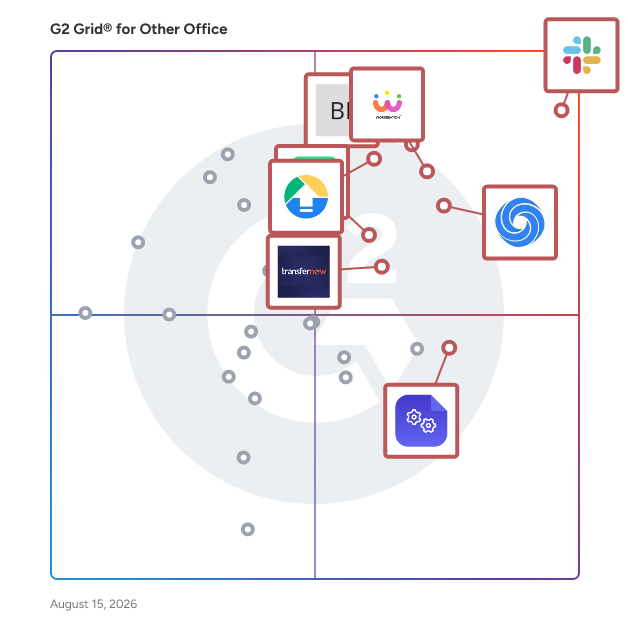
## Best Other Office Software At A Glance

- **Leader:** [Slack Connector for Jira](https://www.g2.com/products/slack-connector-for-jira/reviews)
- **Highest Performer:** [DocsAutomator](https://www.g2.com/products/docsautomator/reviews)
- **Easiest to Use:** [Slack Connector for Jira](https://www.g2.com/products/slack-connector-for-jira/reviews)
- **Top Trending:** [ChatGPT for Excel](https://www.g2.com/products/chatgpt-for-excel/reviews)
- **Best Free Software:** [Online Check Writer- powered by Zil Money](https://www.g2.com/products/online-check-writer-powered-by-zil-money/reviews)


## Top-Rated Products (Ranked by G2 Score)
### 1. [Slack Connector for Jira](https://www.g2.com/products/slack-connector-for-jira/reviews)
  Slack Connector for Jira is a comprehensive integration tool designed to bridge the gap between Slack and Jira Cloud, enhancing team collaboration and streamlining project management workflows. By facilitating seamless communication between these platforms, it ensures that teams remain synchronized and informed without the need to switch between applications. Key Features and Functionality: - Issue Notifications to Selected Channels: Configure multiple Slack channels to receive real-time notifications about changes in specific Jira issues or projects. Each channel can have customized filters, events, and threading options to control the information shared. - Perform Jira Actions from Slack: Utilize the @jira\_connector bot to execute Jira actions directly within Slack, such as assigning tasks, adding comments, and logging work. The bot also expands Jira issue keys mentioned in Slack channels for quick reference. - Access Slack Discussions from Jira Issues: An additional tab panel within Jira issues allows users to view and join related Slack conversations, ensuring all discussions are centralized and easily accessible. - Advanced Notification Filtering: Implement sophisticated filters to manage the flow of notifications, preventing Slack channels from becoming cluttered and ensuring that only pertinent updates are shared. - Automatic Thread Grouping: Maintain organized Slack channels by grouping notifications into threads based on issue, project, space, or content, which is particularly beneficial for high-volume channels. Primary Value and User Solutions: Slack Connector for Jira addresses the challenge of fragmented communication between development and project management teams by integrating Slack and Jira Cloud. This integration ensures that all team members have immediate access to relevant updates, can perform Jira actions without leaving Slack, and can track discussions related to specific issues directly from Jira. By reducing the need to switch between platforms, it enhances productivity, minimizes miscommunication, and keeps projects progressing smoothly.


  **Average Rating:** 4.7/5.0
  **Total Reviews:** 255

**User Satisfaction Scores:**

- **Quality of Support:** 9.1/10 (Category avg: 8.8/10)
- **Ease of Use:** 9.4/10 (Category avg: 9.0/10)


**Seller Details:**

- **Seller:** [Wisoft](https://www.g2.com/sellers/wisoft)
- **Year Founded:** 2007
- **HQ Location:** Poznan, Greater Poland
- **LinkedIn® Page:** https://www.linkedin.com/company/wisoft/ (3 employees on LinkedIn®)

**Reviewer Demographics:**
  - **Who Uses This:** Project Manager
  - **Top Industries:** Computer Software, Information Technology and Services
  - **Company Size:** 57% Mid-Market, 28% Small-Business


### 2. [Workreation®](https://www.g2.com/products/workreation/reviews)
  Workreation® is a smart workplace platform offering various office services, including meeting room booking and hot desking. As a SaaS platform, it enables clients to subscribe to the specific services they wish to implement. We developed the platform in 2021 and have since been running a business primarily focused on Hyundai Motor Group companies. Hyundai Motor Group companies, including Hyundai Motor, Hyundai Mobis, Hyundai Steel, Hyundai Capital, Hyundai Transys, and HMGICS (Hyundai Motor Group Innovation Centre Singapore), among others, have been using our platform. We aim to provide convenient and innovative office services that create a perfect environment, allowing employees to work happily. To achieve that goal, we are continually improving our services and developing new ones!


  **Average Rating:** 5.0/5.0
  **Total Reviews:** 10

**User Satisfaction Scores:**

- **Quality of Support:** 10.0/10 (Category avg: 8.8/10)
- **Ease of Use:** 10.0/10 (Category avg: 9.0/10)


**Seller Details:**

- **Seller:** [Hyundai-Autoever](https://www.g2.com/sellers/hyundai-autoever-de8f111e-0361-47b3-9a3d-ec330cabf0b5)
- **Year Founded:** 2000
- **HQ Location:** 서울특별시, KR
- **LinkedIn® Page:** https://www.linkedin.com/company/hyundai-autoever/about/ (3,486 employees on LinkedIn®)
- **Ownership:** KRX: 307950

**Reviewer Demographics:**
  - **Company Size:** 40% Small-Business, 30% Mid-Market


### 3. [Google Drive &amp; Docs for Confluence](https://www.g2.com/products/google-drive-docs-for-confluence/reviews)
  Google Drive &amp; Docs for Confluence is a powerful integration tool designed to bridge the gap between Atlassian&#39;s Confluence and Google&#39;s suite of productivity applications. By seamlessly embedding Google Drive files—such as Docs, Sheets, and Slides—directly into Confluence pages, this add-on enhances collaboration and streamlines workflows. Users can insert human-readable links, embed individual files, or display entire folders from Google Drive within their Confluence environment. This integration eliminates the need to switch between platforms, allowing teams to access and manage their documents efficiently. The add-on utilizes Google Drive&#39;s OAuth2 protocol, ensuring secure access to files and maintaining data integrity. By consolidating resources and reducing context switching, Google Drive &amp; Docs for Confluence empowers teams to collaborate more effectively and maintain a cohesive workspace. Key Features and Functionality: - Live Links: Insert human-readable links to Google Drive files into Confluence pages, providing direct access without leaving the Confluence environment. - Embedded Files: Embed individual Google Drive files, such as Docs, Sheets, and Slides, directly into Confluence pages, allowing users to view and interact with content seamlessly. - Embedded Folders: Display entire Google Drive folders within Confluence, enabling organized access to multiple files and fostering a structured collaboration space. Primary Value and User Solutions: Google Drive &amp; Docs for Confluence addresses the common challenge of managing and accessing documents across multiple platforms. By integrating Google Drive directly into Confluence, it reduces the need for constant switching between applications, thereby enhancing productivity and minimizing workflow disruptions. The add-on ensures that all team members have access to the most up-to-date documents within their collaborative workspace, promoting consistency and efficiency. Additionally, by leveraging Google Drive&#39;s OAuth2 protocol, it maintains high security standards, ensuring that sensitive information remains protected. This integration ultimately provides a cohesive solution for teams seeking to unify their documentation and collaboration processes.


  **Average Rating:** 4.5/5.0
  **Total Reviews:** 44

**User Satisfaction Scores:**

- **Quality of Support:** 8.4/10 (Category avg: 8.8/10)
- **Ease of Use:** 8.7/10 (Category avg: 9.0/10)


**Seller Details:**

- **Seller:** [Bilith](https://www.g2.com/sellers/bilith)
- **HQ Location:** N/A
- **LinkedIn® Page:** https://www.linkedin.com/company/No-Linkedin-Presence-Added-Intentionally-By-DataOps (1 employees on LinkedIn®)

**Reviewer Demographics:**
  - **Top Industries:** Information Technology and Services, Computer Software
  - **Company Size:** 43% Mid-Market, 43% Small-Business


### 4. [Drive Uploader](https://www.g2.com/products/drive-uploader/reviews)
  DriveUploader is a user-friendly application that enables individuals and businesses to receive large files directly into their Google Drive™ accounts without requiring the sender to have a Google account or install any software. By simply sharing a unique upload link, recipients can collect files from clients, colleagues, or partners seamlessly. This service is particularly beneficial for those who need to manage substantial data transfers efficiently and securely. Key Features and Functionality: - Simple File Uploads: Senders can easily drag and drop files into a web browser, which are then saved directly to the recipient&#39;s Google Drive™. - No File Size Limits: DriveUploader supports the transfer of very large files, up to hundreds of gigabytes each, as long as they fit within the storage capacity of the recipient&#39;s Google Drive™. - No Login Required for Senders: Individuals sending files do not need to create accounts or log in, streamlining the upload process. - Secure Transfers: Utilizing HTTPS, DriveUploader ensures that all file transfers are secure, with data stored directly in the recipient&#39;s Google Drive™ account. - QR Code Generation: Users can generate unique QR codes for their uploaders, allowing senders to access the upload page instantly without the need for links or typing. - Folder Uploads: The service supports the transfer of single files, multiple files, and entire folders, including all subfolders. - Custom Branding: Paid plans offer the ability to customize the uploader page with a logo, providing a branded experience for clients and web visitors. - Website Integration: DriveUploader can be easily embedded into existing websites, blogs, or Facebook pages, enhancing user engagement. - Password Protection: Users can set unique passwords for uploader links, adding an extra layer of privacy and ensuring that only authorized individuals can access the files. - Email Notifications: The service can send updates about new file uploads to multiple email addresses, with personalized subjects and messages, facilitating team collaborations. - Form Builder: DriveUploader offers a form builder that allows users to design custom forms within each uploader, collecting specific data needed alongside the files. - API Integration: For developers, DriveUploader provides an API and webhooks to integrate file uploads into online services that process images, videos, or other large files with custom logic. Primary Value and User Solutions: DriveUploader addresses the common challenges associated with receiving large files, such as email attachment size limits and the need for sender accounts. By offering a straightforward, secure, and efficient method for file transfers directly into Google Drive™, it simplifies workflows for professionals, educators, and businesses. The service&#39;s flexibility, including features like QR code access, custom branding, and website integration, ensures that users can tailor the experience to their specific needs, enhancing productivity and collaboration.


  **Average Rating:** 4.6/5.0
  **Total Reviews:** 16

**User Satisfaction Scores:**

- **Quality of Support:** 8.9/10 (Category avg: 8.8/10)
- **Ease of Use:** 9.6/10 (Category avg: 9.0/10)


**Seller Details:**

- **Seller:** [Google](https://www.g2.com/sellers/google)
- **Year Founded:** 1998
- **HQ Location:** Mountain View, CA
- **Twitter:** @google (31,885,216 Twitter followers)
- **LinkedIn® Page:** https://www.linkedin.com/company/1441/ (336,169 employees on LinkedIn®)
- **Ownership:** NASDAQ:GOOG

**Reviewer Demographics:**
  - **Top Industries:** Computer Software
  - **Company Size:** 65% Small-Business, 24% Mid-Market


### 5. [Diffchecker](https://www.g2.com/products/diffchecker/reviews)
  An all-in-one comparison powerhouse with over 30+ features for a faster and easier workflow. Compare text, images, PDF files , spreadsheets, and folders with total precision.


  **Average Rating:** 4.6/5.0
  **Total Reviews:** 20

**User Satisfaction Scores:**

- **Quality of Support:** 8.7/10 (Category avg: 8.8/10)
- **Ease of Use:** 9.7/10 (Category avg: 9.0/10)


**Seller Details:**

- **Seller:** [Diffchecker](https://www.g2.com/sellers/diffchecker)
- **HQ Location:** N/A
- **LinkedIn® Page:** https://www.linkedin.com/company/No-Linkedin-Presence-Added-Intentionally-By-DataOps (1 employees on LinkedIn®)

**Reviewer Demographics:**
  - **Top Industries:** Information Technology and Services, Computer Software
  - **Company Size:** 40% Mid-Market, 40% Small-Business


### 6. [NoteGPT](https://www.g2.com/products/notegpt/reviews)
  NoteGPT uses ChatGPT AI for summarizing YouTube videos, screenshot capturing and note-taking on YouTube videos.


  **Average Rating:** 4.6/5.0
  **Total Reviews:** 18

**User Satisfaction Scores:**

- **Quality of Support:** 8.2/10 (Category avg: 8.8/10)
- **Ease of Use:** 9.7/10 (Category avg: 9.0/10)


**Seller Details:**

- **Seller:** [NoteGPT](https://www.g2.com/sellers/notegpt)
- **HQ Location:** Kampong Glam, SG
- **LinkedIn® Page:** https://www.linkedin.com/company/notegpt/ (4 employees on LinkedIn®)

**Reviewer Demographics:**
  - **Top Industries:** Information Technology and Services, Computer Software
  - **Company Size:** 72% Mid-Market, 28% Small-Business


### 7. [DocsAutomator](https://www.g2.com/products/docsautomator/reviews)
  DocsAutomator is a tool to automate your document / PDF creation based on Google Docs. It natively connects with a growing list of popular platforms like Airtable, Zapier, Glide, ClickUp, and many more, effortlessly transforming data into polished documents. Trusted by 3000+ companies already, we built DocsAutomator to make document automation as straightforward as editing a Google Doc. Key features: ⚡ Fast document generations Generate documents blazingly fast — independent of length and content. 📄 Unlimited pages Need to dynamically produce a 200 page report? DocsAutomator allows for documents of any length. ✅ Dynamic line items / sections Dynamic line items and sections are a core part of DocsAutomator’s platform —adapt docs to any use case. 🖼️ Dynamic images Add automatically pre-processed and converted images dynamically to your documents 🫣 Show / hide values conditionally Generate complex documents effortlessly by showing / hiding values conditionally. 🎨 Style conditionally By styling conditionally, you can tailor documents to any situation. 🔎 Preview mode Unlimited previews until you&#39;re happy. Thanks to preview mode, you&#39;re not wasting credits testing your documents. 📃 Save Google Doc to continue editing Automating meets human touch. With Google Docs, you can keep editing automatically generated documents.


  **Average Rating:** 4.9/5.0
  **Total Reviews:** 16

**User Satisfaction Scores:**

- **Quality of Support:** 10.0/10 (Category avg: 8.8/10)
- **Ease of Use:** 9.5/10 (Category avg: 9.0/10)


**Seller Details:**

- **Seller:** [DocsAutomator](https://www.g2.com/sellers/docsautomator)
- **HQ Location:** N/A
- **LinkedIn® Page:** https://www.linkedin.com/company/docsautomator/ (1 employees on LinkedIn®)

**Reviewer Demographics:**
  - **Company Size:** 88% Small-Business, 13% Mid-Market


### 8. [TransferNow](https://www.g2.com/products/transfernow/reviews)
  Transfer your photos, videos and heavy documents of up to 20 GB\* per transfer to your contacts


  **Average Rating:** 4.2/5.0
  **Total Reviews:** 10

**User Satisfaction Scores:**

- **Quality of Support:** 8.3/10 (Category avg: 8.8/10)
- **Ease of Use:** 10.0/10 (Category avg: 9.0/10)


**Seller Details:**

- **Seller:** [TransferNow](https://www.g2.com/sellers/transfernow)
- **Year Founded:** 2013
- **HQ Location:** Garches, FR
- **Twitter:** @TransferNowNet (188 Twitter followers)
- **LinkedIn® Page:** https://www.linkedin.com/company/15088179/ (2 employees on LinkedIn®)

**Reviewer Demographics:**
  - **Company Size:** 60% Mid-Market, 20% Enterprise


### 9. [Verizon Business Messaging](https://www.g2.com/products/verizon-business-messaging/reviews)
  Verizon Business Messaging is a simple and reliable way to help keep your business connected. With this full-featured messaging experience, youll be able to securely send, receive and sync messages from multiple Verizon Wireless devices—all on our 4G LTE network or over Wi-Fi.


  **Average Rating:** 4.3/5.0
  **Total Reviews:** 17

**User Satisfaction Scores:**

- **Quality of Support:** 8.8/10 (Category avg: 8.8/10)
- **Ease of Use:** 9.0/10 (Category avg: 9.0/10)


**Seller Details:**

- **Seller:** [Verizon Enterprise](https://www.g2.com/sellers/verizon-enterprise)
- **Year Founded:** 1988
- **HQ Location:** Basking Ridge, NJ
- **Twitter:** @VerizonEnterpr (6 Twitter followers)
- **LinkedIn® Page:** https://www.linkedin.com/company/1094/ (15,946 employees on LinkedIn®)

**Reviewer Demographics:**
  - **Company Size:** 59% Mid-Market, 35% Small-Business


### 10. [MathType](https://www.g2.com/products/mathtype/reviews)
  MathType is the world&#39;s leading equation editor that allows you to write math notation as easily as you write text. From simple equations to complex mathematical expressions, MathType offers an intuitive interface with a toolbar offering over 500 symbols, including support for matrix, multiline equations, and elementary mathematical symbols. In addition to its powerful mathematical capabilities, MathType simplifies the writing of chemical notation with ChemType. This includes a customized toolbar equipped with the periodic table and other chemistry-related symbols, making it easy to create inorganic chemistry notation. MathType is compatible with Microsoft 365, WPS, and Google Workspace. As one of the most powerful mathematical editors on the market, MathType seamlessly integrates with various LMS and text editors, including Moodle, Canvas, Schoology, TinyMCE, and CKEditor. Trusted by educators and EdTech companies globally, MathType offers: · Symbol coverage: With over 500 symbols, MathType supports matrices, multiline equations, and a comprehensive range of specialized symbols, ensuring you have everything needed for any mathematical or scientific notation. · Easy to use: Write equations with an interface that provides a user-friendly experience from day one. MathML native and LaTeX friendly. · AI-Powered Handwriting Recognition: Converts handwritten expressions into clean, digital equations ready to be used in your documents. · ChemType: Unlock a personalized toolbar equipped with specialized chemistry buttons tailored for editing inorganic chemistry notation. · Accessibility: MathType is compliant with accessibility requirements and ensures software accessibility for people with disabilities. · High-quality output: It generates perfect, high-quality images for all your equations that can be exported in various formats such as SVG, PDF, and PNG. · Customizable: You can customize formatting options to define the style settings required for your documents and configure how equation elements are displayed. · Smooth integration: Easily integrate MathType with the platform and technology that best suits you: LMS, HTML, XML, and CMS editors.


  **Average Rating:** 4.1/5.0
  **Total Reviews:** 23

**User Satisfaction Scores:**

- **Quality of Support:** 8.9/10 (Category avg: 8.8/10)
- **Ease of Use:** 8.6/10 (Category avg: 9.0/10)


**Seller Details:**

- **Seller:** [WIRIS](https://www.g2.com/sellers/wiris)
- **Year Founded:** 1999
- **HQ Location:** Barcelona, Catalonia
- **LinkedIn® Page:** https://www.linkedin.com/company/maths-for-more/ (121 employees on LinkedIn®)

**Reviewer Demographics:**
  - **Top Industries:** Education Management
  - **Company Size:** 48% Small-Business, 35% Mid-Market


### 11. [Gitter](https://www.g2.com/products/gitter/reviews)
  Gitter is an open-source chat and networking platform designed to help developers manage, grow, and connect communities through messaging, content sharing, and discovery. Built on the Matrix protocol, Gitter offers secure, decentralized communication, enabling users to engage in real-time discussions across various platforms, including web, desktop, and mobile applications. By integrating seamlessly with GitHub, GitLab, and Twitter, Gitter provides a collaborative environment tailored for developers and open-source projects. Key Features and Functionality: - Seamless Integration: Users can sign in using their GitHub, GitLab, or Twitter accounts, facilitating quick access and streamlined collaboration. - End-to-End Encryption: Ensures secure communication, protecting sensitive information shared within communities. - Markdown and LaTeX Support: Allows for rich text formatting, enabling users to share code snippets, documentation, and mathematical equations effectively. - Matrix Protocol Compatibility: As a Matrix-native platform, Gitter ensures interoperability with various Matrix clients, offering flexibility in how users access and manage their conversations. - Persistent Chat History: Maintains a comprehensive record of discussions, allowing users to search and reference past conversations easily. Primary Value and User Solutions: Gitter addresses the need for a dedicated communication platform tailored for developers and open-source communities. By providing a secure, integrated, and user-friendly environment, it facilitates effective collaboration, knowledge sharing, and community building. Its compatibility with the Matrix protocol ensures that users have the flexibility to choose their preferred client while maintaining access to their communities. Overall, Gitter enhances productivity and fosters a sense of connection among developers worldwide.


  **Average Rating:** 4.0/5.0
  **Total Reviews:** 49

**User Satisfaction Scores:**

- **Quality of Support:** 8.3/10 (Category avg: 8.8/10)
- **Ease of Use:** 8.6/10 (Category avg: 9.0/10)


**Seller Details:**

- **Seller:** [GitHub](https://www.g2.com/sellers/github)
- **Year Founded:** 2008
- **HQ Location:** San Francisco, CA
- **Twitter:** @github (2,638,213 Twitter followers)
- **LinkedIn® Page:** https://www.linkedin.com/company/1418841/ (6,000 employees on LinkedIn®)

**Reviewer Demographics:**
  - **Top Industries:** Computer Software, Information Technology and Services
  - **Company Size:** 63% Small-Business, 18% Mid-Market


#### Pros & Cons

**Pros:**

- Ease of Use (9 reviews)
- Convenience (3 reviews)
- Features (3 reviews)
- Team Collaboration (3 reviews)
- Communication (2 reviews)

**Cons:**

- Learning Curve (3 reviews)
- Not Intuitive (3 reviews)
- Difficult Navigation (2 reviews)
- Limited Features (2 reviews)
- Missing Features (2 reviews)

### 12. [Ignite Realtime Spark](https://www.g2.com/products/ignite-realtime-spark/reviews)
  Spark is an Open Source, cross-platform IM client optimized for businesses and organizations.


  **Average Rating:** 4.2/5.0
  **Total Reviews:** 26

**User Satisfaction Scores:**

- **Quality of Support:** 9.0/10 (Category avg: 8.8/10)
- **Ease of Use:** 9.6/10 (Category avg: 9.0/10)


**Seller Details:**

- **Seller:** [Ignite Realtime](https://www.g2.com/sellers/ignite-realtime)
- **HQ Location:** United States
- **Twitter:** @IgniteRealtime (197 Twitter followers)
- **LinkedIn® Page:** https://www.linkedin.com/company/1166141/ (2 employees on LinkedIn®)

**Reviewer Demographics:**
  - **Company Size:** 41% Mid-Market, 33% Enterprise


#### Pros & Cons

**Pros:**

- Communication (1 reviews)


### 13. [ChatGPT for Excel](https://www.g2.com/products/chatgpt-for-excel/reviews)
  ChatGPT for Excel - Unlock the Power of Excel with AI intelligence! Boost your productivity with ChatGPT for Excel - the ultimate tool for Microsoft Excel ™ users. With our AI-powered add-in, you can automate tasks, gain valuable insights and save time and efforts. Here are just a few examples on how our add-in can help you sparkle: AI.ASK - let AI write engaging content, compelling descriptions, blogs and emails on your behalf AI.LIST - let AI generate list outputs in separate rows to keep your thoughts organized AI.FILL - teach AI to clean your data and fill-in missing ranges AI.FORMAT - have AI to quickly format your data to ensure consistency AI.EXTRACT - unstructured data? No worries, use AI to extract valuable data insights AI.TRANSLATE - make AI translate your content into dozens of languages to reach global audience Let technology work for you, so that you can work on bigger things.


  **Average Rating:** 4.6/5.0
  **Total Reviews:** 26

**User Satisfaction Scores:**

- **Quality of Support:** 8.4/10 (Category avg: 8.8/10)
- **Ease of Use:** 8.6/10 (Category avg: 9.0/10)


**Seller Details:**

- **Seller:** [Apps Do Wonders](https://www.g2.com/sellers/apps-do-wonders)
- **HQ Location:** N/A
- **LinkedIn® Page:** https://www.linkedin.com/company/apps-do-wonders/ (18 employees on LinkedIn®)

**Reviewer Demographics:**
  - **Company Size:** 35% Enterprise, 35% Small-Business


### 14. [Zoho Office Integrator](https://www.g2.com/products/zoho-office-integrator/reviews)
  Looking for document editors to build your next big dream? Try Zoho Office Integrator—an easy, secure way to integrate Zoho&#39;s world-class office editors into your web applications.


  **Average Rating:** 4.0/5.0
  **Total Reviews:** 11

**User Satisfaction Scores:**

- **Quality of Support:** 8.5/10 (Category avg: 8.8/10)
- **Ease of Use:** 8.7/10 (Category avg: 9.0/10)


**Seller Details:**

- **Seller:** [Zoho](https://www.g2.com/sellers/zoho-b00ca9d5-bca8-41b5-a8ad-275480841704)
- **Year Founded:** 1996
- **HQ Location:** Austin, TX
- **Twitter:** @Zoho (137,251 Twitter followers)
- **LinkedIn® Page:** https://www.linkedin.com/company/38373/ (30,531 employees on LinkedIn®)
- **Phone:** +1 (888) 900-9646 

**Reviewer Demographics:**
  - **Company Size:** 55% Small-Business, 36% Mid-Market


### 15. [Socket.Io](https://www.g2.com/products/socket-io/reviews)
  Socket.IO enables real-time bidirectional event-based communication.


  **Average Rating:** 4.6/5.0
  **Total Reviews:** 54

**User Satisfaction Scores:**

- **Quality of Support:** 8.3/10 (Category avg: 8.8/10)
- **Ease of Use:** 8.8/10 (Category avg: 9.0/10)


**Seller Details:**

- **Seller:** [Socket.io](https://www.g2.com/sellers/socket-io)
- **HQ Location:** San Francisco, CA
- **Twitter:** @SocketIO (8,078 Twitter followers)
- **LinkedIn® Page:** https://www.linkedin.com/company/socket-io/about (2 employees on LinkedIn®)

**Reviewer Demographics:**
  - **Who Uses This:** Software Engineer
  - **Top Industries:** Computer Software, Information Technology and Services
  - **Company Size:** 67% Small-Business, 21% Mid-Market


#### Pros & Cons

**Pros:**

- Ease of Use (7 reviews)
- Implementation Ease (5 reviews)
- Easy Integrations (3 reviews)
- Simple (3 reviews)
- Communication (2 reviews)

**Cons:**

- Connectivity Issues (3 reviews)
- Complexity (1 reviews)
- Expensive (1 reviews)
- Learning Curve (1 reviews)
- Missing Features (1 reviews)

### 16. [GAT Labs](https://www.g2.com/products/gat-labs/reviews)
  GAT Labs build tools that help complement the power of Google Workspace and Chrome for Enterprise and Education domains with auditing, management, security, automation and insights. Today, GAT is the only ‘full stack’ solution covering all layers of Google Workspace and Chrome. Every single tool from the GAT Suite gives IT Admins unique capabilities, visibility and security across their cloud environment: - GAT+, which provides advanced data analytics and immediate responses to breach threats. - GAT Unlock allows for controlled document access and ownership changes, requiring dual organisational authorization. - GAT Flow streamlines the process of user onboarding, offboarding, and bulk modifications through secure automated workflows. - GAT Shield offers continuous, live, in-browser 3-factor authentication for Chrome users. For the educational sector, we offer additional tools such as - Teacher Assist lets teachers monitor and manage remote classrooms, fully controlling student browsing. - Teacher Taskmaster automates the supervision of homework assignments without teacher or parent intervention. It uses advanced technology to track time spent, cut and paste actions, typing activity, and AI-generated responses, and verifies if the student typing is the one assigned the work GAT Labs is proud to be SOC 2 Type 2 and ADA&amp;nbsp;CASA&amp;nbsp;Tier-3 certified, demonstrating our unwavering commitment to the highest standards of security and privacy. 15-day free trial available


  **Average Rating:** 4.8/5.0
  **Total Reviews:** 39

**User Satisfaction Scores:**

- **Quality of Support:** 9.4/10 (Category avg: 8.8/10)
- **Ease of Use:** 8.1/10 (Category avg: 9.0/10)


**Seller Details:**

- **Seller:** [General Aduit Tool Ltd](https://www.g2.com/sellers/general-aduit-tool-ltd)
- **Year Founded:** 2014
- **HQ Location:** Dublin, Ireland
- **Twitter:** @GATlabs_ (4,444 Twitter followers)
- **LinkedIn® Page:** https://www.linkedin.com/company/10992338/ (17 employees on LinkedIn®)

**Reviewer Demographics:**
  - **Top Industries:** Education Management, Primary/Secondary Education
  - **Company Size:** 59% Mid-Market, 26% Enterprise


#### Pros & Cons

**Pros:**

- Automation (3 reviews)
- Customer Support (3 reviews)
- Features (3 reviews)
- Google Workspace Integration (3 reviews)
- Reporting (3 reviews)

**Cons:**

- Slow Performance (2 reviews)
- Complex Configuration (1 reviews)
- Complexity (1 reviews)
- Complex Setup (1 reviews)
- Difficult Navigation (1 reviews)

### 17. [Openfire](https://www.g2.com/products/openfire/reviews)
  Internal IM Server for Enterprises


  **Average Rating:** 4.7/5.0
  **Total Reviews:** 14

**User Satisfaction Scores:**

- **Quality of Support:** 8.0/10 (Category avg: 8.8/10)
- **Ease of Use:** 8.8/10 (Category avg: 9.0/10)


**Seller Details:**

- **Seller:** [Ignite Realtime](https://www.g2.com/sellers/ignite-realtime)
- **HQ Location:** United States
- **Twitter:** @IgniteRealtime (197 Twitter followers)
- **LinkedIn® Page:** https://www.linkedin.com/company/1166141/ (2 employees on LinkedIn®)

**Reviewer Demographics:**
  - **Top Industries:** Information Technology and Services
  - **Company Size:** 50% Small-Business, 29% Enterprise


### 18. [Sonetel](https://www.g2.com/products/sonetel/reviews)
  Sonetel offers solutions for business communications.


  **Average Rating:** 4.4/5.0
  **Total Reviews:** 20

**User Satisfaction Scores:**

- **Quality of Support:** 8.5/10 (Category avg: 8.8/10)
- **Ease of Use:** 8.3/10 (Category avg: 9.0/10)


**Seller Details:**

- **Seller:** [Sonetel](https://www.g2.com/sellers/sonetel)
- **HQ Location:** Stockholm
- **Twitter:** @sonetel (1,064 Twitter followers)
- **LinkedIn® Page:** https://www.linkedin.com/company/sonetel (57 employees on LinkedIn®)

**Reviewer Demographics:**
  - **Company Size:** 86% Small-Business, 10% Mid-Market


#### Pros & Cons

**Pros:**

- Affordable (3 reviews)
- Customer Support (2 reviews)
- Quick Response (2 reviews)
- Business Tools (1 reviews)
- Calling Features (1 reviews)

**Cons:**

- Call Issues (1 reviews)
- Customer Service (1 reviews)
- Number Issues (1 reviews)

### 19. [DataNumen BKF Repair](https://www.g2.com/products/datanumen-bkf-repair/reviews)
  DataNumen BKF Repair(DBKFR) is a tool designed to repair corrupt Microsoft backup(BKF) files.


  **Average Rating:** 4.3/5.0
  **Total Reviews:** 10

**User Satisfaction Scores:**

- **Quality of Support:** 9.0/10 (Category avg: 8.8/10)
- **Ease of Use:** 8.6/10 (Category avg: 9.0/10)


**Seller Details:**

- **Seller:** [DataNumen](https://www.g2.com/sellers/datanumen)
- **Year Founded:** 2001
- **HQ Location:** Central, HK
- **Twitter:** @DataNumen (212 Twitter followers)
- **LinkedIn® Page:** https://www.linkedin.com/company/205691/ (12 employees on LinkedIn®)

**Reviewer Demographics:**
  - **Company Size:** 50% Enterprise, 50% Small-Business


### 20. [Online Check Writer- powered by Zil Money](https://www.g2.com/products/online-check-writer-powered-by-zil-money/reviews)
  OnlineCheckWriter.com – Powered by Zil Money allows you to customize and print checks instantly on blank stock papers using a regular printer at your office or home. Also, the payment processing platform lets you move money seamlessly and instantly through various payment methods like ACH, wire, eChecks, check mailing, payment links, and more, with a low transaction fee. Take advantage of Overnight Check Mailing with Tracking for Secure payments: simply create your checks, click send, and OnlineCheckWriter.com – Powered by Zil Money will print and mail your checks via FedEx overnight. You can open a US checking account online without being physically present in the USA using OnlineCheckWriter.com – Powered by Zil Money&#39;s payment service. Users can also create checking accounts with no hidden fees. • Ability to write and print checks from any computer. • Connect with your bank (99% of United States Banks) • Create Check and auto match with bank transaction when clear and mark fraud check • Full outsourcing of checks those prefer. You create online, OnlineCheckWriter.com – Powered by Zil Money print and mail for 1.25$ to your customers • End to end encryption in the Amazon cloud means military-grade security. • Importing/exporting to/from other accounting software • Fraud prevention with Positive pay. • Design professional checks the way you want with your Logos or yours • Make and track deposit slips • Creating checks with or without payee, amount, date, • Print Bulk check, Bulk blank checks, import and print, Group it and print, Set Recurring • Employee/Staff Access Level and Beyond. OnlineCheckWriter.com- Powered by Zil Money is a financial technology company, not a bank. OnlineCheckWriter.com offers banking services through partnership with FDIC member banks Texas National Bank. Customers are not directly insured by the FDIC - but through the pass-through coverage of our partner banks and is conditional on proper titling, record-keeping, and custodial arrangements. Contact Name: OnlineCheckwriter.com- Powered by Zil Money 111 North Market St San Jose CA 95113 Email : Support@onlinecheckwriter.com Phone : 408 372 7707 Fax : 877 722 3376


  **Average Rating:** 4.2/5.0
  **Total Reviews:** 34

**User Satisfaction Scores:**

- **Quality of Support:** 9.1/10 (Category avg: 8.8/10)
- **Ease of Use:** 9.0/10 (Category avg: 9.0/10)


**Seller Details:**

- **Seller:** [Online Check Writer](https://www.g2.com/sellers/online-check-writer)
- **Year Founded:** 2018
- **HQ Location:** San Jose, CA
- **Twitter:** @webcheckwriter (38,947 Twitter followers)
- **LinkedIn® Page:** https://www.linkedin.com/company/25146704/ (140 employees on LinkedIn®)

**Reviewer Demographics:**
  - **Top Industries:** Accounting
  - **Company Size:** 78% Small-Business, 14% Mid-Market


#### Pros & Cons

**Pros:**

- Ease of Use (2 reviews)
- Accounts Payable (1 reviews)
- Customization (1 reviews)
- Intuitive (1 reviews)
- Navigation Ease (1 reviews)

**Cons:**

- Approval Process Issues (2 reviews)

### 21. [Ditto Clipboard Manager](https://www.g2.com/products/ditto-clipboard-manager/reviews)
  Ditto is an extension to the standard windows clipboard. It saves each item placed on the clipboard allowing you access to any of those items at a later time.


  **Average Rating:** 4.8/5.0
  **Total Reviews:** 12

**User Satisfaction Scores:**

- **Quality of Support:** 6.7/10 (Category avg: 8.8/10)
- **Ease of Use:** 8.0/10 (Category avg: 9.0/10)


**Seller Details:**

- **Seller:** [sourceforge](https://www.g2.com/sellers/sourceforge)
- **Year Founded:** 1999
- **HQ Location:** San Diego, CA
- **Twitter:** @sourceforge (46,790 Twitter followers)
- **LinkedIn® Page:** https://www.linkedin.com/company/638555/ (67 employees on LinkedIn®)

**Reviewer Demographics:**
  - **Company Size:** 50% Small-Business, 25% Enterprise


### 22. [Markup](https://www.g2.com/products/markup/reviews)
  Markup is a productivity tool with unique AI-powered features to create a smart reading experience for users. It automatically extracts key reading points out of large files or text and learns the user’s preference and behavior to provide informed suggestions. Markup lets you highlight, annotate, and read with efficiency. \*\*\*Widely Recognized by Media &amp; Our Users\*\*\* + Featured in All Digital School – Editor’s Choice for Reading + Featured in “Annotation and Screencasting to Extend the Reach of Your Classroom” by Yale Center of Language Study + Featured in “The 9 Best PDF Apps for the Apple iPad” by TabletPC Review + User Testimonial: “PDF Markup helps me to take work with me when I am not in the office. It really does make life better!” - Val Sigler KEY FEATURES AUTO SUMMARY (NEW)\* •Immediately find your focus on reading by extracting information that matters •Automatically process heavyweight content in a summary view •Add to your own annotations to keep your ideas all in one place •Copy to your clipboards and share to other platforms for extensive reading WEB HIGHLIGHTER – Also available for Chrome extension • Highlight text and excerpts on web pages through built-in or Safari browser. • Sync your highlights through devices and web • Explore highlights from the markup community or share your own. • Link web highlights to your PDFs DOCUMENT VIEWER &amp; ANNOTATOR • Support all mainstream formats, including PDF and ePub books • Add highlights, freehand writings, sticky notes, text boxes, arrows, shapes, etc. • Customize PDF stamps by adding texts or images • Sign documents &amp; fill forms • BOTA list- display a summary of bookmark, outline, thumbnail and annotation • Text-to-Speech- read out text content with natural sounding voices\* • Multimedia note-taking - insert links, images, audio clips and capture screens\* • Advanced PDF Editing – merge and split pages, watermarks, flattened PDFs and more\* MARKUP EXPLORE WITH AI INTEGRATION • Analyze highlighted stories with Markup&#39;s brilliant algorithm • Automatically sort web pages you’ve highlighted into different categories • Recommend relevant stories you might be interested in INSTANT TEAM COLLABORATION • Share files, pictures, articles, videos, and URLs with your team via Shared Folder • Directly share highlighted Web Markups and annotations to your team • Onboard your team members via Teams Clipboards • Invite and manage your members in Team Panel which also tracks team’s activity FILE TRANSFER &amp; BACKUP • Get files from Dropbox, Google Drive, iCloud Drive, Photo gallery and local files • Copy files via WiFi, iTunes USB, and Open-in feature KDAN CLOUD SERVICES – SIGN UP FOR FREE • Resume unfinished uploading • Viewing PDFs online by sending file links • Send download links from the web with password protection


  **Average Rating:** 4.7/5.0
  **Total Reviews:** 10

**User Satisfaction Scores:**

- **Quality of Support:** 8.9/10 (Category avg: 8.8/10)
- **Ease of Use:** 9.3/10 (Category avg: 9.0/10)


**Seller Details:**

- **Seller:** [KDAN](https://www.g2.com/sellers/kdan)
- **Year Founded:** 2009
- **HQ Location:** Irvine, California
- **LinkedIn® Page:** https://www.linkedin.com/company/2103738/ (241 employees on LinkedIn®)

**Reviewer Demographics:**
  - **Company Size:** 90% Small-Business, 10% Mid-Market


### 23. [python pdf](https://www.g2.com/products/python-pdf/reviews)
  Wkhtmltopdf binaries are precompiled and included in the package making pydf easier to use, in particular this means pydf works on heroku.


  **Average Rating:** 4.6/5.0
  **Total Reviews:** 15

**User Satisfaction Scores:**

- **Quality of Support:** 7.3/10 (Category avg: 8.8/10)
- **Ease of Use:** 8.5/10 (Category avg: 9.0/10)


**Seller Details:**

- **Seller:** [python pdf](https://www.g2.com/sellers/python-pdf)
- **HQ Location:** N/A
- **Twitter:** @pypi (22,999 Twitter followers)
- **LinkedIn® Page:** https://www.linkedin.com/company/No-Linkedin-Presence-Added-Intentionally-By-DataOps (1 employees on LinkedIn®)

**Reviewer Demographics:**
  - **Top Industries:** Internet
  - **Company Size:** 50% Small-Business, 44% Mid-Market


### 24. [Momentum Dashboard](https://www.g2.com/products/momentum-dashboard/reviews)
  Momentum Dashboard is a productivity tool replacing new tab page with a personal dashboard featuring todo, weather, and inspiration.


  **Average Rating:** 4.8/5.0
  **Total Reviews:** 13

**User Satisfaction Scores:**

- **Quality of Support:** 10.0/10 (Category avg: 8.8/10)
- **Ease of Use:** 9.4/10 (Category avg: 9.0/10)


**Seller Details:**

- **Seller:** [Momentumdash](https://www.g2.com/sellers/momentumdash)
- **Year Founded:** 2014
- **HQ Location:** Victoria, CA
- **Twitter:** @momentumdash (30,681 Twitter followers)
- **LinkedIn® Page:** https://www.linkedin.com/company/momentum-dashboard (7 employees on LinkedIn®)

**Reviewer Demographics:**
  - **Company Size:** 46% Small-Business, 38% Mid-Market


### 25. [Share Logins](https://www.g2.com/products/share-logins/reviews)
  Share Logins is an exceptional WordPress plugin designed for seamless synchronization of user activities across multiple websites. With this plugin, users can gain access to all other websites instantly. Share Logins also help in various user actions, including logout, profile updates, password resets, user creation, and deletion.


  **Average Rating:** 4.2/5.0
  **Total Reviews:** 11

**User Satisfaction Scores:**

- **Quality of Support:** 8.7/10 (Category avg: 8.8/10)
- **Ease of Use:** 9.3/10 (Category avg: 9.0/10)


**Seller Details:**

- **Seller:** [codexpert.io](https://www.g2.com/sellers/codexpert-io)
- **Year Founded:** 2017
- **HQ Location:** Mirpur, Dhaka
- **Twitter:** @codexpertio (140 Twitter followers)
- **LinkedIn® Page:** https://www.linkedin.com/company/codexpertio/ (18 employees on LinkedIn®)

**Reviewer Demographics:**
  - **Top Industries:** Information Technology and Services
  - **Company Size:** 73% Small-Business, 27% Mid-Market


## Parent Category

[Office Management Software](https://www.g2.com/categories/office-management-software)


