2026 Best Software Awards are here!See the list

Best Desk Booking Software

Nana Serwah Nkrahene
NSN
Researched and written by Nana Serwah Nkrahene

Desk booking solutions streamline the process of reserving individual desks in a workspace. These solutions allow employees to browse and reserve available desks across a company’s floor plan, which is often interactive, providing 3D visuals and immersive features for users exploring their workspace. Desk booking software is often used in hybrid workplace models, in which a company’s workforce is given the flexibility to decide which days to be office-based and which days to work remotely. However, desk booking software can be used with both fixed (assigned) and open (unassigned) floor plans, making it a great solution for companies that have both full-time office-based and hybrid employees.

Desk booking software allows businesses to allocate part of the office for certain teams or departments, facilitating greater collaboration among in-office employees. Administrators use these products to book desks on behalf of users, limit which desks or areas of an office are available for booking, and monitor utilization via workplace analytics. By having access to workplace analytics, businesses can make smarter decisions about office layout and utilization requirements. Many desk booking solutions are available to users via a mobile app, making it easy for employees to book desks on the go.

While desk booking software can be a standalone platform, it is often part of a comprehensive Space Management solution, which encapsulates both desk booking and meeting room booking functionality.

To qualify for inclusion in the Desk Booking Software category, a product must:

Allow users to view and reserve available desks in a designated workspace
Enable the creation of permanent desk assignments, hot desking, and hoteling for employees
Provide an interactive workplace map showing real-time desk availability
Enable administrators to limit or expand desk availability, based on changes in capacity or demand
Show More
Show Less

Featured Desk Booking Software At A Glance

Free Plan Available:
Kadence
Sponsored
Highest Performer:
Easiest to Use:
Top Trending:
Show LessShow More
Highest Performer:
Easiest to Use:
Top Trending:

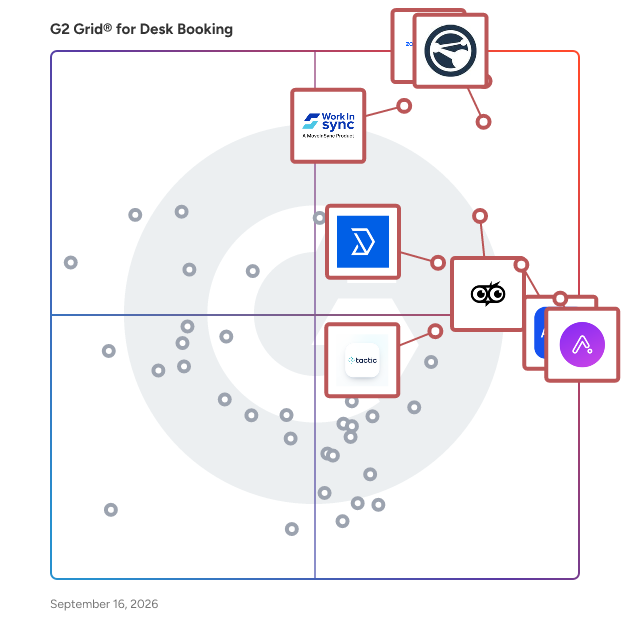
G2 takes pride in showing unbiased reviews on user satisfaction in our ratings and reports. We do not allow paid placements in any of our ratings, rankings, or reports. Learn about our scoring methodologies.

No filters applied
110 Listings in Desk Booking Available
(55,774)4.5 out of 5
Optimized for quick response
5th Easiest To Use in Desk Booking software
View top Consulting Services for Zoom Workplace
Entry Level Price:Free
  • Overview
    Expand/Collapse Overview
  • Product Description
    How are these determined?Information
    This description is provided by the seller.

    Goodbye app overload. Hello effortless work. Work can be complicated. Your tools shouldn't be. Zoom Workplace connects all the ways you collaborate — from meetings to docs to chat and more — with bui

    Users
    • Owner
    • Software Engineer
    Industries
    • Information Technology and Services
    • Computer Software
    Market Segment
    • 51% Small-Business
    • 31% Mid-Market
    User Sentiment
    How are these determined?Information
    These insights, currently in beta, are compiled from user reviews and grouped to display a high-level overview of the software.
    • Zoom Workplace is a platform that centralizes communication, collaboration, and execution in one environment, offering features for videoconferencing, virtual meetings, webinars, and more.
    • Reviewers appreciate the simplicity and reliability of Zoom Workplace for daily meetings, highlighting the ease of joining calls, scheduling meetings, sharing screens, and the clear audio and video quality.
    • Users mentioned occasional minor connection issues or short audio delays, and noted that the platform can use a lot of system resources during long meetings.
  • Pros and Cons
    Expand/Collapse Pros and Cons
  • Zoom Workplace Pros and Cons
    How are these determined?Information
    Pros and Cons are compiled from review feedback and grouped into themes to provide an easy-to-understand summary of user reviews.
    Pros
    Ease of Use
    4,796
    Video Conferencing
    2,795
    Video Quality
    2,099
    Reliability
    2,032
    Screen Sharing
    1,685
    Cons
    Zoom Issues
    1,272
    Limited Features
    1,252
    Meeting Issues
    1,223
    Connection Issues
    867
    Video Issues
    814
  • User Satisfaction
    Expand/Collapse User Satisfaction
  • Zoom Workplace features and usability ratings that predict user satisfaction
    9.1
    Has the product been a good partner in doing business?
    Average: 9.3
    9.2
    Calendar Integrations
    Average: 8.6
    8.9
    Recurring Reservations
    Average: 8.7
    8.1
    Automatic Grouping
    Average: 8.4
  • Seller Details
    Expand/Collapse Seller Details
  • Seller Details
    Seller
    Zoom
    Company Website
    Year Founded
    2011
    HQ Location
    San Jose, CA
    Twitter
    @zoom
    1,045,944 Twitter followers
    LinkedIn® Page
    www.linkedin.com
    12,688 employees on LinkedIn®
Product Description
How are these determined?Information
This description is provided by the seller.

Goodbye app overload. Hello effortless work. Work can be complicated. Your tools shouldn't be. Zoom Workplace connects all the ways you collaborate — from meetings to docs to chat and more — with bui

Users
  • Owner
  • Software Engineer
Industries
  • Information Technology and Services
  • Computer Software
Market Segment
  • 51% Small-Business
  • 31% Mid-Market
User Sentiment
How are these determined?Information
These insights, currently in beta, are compiled from user reviews and grouped to display a high-level overview of the software.
  • Zoom Workplace is a platform that centralizes communication, collaboration, and execution in one environment, offering features for videoconferencing, virtual meetings, webinars, and more.
  • Reviewers appreciate the simplicity and reliability of Zoom Workplace for daily meetings, highlighting the ease of joining calls, scheduling meetings, sharing screens, and the clear audio and video quality.
  • Users mentioned occasional minor connection issues or short audio delays, and noted that the platform can use a lot of system resources during long meetings.
Zoom Workplace Pros and Cons
How are these determined?Information
Pros and Cons are compiled from review feedback and grouped into themes to provide an easy-to-understand summary of user reviews.
Pros
Ease of Use
4,796
Video Conferencing
2,795
Video Quality
2,099
Reliability
2,032
Screen Sharing
1,685
Cons
Zoom Issues
1,272
Limited Features
1,252
Meeting Issues
1,223
Connection Issues
867
Video Issues
814
Zoom Workplace features and usability ratings that predict user satisfaction
9.1
Has the product been a good partner in doing business?
Average: 9.3
9.2
Calendar Integrations
Average: 8.6
8.9
Recurring Reservations
Average: 8.7
8.1
Automatic Grouping
Average: 8.4
Seller Details
Seller
Zoom
Company Website
Year Founded
2011
HQ Location
San Jose, CA
Twitter
@zoom
1,045,944 Twitter followers
LinkedIn® Page
www.linkedin.com
12,688 employees on LinkedIn®
(130)4.8 out of 5
Optimized for quick response
1st Easiest To Use in Desk Booking software
  • Overview
    Expand/Collapse Overview
  • Product Description
    How are these determined?Information
    This description is provided by the seller.

    Connect your people, places, and spaces. Appspace is the workplace experience platform for your whole team that lets you manage it all – from employee communications to your physical office spaces. So

    Users
    No information available
    Industries
    • Consumer Services
    • Information Technology and Services
    Market Segment
    • 50% Mid-Market
    • 37% Small-Business
    User Sentiment
    How are these determined?Information
    These insights, currently in beta, are compiled from user reviews and grouped to display a high-level overview of the software.
    • Appspace is a software platform designed to manage office spaces, room bookings, and digital signage displays, with additional features for internal communication and calendar integration.
    • Reviewers frequently mention the user-friendly booking system, easy implementation, and the ability to manage and schedule content for digital signage as key benefits of using Appspace.
    • Users reported issues with slow interface loading during peak hours, problems with double booking of rooms, and difficulties with certain integrations and updates.
  • Pros and Cons
    Expand/Collapse Pros and Cons
  • Appspace Pros and Cons
    How are these determined?Information
    Pros and Cons are compiled from review feedback and grouped into themes to provide an easy-to-understand summary of user reviews.
    Pros
    Ease of Use
    66
    Features
    40
    Navigation Ease
    28
    Intuitive
    23
    User Interface
    21
    Cons
    Missing Features
    14
    Poor Usability
    12
    User Interface Issues
    12
    Slow Loading
    11
    Confusion
    10
  • User Satisfaction
    Expand/Collapse User Satisfaction
  • Appspace features and usability ratings that predict user satisfaction
    9.3
    Has the product been a good partner in doing business?
    Average: 9.3
    8.9
    Calendar Integrations
    Average: 8.6
    9.0
    Recurring Reservations
    Average: 8.7
    8.9
    Automatic Grouping
    Average: 8.4
  • Seller Details
    Expand/Collapse Seller Details
  • Seller Details
    Seller
    Appspace
    Company Website
    Year Founded
    2002
    HQ Location
    Tampa, FL
    Twitter
    @appspace
    785 Twitter followers
    LinkedIn® Page
    www.linkedin.com
    487 employees on LinkedIn®
Product Description
How are these determined?Information
This description is provided by the seller.

Connect your people, places, and spaces. Appspace is the workplace experience platform for your whole team that lets you manage it all – from employee communications to your physical office spaces. So

Users
No information available
Industries
  • Consumer Services
  • Information Technology and Services
Market Segment
  • 50% Mid-Market
  • 37% Small-Business
User Sentiment
How are these determined?Information
These insights, currently in beta, are compiled from user reviews and grouped to display a high-level overview of the software.
  • Appspace is a software platform designed to manage office spaces, room bookings, and digital signage displays, with additional features for internal communication and calendar integration.
  • Reviewers frequently mention the user-friendly booking system, easy implementation, and the ability to manage and schedule content for digital signage as key benefits of using Appspace.
  • Users reported issues with slow interface loading during peak hours, problems with double booking of rooms, and difficulties with certain integrations and updates.
Appspace Pros and Cons
How are these determined?Information
Pros and Cons are compiled from review feedback and grouped into themes to provide an easy-to-understand summary of user reviews.
Pros
Ease of Use
66
Features
40
Navigation Ease
28
Intuitive
23
User Interface
21
Cons
Missing Features
14
Poor Usability
12
User Interface Issues
12
Slow Loading
11
Confusion
10
Appspace features and usability ratings that predict user satisfaction
9.3
Has the product been a good partner in doing business?
Average: 9.3
8.9
Calendar Integrations
Average: 8.6
9.0
Recurring Reservations
Average: 8.7
8.9
Automatic Grouping
Average: 8.4
Seller Details
Seller
Appspace
Company Website
Year Founded
2002
HQ Location
Tampa, FL
Twitter
@appspace
785 Twitter followers
LinkedIn® Page
www.linkedin.com
487 employees on LinkedIn®
G2 Advertising
Sponsored
G2 Advertising
Get 2x conversion than Google Ads with G2 Advertising!
G2 Advertising places your product in premium positions on high-traffic pages and on targeted competitor pages to reach buyers at key comparison moments.
Entry Level Price:Starting at $109.00
  • Overview
    Expand/Collapse Overview
  • Product Description
    How are these determined?Information
    This description is provided by the seller.

    Archie powers thousands of modern offices and shared workspaces worldwide, offering an integrated solution that includes meeting room and desk booking, visitor management, workspace analytics, and cow

    Users
    • Graphic Designer
    Industries
    • Marketing and Advertising
    • Computer Software
    Market Segment
    • 45% Mid-Market
    • 39% Small-Business
    User Sentiment
    How are these determined?Information
    These insights, currently in beta, are compiled from user reviews and grouped to display a high-level overview of the software.
    • Archie is a desk booking and office management tool that allows users to book desks, manage schedules, and handle visitor sign-ins.
    • Reviewers like the visibility Archie provides into office activities, its integration with other tools, the ability to see team schedules, and the convenience of booking desks and managing visitor sign-ins.
    • Reviewers experienced issues with the app resetting to the ground floor by default, lack of clear guidance on new features, occasional syncing issues with Google Calendar, and the need for more control over notifications.
  • Pros and Cons
    Expand/Collapse Pros and Cons
  • Archie Pros and Cons
    How are these determined?Information
    Pros and Cons are compiled from review feedback and grouped into themes to provide an easy-to-understand summary of user reviews.
    Pros
    Ease of Use
    134
    Easy Booking
    84
    Seat Reservation
    82
    Desk Management
    69
    Desk Booking
    65
    Cons
    Limited Features
    25
    Missing Features
    25
    Limited Customization
    17
    Difficult Learning
    12
    Lack of Customization
    12
  • User Satisfaction
    Expand/Collapse User Satisfaction
  • Archie features and usability ratings that predict user satisfaction
    9.3
    Has the product been a good partner in doing business?
    Average: 9.3
    9.7
    Calendar Integrations
    Average: 8.6
    9.7
    Recurring Reservations
    Average: 8.7
    9.5
    Automatic Grouping
    Average: 8.4
  • Seller Details
    Expand/Collapse Seller Details
  • Seller Details
    Seller
    Archie
    Company Website
    Year Founded
    2016
    HQ Location
    Montreal, Canada
    LinkedIn® Page
    www.linkedin.com
    23 employees on LinkedIn®
Product Description
How are these determined?Information
This description is provided by the seller.

Archie powers thousands of modern offices and shared workspaces worldwide, offering an integrated solution that includes meeting room and desk booking, visitor management, workspace analytics, and cow

Users
  • Graphic Designer
Industries
  • Marketing and Advertising
  • Computer Software
Market Segment
  • 45% Mid-Market
  • 39% Small-Business
User Sentiment
How are these determined?Information
These insights, currently in beta, are compiled from user reviews and grouped to display a high-level overview of the software.
  • Archie is a desk booking and office management tool that allows users to book desks, manage schedules, and handle visitor sign-ins.
  • Reviewers like the visibility Archie provides into office activities, its integration with other tools, the ability to see team schedules, and the convenience of booking desks and managing visitor sign-ins.
  • Reviewers experienced issues with the app resetting to the ground floor by default, lack of clear guidance on new features, occasional syncing issues with Google Calendar, and the need for more control over notifications.
Archie Pros and Cons
How are these determined?Information
Pros and Cons are compiled from review feedback and grouped into themes to provide an easy-to-understand summary of user reviews.
Pros
Ease of Use
134
Easy Booking
84
Seat Reservation
82
Desk Management
69
Desk Booking
65
Cons
Limited Features
25
Missing Features
25
Limited Customization
17
Difficult Learning
12
Lack of Customization
12
Archie features and usability ratings that predict user satisfaction
9.3
Has the product been a good partner in doing business?
Average: 9.3
9.7
Calendar Integrations
Average: 8.6
9.7
Recurring Reservations
Average: 8.7
9.5
Automatic Grouping
Average: 8.4
Seller Details
Seller
Archie
Company Website
Year Founded
2016
HQ Location
Montreal, Canada
LinkedIn® Page
www.linkedin.com
23 employees on LinkedIn®
(556)4.6 out of 5
Optimized for quick response
2nd Easiest To Use in Desk Booking software
Entry Level Price:Starting at $3.00
  • Overview
    Expand/Collapse Overview
  • Product Description
    How are these determined?Information
    This description is provided by the seller.

    Tactic is an intuitive workspace management platform that makes hybrid work simple. We help companies optimize their desk booking, room scheduling, and visitor management in one easy-to-use system. Wi

    Users
    • Customer Concierge
    • Data Entry Specialist
    Industries
    • Outsourcing/Offshoring
    • Accounting
    Market Segment
    • 72% Mid-Market
    • 15% Small-Business
    User Sentiment
    How are these determined?Information
    These insights, currently in beta, are compiled from user reviews and grouped to display a high-level overview of the software.
    • Tactic is a hybrid management tool that aids in organizing and identifying employees, facilitating decision-making, managing capacity controls, and coordinating workspace and resource allocation.
    • Reviewers appreciate Tactic's ease of integration, intuitive booking process, visual open interface, and its ability to bridge the gap between creative showrooms and shared workspaces, revolutionizing workflow and making data of office users transparent.
    • Reviewers noted that the platform's performance consistency could be improved, the mobile app can sometimes lag or have syncing issues, and the user interface can feel cluttered with too much information displayed at once.
  • Pros and Cons
    Expand/Collapse Pros and Cons
  • Tactic Pros and Cons
    How are these determined?Information
    Pros and Cons are compiled from review feedback and grouped into themes to provide an easy-to-understand summary of user reviews.
    Pros
    Ease of Use
    53
    Seat Reservation
    23
    Helpful
    22
    Intuitive
    18
    User Interface
    18
    Cons
    Slow Loading
    13
    Login Issues
    10
    Booking Issues
    8
    Reservation Issues
    8
    Access Issues
    7
  • User Satisfaction
    Expand/Collapse User Satisfaction
  • Tactic features and usability ratings that predict user satisfaction
    9.5
    Has the product been a good partner in doing business?
    Average: 9.3
    9.1
    Calendar Integrations
    Average: 8.6
    9.3
    Recurring Reservations
    Average: 8.7
    9.0
    Automatic Grouping
    Average: 8.4
  • Seller Details
    Expand/Collapse Seller Details
  • Seller Details
    Seller
    Tactic
    Company Website
    Year Founded
    2021
    HQ Location
    Lehi, US
    Twitter
    @tacticsoftware
    298 Twitter followers
    LinkedIn® Page
    www.linkedin.com
    25 employees on LinkedIn®
Product Description
How are these determined?Information
This description is provided by the seller.

Tactic is an intuitive workspace management platform that makes hybrid work simple. We help companies optimize their desk booking, room scheduling, and visitor management in one easy-to-use system. Wi

Users
  • Customer Concierge
  • Data Entry Specialist
Industries
  • Outsourcing/Offshoring
  • Accounting
Market Segment
  • 72% Mid-Market
  • 15% Small-Business
User Sentiment
How are these determined?Information
These insights, currently in beta, are compiled from user reviews and grouped to display a high-level overview of the software.
  • Tactic is a hybrid management tool that aids in organizing and identifying employees, facilitating decision-making, managing capacity controls, and coordinating workspace and resource allocation.
  • Reviewers appreciate Tactic's ease of integration, intuitive booking process, visual open interface, and its ability to bridge the gap between creative showrooms and shared workspaces, revolutionizing workflow and making data of office users transparent.
  • Reviewers noted that the platform's performance consistency could be improved, the mobile app can sometimes lag or have syncing issues, and the user interface can feel cluttered with too much information displayed at once.
Tactic Pros and Cons
How are these determined?Information
Pros and Cons are compiled from review feedback and grouped into themes to provide an easy-to-understand summary of user reviews.
Pros
Ease of Use
53
Seat Reservation
23
Helpful
22
Intuitive
18
User Interface
18
Cons
Slow Loading
13
Login Issues
10
Booking Issues
8
Reservation Issues
8
Access Issues
7
Tactic features and usability ratings that predict user satisfaction
9.5
Has the product been a good partner in doing business?
Average: 9.3
9.1
Calendar Integrations
Average: 8.6
9.3
Recurring Reservations
Average: 8.7
9.0
Automatic Grouping
Average: 8.4
Seller Details
Seller
Tactic
Company Website
Year Founded
2021
HQ Location
Lehi, US
Twitter
@tacticsoftware
298 Twitter followers
LinkedIn® Page
www.linkedin.com
25 employees on LinkedIn®
(279)4.8 out of 5
Optimized for quick response
4th Easiest To Use in Desk Booking software
Entry Level Price:Contact Us
  • Overview
    Expand/Collapse Overview
  • Product Description
    How are these determined?Information
    This description is provided by the seller.

    Skedda is a leading global desk management and hybrid work platform, serving over 12,000 customers and nearly two million users, including IBM, Siemens, Mercedes-Benz, and Harvard University. We are d

    Users
    • Office Manager
    • Executive Assistant
    Industries
    • Non-Profit Organization Management
    • Financial Services
    Market Segment
    • 63% Mid-Market
    • 25% Small-Business
    User Sentiment
    How are these determined?Information
    These insights, currently in beta, are compiled from user reviews and grouped to display a high-level overview of the software.
    • Skedda is a booking and scheduling software that allows users to manage and view bookings and occupancy of spaces.
    • Reviewers frequently mention the software's user-friendly interface, intuitive design, flexibility, and excellent customer support, as well as its seamless integration with other platforms and its detailed map design.
    • Users experienced issues with the initial configuration requiring thoughtful planning, lack of native pay features, inability to make local edits to attributes, and updates not always pushing out in an organized manner.
  • Pros and Cons
    Expand/Collapse Pros and Cons
  • Skedda Pros and Cons
    How are these determined?Information
    Pros and Cons are compiled from review feedback and grouped into themes to provide an easy-to-understand summary of user reviews.
    Pros
    Ease of Use
    55
    Customer Support
    39
    Helpful
    35
    Implementation Ease
    28
    Intuitive
    26
    Cons
    Missing Features
    11
    Booking Limitations
    8
    Limited Customization
    8
    Booking Issues
    7
    Feature Limitations
    5
  • User Satisfaction
    Expand/Collapse User Satisfaction
  • Skedda features and usability ratings that predict user satisfaction
    9.7
    Has the product been a good partner in doing business?
    Average: 9.3
    8.2
    Calendar Integrations
    Average: 8.6
    9.3
    Recurring Reservations
    Average: 8.7
    8.1
    Automatic Grouping
    Average: 8.4
  • Seller Details
    Expand/Collapse Seller Details
  • Seller Details
    Seller
    Skedda
    Company Website
    Year Founded
    2013
    HQ Location
    Boston, Massachusetts
    Twitter
    @skedda
    332 Twitter followers
    LinkedIn® Page
    www.linkedin.com
    104 employees on LinkedIn®
Product Description
How are these determined?Information
This description is provided by the seller.

Skedda is a leading global desk management and hybrid work platform, serving over 12,000 customers and nearly two million users, including IBM, Siemens, Mercedes-Benz, and Harvard University. We are d

Users
  • Office Manager
  • Executive Assistant
Industries
  • Non-Profit Organization Management
  • Financial Services
Market Segment
  • 63% Mid-Market
  • 25% Small-Business
User Sentiment
How are these determined?Information
These insights, currently in beta, are compiled from user reviews and grouped to display a high-level overview of the software.
  • Skedda is a booking and scheduling software that allows users to manage and view bookings and occupancy of spaces.
  • Reviewers frequently mention the software's user-friendly interface, intuitive design, flexibility, and excellent customer support, as well as its seamless integration with other platforms and its detailed map design.
  • Users experienced issues with the initial configuration requiring thoughtful planning, lack of native pay features, inability to make local edits to attributes, and updates not always pushing out in an organized manner.
Skedda Pros and Cons
How are these determined?Information
Pros and Cons are compiled from review feedback and grouped into themes to provide an easy-to-understand summary of user reviews.
Pros
Ease of Use
55
Customer Support
39
Helpful
35
Implementation Ease
28
Intuitive
26
Cons
Missing Features
11
Booking Limitations
8
Limited Customization
8
Booking Issues
7
Feature Limitations
5
Skedda features and usability ratings that predict user satisfaction
9.7
Has the product been a good partner in doing business?
Average: 9.3
8.2
Calendar Integrations
Average: 8.6
9.3
Recurring Reservations
Average: 8.7
8.1
Automatic Grouping
Average: 8.4
Seller Details
Seller
Skedda
Company Website
Year Founded
2013
HQ Location
Boston, Massachusetts
Twitter
@skedda
332 Twitter followers
LinkedIn® Page
www.linkedin.com
104 employees on LinkedIn®
(254)4.5 out of 5
Optimized for quick response
9th Easiest To Use in Desk Booking software
Entry Level Price:Free
  • Overview
    Expand/Collapse Overview
  • Product Description
    How are these determined?Information
    This description is provided by the seller.

    deskbird is the workplace management platform that puts employees first. With an intuitive booking system for desk and other resources, powerful analytics, visitor management and easy integrations, it

    Users
    • Office Manager
    Industries
    • Logistics and Supply Chain
    • Computer Software
    Market Segment
    • 47% Mid-Market
    • 37% Small-Business
  • Pros and Cons
    Expand/Collapse Pros and Cons
  • deskbird Pros and Cons
    How are these determined?Information
    Pros and Cons are compiled from review feedback and grouped into themes to provide an easy-to-understand summary of user reviews.
    Pros
    Ease of Use
    115
    Intuitive
    44
    User Interface
    44
    Easy Booking
    37
    Helpful
    37
    Cons
    Booking Issues
    30
    Missing Features
    21
    Booking Limitations
    20
    Limited Features
    15
    Feature Limitations
    13
  • User Satisfaction
    Expand/Collapse User Satisfaction
  • deskbird features and usability ratings that predict user satisfaction
    9.1
    Has the product been a good partner in doing business?
    Average: 9.3
    7.7
    Calendar Integrations
    Average: 8.6
    8.4
    Recurring Reservations
    Average: 8.7
    7.2
    Automatic Grouping
    Average: 8.4
  • Seller Details
    Expand/Collapse Seller Details
  • Seller Details
    Seller
    deskbird
    Company Website
    Year Founded
    2020
    HQ Location
    St. Gallen, CH
    Twitter
    @deskbirdapp
    103 Twitter followers
    LinkedIn® Page
    www.linkedin.com
    110 employees on LinkedIn®
Product Description
How are these determined?Information
This description is provided by the seller.

deskbird is the workplace management platform that puts employees first. With an intuitive booking system for desk and other resources, powerful analytics, visitor management and easy integrations, it

Users
  • Office Manager
Industries
  • Logistics and Supply Chain
  • Computer Software
Market Segment
  • 47% Mid-Market
  • 37% Small-Business
deskbird Pros and Cons
How are these determined?Information
Pros and Cons are compiled from review feedback and grouped into themes to provide an easy-to-understand summary of user reviews.
Pros
Ease of Use
115
Intuitive
44
User Interface
44
Easy Booking
37
Helpful
37
Cons
Booking Issues
30
Missing Features
21
Booking Limitations
20
Limited Features
15
Feature Limitations
13
deskbird features and usability ratings that predict user satisfaction
9.1
Has the product been a good partner in doing business?
Average: 9.3
7.7
Calendar Integrations
Average: 8.6
8.4
Recurring Reservations
Average: 8.7
7.2
Automatic Grouping
Average: 8.4
Seller Details
Seller
deskbird
Company Website
Year Founded
2020
HQ Location
St. Gallen, CH
Twitter
@deskbirdapp
103 Twitter followers
LinkedIn® Page
www.linkedin.com
110 employees on LinkedIn®
  • Overview
    Expand/Collapse Overview
  • Product Description
    How are these determined?Information
    This description is provided by the seller.

    Joan is an all-inclusive workplace platform that helps businesses streamline meeting room booking, desk reservations, visitor management, workplace digital signage, and asset management with intuitive

    Users
    • IT Manager
    Industries
    • Marketing and Advertising
    • Computer Software
    Market Segment
    • 76% Mid-Market
    • 19% Small-Business
    User Sentiment
    How are these determined?Information
    These insights, currently in beta, are compiled from user reviews and grouped to display a high-level overview of the software.
    • Joan is a device that streamlines the room booking process, allowing users to see availability in real-time and book spaces instantly, and syncs with digital calendars like Google and Office 365.
    • Reviewers like the simplicity and efficiency of Joan, its easy setup, user-friendly interface, and the ability to book multiple desks and create recurring bookings, as well as its battery-powered, wireless design and real-time syncing with digital calendars.
    • Users experienced issues with the initial setup being fiddly, the user experience not being as nice as expected, the pricing being a bit high, the touchscreen being slow and lagging, and the lack of a basic plan and an enterprise plan.
  • Pros and Cons
    Expand/Collapse Pros and Cons
  • Joan Pros and Cons
    How are these determined?Information
    Pros and Cons are compiled from review feedback and grouped into themes to provide an easy-to-understand summary of user reviews.
    Pros
    Ease of Use
    66
    Simple
    35
    Easy Booking
    33
    Customer Support
    23
    Desk Booking
    23
    Cons
    Booking Issues
    13
    Expensive
    10
    Booking Limitations
    9
    Hardware Limitations
    9
    Poor Usability
    9
  • User Satisfaction
    Expand/Collapse User Satisfaction
  • Joan features and usability ratings that predict user satisfaction
    8.9
    Has the product been a good partner in doing business?
    Average: 9.3
    7.6
    Calendar Integrations
    Average: 8.6
    8.0
    Recurring Reservations
    Average: 8.7
    7.6
    Automatic Grouping
    Average: 8.4
  • Seller Details
    Expand/Collapse Seller Details
  • Seller Details
    Year Founded
    2007
    HQ Location
    Ljubljana, SI
    Twitter
    @meetJOAN
    3,854 Twitter followers
    LinkedIn® Page
    www.linkedin.com
Product Description
How are these determined?Information
This description is provided by the seller.

Joan is an all-inclusive workplace platform that helps businesses streamline meeting room booking, desk reservations, visitor management, workplace digital signage, and asset management with intuitive

Users
  • IT Manager
Industries
  • Marketing and Advertising
  • Computer Software
Market Segment
  • 76% Mid-Market
  • 19% Small-Business
User Sentiment
How are these determined?Information
These insights, currently in beta, are compiled from user reviews and grouped to display a high-level overview of the software.
  • Joan is a device that streamlines the room booking process, allowing users to see availability in real-time and book spaces instantly, and syncs with digital calendars like Google and Office 365.
  • Reviewers like the simplicity and efficiency of Joan, its easy setup, user-friendly interface, and the ability to book multiple desks and create recurring bookings, as well as its battery-powered, wireless design and real-time syncing with digital calendars.
  • Users experienced issues with the initial setup being fiddly, the user experience not being as nice as expected, the pricing being a bit high, the touchscreen being slow and lagging, and the lack of a basic plan and an enterprise plan.
Joan Pros and Cons
How are these determined?Information
Pros and Cons are compiled from review feedback and grouped into themes to provide an easy-to-understand summary of user reviews.
Pros
Ease of Use
66
Simple
35
Easy Booking
33
Customer Support
23
Desk Booking
23
Cons
Booking Issues
13
Expensive
10
Booking Limitations
9
Hardware Limitations
9
Poor Usability
9
Joan features and usability ratings that predict user satisfaction
8.9
Has the product been a good partner in doing business?
Average: 9.3
7.6
Calendar Integrations
Average: 8.6
8.0
Recurring Reservations
Average: 8.7
7.6
Automatic Grouping
Average: 8.4
Seller Details
Year Founded
2007
HQ Location
Ljubljana, SI
Twitter
@meetJOAN
3,854 Twitter followers
LinkedIn® Page
www.linkedin.com
  • Overview
    Expand/Collapse Overview
  • Product Description
    How are these determined?Information
    This description is provided by the seller.

    WorkInSync is an AI-powered SaaS solution designed to help companies manage hybrid workplaces while optimising CRE Costs and improving Employee experience. This innovative platform addresses the evolv

    Users
    • Software Engineer
    • Associate
    Industries
    • Information Technology and Services
    • Computer Software
    Market Segment
    • 48% Mid-Market
    • 42% Enterprise
    User Sentiment
    How are these determined?Information
    These insights, currently in beta, are compiled from user reviews and grouped to display a high-level overview of the software.
    • WorkInSync is a software application that provides features for booking desks, meeting rooms, and wayfinding.
    • Users like the ease of use, the number of features, and the ability to see who is coming to the office, which aids in planning, and the reduction of conflicts due to desk and meeting room booking.
    • Reviewers experienced issues with the user interface not being seamless between different features, glitches with integrations, a lack of user-friendliness and navigation orientation, and a desire for improvements in user experience and WhatsApp integration for notifications.
  • Pros and Cons
    Expand/Collapse Pros and Cons
  • WorkInSync Pros and Cons
    How are these determined?Information
    Pros and Cons are compiled from review feedback and grouped into themes to provide an easy-to-understand summary of user reviews.
    Pros
    Easy Booking
    29
    Convenience
    22
    Ease of Use
    21
    Reservation Ease
    16
    Scheduling Ease
    16
    Cons
    Booking Issues
    7
    Slow Loading
    6
    User Interface Issues
    5
    Check-in Issues
    4
    Parking Issues
    4
  • User Satisfaction
    Expand/Collapse User Satisfaction
  • WorkInSync features and usability ratings that predict user satisfaction
    9.3
    Has the product been a good partner in doing business?
    Average: 9.3
    8.4
    Calendar Integrations
    Average: 8.6
    9.0
    Recurring Reservations
    Average: 8.7
    8.9
    Automatic Grouping
    Average: 8.4
  • Seller Details
    Expand/Collapse Seller Details
  • Seller Details
    Year Founded
    2009
    HQ Location
    Bangalore
    LinkedIn® Page
    www.linkedin.com
    844 employees on LinkedIn®
Product Description
How are these determined?Information
This description is provided by the seller.

WorkInSync is an AI-powered SaaS solution designed to help companies manage hybrid workplaces while optimising CRE Costs and improving Employee experience. This innovative platform addresses the evolv

Users
  • Software Engineer
  • Associate
Industries
  • Information Technology and Services
  • Computer Software
Market Segment
  • 48% Mid-Market
  • 42% Enterprise
User Sentiment
How are these determined?Information
These insights, currently in beta, are compiled from user reviews and grouped to display a high-level overview of the software.
  • WorkInSync is a software application that provides features for booking desks, meeting rooms, and wayfinding.
  • Users like the ease of use, the number of features, and the ability to see who is coming to the office, which aids in planning, and the reduction of conflicts due to desk and meeting room booking.
  • Reviewers experienced issues with the user interface not being seamless between different features, glitches with integrations, a lack of user-friendliness and navigation orientation, and a desire for improvements in user experience and WhatsApp integration for notifications.
WorkInSync Pros and Cons
How are these determined?Information
Pros and Cons are compiled from review feedback and grouped into themes to provide an easy-to-understand summary of user reviews.
Pros
Easy Booking
29
Convenience
22
Ease of Use
21
Reservation Ease
16
Scheduling Ease
16
Cons
Booking Issues
7
Slow Loading
6
User Interface Issues
5
Check-in Issues
4
Parking Issues
4
WorkInSync features and usability ratings that predict user satisfaction
9.3
Has the product been a good partner in doing business?
Average: 9.3
8.4
Calendar Integrations
Average: 8.6
9.0
Recurring Reservations
Average: 8.7
8.9
Automatic Grouping
Average: 8.4
Seller Details
Year Founded
2009
HQ Location
Bangalore
LinkedIn® Page
www.linkedin.com
844 employees on LinkedIn®
  • Overview
    Expand/Collapse Overview
  • Product Description
    How are these determined?Information
    This description is provided by the seller.

    After the pandemic, many employees no longer need to work from the office 5 days a week, and companies no longer need to have a workplace assigned to only 1 person, allowing different people to sit at

    Users
    • Support manager
    Industries
    • Human Resources
    • Information Technology and Services
    Market Segment
    • 48% Enterprise
    • 36% Mid-Market
  • Pros and Cons
    Expand/Collapse Pros and Cons
  • UnSpot Pros and Cons
    How are these determined?Information
    Pros and Cons are compiled from review feedback and grouped into themes to provide an easy-to-understand summary of user reviews.
    Pros
    Ease of Use
    45
    Easy Booking
    34
    Simple
    26
    Desk Booking
    22
    Desk Management
    22
    Cons
    Booking Issues
    9
    Slow Loading
    8
    Check-in Issues
    6
    Limited Customization
    6
    User Interface Issues
    6
  • User Satisfaction
    Expand/Collapse User Satisfaction
  • UnSpot features and usability ratings that predict user satisfaction
    10.0
    Has the product been a good partner in doing business?
    Average: 9.3
    10.0
    Calendar Integrations
    Average: 8.6
    10.0
    Recurring Reservations
    Average: 8.7
    10.0
    Automatic Grouping
    Average: 8.4
  • Seller Details
    Expand/Collapse Seller Details
  • Seller Details
    Seller
    UnSpot
    Year Founded
    2021
    HQ Location
    New York, NY
    LinkedIn® Page
    www.linkedin.com
    10 employees on LinkedIn®
Product Description
How are these determined?Information
This description is provided by the seller.

After the pandemic, many employees no longer need to work from the office 5 days a week, and companies no longer need to have a workplace assigned to only 1 person, allowing different people to sit at

Users
  • Support manager
Industries
  • Human Resources
  • Information Technology and Services
Market Segment
  • 48% Enterprise
  • 36% Mid-Market
UnSpot Pros and Cons
How are these determined?Information
Pros and Cons are compiled from review feedback and grouped into themes to provide an easy-to-understand summary of user reviews.
Pros
Ease of Use
45
Easy Booking
34
Simple
26
Desk Booking
22
Desk Management
22
Cons
Booking Issues
9
Slow Loading
8
Check-in Issues
6
Limited Customization
6
User Interface Issues
6
UnSpot features and usability ratings that predict user satisfaction
10.0
Has the product been a good partner in doing business?
Average: 9.3
10.0
Calendar Integrations
Average: 8.6
10.0
Recurring Reservations
Average: 8.7
10.0
Automatic Grouping
Average: 8.4
Seller Details
Seller
UnSpot
Year Founded
2021
HQ Location
New York, NY
LinkedIn® Page
www.linkedin.com
10 employees on LinkedIn®
  • Overview
    Expand/Collapse Overview
  • Product Description
    How are these determined?Information
    This description is provided by the seller.

    Rated #1 for Enterprise Space Management, Desk Booking, and Room Booking, OfficeSpace is the leading AI Operating System for the Built World, defining a new category of workplace software. The Offi

    Users
    No information available
    Industries
    • Computer Software
    • Information Technology and Services
    Market Segment
    • 50% Mid-Market
    • 48% Enterprise
  • Pros and Cons
    Expand/Collapse Pros and Cons
  • OfficeSpace Software Pros and Cons
    How are these determined?Information
    Pros and Cons are compiled from review feedback and grouped into themes to provide an easy-to-understand summary of user reviews.
    Pros
    Ease of Use
    21
    Customer Support
    10
    Intuitive
    9
    Implementation Ease
    7
    Space Management
    7
    Cons
    Missing Features
    5
    Limited Features
    3
    Booking Issues
    2
    Calendar Integration Issues
    2
    Check-in Issues
    2
  • User Satisfaction
    Expand/Collapse User Satisfaction
  • OfficeSpace Software features and usability ratings that predict user satisfaction
    9.5
    Has the product been a good partner in doing business?
    Average: 9.3
    8.5
    Calendar Integrations
    Average: 8.6
    9.1
    Recurring Reservations
    Average: 8.7
    8.6
    Automatic Grouping
    Average: 8.4
  • Seller Details
    Expand/Collapse Seller Details
  • Seller Details
    Company Website
    Year Founded
    2006
    HQ Location
    Alpharetta, Georgia
    Twitter
    @OfficeSpaceSw
    1,891 Twitter followers
    LinkedIn® Page
    www.linkedin.com
    257 employees on LinkedIn®
Product Description
How are these determined?Information
This description is provided by the seller.

Rated #1 for Enterprise Space Management, Desk Booking, and Room Booking, OfficeSpace is the leading AI Operating System for the Built World, defining a new category of workplace software. The Offi

Users
No information available
Industries
  • Computer Software
  • Information Technology and Services
Market Segment
  • 50% Mid-Market
  • 48% Enterprise
OfficeSpace Software Pros and Cons
How are these determined?Information
Pros and Cons are compiled from review feedback and grouped into themes to provide an easy-to-understand summary of user reviews.
Pros
Ease of Use
21
Customer Support
10
Intuitive
9
Implementation Ease
7
Space Management
7
Cons
Missing Features
5
Limited Features
3
Booking Issues
2
Calendar Integration Issues
2
Check-in Issues
2
OfficeSpace Software features and usability ratings that predict user satisfaction
9.5
Has the product been a good partner in doing business?
Average: 9.3
8.5
Calendar Integrations
Average: 8.6
9.1
Recurring Reservations
Average: 8.7
8.6
Automatic Grouping
Average: 8.4
Seller Details
Company Website
Year Founded
2006
HQ Location
Alpharetta, Georgia
Twitter
@OfficeSpaceSw
1,891 Twitter followers
LinkedIn® Page
www.linkedin.com
257 employees on LinkedIn®
  • Overview
    Expand/Collapse Overview
  • Product Description
    How are these determined?Information
    This description is provided by the seller.

    OfficeRnD Workplace is a customizable platform for modern workspaces that allows teams to reserve desks, book meeting rooms, manage resources, and welcome visitors seamlessly integrated with your favo

    Users
    • IT Manager
    Industries
    • Computer Software
    • Financial Services
    Market Segment
    • 78% Mid-Market
    • 13% Small-Business
  • Pros and Cons
    Expand/Collapse Pros and Cons
  • OfficeRnD Workplace Pros and Cons
    How are these determined?Information
    Pros and Cons are compiled from review feedback and grouped into themes to provide an easy-to-understand summary of user reviews.
    Pros
    Ease of Use
    7
    Features
    6
    Simple
    6
    Easy Integrations
    5
    Intuitive
    5
    Cons
    Booking Limitations
    2
    Integration Issues
    2
    Missing Features
    2
    Access Issues
    1
    Access Limitations
    1
  • User Satisfaction
    Expand/Collapse User Satisfaction
  • OfficeRnD Workplace features and usability ratings that predict user satisfaction
    9.5
    Has the product been a good partner in doing business?
    Average: 9.3
    8.7
    Calendar Integrations
    Average: 8.6
    8.8
    Recurring Reservations
    Average: 8.7
    8.1
    Automatic Grouping
    Average: 8.4
  • Seller Details
    Expand/Collapse Seller Details
  • Seller Details
    Seller
    OfficeRnD
    Year Founded
    2015
    HQ Location
    LONDON, GB
    Twitter
    @officernd
    1,742 Twitter followers
    LinkedIn® Page
    www.linkedin.com
    176 employees on LinkedIn®
Product Description
How are these determined?Information
This description is provided by the seller.

OfficeRnD Workplace is a customizable platform for modern workspaces that allows teams to reserve desks, book meeting rooms, manage resources, and welcome visitors seamlessly integrated with your favo

Users
  • IT Manager
Industries
  • Computer Software
  • Financial Services
Market Segment
  • 78% Mid-Market
  • 13% Small-Business
OfficeRnD Workplace Pros and Cons
How are these determined?Information
Pros and Cons are compiled from review feedback and grouped into themes to provide an easy-to-understand summary of user reviews.
Pros
Ease of Use
7
Features
6
Simple
6
Easy Integrations
5
Intuitive
5
Cons
Booking Limitations
2
Integration Issues
2
Missing Features
2
Access Issues
1
Access Limitations
1
OfficeRnD Workplace features and usability ratings that predict user satisfaction
9.5
Has the product been a good partner in doing business?
Average: 9.3
8.7
Calendar Integrations
Average: 8.6
8.8
Recurring Reservations
Average: 8.7
8.1
Automatic Grouping
Average: 8.4
Seller Details
Seller
OfficeRnD
Year Founded
2015
HQ Location
LONDON, GB
Twitter
@officernd
1,742 Twitter followers
LinkedIn® Page
www.linkedin.com
176 employees on LinkedIn®
(129)4.5 out of 5
Optimized for quick response
15th Easiest To Use in Desk Booking software
Entry Level Price:$4.00
  • Overview
    Expand/Collapse Overview
  • Product Description
    How are these determined?Information
    This description is provided by the seller.

    Kadence is a comprehensive workplace operations platform designed to optimize the management of people and spaces within modern enterprises. This innovative solution integrates various functionalities

    Users
    No information available
    Industries
    • Computer Software
    • Non-Profit Organization Management
    Market Segment
    • 51% Mid-Market
    • 33% Small-Business
    User Sentiment
    How are these determined?Information
    These insights, currently in beta, are compiled from user reviews and grouped to display a high-level overview of the software.
    • Kadence is a desk and room booking platform that helps organizations manage their resources and track office usage.
    • Reviewers like Kadence's user-friendly interface, its seamless integration with Microsoft Teams and Slack, and its ability to provide insightful data on office space usage.
    • Users reported issues with the auto check-in feature not always working, difficulties in finding the download link for the Kadence agent, and complexities in the reporting feature with too many columns and timestamps.
  • Pros and Cons
    Expand/Collapse Pros and Cons
  • Kadence Pros and Cons
    How are these determined?Information
    Pros and Cons are compiled from review feedback and grouped into themes to provide an easy-to-understand summary of user reviews.
    Pros
    Ease of Use
    17
    Customer Support
    11
    Intuitive
    11
    Helpful
    9
    Easy Integrations
    7
    Cons
    Booking Issues
    3
    Complex Integration
    2
    Desk Reservation
    2
    Difficult Learning
    2
    Difficult Setup
    2
  • User Satisfaction
    Expand/Collapse User Satisfaction
  • Kadence features and usability ratings that predict user satisfaction
    9.2
    Has the product been a good partner in doing business?
    Average: 9.3
    8.2
    Calendar Integrations
    Average: 8.6
    8.8
    Recurring Reservations
    Average: 8.7
    7.4
    Automatic Grouping
    Average: 8.4
  • Seller Details
    Expand/Collapse Seller Details
  • Seller Details
    Seller
    Kadence
    Company Website
    Year Founded
    2013
    HQ Location
    San Francisco, US
    Twitter
    @KadenceOS
    1,523 Twitter followers
    LinkedIn® Page
    www.linkedin.com
    113 employees on LinkedIn®
Product Description
How are these determined?Information
This description is provided by the seller.

Kadence is a comprehensive workplace operations platform designed to optimize the management of people and spaces within modern enterprises. This innovative solution integrates various functionalities

Users
No information available
Industries
  • Computer Software
  • Non-Profit Organization Management
Market Segment
  • 51% Mid-Market
  • 33% Small-Business
User Sentiment
How are these determined?Information
These insights, currently in beta, are compiled from user reviews and grouped to display a high-level overview of the software.
  • Kadence is a desk and room booking platform that helps organizations manage their resources and track office usage.
  • Reviewers like Kadence's user-friendly interface, its seamless integration with Microsoft Teams and Slack, and its ability to provide insightful data on office space usage.
  • Users reported issues with the auto check-in feature not always working, difficulties in finding the download link for the Kadence agent, and complexities in the reporting feature with too many columns and timestamps.
Kadence Pros and Cons
How are these determined?Information
Pros and Cons are compiled from review feedback and grouped into themes to provide an easy-to-understand summary of user reviews.
Pros
Ease of Use
17
Customer Support
11
Intuitive
11
Helpful
9
Easy Integrations
7
Cons
Booking Issues
3
Complex Integration
2
Desk Reservation
2
Difficult Learning
2
Difficult Setup
2
Kadence features and usability ratings that predict user satisfaction
9.2
Has the product been a good partner in doing business?
Average: 9.3
8.2
Calendar Integrations
Average: 8.6
8.8
Recurring Reservations
Average: 8.7
7.4
Automatic Grouping
Average: 8.4
Seller Details
Seller
Kadence
Company Website
Year Founded
2013
HQ Location
San Francisco, US
Twitter
@KadenceOS
1,523 Twitter followers
LinkedIn® Page
www.linkedin.com
113 employees on LinkedIn®
Entry Level Price:$87.00
  • Overview
    Expand/Collapse Overview
  • Product Description
    How are these determined?Information
    This description is provided by the seller.

    Spacebring is the coworking space management software for superior member service. • Save 15–20 hours per week by automating bookings, invoicing and other administrative tasks. • Deliver an except

    Users
    • Admin
    Industries
    • Real Estate
    • Commercial Real Estate
    Market Segment
    • 84% Small-Business
    • 16% Mid-Market
  • Pros and Cons
    Expand/Collapse Pros and Cons
  • Spacebring Pros and Cons
    How are these determined?Information
    Pros and Cons are compiled from review feedback and grouped into themes to provide an easy-to-understand summary of user reviews.
    Pros
    Ease of Use
    12
    Helpful
    9
    Space Management
    7
    Customer Support
    5
    Flexibility
    5
    Cons
    User Interface Issues
    2
    Integration Issues
    1
    Limited Customization
    1
    Missing Features
    1
    Mobile App Issues
    1
  • User Satisfaction
    Expand/Collapse User Satisfaction
  • Spacebring features and usability ratings that predict user satisfaction
    9.8
    Has the product been a good partner in doing business?
    Average: 9.3
    9.0
    Calendar Integrations
    Average: 8.6
    6.3
    Recurring Reservations
    Average: 8.7
    7.9
    Automatic Grouping
    Average: 8.4
  • Seller Details
    Expand/Collapse Seller Details
  • Seller Details
    Year Founded
    2017
    HQ Location
    Gdansk, Pomorskie
    LinkedIn® Page
    www.linkedin.com
    23 employees on LinkedIn®
Product Description
How are these determined?Information
This description is provided by the seller.

Spacebring is the coworking space management software for superior member service. • Save 15–20 hours per week by automating bookings, invoicing and other administrative tasks. • Deliver an except

Users
  • Admin
Industries
  • Real Estate
  • Commercial Real Estate
Market Segment
  • 84% Small-Business
  • 16% Mid-Market
Spacebring Pros and Cons
How are these determined?Information
Pros and Cons are compiled from review feedback and grouped into themes to provide an easy-to-understand summary of user reviews.
Pros
Ease of Use
12
Helpful
9
Space Management
7
Customer Support
5
Flexibility
5
Cons
User Interface Issues
2
Integration Issues
1
Limited Customization
1
Missing Features
1
Mobile App Issues
1
Spacebring features and usability ratings that predict user satisfaction
9.8
Has the product been a good partner in doing business?
Average: 9.3
9.0
Calendar Integrations
Average: 8.6
6.3
Recurring Reservations
Average: 8.7
7.9
Automatic Grouping
Average: 8.4
Seller Details
Year Founded
2017
HQ Location
Gdansk, Pomorskie
LinkedIn® Page
www.linkedin.com
23 employees on LinkedIn®
(164)4.4 out of 5
Optimized for quick response
Entry Level Price:$3.00
  • Overview
    Expand/Collapse Overview
  • Product Description
    How are these determined?Information
    This description is provided by the seller.

    Envoy Workplace is the platform that helps you run every part of the office experience clearly, securely, and without the complexity. From desk and room booking to delivery management and occupancy in

    Users
    No information available
    Industries
    • Computer Software
    • Information Technology and Services
    Market Segment
    • 60% Mid-Market
    • 24% Enterprise
  • Pros and Cons
    Expand/Collapse Pros and Cons
  • Envoy Workplace Pros and Cons
    How are these determined?Information
    Pros and Cons are compiled from review feedback and grouped into themes to provide an easy-to-understand summary of user reviews.
    Pros
    Ease of Use
    13
    Simple
    7
    Helpful
    6
    Navigation Ease
    6
    Customer Support
    4
    Cons
    Inefficiency
    3
    Missing Features
    3
    Seat Management
    3
    App Performance
    2
    Booking Issues
    2
  • User Satisfaction
    Expand/Collapse User Satisfaction
  • Envoy Workplace features and usability ratings that predict user satisfaction
    9.1
    Has the product been a good partner in doing business?
    Average: 9.3
    7.0
    Calendar Integrations
    Average: 8.6
    7.4
    Recurring Reservations
    Average: 8.7
    6.8
    Automatic Grouping
    Average: 8.4
  • Seller Details
    Expand/Collapse Seller Details
  • Seller Details
    Seller
    Envoy
    Company Website
    Year Founded
    2013
    HQ Location
    San Francisco, California
    Twitter
    @envoy
    3,969 Twitter followers
    LinkedIn® Page
    www.linkedin.com
    440 employees on LinkedIn®
Product Description
How are these determined?Information
This description is provided by the seller.

Envoy Workplace is the platform that helps you run every part of the office experience clearly, securely, and without the complexity. From desk and room booking to delivery management and occupancy in

Users
No information available
Industries
  • Computer Software
  • Information Technology and Services
Market Segment
  • 60% Mid-Market
  • 24% Enterprise
Envoy Workplace Pros and Cons
How are these determined?Information
Pros and Cons are compiled from review feedback and grouped into themes to provide an easy-to-understand summary of user reviews.
Pros
Ease of Use
13
Simple
7
Helpful
6
Navigation Ease
6
Customer Support
4
Cons
Inefficiency
3
Missing Features
3
Seat Management
3
App Performance
2
Booking Issues
2
Envoy Workplace features and usability ratings that predict user satisfaction
9.1
Has the product been a good partner in doing business?
Average: 9.3
7.0
Calendar Integrations
Average: 8.6
7.4
Recurring Reservations
Average: 8.7
6.8
Automatic Grouping
Average: 8.4
Seller Details
Seller
Envoy
Company Website
Year Founded
2013
HQ Location
San Francisco, California
Twitter
@envoy
3,969 Twitter followers
LinkedIn® Page
www.linkedin.com
440 employees on LinkedIn®
  • Overview
    Expand/Collapse Overview
  • Product Description
    How are these determined?Information
    This description is provided by the seller.

    Wayleadr is a parking and arrival management software solution that helps businesses and residential communities optimize parking operations, reduce costs, and improve employee and visitor satisfactio

    Users
    • Business Analyst
    Industries
    • Computer Software
    • Retail
    Market Segment
    • 57% Enterprise
    • 33% Mid-Market
  • Pros and Cons
    Expand/Collapse Pros and Cons
  • Wayleadr Pros and Cons
    How are these determined?Information
    Pros and Cons are compiled from review feedback and grouped into themes to provide an easy-to-understand summary of user reviews.
    Pros
    Ease of Use
    102
    Easy Booking
    65
    Parking Management
    51
    Reservation Ease
    48
    Seat Reservation
    48
    Cons
    Parking Issues
    21
    Booking Issues
    15
    Inconvenience
    10
    Booking Limitations
    9
    Limited Booking Options
    9
  • User Satisfaction
    Expand/Collapse User Satisfaction
  • Wayleadr features and usability ratings that predict user satisfaction
    10.0
    Has the product been a good partner in doing business?
    Average: 9.3
    9.4
    Calendar Integrations
    Average: 8.6
    9.0
    Recurring Reservations
    Average: 8.7
    8.5
    Automatic Grouping
    Average: 8.4
  • Seller Details
    Expand/Collapse Seller Details
  • Seller Details
    Seller
    Wayleadr
    Year Founded
    2018
    HQ Location
    New York, US
    Twitter
    @wayleadr
    40 Twitter followers
    LinkedIn® Page
    linkedin.com
    27 employees on LinkedIn®
Product Description
How are these determined?Information
This description is provided by the seller.

Wayleadr is a parking and arrival management software solution that helps businesses and residential communities optimize parking operations, reduce costs, and improve employee and visitor satisfactio

Users
  • Business Analyst
Industries
  • Computer Software
  • Retail
Market Segment
  • 57% Enterprise
  • 33% Mid-Market
Wayleadr Pros and Cons
How are these determined?Information
Pros and Cons are compiled from review feedback and grouped into themes to provide an easy-to-understand summary of user reviews.
Pros
Ease of Use
102
Easy Booking
65
Parking Management
51
Reservation Ease
48
Seat Reservation
48
Cons
Parking Issues
21
Booking Issues
15
Inconvenience
10
Booking Limitations
9
Limited Booking Options
9
Wayleadr features and usability ratings that predict user satisfaction
10.0
Has the product been a good partner in doing business?
Average: 9.3
9.4
Calendar Integrations
Average: 8.6
9.0
Recurring Reservations
Average: 8.7
8.5
Automatic Grouping
Average: 8.4
Seller Details
Seller
Wayleadr
Year Founded
2018
HQ Location
New York, US
Twitter
@wayleadr
40 Twitter followers
LinkedIn® Page
linkedin.com
27 employees on LinkedIn®