Best Live Chat Software for Small Business

How Many Live Chat Software Products Does G2 Track?

Total Products under this Category: 507

Category Stats (Oct 2026)

  • Average Rating: 4.48/5 The average rating of products in this category, based on all submitted ratings
  • Top Trending Product: Fortifi (+3.05%) - Among all products in this category, Fortifi recorded the largest rating increase compared to last month

Last updated: October 20, 2026

How Does G2 Rank Live Chat Software Products?

Why You Can Trust G2's Software Rankings:

  • 30 Analysts and Data Experts
  • 103,300+ Authentic Reviews
  • 507+ Products
  • Unbiased Rankings

G2's software rankings are built on verified user reviews, rigorous moderation, and a consistent research methodology maintained by a team of analysts and data experts. Each product is measured using the same transparent criteria, with no paid placement or vendor influence. While reviews reflect real user experiences, which can be subjective, they offer valuable insight into how software performs in the hands of professionals. Together, these inputs power the G2 Score, a standardized way to compare tools within every category.

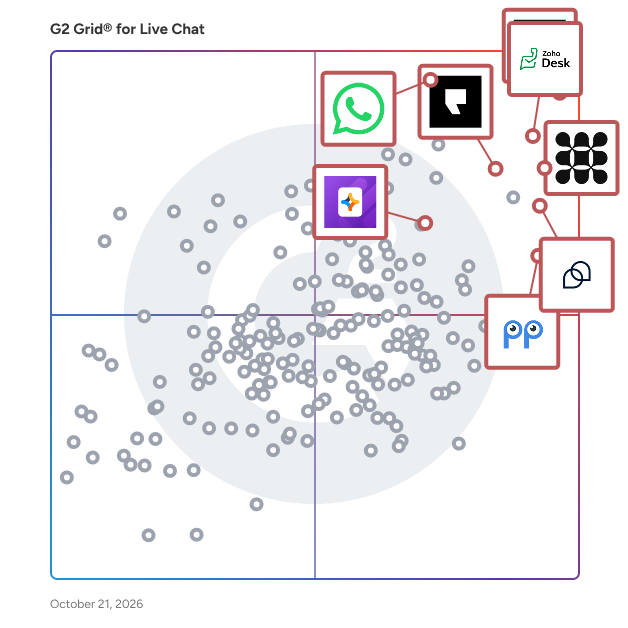
G2 Grid® for Live Chat Software

G2 Grid® for Live Chat Software plotting products by satisfaction and market presence

Highlighted products: Zoho Desk, Zendesk for Customer Service, WhatsApp Business Platform, Tidio, Fin, Podium, Smartsupp, and Jotform AI Agents.

Underlying data: [Grid® JSON](https://www.g2.com/categories/live-chat/grids.json?focus%5B%5D=zoho-desk&focus%5B%5D=zendesk-for-customer-service&focus%5B%5D=whatsapp-business-platform&focus%5B%5D=tidio&focus%5B%5D=fin&focus%5B%5D=podium&focus%5B%5D=smartsupp&focus%5B%5D=jotform-ai-agents&segment=small-business)

Zoho Desk

Zoho Desk is a web-based help desk software solution designed to assist organizations in providing exceptional customer support experiences. This platform serves as a centralized hub for managing customer interactions across multiple channels, allowing businesses to streamline their support processes and enhance overall customer satisfaction. By focusing on the needs of both customers and support agents, Zoho Desk aims to create a more efficient and effective help desk environment. Targeted primarily at businesses of all sizes, Zoho Desk caters to customer support teams looking to improve their service delivery and operational efficiency. The software is particularly beneficial for organizations that require a robust system to manage inquiries from various communication channels, including email, chat, social media, and phone. With its comprehensive feature set, Zoho Desk is well-suited for industries such as retail, technology, healthcare, and finance, where customer engagement and support are critical to success. One of the standout features of Zoho Desk is its omnichannel support capability, which allows businesses to engage with customers seamlessly across different platforms. This ensures that customers receive consistent and timely responses, regardless of how they choose to reach out. Additionally, the platform enhances agent productivity through automation tools that handle repetitive tasks, enabling support teams to focus on more complex customer issues. The integration of AI capabilities further empowers agents by providing them with insights and suggestions based on historical data and customer interactions. Zoho Desk also offers extensive customization options, allowing organizations to tailor the help desk experience to their specific needs. Users can create custom workflows, set up automated responses, and design personalized dashboards to monitor performance metrics. This level of customization ensures that businesses can adapt the software to fit their unique operational requirements, ultimately leading to improved service delivery and customer satisfaction. Furthermore, Zoho Desk provides real-time performance insights, enabling support managers to track key metrics and make data-driven decisions. The ability to analyze customer interactions and agent performance helps organizations identify areas for improvement and optimize their support strategies. With its cost-effective pricing model, Zoho Desk stands out as a practical solution for businesses seeking to enhance their customer support capabilities without incurring excessive expenses.

Average Rating: 4.4/5.0

Total Reviews: 7,751

G2 Deal: 50% discount on your first year with Zoho Desk

With Zoho Desk, you can deliver seamless omnichannel support, improve agent productivity at scale, customize your help desk, leverage powerful AI capabilities, automate mundane tasks, get live performance insights, and deeply integrate with apps you use daily - all without spending a fortune.

Price: ~~$14-40/agent/month~~ → $7-20/agent/month

View this exclusive G2 deal

How Do G2 Users Rate Zoho Desk?

  • Has the product been a good partner in doing business?: 8.4/10 (Category avg: 9.1/10)
  • Lead Development: 8.4/10 (Category avg: 8.5/10)
  • Customization : 8.2/10 (Category avg: 8.5/10)
  • Co-Browsing: 8.3/10 (Category avg: 8.1/10)

Who Is the Company Behind Zoho Desk?

  • Seller: Zoho
  • Company Website:
  • Year Founded: 1996
  • HQ Location: Austin, TX
  • Twitter: @Zoho
    137,880 Twitter followers
  • LinkedIn® Page: www.linkedin.com
    30,913 employees on LinkedIn®

Who Uses This Product?

  • Who Uses This: CEO, Director
  • Top Industries: Information Technology and Services, Computer Software
  • Company Size: 74% Small, 23% Medium

What Do G2 Reviewers Say About Zoho Desk?

AI-generated summary from verified user reviews

Pros
  • Users appreciate the ease of use of Zoho Desk, finding setup simple and customization straightforward.
  • Users appreciate the customization features and email integration of Zoho Desk, enhancing team efficiency and visibility.
  • Users love the efficient ticket management in Zoho Desk, streamlining support and enhancing team collaboration effortlessly.
  • Users value the extensive integrations of Zoho Desk, facilitating seamless communication across various platforms and enhancing productivity.
  • Users value the intuitive interface of Zoho Desk, enhancing organization and simplifying customer support management.
Cons
  • Users find the learning curve steep due to a busy interface and complex setup, making navigation challenging.
  • Users experience a steep learning curve due to a busy interface and complex setup for new features.
  • Users note the limited customization options can be confusing and restrict functionality in certain features of Zoho Desk.
  • Users find the complexity of Zoho Desk's UI and reporting features hampers their daily workflow and efficiency.
  • Users find the interface not intuitive, feeling overwhelmed by many options and hidden elements that complicate navigation.

What Are Recent G2 Reviews of Zoho Desk?

What Are G2 Users Discussing About Zoho Desk?

Zendesk for Customer Service

"Zendesk for Customer Service is an AI-powered service solution that’s easy to set up, use, and scale. It offers out-of-the-box functionality that’s simple to modify, helping businesses move faster. Leveraging AI built on billions of CX interactions, Zendesk enhances the entire service experience—from self-service to agents and admins—improving efficiency at scale. Zendesk equips agents with tools, insights, and context to deliver personalized service across all channels, including social messaging, phone, and email. It unifies personalized conversations, omnichannel case management, AI workflows, automation, and a Marketplace of 1800+ apps under one platform. Zendesk QA uses AI to evaluate and improve agent performance, while Workforce Management optimizes scheduling and productivity to ensure readiness during peak times. The solution is easy to implement and adjust without needing IT or developers. Zendesk’s mission is to simplify business complexity and enable meaningful customer connections for companies of all sizes. Serving 130K+ global brands in 30+ languages, Zendesk is headquartered in San Francisco with offices worldwide."

Average Rating: 4.3/5.0

Total Reviews: 6,736

G2 Deal: Experience the power of Zendesk with a free trial

Start your free trial of the leading AI-powered customer experience platform chosen by 100,000+ users. Whether you’re a small business looking to streamline customer service tickets or an enterprise-grade business that needs support software designed to scale as you grow, Zendesk is your solution.

Price: ~~$19 per agent/month~~ → $0 for 14 days

View this exclusive G2 deal

How Do G2 Users Rate Zendesk for Customer Service?

  • Has the product been a good partner in doing business?: 8.4/10 (Category avg: 9.1/10)
  • Lead Development: 8.1/10 (Category avg: 8.5/10)
  • Customization : 8.0/10 (Category avg: 8.5/10)
  • Co-Browsing: 8.0/10 (Category avg: 8.1/10)

Who Is the Company Behind Zendesk for Customer Service?

  • Seller: Zendesk
  • Company Website:
  • Year Founded: 2007
  • HQ Location: San Francisco, CA
  • Twitter: @Zendesk
    102,672 Twitter followers
  • LinkedIn® Page: www.linkedin.com
    7,537 employees on LinkedIn®

Who Uses This Product?

  • Who Uses This: Customer Success Manager, CEO
  • Top Industries: Computer Software, Information Technology and Services
  • Company Size: 45% Medium, 40% Small

What Do G2 Reviewers Say About Zendesk for Customer Service?

AI-generated summary from verified user reviews

Pros
  • Users appreciate the ease of use with Zendesk, benefiting from organized workflows and seamless functionality.
  • Users value the centralized communication and automation features of Zendesk, enhancing efficiency and personalized support.
  • Users value the efficient organization and speedy responses facilitated by Zendesk's centralized customer support system.
  • Users find Zendesk's ease of use invaluable, appreciating its intuitive interface and efficient task management.
  • Users benefit from the easy management of support tickets in Zendesk, enhancing collaboration and efficiency.
Cons
  • Users find Zendesk lacking in missing features, like customizable ticket statuses and commenting options for agents.
  • Users find the learning curve steep due to advanced features, making setup and customization challenging for non-experts.
  • Users find the limited features of Zendesk frustrating, leading to complex workarounds and time-consuming setups.
  • Users find limited customization in Zendesk, requiring significant time and effort to achieve desired setups and configurations.
  • Users find Zendesk's complexity overwhelming for beginners, with a steep learning curve for advanced features and reports.

What Are Recent G2 Reviews of Zendesk for Customer Service?

What Are G2 Users Discussing About Zendesk for Customer Service?

WhatsApp Business Platform

The WhatsApp Business Platform (API) is a powerful tool that enables businesses to connect with their customers on a personal level, at scale. With over 2 billion monthly active users on WhatsApp, this API provides a unique opportunity for businesses to build meaningful relationships with their audience. Ideal For: - Businesses seeking to send marketing messages, enhance customer engagement through transactional messages, authentication messages and support messages - Enterprises looking to automate routine communication tasks - Marketers aiming to leverage WhatsApp's vast user base for targeted campaigns Benefits: - Improved Customer Experience: Provide instant support and personalized interactions - Increased Efficiency: Automate routine tasks, freeing up resources for more strategic initiatives - Enhanced Data Insights: Gain valuable insights into customer behavior Key Features: - Scalable Messaging: Send and receive messages programmatically - Multimedia Support: Share text, images, documents, and links - Personalized Interactions: Use customer data to create tailored experiences - Omnichannel Support: Integrate WhatsApp with existing channels - Robust Analytics: Track key metrics to optimize campaigns - High Uptime and Security: Enjoy 99.9% uptime and SOC2 and ISO 27001 certifications

Average Rating: 4.6/5.0

Total Reviews: 248

How Do G2 Users Rate WhatsApp Business Platform?

  • Has the product been a good partner in doing business?: 8.7/10 (Category avg: 9.1/10)
  • Lead Development: 8.6/10 (Category avg: 8.5/10)
  • Customization : 8.5/10 (Category avg: 8.5/10)
  • Co-Browsing: 8.0/10 (Category avg: 8.1/10)

Who Is the Company Behind WhatsApp Business Platform?

  • Seller: Meta Platforms, Inc
  • Company Website:
  • Year Founded: 2008
  • HQ Location: Menlo Park, CA
  • Twitter: @Meta
    9,891,711 Twitter followers
  • LinkedIn® Page: www.linkedin.com
    164,238 employees on LinkedIn®

Who Uses This Product?

  • Top Industries: Information Technology and Services, Computer Software
  • Company Size: 67% Small, 24% Medium

What Do G2 Reviewers Say About WhatsApp Business Platform?

AI-generated summary from verified user reviews

Pros
  • Users appreciate the ease of use of WhatsApp Business Platform, making customer interaction seamless and efficient.
  • Users value the versatile features of WhatsApp Business Platform, enhancing client connections and promoting business growth effectively.
  • Users value the automation features of WhatsApp Business Platform for efficient, scalable communication and easy setup.
  • Users value the quick and automated reply feature of WhatsApp Business, enhancing efficiency and customer engagement.
  • Users value the easy communication fostered by WhatsApp Business Platform, enhancing customer interactions with speed and professionalism.
Cons
  • Users highlight limited scalability and complex setup as drawbacks of the WhatsApp Business Platform, impacting small businesses.
  • Users express frustration with the messaging issues, including visibility of typing indicators and message clutter.
  • Users find the service expensive and face complex setups, slow approvals, and rising costs at scale.
  • Users find the expensive subscriptions on WhatsApp Business Platform to be a significant drawback affecting usability.
  • Users feel a lack of integrations limits WhatsApp Business Platform’s features, complicating processes for small businesses.

What Are Recent G2 Reviews of WhatsApp Business Platform?

AI can help you find the answers. G2 helps you trust them.

Connect G2 to Claude or ChatGPT for answers grounded in G2's trusted reviews, comparisons, and pricing from real user insights.

How it works

Tidio

Tidio is an all-in-one customer support software suite comprising (1) help desk, (2) live chat, (3) chatbot automation, and (4) AI agent features. Over 300,000 businesses across ecommerce, services, and tech use Tidio to streamline communication, resolve issues faster, and drive more sales. With Tidio, support teams can engage customers in real time via live chat, automate responses to FAQs with Flows (rules-based chatbots), and manage conversations from multiple channels like email, Messenger, Instagram, WhatsApp, and email in one unified dashboard. At the heart of the platform is Lyro, Tidio’s conversational AI agent and chatbot, capable of resolving up to 67% of common customer inquiries without human involvement. With a single click, Lyro starts using your company’s existing help content to provide accurate and brand-consistent responses without making up answers. When in doubt, the AI agent will hand over the ticket to your team, enhancing trust between users and your brand. Tidio empowers businesses to scale their support without overwhelming their teams. It reduces missed chats, shortens response times, and frees up agents to focus on complex issues. Start free and get 50 AI-powered conversations with Lyro. No credit card required. 💬 Live Chat • Real-Time Support – Engage with visitors instantly through a lightweight chat widget. • Live Typing Preview – See what users are typing before they hit send. • Canned Responses – Use pre-written replies for quick, consistent answers. • AI Reply Assistant – Enhance responses with GPT-4 suggestions. • User Management – Ban users by IP, view live visitor lists. • Chat Transcripts – Save or email conversation history. • Attachments – Support for sending files (images, docs, videos). ⚙️ Flows (Chatbot Automation) • Visual Automation Builder – No-code drag & drop builder for custom flows. • Pre-designed Templates – 40+ templates designed for eCommerce. • Data Collection – Auto-capture contact info and feedback. • Abandoned Cart Recovery – Send timed offers/discounts. • Third-Party Integrations – Sync data with external tools and platforms. 🤖 Lyro (AI Agent) • Conversational AI – Automatically resolve up to 70% of questions. • Product Recommendations – Suggest items based on Shopify product data. • Multichannel Support – Works across live chat, WhatsApp, Instagram, Messenger. • Multilingual Capabilities – Respond in English, Spanish, French, Portuguese, German. • Analytics – Review AI performance and conversation stats. 🛒 Order Management (for Shopify) • Cart Preview – See what's in the customer's cart in real time. • Order History Access – View past orders for personalized help. • Direct Product Recommendations – Suggest products inside the chat. • Order Management – Cancel, update, or refund orders via chat. • Discount Offering – Share coupon codes live in conversation. 🎫 Ticketing System • Unified Ticket Creation – Convert emails/chats into support tickets. • Tagging and Prioritization – Organize and prioritize tasks. • Operator Tracking – Know who’s assigned to what. • Advanced Filtering – Quickly sort through tickets. • Spam Management – Auto-detect and filter irrelevant messages. 📡 Communication Channels Manage all in one dashboard: • Live Chat – Real-time website conversations. • Email – Integrate multiple inboxes. • Instagram – Reply to DMs and reactions. • Messenger – Chat with Facebook users. 🎨 Customization • Branding – Match chat widget to your site's look & feel. • Visibility Settings – Customize widget display by time/device. • Offline Messaging – Capture leads when you're offline. 📊 Analytics • Performance Monitoring – Track response times, satisfaction, missed chats. • Team Insights – Evaluate individual/team productivity. • Flow Analysis – Optimize automations based on performance data. 🔒 Privacy & Compliance • SOC 2 Type 2 • GDPR • CCPA • EU-US DPF • CPRA • AI Pact

Average Rating: 4.6/5.0

Total Reviews: 1,903

G2 Deal: Get 15% off any paid plan after signing up for a 7 day free trial

Tidio combines live chat and chatbot tools to help you connect with your customers and generate more sales with outstanding instant support.

Price: ~~$25-54/month~~ → $21-46/month

View this exclusive G2 deal

How Do G2 Users Rate Tidio?

  • Has the product been a good partner in doing business?: 9.2/10 (Category avg: 9.1/10)
  • Lead Development: 8.8/10 (Category avg: 8.5/10)
  • Customization : 8.9/10 (Category avg: 8.5/10)
  • Co-Browsing: 8.6/10 (Category avg: 8.1/10)

Who Is the Company Behind Tidio?

  • Seller: Tidio
  • Company Website:
  • Year Founded: 2013
  • HQ Location: San Francisco, California
  • Twitter: @tidiocx
    1,306 Twitter followers
  • LinkedIn® Page: www.linkedin.com
    182 employees on LinkedIn®

Who Uses This Product?

  • Who Uses This: Owner, CEO
  • Top Industries: Retail, Marketing and Advertising
  • Company Size: 90% Small, 9% Medium

What Do G2 Reviewers Say About Tidio?

AI-generated summary from verified user reviews

Pros
  • Users find Tidio's ease of use exceptional, enhancing communication with customers effectively and effortlessly.
  • Users appreciate Tidio for its immediate customer support, enhancing engagement and satisfaction in service delivery.
  • Users value the efficient AI chatbots of Tidio, ensuring quick customer responses and smooth communication.
  • Users find Tidio's easy setup incredibly helpful, enabling a smooth start and efficient configuration.
  • Users appreciate Tidio's real-time answers and easy setup, enhancing customer engagement and overall experience dramatically.
Cons
  • Users find Tidio expensive, especially for freelancers seeking customizable pricing and features to fit their needs.
  • Users find the missing features in Tidio, such as geolocation, limiting its affordability and usability across plans.
  • Users find the limited customization options frustrating, wishing for more control over chat features and workflows.
  • Users find Tidio's pricing model expensive, suggesting a need for more affordable options for small businesses.
  • Users desire more features from Tidio, such as additional styles, mobile capabilities, and editing options for chat responses.

What Are Recent G2 Reviews of Tidio?

What Are G2 Users Discussing About Tidio?

Fin

Fin is an AI Agent that helps CX teams deliver instant, accurate, & personalized experiences on any channel, in over 45 languages, 24/7. It is the highest-performing customer agent on the market, resolving 76% of queries on average across 12K+ customers, including highly complex, multi-step cases like refunds, account changes, or subscription issues. Fin connects into business systems, pulls customer data, and takes action in those systems – automatically resolving queries without needing a human. If Fin can’t answer the question or it has explicit guidance not to, it hands off to a human in whatever help desk they’re working in. It runs on all the channels you engage with customers on: voice, email, chat, WhatsApp, SMS, social, Slack, Discord, and more. It delivers the same personalized, context-rich experience regardless of where the conversation is happening. Works across the entire customer journey. Fin is a single Agent that understands the entire customer context and history, can build a relationship with customers over time, and can transition from one use case to another – from service to sales to ecommerce – without the customer even realizing the change. The Fin family of agent roles include: - Fin for Service resolves customers queries and automates support processes end-to-end. - Fin for Sales answers product discovery questions, qualifies inbound leads, and books appointments for your sales team or guides those leads to a self-service flow. - Fin for Ecommerce answers questions as customers shop, recommends exactly the right product, and guides them through checkout. What makes Fin different: - Industry-leading performance: Fin resolves 76% of cases on average across 12,000+ customers, with many customers seeing resolution rates of over 90%. This is because Fin is powered by Apex, our proprietary models that are purpose-built for CX. Fin Apex 1.0 outperforms generic frontier models, with a 2.8% higher resolution rate and 65% fewer hallucinations on average when compared to frontier models. - Easy-to-launch and optimize: Fin is fast to set up and easy for anyone on your team to configure without the need for technical resources. Teams go live in days, see value quickly, and are able to continuously and easily improve Fin themselves. - One platform across AI & human agents: Fin is natively integrated with Intercom, but also integrates seamlessly with almost any helpdesk. This means you can manage your human team and Fin in one place, without ever having to migrate off your system of record or change your workflows. - An agent for customer operations: Operator is an internal agent that helps CX leaders spot problems, find opportunities to improve, and act on them. You can optimize Fin agentically and without the manual lift. - Full trust and control: Fin is the only AI Agent that gives you complete control over how it performs. You can configure tone, behavior, and knowledge without any technical resources. And it has a full observability and testing suite, so you can deploy changes with confidence and trust what is going live to customers. - One agent for the whole lifecycle: Fin is a single Customer Agent, working across the entire customer lifecycle to help sell, onboard, and deliver excellent service. All on the same shared context, history, and guidance. - The most experienced partner: Fin combines 15+ years experience in CX with a 60+ person cutting-edge AI team. We partner with customers for the long-term and have developed the Blueprint for success based on our own experience using Fin.

Average Rating: 4.5/5.0

Total Reviews: 3,764

How Do G2 Users Rate Fin?

  • Has the product been a good partner in doing business?: 8.8/10 (Category avg: 9.1/10)
  • Lead Development: 8.3/10 (Category avg: 8.5/10)
  • Customization : 8.2/10 (Category avg: 8.5/10)
  • Co-Browsing: 8.2/10 (Category avg: 8.1/10)

Who Is the Company Behind Fin?

  • Seller: Fin
  • Company Website:
  • Year Founded: 2011
  • HQ Location: San Francisco, CA
  • Twitter: @fin_ai
    45,225 Twitter followers
  • LinkedIn® Page: www.linkedin.com
    1,238 employees on LinkedIn®

Who Uses This Product?

  • Who Uses This: Customer Success Manager, CEO
  • Top Industries: Computer Software, Information Technology and Services
  • Company Size: 56% Small, 37% Medium

What Do G2 Reviewers Say About Fin?

AI-generated summary from verified user reviews

Pros
  • Users appreciate the powerful query resolution capabilities of Fin, highlighting its quick access to helpful resources.
  • Users find Fin to be incredibly easy to use and appreciate its quick and efficient responses.
  • Users appreciate Fin's speed and reliability in resolving queries, enjoying its intuitive UI and seamless integration.
  • Users enjoy the efficiency of Fin, benefiting from seamless navigation and effective AI handling of customer queries.
  • Users appreciate the automation features of Fin, enhancing efficiency and client management without overwhelming support teams.
Cons
  • Users find the missing features in Fin, particularly for procedure visibility and conversation simulation, frustrating and limiting.
  • Users find AI limitations in Fin, struggling with unique formats and providing unhelpful responses at times.
  • Users express frustration with limited features in Fin, citing a need for better integration and simulation options.
  • Users find the learning curve challenging, struggling with setup and the need for constant monitoring and attention.
  • Users express concerns over Fin's high pricing, with many features requiring additional payment, leading to unexpected bills.

What Are Recent G2 Reviews of Fin?

What Are G2 Users Discussing About Fin?

Podium

Podium builds the AI Employees that power local businesses. Trusted by 60,000+ businesses across Automotive, Home Services, Aesthetics, and Retail, Podium's AI Employees increase lead conversion by 45% and generate 30% more revenue, without adding headcount. Podium is purpose-built for the industries we serve: Automotive: Podium turns every lead into a test drive or service appointment and searches for more opportunities in your database. Used by over 6,000 auto dealerships, Jerry, our AI employee, drives revenue through Sales AI, Service AI and Voice AI for fixed ops, with direct integrations to Reynolds & Reynolds, VinSolutions, CDK, Tekion, Dealertrack, Dealervault, Dealersocket, X-time and every other major CRM, DMS and scheduling system Home Services: Podium is the AI Operating System for HVAC, plumbing, electrical, and garage door contractors: Podium FSM, scheduling, memberships, and payments all in one platform. Larry, our AI employee, answers every call, books jobs directly onto the dispatch board, and follows up until the invoice is paid. Aesthetics: Podium is the AI Operating System for aesthetics: Podium EMR, patient communications, and marketing all in one platform. Avery, our AI front desk, responds to every lead, books appointments directly onto your calendar, and handles after-hours inquiries. Retail: Podium is the AI-powered communication, reviews, and payments platform for furniture, appliance, jewelry, and mattress retailers. Podium's AI Employee responds to every lead in under 60 seconds, 24/7. Since our founding in 2014, Podium has deployed thousands of AI Employees and become the system that drives growth and efficiency for local businesses. Podium has been recognized for Best AI Implementation by Inc. Magazine, highlighted by OpenAI for building revenue-driving AI Agents for local business, and awarded #1 AI Agent for Business Operations by G2.

Average Rating: 4.5/5.0

Total Reviews: 2,072

How Do G2 Users Rate Podium?

  • Has the product been a good partner in doing business?: 9.2/10 (Category avg: 9.1/10)
  • Lead Development: 8.6/10 (Category avg: 8.5/10)
  • Customization : 8.2/10 (Category avg: 8.5/10)
  • Co-Browsing: 7.4/10 (Category avg: 8.1/10)

Who Is the Company Behind Podium?

  • Seller: Podium
  • Company Website:
  • Year Founded: 2014
  • HQ Location: Lehi, UT
  • Twitter: @PodiumHQ
    4,178 Twitter followers
  • LinkedIn® Page: www.linkedin.com
    1,639 employees on LinkedIn®

Who Uses This Product?

  • Who Uses This: Owner, General Manager
  • Top Industries: Automotive, Retail
  • Company Size: 61% Small, 34% Medium

What Do G2 Reviewers Say About Podium?

AI-generated summary from verified user reviews

Pros
  • Users find Podium's ease of use and intuitive design to significantly enhance their business operations and efficiency.
  • Users appreciate Podium for its user-friendly interface and effective communication features that enhance business operations.
  • Users love the easy communication with customers via Podium, enhancing real-time interactions and improving service insights.
  • Users highly value Podium's unified communication, seamlessly integrating multiple messaging platforms for streamlined customer engagement.
  • Users rave about the fantastic customer support from Podium, enhancing business operations and satisfaction significantly.
Cons
  • Users express concern over missing features in Podium, hindering effective service management and customer engagement.
  • Users find messaging issues with Podium, struggling to manage a high volume of inquiries effectively.
  • Users find Podium's limited features challenging, particularly with tracking messages and lack of integration options.
  • Users find Podium's pricing to be excessive, deterring small businesses from fully utilizing the platform.
  • Users report poor customer support, facing aggressive practices and frustrating cancellation processes that sour their experience.

What Are Recent G2 Reviews of Podium?

What Are G2 Users Discussing About Podium?

Smartsupp

Smartsupp helps businesses grow online sales with advanced AI Shopping Assistants, live chat, multichannel solution and automated workflows. We offer everything you need to grow your online sales: an easy-to-use platform powered with AI, chatbots with various skills and templates, live chat... and much much more you can use to engage your visitors at the right time and convert them into loyal customers in no time. Smartsupp is one of the leading and most trusted chat and chatbot solutions in the world, currently helping over 100,000 webshops and websites.

Average Rating: 4.7/5.0

Total Reviews: 983

How Do G2 Users Rate Smartsupp?

  • Has the product been a good partner in doing business?: 9.0/10 (Category avg: 9.1/10)
  • Lead Development: 8.6/10 (Category avg: 8.5/10)
  • Customization : 8.8/10 (Category avg: 8.5/10)
  • Co-Browsing: 8.4/10 (Category avg: 8.1/10)

Who Is the Company Behind Smartsupp?

  • Seller: Smartsupp
  • Year Founded: 2013
  • HQ Location: Brno, South Moravia
  • Twitter: @SmartsuppCOM
    441 Twitter followers
  • LinkedIn® Page: www.linkedin.com
    33 employees on LinkedIn®

Who Uses This Product?

  • Who Uses This: CEO, Owner
  • Top Industries: Retail, Apparel & Fashion
  • Company Size: 96% Small, 3% Medium

What Do G2 Reviewers Say About Smartsupp?

AI-generated summary from verified user reviews

Pros
  • Users praise the ease of use of Smartsupp, enhancing communication and customer support effortlessly.
  • Users value the easy setup of Smartsupp, finding quick implementation and helpful tutorials for seamless integration.
  • Users find Smartsupp's helpful automation features enhance customer support efficiency and improve engagement from the start.
  • Users love the real-time visitor notifications of Smartsupp, appreciating its multi-device support and ease of use.
  • Users appreciate the intuitive interface of Smartsupp, which simplifies setup and enhances user experience seamlessly.
Cons
  • Users find Smartsupp expensive for small businesses, suggesting a need for more affordable subscription options.
  • Users feel the subscription cost is too high and suggest the need for more payment options for convenience.
  • Users find the AI limitations restrictive, needing manual input for the chatbot to effectively learn website content.
  • Users highlight the missing features of Smartsupp, including limited integrations and slow customer switching.
  • Users face challenges with chat management, including message editing issues and inadequate support communication.

What Are Recent G2 Reviews of Smartsupp?

What Are G2 Users Discussing About Smartsupp?

Jotform AI Agents

Jotform AI Agents are automated real-time assistants designed to help your users at any time of day or night. AI Agents are the future of customer service. Train and customize your own personal AI Agent to enhance user engagement, improve response times, and streamline support operations. With Jotform’s intuitive, no-code AI builder, you can easily train and customize your own AI Agent to match your brand voice, support workflows, and respond with the exact information your users need. Simply provide key details, documents, FAQs, or form data, and your AI Agent will learn from this context to deliver accurate, personalized interactions. This level of customization helps teams improve response times, boost user satisfaction, and streamline support operations across every stage of the customer journey. One of the platform’s most powerful advantages is its extensive library of 7,000+ customizable AI Agent templates. These ready-made templates provide an easy starting point for a wide variety of use cases, including customer support, onboarding, lead qualification, appointment scheduling, product education, internal training, and more. Each template can be fully personalized with your own instructions, tone, workflows, and industry-specific knowledge—allowing you to deploy high-performing AI Agents in minutes. Jotform AI Agents provide 24/7 automated assistance, ensuring your customers receive instant support even outside of business hours. While you sleep, your AI Agents continue working—handling inquiries, resolving issues, collecting information, and providing accurate responses around the clock. This continuous availability reduces wait times, increases engagement, and helps teams keep up with growing demand. With multichannel support, Jotform AI Agents can operate wherever your users are. Deploy your agents across web, chat widgets, email, phone, WhatsApp, Messenger, Gmail, WordPress, and other communication channels for a unified, consistent support experience. This omnichannel flexibility ensures that your users always receive real-time assistance—no matter the device or platform. For teams requiring voice-based interactions, Jotform offers powerful phone and SMS capabilities. AI Agents can handle incoming calls, conduct natural voice conversations, answer questions, and transcribe spoken messages—all with a friendly, human-like tone. This makes Jotform AI Agents ideal for customer service hotlines, appointment reminders, phone-based support, and automated phone menus. AI Agents can also perform customizable actions based on your workflows. Define specific behaviors, triggers, follow-up steps, or automated tasks for your agent to execute. Whether you want it to qualify leads, send emails, update CRM records, route inquiries, generate reports, or collect data through forms, your AI Agent follows your rules precisely. By combining real-time automation, no-code customization, multichannel support, and intelligent communication, Jotform AI Agents help organizations scale their customer experience effortlessly. Whether you’re a small business or a global enterprise, AI Agents provide the speed, accuracy, and availability needed to support users at every moment.

Average Rating: 4.5/5.0

Total Reviews: 714

How Do G2 Users Rate Jotform AI Agents?

  • Has the product been a good partner in doing business?: 8.7/10 (Category avg: 9.1/10)
  • Lead Development: 7.6/10 (Category avg: 8.5/10)
  • Customization : 8.7/10 (Category avg: 8.5/10)
  • Co-Browsing: 6.1/10 (Category avg: 8.1/10)

Who Is the Company Behind Jotform AI Agents?

  • Seller: Jotform
  • Company Website:
  • Year Founded: 2006
  • HQ Location: San Francisco, California
  • Twitter: @Jotform
    39,289 Twitter followers
  • LinkedIn® Page: www.linkedin.com
    925 employees on LinkedIn®

Who Uses This Product?

  • Who Uses This: Owner, Founder
  • Top Industries: Information Technology and Services, Computer Software
  • Company Size: 74% Small, 11% Medium

What Do G2 Reviewers Say About Jotform AI Agents?

AI-generated summary from verified user reviews

Pros
  • Users value the ease of use of Jotform AI Agents, enhancing productivity and simplifying onboarding processes.
  • Users find the easy setup of Jotform AI Agents simplifies onboarding and ongoing training for clients.
  • Users highlight the easy setup of Jotform AI Agents, enabling quick onboarding and efficient client interaction.
  • Users find Jotform AI Agents to be extremely helpful in streamlining tasks and enhancing productivity in various settings.
  • Users value the superior setup ease of Jotform AI Agents, facilitating a smooth onboarding process and enhanced efficiency.
Cons
  • Users find the AI limitations frustrating, with issues in flexibility and understanding user specifications effectively.
  • Users find the AI's limited capabilities affect its flexibility and accuracy in executing workflows and understanding requests.
  • Users express frustration with the limited features of Jotform AI Agents, hindering their ability to customize workflows effectively.
  • Users find inadequate AI features in Jotform AI Agents, as it often hallucinates and misunderstands user requests.
  • Users experience poor understanding from Jotform AI Agents, leading to frustration and confusion in interpreting queries and instructions.

What Are Recent G2 Reviews of Jotform AI Agents?

Shopify Inbox

Shopify Inbox is a free messaging tool designed to enhance customer engagement and boost sales by enabling real-time communication between merchants and shoppers. Integrated seamlessly into the Shopify platform, it allows store owners to manage customer conversations directly from their admin panel or through dedicated mobile applications. By providing live customer data, such as browsing history, cart contents, and past orders, Shopify Inbox empowers merchants to offer personalized support and product recommendations, thereby increasing conversion rates and fostering stronger customer relationships. Key Features and Functionality: - Seamless Integration: Easily add chat functionality to your online store through a straightforward setup within the Shopify admin interface. - AI-Powered Responses: Utilize artificial intelligence to generate instant answers and suggested replies, enabling quicker responses to customer inquiries. - Customer Insights: Access detailed customer profiles, including products viewed, items in the cart, and order history, to tailor interactions effectively. - Product and Discount Sharing: Send product recommendations, images, and discount codes directly within the chat, facilitating upselling and enhancing the shopping experience. - Automated Messaging: Set up automated greetings, contact information collection, and responses to frequently asked questions, saving time for both merchants and customers. Primary Value and Solutions Provided: Shopify Inbox addresses the need for efficient and personalized customer communication in the e-commerce space. By offering real-time chat capabilities integrated with live customer data, it enables merchants to provide immediate assistance, recommend products, and offer discounts, all of which can lead to increased sales and customer satisfaction. The AI-driven features and automation tools reduce response times and streamline customer support processes, allowing businesses to manage inquiries more effectively and focus on growth.

Average Rating: 4.4/5.0

Total Reviews: 17

How Do G2 Users Rate Shopify Inbox?

  • Has the product been a good partner in doing business?: 9.3/10 (Category avg: 9.1/10)
  • Lead Development: 6.8/10 (Category avg: 8.5/10)
  • Customization : 7.7/10 (Category avg: 8.5/10)
  • Co-Browsing: 7.0/10 (Category avg: 8.1/10)

Who Is the Company Behind Shopify Inbox?

  • Seller: Shopify
  • Year Founded: 2006
  • HQ Location: Ottawa, ON
  • Twitter: @Shopify
    450,909 Twitter followers
  • LinkedIn® Page: www.linkedin.com
    29,875 employees on LinkedIn®
  • Ownership: NYSE:SHOP

Who Uses This Product?

  • Company Size: 89% Small, 11% Medium

What Do G2 Reviewers Say About Shopify Inbox?

AI-generated summary from verified user reviews

Pros
  • Users find the easy setup of Shopify Inbox beneficial, ensuring their websites remain functional without complications.
  • Users value the reliable notifications for updates, ensuring their site stays running smoothly without issues.
Cons
  • Users find the learning curve challenging, wishing for better guidance on managing features and layout.

What Are Recent G2 Reviews of Shopify Inbox?

HubSpot Service Hub

Service Hub delivers AI-powered customer service at scale by unifying customer insights, providing omnichannel support tools, and enabling efficient self-service options within a single platform. Core Value Proposition: Service Hub addresses three critical customer service challenges: scaling support teams without proportional headcount increases, maintaining service quality across multiple communication channels, and leveraging customer data to drive retention and growth. The platform connects customer service data with information from sales and marketing, providing support representatives with complete customer context. Key Capabilities: Omnichannel Help Desk: Service Hub consolidates support requests from multiple communication channels into a single interface. Teams manage all customer communications without switching between tools, ensuring consistent response quality across channels. AI-Powered Efficiency: The platform includes AI features that automate ticket routing, suggest relevant knowledge base articles, and identify patterns in customer issues to improve resolution speed and support team productivity. Self-Service Tools: Service Hub provides knowledge base creation, chatbot functionality, and customer portal capabilities enabling customers to find answers independently. This reduces ticket volume and support team workload while improving customer satisfaction. Data-Driven Retention: The platform offers customer health scoring, efficiency reporting, and trend analysis that help service leaders identify at-risk accounts, optimize team performance, and connect support activities to business growth metrics. Service Hub vs. Alternatives: Unlike standalone ticketing systems operating in isolation, Service Hub shares customer data with sales and marketing platforms, enabling support teams to see complete customer journey context. Representatives can access purchase history, marketing interactions, and sales conversations without needing to request information from other departments. Service Hub eliminates the need to purchase and integrate separate tools for live chat, knowledge base management, customer feedback collection, and service analytics by providing these capabilities within the unified HubSpot platform. Who Should Use Service Hub: Service Hub serves customer experience leaders seeking to scale support efficiently, support teams needing complete customer context for quality service delivery, and organizations wanting to connect service metrics to retention and growth outcomes. The platform enables CX leaders to focus on efficient reps empowered by AI. Outcome: Service Hub helps teams deliver delightful support at scale with unified customer insights, create efficient reps empowered by AI, and scale their company, not complexity.

Average Rating: 4.4/5.0

Total Reviews: 2,912

G2 Deal: Get the HubSpot Growth CRM Suite - 20% off HubSpot plans for the first year, then 10% off in perpetuity

20% off HubSpot plans for the first year, then 10% off in perpetuity

View this exclusive G2 deal

How Do G2 Users Rate HubSpot Service Hub?

  • Has the product been a good partner in doing business?: 8.8/10 (Category avg: 9.1/10)
  • Lead Development: 8.4/10 (Category avg: 8.5/10)
  • Customization : 8.1/10 (Category avg: 8.5/10)
  • Co-Browsing: 8.1/10 (Category avg: 8.1/10)

Who Is the Company Behind HubSpot Service Hub?

  • Seller: HubSpot
  • Company Website:
  • Year Founded: 2006
  • HQ Location: Cambridge, Massachusetts, United States
  • Twitter: @HubSpot
    784,270 Twitter followers
  • LinkedIn® Page: www.linkedin.com
    17,628 employees on LinkedIn®

Who Uses This Product?

  • Who Uses This: Customer Success Manager, Customer Success Specialist
  • Top Industries: Computer Software, Information Technology and Services
  • Company Size: 59% Small, 37% Medium

What Do G2 Reviewers Say About HubSpot Service Hub?

AI-generated summary from verified user reviews

Pros
  • Users commend the ease of use of HubSpot Service Hub, streamlining communication and enhancing decision-making effortlessly.
  • Users love the seamless integration of features in HubSpot Service Hub, enhancing communication and accessibility of insights.
  • Users highly value the responsive customer support of HubSpot Service Hub, ensuring quick assistance for any inquiries.
  • Users appreciate the efficiency of HubSpot Service Hub, streamlining tasks and enhancing productivity effectively.
  • Users appreciate the convenient ticketing system of HubSpot Service Hub, efficiently managing all customer interactions in one place.
Cons
  • Users find missing features in HubSpot Service Hub, especially in customization and advanced functionalities requiring higher plans.
  • Users find limited customization in contacts and reporting features, hindering their ability to effectively manage multiple properties.
  • Users feel the limited features of HubSpot Service Hub hinder customization and efficiency in their workflows.
  • Users report a lack of features in HubSpot Service Hub, hindering usability and cross-team collaboration.
  • Users face limited email processing options and struggle with ticket management inefficiencies in HubSpot Service Hub.

What Are Recent G2 Reviews of HubSpot Service Hub?

What Are G2 Users Discussing About HubSpot Service Hub?

Qualified

Qualified is the Agentic Marketing platform for B2B companies around the world. Headquartered in San Francisco, Qualified is built to modernize and maximize inbound pipeline generation with Piper the AI SDR Agent. Piper autonomously engages website visitors, captures leads, and converts them into pipeline with zero human intervention. With Piper, Qualified is transforming pipeline generation as we know it today. Your website is the front door to your business and the pinnacle of pipeline generation, but what happens when interested buyers want to learn more? They submit a web form and move on. Those leads get added to a queue for an inbound Sales Development Rep (SDR) to follow up with and nurture to pipeline for your sales team. How long does it take for an inbound lead to hear back? It can take hours, if not days. In the world of sales and marketing, speed is crucial as 78% of buyers go with the vendor that responds to them first. The problem is it's impossible to respond quickly with the current process because it's painfully manual, time intensive, and it relies on limited human capacity. But it doesn’t have to be this way. In the age of AI, we can put pipeline generation on autopilot. Meet Piper the AI SDR Agent. She operates across your entire inbound motion and works tirelessly to convert qualified buyers into pipeline, 24x7. Piper knows everything about your buyers. She profiles every website visitor to understand whether they're qualified and where they are in the buying journey then works toward her conversion goals. Piper also turns every touchpoint on your website into an opportunity for conversion with live chat, meeting booking, and personalized marketing offers. What's more, Piper works the inbox to send fast, personalized follow up and nurture emails to each and every lead. Hundreds of the world’s leading brands—including Crunchbase, Demandbase, Greenhouse, Plaid, and Suse—have hired Piper the AI SDR Agent to grow their inbound pipeline and are seeing real tangible business results.

Average Rating: 4.9/5.0

Total Reviews: 1,558

How Do G2 Users Rate Qualified?

  • Has the product been a good partner in doing business?: 9.9/10 (Category avg: 9.1/10)
  • Lead Development: 9.5/10 (Category avg: 8.5/10)
  • Customization : 9.4/10 (Category avg: 8.5/10)
  • Co-Browsing: 9.1/10 (Category avg: 8.1/10)

Who Is the Company Behind Qualified?

  • Seller: Salesforce
  • Company Website:
  • Year Founded: 1999
  • HQ Location: San Francisco, CA
  • Twitter: @salesforce
    579,511 Twitter followers
  • LinkedIn® Page: www.linkedin.com
    89,711 employees on LinkedIn®

Who Uses This Product?

  • Who Uses This: Marketing Operations Manager, Sales Development Representative
  • Top Industries: Computer Software, Information Technology and Services
  • Company Size: 67% Medium, 21% Large

What Do G2 Reviewers Say About Qualified?

AI-generated summary from verified user reviews

Pros
  • Users value the excellent and responsive customer support from Qualified, ensuring smooth implementation and ongoing assistance.
  • Users value the excellent support from Qualified, enhancing their experience and facilitating smooth integrations and migrations.
  • Users value the seamless data integration of Qualified, enhancing real-time engagement and optimizing website conversions effectively.
  • Users find Qualified to be exceptionally easy to use, with seamless integration and effective tools enhancing their experience.
  • Users value the exceptional customer service from Qualified, noting responsiveness and personalized support throughout their experience.
Cons
  • Users find the learning curve steep due to non-intuitive reporting and dashboard features, affecting overall usability.
  • Users note the missing features in Qualified, making it difficult to extract insights and accomplish tasks efficiently.
  • Users face a steep learning curve with Qualified, requiring time and support to fully utilize its features.
  • Users desire more customization options in Qualified, particularly for graphic elements and dialogue flow management.
  • Users find the complexity of Qualified's setup and management can be cumbersome without proper guidance and support.

What Are Recent G2 Reviews of Qualified?

What Are G2 Users Discussing About Qualified?

Missive

Are you double sending emails? Not knowing who's responding to what, or whether they've responded at all? Losing the thread when the person who owns it is out? What if your business could manage all your email accounts, including its shared inboxes like support@, sales@, info@, and accounting@, along with SMS, WhatsApp, Messenger, and Instagram—all in one place? Missive is inbox collaboration for teams that run on email. Every conversation gets an owner, so nobody replies twice and nothing sits unread for a week. Teammates discuss a thread in private comments right beside it instead of forwarding it around, and when someone's away, whoever picks it up gets the full history. Missive's AI assistant works inside the inbox. It reads a thread and drafts a reply in your voice, searches your email, contacts and calendar, and reads attachments. Through MCP it pulls context from tools like ClickUp, Todoist and Stripe—and the reverse, letting Claude, ChatGPT or Cursor act on your conversations, contacts and drafts from outside Missive. Bring your own Claude, OpenAI or Gemini key, or use Missive AI credits. You approve before anything sends. Used by over 6500 businesses, including accounting firms, manufacturers, property management companies, travel agencies, legal practices, and logistics teams. -- Key features • Team Inboxes: Shared addresses the whole team works from, with assignment so every conversation has a clear owner and coverage when someone's out. • Internal comments and @mentions: Discuss a thread in a private sidebar next to the actual email. The customer never sees it. • AI assistant: Drafts replies in your voice, searches your inbox, contacts and calendar, and reads attachments. Labels, events and sends happen only after you approve. • MCP in both directions: Missive AI connects out to tools like ClickUp, Todoist and Stripe, and Missive's MCP server lets Claude, ChatGPT or Cursor work on your inbox from outside. • Automated Workflows: Create customizable rules to automate repetitive tasks and use AI to get even more efficiency. Popular use cases include auto-categorization of emails, auto-follow-up emails, automatic forwarding of receipts, and out-of-office auto-responses. • Canned responses: Save time with pre-written replies to customer inquiries, sales pitches, or to include that PDF you always need to attach when signing up a new client. • Integrations: Pipedrive, HubSpot, Shopify, Airtable, ClickUp, Asana, Dialpad, Twilio, Aircall, Zapier, and a REST API for building your own.

Average Rating: 4.7/5.0

Total Reviews: 857

How Do G2 Users Rate Missive?

  • Has the product been a good partner in doing business?: 9.6/10 (Category avg: 9.1/10)
  • Lead Development: 8.0/10 (Category avg: 8.5/10)
  • Customization : 8.6/10 (Category avg: 8.5/10)
  • Co-Browsing: 6.4/10 (Category avg: 8.1/10)

Who Is the Company Behind Missive?

  • Seller: Missive
  • Company Website:
  • Year Founded: 2015
  • HQ Location: Quebec, QC
  • Twitter: @missiveapp
    2,667 Twitter followers
  • LinkedIn® Page: www.linkedin.com
    12 employees on LinkedIn®

Who Uses This Product?

  • Who Uses This: CEO, Owner
  • Top Industries: Accounting, Marketing and Advertising
  • Company Size: 88% Small, 12% Medium

What Do G2 Reviewers Say About Missive?

AI-generated summary from verified user reviews

Pros
  • Users value the seamless team collaboration in Missive, enhancing productivity through integrated chat and task assignment.
  • Users appreciate the team collaboration features of Missive, which streamline workflow and enhance productivity significantly.
  • Users find Missive's intuitive interface and seamless collaboration features make email management effortless and efficient.
  • Users appreciate the collaborative features of Missive that enhance team productivity and streamline email management.
  • Users value the collaborative features of Missive, enhancing teamwork and improving email organization effortlessly.
Cons
  • Users note the missing features in Missive, such as offline support and an improved search and labeling system.
  • Users find the learning curve challenging initially, requiring time to become familiar with advanced features and setups.
  • Users find the search functionality lacking, especially for specific and older messages, despite some improvements over time.
  • Users find the search difficulty frustrating, particularly with older messages, though improvements are underway.
  • Users find the steep learning curve of Missive challenging initially, making setup and feature integration feel daunting.

What Are Recent G2 Reviews of Missive?

What Are G2 Users Discussing About Missive?

Birdeye

Birdeye builds AI coworkers for multi-location brands — trusted by the world's largest enterprise brands, including Aspen Dental, Sun Auto, and Caesars Entertainment. We give you AI coworkers at every location, across marketing, operations, and customer experience, that own the jobs your business needs done: winning AI visibility, booking appointments, and driving consistent CX. AI Coworkers → Own the Jobs Jay (marketing), Myna (operations), and Robin (customer experience) own the work across your locations — from AI search visibility, reviews, listings, and social, to front desk and appointment booking, to surveys, ticketing, and insights. An agent carries out an action, but it doesn't own an outcome. A coworker holds a job. Agents give you capacity; coworkers give you ownership. Your team manages three coworkers instead of thirty agents — and the work gets done at every location, without stretching anyone thinner. Agents → Do the Work Each coworker orchestrates multiple agents that work together to complete a job, and how those agents work is what makes us different. Most software tells you what's happening; ours decides what to do and does it. That runs on BirdAI, our Agent OS: it consolidates every signal across every location, whether it lives in Birdeye or one of your 3,000+ integrations; reasons with your industry, brand, and location context, backed by 13 years of multi-location data infrastructure; and acts — autonomously or with a human in the loop, your call per workflow. So one review, one campaign, one missed call becomes a finished outcome, not a line item in a dashboard. Enterprise-Ready → Built for Scale SSO, audit logging, HIPAA, SOC 2, and GDPR. Role-based access, tiered approvals, and location-level reporting give corporate and local teams the control they need — so you stay in control while AI handles execution across hundreds of locations. With teams across the U.S., U.K., Australia, and India, Birdeye serves multi-location brands in healthcare, dental, restaurants, financial services, auto, retail, and property management.

Average Rating: 4.7/5.0

Total Reviews: 4,135

How Do G2 Users Rate Birdeye?

  • Has the product been a good partner in doing business?: 9.4/10 (Category avg: 9.1/10)
  • Lead Development: 8.7/10 (Category avg: 8.5/10)
  • Customization : 8.8/10 (Category avg: 8.5/10)
  • Co-Browsing: 8.4/10 (Category avg: 8.1/10)

Who Is the Company Behind Birdeye?

  • Seller: Birdeye
  • Company Website:
  • Year Founded: 2012
  • HQ Location: Palo Alto, CA
  • Twitter: @BirdEye_
    5,232 Twitter followers
  • LinkedIn® Page: www.linkedin.com
    1,477 employees on LinkedIn®

Who Uses This Product?

  • Who Uses This: Owner, Marketing Manager
  • Top Industries: Hospital & Health Care, Real Estate
  • Company Size: 46% Small, 34% Medium

What Do G2 Reviewers Say About Birdeye?

AI-generated summary from verified user reviews

Pros
  • Users value the ease of use of Birdeye, appreciating its intuitive navigation and efficient support team.
  • Users appreciate the efficiency in managing reviews with Birdeye, making feedback response quick and streamlined.
  • Users appreciate the efficiency in review management offered by Birdeye, streamlining customer feedback in one platform.
  • Users appreciate the fast and responsive customer support provided by Birdeye, enhancing their overall experience.
  • Users appreciate the centralized platform of Birdeye, simplifying patient engagement and reputation management efficiently.
Cons
  • Users feel the lack of missing features limits Birdeye's potential, wishing for more reports and integrations.
  • Users notice the need for improvement in the AI chatbot, as it struggles with complex queries and implementation issues.
  • Users find the dashboard challenging to navigate, especially when managing multiple locations and utilizing the search function.
  • Users experience a noticeable learning curve with Birdeye, especially when navigating its features initially.
  • Users note that Birdeye has limited features for review management, impacting the effectiveness of customer interactions.

What Are Recent G2 Reviews of Birdeye?

What Are G2 Users Discussing About Birdeye?

Chatway Live Chat

Chatway is an all-in-one live chat, AI chatbot, customer service, and customer communication platform that helps businesses support customers, automate conversations, manage multiple channels, and connect support workflows with AI agents and external tools. Businesses can add a customizable live chat widget to their website in minutes and communicate with visitors in real time. Chatway works with virtually any website and offers integrations for platforms such as WordPress, WooCommerce, Shopify, Wix, Square, BigCommerce, and more. Chatway combines human support, AI-powered customer service, automation, omnichannel messaging, ecommerce data, mobile apps, team collaboration, and powerful developer tools in one platform. ### AI Support Agent Chatway includes an AI Support Agent that can automatically answer customer questions 24/7. Businesses can train the AI using website content, Help Center articles, knowledge base content, FAQs, and other relevant information. The AI can answer common questions, provide support in multiple languages, and reduce the number of conversations that require a human agent. When human assistance is needed, the conversation can be handed over to the support team. Chatway includes AI credits so businesses can start using the AI Support Agent and scale usage as their support volume grows. ### MCP for AI agents Chatway supports the Model Context Protocol, or MCP, making it easy to connect Chatway with AI assistants and AI agents. Through MCP, compatible AI tools can securely access Chatway and work with customer service data using natural language. AI agents can perform actions such as: - Find and review conversations - Summarize customer conversations - Search contacts - Find unresolved conversations - Reply to customers - Assign conversations - Add tags - Add private notes - Update custom data - Resolve or reopen conversations - Help triage support requests Chatway can be connected with MCP-compatible tools such as ChatGPT, Claude, Cursor, Codex, Gemini, Grok, Cline, Devin, Manus, Goose, OpenCode, and other AI agents and MCP clients. MCP access is permission-based, so businesses can control what an AI agent is allowed to access and do. This makes Chatway especially useful for companies building AI agents, internal AI assistants, automated support workflows, and AI-powered customer service systems. ### REST API and Webhooks Chatway includes a REST API and Webhooks for businesses that want to build custom integrations and automations. The API allows external apps and AI agents to interact with Chatway conversations, messages, contacts, assignments, tags, custom data, and other support workflows. Webhooks can notify external systems when important events happen in Chatway, such as: - A customer sends a message - A new conversation is created - A conversation is resolved - An agent is assigned - A contact form is submitted - Other customer or conversation events occur MCP, API, and Webhooks can also be combined to create advanced workflows. For example: Customer sends a message → Chatway Webhook → AI agent or external system → Chatway API → customer receives a response. This makes Chatway flexible enough for both simple live chat setups and advanced AI customer service infrastructure. ### Omnichannel customer service Chatway helps businesses manage customer conversations from multiple channels in one place. Supported communication channels include website live chat, WhatsApp, Facebook Messenger, Instagram, email, and other connected channels. Support agents can manage conversations from a centralized inbox while customers continue communicating through the channels they prefer. Businesses can also add contact buttons such as WhatsApp, Messenger, Instagram, Telegram, phone, SMS, email, and custom links directly to the chat widget. ### Automations and workflows Chatway includes automation tools that help businesses reduce repetitive work and engage visitors at the right time. Automations can be triggered based on visitor behavior, pages visited, working hours, conversation activity, tags, custom data, and other conditions. Businesses can use automations to: - Send automatic greetings - Send targeted messages - Route conversations - Assign agents or teams - Add tags - Update custom data - Add private notes - Create reminders - Send post-chat surveys - Send messages based on working hours - Automatically resolve conversations - Trigger workflows based on customer behavior These tools help support teams save time while maintaining a personal customer experience. ### Teams and collaboration Chatway supports both individual users and growing customer service teams. Businesses can invite multiple agents, organize agents into teams, assign conversations, and route customers to the right department or support group. Teams can be created for areas such as sales, technical support, billing, customer success, or specific products. Agents can use private notes to collaborate internally without customers seeing the discussion. Roles and permissions help businesses control what different users can access. ### Multiple inboxes and widgets Businesses managing multiple brands, websites, products, or departments can create multiple inboxes and chat widgets inside Chatway. Each widget can have its own appearance, settings, automations, agents, and customer experience. This makes Chatway suitable for SaaS companies, ecommerce businesses, agencies, hosting companies, and organizations that manage several websites or products. ### Ecommerce integrations Chatway integrates with ecommerce platforms such as Shopify and WooCommerce. Support agents can access useful customer and store information while chatting, reducing the need to switch between multiple systems. Depending on the integration, agents can see information such as: - Customer details - Orders - Order status - Cart contents - Cart value - Products - Purchase information Agents can also share relevant products, order information, and discount coupons during conversations. Having ecommerce information directly alongside the customer conversation helps agents answer questions faster and provide better support. ### Help Center and knowledge base Chatway includes a customizable Help Center that businesses can use to create a self-service knowledge base. Businesses can publish articles, FAQs, product documentation, policies, troubleshooting guides, and other support content. Customers can search for answers themselves and move into live chat or the AI Support Agent when they need additional help. The Help Center can be customized to match the business's brand. ### Live translation and multilingual support Chatway helps businesses support customers around the world. Incoming customer messages can be translated in real time into the agent's preferred language. Businesses can also customize and translate the chat widget for different audiences. The AI Support Agent can communicate in multiple languages, making Chatway useful for international customer service teams. ### Customizable live chat widget The Chatway widget can be customized to match a business's website and branding. Businesses can customize the appearance, colors, text, position, forms, FAQs, social buttons, languages, availability, and other settings. The widget can also be shown or hidden based on conditions such as pages, domains, countries, schedules, dates, and other targeting rules. Pre-chat forms and custom fields can be used to collect useful visitor information. ### Visitor information and customer context Chatway gives agents useful context about website visitors and customers. Agents can see relevant information such as the page a visitor is viewing and other available customer details. Tags, custom data, customer information, and conversation history help support teams provide more personalized assistance. ### iOS and Android mobile apps Chatway includes native mobile apps for iOS and Android. Agents can receive push notifications, reply to customers, manage conversations, and provide customer service directly from their phones. This is especially useful for small businesses, distributed teams, and support teams that need to remain available while away from their computers. ### Productivity tools Chatway includes a wide range of tools designed to make customer service faster and easier, including: - Canned responses - FAQs - Conversation assignments - Teams - Private notes - Reminders - Scheduled messages - Tags - Custom visitor data - Conversation segments - File and image sharing - Chat transcripts - Customer blocking - Push and email notifications - Post-chat surveys - Agent availability - Conversation history - Advanced search and filters ### Easy installation Chatway can be installed quickly on almost any website. Dedicated integrations are available for popular platforms including WordPress, WooCommerce, Shopify, Wix, Square, BigCommerce, and others. Businesses can manage multiple websites and customer service operations from the same Chatway account. ### Human support, AI support, and custom AI agents in one platform One of Chatway's biggest strengths is its flexibility. Businesses can use human agents for traditional live chat, automate common support questions with the Chatway AI Support Agent, or connect their own AI agents using MCP, API, and Webhooks. This allows a business to start with simple live chat and gradually move toward more advanced automation and AI-powered customer service without replacing its customer communication platform. Chatway brings together live chat, AI chatbot capabilities, AI Support Agent, omnichannel messaging, automations, teams, mobile apps, ecommerce integrations, Help Center, live translation, multiple inboxes, multiple widgets, MCP, REST API, and Webhooks in one customer service platform.

Average Rating: 4.9/5.0

Total Reviews: 91

How Do G2 Users Rate Chatway Live Chat?

  • Has the product been a good partner in doing business?: 9.6/10 (Category avg: 9.1/10)
  • Lead Development: 9.0/10 (Category avg: 8.5/10)
  • Customization : 9.2/10 (Category avg: 8.5/10)
  • Co-Browsing: 8.4/10 (Category avg: 8.1/10)

Who Is the Company Behind Chatway Live Chat?

  • Seller: Chatway
  • Year Founded: 2014
  • HQ Location: Tel Aviv, IL
  • Twitter: @chatway_inc
    12 Twitter followers
  • LinkedIn® Page: www.linkedin.com
    2 employees on LinkedIn®

Who Uses This Product?

  • Who Uses This: Owner, Founder
  • Top Industries: Leisure, Travel & Tourism, Retail
  • Company Size: 91% Small, 3% Medium

What Do G2 Reviewers Say About Chatway Live Chat?

AI-generated summary from verified user reviews

Pros
  • Users love the ease of use of Chatway Live Chat, seamlessly integrating it into their e-commerce platforms.
  • Users rave about the outstanding customer support provided by Chatway Live Chat, making their experience seamless and efficient.
  • Users find the easy setup of Chatway Live Chat to be a significant time-saver for their communication needs.
  • Users enjoy the high level of customization and integration with Chatway Live Chat, enhancing their support experience.
  • Users love the simplicity and ease of use of Chatway Live Chat, making it perfect for their needs.
Cons
  • Users desire more customization options for the chat widget design and conversation management, seeking enhanced control.
  • Users find Chatway Live Chat to be expensive, especially with a flat rate that lacks user scaling options.
  • Users find it disappointing that Chatway's free version has limited user access and chat history, affecting usability.
  • Users find the lack of chatbot functionality limiting, affecting automated customer interactions outside business hours.
  • Users express a desire for improved integration options, as flexibility with design is somewhat limited.
What Are Recent G2 Reviews of Chatway Live Chat?

Chatty

We don’t sell you another chat app. We help you sell more with AI sales assistant. No time to answer customer questions 24/7? Let Chatty AI chatbot handle it with live chat & helpdesk. Powered by advanced AI model, it answers product questions, suggests products, and helps with order tracking - all while you're away. Then, you can manage conversations with your team from all channels in one inbox: WhatsApp, Facebook Messenger, Instagram, Email, and more. Build your FAQs help center for quick customer support, then let customers self-serve forever.

Average Rating: 4.8/5.0

Total Reviews: 86

How Do G2 Users Rate Chatty?

  • Has the product been a good partner in doing business?: 9.2/10 (Category avg: 9.1/10)
  • Lead Development: 10.0/10 (Category avg: 8.5/10)
  • Customization : 8.7/10 (Category avg: 8.5/10)

Who Is the Company Behind Chatty?

  • Seller: Chatty
  • Year Founded: 2022
  • HQ Location: Hà Nội, VN
  • LinkedIn® Page: www.linkedin.com
    7 employees on LinkedIn®

Who Uses This Product?

  • Who Uses This: CEO
  • Top Industries: Retail, Food & Beverages
  • Company Size: 89% Small, 7% Medium

What Do G2 Reviewers Say About Chatty?

AI-generated summary from verified user reviews

Pros
  • Users highlight the outstanding customer support of Chatty, appreciating quick solutions and helpful team members like Ms. Hazel.
  • Users appreciate the helpful customer support from Chatty, praising its instant and professional assistance for a rewarding experience.
  • Users find Chatty's ease of use remarkable, streamlining customer service with seamless setup and effective support.
  • Users commend the easy setup of Chatty, appreciating the seamless integration and immediate results for their business.
  • Users love how fast and reliable Chatty is, dramatically enhancing their productivity and assistance in tasks.
Cons
  • Users express frustration with limited customization options, requiring technical support for basic adjustments instead of user-friendly controls.
  • Users feel that the limited features of Chatty hinder usability and overall effectiveness for email support.
  • Users find the AI limitations can lead to confusion, but appreciate the responsive customer support for assistance.
  • Users find the learning curve steep, requiring time and effort to fully understand and utilize Chatty's features.
  • Users express frustration over Chatty's inadequate handling of customer issues, leading to confusion and the need for support escalation.

What Are Recent G2 Reviews of Chatty?

Inia Debnath
ID
Researched and written by Inia Debnath
Updated