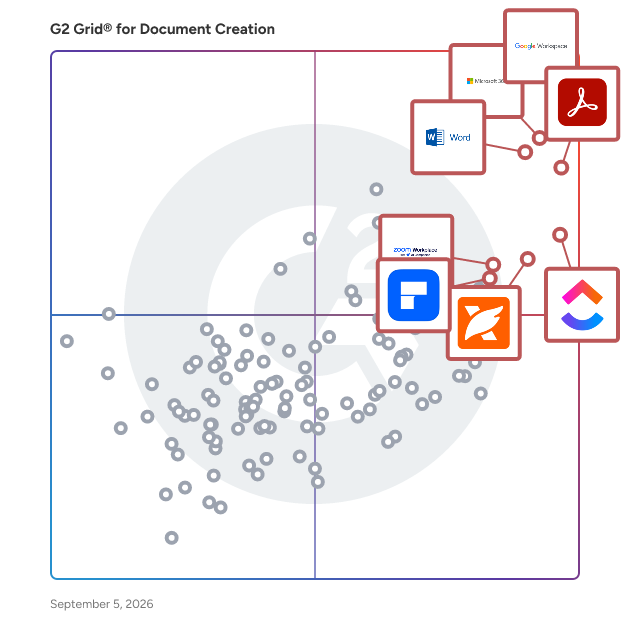
# Best Document Creation Software - Page 19

  *By [Nana Serwah Nkrahene](https://research.g2.com/insights/author/nana-nkrahene)*

   Document creation software allows users to customize, edit, store, and share text-based documents, functioning as word processors and PDF creators with collaborative editing capabilities, either as standalone platforms or as part of a larger business software suite.

### Core Capabilities of Document Creation Software

To qualify for inclusion in the Document Creation category, a product must:

- Enable the creation of text-based documents
- Allow documents to be saved and exported in multiple formats
- Have the ability to store and share documents
- Allow for versions and revision history

### Common Use Cases for Document Creation Software

Teams across functions use document creation software to produce, collaborate on, and manage written content. Common use cases include:

- Drafting and editing reports, proposals, and business documents collaboratively
- Exporting documents in multiple formats such as PDF, DOCX, or plain text for distribution
- Managing document version history and tracking revisions across team members

### How Document Creation Software Differs from Other Tools

Document creation software is designed for editable, collaborative text files, unlike PDF editors, which work with fixed-format documents that require specialized tools to modify. Document creation solutions are often part of a larger suite of productivity products or configured as integrations for more expansive business software, but can also function as independent, highly focused platforms.

### Insights from G2 on Document Creation Software

Based on category trends on G2, collaborative editing and version control stand out as the most valued capabilities. These platforms deliver ease of formatting and seamless document sharing as primary reasons for adoption.


## Category Overview

**Total Products under this Category:** 295


## Trust & Credibility Stats

**Why You Can Trust G2's Software Rankings:**

- 30 Analysts and Data Experts
- 152,000+ Authentic Reviews
- 295+ Products
- Unbiased Rankings

G2's software rankings are built on verified user reviews, rigorous moderation, and a consistent research methodology maintained by a team of analysts and data experts. Each product is measured using the same transparent criteria, with no paid placement or vendor influence. While reviews reflect real user experiences, which can be subjective, they offer valuable insight into how software performs in the hands of professionals. Together, these inputs power the G2 Score, a standardized way to compare tools within every category.


## Best Document Creation Software At A Glance

- **Leader:** [Google Workspace](https://www.g2.com/products/google-workspace/reviews)
- **Highest Performer:** [PDF-XChange Editor](https://www.g2.com/products/pdf-xchange-editor/reviews)
- **Easiest to Use:** [Microsoft Word](https://www.g2.com/products/microsoft-word/reviews)
- **Top Trending:** [Google Workspace](https://www.g2.com/products/google-workspace/reviews)
- **Best Free Software:** [Google Workspace](https://www.g2.com/products/google-workspace/reviews)


## Parent Category

[Collaboration &amp; Productivity Software](https://www.g2.com/categories/collaboration-productivity)


## Related Categories

- [E-Signature Software](https://www.g2.com/categories/e-signature)
- [Document Generation Software](https://www.g2.com/categories/document-generation)
- [PDF Editors](https://www.g2.com/categories/pdf-editor)


---

## Buyer Guide

### What You Should Know About Document Creation Software

### What is Document Creation Software?

Cloud-based document creation tools can be shared, viewed, and adjusted with anyone a user chooses to collaborate with. Additionally, the tools include access privilege settings so only users with permissions can view certain documents. Cloud-based tools also provide users with access to documents anytime, anywhere, provided you have internet access. In some cases, document creation tools allow offline adjustments—although those edits won’t save until internet access is regained—which is particularly helpful for workers who are traveling and cannot easily access the internet.

On top of its accessibility benefits, document creation software enables better organization. In many cases, the software provides a repository to store and manage all created documents. Such a repository generally exists on a drive that can easily be shared with a team. If an entire team has access to the documents created, they can more easily locate specific projects and better collaborate with team members.

Key Benefits of Document Creation Software

- Provides an easy collaboration solution
- Easily configures settings to formalize consistent formatting standards and ensure privacy
- Eases the sharing and managing of stored documents

### Why Use Document Creation Software?

For businesses, the main benefit of a document creation solution is collaboration on written or visual projects. Document creation software can significantly simplify collaborative projects, easily storing, organizing, and allowing edits to any project-related documentation. That benefit can be felt either in situations where multiple team members must equally contribute to a project or when a single document requires a second set of eyes prior to publication.

Furthermore, document creation software provides a seamless solution for writers. Take, for example, remote freelance writers or team members: Rather than endlessly email pieces of content back and forth, they can easily submit their written content on a company&#39;s shared drive. Once the content exists on the drive, then it can easily be shared with other team members and managers, seamlessly fitting into existing processes and workflows.

### Who Uses Document Creation Software?

Written and visual content is everywhere, no matter the industry, so all businesses and freelancers have a use case for document creation software. Document creation tools are most commonly seen in industries that publish or share content, such as marketing, media, and education. Additionally, financial services companies, law firms, and other corporate entities all use document creation tools to produce documents. For example, a loan originator might use a document generator to create a loan contract quickly and easily. The collaborative aspect helps connect teams on single projects, assists with file conversions, and provides an easy word processing solution, which is why the software is popular across all industries.

### Kinds of Document Creation software

There are a couple of different document creation tools available:

**Word processor —** When the goal is putting words onto the page, a word processor is your go-to type of document creation tool. Whether it’s a report, contract, or even brainstorming notes, word processors provide a variety of resources to facilitate the writing process. For example, word count and page count, which are common features of word processors, help the user keep track of any task goals or parameters they have set in place.

**PDF creator/editor —** PDF editors assist in creating, editing, and converting PDFs. PDF editors are useful in situations where text needs to be redacted or when you need to make a document&#39;s text searchable.

### Document Creation Software Features

Despite their apparent simplicity, document creation software comes packed with features to streamline the process of typing documents. Most products in the space will come with the same basic features, but many cloud-based solutions are able to provide extra collaborative features because of their syncable nature.

**Word processor —** All document creation solutions serve as a word processor. The main, bare-bones use case of a document creation solution is to allow users to input, edit, and format text.

**Grammar and spell check —** The majority of document creation solutions provide a built-in grammar and spell checker. Words that are either spelled incorrectly or used incorrectly in terms of grammar are highlighted so users can review them and make changes. Grammar and spell checkers will also often provide a recommended fix that offers the potential correct spelling or usage for a word.

**Font modifiers —** Document creation software may provide dozens of preinstalled fonts for users to choose from. For on-premises solutions, users can also download fonts online and use them within the software after installation. Users also have the ability to bold, italicize, and underline text, and some options also allow users to change the color of text and highlight sections.

**Save and store —** Users can save and store their documents from inside the document creation software. On-premises solutions will allow users to name their documents and decide where in their hard drive they want to store the document. Cloud-based solutions will often integrate with a [content management system](https://www.g2.com/categories/content-management) to store saved documents. All saved documents can be opened again later so users can continue writing or edit them.

**Document formatting —** Document creation tools enable users to change all aspects of a document, including margins, headers and footers, line spacing, and indentation.

**Templates —** Document formats can be saved as a template for repeat use. Many document creation tools will also provide premade templates for documents like resumes, legal forms, letters, and brochures.

**Insert images —** Document creation tools can add images to documents from saved local storage or from the cloud, depending on the solution. Some solutions can even pull images like graphs or charts from other software like [spreadsheets](https://www.g2.com/categories/spreadsheets) if integrations are provided.

**File types —** Most document creation tools will allow users to save or download their documents as different file types, including PDF, plain text files, and rich text files.

#### Additional Document Creation Features

**Collaborative editing —** Since cloud-based document creation solutions can sync across devices, most allow multiple users to edit a document at the same time. Users can view changes and additions in real time (and see who is making them). Cloud-based solutions also allow users to see everyone who is viewing the document at a given moment, even if they aren’t making any additions to the document itself.

**Suggest edits —** Cloud-based solutions will allow users to share documents with others so they can proofread their work. Proofreaders will have the option to suggest edits instead of editing the document directly. These suggested edits can then be approved by either the document’s owner or whoever the owner gives permission. Once changes are approved, the recommended edit is then applied to the original document.

**Sharing —** While documents created using on-premises document creation solutions will have to be attached to a message to share it, those made with cloud-based solutions can simply share a link that takes the user to the document. The owner of the document can set different permissions per document or user, such as view-only or allow others to make changes.

### Trends Related to Document Creation Software

As document creation tools become more popular within collaborative environments, there’s more room for digital transformation:

**Social integration —** Many document creation solutions offer connection to social media websites, such as Facebook and Twitter, which enhances collaboration and storage features. For example, some cloud-based tools allow users to instantly share a file via social media.

**More cloud-based platforms —** There are numerous benefits to leveraging a cloud-based document creation tool, such as ease of collaboration, accountability, and project management. Because of this, more and more people are interested in using cloud-based document creation tools. As companies react to this shift, cloud-based solutions are becoming more abundant and developed.

### Potential Issues with Document Creation Software

**Potentially expensive —** While some computers will come with an on-premises, local document creation tool preinstalled, those that don’t will have to pay for a license for an on-premises solution should they want one. On-premises solutions can be expensive without discounts like vouchers or complimentary licenses through schools, universities, or employers. While free on-premises document creation solutions are available, name-brand options that are sometimes required by schools or workplaces come with a hefty price tag.

While popular cloud-based document creation solutions offer a free base product, businesses looking for storage space that can accomodate them might have to pay extra. While the ability to use the document creation software is usually free, the accompanying cloud storage space required may be expensive.

### Software and Services Related to Document Creation Software

There are several other software options available that supplement document creation tools:

[**Spreadsheets software**](https://www.g2.com/categories/spreadsheets) **—** Similar to document creation software, spreadsheets software organizes, catalogues, and maintains data but in the form of a spreadsheet. The data within the spreadsheet can then be turned into charts and graphs. Spreadsheet software also offers collaboration features similar to the ones offered in document creation software.

[**Presentation software**](https://www.g2.com/categories/presentation) **—** Presentation software allows users to create interactive, slide-based presentations using custom or premade templates. Similar to document creation tools, presentation software allows users to generate visual documents in a collaborative manner.

[**Office suites**](https://www.g2.com/categories/office-suites) **—** Document creation software will sometimes come bundled in with a larger suite of office tools that will also include [presentation software](https://www.g2.com/categories/presentation) and spreadsheet software. Users will benefit from the fact that the software in the bundled office suite integrates with one another, allowing users to easily pull information from one into another. For example, a document creation tool that integrates with a spreadsheet software can pull graphs and charts from it and add them to a text document without requiring the user to leave the software.

[**Document generation software**](https://www.g2.com/categories/document-generation) **—** Document generation software is similar to document creation software, in that both are concerned with creating text-based documents. However, document generation software is used specifically for documents that require data to be pulled from an outside source and used to generate a form. While document creation tools can be used on nonroutine instances, businesses that require a streamlined workflow between data and form creation would have their needs best met with a document generation solution.

[**PDF editor software**](https://www.g2.com/categories/pdf-editor) **—** While document creation tools can usually save a document as a PDF, few can edit PDFs themselves. If users don’t have access to a non-PDF version of a document, they won’t be able to make edits to it using only a document creation solution. Instead, users will need to turn to a PDF editor if they want to make changes to a PDF file.