# Top Free Document Creation Software

## How Many Document Creation Software Products Does G2 Track?

**Total Products under this Category:** 337

### Category Stats (Aug 2026)

- **Average Rating:** 4.37/5 The average rating of products in this category, based on all submitted ratings
- **Top Trending Product:** Bit.ai (+0.56%) - Among all products in this category, Bit.ai recorded the largest rating increase compared to last month

_Last updated: August 21, 2026_

## How Does G2 Rank Document Creation Software Products?

**Why You Can Trust G2's Software Rankings:**

- 30 Analysts and Data Experts
- 156,400+ Authentic Reviews
- 337+ Products
- Unbiased Rankings

G2's software rankings are built on verified user reviews, rigorous moderation, and a consistent research methodology maintained by a team of analysts and data experts. Each product is measured using the same transparent criteria, with no paid placement or vendor influence. While reviews reflect real user experiences, which can be subjective, they offer valuable insight into how software performs in the hands of professionals. Together, these inputs power the G2 Score, a standardized way to compare tools within every category.

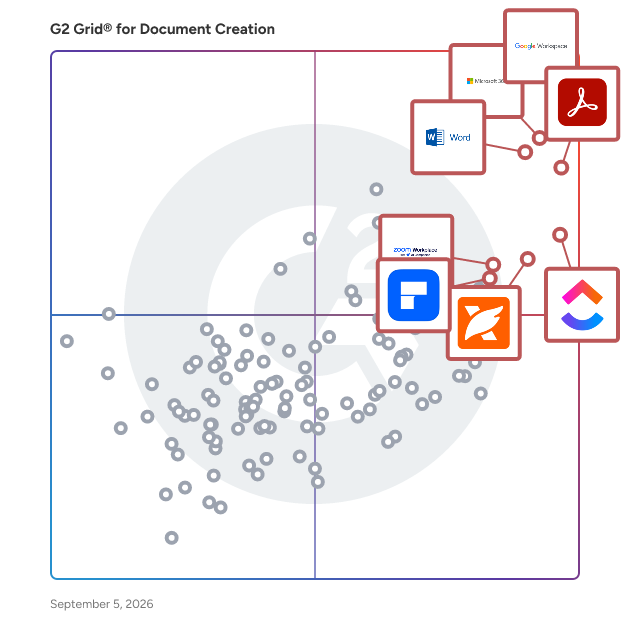
## G2 Grid® for Document Creation Software
 ![G2 Grid® for Document Creation Software plotting products by satisfaction and market presence](https://www.g2.com/categories/document-creation/grids.png?focus%5B%5D=1434&focus%5B%5D=663&focus%5B%5D=1531&focus%5B%5D=4363&focus%5B%5D=25675&focus%5B%5D=10856&focus%5B%5D=7372&focus%5B%5D=16921)

Highlighted products: Google Workspace, Microsoft 365, Adobe Acrobat, Microsoft Word, ClickUp, Foxit PDF Editor, Zoom Workplace, and Wondershare PDFelement.

Underlying data: [Grid® JSON](https://www.g2.com/categories/document-creation/grids.json?focus%5B%5D=google-workspace&focus%5B%5D=microsoft365&focus%5B%5D=adobe-acrobat&focus%5B%5D=microsoft-word&focus%5B%5D=clickup&focus%5B%5D=foxit-pdf-editor&focus%5B%5D=zoom-workplace&focus%5B%5D=wondershare-wondershare-pdfelement)

**Sponsored**

### Adobe Acrobat

Acrobat: Trusted for documents. Now built for how work really happens. For more than 30 years, Acrobat has been the trusted name in document workflow — helping businesses create, sign, and share with confidence. As one of the leading enterprise document platforms that scales for global teams, Acrobat has evolved beyond the PDF. Now with Acrobat Studio, it has been reimagined for how modern teams work: smarter, more collaborative, and powered by AI. Acrobat Studio builds on everything professionals know from Acrobat Pro — powerful PDF editing, signing, and reviewing — and expands it into a connected workspace where teams can create, collaborate, and communicate in entirely new ways. While Acrobat Pro focuses on the PDF itself, Acrobat Studio connects the full document journey, from insight to action. With PDF Spaces, teams can bring related documents together, chat with AI Assistants that summarize content or surface key takeaways, and keep everyone aligned without endless versions or email threads. Express Premium tools make it easy to remix or reuse that same content into branded presentations, visuals, or reports — helping teams communicate ideas faster and more confidently. Security remains a constant. Acrobat follows Adobe's Secure Product Lifecycle to safeguard data at every stage, with encryption, access controls, and enterprise-grade compliance. For organizations evaluating document automation tools suitable for multi-region, multi-team deployments, Acrobat Studio delivers the scale, security, and integrations to support it. From small teams to large enterprises, it turns everyday PDFs into powerful, intelligent workspaces — helping people move ideas forward and communicate with greater clarity and impact.

[Visit website](https://www.g2.com/external_clickthroughs/record?secure%5Bad_program%5D=ppc&secure%5Bad_slot%5D=category_product_list_llm&secure%5Bcategory_id%5D=237&secure%5Bchosen_at%5D=2026-08-24T06%3A50%3A52Z&secure%5Bdisplayable_resource_id%5D=237&secure%5Bdisplayable_resource_type%5D=Category&secure%5Bmedium%5D=sponsored&secure%5Bplacement_reason%5D=page_category&secure%5Bplacement_resource_ids%5D%5B%5D=237&secure%5Bprioritized%5D=false&secure%5Bproduct_id%5D=1531&secure%5Bresource_id%5D=237&secure%5Bresource_type%5D=Category&secure%5Bsource_type%5D=category_page&secure%5Bsource_url%5D=https%3A%2F%2Fwww.g2.com%2Fcategories%2Fdocument-creation%2Ffree&secure%5Btoken%5D=6ea7dff86322a0e4a0f3c900928246e80f9c218c4284451823691cbce5296263&secure%5Burl%5D=https%3A%2F%2Fbusiness.adobe.com%2Fproducts%2Facrobat-business.html%3Fsdid%3D5WYL7NBP%26mv%3Dsocial%26mv2%3Dpaidsoc&secure%5Burl_type%5D=custom_url)

### [Google Workspace](https://www.g2.com/products/google-workspace/reviews)

Google Workspace is a comprehensive productivity and collaboration solution designed to help users streamline their work processes by integrating essential tools such as email, chat, file storage, and video conferencing into a unified platform. This suite of applications is tailored for businesses, educational institutions, and individuals looking to enhance their communication and collaboration efforts, all while leveraging the power of Google’s artificial intelligence. Targeted at a diverse audience, Google Workspace caters to teams of all sizes, from small startups to large enterprises. It is particularly beneficial for remote teams and organizations that prioritize collaboration across different locations. The platform supports various use cases, including project management, team communication, document sharing, and virtual meetings, making it an ideal choice for professionals who need to work together efficiently, regardless of their physical location. One of the key features of Google Workspace is its seamless integration of applications such as Gmail, Google Meet, Google Drive, and Google Docs. This interconnectedness allows users to switch effortlessly between tasks, whether they are sending emails, participating in video calls, or collaborating on documents in real-time. The AI capabilities embedded within the platform enhance user experience by providing smart suggestions, automating repetitive tasks, and improving search functionalities, ultimately saving time and increasing productivity. Additionally, Google Workspace prioritizes security and data protection, offering robust features such as two-factor authentication, advanced phishing protection, and customizable access controls. These measures ensure that sensitive information remains secure while allowing teams to collaborate freely. The platform also supports third-party integrations, enabling users to connect their favorite applications and tools, further enhancing their workflow. In summary, Google Workspace stands out in the productivity software category by providing a holistic approach to collaboration. Its user-friendly interface, combined with powerful AI-driven features and strong security protocols, makes it a valuable tool for anyone looking to improve their work processes and foster effective teamwork. Whether for managing projects, communicating with colleagues, or sharing files, Google Workspace is designed to meet the diverse needs of its users, making it an essential resource in today’s digital workplace.

**Average Rating:** 4.6/5.0

**Total Reviews:** 45,674

#### How Do G2 Users Rate Google Workspace?

- **Has the product been a good partner in doing business?:** 9.0/10 (Category avg: 9.0/10)
- **Quality of Support:** 8.6/10 (Category avg: 8.6/10)
- **Ease of Use:** 9.3/10 (Category avg: 8.9/10)
- **Ease of Admin:** 9.0/10 (Category avg: 8.9/10)

#### Who Is the Company Behind Google Workspace?

- **Seller:** [Google](https://www.g2.com/sellers/google)
- **Year Founded:** 1998
- **HQ Location:** Mountain View, CA
- **Twitter:** @google  
31,899,995 Twitter followers
- **LinkedIn® Page:** [www.linkedin.com](https://www.g2.com/external_clickthroughs/record?secure%5Bsource_type%5D=product_profile&secure%5Btoken%5D=fe4a5936665c9702418dd53c477fef5a7baea08078bb117ed67e966fc581b9ec&secure%5Burl%5D=https%3A%2F%2Fwww.linkedin.com%2Fcompany%2F1441%2F&secure%5Burl_type%5D=linkedin_company_website)  
341,888 employees on LinkedIn®
- **Ownership:** NASDAQ:GOOG

#### Who Uses This Product?

- **Who Uses This:** Student, Teacher
- **Top Industries:** Information Technology and Services, Education Management
- **Company Size:** 46% Small, 35% Medium

#### What Do G2 Reviewers Say About Google Workspace?

_AI-generated summary from verified user reviews_

##### Pros

- Users appreciate the **ease of use** in Google Workspace, facilitating smooth and efficient workflow management.
- Users love the **seamless team collaboration** in Google Workspace, enhancing communication and boosting productivity effortlessly.
- Users love the **seamless integrations** in Google Workspace, enhancing efficiency with easy access to tools and scheduling.
- Users praise the **ease of use and integration** in Google Workspace, enhancing productivity and collaboration seamlessly.
- Users enjoy the **intuitive design** of Google Workspace, facilitating productivity and smooth integration of essential tools.

##### Cons

- Users face **missing features** in Google Workspace, such as limited offline capabilities and restrictions on accessing certain functionalities.
- Users find the **limited features** of Google Workspace unnecessary for smaller teams, lacking essential tools for their needs.
- Users find Google Workspace **lacking features** compared to other platforms, impacting effective campaign management and data handling.
- Users find the **lack of advanced features** in Google Workspace limits their productivity and customization options.
- Users find **limited customization** options in Google Workspace, particularly for calendars and forms, restricting flexibility and creativity.

#### What Are Recent G2 Reviews of Google Workspace?

**["All-in-One, Fast, and User-Friendly with Smart Auto-Suggestions"](https://www.g2.com/survey_responses/google-workspace-review-13286093)**

**Rating:** 5.0/5.0 stars

_— Pratiksha K._

[Read full review](https://www.g2.com/survey_responses/google-workspace-review-13286093)

**["Truly the best tool for team work and note taking."](https://www.g2.com/survey_responses/google-workspace-review-13337639)**

**Rating:** 4.5/5.0 stars

_— Rohini S._

[Read full review](https://www.g2.com/survey_responses/google-workspace-review-13337639)

#### What Are G2 Users Discussing About Google Workspace?

- [What tips do you have for effectively using Google Meet’s advanced features for large virtual meetings?](https://www.g2.com/discussions/what-tips-do-you-have-for-effectively-using-google-meet-s-advanced-features-for-large-virtual-meetings) - 17 comments, 12 upvotes
- [What is Google Surveys used for?](https://www.g2.com/discussions/what-is-google-surveys-used-for) - 9 comments, 3 upvotes
- [What does G Suite do?](https://www.g2.com/discussions/what-does-g-suite-do) - 8 comments, 5 upvotes
- [What companies use G suite?](https://www.g2.com/discussions/what-companies-use-g-suite) - 5 comments, 3 upvotes
- [Does G suite include Google classroom?](https://www.g2.com/discussions/does-g-suite-include-google-classroom) - 9 comments, 5 upvotes

### [Microsoft 365](https://www.g2.com/products/microsoft365/reviews)

Launch and grow your business with Microsoft 365. Do more, faster, with intelligent tools to create, send, share, and store professional, branded documents with your customers and team - securely in the cloud. Microsoft 365 is a cloud-based suite of software tools designed to help you do more—with best-in-class communication, design, and data management apps, intelligent cloud services, and advanced security. Access your data from anywhere, collaborate with team members in real time, meet with people virtually, and use thousands of predesigned templates to better communicate with customers and manage your business - all with built-in security technology that safeguards your data and devices from anywhere. Get the latest Office apps, such as Microsoft Teams, Word, Excel, PowerPoint, Outlook, OneDrive, and more.

**Average Rating:** 4.6/5.0

**Total Reviews:** 5,547

#### How Do G2 Users Rate Microsoft 365?

- **Has the product been a good partner in doing business?:** 8.8/10 (Category avg: 9.0/10)
- **Quality of Support:** 8.5/10 (Category avg: 8.6/10)
- **Ease of Use:** 9.0/10 (Category avg: 8.9/10)
- **Ease of Admin:** 8.7/10 (Category avg: 8.9/10)

#### Who Is the Company Behind Microsoft 365?

- **Seller:** [Microsoft](https://www.g2.com/sellers/microsoft)
- **Year Founded:** 1975
- **HQ Location:** Redmond, Washington
- **Twitter:** @microsoft  
13,091,739 Twitter followers
- **LinkedIn® Page:** [www.linkedin.com](https://www.g2.com/external_clickthroughs/record?secure%5Bsource_type%5D=product_profile&secure%5Btoken%5D=9458f51bd6ded48ad432a804f19ad736469f007787569b63827154231c315630&secure%5Burl%5D=https%3A%2F%2Fwww.linkedin.com%2Fcompany%2Fmicrosoft%2F&secure%5Burl_type%5D=linkedin_company_website)  
231,632 employees on LinkedIn®
- **Ownership:** MSFT

#### Who Uses This Product?

- **Who Uses This:** Owner, Software Engineer
- **Top Industries:** Information Technology and Services, Education Management
- **Company Size:** 37% Medium, 35% Small

#### What Do G2 Reviewers Say About Microsoft 365?

_AI-generated summary from verified user reviews_

##### Pros

- Users highlight the **ease of use** in Microsoft 365, enjoying straightforward implementation and seamless navigation.
- Users appreciate the **seamless team collaboration** in Microsoft 365, enhancing efficiency and communication across various applications.
- Users value the **easy integration with Microsoft apps** , enhancing data access and collaboration across devices.
- Users value the **easy integration** of Microsoft 365 with other tools, enhancing collaboration and accessibility across devices.
- Users love the **seamless integration** of Microsoft 365 with other apps, enhancing accessibility and collaboration.

##### Cons

- Users find Microsoft 365 **too expensive** for small teams, encountering frustrating limitations and issues with updates.
- Users find the **missing features** frustrating, as essential tools are locked behind higher-priced plans and updates disrupt functionality.
- Users find the **learning curve daunting** with Microsoft 365, often feeling overwhelmed by its complexity and features.
- Users often face **technical issues** with Microsoft 365, including slow performance and frustrating app updates and configurations.
- Users find Microsoft 365 **lacking essential features** , especially with frequent updates that disrupt established workflows and settings.

#### What Are Recent G2 Reviews of Microsoft 365?

**["Microsoft 365: Productive, Secure, data life cycle management and Effortless Collaboration Anywhere"](https://www.g2.com/survey_responses/microsoft-365-review-13234875)**

**Rating:** 5.0/5.0 stars

_— patan b._

[Read full review](https://www.g2.com/survey_responses/microsoft-365-review-13234875)

**["Microsoft 365: A Comprehensive, Secure Collaboration Ecosystem Powered by Copilot"](https://www.g2.com/survey_responses/microsoft-365-review-13193350)**

**Rating:** 5.0/5.0 stars

_— Rene "Rocky" E._

[Read full review](https://www.g2.com/survey_responses/microsoft-365-review-13193350)

#### What Are G2 Users Discussing About Microsoft 365?

- [What are the uses of Microsoft software?](https://www.g2.com/discussions/what-are-the-uses-of-microsoft-software) - 2 comments, 1 upvote
- [What kind of software is Microsoft Office?](https://www.g2.com/discussions/what-kind-of-software-is-microsoft-office) - 1 comment, 1 upvote
- [What programs are in Microsoft Office suite?](https://www.g2.com/discussions/what-programs-are-in-microsoft-office-suite) - 1 comment
- [What is Microsoft Office features?](https://www.g2.com/discussions/what-is-microsoft-office-features) - 2 comments

### [Adobe Acrobat](https://www.g2.com/products/adobe-acrobat/reviews)

Acrobat: Trusted for documents. Now built for how work really happens. For more than 30 years, Acrobat has been the trusted name in document workflow — helping businesses create, sign, and share with confidence. As one of the leading enterprise document platforms that scales for global teams, Acrobat has evolved beyond the PDF. Now with Acrobat Studio, it has been reimagined for how modern teams work: smarter, more collaborative, and powered by AI. Acrobat Studio builds on everything professionals know from Acrobat Pro — powerful PDF editing, signing, and reviewing — and expands it into a connected workspace where teams can create, collaborate, and communicate in entirely new ways. While Acrobat Pro focuses on the PDF itself, Acrobat Studio connects the full document journey, from insight to action. With PDF Spaces, teams can bring related documents together, chat with AI Assistants that summarize content or surface key takeaways, and keep everyone aligned without endless versions or email threads. Express Premium tools make it easy to remix or reuse that same content into branded presentations, visuals, or reports — helping teams communicate ideas faster and more confidently. Security remains a constant. Acrobat follows Adobe's Secure Product Lifecycle to safeguard data at every stage, with encryption, access controls, and enterprise-grade compliance. For organizations evaluating document automation tools suitable for multi-region, multi-team deployments, Acrobat Studio delivers the scale, security, and integrations to support it. From small teams to large enterprises, it turns everyday PDFs into powerful, intelligent workspaces — helping people move ideas forward and communicate with greater clarity and impact.

**Average Rating:** 4.5/5.0

**Total Reviews:** 4,677

#### How Do G2 Users Rate Adobe Acrobat?

- **Has the product been a good partner in doing business?:** 8.9/10 (Category avg: 9.0/10)
- **Quality of Support:** 8.5/10 (Category avg: 8.6/10)
- **Ease of Use:** 8.8/10 (Category avg: 8.9/10)
- **Ease of Admin:** 8.9/10 (Category avg: 8.9/10)

#### Who Is the Company Behind Adobe Acrobat?

- **Seller:** [Adobe](https://www.g2.com/sellers/adobe)
- **Company Website:** adobe.com
- **Year Founded:** 1982
- **HQ Location:** San Jose, CA
- **Twitter:** @Adobe  
956,842 Twitter followers
- **LinkedIn® Page:** [www.linkedin.com](https://www.g2.com/external_clickthroughs/record?secure%5Bsource_type%5D=product_profile&secure%5Btoken%5D=4bd838466d461c6fe81e09c861e82adaaf56d5a567f856b855f9808677f90560&secure%5Burl%5D=https%3A%2F%2Fwww.linkedin.com%2Fcompany%2F1480%2F&secure%5Burl_type%5D=linkedin_company_website)  
42,087 employees on LinkedIn®

#### Who Uses This Product?

- **Who Uses This:** Graphic Designer, Owner
- **Top Industries:** Information Technology and Services, Computer Software
- **Company Size:** 42% Small, 31% Medium

#### What Do G2 Reviewers Say About Adobe Acrobat?

_AI-generated summary from verified user reviews_

##### Pros

- Users appreciate the **ease of use** of Adobe Acrobat, simplifying PDF management and enhancing productivity seamlessly.
- Users appreciate the **easy editing** features of Adobe Acrobat, which streamline PDF handling and enhance productivity.
- Users value the **versatile PDF editing capabilities** of Adobe Acrobat, making document management seamless and efficient.
- Users appreciate the **editing versatility** of Adobe Acrobat, allowing seamless document management and security across devices.
- Users value the **centralized management of PDFs** in Adobe Acrobat, appreciating its all-in-one platform for various tasks.

##### Cons

- Users feel that Adobe Acrobat is **expensive** , particularly due to limited free features and a restrictive subscription model.
- Users experience **slow performance** with Adobe Acrobat, noting lag and loading issues despite having high-end systems.
- Users often face **PDF issues** with Acrobat, including difficulty compressing, slow performance, and challenging editing experiences.
- Users find Adobe Acrobat **not user friendly** , especially when trying to navigate its complex features and tools.
- Users find the **learning curve steep** , with advanced tools often overwhelming and hidden, causing initial difficulties in usage.

#### What Are Recent G2 Reviews of Adobe Acrobat?

**["Rock-Solid PDF/A Compliance with Preflight Verification in Adobe Acrobat Pro"](https://www.g2.com/survey_responses/adobe-acrobat-review-13349044)**

**Rating:** 5.0/5.0 stars

_— Bright b._

[Read full review](https://www.g2.com/survey_responses/adobe-acrobat-review-13349044)

**["Time-Saving E‑Sign and Reliable File Conversion PDF Viewer"](https://www.g2.com/survey_responses/adobe-acrobat-review-13325318)**

**Rating:** 4.5/5.0 stars

_— Ansab S._

[Read full review](https://www.g2.com/survey_responses/adobe-acrobat-review-13325318)

#### What Are G2 Users Discussing About Adobe Acrobat?

- [How is Adobe Acrobat redefining the way professionals work with PDFs for documentation and collaboration?](https://www.g2.com/discussions/how-is-adobe-acrobat-redefining-the-way-professionals-work-with-pdfs-for-documentation-and-collaboration) - 5 comments, 8 upvotes
- [How is Adobe Acrobat being used to enhance operational efficiency and user experience in its specific field?](https://www.g2.com/discussions/how-is-adobe-acrobat-being-used-to-enhance-operational-efficiency-and-user-experience-in-its-specific-field) - 3 comments, 1 upvote
- [What does Adobe Pro DC include?](https://www.g2.com/discussions/what-does-adobe-pro-dc-include) - 8 comments, 3 upvotes
- [What is the difference between Adobe Acrobat DC and Adobe Acrobat Reader DC?](https://www.g2.com/discussions/what-is-the-difference-between-adobe-acrobat-dc-and-adobe-acrobat-reader-dc) - 4 comments, 4 upvotes
- [What can Adobe Acrobat DC do?](https://www.g2.com/discussions/what-can-adobe-acrobat-dc-do) - 4 comments, 3 upvotes

### [ClickUp](https://www.g2.com/products/clickup/reviews)

ClickUp is the world’s first Converged AI Workspace, bringing together all work apps, data, and workflows. ClickUp eliminates all forms of work sprawl to provide 100% context and a single place for humans and agents to work, together. Trusted by more than 20 million users worldwide, ClickUp is on a mission to maximize human productivity.

**Average Rating:** 4.6/5.0

**Total Reviews:** 13,158

#### How Do G2 Users Rate ClickUp?

- **Has the product been a good partner in doing business?:** 9.0/10 (Category avg: 9.0/10)
- **Quality of Support:** 8.8/10 (Category avg: 8.6/10)
- **Ease of Use:** 8.5/10 (Category avg: 8.9/10)
- **Ease of Admin:** 8.6/10 (Category avg: 8.9/10)

#### Who Is the Company Behind ClickUp?

- **Seller:** [ClickUp](https://www.g2.com/sellers/clickup)
- **Company Website:** ClickUp.com
- **Year Founded:** 2017
- **HQ Location:** San Diego, California
- **Twitter:** @clickup  
69,539 Twitter followers
- **LinkedIn® Page:** [www.linkedin.com](https://www.g2.com/external_clickthroughs/record?secure%5Bsource_type%5D=product_profile&secure%5Btoken%5D=12451d66d580078c16b08985ccc98dcf8d832565fb04a9665439cfd4f2a74fa7&secure%5Burl%5D=https%3A%2F%2Fwww.linkedin.com%2Fcompany%2F12949663%2F&secure%5Burl_type%5D=linkedin_company_website)  
1,526 employees on LinkedIn®

#### Who Uses This Product?

- **Who Uses This:** CEO, Project Manager
- **Top Industries:** Marketing and Advertising, Computer Software
- **Company Size:** 77% Small, 19% Medium

#### What Do G2 Reviewers Say About ClickUp?

_AI-generated summary from verified user reviews_

##### Pros

- Users find ClickUp to be incredibly **easy and simple to use** , streamlining tasks and enhancing productivity effortlessly.
- Users value the **flexibility in task management** , enabling customized workflows for personal, team, and project tasks.
- Users appreciate the **abundance of features** in ClickUp, making task management seamless and efficient.
- Users appreciate ClickUp for its **streamlined management tasks** , enabling better organization and efficiency in project handling.
- Users appreciate ClickUp for its **streamlined organization** , making team management and project tracking efficient and effortless.

##### Cons

- Users find the **missing features** in ClickUp frustrating, particularly the lack of basic tools like subfolders.
- Users experience a **learning curve** with ClickUp, finding the plethora of features daunting at first.
- Users note **limited features** in ClickUp, with missing basic options and a complex setup process hindering ease of use.
- Users find ClickUp **not intuitive** , feeling overwhelmed by its many features and struggling with initial setup and performance.
- Users experience **slow loading** times in ClickUp, which affects their productivity when managing multiple tasks and fields.

#### What Are Recent G2 Reviews of ClickUp?

**["Keeps my projects and tasks organized"](https://www.g2.com/survey_responses/clickup-review-13269059)**

**Rating:** 4.0/5.0 stars

_— HARSHKANT K._

[Read full review](https://www.g2.com/survey_responses/clickup-review-13269059)

**["Highly Customizable but Steep Learning Curve"](https://www.g2.com/survey_responses/clickup-review-13341211)**

**Rating:** 5.0/5.0 stars

_— Nilanjan H._

[Read full review](https://www.g2.com/survey_responses/clickup-review-13341211)

#### What Are G2 Users Discussing About ClickUp?

- [What features of ClickUp make it a preferred choice for project management in agile teams?](https://www.g2.com/discussions/what-features-of-clickup-make-it-a-preferred-choice-for-project-management-in-agile-teams) - 6 comments, 6 upvotes
- [What is ClickUp used for?](https://www.g2.com/discussions/what-is-clickup-used-for) - 10 comments, 4 upvotes
- [Does Google use ClickUp?](https://www.g2.com/discussions/does-google-use-clickup) - 5 comments, 3 upvotes
- [Who uses ClickUp?](https://www.g2.com/discussions/who-uses-clickup) - 14 comments, 4 upvotes
- [Is ClickUp really free?](https://www.g2.com/discussions/is-clickup-really-free) - 12 comments, 3 upvotes

### [Foxit PDF Editor](https://www.g2.com/products/foxit-pdf-editor/reviews)

Founded in 2001, Foxit is a leading provider of innovative PDF and eSignature products and services, helping knowledge workers increase productivity and do more with documents. Foxit combines easy-to-use desktop software, mobile apps, and cloud services in one powerful solution: The Foxit PDF Editor. This intelligent document solution allows users to create, edit, fill, and sign documents through their integrated PDF Editor and eSign offerings – from anywhere and on any device. Most editing tools focus only on creating and modifying documents, leaving storage, organization, and control to other systems. Foxit Document Management System (DMS) is included in Foxit PDF Editor, so every document is securely stored, organized, governed, and connected from the moment it's edited. As the first to market with AI-powered PDF editing solutions, Foxit enhances productivity with smart document editing and workflow automation. Winner of numerous awards, Foxit has over 700 million users and has sold to over 528,000 customers, ranging from SMBs to global enterprises worldwide. Foxit products are ISO 32000-1/PDF 1.7 standard compliant, therefore, compatible with your existing PDF documents and forms.

**Average Rating:** 4.6/5.0

**Total Reviews:** 3,486

#### How Do G2 Users Rate Foxit PDF Editor?

- **Has the product been a good partner in doing business?:** 9.0/10 (Category avg: 9.0/10)
- **Quality of Support:** 8.9/10 (Category avg: 8.6/10)
- **Ease of Use:** 9.0/10 (Category avg: 8.9/10)
- **Ease of Admin:** 8.9/10 (Category avg: 8.9/10)

#### Who Is the Company Behind Foxit PDF Editor?

- **Seller:** [Foxit](https://www.g2.com/sellers/foxit)
- **Company Website:** www.foxit.com
- **Year Founded:** 2001
- **HQ Location:** Fremont, CA
- **Twitter:** @foxitsoftware  
6,226 Twitter followers
- **LinkedIn® Page:** [www.linkedin.com](https://www.g2.com/external_clickthroughs/record?secure%5Bsource_type%5D=product_profile&secure%5Btoken%5D=610d6941f2244e95329cdaa84eafed4ffb9648ec08f60f59ad84b7a5e1c18fe0&secure%5Burl%5D=https%3A%2F%2Fwww.linkedin.com%2Fcompany%2Ffoxit-corporation%2F&secure%5Burl_type%5D=linkedin_company_website)  
569 employees on LinkedIn®

#### Who Uses This Product?

- **Who Uses This:** Owner, President
- **Top Industries:** Construction, Accounting
- **Company Size:** 63% Small, 24% Medium

#### What Do G2 Reviewers Say About Foxit PDF Editor?

_AI-generated summary from verified user reviews_

##### Pros

- Users appreciate the **ease of use** of Foxit PDF Editor, highlighting its intuitive interface and quick setup process.
- Users appreciate the **intuitive and user-friendly interface** of Foxit PDF Editor, enhancing their editing experience significantly.
- Users love the **easy editing** features of Foxit PDF Editor, enhancing their workflow with intuitive and efficient tools.
- Users commend Foxit PDF Editor for its **fast, lightweight, and easy-to-use interface** , enhancing productivity in PDF management.
- Users appreciate the **user-friendly interface** of Foxit PDF Editor, enhancing their editing experience with powerful tools and ease of use.

##### Cons

- Users find the **learning curve steep** , especially for newcomers, due to advanced features being hard to discover.
- Users find the **difficulty in discovering advanced features** and initial setup frustrating, impacting their overall experience.
- Users find the **pricing concerns** of Foxit PDF Editor to be a significant drawback, especially for beginners.
- Users find **missing features** in Foxit PDF Editor, particularly in the free version and Mac compatibility.
- Users find the **limited features** of Foxit PDF Editor restrict its usability without a paid subscription.

#### What Are Recent G2 Reviews of Foxit PDF Editor?

**["Streamlined Structural Workflows with Form Extraction"](https://www.g2.com/survey_responses/foxit-pdf-editor-review-13348939)**

**Rating:** 5.0/5.0 stars

_— Bright b._

[Read full review](https://www.g2.com/survey_responses/foxit-pdf-editor-review-13348939)

**["Efficient PDF Editing with Room for Interface Improvements"](https://www.g2.com/survey_responses/foxit-pdf-editor-review-13345630)**

**Rating:** 5.0/5.0 stars

_— Pamsine P._

[Read full review](https://www.g2.com/survey_responses/foxit-pdf-editor-review-13345630)

#### What Are G2 Users Discussing About Foxit PDF Editor?

- [How does the Foxit PDF Editor Suite stand out in terms of features and usability for professional PDF management?](https://www.g2.com/discussions/how-does-the-foxit-pdf-editor-suite-stand-out-in-terms-of-features-and-usability-for-professional-pdf-management) - 3 comments, 3 upvotes
- [What is Foxit PDF Editor used for?](https://www.g2.com/discussions/what-is-foxit-pdf-editor-used-for) - 2 comments, 1 upvote
- [Is Foxit Phantom PDF free?](https://www.g2.com/discussions/is-foxit-phantom-pdf-free) - 3 comments
- [How do I use Foxit PhantomPDF?](https://www.g2.com/discussions/how-do-i-use-foxit-phantompdf) - 1 comment
- [What is Foxit PhantomPDF standard?](https://www.g2.com/discussions/what-is-foxit-phantompdf-standard) - 2 comments

### [Zoom Workplace](https://www.g2.com/products/zoom-workplace/reviews)

Goodbye app overload. Hello effortless work. Work can be complicated. Your tools shouldn't be. Zoom Workplace connects all the ways you collaborate — from meetings to docs to chat and more — with built-in AI and seamless integrations that help teams focus and work flawlessly. Zoom Communications: Unified, Effortless Connection for Modern Work Bring every way your teams communicate—meetings, chat, calls, email, and scheduling—into one seamless experience. With Zoom, collaboration happens faster and more naturally across channels, without switching apps or losing context. From spontaneous chats to scheduled meetings and calls, everything stays connected, searchable, and secure—powered by one intuitive platform built for how modern teams work. Zoom Productivity: Workflows Connected, Work Effortless Transform how work gets done with AI-first collaboration that keeps people, content, and actions in one place. From brainstorming on whiteboards to co-creating in docs, sharing clips, and automating follow-ups, Zoom connects every step of your workflow. With Zoom Hub and integrated video management, knowledge stays organized, accessible, and actionable—so teams can move from idea to outcome without friction. Zoom Spaces: Smarter, Connected Workplaces for Every Team Bring your physical and hybrid environments to life with intelligent, connected spaces. Zoom Spaces unifies meeting rooms, desk reservations, digital signage, and visitor management into one seamless experience—making it simple to collaborate, navigate, and manage the workplace. Whether employees are remote, hybrid, or on-site, Zoom creates a consistent, secure, and flexible environment that keeps teams connected wherever work happens. Zoom Employee Engagement: Connect, Inspire, and Empower Every Employee Foster belonging and alignment with Workvivo by Zoom—a modern employee experience platform that unites communication, culture, and community in one place. From company-wide updates to recognition, feedback, and social engagement, Workvivo gives every employee a voice and a sense of connection. Built right into Zoom Workplace, it helps organizations strengthen culture, boost engagement, and keep teams informed and inspired—no matter where they work.

**Average Rating:** 4.5/5.0

**Total Reviews:** 53,580

#### How Do G2 Users Rate Zoom Workplace?

- **Has the product been a good partner in doing business?:** 9.1/10 (Category avg: 9.0/10)
- **Quality of Support:** 8.7/10 (Category avg: 8.6/10)
- **Ease of Use:** 9.1/10 (Category avg: 8.9/10)
- **Ease of Admin:** 9.0/10 (Category avg: 8.9/10)

#### Who Is the Company Behind Zoom Workplace?

- **Seller:** [Zoom](https://www.g2.com/sellers/zoom-a5000ea1-6d30-4ab4-b591-20723189ac97)
- **Company Website:** www.zoom.com
- **Year Founded:** 2011
- **HQ Location:** San Jose, CA
- **Twitter:** @zoom  
1,042,714 Twitter followers
- **LinkedIn® Page:** [www.linkedin.com](https://www.g2.com/external_clickthroughs/record?secure%5Bsource_type%5D=product_profile&secure%5Btoken%5D=ea58933ffb5ea1e88769e70b1323ea336f3f35193bdf38ad87831cfc56794a9a&secure%5Burl%5D=https%3A%2F%2Fwww.linkedin.com%2Fcompany%2F2532259%2F&secure%5Burl_type%5D=linkedin_company_website)  
13,494 employees on LinkedIn®

#### Who Uses This Product?

- **Who Uses This:** Owner, Software Engineer
- **Top Industries:** Information Technology and Services, Computer Software
- **Company Size:** 51% Small, 31% Medium

#### What Do G2 Reviewers Say About Zoom Workplace?

_AI-generated summary from verified user reviews_

##### Pros

- Users love the **ease of use** of Zoom Workplace, enjoying seamless access to features with just a click.
- Users appreciate the **ease of collaboration** in Zoom Workplace, especially with breakout rooms and seamless screen sharing.
- Users value the **reliability** of Zoom Workplace, ensuring seamless connectivity and stability even during adverse conditions.
- Users find the **ease of use for meetings** in Zoom Workplace invaluable for seamless collaboration and productivity.
- Users enjoy the **easy-to-use video conferencing** features of Zoom, facilitating smooth communication and collaboration in hybrid work settings.

##### Cons

- Users note the **limited features** of Zoom Workplace, expressing a need for improved built-in collaboration tools.
- Users experience **Zoom issues** like fatigue, connectivity problems, and confusing configurations that hinder their overall meeting effectiveness.
- Users experience **Zoom fatigue** , notification overload, and connectivity issues, making long meetings feel overwhelming and impersonal.
- Users find **missing features** in Zoom Workplace, like improved sharing links and chat access post-calls, frustrating.
- Users often face **connection issues** with Zoom Workplace, leading to a frustrating and less seamless experience.

#### What Are Recent G2 Reviews of Zoom Workplace?

**["Effortlessly Connects Teams, Great for Remote Work"](https://www.g2.com/survey_responses/zoom-workplace-review-13232000)**

**Rating:** 5.0/5.0 stars

_— Mazelo X._

[Read full review](https://www.g2.com/survey_responses/zoom-workplace-review-13232000)

**["Zoom’s One-Click Reliability with Seamless Screen Sharing and Stable Quality"](https://www.g2.com/survey_responses/zoom-workplace-review-13290295)**

**Rating:** 4.5/5.0 stars

_— Battier mal B._

[Read full review](https://www.g2.com/survey_responses/zoom-workplace-review-13290295)

#### What Are G2 Users Discussing About Zoom Workplace?

- [Is Zoom Workplace worth it?](https://www.g2.com/discussions/is-zoom-workplace-worth-it) - 29 comments, 38 upvotes
- [What are your tips for using Zoom Workplace effectively?](https://www.g2.com/discussions/what-are-your-tips-for-using-zoom-workplace-effectively) - 7 comments, 11 upvotes
- [What does Zoom do?](https://www.g2.com/discussions/what-does-zoom-do) - 30 comments, 12 upvotes
- [What are the features offered by Zoom?](https://www.g2.com/discussions/what-are-the-features-offered-by-zoom) - 5 comments, 2 upvotes
- [How do you add features in Zoom?](https://www.g2.com/discussions/how-do-you-add-features-in-zoom) - 18 comments, 2 upvotes

### [Wondershare PDFelement](https://www.g2.com/products/wondershare-wondershare-pdfelement/reviews)

PDFelement is a comprehensive PDF editing solution designed to assist users in managing their PDF documents efficiently. This versatile software caters to a wide range of needs, including creating, editing, converting, annotating, and securing PDF files. With its user-friendly interface and advanced features, PDFelement is suitable for both professionals and individuals seeking to streamline their document workflows. The target audience for PDFelement includes businesses, students, and professionals who frequently work with PDF files. Its capabilities are particularly beneficial for those who require a reliable tool for document management, whether for creating reports, filling out forms, or collaborating on projects. The software is designed to enhance productivity by simplifying complex tasks associated with PDF handling, making it an essential tool for anyone who regularly interacts with digital documents. One of the standout features of PDFelement is its advanced Optical Character Recognition (OCR) technology, which allows users to convert scanned documents into editable and searchable text. This feature is particularly useful for professionals who need to digitize paper documents while preserving their original formatting. Additionally, PDFelement supports the conversion of PDFs to and from various formats, including Word, Excel, and PowerPoint, ensuring that users can work with their documents in the format that best suits their needs. PDFelement also offers robust security features, enabling users to protect sensitive information within their documents. Users can easily password-protect their PDFs, redact confidential data, and electronically sign documents, facilitating secure collaboration. The software’s form-filling capabilities further enhance its utility, allowing users to create and fill out forms effortlessly, which is especially beneficial for businesses that require streamlined data collection processes. Overall, PDFelement stands out in the PDF editing category due to its combination of powerful features, ease of use, and versatility. By optimizing PDF tasks and providing a comprehensive set of tools, PDFelement empowers users to manage their documents more effectively, ultimately enhancing their productivity and workflow efficiency.

**Average Rating:** 4.5/5.0

**Total Reviews:** 1,028

#### How Do G2 Users Rate Wondershare PDFelement?

- **Has the product been a good partner in doing business?:** 8.9/10 (Category avg: 9.0/10)
- **Quality of Support:** 8.7/10 (Category avg: 8.6/10)
- **Ease of Use:** 9.1/10 (Category avg: 8.9/10)
- **Ease of Admin:** 9.0/10 (Category avg: 8.9/10)

#### Who Is the Company Behind Wondershare PDFelement?

- **Seller:** [Wondershare](https://www.g2.com/sellers/wondershare)
- **Company Website:** www.wondershare.com
- **Year Founded:** 2003
- **HQ Location:** Shenzen, CN
- **Twitter:** @Wondershare  
14,154 Twitter followers
- **LinkedIn® Page:** [www.linkedin.com](https://www.g2.com/external_clickthroughs/record?secure%5Bsource_type%5D=product_profile&secure%5Btoken%5D=42a8a1c3cd18c714b0cd5cd2449a17e67c0c07eae232ab173d3127cb34a22eea&secure%5Burl%5D=https%3A%2F%2Fwww.linkedin.com%2Fcompany%2Fwondershare-technology&secure%5Burl_type%5D=linkedin_company_website)  
644 employees on LinkedIn®

#### Who Uses This Product?

- **Who Uses This:** Owner, Project Manager
- **Top Industries:** Information Technology and Services, Computer Software
- **Company Size:** 66% Small, 23% Medium

#### What Do G2 Reviewers Say About Wondershare PDFelement?

_AI-generated summary from verified user reviews_

##### Pros

- Users find Wondershare PDFelement to be **extremely user-friendly and easy to use** , enhancing their PDF editing experience effortlessly.
- Users value the **ease of use and extensive features** of Wondershare PDFelement, enhancing productivity and workflow.
- Users commend the **ease of use** of Wondershare PDFelement, appreciating its smooth editing and comprehensive toolset.
- Users find the **easy editing capabilities** of Wondershare PDFelement invaluable for managing PDF documents effortlessly.
- Users appreciate the **comprehensive PDF management features** of Wondershare PDFelement, making their tasks efficient and easy.

##### Cons

- Users report **slow performance** with large files, often leading to crashes and frustrating processing times.
- Users report **zooming and extraction issues** with PDFelement, which can hinder smooth navigation and document management.
- Users feel the product is **too expensive** and desire more affordable upgrade options or a perpetual license model.
- Users note the **limited features** of Wondershare PDFelement, suggesting enhancements for better productivity and functionality.
- Users find **missing features** problematic, particularly with large files and outdated templates affecting usability.

#### What Are Recent G2 Reviews of Wondershare PDFelement?

**["PDFelement Makes Editing, Converting, and Signing Highly Effiecient."](https://www.g2.com/survey_responses/wondershare-pdfelement-review-12598352)**

**Rating:** 4.5/5.0 stars

_— Tanvi M._

[Read full review](https://www.g2.com/survey_responses/wondershare-pdfelement-review-12598352)

**["The undisputed KING of PDFs -- Easy to Use, All-In-One AI Solution"](https://www.g2.com/survey_responses/wondershare-pdfelement-review-11605844)**

**Rating:** 5.0/5.0 stars

_— Dhananjay R._

[Read full review](https://www.g2.com/survey_responses/wondershare-pdfelement-review-11605844)

#### What Are G2 Users Discussing About Wondershare PDFelement?

- [What is the best PDF editor software?](https://www.g2.com/discussions/what-is-the-best-pdf-editor-software) - 2 comments, 2 upvotes
- [Is PDFelement app free?](https://www.g2.com/discussions/is-pdfelement-app-free)
- [Is PDFelement safe to use?](https://www.g2.com/discussions/is-pdfelement-safe-to-use) - 2 comments
- [What is PDFelement?](https://www.g2.com/discussions/what-is-pdfelement) - 2 comments

### [pdfFiller](https://www.g2.com/products/pdffiller/reviews)

pdfFiller is a cloud-native document management platform that unifies editing, e-signing, storage, and collaboration. Purpose-built for small and mid-sized businesses, it eliminates the need for multiple subscriptions and constant app-switching, delivering enterprise-grade functionality without enterprise-grade complexity. pdfFiller is engineered for value-driven small businesses, enabling teams to work confidently from wherever they choose. Documents are securely stored in the cloud, giving teams reliable anytime-anywhere access with zero risk of data loss. Recognized internationally as a leading PDF solution across industries and sectors of various sizes, pdfFiller is trusted by organizations seeking to modernize their document workflows and scale operational efficiency. Across sectors, pdfFiller has become a go-to solution for a wide range of business-critical workflows. Real estate professionals rely on the platform for fast, secure contract signing, while healthcare providers and patients use its HIPAA-compliant e-signature capabilities to manage medical forms with confidence. Insurance professionals turn to pdfFiller for editable, fillable application forms, and HR teams — from lean startups to large enterprises — use it to streamline employee onboarding. Educators leverage the platform to quickly create worksheets and instructional materials, nonprofit organizations and researchers apply it for scalable online data collection. Finance professionals, bookkeepers, and accountants value its intuitive, low-friction approach to everyday document handling. Beyond its core editing and signing capabilities, pdfFiller offers a robust set of value-added tools designed to support evolving business needs, including document resizing and cropping, AI-powered summarization and translation, and AI-assisted document generation and template creation. Together, these capabilities position pdfFiller as more than a document tool — it's a platform built to keep pace with the demands of modern, fast-moving organizations. Integrating pdfFiller into daily operations delivers measurable business impact, strengthening cross-departmental collaboration, boosting organizational productivity, and elevating the overall customer experience. The results speak for themselves: businesses using pdfFiller report saving over 40 hours of employee work time per week, achieving a 70% reduction in document preparation errors, and realizing contract turnaround times up to 24 times faster than traditional methods, a clear testament to the platform's impact on operational excellence.

**Average Rating:** 4.6/5.0

**Total Reviews:** 876

#### How Do G2 Users Rate pdfFiller?

- **Has the product been a good partner in doing business?:** 9.5/10 (Category avg: 9.0/10)
- **Quality of Support:** 9.0/10 (Category avg: 8.6/10)
- **Ease of Use:** 9.1/10 (Category avg: 8.9/10)
- **Ease of Admin:** 9.3/10 (Category avg: 8.9/10)

#### Who Is the Company Behind pdfFiller?

- **Seller:** [airSlate](https://www.g2.com/sellers/airslate)
- **Company Website:** www.airslate.com
- **Year Founded:** 2006
- **HQ Location:** Brookline, Massachusetts
- **Twitter:** @airSlate  
1,234 Twitter followers
- **LinkedIn® Page:** [www.linkedin.com](https://www.g2.com/external_clickthroughs/record?secure%5Bsource_type%5D=product_profile&secure%5Btoken%5D=a387d416c91f548c7ca2da354b11b960ce5fed9453c45cce8a37df86af1daf78&secure%5Burl%5D=https%3A%2F%2Fwww.linkedin.com%2Fcompany%2Fairslate%2F&secure%5Burl_type%5D=linkedin_company_website)  
798 employees on LinkedIn®

#### Who Uses This Product?

- **Who Uses This:** Owner, President
- **Top Industries:** Real Estate, Insurance
- **Company Size:** 82% Small, 13% Medium

#### What Do G2 Reviewers Say About pdfFiller?

_AI-generated summary from verified user reviews_

##### Pros

- Users appreciate the **ease of use** of pdfFiller, enjoying its user-friendly interface and quick accessibility.
- Users value the **easy editing** capabilities of pdfFiller, enabling fast modifications and seamless document management from anywhere.
- Users value the **cloud-based access** of pdfFiller, enabling work flexibility and efficient document management from anywhere.
- Users value the **easy editing** of PDF files with pdfFiller, enhancing productivity and streamlining document management.
- Users value the **e-signing features** of pdfFiller, enhancing document approvals and boosting workplace efficiency.

##### Cons

- Users note the **missing features** in pdfFiller, including limitations with signatures and template customization.
- Users find the **high pricing** of pdfFiller to be a barrier, especially with limited free features available.
- Users find pdfFiller **not user friendly** , particularly for newcomers struggling with its overwhelming interface and complex features.
- Users find **feature limitations** frustrating, particularly with customization and slow loading for complex documents.
- Users face **PDF issues** like slow performance with large documents and limited copy-paste functions, causing frustration.

#### What Are Recent G2 Reviews of pdfFiller?

**["Easy PDF Editing and Templates That Keep Document Work Fast and Consistent"](https://www.g2.com/survey_responses/pdffiller-review-13119845)**

**Rating:** 5.0/5.0 stars

_— Muzammil M._

[Read full review](https://www.g2.com/survey_responses/pdffiller-review-13119845)

**["pdfFiller lets us update forms without rebuilding the whole workflow"](https://www.g2.com/survey_responses/pdffiller-review-13156175)**

**Rating:** 4.5/5.0 stars

_— Yurii L._

[Read full review](https://www.g2.com/survey_responses/pdffiller-review-13156175)

#### What Are G2 Users Discussing About pdfFiller?

- [What is pdfFiller by airSlate used for?](https://www.g2.com/discussions/what-is-pdffiller-by-airslate-used-for) - 1 comment
- [How do I use pdfFiller for free?](https://www.g2.com/discussions/how-do-i-use-pdffiller-for-free) - 2 comments
- [How much does pdfFiller cost?](https://www.g2.com/discussions/how-much-does-pdffiller-cost) - 2 comments
- [What does PDF Filler do?](https://www.g2.com/discussions/what-does-pdf-filler-do) - 1 comment
- [What is pdfFiller software?](https://www.g2.com/discussions/what-is-pdffiller-software) - 2 comments

### [UPDF](https://www.g2.com/products/updf/reviews)

This leading alternative to Adobe® Acrobat® and Foxit® offers enterprise-grade PDF functionalities and perpetual licensing at a fraction of the price.UPDF is an all-in-one PDF solution that allows you to view,OCR,edit, sign,annotate, convert, protect, organize, crop, split, and share PDF files effortlessly.We support SSO and Online management portal to manage your licenses. It is compatible with Windows, macOS, iOS, and Android systems. With UPDF, you can easily process your PDF files wherever you go. One license can be used across Windows, macOS, iOS, and Android systems.

**Average Rating:** 4.5/5.0

**Total Reviews:** 443

#### How Do G2 Users Rate UPDF?

- **Has the product been a good partner in doing business?:** 9.2/10 (Category avg: 9.0/10)
- **Quality of Support:** 9.0/10 (Category avg: 8.6/10)
- **Ease of Use:** 9.1/10 (Category avg: 8.9/10)
- **Ease of Admin:** 9.3/10 (Category avg: 8.9/10)

#### Who Is the Company Behind UPDF?

- **Seller:** [Superace Software Technology](https://www.g2.com/sellers/superace-software-technology)
- **Company Website:** updf.com
- **HQ Location:** Shenzhen, Guangdong
- **Twitter:** @updfeditor  
755 Twitter followers
- **LinkedIn® Page:** [www.linkedin.com](https://www.g2.com/external_clickthroughs/record?secure%5Bsource_type%5D=product_profile&secure%5Btoken%5D=614ab8480100495e3a6359503ffe4261bd3a9400b828c9044198686cb31d10bc&secure%5Burl%5D=https%3A%2F%2Fwww.linkedin.com%2Fcompany%2Fsuperace-software%2F&secure%5Burl_type%5D=linkedin_company_website)  
22 employees on LinkedIn®

#### Who Uses This Product?

- **Who Uses This:** CEO, Owner
- **Top Industries:** Consulting, Higher Education
- **Company Size:** 81% Small, 9% Medium

#### What Do G2 Reviewers Say About UPDF?

_AI-generated summary from verified user reviews_

##### Pros

- Users find UPDF's interface incredibly **easy to use** , making document management and editing simple and efficient.
- Users love UPDF for its **versatile features** , enabling efficient editing and seamless access across various devices.
- Users value the **ease of use** of UPDF, allowing for quick editing without overwhelming complexity.
- Users love the **easy editing** capabilities of UPDF, transforming PDF tasks into a simple and enjoyable experience.
- Users love the **user-friendly interface** of UPDF, enhancing their efficiency and enjoyment while working with PDFs.

##### Cons

- Users find the **missing features** in UPDF limit its functionality compared to competitors like Adobe Acrobat.
- Users encounter **PDF issues** like limited simultaneous viewing, tool navigation difficulties, and lack of JavaScript support.
- Users note a **slow learning curve** due to initial menu un-intuitiveness and the need for trial and error.
- Users express a desire for **more available features** in UPDF, citing limitations for advanced and professional use cases.
- Users find the **interface not user-friendly** , making it difficult to locate essential functions like signing and stamping.

#### What Are Recent G2 Reviews of UPDF?

**["Practical PDF Tool for Project Documentation"](https://www.g2.com/survey_responses/updf-review-13231455)**

**Rating:** 4.5/5.0 stars

_— Vijay V._

[Read full review](https://www.g2.com/survey_responses/updf-review-13231455)

**["Clean Interface and Smooth PDF Handling in One Place"](https://www.g2.com/survey_responses/updf-review-13099777)**

**Rating:** 5.0/5.0 stars

_— Muzammil M._

[Read full review](https://www.g2.com/survey_responses/updf-review-13099777)

### [Conga Composer](https://www.g2.com/products/conga-composer/reviews)

Flexible. Scalable. Embedded. Conga Composer transforms how businesses generate documents Disconnected systems and manual workflows make document generation slow, error-prone, and costly. Conga Composer streamlines this by embedding automated document creation into your existing tools. It supports multiple formats, merges data from any source, and scales effortlessly, empowering teams to deliver accurate, beautifully branded documents faster, with less effort and greater control. Conga Composer excels in document generation with key advantages: Launch Anywhere – Trigger document generation from buttons, flows, Apex, or external systems- no custom code needed. Multi-Format Support – Create Word, PDF, Excel, PowerPoint, and HTML email templates. Dynamic Content – Use conditional logic, charts, dashboards, rich text, and global currencies. High-Volume Ready – Supports large templates (25MB), merged outputs (250MB), and batch processing. Enterprise Scalability – Reusable templates and behaviors across departments and use cases. eSignature Integration – Seamless pairing with Conga Sign for end-to-end agreement workflows. Revenue Lifecycle Alignment – Only vendor that integrates doc gen into CLM, CPQ, and full revenue processes. Admin-Friendly Setup – Built for Salesforce admins and business users—no developer dependency. Proven Performance – Trusted by 8,000+ businesses; millions of documents generated monthly. Future-Ready – Monitoring AI trends to invest when enterprise-grade reliability is guaranteed. With these strengths, Conga Composer delivers a scalable, flexible, and automated solution for efficient document generation.

**Average Rating:** 4.4/5.0

**Total Reviews:** 847

#### How Do G2 Users Rate Conga Composer?

- **Has the product been a good partner in doing business?:** 8.7/10 (Category avg: 9.0/10)
- **Quality of Support:** 8.7/10 (Category avg: 8.6/10)
- **Ease of Use:** 8.3/10 (Category avg: 8.9/10)
- **Ease of Admin:** 8.1/10 (Category avg: 8.9/10)

#### Who Is the Company Behind Conga Composer?

- **Seller:** [Conga](https://www.g2.com/sellers/conga)
- **Company Website:** conga.com
- **Year Founded:** 2006
- **HQ Location:** 3200 Kirby Dr., Suite 500, Houston, TX 77098
- **LinkedIn® Page:** [www.linkedin.com](https://www.g2.com/external_clickthroughs/record?secure%5Bsource_type%5D=product_profile&secure%5Btoken%5D=7394444244195361ceb6e2c02dab0bcbd6dc18af653f4d3d5966325dbbbf9629&secure%5Burl%5D=https%3A%2F%2Fwww.linkedin.com%2Fcompany%2Fconga%2F&secure%5Burl_type%5D=linkedin_company_website)  
2,116 employees on LinkedIn®
- **Phone:** (303) 465-1616

#### Who Uses This Product?

- **Who Uses This:** Salesforce Administrator, Business Analyst
- **Top Industries:** Information Technology and Services, Computer Software
- **Company Size:** 47% Medium, 28% Large

#### What Do G2 Reviewers Say About Conga Composer?

_AI-generated summary from verified user reviews_

##### Pros

- Users value the **powerful API** of Conga Composer for efficient bulk document generation and seamless integration.
- Users value the **easy document customization** and excellent support from Conga Composer for efficient document management.
- Users value the **ease of use** of Conga Composer, finding it straightforward for document configuration and template launching.
- Users value the **time-saving capabilities** of Conga Composer, streamlining document creation and delivery processes effortlessly.
- Users value the **seamless integration with Salesforce** that enhances efficiency and reduces errors in document creation.

##### Cons

- Users find the **learning curve steep** , making it challenging to resolve issues independently, leading to frustration.
- Users find the **steep learning curve** of Conga Composer challenging, requiring time to master templates and queries.
- Users find the **difficult learning curve** and complex steps hinder their experience with Conga Composer.
- Users find that **tasks are time-consuming** due to the complex setup and steep learning curve of Conga Composer.
- Users face a **complex setup** for Conga Composer, making issue resolution tedious and time-consuming with many unresolved tickets.

#### What Are Recent G2 Reviews of Conga Composer?

**["Seamless Salesforce Integration with Outstanding Support"](https://www.g2.com/survey_responses/conga-composer-review-13109142)**

**Rating:** 5.0/5.0 stars

_— Verified User in Online Media_

[Read full review](https://www.g2.com/survey_responses/conga-composer-review-13109142)

**["Conga Composer and our needs."](https://www.g2.com/survey_responses/conga-composer-review-10027329)**

**Rating:** 5.0/5.0 stars

_— Verified User in Automotive_

[Read full review](https://www.g2.com/survey_responses/conga-composer-review-10027329)

#### What Are G2 Users Discussing About Conga Composer?

- [What is conga solution?](https://www.g2.com/discussions/what-is-conga-solution)
- [What is Conga Composer?](https://www.g2.com/discussions/what-is-conga-composer) - 3 comments
- [What does conga software do?](https://www.g2.com/discussions/what-does-conga-software-do)

### [Zoho WorkDrive](https://www.g2.com/products/zoho-workdrive/reviews)

Zoho Docs is now Zoho WorkDrive! Launched in 2019 as the successor to Zoho Docs, Zoho WorkDrive is a robust content management platform trusted by over 1 million businesses worldwide. Built for modern teams, small businesses, and enterprises, it provides secure file storage, seamless collaboration, and powerful automation features. With detailed access stats, mobile apps for Android and iOS, and a desktop sync application, WorkDrive empowers teams to work efficiently from anywhere, anytime.

**Average Rating:** 4.4/5.0

**Total Reviews:** 696

#### How Do G2 Users Rate Zoho WorkDrive?

- **Has the product been a good partner in doing business?:** 8.8/10 (Category avg: 9.0/10)
- **Quality of Support:** 8.7/10 (Category avg: 8.6/10)
- **Ease of Use:** 9.1/10 (Category avg: 8.9/10)
- **Ease of Admin:** 8.7/10 (Category avg: 8.9/10)

#### Who Is the Company Behind Zoho WorkDrive?

- **Seller:** [Zoho](https://www.g2.com/sellers/zoho-b00ca9d5-bca8-41b5-a8ad-275480841704)
- **Year Founded:** 1996
- **HQ Location:** Austin, TX
- **Twitter:** @Zoho  
137,880 Twitter followers
- **LinkedIn® Page:** [www.linkedin.com](https://www.g2.com/external_clickthroughs/record?secure%5Bsource_type%5D=product_profile&secure%5Btoken%5D=9c8e45ddb296c32c6c5597ef9ba945c94562c57624f7bd1dcf1a9e9931f71578&secure%5Burl%5D=https%3A%2F%2Fwww.linkedin.com%2Fcompany%2F38373%2F&secure%5Burl_type%5D=linkedin_company_website)  
30,766 employees on LinkedIn®
- **Phone:** +1 (888) 900-9646 

#### Who Uses This Product?

- **Who Uses This:** Software Engineer, Owner
- **Top Industries:** Information Technology and Services, Computer Software
- **Company Size:** 51% Small, 35% Medium

#### What Do G2 Reviewers Say About Zoho WorkDrive?

_AI-generated summary from verified user reviews_

##### Pros

- Users praise the **easy-to-use interface** of Zoho WorkDrive, enhancing organization and collaboration without confusion.
- Users value the **effective team collaboration** features of Zoho WorkDrive, enhancing project organization and real-time teamwork.
- Users appreciate the **real-time collaboration** features of Zoho WorkDrive, enhancing teamwork and productivity effortlessly.
- Users value the **real-time collaboration** feature in Zoho WorkDrive, enhancing team communication and workflow efficiency.
- Users value the **seamless integration** of Zoho WorkDrive across devices and apps, streamlining collaboration and organization.

##### Cons

- Users experience **slow file syncing** with Zoho WorkDrive, especially for larger files, which can hinder productivity under tight deadlines.
- Users experience **slow performance** with Zoho WorkDrive, impacting navigation, syncing, and collaboration on large projects.
- Users experience **syncing issues** that can slow down workflow, especially when managing large files under tight deadlines.
- Users note the **missing features** in Zoho WorkDrive, particularly compared to more integrated solutions like SharePoint.
- Users experience **performance issues** with slow file syncing and poor mobile app quality, affecting overall usability.

#### What Are Recent G2 Reviews of Zoho WorkDrive?

**["5-STAR"](https://www.g2.com/survey_responses/zoho-workdrive-review-5411924)**

**Rating:** 5.0/5.0 stars

_— Amber D._

[Read full review](https://www.g2.com/survey_responses/zoho-workdrive-review-5411924)

**["Team Folders, Real-Time Collaboration, and Granular Permissions Done Right"](https://www.g2.com/survey_responses/zoho-workdrive-review-13173430)**

**Rating:** 4.5/5.0 stars

_— Bilal M._

[Read full review](https://www.g2.com/survey_responses/zoho-workdrive-review-13173430)

#### What Are G2 Users Discussing About Zoho WorkDrive?

- [What is Zoho Docs used for?](https://www.g2.com/discussions/what-is-zoho-docs-used-for) - 2 comments, 2 upvotes
- [What is Zoho platform?](https://www.g2.com/discussions/zoho-docs-what-is-zoho-platform) - 3 comments, 1 upvote
- [Is WorkDrive free?](https://www.g2.com/discussions/is-workdrive-free) - 2 comments
- [How do I use Zoho documents?](https://www.g2.com/discussions/how-do-i-use-zoho-documents) - 1 comment
- [Is Zoho WorkDrive secure?](https://www.g2.com/discussions/is-zoho-workdrive-secure) - 2 comments

### [FlippingBook](https://www.g2.com/products/flippingbook/reviews)

FlippingBook is an online tool and desktop software for creating professional digital flipbooks. It makes your PDF ebooks, e-catalogs, digital brochures, annual reports, presentations, magazines, and sales collateral interactive. More than 50,000 companies across 179 countries use FlippingBook to create easy-to-use online documents, deliver content across the web, and improve their communication processes. The service works on desktops and mobile devices and can be integrated with third-party systems such as Zapier, Google Analytics, and WordPress. FlippingBook helps small businesses and large renowned brands, such as Unilever, Marriott, Intel, Cartier, FOX, Nestle.

**Average Rating:** 4.7/5.0

**Total Reviews:** 292

#### How Do G2 Users Rate FlippingBook?

- **Has the product been a good partner in doing business?:** 9.4/10 (Category avg: 9.0/10)
- **Quality of Support:** 9.4/10 (Category avg: 8.6/10)
- **Ease of Use:** 9.3/10 (Category avg: 8.9/10)
- **Ease of Admin:** 9.4/10 (Category avg: 8.9/10)

#### Who Is the Company Behind FlippingBook?

- **Seller:** [FlippingBook](https://www.g2.com/sellers/flippingbook)
- **Year Founded:** 2004
- **HQ Location:** Cospicua, Malta
- **Twitter:** @flippingbook  
1,120 Twitter followers
- **LinkedIn® Page:** [www.linkedin.com](https://www.g2.com/external_clickthroughs/record?secure%5Bsource_type%5D=product_profile&secure%5Btoken%5D=578b8bcabf0f59542885402eb08343749f9ddfbfe83362ce6329577ceeddf7a8&secure%5Burl%5D=https%3A%2F%2Fwww.linkedin.com%2Fcompany%2F2495509%2F&secure%5Burl_type%5D=linkedin_company_website)  
47 employees on LinkedIn®

#### Who Uses This Product?

- **Who Uses This:** Marketing Manager, Marketing Coordinator
- **Top Industries:** Marketing and Advertising, Real Estate
- **Company Size:** 58% Small, 31% Medium

#### What Do G2 Reviewers Say About FlippingBook?

_AI-generated summary from verified user reviews_

##### Pros

- Users rave about the **ease of use** in FlippingBook, making content creation efficient and accessible for everyone.
- Users find FlippingBook to be **intuitive and easy-to-use** , effortlessly creating engaging and interactive content for audiences.
- Users value the **exceptional quality** of FlippingBook for creating engaging and interactive content with ease.
- Users love the **intuitive design and robust features** of FlippingBook, enhancing customer engagement and streamlining communication.
- Users rave about the **intuitive and user-friendly interface** of FlippingBook, making content access effortless and efficient.

##### Cons

- Users face **feature limitations** with FlippingBook, such as lack of editing capabilities and no tracking for downloads.
- Users find the **lack of design customization** and limited templates frustrating in FlippingBook's functionality.
- Users find **limited customization** options in FlippingBook, which restricts design flexibility for their specific needs.
- Users find the **missing features** of FlippingBook, such as reporting and live editing, frustrating and limiting.
- Users express frustration over **limited features** in FlippingBook, wishing for enhanced customization and reporting capabilities.

#### What Are Recent G2 Reviews of FlippingBook?

**["Very happy with FlippingBook"](https://www.g2.com/survey_responses/flippingbook-review-1361061)**

**Rating:** 5.0/5.0 stars

_— Peter J._

[Read full review](https://www.g2.com/survey_responses/flippingbook-review-1361061)

**["Stable Links and Great Value for Managing Many FlippingBooks"](https://www.g2.com/survey_responses/flippingbook-review-12496818)**

**Rating:** 5.0/5.0 stars

_— Loni S._

[Read full review](https://www.g2.com/survey_responses/flippingbook-review-12496818)

#### What Are G2 Users Discussing About FlippingBook?

- [What is FlippingBook used for?](https://www.g2.com/discussions/what-is-flippingbook-used-for)
- [How much does flipbook cost?](https://www.g2.com/discussions/how-much-does-flipbook-cost) - 1 comment
- [Is flipbook free?](https://www.g2.com/discussions/is-flipbook-free) - 1 comment
- [What is the best flipbook software?](https://www.g2.com/discussions/what-is-the-best-flipbook-software) - 1 comment
- [What is FlippingBook?](https://www.g2.com/discussions/what-is-flippingbook) - 3 comments

### [FineReader PDF for Windows and Mac](https://www.g2.com/products/finereader-pdf-for-windows-and-mac/reviews)

FineReader is an all-in-one OCR and PDF software application designed to increase business productivity. It provides easy-to-use tools to access and modify information locked in paper-based documents and PDFs. ABBYY FineReader PDF 16 for Windows Digitize, retrieve, edit, protect, share, and collaborate on all kinds of documents in the same workflow. Edit digital and scanned PDFs with a newfound ease: correct whole sentences and paragraphs or even adjust the layout. Incorporate paper documents into a digital workplace with AI-based OCR technology to simplify daily work. ABBYY FineReader PDF for Mac® Manage your documents more easily and perform all document tasks quicker in digital workflows. Convert PDFs, document images and scans with unmatched accuracy Achieve new levels of productivity when converting documents with the latest OCR technology and view and reuse content from PDFs of any kind with ease. ABBYY FineReader PDF for iOS - The first smart AI-powered scanner that turns your mobile device into an all-purpose tool to quickly capture docs and books, create electronic copies in PDF and JPEG, and extract texts from scans for further editing and sharing.

**Average Rating:** 4.5/5.0

**Total Reviews:** 293

#### How Do G2 Users Rate FineReader PDF for Windows and Mac?

- **Has the product been a good partner in doing business?:** 8.9/10 (Category avg: 9.0/10)
- **Quality of Support:** 8.4/10 (Category avg: 8.6/10)
- **Ease of Use:** 8.9/10 (Category avg: 8.9/10)
- **Ease of Admin:** 9.1/10 (Category avg: 8.9/10)

#### Who Is the Company Behind FineReader PDF for Windows and Mac?

- **Seller:** [ABBYY](https://www.g2.com/sellers/abbyy)
- **Company Website:** www.ABBYY.com
- **Year Founded:** 1989
- **HQ Location:** Milpitas, CA
- **Twitter:** @ABBYY\_Software  
3,018 Twitter followers
- **LinkedIn® Page:** [www.linkedin.com](https://www.g2.com/external_clickthroughs/record?secure%5Bsource_type%5D=product_profile&secure%5Btoken%5D=7b10c4f612a2d173dca34b23b1ffc7c7eb42fef2862e2024d138af9f8e4d7542&secure%5Burl%5D=https%3A%2F%2Fwww.linkedin.com%2Fcompany%2F16372%2F&secure%5Burl_type%5D=linkedin_company_website)  
943 employees on LinkedIn®

#### Who Uses This Product?

- **Who Uses This:** Owner, President
- **Top Industries:** Translation and Localization, Information Technology and Services
- **Company Size:** 74% Small, 18% Medium

#### What Do G2 Reviewers Say About FineReader PDF for Windows and Mac?

_AI-generated summary from verified user reviews_

##### Pros

- Users find FineReader PDF to offer **exceptional ease of use** , making document editing and conversion straightforward and efficient.
- Users value the **accurate document conversion** of FineReader PDF, enabling efficient edits and maintaining original layouts effortlessly.
- Users value the **easy conversion** capabilities of FineReader PDF, praising its accuracy and editing flexibility for professional use.
- Users appreciate the **high accuracy of OCR** in FineReader PDF, ensuring minimal errors when converting scanned documents.
- Users appreciate the **easy editing** feature of FineReader PDF, simplifying document management and enhancing productivity.

##### Cons

- Users find the **high pricing** of FineReader PDF to be a significant drawback compared to alternatives.
- Users report a **steep learning curve** that can hinder productivity and complicate the initial experience with FineReader.
- Users face **difficulty with OCR accuracy** and inconsistent usage between Windows and Mac, complicating the experience.
- Users highlight **missing features** like limited cloud integration and inconsistent functionality between Windows and Mac versions.
- Users frequently encounter **OCR errors** , particularly with low-quality scans, complicating their experience on Mac versus Windows.

#### What Are Recent G2 Reviews of FineReader PDF for Windows and Mac?

**["Intuitive Design but OCR Needs Improvement"](https://www.g2.com/survey_responses/finereader-pdf-for-windows-and-mac-review-12275431)**

**Rating:** 4.0/5.0 stars

_— Pooja K._

[Read full review](https://www.g2.com/survey_responses/finereader-pdf-for-windows-and-mac-review-12275431)

**["Overall good experience with Windows compared to Mac"](https://www.g2.com/survey_responses/finereader-pdf-for-windows-and-mac-review-11715155)**

**Rating:** 4.5/5.0 stars

_— Dharan P._

[Read full review](https://www.g2.com/survey_responses/finereader-pdf-for-windows-and-mac-review-11715155)

#### What Are G2 Users Discussing About FineReader PDF for Windows and Mac?

- [What is FineReader PDF for Windows and Mac used for?](https://www.g2.com/discussions/what-is-finereader-pdf-for-windows-and-mac-used-for)
- [What is the best PDF OCR software?](https://www.g2.com/discussions/what-is-the-best-pdf-ocr-software)
- [Is abbyy FineReader free?](https://www.g2.com/discussions/is-abbyy-finereader-free)
- [What does abbyy FineReader do?](https://www.g2.com/discussions/what-does-abbyy-finereader-do) - 4 comments
- [How do you use abbyy FineReader 15?](https://www.g2.com/discussions/how-do-you-use-abbyy-finereader-15) - 1 comment

### [Nitro PDF](https://www.g2.com/products/nitro-pdf/reviews)

1. What is Nitro PDF? Nitro PDF is a full-featured PDF editor that enables you to create, edit, convert, sign, and secure PDF documents. It is designed for individuals, small businesses, and enterprises as a cost-effective alternative to Adobe Acrobat, combining powerful functionality with an intuitive interface that works across devices. 2. What are the main features of Nitro PDF? Nitro PDF is a comprehensive solution for creating, editing, and securing documents across Windows, Mac, iOS, and web browsers. It includes powerful AI productivity tools and is built with an intuitive interface mirroring the Microsoft Office and Apple toolbars. Key features of Nitro PDF include: • Core Editing: Tools to create, edit, convert, combine, and annotate PDFs, including advanced OCR and secure signing capabilities. • AI Smart Tools: Enhances productivity via smart data extraction, automated form creation, and intelligent document redaction. • Nitro Analytics: Real-time visibility into PDF usage, allowing organizations to measure productivity, prove ROI, and track sustainability. • Nitro Workspace: A centralized cloud hub for accessing PDF and eSign tools, AI assistants, and administration from any device. • Advanced Editing: Create PDFs from any file type and convert PDFs into editable Microsoft Word, Excel, and PowerPoint files while maintaining original layouts. • Powerful OCR (Optical Character Recognition): Turn scanned paper documents and images into fully searchable and editable PDFs with high-accuracy text recognition. Nitro PDF is available in multiple plans to suit different business needs. 3. What support options does Nitro offer? Whether you're a five-person team or a global enterprise, our dedicated support is available 24/7. • Human Support: Nitro offers dedicated customer support, including onboarding, training, and troubleshooting resources, to ensure a smooth experience for your team. • Knowledge Base and Guides: Access hundreds of detailed articles covering product features, integrations, workflows, and best practices. • Video Tutorials: Step-by-step walkthroughs and demonstrations to help you learn and master Nitro tools quickly. • Community Forum: Connect with other Nitro users, share feedback, ask questions, and discover tips and solutions. • Knowledge Assistant: A 24/7 in-app AI assistant providing instant, context-aware guidance on features, workflows, and troubleshooting. 4. Does Nitro PDF support integrations with other business tools? Yes. Nitro PDF integrates with software such as Microsoft Office suite, OneDrive, Dropbox, and other platforms. These integrations simplify document workflows and make it easy to create, edit, and share PDFs directly within your existing environment. 5. How does Nitro ensure document security and compliance? Nitro protects sensitive information with advanced encryption, password protection, granular access controls, and tamper-evident audit trails. Nitro's solutions are designed to meet enterprise and mid-market compliance requirements, including ISO 27001, SOC 2, HIPAA, GDPR, eIDAS, UETA, and the ESIGN Act.

**Average Rating:** 4.4/5.0

**Total Reviews:** 378

#### How Do G2 Users Rate Nitro PDF?

- **Has the product been a good partner in doing business?:** 8.9/10 (Category avg: 9.0/10)
- **Quality of Support:** 8.1/10 (Category avg: 8.6/10)
- **Ease of Use:** 8.8/10 (Category avg: 8.9/10)
- **Ease of Admin:** 8.9/10 (Category avg: 8.9/10)

#### Who Is the Company Behind Nitro PDF?

- **Seller:** [Nitro, Inc](https://www.g2.com/sellers/nitro-inc)
- **Company Website:** www.gonitro.com
- **Year Founded:** 2005
- **HQ Location:** San Francisco, CA
- **LinkedIn® Page:** [www.linkedin.com](https://www.g2.com/external_clickthroughs/record?secure%5Bsource_type%5D=product_profile&secure%5Btoken%5D=d01c65da607db4e8b2a8585c6d74d9c4387892c362d894342e9d06d5739654bd&secure%5Burl%5D=https%3A%2F%2Fwww.linkedin.com%2Fcompany%2Fgo-nitro%2F&secure%5Burl_type%5D=linkedin_company_website)  
371 employees on LinkedIn®

#### Who Uses This Product?

- **Who Uses This:** IT Manager
- **Top Industries:** Information Technology and Services, Construction
- **Company Size:** 47% Small, 35% Medium

#### What Do G2 Reviewers Say About Nitro PDF?

_AI-generated summary from verified user reviews_

##### Pros

- Users find Nitro PDF's **ease of use** remarkable, appreciating its intuitive interface and minimal learning curve.
- Users love the **easy editing** features of Nitro PDF, ensuring quick and accurate document management for all skill levels.
- Users praise Nitro PDF for its **exceptional security features** and comprehensive editing tools, enhancing overall productivity.
- Users appreciate the **easy conversion** feature of Nitro PDF, enabling quick and accurate file management for everyone.
- Users value the **robust PDF processing capabilities** of Nitro PDF, enhancing document management and streamlining workflows effectively.

##### Cons

- Users report **performance issues** with Nitro PDF, facing slow processing and uninstallation problems with large documents.
- Users find the **pricing too high** , making Nitro PDF less accessible for casual and individual users.
- Users experience **slow performance** with Nitro PDF, especially when handling large documents, affecting overall efficiency.
- Users note the **limited features** of Nitro PDF, particularly when compared to high-end PDF tools for complex tasks.
- Users report significant **performance issues** with Nitro PDF, especially when handling large files or after updates.

#### What Are Recent G2 Reviews of Nitro PDF?

**["Comprehensive PDF Solution for Business Needs"](https://www.g2.com/survey_responses/nitro-pdf-review-13063463)**

**Rating:** 4.0/5.0 stars

_— Shivang M._

[Read full review](https://www.g2.com/survey_responses/nitro-pdf-review-13063463)

**["Excellent PDF Conversions with a Clean, Intuitive Interface"](https://www.g2.com/survey_responses/nitro-pdf-review-13224834)**

**Rating:** 4.5/5.0 stars

_— Komal S._

[Read full review](https://www.g2.com/survey_responses/nitro-pdf-review-13224834)

#### What Are G2 Users Discussing About Nitro PDF?

- [What is Nitro PDF Productivity used for?](https://www.g2.com/discussions/what-is-nitro-pdf-productivity-used-for)
- [What is PDFpen used for?](https://www.g2.com/discussions/what-is-pdfpen-used-for)
- [What is Connective used for?](https://www.g2.com/discussions/what-is-connective-used-for)

### [PDF-XChange Editor](https://www.g2.com/products/pdf-xchange-editor/reviews)

Our business began in 1997 as ‘Tracker Software Products Ltd’ to develop document management and imaging-related software. These products included TIFF and PDF digital conversion utilities that enabled the conversion of many document formats to TIFF and PDF for subsequent archiving within document management products. These standalone conversion applications quickly proved their worth and we made the decision to concentrate on the development of these utilities for the end-user and third-party software developer markets. During the intervening years we have become a global leader in the PDF software market. Our offices are located in Canada, the U.K., Bulgaria and Ukraine. Our corporate headquarters relocated to Vancouver Island, British Columbia, in 2008. At 2016 we incorporated PDF-XChange Co Ltd in the U.K. to tie together all of our interests worldwide. In the coming months it is our intention to rebrand all of our sales and marketing under this one common brand worldwide. Our vision is to provide dynamic and powerful software for the creation, editing, manipulation and conversion of PDF documents, and our applications can convert a huge range of document formats to and from PDF. Our dedicated team of developers strive continually to improve the quality and functionality of our products. We aim to create applications that are flexible enough to meet the needs of all practitioners from novice users to professional document creators. Our software creates files that conform to the internationally-recognized ISO PDF standard, which means they are compatible with all major PDF document viewers/editors worldwide.

**Average Rating:** 4.6/5.0

**Total Reviews:** 146

#### How Do G2 Users Rate PDF-XChange Editor?

- **Has the product been a good partner in doing business?:** 9.0/10 (Category avg: 9.0/10)
- **Quality of Support:** 8.8/10 (Category avg: 8.6/10)
- **Ease of Use:** 9.1/10 (Category avg: 8.9/10)
- **Ease of Admin:** 8.8/10 (Category avg: 8.9/10)

#### Who Is the Company Behind PDF-XChange Editor?

- **Seller:** [PDF-XChange Co. Ltd. (Tracker Software)](https://www.g2.com/sellers/pdf-xchange-co-ltd-tracker-software)
- **Year Founded:** 2008
- **HQ Location:** Oulunsalo
- **Twitter:** @PDFXEditor  
173 Twitter followers
- **LinkedIn® Page:** [www.linkedin.com](https://www.g2.com/external_clickthroughs/record?secure%5Bsource_type%5D=product_profile&secure%5Btoken%5D=7886df2ed926834e5eb248c77dcfa8e5c815d3ab1f0fe3132ced0dba45868834&secure%5Burl%5D=https%3A%2F%2Fwww.linkedin.com%2Fcompany%2FNo-Linkedin-Presence-Added-Intentionally-By-DataOps&secure%5Burl_type%5D=linkedin_company_website)  
1 employees on LinkedIn®

#### Who Uses This Product?

- **Top Industries:** Information Technology and Services, Accounting
- **Company Size:** 39% Large, 36% Small

#### What Do G2 Reviewers Say About PDF-XChange Editor?

_AI-generated summary from verified user reviews_

##### Pros

- Users praise the **ease of use** of PDF-XChange Editor, enabling smooth file viewing, editing, and collaboration effortlessly.
- Users highlight the **easy editing** capabilities of PDF-XChange Editor, praising its intuitive tools and efficient workflow.
- Users praise the **document editing capabilities** of PDF-XChange Editor for its smooth performance and powerful annotation tools.
- Users find the **easy conversion** feature of PDF-XChange Editor to be highly beneficial for managing PDF documents.
- Users commend the **robust feature set** of PDF-XChange Editor, facilitating easy editing, annotation, and integration with other tools.

##### Cons

- Users find the interface **not user friendly** , noting it feels outdated and lacks modern design elements.
- Users feel the **UI design is outdated** and would greatly benefit from a more modern and appealing interface.
- Users find **user adoption challenging** , often requiring additional efforts to gain acceptance of PDF-XChange Editor.
- Users express frustration over the **lack of integration with cloud services** , hindering seamless workflow and accessibility.
- Users find the **lack of integrations** with popular cloud services limits their workflow and efficiency.

#### What Are Recent G2 Reviews of PDF-XChange Editor?

**["Lightweight Editor with Powerful Annotation Features"](https://www.g2.com/survey_responses/pdf-xchange-editor-review-12069658)**

**Rating:** 4.5/5.0 stars

_— Vahid T._

[Read full review](https://www.g2.com/survey_responses/pdf-xchange-editor-review-12069658)

**["Secure PDF Protection and Impressive Editing tools for Corporate Documents"](https://www.g2.com/survey_responses/pdf-xchange-editor-review-12629104)**

**Rating:** 5.0/5.0 stars

_— Sagar J._

[Read full review](https://www.g2.com/survey_responses/pdf-xchange-editor-review-12629104)

#### What Are G2 Users Discussing About PDF-XChange Editor?

- [What is PDF-XChange Editor used for?](https://www.g2.com/discussions/what-is-pdf-xchange-editor-used-for)
- [How do I resize a PDF in XChange editor?](https://www.g2.com/discussions/how-do-i-resize-a-pdf-in-xchange-editor)
- [Who makes PDF XChange?](https://www.g2.com/discussions/who-makes-pdf-xchange) - 1 comment
- [How do I use PDF editor XChange?](https://www.g2.com/discussions/how-do-i-use-pdf-editor-xchange)
- [What does PDF XChange editor do?](https://www.g2.com/discussions/what-does-pdf-xchange-editor-do)

- &lsaquo; Prev ‹ Prev
- 1
- [2](/categories/document-creation/free?order=g2_score&page=2#product-list)
- [3](/categories/document-creation/free?order=g2_score&page=3#product-list)
- [4](/categories/document-creation/free?order=g2_score&page=4#product-list)
- [5](/categories/document-creation/free?order=g2_score&page=5#product-list)
- [6](/categories/document-creation/free?order=g2_score&page=6#product-list)
- [7](/categories/document-creation/free?order=g2_score&page=7#product-list)
- [Next &rsaquo; Next ›](/categories/document-creation/free?order=g2_score&page=2#product-list)

Spotlight Categories

[Revenue Operations & Intelligence (RO&I) Software](https://www.g2.com/categories/revenue-operations-intelligence-ro-i)

[Sales Enablement Software](https://www.g2.com/categories/sales-enablement)

[Account-Based Orchestration Platforms](https://www.g2.com/categories/account-based-orchestration-platforms)

[Expense Management Software](https://www.g2.com/categories/expense-management)

[Board Management Software](https://www.g2.com/categories/board-management)

Similar Categories

- [Team Collaboration](/categories/team-collaboration)
- [Other Collaboration](/categories/other-collaboration)
- [Agentic AI Browser](/categories/agentic-ai-browser)
- [AI Meeting Assistants](/categories/ai-meeting-assistants)
- [AI Presentation Tools](/categories/ai-presentation-tools)

- [Audio Conferencing](/categories/audio-conferencing)
- [Board Management](/categories/board-management)
- [Bookmark Manager](/categories/bookmark-manager)
- [Browser](/categories/browsers)
- [Business Scheduling](/categories/business-scheduling)

- [Calendar](/categories/calendar-software)
- [Cloud PBX Platforms](/categories/cloud-pbx-platforms)
- [Collaborative Research Writing Tools](/categories/collaborative-research-writing-tools)
- [Decision-Making](/categories/decision-making)
- [Digital Adoption Platform](/categories/digital-adoption-platform)

[Browse Document Creation Themes](/categories/document-creation/themes)