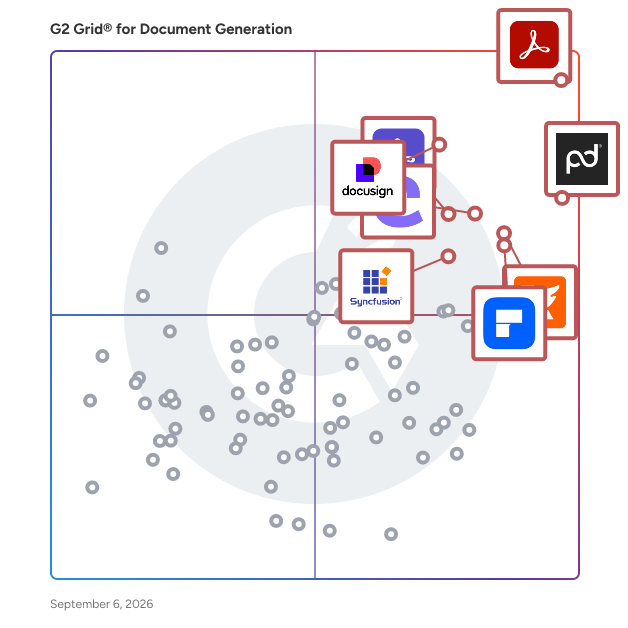
  # Best Enterprise Document Generation Software

  *By [Nana Serwah Nkrahene](https://research.g2.com/insights/author/nana-nkrahene)*

   Products classified in the overall Document Generation category are similar in many regards and help companies of all sizes solve their business problems. However, enterprise business features, pricing, setup, and installation differ from businesses of other sizes, which is why we match buyers to the right Enterprise Business Document Generation to fit their needs. Compare product ratings based on reviews from enterprise users or connect with one of G2&#39;s buying advisors to find the right solutions within the Enterprise Business Document Generation category.

In addition to qualifying for inclusion in the Document Generation Software category, to qualify for inclusion in the Enterprise Business Document Generation Software category, a product must have at least 10 reviews left by a reviewer from an enterprise business.


## How Many Document Generation Software Products Does G2 Track?
**Total Products under this Category:** 243

### Category Stats (May 2026)
- **Average Rating**: 4.53/5
- **New Reviews This Quarter**: 329
- **Buyer Segments**: Small-Business 46% │ Mid-Market 32% │ Enterprise 22%
- **Top Trending Product**: FormSwift (+0.034)
*Last updated: May 18, 2026*

  
## How Does G2 Rank Document Generation Software Products?

**Why You Can Trust G2's Software Rankings:**

- 30 Analysts and Data Experts
- 28,700+ Authentic Reviews
- 243+ Products
- Unbiased Rankings

G2's software rankings are built on verified user reviews, rigorous moderation, and a consistent research methodology maintained by a team of analysts and data experts. Each product is measured using the same transparent criteria, with no paid placement or vendor influence. While reviews reflect real user experiences, which can be subjective, they offer valuable insight into how software performs in the hands of professionals. Together, these inputs power the G2 Score, a standardized way to compare tools within every category.


---

**Sponsored**

### altaFlow

altaFlow generates custom docs with a click, integrates eSignatures, creates webforms, and more without coding. It’s the ultimate tool to simplify, automate, and elevate your workflows.


[Visit website](https://www.g2.com/external_clickthroughs/record?secure%5Bad_program%5D=ppc&amp;secure%5Bad_slot%5D=category_product_list&amp;secure%5Bcategory_id%5D=1120&amp;secure%5Bdisplayable_resource_id%5D=1120&amp;secure%5Bdisplayable_resource_type%5D=Category&amp;secure%5Bmedium%5D=sponsored&amp;secure%5Bplacement_reason%5D=page_category&amp;secure%5Bplacement_resource_ids%5D%5B%5D=1120&amp;secure%5Bprioritized%5D=false&amp;secure%5Bproduct_id%5D=116146&amp;secure%5Bresource_id%5D=1120&amp;secure%5Bresource_type%5D=Category&amp;secure%5Bsource_type%5D=category_page&amp;secure%5Bsource_url%5D=https%3A%2F%2Fwww.g2.com%2Fcategories%2Fdocument-generation&amp;secure%5Btoken%5D=60f15347aaf7a8977086cb3d433d7ef6db3f1c8eb5fbbfc5d82aab617ab6e5e8&amp;secure%5Burl%5D=https%3A%2F%2Faltaflow.com%2Fg2-demo%2F%3Futm_source%3Dg2%26utm_medium%3Dppc%26utm_campaign%3Dg2clicks&amp;secure%5Burl_type%5D=book_demo)

---

  ## What Are the Top-Rated Document Generation Software Products in 2026?
### 1. [Adobe Acrobat](https://www.g2.com/products/adobe-acrobat/reviews)
  Acrobat: Trusted for documents. Now built for how work really happens. For more than 30 years, Acrobat has been the trusted name in document workflow — helping businesses create, sign, and share with confidence. As one of the leading enterprise document platforms that scales for global teams, Acrobat has evolved beyond the PDF. Now with Acrobat Studio, it has been reimagined for how modern teams work: smarter, more collaborative, and powered by AI. Acrobat Studio builds on everything professionals know from Acrobat Pro — powerful PDF editing, signing, and reviewing — and expands it into a connected workspace where teams can create, collaborate, and communicate in entirely new ways. While Acrobat Pro focuses on the PDF itself, Acrobat Studio connects the full document journey, from insight to action. With PDF Spaces, teams can bring related documents together, chat with AI Assistants that summarize content or surface key takeaways, and keep everyone aligned without endless versions or email threads. Express Premium tools make it easy to remix or reuse that same content into branded presentations, visuals, or reports — helping teams communicate ideas faster and more confidently. Security remains a constant. Acrobat follows Adobe&#39;s Secure Product Lifecycle to safeguard data at every stage, with encryption, access controls, and enterprise-grade compliance. For organizations evaluating document automation tools suitable for multi-region, multi-team deployments, Acrobat Studio delivers the scale, security, and integrations to support it. From small teams to large enterprises, it turns everyday PDFs into powerful, intelligent workspaces — helping people move ideas forward and communicate with greater clarity and impact.


  **Average Rating:** 4.5/5.0
  **Total Reviews:** 4,538
**How Do G2 Users Rate Adobe Acrobat?**

- **Has the product been a good partner in doing business?:** 8.9/10 (Category avg: 9.2/10)
- **Documents:** 9.1/10 (Category avg: 8.9/10)
- **Software:** 8.7/10 (Category avg: 8.5/10)
- **Workflow:** 8.6/10 (Category avg: 8.5/10)

**Who Is the Company Behind Adobe Acrobat?**

- **Seller:** [Adobe](https://www.g2.com/sellers/adobe)
- **Company Website:** https://adobe.com
- **Year Founded:** 1982
- **HQ Location:** San Jose, CA
- **Twitter:** @Adobe (959,034 Twitter followers)
- **LinkedIn® Page:** https://www.linkedin.com/company/1480/ (41,539 employees on LinkedIn®)

**Who Uses This Product?**
  - **Who Uses This:** Graphic Designer, Owner
  - **Top Industries:** Information Technology and Services, Computer Software
  - **Company Size:** 42% Small-Business, 32% Mid-Market


#### What Are Adobe Acrobat's Pros and Cons?

**Pros:**

- Ease of Use (595 reviews)
- Easy Editing (459 reviews)
- PDF Editing (434 reviews)
- Editing (337 reviews)
- Features (319 reviews)

**Cons:**

- Expensive (228 reviews)
- Slow Performance (179 reviews)
- PDF Issues (130 reviews)
- Not-User Friendly (126 reviews)
- Learning Curve (102 reviews)

### 2. [Conga Composer](https://www.g2.com/products/conga-composer/reviews)
  Flexible. Scalable. Embedded. Conga Composer transforms how businesses generate documents Disconnected systems and manual workflows make document generation slow, error-prone, and costly. Conga Composer streamlines this by embedding automated document creation into your existing tools. It supports multiple formats, merges data from any source, and scales effortlessly, empowering teams to deliver accurate, beautifully branded documents faster, with less effort and greater control. Conga Composer excels in document generation with key advantages: Launch Anywhere – Trigger document generation from buttons, flows, Apex, or external systems- no custom code needed. Multi-Format Support – Create Word, PDF, Excel, PowerPoint, and HTML email templates. Dynamic Content – Use conditional logic, charts, dashboards, rich text, and global currencies. High-Volume Ready – Supports large templates (25MB), merged outputs (250MB), and batch processing. Enterprise Scalability – Reusable templates and behaviors across departments and use cases. eSignature Integration – Seamless pairing with Conga Sign for end-to-end agreement workflows. Revenue Lifecycle Alignment – Only vendor that integrates doc gen into CLM, CPQ, and full revenue processes. Admin-Friendly Setup – Built for Salesforce admins and business users—no developer dependency. Proven Performance – Trusted by 8,000+ businesses; millions of documents generated monthly. Future-Ready – Monitoring AI trends to invest when enterprise-grade reliability is guaranteed. With these strengths, Conga Composer delivers a scalable, flexible, and automated solution for efficient document generation.


  **Average Rating:** 4.4/5.0
  **Total Reviews:** 834
**How Do G2 Users Rate Conga Composer?**

- **Has the product been a good partner in doing business?:** 8.7/10 (Category avg: 9.2/10)
- **Documents:** 8.7/10 (Category avg: 8.9/10)
- **Software:** 8.9/10 (Category avg: 8.5/10)
- **Workflow:** 8.5/10 (Category avg: 8.5/10)

**Who Is the Company Behind Conga Composer?**

- **Seller:** [Conga](https://www.g2.com/sellers/conga)
- **Company Website:** https://conga.com/
- **Year Founded:** 2006
- **HQ Location:** 3200 Kirby Dr., Suite 500, Houston, TX 77098
- **LinkedIn® Page:** https://www.linkedin.com/company/conga/ (1,793 employees on LinkedIn®)
- **Phone:** (303) 465-1616

**Who Uses This Product?**
  - **Who Uses This:** Salesforce Administrator, Salesforce Consultant
  - **Top Industries:** Information Technology and Services, Computer Software
  - **Company Size:** 47% Mid-Market, 28% Enterprise


#### What Are Conga Composer's Pros and Cons?

**Pros:**

- Features (89 reviews)
- Document Management (83 reviews)
- Ease of Use (76 reviews)
- Time-saving (56 reviews)
- Templates (55 reviews)

**Cons:**

- Learning Curve (50 reviews)
- Steep Learning Curve (31 reviews)
- Time-Consuming (28 reviews)
- Difficulty (26 reviews)
- Limited Template Flexibility (21 reviews)

### 3. [Docusign CLM](https://www.g2.com/products/docusign-clm/reviews)
  While eSignature has changed the way that many organizations execute a contract, the lifecycle before and after signature is often managed through manual processes, spreadsheets, and emails—slowing the pace of doing business, increasing risk, and frustrating customers and employees. Docusign CLM (Contract Lifecycle Management) allows organizations to streamline the agreement lifecycle by transforming analog manual processes into a digital automated workflow. The end result is an accelerated pace of doing business, increased compliance, and more efficient employees. Key Features: Central Repository, Advanced Search &amp; Find, Version Control, Clause Library, Collaboration with internal and external parties, Redlining, Simple &amp; Advanced Workflows, Tagging, Mobile Access, Multi Platform integrations (including tight integration with Salesforce).


  **Average Rating:** 4.3/5.0
  **Total Reviews:** 483
**How Do G2 Users Rate Docusign CLM?**

- **Has the product been a good partner in doing business?:** 8.6/10 (Category avg: 9.2/10)
- **Documents:** 9.0/10 (Category avg: 8.9/10)
- **Software:** 8.6/10 (Category avg: 8.5/10)
- **Workflow:** 8.8/10 (Category avg: 8.5/10)

**Who Is the Company Behind Docusign CLM?**

- **Seller:** [Docusign](https://www.g2.com/sellers/docusign)
- **Company Website:** https://www.docusign.com
- **Year Founded:** 2003
- **HQ Location:** San Francisco, CA
- **Twitter:** @Docusign (144,160 Twitter followers)
- **LinkedIn® Page:** https://www.linkedin.com/company/19022/ (8,411 employees on LinkedIn®)

**Who Uses This Product?**
  - **Who Uses This:** Account Executive, General Counsel
  - **Top Industries:** Information Technology and Services, Computer Software
  - **Company Size:** 45% Mid-Market, 29% Enterprise


#### What Are Docusign CLM's Pros and Cons?

**Pros:**

- Ease of Use (129 reviews)
- Digital Signing (66 reviews)
- Digital Signatures (60 reviews)
- Document Management (60 reviews)
- Simple (55 reviews)

**Cons:**

- Expensive (28 reviews)
- Steep Learning Curve (24 reviews)
- Signature Issues (17 reviews)
- Complex Setup (16 reviews)
- Learning Curve (16 reviews)

### 4. [Responsive, formerly RFPIO](https://www.g2.com/products/responsive-formerly-rfpio/reviews)
  Responsive is the global leader in strategic response management software, transforming how organizations share and exchange critical information. Our commitment to product innovation and customer success empowers companies to accelerate growth, mitigate risk and improve the employee experience by leveraging intelligent technologies to quickly and accurately manage RFPs, RFIs, security questionnaires (VSQs), due diligence questionnaires (DDQs), risk assessments and all other complex information requests (RFXs). With Responsive, frontline teams deliver superior responses by automating the completion of questionnaires, documents and spreadsheets while collaborating with stakeholders, improving processes with data insights, and quickly accessing approved content across popular business applications.


  **Average Rating:** 4.5/5.0
  **Total Reviews:** 1,275
**How Do G2 Users Rate Responsive, formerly RFPIO?**

- **Has the product been a good partner in doing business?:** 9.3/10 (Category avg: 9.2/10)
- **Documents:** 8.4/10 (Category avg: 8.9/10)
- **Software:** 8.1/10 (Category avg: 8.5/10)
- **Workflow:** 8.4/10 (Category avg: 8.5/10)

**Who Is the Company Behind Responsive, formerly RFPIO?**

- **Seller:** [Responsive](https://www.g2.com/sellers/responsive)
- **Company Website:** https://www.responsive.io/
- **Year Founded:** 2016
- **HQ Location:** Frisco, Texas
- **Twitter:** @responsiveio (1,736 Twitter followers)
- **LinkedIn® Page:** https://www.linkedin.com/company/responsiveio (708 employees on LinkedIn®)

**Who Uses This Product?**
  - **Who Uses This:** Proposal Manager, Proposal Writer
  - **Top Industries:** Computer Software, Information Technology and Services
  - **Company Size:** 48% Mid-Market, 39% Enterprise


#### What Are Responsive, formerly RFPIO's Pros and Cons?

**Pros:**

- Ease of Use (150 reviews)
- Features (117 reviews)
- Time-saving (87 reviews)
- Efficiency (86 reviews)
- Team Collaboration (77 reviews)

**Cons:**

- Learning Curve (34 reviews)
- Not Intuitive (33 reviews)
- Inaccurate Responses (27 reviews)
- Non-Intuitive Features (27 reviews)
- Missing Features (23 reviews)

### 5. [PandaDoc](https://www.g2.com/products/pandadoc/reviews)
  PandaDoc is a comprehensive document management solution designed to assist users in creating, managing, e-signing, and notarizing documents efficiently. This platform serves as a centralized workflow tool, streamlining the document lifecycle from inception to final approval. By digitizing traditional document processes, PandaDoc aims to reduce inefficiencies and enhance productivity for businesses of all sizes. Targeted primarily at professionals and organizations that rely heavily on documentation, PandaDoc is particularly beneficial for sales teams, legal departments, and project managers. These users often face the challenge of managing numerous documents, contracts, and agreements, which can be time-consuming and prone to errors when handled manually. With PandaDoc, users can automate repetitive tasks, ensuring that they can allocate more time to strategic activities that drive business growth. Key features of PandaDoc include customizable templates, an intuitive drag-and-drop editor, and robust e-signature capabilities. Users can create visually appealing documents quickly, using pre-built templates tailored for various industries. The platform also supports real-time collaboration, allowing multiple stakeholders to review and edit documents simultaneously. This feature is particularly valuable in fast-paced environments where timely feedback is crucial. Additionally, PandaDoc&#39;s e-signature functionality ensures that documents can be signed securely and legally, eliminating the need for physical signatures and expediting the approval process. Another significant advantage of PandaDoc is its integration capabilities. The platform seamlessly connects with popular CRM systems, payment processors, and other business tools, enabling users to manage their documents within their existing workflows. This integration reduces the friction often associated with switching between different applications, allowing for a more cohesive user experience. Furthermore, PandaDoc provides analytics and reporting features that help users track document performance, offering insights into how recipients interact with their documents, which can inform future strategies. Overall, PandaDoc stands out in the document management category by providing a user-friendly interface, powerful automation features, and extensive integration options. By addressing common pain points associated with document handling, PandaDoc empowers organizations to enhance their operational efficiency, reduce turnaround times, and ultimately focus on what matters most: achieving their business objectives.


  **Average Rating:** 4.7/5.0
  **Total Reviews:** 3,312
**How Do G2 Users Rate PandaDoc?**

- **Has the product been a good partner in doing business?:** 9.3/10 (Category avg: 9.2/10)
- **Documents:** 9.1/10 (Category avg: 8.9/10)
- **Software:** 8.8/10 (Category avg: 8.5/10)
- **Workflow:** 9.2/10 (Category avg: 8.5/10)

**Who Is the Company Behind PandaDoc?**

- **Seller:** [PandaDoc](https://www.g2.com/sellers/pandadoc)
- **Company Website:** https://www.pandadoc.com
- **Year Founded:** 2011
- **HQ Location:** San Francisco, CA
- **Twitter:** @pandadoc (18,455 Twitter followers)
- **LinkedIn® Page:** https://www.linkedin.com/company/2211704/ (895 employees on LinkedIn®)

**Who Uses This Product?**
  - **Who Uses This:** CEO, Owner
  - **Top Industries:** Marketing and Advertising, Computer Software
  - **Company Size:** 68% Small-Business, 25% Mid-Market


#### What Are PandaDoc's Pros and Cons?

**Pros:**

- Ease of Use (665 reviews)
- Document Management (333 reviews)
- Simple (329 reviews)
- E-Signatures (299 reviews)
- Intuitive (294 reviews)

**Cons:**

- Signature Issues (107 reviews)
- Missing Features (105 reviews)
- Expensive (99 reviews)
- Difficult Editing (91 reviews)
- Document Management (81 reviews)

### 6. [Progress Telerik](https://www.g2.com/products/progress-telerik/reviews)
  Telerik and Kendo UI are comprehensive UI component libraries designed to assist .NET and JavaScript developers in creating modern, visually appealing, and robust applications. These libraries offer a vast collection of over 1,250 UI components tailored for various platforms, enabling developers to streamline their workflow and enhance productivity. By leveraging these tools, users can significantly reduce development time, reportedly by up to 50%, while ensuring their applications remain future-proof and adaptable to evolving technology trends. Targeted primarily at web developers and designers, Telerik and Kendo UI cater to a diverse audience, including enterprises, startups, and individual developers seeking to elevate their application development process. The libraries are particularly beneficial for teams that require rapid prototyping and deployment of user interfaces. With a rich set of features, these libraries support a wide array of use cases, from creating simple web applications to complex enterprise solutions, all while maintaining a high standard of quality and performance. One of the standout features of Telerik and Kendo UI is the extensive customization options available to users. Developers can choose from various themes and skins to ensure their applications align with branding guidelines and user preferences. Additionally, the libraries come equipped with tools for Embedded Reporting, Automated Testing, and Mocking, which further enhance the development experience. These features not only facilitate a smoother workflow but also contribute to the overall quality and reliability of the applications being developed. For teams collaborating with designers, Telerik and Kendo UI offer Design Kits for Figma, which provide highly customizable design files that accurately represent the web components. This integration allows for seamless communication between developers and designers, significantly speeding up UI development cycles. The Design Kits are aligned with the themes available in the libraries, such as Material, Bootstrap, and Default, ensuring consistency and coherence throughout the design and development process. Overall, Telerik and Kendo UI stand out in the crowded landscape of UI component libraries by offering a robust set of features, extensive customization capabilities, and valuable resources for collaboration. These tools empower developers to create high-quality applications efficiently, making them an essential asset for anyone involved in modern web development.


  **Average Rating:** 4.5/5.0
  **Total Reviews:** 207
**How Do G2 Users Rate Progress Telerik?**

- **Has the product been a good partner in doing business?:** 9.1/10 (Category avg: 9.2/10)
- **Documents:** 9.1/10 (Category avg: 8.9/10)
- **Software:** 8.8/10 (Category avg: 8.5/10)
- **Workflow:** 8.5/10 (Category avg: 8.5/10)

**Who Is the Company Behind Progress Telerik?**

- **Seller:** [Progress Software](https://www.g2.com/sellers/progress-software)
- **Company Website:** https://www.progress.com/
- **Year Founded:** 1981
- **HQ Location:** Burlington, MA.
- **Twitter:** @ProgressSW (48,838 Twitter followers)
- **LinkedIn® Page:** https://www.linkedin.com/company/progress-software/ (4,207 employees on LinkedIn®)

**Who Uses This Product?**
  - **Who Uses This:** Software Developer, Software Engineer
  - **Top Industries:** Computer Software, Information Technology and Services
  - **Company Size:** 52% Small-Business, 27% Mid-Market


#### What Are Progress Telerik's Pros and Cons?

**Pros:**

- Ease of Use (55 reviews)
- Customer Support (52 reviews)
- Component Variety (37 reviews)
- Functionality (34 reviews)
- Components (32 reviews)

**Cons:**

- Learning Curve (23 reviews)
- Expensive (15 reviews)
- Cost Issues (14 reviews)
- Missing Features (13 reviews)
- Poor Documentation (12 reviews)

### 7. [Nintex](https://www.g2.com/products/nintex-nintex/reviews)
  Nintex helps companies unlock the power of endless possibilities with agentic business orchestration. Today, more than 7,000 public and private sector organizations across 100+ countries turn to the Nintex platform to automate how work gets done, remove friction from business processes, and unlock the full potential of their people. Nintex CE allows organizations to govern how people, systems, and AI work together: combining the speed and innovation of easy, low-code application development, with the flexibility of workflow orchestration, and the intelligence of AI agents to build solutions that solve their unique business challenges. Nintex K2 allows organizations to get advanced orchestration, control, and scalability, while keeping data securely on-premises to meet the exacting standards of highly regulated entities or those with strict data sovereignty requirements. Harness powerful on-prem automation, rich application development, and complex case management with full control.


  **Average Rating:** 4.3/5.0
  **Total Reviews:** 1,272
**How Do G2 Users Rate Nintex?**

- **Has the product been a good partner in doing business?:** 8.4/10 (Category avg: 9.2/10)
- **Documents:** 9.0/10 (Category avg: 8.9/10)
- **Software:** 8.3/10 (Category avg: 8.5/10)
- **Workflow:** 9.5/10 (Category avg: 8.5/10)

**Who Is the Company Behind Nintex?**

- **Seller:** [Nintex](https://www.g2.com/sellers/nintex)
- **Company Website:** https://www.nintex.com
- **Year Founded:** 2006
- **HQ Location:** Bellevue, WA
- **LinkedIn® Page:** https://www.linkedin.com/company/258303/ (1,200 employees on LinkedIn®)

**Who Uses This Product?**
  - **Who Uses This:** Business Analyst, Salesforce Administrator
  - **Top Industries:** Information Technology and Services, Financial Services
  - **Company Size:** 48% Enterprise, 40% Mid-Market


#### What Are Nintex's Pros and Cons?

**Pros:**

- Ease of Use (37 reviews)
- Workflow Management (19 reviews)
- Automation (18 reviews)
- Easy Setup (17 reviews)
- Versatility (16 reviews)

**Cons:**

- Limited Features (17 reviews)
- Learning Curve (13 reviews)
- Complexity (9 reviews)
- Expensive (9 reviews)
- Limited Customization (9 reviews)

### 8. [Foxit PDF Editor](https://www.g2.com/products/foxit-pdf-editor/reviews)
  Founded in 2001, Foxit is a leading provider of innovative PDF and eSignature products and services, helping knowledge workers increase productivity and do more with documents. Foxit combines easy-to-use desktop software, mobile apps, and cloud services in one powerful solution: The Foxit PDF Editor. This intelligent document solution allows users to create, edit, fill, and sign documents through their integrated PDF Editor and eSign offerings – from anywhere and on any device. Most editing tools focus only on creating and modifying documents, leaving storage, organization, and control to other systems. Foxit PDF Editor integrates directly with Foxit Document Management System (DMS), so every document is securely stored, organized, governed, and connected from the moment it&#39;s edited. As the first to market with AI-powered PDF editing solutions, Foxit enhances productivity with smart document editing and workflow automation. Winner of numerous awards, Foxit has over 700 million users and has sold to over 528,000 customers, ranging from SMBs to global enterprises worldwide. Foxit products are ISO 32000-1/PDF 1.7 standard compliant, therefore, compatible with your existing PDF documents and forms.


  **Average Rating:** 4.6/5.0
  **Total Reviews:** 3,390
**How Do G2 Users Rate Foxit PDF Editor?**

- **Has the product been a good partner in doing business?:** 9.0/10 (Category avg: 9.2/10)
- **Documents:** 9.0/10 (Category avg: 8.9/10)
- **Software:** 8.5/10 (Category avg: 8.5/10)
- **Workflow:** 8.2/10 (Category avg: 8.5/10)

**Who Is the Company Behind Foxit PDF Editor?**

- **Seller:** [Foxit](https://www.g2.com/sellers/foxit)
- **Company Website:** https://www.foxit.com/
- **Year Founded:** 2001
- **HQ Location:** Fremont, CA
- **Twitter:** @foxitsoftware (6,234 Twitter followers)
- **LinkedIn® Page:** https://www.linkedin.com/company/foxit-corporation/ (559 employees on LinkedIn®)

**Who Uses This Product?**
  - **Who Uses This:** Owner, President
  - **Top Industries:** Construction, Accounting
  - **Company Size:** 63% Small-Business, 24% Mid-Market


#### What Are Foxit PDF Editor's Pros and Cons?

**Pros:**

- Ease of Use (567 reviews)
- PDF Editing (407 reviews)
- Easy Editing (371 reviews)
- Simple (345 reviews)
- Features (332 reviews)

**Cons:**

- Difficulty (91 reviews)
- Expensive (91 reviews)
- Learning Curve (90 reviews)
- Missing Features (85 reviews)
- Limited Features (76 reviews)

### 9. [DealHub](https://www.g2.com/products/dealhub/reviews)
  DealHub is the Agentic Quote-to-Revenue (Q2R) platform designed for the AI era. We empower high-growth SaaS and forward-thinking enterprises to fully consolidate, automate, and accelerate their entire revenue lifecycle, from initial quote generation through final cash collection and revenue recognition. DealHub gives enterprises ultimate flexibility, enabling the rapid design, launch, and scale of any modern monetization model, such as Sales-Led Growth (SLG), Product-Led Growth (PLG), Self-Serve, Subscription, Usage-Based, and AI Consumption models. The unified platform replaces fragmented revenue tools, integrating critical capabilities into one orchestrated engine, including AI-Powered CPQ (Configure, Price, Quote), CLM (Contract Lifecycle Management), Subscription Management &amp; Billing, Revenue Recognition, Digital DealRoom, and Composable API-first Headless Quoting. Enterprises choose DealHub to drive revenue at AI scale, leveraging real-time revenue visibility and predictability across all revenue streams via live ARR, usage, churn, and forecast dashboards. DealHub offers seamless, native integration with all leading CRMs, including Salesforce, Microsoft Dynamics, and HubSpot, ensuring customers achieve faster time-to-value. DealHub is trusted by global leaders, including Intuit, Gong, Kore.ai, SpotOn, and Braze.


  **Average Rating:** 4.7/5.0
  **Total Reviews:** 833
**How Do G2 Users Rate DealHub?**

- **Has the product been a good partner in doing business?:** 9.6/10 (Category avg: 9.2/10)
- **Documents:** 9.1/10 (Category avg: 8.9/10)
- **Software:** 9.3/10 (Category avg: 8.5/10)
- **Workflow:** 9.3/10 (Category avg: 8.5/10)

**Who Is the Company Behind DealHub?**

- **Seller:** [DealHub.io](https://www.g2.com/sellers/dealhub-io)
- **Company Website:** https://dealhub.io/
- **Year Founded:** 2014
- **HQ Location:** Austin, Texas
- **Twitter:** @DealHubIO (3,897 Twitter followers)
- **LinkedIn® Page:** https://www.linkedin.com/company/dealhubio/ (308 employees on LinkedIn®)

**Who Uses This Product?**
  - **Who Uses This:** Sales Operations Manager, Account Executive
  - **Top Industries:** Computer Software, Information Technology and Services
  - **Company Size:** 65% Mid-Market, 23% Small-Business


#### What Are DealHub's Pros and Cons?

**Pros:**

- Customer Support (109 reviews)
- Ease of Use (101 reviews)
- Efficiency (88 reviews)
- Time-saving (87 reviews)
- Integrations (82 reviews)

**Cons:**

- Learning Curve (37 reviews)
- Limited Customization (33 reviews)
- Steep Learning Curve (25 reviews)
- Missing Features (22 reviews)
- Integration Issues (20 reviews)

### 10. [UpSlide](https://www.g2.com/products/upslide/reviews)
  UpSlide is a document production solution specifically designed for the financial services sector, enabling firms to create and manage high-stakes documents within the Microsoft 365 environment. With over 15 years of experience, UpSlide focuses on enhancing the accuracy, consistency, and control of document creation, ensuring that financial professionals can deliver polished and compliant materials efficiently. Targeted primarily at finance firms, UpSlide caters to a diverse audience that includes investment banks, asset managers, and consulting firms. The platform is particularly beneficial for teams involved in the production of pitchbooks, investment memorandums (IMs), and financial reports. By streamlining the document creation process, UpSlide allows users to focus on the content and strategy rather than the formatting and compliance aspects, which are critical in the financial industry. One of the standout features of UpSlide is its ability to bridge the gap between AI-generated drafts and client-ready documents. The solution integrates AI agents with Microsoft 365, enabling seamless orchestration and deterministic workflows. This ensures that all documents remain on-brand and are thoroughly verified from the initial draft to the final version. The platform&#39;s robust capabilities help finance teams maintain high standards of quality while reducing the time spent on document production. UpSlide is trusted by over 900 teams, including prominent firms such as KPMG, Deloitte, PwC, and Rothschild &amp; Co. The platform boasts a remarkable 98% renewal rate, reflecting its effectiveness and reliability in the industry. Additionally, UpSlide has earned a reputation as a Leader on G2, underscoring its strong market presence. The in-house implementation team provides comprehensive support throughout the rollout process, ensuring a smooth transition for new users. With an impressive customer satisfaction score of 4.9 out of 5 and an average deployment time of under six weeks, UpSlide demonstrates its commitment to delivering value to its clients. In summary, UpSlide stands out in the document production landscape for financial services by offering a powerful combination of AI integration, workflow automation, and dedicated support. This enables finance professionals to produce high-quality documents that meet the rigorous demands of their industry while enhancing overall productivity and efficiency.


  **Average Rating:** 4.6/5.0
  **Total Reviews:** 63
**How Do G2 Users Rate UpSlide?**

- **Has the product been a good partner in doing business?:** 9.3/10 (Category avg: 9.2/10)
- **Documents:** 7.5/10 (Category avg: 8.9/10)
- **Software:** 4.9/10 (Category avg: 8.5/10)
- **Workflow:** 7.1/10 (Category avg: 8.5/10)

**Who Is the Company Behind UpSlide?**

- **Seller:** [UpSlide](https://www.g2.com/sellers/upslide)
- **Company Website:** https://upslide.com
- **Year Founded:** 2009
- **HQ Location:** Paris, Ile-de-France
- **Twitter:** @Up_Slide (3,514 Twitter followers)
- **LinkedIn® Page:** https://www.linkedin.com/company/3175264/ (181 employees on LinkedIn®)

**Who Uses This Product?**
  - **Top Industries:** Financial Services, Accounting
  - **Company Size:** 46% Mid-Market, 40% Enterprise


#### What Are UpSlide's Pros and Cons?

**Pros:**

- Ease of Use (12 reviews)
- Customer Support (9 reviews)
- Time-Saving (8 reviews)
- Features (7 reviews)
- Time-saving (7 reviews)

**Cons:**

- Complex Features (3 reviews)
- Lack of Features (3 reviews)
- Missing Features (3 reviews)
- Performance Issues (3 reviews)
- Slow Performance (3 reviews)

### 11. [Documaker](https://www.g2.com/products/documaker/reviews)
  Documaker dynamically creates, manages, and delivers enterprise communications to customers and stakeholders, when and how they want themwhether by print, email, text messaging, social media, or any other format.


  **Average Rating:** 4.0/5.0
  **Total Reviews:** 22
**How Do G2 Users Rate Documaker?**

- **Has the product been a good partner in doing business?:** 8.1/10 (Category avg: 9.2/10)
- **Documents:** 7.7/10 (Category avg: 8.9/10)
- **Software:** 7.7/10 (Category avg: 8.5/10)
- **Workflow:** 7.4/10 (Category avg: 8.5/10)

**Who Is the Company Behind Documaker?**

- **Seller:** [Oracle](https://www.g2.com/sellers/oracle)
- **Year Founded:** 1977
- **HQ Location:** Austin, TX
- **Twitter:** @Oracle (828,328 Twitter followers)
- **LinkedIn® Page:** https://www.linkedin.com/company/1028/ (199,301 employees on LinkedIn®)
- **Ownership:** NYSE:ORCL

**Who Uses This Product?**
  - **Top Industries:** Insurance
  - **Company Size:** 54% Enterprise, 25% Mid-Market


### 12. [Templafy](https://www.g2.com/products/templafy/reviews)
  Templafy is the leading AI-powered document generation platform, enabling enterprise organizations to create accurate, compliant, and on-brand documents with maximum efficiency and control. Accessible directly within M365, Google Workspace, Salesforce, Claude or any AI agent Templafy simplifies document workflows through AI and automation, to reduce risk and and boost productivity. Founded in 2014, Templafy is a global organization with offices across Europe and the US. Trusted by industry leaders like KPMG and BDO, Templafy saves teams over 30% of the time they typically spend on repetitive work like proposals, engagement letters, and audit reports, so they can focus on revenue-driving tasks instead. Join more than 4 million users worldwide who rely on Templafy to accelerate business content creation with AI.


  **Average Rating:** 4.4/5.0
  **Total Reviews:** 58
**How Do G2 Users Rate Templafy?**

- **Has the product been a good partner in doing business?:** 9.3/10 (Category avg: 9.2/10)
- **Documents:** 8.3/10 (Category avg: 8.9/10)
- **Software:** 6.8/10 (Category avg: 8.5/10)
- **Workflow:** 7.9/10 (Category avg: 8.5/10)

**Who Is the Company Behind Templafy?**

- **Seller:** [Templafy](https://www.g2.com/sellers/templafy)
- **Company Website:** https://www.templafy.com/
- **HQ Location:** New York, USA
- **Twitter:** @Templafy (919 Twitter followers)
- **LinkedIn® Page:** https://www.linkedin.com/company/3585015/ (212 employees on LinkedIn®)

**Who Uses This Product?**
  - **Top Industries:** Consulting, Accounting
  - **Company Size:** 46% Enterprise, 41% Mid-Market


#### What Are Templafy's Pros and Cons?

**Pros:**

- Ease of Use (15 reviews)
- Features (10 reviews)
- Templates (9 reviews)
- Time-Saving (8 reviews)
- Branding (7 reviews)

**Cons:**

- Complex Usability (7 reviews)
- Expensive (4 reviews)
- Missing Features (4 reviews)
- Technical Issues (4 reviews)
- Difficult Learning (3 reviews)

### 13. [PDF-XChange Editor](https://www.g2.com/products/pdf-xchange-editor/reviews)
  Our business began in 1997 as ‘Tracker Software Products Ltd’ to develop document management and imaging-related software. These products included TIFF and PDF digital conversion utilities that enabled the conversion of many document formats to TIFF and PDF for subsequent archiving within document management products. These standalone conversion applications quickly proved their worth and we made the decision to concentrate on the development of these utilities for the end-user and third-party software developer markets. During the intervening years we have become a global leader in the PDF software market. Our offices are located in Canada, the U.K., Bulgaria and Ukraine. Our corporate headquarters relocated to Vancouver Island, British Columbia, in 2008. At 2016 we incorporated PDF-XChange Co Ltd in the U.K. to tie together all of our interests worldwide. In the coming months it is our intention to rebrand all of our sales and marketing under this one common brand worldwide. Our vision is to provide dynamic and powerful software for the creation, editing, manipulation and conversion of PDF documents, and our applications can convert a huge range of document formats to and from PDF. Our dedicated team of developers strive continually to improve the quality and functionality of our products. We aim to create applications that are flexible enough to meet the needs of all practitioners from novice users to professional document creators. Our software creates files that conform to the internationally-recognized ISO PDF standard, which means they are compatible with all major PDF document viewers/editors worldwide.


  **Average Rating:** 4.6/5.0
  **Total Reviews:** 146
**How Do G2 Users Rate PDF-XChange Editor?**

- **Has the product been a good partner in doing business?:** 9.0/10 (Category avg: 9.2/10)
- **Documents:** 8.8/10 (Category avg: 8.9/10)
- **Software:** 9.4/10 (Category avg: 8.5/10)
- **Workflow:** 8.5/10 (Category avg: 8.5/10)

**Who Is the Company Behind PDF-XChange Editor?**

- **Seller:** [PDF-XChange Co. Ltd. (Tracker Software)](https://www.g2.com/sellers/pdf-xchange-co-ltd-tracker-software)
- **Year Founded:** 2008
- **HQ Location:** Oulunsalo
- **Twitter:** @PDFXEditor (177 Twitter followers)
- **LinkedIn® Page:** https://www.linkedin.com/company/No-Linkedin-Presence-Added-Intentionally-By-DataOps (1 employees on LinkedIn®)

**Who Uses This Product?**
  - **Top Industries:** Information Technology and Services, Accounting
  - **Company Size:** 39% Enterprise, 36% Small-Business


#### What Are PDF-XChange Editor's Pros and Cons?

**Pros:**

- Ease of Use (4 reviews)
- Easy Editing (4 reviews)
- Document Editing (3 reviews)
- Easy Conversion (3 reviews)
- Features (3 reviews)

**Cons:**

- Not-User Friendly (2 reviews)
- Design Issues (1 reviews)
- Difficulty (1 reviews)
- Integration Issues (1 reviews)
- Lack of Integrations (1 reviews)

### 14. [BRYTER](https://www.g2.com/products/bryter/reviews)
  BRYTER enables expert teams like Legal and Compliance to make their knowledge available digitally. BRYTER applications collect the relevant information, process it intelligently, and provide the answers, decisions, and documents business partners need, transforming experts into business enablers. Global enterprises like McDonalds and ING, Law Firms like Linklaters and DLA Piper, and professional service firms like Deloitte, PwC, and KPMG, use BRYTER’s no-code platform to build applications that reduce repetitive tasks for experts, mitigate risk, and accelerate business outcomes. BRYTER is a remote-first company with offices in New York, London, Frankfurt and Berlin. www.bryter.com


  **Average Rating:** 4.7/5.0
  **Total Reviews:** 66
**How Do G2 Users Rate BRYTER?**

- **Has the product been a good partner in doing business?:** 9.6/10 (Category avg: 9.2/10)
- **Documents:** 9.0/10 (Category avg: 8.9/10)
- **Software:** 7.8/10 (Category avg: 8.5/10)
- **Workflow:** 9.3/10 (Category avg: 8.5/10)

**Who Is the Company Behind BRYTER?**

- **Seller:** [BRYTER](https://www.g2.com/sellers/bryter-1d888a14-56d4-4c82-a3da-09d46169e547)
- **Year Founded:** 2018
- **HQ Location:** New York
- **Twitter:** @BRYTER_io (1,031 Twitter followers)
- **LinkedIn® Page:** https://www.linkedin.com/company/brytergmbh/ (87 employees on LinkedIn®)

**Who Uses This Product?**
  - **Top Industries:** Legal Services
  - **Company Size:** 42% Small-Business, 38% Enterprise


#### What Are BRYTER's Pros and Cons?

**Pros:**

- Artificial Intelligence (1 reviews)
- Automation (1 reviews)
- Automation Efficiency (1 reviews)
- Ease of Use (1 reviews)
- Time-Saving (1 reviews)

**Cons:**

- Content Management (1 reviews)
- Difficult Learning (1 reviews)
- Feature Issues (1 reviews)
- Functionality Limitations (1 reviews)
- Integration Issues (1 reviews)

### 15. [Wondershare PDFelement](https://www.g2.com/products/wondershare-wondershare-pdfelement/reviews)
  PDFelement is a comprehensive PDF editing solution designed to assist users in managing their PDF documents efficiently. This versatile software caters to a wide range of needs, including creating, editing, converting, annotating, and securing PDF files. With its user-friendly interface and advanced features, PDFelement is suitable for both professionals and individuals seeking to streamline their document workflows. The target audience for PDFelement includes businesses, students, and professionals who frequently work with PDF files. Its capabilities are particularly beneficial for those who require a reliable tool for document management, whether for creating reports, filling out forms, or collaborating on projects. The software is designed to enhance productivity by simplifying complex tasks associated with PDF handling, making it an essential tool for anyone who regularly interacts with digital documents. One of the standout features of PDFelement is its advanced Optical Character Recognition (OCR) technology, which allows users to convert scanned documents into editable and searchable text. This feature is particularly useful for professionals who need to digitize paper documents while preserving their original formatting. Additionally, PDFelement supports the conversion of PDFs to and from various formats, including Word, Excel, and PowerPoint, ensuring that users can work with their documents in the format that best suits their needs. PDFelement also offers robust security features, enabling users to protect sensitive information within their documents. Users can easily password-protect their PDFs, redact confidential data, and electronically sign documents, facilitating secure collaboration. The software’s form-filling capabilities further enhance its utility, allowing users to create and fill out forms effortlessly, which is especially beneficial for businesses that require streamlined data collection processes. Overall, PDFelement stands out in the PDF editing category due to its combination of powerful features, ease of use, and versatility. By optimizing PDF tasks and providing a comprehensive set of tools, PDFelement empowers users to manage their documents more effectively, ultimately enhancing their productivity and workflow efficiency.


  **Average Rating:** 4.5/5.0
  **Total Reviews:** 1,030
**How Do G2 Users Rate Wondershare PDFelement?**

- **Has the product been a good partner in doing business?:** 8.9/10 (Category avg: 9.2/10)
- **Documents:** 9.1/10 (Category avg: 8.9/10)
- **Software:** 8.6/10 (Category avg: 8.5/10)
- **Workflow:** 8.8/10 (Category avg: 8.5/10)

**Who Is the Company Behind Wondershare PDFelement?**

- **Seller:** [Wondershare](https://www.g2.com/sellers/wondershare)
- **Company Website:** https://www.wondershare.com
- **Year Founded:** 2003
- **HQ Location:** Shenzen, CN
- **Twitter:** @Wondershare (14,152 Twitter followers)
- **LinkedIn® Page:** https://www.linkedin.com/company/wondershare-technology (642 employees on LinkedIn®)

**Who Uses This Product?**
  - **Who Uses This:** Owner, Project Manager
  - **Top Industries:** Information Technology and Services, Computer Software
  - **Company Size:** 66% Small-Business, 23% Mid-Market


#### What Are Wondershare PDFelement's Pros and Cons?

**Pros:**

- Ease of Use (251 reviews)
- Features (204 reviews)
- PDF Editing (189 reviews)
- Easy Editing (180 reviews)
- PDF Management (150 reviews)

**Cons:**

- Slow Performance (86 reviews)
- PDF Issues (51 reviews)
- Expensive (50 reviews)
- Limited Features (41 reviews)
- Missing Features (38 reviews)

### 16. [ApowerPDF](https://www.g2.com/products/apowerpdf/reviews)
  As a well-rounded PDF editor, ApowerPDF has slick user interface and offers a wide range of PDF editing options to choose from based on your needs. With it, you can easily modify text/graphics, add images, text, watermarks or even manage PDF pages and save with results that look exactly like the original. Indeed, it&#39;s quite useful for both individuals and business.


  **Average Rating:** 4.3/5.0
  **Total Reviews:** 43
**How Do G2 Users Rate ApowerPDF?**

- **Has the product been a good partner in doing business?:** 9.2/10 (Category avg: 9.2/10)

**Who Is the Company Behind ApowerPDF?**

- **Seller:** [Apowersoft](https://www.g2.com/sellers/apowersoft)
- **HQ Location:** N/A
- **Twitter:** @Apowersoft (749 Twitter followers)
- **LinkedIn® Page:** https://www.linkedin.com/company/No-Linkedin-Presence-Added-Intentionally-By-DataOps (1 employees on LinkedIn®)

**Who Uses This Product?**
  - **Top Industries:** Information Technology and Services, Higher Education
  - **Company Size:** 57% Enterprise, 30% Mid-Market


### 17. [QorusDocs](https://www.g2.com/products/qorusdocs/reviews)
  QorusDocs is AI-powered proposal management software that automates the creation of personalized pitches, presentations, proposals, and RFP responses. QorusDocs allows business development, sales, marketing and bid teams to collaborate seamlessly, optimizing billable hours and increasing client wins. QPilot the secure and private AI from QorusDocs, revolutionizes the work of business development, sales, and bid teams. QPilot simplifies the process of creating pitches, proposals, and RFP responses, enhancing efficiency and quality while eliminating monotonous tasks. With QPilot, you can allocate more time to cultivate client relationships and refine the strategic art of your presentations. Learn more at www.qorusdocs.com


  **Average Rating:** 4.4/5.0
  **Total Reviews:** 166
**How Do G2 Users Rate QorusDocs?**

- **Has the product been a good partner in doing business?:** 9.1/10 (Category avg: 9.2/10)
- **Documents:** 8.8/10 (Category avg: 8.9/10)
- **Software:** 8.7/10 (Category avg: 8.5/10)
- **Workflow:** 7.8/10 (Category avg: 8.5/10)

**Who Is the Company Behind QorusDocs?**

- **Seller:** [QorusDocs](https://www.g2.com/sellers/qorusdocs)
- **Year Founded:** 2012
- **HQ Location:** Seattle, WA
- **Twitter:** @qorusdocs (2,616 Twitter followers)
- **LinkedIn® Page:** https://www.linkedin.com/company/1203323/ (66 employees on LinkedIn®)

**Who Uses This Product?**
  - **Top Industries:** Information Technology and Services, Computer Software
  - **Company Size:** 49% Enterprise, 31% Mid-Market


#### What Are QorusDocs's Pros and Cons?

**Pros:**

- Ease of Use (12 reviews)
- Document Management (9 reviews)
- Content Management (8 reviews)
- Customer Support (8 reviews)
- Simple (8 reviews)

**Cons:**

- Limited Features (4 reviews)
- Complexity (3 reviews)
- Difficult Learning (3 reviews)
- Steep Learning Curve (3 reviews)
- Complex Setup (2 reviews)

### 18. [BrandOffice](https://www.g2.com/products/brandoffice/reviews)
  BrandOffice is a branding software solution designed to help organizations maintain brand consistency across all their documents, presentations, and reports. Developed by BrandQuantum, this innovative tool integrates seamlessly with Microsoft Office applications, allowing users to create and manage branded content effortlessly. By automating the branding process, BrandOffice ensures that every employee can produce materials that reflect the organization&#39;s identity, regardless of their design expertise. Targeted at businesses of all sizes, BrandOffice is particularly beneficial for marketing teams, corporate communications, and any employee who regularly generates content. The software addresses common challenges faced by organizations, such as inconsistent branding, outdated templates, and the risk of using incorrect logos or colors. With BrandOffice, companies can streamline their branding efforts, ensuring that all materials are not only visually appealing but also aligned with the latest brand guidelines. One of the key features of BrandOffice is its ability to provide users with pre-approved templates that are automatically updated as the brand evolves. This means that employees can create documents, PowerPoint presentations, and Excel reports without worrying about whether they are using the correct branding elements. The software also includes a centralized library of assets, such as logos, fonts, and color palettes, which are easily accessible to all users. This feature not only saves time but also reduces the likelihood of errors that can occur when employees attempt to source branding elements independently. BrandOffice adds significant value by enhancing collaboration within organizations. With its intuitive interface and easy-to-use tools, employees can work together on projects while ensuring that all outputs adhere to brand standards. Additionally, the software&#39;s integration with Microsoft Office means that users can leverage familiar applications to create branded content without needing to learn a new system. This familiarity helps to facilitate a smoother adoption process and encourages widespread use across the organization. Ultimately, BrandOffice stands out in its category by combining robust branding capabilities with the convenience of Microsoft Office integration. By empowering employees to create consistent and professional-looking documents, presentations, and reports, BrandOffice not only strengthens brand identity but also enhances overall productivity and efficiency within the organization.


  **Average Rating:** 4.9/5.0
  **Total Reviews:** 21
**How Do G2 Users Rate BrandOffice?**

- **Has the product been a good partner in doing business?:** 10.0/10 (Category avg: 9.2/10)
- **Documents:** 9.9/10 (Category avg: 8.9/10)
- **Software:** 9.1/10 (Category avg: 8.5/10)
- **Workflow:** 8.9/10 (Category avg: 8.5/10)

**Who Is the Company Behind BrandOffice?**

- **Seller:** [BrandQuantum](https://www.g2.com/sellers/brandquantum)
- **Company Website:** https://www.brandquantum.com/
- **Year Founded:** 2014
- **HQ Location:** South Carolina, USA
- **Twitter:** @BrandQuantum (79 Twitter followers)
- **LinkedIn® Page:** https://www.linkedin.com/company/10867687/ (15 employees on LinkedIn®)

**Who Uses This Product?**
  - **Top Industries:** Financial Services
  - **Company Size:** 48% Enterprise, 33% Mid-Market


#### What Are BrandOffice's Pros and Cons?

**Pros:**

- Customization (1 reviews)
- Document Editing (1 reviews)
- Ease of Creation (1 reviews)
- Ease of Use (1 reviews)
- Intuitive (1 reviews)

**Cons:**

- Saving Issues (1 reviews)

### 19. [XaitPorter](https://www.g2.com/products/xaitporter/reviews)
  XaitPorter is a cloud based document co-authoring and automation solution. XaitPorter has a built on workflow, is built on a database to making reuse of information easier and automatically takes care of formatting, layout and numbering. Xait with XaitPorter has 50,000+ users globally. Xait has majority of the larger oil service and engineering companies globally, and 50+ oil companies as clients. In addition, Xait have clients in the CRO industry, ITC, Engineering, construction, and more. XaitPorter is used for a wide variety of documents such as tenders, contracts, license applications, field development plans, well reports, annual reports and more. XaitPorter is built for complex documents with high value and high impact, and make it easy to manage teams collaborating on business critical documents. XaitPorter automatically takes care of formatting, layout and numbering. In addition, as XaitPorter is built on a database, XaitPorter ensure that our clients can more efficiently manage, maintain and leverage their content.


  **Average Rating:** 4.6/5.0
  **Total Reviews:** 51
**How Do G2 Users Rate XaitPorter?**

- **Has the product been a good partner in doing business?:** 9.1/10 (Category avg: 9.2/10)
- **Documents:** 8.9/10 (Category avg: 8.9/10)
- **Software:** 9.2/10 (Category avg: 8.5/10)
- **Workflow:** 9.2/10 (Category avg: 8.5/10)

**Who Is the Company Behind XaitPorter?**

- **Seller:** [Xait](https://www.g2.com/sellers/xait)
- **Year Founded:** 2000
- **HQ Location:** Sandnes, Norway
- **Twitter:** @xaitgroup (702 Twitter followers)
- **LinkedIn® Page:** https://www.linkedin.com/company/110126/ (95 employees on LinkedIn®)

**Who Uses This Product?**
  - **Top Industries:** Oil &amp; Energy, Computer Software
  - **Company Size:** 57% Mid-Market, 31% Enterprise


### 20. [empower](https://www.g2.com/products/empower-empower/reviews)
  The empower® Suite is a software solution integrated into Microsoft 365 that simplifies the creation of presentations, charts, documents, and emails while ensuring consistency and efficiency. It enables companies to produce professional, brand-compliant content with significantly reduced effort. The suite consists of three modules that can be used individually or together. empower® Slide Generation combines artificial intelligence, templates, automation, and shared corporate content to create professional PowerPoint presentations in minutes rather than hours. It eliminates manual formatting and ensures full compliance with corporate design standards. empower® Chart Creation is designed specifically for building complex business charts in PowerPoint and is ideal for data-driven, professional presentations. With more than 40 chart types, including waterfall, Mekko, and Gantt charts, as well as Excel linking, intelligent add-on elements, and automatic layout adjustments, users can create and edit charts approximately 50 percent faster than with standard PowerPoint features. In addition, empower® Chart Creation makes adoption and transition easy. Existing PowerPoint charts and charts from other PowerPoint charting add-ins can be converted into fully editable empower® charts with a single click. empower® Template Management centrally provides up-to-date Office templates, automatically applies them across PowerPoint, Word, Excel, and Outlook, and helps ensure brand and legal compliance in significantly less time.


  **Average Rating:** 4.5/5.0
  **Total Reviews:** 27
**How Do G2 Users Rate empower?**

- **Has the product been a good partner in doing business?:** 8.7/10 (Category avg: 9.2/10)
- **Documents:** 7.5/10 (Category avg: 8.9/10)
- **Software:** 6.7/10 (Category avg: 8.5/10)
- **Workflow:** 4.2/10 (Category avg: 8.5/10)

**Who Is the Company Behind empower?**

- **Seller:** [empower](https://www.g2.com/sellers/empower)
- **Year Founded:** 2005
- **HQ Location:** Cologne, DE
- **Twitter:** @empower_suite (36 Twitter followers)
- **LinkedIn® Page:** https://www.linkedin.com/company/empowersuite/ (104 employees on LinkedIn®)

**Who Uses This Product?**
  - **Company Size:** 41% Enterprise, 30% Mid-Market


#### What Are empower's Pros and Cons?

**Pros:**

- Features (5 reviews)
- Time-Saving (5 reviews)
- Customization (3 reviews)
- Efficiency (3 reviews)
- Customer Satisfaction (2 reviews)

**Cons:**

- Poor Customer Support (3 reviews)
- Update Issues (2 reviews)
- API Issues (1 reviews)
- Error Handling (1 reviews)
- Hidden Features (1 reviews)

### 21. [Collavate](https://www.g2.com/products/collavate/reviews)
  Collavate is an easy to use document collaboration tool that helps make idea creation a reality. With security options, all the necessary document tools and features, Collavate meets your needs for simplified workflow automation and team member sharing. Easy to set up Google Docs and Drive Add-on makes document archiving applications easier than ever before in a safe environment perfect for any situation. It provides a secure, centralized place to manage documents and compliance workflow for Google Workspace. With industry experts working behind the scenes to bring you the most relevant features, you can trust Collavate to bring you the features you need without cramming in features you don’t. Plus, compliances such as ISO 9001 , GDPR, HIPAA, ISO 13485 are easy to achieve. We support the entire process of planning, brainstorming, drafting, reviewing, correcting and publishing documents. Group messaging lets you chat in an organized way with other team members while you’re working. You can share screenshots, links, videos, and more using the messenger feature. We have a wide range of collaboration capabilities for corporate documentation, including automated workflows, ledger, reminder/due-date for approval, audit trail, version control and document template options. Automate workflows and establish communication with Collavate with a variety of tasks that require document control, editing, and document collaboration. Issues or Questions: support@collavate.com


  **Average Rating:** 4.8/5.0
  **Total Reviews:** 58
**How Do G2 Users Rate Collavate?**

- **Has the product been a good partner in doing business?:** 8.6/10 (Category avg: 9.2/10)
- **Documents:** 9.8/10 (Category avg: 8.9/10)
- **Software:** 9.9/10 (Category avg: 8.5/10)
- **Workflow:** 9.8/10 (Category avg: 8.5/10)

**Who Is the Company Behind Collavate?**

- **Seller:** [Netkiller](https://www.g2.com/sellers/netkiller)
- **Year Founded:** 2005
- **HQ Location:** Palo Alto, California
- **Twitter:** @netkiller_cloud (54 Twitter followers)
- **LinkedIn® Page:** https://www.linkedin.com/company/1644003 (29 employees on LinkedIn®)

**Who Uses This Product?**
  - **Top Industries:** Automotive, Financial Services
  - **Company Size:** 42% Mid-Market, 39% Enterprise


### 22. [Adobe Acrobat Sign](https://www.g2.com/products/adobe-acrobat-sign/reviews)
  At Adobe, we believe that documents are more than just a collection of information and proof. They are foundational to connecting people and ideas, pushing business forward. Adobe Acrobat Sign helps your business move faster. Acrobat Sign is the only intuitive e-signature solution that combines simple and secure e-signatures with the power of Adobe Acrobat. With Acrobat Sign, you can create, sign, send for signature, manage, and track documents – all from one Adobe platform. You can create delightful signing experiences for your customers and teams by enabling them to sign documents on any device or browser – anytime, anywhere. No additional software download or accounts are needed. As Microsoft’s preferred e-signature solution, Acrobat Sign seamlessly integrates with your favorite Microsoft apps. Save time by signing and requesting signatures – all right from Microsoft 365, Teams, Outlook, and more. Plus, you can access smart integrations for Salesforce, Workday, and many more apps you use every day. Minimize legal and compliance risks by choosing Acrobat Sign, designed to be globally compliant and legally-binding in nearly every country in the world.


  **Average Rating:** 4.4/5.0
  **Total Reviews:** 1,015
**How Do G2 Users Rate Adobe Acrobat Sign?**

- **Has the product been a good partner in doing business?:** 8.1/10 (Category avg: 9.2/10)
- **Documents:** 8.8/10 (Category avg: 8.9/10)
- **Software:** 8.6/10 (Category avg: 8.5/10)
- **Workflow:** 8.9/10 (Category avg: 8.5/10)

**Who Is the Company Behind Adobe Acrobat Sign?**

- **Seller:** [Adobe](https://www.g2.com/sellers/adobe)
- **Year Founded:** 1982
- **HQ Location:** San Jose, CA
- **Twitter:** @Adobe (959,034 Twitter followers)
- **LinkedIn® Page:** https://www.linkedin.com/company/1480/ (41,539 employees on LinkedIn®)
- **Ownership:** NASDAQ:ADBE

**Who Uses This Product?**
  - **Who Uses This:** Owner, President
  - **Top Industries:** Information Technology and Services, Computer Software
  - **Company Size:** 40% Small-Business, 38% Mid-Market


#### What Are Adobe Acrobat Sign's Pros and Cons?

**Pros:**

- Ease of Use (82 reviews)
- E-Signatures (75 reviews)
- Easy Setup (46 reviews)
- Document Management (45 reviews)
- Signatures (43 reviews)

**Cons:**

- Expensive (24 reviews)
- Learning Curve (16 reviews)
- Signature Issues (16 reviews)
- Not Intuitive (14 reviews)
- Not User-Friendly (13 reviews)

### 23. [Overleaf](https://www.g2.com/products/overleaf/reviews)
  Overleaf is the scientific and technical writing platform loved by over 20 million users around the world. It&#39;s a LaTeX editor that’s easy enough for beginners and powerful enough for experts. Using Overleaf, anyone can write smarter—creating complex, beautifully formatted documents with ease. But more than that, it lets you collaborate easily with colleagues, track changes in real-time, write in LaTeX code or a visual editor, and work anywhere, on any device. Plus, with personal, group, and institutional options, right up to on-premises enterprise solutions, you can take Overleaf with you wherever you go.


  **Average Rating:** 4.6/5.0
  **Total Reviews:** 74
**How Do G2 Users Rate Overleaf?**

- **Has the product been a good partner in doing business?:** 10.0/10 (Category avg: 9.2/10)
- **Documents:** 8.6/10 (Category avg: 8.9/10)
- **Software:** 6.9/10 (Category avg: 8.5/10)
- **Workflow:** 8.4/10 (Category avg: 8.5/10)

**Who Is the Company Behind Overleaf?**

- **Seller:** [Overleaf](https://www.g2.com/sellers/overleaf)
- **Year Founded:** 2012
- **HQ Location:** London, England
- **Twitter:** @overleaf (55,367 Twitter followers)
- **LinkedIn® Page:** https://www.linkedin.com/company/2990215/ (75 employees on LinkedIn®)

**Who Uses This Product?**
  - **Who Uses This:** Student, Graduate Research Assistant
  - **Top Industries:** Research, Higher Education
  - **Company Size:** 43% Enterprise, 30% Small-Business


#### What Are Overleaf's Pros and Cons?

**Pros:**

- Templates (3 reviews)
- Ease of Creation (2 reviews)
- Ease of Use (2 reviews)
- Easy Creation (2 reviews)
- Efficiency (2 reviews)

**Cons:**

- Performance Issues (2 reviews)
- Slow Performance (2 reviews)
- Expensive (1 reviews)
- Formatting Issues (1 reviews)
- Limited Features (1 reviews)

### 24. [PDFescape](https://www.g2.com/products/pdfescape/reviews)
  PDFescape is a totally free and open source online PDF reader and editor, as well as a PDF form filler with features for PDF form design. PDFescape offers users a new way to open and edit PDF files online. It allows for a much better PDF software experience by using the original document file format, allowing users to be not be constrained by typical software requirements. Due to the fact that this PDF editor can be accessed online, PDFescape only requires a modern internet browser and an active internet connection. Below are some of the features offered by this PDF editor.

### Online PDF Reader

- Natively open PDF documents in your preferred web browser
- Manipulate PDF pages with zooming and rotation features for an optimal viewing experience
- Copy PDF text to your clipboard by selecting your desired content
- Easily search PDF text for specific keywords and terms with ease
- Gives you the ability to save, download, and print all PDF documents
- Provides users with thumbnail, bookmark, and link support features and functionality

### Online PDF Editor

- Gives you the option to add text, shapes, whiteout, and other annotations to PDF files
- Crop, rotate, shift, move, delete and insert PDF files to create more custom files
- Easily create links to multiple PDF files or other types of web content 
- Edit PDF information tags to help with identification
- Encrypt PDF content with password protection features
- Add additional images to PDF forms and documents
- Sign PDF documents using scanned and imported signatures

### PDF Form Filler

- Fill out PDF forms using pre-existing form fields or by using a text tool
- PDF field calculation and formatting features are supported
- PDF text, checkbox, radio, list, and drop down fields are available and supported
- Basic PDF field design and styling properties supported
- Allows users to quickly jump from field to field using tabs

### PDF Form Designer

- Create and add new PDF form fields to any existing PDF file
- Style PDF form fields with text, color, size features
- Modify existing PDF form fields to suit custom documents
- Fully supports checkbox, radio, dropdown, listbox, text, submit button and reset button fields in all PDF files
- Submit buttons are able to be created to be compatible with PDFescape Ultimate&#39;s&amp;nbsp;publishing&amp;nbsp;feature

PDFescape also offers many more features as a PDF editor, including RAD options, PDF merging, and some of the functionality listed below.
### PDFescape Additional Features:

- PDF Annotator
- Premium Desktop Features
- Ultimate Desktop Features
- Webmaster Tools
- Additional Publishing Features
- Volume Licensing
- And many more!


  **Average Rating:** 4.2/5.0
  **Total Reviews:** 67
**How Do G2 Users Rate PDFescape?**

- **Has the product been a good partner in doing business?:** 8.3/10 (Category avg: 9.2/10)
- **Documents:** 8.3/10 (Category avg: 8.9/10)
- **Software:** 8.5/10 (Category avg: 8.5/10)
- **Workflow:** 8.3/10 (Category avg: 8.5/10)

**Who Is the Company Behind PDFescape?**

- **Seller:** [Red Software](https://www.g2.com/sellers/red-software)
- **Year Founded:** 2015
- **HQ Location:** Monza, MB
- **Twitter:** @pdfescape (398 Twitter followers)
- **LinkedIn® Page:** https://www.linkedin.com/company/red-software-systems/ (25 employees on LinkedIn®)

**Who Uses This Product?**
  - **Top Industries:** Information Technology and Services, Computer Software
  - **Company Size:** 39% Mid-Market, 36% Enterprise


#### What Are PDFescape's Pros and Cons?

**Pros:**

- Easy Editing (4 reviews)
- PDF Editing (4 reviews)
- Document Editing (2 reviews)
- Ease of Use (2 reviews)
- Form Filling (2 reviews)

**Cons:**

- Conversion Issues (1 reviews)
- Data Deletion (1 reviews)
- Import Issues (1 reviews)
- PDF Issues (1 reviews)
- Slow Loading (1 reviews)

### 25. [Macabacus](https://www.g2.com/products/macabacus-macabacus/reviews)
  Macabacus is the world&#39;s leading suite of MS Office productivity tools, used by thousands of professionals and teams in investment banking, corporate finance, private equity, and other finance capacities to prepare financial models and presentations with the highest levels of accuracy, efficiency and brand consistency.


  **Average Rating:** 4.7/5.0
  **Total Reviews:** 92
**How Do G2 Users Rate Macabacus?**

- **Has the product been a good partner in doing business?:** 8.9/10 (Category avg: 9.2/10)
- **Documents:** 7.5/10 (Category avg: 8.9/10)
- **Software:** 8.2/10 (Category avg: 8.5/10)
- **Workflow:** 7.5/10 (Category avg: 8.5/10)

**Who Is the Company Behind Macabacus?**

- **Seller:** [Macabacus](https://www.g2.com/sellers/macabacus-f0918b46-1a42-4749-a713-caf0fd6c399a)
- **Year Founded:** 2008
- **HQ Location:** New York, New York, United States
- **Twitter:** @macabacus (375 Twitter followers)
- **LinkedIn® Page:** https://www.linkedin.com/company/macabacus/ (39 employees on LinkedIn®)
- **Phone:** +1 888-596-2202 

**Who Uses This Product?**
  - **Who Uses This:** Associate
  - **Top Industries:** Financial Services, Venture Capital &amp; Private Equity
  - **Company Size:** 50% Small-Business, 26% Mid-Market


#### What Are Macabacus's Pros and Cons?

**Pros:**

- Ease of Use (21 reviews)
- Features (12 reviews)
- Time-Saving (12 reviews)
- Simple (7 reviews)
- Easy Editing (5 reviews)

**Cons:**

- Update Issues (6 reviews)
- Bug Issues (5 reviews)
- Editing Issues (4 reviews)
- Difficult Editing (3 reviews)
- Difficulty (3 reviews)


    ## What Is Document Generation Software?
  [Collaboration &amp; Productivity Software](https://www.g2.com/categories/collaboration-productivity)
  ## What Software Categories Are Similar to Document Generation Software?
    - [Contract Management Software](https://www.g2.com/categories/contract-management)
    - [E-Signature Software](https://www.g2.com/categories/e-signature)
    - [Document Creation Software](https://www.g2.com/categories/document-creation)