# Best Office Suites Software

## How Many Office Suites Software Products Does G2 Track?

**Total Products under this Category:** 27

### Category Stats (Aug 2026)

- **Average Rating:** 4.36/5 The average rating of products in this category, based on all submitted ratings
- **Top Trending Product:** MobiOffice (+0.31%) - Among all products in this category, MobiOffice recorded the largest rating increase compared to last month

_Last updated: August 21, 2026_

## How Does G2 Rank Office Suites Software Products?

**Why You Can Trust G2's Software Rankings:**

- 30 Analysts and Data Experts
- 55,300+ Authentic Reviews
- 27+ Products
- Unbiased Rankings

G2's software rankings are built on verified user reviews, rigorous moderation, and a consistent research methodology maintained by a team of analysts and data experts. Each product is measured using the same transparent criteria, with no paid placement or vendor influence. While reviews reflect real user experiences, which can be subjective, they offer valuable insight into how software performs in the hands of professionals. Together, these inputs power the G2 Score, a standardized way to compare tools within every category.

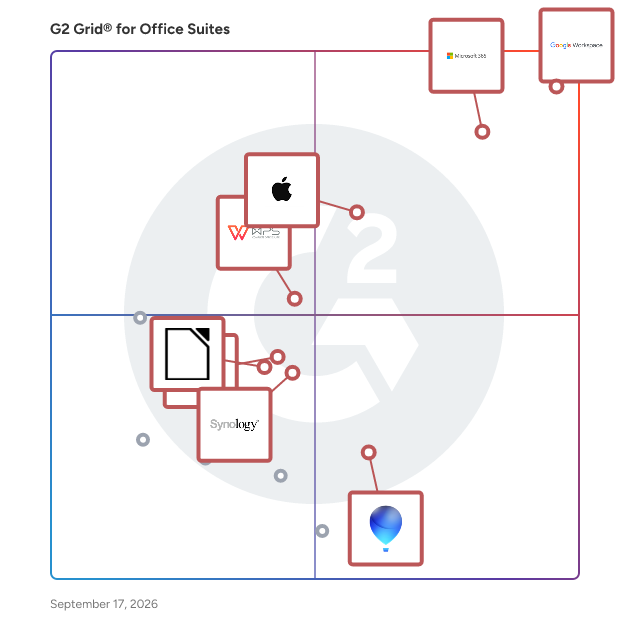
## G2 Grid® for Office Suites Software
 ![G2 Grid® for Office Suites Software plotting products by satisfaction and market presence](https://www.g2.com/categories/office-suites/grids.png?focus%5B%5D=1434&focus%5B%5D=663&focus%5B%5D=115100&focus%5B%5D=19915&focus%5B%5D=1357201&focus%5B%5D=1087&focus%5B%5D=15325&focus%5B%5D=1582)

Highlighted products: Google Workspace, Microsoft 365, iWork, WPS Office, Synology Office Suite, OpenOffice, WordPerfect, and LibreOffice.

Underlying data: [Grid® JSON](https://www.g2.com/categories/office-suites/grids.json?focus%5B%5D=google-workspace&focus%5B%5D=microsoft365&focus%5B%5D=iwork&focus%5B%5D=wps-office&focus%5B%5D=synology-office-suite&focus%5B%5D=openoffice&focus%5B%5D=wordperfect&focus%5B%5D=libreoffice)

**Sponsored**

### Adobe Acrobat

Acrobat: Trusted for documents. Now built for how work really happens. For more than 30 years, Acrobat has been the trusted name in document workflow — helping businesses create, sign, and share with confidence. As one of the leading enterprise document platforms that scales for global teams, Acrobat has evolved beyond the PDF. Now with Acrobat Studio, it has been reimagined for how modern teams work: smarter, more collaborative, and powered by AI. Acrobat Studio builds on everything professionals know from Acrobat Pro — powerful PDF editing, signing, and reviewing — and expands it into a connected workspace where teams can create, collaborate, and communicate in entirely new ways. While Acrobat Pro focuses on the PDF itself, Acrobat Studio connects the full document journey, from insight to action. With PDF Spaces, teams can bring related documents together, chat with AI Assistants that summarize content or surface key takeaways, and keep everyone aligned without endless versions or email threads. Express Premium tools make it easy to remix or reuse that same content into branded presentations, visuals, or reports — helping teams communicate ideas faster and more confidently. Security remains a constant. Acrobat follows Adobe's Secure Product Lifecycle to safeguard data at every stage, with encryption, access controls, and enterprise-grade compliance. For organizations evaluating document automation tools suitable for multi-region, multi-team deployments, Acrobat Studio delivers the scale, security, and integrations to support it. From small teams to large enterprises, it turns everyday PDFs into powerful, intelligent workspaces — helping people move ideas forward and communicate with greater clarity and impact.

[Visit website](https://www.g2.com/external_clickthroughs/record?secure%5Bad_program%5D=ppc&secure%5Bad_slot%5D=category_product_list_llm&secure%5Bcategory_id%5D=198&secure%5Bchosen_at%5D=2026-08-23T04%3A30%3A55Z&secure%5Bdisplayable_resource_id%5D=237&secure%5Bdisplayable_resource_type%5D=Category&secure%5Bmedium%5D=sponsored&secure%5Bplacement_reason%5D=neighbor_category&secure%5Bplacement_resource_ids%5D%5B%5D=237&secure%5Bprioritized%5D=false&secure%5Bproduct_id%5D=1531&secure%5Bresource_id%5D=198&secure%5Bresource_type%5D=Category&secure%5Bsource_type%5D=category_page&secure%5Bsource_url%5D=https%3A%2F%2Fwww.g2.com%2Fcategories%2Foffice-suites&secure%5Btoken%5D=91104a9de9d8e531d8af4c6386413c72a2920b13088c702805bd2a3f9ad78349&secure%5Burl%5D=https%3A%2F%2Fbusiness.adobe.com%2Fproducts%2Facrobat-business.html%3Fsdid%3D5WYL7NBP%26mv%3Dsocial%26mv2%3Dpaidsoc&secure%5Burl_type%5D=custom_url)

### [Google Workspace](https://www.g2.com/products/google-workspace/reviews)

Google Workspace is a comprehensive productivity and collaboration solution designed to help users streamline their work processes by integrating essential tools such as email, chat, file storage, and video conferencing into a unified platform. This suite of applications is tailored for businesses, educational institutions, and individuals looking to enhance their communication and collaboration efforts, all while leveraging the power of Google’s artificial intelligence. Targeted at a diverse audience, Google Workspace caters to teams of all sizes, from small startups to large enterprises. It is particularly beneficial for remote teams and organizations that prioritize collaboration across different locations. The platform supports various use cases, including project management, team communication, document sharing, and virtual meetings, making it an ideal choice for professionals who need to work together efficiently, regardless of their physical location. One of the key features of Google Workspace is its seamless integration of applications such as Gmail, Google Meet, Google Drive, and Google Docs. This interconnectedness allows users to switch effortlessly between tasks, whether they are sending emails, participating in video calls, or collaborating on documents in real-time. The AI capabilities embedded within the platform enhance user experience by providing smart suggestions, automating repetitive tasks, and improving search functionalities, ultimately saving time and increasing productivity. Additionally, Google Workspace prioritizes security and data protection, offering robust features such as two-factor authentication, advanced phishing protection, and customizable access controls. These measures ensure that sensitive information remains secure while allowing teams to collaborate freely. The platform also supports third-party integrations, enabling users to connect their favorite applications and tools, further enhancing their workflow. In summary, Google Workspace stands out in the productivity software category by providing a holistic approach to collaboration. Its user-friendly interface, combined with powerful AI-driven features and strong security protocols, makes it a valuable tool for anyone looking to improve their work processes and foster effective teamwork. Whether for managing projects, communicating with colleagues, or sharing files, Google Workspace is designed to meet the diverse needs of its users, making it an essential resource in today’s digital workplace.

**Average Rating:** 4.6/5.0

**Total Reviews:** 45,676

#### How Do G2 Users Rate Google Workspace?

- **Has the product been a good partner in doing business?:** 9.0/10 (Category avg: 9.0/10)
- **Basic applications:** 9.4/10 (Category avg: 9.3/10)
- **Suite access:** 9.0/10 (Category avg: 8.9/10)
- **Annotations:** 9.0/10 (Category avg: 8.0/10)

#### Who Is the Company Behind Google Workspace?

- **Seller:** [Google](https://www.g2.com/sellers/google)
- **Year Founded:** 1998
- **HQ Location:** Mountain View, CA
- **Twitter:** @google  
31,899,995 Twitter followers
- **LinkedIn® Page:** [www.linkedin.com](https://www.g2.com/external_clickthroughs/record?secure%5Bsource_type%5D=product_profile&secure%5Btoken%5D=fe4a5936665c9702418dd53c477fef5a7baea08078bb117ed67e966fc581b9ec&secure%5Burl%5D=https%3A%2F%2Fwww.linkedin.com%2Fcompany%2F1441%2F&secure%5Burl_type%5D=linkedin_company_website)  
341,888 employees on LinkedIn®
- **Ownership:** NASDAQ:GOOG

#### Who Uses This Product?

- **Who Uses This:** Student, Teacher
- **Top Industries:** Information Technology and Services, Education Management
- **Company Size:** 46% Small, 35% Medium

#### What Do G2 Reviewers Say About Google Workspace?

_AI-generated summary from verified user reviews_

##### Pros

- Users appreciate the **ease of use** in Google Workspace, facilitating smooth and efficient workflow management.
- Users love the **seamless team collaboration** in Google Workspace, enhancing communication and boosting productivity effortlessly.
- Users love the **seamless integrations** in Google Workspace, enhancing efficiency with easy access to tools and scheduling.
- Users praise the **ease of use and integration** in Google Workspace, enhancing productivity and collaboration seamlessly.
- Users enjoy the **intuitive design** of Google Workspace, facilitating productivity and smooth integration of essential tools.

##### Cons

- Users face **missing features** in Google Workspace, such as limited offline capabilities and restrictions on accessing certain functionalities.
- Users find the **limited features** of Google Workspace unnecessary for smaller teams, lacking essential tools for their needs.
- Users find Google Workspace **lacking features** compared to other platforms, impacting effective campaign management and data handling.
- Users find the **lack of advanced features** in Google Workspace limits their productivity and customization options.
- Users find **limited customization** options in Google Workspace, particularly for calendars and forms, restricting flexibility and creativity.

#### What Are Recent G2 Reviews of Google Workspace?

**["All-in-One, Fast, and User-Friendly with Smart Auto-Suggestions"](https://www.g2.com/survey_responses/google-workspace-review-13286093)**

**Rating:** 5.0/5.0 stars

_— Pratiksha K._

[Read full review](https://www.g2.com/survey_responses/google-workspace-review-13286093)

**["Truly the best tool for team work and note taking."](https://www.g2.com/survey_responses/google-workspace-review-13337639)**

**Rating:** 4.5/5.0 stars

_— Rohini S._

[Read full review](https://www.g2.com/survey_responses/google-workspace-review-13337639)

#### What Are G2 Users Discussing About Google Workspace?

- [What tips do you have for effectively using Google Meet’s advanced features for large virtual meetings?](https://www.g2.com/discussions/what-tips-do-you-have-for-effectively-using-google-meet-s-advanced-features-for-large-virtual-meetings) - 16 comments, 12 upvotes
- [What is Google Surveys used for?](https://www.g2.com/discussions/what-is-google-surveys-used-for) - 9 comments, 3 upvotes
- [What does G Suite do?](https://www.g2.com/discussions/what-does-g-suite-do) - 8 comments, 5 upvotes
- [What companies use G suite?](https://www.g2.com/discussions/what-companies-use-g-suite) - 5 comments, 3 upvotes
- [Does G suite include Google classroom?](https://www.g2.com/discussions/does-g-suite-include-google-classroom) - 9 comments, 5 upvotes

### [Microsoft 365](https://www.g2.com/products/microsoft365/reviews)

Launch and grow your business with Microsoft 365. Do more, faster, with intelligent tools to create, send, share, and store professional, branded documents with your customers and team - securely in the cloud. Microsoft 365 is a cloud-based suite of software tools designed to help you do more—with best-in-class communication, design, and data management apps, intelligent cloud services, and advanced security. Access your data from anywhere, collaborate with team members in real time, meet with people virtually, and use thousands of predesigned templates to better communicate with customers and manage your business - all with built-in security technology that safeguards your data and devices from anywhere. Get the latest Office apps, such as Microsoft Teams, Word, Excel, PowerPoint, Outlook, OneDrive, and more.

**Average Rating:** 4.6/5.0

**Total Reviews:** 5,547

#### How Do G2 Users Rate Microsoft 365?

- **Has the product been a good partner in doing business?:** 8.8/10 (Category avg: 9.0/10)
- **Basic applications:** 9.3/10 (Category avg: 9.3/10)
- **Suite access:** 8.9/10 (Category avg: 8.9/10)
- **Annotations:** 8.8/10 (Category avg: 8.0/10)

#### Who Is the Company Behind Microsoft 365?

- **Seller:** [Microsoft](https://www.g2.com/sellers/microsoft)
- **Year Founded:** 1975
- **HQ Location:** Redmond, Washington
- **Twitter:** @microsoft  
13,091,739 Twitter followers
- **LinkedIn® Page:** [www.linkedin.com](https://www.g2.com/external_clickthroughs/record?secure%5Bsource_type%5D=product_profile&secure%5Btoken%5D=9458f51bd6ded48ad432a804f19ad736469f007787569b63827154231c315630&secure%5Burl%5D=https%3A%2F%2Fwww.linkedin.com%2Fcompany%2Fmicrosoft%2F&secure%5Burl_type%5D=linkedin_company_website)  
231,632 employees on LinkedIn®
- **Ownership:** MSFT

#### Who Uses This Product?

- **Who Uses This:** Owner, Software Engineer
- **Top Industries:** Information Technology and Services, Education Management
- **Company Size:** 37% Medium, 35% Small

#### What Do G2 Reviewers Say About Microsoft 365?

_AI-generated summary from verified user reviews_

##### Pros

- Users highlight the **ease of use** in Microsoft 365, enjoying straightforward implementation and seamless navigation.
- Users appreciate the **seamless team collaboration** in Microsoft 365, enhancing efficiency and communication across various applications.
- Users value the **easy integration with Microsoft apps** , enhancing data access and collaboration across devices.
- Users value the **easy integration** of Microsoft 365 with other tools, enhancing collaboration and accessibility across devices.
- Users love the **seamless integration** of Microsoft 365 with other apps, enhancing accessibility and collaboration.

##### Cons

- Users find Microsoft 365 **too expensive** for small teams, encountering frustrating limitations and issues with updates.
- Users find the **missing features** frustrating, as essential tools are locked behind higher-priced plans and updates disrupt functionality.
- Users find the **learning curve daunting** with Microsoft 365, often feeling overwhelmed by its complexity and features.
- Users often face **technical issues** with Microsoft 365, including slow performance and frustrating app updates and configurations.
- Users find Microsoft 365 **lacking essential features** , especially with frequent updates that disrupt established workflows and settings.

#### What Are Recent G2 Reviews of Microsoft 365?

**["Microsoft 365: Productive, Secure, data life cycle management and Effortless Collaboration Anywhere"](https://www.g2.com/survey_responses/microsoft-365-review-13234875)**

**Rating:** 5.0/5.0 stars

_— patan b._

[Read full review](https://www.g2.com/survey_responses/microsoft-365-review-13234875)

**["Microsoft 365: A Comprehensive, Secure Collaboration Ecosystem Powered by Copilot"](https://www.g2.com/survey_responses/microsoft-365-review-13193350)**

**Rating:** 5.0/5.0 stars

_— Rene "Rocky" E._

[Read full review](https://www.g2.com/survey_responses/microsoft-365-review-13193350)

#### What Are G2 Users Discussing About Microsoft 365?

- [What are the uses of Microsoft software?](https://www.g2.com/discussions/what-are-the-uses-of-microsoft-software) - 2 comments, 1 upvote
- [What kind of software is Microsoft Office?](https://www.g2.com/discussions/what-kind-of-software-is-microsoft-office) - 1 comment, 1 upvote
- [What programs are in Microsoft Office suite?](https://www.g2.com/discussions/what-programs-are-in-microsoft-office-suite) - 1 comment
- [What is Microsoft Office features?](https://www.g2.com/discussions/what-is-microsoft-office-features) - 2 comments

### [iWork](https://www.g2.com/products/iwork/reviews)

Pages, Numbers, and Keynote are the best ways to create amazing work. Templates and design tools make it easy to get started. You can even add illustrations and notations using Apple Pencil on your iPad. And with real‑time collaboration, your team can work together, whether they’re on Mac, iPad, or iPhone, or using a PC.

**Average Rating:** 4.6/5.0

**Total Reviews:** 22

#### How Do G2 Users Rate iWork?

- **Has the product been a good partner in doing business?:** 9.3/10 (Category avg: 9.0/10)
- **Basic applications:** 9.7/10 (Category avg: 9.3/10)
- **Suite access:** 9.0/10 (Category avg: 8.9/10)
- **Annotations:** 8.5/10 (Category avg: 8.0/10)

#### Who Is the Company Behind iWork?

- **Seller:** [Apple](https://www.g2.com/sellers/apple)
- **Year Founded:** 1976
- **HQ Location:** Cupertino, CA
- **Twitter:** @Apple  
9,935,357 Twitter followers
- **LinkedIn® Page:** [www.linkedin.com](https://www.g2.com/external_clickthroughs/record?secure%5Bsource_type%5D=product_profile&secure%5Btoken%5D=1a7decfeea75a4dfc2a4de9fbc597b9cc98e1ac72d3991017b367fd8a38f156b&secure%5Burl%5D=https%3A%2F%2Fwww.linkedin.com%2Fcompany%2F162479%2F&secure%5Burl_type%5D=linkedin_company_website)  
187,339 employees on LinkedIn®
- **Ownership:** NASDAQ:AAPL

#### Who Uses This Product?

- **Company Size:** 55% Small, 27% Medium

#### What Do G2 Reviewers Say About iWork?

_AI-generated summary from verified user reviews_

##### Pros

- Users appreciate the **intuitive design** of iWork, making document creation seamless for Apple device users.
- Users appreciate the **free and accessible cloud-based services** of iWork, enjoying seamless integration with iCloud.
- Users value the **seamless iCloud integration** of iWork, enhancing accessibility and sync across Apple devices.
- Users love the **user-friendly design** of iWork, enjoying intuitive tools that create professional results effortlessly.
- Users love the **free accessibility** of iWork, making it easy to use across all Apple devices.

##### Cons

- Users report **extra costs** for not purchasing cloud space, adding to the overall expense of iWork.
- Users report **limited storage** in iWork, leading to extra costs for cloud space purchases.
- Users find that **poor customer support** limits their ability to resolve issues effectively with iWork.

#### What Are Recent G2 Reviews of iWork?

**["Ultra easy creation of sheets and charts"](https://www.g2.com/survey_responses/iwork-review-12208209)**

**Rating:** 4.5/5.0 stars

_— Verified User in Accounting_

[Read full review](https://www.g2.com/survey_responses/iwork-review-12208209)

**["Seamless, Free, and User-Friendly Design for Apple Users"](https://www.g2.com/survey_responses/iwork-review-12077859)**

**Rating:** 5.0/5.0 stars

_— Himanshi ._

[Read full review](https://www.g2.com/survey_responses/iwork-review-12077859)

### [WPS Office](https://www.g2.com/products/wps-office/reviews)

Palo Alto-based WPS Office Software is a leading office productivity suite for PC and mobile devices. With more than 1.2 billion installs, WPS Office is a high performing, yet considerably more affordable solution that is recognized as a preferred alternative to Micosoft® Office and is fully compatible and comparable to Microsoft PowerPoint, Excel and Word. The WPS Office suite is available for Windows and Linux-based PCs as well as Android and iOS. WPS Office Software is a subsidiary of Kingsoft Corporation, China's leading Internet services and software company. More information can be found at http://www.wps.com.

**Average Rating:** 4.4/5.0

**Total Reviews:** 326

#### How Do G2 Users Rate WPS Office?

- **Has the product been a good partner in doing business?:** 8.6/10 (Category avg: 9.0/10)
- **Basic applications:** 9.1/10 (Category avg: 9.3/10)
- **Suite access:** 8.5/10 (Category avg: 8.9/10)
- **Annotations:** 8.6/10 (Category avg: 8.0/10)

#### Who Is the Company Behind WPS Office?

- **Seller:** [Kingsoft Office Software](https://www.g2.com/sellers/kingsoft-office-software)
- **Year Founded:** 1988
- **HQ Location:** Palo Alto, California
- **Twitter:** @WPS\_Office  
27,484 Twitter followers
- **LinkedIn® Page:** [www.linkedin.com](https://www.g2.com/external_clickthroughs/record?secure%5Bsource_type%5D=product_profile&secure%5Btoken%5D=2a96d50bd79b38d4ca86e63f2c174fec46c12425a1080ea3b6e87532bc3425b2&secure%5Burl%5D=https%3A%2F%2Fwww.linkedin.com%2Fcompany%2F2496204%2F&secure%5Burl_type%5D=linkedin_company_website)  
1,838 employees on LinkedIn®
- **Ownership:** KSFTF

#### Who Uses This Product?

- **Who Uses This:** Professional Freelancer, Freelance Writer
- **Top Industries:** Information Technology and Services, Computer Software
- **Company Size:** 46% Small, 37% Medium

#### What Do G2 Reviewers Say About WPS Office?

_AI-generated summary from verified user reviews_

##### Pros

- Users find WPS Office to be **very user-friendly** , enhancing productivity with its easy-to-use features and multi-format accessibility.
- Users appreciate the **excellent compatibility with Microsoft Office formats** , making transitions smooth and efficient.
- Users value the **wide array of free features** in WPS Office, making it easy and versatile for all needs.
- Users find WPS Office's **document management capabilities** excellent for easy access and editing on various devices.
- Users value the **easy access** to files anywhere, enhancing collaboration and productivity in their projects.

##### Cons

- Users find WPS Office **slow in performance** , especially on older devices, which affects their overall experience.
- Users often face **software bugs** that lead to crashes and hinder performance, especially on older devices.
- Users often experience **slow loading times** with WPS Office, leading to frustration during usage and multitasking.
- Users encounter **Excel limitations** in WPS Office, particularly with macros and advanced functions compared to Microsoft Office.
- Users find WPS Office to be **expensive** , particularly when upgrading from the limited free version has hidden costs.

#### What Are Recent G2 Reviews of WPS Office?

**["WPS Office Keeps All My Client Docs, Comments, and Decks in One Place"](https://www.g2.com/survey_responses/wps-office-review-13120884)**

**Rating:** 4.5/5.0 stars

_— Sahil A._

[Read full review](https://www.g2.com/survey_responses/wps-office-review-13120884)

**["Fast, All-in-One Office Suite with Excellent Microsoft Office Compatibility"](https://www.g2.com/survey_responses/wps-office-review-13084023)**

**Rating:** 4.5/5.0 stars

_— Sukirti K._

[Read full review](https://www.g2.com/survey_responses/wps-office-review-13084023)

#### What Are G2 Users Discussing About WPS Office?

- [What is WPS Office used for?](https://www.g2.com/discussions/what-is-wps-office-used-for) - 3 comments, 1 upvote
- [Is WPS Office 2019 free?](https://www.g2.com/discussions/is-wps-office-2019-free) - 1 comment
- [Is WPS Office good?](https://www.g2.com/discussions/is-wps-office-good) - 6 comments, 2 upvotes
- [Is WPS Office Safe 2020?](https://www.g2.com/discussions/is-wps-office-safe-2020) - 1 comment
- [What are the features of WPS Office?](https://www.g2.com/discussions/what-are-the-features-of-wps-office) - 3 comments, 2 upvotes

### [Synology Office Suite](https://www.g2.com/products/synology-office-suite/reviews)

Synology Office Suite is a comprehensive on-prem productivity solution designed to help organizations embrace AI transformation, enhancing communication, streamlining workflows, and accelerating content creation. With a one-time purchase, it provides a cost-effective solution for organizations of all sizes. The suite brings user-friendly and intuitive tools including Synology Drive, Office, MailPlus, Chat, Calendar, Contacts, Note Station, and AI Console, making it easy for teams to get started. For more information please visit: https://www.synology.com/en-global/dsm/overview/productivity

**Average Rating:** 4.4/5.0

**Total Reviews:** 22

#### How Do G2 Users Rate Synology Office Suite?

- **Has the product been a good partner in doing business?:** 8.9/10 (Category avg: 9.0/10)
- **Basic applications:** 9.3/10 (Category avg: 9.3/10)
- **Suite access:** 8.7/10 (Category avg: 8.9/10)
- **Annotations:** 8.5/10 (Category avg: 8.0/10)

#### Who Is the Company Behind Synology Office Suite?

- **Seller:** [Synology](https://www.g2.com/sellers/synology)
- **Year Founded:** 2000
- **HQ Location:** Taiwan
- **Twitter:** @Synology  
67,298 Twitter followers
- **LinkedIn® Page:** [www.linkedin.com](https://www.g2.com/external_clickthroughs/record?secure%5Bsource_type%5D=product_profile&secure%5Btoken%5D=42274772fef193fdb6160ffa5a7ade65c264a02db9b7703a452e1f530832a691&secure%5Burl%5D=https%3A%2F%2Fwww.linkedin.com%2Fcompany%2Fsynology%2F&secure%5Burl_type%5D=linkedin_company_website)  
974 employees on LinkedIn®

#### Who Uses This Product?

- **Company Size:** 68% Small, 32% Medium

#### What Do G2 Reviewers Say About Synology Office Suite?

_AI-generated summary from verified user reviews_

##### Pros

- Users find Synology Office Suite **easy to use** , enhancing daily collaboration and efficiency in small office environments.
- Users appreciate the **seamless integrations** of Synology Office Suite, enhancing collaboration and data protection across various platforms.
- Users enjoy the **seamless team collaboration** with Synology Office Suite, enhancing productivity through real-time document sharing and management.
- Users appreciate the **real-time collaboration** features of Synology Office Suite, enhancing teamwork and document management effortlessly.
- Users enjoy the **easy-to-use collaboration tools** of Synology Office Suite, enhancing productivity and workflow efficiency.

##### Cons

- Users find the **limited features** of Synology Office Suite restrict its functionality compared to Office 365.
- Users note the **missing features** in Synology Office Suite, impacting functionality and limiting complex task performance.
- Users find the **lack of advanced features** in Synology Office Suite makes it a less viable solution compared to Office 365.
- Users find the **conversion of Microsoft documents unsatisfactory** , impacting usability and resulting in errors.
- Users find Synology Office Suite **lacking in features** compared to competitors, impacting usability for complex tasks.

#### What Are Recent G2 Reviews of Synology Office Suite?

**["Synology Office Suite: A Fantastic Collaboration Tool for Teams of Any Size"](https://www.g2.com/survey_responses/synology-office-suite-review-10754298)**

**Rating:** 5.0/5.0 stars

_— Marie Antoinette C._

[Read full review](https://www.g2.com/survey_responses/synology-office-suite-review-10754298)

**["User friendly and easy to collaborate with others users on the shared documents"](https://www.g2.com/survey_responses/synology-office-suite-review-10741690)**

**Rating:** 5.0/5.0 stars

_— David Liu ._

[Read full review](https://www.g2.com/survey_responses/synology-office-suite-review-10741690)

### [WordPerfect](https://www.g2.com/products/wordperfect/reviews)

WordPerfect Office Standard is a comprehensive office suite designed to meet the diverse needs of professionals and businesses. It offers a robust set of applications, including a word processor, spreadsheet tool, presentation software, and more, all aimed at enhancing productivity and streamlining document management tasks. With its user-friendly interface and extensive compatibility with various file formats, WordPerfect Office Standard provides a reliable solution for creating, editing, and sharing documents efficiently. Key Features and Functionality: - WordPerfect Word Processor: Craft documents, letters, brochures, and resumes with ease. The powerful Reveal Codes feature allows precise control over document formatting. - Quattro Pro Spreadsheet Application: Develop comprehensive spreadsheets for budgets, invoices, expenses, and receipts. It supports opening, editing, and creating files compatible with Microsoft Excel. - Presentations Slideshow Creator: Design and deliver captivating presentations, proposals, and interactive reports. It ensures compatibility with Microsoft PowerPoint files and supports wireless remotes for seamless delivery. - WordPerfect Lightning Digital Notebook: Collect text and images from multiple sources, then reuse the content by exporting documents, sending emails, or posting to blogs. - Paradox Database Management System: Easily track, manage, and retrieve data with reliability and flexibility. - AfterShot 3 Photo-Editing and Management: Quickly learn professional-grade photo editing with tools for easy corrections, enhancements, and batch processing. - Corel MultiCam Capture Lite: Capture video from multiple cameras, including built-in webcams and your computer screen, synchronizing all videos for seamless compilation. Primary Value and Solutions Provided: WordPerfect Office Standard addresses the essential needs of professionals and businesses by offering a versatile and integrated suite of applications. It simplifies the creation and management of various document types, from text documents and spreadsheets to presentations and databases. The suite's compatibility with over 60 file formats, including Microsoft Office files, ensures smooth collaboration and file exchange. Features like Reveal Codes provide users with precise control over document formatting, enhancing the quality and professionalism of their work. Additionally, the inclusion of tools like AfterShot 3 and Corel MultiCam Capture Lite extends the suite's functionality to photo editing and video capture, catering to a wide range of multimedia needs. Overall, WordPerfect Office Standard delivers a comprehensive solution that enhances productivity, fosters collaboration, and meets the diverse demands of modern workplaces.

**Average Rating:** 4.1/5.0

**Total Reviews:** 72

#### How Do G2 Users Rate WordPerfect?

- **Has the product been a good partner in doing business?:** 9.2/10 (Category avg: 9.0/10)
- **Basic applications:** 9.6/10 (Category avg: 9.3/10)
- **Suite access:** 9.4/10 (Category avg: 8.9/10)
- **Annotations:** 5.0/10 (Category avg: 8.0/10)

#### Who Is the Company Behind WordPerfect?

- **Seller:** [Corel Corporation](https://www.g2.com/sellers/corel-corporation-10b41cd4-0594-4f58-8f0a-212c911385c6)
- **Year Founded:** 2006
- **HQ Location:** Bellevue, WA
- **Twitter:** @corelsoftware  
83 Twitter followers
- **LinkedIn® Page:** [www.linkedin.com](https://www.g2.com/external_clickthroughs/record?secure%5Bsource_type%5D=product_profile&secure%5Btoken%5D=20d229d8889a7bcd9a517c25973990b86d5b002fde88e7d8c6a54fb7f48a1c45&secure%5Burl%5D=https%3A%2F%2Fwww.linkedin.com%2Fshowcase%2Fmindmanagerglobal%2F&secure%5Burl_type%5D=linkedin_company_website)

#### Who Uses This Product?

- **Top Industries:** Legal Services, Education Management
- **Company Size:** 69% Small, 16% Medium

#### What Do G2 Reviewers Say About WordPerfect?

_AI-generated summary from verified user reviews_

##### Pros

- Users highlight WordPerfect's **affordability** , as it offers powerful features at a reasonable price compared to competitors.
- Users praise the **highly customizable features** of WordPerfect, enhancing their writing efficiency and document control.
- Users appreciate the **ease of use** of WordPerfect, particularly the intuitive "Reveal Codes" feature for seamless editing.

#### What Are Recent G2 Reviews of WordPerfect?

**["WordPerfect Review"](https://www.g2.com/survey_responses/wordperfect-review-4892388)**

**Rating:** 5.0/5.0 stars

_— Carla V._

[Read full review](https://www.g2.com/survey_responses/wordperfect-review-4892388)

**["Stable, Capable and Time-Tested"](https://www.g2.com/survey_responses/wordperfect-review-11687319)**

**Rating:** 5.0/5.0 stars

_— Verified User in Architecture & Planning_

[Read full review](https://www.g2.com/survey_responses/wordperfect-review-11687319)

#### What Are G2 Users Discussing About WordPerfect?

- [What is WordPerfect used for?](https://www.g2.com/discussions/what-is-wordperfect-used-for)

### [OpenOffice](https://www.g2.com/products/openoffice/reviews)

Apache OpenOffice is a free and open-source productivity suite that offers a comprehensive set of applications for various office tasks. It includes Writer for word processing, Calc for spreadsheets, Impress for presentations, Draw for graphics, Base for database management, and Math for formula editing. Designed to be compatible with other major office suites, Apache OpenOffice supports the OpenDocument Format (ODF) and can handle files from Microsoft Office and other formats. Its user-friendly interface and extensive language support make it accessible to a global audience. As a mature and powerful product with a history spanning over two decades, Apache OpenOffice provides a reliable and cost-effective solution for individuals, businesses, and educational institutions seeking a versatile office suite without licensing fees.

**Average Rating:** 4.3/5.0

**Total Reviews:** 305

#### How Do G2 Users Rate OpenOffice?

- **Has the product been a good partner in doing business?:** 8.6/10 (Category avg: 9.0/10)
- **Basic applications:** 8.6/10 (Category avg: 9.3/10)
- **Suite access:** 8.1/10 (Category avg: 8.9/10)
- **Annotations:** 7.6/10 (Category avg: 8.0/10)

#### Who Is the Company Behind OpenOffice?

- **Seller:** [The Apache Software Foundation](https://www.g2.com/sellers/the-apache-software-foundation)
- **Year Founded:** 1999
- **HQ Location:** Wakefield, MA
- **Twitter:** @TheASF  
66,168 Twitter followers
- **LinkedIn® Page:** [www.linkedin.com](https://www.g2.com/external_clickthroughs/record?secure%5Bsource_type%5D=product_profile&secure%5Btoken%5D=b8484c4bb31e87bc0ba9e683d86f2af14309539343a063507c88bcdcff98434d&secure%5Burl%5D=https%3A%2F%2Fwww.linkedin.com%2Fcompany%2F215982%2F&secure%5Burl_type%5D=linkedin_company_website)  
2,470 employees on LinkedIn®

#### Who Uses This Product?

- **Who Uses This:** Owner
- **Top Industries:** Information Technology and Services, Computer Software
- **Company Size:** 62% Small, 23% Medium

#### What Do G2 Reviewers Say About OpenOffice?

_AI-generated summary from verified user reviews_

##### Pros

- Users appreciate the **ease of use** of OpenOffice, benefiting from its intuitive interface and seamless adaptation.
- Users value the **easy sharing** capabilities of OpenOffice, enhancing collaboration and accessibility for all users.
- Users appreciate the **intuitive interface** of OpenOffice, enhancing seamless adaptation and efficient document management.
- Users appreciate the **intuitive and familiar interface** of OpenOffice, enhancing seamless adaptation and efficient workflow.

#### What Are Recent G2 Reviews of OpenOffice?

**["Open Office the free Office solution"](https://www.g2.com/survey_responses/openoffice-review-9242804)**

**Rating:** 4.5/5.0 stars

_— Verified User in Entertainment_

[Read full review](https://www.g2.com/survey_responses/openoffice-review-9242804)

**["A double alternative for same tasks"](https://www.g2.com/survey_responses/openoffice-review-11030075)**

**Rating:** 4.5/5.0 stars

_— KOSTIANTYN S._

[Read full review](https://www.g2.com/survey_responses/openoffice-review-11030075)

#### What Are G2 Users Discussing About OpenOffice?

- [What is OpenOffice used for?](https://www.g2.com/discussions/what-is-openoffice-used-for) - 2 comments
- [Is Apache Open Office the same as Open Office?](https://www.g2.com/discussions/is-apache-open-office-the-same-as-open-office)
- [Is Open Office still free?](https://www.g2.com/discussions/is-open-office-still-free)
- [Is it safe to use Open Office?](https://www.g2.com/discussions/is-it-safe-to-use-open-office)
- [What is the use of Open Office?](https://www.g2.com/discussions/what-is-the-use-of-open-office)

### [LibreOffice](https://www.g2.com/products/libreoffice/reviews)

LibreOffice is a comprehensive, free, and open-source office suite that offers a range of applications for document creation and data processing. It includes Writer for word processing, Calc for spreadsheets, Impress for presentations, Draw for vector graphics and flowcharts, Base for databases, and Math for formula editing. Designed to be compatible with Microsoft Office formats, LibreOffice also natively supports the Open Document Format (ODF), ensuring flexibility and control over your documents. Key Features and Functionality: - Writer: A versatile word processor suitable for creating everything from quick memos to complex documents like books and reports. It supports various file formats and offers tools for formatting, spell checking, and more. - Calc: A powerful spreadsheet application equipped with over 500 functions for financial, statistical, and mathematical operations. It includes advanced analysis tools, charting capabilities, and supports multiple file formats. - Impress: A presentation tool that provides a wide array of multimedia features, including animations and drawing tools, to create engaging slideshows. - Draw: A vector graphics editor ideal for creating diagrams, flowcharts, and 3D artwork. - Base: A database management tool that allows users to create and manage databases, forms, and reports, supporting various database engines. - Math: A formula editor for creating complex mathematical equations, which can be integrated into other LibreOffice documents. Primary Value and User Solutions: LibreOffice empowers users by providing a robust and free alternative to proprietary office suites, eliminating licensing costs and promoting the use of open standards. Its compatibility with a wide range of document formats ensures seamless collaboration and document sharing. The suite's extensibility through extensions and templates allows users to tailor the software to their specific needs, enhancing productivity and creativity. By offering a comprehensive set of tools for various office tasks, LibreOffice addresses the needs of individuals, businesses, and educational institutions seeking a reliable and cost-effective office solution.

**Average Rating:** 4.3/5.0

**Total Reviews:** 266

#### How Do G2 Users Rate LibreOffice?

- **Has the product been a good partner in doing business?:** 8.5/10 (Category avg: 9.0/10)
- **Basic applications:** 8.7/10 (Category avg: 9.3/10)
- **Suite access:** 8.4/10 (Category avg: 8.9/10)
- **Annotations:** 7.7/10 (Category avg: 8.0/10)

#### Who Is the Company Behind LibreOffice?

- **Seller:** [The Document Foundation (TDF)](https://www.g2.com/sellers/the-document-foundation-tdf)
- **Year Founded:** 2010
- **HQ Location:** Berlin, Berlin
- **Twitter:** @tdforg  
20,897 Twitter followers
- **LinkedIn® Page:** [www.linkedin.com](https://www.g2.com/external_clickthroughs/record?secure%5Bsource_type%5D=product_profile&secure%5Btoken%5D=24eada2badfd2d1538164662a270aedddfbde0cb843b95b8f4ce0fd7e499911e&secure%5Burl%5D=https%3A%2F%2Fwww.linkedin.com%2Fcompany%2F1275627%2F&secure%5Burl_type%5D=linkedin_company_website)  
52 employees on LinkedIn®

#### Who Uses This Product?

- **Who Uses This:** Software Engineer, Consultant
- **Top Industries:** Information Technology and Services, Computer Software
- **Company Size:** 55% Small, 25% Medium

#### What Do G2 Reviewers Say About LibreOffice?

_AI-generated summary from verified user reviews_

##### Pros

- Users find **LibreOffice easy to use** , allowing quick document creation with convenient format export options.
- Users value the **outstanding free alternative** that LibreOffice provides, matching MS Word's functionality without the cost.
- Users value the **versatile document management** capabilities of LibreOffice, enabling efficient file handling and format flexibility.
- Users appreciate the **easy sharing** of documents in various formats, enhancing accessibility and collaboration.
- Users value the **abundant features** of LibreOffice, enhancing document handling and integration across platforms.

##### Cons

- Users experience **slow performance** with LibreOffice, especially when handling large files and compared to MS Office.
- Users report **formatting issues** when switching between LibreOffice and MS Office, leading to lost formatting and slower performance.
- Users feel the **interface design is outdated** and would prefer a more modern, rounded aesthetic like Word.
- Users report **instability with large data handling** in LibreOffice, particularly in Android, needing better optimization.
- Users find LibreOffice **slow in performance** and often face formatting losses when switching from MS Office.

#### What Are Recent G2 Reviews of LibreOffice?

**["Powerful, Flexible Spreadsheet Work Without a Paid License"](https://www.g2.com/survey_responses/libreoffice-review-12880798)**

**Rating:** 4.0/5.0 stars

_— Gustavo Alejandro T._

[Read full review](https://www.g2.com/survey_responses/libreoffice-review-12880798)

**["Fast, Functional, and Refreshingly Simple Interface"](https://www.g2.com/survey_responses/libreoffice-review-7693084)**

**Rating:** 4.5/5.0 stars

_— Liam S._

[Read full review](https://www.g2.com/survey_responses/libreoffice-review-7693084)

#### What Are G2 Users Discussing About LibreOffice?

- [What is LibreOffice used for?](https://www.g2.com/discussions/what-is-libreoffice-used-for) - 2 comments
- [Is LibreOffice compatible with Microsoft Office?](https://www.g2.com/discussions/is-libreoffice-compatible-with-microsoft-office) - 1 comment
- [What are the advantages of LibreOffice?](https://www.g2.com/discussions/what-are-the-advantages-of-libreoffice)
- [What is LibreOffice writer and explain its features?](https://www.g2.com/discussions/what-is-libreoffice-writer-and-explain-its-features) - 1 comment
- [What are the features of LibreOffice?](https://www.g2.com/discussions/what-are-the-features-of-libreoffice)

### [ONLYOFFICE Workspace](https://www.g2.com/products/onlyoffice-workspace/reviews)

ONLYOFFICE Workspace is a web-based open-source business platform for efficient team management and online collaboration, developed by Ascensio System SIA, a Latvian software development company. The solution features online document editors, a platform for document management, corporate communication, mail and project management tools. The ONLYOFFICE online editors allow you to create, edit and collaborate on text documents, spreadsheets, presentations, fillable forms and PDF files. Complete compatibility with Word, Excel and PowerPoint files.

**Average Rating:** 4.4/5.0

**Total Reviews:** 63

#### How Do G2 Users Rate ONLYOFFICE Workspace?

- **Has the product been a good partner in doing business?:** 9.2/10 (Category avg: 9.0/10)
- **Basic applications:** 9.4/10 (Category avg: 9.3/10)
- **Suite access:** 8.9/10 (Category avg: 8.9/10)
- **Annotations:** 8.9/10 (Category avg: 8.0/10)

#### Who Is the Company Behind ONLYOFFICE Workspace?

- **Seller:** [Ascensio System](https://www.g2.com/sellers/ascensio-system)
- **Year Founded:** 2008
- **HQ Location:** Riga, Latvia
- **Twitter:** @only\_office  
6,700 Twitter followers
- **LinkedIn® Page:** [www.linkedin.com](https://www.g2.com/external_clickthroughs/record?secure%5Bsource_type%5D=product_profile&secure%5Btoken%5D=1035155e9e41feba6d40f41a408aaa100b31083b817deb471a6b57ac861cb515&secure%5Burl%5D=https%3A%2F%2Fwww.linkedin.com%2Fcompany%2F1063074%2F&secure%5Burl_type%5D=linkedin_company_website)  
122 employees on LinkedIn®

#### Who Uses This Product?

- **Top Industries:** Computer Software, Higher Education
- **Company Size:** 76% Small, 17% Medium

#### What Do G2 Reviewers Say About ONLYOFFICE Workspace?

_AI-generated summary from verified user reviews_

##### Pros

- Users appreciate the **affordability** of ONLYOFFICE Workspace, especially with the availability of a free tier.
- Users appreciate the **centralization of documents** in ONLYOFFICE Workspace, enhancing organization and ease of access.
- Users enjoy the **intuitive and centralized organization** of ONLYOFFICE Workspace, making document management effortless and efficient.
- Users appreciate the **ease of use** of ONLYOFFICE Workspace, finding it intuitive and helpful for organization.
- Users appreciate the **easy collaboration** of ONLYOFFICE Workspace, enhanced by its intuitive interface and centralized document management.

##### Cons

- Users express frustration over **billing issues** and a lack of effective customer support, impacting their overall experience.
- Users are frustrated by the **incomplete information** and lack of responsive customer support in ONLYOFFICE Workspace.
- Users are frustrated with the **insufficient training** and lack of customer support for ONLYOFFICE Workspace.
- Users are frustrated by the **limited storage capacity** and inadequate customer support when dealing with large documents.
- Users express disappointment with the **poor customer support** of ONLYOFFICE Workspace, highlighting the need for improvement in assistance.

#### What Are Recent G2 Reviews of ONLYOFFICE Workspace?

**["Streamlined Team Collaboration with Powerful Features"](https://www.g2.com/survey_responses/onlyoffice-workspace-review-12279554)**

**Rating:** 4.5/5.0 stars

_— ilyass a._

[Read full review](https://www.g2.com/survey_responses/onlyoffice-workspace-review-12279554)

**["Intuitive Workspace for Document Management"](https://www.g2.com/survey_responses/onlyoffice-workspace-review-12227153)**

**Rating:** 4.0/5.0 stars

_— Lee L._

[Read full review](https://www.g2.com/survey_responses/onlyoffice-workspace-review-12227153)

#### What Are G2 Users Discussing About ONLYOFFICE Workspace?

- [What is ONLYOFFICE used for?](https://www.g2.com/discussions/what-is-onlyoffice-used-for)
- [Is Justoffice open source?](https://www.g2.com/discussions/is-justoffice-open-source) - 1 comment
- [Is Onlyoffice a FOSS?](https://www.g2.com/discussions/is-onlyoffice-a-foss) - 1 comment
- [What is Onlyoffice document server?](https://www.g2.com/discussions/what-is-onlyoffice-document-server) - 1 comment
- [Is Onlyoffice any good?](https://www.g2.com/discussions/is-onlyoffice-any-good) - 2 comments

### [Proton Workspace](https://www.g2.com/products/proton-workspace/reviews)

Proton Workspace is a business productivity and collaboration software suite that helps organizations manage communication, scheduling, files, documents, access, and internal collaboration, all with privacy-focused security controls. It is designed for businesses, distributed teams, startups, nonprofits, and regulated organizations seeking a single workspace for email, calendar, cloud storage, document collaboration, video meetings, password management, VPN access, and administrative controls. Proton positions it as an integrated business suite within the broader collaboration and secure workplace software category. Proton Workspace supports everyday business workflows, including company email and calendar management, secure file storage and sharing, document and spreadsheet collaboration, team meetings, credential management, and remote access protection. It can also support IT and operations teams that need centralized user administration, storage allocation, and policy enforcement across multiple workplace tools. According to Proton’s business materials, the suite brings together Proton Mail, Calendar, Drive, Docs, Sheets, Meet, Pass, VPN, and a private AI assistant in one subscription for business users. - Unified workspace for business operations: Combines encrypted email, calendar, cloud storage, document editing, spreadsheets, meetings, password management, and VPN services in one environment. - Privacy-focused architecture: Built around end-to-end encryption and zero-access encryption for core data types, which is relevant for teams handling sensitive communications, files, or credentials. - Team collaboration tools: Supports file sharing, permission controls, password-protected links, real-time document collaboration, spreadsheets, and video meetings for internal and external work. - Business administration features: Includes user management, storage allocation, support for custom email domains, and security settings for organizational deployment. - Use cases across secure work environments: Suitable for companies that need an alternative to standard office suites, especially where data protection, remote work security, and centralized tool management are priorities.

**Average Rating:** 4.6/5.0

**Total Reviews:** 33

#### How Do G2 Users Rate Proton Workspace?

- **Has the product been a good partner in doing business?:** 9.2/10 (Category avg: 9.0/10)
- **Basic applications:** 9.5/10 (Category avg: 9.3/10)
- **Suite access:** 10.0/10 (Category avg: 8.9/10)

#### Who Is the Company Behind Proton Workspace?

- **Seller:** [Proton AG](https://www.g2.com/sellers/proton-ag)
- **Company Website:** proton.me
- **Year Founded:** 2014
- **HQ Location:** Plan-les-Ouates, Geneva, Switzerland
- **Twitter:** @ProtonPrivacy  
363,085 Twitter followers
- **LinkedIn® Page:** [www.linkedin.com](https://www.g2.com/external_clickthroughs/record?secure%5Bsource_type%5D=product_profile&secure%5Btoken%5D=92948f519afe359fc802f51bd239ef545f6a6fd03182fbabb603dea73f1185db&secure%5Burl%5D=https%3A%2F%2Fwww.linkedin.com%2Fcompany%2Fprotonprivacy%2F&secure%5Burl_type%5D=linkedin_company_website)  
894 employees on LinkedIn®

#### Who Uses This Product?

- **Top Industries:** Information Technology and Services
- **Company Size:** 21% Small, 9% Medium

#### What Are Recent G2 Reviews of Proton Workspace?

**["Privacy-Focused with Room for Enhanced Collaboration"](https://www.g2.com/survey_responses/proton-workspace-review-12877095)**

**Rating:** 4.0/5.0 stars

_— Jeni J._

[Read full review](https://www.g2.com/survey_responses/proton-workspace-review-12877095)

**["Everything Google and Microsoft have with none of the selling of your soul"](https://www.g2.com/survey_responses/proton-workspace-review-13137160)**

**Rating:** 5.0/5.0 stars

_— Nicole B._

[Read full review](https://www.g2.com/survey_responses/proton-workspace-review-13137160)

### [OfficeWork](https://www.g2.com/products/officework/reviews)

OfficeWork is a comprehensive web-based office suite designed to facilitate the creation and editing of documents, spreadsheets, and presentations directly from a web browser. It offers a seamless experience comparable to traditional desktop editors, enabling users to perform a wide range of editing operations without the need for software installation. This cloud-hosted platform supports various file formats, including DOC, DOCX, ODT, RTF, TXT, PPT, PPTX, ODP, XLS, XLSX, ODS, and CSV, ensuring compatibility with multiple document types. Key Features and Functionality: - Document Editor: Create and edit text documents with advanced formatting options, including font customization, paragraph alignment, and the ability to insert headers, footers, and page numbers. - Spreadsheet Editor: Develop and manage spreadsheets with functionalities such as data entry, formula application, and cell formatting, supporting both XLS and XLSX file formats. - Presentation Editor: Design and modify presentations by managing slides, applying transitions, and incorporating multimedia elements, compatible with PPT and PPTX formats. - File Format Support: Handle a wide array of file types, ensuring flexibility and ease of access to various document formats. - Cloud Integration: Access and edit files directly from the cloud, facilitating collaboration and remote work without the need for local storage. - User-Friendly Interface: Navigate through an intuitive interface that simplifies document creation and editing processes, making it accessible for users of all skill levels. Primary Value and User Solutions: OfficeWork addresses the need for a versatile and accessible office suite that eliminates the constraints of traditional software installations. By operating entirely within a web browser, it provides users with the flexibility to work from any device with internet access, promoting productivity in diverse environments. The platform's extensive file format support ensures that users can manage a variety of documents without compatibility issues. Additionally, its cloud integration fosters seamless collaboration among team members, making it an ideal solution for businesses and individuals seeking a cost-effective, efficient, and user-friendly office suite.

**Average Rating:** 4.4/5.0

**Total Reviews:** 29

#### How Do G2 Users Rate OfficeWork?

- **Has the product been a good partner in doing business?:** 9.2/10 (Category avg: 9.0/10)
- **Basic applications:** 8.9/10 (Category avg: 9.3/10)
- **Suite access:** 9.1/10 (Category avg: 8.9/10)
- **Annotations:** 8.8/10 (Category avg: 8.0/10)

#### Who Is the Company Behind OfficeWork?

- **Seller:** [RedcoolMedia](https://www.g2.com/sellers/redcoolmedia)
- **Year Founded:** 2015
- **HQ Location:** Madrid, Madrid
- **Twitter:** @redcoolmedia  
12 Twitter followers
- **LinkedIn® Page:** [www.linkedin.com](https://www.g2.com/external_clickthroughs/record?secure%5Bsource_type%5D=product_profile&secure%5Btoken%5D=963930a4c8d2a742eba18361c3c6e5e24b5cbb82868aa1f54c375f8cfdc6577b&secure%5Burl%5D=https%3A%2F%2Fwww.linkedin.com%2Fcompany%2F11172975%2F&secure%5Burl_type%5D=linkedin_company_website)  
1 employees on LinkedIn®

#### Who Uses This Product?

- **Company Size:** 53% Medium, 27% Small

#### What Do G2 Reviewers Say About OfficeWork?

_AI-generated summary from verified user reviews_

##### Pros

- Users commend the **ease of use** in OfficeWork, finding it intuitive and essential for daily activities.
- Users love the **cloud-based services** of OfficeWork, allowing access to documents across multiple devices seamlessly.
- Users value the **seamless cloud storage** of OfficeWork, enabling easy access to documents from multiple devices.
- Users find OfficeWork **extremely helpful** with automated reports, seamless integration, and enhanced workflow efficiency.
- Users value the **collaboration features** of OfficeWork, making it easier to interact with colleagues efficiently.

##### Cons

- Users find that **data indexing tasks can be cumbersome** , slowing down searches in large document databases.
- Users find the **lack of desktop apps** for OfficeWork limiting, hindering effective collaboration with stakeholders.
- Users note that some **old features are now less accessible** , making it harder to navigate OfficeWork effectively.
- Users find that the **search functionality feels cumbersome** with large document databases, slowing down and complicating the experience.
- Users find that **slow loading** during large document indexing makes searches cumbersome and frustrating.

#### What Are Recent G2 Reviews of OfficeWork?

**["A Practical Review of OfficeWork Office Online Tools"](https://www.g2.com/survey_responses/officework-review-11394619)**

**Rating:** 5.0/5.0 stars

_— Rajasekar M._

[Read full review](https://www.g2.com/survey_responses/officework-review-11394619)

**["Amazing experience ! So collaborative tool"](https://www.g2.com/survey_responses/officework-review-10687352)**

**Rating:** 4.5/5.0 stars

_— Hind H._

[Read full review](https://www.g2.com/survey_responses/officework-review-10687352)

### [Truly Office](https://www.g2.com/products/truly-office/reviews)

Truly Office Software is a top-rated office productivity suite for PCs and mobile devices. It is a multi-device, high-performance software that is significantly cheaper than alternatives. Truly Office is compatible with Microsoft PowerPoint, Excel, and Word. Truly Office Suite can be downloaded for Windows, Linux and Android-based PCs. Truly Office is an office suite that prioritizes privacy and offers a comprehensive set of features. It also has a high level of compatibility. Truly Office is a professional and handy office software that allows you to edit documents in Word, Slides and Sheets to increase your productivity.

**Average Rating:** 4.9/5.0

**Total Reviews:** 10

#### How Do G2 Users Rate Truly Office?

- **Has the product been a good partner in doing business?:** 10.0/10 (Category avg: 9.0/10)
- **Basic applications:** 9.8/10 (Category avg: 9.3/10)
- **Suite access:** 9.6/10 (Category avg: 8.9/10)
- **Annotations:** 8.5/10 (Category avg: 8.0/10)

#### Who Is the Company Behind Truly Office?

- **Seller:** [Truly Office](https://www.g2.com/sellers/truly-office)
- **Year Founded:** 2023
- **HQ Location:** Cheyenne, Wyoming
- **LinkedIn® Page:** [www.linkedin.com](https://www.g2.com/external_clickthroughs/record?secure%5Bsource_type%5D=product_profile&secure%5Btoken%5D=1a248c69d75d361ebc8e47cf27de36d3c4f0119d033e3e3745b5a24ea110a5e1&secure%5Burl%5D=https%3A%2F%2Fwww.linkedin.com%2Fcompany%2Ftruly-office%2F&secure%5Burl_type%5D=linkedin_company_website)  
3 employees on LinkedIn®

#### Who Uses This Product?

- **Company Size:** 70% Small, 20% Medium

#### What Are Recent G2 Reviews of Truly Office?

**["Best ever solution is truly office"](https://www.g2.com/survey_responses/truly-office-review-9881655)**

**Rating:** 4.0/5.0 stars

_— Priyanka Y._

[Read full review](https://www.g2.com/survey_responses/truly-office-review-9881655)

**["Truly office - A true office solution"](https://www.g2.com/survey_responses/truly-office-review-9996288)**

**Rating:** 5.0/5.0 stars

_— Prasad B._

[Read full review](https://www.g2.com/survey_responses/truly-office-review-9996288)

### [Polaris Office](https://www.g2.com/products/polaris-office/reviews)

You can work with documents in various formats such as HWP, MS Office, ODT, etc. on the PC at one time with only Polaris Office, without installing additional programs.

**Average Rating:** 4.3/5.0

**Total Reviews:** 22

#### How Do G2 Users Rate Polaris Office?

- **Has the product been a good partner in doing business?:** 9.2/10 (Category avg: 9.0/10)
- **Basic applications:** 9.8/10 (Category avg: 9.3/10)
- **Suite access:** 8.3/10 (Category avg: 8.9/10)
- **Annotations:** 8.3/10 (Category avg: 8.0/10)

#### Who Is the Company Behind Polaris Office?

- **Seller:** [Polaris Office](https://www.g2.com/sellers/polaris-office)
- **HQ Location:** N/A
- **Twitter:** @POLARISOffice  
695 Twitter followers
- **LinkedIn® Page:** [www.linkedin.com](https://www.g2.com/external_clickthroughs/record?secure%5Bsource_type%5D=product_profile&secure%5Btoken%5D=7a0380c073fab4b130ed7260e0cc767b966f26c12785d7b0370086f5f22eddc1&secure%5Burl%5D=https%3A%2F%2Fwww.linkedin.com%2Fcompany%2F6586316%2F&secure%5Burl_type%5D=linkedin_company_website)  
13 employees on LinkedIn®

#### Who Uses This Product?

- **Company Size:** 50% Medium, 32% Small

#### What Are Recent G2 Reviews of Polaris Office?

**["Simple, lightweight and hassle-free"](https://www.g2.com/survey_responses/polaris-office-review-8792579)**

**Rating:** 5.0/5.0 stars

_— Prajwal P._

[Read full review](https://www.g2.com/survey_responses/polaris-office-review-8792579)

**["Polaris Office - A Student's Swiss Army Knife"](https://www.g2.com/survey_responses/polaris-office-review-8925919)**

**Rating:** 5.0/5.0 stars

_— Gil Angelo M._

[Read full review](https://www.g2.com/survey_responses/polaris-office-review-8925919)

### [Thinkfree Office](https://www.g2.com/products/thinkfree-office/reviews)

Thinkfree Office is an enterprise office suite that provides web-based document editing, collaboration, and AI-assisted document workflows for organizations. The platform includes online Word Processor, Spreadsheet, and Presentation applications that enable users to create, edit, share, and collaborate on documents. Designed for enterprises, SaaS providers, and software vendors, Thinkfree Office supports on-premise deployment, private cloud environments, hosted API integration, and embedded document editing scenarios. Organizations can maintain control over their data and infrastructure while delivering modern productivity capabilities across teams and applications. Thinkfree's AI Office SDK extends document productivity with AI-powered capabilities including document generation, summarization, translation, content refinement, information extraction, and document analysis. Organizations can integrate public LLMs, private AI models, or self-hosted LLMs to build AI-assisted document workflows based on their security and compliance requirements. Thinkfree Office supports Microsoft Office file formats including DOC, DOCX, XLS, XLSX, PPT, and PPTX, as well as Open Document formats. Real-time collaboration features include co-authoring, comments, Track Changes, and in-app chat. With API integration and customization capabilities, Thinkfree Office can be embedded into enterprise applications, document management systems, knowledge management platforms, customer portals, and SaaS products. Key capabilities include: • AI-assisted document workflows • Online document editing and collaboration • Enterprise office suite deployment • On-premise and private cloud deployment • Self-hosted LLM and private AI integration • Embedded document editor for SaaS applications • API integration and white-label customization • Secure enterprise document workflows

**Average Rating:** 3.8/5.0

**Total Reviews:** 13

#### How Do G2 Users Rate Thinkfree Office?

- **Has the product been a good partner in doing business?:** 8.3/10 (Category avg: 9.0/10)

#### Who Is the Company Behind Thinkfree Office?

- **Seller:** [ThinkFree](https://www.g2.com/sellers/thinkfree)
- **Year Founded:** 2023
- **HQ Location:** Seongnam, South Korea
- **Twitter:** @Thinkfree\_Inc  
3 Twitter followers
- **LinkedIn® Page:** [www.linkedin.com](https://www.g2.com/external_clickthroughs/record?secure%5Bsource_type%5D=product_profile&secure%5Btoken%5D=316329281cc190313091512bc9ff5257f5d776882b8ff75dd93a48dc66a7e72d&secure%5Burl%5D=https%3A%2F%2Fwww.linkedin.com%2Fcompany%2F2070862%2F&secure%5Burl_type%5D=linkedin_company_website)  
175 employees on LinkedIn®
- **Ownership:** KOE

#### Who Uses This Product?

- **Company Size:** 62% Small, 31% Large

#### What Are Recent G2 Reviews of Thinkfree Office?

**["Cheap, Professional and Light"](https://www.g2.com/survey_responses/thinkfree-office-review-916127)**

**Rating:** 4.0/5.0 stars

_— Peggy T._

[Read full review](https://www.g2.com/survey_responses/thinkfree-office-review-916127)

**["If I didn’t have Ink Pad with Mac I’d use this program"](https://www.g2.com/survey_responses/thinkfree-office-review-1974651)**

**Rating:** 5.0/5.0 stars

_— Leilani H._

[Read full review](https://www.g2.com/survey_responses/thinkfree-office-review-1974651)

#### What Are G2 Users Discussing About Thinkfree Office?

- [What is ThinkFree used for?](https://www.g2.com/discussions/what-is-thinkfree-used-for)

### [MobiOffice](https://www.g2.com/products/mobioffice/reviews)

MobiOffice (formerly OfficeSuite) is a 3-in-1 office suite alternative that allows you to easily create and edit text documents, spreadsheets, and presentations at work and at home. Available on Windows, Android, iOS, and macOS, MobiOffice includes MobiDocs, MobiSheets, and MobiSlides. MobiOffice is compatible with all major file formats, including Microsoft Office (DOCX, ODT, PPTX), Google formats (Docs, Sheets, Slides), Apple iWork, OpenOffice, LibreOffice, WPS Office, Polaris Office, and more. Take a closer look at MobiOffice’s core components: • MobiDocs simplifies the way you create and edit documents. You can use customizable templates, apply basic formatting like fonts and styles, and easily integrate images and tables. Additionally, you can access advanced functions like spell check and an AI-powered paraphraser. MobiDocs is an easy-to-use, feature-rich tool for both simple and complex tasks. • MobiSheets offers simple, user-friendly tools to build spreadsheets, manage and analyze data effortlessly, visualize trends, and create reports. At the same time, advanced features like Pivot Tables handle more complex data tasks for business needs, making it suitable for both beginners and advanced users. • MobiSlides allows you to create polished, professional presentations with a wide selection of templates and easy design tools. You can also leverage more advanced features like animations, multimedia integration, and custom transitions to bring your ideas to life. Optimized for all major platforms, MobiOffice’s components - MobiDocs, MobiSheets, and MobiSlides - are available as a complete suite or standalone apps оn Windows, delivering tailored and affordable solutions that suit individual needs. MobiOffice integrates with MobiDrive, for up to 20GB of free cloud storage and value plans up to 2TB, making file access and syncing easier than ever.

**Average Rating:** 4.5/5.0

**Total Reviews:** 38

#### How Do G2 Users Rate MobiOffice?

- **Has the product been a good partner in doing business?:** 10.0/10 (Category avg: 9.0/10)
- **Basic applications:** 8.3/10 (Category avg: 9.3/10)
- **Suite access:** 7.2/10 (Category avg: 8.9/10)
- **Annotations:** 7.5/10 (Category avg: 8.0/10)

#### Who Is the Company Behind MobiOffice?

- **Seller:** [MobiSystems](https://www.g2.com/sellers/mobisystems-bc8ab2d0-2bd4-4bc8-80cb-9a3bc436b0ed)
- **Year Founded:** 2001
- **HQ Location:** Sofia, Sofia
- **Twitter:** @MobiSystems  
3,525 Twitter followers
- **LinkedIn® Page:** [www.linkedin.com](https://www.g2.com/external_clickthroughs/record?secure%5Bsource_type%5D=product_profile&secure%5Btoken%5D=dc289c6dff11940332418a8c471e4b967ecb6d5ff1fdefc5169ef092523ed69a&secure%5Burl%5D=https%3A%2F%2Fwww.linkedin.com%2Fcompany%2Fmobisystems%2F&secure%5Burl_type%5D=linkedin_company_website)  
130 employees on LinkedIn®

#### Who Uses This Product?

- **Company Size:** 36% Medium, 36% Small

#### What Do G2 Reviewers Say About MobiOffice?

_AI-generated summary from verified user reviews_

##### Pros

- Users value the **seamless communication integration** in MobiOffice, enhancing document management and collaboration effortlessly.
- Users appreciate the **well-organized data management** in MobiOffice, enabling easy updates and access to document history.
- Users value the **efficient document editing** in MobiOffice, thanks to its clean interface and adaptable templates.
- Users value the **well-organized interface and adaptable templates** of MobiOffice, enhancing productivity and document management.
- Users appreciate the **easy editing capabilities** of MobiOffice, enjoying seamless integration of dynamic data and document history.

#### What Are Recent G2 Reviews of MobiOffice?

**["An OPTIMAL Free Alternative to Word"](https://www.g2.com/survey_responses/mobioffice-review-12955630)**

**Rating:** 5.0/5.0 stars

_— Alberto F._

[Read full review](https://www.g2.com/survey_responses/mobioffice-review-12955630)

**["All-in-One Office Suite with a Familiar Interface and Seamless Cloud Workflow"](https://www.g2.com/survey_responses/mobioffice-review-13218340)**

**Rating:** 5.0/5.0 stars

_— Muzammil M._

[Read full review](https://www.g2.com/survey_responses/mobioffice-review-13218340)

- &lsaquo; Prev ‹ Prev
- 1
- [2](/categories/office-suites?order=g2_score&page=2#product-list)
- [Next &rsaquo; Next ›](/categories/office-suites?order=g2_score&page=2#product-list)

Spotlight Categories

[Retail POS Systems](https://www.g2.com/categories/retail-pos)

[Conversation Intelligence Software](https://www.g2.com/categories/conversation-intelligence)

[SEO Tools](https://www.g2.com/categories/seo-tools)

[Employee Recognition Software](https://www.g2.com/categories/employee-recognition)

[Anti Money Laundering Software](https://www.g2.com/categories/anti-money-laundering)

Similar Categories

- [Team Collaboration](/categories/team-collaboration)
- [Other Collaboration](/categories/other-collaboration)
- [Agentic AI Browser](/categories/agentic-ai-browser)
- [AI Meeting Assistants](/categories/ai-meeting-assistants)
- [AI Presentation Tools](/categories/ai-presentation-tools)

- [Audio Conferencing](/categories/audio-conferencing)
- [Board Management](/categories/board-management)
- [Bookmark Manager](/categories/bookmark-manager)
- [Browser](/categories/browsers)
- [Business Scheduling](/categories/business-scheduling)

- [Calendar](/categories/calendar-software)
- [Cloud PBX Platforms](/categories/cloud-pbx-platforms)
- [Collaborative Research Writing Tools](/categories/collaborative-research-writing-tools)
- [Decision-Making](/categories/decision-making)
- [Digital Adoption Platform](/categories/digital-adoption-platform)

 ![Neeraja Prakash](/assets/transparent-ad5be28fbcd25b7b08d2cebe1d957125437fb5407d75ee717965ad22c8808791.gif "Neeraja Prakash")
NP

Researched and written by [Neeraja Prakash](https://research.g2.com/insights/author/neeraja-prakash)

Updated October 3, 2024

Office suites are software packages which contain a variety of products focused on productivity such as [document creation software](https://www.g2.com/categories/document-creation), [spreadsheets software](https://www.g2.com/categories/spreadsheets), and [presentation software](https://www.g2.com/categories/presentation). In some cases, other programs such as [project management software](https://www.g2.com/categories/project-management) are included in the suite. These packages can be offered via a subscription or through a one-time purchase. Many suites are also open source and free to use. Office suites are widely used as foundational software for businesses of any size. They can be used for a wide range of tasks and are generally used to improve productivity within an organization.

Companies use office suites to create files used to share information. This information can be shared using text documents, presentations, spreadsheets, worksheets, charts and graphs, and more. These software packages can be free web-based applications or locally installed programs, and the components of the suite are typically used in conjunction with one another. Web based applications allow users to collaborate with one another on documents. Often, the components of an office suite share a consistent user interface, simplifying their interaction.

To qualify for inclusion in the Office Suites category, a product must:

- Be a suite product, comprising multiple productivity components
- Include separate tools for word processing, spreadsheets, and presentations

Show More

### Office Suites Topics

- [What is Office Suites Software?](#what-is-office-suites-software)
- [Why Use Office Suites Software?](#why-use-office-suites-software)
- [Who Uses Office Suites Software?](#who-uses-office-suites-software)
- [Kinds of Office Suites Software](#kinds-of-office-suites-software)
- [Office Suites Software Features](#office-suites-software-features)
- [Trends Related to Office Suites Software](#trends-related-to-office-suites-software)
- [Potential Issues with Office Suites Software](#potential-issues-with-office-suites-software)
- [Software and Services Related to Office Suites Software](#software-and-services-related-to-office-suites-software)

[
### Office Suites Topics
 Expand/Collapse ](#)
- [What is Office Suites Software?](#what-is-office-suites-software)
- [Why Use Office Suites Software?](#why-use-office-suites-software)
- [Who Uses Office Suites Software?](#who-uses-office-suites-software)
- [Kinds of Office Suites Software](#kinds-of-office-suites-software)
- [Office Suites Software Features](#office-suites-software-features)
- [Trends Related to Office Suites Software](#trends-related-to-office-suites-software)
- [Potential Issues with Office Suites Software](#potential-issues-with-office-suites-software)
- [Software and Services Related to Office Suites Software](#software-and-services-related-to-office-suites-software)

## Learn More About Office Suites Software

### What is Office Suites Software?
 

Office suites have been an essential product for businesses of all sizes for many years. The three common components of an office suite include [document creation software](https://www.g2.com/categories/document-creation), [spreadsheets software](https://www.g2.com/categories/spreadsheets), and [presentation software](https://www.g2.com/categories/presentation). While these three products are the bread and butter of a typical office suite, additional products often exist within a suite, as well. Other common additions include [email software](https://www.g2.com/categories/email), [internal communications software](https://www.g2.com/categories/internal-communications) and [cloud content collaboration software](https://www.g2.com/categories/cloud-content-collaboration). Businesses must evaluate what tools they need for their business so they can purchase the ideal office suite software.


Businesses should also consider the various pricing models associated with office suites software. For example, many office suites vendors now offer subscription models. A subscription model is a business model that allows customers to pay a recurring price for unlimited access to a suite. The recurring price is either paid over a specific period of time or indefinitely. This is ideal for businesses that prefer paying for their software in small increments instead of purchasing the full software immediately, which is another option. Businesses should keep in mind that most office suites don’t allow product cherry-picking. In other words, in most cases, what comes with the suite stays with the suite. For businesses that only require specific tools might need to request special pricing from the vendor.


Many suites are open-source or free to download. Open-source office suites are ideal for businesses on a tight budget. Usually, open-source solutions still include major components of an office suite and are often compatible with other office suites solutions. While compatible with other office suites, open-source products may not always convert documents on par with paid office suite solutions. Businesses that convert different file types should consider this before implementing a free open-source solution.


Key Benefits of Office Suites Software

 
- Create text-based documents, spreadsheets, and presentations
- Convert multiple file formats
- Collaborate on documents across organizations


### Why Use Office Suites Software?
 

Office suites software is a staple solution for many businesses and helps power office productivity and document creation. From product demos to content creation, office suites software is an essential tool for almost every industry.


**Productivity —** Office suites all help professionals produce content. A major benefit to office suites software is the number of things a user can accomplish within a singular suite product. For example, [spreadsheets software](https://www.g2.com/categories/spreadsheets), one of the three major components, has thousands of use cases. An accounting team may use a spreadsheet keeping track of a company’s daily finances while a researcher may use spreadsheets software to create pivot tables to compare data. Office suites help every department in a business be more productive.


**Collaboration —** Along with helping businesses be more productive, office suites promote collaboration, both within a team and across departments. Many office suites offer collaboration features that allow multiple users to create and edit documents at the same time. In addition, when a single office suites platform is integrated across a company, users can easily share documents with others. The ability to seamlessly collaborate on work increases productivity across departments.


### Who Uses Office Suites Software?
 

Office suites are an office staple, so virtually every professional benefits from using this software. While some users may benefit from a specific product within a platform over another, the variety of use cases make office suites appealing to everyone. However, accountants, content creators, and sales teams usually benefit from office suites the most.


**Accountants —** Accountants use [spreadsheets software](https://www.g2.com/categories/spreadsheets) daily to manage a company’s finances. Spreadsheets are ideal for tracking and calculating finances and often provide features and extension options to improve the accountant’s workflow. Accountants may also use [document creation software](https://www.g2.com/categories/document-creation) to create expense reports to deliver their findings to other departments.


**Content creators —** [Document creation software](https://www.g2.com/categories/document-creation) benefits text-based content creators. It allows collaboration across teams for content editing and copy editing, making content creation more efficient and collaborative. Beyond document creation, content creators might also use [spreadsheets software](https://www.g2.com/categories/spreadsheets) to organize content ideas and to compile data related to a piece of content.


**Sales —** [Presentation software](https://www.g2.com/categories/presentation) is commonly used by sales teams to present sales pitches. While many sales teams may opt for a standalone presentation solution, the collaborative aspect of office suites platforms make office suites more appealing. Sales teams often use [document creation tools](https://www.g2.com/categories/document-creation) and [spreadsheets tools](https://www.g2.com/categories/spreadsheets) for lead organization, prospect information management, and more.


### Kinds of Office Suites Software

While office suites platforms are typically solidified in their product offerings within the suite, businesses have plenty of purchasing options they can choose.

[**Subscription-based**](https://research.g2.com/insights/subscription-based-software-models) **—** Subscription-based office suites are increasingly common and allow cloud collaboration, making this choice appealing. Businesses can incrementally pay for the software instead of all at once. Another benefit of cloud-based office suites with a subscription model is that software updates are automatic and rolled out more often. This eases the duties of IT departments and makes the user experience more positive.

**One-time purchase —** While not as common, businesses may choose to purchase specific versions of an office suite platform for a one-time fee. While this option allows users to own the product instead of just subscribing, the fee is typically high. If users need access to an upgraded version of the product, they need to purchase an upgrade or purchase the product again. Additionally, any issues with the product might need to be handled internally and not by the software vendor.

**Open-source —** Open-source office suites are free to download, which is an appealing option for small businesses or businesses on a tight budget. Businesses must consider what their needs are as open-source options often don’t have the same features as paid options.

Besides different pricing model options, businesses can choose between an on-premise or online office suite as well.

**On-premise —** On-premise office suites are installed onto a user’s computer on-premise and are also known as SaaS (software as a service) products. Users might want to consider [SaaS operations management solutions](https://www.g2.com/categories/saas-operations-management) if they consider the on-premise option.

**Online —** Online office suites operate in the cloud and are not downloaded onto a user’s computer. Instead, a user accesses their office suites tools in their browser. This choice is ideal for web-based collaboration; however, web-based solutions may have limited features.

### Office Suites Software Features

Depending on the products within the suite, office suites software offers a wide variety of features. The overall features of the platforms’ core applications range from collaborative tools to features that increase user efficiency.

**Templates —** Applications allow users to start a document from scratch as well as access existing tools. For example, users can create a presentation with available slide structure, fonts, and colors.

**Cloud collaboration —** Cloud collaboration tools differ depending on the type of suites platform. Typically, cloud collaboration allows multiple users to edit an application at the same time. Many applications also include annotations, notes, and chat tools that enable users to communicate with each other within an application.

**File conversion —** Files can be converted between applications. For example, a user can create a document within a spreadsheet tool and easily move the data within the spreadsheet into a presentation tool within the same platform. In addition, many suite tools allow users to convert files created outside the platform’s applications.

**Dashboard —** Web-based solutions offer a dashboard that houses each application for easy access. Some on-premise solutions also offer this feature.

### Trends Related to Office Suites Software

**More core applications —** While the three main components of an office suite have been the same for a long time, many office suites are expanding the core components as demand for different applications rises. Notably, [cloud content collaboration tools](https://www.g2.com/categories/cloud-content-collaboration) are becoming a staple within many office suites platforms. [Cloud content collaboration tools](https://www.g2.com/categories/cloud-content-collaboration) allow users to easily share content within other applications in a designated [cloud storage solution](https://www.g2.com/categories/cloud-storage).

### Potential Issues with Office Suites Software

**Unused applications —** Office suites are purchased as an entire suite. That means users that don’t require spreadsheets software cannot exclude that tool from their suite to lower the price. This means many businesses resort to buying an entire suite with untouched tools. Before committing to a suite, businesses should assess whether some included tools will go unused and if it’s worth purchasing the suite at all.

### Software and Services Related to Office Suites Software

There are several similar products on the market that help businesses combine more than one application or module for a streamlined workflow.

[**HR management suites software**](https://www.g2.com/categories/hr-management-suites) **—** HR management suites are a series of modules that help HR professionals centralize common HR processes. However, HR management suites allow users to purchase modules separately.

[**CRM all-in-one software**](https://www.g2.com/categories/crm-all-in-one) **—** CRM all-in-one tools combine a series of customer interaction tools within a single platform. Similar to office suites software, individual tools within the platform cannot be purchased separately.

[**Project management software**](https://www.g2.com/categories/project-management) **—** Project management software offers multiple tools to help businesses manage projects and streamline project workflow.