Best Online Proofing Software

How Many Online Proofing Software Products Does G2 Track?

Total Products under this Category: 111

Category Stats (Nov 2026)

  • Average Rating: 4.6/5 (↑0.01 vs Oct 2026) The average rating of products in this category, based on all submitted ratings
  • Top Trending Product: WebCenter Go (+3.53%) - Among all products in this category, WebCenter Go recorded the largest rating increase compared to last month

Last updated: November 12, 2026

How Does G2 Rank Online Proofing Software Products?

Why You Can Trust G2's Software Rankings:

  • 30 Analysts and Data Experts
  • 27,000+ Authentic Reviews
  • 111+ Products
  • Unbiased Rankings

G2's software rankings are built on verified user reviews, rigorous moderation, and a consistent research methodology maintained by a team of analysts and data experts. Each product is measured using the same transparent criteria, with no paid placement or vendor influence. While reviews reflect real user experiences, which can be subjective, they offer valuable insight into how software performs in the hands of professionals. Together, these inputs power the G2 Score, a standardized way to compare tools within every category.

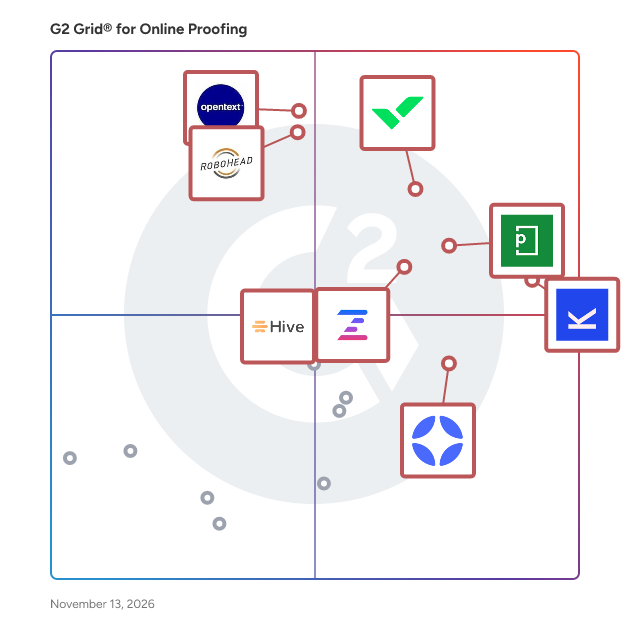
G2 Grid® for Online Proofing Software

G2 Grid® for Online Proofing Software plotting products by satisfaction and market presence

Highlighted products: Kontentino, Wrike, PageProof, OpenText Hightail, RoboHead, Ziflow, StreamWork, and Hive.

Underlying data: [Grid® JSON](https://www.g2.com/categories/online-proofing/grids.json?focus%5B%5D=kontentino&focus%5B%5D=wrike&focus%5B%5D=pageproof&focus%5B%5D=opentext-opentext-hightail&focus%5B%5D=robohead&focus%5B%5D=ziflow&focus%5B%5D=streamwork-streamwork&focus%5B%5D=hive-hive-hive)

Kontentino

Kontentino is a collaborative social media tool that turns chaos into clarity - helping teams plan, approve, and schedule together effortlessly. It brings marketing teams, clients, and stakeholders into a single structured workflow — replacing scattered emails and endless feedback loops with clarity, speed, and control. Approvals without the friction Clients review and approve posts through a clean interface. No login required. Fewer misunderstandings, faster sign-offs, stronger relationships. Real collaboration, in real time Copywriters, designers, managers, and clients work together in one place. No version confusion, no lost feedback threads. Multi-brand, multi-channel clarity Manage dozens of brands and profiles from one calendar. Always know what's scheduled, what needs approval, and what's going live next. Publish and measure, all in one place Autopublish to Facebook, Instagram, LinkedIn, TikTok, and more. Then track performance with visual reports that actually make sense. AI that works the way you do Smart AI features for content creation and localization - built into your workflow, not bolted on. Backed by real human support when you need it. Support from real people, fast When you need help, a real person responds. Quickly. Kontentino support team knows the product and social media landscape, and always aims to solves problems. Built for agencies managing multiple clients, and in-house teams who can't afford messy processes. Kontentino scales with you — from a handful of profiles to a full portfolio.

Average Rating: 4.6/5.0

Total Reviews: 391

How Do G2 Users Rate Kontentino?

  • Has the product been a good partner in doing business?: 9.4/10 (Category avg: 9.4/10)
  • Quality of Support: 9.5/10 (Category avg: 9.1/10)
  • Ease of Admin: 9.1/10 (Category avg: 9.0/10)
  • Ease of Use: 9.0/10 (Category avg: 9.0/10)

Who Is the Company Behind Kontentino?

  • Seller: Kontentino
  • Company Website:
  • Year Founded: 2014
  • HQ Location: Bratislava, Slovakia
  • LinkedIn® Page: www.linkedin.com
    31 employees on LinkedIn®

Who Uses This Product?

  • Who Uses This: Social Media Manager, CEO
  • Top Industries: Marketing and Advertising, Computer Software
  • Company Size: 70% Small, 16% Medium

What Do G2 Reviewers Say About Kontentino?

AI-generated summary from verified user reviews

Pros
  • Users love the ease of use of Kontentino, appreciating its intuitive interface and seamless management of social media.
  • Users love the calendar view in Kontentino, which simplifies content planning and enhances team collaboration.
  • Users value the centralized management of Kontentino, enjoying seamless integration for social media and client collaboration.
  • Users find Kontentino's intuitive interface extremely easy to use, ensuring a seamless experience for everyone involved.
  • Users appreciate the user-friendly interface of Kontentino, making content management and client interaction effortless.
Cons
  • Users experience performance issues with Kontentino, including slow loading times and interruptions when switching between brands.
  • Users find Kontentino's lack of Instagram stories features limits functionality, especially for agencies managing multiple accounts.
  • Users find the lack of advanced analytics in Kontentino limits their data insights and deeper content analysis.
  • Users find the limited analytics of Kontentino restrictive, wishing for more metrics and insights across platforms.
  • Users feel the high pricing of Kontentino is a drawback, especially after recent steep increases.

What Are Recent G2 Reviews of Kontentino?

Wrike

Wrike is the trusted work delivery platform where AI extends what people can accomplish. By centralizing all work in one governed, context-rich environment, Wrike helps organizations streamline collaboration, project planning, and task execution while maintaining the control and accountability that complex work demands. Wrike serves project managers, team leaders, and organizations of all sizes across marketing, IT, product development, professional services, and beyond. Teams use Wrike to track work progress, assign tasks, set deadlines, and facilitate communication, eliminating silos and fostering a culture of transparency and accountability that is crucial for successful delivery. Key features include AI Agents, Wrike Copilot, Wrike MCP Server, workflow automations, customizable dashboards, real-time collaboration tools, and advanced reporting capabilities. Teams can build and automate tailored workflows that reflect their unique processes, visualize timelines through Gantt charts and Kanban boards, and integrate seamlessly with tools like Slack, Google Drive, and Microsoft Teams. Wrike's MCP server extends this further, allowing AI assistants to connect directly to the platform where execution actually happens so AI-driven actions become part of the auditable record of how work gets done, not disconnected outputs living outside the system. And powered by the Wrike Work Intelligence® Graph, the platform gives AI the structured context it needs to act reliably inside the same roles, permissions, and access controls as your people. The result goes far beyond task management. Wrike reduces time spent on administrative work, scales alongside growing organizations, and gives teams the governed foundation they need to put AI to work on their most consequential workflows without losing control. With more than 20,000 organizations worldwide, including Siemens, Walmart, NVIDIA, and The Estée Lauder Companies, trusting Wrike to deliver their most important work, the platform has earned its place as a reliable partner for organizations to deliver without doubt

Average Rating: 4.2/5.0

Total Reviews: 4,525

How Do G2 Users Rate Wrike?

  • Has the product been a good partner in doing business?: 8.5/10 (Category avg: 9.4/10)
  • Quality of Support: 8.5/10 (Category avg: 9.1/10)
  • Ease of Admin: 8.3/10 (Category avg: 9.0/10)
  • Ease of Use: 7.9/10 (Category avg: 9.0/10)

Who Is the Company Behind Wrike?

  • Seller: Wrike, Inc.
  • Company Website:
  • Year Founded: 2006
  • HQ Location: San Diego, CA
  • LinkedIn® Page: www.linkedin.com
    1,257 employees on LinkedIn®
  • Ownership: Symphony Technology Group (STG)

Who Uses This Product?

  • Who Uses This: Project Manager, Marketing Manager
  • Top Industries: Marketing and Advertising, Information Technology and Services
  • Company Size: 43% Medium, 36% Small

What Do G2 Reviewers Say About Wrike?

AI-generated summary from verified user reviews

Pros
  • Users appreciate the flexibility and scalability of Wrike, enhancing project management and team collaboration effectively.
  • Users value the real-time collaboration features of Wrike, enhancing team alignment and project management efficiency.
  • Users value the enhanced task management features of Wrike, which streamline collaboration and improve project tracking.
  • Users commend the organization capabilities of Wrike, enabling clear project visibility and efficient timeline management.
  • Users appreciate the ease of use in Wrike, quickly adapting to its customizable features and integrations.
Cons
  • Users find the learning curve steep in customizing Wrike, leading some to prefer alternatives like Notion.
  • Users find Wrike not intuitive, struggling with its complex navigation and customization options compared to other tools.
  • Users note missing features in Wrike, particularly requiring improved visuals and advanced reporting options for design and management tasks.
  • Users note the limited features for advanced calculations, making complex reporting difficult on Wrike.
  • Users find Wrike's complexity overwhelming, especially when it comes to customization and keeping up with new features.

What Are Recent G2 Reviews of Wrike?

What Are G2 Users Discussing About Wrike?

PageProof

PageProof is an online proofing and creative approval platform with AI-powered insights and commenting that helps marketing and creative teams review, collaborate on, and approve content efficiently and securely. It brings every file type, reviewer, workflow step, and approval decision into one structured environment – transforming fragmented feedback into a clear, organized path to sign-off. The result is a review process that feels calmer, more predictable, and purpose-built for producing quality creative work at scale. Designed for organizations that create and distribute content regularly, PageProof supports global marketing departments, in-house creative teams, agencies, higher-education institutions, and enterprise brands. Teams use PageProof to replace long email threads and printouts, consolidate feedback, manage stakeholder approvals, and maintain compliance and brand accuracy across all creative output. PageProof provides a governed approval process that ensures the right people review the right content at the right time. Automated workflows, templates, and intelligent tools reduce manual steps and give teams a clear, auditable path from first draft to final approval. Key capabilities include: • End-to-end online proofing for static artwork, video, audio, HTML, presentations, documents, emails, and more. • Automated workflows and templates that structure review stages and eliminate repetitive setup work. • PageProof Intelligence® features such as Smart Compare, Smart Check, and Smart Tags that add clarity and insight to every review. • Additional PageProof Intelligence features for proofing include PI Insights providing AI powered insights into your work, PI Commenting adding comments onto your work directly. • PageProof Agentic Proofing allows teams to create PI Agents to check work according to their own defined guidelines for brand, language, style, tone, design - you decide! • Smart proofing tools – including rulers, gridlines, automated link scanner, barcode and QR code scanner, spell check, ColorSep®, color check, and metadata analysis – that surface issues early and reduce revision cycles. • Deep integrations with design, communication, project management, and content systems including Adobe Creative Cloud, Adobe Express, Figma, Canva, Microsoft Office, Slack, Asana, monday.com, Trello, Airtable, ClickUp, MediaValet, and others. • Enterprise-grade security with patented encryption of proofs, full audit trails, granular access controls, data residency options for sovereignty requirements, and ISO 27001:2022 certification. Teams choose PageProof to bring structure to creative operations, reduce approval bottlenecks, and deliver work with confidence. Every proof includes an automatic audit history, clear to-dos, version control, and structured decision-making – giving reviewers clarity and creatives the direction they need to move forward. Additional benefits include: • Support for unlimited reviewers inside and outside the organization. • Consistent workflows that strengthen brand governance and reduce errors. • Streamlined collaboration that minimizes meetings, email chains, and scattered feedback. • FinalFile delivery, a flexible delivery layer that automatically routes approved files into downstream systems such as MediaValet and project management tools. For more than a decade, PageProof has helped organizations bring order, clarity, and speed to the creative review process – empowering teams to produce their best work without compromising on accuracy, security, or workflow integrity.

Average Rating: 4.8/5.0

Total Reviews: 391

How Do G2 Users Rate PageProof?

  • Has the product been a good partner in doing business?: 9.6/10 (Category avg: 9.4/10)
  • Quality of Support: 9.6/10 (Category avg: 9.1/10)
  • Ease of Admin: 9.1/10 (Category avg: 9.0/10)
  • Ease of Use: 9.1/10 (Category avg: 9.0/10)

Who Is the Company Behind PageProof?

  • Seller: PageProof
  • Company Website:
  • Year Founded: 2014
  • HQ Location: Birkenhead, Auckland
  • LinkedIn® Page: www.linkedin.com
    37 employees on LinkedIn®

Who Uses This Product?

  • Who Uses This: Graphic Designer, Marketing Manager
  • Top Industries: Marketing and Advertising, Graphic Design
  • Company Size: 52% Small, 38% Medium

What Do G2 Reviewers Say About PageProof?

AI-generated summary from verified user reviews

Pros
  • Users find PageProof to be easy to use, facilitating intuitive project reviews and seamless collaboration among stakeholders.
  • Users value the collaborative commenting features of PageProof, enhancing visibility and streamlining the review process effortlessly.
  • Users highlight the intuitive proofreading tools of PageProof, enhancing collaboration and feedback efficiency for all projects.
  • Users value the great team collaboration in PageProof, facilitating seamless feedback and faster review cycles.
  • Users value the efficiency of PageProof, enjoying streamlined workflows and seamless feedback integration with other tools.
Cons
  • Users desire missing features like expanded tools, improved notifications, and better bulk editing for enhanced productivity.
  • Users find upload issues frustrating, struggling with document flow, limited folder structures, and markup limitations.
  • Users find the document handling cumbersome, requiring repetitive steps and causing delays in the review process.
  • Users often face software instability with PageProof, experiencing crashes and saving issues that disrupt their workflow.
  • Users find the approval process cumbersome, needing to repeatedly send documents for new updates from approvers.

What Are Recent G2 Reviews of PageProof?

What Are G2 Users Discussing About PageProof?

AI can help you find the answers. G2 helps you trust them.

Connect G2 to Claude or ChatGPT for answers grounded in G2's trusted reviews, comparisons, and pricing from real user insights.

How it works

OpenText Hightail

OpenText Hightail is the essential creative collaboration application for marketing teams and their creative partners developing compelling visual creative content and looking to speed their time to market. With one place for teams to share, review feedback and approve multimedia files, Hightail streamlines the process and helps teams keep marketing campaigns on schedule. Mobile access and visual previews also make it easy for executive level creative review. Learn more at www.hightail.com.

Average Rating: 4.2/5.0

Total Reviews: 677

How Do G2 Users Rate OpenText Hightail?

  • Has the product been a good partner in doing business?: 8.7/10 (Category avg: 9.4/10)
  • Quality of Support: 8.2/10 (Category avg: 9.1/10)
  • Ease of Admin: 8.5/10 (Category avg: 9.0/10)
  • Ease of Use: 8.8/10 (Category avg: 9.0/10)

Who Is the Company Behind OpenText Hightail?

  • Seller: OpenText
  • Year Founded: 1991
  • HQ Location: Waterloo, ON
  • LinkedIn® Page: www.linkedin.com
    22,835 employees on LinkedIn®
  • Ownership: NASDAQ:OTEX
  • Phone: +1-519-888-7111

Who Uses This Product?

  • Who Uses This: Owner, Project Manager
  • Top Industries: Marketing and Advertising, Entertainment
  • Company Size: 51% Small, 31% Medium

What Are Recent G2 Reviews of OpenText Hightail?

What Are G2 Users Discussing About OpenText Hightail?

RoboHead

RoboHead is a project management software solution - designed for marketing and creative professionals - to help teams focus on their people, deadlines, and creative deliverables. RoboHead has everything you need to create awesome work is in one place: schedules, budgets, deliverables, online proofing, surveys, reports, asset management, and more.

Average Rating: 4.3/5.0

Total Reviews: 94

How Do G2 Users Rate RoboHead?

  • Has the product been a good partner in doing business?: 9.4/10 (Category avg: 9.4/10)
  • Quality of Support: 9.3/10 (Category avg: 9.1/10)
  • Ease of Admin: 8.3/10 (Category avg: 9.0/10)
  • Ease of Use: 8.2/10 (Category avg: 9.0/10)

Who Is the Company Behind RoboHead?

  • Seller: Aquent
  • Year Founded: 1986
  • HQ Location: Boston, MA
  • LinkedIn® Page: www.linkedin.com
    4,134 employees on LinkedIn®

Who Uses This Product?

  • Top Industries: Marketing and Advertising, Financial Services
  • Company Size: 46% Medium, 35% Large

What Do G2 Reviewers Say About RoboHead?

AI-generated summary from verified user reviews

Pros
  • Users find RoboHead to have a user-friendly interface, simplifying project management and enhancing overall productivity.
  • Users value the clarity and efficiency RoboHead brings to managing creative projects and stakeholder collaboration.
  • Users love the extensive customization options in RoboHead, enhancing their workflow and adapting to team needs effortlessly.
  • Users praise the responsive customer support of RoboHead, ensuring quick assistance and effective solutions for their needs.
  • Users value the efficient team collaboration in RoboHead, streamlining project management for numerous tasks.
Cons
  • Users note a steep learning curve with RoboHead, requiring significant time and effort to master its features.
  • Users face limited task management functionality, struggling with tracking projects and insufficient communication features.
  • Users experience limited app functionality with project visibility issues and lack of integration with creative software.
  • Users find the learning difficulty notable, requiring time and effort to effectively master RoboHead.
  • Users find RoboHead's missing features lead to cumbersome workflows and hinder project management efficiency.

What Are Recent G2 Reviews of RoboHead?

What Are G2 Users Discussing About RoboHead?

Ziflow

Ziflow is an online proofing solution that helps marketing, creative and agency teams review, mark up and approve content before it is published. It belongs to the online proofing and creative review and approval software categories and serves in-house creative teams, creative and marketing operations leaders, brand managers, and advertising, design and production agencies. Common use cases include digital advertising, packaging, print, video production, website design and localization QA. Ziflow replaces feedback spread across email, shared drives, spreadsheets and chat with a single workspace. Reviewers comment directly on the asset, and each decision is recorded against the version it applies to. Organizations using Ziflow include AWS, Toyota, McCann Worldgroup, DoorDash, Williams Sonoma, Vista and Viasat.. Key features of Ziflow include: • Automated workflow routing: Route proofs based on project type, team structure, or deadlines. • Version control: Maintain a clear audit trail with side-by-side version comparisons and comment histories. • Role-based permissions: Manage access and visibility across internal teams and external collaborators. • Deadline tracking and reminders: Set due dates for each review stage and automatically notify reviewers to keep projects moving on schedule. • Real-time commenting and markup tools: Provide visual feedback on any file type. • Integrations with popular tools: Connect Ziflow to platforms like Adobe Creative Cloud, monday.com, Slack, and more. • ReviewAI: AI-assisted review that checks assets against a team’s own checklist criteria, such as a required legal disclaimer, and explains each pass or fail result for a reviewer to confirm. Ziflow is particularly useful for teams managing a high volume of creative assets or working across multiple stakeholders. It helps reduce review cycle times, limit errors, and keep content projects on track—especially when scaling production across channels and teams.

Average Rating: 4.5/5.0

Total Reviews: 932

How Do G2 Users Rate Ziflow?

  • Has the product been a good partner in doing business?: 9.2/10 (Category avg: 9.4/10)
  • Quality of Support: 9.1/10 (Category avg: 9.1/10)
  • Ease of Admin: 8.8/10 (Category avg: 9.0/10)
  • Ease of Use: 8.9/10 (Category avg: 9.0/10)

Who Is the Company Behind Ziflow?

  • Seller: Ziflow
  • Company Website:
  • Year Founded: 2016
  • HQ Location: London
  • LinkedIn® Page: www.linkedin.com
    103 employees on LinkedIn®
  • Ownership: Private

Who Uses This Product?

  • Who Uses This: Graphic Designer, Project Manager
  • Top Industries: Marketing and Advertising, Design
  • Company Size: 48% Small, 43% Medium

What Do G2 Reviewers Say About Ziflow?

AI-generated summary from verified user reviews

Pros
  • Users find the ease of use in Ziflow invaluable for seamless collaboration and clear communication.
  • Users value the centralized review platform of Ziflow, enhancing collaboration and precision in asset management.
  • Users value the seamless commenting features of Ziflow, enhancing collaboration and feedback across various asset formats.
  • Users commend Ziflow for its exceptional efficiency, enhancing collaboration and streamlining processes across teams effortlessly.
  • Users value the version control features in Ziflow for effective feedback tracking and asset management.
Cons
  • Users note the limited options in Ziflow's filing system, impacting organization and file management abilities.
  • Users report commenting issues in Ziflow, including confusion over UX and difficulties in tracking feedback efficiently.
  • Users experience limited access due to admin restrictions, frequent logouts, and difficulties with file downloads and compatibility.
  • Users experience limited usability due to confusing UX and difficult comment management in Ziflow.
  • Users find Ziflow's interface not intuitive, facing challenges in navigating features and managing comments effectively.

What Are Recent G2 Reviews of Ziflow?

What Are G2 Users Discussing About Ziflow?

StreamWork

StreamWork is an enterprise online proofing and creative approval platform built for enterprise marketing teams, creative operations leaders, in-house studios, and agencies that manage high volumes of creative at scale. Trusted by enterprise teams including The Channel Company, MegaFood, and Arizona State University, StreamWork was purpose-built for the way modern creative teams work today, with the AI capabilities, workflow depth, and ease of use that the next generation of creative operations demands. Unlike legacy tools architected a decade ago and retrofitted to keep up, StreamWork delivers the deepest feature set among top online proofing platforms, consolidating version control, feedback, task management, and stakeholder approvals in one intelligent workspace to eliminate bottlenecks, reduce revision cycles, and launch campaigns faster. Teams use StreamWork to markup nearly any file type (videos, images, PDFs, documents, slides, CAD files, and more), compare versions side by side, route assets through AI-enabled multi-stage approval workflows, delegate feedback as assigned tasks to the right teams, and maintain a complete audit trail of every decision. AI-powered video transcription, intelligent deadline reminders, and automated approval routing represent the next generation of creative approval technology, built natively into the platform from day one rather than bolted on as an afterthought. StreamWork was designed with a single philosophy: enterprise-grade capability should also be extremely easy to use. The result is a modern, visual-first platform that creative and marketing teams adopt immediately, and that even your most time-pressed external reviewers engage with without friction. No legacy UX. No bloated configuration. Just the most capable online proofing and creative approval platform available today. Proven to deliver substantial ROI, StreamWork helps teams cut approval cycles by over 30% and launch higher-quality campaigns faster. Key Features: Online Proofing and Markup: Review and annotate nearly any media type including videos, PDFs, images, decks, and design files with precision markup, contextual comments, and version stacking. Side by Side Version Comparison: Compare any two versions of an asset side by side, including synced video playback and independent audio controls, to catch changes fast without toggling between files. AI-Enabled Multi-Stage Approval Workflows: Build customizable, multi-stage workflows with bulk approvals, conditional routing, reviewer permissions, and intelligent deadline reminders. Set it up once and StreamWork ensures projects move forward efficiently. Feedback-to-Task Delegation: Convert any comment into an assigned task with an owner, due date, and priority. Legal handles their notes. Copy handles theirs. Brand handles theirs. Full accountability at every stage. Visual Asset Library: Organized workspaces, projects, folders, and subfolders give enterprise teams a searchable, versioned way to keep every asset organized within the proofing and approval workflow. Already have a DAM? We can build custom integrations to connect with it. Enterprise-Grade Security and Compliance: SOC 2 Type II certified with granular access controls, role-based permissions, SSO, AES-256 encryption, and immutable audit trails. Works Inside Your Existing Stack: Native integrations with Asana, Monday.com, Slack, Adobe Creative Cloud, Google Drive, Dropbox, Box, and more. Approval status syncs automatically into your existing project management tools.

Average Rating: 4.7/5.0

Total Reviews: 57

How Do G2 Users Rate StreamWork?

  • Has the product been a good partner in doing business?: 9.8/10 (Category avg: 9.4/10)
  • Quality of Support: 9.7/10 (Category avg: 9.1/10)
  • Ease of Admin: 9.3/10 (Category avg: 9.0/10)
  • Ease of Use: 9.4/10 (Category avg: 9.0/10)

Who Is the Company Behind StreamWork?

  • Seller: StreamWork
  • Company Website:
  • Year Founded: 2022
  • HQ Location: San Francisco, California
  • LinkedIn® Page: linkedin.com
    4 employees on LinkedIn®

Who Uses This Product?

  • Top Industries: Marketing and Advertising, Consulting
  • Company Size: 60% Small, 35% Medium

What Do G2 Reviewers Say About StreamWork?

AI-generated summary from verified user reviews

Pros
  • Users love the ease of use of StreamWork, streamlining approval workflows and simplifying feedback management seamlessly.
  • Users value the communication ease of StreamWork, streamlining feedback and collaboration from multiple stakeholders effortlessly.
  • Users commend StreamWork for its time-saving capabilities, streamlining reviews and enhancing productivity with real-time feedback.
  • Users find StreamWork to be intuitive and built for creative workflows, enhancing collaboration and simplifying feedback processes.
  • Users praise the seamless proofing process of StreamWork, which enhances collaboration with full control and efficiency.
Cons
  • Users feel StreamWork lacks essential features for storage and organization, hindering overall efficiency and usability.
  • Users face organizational issues due to limited subfolder creation and poor clarity of smaller media in StreamWork.
  • Users find navigation difficult due to overwhelming dropdown menus, making file uploads time-consuming and cumbersome.
  • Users note the approval process is still evolving, on the lookout for improved features to enhance efficiency.
  • Users find the user interface crowded, making navigation and usage more challenging than necessary.

What Are Recent G2 Reviews of StreamWork?

ReviewStudio

ReviewStudio is a type of online proofing solution designed to help users streamline feedback and approval processes for their creative projects. This platform addresses the common challenges associated with fragmented feedback systems, allowing teams to gather and manage all creative input in a single, organized environment. By centralizing feedback, ReviewStudio enhances collaboration and accelerates project timelines. The target audience for ReviewStudio includes marketing teams, advertising agencies, and large enterprises that require efficient collaboration on creative content. These users often face difficulties when juggling multiple emails, tools, and meetings to gather feedback. ReviewStudio simplifies this process by providing a dedicated space where all stakeholders can engage with the content directly. This is particularly beneficial for teams working on complex projects that involve numerous revisions and require input from various sources. Key features of ReviewStudio include the ability to markup and comment directly on images, videos, PDFs, and web pages from any device. This functionality allows users to provide precise feedback, ensuring that comments are contextual and easily understood. Additionally, the platform enables users to convert feedback into actionable task assignments, facilitating a smoother workflow. With version comparison capabilities, teams can track changes and verify that revisions have been implemented correctly, reducing the likelihood of miscommunication and errors. ReviewStudio stands out in its category by offering a user-friendly interface that fosters collaboration among team members and clients alike. The platform is particularly advantageous for global advertising agencies that need to manage external client feedback efficiently. By integrating ReviewStudio into their existing workflows, organizations can enhance productivity and ensure that creative projects are completed on time and to the satisfaction of all parties involved. Overall, ReviewStudio provides a comprehensive solution for managing creative feedback, making it an essential tool for teams aiming to optimize their creative processes.

Average Rating: 4.7/5.0

Total Reviews: 156

How Do G2 Users Rate ReviewStudio?

  • Has the product been a good partner in doing business?: 9.3/10 (Category avg: 9.4/10)
  • Quality of Support: 9.2/10 (Category avg: 9.1/10)
  • Ease of Admin: 8.9/10 (Category avg: 9.0/10)
  • Ease of Use: 8.9/10 (Category avg: 9.0/10)

Who Is the Company Behind ReviewStudio?

  • Seller: StoryTEQ
  • Year Founded: 2017
  • HQ Location: Amsterdam
  • LinkedIn® Page: www.linkedin.com
    197 employees on LinkedIn®

Who Uses This Product?

  • Who Uses This: President, Owner
  • Top Industries: Marketing and Advertising, Architecture & Planning
  • Company Size: 69% Small, 22% Medium

What Do G2 Reviewers Say About ReviewStudio?

AI-generated summary from verified user reviews

Pros
  • Users love the ease of use in ReviewStudio, with intuitive features that streamline feedback and improve collaboration.
  • Users value the commenting features of ReviewStudio, enhancing clarity and collaboration with direct, in-context feedback.
  • Users value the effective version control in ReviewStudio, streamlining feedback and enhancing collaboration among team members.
  • Users appreciate the superior workflow and collaboration tools of ReviewStudio, greatly enhancing project approval processes.
  • Users find that ReviewStudio offers time-saving efficiencies by centralizing feedback and streamlining the review process.
Cons
  • Users find the interface unintuitive, requiring complex navigation and adjustments that hinder straightforward usage.
  • Users experience upload issues, finding the process cumbersome and requesting more efficient features to streamline their workflow.
  • Users face issues with commenting functionality, including decision button confusion and lack of options for text size and image attachments.
  • Users feel the absence of a text feature for caption creation limits functionality and flexibility in their workflow.
  • Users find poor notifications frustrating, requiring manual adjustments and missing automatic alerts for an efficient workflow.

What Are Recent G2 Reviews of ReviewStudio?

What Are G2 Users Discussing About ReviewStudio?

Gain

Gain is the content approval platform for marketing teams and agencies. It replaces the disconnected stack of tools most teams are using to approve social posts, files, documents, or any content on the web – and keeps a complete record of every decision along the way. Most teams manage approvals across two or three separate tools: one for social posts, another for reviewing PDFs and files, and a third for web content. Gain replaces all of them. Every piece of content your team creates moves through customizable approval flows, builds a complete approval record, and gets published or delivered with full documentation of who approved what and when. Gain is built for agencies managing multiple clients and in-house marketing teams where content needs sign-off from brand, legal, or leadership before it goes live. If your team cannot afford to publish content that wasn't properly approved, Gain is built for you. Key capabilities: ● Dedicated workspaces for each client or brand, with separate content calendars and controlled team access. ● Customizable approval flows that route social posts, marketing files, text documents, and web URLs to the right stakeholders in the right order. ● One-click approvals and magic login links so clients and external reviewers can approve without creating an account. ● Automatic, time-stamped records (audit trail) of every review decision, action, and approval decision across every content type. ● Auto-publishing to 9 social platforms once content is approved. ● Flat-rate pricing with unlimited reviewers, starting at $99/month.

Average Rating: 4.7/5.0

Total Reviews: 82

G2 Deal: Save 25% on your first year of Gain!

Try Gain free and see for yourself how your team can manage more social media clients with less effort, and zero chaos. Since you found us in G2, when your free trial ends you'll automatically get 25% off your first year of Gain.

Price: ~~99 usd / month (yearly plan) , 199 usd / month (yearly plan) , 399 usd / month (yearly plan)~~ → 74.25 usd / month (yearly plan) , 149.25 usd / month (yearly plan) , 299.25 usd / month (yearly plan)

View this exclusive G2 deal

How Do G2 Users Rate Gain?

  • Has the product been a good partner in doing business?: 9.4/10 (Category avg: 9.4/10)
  • Quality of Support: 9.5/10 (Category avg: 9.1/10)
  • Ease of Admin: 9.3/10 (Category avg: 9.0/10)
  • Ease of Use: 9.4/10 (Category avg: 9.0/10)

Who Is the Company Behind Gain?

  • Seller: Gain
  • Company Website:
  • Year Founded: 2013
  • HQ Location: Miami, US
  • LinkedIn® Page: www.linkedin.com
    21 employees on LinkedIn®

Who Uses This Product?

  • Top Industries: Marketing and Advertising
  • Company Size: 81% Small, 18% Medium

What Do G2 Reviewers Say About Gain?

AI-generated summary from verified user reviews

Pros
  • Users love the ease of use in Gain, enjoying effortless scheduling, approvals, and feature updates.
  • Users appreciate the ease of the approval process with Gain, enabling seamless client reviews and content management.
  • Users commend the responsive customer support of Gain, noting quick resolutions and exceptional service experiences.
  • Users love the automation features of Gain, making scheduling and approvals incredibly efficient and hassle-free.
  • Users commend Gain's exceptional customer service, appreciating their responsiveness and dedication to user needs and platform improvements.
Cons
  • Users miss certain Instagram features like overlays, polls, and collaboration options while using Gain.
  • Users miss Instagram features like overlays and collaborator options, limiting their creative flexibility with Gain.
  • Users face content duplication issues across social media platforms, making scheduling tedious and time-consuming.
  • Users find file management challenging due to limitations like upload size and missing features for social media content routing.
  • Users find the limited options for collaboration and scheduling in Gain to be restrictive for their needs.

What Are Recent G2 Reviews of Gain?

What Are G2 Users Discussing About Gain?

Hive

Hive is an all-in-one project management software platform that helps teams plan, collaborate, automate workflows, and deliver projects faster. Designed for organizations of every size, Hive combines powerful project planning, task management, team collaboration, and workflow automation tools in one customizable workspace. Whether you're managing marketing campaigns, product launches, creative projects, client work, or cross-functional initiatives, Hive adapts to your team's unique processes. Unlike rigid project management tools, Hive offers flexible workflows, customizable dashboards, and multiple project views so every team can work the way they work best. Hive empowers marketing, operations, product, IT, creative, and remote teams with the tools they need to stay organized and aligned. With customizable workflows and powerful collaboration features, teams can centralize work, reduce manual tasks, and improve visibility across every project. Key capabilities include: - Multiple project views, including Kanban boards, Gantt charts, calendars, tables, and lists - Task management with custom fields, dependencies, milestones, and priorities - Workflow automation to eliminate repetitive work - Real-time team collaboration with messaging, comments, and file sharing - Time tracking, reporting, and analytics - Integrations with hundreds of popular business applications Every organization works differently, which is why Hive is built to be one of the most customizable project management platforms available. Teams can create workflows tailored to their business processes using custom fields, project templates, automations, approvals, and integrations. Instead of forcing teams to change how they work, Hive adapts to existing workflows — helping organizations improve efficiency without disrupting productivity. Hive gives teams the flexibility to manage projects from the perspective that works best for them. Switch seamlessly between: - Kanban boards for agile workflows - Gantt charts for timeline planning - Calendar views for scheduling - Table and List views for detailed task management These flexible project views help teams track deadlines, manage resources, identify bottlenecks, and keep projects moving forward. Hive brings projects, communication, and documentation together in one centralized workspace. Team members can collaborate in real time, assign tasks, share files, provide feedback, and monitor project progress without switching between multiple tools. By combining project planning, collaboration, automation, and reporting in a single platform, Hive helps teams reduce busywork and focus on delivering results. Hive is more than just task management software—it's a scalable work management platform built to evolve alongside your business. As your needs change, Hive continues to expand through new features, integrations, and customer-driven enhancements. With flexible customization, powerful automation, and dedicated customer support, Hive enables organizations to streamline workflows, improve cross-functional collaboration, and execute projects with greater speed and confidence.

Average Rating: 4.6/5.0

Total Reviews: 657

G2 Deal: Get 20% off Hive

Get 20% off Hive Starter or Hive Teams plans. Customize your project management experience with the best tools & functionality for every budget.

Price: ~~$5 per user/month~~ → $4 per user/month

View this exclusive G2 deal

How Do G2 Users Rate Hive?

  • Has the product been a good partner in doing business?: 9.4/10 (Category avg: 9.4/10)
  • Quality of Support: 9.3/10 (Category avg: 9.1/10)
  • Ease of Admin: 9.0/10 (Category avg: 9.0/10)
  • Ease of Use: 9.1/10 (Category avg: 9.0/10)

Who Is the Company Behind Hive?

  • Seller: Hive
  • Company Website:
  • Year Founded: 2016
  • HQ Location: New York, New York
  • LinkedIn® Page: www.linkedin.com
    63 employees on LinkedIn®

Who Uses This Product?

  • Who Uses This: Project Manager, Graphic Designer
  • Top Industries: Marketing and Advertising, Information Technology and Services
  • Company Size: 63% Small, 29% Medium

What Do G2 Reviewers Say About Hive?

AI-generated summary from verified user reviews

Pros
  • Users value the advanced project management features of Hive, enhancing collaboration and streamlining workflow processes.
  • Users appreciate Hive's ease of use, benefiting from intuitive project management and seamless collaboration tools.
  • Users love Hive's team collaboration features, enhancing communication and streamlining teamwork across multiple projects and tasks.
  • Users love Hive's project handling features, enabling efficient tracking, collaboration, and easy access to project statuses.
  • Users value the organizational capabilities of Hive, enhancing efficiency in project management and teamwork.
Cons
  • Users find Hive lacks essential missing features like real-time data processing and efficient task reassignment tools.
  • Users find the initial learning curve of Hive overwhelming, particularly for smaller teams adapting to its extensive features.
  • Users report limited features in Hive's PC and mobile apps, making urgent tasks difficult and slow to process.
  • Users find Hive's interface not intuitive, leading to difficulties in navigating its extensive feature set effectively.
  • Users find Hive's complexity overwhelming, particularly its initial learning curve and potential for over-configuration.

What Are Recent G2 Reviews of Hive?

Filestage

Filestage is the online proofing and content approval software for marketing teams and agencies that need content signed off fast, while keeping everything on brand and compliant. It brings online proofing and content governance together: every file, reviewer, comment, and approval decision sits in one place, with a record of who approved what and when. The result is fewer review rounds, fewer errors reaching the market, and approvals that marketing, brand, and legal teams can stand behind. Teams use Filestage to replace email threads, annotated PDFs, and approval spreadsheets, to check content against brand guidelines and internal and external policies, and to keep a clear audit trail as content volume grows. Key features: • Unlimited reviewers – Invite colleagues, clients, and partners to review; external reviewers don't need a Filestage account. • Custom review workflows – Build multi-step approval workflows with sequential or parallel reviewer groups, due dates, reminders, checklists, and custom decision options, then automate repeat steps and reuse them as templates. • Online proofing for any file – Comment directly on designs, images, video, audio, PDFs, documents, live websites, and interactive HTML, with time-coded feedback on video. • Review Agents – Automated pre-checks for spelling and grammar, forbidden terms, QR codes and barcodes, file specifications, and team-defined rules run before reviewers are notified. People always make the final decision. • Version control – Compare versions, or any two files, side by side. • Full audit trail – Every comment and decision is timestamped, attributed, and tied to the exact file version, with exportable PDF review reports. • Integrations – Adobe Creative Cloud, Figma, Google Drive, Slack, Microsoft Teams, Asana, monday.com, Jira, Zapier, Make, and API. • Security – ISO/IEC 27001:2022 and SOC 2 Type II certified, GDPR compliant, and hosted in the EU, with German data residency. Since 2015, Filestage has helped marketing teams and agencies replace scattered feedback with a clear, documented approval process. Today, teams in 192 countries use Filestage to approve 2.7 million files every year.

Average Rating: 4.6/5.0

Total Reviews: 241

How Do G2 Users Rate Filestage?

  • Has the product been a good partner in doing business?: 9.2/10 (Category avg: 9.4/10)
  • Quality of Support: 9.1/10 (Category avg: 9.1/10)
  • Ease of Admin: 9.1/10 (Category avg: 9.0/10)
  • Ease of Use: 9.1/10 (Category avg: 9.0/10)

Who Is the Company Behind Filestage?

  • Seller: Filestage
  • Year Founded: 2015
  • HQ Location: Stuttgart, Baden-Wurttemberg
  • LinkedIn® Page: www.linkedin.com
    57 employees on LinkedIn®

Who Uses This Product?

  • Who Uses This: Project Manager
  • Top Industries: Marketing and Advertising, Animation
  • Company Size: 58% Small, 30% Medium

What Do G2 Reviewers Say About Filestage?

AI-generated summary from verified user reviews

Pros
  • Users find Filestage to be exceptionally easy to use, streamlining approval processes and enhancing communication across teams.
  • Users value the clear and efficient communication of Filestage, streamlining approval processes with ease.
  • Users appreciate the efficiency of Filestage, streamlining approval processes with clear communication and smooth workflows.
  • Users value the commenting features of Filestage for enabling clear communication and efficient approval workflows.
  • Users appreciate the intuitive operation of Filestage, enhancing clarity and efficiency in approval processes.
Cons
  • Users find the learning curve steep, requiring training for new reviewers to navigate the approval process effectively.
  • Users find Filestage not intuitive, often requiring training for new users to navigate the approval process effectively.
  • Users find that training is required for new participants, making onboarding more challenging than anticipated.
  • Users feel that the approval process requires training, making it less intuitive for newcomers to Filestage.
  • Users find the lack of guidance for onboarding reviewers challenging, impacting their overall experience with Filestage.

What Are Recent G2 Reviews of Filestage?

What Are G2 Users Discussing About Filestage?

KROCK.io

Krock.io is video review and media collaboration software built for creative teams working on video, animation, design, and marketing projects. It simplifies the entire feedback loop—from initial concepts to final delivery—by bringing all communication, versioning, and approvals into one place. With Krock, teams can create customizable workflows, assign roles (team member, collaborator, reviewer), and streamline feedback with time-coded comments on video, design files, and documents. The platform supports a variety of file types and integrates with tools like Adobe Premiere Pro and Final Cut Pro via dedicated plugins. Krock.io is perfect for animation studios, video production companies, marketing agencies, and in-house creative teams who want to save time, reduce miscommunication, and deliver projects faster with a professional client-facing experience.

Average Rating: 4.5/5.0

Total Reviews: 42

How Do G2 Users Rate KROCK.io?

  • Has the product been a good partner in doing business?: 8.8/10 (Category avg: 9.4/10)
  • Quality of Support: 8.9/10 (Category avg: 9.1/10)
  • Ease of Admin: 8.8/10 (Category avg: 9.0/10)
  • Ease of Use: 9.0/10 (Category avg: 9.0/10)

Who Is the Company Behind KROCK.io?

  • Seller: Krock
  • Year Founded: 2020
  • HQ Location: Tallinn, EE
  • LinkedIn® Page: www.linkedin.com
    4 employees on LinkedIn®

Who Uses This Product?

  • Top Industries: Marketing and Advertising
  • Company Size: 83% Small, 12% Medium

What Do G2 Reviewers Say About KROCK.io?

AI-generated summary from verified user reviews

Pros
  • Users appreciate the communication ease of KROCK.io, enabling smooth feedback sharing and collaboration in creative projects.
  • Users appreciate the easy sharing capabilities of KROCK.io, enhancing collaboration and streamlining project management effortlessly.
  • Users value the time-saving organization of KROCK.io, streamlining project management and enhancing team collaboration.
  • Users appreciate the ease of commenting, facilitating quick feedback on shared visuals and enhancing team alignment.
  • Users appreciate the ease of use of KROCK.io, making project management intuitive and efficient for collaboration.
Cons
  • Users note the slow performance of KROCK.io, particularly with larger files and mobile view limitations, impacting usability.
  • Users find the limited customization for notifications somewhat overwhelming, suggesting a need for greater flexibility.
  • Users find the limited features of KROCK.io inadequate for complex workflows, affecting overall functionality and usability.
  • Users find that upload speeds and mobile view limitations hinder effective data visualization on KROCK.io's app.
  • Users face mobile compatibility issues as large files take time to upload and charts are hard to read.

What Are Recent G2 Reviews of KROCK.io?

IntelligenceBank

IntelligenceBank is the AI-powered digital asset management, marketing compliance and marketing workflow platform that helps marketing teams create and manage more approved content, faster.

Average Rating: 4.5/5.0

Total Reviews: 325

How Do G2 Users Rate IntelligenceBank?

  • Has the product been a good partner in doing business?: 9.4/10 (Category avg: 9.4/10)
  • Quality of Support: 9.4/10 (Category avg: 9.1/10)
  • Ease of Admin: 8.8/10 (Category avg: 9.0/10)
  • Ease of Use: 8.7/10 (Category avg: 9.0/10)

Who Is the Company Behind IntelligenceBank?

  • Seller: IntelligenceBank
  • Company Website:
  • Year Founded: 2009
  • HQ Location: Melbourne, VIC
  • LinkedIn® Page: www.linkedin.com
    82 employees on LinkedIn®

Who Uses This Product?

  • Who Uses This: Marketing Coordinator
  • Top Industries: Marketing and Advertising, Construction
  • Company Size: 44% Medium, 31% Small

What Do G2 Reviewers Say About IntelligenceBank?

AI-generated summary from verified user reviews

Pros
  • Users appreciate the user-friendly platform of IntelligenceBank, making uploads, downloads, and organization effortless for everyone.
  • Users appreciate the customizability of IntelligenceBank, enabling tailored workflows and efficient asset management for their specific needs.
  • Users praise the easy organization of IntelligenceBank, streamlining asset management with a user-friendly and intuitive platform.
  • Users appreciate the user-friendly platform of IntelligenceBank, which simplifies asset organization and enhances overall efficiency.
  • Users appreciate the customizable platform of IntelligenceBank, enhancing workflow management and brand alignment effectively.
Cons
  • Users find IntelligenceBank not intuitive, with clunky navigation and cumbersome search functions hindering efficiency.
  • Users feel the missing features in IntelligenceBank hinder usability and limit overall functionality and efficiency.
  • Users complain about poor usability in IntelligenceBank, noting clunky navigation and an unintuitive interface hinder efficiency.
  • Users face filtering issues with IntelligenceBank, struggling with clunky navigation and ineffective search functionalities.
  • Users find folder management cumbersome, with a convoluted system making navigation and search frustratingly inefficient.

What Are Recent G2 Reviews of IntelligenceBank?

What Are G2 Users Discussing About IntelligenceBank?

Approval Studio

Approval Studio is built for creative teams who are tired of chasing approvals over email. You upload a file, share a link, and your client annotates directly in their browser. No account, no download, no back and forth asking if they got the file. Every comment is pinned to the exact spot on the artwork, every version is stored, and every approval is timestamped. For packaging and print work specifically, you get tools that generic proofing software skips: a barcode scanner, color separation, and four comparison modes that catch the differences your eyes miss after the tenth revision. Project management, task assignments, audit trails, and integrations with Adobe Creative Cloud, Slack, Shopify, and Zapier are all included. For teams building custom modern workflows, there's a full API and native MCP support.

Average Rating: 4.8/5.0

Total Reviews: 44

How Do G2 Users Rate Approval Studio?

  • Has the product been a good partner in doing business?: 9.4/10 (Category avg: 9.4/10)
  • Quality of Support: 9.8/10 (Category avg: 9.1/10)
  • Ease of Admin: 8.9/10 (Category avg: 9.0/10)
  • Ease of Use: 9.4/10 (Category avg: 9.0/10)

Who Is the Company Behind Approval Studio?

Who Uses This Product?

  • Top Industries: Marketing and Advertising, Information Technology and Services
  • Company Size: 73% Small, 25% Medium

What Do G2 Reviewers Say About Approval Studio?

AI-generated summary from verified user reviews

Pros
  • Users value the automation capabilities of Approval Studio, significantly enhancing workflow efficiency and reducing manual efforts.
  • Users appreciate the communication ease of Approval Studio, minimizing back-and-forth and enhancing collaboration effectively.
  • Users appreciate the ease of use in Approval Studio, which simplifies the approval process and enhances workflow efficiency.
  • Users appreciate the easy integrations of Approval Studio, enhancing efficiency and streamlining their agency workflows effectively.
  • Users commend the efficiency of Approval Studio, as it streamlines reviews and reduces communication delays effectively.
Cons
  • Users feel that Approval Studio lacks specific views for tracking approval statuses, making it difficult to identify bottlenecks.
  • Users notice integration issues with Approval Studio, seeking more options to enhance workflow efficiency and tracking.

What Are Recent G2 Reviews of Approval Studio?

What Are G2 Users Discussing About Approval Studio?

ArtworkFlow

Artwork Flow is an AI-powered label management and compliance platform for NPD, regulatory, and packaging teams. It helps fast-growing brands such as Vita Coco, HomeChef, and Trinchero Family Estates accelerate their time to market through cutting-edge label compliance, proofing, and workflow features.

Average Rating: 4.8/5.0

Total Reviews: 44

How Do G2 Users Rate ArtworkFlow?

  • Has the product been a good partner in doing business?: 9.1/10 (Category avg: 9.4/10)
  • Quality of Support: 9.8/10 (Category avg: 9.1/10)
  • Ease of Admin: 8.6/10 (Category avg: 9.0/10)
  • Ease of Use: 9.6/10 (Category avg: 9.0/10)

Who Is the Company Behind ArtworkFlow?

Who Uses This Product?

  • Top Industries: Computer Software, Marketing and Advertising
  • Company Size: 53% Small, 31% Medium

What Do G2 Reviewers Say About ArtworkFlow?

AI-generated summary from verified user reviews

Pros
  • Users find ArtworkFlow's ease of use in managing workflows and projects to be highly beneficial and efficient.
  • Users appreciate the efficient asset management in ArtworkFlow, enhancing project timelines and resource planning effectively.
  • Users appreciate the user-friendly workflow and version history features of ArtworkFlow, enhancing collaboration and project management.
  • Users value the effective branding management of ArtworkFlow, enhancing asset organization and operational efficiency significantly.
  • Users value the centralization of assets in ArtworkFlow, enhancing project management and streamlining marketing operations.
Cons
  • Users find feature limitations in ArtworkFlow, notably missing tools for ideation and project resumption options.
  • Users experience slow performance with ArtworkFlow, finding it time-consuming to analyze reports for projects.
  • Users experience slow loading times, expressing a desire for improvements in speed and functionality during use.
  • Users find the inadequate reporting capabilities of ArtworkFlow limit their ability to track efficiency effectively.
  • Users report integration issues, noting difficulty in connecting APIs and triggering workflows from DAM systems.

What Are Recent G2 Reviews of ArtworkFlow?

Neeraja Prakash
NP
Researched and written by Neeraja Prakash
Updated January 7, 2026