Best Desktop Search Software

How Many Desktop Search Software Products Does G2 Track?

Total Products under this Category: 33

Category Stats (Oct 2026)

  • Average Rating: 4.46/5 (↑0.06 vs Sep 2026) The average rating of products in this category, based on all submitted ratings

Last updated: October 12, 2026

How Does G2 Rank Desktop Search Software Products?

Why You Can Trust G2's Software Rankings:

  • 30 Analysts and Data Experts
  • 200+ Authentic Reviews
  • 33+ Products
  • Unbiased Rankings

G2's software rankings are built on verified user reviews, rigorous moderation, and a consistent research methodology maintained by a team of analysts and data experts. Each product is measured using the same transparent criteria, with no paid placement or vendor influence. While reviews reflect real user experiences, which can be subjective, they offer valuable insight into how software performs in the hands of professionals. Together, these inputs power the G2 Score, a standardized way to compare tools within every category.

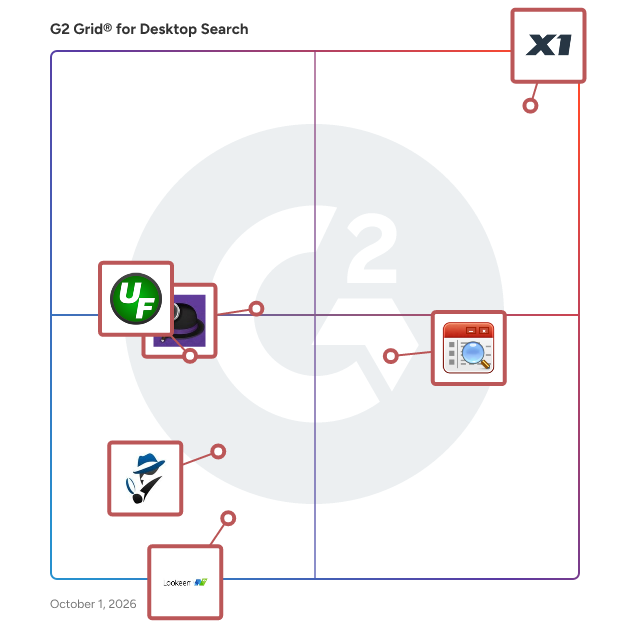
G2 Grid® for Desktop Search Software

G2 Grid® for Desktop Search Software plotting products by satisfaction and market presence

Highlighted products: X1 Search, Listary, Alfred, UltraFinder, Agent Ransack, and Lookeen.

Underlying data: [Grid® JSON](https://www.g2.com/categories/desktop-search/grids.json?focus%5B%5D=x1-search&focus%5B%5D=listary&focus%5B%5D=alfred&focus%5B%5D=ultrafinder&focus%5B%5D=agent-ransack&focus%5B%5D=lookeen)

X1 Search

Stop Searching and Start Finding — with X1 Search. X1 Search empowers you to instantly find the exact information you need across all your data sources — including emails, files, chats, documents, and more — from Microsoft 365 (Mail, Teams, SharePoint, OneDrive, Exchange), Google Workspace, Slack, local files, and cloud storage. All in a single, lightning-fast search using one powerful solution. Powered by X1’s fast-as-you-type technology, this intuitive desktop application delivers real-time results across your content — helping you work smarter and save hours every day. Designed for both business and personal use, X1 Search streamlines your workflow by consolidating years of content into a single, unified interface and providing: • Unified search across email, files, chats, and cloud sources • Full-fidelity previews • Built-in hit highlighting • Blazing-fast performance • Advanced review & tagging tools for efficient data organization • More accurate results than OS or legacy desktop search tools With X1 Search 10, you no longer need to switch between apps or struggle with fragmented systems. Everything is indexed. Everything is searchable. And everything is available — instantly. Experience unmatched speed, precision, and simplicity — all in one solution built to handle the demands of modern information workflows. X1 Search is currently supported on Windows-based operating systems and is available for immediate purchase on our website. Simply buy online and download to get started within minutes.

Average Rating: 4.6/5.0

Total Reviews: 66

How Do G2 Users Rate X1 Search?

  • Efficiency: 9.5/10 (Category avg: 9.0/10)
  • Fields: 9.5/10 (Category avg: 8.9/10)
  • Ease of Use: 9.0/10 (Category avg: 9.4/10)
  • Resources: 8.7/10 (Category avg: 8.8/10)

Who Is the Company Behind X1 Search?

  • Seller: X1
  • Year Founded: 2003
  • HQ Location: Pasadena, CA
  • Twitter: @X1Discovery
    1,233 Twitter followers
  • LinkedIn® Page: www.linkedin.com
    148 employees on LinkedIn®

Who Uses This Product?

  • Top Industries: Information Technology and Services, Higher Education
  • Company Size: 61% Small, 19% Medium

What Do G2 Reviewers Say About X1 Search?

AI-generated summary from verified user reviews

Pros
  • Users love X1's instant and thorough search functionality, enabling them to efficiently find documents and files effortlessly.
  • Users commend X1 Search for its excellent customer support, consistently receiving prompt and effective assistance from the support team.
  • Users find X1 Search extremely easy to use, enhancing their productivity with fast and efficient file searching capabilities.
  • Users value the efficiency of X1 Search, which rapidly locates files and enhances overall productivity significantly.
  • Users appreciate the fast search capability of X1 Search, effortlessly retrieving old emails without limitations.
Cons
  • Users find the lack of wildcard search functionality in X1 Search limits their ability to find products easily.

What Are Recent G2 Reviews of X1 Search?

What Are G2 Users Discussing About X1 Search?

Listary

Listary is a powerful search utility designed to enhance file and application access on Windows systems. It offers a seamless and efficient way to locate files, launch applications, and navigate directories, significantly improving productivity for users who manage extensive data and software. Key Features and Functionality: - Instant Search: Quickly find files, folders, and applications by typing a few characters, with real-time results that refine as you type. - Quick Launch: Open applications and documents directly from any location without navigating through menus or folders. - Integration with File Managers: Works seamlessly with popular file managers, enhancing their search capabilities without disrupting workflow. - Customizable Shortcuts: Assign personalized keyboard shortcuts to frequently used commands and searches for faster access. - Smart Commands: Execute commands and operations directly from the search interface, such as copying, moving, or deleting files. - Fuzzy Matching: Locate items even when the exact name is unknown, thanks to intelligent search algorithms that handle typos and partial matches. - Recent and Favorite Items: Access recently used and favorite files and folders quickly, reducing the time spent searching for commonly used items. Primary Value and User Solutions: Listary addresses the common challenge of efficiently managing and accessing a vast array of files and applications on Windows systems. By providing an intuitive and lightning-fast search experience, it eliminates the need for manual navigation through complex directory structures. This streamlined approach saves time, reduces frustration, and enhances overall productivity, making it an invaluable tool for professionals, developers, and power users who require quick and reliable access to their digital resources.

Average Rating: 4.3/5.0

Total Reviews: 24

How Do G2 Users Rate Listary?

  • Efficiency: 8.6/10 (Category avg: 9.0/10)
  • Fields: 8.7/10 (Category avg: 8.9/10)
  • Ease of Use: 9.2/10 (Category avg: 9.4/10)
  • Resources: 8.7/10 (Category avg: 8.8/10)

Who Is the Company Behind Listary?

  • Seller: Bopsoft
  • HQ Location: N/A
  • Twitter: @UseListary
    426 Twitter followers
  • LinkedIn® Page: www.linkedin.com
    1 employees on LinkedIn®

Who Uses This Product?

  • Top Industries: Marketing and Advertising
  • Company Size: 76% Small, 28% Medium

What Are Recent G2 Reviews of Listary?

What Are G2 Users Discussing About Listary?

Alfred

Alfred is an app for Mac OS X designed to boost efficiency with hotkeys, keywords, text expansion and others.

Average Rating: 4.5/5.0

Total Reviews: 34

How Do G2 Users Rate Alfred?

  • Efficiency: 10.0/10 (Category avg: 9.0/10)
  • Fields: 8.9/10 (Category avg: 8.9/10)
  • Ease of Use: 9.5/10 (Category avg: 9.4/10)
  • Resources: 10.0/10 (Category avg: 8.8/10)

Who Is the Company Behind Alfred?

  • Seller: Alfred
  • HQ Location: United Kingdom
  • Twitter: @alfredapp
    49,491 Twitter followers
  • LinkedIn® Page: www.linkedin.com
    3 employees on LinkedIn®

Who Uses This Product?

  • Top Industries: Computer Software
  • Company Size: 65% Small, 21% Large

What Do G2 Reviewers Say About Alfred?

AI-generated summary from verified user reviews

Pros
  • Users find the ease of use in Alfred's hotkeys to be simple, efficient, and highly beneficial for organizing tasks.
  • Users find Alfred's efficiency impressive, with easy hotkey access enhancing their productivity significantly.
Cons
  • Users experience a steep learning difficulty with Alfred, making initial usage overwhelming before becoming enjoyable.
  • Users find the poor UI design lacking in fluidity, causing an initial overwhelming learning curve.

What Are Recent G2 Reviews of Alfred?

What Are G2 Users Discussing About Alfred?

AI can help you find the answers. G2 helps you trust them.

Connect G2 to Claude or ChatGPT for answers grounded in G2's trusted reviews, comparisons, and pricing from real user insights.

How it works

UltraFinder

UltraFinder is a quick and lightweight Windows search program designed to find text in files anywhere. UltraFinder also allows you to find duplicates and eliminate or delete duplicates, keeping your computer clean and uncluttered while conserving hard drive space.

Average Rating: 4.2/5.0

Total Reviews: 14

How Do G2 Users Rate UltraFinder?

  • Ease of Use: 8.7/10 (Category avg: 9.4/10)

Who Is the Company Behind UltraFinder?

  • Seller: Idera, Inc.
  • Year Founded: 2007
  • HQ Location: Austin, US
  • Twitter: @MigrationWiz
    482 Twitter followers
  • LinkedIn® Page: www.linkedin.com
    285 employees on LinkedIn®

Who Uses This Product?

  • Top Industries: Information Technology and Services
  • Company Size: 71% Small, 14% Medium

What Do G2 Reviewers Say About UltraFinder?

AI-generated summary from verified user reviews

Pros
  • Users appreciate the robust search functionality of UltraFinder, effortlessly locating files by various criteria.
  • Users appreciate the ease of use in UltraFinder's intuitive interface for quickly finding files efficiently.
  • Users love the speed of UltraFinder, enabling quick and efficient file searches across multiple drives effortlessly.
  • Users love the fast search functionality of UltraFinder, efficiently locating files, text strings, and duplicates across platforms.
  • Users value the tool efficiency of UltraFinder, enhancing their ability to quickly locate files and duplicates.
Cons
  • Users feel the cost increase could be optimized to better attract and retain more users.
  • Users find the pricing to be steep, affecting their overall satisfaction with UltraFinder.
  • Users find the limited customization options frustrating, impacting their ability to tailor the experience to their needs.
  • Users experience slow loading times when UltraFinder searches large files, particularly by date modified or size.
  • Users experience slow performance in UltraFinder, particularly when searching large files by date modified or size.

What Are Recent G2 Reviews of UltraFinder?

What Are G2 Users Discussing About UltraFinder?

Agent Ransack

Agent Ransack is a free software program for finding files on your PC or network drives. It is a lite version of FileLocator Pro and is a free for both personal and commercial use.

Average Rating: 4.6/5.0

Total Reviews: 20

How Do G2 Users Rate Agent Ransack?

  • Efficiency: 8.6/10 (Category avg: 9.0/10)
  • Fields: 8.9/10 (Category avg: 8.9/10)
  • Ease of Use: 9.3/10 (Category avg: 9.4/10)
  • Resources: 8.4/10 (Category avg: 8.8/10)

Who Is the Company Behind Agent Ransack?

  • Seller: Mythicsoft Ltd.
  • Year Founded: 2004
  • HQ Location: Cambridge, England
  • Twitter: @mythicsoft
    161 Twitter followers
  • LinkedIn® Page: www.linkedin.com
    1 employees on LinkedIn®

Who Uses This Product?

  • Top Industries: Information Technology and Services
  • Company Size: 70% Large, 25% Small

What Do G2 Reviewers Say About Agent Ransack?

AI-generated summary from verified user reviews

Pros
  • Users love the speed and flexibility of Agent Ransack, efficiently searching file names and document text.
  • Users praise the speed and flexibility of Agent Ransack, easily locating file names and text efficiently.

What Are Recent G2 Reviews of Agent Ransack?

Lookeen

Lookeen Desktop Search Finds Everything Your time is too valuable to waste on inefficient and ineffective search – use Lookeen to improve your productivity with its lightning fast file and email search. The Lookeen toolbar integrates itself smoothly into the Windows system tray and into Outlook. A professional solution for Outlook users with a high volume of email, or any business person with gigabytes of data to work with. If it's there, Lookeen will find it. "It" can be anything from a file or email, to a contact, task, attachment, or appointment. "There" can be in any Outlook PST/OST file and any account type — from Exchange to POP or IMAP — or any local, network or virtual drive. It solves the problem of search in VDI environments and on standard desktops. In an enterprise environment Lookeen can search external indices of shared archives and servers, while following Active Directory rights and group policies so that your data remains secure.

Average Rating: 4.0/5.0

Total Reviews: 32

How Do G2 Users Rate Lookeen?

  • Efficiency: 7.5/10 (Category avg: 9.0/10)
  • Fields: 5.4/10 (Category avg: 8.9/10)
  • Ease of Use: 8.3/10 (Category avg: 9.4/10)
  • Resources: 6.3/10 (Category avg: 8.8/10)

Who Is the Company Behind Lookeen?

Who Uses This Product?

  • Top Industries: Computer Software
  • Company Size: 78% Small, 13% Medium

What Do G2 Reviewers Say About Lookeen?

AI-generated summary from verified user reviews

Pros
  • Users value the wildcard search functionality of Lookeen, assisting them in finding incomplete or mistyped product names.
Cons
  • Users experience limited search results with Lookeen, restricting access to older emails when needed.

What Are Recent G2 Reviews of Lookeen?

What Are G2 Users Discussing About Lookeen?

AI File Pro

AI File Pro cleans up messy file folders automatically. It reads and understands your files - documents, PDFs, scans, pictures, videos, and voice recordings - then sorts them into tidy, clearly named folders so you can find anything in seconds. WHAT IT DOES - Organizes your files: reads each file, figures out what it is, and puts it in the right folder - Gives files clear names: no more "scan_0042.pdf" - every file gets a name that tells you what is inside - Watches your folders: new files are sorted automatically as they arrive - Cleans up scans: splits multi-document scans apart and removes duplicate copies - Answers questions: ask in plain English - "What is the report due date?" - and get the answer with a link to the exact file READS HANDWRITING AND SCANS Built-in AI reads the text in scanned paper and even handwriting, so paper documents become just as easy to search as digital ones. KEEPS YOUR DATA PRIVATE - No person ever sees your files - everything is processed automatically - Your files are encrypted on your computer and whenever they move WHO IT IS FOR Any business drowning in files - legal, finance, healthcare, and office teams tired of hunting for documents. WHAT YOU GET - Find documents in seconds instead of minutes - Hours saved every week on filing and searching - Clean, consistent folders that stay organized on their own See it work on your own files - most teams are organized within minutes of connecting their first folder. Start your free trial: https://www.fabsoft.com/ai-file-pro-sales-trial/?utm_source=g2&utm_medium=review_site&utm_campaign=g2_profile_cta&utm_content=start_trial Learn more: https://www.fabsoft.com/products/ai-file-pro/

Average Rating: 4.9/5.0

Total Reviews: 14

How Do G2 Users Rate AI File Pro?

  • Efficiency: 10.0/10 (Category avg: 9.0/10)
  • Fields: 10.0/10 (Category avg: 8.9/10)
  • Ease of Use: 9.6/10 (Category avg: 9.4/10)

Who Is the Company Behind AI File Pro?

  • Seller: FabSoft
  • Company Website:
  • Year Founded: 1992
  • HQ Location: Montville, US
  • Twitter: @FabsoftTech
    63 Twitter followers
  • LinkedIn® Page: www.linkedin.com
    10 employees on LinkedIn®

Who Uses This Product?

  • Top Industries: Information Technology and Services
  • Company Size: 171% Medium, 150% Small

What Do G2 Reviewers Say About AI File Pro?

AI-generated summary from verified user reviews

Pros
  • Users value the accuracy of AI File Pro in retrieving necessary documents quickly and efficiently, enhancing productivity.
  • Users value the efficient data extraction of AI File Pro, making document organization and retrieval seamless and effective.
  • Users value the document automation of AI File Pro, streamlining organization and access to diverse records efficiently.
  • Users value the plain-language search in AI File Pro, significantly enhancing efficiency in locating documents swiftly.
  • Users praise the ease of use of AI File Pro, highlighting its simple search and automatic document organization features.
Cons
  • Users experience slow performance with large files and occasional lags, impacting the efficiency of AI File Pro.
  • Users highlight integration issues, noting a lack of direct connections with key platforms like Microsoft Teams and SharePoint.
  • Users experience compatibility issues with AI File Pro, especially due to its limitation to Windows and some file formats.
  • Users experience occasional connection issues, particularly with API integrations and large file syncs affecting accessibility.
  • Users find the missing features of AI File Pro affect its understanding of technical language and specialized files.

What Are Recent G2 Reviews of AI File Pro?

Copernic Desktop Search

Copernic Desktop Search is the best alternative to Windows Search as it allows you to centralize your document, file & email searches in one unique interface. It creates a unique map of keywords that allow you to search Windows using a powerful index. You can search any documents on your computer, external and network drives with the full version. Start now and increase your search speed and your organization's productivity while reducing the time lost trying to find those documents. Join the 4,000,000+ users in more than 125 countries.

Average Rating: 3.5/5.0

Total Reviews: 16

How Do G2 Users Rate Copernic Desktop Search?

  • Efficiency: 9.2/10 (Category avg: 9.0/10)
  • Fields: 8.3/10 (Category avg: 8.9/10)
  • Ease of Use: 8.1/10 (Category avg: 9.4/10)
  • Resources: 8.3/10 (Category avg: 8.8/10)

Who Is the Company Behind Copernic Desktop Search?

  • Seller: Copernic
  • Year Founded: 1996
  • HQ Location: Quebec City, CA
  • Twitter: @Copernic
    1,205 Twitter followers
  • LinkedIn® Page: www.linkedin.com
    24 employees on LinkedIn®

Who Uses This Product?

  • Company Size: 69% Small, 19% Medium

What Are Recent G2 Reviews of Copernic Desktop Search?

What Are G2 Users Discussing About Copernic Desktop Search?

DocFetcher

DocFetcher is an Open Source desktop search application: It allows you to search the contents of files on your computer.

Average Rating: 4.3/5.0

Total Reviews: 6

How Do G2 Users Rate DocFetcher?

  • Efficiency: 8.8/10 (Category avg: 9.0/10)
  • Fields: 9.6/10 (Category avg: 8.9/10)
  • Ease of Use: 9.6/10 (Category avg: 9.4/10)
  • Resources: 8.8/10 (Category avg: 8.8/10)

Who Is the Company Behind DocFetcher?

Who Uses This Product?

  • Company Size: 83% Small, 17% Large

What Do G2 Reviewers Say About DocFetcher?

AI-generated summary from verified user reviews

Pros
  • Users value the ease of use of DocFetcher for effortlessly indexing and searching through files.
  • Users appreciate the fast search capabilities of DocFetcher, allowing quick keyword searches across all indexed files.
  • Users value the easy search functionality of DocFetcher, allowing quick keyword access within indexed files.
  • Users appreciate the time-saving aspect of DocFetcher, enabling quick local searches akin to Google.
Cons
  • Users find the learning difficulty of DocFetcher challenging, but eventually appreciate its superior search capabilities.

What Are Recent G2 Reviews of DocFetcher?

What Are G2 Users Discussing About DocFetcher?

SearchMyFiles

SearchMyFiles is an alternative to the standard "Search For Files And Folders" module of Windows. It allows you to easily search files in your system by wildcard, by last modified/created/last accessed time, by file attributes, by file content (text or binary search), and by the file size.

Average Rating: 4.5/5.0

Total Reviews: 6

How Do G2 Users Rate SearchMyFiles?

  • Efficiency: 7.8/10 (Category avg: 9.0/10)
  • Fields: 8.3/10 (Category avg: 8.9/10)
  • Ease of Use: 8.3/10 (Category avg: 9.4/10)
  • Resources: 8.3/10 (Category avg: 8.8/10)

Who Is the Company Behind SearchMyFiles?

  • Seller: NirSoft
  • HQ Location: Torrance, us
  • Twitter: @nirsoft
    2,788 Twitter followers
  • LinkedIn® Page: www.linkedin.com
    1 employees on LinkedIn®

Who Uses This Product?

  • Company Size: 50% Small, 50% Medium

What Do G2 Reviewers Say About SearchMyFiles?

AI-generated summary from verified user reviews

Pros
  • Users appreciate the customizable search features of SearchMyFiles, enabling efficient data management and precise file organization.
  • Users love the advanced search filters and duplicate file finder, enhancing data management and search precision effortlessly.
  • Users value the advanced search filters of SearchMyFiles, enhancing efficiency and enabling precise data management.
  • Users appreciate the advanced search filters and duplicate file finder for efficient data management and cleanup.
  • Users appreciate the advanced search filters in SearchMyFiles, enhancing efficiency in managing large data volumes.
Cons
  • Users find the outdated interface frustrating, as it necessitates manual setup for each search, wasting time.
  • Users find the setup difficulty of SearchMyFiles cumbersome, as it requires time-consuming manual configuration for each search.

What Are Recent G2 Reviews of SearchMyFiles?

SeekFast

SeekFast is a software tool, allowing you to quickly and easily search text in files on your computer. It supports all common document file types: Microsoft Word Documents (DOCX, DOC) PDF files (PDF) Microsoft Excel Spreadsheets (XLSX, XLS) Microsoft PowerPoint files (PPTX, PPT) OpenOffice Document Text (ODT) LibreOffice Writer documents (ODT) LaTeX documents (TEX) Rich Text Format (RTF) Text files (TXT, HTML, XML, PHP, CPP, CS, JAVA, PL, PY, JS and others) You choose which types of files and in which folder (and its subfolders) you want to search on your computer. SeekFast is available for Windows and Mac operating systems.

Average Rating: 5.0/5.0

Total Reviews: 4

How Do G2 Users Rate SeekFast?

  • Efficiency: 10.0/10 (Category avg: 9.0/10)
  • Fields: 10.0/10 (Category avg: 8.9/10)
  • Ease of Use: 10.0/10 (Category avg: 9.4/10)
  • Resources: 9.4/10 (Category avg: 8.8/10)

Who Is the Company Behind SeekFast?

Who Uses This Product?

  • Company Size: 50% Medium, 50% Small

What Are Recent G2 Reviews of SeekFast?

What Are G2 Users Discussing About SeekFast?

ExplorerMax

OSToto Co., Ltd. is a world’s leading computer software and software services provider. Registered in 2016, this company has well developed into a strong technology team by providing excellent and professional computer software and services. As for ExplorerMax, it's a chrome-styled file manager for Windows users. Download URL: https://explorermax.drivethelife.com/download/explorermax.exe 1. Tabs - Tabs let you keep multiple folders open and switch between them quickly. 2. Quick Search - Search the files from your system or specific disk. And it's returning the results in groups / Categories clearly. 3. Bookmarks - Keep your favorite files or folders quickly accessible through bookmarks. 4. Timeline - Locate to your file-managing history and recent files efficiently. 5. Skin - Light or dark mode is available. 6. Batch Rename - Smart rename your files. 7. Compression/Extraction - Easy to compress and extract the files in most types. 8. Dual-pane: support better file-to-file operations. It offers a 30-day free trial without any restrictions. Please try it now. And we keep improving it all the time. Also, we are launching a review program that rewards the great public review with the free license. If you're interested in that, please contact submit@drivethelife or leave a message to our Facebook page (ostotosoftware).

Average Rating: 4.0/5.0

Total Reviews: 2

Who Is the Company Behind ExplorerMax?

Who Uses This Product?

  • Company Size: 100% Small

What Are Recent G2 Reviews of ExplorerMax?

Glarysoft Quick Search

Locate files and folders by key words. Quick file indexing

Average Rating: 4.5/5.0

Total Reviews: 2

How Do G2 Users Rate Glarysoft Quick Search?

  • Efficiency: 6.7/10 (Category avg: 9.0/10)
  • Fields: 6.7/10 (Category avg: 8.9/10)
  • Ease of Use: 10.0/10 (Category avg: 9.4/10)
  • Resources: 8.3/10 (Category avg: 8.8/10)

Who Is the Company Behind Glarysoft Quick Search?

  • Seller: Glarysoft Ltd.
  • HQ Location: Vancouver, CA
  • Twitter: @Glarysoft
    1,054 Twitter followers
  • LinkedIn® Page: www.linkedin.com
    1 employees on LinkedIn®

Who Uses This Product?

  • Company Size: 100% Small

What Are Recent G2 Reviews of Glarysoft Quick Search?

What Are G2 Users Discussing About Glarysoft Quick Search?

mysys

mysys indexes your entire system's files and folders for instant search. Contents are not indexed but uses multi-threading along with the index to get results fast! Searches inside PDF's, e-book formats, MS Word/Excel and others. Able to play movies and audio files from within the app. View HTML and PDF's also.

Average Rating: 4.8/5.0

Total Reviews: 2

How Do G2 Users Rate mysys?

  • Ease of Use: 10.0/10 (Category avg: 9.4/10)

Who Is the Company Behind mysys?

Who Uses This Product?

  • Company Size: 50% Medium, 50% Small

What Do G2 Reviewers Say About mysys?

AI-generated summary from verified user reviews

Pros
  • Users appreciate the ease of use of Mysys, enabling quick searches and a smooth experience in their workflow.
  • Users love the fast search capabilities of Mysys, enabling quick and efficient access to files and content.
  • Users love the quick and effective search functionality in Mysys, making it easy to find files and content.
  • Users appreciate the fast search functionality of Mysys, allowing quick access to files and content effortlessly.
Cons
  • Users find the expensive subscription and additional packages required for mysys to be a significant downside.

What Are Recent G2 Reviews of mysys?

QuikFynd

QuikFynd lets you search your fragmented data from your personal mobile devices in a secure and easy manner.

Average Rating: 3.8/5.0

Total Reviews: 2

How Do G2 Users Rate QuikFynd?

  • Ease of Use: 8.3/10 (Category avg: 9.4/10)

Who Is the Company Behind QuikFynd?

  • Seller: QuikFynd
  • Year Founded: 2013
  • HQ Location: Portland, US
  • Twitter: @quikfynd
    91 Twitter followers
  • LinkedIn® Page: www.linkedin.com
    2 employees on LinkedIn®

Who Uses This Product?

  • Company Size: 100% Small

What Are Recent G2 Reviews of QuikFynd?

What Are G2 Users Discussing About QuikFynd?

Neeraja Prakash
NP
Researched and written by Neeraja Prakash
Updated October 3, 2024