# Best Document Management Software

## How Many Document Management Software Products Does G2 Track?

**Total Products under this Category:** 544

### Category Stats (Aug 2026)

- **Average Rating:** 4.42/5 The average rating of products in this category, based on all submitted ratings
- **Top Trending Product:** Docuplete (+1.75%) - Among all products in this category, Docuplete recorded the largest rating increase compared to last month

_Last updated: August 19, 2026_

## How Does G2 Rank Document Management Software Products?

**Why You Can Trust G2's Software Rankings:**

- 30 Analysts and Data Experts
- 19,800+ Authentic Reviews
- 544+ Products
- Unbiased Rankings

G2's software rankings are built on verified user reviews, rigorous moderation, and a consistent research methodology maintained by a team of analysts and data experts. Each product is measured using the same transparent criteria, with no paid placement or vendor influence. While reviews reflect real user experiences, which can be subjective, they offer valuable insight into how software performs in the hands of professionals. Together, these inputs power the G2 Score, a standardized way to compare tools within every category.

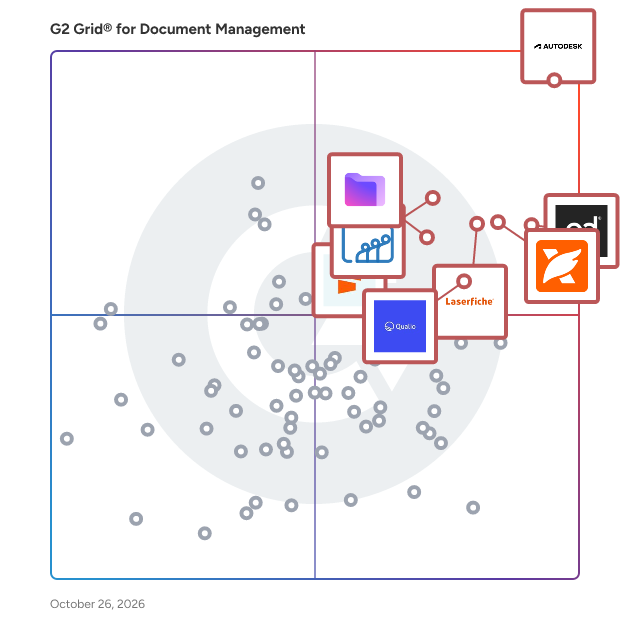
## G2 Grid® for Document Management Software
 ![G2 Grid® for Document Management Software plotting products by satisfaction and market presence](https://www.g2.com/categories/document-management/grids.png?focus%5B%5D=4036&focus%5B%5D=3066&focus%5B%5D=10856&focus%5B%5D=69702&focus%5B%5D=3093&focus%5B%5D=1486323&focus%5B%5D=4969&focus%5B%5D=1450270)

Highlighted products: PandaDoc, Laserfiche, Foxit PDF Editor, Zoho WorkDrive, Seismic Enablement Cloud, Proton Drive For Business, M-Files, and Signify.

Underlying data: [Grid® JSON](https://www.g2.com/categories/document-management/grids.json?focus%5B%5D=pandadoc&focus%5B%5D=laserfiche&focus%5B%5D=foxit-pdf-editor&focus%5B%5D=zoho-workdrive&focus%5B%5D=seismic-enablement-cloud&focus%5B%5D=proton-drive-for-business&focus%5B%5D=m-files&focus%5B%5D=signify-signify)

**Sponsored**

### altaFlow

altaFlow generates custom docs with a click, integrates eSignatures, creates webforms, and more without coding. It’s the ultimate tool to simplify, automate, and elevate your workflows.

[Visit website](https://www.g2.com/external_clickthroughs/record?secure%5Bad_program%5D=ppc&secure%5Bad_slot%5D=category_product_list_llm&secure%5Bcategory_id%5D=1005458&secure%5Bchosen_at%5D=2026-08-19T18%3A14%3A31Z&secure%5Bdisplayable_resource_id%5D=1005458&secure%5Bdisplayable_resource_type%5D=Category&secure%5Bmedium%5D=sponsored&secure%5Bplacement_reason%5D=page_category&secure%5Bplacement_resource_ids%5D%5B%5D=1005458&secure%5Bprioritized%5D=false&secure%5Bproduct_id%5D=116146&secure%5Bresource_id%5D=1005458&secure%5Bresource_type%5D=Category&secure%5Bsource_type%5D=category_page&secure%5Bsource_url%5D=https%3A%2F%2Fwww.g2.com%2Fcategories%2Fdocument-management&secure%5Btoken%5D=ecf0f17af11d0d70e43d8c6658d47bcb3dcd391a44dbd2163fa4dc84c80b514c&secure%5Burl%5D=https%3A%2F%2Faltaflow.com%2Fg2-demo%2F%3Futm_source%3Dg2%26utm_medium%3Dppc%26utm_campaign%3Dg2clicks&secure%5Burl_type%5D=book_demo)

### [PandaDoc](https://www.g2.com/es/products/pandadoc/reviews)

PandaDoc es una plataforma de gestión de documentos todo en uno en la que confían más de 68,000 equipos de ventas, legales y de operaciones para crear, enviar, firmar electrónicamente y gestionar documentos más rápido y con menos trabajo manual. Los equipos que utilizan PandaDoc cierran acuerdos un 30% más rápido y reducen el tiempo de respuesta de documentos hasta en un 50%. Clientes como Autodesk, Rakuten y Sysco utilizan PandaDoc para optimizar todo su proceso de documentos, desde la propuesta hasta el contrato firmado, y todo lo demás. PandaDoc ayuda a tu equipo a: - Crear y enviar propuestas, contratos y acuerdos profesionales utilizando plantillas personalizables y un editor de arrastrar y soltar - Recoger firmas electrónicas legalmente vinculantes desde cualquier dispositivo, en cualquier lugar, sin necesidad de imprimir, escanear o retrasos - Colaborar en tiempo real con partes interesadas internas y firmantes externos simultáneamente - Automatizar tareas repetitivas de documentos para que los representantes y equipos de operaciones pasen menos tiempo en tareas administrativas y más tiempo cerrando acuerdos - Rastrear el rendimiento de los documentos con análisis que muestran cómo los destinatarios interactúan con cada página PandaDoc se integra de forma nativa con las herramientas que tu equipo ya utiliza, incluyendo Salesforce, HubSpot, Pipedrive, Stripe y más de 30 otras plataformas CRM y de pago, manteniendo los procesos de documentos dentro de tu pila existente sin añadir fricción o inicios de sesión adicionales. Ya sea que estés en ventas, legal, recursos humanos o finanzas, PandaDoc es especialmente popular entre las empresas en crecimiento que necesitan procesos de documentos de nivel empresarial sin la complejidad o el costo adicional. Desde el primer borrador hasta la aprobación final, PandaDoc centraliza todo el ciclo de vida del documento con el cumplimiento, la seguridad y la trazabilidad que tu equipo necesita para operar con confianza. PandaDoc también admite la notarización, la recolección de pagos y el análisis de documentos en una sola plataforma, reduciendo la necesidad de gestionar múltiples herramientas a lo largo de tu proceso de documentos.

**Average Rating:** 4.7/5.0

**Total Reviews:** 3,529

#### How Do G2 Users Rate PandaDoc?

- **¿Ha sido the product un buen socio para hacer negocios?:** 9.3/10 (Category avg: 8.7/10)
- **Facilidad de administración:** 9.1/10 (Category avg: 8.3/10)
- **Calidad del soporte:** 9.0/10 (Category avg: 8.5/10)
- **Facilidad de uso:** 9.2/10 (Category avg: 8.6/10)

#### Who Is the Company Behind PandaDoc?

- **Vendedor:** [PandaDoc](https://www.g2.com/es/sellers/pandadoc)
- **Sitio web de la empresa:** www.pandadoc.com
- **Año de fundación:** 2011
- **Ubicación de la sede:** San Francisco, CA
- **Twitter:** @pandadoc  
18,428 seguidores en Twitter
- **Página de LinkedIn®:** [www.linkedin.com](https://www.g2.com/es/external_clickthroughs/record?secure%5Bsource_type%5D=product_profile&secure%5Btoken%5D=40ca5f565283ec365ee9960a9ae5dd31d786fbaa6c410fe3d86b23a96392cfce&secure%5Burl%5D=https%3A%2F%2Fwww.linkedin.com%2Fcompany%2F2211704%2F&secure%5Burl_type%5D=linkedin_company_website)  
883 empleados en LinkedIn®

#### Who Uses This Product?

- **Who Uses This:** Director Ejecutivo, Propietario
- **Top Industries:** Software de Computadora, Marketing y publicidad
- **Company Size:** 68% Small, 26% Medium

#### What Do G2 Reviewers Say About PandaDoc?

_AI-generated summary from verified user reviews_

##### Pros

- Los usuarios elogian la **facilidad de uso** en PandaDoc, destacando su navegación y proceso de firma sin problemas.
- Los usuarios valoran la **gestión intuitiva de documentos** de PandaDoc, mejorando la eficiencia del flujo de trabajo con aprobaciones seguras y sin problemas.
- Los usuarios aprecian las **herramientas de edición intuitivas** de PandaDoc que mejoran la eficiencia del flujo de trabajo y agilizan la gestión de documentos.
- Los usuarios encuentran que PandaDoc es **extremadamente fácil de usar** , mejorando la eficiencia en la gestión de documentos y la obtención de firmas.
- A los usuarios les encanta la **simplicidad de las firmas electrónicas** en PandaDoc, haciendo que la firma de documentos sea sencilla para ambas partes.

##### Cons

- Los usuarios encuentran frustrantes las **características faltantes** como el control de expiración de documentos y las limitaciones de fusión de celdas en PandaDoc.
- Los usuarios encuentran PandaDoc **caro** , particularmente en lo que respecta a los costos por envíos de formularios en línea, lo que limita su practicidad para equipos pequeños.
- Los usuarios encuentran los **problemas de firma** desafiantes, destacando dificultades con las firmas personales y otras limitaciones de formato.
- Los usuarios tienen dificultades con la **edición difícil** , enfrentando problemas como saltarse secciones y limitaciones en los cambios en tiempo real durante la colaboración.
- Los usuarios encuentran **dificultad para editar** en PandaDoc, con desafíos en el formato de tablas y ajustes en documentos en vivo.

#### What Are Recent G2 Reviews of PandaDoc?

**["Propuestas directas y firma electrónica con PandaDoc"](https://www.g2.com/es/survey_responses/pandadoc-review-13324485)**

**Rating:** 5.0/5.0 stars

_— Muzammil M._

[Read full review](https://www.g2.com/es/survey_responses/pandadoc-review-13324485)

**["Interfaz limpia, incorporación fluida y AI útil con gran integración de Zendesk"](https://www.g2.com/es/survey_responses/pandadoc-review-13322211)**

**Rating:** 4.5/5.0 stars

_— Faizan Aslam B._

[Read full review](https://www.g2.com/es/survey_responses/pandadoc-review-13322211)

#### What Are G2 Users Discussing About PandaDoc?

- [¿Cuáles son las formas innovadoras en que se está utilizando PandaDoc para agilizar la gestión de documentos y la automatización del flujo de trabajo?](https://www.g2.com/es/discussions/what-are-the-innovative-ways-pandadoc-is-being-used-to-streamline-document-management-and-workflow-automation) - 2 comments
- [¿Para qué se utiliza PandaDoc?](https://www.g2.com/es/discussions/what-is-pandadoc-used-for) - 4 comments
- [¿Qué es PandaDoc com?](https://www.g2.com/es/discussions/what-is-pandadoc-com) - 3 comments
- [¿Cuánto cuesta PandaDoc?](https://www.g2.com/es/discussions/how-much-does-pandadoc-cost) - 2 comments
- [¿Es realmente gratuito PandaDoc?](https://www.g2.com/es/discussions/is-pandadoc-really-free) - 3 comments

### [Laserfiche](https://www.g2.com/products/laserfiche/reviews)

Get work done faster with Laserfiche, the leading SaaS provider of AI-powered document management and process automation. Through powerful workflows, electronic forms, document management and analytics, Laserfiche accelerates processes across the enterprise. ✓ Organize Your Content with AI-Powered Document Management Optimize your operations and increase team productivity with AI-powered document management. Centralize your content, improve collaboration and maintain audit trails to support compliance needs. ✓ Boost Your Productivity with Intelligent Automation Increase efficiency by automating tasks with low-code process automation and prebuilt solution templates. Work smarter and shift your team’s focus to higher priority strategic goals. ✓ Unify Your Systems with Powerful Integrations Laserfiche is the backbone connecting hundreds of mission-critical applications. Users can access relevant documents from a single location, eliminating the need to search across multiple platforms. ✓ Elevate Your Work with Laserfiche AI Laserfiche AI enables organizations to simplify their work, take control of processes and supercharge productivity — all without losing sight of critical data privacy and security standards.

**Average Rating:** 4.7/5.0

**Total Reviews:** 1,206

#### How Do G2 Users Rate Laserfiche?

- **Has the product been a good partner in doing business?:** 9.2/10 (Category avg: 8.7/10)
- **Ease of Admin:** 8.5/10 (Category avg: 8.3/10)
- **Quality of Support:** 9.0/10 (Category avg: 8.5/10)
- **Ease of Use:** 8.8/10 (Category avg: 8.6/10)

#### Who Is the Company Behind Laserfiche?

- **Seller:** [Laserfiche](https://www.g2.com/sellers/laserfiche)
- **Company Website:** www.laserfiche.com
- **Year Founded:** 1976
- **HQ Location:** Long Beach, California
- **Twitter:** @laserfiche  
4,770 Twitter followers
- **LinkedIn® Page:** [www.linkedin.com](https://www.g2.com/external_clickthroughs/record?secure%5Bsource_type%5D=product_profile&secure%5Btoken%5D=73bed4680cf027c93c3e96a2669556fc76539bf00149ec891c43b43c7a910711&secure%5Burl%5D=https%3A%2F%2Fwww.linkedin.com%2Fcompany%2F19414%2F&secure%5Burl_type%5D=linkedin_company_website)  
403 employees on LinkedIn®

#### Who Uses This Product?

- **Who Uses This:** Deputy City Clerk, Business Systems Analyst
- **Top Industries:** Government Administration, Education Management
- **Company Size:** 60% Medium, 25% Large

#### What Do G2 Reviewers Say About Laserfiche?

_AI-generated summary from verified user reviews_

##### Pros

- Users find Laserfiche's **ease of use** empowering, enabling self-service implementation and efficient process management.
- Users value the **easy process automation** with Laserfiche, enhancing efficiency and reducing errors across departments.
- Users appreciate the **automation of form processes** with Laserfiche, enhancing efficiency and document management.
- Users value the **robust and flexible workflow automation** in Laserfiche, enhancing efficiency and integration with other systems.
- Users commend the **easy training and onboarding** capabilities of Laserfiche, enhancing team efficiency and document management.

##### Cons

- Users experience a **challenging learning curve** with Laserfiche, making initial navigation and feature usage difficult.
- Users experience a **small learning difficulty** with Laserfiche, particularly when adapting to metadata fields and workflows.
- Users find the **missing features** in Laserfiche hinder their experience and highlight the need for better resources.
- Users express concern over **update issues** , highlighting difficulty in keeping up with the rapid growth of Laserfiche.
- Users feel the **limited functionality** of Laserfiche restricts basic process structuring and complicates user experiences.

#### What Are Recent G2 Reviews of Laserfiche?

**["Document Management and Automation"](https://www.g2.com/survey_responses/laserfiche-review-3536890)**

**Rating:** 4.5/5.0 stars

_— Matthew D._

[Read full review](https://www.g2.com/survey_responses/laserfiche-review-3536890)

**["Robust and Reliable"](https://www.g2.com/survey_responses/laserfiche-review-10968098)**

**Rating:** 4.5/5.0 stars

_— Holly V._

[Read full review](https://www.g2.com/survey_responses/laserfiche-review-10968098)

#### What Are G2 Users Discussing About Laserfiche?

- [What is Laserfiche used for?](https://www.g2.com/discussions/what-is-laserfiche-used-for)
- [What is document imaging software?](https://www.g2.com/discussions/what-is-document-imaging-software) - 1 upvote
- [How much is laserfiche?](https://www.g2.com/discussions/how-much-is-laserfiche)
- [What is Laserfiche software?](https://www.g2.com/discussions/what-is-laserfiche-software) - 2 comments

### [Foxit PDF Editor](https://www.g2.com/products/foxit-pdf-editor/reviews)

Founded in 2001, Foxit is a leading provider of innovative PDF and eSignature products and services, helping knowledge workers increase productivity and do more with documents. Foxit combines easy-to-use desktop software, mobile apps, and cloud services in one powerful solution: The Foxit PDF Editor. This intelligent document solution allows users to create, edit, fill, and sign documents through their integrated PDF Editor and eSign offerings – from anywhere and on any device. Most editing tools focus only on creating and modifying documents, leaving storage, organization, and control to other systems. Foxit Document Management System (DMS) is included in Foxit PDF Editor, so every document is securely stored, organized, governed, and connected from the moment it's edited. As the first to market with AI-powered PDF editing solutions, Foxit enhances productivity with smart document editing and workflow automation. Winner of numerous awards, Foxit has over 700 million users and has sold to over 528,000 customers, ranging from SMBs to global enterprises worldwide. Foxit products are ISO 32000-1/PDF 1.7 standard compliant, therefore, compatible with your existing PDF documents and forms.

**Average Rating:** 4.6/5.0

**Total Reviews:** 3,475

#### How Do G2 Users Rate Foxit PDF Editor?

- **Has the product been a good partner in doing business?:** 9.0/10 (Category avg: 8.7/10)
- **Ease of Admin:** 8.9/10 (Category avg: 8.3/10)
- **Quality of Support:** 8.9/10 (Category avg: 8.5/10)
- **Ease of Use:** 9.0/10 (Category avg: 8.6/10)

#### Who Is the Company Behind Foxit PDF Editor?

- **Seller:** [Foxit](https://www.g2.com/sellers/foxit)
- **Company Website:** www.foxit.com
- **Year Founded:** 2001
- **HQ Location:** Fremont, CA
- **Twitter:** @foxitsoftware  
6,226 Twitter followers
- **LinkedIn® Page:** [www.linkedin.com](https://www.g2.com/external_clickthroughs/record?secure%5Bsource_type%5D=product_profile&secure%5Btoken%5D=610d6941f2244e95329cdaa84eafed4ffb9648ec08f60f59ad84b7a5e1c18fe0&secure%5Burl%5D=https%3A%2F%2Fwww.linkedin.com%2Fcompany%2Ffoxit-corporation%2F&secure%5Burl_type%5D=linkedin_company_website)  
569 employees on LinkedIn®

#### Who Uses This Product?

- **Who Uses This:** Owner, President
- **Top Industries:** Construction, Accounting
- **Company Size:** 63% Small, 24% Medium

#### What Do G2 Reviewers Say About Foxit PDF Editor?

_AI-generated summary from verified user reviews_

##### Pros

- Users appreciate the **ease of use** of Foxit PDF Editor, highlighting its intuitive interface and quick setup process.
- Users appreciate the **intuitive and user-friendly interface** of Foxit PDF Editor, enhancing their editing experience significantly.
- Users love the **easy editing** features of Foxit PDF Editor, enhancing their workflow with intuitive and efficient tools.
- Users commend Foxit PDF Editor for its **fast, lightweight, and easy-to-use interface** , enhancing productivity in PDF management.
- Users appreciate the **user-friendly interface** of Foxit PDF Editor, enhancing their editing experience with powerful tools and ease of use.

##### Cons

- Users find the **learning curve steep** , especially for newcomers, due to advanced features being hard to discover.
- Users find the **difficulty in discovering advanced features** and initial setup frustrating, impacting their overall experience.
- Users find the **pricing concerns** of Foxit PDF Editor to be a significant drawback, especially for beginners.
- Users find **missing features** in Foxit PDF Editor, particularly in the free version and Mac compatibility.
- Users find the **limited features** of Foxit PDF Editor restrict its usability without a paid subscription.

#### What Are Recent G2 Reviews of Foxit PDF Editor?

**["Comprehensive PDF Management in One Place"](https://www.g2.com/survey_responses/foxit-pdf-editor-review-13327962)**

**Rating:** 5.0/5.0 stars

_— James B._

[Read full review](https://www.g2.com/survey_responses/foxit-pdf-editor-review-13327962)

**["Fast, Feature-Rich, and Cost-Effective PDF Editing with Strong Enterprise Security"](https://www.g2.com/survey_responses/foxit-pdf-editor-review-13272918)**

**Rating:** 5.0/5.0 stars

_— Nina S._

[Read full review](https://www.g2.com/survey_responses/foxit-pdf-editor-review-13272918)

#### What Are G2 Users Discussing About Foxit PDF Editor?

- [How does the Foxit PDF Editor Suite stand out in terms of features and usability for professional PDF management?](https://www.g2.com/discussions/how-does-the-foxit-pdf-editor-suite-stand-out-in-terms-of-features-and-usability-for-professional-pdf-management) - 3 comments, 3 upvotes
- [What is Foxit PDF Editor used for?](https://www.g2.com/discussions/what-is-foxit-pdf-editor-used-for) - 2 comments, 2 upvotes
- [Is Foxit Phantom PDF free?](https://www.g2.com/discussions/is-foxit-phantom-pdf-free) - 4 comments, 1 upvote
- [How do I use Foxit PhantomPDF?](https://www.g2.com/discussions/how-do-i-use-foxit-phantompdf) - 1 comment
- [What is Foxit PhantomPDF standard?](https://www.g2.com/discussions/what-is-foxit-phantompdf-standard) - 3 comments

### [Zoho WorkDrive](https://www.g2.com/products/zoho-workdrive/reviews)

Zoho Docs is now Zoho WorkDrive! Launched in 2019 as the successor to Zoho Docs, Zoho WorkDrive is a robust content management platform trusted by over 1 million businesses worldwide. Built for modern teams, small businesses, and enterprises, it provides secure file storage, seamless collaboration, and powerful automation features. With detailed access stats, mobile apps for Android and iOS, and a desktop sync application, WorkDrive empowers teams to work efficiently from anywhere, anytime.

**Average Rating:** 4.4/5.0

**Total Reviews:** 696

#### How Do G2 Users Rate Zoho WorkDrive?

- **Has the product been a good partner in doing business?:** 8.8/10 (Category avg: 8.7/10)
- **Ease of Admin:** 8.7/10 (Category avg: 8.3/10)
- **Quality of Support:** 8.7/10 (Category avg: 8.5/10)
- **Ease of Use:** 9.1/10 (Category avg: 8.6/10)

#### Who Is the Company Behind Zoho WorkDrive?

- **Seller:** [Zoho](https://www.g2.com/sellers/zoho-b00ca9d5-bca8-41b5-a8ad-275480841704)
- **Year Founded:** 1996
- **HQ Location:** Austin, TX
- **Twitter:** @Zoho  
137,880 Twitter followers
- **LinkedIn® Page:** [www.linkedin.com](https://www.g2.com/external_clickthroughs/record?secure%5Bsource_type%5D=product_profile&secure%5Btoken%5D=9c8e45ddb296c32c6c5597ef9ba945c94562c57624f7bd1dcf1a9e9931f71578&secure%5Burl%5D=https%3A%2F%2Fwww.linkedin.com%2Fcompany%2F38373%2F&secure%5Burl_type%5D=linkedin_company_website)  
30,766 employees on LinkedIn®
- **Phone:** +1 (888) 900-9646 

#### Who Uses This Product?

- **Who Uses This:** Software Engineer, Owner
- **Top Industries:** Information Technology and Services, Computer Software
- **Company Size:** 51% Small, 35% Medium

#### What Do G2 Reviewers Say About Zoho WorkDrive?

_AI-generated summary from verified user reviews_

##### Pros

- Users praise the **easy-to-use interface** of Zoho WorkDrive, enhancing organization and collaboration without confusion.
- Users value the **effective team collaboration** features of Zoho WorkDrive, enhancing project organization and real-time teamwork.
- Users appreciate the **real-time collaboration** features of Zoho WorkDrive, enhancing teamwork and productivity effortlessly.
- Users value the **real-time collaboration** feature in Zoho WorkDrive, enhancing team communication and workflow efficiency.
- Users value the **seamless integration** of Zoho WorkDrive across devices and apps, streamlining collaboration and organization.

##### Cons

- Users experience **slow file syncing** with Zoho WorkDrive, especially for larger files, which can hinder productivity under tight deadlines.
- Users experience **slow performance** with Zoho WorkDrive, impacting navigation, syncing, and collaboration on large projects.
- Users experience **syncing issues** that can slow down workflow, especially when managing large files under tight deadlines.
- Users note the **missing features** in Zoho WorkDrive, particularly compared to more integrated solutions like SharePoint.
- Users experience **performance issues** with slow file syncing and poor mobile app quality, affecting overall usability.

#### What Are Recent G2 Reviews of Zoho WorkDrive?

**["5-STAR"](https://www.g2.com/survey_responses/zoho-workdrive-review-5411924)**

**Rating:** 5.0/5.0 stars

_— Amber D._

[Read full review](https://www.g2.com/survey_responses/zoho-workdrive-review-5411924)

**["Team Folders, Real-Time Collaboration, and Granular Permissions Done Right"](https://www.g2.com/survey_responses/zoho-workdrive-review-13173430)**

**Rating:** 4.5/5.0 stars

_— Bilal M._

[Read full review](https://www.g2.com/survey_responses/zoho-workdrive-review-13173430)

#### What Are G2 Users Discussing About Zoho WorkDrive?

- [What is Zoho Docs used for?](https://www.g2.com/discussions/what-is-zoho-docs-used-for) - 2 comments, 2 upvotes
- [What is Zoho platform?](https://www.g2.com/discussions/zoho-docs-what-is-zoho-platform) - 3 comments, 1 upvote
- [Is WorkDrive free?](https://www.g2.com/discussions/is-workdrive-free) - 2 comments
- [How do I use Zoho documents?](https://www.g2.com/discussions/how-do-i-use-zoho-documents) - 1 comment
- [Is Zoho WorkDrive secure?](https://www.g2.com/discussions/is-zoho-workdrive-secure) - 2 comments

### [Seismic Enablement Cloud](https://www.g2.com/es/products/seismic-enablement-cloud/reviews)

Seismic es el líder global en habilitación impulsada por IA, empoderando a los líderes de mercado para impulsar el crecimiento estratégico y ofrecer experiencias excepcionales al cliente a gran escala. La Seismic Enablement Cloud™ es la única plataforma unificada impulsada por IA que prepara a los equipos de cara al cliente con las habilidades, contenido, herramientas e información necesarias para maximizar cada interacción con el comprador y fortalecer las relaciones con los clientes. Las soluciones de contenido de Seismic ayudan a los equipos de ingresos a encontrar, personalizar y entregar activos de alto impacto y conformes que aceleran el compromiso del comprador y generan resultados a gran escala. Con la confianza de aproximadamente 2,000 organizaciones en todo el mundo, Seismic ayuda a las empresas a lograr resultados medibles y acelerar el crecimiento de los ingresos. Seismic tiene su sede en San Diego con oficinas en toda América del Norte, Europa, Asia y Australia. Aprende más en seismic.com. Para obtener más información, visita Seismic.com y síguenos en LinkedIn, Twitter e Instagram.

**Average Rating:** 4.6/5.0

**Total Reviews:** 1,757

#### How Do G2 Users Rate Seismic Enablement Cloud?

- **¿Ha sido the product un buen socio para hacer negocios?:** 9.1/10 (Category avg: 8.7/10)
- **Facilidad de administración:** 8.1/10 (Category avg: 8.3/10)
- **Calidad del soporte:** 9.1/10 (Category avg: 8.5/10)
- **Facilidad de uso:** 8.9/10 (Category avg: 8.6/10)

#### Who Is the Company Behind Seismic Enablement Cloud?

- **Vendedor:** [Seismic](https://www.g2.com/es/sellers/seismic)
- **Año de fundación:** 2010
- **Ubicación de la sede:** San Diego, CA
- **Twitter:** @SeismicSoftware  
3,806 seguidores en Twitter
- **Página de LinkedIn®:** [www.linkedin.com](https://www.g2.com/es/external_clickthroughs/record?secure%5Bsource_type%5D=product_profile&secure%5Btoken%5D=f738b9a1780c9066087c801cb734ca6b9df466f165a5c544b61396d7fa75c583&secure%5Burl%5D=https%3A%2F%2Fwww.linkedin.com%2Fcompany%2F2746866%2F&secure%5Burl_type%5D=linkedin_company_website)  
1,329 empleados en LinkedIn®

#### Who Uses This Product?

- **Who Uses This:** Ejecutivo de Cuentas, Gerente de Cuentas
- **Top Industries:** Software de Computadora, Tecnología de la información y servicios
- **Company Size:** 57% Large, 30% Medium

#### What Do G2 Reviewers Say About Seismic Enablement Cloud?

_AI-generated summary from verified user reviews_

##### Pros

- Los usuarios valoran la **facilidad de uso** de Seismic Enablement Cloud, facilitando el acceso a contenido y recursos esenciales.
- Los usuarios valoran las capacidades de **compartir fácilmente** de Seismic, mejorando la accesibilidad al contenido y la colaboración con los clientes de manera efectiva.
- Los usuarios valoran la **facilidad de compartir y rastrear documentos** con Seismic, mejorando la colaboración y la consistencia de la marca.
- Los usuarios destacan la **utilidad** de Seismic Enablement Cloud, señalando su eficiencia para acceder y compartir contenido sin problemas.
- Los usuarios valoran la **fuente central de verdad** proporcionada por Seismic Enablement Cloud, mejorando la eficiencia y el acceso a contenido actualizado.

##### Cons

- Los usuarios encuentran **difícil la navegación** debido a la desorganización y problemas con la carga lenta y la funcionalidad de búsqueda limitada.
- Los usuarios encuentran la interfaz **no intuitiva** , ya que crear informes personalizados y diapositivas de presentación puede ser frustrante.
- Los usuarios experimentan un **proceso de búsqueda de documentos confuso** en Seismic, lo que complica el acceso a la información necesaria.
- Los usuarios enfrentan una **curva de aprendizaje pronunciada** con Seismic Enablement Cloud debido a sus numerosas funciones y navegación compleja.
- Los usuarios tienen dificultades con **una funcionalidad de búsqueda deficiente** , lo que lleva a problemas para encontrar información específica y navegar por la plataforma.

#### What Are Recent G2 Reviews of Seismic Enablement Cloud?

**["Gestión de Activos de Marketing Simplificada con UX Fácil"](https://www.g2.com/es/survey_responses/seismic-enablement-cloud-review-13223923)**

**Rating:** 5.0/5.0 stars

_— Kyle A._

[Read full review](https://www.g2.com/es/survey_responses/seismic-enablement-cloud-review-13223923)

**["Seismic hace que el contenido de ventas sea fácil, profesional y listo para el campo."](https://www.g2.com/es/survey_responses/seismic-enablement-cloud-review-12639441)**

**Rating:** 5.0/5.0 stars

_— Rachel C._

[Read full review](https://www.g2.com/es/survey_responses/seismic-enablement-cloud-review-12639441)

#### What Are G2 Users Discussing About Seismic Enablement Cloud?

- [¿Cómo utilizo eficazmente las funciones de personalización de contenido de Seismic para el habilitamiento de ventas?](https://www.g2.com/es/discussions/how-do-i-utilize-seismic-s-content-personalization-features-effectively-for-sales-enablement)
- [¿Para qué se utiliza Seismic?](https://www.g2.com/es/discussions/what-is-seismic-used-for)
- [Who owns seismic software?](https://www.g2.com/es/discussions/who-owns-seismic-software)
- [What is seismic sales enablement?](https://www.g2.com/es/discussions/what-is-seismic-sales-enablement)
- [¿Cuánto cuesta el sísmico?](https://www.g2.com/es/discussions/how-much-does-seismic-cost) - 3 comments

### [Proton Drive For Business](https://www.g2.com/products/proton-drive-for-business/reviews)

Proton Drive for Business is a secure cloud storage and collaboration solution specifically designed to assist small and medium-sized businesses (SMBs) in safely storing, sharing, and managing their files and documents. This platform prioritizes privacy and security, employing robust encryption methods to protect sensitive business data. By ensuring that only authorized users can access files, Proton Drive for Business also helps organizations comply with various data protection regulations, making it an essential tool for businesses that handle confidential information. The target audience for Proton Drive for Business includes SMBs that require stringent safeguards for client data, intellectual property, and operational documents while facilitating seamless team collaboration. Typical use cases encompass securely storing business files, sharing documents with internal teams or external partners, and enabling real-time editing of documents and spreadsheets. The platform’s central administrative interface allows for effective management of access controls and compliance measures, ensuring that businesses can operate securely and efficiently. Key features of Proton Drive for Business include end-to-end encrypted cloud storage, which ensures that files are encrypted on the user’s device before being uploaded, with only authorized users able to access them. This level of security means that even Proton cannot decrypt customer files, providing an added layer of privacy. The solution also supports regulatory compliance with international standards such as ISO 27001, GDPR, HIPAA, and CCPA, making it particularly valuable for SMBs operating in regulated industries. Additionally, data stored in Proton Drive benefits from Swiss legal protections, which offer stronger safeguards against surveillance and unauthorized access compared to many other jurisdictions. Collaboration and sharing features are integral to Proton Drive for Business, allowing users to share files securely via encrypted links or email invites. Users can set passwords, expiration dates, and revoke access at any time, ensuring flexibility in file sharing. The platform also supports real-time collaboration, enabling teams to work together on documents and spreadsheets with synchronized updates. Features such as file versioning and recovery further enhance business continuity by allowing users to track changes and restore previous versions of files, mitigating risks associated with accidental alterations or data loss. For administrators, Proton Drive for Business offers a centralized panel for managing users, permissions, and storage limits, along with monitoring sharing activity. The solution supports multi-user environments and allows for the implementation of security policies, including two-factor authentication (2FA) and hardware security keys. This comprehensive approach to security and management positions Proton Drive for Business as a privacy-centric alternative to mainstream cloud services, ensuring that business data remains accessible only to authorized personnel while integrating essential compliance features for SMBs in regulated environments.

**Average Rating:** 4.5/5.0

**Total Reviews:** 163

#### How Do G2 Users Rate Proton Drive For Business?

- **Has the product been a good partner in doing business?:** 8.5/10 (Category avg: 8.7/10)
- **Ease of Admin:** 8.5/10 (Category avg: 8.3/10)
- **Quality of Support:** 9.0/10 (Category avg: 8.5/10)
- **Ease of Use:** 8.8/10 (Category avg: 8.6/10)

#### Who Is the Company Behind Proton Drive For Business?

- **Seller:** [Proton AG](https://www.g2.com/sellers/proton-ag)
- **Company Website:** proton.me
- **Year Founded:** 2014
- **HQ Location:** Plan-les-Ouates, Geneva, Switzerland
- **Twitter:** @ProtonPrivacy  
363,085 Twitter followers
- **LinkedIn® Page:** [www.linkedin.com](https://www.g2.com/external_clickthroughs/record?secure%5Bsource_type%5D=product_profile&secure%5Btoken%5D=92948f519afe359fc802f51bd239ef545f6a6fd03182fbabb603dea73f1185db&secure%5Burl%5D=https%3A%2F%2Fwww.linkedin.com%2Fcompany%2Fprotonprivacy%2F&secure%5Burl_type%5D=linkedin_company_website)  
894 employees on LinkedIn®

#### Who Uses This Product?

- **Who Uses This:** Owner
- **Top Industries:** Information Technology and Services, Mental Health Care
- **Company Size:** 14% Small, 2% Medium

#### What Do G2 Reviewers Say About Proton Drive For Business?

_AI-generated summary from verified user reviews_

##### Pros

- Users value Proton Drive for Business as a **trustworthy cloud storage solution** for secure data management.
- Users value the **reliability** of Proton Drive for Business, trusting it to securely store their data.
- Users value the **reliable storage solutions** of Proton Drive For Business for secure data management.

##### Cons

- Users are frustrated by the **lack of a native Linux client** for syncing data, hoping for future improvements.
- Users struggle with **syncing issues** on Proton Drive for Business due to the lack of a native Linux client.

#### What Are Recent G2 Reviews of Proton Drive For Business?

**["An online storage solution that is secured within an environment focused on safety"](https://www.g2.com/survey_responses/proton-drive-for-business-review-12801679)**

**Rating:** 5.0/5.0 stars

_— B A R._

[Read full review](https://www.g2.com/survey_responses/proton-drive-for-business-review-12801679)

**["Flexible Large-File Sharing with Customizable Shareable Link Permissions"](https://www.g2.com/survey_responses/proton-drive-for-business-review-12801063)**

**Rating:** 4.5/5.0 stars

_— James B._

[Read full review](https://www.g2.com/survey_responses/proton-drive-for-business-review-12801063)

### [M-Files](https://www.g2.com/products/m-files/reviews)

M-Files delivers Context-First Document Management with an AI-native, metadata-driven architecture that eliminates information chaos and improves productivity across the document lifecycle. By linking documents to the people, processes, clients, and projects that give them meaning, M-Files creates a unified, connected environment that accelerates decision-making, strengthens governance, and streamlines industry-specific workflows through advanced workflow automation and AI. M-Files is also the only document management system that is native to Microsoft 365. This unified solution extends Microsoft collaboration, Copilot, and Purview capabilities to curated M-Files content, enabling stronger security, more consistent compliance, and more accurate AI outcomes grounded in trusted, contextualized information. Organizations gain a seamless, future-ready environment that maximizes ROI on their Microsoft investments while supporting smarter and more efficient work across the business. Schedule a Demo: https://bit.ly/3O1SCm0 Free Trial: https://bit.ly/4ehlAsV

**Average Rating:** 4.4/5.0

**Total Reviews:** 229

#### How Do G2 Users Rate M-Files?

- **Has the product been a good partner in doing business?:** 8.4/10 (Category avg: 8.7/10)
- **Ease of Admin:** 7.7/10 (Category avg: 8.3/10)
- **Quality of Support:** 8.5/10 (Category avg: 8.5/10)
- **Ease of Use:** 8.5/10 (Category avg: 8.6/10)

#### Who Is the Company Behind M-Files?

- **Seller:** [M-Files Corporation](https://www.g2.com/sellers/m-files-corporation)
- **Year Founded:** 2002
- **HQ Location:** Austin, Texas
- **Twitter:** @M\_Files  
8,609 Twitter followers
- **LinkedIn® Page:** [www.linkedin.com](https://www.g2.com/external_clickthroughs/record?secure%5Bsource_type%5D=product_profile&secure%5Btoken%5D=593da3a7d693da8cb43e08b069463deed52adb53c614820473743ac2bc2811c3&secure%5Burl%5D=https%3A%2F%2Fwww.linkedin.com%2Fcompany%2F118361%2F&secure%5Burl_type%5D=linkedin_company_website)  
842 employees on LinkedIn®

#### Who Uses This Product?

- **Who Uses This:** Project Manager, Director
- **Top Industries:** Information Technology and Services, Computer Software
- **Company Size:** 48% Medium, 41% Small

#### What Do G2 Reviewers Say About M-Files?

_AI-generated summary from verified user reviews_

##### Pros

- Users love the **user-friendly interface** of M-Files, making document management simple and efficient for everyone.
- Users value the **effortless organization and collaboration** capabilities of M-Files, simplifying document management and access control.
- Users value the **easy access** to files anytime, benefiting from a central, secure storage and user-friendly interface.
- Users value the **efficient data management** capabilities of M-Files, enhancing organization and simplifying information retrieval significantly.
- Users value the **organization capabilities** of M-Files, making project management and document tracking effortless and efficient.

##### Cons

- Users find the **learning curve steep** for M-Files, requiring significant time and training for effective use.
- Users face **initial training challenges** with M-Files, requiring extra time to adapt to the platform's structure.
- Users report **slow performance** with M-Files, particularly during document retrieval and complex search operations.
- Users often experience **slow loading** times in M-Files, particularly during complex searches and document handling.
- Users find the **outdated UI and inconsistent features** of M-Files challenging, especially for new users.

#### What Are Recent G2 Reviews of M-Files?

**["Reliable Platform for Managing Documents and Content Workflows"](https://www.g2.com/survey_responses/m-files-review-12787325)**

**Rating:** 5.0/5.0 stars

_— Ishan S._

[Read full review](https://www.g2.com/survey_responses/m-files-review-12787325)

**["Good Metadata Driven Document Management And Requires Planning Up Front"](https://www.g2.com/survey_responses/m-files-review-12806906)**

**Rating:** 4.5/5.0 stars

_— Kaleem A._

[Read full review](https://www.g2.com/survey_responses/m-files-review-12806906)

#### What Are G2 Users Discussing About M-Files?

- [Is anyone else struggling with AI tagging and advanced workflows adding chaos instead of clarity?](https://www.g2.com/discussions/is-anyone-else-struggling-with-ai-tagging-and-advanced-workflows-adding-chaos-instead-of-clarity) - 1 comment, 1 upvote
- [How are you dealing with the older‑feeling desktop client and extra clicks in everyday work?](https://www.g2.com/discussions/how-are-you-dealing-with-the-older-feeling-desktop-client-and-extra-clicks-in-everyday-work) - 1 comment, 1 upvote
- [What are you doing to cope with slow performance on large data sets and in the cloud?](https://www.g2.com/discussions/what-are-you-doing-to-cope-with-slow-performance-on-large-data-sets-and-in-the-cloud) - 1 comment, 1 upvote
- [How are you helping new and non‑technical colleagues get over the M-Files learning curve?](https://www.g2.com/discussions/how-are-you-helping-new-and-non-technical-colleagues-get-over-the-m-files-learning-curve) - 1 comment, 1 upvote
- [Complex setup and constant metadata tweaks slow my rollout and ongoing work](https://www.g2.com/discussions/complex-setup-and-constant-metadata-tweaks-slow-my-rollout-and-ongoing-work) - 1 comment, 1 upvote

### [Signify](https://www.g2.com/products/signify-signify/reviews)

Signify is a digital contracting platform that helps teams manage, automate, and track documents in one place. From sending and signing to organizing and archiving, it supports the full document workflow. Signify combines e-signatures, workflow automation, a team workspace, and a searchable archive. Set signing order and recipient roles, assign documents to folders with team-based permissions, and use structured templates to keep processes consistent across the company. You can see exactly what’s signed, pending, or in progress - and who’s involved. Permissions are clear, templates are shared with built-in rules, and folder access is controlled by team roles. Over 4.5 million documents have been sent through Signify, with 80% finalized in under 24 hours. Signify is built to support both the people who manage documents and those who sign them - making the entire process simple and efficient.

**Average Rating:** 4.9/5.0

**Total Reviews:** 118

#### How Do G2 Users Rate Signify?

- **Has the product been a good partner in doing business?:** 10.0/10 (Category avg: 8.7/10)
- **Ease of Admin:** 9.9/10 (Category avg: 8.3/10)
- **Quality of Support:** 9.9/10 (Category avg: 8.5/10)
- **Ease of Use:** 9.9/10 (Category avg: 8.6/10)

#### Who Is the Company Behind Signify?

- **Seller:** [Signify](https://www.g2.com/sellers/signify-c43861d1-1c92-4424-a554-3f971f9cd66a)
- **Company Website:** signifyapp.com
- **Year Founded:** 2021
- **HQ Location:** Tbilisi, GE
- **LinkedIn® Page:** [www.linkedin.com](https://www.g2.com/external_clickthroughs/record?secure%5Bsource_type%5D=product_profile&secure%5Btoken%5D=63460aac46d2bd850efd7ec65c5c577df983d254582aa334265cd4aa710463d9&secure%5Burl%5D=https%3A%2F%2Fwww.linkedin.com%2Fcompany%2Fsignifyge%2F&secure%5Burl_type%5D=linkedin_company_website)  
36 employees on LinkedIn®

#### Who Uses This Product?

- **Who Uses This:** Lawyer
- **Top Industries:** Computer Software, Banking
- **Company Size:** 41% Medium, 33% Small

#### What Do G2 Reviewers Say About Signify?

_AI-generated summary from verified user reviews_

##### Pros

- Users appreciate the **ease of use** of Signify, highlighting its convenience and time-saving capabilities.
- Users find Signify to be a **time-saving tool** , enhancing workflow and simplifying document management processes.
- Users appreciate the **time-saving** benefits of Signify, enjoying its convenience and positive impact on nature.
- Users enjoy the **convenience** of Signify, appreciating its time-saving features and effective collaboration capabilities.
- Users highlight the **efficiency of digital signatures** , making signing documents easy and streamlining the approval process.

##### Cons

- Users find the **document visibility lacking** for recipients and struggle with the commenting process before rejecting documents.
- Users face **legal uncertainty** and system limitations with Signify, complicating the signing process and acceptance of documents.
- Users experience **slow loading times** , with delays in opening documents and navigating the interface affecting usability.
- Users experience **slow performance** , as operations like document opening and file deletion can lag significantly at times.
- Users find **difficult editing** of documents frustrating, wishing for easier in-upload modifications rather than re-uploading. 

#### What Are Recent G2 Reviews of Signify?

**["Makes Signing Documents Effortless"](https://www.g2.com/survey_responses/signify-review-13049888)**

**Rating:** 5.0/5.0 stars

_— George K._

[Read full review](https://www.g2.com/survey_responses/signify-review-13049888)

**["Accurate Document Tracking: See Exactly When Files Are Opened, Viewed, and Completed"](https://www.g2.com/survey_responses/signify-review-13049710)**

**Rating:** 5.0/5.0 stars

_— Ramazi B._

[Read full review](https://www.g2.com/survey_responses/signify-review-13049710)

### [Conga Composer](https://www.g2.com/products/conga-composer/reviews)

Flexible. Scalable. Embedded. Conga Composer transforms how businesses generate documents Disconnected systems and manual workflows make document generation slow, error-prone, and costly. Conga Composer streamlines this by embedding automated document creation into your existing tools. It supports multiple formats, merges data from any source, and scales effortlessly, empowering teams to deliver accurate, beautifully branded documents faster, with less effort and greater control. Conga Composer excels in document generation with key advantages: Launch Anywhere – Trigger document generation from buttons, flows, Apex, or external systems- no custom code needed. Multi-Format Support – Create Word, PDF, Excel, PowerPoint, and HTML email templates. Dynamic Content – Use conditional logic, charts, dashboards, rich text, and global currencies. High-Volume Ready – Supports large templates (25MB), merged outputs (250MB), and batch processing. Enterprise Scalability – Reusable templates and behaviors across departments and use cases. eSignature Integration – Seamless pairing with Conga Sign for end-to-end agreement workflows. Revenue Lifecycle Alignment – Only vendor that integrates doc gen into CLM, CPQ, and full revenue processes. Admin-Friendly Setup – Built for Salesforce admins and business users—no developer dependency. Proven Performance – Trusted by 8,000+ businesses; millions of documents generated monthly. Future-Ready – Monitoring AI trends to invest when enterprise-grade reliability is guaranteed. With these strengths, Conga Composer delivers a scalable, flexible, and automated solution for efficient document generation.

**Average Rating:** 4.4/5.0

**Total Reviews:** 847

#### How Do G2 Users Rate Conga Composer?

- **Has the product been a good partner in doing business?:** 8.7/10 (Category avg: 8.7/10)
- **Ease of Admin:** 8.1/10 (Category avg: 8.3/10)
- **Quality of Support:** 8.7/10 (Category avg: 8.5/10)
- **Ease of Use:** 8.3/10 (Category avg: 8.6/10)

#### Who Is the Company Behind Conga Composer?

- **Seller:** [Conga](https://www.g2.com/sellers/conga)
- **Company Website:** conga.com
- **Year Founded:** 2006
- **HQ Location:** 3200 Kirby Dr., Suite 500, Houston, TX 77098
- **LinkedIn® Page:** [www.linkedin.com](https://www.g2.com/external_clickthroughs/record?secure%5Bsource_type%5D=product_profile&secure%5Btoken%5D=7394444244195361ceb6e2c02dab0bcbd6dc18af653f4d3d5966325dbbbf9629&secure%5Burl%5D=https%3A%2F%2Fwww.linkedin.com%2Fcompany%2Fconga%2F&secure%5Burl_type%5D=linkedin_company_website)  
2,116 employees on LinkedIn®
- **Phone:** (303) 465-1616

#### Who Uses This Product?

- **Who Uses This:** Salesforce Administrator, Business Analyst
- **Top Industries:** Information Technology and Services, Computer Software
- **Company Size:** 47% Medium, 28% Large

#### What Do G2 Reviewers Say About Conga Composer?

_AI-generated summary from verified user reviews_

##### Pros

- Users value the **powerful API** of Conga Composer for efficient bulk document generation and seamless integration.
- Users value the **easy document customization** and excellent support from Conga Composer for efficient document management.
- Users value the **ease of use** of Conga Composer, finding it straightforward for document configuration and template launching.
- Users value the **time-saving capabilities** of Conga Composer, streamlining document creation and delivery processes effortlessly.
- Users value the **seamless integration with Salesforce** that enhances efficiency and reduces errors in document creation.

##### Cons

- Users find the **learning curve steep** , making it challenging to resolve issues independently, leading to frustration.
- Users find the **steep learning curve** of Conga Composer challenging, requiring time to master templates and queries.
- Users find the **difficult learning curve** and complex steps hinder their experience with Conga Composer.
- Users find that **tasks are time-consuming** due to the complex setup and steep learning curve of Conga Composer.
- Users face a **complex setup** for Conga Composer, making issue resolution tedious and time-consuming with many unresolved tickets.

#### What Are Recent G2 Reviews of Conga Composer?

**["Seamless Salesforce Integration with Outstanding Support"](https://www.g2.com/survey_responses/conga-composer-review-13109142)**

**Rating:** 5.0/5.0 stars

_— Verified User in Online Media_

[Read full review](https://www.g2.com/survey_responses/conga-composer-review-13109142)

**["Conga Composer and our needs."](https://www.g2.com/survey_responses/conga-composer-review-10027329)**

**Rating:** 5.0/5.0 stars

_— Verified User in Automotive_

[Read full review](https://www.g2.com/survey_responses/conga-composer-review-10027329)

#### What Are G2 Users Discussing About Conga Composer?

- [What is conga solution?](https://www.g2.com/discussions/what-is-conga-solution)
- [What is Conga Composer?](https://www.g2.com/discussions/what-is-conga-composer) - 3 comments
- [What does conga software do?](https://www.g2.com/discussions/what-does-conga-software-do)

### [Hudu](https://www.g2.com/products/hudu/reviews)

Hudu is a comprehensive IT documentation platform designed to help organizations streamline their operations and improve team efficiency. It provides a centralized hub for storing critical documentation—covering everything from systems, processes, and policies to credentials, SOPs, and asset records. With Hudu, teams can ensure that important information is always organized, easy to access, and kept up to date, making day-to-day work smoother and decision-making faster. While originally built for internal IT departments and MSPs, Hudu is flexible enough to support a wide range of industries, including finance, healthcare, education, and construction. Its structure can be tailored to fit the needs of any organization, whether you're managing internal infrastructure, supporting clients, or coordinating distributed teams. Teams can build custom asset layouts to track hardware, software, or industry-specific data. Knowledge base articles and SOPs support rich formatting, embedded content, and reusable templates to keep documentation consistent and easy to follow. Passwords and OTPs are stored securely with full access controls and history tracking for auditability and compliance. Hudu supports detailed permission management, so teams can control access at a granular level across departments, roles, or clients. It integrates with popular tools like Microsoft 365, ConnectWise, HaloPSA, NinjaOne, N-able, and many more to automatically sync key data and reduce manual entry. A browser extension and mobile app make it easy to access or update documentation on the go, whether in the office or the field. For more advanced workflows, Hudu offers a powerful API, allowing teams to automate documentation or integrate with internal systems. Organizations with strict security requirements can also choose to deploy Hudu on-premises with full control over their environment. With Hudu, teams can reduce onboarding time, cut down on repetitive questions, and ensure processes are followed consistently. It replaces scattered documentation with a centralized source of truth that’s easy to manage and scale. If your team depends on shared knowledge to operate efficiently, Hudu helps you keep it organized, accessible, and secure—no matter your industry or size.

**Average Rating:** 4.7/5.0

**Total Reviews:** 357

#### How Do G2 Users Rate Hudu?

- **Has the product been a good partner in doing business?:** 9.5/10 (Category avg: 8.7/10)
- **Ease of Admin:** 9.2/10 (Category avg: 8.3/10)
- **Quality of Support:** 9.2/10 (Category avg: 8.5/10)
- **Ease of Use:** 9.2/10 (Category avg: 8.6/10)

#### Who Is the Company Behind Hudu?

- **Seller:** [Hudu](https://www.g2.com/sellers/hudu)
- **Company Website:** hudu.com
- **Year Founded:** 2018
- **HQ Location:** Fort Collins, Colorado
- **Twitter:** @HuduHQ  
500 Twitter followers
- **LinkedIn® Page:** [www.linkedin.com](https://www.g2.com/external_clickthroughs/record?secure%5Bsource_type%5D=product_profile&secure%5Btoken%5D=bd7243ca000fd7ce62c7bef4ec50540123054ff52d1cbcfbf577ed4f6c2d53fb&secure%5Burl%5D=https%3A%2F%2Fwww.linkedin.com%2Fcompany%2Fhudu-technologies%2F&secure%5Burl_type%5D=linkedin_company_website)  
32 employees on LinkedIn®

#### Who Uses This Product?

- **Who Uses This:** Owner, Director
- **Top Industries:** Information Technology and Services, Computer & Network Security
- **Company Size:** 70% Small, 12% Medium

#### What Do G2 Reviewers Say About Hudu?

_AI-generated summary from verified user reviews_

##### Pros

- Users value the **clean and simple interface** of Hudu, enhancing usability and customization for their unique needs.
- Users appreciate the **intuitive interface and comprehensive features** of Hudu for organizing IT data efficiently.
- Users rave about Hudu's **seamless integrations** , making it easy to incorporate existing systems and enhancing daily operations.
- Users love the **easy setup** of Hudu, enabling quick customization and immediate access to documentation.
- Users appreciate the **clean and simple interface** of Hudu, making it easy to use and customize for their needs.

##### Cons

- Users find Hudu's **missing features** , such as a unified search bar and limited customization, affecting their overall experience.
- Users find the **poor integration** process challenging and desire additional options for improved efficiency.
- Users note that **UX improvement** is needed, especially in search, navigation, and overall interface design.
- Users are disappointed by Hudu's **limited features** , particularly regarding support for VPS providers and third-party integrations.
- Users face **integration issues** with Hudu, needing more support for third-party tools and a broader range of VPS options.

#### What Are Recent G2 Reviews of Hudu?

**["Self-Hosted Documentation with a Clean API and Flexible MSP Asset Modeling"](https://www.g2.com/survey_responses/hudu-review-12577291)**

**Rating:** 5.0/5.0 stars

_— Mark H._

[Read full review](https://www.g2.com/survey_responses/hudu-review-12577291)

**["Secure Self-Hosting, Great UI, and Seamless HaloPSA Integration"](https://www.g2.com/survey_responses/hudu-review-12997857)**

**Rating:** 5.0/5.0 stars

_— Anthony R._

[Read full review](https://www.g2.com/survey_responses/hudu-review-12997857)

#### What Are G2 Users Discussing About Hudu?

- [What is Hudu used for?](https://www.g2.com/discussions/what-is-hudu-used-for) - 1 comment

### [Nitro PDF](https://www.g2.com/products/nitro-pdf/reviews)

1. What is Nitro PDF? Nitro PDF is a full-featured PDF editor that enables you to create, edit, convert, sign, and secure PDF documents. It is designed for individuals, small businesses, and enterprises as a cost-effective alternative to Adobe Acrobat, combining powerful functionality with an intuitive interface that works across devices. 2. What are the main features of Nitro PDF? Nitro PDF is a comprehensive solution for creating, editing, and securing documents across Windows, Mac, iOS, and web browsers. It includes powerful AI productivity tools and is built with an intuitive interface mirroring the Microsoft Office and Apple toolbars. Key features of Nitro PDF include: • Core Editing: Tools to create, edit, convert, combine, and annotate PDFs, including advanced OCR and secure signing capabilities. • AI Smart Tools: Enhances productivity via smart data extraction, automated form creation, and intelligent document redaction. • Nitro Analytics: Real-time visibility into PDF usage, allowing organizations to measure productivity, prove ROI, and track sustainability. • Nitro Workspace: A centralized cloud hub for accessing PDF and eSign tools, AI assistants, and administration from any device. • Advanced Editing: Create PDFs from any file type and convert PDFs into editable Microsoft Word, Excel, and PowerPoint files while maintaining original layouts. • Powerful OCR (Optical Character Recognition): Turn scanned paper documents and images into fully searchable and editable PDFs with high-accuracy text recognition. Nitro PDF is available in multiple plans to suit different business needs. 3. What support options does Nitro offer? Whether you're a five-person team or a global enterprise, our dedicated support is available 24/7. • Human Support: Nitro offers dedicated customer support, including onboarding, training, and troubleshooting resources, to ensure a smooth experience for your team. • Knowledge Base and Guides: Access hundreds of detailed articles covering product features, integrations, workflows, and best practices. • Video Tutorials: Step-by-step walkthroughs and demonstrations to help you learn and master Nitro tools quickly. • Community Forum: Connect with other Nitro users, share feedback, ask questions, and discover tips and solutions. • Knowledge Assistant: A 24/7 in-app AI assistant providing instant, context-aware guidance on features, workflows, and troubleshooting. 4. Does Nitro PDF support integrations with other business tools? Yes. Nitro PDF integrates with software such as Microsoft Office suite, OneDrive, Dropbox, and other platforms. These integrations simplify document workflows and make it easy to create, edit, and share PDFs directly within your existing environment. 5. How does Nitro ensure document security and compliance? Nitro protects sensitive information with advanced encryption, password protection, granular access controls, and tamper-evident audit trails. Nitro's solutions are designed to meet enterprise and mid-market compliance requirements, including ISO 27001, SOC 2, HIPAA, GDPR, eIDAS, UETA, and the ESIGN Act.

**Average Rating:** 4.4/5.0

**Total Reviews:** 379

#### How Do G2 Users Rate Nitro PDF?

- **Has the product been a good partner in doing business?:** 8.9/10 (Category avg: 8.7/10)
- **Ease of Admin:** 8.9/10 (Category avg: 8.3/10)
- **Quality of Support:** 8.1/10 (Category avg: 8.5/10)
- **Ease of Use:** 8.8/10 (Category avg: 8.6/10)

#### Who Is the Company Behind Nitro PDF?

- **Seller:** [Nitro, Inc](https://www.g2.com/sellers/nitro-inc)
- **Company Website:** www.gonitro.com
- **Year Founded:** 2005
- **HQ Location:** San Francisco, CA
- **LinkedIn® Page:** [www.linkedin.com](https://www.g2.com/external_clickthroughs/record?secure%5Bsource_type%5D=product_profile&secure%5Btoken%5D=d01c65da607db4e8b2a8585c6d74d9c4387892c362d894342e9d06d5739654bd&secure%5Burl%5D=https%3A%2F%2Fwww.linkedin.com%2Fcompany%2Fgo-nitro%2F&secure%5Burl_type%5D=linkedin_company_website)  
371 employees on LinkedIn®

#### Who Uses This Product?

- **Who Uses This:** IT Manager
- **Top Industries:** Information Technology and Services, Construction
- **Company Size:** 47% Small, 35% Medium

#### What Do G2 Reviewers Say About Nitro PDF?

_AI-generated summary from verified user reviews_

##### Pros

- Users find Nitro PDF's **ease of use** remarkable, appreciating its intuitive interface and minimal learning curve.
- Users love the **easy editing** features of Nitro PDF, ensuring quick and accurate document management for all skill levels.
- Users praise Nitro PDF for its **exceptional security features** and comprehensive editing tools, enhancing overall productivity.
- Users appreciate the **easy conversion** feature of Nitro PDF, enabling quick and accurate file management for everyone.
- Users value the **robust PDF processing capabilities** of Nitro PDF, enhancing document management and streamlining workflows effectively.

##### Cons

- Users report **performance issues** with Nitro PDF, facing slow processing and uninstallation problems with large documents.
- Users find the **pricing too high** , making Nitro PDF less accessible for casual and individual users.
- Users experience **slow performance** with Nitro PDF, especially when handling large documents, affecting overall efficiency.
- Users note the **limited features** of Nitro PDF, particularly when compared to high-end PDF tools for complex tasks.
- Users report significant **performance issues** with Nitro PDF, especially when handling large files or after updates.

#### What Are Recent G2 Reviews of Nitro PDF?

**["Comprehensive PDF Solution for Business Needs"](https://www.g2.com/survey_responses/nitro-pdf-review-13063463)**

**Rating:** 4.0/5.0 stars

_— Shivang M._

[Read full review](https://www.g2.com/survey_responses/nitro-pdf-review-13063463)

**["Excellent PDF Conversions with a Clean, Intuitive Interface"](https://www.g2.com/survey_responses/nitro-pdf-review-13224834)**

**Rating:** 4.5/5.0 stars

_— Komal S._

[Read full review](https://www.g2.com/survey_responses/nitro-pdf-review-13224834)

#### What Are G2 Users Discussing About Nitro PDF?

- [What is Nitro PDF Productivity used for?](https://www.g2.com/discussions/what-is-nitro-pdf-productivity-used-for)
- [What is PDFpen used for?](https://www.g2.com/discussions/what-is-pdfpen-used-for)
- [What is Connective used for?](https://www.g2.com/discussions/what-is-connective-used-for)

### [iManage Work](https://www.g2.com/products/imanage-work/reviews)

iManage Work is the industry’s leading document and email management application, empowering professionals to manage information more productively, securely, and seamlessly. We built iManage Work with a comprehensive focus on the user experience, bringing you and your knowledge workers agility, efficiency, and access across devices. Key Benefits - Work productively: Manage documents and emails more efficiently and intuitively - Work from anywhere: Mobile-first design lets users work remotely on any device - Work securely: Industry-leading security and governance ensures that iManage Work is the safest place to store information - Work seamlessly: Integrations with Office 365 enable users to do more from inside the familiar Office and Outlook interfaces - Find anything: Smart search cuts through clutter to deliver personalized results For professionals and organizations who need security, agility, and ease-of-use, iManage Work 10 provides a single-source-of-truth for documents and emails to simplify and streamline work. Used globally by leading corporations, law firms, and professional services firms — over 1 million professionals worldwide rely on iManage Work every day.

**Average Rating:** 4.4/5.0

**Total Reviews:** 337

#### How Do G2 Users Rate iManage Work?

- **Has the product been a good partner in doing business?:** 8.9/10 (Category avg: 8.7/10)
- **Ease of Admin:** 8.1/10 (Category avg: 8.3/10)
- **Quality of Support:** 8.3/10 (Category avg: 8.5/10)
- **Ease of Use:** 8.3/10 (Category avg: 8.6/10)

#### Who Is the Company Behind iManage Work?

- **Seller:** [iManage](https://www.g2.com/sellers/imanage)
- **Company Website:** www.imanage.com
- **Year Founded:** 2015
- **HQ Location:** Chicago, Illinois
- **Twitter:** @imanageinc  
2,763 Twitter followers
- **LinkedIn® Page:** [www.linkedin.com](https://www.g2.com/external_clickthroughs/record?secure%5Bsource_type%5D=product_profile&secure%5Btoken%5D=1274ff930e8314efce43756c991b1ced030e058d8e935e6077246b0b8b4b38f2&secure%5Burl%5D=https%3A%2F%2Fwww.linkedin.com%2Fcompany%2F4526%2F&secure%5Burl_type%5D=linkedin_company_website)  
1,310 employees on LinkedIn®

#### Who Uses This Product?

- **Who Uses This:** Associate, IT Director
- **Top Industries:** Legal Services, Law Practice
- **Company Size:** 51% Medium, 33% Large

#### What Do G2 Reviewers Say About iManage Work?

_AI-generated summary from verified user reviews_

##### Pros

- Users appreciate the **ease of use** of iManage Work, enjoying its user-friendly interface for efficient document management.
- Users praise iManage Work for its **ease of use** and excellent graphical interface, enhancing document management and collaboration.
- Users appreciate the **robust search capabilities** of iManage Work, making data retrieval efficient and straightforward.
- Users appreciate the **easy access** of iManage Work, finding it convenient to manage documents and emails from anywhere.
- Users appreciate the **extensive features** of iManage Work, enhancing collaboration and efficiency in document management.

##### Cons

- Users report **inconsistent responsiveness** and maintenance issues with iManage Work, hindering document access and integration efficiency.
- Users report **inconsistent responsiveness** in iManage Work, causing disruptions and complicating document management tasks.
- Users face **limitations in mobile features** of iManage Work, leading to a need for improvements and better accessibility.
- Users note an **inconsistency in responsiveness** during use, particularly after updates or maintenance, impacting workflow.
- Users find the **learning curve steep** in iManage Work, especially those new to document management systems.

#### What Are Recent G2 Reviews of iManage Work?

**["A Solid Platform with a Strong Ecosystem That’s Served Us Well for 20 Years"](https://www.g2.com/survey_responses/imanage-work-review-12942202)**

**Rating:** 4.5/5.0 stars

_— Steve D._

[Read full review](https://www.g2.com/survey_responses/imanage-work-review-12942202)

**["Secure, and Efficient - the one tool that empowers document sharing"](https://www.g2.com/survey_responses/imanage-work-review-12942630)**

**Rating:** 4.0/5.0 stars

_— Oliver D._

[Read full review](https://www.g2.com/survey_responses/imanage-work-review-12942630)

#### What Are G2 Users Discussing About iManage Work?

- [What is iManage Work used for?](https://www.g2.com/discussions/what-is-imanage-work-used-for)
- [What is iManage 10?](https://www.g2.com/discussions/what-is-imanage-10)
- [Is iManage the same as FileSite?](https://www.g2.com/discussions/is-imanage-the-same-as-filesite)
- [How do I use iManage?](https://www.g2.com/discussions/how-do-i-use-imanage)
- [What is iManage software?](https://www.g2.com/discussions/what-is-imanage-software)

### [DocuWare](https://www.g2.com/products/ricoh-india-ltd-docuware/reviews)

DocuWare is a comprehensive document management and workflow automation solution designed to streamline business processes by enabling organizations to securely store, manage, and share documents across various formats and sources. Whether operating from the office, home, or on the go, DocuWare facilitates efficient document handling and approval processes through automated workflows, available in both on-premise and cloud configurations. Key Features and Functionality: - Document Management: Centralized storage of documents, ensuring they are accessible, secure, and compliant. - Automated Workflows: Simplification of approvals and document processing, reducing manual tasks and accelerating business operations. - AI-Powered Data Processing: Utilization of Intelligent Document Processing (IDP) to extract and process complex, unstructured data efficiently, even from handwritten or degraded documents. - Remote Accessibility: Secure access to documents and workflows from any device with internet connectivity, supporting distributed and remote teams. - Integration Capabilities: Seamless integration with various applications, enhancing existing business systems and workflows. Primary Value and Solutions Provided: DocuWare addresses the challenges of manual document handling and inefficient workflows by automating and digitizing these processes. This leads to increased productivity, as teams can quickly find and retrieve documents, focus on strategic initiatives, and respond promptly to customer and business needs. By reducing manual tasks, organizations can enhance efficiency, ensure data security, and maintain compliance with regulatory standards. Ultimately, DocuWare empowers businesses to be more agile and competitive in their respective industries.

**Average Rating:** 4.3/5.0

**Total Reviews:** 26

#### How Do G2 Users Rate DocuWare?

- **Has the product been a good partner in doing business?:** 4.2/10 (Category avg: 8.7/10)
- **Ease of Admin:** 5.8/10 (Category avg: 8.3/10)
- **Quality of Support:** 7.9/10 (Category avg: 8.5/10)
- **Ease of Use:** 8.6/10 (Category avg: 8.6/10)

#### Who Is the Company Behind DocuWare?

- **Seller:** [Ricoh USA, Inc](https://www.g2.com/sellers/ricoh-usa-inc-0069db09-c48d-4c8b-ac83-37df688ac8d5)
- **Year Founded:** 1962
- **HQ Location:** New Delhi, India
- **Twitter:** @RicohIDC  
111 Twitter followers
- **LinkedIn® Page:** [www.linkedin.com](https://www.g2.com/external_clickthroughs/record?secure%5Bsource_type%5D=product_profile&secure%5Btoken%5D=598789030d791c92eccfd50401106ed79d8907eb44d1ac32cabce0fbecc7251a&secure%5Burl%5D=https%3A%2F%2Fwww.linkedin.com%2Fcompany%2Fricoh-company-ltd-%2F&secure%5Burl_type%5D=linkedin_company_website)  
18,363 employees on LinkedIn®
- **Ownership:** BSE: 517496

#### Who Uses This Product?

- **Company Size:** 50% Small, 43% Medium

#### What Do G2 Reviewers Say About DocuWare?

_AI-generated summary from verified user reviews_

##### Pros

- Users appreciate the **ease of use** of DocuWare, allowing quick access to documents and efficient data management.
- Users praise the **intelligent data management** of DocuWare, enhancing productivity with its advanced recognition and automation features.
- Users find the **collaboration features** of RicohDocs greatly enhance teamwork and productivity within their organizations.
- Users appreciate the **easy access** of DocuWare, enhancing efficiency with a user-friendly interface and seamless integration.
- Users find the **easy implementation** of DocuWare seamless, significantly improving access and efficiency in document management.

##### Cons

- Users find the **cost issues** of DocuWare to be a bit high, impacting their overall satisfaction.
- Users find the **learning curve challenging** , making onboarding difficult for those unfamiliar with the system.
- Users find the **training required** for DocuWare to be a significant challenge, hindering smooth onboarding and usage.
- Users find that mastering **difficult learning** aspects like indexing, workflows, and configuration requires significant time investment.
- Users find the **cost of DocuWare a bit high** , which may be a barrier for some potential customers.

#### What Are Recent G2 Reviews of DocuWare?

**["Reliable Document Centralization with Smooth Workflow Automation"](https://www.g2.com/survey_responses/docuware-review-12713517)**

**Rating:** 4.0/5.0 stars

_— Verified User in Oil & Energy_

[Read full review](https://www.g2.com/survey_responses/docuware-review-12713517)

**["Docuware: Game-Changer for Going Paperless with Easy UI and Great Support"](https://www.g2.com/survey_responses/docuware-review-12277743)**

**Rating:** 4.5/5.0 stars

_— Mustafa L._

[Read full review](https://www.g2.com/survey_responses/docuware-review-12277743)

#### What Are G2 Users Discussing About DocuWare?

- [What is RicohDocs used for?](https://www.g2.com/discussions/what-is-ricohdocs-used-for)

### [DocuWare](https://www.g2.com/products/docuware/reviews)

DocuWare is a type of digital document management and automated workflow solution designed to help organizations streamline their document processes and enhance operational efficiency. This versatile platform caters to businesses of all sizes and spans various industries, including but not limited to manufacturing, finance, education, and government. By offering a comprehensive suite of tools for managing documents and automating workflows, DocuWare enables users to reduce manual tasks, improve collaboration, and ensure compliance with regulatory requirements. The target audience for DocuWare includes organizations seeking to optimize their document management practices and automate repetitive processes. This solution is particularly beneficial for businesses that handle large volumes of paperwork or require secure access to sensitive information. With its capabilities, DocuWare serves a diverse clientele, from small businesses to large enterprises, making it a flexible choice for any organization looking to enhance its document handling capabilities. DocuWare's key features include robust document storage, intelligent document processing, advanced search functionalities, and customizable workflow automation. Users can easily store and retrieve documents in a secure digital environment, ensuring that critical information is always accessible. The platform's advanced search capabilities allow users to locate documents quickly, saving time and improving productivity. Additionally, the customizable workflow automation tools enable organizations to design processes tailored to their specific needs, facilitating smoother operations and reducing the likelihood of errors. One of the standout aspects of DocuWare is its adaptability to various deployment options. Organizations can choose between cloud-based or on-premises solutions, allowing them to select the deployment method that best fits their infrastructure and security requirements. With support for 24 languages, DocuWare is accessible to a global audience, making it a suitable choice for multinational organizations. The platform currently serves over 20,000 customers and 930,000 users across more than 100 countries, backed by a network of over 800 partners, which highlights its widespread acceptance and reliability in the market. Overall, DocuWare provides a comprehensive solution for organizations looking to modernize their document management and workflow processes. By leveraging its advanced features and flexible deployment options, businesses can enhance efficiency, improve collaboration, and ensure that they remain compliant with industry regulations.

**Average Rating:** 4.4/5.0

**Total Reviews:** 238

#### How Do G2 Users Rate DocuWare?

- **Has the product been a good partner in doing business?:** 9.0/10 (Category avg: 8.7/10)
- **Ease of Admin:** 8.2/10 (Category avg: 8.3/10)
- **Quality of Support:** 8.9/10 (Category avg: 8.5/10)
- **Ease of Use:** 8.8/10 (Category avg: 8.6/10)

#### Who Is the Company Behind DocuWare?

- **Seller:** [DocuWare](https://www.g2.com/sellers/docuware)
- **Company Website:** docuware.com
- **Year Founded:** 1988
- **HQ Location:** Beacon, NY
- **Twitter:** @DocuWare  
2,283 Twitter followers
- **LinkedIn® Page:** [www.linkedin.com](https://www.g2.com/external_clickthroughs/record?secure%5Bsource_type%5D=product_profile&secure%5Btoken%5D=d375a94a7861476d6c80dd2999f5248b35c4cfc6d26da04ff28d7e32b4a69601&secure%5Burl%5D=https%3A%2F%2Fwww.linkedin.com%2Fcompany%2F101401%2F&secure%5Burl_type%5D=linkedin_company_website)  
647 employees on LinkedIn®

#### Who Uses This Product?

- **Who Uses This:** Software Analyst
- **Top Industries:** Information Technology and Services, Pharmaceuticals
- **Company Size:** 47% Medium, 30% Large

#### What Do G2 Reviewers Say About DocuWare?

_AI-generated summary from verified user reviews_

##### Pros

- Users value the **ease of use** of DocuWare, finding its intuitive interface and efficient workflows highly beneficial.
- Users appreciate the **seamless integration capabilities** of DocuWare, enhancing productivity and simplifying document management effortlessly.
- Users value the **streamlined document management** of DocuWare, enabling efficient workflows and quick access to files.
- Users value the **robust automation** in DocuWare, which simplifies repetitive tasks and enhances workflow efficiency.
- Users value the **easy integrations** of DocuWare, enhancing efficiency through seamless connections with various applications.

##### Cons

- Users notice **missing features** , including inadequate OCR and limited system integration, affecting overall efficiency.
- Users face a **challenging learning curve** with DocuWare, especially those new to document management systems.
- Users find **limited features** in DocuWare, especially regarding built-in actions, rules, and compatibility concerns.
- Users find the **complex setup and steep learning curve** frustrating, hindering efficient initial use of DocuWare.
- Users face a **challenging learning curve** with DocuWare due to complex setup and insufficient tutorials available.

#### What Are Recent G2 Reviews of DocuWare?

**["Centralization and Security in Document Management"](https://www.g2.com/survey_responses/docuware-review-12854489)**

**Rating:** 4.5/5.0 stars

_— Manuel M._

[Read full review](https://www.g2.com/survey_responses/docuware-review-12854489)

**["DocuWare Makes Secure Document Storage and Access Seamless Anywhere"](https://www.g2.com/survey_responses/docuware-review-12837116)**

**Rating:** 5.0/5.0 stars

_— Timothy S._

[Read full review](https://www.g2.com/survey_responses/docuware-review-12837116)

#### What Are G2 Users Discussing About DocuWare?

- [What is DocuWare used for?](https://www.g2.com/discussions/what-is-docuware-used-for)
- [What benefits does DocuWare offer in purchasing?](https://www.g2.com/discussions/what-benefits-does-docuware-offer-in-purchasing) - 1 comment
- [How much does DocuWare cost?](https://www.g2.com/discussions/how-much-does-docuware-cost) - 1 comment
- [How do I use DocuWare?](https://www.g2.com/discussions/how-do-i-use-docuware) - 1 comment
- [What is DocuWare software?](https://www.g2.com/discussions/what-is-docuware-software) - 1 comment

### [Hyland OnBase](https://www.g2.com/products/hyland-onbase/reviews)

OnBase provides a broad spectrum of turn-key industry and departmental solutions that are expertly tailored to meet specific business challenges. As an enterprise platform, OnBase has purpose-built integrations and connectors to core industry LOBs such as Epic and Workday, supporting critical content and process solutions. With repeatable industry solutions, OnBase provides the capability to intelligently automate your business processes so your team can focus on higher value work without the need to build costly customized solutions. With business ownership of solutions, OnBase enables expansion beyond IT, delivering faster ROI. OnBase speeds up processes and reduces costs by capturing important information into a single system so you can manage data, documents and processes. Workflow can be configured to address your departmental, industry and enterprise challenges. Organizations also benefit from low-code application development and a range of multichannel capture options. OnBase can integrate with your existing systems and provide instant access to everyone who needs it, giving visibility into your processes and system performance while securely storing, protecting and expunging your content.

**Average Rating:** 4.4/5.0

**Total Reviews:** 308

#### How Do G2 Users Rate Hyland OnBase?

- **Has the product been a good partner in doing business?:** 8.9/10 (Category avg: 8.7/10)
- **Ease of Admin:** 8.1/10 (Category avg: 8.3/10)
- **Quality of Support:** 8.3/10 (Category avg: 8.5/10)
- **Ease of Use:** 8.3/10 (Category avg: 8.6/10)

#### Who Is the Company Behind Hyland OnBase?

- **Seller:** [Hyland](https://www.g2.com/sellers/hyland-a47a4cc4-7960-4080-8278-3ba399e3d4cd)
- **Company Website:** www.hyland.com
- **Year Founded:** 1991
- **HQ Location:** Westlake, OH
- **Twitter:** @Hyland  
13,165 Twitter followers
- **LinkedIn® Page:** [www.linkedin.com](https://www.g2.com/external_clickthroughs/record?secure%5Bsource_type%5D=product_profile&secure%5Btoken%5D=c883a1481226a335ea9cd2f2b5cea2da9dd785892900735fff77c228b619fe15&secure%5Burl%5D=https%3A%2F%2Fwww.linkedin.com%2Fcompany%2F10043%2F&secure%5Burl_type%5D=linkedin_company_website)  
4,269 employees on LinkedIn®

#### Who Uses This Product?

- **Top Industries:** Government Administration, Higher Education
- **Company Size:** 51% Large, 43% Medium

#### What Do G2 Reviewers Say About Hyland OnBase?

_AI-generated summary from verified user reviews_

##### Pros

- Users value the **intuitive use** of Hyland OnBase, appreciating its powerful document categorization and scalability.
- Users appreciate the **powerful document management** capabilities of Hyland OnBase for its ease of cross-referencing and categorization.
- Users value the **seamless integrations** of Hyland OnBase, enhancing functionality and ease of use with core systems.
- Users value the **seamless integration** with geographic systems and appreciate the powerful, user-friendly document management features.
- Users appreciate the **user-friendly interface** of Hyland OnBase, making training and workflow management seamless and simple.

##### Cons

- Users note **missing features** in on-premise implementations, hindering functionality and support in comparison to cloud solutions.
- Users report **update issues** post-upgrade, particularly with document locking, causing significant administrative challenges and delays.
- Users find the **complexity** of Hyland OnBase challenging, requiring significant support and training to navigate effectively.
- Users report persistent **technical issues** after upgrades, particularly with document locking and overall stability.
- Users find the **learning curve quite steep** , requiring significant training to effectively manage documents and workflows.

#### What Are Recent G2 Reviews of Hyland OnBase?

**["Onbase system admin"](https://www.g2.com/survey_responses/hyland-onbase-review-10301258)**

**Rating:** 4.5/5.0 stars

_— Surbhi D._

[Read full review](https://www.g2.com/survey_responses/hyland-onbase-review-10301258)

**["Great product with a lot of promise"](https://www.g2.com/survey_responses/hyland-onbase-review-11604743)**

**Rating:** 4.0/5.0 stars

_— Kelly A._

[Read full review](https://www.g2.com/survey_responses/hyland-onbase-review-11604743)

#### What Are G2 Users Discussing About Hyland OnBase?

- [What is OnBase used for?](https://www.g2.com/discussions/what-is-onbase-used-for) - 1 comment
- [What is OnBase Document Management?](https://www.g2.com/discussions/what-is-onbase-document-management) - 2 comments
- [Is OnBase a database?](https://www.g2.com/discussions/is-onbase-a-database) - 1 comment
- [What is OnBase platform?](https://www.g2.com/discussions/what-is-onbase-platform) - 1 comment
- [What is OnBase software used for?](https://www.g2.com/discussions/what-is-onbase-software-used-for) - 1 comment

- &lsaquo; Prev ‹ Prev
- 1
- [2](/categories/document-management?order=g2_score&page=2#product-list)
- [3](/categories/document-management?order=g2_score&page=3#product-list)
- [4](/categories/document-management?order=g2_score&page=4#product-list)
- [5](/categories/document-management?order=g2_score&page=5#product-list)
- …
- [36](/categories/document-management?order=g2_score&page=36#product-list)
- [37](/categories/document-management?order=g2_score&page=37#product-list)
- [Next &rsaquo; Next ›](/categories/document-management?order=g2_score&page=2#product-list)

Spotlight Categories

[Business Process Management Software](https://www.g2.com/categories/business-process-management)

[Corporate Learning Management Systems](https://www.g2.com/categories/corporate-learning-management-systems)

[Environmental Health and Safety Software](https://www.g2.com/categories/environmental-health-and-safety)

[Multi-Country Payroll Software](https://www.g2.com/categories/multi-country-payroll)

[Accounts Receivable Software](https://www.g2.com/categories/accounts-receivable)

Similar Categories

- [Brand Asset Management](/categories/brand-asset-management)
- [Client Portal](/categories/client-portal)
- [Cloud Content Collaboration](/categories/cloud-content-collaboration)
- [CMS Tools](/categories/cms-tools)
- [Commenting Systems](/categories/commenting-systems)

- [Component Content Management Systems](/categories/component-content-management-systems)
- [Content Moderation Tools](/categories/content-moderation-tools)
- [Design Systems](/categories/design-systems)
- [Desktop Search](/categories/desktop-search)
- [Digital Asset Management](/categories/digital-asset-management)

- [Digital Experience Orchestration (DXO) Platforms](/categories/digital-experience-orchestration-dxo-platforms)
- [Digital Experience Platforms (DXP)](/categories/digital-experience-platforms-dxp)
- [Digital Rights Management (DRM)](/categories/digital-rights-management-drm)
- [Enterprise Content Management (ECM)](/categories/enterprise-content-management-ecm)
- [File Migration](/categories/file-migration)

[Browse Document Management Themes](/categories/document-management/themes)

 ![Neeraja Prakash](/assets/transparent-ad5be28fbcd25b7b08d2cebe1d957125437fb5407d75ee717965ad22c8808791.gif "Neeraja Prakash")
NP

Researched and written by [Neeraja Prakash](https://research.g2.com/insights/author/neeraja-prakash)

Updated October 3, 2024

Document management software captures, stores, manages, and securely shares company documents. These solutions store electronic documents, such as Word documents, PDFs, presentations, invoices, and scanned images of paper documents, in a centralized location. Document management software is designed to control the entire lifecycle of documents, including document retention, creation, and accessibility. They also manage audit trails, indexing, versioning, and workflows. Typically, organizations will have one central document management system that stores company-wide documents, but it is also common for different teams to have their own storage systems. This software helps organizations reduce the time it takes to search for and access documents, minimize the need for physical document storage, reduce the risk of non-compliance and security breaches, and improve collaboration and workflows.

While document management can exist as a standalone solution, it is often a module included in enterprise software applications, such as [enterprise content management systems](https://www.g2.com/categories/enterprise-content-management-ecm) and [cloud content collaboration software](https://www.g2.com/categories/cloud-content-collaboration).

To qualify for inclusion in the Document Management category, a product must:

- Store structured content across various file types in a centralized repository
- Enable users to find and manage documents through search and advanced filtering and tagging capabilities
- Offer version control to keep a record of various versions of documents
- Set access rights for individuals or departments using permissions structures

Top Tools at a Glance

| Product | Best for | User Review |
| --- | --- | --- |
| [![Product Avatar Image](https://images.g2crowd.com/uploads/product/image/large_detail/large_detail_c9c02185b2606c5e58ac5c37522d55fe/pandadoc.png "Product Avatar Image")](https://www.g2.com/products/pandadoc/reviews)[PandaDoc](https://www.g2.com/products/pandadoc/reviews)[4.7/5(3,710)](https://www.g2.com/products/pandadoc/reviews) | Contract creation, e-signature, and real-time tracking | "Clean UI, Smooth Onboarding, and Helpful AI with Great Zendesk Integration" |
| [![Product Avatar Image](https://images.g2crowd.com/uploads/product/image/large_detail/large_detail_567526c3e0ca0f7385662e2e16eeba06/laserfiche.png "Product Avatar Image")](https://www.g2.com/products/laserfiche/reviews)[Laserfiche](https://www.g2.com/products/laserfiche/reviews)[4.7/5(1,247)](https://www.g2.com/products/laserfiche/reviews) | Records automation with low-code workflow | "Robust and Reliable" |
| [![Product Avatar Image](https://images.g2crowd.com/uploads/product/image/large_detail/large_detail_aacb4918faa37f2c4dd538399c278135/foxit-pdf-editor.png "Product Avatar Image")](https://www.g2.com/products/foxit-pdf-editor/reviews)[Foxit PDF Editor](https://www.g2.com/products/foxit-pdf-editor/reviews)[4.6/5(3,713)](https://www.g2.com/products/foxit-pdf-editor/reviews) | PDF editing and signing with Adobe-alternative pricing | "Comprehensive PDF Management in One Place" |
| [![Product Avatar Image](https://images.g2crowd.com/uploads/product/image/large_detail/large_detail_5f057fcb8343d2a36e9065b5e4458c13/zoho-workdrive.png "Product Avatar Image")](https://www.g2.com/products/zoho-workdrive/reviews)[Zoho WorkDrive](https://www.g2.com/products/zoho-workdrive/reviews)[4.4/5(718)](https://www.g2.com/products/zoho-workdrive/reviews) | Team-owned document collaboration inside Zoho ecosystem | "5-STAR" |
| [![Product Avatar Image](https://images.g2crowd.com/uploads/product/image/large_detail/large_detail_06018155420e099d3969ff1d73e217cf/m-files.jpg "Product Avatar Image")](https://www.g2.com/products/m-files/reviews)[M-Files](https://www.g2.com/products/m-files/reviews)[4.4/5(273)](https://www.g2.com/products/m-files/reviews) | Metadata-driven document retrieval and workflow automation | "Reliable Platform for Managing Documents and Content Workflows" |
| [![Product Avatar Image](https://images.g2crowd.com/uploads/product/image/large_detail/large_detail_758285181dcb6cb829af87d6eed32806/signify-signify.png "Product Avatar Image")](https://www.g2.com/products/signify-signify/reviews)[Signify](https://www.g2.com/products/signify-signify/reviews)[4.9/5(138)](https://www.g2.com/products/signify-signify/reviews) | End-to-end document signing with audit-trail archiving | "Accurate Document Tracking: See Exactly When Files Are Opened, Viewed, and Completed" |
| [![Product Avatar Image](https://images.g2crowd.com/uploads/product/image/large_detail/large_detail_350a4f99a123cce7aba94457fd131450/conga-composer.png "Product Avatar Image")](https://www.g2.com/products/conga-composer/reviews)[Conga Composer](https://www.g2.com/products/conga-composer/reviews)[4.4/5(918)](https://www.g2.com/products/conga-composer/reviews) | Salesforce-native automated document generation | "Conga Composer and our needs." |
| [![Product Avatar Image](https://images.g2crowd.com/uploads/product/image/large_detail/large_detail_612956ca64d4f519e20a81577a377ed0/hudu.png "Product Avatar Image")](https://www.g2.com/products/hudu/reviews)[Hudu](https://www.g2.com/products/hudu/reviews)[4.7/5(357)](https://www.g2.com/products/hudu/reviews) | MSP client documentation with self-hosted control | "Secure Self-Hosting, Great UI, and Seamless HaloPSA Integration" |

* * *

Show More

## Frequently asked questions about Document Management Software

### How can I evaluate the ROI of investing in a Document Management system?

To evaluate the ROI of a Document Management system, consider factors such as time savings, improved collaboration, and reduced storage costs. Users report an average time savings of 30% in document retrieval and a 25% increase in team productivity. Additionally, systems like DocuWare and M-Files are noted for their strong integration capabilities, which can further enhance efficiency. Assessing these metrics against the system's cost will provide a clearer picture of potential ROI.

### What are the best use cases for Document Management solutions in my industry?

Document Management solutions are best utilized in industries such as healthcare for managing patient records securely, legal for organizing case files and compliance documentation, and finance for handling sensitive financial documents and ensuring regulatory compliance. Key products like DocuSign, M-Files, and Box are frequently highlighted for their robust features in document security, collaboration, and workflow automation, making them suitable for these use cases.

### How do Document Management systems handle compliance and regulatory requirements?

Document Management systems typically handle compliance and regulatory requirements by offering features such as audit trails, secure access controls, and automated retention policies. For instance, products like M-Files and DocuWare are noted for their strong compliance capabilities, with users highlighting their ability to support GDPR and HIPAA regulations. Additionally, systems like SharePoint and Box provide extensive documentation and reporting features that facilitate adherence to various industry standards. Overall, these systems are designed to ensure that organizations can manage sensitive information securely and in compliance with legal obligations.

### What support options are typically available for Document Management users?

Document Management users typically have access to various support options, including live chat, email support, and extensive knowledge bases. For instance, products like M-Files and DocuWare offer 24/7 support, while others like Box provide community forums and ticketing systems. Additionally, many solutions feature onboarding assistance and training resources to help users maximize their experience. The availability of these support options can significantly enhance user satisfaction and product effectiveness.

### How does user experience impact the adoption of Document Management software?

User experience significantly impacts the adoption of Document Management software, as evidenced by user reviews highlighting ease of use and intuitive interfaces as critical factors. Products like DocuWare and M-Files receive high ratings for user satisfaction, with scores of 8.5 and 8.3 respectively, indicating that a positive user experience correlates with higher adoption rates. Additionally, features such as mobile access and seamless integration with existing tools are frequently mentioned as enhancing user experience, further driving adoption among organizations seeking efficient document management solutions.

### What security features are essential in a Document Management system?

Essential security features in a Document Management system include user authentication, data encryption, access controls, audit trails, and compliance with regulations like GDPR. User reviews highlight the importance of robust encryption methods, with many users emphasizing the need for role-based access controls to ensure sensitive documents are only accessible to authorized personnel. Additionally, features like automated backup and recovery options are frequently mentioned as critical for data integrity and security.

### How do I assess the scalability of a Document Management solution?

To assess the scalability of a Document Management solution, consider user feedback on performance during growth phases. Look for solutions like M-Files, DocuWare, and SharePoint, which are frequently noted for their ability to handle increasing document volumes and user counts. Users often highlight features such as cloud integration, automated workflows, and robust security measures that support scalability. Additionally, check for customer reviews that mention ease of integration with existing systems and adaptability to changing business needs, as these factors are crucial for long-term scalability.

### What are the common challenges during Document Management implementation?

Common challenges during Document Management implementation include user resistance to change, which is frequently noted in reviews, and the complexity of data migration from legacy systems. Additionally, integration issues with existing software can hinder the process, as highlighted by users. Training staff effectively is another significant hurdle, with many users emphasizing the need for comprehensive onboarding to ensure successful adoption. Lastly, maintaining compliance with regulations is often cited as a challenge, requiring careful planning and execution.

### How can Document Management systems improve team collaboration and productivity?

Document Management systems enhance team collaboration and productivity by centralizing document storage, enabling real-time access and editing, and facilitating seamless sharing among team members. Features such as version control and audit trails ensure that all changes are tracked, reducing errors and improving accountability. User reviews highlight that tools like DocuWare, M-Files, and SharePoint significantly streamline workflows, with users reporting increased efficiency and reduced time spent on document retrieval. Additionally, integrations with other software platforms further enhance collaboration, allowing teams to work more cohesively.

### What integrations should I consider for my Document Management software?

When selecting Document Management software, consider integrations with popular tools such as Microsoft Office 365, Google Workspace, and Dropbox, as these are frequently highlighted by users for enhancing productivity. Additionally, integrations with CRM systems like Salesforce and project management tools like Asana are commonly valued for streamlining workflows. Other notable integrations include e-signature solutions like DocuSign and payment processors, which can significantly improve document handling efficiency.

### How do pricing models vary across Document Management solutions?

Pricing models for Document Management solutions vary significantly. For instance, M-Files offers a subscription-based model with pricing starting at approximately $39 per user per month, while DocuWare provides tiered pricing based on the number of users and features, typically starting around $300 per month for small teams. On the other hand, SharePoint has a more complex pricing structure that can depend on the Office 365 plan chosen, often starting at $5 per user per month. Additionally, Box offers a per-user pricing model starting at $15 per user per month, emphasizing collaboration features.

### What are the key features to look for in a Document Management system?

Key features to look for in a Document Management system include robust document storage and retrieval capabilities, version control, user access controls, collaboration tools, and integration with other software. Additionally, advanced search functionality, automated workflows, and compliance management are critical for enhancing productivity and ensuring regulatory adherence. User reviews highlight the importance of intuitive user interfaces and mobile access, which significantly improve user satisfaction and adoption rates.