Introducing G2.ai, the future of software buying.Try now

Best Workforce Management Software for Small Business

Jeffrey Lin
JL
Researched and written by Jeffrey Lin

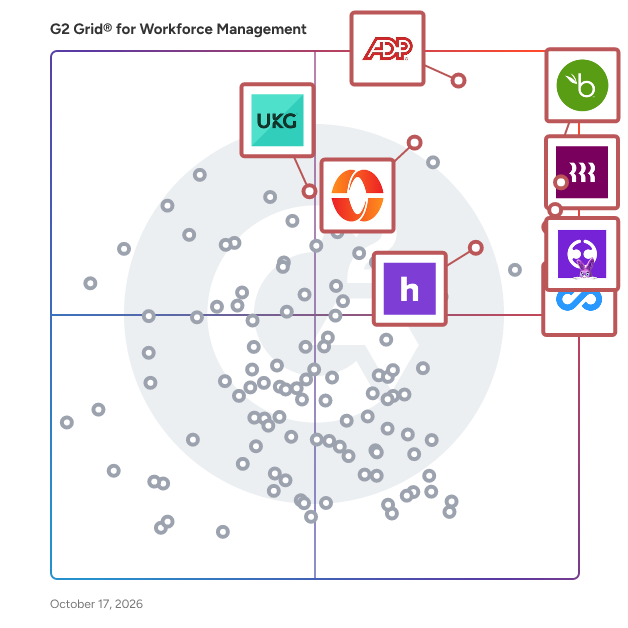
Products classified in the overall Workforce Management category are similar in many regards and help companies of all sizes solve their business problems. However, small business features, pricing, setup, and installation differ from businesses of other sizes, which is why we match buyers to the right Small Business Workforce Management to fit their needs. Compare product ratings based on reviews from enterprise users or connect with one of G2's buying advisors to find the right solutions within the Small Business Workforce Management category.

In addition to qualifying for inclusion in the Workforce Management Software category, to qualify for inclusion in the Small Business Workforce Management Software category, a product must have at least 10 reviews left by a reviewer from a small business.

Show More
Show Less

G2 takes pride in showing unbiased reviews on user satisfaction in our ratings and reports. We do not allow paid placements in any of our ratings, rankings, or reports. Learn about our scoring methodologies.

Coming Soon
Get Trending Workforce Management Products in Your Inbox

A weekly snapshot of rising stars, new launches, and what everyone's buzzing about.

Sample Trending Products Newsletter
1 filter applied
Clear All

54 Listings in Small Business Workforce Management Available

(3,393)4.6 out of 5
9th Easiest To Use in Workforce Management software
Save to My Lists
Entry Level Price:Free
  • Overview
    Expand/Collapse Overview
  • Product Description
    How are these determined?Information
    This description is provided by the seller.

    Connecteam is a mobile-first workforce management app featuring a robust set of tools designed to help organizations with deskless teams improve communication, retain staff, and drive operational effi

    Users
    • Owner
    • Manager
    Industries
    • Construction
    • Retail
    Market Segment
    • 83% Small-Business
    • 13% Mid-Market
    User Sentiment
    How are these determined?Information
    These insights, currently in beta, are compiled from user reviews and grouped to display a high-level overview of the software.
    • Connecteam is a platform designed to facilitate communication, task assignment, and scheduling among team members, with additional features for time tracking and payroll management.
    • Users frequently mention the user-friendly design, robust functionality, and the convenience of having multiple features in one platform, such as chat, task assignment, scheduling, and time tracking.
    • Reviewers mentioned some limitations such as the need for more customization options, issues with agent adoption, challenges with the mobile interface, and difficulties in navigating certain features.
  • Pros and Cons
    Expand/Collapse Pros and Cons
  • Connecteam Pros and Cons
    How are these determined?Information
    Pros and Cons are compiled from review feedback and grouped into themes to provide an easy-to-understand summary of user reviews.
    Pros
    Ease of Use
    2,305
    Features
    1,266
    Scheduling
    1,180
    Intuitive
    955
    Communication
    947
    Cons
    Missing Features
    656
    Limited Features
    586
    Scheduling Issues
    446
    Improvement Needed
    363
    Not User-Friendly
    341
  • User Satisfaction
    Expand/Collapse User Satisfaction
  • Connecteam features and usability ratings that predict user satisfaction
    9.3
    Has the product been a good partner in doing business?
    Average: 8.6
    9.1
    Performance
    Average: 8.6
    8.4
    Skills Management
    Average: 8.2
    8.4
    Workforce Analytics
    Average: 8.4
  • Seller Details
    Expand/Collapse Seller Details
  • Seller Details
    Company Website
    Year Founded
    2015
    HQ Location
    New York, NY
    Twitter
    @ConnecteamApp
    1,249 Twitter followers
    LinkedIn® Page
    www.linkedin.com
    454 employees on LinkedIn®
Product Description
How are these determined?Information
This description is provided by the seller.

Connecteam is a mobile-first workforce management app featuring a robust set of tools designed to help organizations with deskless teams improve communication, retain staff, and drive operational effi

Users
  • Owner
  • Manager
Industries
  • Construction
  • Retail
Market Segment
  • 83% Small-Business
  • 13% Mid-Market
User Sentiment
How are these determined?Information
These insights, currently in beta, are compiled from user reviews and grouped to display a high-level overview of the software.
  • Connecteam is a platform designed to facilitate communication, task assignment, and scheduling among team members, with additional features for time tracking and payroll management.
  • Users frequently mention the user-friendly design, robust functionality, and the convenience of having multiple features in one platform, such as chat, task assignment, scheduling, and time tracking.
  • Reviewers mentioned some limitations such as the need for more customization options, issues with agent adoption, challenges with the mobile interface, and difficulties in navigating certain features.
Connecteam Pros and Cons
How are these determined?Information
Pros and Cons are compiled from review feedback and grouped into themes to provide an easy-to-understand summary of user reviews.
Pros
Ease of Use
2,305
Features
1,266
Scheduling
1,180
Intuitive
955
Communication
947
Cons
Missing Features
656
Limited Features
586
Scheduling Issues
446
Improvement Needed
363
Not User-Friendly
341
Connecteam features and usability ratings that predict user satisfaction
9.3
Has the product been a good partner in doing business?
Average: 8.6
9.1
Performance
Average: 8.6
8.4
Skills Management
Average: 8.2
8.4
Workforce Analytics
Average: 8.4
Seller Details
Company Website
Year Founded
2015
HQ Location
New York, NY
Twitter
@ConnecteamApp
1,249 Twitter followers
LinkedIn® Page
www.linkedin.com
454 employees on LinkedIn®
(8,916)4.8 out of 5
Optimized for quick response
1st Easiest To Use in Workforce Management software
View top Consulting Services for Rippling
Save to My Lists
  • Overview
    Expand/Collapse Overview
  • Product Description
    How are these determined?Information
    This description is provided by the seller.

    Streamline your business with Rippling’s all-in-one platform for HR, IT, payroll, and spend management. Simplify IT with device management, software access, and compliance monitoring, all from one das

    Users
    • Software Engineer
    • Account Executive
    Industries
    • Computer Software
    • Information Technology and Services
    Market Segment
    • 59% Mid-Market
    • 29% Small-Business
    User Sentiment
    How are these determined?Information
    These insights, currently in beta, are compiled from user reviews and grouped to display a high-level overview of the software.
    • Rippling is a platform designed to manage HR functions, payroll, benefits, and IT in one system, providing a user-friendly interface for tasks such as employee profile management, time tracking, and benefits enrollment.
    • Users frequently mention the ease of use, the convenience of having all HR-related functions in one place, the time-saving aspect of the platform, and the efficient customer support.
    • Reviewers experienced issues such as difficulties with initial setup, challenges in removing certain integrations, too many steps for login with some applications, and the absence of a test environment for trying out different processes.
  • Pros and Cons
    Expand/Collapse Pros and Cons
  • Rippling Pros and Cons
    How are these determined?Information
    Pros and Cons are compiled from review feedback and grouped into themes to provide an easy-to-understand summary of user reviews.
    Pros
    Ease of Use
    7,536
    Intuitive
    5,723
    Simple
    4,823
    User Interface
    4,290
    Easy Access
    4,138
    Cons
    Missing Features
    1,438
    Not User-Friendly
    967
    Learning Curve
    930
    Limited Features
    909
    Navigation Difficulty
    881
  • User Satisfaction
    Expand/Collapse User Satisfaction
  • Rippling features and usability ratings that predict user satisfaction
    9.0
    Has the product been a good partner in doing business?
    Average: 8.6
    9.4
    Performance
    Average: 8.6
    9.0
    Skills Management
    Average: 8.2
    9.1
    Workforce Analytics
    Average: 8.4
  • Seller Details
    Expand/Collapse Seller Details
  • Seller Details
    Seller
    Rippling
    Company Website
    Year Founded
    2016
    HQ Location
    San Francisco, CA
    Twitter
    @Rippling
    11,587 Twitter followers
    LinkedIn® Page
    www.linkedin.com
    6,456 employees on LinkedIn®
Product Description
How are these determined?Information
This description is provided by the seller.

Streamline your business with Rippling’s all-in-one platform for HR, IT, payroll, and spend management. Simplify IT with device management, software access, and compliance monitoring, all from one das

Users
  • Software Engineer
  • Account Executive
Industries
  • Computer Software
  • Information Technology and Services
Market Segment
  • 59% Mid-Market
  • 29% Small-Business
User Sentiment
How are these determined?Information
These insights, currently in beta, are compiled from user reviews and grouped to display a high-level overview of the software.
  • Rippling is a platform designed to manage HR functions, payroll, benefits, and IT in one system, providing a user-friendly interface for tasks such as employee profile management, time tracking, and benefits enrollment.
  • Users frequently mention the ease of use, the convenience of having all HR-related functions in one place, the time-saving aspect of the platform, and the efficient customer support.
  • Reviewers experienced issues such as difficulties with initial setup, challenges in removing certain integrations, too many steps for login with some applications, and the absence of a test environment for trying out different processes.
Rippling Pros and Cons
How are these determined?Information
Pros and Cons are compiled from review feedback and grouped into themes to provide an easy-to-understand summary of user reviews.
Pros
Ease of Use
7,536
Intuitive
5,723
Simple
4,823
User Interface
4,290
Easy Access
4,138
Cons
Missing Features
1,438
Not User-Friendly
967
Learning Curve
930
Limited Features
909
Navigation Difficulty
881
Rippling features and usability ratings that predict user satisfaction
9.0
Has the product been a good partner in doing business?
Average: 8.6
9.4
Performance
Average: 8.6
9.0
Skills Management
Average: 8.2
9.1
Workforce Analytics
Average: 8.4
Seller Details
Seller
Rippling
Company Website
Year Founded
2016
HQ Location
San Francisco, CA
Twitter
@Rippling
11,587 Twitter followers
LinkedIn® Page
www.linkedin.com
6,456 employees on LinkedIn®

This is how G2 Deals can help you:

  • Easily shop for curated – and trusted – software
  • Own your own software buying journey
  • Discover exclusive deals on software
(2,342)4.4 out of 5
7th Easiest To Use in Workforce Management software
View top Consulting Services for UKG Ready
Save to My Lists
  • Overview
    Expand/Collapse Overview
  • Product Description
    How are these determined?Information
    This description is provided by the seller.

    At UKG, our purpose is people®. We’re on a mission to inspire every organization to become a great place to work through HR and payroll technology built for all. With UKG, you get more than 70 years o

    Users
    • Teacher
    • Human Resources Manager
    Industries
    • Hospital & Health Care
    • Retail
    Market Segment
    • 55% Mid-Market
    • 32% Enterprise
    User Sentiment
    How are these determined?Information
    These insights, currently in beta, are compiled from user reviews and grouped to display a high-level overview of the software.
    • UKG Ready is a tool that allows users to manage their time, view pay, submit change requests, and access HR information.
    • Users frequently mention the ease of use, the ability to access the tool from multiple devices, and the streamlined internal processes as major benefits of UKG Ready.
    • Users reported occasional system lags, difficulties in navigating some features, and limitations in customization options as some of the drawbacks of the tool.
  • Pros and Cons
    Expand/Collapse Pros and Cons
  • UKG Ready Pros and Cons
    How are these determined?Information
    Pros and Cons are compiled from review feedback and grouped into themes to provide an easy-to-understand summary of user reviews.
    Pros
    Ease of Use
    774
    Easy Access
    409
    Time Tracking
    302
    Simple
    301
    User Interface
    271
    Cons
    Login Issues
    161
    Navigation Difficulty
    151
    Login Problems
    94
    Clocking Issues
    89
    Not User-Friendly
    85
  • User Satisfaction
    Expand/Collapse User Satisfaction
  • UKG Ready features and usability ratings that predict user satisfaction
    8.5
    Has the product been a good partner in doing business?
    Average: 8.6
    8.7
    Performance
    Average: 8.6
    8.3
    Skills Management
    Average: 8.2
    8.5
    Workforce Analytics
    Average: 8.4
  • Seller Details
    Expand/Collapse Seller Details
  • Seller Details
    Seller
    UKG
    Company Website
    Year Founded
    1977
    HQ Location
    Weston, FL
    Twitter
    @UKGInc
    42,930 Twitter followers
    LinkedIn® Page
    www.linkedin.com
    16,035 employees on LinkedIn®
Product Description
How are these determined?Information
This description is provided by the seller.

At UKG, our purpose is people®. We’re on a mission to inspire every organization to become a great place to work through HR and payroll technology built for all. With UKG, you get more than 70 years o

Users
  • Teacher
  • Human Resources Manager
Industries
  • Hospital & Health Care
  • Retail
Market Segment
  • 55% Mid-Market
  • 32% Enterprise
User Sentiment
How are these determined?Information
These insights, currently in beta, are compiled from user reviews and grouped to display a high-level overview of the software.
  • UKG Ready is a tool that allows users to manage their time, view pay, submit change requests, and access HR information.
  • Users frequently mention the ease of use, the ability to access the tool from multiple devices, and the streamlined internal processes as major benefits of UKG Ready.
  • Users reported occasional system lags, difficulties in navigating some features, and limitations in customization options as some of the drawbacks of the tool.
UKG Ready Pros and Cons
How are these determined?Information
Pros and Cons are compiled from review feedback and grouped into themes to provide an easy-to-understand summary of user reviews.
Pros
Ease of Use
774
Easy Access
409
Time Tracking
302
Simple
301
User Interface
271
Cons
Login Issues
161
Navigation Difficulty
151
Login Problems
94
Clocking Issues
89
Not User-Friendly
85
UKG Ready features and usability ratings that predict user satisfaction
8.5
Has the product been a good partner in doing business?
Average: 8.6
8.7
Performance
Average: 8.6
8.3
Skills Management
Average: 8.2
8.5
Workforce Analytics
Average: 8.4
Seller Details
Seller
UKG
Company Website
Year Founded
1977
HQ Location
Weston, FL
Twitter
@UKGInc
42,930 Twitter followers
LinkedIn® Page
www.linkedin.com
16,035 employees on LinkedIn®
(2,830)4.4 out of 5
Optimized for quick response
7th Easiest To Use in Workforce Management software
View top Consulting Services for BambooHR
Save to My Lists
Entry Level Price:Contact Us
  • Overview
    Expand/Collapse Overview
  • Product Description
    How are these determined?Information
    This description is provided by the seller.

    BambooHR® is an all-in-one HR software solution designed to eliminate inefficiencies and simplify people management. Trusted by thousands of companies in over 150 countries, BambooHR centralizes your

    Users
    • HR Manager
    • Human Resources Manager
    Industries
    • Computer Software
    • Information Technology and Services
    Market Segment
    • 63% Mid-Market
    • 29% Small-Business
    User Sentiment
    How are these determined?Information
    These insights, currently in beta, are compiled from user reviews and grouped to display a high-level overview of the software.
    • BambooHR is a human resources platform that provides features for managing employee lifecycle, onboarding, time-off tracking, performance reviews, and reporting.
    • Reviewers like the clean, intuitive interface of BambooHR, its ease of use, the ability to manage personal information, and the convenience it provides for larger companies to stay interconnected with their employees.
    • Users reported issues with the reporting features being basic, the mobile app not being smooth, lack of integrations with payroll providers, and difficulty in customizing reports.
  • Pros and Cons
    Expand/Collapse Pros and Cons
  • BambooHR Pros and Cons
    How are these determined?Information
    Pros and Cons are compiled from review feedback and grouped into themes to provide an easy-to-understand summary of user reviews.
    Pros
    Ease of Use
    418
    Helpful
    208
    Simple
    196
    User Interface
    194
    Customer Support
    191
    Cons
    Missing Features
    157
    Limited Customization
    137
    Limited Features
    115
    Poor Customer Support
    78
    Payroll Issues
    63
  • User Satisfaction
    Expand/Collapse User Satisfaction
  • BambooHR features and usability ratings that predict user satisfaction
    9.0
    Has the product been a good partner in doing business?
    Average: 8.6
    8.5
    Performance
    Average: 8.6
    7.4
    Skills Management
    Average: 8.2
    8.2
    Workforce Analytics
    Average: 8.4
  • Seller Details
    Expand/Collapse Seller Details
  • Seller Details
    Seller
    BambooHR
    Company Website
    Year Founded
    2008
    HQ Location
    Draper, UT
    Twitter
    @bamboohr
    18,129 Twitter followers
    LinkedIn® Page
    www.linkedin.com
    1,760 employees on LinkedIn®
Product Description
How are these determined?Information
This description is provided by the seller.

BambooHR® is an all-in-one HR software solution designed to eliminate inefficiencies and simplify people management. Trusted by thousands of companies in over 150 countries, BambooHR centralizes your

Users
  • HR Manager
  • Human Resources Manager
Industries
  • Computer Software
  • Information Technology and Services
Market Segment
  • 63% Mid-Market
  • 29% Small-Business
User Sentiment
How are these determined?Information
These insights, currently in beta, are compiled from user reviews and grouped to display a high-level overview of the software.
  • BambooHR is a human resources platform that provides features for managing employee lifecycle, onboarding, time-off tracking, performance reviews, and reporting.
  • Reviewers like the clean, intuitive interface of BambooHR, its ease of use, the ability to manage personal information, and the convenience it provides for larger companies to stay interconnected with their employees.
  • Users reported issues with the reporting features being basic, the mobile app not being smooth, lack of integrations with payroll providers, and difficulty in customizing reports.
BambooHR Pros and Cons
How are these determined?Information
Pros and Cons are compiled from review feedback and grouped into themes to provide an easy-to-understand summary of user reviews.
Pros
Ease of Use
418
Helpful
208
Simple
196
User Interface
194
Customer Support
191
Cons
Missing Features
157
Limited Customization
137
Limited Features
115
Poor Customer Support
78
Payroll Issues
63
BambooHR features and usability ratings that predict user satisfaction
9.0
Has the product been a good partner in doing business?
Average: 8.6
8.5
Performance
Average: 8.6
7.4
Skills Management
Average: 8.2
8.2
Workforce Analytics
Average: 8.4
Seller Details
Seller
BambooHR
Company Website
Year Founded
2008
HQ Location
Draper, UT
Twitter
@bamboohr
18,129 Twitter followers
LinkedIn® Page
www.linkedin.com
1,760 employees on LinkedIn®
(3,859)4.2 out of 5
Optimized for quick response
View top Consulting Services for ADP Workforce Now
Save to My Lists
  • Overview
    Expand/Collapse Overview
  • Product Description
    How are these determined?Information
    This description is provided by the seller.

    ADP Workforce Now is the only all-in-one, cloud-based HR suite that adapts to the way you work. Built on a single database, ADP Workforce Now features Human Resource Management, Payroll, Benefits, Ta

    Users
    • Human Resources Manager
    • HR Manager
    Industries
    • Hospital & Health Care
    • Non-Profit Organization Management
    Market Segment
    • 64% Mid-Market
    • 20% Enterprise
    User Sentiment
    How are these determined?Information
    These insights, currently in beta, are compiled from user reviews and grouped to display a high-level overview of the software.
    • ADP Workforce Now is a comprehensive HR management tool that combines payroll, benefits, time tracking, and talent management into a single platform.
    • Reviewers frequently mention the ease of use, the convenience of having all HR-related tools in one place, and the efficiency of the system in managing payroll and scheduling needs.
    • Users reported issues with the user interface, difficulties with certain aspects of the payroll system, and inconsistencies in customer support.
  • Pros and Cons
    Expand/Collapse Pros and Cons
  • ADP Workforce Now Pros and Cons
    How are these determined?Information
    Pros and Cons are compiled from review feedback and grouped into themes to provide an easy-to-understand summary of user reviews.
    Pros
    Ease of Use
    277
    Helpful
    178
    Features
    144
    Customer Support
    143
    Payroll Management
    135
    Cons
    Poor Customer Support
    116
    Missing Features
    81
    Not User-Friendly
    80
    Poor Support Services
    64
    Limited Customization
    63
  • User Satisfaction
    Expand/Collapse User Satisfaction
  • ADP Workforce Now features and usability ratings that predict user satisfaction
    8.0
    Has the product been a good partner in doing business?
    Average: 8.6
    8.1
    Performance
    Average: 8.6
    7.9
    Skills Management
    Average: 8.2
    8.2
    Workforce Analytics
    Average: 8.4
  • Seller Details
    Expand/Collapse Seller Details
  • Seller Details
    Seller
    ADP
    Company Website
    Year Founded
    1949
    HQ Location
    Roseland, New Jersey
    Twitter
    @ADP
    48,734 Twitter followers
    LinkedIn® Page
    www.linkedin.com
    87,551 employees on LinkedIn®
Product Description
How are these determined?Information
This description is provided by the seller.

ADP Workforce Now is the only all-in-one, cloud-based HR suite that adapts to the way you work. Built on a single database, ADP Workforce Now features Human Resource Management, Payroll, Benefits, Ta

Users
  • Human Resources Manager
  • HR Manager
Industries
  • Hospital & Health Care
  • Non-Profit Organization Management
Market Segment
  • 64% Mid-Market
  • 20% Enterprise
User Sentiment
How are these determined?Information
These insights, currently in beta, are compiled from user reviews and grouped to display a high-level overview of the software.
  • ADP Workforce Now is a comprehensive HR management tool that combines payroll, benefits, time tracking, and talent management into a single platform.
  • Reviewers frequently mention the ease of use, the convenience of having all HR-related tools in one place, and the efficiency of the system in managing payroll and scheduling needs.
  • Users reported issues with the user interface, difficulties with certain aspects of the payroll system, and inconsistencies in customer support.
ADP Workforce Now Pros and Cons
How are these determined?Information
Pros and Cons are compiled from review feedback and grouped into themes to provide an easy-to-understand summary of user reviews.
Pros
Ease of Use
277
Helpful
178
Features
144
Customer Support
143
Payroll Management
135
Cons
Poor Customer Support
116
Missing Features
81
Not User-Friendly
80
Poor Support Services
64
Limited Customization
63
ADP Workforce Now features and usability ratings that predict user satisfaction
8.0
Has the product been a good partner in doing business?
Average: 8.6
8.1
Performance
Average: 8.6
7.9
Skills Management
Average: 8.2
8.2
Workforce Analytics
Average: 8.4
Seller Details
Seller
ADP
Company Website
Year Founded
1949
HQ Location
Roseland, New Jersey
Twitter
@ADP
48,734 Twitter followers
LinkedIn® Page
www.linkedin.com
87,551 employees on LinkedIn®
(2,148)4.3 out of 5
10th Easiest To Use in Workforce Management software
View top Consulting Services for UKG Pro
Save to My Lists
  • Overview
    Expand/Collapse Overview
  • Product Description
    How are these determined?Information
    This description is provided by the seller.

    Designed for organizations that prioritize diverse workforces and cultures of trust and belonging, UKG Pro® puts people at the center of your strategy. From HR and complex payroll to talent and indust

    Users
    • Payroll Manager
    • HR Generalist
    Industries
    • Hospital & Health Care
    • Oil & Energy
    Market Segment
    • 48% Mid-Market
    • 46% Enterprise
    User Sentiment
    How are these determined?Information
    These insights, currently in beta, are compiled from user reviews and grouped to display a high-level overview of the software.
    • UKG Pro is a Human Resource Management System that combines many HR-modules in one platform, including payroll, benefits, attendance, talent management, and recruiting.
    • Reviewers frequently mention the ease of use, strong reporting tools, and the ability to handle various HR tasks such as payroll and personal information management.
    • Users mentioned issues with customer support, the high cost for mid-size firms, and difficulties with configuration, workflows, and settings.
  • Pros and Cons
    Expand/Collapse Pros and Cons
  • UKG Pro Pros and Cons
    How are these determined?Information
    Pros and Cons are compiled from review feedback and grouped into themes to provide an easy-to-understand summary of user reviews.
    Pros
    Ease of Use
    176
    Helpful
    84
    Intuitive
    69
    Customer Support
    64
    User Interface
    63
    Cons
    Not User-Friendly
    44
    Learning Curve
    40
    Poor Customer Support
    38
    Limited Features
    33
    Missing Features
    30
  • User Satisfaction
    Expand/Collapse User Satisfaction
  • UKG Pro features and usability ratings that predict user satisfaction
    8.3
    Has the product been a good partner in doing business?
    Average: 8.6
    8.5
    Performance
    Average: 8.6
    7.7
    Skills Management
    Average: 8.2
    8.1
    Workforce Analytics
    Average: 8.4
  • Seller Details
    Expand/Collapse Seller Details
  • Seller Details
    Seller
    UKG
    Company Website
    Year Founded
    1977
    HQ Location
    Weston, FL
    Twitter
    @UKGInc
    42,930 Twitter followers
    LinkedIn® Page
    www.linkedin.com
    16,035 employees on LinkedIn®
Product Description
How are these determined?Information
This description is provided by the seller.

Designed for organizations that prioritize diverse workforces and cultures of trust and belonging, UKG Pro® puts people at the center of your strategy. From HR and complex payroll to talent and indust

Users
  • Payroll Manager
  • HR Generalist
Industries
  • Hospital & Health Care
  • Oil & Energy
Market Segment
  • 48% Mid-Market
  • 46% Enterprise
User Sentiment
How are these determined?Information
These insights, currently in beta, are compiled from user reviews and grouped to display a high-level overview of the software.
  • UKG Pro is a Human Resource Management System that combines many HR-modules in one platform, including payroll, benefits, attendance, talent management, and recruiting.
  • Reviewers frequently mention the ease of use, strong reporting tools, and the ability to handle various HR tasks such as payroll and personal information management.
  • Users mentioned issues with customer support, the high cost for mid-size firms, and difficulties with configuration, workflows, and settings.
UKG Pro Pros and Cons
How are these determined?Information
Pros and Cons are compiled from review feedback and grouped into themes to provide an easy-to-understand summary of user reviews.
Pros
Ease of Use
176
Helpful
84
Intuitive
69
Customer Support
64
User Interface
63
Cons
Not User-Friendly
44
Learning Curve
40
Poor Customer Support
38
Limited Features
33
Missing Features
30
UKG Pro features and usability ratings that predict user satisfaction
8.3
Has the product been a good partner in doing business?
Average: 8.6
8.5
Performance
Average: 8.6
7.7
Skills Management
Average: 8.2
8.1
Workforce Analytics
Average: 8.4
Seller Details
Seller
UKG
Company Website
Year Founded
1977
HQ Location
Weston, FL
Twitter
@UKGInc
42,930 Twitter followers
LinkedIn® Page
www.linkedin.com
16,035 employees on LinkedIn®
(1,629)4.1 out of 5
Optimized for quick response
View top Consulting Services for Paychex
Save to My Lists
  • Overview
    Expand/Collapse Overview
  • Product Description
    How are these determined?Information
    This description is provided by the seller.

    Paychex Flex® is an all-in-one HR solution designed with simplicity in mind. With technology that grows and changes with your business, Paychex has the right combination of innovative business solutio

    Users
    • Office Manager
    • Owner
    Industries
    • Non-Profit Organization Management
    • Construction
    Market Segment
    • 75% Small-Business
    • 22% Mid-Market
    User Sentiment
    How are these determined?Information
    These insights, currently in beta, are compiled from user reviews and grouped to display a high-level overview of the software.
    • Paychex is a payroll processing software that offers features such as tax filings, employee onboarding, time tracking, and direct deposits.
    • Users like the user-friendly interface, the convenience of having all payroll and HR tasks in one place, and the robust payroll processing that saves significant time by handling payments, calculations, and filings with minimal manual effort.
    • Reviewers noted issues with customer support response times, occasional system glitches, and difficulties in navigating certain sections of the platform, as well as high pricing and issues with payroll accuracy.
  • Pros and Cons
    Expand/Collapse Pros and Cons
  • Paychex Pros and Cons
    How are these determined?Information
    Pros and Cons are compiled from review feedback and grouped into themes to provide an easy-to-understand summary of user reviews.
    Pros
    Ease of Use
    77
    Payroll Management
    45
    Helpful
    43
    Payroll
    39
    Customer Support
    35
    Cons
    Poor Customer Support
    36
    Payroll Issues
    25
    Expensive
    20
    Not Intuitive
    16
    Not User-Friendly
    15
  • User Satisfaction
    Expand/Collapse User Satisfaction
  • Paychex features and usability ratings that predict user satisfaction
    8.5
    Has the product been a good partner in doing business?
    Average: 8.6
    8.5
    Performance
    Average: 8.6
    8.4
    Skills Management
    Average: 8.2
    8.8
    Workforce Analytics
    Average: 8.4
  • Seller Details
    Expand/Collapse Seller Details
  • Seller Details
    Company Website
    Year Founded
    1971
    HQ Location
    Rochester, NY
    Twitter
    @Paychex
    11,907 Twitter followers
    LinkedIn® Page
    www.linkedin.com
    18,525 employees on LinkedIn®
Product Description
How are these determined?Information
This description is provided by the seller.

Paychex Flex® is an all-in-one HR solution designed with simplicity in mind. With technology that grows and changes with your business, Paychex has the right combination of innovative business solutio

Users
  • Office Manager
  • Owner
Industries
  • Non-Profit Organization Management
  • Construction
Market Segment
  • 75% Small-Business
  • 22% Mid-Market
User Sentiment
How are these determined?Information
These insights, currently in beta, are compiled from user reviews and grouped to display a high-level overview of the software.
  • Paychex is a payroll processing software that offers features such as tax filings, employee onboarding, time tracking, and direct deposits.
  • Users like the user-friendly interface, the convenience of having all payroll and HR tasks in one place, and the robust payroll processing that saves significant time by handling payments, calculations, and filings with minimal manual effort.
  • Reviewers noted issues with customer support response times, occasional system glitches, and difficulties in navigating certain sections of the platform, as well as high pricing and issues with payroll accuracy.
Paychex Pros and Cons
How are these determined?Information
Pros and Cons are compiled from review feedback and grouped into themes to provide an easy-to-understand summary of user reviews.
Pros
Ease of Use
77
Payroll Management
45
Helpful
43
Payroll
39
Customer Support
35
Cons
Poor Customer Support
36
Payroll Issues
25
Expensive
20
Not Intuitive
16
Not User-Friendly
15
Paychex features and usability ratings that predict user satisfaction
8.5
Has the product been a good partner in doing business?
Average: 8.6
8.5
Performance
Average: 8.6
8.4
Skills Management
Average: 8.2
8.8
Workforce Analytics
Average: 8.4
Seller Details
Company Website
Year Founded
1971
HQ Location
Rochester, NY
Twitter
@Paychex
11,907 Twitter followers
LinkedIn® Page
www.linkedin.com
18,525 employees on LinkedIn®
(647)4.6 out of 5
Optimized for quick response
4th Easiest To Use in Workforce Management software
Save to My Lists
Entry Level Price:$2.00
  • Overview
    Expand/Collapse Overview
  • Product Description
    How are these determined?Information
    This description is provided by the seller.

    Deputy is the world’s leading workforce management software, revolutionizing hourly work for over 1.5 million workers and 375,000 workplaces across over 100 countries. As the complete people platform

    Users
    • Owner
    • Barista
    Industries
    • Hospitality
    • Retail
    Market Segment
    • 53% Small-Business
    • 33% Mid-Market
  • Pros and Cons
    Expand/Collapse Pros and Cons
  • Deputy Pros and Cons
    How are these determined?Information
    Pros and Cons are compiled from review feedback and grouped into themes to provide an easy-to-understand summary of user reviews.
    Pros
    Ease of Use
    223
    Scheduling
    139
    Scheduling Ease
    127
    Intuitive
    118
    User Interface
    101
    Cons
    Scheduling Issues
    47
    Shift Management
    39
    Clocking Issues
    23
    Missing Features
    22
    Slow Loading
    19
  • User Satisfaction
    Expand/Collapse User Satisfaction
  • Deputy features and usability ratings that predict user satisfaction
    9.2
    Has the product been a good partner in doing business?
    Average: 8.6
    9.1
    Performance
    Average: 8.6
    8.3
    Skills Management
    Average: 8.2
    8.4
    Workforce Analytics
    Average: 8.4
  • Seller Details
    Expand/Collapse Seller Details
  • Seller Details
    Seller
    Deputy
    Company Website
    Year Founded
    2008
    HQ Location
    Sydney, Australia
    Twitter
    @deputyapp
    4,343 Twitter followers
    LinkedIn® Page
    www.linkedin.com
    520 employees on LinkedIn®
Product Description
How are these determined?Information
This description is provided by the seller.

Deputy is the world’s leading workforce management software, revolutionizing hourly work for over 1.5 million workers and 375,000 workplaces across over 100 countries. As the complete people platform

Users
  • Owner
  • Barista
Industries
  • Hospitality
  • Retail
Market Segment
  • 53% Small-Business
  • 33% Mid-Market
Deputy Pros and Cons
How are these determined?Information
Pros and Cons are compiled from review feedback and grouped into themes to provide an easy-to-understand summary of user reviews.
Pros
Ease of Use
223
Scheduling
139
Scheduling Ease
127
Intuitive
118
User Interface
101
Cons
Scheduling Issues
47
Shift Management
39
Clocking Issues
23
Missing Features
22
Slow Loading
19
Deputy features and usability ratings that predict user satisfaction
9.2
Has the product been a good partner in doing business?
Average: 8.6
9.1
Performance
Average: 8.6
8.3
Skills Management
Average: 8.2
8.4
Workforce Analytics
Average: 8.4
Seller Details
Seller
Deputy
Company Website
Year Founded
2008
HQ Location
Sydney, Australia
Twitter
@deputyapp
4,343 Twitter followers
LinkedIn® Page
www.linkedin.com
520 employees on LinkedIn®
(1,211)4.5 out of 5
Optimized for quick response
8th Easiest To Use in Workforce Management software
Save to My Lists
Entry Level Price:Free
  • Overview
    Expand/Collapse Overview
  • Product Description
    How are these determined?Information
    This description is provided by the seller.

    greytHR is a comprehensive Human Resource Management System (HRMS) designed to streamline complex, recurring, and essential HR and payroll functions in a compliant and secure manner. This platform pro

    Users
    • HR Manager
    • HR
    Industries
    • Information Technology and Services
    • Computer Software
    Market Segment
    • 64% Mid-Market
    • 24% Small-Business
    User Sentiment
    How are these determined?Information
    These insights, currently in beta, are compiled from user reviews and grouped to display a high-level overview of the software.
    • greytHR is a platform that simplifies daily HR tasks and manages payroll, attendance, and employee data.
    • Reviewers appreciate the user-friendly interface, the automation of tasks like payslip generation and compliance management, and the convenience of the mobile app for on-the-go access.
    • Reviewers mentioned that the user interface could be improved, the advanced admin access can be confusing, and the system sometimes feels slow during peak hours.
  • Pros and Cons
    Expand/Collapse Pros and Cons
  • greytHR Pros and Cons
    How are these determined?Information
    Pros and Cons are compiled from review feedback and grouped into themes to provide an easy-to-understand summary of user reviews.
    Pros
    Ease of Use
    250
    Payroll
    135
    Payroll Management
    129
    Simple
    124
    Attendance Tracking
    119
    Cons
    Slow Loading
    63
    Slow Performance
    61
    Limited Customization
    60
    Poor Customer Support
    55
    Missing Features
    53
  • User Satisfaction
    Expand/Collapse User Satisfaction
  • greytHR features and usability ratings that predict user satisfaction
    8.7
    Has the product been a good partner in doing business?
    Average: 8.6
    8.6
    Performance
    Average: 8.6
    8.7
    Skills Management
    Average: 8.2
    8.6
    Workforce Analytics
    Average: 8.4
  • Seller Details
    Expand/Collapse Seller Details
  • Seller Details
    Company Website
    Year Founded
    1994
    HQ Location
    Bangalore
    Twitter
    @greythr2
    1,115 Twitter followers
    LinkedIn® Page
    www.linkedin.com
    990 employees on LinkedIn®
Product Description
How are these determined?Information
This description is provided by the seller.

greytHR is a comprehensive Human Resource Management System (HRMS) designed to streamline complex, recurring, and essential HR and payroll functions in a compliant and secure manner. This platform pro

Users
  • HR Manager
  • HR
Industries
  • Information Technology and Services
  • Computer Software
Market Segment
  • 64% Mid-Market
  • 24% Small-Business
User Sentiment
How are these determined?Information
These insights, currently in beta, are compiled from user reviews and grouped to display a high-level overview of the software.
  • greytHR is a platform that simplifies daily HR tasks and manages payroll, attendance, and employee data.
  • Reviewers appreciate the user-friendly interface, the automation of tasks like payslip generation and compliance management, and the convenience of the mobile app for on-the-go access.
  • Reviewers mentioned that the user interface could be improved, the advanced admin access can be confusing, and the system sometimes feels slow during peak hours.
greytHR Pros and Cons
How are these determined?Information
Pros and Cons are compiled from review feedback and grouped into themes to provide an easy-to-understand summary of user reviews.
Pros
Ease of Use
250
Payroll
135
Payroll Management
129
Simple
124
Attendance Tracking
119
Cons
Slow Loading
63
Slow Performance
61
Limited Customization
60
Poor Customer Support
55
Missing Features
53
greytHR features and usability ratings that predict user satisfaction
8.7
Has the product been a good partner in doing business?
Average: 8.6
8.6
Performance
Average: 8.6
8.7
Skills Management
Average: 8.2
8.6
Workforce Analytics
Average: 8.4
Seller Details
Company Website
Year Founded
1994
HQ Location
Bangalore
Twitter
@greythr2
1,115 Twitter followers
LinkedIn® Page
www.linkedin.com
990 employees on LinkedIn®
(1,550)4.5 out of 5
Optimized for quick response
3rd Easiest To Use in Workforce Management software
Save to My Lists
Entry Level Price:$4.99
  • Overview
    Expand/Collapse Overview
  • Product Description
    How are these determined?Information
    This description is provided by the seller.

    Hubstaff is a time tracking software built for global teams. Track hours with precision, automate payments and invoicing, and gain full visibility into how work gets done — whether your team is remote

    Users
    • Owner
    • CEO
    Industries
    • Information Technology and Services
    • Computer Software
    Market Segment
    • 58% Small-Business
    • 33% Mid-Market
    User Sentiment
    How are these determined?Information
    These insights, currently in beta, are compiled from user reviews and grouped to display a high-level overview of the software.
    • Hubstaff is a software tool designed to track productivity, timesheets, and efficiency of remote teams, with features such as screenshots, activity levels, and detailed reports.
    • Users frequently mention the ease of use, the ability to create transparency with report work, the convenience of spotting patterns early with activity levels, and the simplification of payroll with detailed reports.
    • Users reported issues with the setup of certain features, occasional overcomplication for simple time tracking needs, and problems with updates causing loss of data or functionality.
  • Pros and Cons
    Expand/Collapse Pros and Cons
  • Hubstaff Pros and Cons
    How are these determined?Information
    Pros and Cons are compiled from review feedback and grouped into themes to provide an easy-to-understand summary of user reviews.
    Pros
    Time Tracking
    647
    Ease of Use
    560
    Tracking Ease
    464
    Time-saving
    352
    Features
    294
    Cons
    Time Tracking Issues
    219
    Inaccurate Tracking
    214
    Time Tracking
    163
    Software Bugs
    125
    Missing Features
    123
  • User Satisfaction
    Expand/Collapse User Satisfaction
  • Hubstaff features and usability ratings that predict user satisfaction
    8.9
    Has the product been a good partner in doing business?
    Average: 8.6
    9.2
    Performance
    Average: 8.6
    8.4
    Skills Management
    Average: 8.2
    9.1
    Workforce Analytics
    Average: 8.4
  • Seller Details
    Expand/Collapse Seller Details
  • Seller Details
    Seller
    Hubstaff
    Company Website
    Year Founded
    2013
    HQ Location
    Indianapolis, IN
    Twitter
    @HubStaff
    11,620 Twitter followers
    LinkedIn® Page
    www.linkedin.com
    315 employees on LinkedIn®
Product Description
How are these determined?Information
This description is provided by the seller.

Hubstaff is a time tracking software built for global teams. Track hours with precision, automate payments and invoicing, and gain full visibility into how work gets done — whether your team is remote

Users
  • Owner
  • CEO
Industries
  • Information Technology and Services
  • Computer Software
Market Segment
  • 58% Small-Business
  • 33% Mid-Market
User Sentiment
How are these determined?Information
These insights, currently in beta, are compiled from user reviews and grouped to display a high-level overview of the software.
  • Hubstaff is a software tool designed to track productivity, timesheets, and efficiency of remote teams, with features such as screenshots, activity levels, and detailed reports.
  • Users frequently mention the ease of use, the ability to create transparency with report work, the convenience of spotting patterns early with activity levels, and the simplification of payroll with detailed reports.
  • Users reported issues with the setup of certain features, occasional overcomplication for simple time tracking needs, and problems with updates causing loss of data or functionality.
Hubstaff Pros and Cons
How are these determined?Information
Pros and Cons are compiled from review feedback and grouped into themes to provide an easy-to-understand summary of user reviews.
Pros
Time Tracking
647
Ease of Use
560
Tracking Ease
464
Time-saving
352
Features
294
Cons
Time Tracking Issues
219
Inaccurate Tracking
214
Time Tracking
163
Software Bugs
125
Missing Features
123
Hubstaff features and usability ratings that predict user satisfaction
8.9
Has the product been a good partner in doing business?
Average: 8.6
9.2
Performance
Average: 8.6
8.4
Skills Management
Average: 8.2
9.1
Workforce Analytics
Average: 8.4
Seller Details
Seller
Hubstaff
Company Website
Year Founded
2013
HQ Location
Indianapolis, IN
Twitter
@HubStaff
11,620 Twitter followers
LinkedIn® Page
www.linkedin.com
315 employees on LinkedIn®
(545)4.4 out of 5
Optimized for quick response
Save to My Lists
  • Overview
    Expand/Collapse Overview
  • Product Description
    How are these determined?Information
    This description is provided by the seller.

    Dialpad elevates every conversation with the leading Ai-powered customer communications platform. Tap into real-time Ai insights to enhance and streamline every interaction. Dialpad Support moderni

    Users
    • Account Manager
    • Customer Service Rep
    Industries
    • Financial Services
    • Consumer Services
    Market Segment
    • 55% Mid-Market
    • 39% Small-Business
    User Sentiment
    How are these determined?Information
    These insights, currently in beta, are compiled from user reviews and grouped to display a high-level overview of the software.
    • Dialpad is a tool that provides support for handling calls, meeting with coworkers, and monitoring team communications.
    • Users frequently mention the ease of implementation, the ability to gather valuable data through insights/analytics, and the proactive, hands-on customer support that includes follow-ups.
    • Reviewers mentioned challenges such as the tool being resource-intensive on PCs, the inability to ring all members of a contact center simultaneously, and occasional delays in resolution due to escalation to the telephony team.
  • Pros and Cons
    Expand/Collapse Pros and Cons
  • Dialpad Support Pros and Cons
    How are these determined?Information
    Pros and Cons are compiled from review feedback and grouped into themes to provide an easy-to-understand summary of user reviews.
    Pros
    Ease of Use
    64
    Helpful
    51
    Features
    35
    Customer Support
    34
    Call Recording
    30
    Cons
    Call Issues
    20
    Dialer Issues
    16
    Learning Curve
    16
    Missing Features
    13
    Recording Issues
    12
  • User Satisfaction
    Expand/Collapse User Satisfaction
  • Dialpad Support features and usability ratings that predict user satisfaction
    9.1
    Has the product been a good partner in doing business?
    Average: 8.6
    9.0
    Performance
    Average: 8.6
    8.5
    Skills Management
    Average: 8.2
    8.7
    Workforce Analytics
    Average: 8.4
  • Seller Details
    Expand/Collapse Seller Details
  • Seller Details
    Seller
    Dialpad
    Company Website
    Year Founded
    2011
    HQ Location
    San Ramon, California
    Twitter
    @DialpadHQ
    58 Twitter followers
    LinkedIn® Page
    www.linkedin.com
    1,450 employees on LinkedIn®
Product Description
How are these determined?Information
This description is provided by the seller.

Dialpad elevates every conversation with the leading Ai-powered customer communications platform. Tap into real-time Ai insights to enhance and streamline every interaction. Dialpad Support moderni

Users
  • Account Manager
  • Customer Service Rep
Industries
  • Financial Services
  • Consumer Services
Market Segment
  • 55% Mid-Market
  • 39% Small-Business
User Sentiment
How are these determined?Information
These insights, currently in beta, are compiled from user reviews and grouped to display a high-level overview of the software.
  • Dialpad is a tool that provides support for handling calls, meeting with coworkers, and monitoring team communications.
  • Users frequently mention the ease of implementation, the ability to gather valuable data through insights/analytics, and the proactive, hands-on customer support that includes follow-ups.
  • Reviewers mentioned challenges such as the tool being resource-intensive on PCs, the inability to ring all members of a contact center simultaneously, and occasional delays in resolution due to escalation to the telephony team.
Dialpad Support Pros and Cons
How are these determined?Information
Pros and Cons are compiled from review feedback and grouped into themes to provide an easy-to-understand summary of user reviews.
Pros
Ease of Use
64
Helpful
51
Features
35
Customer Support
34
Call Recording
30
Cons
Call Issues
20
Dialer Issues
16
Learning Curve
16
Missing Features
13
Recording Issues
12
Dialpad Support features and usability ratings that predict user satisfaction
9.1
Has the product been a good partner in doing business?
Average: 8.6
9.0
Performance
Average: 8.6
8.5
Skills Management
Average: 8.2
8.7
Workforce Analytics
Average: 8.4
Seller Details
Seller
Dialpad
Company Website
Year Founded
2011
HQ Location
San Ramon, California
Twitter
@DialpadHQ
58 Twitter followers
LinkedIn® Page
www.linkedin.com
1,450 employees on LinkedIn®
(1,944)4.8 out of 5
Optimized for quick response
2nd Easiest To Use in Workforce Management software
Save to My Lists
Entry Level Price:₹85.00
  • Overview
    Expand/Collapse Overview
  • Product Description
    How are these determined?Information
    This description is provided by the seller.

    HROne is a future-ready HCM suite that automates HR processes, simplifies human interactions and delivers actionable insights to build better workplaces. In our pursuit to set everything HR on aut

    Users
    • HR Manager
    • Assistant Manager
    Industries
    • Manufacturing
    • Information Technology and Services
    Market Segment
    • 60% Mid-Market
    • 28% Enterprise
    User Sentiment
    How are these determined?Information
    These insights, currently in beta, are compiled from user reviews and grouped to display a high-level overview of the software.
    • HROne is an all-in-one HRMS portal designed to cover all HR needs including attendance tracking, payroll processing, and employee performance review.
    • Users like the software's user-friendly interface, its ability to streamline various HR processes, and the excellent support provided by the implementation team.
    • Users reported issues with customization options, occasional glitches due to internet connectivity, and limitations in mobile application access.
  • Pros and Cons
    Expand/Collapse Pros and Cons
  • HROne Pros and Cons
    How are these determined?Information
    Pros and Cons are compiled from review feedback and grouped into themes to provide an easy-to-understand summary of user reviews.
    Pros
    Ease of Use
    882
    Helpful
    558
    Attendance Management
    462
    Payroll
    457
    Payroll Management
    449
    Cons
    Missing Features
    290
    Limited Features
    273
    Slow Loading
    260
    Limited Customization
    235
    Slow Performance
    219
  • User Satisfaction
    Expand/Collapse User Satisfaction
  • HROne features and usability ratings that predict user satisfaction
    9.4
    Has the product been a good partner in doing business?
    Average: 8.6
    9.3
    Performance
    Average: 8.6
    9.3
    Skills Management
    Average: 8.2
    9.4
    Workforce Analytics
    Average: 8.4
  • Seller Details
    Expand/Collapse Seller Details
  • Seller Details
    Seller
    HROne
    Company Website
    Year Founded
    2016
    HQ Location
    Noida
    Twitter
    @hronecloud
    1,590 Twitter followers
    LinkedIn® Page
    www.linkedin.com
    407 employees on LinkedIn®
Product Description
How are these determined?Information
This description is provided by the seller.

HROne is a future-ready HCM suite that automates HR processes, simplifies human interactions and delivers actionable insights to build better workplaces. In our pursuit to set everything HR on aut

Users
  • HR Manager
  • Assistant Manager
Industries
  • Manufacturing
  • Information Technology and Services
Market Segment
  • 60% Mid-Market
  • 28% Enterprise
User Sentiment
How are these determined?Information
These insights, currently in beta, are compiled from user reviews and grouped to display a high-level overview of the software.
  • HROne is an all-in-one HRMS portal designed to cover all HR needs including attendance tracking, payroll processing, and employee performance review.
  • Users like the software's user-friendly interface, its ability to streamline various HR processes, and the excellent support provided by the implementation team.
  • Users reported issues with customization options, occasional glitches due to internet connectivity, and limitations in mobile application access.
HROne Pros and Cons
How are these determined?Information
Pros and Cons are compiled from review feedback and grouped into themes to provide an easy-to-understand summary of user reviews.
Pros
Ease of Use
882
Helpful
558
Attendance Management
462
Payroll
457
Payroll Management
449
Cons
Missing Features
290
Limited Features
273
Slow Loading
260
Limited Customization
235
Slow Performance
219
HROne features and usability ratings that predict user satisfaction
9.4
Has the product been a good partner in doing business?
Average: 8.6
9.3
Performance
Average: 8.6
9.3
Skills Management
Average: 8.2
9.4
Workforce Analytics
Average: 8.4
Seller Details
Seller
HROne
Company Website
Year Founded
2016
HQ Location
Noida
Twitter
@hronecloud
1,590 Twitter followers
LinkedIn® Page
www.linkedin.com
407 employees on LinkedIn®
  • Overview
    Expand/Collapse Overview
  • Product Description
    How are these determined?Information
    This description is provided by the seller.

    Zoho People is a cloud-based HR software designed to help businesses streamline and automate their HR processes—right from onboarding to offboarding. It offers a comprehensive suite of tools including

    Users
    • HR Manager
    • Software Engineer
    Industries
    • Information Technology and Services
    • Computer Software
    Market Segment
    • 58% Mid-Market
    • 30% Small-Business
  • Pros and Cons
    Expand/Collapse Pros and Cons
  • Zoho People Pros and Cons
    How are these determined?Information
    Pros and Cons are compiled from review feedback and grouped into themes to provide an easy-to-understand summary of user reviews.
    Pros
    Ease of Use
    54
    Attendance Tracking
    31
    Leave Management
    28
    HR Management
    26
    Helpful
    22
    Cons
    Limited Customization
    12
    Missing Features
    9
    Not User-Friendly
    9
    Slow Loading
    8
    Difficult Customization
    7
  • User Satisfaction
    Expand/Collapse User Satisfaction
  • Zoho People features and usability ratings that predict user satisfaction
    8.5
    Has the product been a good partner in doing business?
    Average: 8.6
    8.9
    Performance
    Average: 8.6
    8.7
    Skills Management
    Average: 8.2
    8.6
    Workforce Analytics
    Average: 8.4
  • Seller Details
    Expand/Collapse Seller Details
  • Seller Details
    Seller
    Zoho
    Year Founded
    1996
    HQ Location
    Austin, TX
    Twitter
    @Zoho
    136,279 Twitter followers
    LinkedIn® Page
    www.linkedin.com
    29,500 employees on LinkedIn®
    Phone
    +1 (888) 900-9646
Product Description
How are these determined?Information
This description is provided by the seller.

Zoho People is a cloud-based HR software designed to help businesses streamline and automate their HR processes—right from onboarding to offboarding. It offers a comprehensive suite of tools including

Users
  • HR Manager
  • Software Engineer
Industries
  • Information Technology and Services
  • Computer Software
Market Segment
  • 58% Mid-Market
  • 30% Small-Business
Zoho People Pros and Cons
How are these determined?Information
Pros and Cons are compiled from review feedback and grouped into themes to provide an easy-to-understand summary of user reviews.
Pros
Ease of Use
54
Attendance Tracking
31
Leave Management
28
HR Management
26
Helpful
22
Cons
Limited Customization
12
Missing Features
9
Not User-Friendly
9
Slow Loading
8
Difficult Customization
7
Zoho People features and usability ratings that predict user satisfaction
8.5
Has the product been a good partner in doing business?
Average: 8.6
8.9
Performance
Average: 8.6
8.7
Skills Management
Average: 8.2
8.6
Workforce Analytics
Average: 8.4
Seller Details
Seller
Zoho
Year Founded
1996
HQ Location
Austin, TX
Twitter
@Zoho
136,279 Twitter followers
LinkedIn® Page
www.linkedin.com
29,500 employees on LinkedIn®
Phone
+1 (888) 900-9646
Entry Level Price:Free
  • Overview
    Expand/Collapse Overview
  • Product Description
    How are these determined?Information
    This description is provided by the seller.

    Homebase is the everything app for hourly teams, trusted by 100,000+ small (but mighty) businesses. Our mission is to make local business teams unstoppable. Homebase helps you: ✅ Save managers 5+

    Users
    • Owner
    • General Manager
    Industries
    • Restaurants
    • Food & Beverages
    Market Segment
    • 78% Small-Business
    • 18% Mid-Market
    User Sentiment
    How are these determined?Information
    These insights, currently in beta, are compiled from user reviews and grouped to display a high-level overview of the software.
    • Homebase is a software that integrates scheduling, timeclocks, and onboarding, designed to manage employees and streamline payroll processes, primarily for American companies.
    • Reviewers like the user-friendly interface of Homebase, appreciating its efficiency in simplifying complex tasks such as payroll, time tracking, and document storage, and its seamless integration with existing systems.
    • Users mentioned issues with Homebase's handling of payroll for salaried employees, differences in application view between mobile and web, limitations in reporting capabilities, and occasional glitches in the system.
  • Pros and Cons
    Expand/Collapse Pros and Cons
  • Homebase Pros and Cons
    How are these determined?Information
    Pros and Cons are compiled from review feedback and grouped into themes to provide an easy-to-understand summary of user reviews.
    Pros
    Ease of Use
    47
    Scheduling Ease
    38
    Scheduling
    37
    User Interface
    29
    Time-saving
    25
    Cons
    Limited Customization
    13
    Limited Features
    9
    Missing Features
    9
    Scheduling Issues
    9
    Payroll Issues
    8
  • User Satisfaction
    Expand/Collapse User Satisfaction
  • Homebase features and usability ratings that predict user satisfaction
    8.6
    Has the product been a good partner in doing business?
    Average: 8.6
    8.8
    Performance
    Average: 8.6
    7.8
    Skills Management
    Average: 8.2
    7.5
    Workforce Analytics
    Average: 8.4
  • Seller Details
    Expand/Collapse Seller Details
  • Seller Details
    Seller
    Homebase
    Company Website
    Year Founded
    2014
    HQ Location
    San Francisco, California
    Twitter
    @joinhomebase
    1,775 Twitter followers
    LinkedIn® Page
    www.linkedin.com
    1,694 employees on LinkedIn®
Product Description
How are these determined?Information
This description is provided by the seller.

Homebase is the everything app for hourly teams, trusted by 100,000+ small (but mighty) businesses. Our mission is to make local business teams unstoppable. Homebase helps you: ✅ Save managers 5+

Users
  • Owner
  • General Manager
Industries
  • Restaurants
  • Food & Beverages
Market Segment
  • 78% Small-Business
  • 18% Mid-Market
User Sentiment
How are these determined?Information
These insights, currently in beta, are compiled from user reviews and grouped to display a high-level overview of the software.
  • Homebase is a software that integrates scheduling, timeclocks, and onboarding, designed to manage employees and streamline payroll processes, primarily for American companies.
  • Reviewers like the user-friendly interface of Homebase, appreciating its efficiency in simplifying complex tasks such as payroll, time tracking, and document storage, and its seamless integration with existing systems.
  • Users mentioned issues with Homebase's handling of payroll for salaried employees, differences in application view between mobile and web, limitations in reporting capabilities, and occasional glitches in the system.
Homebase Pros and Cons
How are these determined?Information
Pros and Cons are compiled from review feedback and grouped into themes to provide an easy-to-understand summary of user reviews.
Pros
Ease of Use
47
Scheduling Ease
38
Scheduling
37
User Interface
29
Time-saving
25
Cons
Limited Customization
13
Limited Features
9
Missing Features
9
Scheduling Issues
9
Payroll Issues
8
Homebase features and usability ratings that predict user satisfaction
8.6
Has the product been a good partner in doing business?
Average: 8.6
8.8
Performance
Average: 8.6
7.8
Skills Management
Average: 8.2
7.5
Workforce Analytics
Average: 8.4
Seller Details
Seller
Homebase
Company Website
Year Founded
2014
HQ Location
San Francisco, California
Twitter
@joinhomebase
1,775 Twitter followers
LinkedIn® Page
www.linkedin.com
1,694 employees on LinkedIn®
(66)4.2 out of 5
View top Consulting Services for SkypeTime
Save to My Lists
  • Overview
    Expand/Collapse Overview
  • Product Description
    How are these determined?Information
    This description is provided by the seller.

    The SkypeTime system is a web application and a set of services for collecting and processing data of users connecting to corporate resources: Skype for Business, Exchange, SharePoint, RDG, etc. Skype

    Users
    No information available
    Industries
    • Computer Software
    • Education Management
    Market Segment
    • 58% Mid-Market
    • 27% Small-Business
  • Pros and Cons
    Expand/Collapse Pros and Cons
  • SkypeTime Pros and Cons
    How are these determined?Information
    Pros and Cons are compiled from review feedback and grouped into themes to provide an easy-to-understand summary of user reviews.
    Pros
    Features
    1
    Time-saving
    1
    Time Tracking
    1
    Cons
    This product has not yet received any negative sentiments.
  • User Satisfaction
    Expand/Collapse User Satisfaction
  • SkypeTime features and usability ratings that predict user satisfaction
    8.8
    Has the product been a good partner in doing business?
    Average: 8.6
    9.1
    Performance
    Average: 8.6
    8.4
    Skills Management
    Average: 8.2
    8.4
    Workforce Analytics
    Average: 8.4
  • Seller Details
    Expand/Collapse Seller Details
  • Seller Details
    Seller
    Microsoft
    Year Founded
    1975
    HQ Location
    Redmond, Washington
    Twitter
    @microsoft
    13,090,087 Twitter followers
    LinkedIn® Page
    www.linkedin.com
    220,934 employees on LinkedIn®
    Ownership
    MSFT
Product Description
How are these determined?Information
This description is provided by the seller.

The SkypeTime system is a web application and a set of services for collecting and processing data of users connecting to corporate resources: Skype for Business, Exchange, SharePoint, RDG, etc. Skype

Users
No information available
Industries
  • Computer Software
  • Education Management
Market Segment
  • 58% Mid-Market
  • 27% Small-Business
SkypeTime Pros and Cons
How are these determined?Information
Pros and Cons are compiled from review feedback and grouped into themes to provide an easy-to-understand summary of user reviews.
Pros
Features
1
Time-saving
1
Time Tracking
1
Cons
This product has not yet received any negative sentiments.
SkypeTime features and usability ratings that predict user satisfaction
8.8
Has the product been a good partner in doing business?
Average: 8.6
9.1
Performance
Average: 8.6
8.4
Skills Management
Average: 8.2
8.4
Workforce Analytics
Average: 8.4
Seller Details
Seller
Microsoft
Year Founded
1975
HQ Location
Redmond, Washington
Twitter
@microsoft
13,090,087 Twitter followers
LinkedIn® Page
www.linkedin.com
220,934 employees on LinkedIn®
Ownership
MSFT