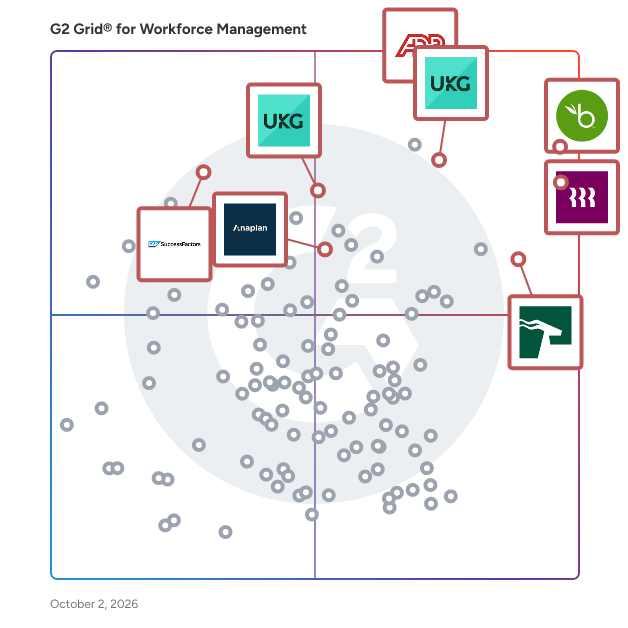
# Best Enterprise Workforce Management Software

  *By [Jeffrey Lin](https://research.g2.com/insights/author/jeffrey-lin)*

   Products classified in the overall Workforce Management category are similar in many regards and help companies of all sizes solve their business problems. However, enterprise business features, pricing, setup, and installation differ from businesses of other sizes, which is why we match buyers to the right Enterprise Business Workforce Management to fit their needs. Compare product ratings based on reviews from enterprise users or connect with one of G2&#39;s buying advisors to find the right solutions within the Enterprise Business Workforce Management category.

In addition to qualifying for inclusion in the Workforce Management Software category, to qualify for inclusion in the Enterprise Business Workforce Management Software category, a product must have at least 10 reviews left by a reviewer from an enterprise business.


---

**Sponsored**

### Insightful

Insightful is workforce analytics software that shows how work actually happens across your teams. When work is spread across people, locations, and tools, small gaps add up fast. Time goes missing. Work slows down. Problems surface late. Insightful makes this visible. You can see where time is going, how teams are performing, and where work is breaking down — without relying on manual tracking or guesswork. With Insightful, you can: - See how time is spent across teams - Spot drops in utilization and output early - Understand where work slows down or gets stuck - Compare performance across teams, roles, or locations - Use real activity data to review work and resolve disputes This is not just another monitoring tool. Insightful helps you run better operations. You get clear data you can use in weekly reviews, planning, and day-to-day decisions. It combines automatic time tracking, activity data, and reporting in one place — so you can improve performance without adding overhead. Teams choose Insightful because it delivers strong visibility and control without the cost or complexity of heavier tools.


[Book a Demo](https://www.g2.com/external_clickthroughs/record?secure%5Bad_program%5D=ppc&amp;secure%5Bad_slot%5D=category_product_list&amp;secure%5Bcategory_id%5D=171&amp;secure%5Bdisplayable_resource_id%5D=63&amp;secure%5Bdisplayable_resource_type%5D=Category&amp;secure%5Bmedium%5D=sponsored&amp;secure%5Bplacement_reason%5D=neighbor_category&amp;secure%5Bplacement_resource_ids%5D%5B%5D=247&amp;secure%5Bprioritized%5D=false&amp;secure%5Bproduct_id%5D=37386&amp;secure%5Bresource_id%5D=171&amp;secure%5Bresource_type%5D=Category&amp;secure%5Bsource_type%5D=category_page&amp;secure%5Bsource_url%5D=https%3A%2F%2Fwww.g2.com%2Fcategories%2Fworkforce-management%2Fenterprise&amp;secure%5Btoken%5D=5880067ef8b0dfbfd03d8ee29f87beefe1fd8ff8896986c3ad8e3733fc069988&amp;secure%5Burl%5D=https%3A%2F%2Fwww.insightful.io%2Fworkforce-analytics-enterprise%3Futm_source%3Dg2%26utm_medium%3Dreferral%26utm_campaign%3Ddirectories_paid%26utm_content%3Dpaid%26utm_term%3Dppc2026_topic_employee_monitoring&amp;secure%5Burl_type%5D=custom_url)

---

## Top-Rated Products (Ranked by G2 Score)
  ### 1. [ADP Workforce Now](https://www.g2.com/products/adp-workforce-now/reviews)
  ADP Workforce Now is the only all-in-one, cloud-based HR suite that adapts to the way you work. Built on a single database, ADP Workforce Now features Human Resource Management, Payroll, Benefits, Talent Management, Time &amp; Labor Management, Learning and Analytics, and Return to Office capabilities. Managing your people has never been easier. ADP Workforce Now equips you with the tools not just to track HR information, but to help you manage your workforce and make data-driven decisions. And, as you grow, you can add the functionality you need. Empower all levels of your organization with tools and capabilities designed specifically to provide an engaging experience for business leaders, managers, and workers. • All-in-one: A configurable HR platform to efficiently manage all your people management functions — payroll, HR, time, talent, and benefits — within a single database. • Confident Compliance: Our industry-leading security keeps your data safe, while our deep compliance expertise and solutions help you protect your business. • Ease of use: Innovative, easy-to-use features at your fingertips, making it easy to work in ways that fit your needs while also providing a better experience for your workforce • Insights in the flow of work: Make decisions with confidence, informed by insights from the richest and most robust workforce database in the business. • Integrated and connected ecosystem: Broaden your people management capabilities with the largest HR ecosystem that easily and securely integrates with leading third-party solutions. Easily connect with vital partners such as accountants, brokers and financial providers. PAYROLL. Save time and reduce errors with the all-in-one suite purposefully built to help you operate your business and meet your compliance needs. With anytime, anywhere access, quickly and accurately process payroll and gain insights into pay and earnings trends. Improve accuracy and increase confidence by reviewing and correcting errors before running payroll. Manage and pay employees across different jurisdictions and borders. ADP Workforce Now is also engineered to help support your tax &amp; compliance obligations and scales with you as you grow. Manage payroll for a global workforce with a single solution. HUMAN RESOURCES. Transform HR management from an administrative function to a vital, strategic part of your business. With configurable workflows and online document storage, reduce the time spent with paperwork and increase the time managing and transforming your people. Automate and streamline key needs including new hire onboarding and employee acknowledgment. Reduce employee and manager questions by equipping them with anytime, anywhere access so they can take action at their convenience. TALENT. Recruitment, performance management, compensation, learning. Attract top talent with intelligent and easy-to-use tools. Advertise open positions across 25,000+ Job Sites with JobTarget. Take a proactive approach to hiring with embedded ZipRecruiter Job Slots that helps you identify and match active job seekers with best fit jobs. Intelligently analyze which applicants best match your job description with Profile Relevancy. Define job requisitions with confidence using industry and geographic Compensation Benchmarks. Streamline the performance review process to better assess and develop high-performing teams. Align performance to corporate goals with the help of cascading and weighted goals and view team priorities and goal progress in one place with an organized Performance dashboard. Provide flexibility outside of the traditional annual review process with continuous and non-common date reviews. Develop a defined pay-for-performance compensation strategy to help retain top talent. BENEFITS ADMINISTRATION. Streamline your benefits administration with an actionable dashboard that brings notifications and tasks to your attention. Administer benefit plans, execute a smooth open enrollment process, and collect the data required to be compliant with the ACA. Utilize electronic carrier connections to ensure that enrolled employees and their dependents match your organization’s records saving you money. Reduce your administrative burden and simplify Open Enrollment with our OE Center and service team TIME &amp; ATTENDANCE. Experience time tracking that’s easy, convenient and accurate — for both employees and managers. Manage labor costs, boost productivity and simplify compliance by automating your timekeeping, attendance tracking and scheduling. Time-saving automation, seamless payroll integration, real-time visibility into attendance, time off, and overtime as well as real-time analytics help you effectively manage your workforce, every day. ADP DATACLOUD. Making data-driven business decisions has never been easier. With all of your Payroll, Human Resources, Benefits, Time and Talent information in one system, you can gain real, data-driven insight into your business. ADP Benchmarks lets you see how you compare to companies like yours— industries like yours— and locations like yours—so that you can confidently make strategic decisions based on the industry&#39;s largest data set. MOBILE. Equip employees and managers with anytime, anywhere access to view pay and tax information, complete benefits enrollment, clock in or out, manage payment options, and may. Empower business leaders with actionable workforce insights on their mobile device — when and how they need them with Executive and manager insights. ADP MARKETPLACE. Broaden the capabilities of your HR suite with leading solutions ready to easily and securely share data with ADP Workforce Now. ADP API CENTRAL. Supports developers with tools for custom integrations to other HR and business systems to share and synchronize HR data to save time and maintain data accuracy.


  **Average Rating:** 4.2/5.0
  **Total Reviews:** 3,865

**User Satisfaction Scores:**

- **Has the product been a good partner in doing business?:** 8.0/10 (Category avg: 8.6/10)
- **Performance:** 8.1/10 (Category avg: 8.6/10)
- **Skills Management:** 7.9/10 (Category avg: 8.2/10)
- **Workforce Analytics:** 8.2/10 (Category avg: 8.4/10)


**Seller Details:**

- **Seller:** [ADP](https://www.g2.com/sellers/adp)
- **Company Website:** https://ADP.com
- **Year Founded:** 1949
- **HQ Location:** Roseland, New Jersey
- **Twitter:** @ADP (48,732 Twitter followers)
- **LinkedIn® Page:** https://www.linkedin.com/company/adp/ (93,550 employees on LinkedIn®)

**Reviewer Demographics:**
  - **Who Uses This:** Human Resources Manager, HR Manager
  - **Top Industries:** Hospital &amp; Health Care, Non-Profit Organization Management
  - **Company Size:** 64% Mid-Market, 20% Enterprise


#### Pros & Cons

**Pros:**

- Ease of Use (309 reviews)
- Helpful (179 reviews)
- Payroll Management (163 reviews)
- Features (159 reviews)
- Easy Access (150 reviews)

**Cons:**

- Poor Customer Support (111 reviews)
- Not User-Friendly (98 reviews)
- Missing Features (84 reviews)
- Navigation Difficulty (72 reviews)
- Limited Customization (71 reviews)

  ### 2. [HROne](https://www.g2.com/products/uneecops-hrone/reviews)
  HROne is a future-ready HCM suite that automates HR processes, simplifies human interactions and delivers actionable insights to build better workplaces. In our pursuit to set everything HR on autopilot, we have successfully streamlined HR functions across the entire employee lifecycle, saving millions of hours for 1100+ enterprises. This count includes names from 20+ industries— Timex, ABP, Lux Cozi, Droom, Amar Ujala, Haier, Bikanervala, Weikfield, Burberry, Harvest Gold, Studds, Nippon Steel, Annapurna, Nissin, TravelXp, Career Launcher, and Paynearby are some to name a few. The best part? We gift our users a MOBILE APP at zero cost to help them experience the true power of HR automation anywhere, anytime. We differentiate ourselves in the HR software market with the following salient functionalities- ✅ First ever Gmail-inspired Inbox for HR to guide your day ✅ Innovative task insights to get work done in time ✅ Intuitive global search box to trace &amp; access any information and a system that doesn’t just promise but actually SHOWS YOU ITS REAL ROI. Being the first HCM that takes real-time actions on all HR tasks, discouraging backlogs with subtle reminders, we set you up for success by automating all operational tasks. To know more, visit our website- https://hrone.cloud/


  **Average Rating:** 4.8/5.0
  **Total Reviews:** 2,042

**User Satisfaction Scores:**

- **Has the product been a good partner in doing business?:** 9.4/10 (Category avg: 8.6/10)
- **Performance:** 9.3/10 (Category avg: 8.6/10)
- **Skills Management:** 9.3/10 (Category avg: 8.2/10)
- **Workforce Analytics:** 9.4/10 (Category avg: 8.4/10)


**Seller Details:**

- **Seller:** [HROne](https://www.g2.com/sellers/hrone-94ee16e4-7edc-45bb-803d-2eb147a2e6ba)
- **Company Website:** https://www.hrone.cloud
- **Year Founded:** 2016
- **HQ Location:** Noida
- **Twitter:** @hronecloud (1,572 Twitter followers)
- **LinkedIn® Page:** https://www.linkedin.com/company/hronecloud/ (428 employees on LinkedIn®)

**Reviewer Demographics:**
  - **Who Uses This:** HR Manager, Assistant Manager
  - **Top Industries:** Manufacturing, Information Technology and Services
  - **Company Size:** 61% Mid-Market, 27% Enterprise


#### Pros & Cons

**Pros:**

- Ease of Use (688 reviews)
- Helpful (450 reviews)
- Attendance Management (376 reviews)
- Attendance Tracking (372 reviews)
- Payroll (359 reviews)

**Cons:**

- Missing Features (239 reviews)
- Limited Features (223 reviews)
- Slow Loading (213 reviews)
- Limited Customization (180 reviews)
- Slow Performance (171 reviews)

  ### 3. [UKG Ready](https://www.g2.com/products/ukg-ready/reviews)
  At UKG, our purpose is people®. We’re on a mission to inspire every organization to become a great place to work through HR and payroll technology built for all. With UKG, you get more than 70 years of combined experience in HCM, workforce management, and culture solutions ― all in one suite. The UKG Ready® software suite is the intuitive, centralized HCM solution designed for small to mid-sized businesses that meets all your employee needs. It automates and streamlines HR, payroll, benefits, time, talent, and scheduling processes, empowering your people to be more productive, make more informed decisions, and build a culture of trust within their organizations. UKG Ready is designed to grow along with your business, offering a comprehensive suite of tools that offer actionable insights, help ensure compliance, and improve profitability. Using the power of AI, it draws on a unique set of work, people, and culture data to boost efficiency and productivity, ultimately driving better business results for all. For example, UKG Ready streamlines core HR functions by centralizing employee information in a single secure database to give HR teams simplified benefits administration, automated workflows, configurable forms, and real-time access to all their people data in one convenient place to help reduce administrative workload and compliance risk. When it comes to payroll, UKG Ready calculations run continuously in the background to reduce payroll processing time and provide real-time reports and analytics. UKG Ready’s flexible pay rules engine simplifies different pay scenarios such as shift differentials and employees with multiple positions. And automatic compliance updates keep you current with constantly changing regulatory requirements. For workforce management, UKG Ready streamlines time and attendance tasks by automating hour tracking, time approvals, and time-off requests. It also simplifies leave and accrual tracking with consistent policy application. In addition, managers can create optimal schedules based on demand, skills, and compliance rules while employees can access self-service tools for shift selection and schedule viewing. And automated expense tracking speeds reimbursement approvals for a better employee experience while offering comprehensive reporting for more informed decision making. The Great Place To Work® Hub in UKG Ready leverages data from the global workplace culture authority, Great Place To Work, and compares it with insights gathered directly you’re your people, allowing you to measure company performance and receive recommendations on improvement opportunities so employees want to stay and grow. UKG Bryte AI™ is our AI-powered sidekick and the embodiment of UKG’s commitment to help organizations become great places to work by empowering people with the insights they need to build a brighter future for all. With AI driven by decades of people, work, and workplace culture data, users get insights to build trust, make the hard things simple, and deliver personalized experiences that foster meaning and purpose. And as partners for life, all UKG customers receive expert support, on-demand guidance, and anytime, anywhere access to a wide range of resources.


  **Average Rating:** 4.4/5.0
  **Total Reviews:** 2,326

**User Satisfaction Scores:**

- **Has the product been a good partner in doing business?:** 8.5/10 (Category avg: 8.6/10)
- **Performance:** 8.7/10 (Category avg: 8.6/10)
- **Skills Management:** 8.3/10 (Category avg: 8.2/10)
- **Workforce Analytics:** 8.5/10 (Category avg: 8.4/10)


**Seller Details:**

- **Seller:** [UKG](https://www.g2.com/sellers/ukg)
- **Company Website:** https://www.ukg.com/
- **Year Founded:** 1977
- **HQ Location:** Weston, FL
- **Twitter:** @UKGInc (42,680 Twitter followers)
- **LinkedIn® Page:** https://www.linkedin.com/company/67539665 (16,403 employees on LinkedIn®)

**Reviewer Demographics:**
  - **Who Uses This:** Teacher, Administrative Assistant
  - **Top Industries:** Hospital &amp; Health Care, Retail
  - **Company Size:** 55% Mid-Market, 31% Enterprise


#### Pros & Cons

**Pros:**

- Ease of Use (708 reviews)
- Easy Access (358 reviews)
- Simple (288 reviews)
- Time Tracking (272 reviews)
- User Interface (263 reviews)

**Cons:**

- Navigation Difficulty (147 reviews)
- Login Issues (126 reviews)
- Learning Curve (102 reviews)
- Not User-Friendly (90 reviews)
- Not Intuitive (84 reviews)

  ### 4. [Rippling](https://www.g2.com/products/rippling/reviews)
  Streamline your business with Rippling’s all-in-one platform for HR, IT, payroll, and spend management. Effortlessly manage the entire employee lifecycle, from hiring to benefits administration. Automate HR tasks, ensure compliance, and streamline approvals. Enjoy timely payroll, real-time financial visibility, and dynamic spend policies. Simplify IT with device management, software access, and compliance monitoring, all from one dashboard. Rippling empowers your business to save time, reduce costs, and enhance efficiency, allowing you to focus on growth. Experience the power of unified management with Rippling today.


  **Average Rating:** 4.8/5.0
  **Total Reviews:** 10,718

**User Satisfaction Scores:**

- **Has the product been a good partner in doing business?:** 9.1/10 (Category avg: 8.6/10)
- **Performance:** 9.4/10 (Category avg: 8.6/10)
- **Skills Management:** 9.0/10 (Category avg: 8.2/10)
- **Workforce Analytics:** 9.1/10 (Category avg: 8.4/10)


**Seller Details:**

- **Seller:** [Rippling](https://www.g2.com/sellers/rippling)
- **Company Website:** https://www.rippling.com
- **Year Founded:** 2016
- **HQ Location:** San Francisco, CA
- **Twitter:** @Rippling (12,054 Twitter followers)
- **LinkedIn® Page:** https://www.linkedin.com/company/17988315/ (6,941 employees on LinkedIn®)

**Reviewer Demographics:**
  - **Who Uses This:** Software Engineer, Account Executive
  - **Top Industries:** Computer Software, Information Technology and Services
  - **Company Size:** 55% Mid-Market, 29% Small-Business


#### Pros & Cons

**Pros:**

- Ease of Use (6965 reviews)
- Intuitive (5169 reviews)
- Simple (4563 reviews)
- User Interface (3808 reviews)
- Easy Access (3660 reviews)

**Cons:**

- Missing Features (1240 reviews)
- Not User-Friendly (885 reviews)
- Learning Curve (856 reviews)
- Limited Features (841 reviews)
- Improvement Needed (818 reviews)

  ### 5. [UKG Pro](https://www.g2.com/products/ukg-pro/reviews)
  Designed for organizations that prioritize diverse workforces and cultures of trust and belonging, UKG Pro® puts people at the center of your strategy. From HR and complex payroll to talent and industry-focused workforce management (WFM),our comprehensive human capital management solution (HCM) anticipates people’s needs beyond just work. We partner with you every step of the way to drive better business outcomes and create great workplaces for all.


  **Average Rating:** 4.3/5.0
  **Total Reviews:** 2,129

**User Satisfaction Scores:**

- **Has the product been a good partner in doing business?:** 8.3/10 (Category avg: 8.6/10)
- **Performance:** 8.5/10 (Category avg: 8.6/10)
- **Skills Management:** 7.7/10 (Category avg: 8.2/10)
- **Workforce Analytics:** 8.1/10 (Category avg: 8.4/10)


**Seller Details:**

- **Seller:** [UKG](https://www.g2.com/sellers/ukg)
- **Company Website:** https://www.ukg.com/
- **Year Founded:** 1977
- **HQ Location:** Weston, FL
- **Twitter:** @UKGInc (42,680 Twitter followers)
- **LinkedIn® Page:** https://www.linkedin.com/company/67539665 (16,403 employees on LinkedIn®)

**Reviewer Demographics:**
  - **Who Uses This:** Payroll Manager, HR Generalist
  - **Top Industries:** Hospital &amp; Health Care, Oil &amp; Energy
  - **Company Size:** 48% Mid-Market, 46% Enterprise


#### Pros & Cons

**Pros:**

- Ease of Use (171 reviews)
- Helpful (90 reviews)
- Customer Support (65 reviews)
- Features (65 reviews)
- User Interface (64 reviews)

**Cons:**

- Not User-Friendly (50 reviews)
- Learning Curve (45 reviews)
- Poor Customer Support (39 reviews)
- Limited Features (36 reviews)
- Not Intuitive (36 reviews)

  ### 6. [BambooHR](https://www.g2.com/products/bamboohr/reviews)
  BambooHR® is an all-in-one HR software solution designed to eliminate inefficiencies and simplify people management. Trusted by thousands of companies in over 150 countries, BambooHR centralizes your employee data, payroll, time tracking, and benefits information for seamless coordination and security. Whether you&#39;re managing payroll, tracking employee time, or handling benefits, BambooHR ensures accurate data and a smooth user experience. Features like electronic signature collection streamline operations, saving time and reducing environmental impact. With BambooHR, you can automate key HR functions and workflows throughout the entire employee lifecycle, from onboarding to offboarding. Notable clients like Fitbit, Fab, FreshBooks, Klout, and Squarespace rely on BambooHR to stay organized and efficient. Learn more at www.bamboohr.com.


  **Average Rating:** 4.5/5.0
  **Total Reviews:** 4,162

**User Satisfaction Scores:**

- **Has the product been a good partner in doing business?:** 9.0/10 (Category avg: 8.6/10)
- **Performance:** 8.5/10 (Category avg: 8.6/10)
- **Skills Management:** 7.4/10 (Category avg: 8.2/10)
- **Workforce Analytics:** 8.2/10 (Category avg: 8.4/10)


**Seller Details:**

- **Seller:** [BambooHR](https://www.g2.com/sellers/bamboohr)
- **Company Website:** https://www.bamboohr.com
- **Year Founded:** 2008
- **HQ Location:** Draper, UT
- **Twitter:** @bamboohr (18,012 Twitter followers)
- **LinkedIn® Page:** https://www.linkedin.com/company/2049060/ (1,830 employees on LinkedIn®)

**Reviewer Demographics:**
  - **Who Uses This:** HR Manager, Human Resources Manager
  - **Top Industries:** Computer Software, Information Technology and Services
  - **Company Size:** 60% Mid-Market, 26% Small-Business


#### Pros & Cons

**Pros:**

- Ease of Use (906 reviews)
- Simple (487 reviews)
- User Interface (403 reviews)
- Intuitive (336 reviews)
- User-Friendly Interface (324 reviews)

**Cons:**

- Missing Features (261 reviews)
- Limited Customization (183 reviews)
- Limited Features (170 reviews)
- Limited Options (108 reviews)
- Limited Capabilities (102 reviews)

  ### 7. [Anaplan](https://www.g2.com/products/anaplan/reviews)
  Anaplan is the only scenario planning and analysis platform designed to optimize decision-making in today’s complex business environment so that enterprises can outpace their competition and the market. By building connections and collaboration across organizational silos, the platform intelligently surfaces key insights — so businesses can make the right decisions, right now.​ More than 2,400 of the world’s best brands continually optimize their decision-making by planning with Anaplan. G2 categories include: Corporate Performance Management, Budgeting &amp; Forecasting, Compensation Management, Financial Close, Sales &amp; Ops Planning, Sales Performance Management, Sales Planning, Supply Chain Planning, and Workforce Management.


  **Average Rating:** 4.6/5.0
  **Total Reviews:** 388

**User Satisfaction Scores:**

- **Has the product been a good partner in doing business?:** 8.6/10 (Category avg: 8.6/10)
- **Performance:** 8.7/10 (Category avg: 8.6/10)
- **Skills Management:** 7.7/10 (Category avg: 8.2/10)
- **Workforce Analytics:** 8.5/10 (Category avg: 8.4/10)


**Seller Details:**

- **Seller:** [Anaplan](https://www.g2.com/sellers/anaplan)
- **Company Website:** https://www.anaplan.com
- **Year Founded:** 2006
- **HQ Location:** Miami, FL
- **Twitter:** @anaplan (21,798 Twitter followers)
- **LinkedIn® Page:** https://www.linkedin.com/company/anaplan/ (2,737 employees on LinkedIn®)

**Reviewer Demographics:**
  - **Who Uses This:** Manager, Senior Consultant
  - **Top Industries:** Information Technology and Services, Financial Services
  - **Company Size:** 52% Enterprise, 34% Mid-Market


#### Pros & Cons

**Pros:**

- Ease of Use (100 reviews)
- Flexibility (90 reviews)
- Features (87 reviews)
- Efficiency (63 reviews)
- Planning (59 reviews)

**Cons:**

- Limitations (44 reviews)
- Missing Features (39 reviews)
- Learning Curve (33 reviews)
- Performance Issues (30 reviews)
- Lack of Features (29 reviews)

  ### 8. [SAP SuccessFactors HCM](https://www.g2.com/products/sap-sap-successfactors-hcm/reviews)
  SAP SuccessFactors HCM is a global, AI-powered cloud HR suite designed to help organizations thrive in a fast-moving world. With 100+ localizations, it delivers real-time visibility and connected solutions across core HR, payroll, talent management, learning, analytics, planning, and employee experience. More than 10,000 organizations trust SAP SuccessFactors HCM to enhance every employee experience, workforce decision, and people process—turning each employee into a success story. With SAP SuccessFactors HCM, you can: - Empower your workforce with AI-driven tools for self-service, learning, performance, and development to help people work faster and smarter. - Identify and develop top talent with a unified source of people and skills data that supports both HR strategies and business goals. - Stay compliant and agile with built-in legal and regulatory updates tailored to local business requirements. - Accelerate time to value by leveraging proven HR best practices and the strength of a global partner ecosystem.


  **Average Rating:** 4.1/5.0
  **Total Reviews:** 1,442

**User Satisfaction Scores:**

- **Has the product been a good partner in doing business?:** 8.3/10 (Category avg: 8.6/10)
- **Performance:** 8.3/10 (Category avg: 8.6/10)
- **Skills Management:** 8.4/10 (Category avg: 8.2/10)
- **Workforce Analytics:** 8.4/10 (Category avg: 8.4/10)


**Seller Details:**

- **Seller:** [SAP](https://www.g2.com/sellers/sap)
- **Company Website:** https://www.sap.com/
- **Year Founded:** 1972
- **HQ Location:** Walldorf
- **Twitter:** @SAP (297,024 Twitter followers)
- **LinkedIn® Page:** https://www.linkedin.com/company/sap/ (141,341 employees on LinkedIn®)

**Reviewer Demographics:**
  - **Who Uses This:** Recruiter, Consultant
  - **Top Industries:** Information Technology and Services, Computer Software
  - **Company Size:** 55% Enterprise, 34% Mid-Market


#### Pros & Cons

**Pros:**

- Ease of Use (144 reviews)
- Features (100 reviews)
- HR Management (94 reviews)
- Comprehensive Features (83 reviews)
- Simple (80 reviews)

**Cons:**

- Not User-Friendly (68 reviews)
- Not Intuitive (67 reviews)
- Limited Customization (60 reviews)
- Learning Curve (57 reviews)
- Limited Features (57 reviews)

  ### 9. [greytHR](https://www.g2.com/products/greythr/reviews)
  greytHR is a comprehensive Human Resource Management System (HRMS) designed to streamline complex, recurring, and essential HR and payroll functions in a compliant and secure manner. This platform provides a full suite of over 50 tools that cover the entire employee lifecycle, from hiring to retirement, making it an invaluable resource for organizations looking to enhance their People Operations. The versatility of greytHR makes it suitable for a wide range of organizations, from small and medium-sized enterprises to large corporations. It is adaptable for various industries, including manufacturing, information technology, healthcare, banking, hospitality, education, and retail. This flexibility allows businesses with employee counts ranging from 5 to 50,000 to utilize the platform effectively. With over 30,000 organizations and 3 million users across more than 25 countries, greytHR has established itself as a trusted HRMS solution in regions such as India, the Middle East, and Southeast Asia. Key features of greytHR include modules for hiring, onboarding, core HR management, performance management, workforce management, and payroll processing. The platform also offers tools for absence management, time and attendance tracking, offboarding, and detailed HR reports and analytics. Employee self-service capabilities empower users to manage their own information, while a mobile app ensures accessibility on the go. Additionally, greytHR supports a marketplace for integrations, allowing organizations to connect with other software solutions seamlessly. By providing a centralized platform for all HR-related tasks, greytHR enhances operational efficiency and compliance. The platform’s robust features cater to the diverse needs of HR departments, enabling them to focus on strategic initiatives rather than administrative burdens. This holistic approach not only improves employee engagement and retention but also supports organizations in maintaining 100% compliance with HR regulations. As a result, greytHR stands out in the HRMS category, offering a unique blend of functionality, adaptability, and user-friendly design that meets the evolving needs of modern businesses.


  **Average Rating:** 4.5/5.0
  **Total Reviews:** 1,172

**User Satisfaction Scores:**

- **Has the product been a good partner in doing business?:** 8.7/10 (Category avg: 8.6/10)
- **Performance:** 8.6/10 (Category avg: 8.6/10)
- **Skills Management:** 8.7/10 (Category avg: 8.2/10)
- **Workforce Analytics:** 8.6/10 (Category avg: 8.4/10)


**Seller Details:**

- **Seller:** [Greytip Software Pvt. Ltd.](https://www.g2.com/sellers/greytip-software-pvt-ltd)
- **Year Founded:** 1994
- **HQ Location:** Bangalore
- **Twitter:** @greythr2 (1,096 Twitter followers)
- **LinkedIn® Page:** https://www.linkedin.com/company/600275/ (1,016 employees on LinkedIn®)

**Reviewer Demographics:**
  - **Who Uses This:** HR Manager, HR
  - **Top Industries:** Information Technology and Services, Computer Software
  - **Company Size:** 64% Mid-Market, 24% Small-Business


#### Pros & Cons

**Pros:**

- Ease of Use (224 reviews)
- Payroll (129 reviews)
- Payroll Management (124 reviews)
- Attendance Tracking (119 reviews)
- Leave Management (108 reviews)

**Cons:**

- Limited Customization (61 reviews)
- Slow Performance (61 reviews)
- Slow Loading (58 reviews)
- Missing Features (50 reviews)
- Poor Customer Support (49 reviews)

  ### 10. [Verint Workforce Management](https://www.g2.com/products/verint-workforce-management/reviews)
  Verint Workforce Management is an AI-powered solution that forecasts your customer demand, analyzes and predicts the number of employees needed, and optimizes employee schedules to align with demand across contact center and back-office operations, to help you meet your CX and efficiency goals. We provide industry-leading forecasting accuracy (+/- 95%), the most flexibility in employee scheduling, and AI-derived data insights and dashboards for faster, better decision making. Verint WFM customers have achieved such AI-powered business outcomes as: 20% increase in employee productivity, 20%-30% reduction in employee attrition, 5%-10% increase in NPS / CSAT scores, 35% increase in manager capacity. Verint WFM is part of Verint Open Platform, which helps your customer service operations lower costs and elevate EX and CX with AI-powered bots that automate CX workflows. The Verint Platform has the broadest range of CX Automation solutions, including Agent Copilot Bots, Knowledge Management, Intelligent Virtual Assistants and more. The Platform and solutions are scalable from SMB customers to global enterprises, and can be deployed on-premises, single or multi-tenant cloud, or a hybrid mix.


  **Average Rating:** 4.2/5.0
  **Total Reviews:** 173

**User Satisfaction Scores:**

- **Has the product been a good partner in doing business?:** 8.5/10 (Category avg: 8.6/10)
- **Performance:** 8.4/10 (Category avg: 8.6/10)
- **Skills Management:** 7.9/10 (Category avg: 8.2/10)
- **Workforce Analytics:** 8.3/10 (Category avg: 8.4/10)


**Seller Details:**

- **Seller:** [Verint](https://www.g2.com/sellers/verint)
- **Year Founded:** 1994
- **HQ Location:** Melville, New York
- **Twitter:** @Verint (7,747 Twitter followers)
- **LinkedIn® Page:** https://www.linkedin.com/company/verint (4,226 employees on LinkedIn®)
- **Ownership:** NASDAQ: VRNT

**Reviewer Demographics:**
  - **Top Industries:** Insurance, Financial Services
  - **Company Size:** 54% Enterprise, 35% Mid-Market


#### Pros & Cons

**Pros:**

- Ease of Use (18 reviews)
- Efficiency (16 reviews)
- Scheduling (15 reviews)
- Features (9 reviews)
- Agent Management (5 reviews)

**Cons:**

- Limited Customization (8 reviews)
- Learning Curve (6 reviews)
- User Interface Issues (6 reviews)
- Missing Features (5 reviews)
- Poor Reporting (5 reviews)

  ### 11. [Dayforce](https://www.g2.com/products/dayforce/reviews)
  Dayforce is the global people platform for the modern workforce. An enterprise HCM solution, Dayforce combines payroll, HR, benefits, talent management, workforce management, and more in a single cloud application to power today’s boundless workforce. Dayforce helps deliver experiences that help organizations unlock their full workforce potential and operate with confidence no matter where they operate in the world. Dayforce is headquartered in Toronto, Ontario and Minneapolis, Minnesota with operations across the globe. The company’s brand promise to make work life better is the commitment it makes not only to customers, but to its own people and the communities Dayforce operates in. Key product areas: · HRIS · Global payroll, on-demand pay · Benefits · Workforce management, including time and attendance and task management · Talent acquisition, including recruiting and onboarding · Talent management, including performance management, succession planning, compensation management, engagement surveys, and an integrated learning management system · Advanced reporting, analytics, and dashboards · HR self service via the Dayforce mobile app


  **Average Rating:** 4.2/5.0
  **Total Reviews:** 933

**User Satisfaction Scores:**

- **Has the product been a good partner in doing business?:** 8.2/10 (Category avg: 8.6/10)
- **Performance:** 8.0/10 (Category avg: 8.6/10)
- **Skills Management:** 7.8/10 (Category avg: 8.2/10)
- **Workforce Analytics:** 8.1/10 (Category avg: 8.4/10)


**Seller Details:**

- **Seller:** [Dayforce](https://www.g2.com/sellers/dayforce)
- **Year Founded:** 2012
- **HQ Location:** Minneapolis, MN
- **Twitter:** @Ceridian (16,584 Twitter followers)
- **LinkedIn® Page:** https://www.linkedin.com/company/3169/ (4,320 employees on LinkedIn®)
- **Ownership:** NYSE: CDAY

**Reviewer Demographics:**
  - **Who Uses This:** Payroll Manager, Payroll Specialist
  - **Top Industries:** Retail, Non-Profit Organization Management
  - **Company Size:** 47% Mid-Market, 46% Enterprise


#### Pros & Cons

**Pros:**

- Ease of Use (153 reviews)
- Features (76 reviews)
- Helpful (75 reviews)
- Comprehensive Features (67 reviews)
- Payroll Management (63 reviews)

**Cons:**

- Poor Customer Support (59 reviews)
- Missing Features (49 reviews)
- Limited Customization (48 reviews)
- Limited Features (48 reviews)
- Reporting Issues (43 reviews)

  ### 12. [Zoho People](https://www.g2.com/products/zoho-people/reviews)
  Zoho People is a cloud-based HR software designed to help businesses streamline and automate their HR processes—right from onboarding to offboarding. It offers a comprehensive suite of tools including time and attendance tracking, leave management, performance reviews, employee self-service, document management, and more. With Zoho People, HR teams can reduce manual work, ensure compliance, and offer a better experience to employees. It’s highly customizable, integrates with popular third-party apps, and scales with your organization—whether you&#39;re a startup or an enterprise. ✅ Attendance &amp; Time Tracking: Monitor work hours, manage shifts, and integrate with biometric systems. ✅ Leave Management: Automate leave policies, approvals, and accruals. ✅ Performance Management: Enable 360° reviews, set goals, and track progress. ✅ Employee Self-Service: Let employees update info, request time off, and access policies. ✅ HR Workflows: Automate tasks like onboarding, document collection, and approvals. ✅ Custom Forms &amp; Fields: Tailor the system to match your unique HR processes. ✅ Integration-Ready: Connect with Zoho apps, Google Workspace, Microsoft 365, and more. Try Zoho People now: https://www.zoho.com/people/signup.html


  **Average Rating:** 4.4/5.0
  **Total Reviews:** 387

**User Satisfaction Scores:**

- **Has the product been a good partner in doing business?:** 8.5/10 (Category avg: 8.6/10)
- **Performance:** 8.8/10 (Category avg: 8.6/10)
- **Skills Management:** 8.7/10 (Category avg: 8.2/10)
- **Workforce Analytics:** 8.6/10 (Category avg: 8.4/10)


**Seller Details:**

- **Seller:** [Zoho](https://www.g2.com/sellers/zoho-b00ca9d5-bca8-41b5-a8ad-275480841704)
- **Year Founded:** 1996
- **HQ Location:** Austin, TX
- **Twitter:** @Zoho (137,047 Twitter followers)
- **LinkedIn® Page:** https://www.linkedin.com/company/38373/ (30,531 employees on LinkedIn®)
- **Phone:** +1 (888) 900-9646 

**Reviewer Demographics:**
  - **Who Uses This:** Software Engineer, HR Manager
  - **Top Industries:** Information Technology and Services, Computer Software
  - **Company Size:** 56% Mid-Market, 31% Small-Business


#### Pros & Cons

**Pros:**

- Ease of Use (70 reviews)
- Attendance Tracking (43 reviews)
- Leave Management (41 reviews)
- HR Management (36 reviews)
- Simple (30 reviews)

**Cons:**

- Limited Customization (20 reviews)
- Learning Curve (18 reviews)
- Not User-Friendly (17 reviews)
- Missing Features (14 reviews)
- Complex Setup (13 reviews)

  ### 13. [Paylocity](https://www.g2.com/products/paylocity/reviews)
  Paylocity delivers the most innovative technology bringing HR, Finance, and IT together in one modern, easy-to-use platform to empower teams, simplify processes, and deliver real results. Run payroll, benefits, talent and workforce management while also managing all non-payroll spend including expenses, accounts payable, corporate cards, procurement, and headcount planning. Anchored to a single employee record, policy, limit, and approval workflows stay in lockstep as people join, move, and grow. We&#39;re more than a platform, we’re the partner helping you shape the future of work.


  **Average Rating:** 4.5/5.0
  **Total Reviews:** 5,129

**User Satisfaction Scores:**

- **Has the product been a good partner in doing business?:** 8.8/10 (Category avg: 8.6/10)
- **Performance:** 8.5/10 (Category avg: 8.6/10)
- **Skills Management:** 7.7/10 (Category avg: 8.2/10)
- **Workforce Analytics:** 8.1/10 (Category avg: 8.4/10)


**Seller Details:**

- **Seller:** [Paylocity](https://www.g2.com/sellers/paylocity)
- **Company Website:** https://www.paylocity.com
- **Year Founded:** 1997
- **HQ Location:** Schaumburg, IL
- **Twitter:** @Paylocity (4,578 Twitter followers)
- **LinkedIn® Page:** https://www.linkedin.com/company/24614/ (6,789 employees on LinkedIn®)

**Reviewer Demographics:**
  - **Who Uses This:** HR Manager, Controller
  - **Top Industries:** Computer Software, Information Technology and Services
  - **Company Size:** 72% Mid-Market, 20% Small-Business


#### Pros & Cons

**Pros:**

- Ease of Use (1348 reviews)
- Helpful (661 reviews)
- Customer Support (602 reviews)
- Intuitive (562 reviews)
- Simple (552 reviews)

**Cons:**

- Poor Customer Support (483 reviews)
- Missing Features (333 reviews)
- Learning Curve (317 reviews)
- Limited Features (251 reviews)
- Poor Support Services (245 reviews)

  ### 14. [Quinyx](https://www.g2.com/products/quinyx/reviews)
  Quinyx is the workforce management platform built for the world’s frontline industries, where efficiency, agility, and employee engagement make all the difference. More than just scheduling, Quinyx connects labor planning to real business outcomes. It helps organizations optimize staffing levels, control costs, and ensure compliance, all while empowering frontline teams with AI-powered, mobile-first tools designed for the way people actually work. Fast to deploy and simple to adopt, Quinyx delivers measurable ROI within months, transforming workforce management from a back-office function into a strategic driver of performance. With built-in global compliance and advanced AI capabilities, the platform enables businesses to forecast demand accurately, adapt to operational complexity, and scale seamlessly across regions and markets. Quinyx doesn’t just manage workforces — it elevates them. By aligning people, processes, and performance in one intuitive platform, Quinyx gives organizations the clarity and agility to make smarter labor decisions, engage their teams, and build a more productive, sustainable future of work.


  **Average Rating:** 4.3/5.0
  **Total Reviews:** 494

**User Satisfaction Scores:**

- **Has the product been a good partner in doing business?:** 8.5/10 (Category avg: 8.6/10)
- **Performance:** 8.2/10 (Category avg: 8.6/10)
- **Skills Management:** 7.8/10 (Category avg: 8.2/10)
- **Workforce Analytics:** 7.7/10 (Category avg: 8.4/10)


**Seller Details:**

- **Seller:** [Quinyx](https://www.g2.com/sellers/quinyx)
- **Company Website:** https://www.quinyx.com
- **Year Founded:** 2005
- **HQ Location:** Stockholm
- **LinkedIn® Page:** https://www.linkedin.com/company/1281172/ (296 employees on LinkedIn®)

**Reviewer Demographics:**
  - **Who Uses This:** Store Manager, Supervisor
  - **Top Industries:** Retail, Hospital &amp; Health Care
  - **Company Size:** 37% Enterprise, 37% Mid-Market


#### Pros & Cons

**Pros:**

- Ease of Use (49 reviews)
- Intuitive (27 reviews)
- Simple (22 reviews)
- Scheduling (21 reviews)
- Navigation Ease (18 reviews)

**Cons:**

- Scheduling Issues (13 reviews)
- Limited Features (9 reviews)
- Missing Features (9 reviews)
- Not User-Friendly (9 reviews)
- Complexity (8 reviews)

  ### 15. [Deputy](https://www.g2.com/products/deputy/reviews)
  Deputy is the leading workforce management software and unified end-to-end people platform for shift-based work.Trusted by over 390,000 workplaces globally, Deputy simplifies the entire employee lifecycle by combining HR, advanced scheduling, time tracking, and compliance tools into a single seamless app. Move beyond employee scheduling with a platform that provides a centralised source of visibility for navigating complex labor laws, streamlining team communication, and controlling costs in real-time. Whether you need to simplify recruitment and onboarding with Deputy HR, capture accurate timesheets with GPS verification, or bridge the gap to pay with 300+ payroll integrations, Deputy empowers you to manage your entire workforce infrastructure from anywhere.


  **Average Rating:** 4.6/5.0
  **Total Reviews:** 645

**User Satisfaction Scores:**

- **Has the product been a good partner in doing business?:** 9.2/10 (Category avg: 8.6/10)
- **Performance:** 9.1/10 (Category avg: 8.6/10)
- **Skills Management:** 8.3/10 (Category avg: 8.2/10)
- **Workforce Analytics:** 8.4/10 (Category avg: 8.4/10)


**Seller Details:**

- **Seller:** [Deputy](https://www.g2.com/sellers/deputy)
- **Company Website:** https://www.deputy.com
- **Year Founded:** 2008
- **HQ Location:** Sydney, Australia
- **Twitter:** @deputyapp (4,317 Twitter followers)
- **LinkedIn® Page:** https://www.linkedin.com/company/2451628/ (475 employees on LinkedIn®)

**Reviewer Demographics:**
  - **Who Uses This:** Owner, Barista
  - **Top Industries:** Hospitality, Retail
  - **Company Size:** 52% Small-Business, 33% Mid-Market


#### Pros & Cons

**Pros:**

- Ease of Use (243 reviews)
- Scheduling (148 reviews)
- Scheduling Ease (135 reviews)
- Intuitive (131 reviews)
- User Interface (108 reviews)

**Cons:**

- Scheduling Issues (48 reviews)
- Shift Management (41 reviews)
- Clocking Issues (27 reviews)
- Missing Features (25 reviews)
- Slow Loading (24 reviews)

  ### 16. [ProHance](https://www.g2.com/products/prohance/reviews)
  ProHance is a new-age workforce analytics and operations enablement platform that delivers complete end-to-end visibility into your workforce. Serving as a single unified solution, it empowers organizations to maximize productivity, optimize costs, and directly impact the bottom line. By intelligently combining real-time activity tracking, accurate time utilization analysis, omnichannel operations management, and AI-powered insights grounded in indisputable data, ProHance enables leaders to make informed, confident decisions. It seamlessly supports shift planning, automated work allocation, capacity forecasting, and more —covering the entire workforce lifecycle from login to outcomes. ProHance’s new AI solution predicts attrition early, spotting disengagement signals so you can intervene proactively, retain top talent, and escape the costly turnover-rehire cycle. Instant persona-based insights put actionable retention strategies at your fingertips. With intuitive, customizable dashboards, predictive analytics, and proactive alerts, ProHance helps organizations eliminate inefficiencies, balance workloads, retain top talent, and drive sustainable performance improvements. Trusted by leading enterprises in IT, BFSI, healthcare, BPOs, GCCs and beyond, ProHance consistently delivers up to 30% gains in operational efficiency while fostering greater transparency, accountability, and employee engagement.


  **Average Rating:** 4.6/5.0
  **Total Reviews:** 211

**User Satisfaction Scores:**

- **Has the product been a good partner in doing business?:** 9.1/10 (Category avg: 8.6/10)
- **Performance:** 9.0/10 (Category avg: 8.6/10)
- **Skills Management:** 9.1/10 (Category avg: 8.2/10)
- **Workforce Analytics:** 9.1/10 (Category avg: 8.4/10)


**Seller Details:**

- **Seller:** [ProHance](https://www.g2.com/sellers/prohance)
- **Company Website:** https://www.prohance.ai/
- **Year Founded:** 2010
- **HQ Location:** Bangalore, Karnataka
- **Twitter:** @prohance_net (79 Twitter followers)
- **LinkedIn® Page:** https://www.linkedin.com/company/prohance/ (206 employees on LinkedIn®)

**Reviewer Demographics:**
  - **Who Uses This:** Assistant Manager, Project Manager
  - **Top Industries:** Information Technology and Services, Outsourcing/Offshoring
  - **Company Size:** 57% Mid-Market, 37% Enterprise


#### Pros & Cons

**Pros:**

- Time Tracking (30 reviews)
- Efficiency (25 reviews)
- Ease of Use (21 reviews)
- Time-saving (17 reviews)
- Tracking Ease (17 reviews)

**Cons:**

- Difficult Navigation (8 reviews)
- Limited Features (8 reviews)
- Data Inaccuracy (7 reviews)
- Missing Features (6 reviews)
- Not Intuitive (6 reviews)

  ### 17. [Deel HR](https://www.g2.com/products/deel-hr/reviews)
  Deel HR is a global HRIS/HCM solution that helps companies manage people, compliance and HR processes across countries It runs core HR operations, onboarding, employee files, approvals, policies, time off, and documents, and layers on modular tools for talent, performance, compensation and planning. Built-in global data and AI help teams automate busywork, draft content, and turn people data into better decisions. Key capabilities and value: - HRIS that centralizes employee data and automates routine tasks to reduce manual work - Engage: reviews, goals, learning and surveys that live in the same system as HR data - Compensation and planning: salary insights, benchmarking and costed headcount planning tied to real payroll data - Global-first design: support for every worker type and local rules across 150+ countries- - AI and automation: automate tasks with workflows that give HR teams 97hours back per month. AI gets you answers about global compliance, salary data. You can even hire AI Agents to help complete actions like plan headcount, aid with offboarding, or check for time of conflicts. Deel HR is aimed at people leaders who want a single, connected system that grows with the business. The product reduces risk, improves HR efficiency, and provides clearer, country-aware reports for leaders planning hiring, pay and performance


  **Average Rating:** 4.8/5.0
  **Total Reviews:** 1,282

**User Satisfaction Scores:**

- **Has the product been a good partner in doing business?:** 9.5/10 (Category avg: 8.6/10)
- **Performance:** 9.2/10 (Category avg: 8.6/10)
- **Skills Management:** 10.0/10 (Category avg: 8.2/10)
- **Workforce Analytics:** 10.0/10 (Category avg: 8.4/10)


**Seller Details:**

- **Seller:** [Deel](https://www.g2.com/sellers/deel)
- **Company Website:** https://www.deel.com/
- **Year Founded:** 2019
- **HQ Location:** San Francisco, California
- **Twitter:** @deel (28,900 Twitter followers)
- **LinkedIn® Page:** https://www.linkedin.com/company/deel/ (8,850 employees on LinkedIn®)

**Reviewer Demographics:**
  - **Who Uses This:** Contractor, Software Engineer
  - **Top Industries:** Computer Software, Information Technology and Services
  - **Company Size:** 47% Small-Business, 42% Mid-Market


#### Pros & Cons

**Pros:**

- Ease of Use (829 reviews)
- Simple (437 reviews)
- Convenience (387 reviews)
- Helpful (381 reviews)
- Intuitive (364 reviews)

**Cons:**

- High Fees (120 reviews)
- Expensive (119 reviews)
- Slow Performance (109 reviews)
- Payment Issues (107 reviews)
- Slow Loading (107 reviews)

  ### 18. [Calabrio ONE](https://www.g2.com/products/calabrio-one/reviews)
  As contact centers face evolving challenges and increasing demands, rapid innovation in workforce optimization (WFO) technology promises to rise to the occasion and help achieve an elevated approach. You can seek out the leading-edge tools that are driving transformational WFO best practices in some of the most innovative contact centers. And you can find a true WFO solutions partner to help you maximize the value of those tools and achieve the outcomes that matter most for your business. Calabrio ONE elevates contact center WFO with its seamlessly embedded analytics tools. By bringing together call recording, quality management, workforce management and voice-of-the-customer (VoC) analytics into one fully-integrated software suite, we help companies put their customers first. Integrated analytics helps business users of all backgrounds easily analyze and act upon the data gathered every day in the contact center to improve customer satisfaction, protect your brand, and increase product innovation. Built to take full advantage of agile cloud-based platforms, Calabrio ONE is easy to use, easy to personalize, and provides the insights you need to improve customer and agent experience in your contact center. Note: Calabrio and Verint have now joined forces under the name Verint.


  **Average Rating:** 4.5/5.0
  **Total Reviews:** 374

**User Satisfaction Scores:**

- **Has the product been a good partner in doing business?:** 8.8/10 (Category avg: 8.6/10)
- **Performance:** 9.1/10 (Category avg: 8.6/10)
- **Skills Management:** 8.8/10 (Category avg: 8.2/10)
- **Workforce Analytics:** 9.0/10 (Category avg: 8.4/10)


**Seller Details:**

- **Seller:** [Verint](https://www.g2.com/sellers/verint)
- **Company Website:** https://www.verint.com/
- **Year Founded:** 1994
- **HQ Location:** Melville, New York
- **Twitter:** @Verint (7,747 Twitter followers)
- **LinkedIn® Page:** https://www.linkedin.com/company/verint (4,226 employees on LinkedIn®)

**Reviewer Demographics:**
  - **Who Uses This:** Risk Investigator, Workforce Analyst
  - **Top Industries:** Consumer Services, Hospital &amp; Health Care
  - **Company Size:** 53% Mid-Market, 37% Enterprise


#### Pros & Cons

**Pros:**

- Ease of Use (59 reviews)
- Features (39 reviews)
- Efficiency (36 reviews)
- Scheduling (30 reviews)
- Customer Support (25 reviews)

**Cons:**

- Missing Features (20 reviews)
- Poor Reporting (16 reviews)
- Inadequate Reporting (15 reviews)
- Not Intuitive (13 reviews)
- Inaccurate Data Analysis (12 reviews)

  ### 19. [Keka](https://www.g2.com/products/keka/reviews)
  Keka is a global People and Project Operations Platform designed for growing businesses to align teams, drive performance, and streamline HR, payroll, and project delivery. From hiring and onboarding to time tracking, performance reviews, payroll, and project billing, Keka brings everything together in one flexible, modular system that works across countries, roles, and industries. Built for real-world adoption across HR, finance, and delivery teams, Keka supports both desk and frontline workforces, simplifies compliance in every region, and offers project-level insights for service businesses. Whether you’re managing people, processing payroll, or running billable projects, Keka helps your business scale with clarity—not complexity.


  **Average Rating:** 4.5/5.0
  **Total Reviews:** 1,800

**User Satisfaction Scores:**

- **Has the product been a good partner in doing business?:** 8.8/10 (Category avg: 8.6/10)
- **Performance:** 8.6/10 (Category avg: 8.6/10)
- **Skills Management:** 8.5/10 (Category avg: 8.2/10)
- **Workforce Analytics:** 8.7/10 (Category avg: 8.4/10)


**Seller Details:**

- **Seller:** [Keka Technologies](https://www.g2.com/sellers/keka-technologies)
- **Company Website:** https://www.keka.com
- **Year Founded:** 2015
- **HQ Location:** Seattle, US
- **Twitter:** @kekahr_official (1,150 Twitter followers)
- **LinkedIn® Page:** https://www.linkedin.com/company/6417440/ (1,213 employees on LinkedIn®)

**Reviewer Demographics:**
  - **Who Uses This:** HR Manager, HR Executive
  - **Top Industries:** Information Technology and Services, Computer Software
  - **Company Size:** 73% Mid-Market, 21% Small-Business


#### Pros & Cons

**Pros:**

- Ease of Use (536 reviews)
- Intuitive (315 reviews)
- Helpful (288 reviews)
- User Interface (271 reviews)
- Simple (269 reviews)

**Cons:**

- Missing Features (126 reviews)
- Limited Features (122 reviews)
- Limited Customization (119 reviews)
- Slow Loading (113 reviews)
- Poor Customer Support (99 reviews)

  ### 20. [When I Work](https://www.g2.com/products/when-i-work/reviews)
  When I Work is an easy way for businesses to schedule, track time and attendance, and communicate with their hourly employees. Put the schedule and time clock in every employee&#39;s pocket with free iOS and Android apps. Keep track of time off, employee availability, and manage shift swaps with just a few clicks. Integrate with your payroll provider to streamline the process and avoid human error. Get started with a 14-day free trial now.


  **Average Rating:** 4.4/5.0
  **Total Reviews:** 368

**User Satisfaction Scores:**

- **Has the product been a good partner in doing business?:** 8.7/10 (Category avg: 8.6/10)
- **Performance:** 8.9/10 (Category avg: 8.6/10)
- **Skills Management:** 8.0/10 (Category avg: 8.2/10)
- **Workforce Analytics:** 8.1/10 (Category avg: 8.4/10)


**Seller Details:**

- **Seller:** [When I Work](https://www.g2.com/sellers/when-i-work)
- **Company Website:** https://wheniwork.com
- **Year Founded:** 2010
- **HQ Location:** Minneapolis, MN
- **Twitter:** @wheniwork (13,667 Twitter followers)
- **LinkedIn® Page:** https://www.linkedin.com/company/1106813/ (200 employees on LinkedIn®)

**Reviewer Demographics:**
  - **Who Uses This:** Owner, General Manager
  - **Top Industries:** Hospital &amp; Health Care, Retail
  - **Company Size:** 59% Small-Business, 32% Mid-Market


#### Pros & Cons

**Pros:**

- Ease of Use (61 reviews)
- Scheduling (43 reviews)
- Scheduling Ease (42 reviews)
- Time-saving (24 reviews)
- Shift Management (22 reviews)

**Cons:**

- Scheduling Issues (15 reviews)
- Missing Features (10 reviews)
- Software Bugs (10 reviews)
- Notification Issues (9 reviews)
- Poor Notifications (9 reviews)

  ### 21. [Oracle PeopleSoft](https://www.g2.com/products/oracle-peoplesoft/reviews)
  Oracle PeopleSoft is a comprehensive suite of enterprise resource planning (ERP) applications designed to meet the complex business requirements of organizations across various industries. Originally developed to support human resources and financial operations, PeopleSoft has evolved to offer a wide range of industry-specific solutions, including those for healthcare, education, communications, and manufacturing. Acquired by Oracle Corporation in 2005, PeopleSoft now provides an integrated platform that helps organizations manage human capital, finance, supply chain, customer relationships, and business analytics from a centralized system. Key Features and Functionality: - Human Capital Management (HCM): Streamlines HR processes, including talent acquisition, payroll, benefits administration, and workforce analytics. - Financial Management Solutions (FMS): Offers tools for managing financial operations, such as general ledger, accounts payable and receivable, and asset management. - Supply Chain Management (SCM): Enhances supply chain efficiency through inventory management, procurement, and supplier collaboration. - Customer Relationship Management (CRM): Provides capabilities for sales automation, customer service, and marketing campaigns. - Enterprise Performance Management (EPM): Delivers analytics and reporting tools to monitor and improve business performance. - PeopleTools Technology: A robust development toolset that supports the customization and extension of PeopleSoft applications, facilitating integration with other systems and adherence to service-oriented architecture (SOA) principles. Primary Value and Solutions Provided: PeopleSoft&#39;s primary value lies in its ability to integrate various business functions into a unified system, thereby enhancing operational efficiency and decision-making. By offering a modular and scalable architecture, it allows organizations to tailor the software to their specific needs, ensuring flexibility and adaptability in a dynamic business environment. The platform&#39;s intuitive user interface and powerful analytics empower users to access critical information and insights, facilitating informed decision-making and strategic planning. Additionally, PeopleSoft&#39;s continuous delivery model ensures that organizations can adopt new features and updates seamlessly, reducing the total cost of ownership and improving the overall user experience.


  **Average Rating:** 3.8/5.0
  **Total Reviews:** 663

**User Satisfaction Scores:**

- **Has the product been a good partner in doing business?:** 8.0/10 (Category avg: 8.6/10)
- **Performance:** 7.9/10 (Category avg: 8.6/10)
- **Skills Management:** 8.0/10 (Category avg: 8.2/10)
- **Workforce Analytics:** 8.1/10 (Category avg: 8.4/10)


**Seller Details:**

- **Seller:** [Oracle](https://www.g2.com/sellers/oracle)
- **Year Founded:** 1977
- **HQ Location:** Austin, TX
- **Twitter:** @Oracle (826,383 Twitter followers)
- **LinkedIn® Page:** https://www.linkedin.com/company/1028/ (199,301 employees on LinkedIn®)
- **Ownership:** NYSE:ORCL

**Reviewer Demographics:**
  - **Top Industries:** Hospital &amp; Health Care, Higher Education
  - **Company Size:** 70% Enterprise, 23% Mid-Market


#### Pros & Cons

**Pros:**

- Ease of Use (8 reviews)
- Efficiency (5 reviews)
- Reporting (5 reviews)
- Simple (5 reviews)
- Helpful (4 reviews)

**Cons:**

- Slow Performance (8 reviews)
- Not User-Friendly (6 reviews)
- Slow Loading (6 reviews)
- Steep Learning Curve (5 reviews)
- Delays (4 reviews)

  ### 22. [Legion WFM](https://www.g2.com/products/legion-wfm/reviews)
  Legion Technologies is a workforce management platform designed to help businesses enhance labor efficiency while simultaneously boosting employee engagement. This innovative solution leverages advanced technology to streamline various aspects of workforce management, making it easier for organizations to optimize their operations and improve overall productivity. The Legion WFM platform stands out due to its intelligent automation and employee-centric approach, ensuring that both management and staff benefit from its features. The target audience for Legion Technologies includes businesses with 1000+ employees looking to improve their workforce management practices. Industries such as retail, hospitality, restaurants and convenience stores can particularly benefit from the platform&#39;s capabilities. By providing tools for strategic insights, labor budgeting, and demand forecasting, Legion enables organizations to make informed decisions that align workforce capabilities with business needs. Legion AI is crucial for optimizing labor costs and ensuring that the right number of employees are scheduled at the right times. Key features of the Legion WFM platform include labor optimization, automated scheduling, and time and attendance tracking. These functionalities work together to create a seamless execution process that maximizes operational efficiency. Automated scheduling reduces the time managers spend on creating shifts, while labor optimization ensures that businesses are not overstaffed or understaffed. The time and attendance feature simplifies tracking employee hours, allowing for accurate payroll processing and compliance with labor regulations. In addition to operational features, Legion Technologies places a strong emphasis on employee empowerment. The platform includes tools for frontline communications, enabling team members to stay informed and connected. Legion InstantPay is another notable feature that allows employees to access their earned wages before the traditional payday, enhancing financial flexibility. Furthermore, the platform includes performance and rewards tracking, which helps organizations recognize and incentivize employee contributions, fostering a positive workplace culture. Overall, Legion Technologies provides a comprehensive workforce management solution that not only enhances operational efficiency but also prioritizes employee satisfaction. By integrating advanced technology with user-friendly interfaces, the Legion WFM platform positions itself as a valuable asset for businesses aiming to thrive in a competitive landscape.


  **Average Rating:** 4.3/5.0
  **Total Reviews:** 69

**User Satisfaction Scores:**

- **Has the product been a good partner in doing business?:** 9.2/10 (Category avg: 8.6/10)
- **Performance:** 9.0/10 (Category avg: 8.6/10)
- **Skills Management:** 8.7/10 (Category avg: 8.2/10)
- **Workforce Analytics:** 8.6/10 (Category avg: 8.4/10)


**Seller Details:**

- **Seller:** [Legion Technologies](https://www.g2.com/sellers/legion-technologies)
- **Company Website:** https://legion.co/
- **Year Founded:** 2016
- **HQ Location:** Palo Alto, US
- **Twitter:** @legiontech (239 Twitter followers)
- **LinkedIn® Page:** https://www.linkedin.com/company/24584274/ (249 employees on LinkedIn®)

**Reviewer Demographics:**
  - **Top Industries:** Retail, Health, Wellness and Fitness
  - **Company Size:** 47% Enterprise, 29% Small-Business


#### Pros & Cons

**Pros:**

- Ease of Use (4 reviews)
- Scheduling (3 reviews)
- Scheduling Ease (3 reviews)
- Access Ease (1 reviews)
- Automation (1 reviews)

**Cons:**

- Holiday Management (1 reviews)
- Inadequate Tracking (1 reviews)
- Limited Features (1 reviews)
- Organizational Challenges (1 reviews)
- PTO Issues (1 reviews)

  ### 23. [SkypeTime](https://www.g2.com/products/skypetime/reviews)
  SkypeTime is a comprehensive worktime accounting and security monitoring system designed to enhance organizational efficiency and security. By integrating seamlessly with Microsoft Office 365, Skype for Business, and Active Directory, SkypeTime provides real-time insights into employee attendance, remote connections, and resource utilization. This robust platform enables businesses to monitor work hours, track external connections, and ensure compliance with corporate policies, thereby fostering a more productive and secure work environment. Key Features and Functionality: - Attendance Monitoring: Tracks employee presence, including start and end times, breaks, and overtime, offering detailed reports on work schedules. - Remote Connection Tracking: Monitors external access to corporate resources via VPN, Remote Desktop Gateway (RDG), and other channels, ensuring secure remote work practices. - Communication Analysis: Records details of calls, audio and video conferences, and group chats conducted through Skype for Business, providing insights into communication patterns. - Leave Management: Facilitates the creation, approval, and tracking of leave requests, including vacations, sick leaves, and remote work, streamlining HR processes. - Comprehensive Reporting: Generates various reports, such as worktime analysis, department performance, and external activity logs, aiding in informed decision-making. Primary Value and Solutions Provided: SkypeTime addresses the critical need for effective workforce management and security oversight in modern organizations. By offering detailed insights into employee activities and external interactions with corporate resources, it helps businesses: - Enhance Productivity: By monitoring work hours and attendance, organizations can identify and address inefficiencies, leading to improved employee performance. - Strengthen Security: Tracking external connections and remote access ensures that only authorized personnel interact with sensitive corporate data, reducing security risks. - Streamline HR Operations: Automating leave requests and approvals simplifies administrative tasks, allowing HR departments to focus on strategic initiatives. - Ensure Compliance: Comprehensive reporting and monitoring assist in maintaining adherence to corporate policies and regulatory requirements. In summary, SkypeTime serves as a vital tool for organizations aiming to optimize workforce management, bolster security measures, and maintain compliance, all while integrating seamlessly with existing Microsoft infrastructure.


  **Average Rating:** 4.2/5.0
  **Total Reviews:** 57

**User Satisfaction Scores:**

- **Has the product been a good partner in doing business?:** 9.0/10 (Category avg: 8.6/10)
- **Performance:** 9.2/10 (Category avg: 8.6/10)
- **Skills Management:** 8.5/10 (Category avg: 8.2/10)
- **Workforce Analytics:** 8.5/10 (Category avg: 8.4/10)


**Seller Details:**

- **Seller:** [Microsoft](https://www.g2.com/sellers/microsoft)
- **Year Founded:** 1975
- **HQ Location:** Redmond, Washington
- **Twitter:** @microsoft (13,090,464 Twitter followers)
- **LinkedIn® Page:** https://www.linkedin.com/company/microsoft/ (227,697 employees on LinkedIn®)
- **Ownership:** MSFT

**Reviewer Demographics:**
  - **Top Industries:** Computer Software, Education Management
  - **Company Size:** 57% Mid-Market, 27% Small-Business


#### Pros & Cons

**Pros:**

- Ease of Use (2 reviews)
- Easy Setup (1 reviews)
- Features (1 reviews)
- Helpful (1 reviews)
- Scheduling (1 reviews)

**Cons:**

- Inadequate Tracking (1 reviews)
- Limited Options (1 reviews)
- Missing Features (1 reviews)

  ### 24. [Assembled WFM](https://www.g2.com/products/assembled-wfm/reviews)
  Assembled is an all-in-one support platform designed to enhance customer service operations by integrating AI agents with intelligent workforce management. This solution aims to help companies deliver exceptional support experiences while efficiently managing their resources. By leveraging advanced technology, Assembled enables organizations to streamline their support processes, ensuring that both AI and human agents work in harmony to meet customer needs. The platform primarily targets customer support teams across various industries that seek to improve their operational efficiency and service quality. Assembled is particularly beneficial for businesses that handle high volumes of customer interactions and require precise forecasting and staffing solutions. With its capabilities, teams can automate a significant portion of customer interactions, allowing human agents to focus on more complex inquiries, thereby enhancing overall productivity and customer satisfaction. Key features of Assembled include fast and intuitive scheduling, which allows teams to create customized work schedules that adapt to fluctuating demand. This flexibility is crucial for organizations that experience varying levels of customer inquiries throughout the day or week. Additionally, the platform offers human-in-the-loop AI-powered automation, which ensures that AI agents can seamlessly collaborate with human staff, providing a balanced approach to customer support. This unique feature helps to maintain a personal touch in customer interactions while benefiting from the efficiency of automation. Another standout aspect of Assembled is its powerful forecasting capabilities, which boast over 90% accuracy. This feature enables teams to predict customer demand accurately, allowing for optimal staffing decisions that align with anticipated workload. Furthermore, the platform provides meaningful cross-team visibility, ensuring that all stakeholders have access to relevant information and insights, fostering collaboration and informed decision-making. Assembled also excels in reporting, offering centralized and robust analytics that deliver actionable insights. This comprehensive reporting functionality empowers teams to track performance metrics, identify trends, and make data-driven adjustments to their support strategies. By utilizing Assembled, organizations can scale their support operations intelligently, balancing the strengths of AI with the irreplaceable value of human interaction, ultimately leading to enhanced customer experiences and operational success.


  **Average Rating:** 4.6/5.0
  **Total Reviews:** 163

**User Satisfaction Scores:**

- **Has the product been a good partner in doing business?:** 9.5/10 (Category avg: 8.6/10)
- **Performance:** 8.9/10 (Category avg: 8.6/10)
- **Skills Management:** 8.0/10 (Category avg: 8.2/10)
- **Workforce Analytics:** 8.7/10 (Category avg: 8.4/10)


**Seller Details:**

- **Seller:** [Assembled](https://www.g2.com/sellers/assembled)
- **Company Website:** https://www.assembled.com
- **Year Founded:** 2018
- **HQ Location:** San Francisco, California
- **Twitter:** @assembledhq (379 Twitter followers)
- **LinkedIn® Page:** https://www.linkedin.com/company/26571599/ (157 employees on LinkedIn®)

**Reviewer Demographics:**
  - **Who Uses This:** Team Lead
  - **Top Industries:** Financial Services, Computer Software
  - **Company Size:** 63% Mid-Market, 22% Small-Business


#### Pros & Cons

**Pros:**

- Ease of Use (39 reviews)
- Scheduling (28 reviews)
- Scheduling Ease (25 reviews)
- Intuitive (20 reviews)
- Efficiency (19 reviews)

**Cons:**

- Scheduling Issues (15 reviews)
- Missing Features (10 reviews)
- Limited Features (9 reviews)
- Poor Reporting (9 reviews)
- Slow Loading (9 reviews)

  ### 25. [Hubstaff](https://www.g2.com/products/hubstaff/reviews)
  Hubstaff is a time tracking software built for global teams. Track hours with precision, automate payments and invoicing, and gain full visibility into how work gets done — whether your team is remote, hybrid, in-office or field-based. In addition to time tracking, Hubstaff includes built-in productivity monitoring features such as activity rates, app and URL usage, and optional screenshots — helping managers understand how time is spent and where focus is lost. The platform also offers advanced workforce analytics that classify work time, detect unusual activity patterns, and highlight inefficiencies — enabling data-driven decisions that improve performance and reduce wasted hours. Available on Mac, Windows, Linux, iOS, Android, and Chrome, Hubstaff platform integrates with over 35+ tools to streamline operations and support productive, high-performing teams.


  **Average Rating:** 4.4/5.0
  **Total Reviews:** 2,196

**User Satisfaction Scores:**

- **Has the product been a good partner in doing business?:** 8.8/10 (Category avg: 8.6/10)
- **Performance:** 9.2/10 (Category avg: 8.6/10)
- **Skills Management:** 8.4/10 (Category avg: 8.2/10)
- **Workforce Analytics:** 9.1/10 (Category avg: 8.4/10)


**Seller Details:**

- **Seller:** [Hubstaff](https://www.g2.com/sellers/hubstaff)
- **Company Website:** https://hubstaff.com
- **Year Founded:** 2013
- **HQ Location:** Indianapolis, IN
- **Twitter:** @HubStaff (11,568 Twitter followers)
- **LinkedIn® Page:** https://www.linkedin.com/company/2358159/ (330 employees on LinkedIn®)

**Reviewer Demographics:**
  - **Who Uses This:** CEO, Owner
  - **Top Industries:** Information Technology and Services, Computer Software
  - **Company Size:** 44% Small-Business, 25% Mid-Market


#### Pros & Cons

**Pros:**

- Time Tracking (534 reviews)
- Ease of Use (505 reviews)
- Tracking Ease (395 reviews)
- Time-saving (329 reviews)
- Simple (312 reviews)

**Cons:**

- Inaccurate Tracking (191 reviews)
- Time Tracking Issues (173 reviews)
- Time Tracking (135 reviews)
- Limited Features (114 reviews)
- Missing Features (110 reviews)


## Parent Category

[HR Software](https://www.g2.com/categories/hr)


## Related Categories

- [Time Tracking Software](https://www.g2.com/categories/time-tracking-software)
- [Employee Scheduling Software](https://www.g2.com/categories/employee-scheduling-software)
- [Time &amp; Attendance Software](https://www.g2.com/categories/time-attendance)


---

## Buyer Guide

### What You Should Know About Workforce Management Software

### What is Workforce Management Software?

Workforce management solutions help businesses track, monitor, and evaluate business metrics, which in turn help human resources departments and personnel oversee and optimize employee schedules and workloads.

Key Benefits of Workforce Management Software

- Reduce expenses by optimizing employee schedules
- ncrease operational productivity
- Minimize financial and non-compliance risks
- Improve employee morale and reduce churn rates
- Automate non-critical labor activities
- Optimize skill usage around value-driving activities

### Why Use Workforce Management software?

Workforce management platforms help businesses optimize their workforce efforts by forecasting labor demand, creating and managing employee schedules, tracking employee attendance, and reporting on workforce efficiency. Workforce management solution use and implementation varies from organization to organization; it also differs in terms of scope. Some tools only focus on employee scheduling and time-off requests; meanwhile, the more robust (and more commonly used) workforce management tools provide payroll, time tracking, and reporting solutions.

**Forecast labor demands –** Many workforce management tools enable businesses to forecast labor demands that help reduce over- or understaffed workdays. This also helps prevent businesses from paying unnecessary overtime pay. Since workforce management tools allow employees to submit time-off requests directly into the software, mistakes such as scheduling an employee when she or he is unavailable are significantly mitigated because all requests are documented in the system.

**Employee schedules –** Depending on the nature and size of a business, scheduling employees can be a complicated task. One that, when mistakes are made, can result in missed shifts, upset employees, and poor customer service. Workforce management software solutions enable employers to house all employee schedules in one place. The software also allows employees to gain greater insight into their upcoming schedules, while providing communication tools for things like time-off requests.

**Payroll –** Many workforce management tools have payroll functionality, or integrate with payroll software, to automatically account for employee hours worked.

**Time tracking –** Through the use of built-in time tracking features, workforce management solutions helps users ensure that their employees are only accruing time worked when they are actually working.

**Employee portal–** Workforce management products often provide an employee portal. This way, employees can log into the system and see when they are scheduled to work, request time off, and even clock in and out.

**Reports –** Workforce management software can generate reports based on time clocked. This provides employers with insights into which employees are on time and which aren’t; it also allows employers to identify any missed shifts.

### Who Uses Workforce Management software?

Though workforce management tools can be used by any business, traditionally they are used by organizations with large hourly and part-time workforces in industries such as retail, manufacturing, hospitality, and health care.

Small businesses in some industries, such as retail or hospitality, deal with a larger number of high turnover rates and employees that work part-time. Workforce management systems make it easy to track all employees. Organizations in other sectors have seen the need to track time and work activities for highly skilled and diverse workforces increase, particularly with the increase in remote and contract employees.

Ultimately, workforce management software is great for businesses of all sizes looking to streamline management’s workload while providing more transparency to the entire team when it comes to scheduling.

### Workforce Management Software Features

**Labor forecasting –** Workforce management solutions help companies predict the number and types of employees necessary to meet anticipated demand and control labor costs.

**Shift scheduling –** Companies can use WFM solutions to plan employee work shifts according to availability, as well as provide notifications to employees when they are scheduled.

**Time &amp; attendance management –** Workforce management tools let employees track the hours they have worked through integrations with time tracking products or built-in time tracking features.

**Absence &amp; leave management –** With workforce management solutions, employees can submit paid time off (PTO) or leave of absence requests that managers can approve or deny within the platform.

**Skills management –** WFM solutions let businesses organize, sort, and view employees based on skills and qualifications in order to make smarter scheduling decisions.

**Succession management –** With WFM solutions, businesses can identify high-performing employees with potential to be promoted with minimal development.

**Workforce analytics –** Workforce management tools are designed to help analyze employee data and develop a baseline for evaluating and optimizing workforce management.

**Self-service capabilities –** Workforce management solutions provide employee self-service portals through which they can view their schedules, submit PTO requests, configure work availability and preferences, and self-schedule from available work times.

**Mobile shift scheduling –** Many workforce management tools offer mobile applications or mobile-optimized websites that provide mobile workforce management solutions. Many of these mobile applications facilitate communication between employees and managers around shift scheduling. Managers and employees can use WFM solutions to create or claim available work shifts and receive notifications on their mobile devices. Features such as leave and absence management, as well as time and attendance tracking features, are often included in mobile applications, allowing managers to approve or deny employee requests on the go.

**Team communication –** WFM solutions provide messaging solutions for team members or managers through built-in text or emailing functions and communicate scheduling or leave requests. Another great function of many workforce management tools is communication between management and employees. If you are managing a team, it can be easy to lose track of individual correspondences with each employee. Many workforce management tools allow you to communicate with employees inside the tool. This way you can make changes to a schedule and notify an employee all in the same tool.

**Customization –** Workforce management software allows administrators to customize the solution to accommodate their unique processes. This includes the ability to create custom objects, fields, rules, calculations, and views.

**Cloud-based solutions –** Cloud-based workforce management software lets companies and employees access the software anywhere.

**Integrated application programming interface (APIs) –** WFM solutions provide specifications for how the application communicates with other software. APIs typically enable integration of data, logic, and objects with other software applications.

**Dashboards –** WFM software provides an easy-to-read, often single-page, real-time user interface, showing a graphical presentation of the current status and historical trends of an organization’s key performance indicators (KPIs) to enable instantaneous and informed decisions to be made at a glance.

**Reporting –** Workforce management systems enable reporting of all data contained within the system. Typically contains standard reports as well as the ability to create ad-hoc reports.

**Analytics –** An emerging area of importance in workforce management tools is the ability to provide actionable workforce analytics about people in the workplace. The data collected by workforce management software includes information such as employee skills and time attendance, which can be used to uncover and report on insights into workforce efficiencies. Companies are also able to identify the likelihood of employee success and predict the need for certain skill sets.

#### Additional Workforce Management Software Features

Additional features that some workforce management solutions may offer include succession and contingency planning, as well as compliance and risk management.

### Potential Issues with Workforce Management Software

Workforce management vs. time tracking software – Workforce management and time tracking software are often confused due to their overlap in functionality. These solutions are not the same; workforce management is more concerned with scheduling worker hours, and time tracking software is concerned with tracking the hours that were scheduled. However, given how closely related these two functions are, it’s common for one tool to contain functionality for both tasks.

### Software and Services Related to Workforce Management Software

[**HR Management Suites Software**](https://www.g2.com/categories/hr-management-suites)

[**Core HR Software**](https://www.g2.com/categories/core-hr)

[**Time Tracking Software**](https://www.g2.com/categories/time-tracking)

[**Payroll Software**](https://www.g2.com/categories/payroll)

[**Contact Center Infrastructure Software**](https://www.g2.com/categories/contact-center-infrastructure)

[**Field Service Management Software**](https://www.g2.com/categories/field-service-management)

[**Onboarding Software**](https://www.g2.com/categories/onboarding)

[**Employee Engagement Software**](https://www.g2.com/categories/employee-engagement)

### What are the best workforce management software options to integrate with existing systems?

Here are some of the best workforce management platforms that integrate easily with existing tools and systems.

- [Rippling](https://www.g2.com/products/rippling/reviews) offers seamless integration across HR, IT, and payroll systems, making it ideal for unifying workforce operations without manual syncing.
- [BambooHR](https://www.g2.com/products/bamboohr/reviews) integrates easily with third-party tools and HR tech stacks, allowing companies to expand functionality without switching platforms.
- [Zoho People](https://www.g2.com/products/zoho-people/reviews) provides a highly flexible API and built-in integrations, making it simple to connect with CRMs, payroll, and productivity apps.
- [UKG Ready](https://www.g2.com/products/ukg-ready/reviews) delivers robust integration capabilities with payroll, time tracking, and ERP systems to streamline complex workforce processes.
- [Deputy](https://www.g2.com/products/deputy/reviews) connects with POS, payroll, and HR systems, helping businesses simplify scheduling and labor cost tracking with minimal friction.

### What are the most user-friendly workforce apps for companies?

Here are some of the most user-friendly workforce apps designed to simplify team management and scheduling:

- [Connecteam](https://www.g2.com/products/connecteam/reviews) delivers an all-in-one mobile-first platform that’s easy to navigate for deskless teams handling scheduling, communication, and task management.
- [Homebase](https://www.g2.com/products/homebase/reviews) offers an intuitive interface for time tracking, shift planning, and team messaging, making it ideal for small business teams.
- [BambooHR](https://www.g2.com/products/bamboohr/reviews) combines simplicity with powerful HR features, giving teams a clear and accessible platform for employee data and workflows.
- [When I Work](https://www.g2.com/products/when-i-work/reviews) simplifies staff scheduling and attendance tracking with a clean, drag-and-drop interface that’s easy for managers and employees alike.
- [Zoho People](https://www.g2.com/products/zoho-people/reviews) packs essential HR functions into a user-friendly dashboard that can be customized to fit a company’s unique workflow needs.

### What are the most cost-effective workforce management systems?

Here are some cost-effective workforce management systems that offer strong value without compromising on features:

- [Homebase](https://www.g2.com/products/homebase/reviews) offers free scheduling and time-tracking tools for small teams, making it a budget-friendly option for growing businesses.
- [greytHR](https://www.g2.com/products/greythr/reviews) delivers essential HR and payroll features at a competitive price, ideal for companies looking to digitize without overspending.
- [Zoho People](https://www.g2.com/products/zoho-people/reviews) provides a scalable HR suite with affordable pricing tiers, helping businesses manage attendance, leave, and performance cost-effectively.
- [When I Work](https://www.g2.com/products/when-i-work/reviews) combines low-cost scheduling and team communication features in an easy-to-use platform suited for hourly workforces.
- [Hubstaff](https://www.g2.com/products/hubstaff/reviews) enables remote time tracking and productivity monitoring with transparent pricing, great for lean teams needing basic workforce visibility.


