# Best Screen Sharing Software

  *By [Nana Serwah Nkrahene](https://research.g2.com/insights/author/nana-nkrahene)*

   Screen sharing tools allow users to share the screen of their devices in real time, enabling outside viewers to watch their movements. Screen sharing tools facilitate collaboration between teams and between demonstrators and their audience by turning a user’s device screen into a point of discussion, a collaborative space, or a demonstration. Screen sharing tools are a must in an organization&#39;s collaboration software stack and are often built into other software products.

Screen sharing solutions can be useful regardless of industry. Generally, they’re used internally when teams are brainstorming or ideating. Sales and marketing teams often use screen sharing tools during calls with clients or stakeholders to provide demos or extra collateral. Many screen sharing tools are built into other software solutions such as [video conferencing software](https://www.g2crowd.com/categories/video-conferencing) and [webinar software](https://www.g2crowd.com/categories/webinar). Some screen sharing tools are dedicated solutions that provide screen sharing as a main feature and video conferencing as a secondary solution.

To qualify for inclusion in the Screen Sharing category, a product must:

- Allow users to share the screen of their digital device in real time
- Provide collaborative tools like audio and video conferencing or live chat
- Allow multiple users to share their screen at once


## Best Screen Sharing Software At A Glance

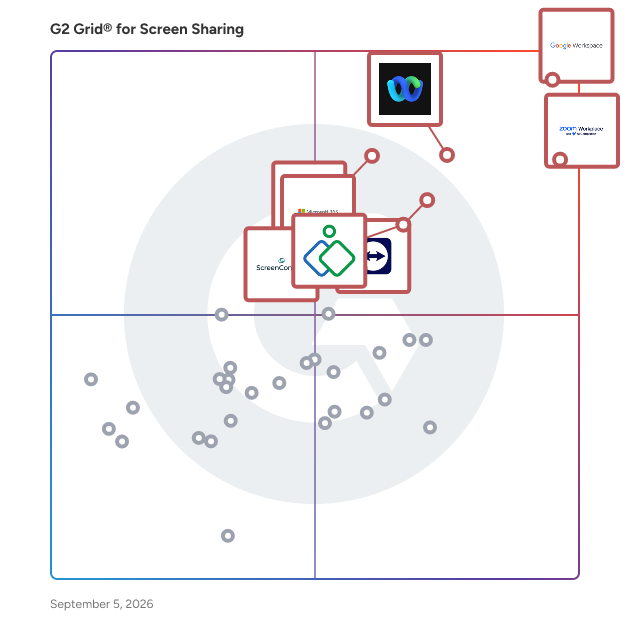
- **Leader:** [Google Workspace](https://www.g2.com/products/google-workspace/reviews)
- **Highest Performer:** [CrankWheel](https://www.g2.com/products/crankwheel/reviews)
- **Easiest to Use:** [Google Workspace](https://www.g2.com/products/google-workspace/reviews)
- **Top Trending:** [Google Workspace](https://www.g2.com/products/google-workspace/reviews)
- **Best Free Software:** [Zoom Workplace](https://www.g2.com/products/zoom-workplace/reviews)


---

**Sponsored**

### CrankWheel

Share your screen without any friction. Screen share in seconds during a voice call. You send a link via text or email and your viewer opens the session in any browser on any device. No download or registration is required for your viewer(s), even on their mobile phone. Add visuals to voice calls. No need to book a follow-up meeting, instead go seamlessly from phone call to full visual presentation. Requesting viewers&#39; webcams is optional. Establish trust faster and close the deal in the first cold call with CrankWheel. Features: Easy screen share Stream HQ videos with sound within a screen share Electronic Signature on forms Record your screen and webcam and embed the video in emails, with Grant your viewer remote control A preview window shows you what the viewer sees and if he is engaged Customizable post-session redirect URL Traditional web conferencing (web-based audio, all participants can share webcam)


[Try for Free](https://www.g2.com/external_clickthroughs/record?secure%5Bad_program%5D=ppc&amp;secure%5Bad_slot%5D=category_product_list&amp;secure%5Bcategory_id%5D=1854&amp;secure%5Bdisplayable_resource_id%5D=1854&amp;secure%5Bdisplayable_resource_type%5D=Category&amp;secure%5Bmedium%5D=sponsored&amp;secure%5Bplacement_reason%5D=page_category&amp;secure%5Bplacement_resource_ids%5D%5B%5D=1854&amp;secure%5Bprioritized%5D=false&amp;secure%5Bproduct_id%5D=22451&amp;secure%5Bresource_id%5D=1854&amp;secure%5Bresource_type%5D=Category&amp;secure%5Bsource_type%5D=category_page&amp;secure%5Bsource_url%5D=https%3A%2F%2Fwww.g2.com%2Fcategories%2Fscreen-sharing&amp;secure%5Btoken%5D=093b4f4c6be5927fa62e3c9dd3d35c8234ea542c75f6eb423e5123985efd6b09&amp;secure%5Burl%5D=https%3A%2F%2Fwww.crankwheel.com%2F%3Futm_campaign%3Dg2ppc%26utm_medium%3Dppc%26utm_source%3Dg2&amp;secure%5Burl_type%5D=free_trial)

---

## Top-Rated Products (Ranked by G2 Score)
  ### 1. [Google Workspace](https://www.g2.com/products/google-workspace/reviews)
  Google Workspace is a comprehensive productivity and collaboration solution designed to help users streamline their work processes by integrating essential tools such as email, chat, file storage, and video conferencing into a unified platform. This suite of applications is tailored for businesses, educational institutions, and individuals looking to enhance their communication and collaboration efforts, all while leveraging the power of Google’s artificial intelligence. Targeted at a diverse audience, Google Workspace caters to teams of all sizes, from small startups to large enterprises. It is particularly beneficial for remote teams and organizations that prioritize collaboration across different locations. The platform supports various use cases, including project management, team communication, document sharing, and virtual meetings, making it an ideal choice for professionals who need to work together efficiently, regardless of their physical location. One of the key features of Google Workspace is its seamless integration of applications such as Gmail, Google Meet, Google Drive, and Google Docs. This interconnectedness allows users to switch effortlessly between tasks, whether they are sending emails, participating in video calls, or collaborating on documents in real-time. The AI capabilities embedded within the platform enhance user experience by providing smart suggestions, automating repetitive tasks, and improving search functionalities, ultimately saving time and increasing productivity. Additionally, Google Workspace prioritizes security and data protection, offering robust features such as two-factor authentication, advanced phishing protection, and customizable access controls. These measures ensure that sensitive information remains secure while allowing teams to collaborate freely. The platform also supports third-party integrations, enabling users to connect their favorite applications and tools, further enhancing their workflow. In summary, Google Workspace stands out in the productivity software category by providing a holistic approach to collaboration. Its user-friendly interface, combined with powerful AI-driven features and strong security protocols, makes it a valuable tool for anyone looking to improve their work processes and foster effective teamwork. Whether for managing projects, communicating with colleagues, or sharing files, Google Workspace is designed to meet the diverse needs of its users, making it an essential resource in today’s digital workplace.


  **Average Rating:** 4.6/5.0
  **Total Reviews:** 45,262

**User Satisfaction Scores:**

- **Has the product been a good partner in doing business?:** 9.0/10 (Category avg: 9.0/10)
- **Video Conferencing:** 9.1/10 (Category avg: 8.8/10)
- **Live Preview:** 8.9/10 (Category avg: 8.9/10)
- **Audio Conferencing:** 9.0/10 (Category avg: 8.9/10)


**Seller Details:**

- **Seller:** [Google](https://www.g2.com/sellers/google)
- **Year Founded:** 1998
- **HQ Location:** Mountain View, CA
- **Twitter:** @google (31,840,340 Twitter followers)
- **LinkedIn® Page:** https://www.linkedin.com/company/1441/ (336,169 employees on LinkedIn®)
- **Ownership:** NASDAQ:GOOG

**Reviewer Demographics:**
  - **Who Uses This:** Student, Teacher
  - **Top Industries:** Information Technology and Services, Education Management
  - **Company Size:** 46% Small-Business, 35% Mid-Market


#### Pros & Cons

**Pros:**

- Ease of Use (2236 reviews)
- Team Collaboration (1355 reviews)
- Integrations (1266 reviews)
- Features (1147 reviews)
- Intuitive (1067 reviews)

**Cons:**

- Missing Features (908 reviews)
- Limited Features (841 reviews)
- Lacking Features (501 reviews)
- Lack of Features (350 reviews)
- Limited Customization (346 reviews)

  ### 2. [Zoom Workplace](https://www.g2.com/products/zoom-workplace/reviews)
  Goodbye app overload. Hello effortless work. Work can be complicated. Your tools shouldn&#39;t be. Zoom Workplace connects all the ways you collaborate — from meetings to docs to chat and more — with built-in AI and seamless integrations that help teams focus and work flawlessly. Zoom Communications: Unified, Effortless Connection for Modern Work Bring every way your teams communicate—meetings, chat, calls, email, and scheduling—into one seamless experience. With Zoom, collaboration happens faster and more naturally across channels, without switching apps or losing context. From spontaneous chats to scheduled meetings and calls, everything stays connected, searchable, and secure—powered by one intuitive platform built for how modern teams work. Zoom Productivity: Workflows Connected, Work Effortless Transform how work gets done with AI-first collaboration that keeps people, content, and actions in one place. From brainstorming on whiteboards to co-creating in docs, sharing clips, and automating follow-ups, Zoom connects every step of your workflow. With Zoom Hub and integrated video management, knowledge stays organized, accessible, and actionable—so teams can move from idea to outcome without friction. Zoom Spaces: Smarter, Connected Workplaces for Every Team Bring your physical and hybrid environments to life with intelligent, connected spaces. Zoom Spaces unifies meeting rooms, desk reservations, digital signage, and visitor management into one seamless experience—making it simple to collaborate, navigate, and manage the workplace. Whether employees are remote, hybrid, or on-site, Zoom creates a consistent, secure, and flexible environment that keeps teams connected wherever work happens. Zoom Employee Engagement: Connect, Inspire, and Empower Every Employee Foster belonging and alignment with Workvivo by Zoom—a modern employee experience platform that unites communication, culture, and community in one place. From company-wide updates to recognition, feedback, and social engagement, Workvivo gives every employee a voice and a sense of connection. Built right into Zoom Workplace, it helps organizations strengthen culture, boost engagement, and keep teams informed and inspired—no matter where they work.


  **Average Rating:** 4.5/5.0
  **Total Reviews:** 53,237

**User Satisfaction Scores:**

- **Has the product been a good partner in doing business?:** 9.1/10 (Category avg: 9.0/10)
- **Video Conferencing:** 9.3/10 (Category avg: 8.8/10)
- **Live Preview:** 9.0/10 (Category avg: 8.9/10)
- **Audio Conferencing:** 9.2/10 (Category avg: 8.9/10)


**Seller Details:**

- **Seller:** [Zoom](https://www.g2.com/sellers/zoom-a5000ea1-6d30-4ab4-b591-20723189ac97)
- **Company Website:** https://www.zoom.com
- **Year Founded:** 2011
- **HQ Location:** San Jose, CA
- **Twitter:** @zoom (1,043,510 Twitter followers)
- **LinkedIn® Page:** https://www.linkedin.com/company/2532259/ (12,688 employees on LinkedIn®)

**Reviewer Demographics:**
  - **Who Uses This:** Owner, Software Engineer
  - **Top Industries:** Information Technology and Services, Computer Software
  - **Company Size:** 51% Small-Business, 31% Mid-Market


#### Pros & Cons

**Pros:**

- Ease of Use (4632 reviews)
- Video Conferencing (2759 reviews)
- Video Quality (2113 reviews)
- Reliability (2004 reviews)
- Screen Sharing (1694 reviews)

**Cons:**

- Limited Features (1265 reviews)
- Zoom Issues (1208 reviews)
- Meeting Issues (1179 reviews)
- Connection Issues (876 reviews)
- Video Issues (804 reviews)

  ### 3. [Webex Suite](https://www.g2.com/products/cisco-webex-suite/reviews)
  Webex Suite is an all-in-one, AI-powered collaboration suite built to increase productivity and maximize teamwork in today’s hybrid work. With 8 powerful individual workflows – Meetings, Messaging, Calling, Webinar, Events, Polling, Whiteboarding and Video Messaging in one, Webex Suite delivers exceptional value, world-class user experiences, and incredible audio and video, anywhere on any device. With a variety of collaboration and AI innovations, such as Webex AI Assistant, Real-time Translation, Background Noise Removal, and more, Webex Suite delivers rich and innovative experiences for employees and customers, enabling them to seamlessly connect, collaborate, engage and get work done. Webex Suite is powered by the industry-leading Webex Platform that is secure, compliant, and easily managed with built-in pervasive intelligence, bringing AI innovations across the entire Webex portfolio. The entire Webex Suite can be managed via the single-pane-of-glass management tool, Webex Control Hub. Webex Suite is backed by Cisco’s industry-leading security and networking infrastructure that ensures the best quality video and audio communications. Webex Suite Workflows: Meetings: Drive more productive meetings with AI-powered experiences and high-quality audio and video. Messaging: Collaborate async with rich messaging, secure file sharing, and digital whiteboarding to keep work flowing between meetings. Calling: Stay connected with modern business phone system and flexible calling options. Webinar: Host high quality webinars and drive engagement with immersive content and interactive audience experiences. Events: Power virtual, in-person, and hybrid events with immersive multi-track agendas, ticketing, attendee networking, analytics, and more. Polling: Enable active participation in every meeting with quizzes, polling, and interactive Q&amp;A. Whiteboarding: Unleash creativity with a digital whiteboarding solution for everyone, on any device. Video Messaging: Record, share ideas, engage, and facilitate real-time feedback with intuitive video messaging.


  **Average Rating:** 4.2/5.0
  **Total Reviews:** 17,590

**User Satisfaction Scores:**

- **Has the product been a good partner in doing business?:** 8.7/10 (Category avg: 9.0/10)
- **Video Conferencing:** 9.0/10 (Category avg: 8.8/10)
- **Live Preview:** 8.9/10 (Category avg: 8.9/10)
- **Audio Conferencing:** 9.0/10 (Category avg: 8.9/10)


**Seller Details:**

- **Seller:** [Cisco](https://www.g2.com/sellers/cisco)
- **Company Website:** https://www.cisco.com
- **Year Founded:** 1984
- **HQ Location:** San Jose, CA
- **Twitter:** @Cisco (720,884 Twitter followers)
- **LinkedIn® Page:** https://www.linkedin.com/company/cisco/ (95,742 employees on LinkedIn®)

**Reviewer Demographics:**
  - **Who Uses This:** Software Engineer, Senior Software Engineer
  - **Top Industries:** Information Technology and Services, Computer Software
  - **Company Size:** 50% Enterprise, 31% Mid-Market


#### Pros & Cons

**Pros:**

- Ease of Use (281 reviews)
- Video Conferencing (197 reviews)
- Reliability (190 reviews)
- Features (177 reviews)
- Video Quality (165 reviews)

**Cons:**

- Slow Loading (107 reviews)
- Not User-Friendly (97 reviews)
- Performance Issues (97 reviews)
- Lack of Intuitiveness (86 reviews)
- User Interface (84 reviews)

  ### 4. [Microsoft 365](https://www.g2.com/products/microsoft365/reviews)
  Launch and grow your business with Microsoft 365. Do more, faster, with intelligent tools to create, send, share, and store professional, branded documents with your customers and team - securely in the cloud. Microsoft 365 is a cloud-based suite of software tools designed to help you do more—with best-in-class communication, design, and data management apps, intelligent cloud services, and advanced security. Access your data from anywhere, collaborate with team members in real time, meet with people virtually, and use thousands of predesigned templates to better communicate with customers and manage your business - all with built-in security technology that safeguards your data and devices from anywhere. Get the latest Office apps, such as Microsoft Teams, Word, Excel, PowerPoint, Outlook, OneDrive, and more.


  **Average Rating:** 4.6/5.0
  **Total Reviews:** 5,466

**User Satisfaction Scores:**

- **Has the product been a good partner in doing business?:** 8.8/10 (Category avg: 9.0/10)
- **Video Conferencing:** 9.0/10 (Category avg: 8.8/10)
- **Live Preview:** 8.9/10 (Category avg: 8.9/10)
- **Audio Conferencing:** 9.0/10 (Category avg: 8.9/10)


**Seller Details:**

- **Seller:** [Microsoft](https://www.g2.com/sellers/microsoft)
- **Year Founded:** 1975
- **HQ Location:** Redmond, Washington
- **Twitter:** @microsoft (13,090,464 Twitter followers)
- **LinkedIn® Page:** https://www.linkedin.com/company/microsoft/ (227,697 employees on LinkedIn®)
- **Ownership:** MSFT

**Reviewer Demographics:**
  - **Who Uses This:** Owner, Manager
  - **Top Industries:** Information Technology and Services, Education Management
  - **Company Size:** 37% Mid-Market, 35% Small-Business


#### Pros & Cons

**Pros:**

- Ease of Use (297 reviews)
- Team Collaboration (228 reviews)
- Features (220 reviews)
- Integrations (198 reviews)
- Seamless Integration (178 reviews)

**Cons:**

- Expensive (117 reviews)
- Missing Features (102 reviews)
- Learning Curve (95 reviews)
- Limited Features (76 reviews)
- Lacking Features (73 reviews)

  ### 5. [TeamViewer](https://www.g2.com/products/teamviewer/reviews)
  TeamViewer is a leading provider of remote connectivity software for individuals and businesses of all sizes. Our remote software enables companies across various industries to enhance their efficiency and achieve their business goals by digitally transforming their processes. We offer a selection of bespoke solutions: TeamViewer Tensor, our enterprise remote connectivity solution, enables businesses to connect, manage, and protect computers, mobile devices, and embedded platforms – on site and around the globe. TeamViewer Remote, our remote access and support solution, enables secure access to devices for remote support in small and medium-sized businesses. A free version of TeamViewer Remote is available for personal use. TeamViewer is actively working to shape the digital revolution by innovating in the fields of augmented reality (AR) and the Internet of Things (IoT). Our AR platform, Frontline, brings digital technology onto the shop floor with industrial AR solutions designed to optimize manual processes. Strategic partnerships and software integrations with other industry leaders such as SAP, Google, and Microsoft let us provide our customers with a seamless experience, regardless of their device or operating system. Since TeamViewer was founded in Göppingen, Germany, in 2005, our solutions have been installed on more than 2.5 billion devices worldwide. For more information, visit www.teamviewer.com.


  **Average Rating:** 4.5/5.0
  **Total Reviews:** 3,720

**User Satisfaction Scores:**

- **Has the product been a good partner in doing business?:** 8.6/10 (Category avg: 9.0/10)
- **Video Conferencing:** 8.7/10 (Category avg: 8.8/10)
- **Live Preview:** 8.9/10 (Category avg: 8.9/10)
- **Audio Conferencing:** 8.7/10 (Category avg: 8.9/10)


**Seller Details:**

- **Seller:** [TeamViewer](https://www.g2.com/sellers/teamviewer)
- **Company Website:** https://www.teamviewer.com
- **Year Founded:** 2005
- **HQ Location:** Goppingen
- **Twitter:** @TeamViewer (48,089 Twitter followers)
- **LinkedIn® Page:** https://www.linkedin.com/company/3479536/ (2,719 employees on LinkedIn®)

**Reviewer Demographics:**
  - **Who Uses This:** Software Engineer, IT Manager
  - **Top Industries:** Information Technology and Services, Computer Software
  - **Company Size:** 42% Small-Business, 36% Mid-Market


#### Pros & Cons

**Pros:**

- Ease of Use (517 reviews)
- Remote Access (427 reviews)
- Remote Control (342 reviews)
- Easy Access (277 reviews)
- Remote Work (276 reviews)

**Cons:**

- Connection Issues (181 reviews)
- Connectivity Issues (147 reviews)
- Expensive (138 reviews)
- Slow Performance (134 reviews)
- Remote Access Issues (122 reviews)

  ### 6. [Zoho Assist](https://www.g2.com/products/zoho-assist/reviews)
  Zoho Assist is a cloud-based remote support and unattended access solution designed to help businesses deliver seamless IT support and manage remote devices effortlessly. Whether you&#39;re assisting customers in real time or managing unattended endpoints, Zoho Assist offers a fast, secure, and reliable platform that works across devices and operating systems. With zero setup required on the technician&#39;s end and a lightweight client for end users, Zoho Assist makes remote troubleshooting simple and efficient, no complicated configurations, no hassle.


  **Average Rating:** 4.6/5.0
  **Total Reviews:** 646

**User Satisfaction Scores:**

- **Has the product been a good partner in doing business?:** 9.2/10 (Category avg: 9.0/10)
- **Video Conferencing:** 7.4/10 (Category avg: 8.8/10)
- **Live Preview:** 7.6/10 (Category avg: 8.9/10)
- **Audio Conferencing:** 7.5/10 (Category avg: 8.9/10)


**Seller Details:**

- **Seller:** [Zoho](https://www.g2.com/sellers/zoho-b00ca9d5-bca8-41b5-a8ad-275480841704)
- **Year Founded:** 1996
- **HQ Location:** Austin, TX
- **Twitter:** @Zoho (137,047 Twitter followers)
- **LinkedIn® Page:** https://www.linkedin.com/company/38373/ (30,531 employees on LinkedIn®)
- **Phone:** +1 (888) 900-9646 

**Reviewer Demographics:**
  - **Who Uses This:** Owner, IT Manager
  - **Top Industries:** Information Technology and Services, Computer &amp; Network Security
  - **Company Size:** 70% Small-Business, 23% Mid-Market


#### Pros & Cons

**Pros:**

- Ease of Use (143 reviews)
- Remote Access (98 reviews)
- Remote Support (80 reviews)
- Easy Setup (70 reviews)
- Reliability (70 reviews)

**Cons:**

- Remote Access Issues (32 reviews)
- Feature Limitations (21 reviews)
- Connection Issues (17 reviews)
- Not User-Friendly (17 reviews)
- Expensive (15 reviews)

  ### 7. [GoTo Meeting](https://www.g2.com/products/goto-meeting/reviews)
  An industry leader in online video conferencing for companies around the world, GoTo Meeting now comes as part of GoTo Connect, the all-in-one communications software built for SMBs. The Meeting solution, available to buy standalone, is trusted by millions of people every day for real time virtual communication and collaboration. Get a fast, easy and reliable professional online meeting solution that enables customers to meet face to face, connect with colleagues through in-meeting chat or conference calling, and screenshare their presentations, all with the click of a button. Nothing can match the momentum of your team or business when it’s fueled by an award-winning collaboration solution, the Meeting solution from GoTo Connect pairs productivity with flexibility to let employees work effectively anytime, anywhere on any device.


  **Average Rating:** 4.2/5.0
  **Total Reviews:** 16,558

**User Satisfaction Scores:**

- **Has the product been a good partner in doing business?:** 8.7/10 (Category avg: 9.0/10)
- **Video Conferencing:** 9.0/10 (Category avg: 8.8/10)
- **Live Preview:** 8.9/10 (Category avg: 8.9/10)
- **Audio Conferencing:** 9.0/10 (Category avg: 8.9/10)


**Seller Details:**

- **Seller:** [GoTo](https://www.g2.com/sellers/goto-e9cfa0d5-5de0-41fa-9bc6-a0e0ce54cb86)
- **Year Founded:** 2003
- **HQ Location:** Boston, MA
- **Twitter:** @goto (41,278 Twitter followers)
- **LinkedIn® Page:** https://www.linkedin.com/company/37788/ (1,011 employees on LinkedIn®)

**Reviewer Demographics:**
  - **Who Uses This:** Project Manager, Software Engineer
  - **Top Industries:** Information Technology and Services, Computer Software
  - **Company Size:** 41% Small-Business, 39% Mid-Market


#### Pros & Cons

**Pros:**

- Ease of Use (82 reviews)
- Easy Setup (43 reviews)
- Reliability (32 reviews)
- Intuitive (26 reviews)
- Simplicity (25 reviews)

**Cons:**

- User Interface (13 reviews)
- Integration Issues (12 reviews)
- Limited Features (12 reviews)
- Poor Quality (12 reviews)
- Expensive (11 reviews)

  ### 8. [CrankWheel](https://www.g2.com/products/crankwheel/reviews)
  Share your screen without any friction. Screen share in seconds during a voice call. You send a link via text or email and your viewer opens the session in any browser on any device. No download or registration is required for your viewer(s), even on their mobile phone. Add visuals to voice calls. No need to book a follow-up meeting, instead go seamlessly from phone call to full visual presentation. Requesting viewers&#39; webcams is optional. Establish trust faster and close the deal in the first cold call with CrankWheel. Features: Easy screen share Stream HQ videos with sound within a screen share Electronic Signature on forms Record your screen and webcam and embed the video in emails, with Grant your viewer remote control A preview window shows you what the viewer sees and if he is engaged Customizable post-session redirect URL Traditional web conferencing (web-based audio, all participants can share webcam)


  **Average Rating:** 4.9/5.0
  **Total Reviews:** 76

**User Satisfaction Scores:**

- **Has the product been a good partner in doing business?:** 9.7/10 (Category avg: 9.0/10)
- **Video Conferencing:** 8.9/10 (Category avg: 8.8/10)
- **Live Preview:** 9.5/10 (Category avg: 8.9/10)
- **Audio Conferencing:** 8.8/10 (Category avg: 8.9/10)


**Seller Details:**

- **Seller:** [CrankWheel ehf.](https://www.g2.com/sellers/crankwheel-ehf)
- **Company Website:** https://www.crankwheel.com
- **Year Founded:** 2015
- **HQ Location:** Hafnarfjörður, IS
- **Twitter:** @crankwheel (778 Twitter followers)
- **LinkedIn® Page:** https://www.linkedin.com/company/9433703 (9 employees on LinkedIn®)

**Reviewer Demographics:**
  - **Top Industries:** Insurance, Marketing and Advertising
  - **Company Size:** 68% Small-Business, 20% Mid-Market


#### Pros & Cons

**Pros:**

- Ease of Use (27 reviews)
- Screen Sharing (22 reviews)
- Simple (6 reviews)
- Easy Setup (5 reviews)
- Navigation Ease (5 reviews)

**Cons:**

- Screen Sharing (4 reviews)
- Audio Issues (2 reviews)
- Chat Functionality (2 reviews)
- Connection Issues (2 reviews)
- Expensive (2 reviews)

  ### 9. [ScreenConnect](https://www.g2.com/products/screenconnect/reviews)
  ScreenConnect delivers fast, flexible, and secure remote desktop and mobile support solutions for every industry and need. With ScreenConnect, IT teams can raise the bar for remote support and reduce customer downtime through on-demand access to desktops, mobile devices, and more. No matter where you work, how you work, and who you work for, ScreenConnect helps you serve customers securely, silently, and seamlessly.


  **Average Rating:** 4.7/5.0
  **Total Reviews:** 469

**User Satisfaction Scores:**

- **Has the product been a good partner in doing business?:** 9.1/10 (Category avg: 9.0/10)
- **Video Conferencing:** 9.4/10 (Category avg: 8.8/10)
- **Live Preview:** 8.6/10 (Category avg: 8.9/10)
- **Audio Conferencing:** 6.5/10 (Category avg: 8.9/10)


**Seller Details:**

- **Seller:** [ConnectWise](https://www.g2.com/sellers/connectwise)
- **Company Website:** https://www.connectwise.com/
- **Year Founded:** 1982
- **HQ Location:** Tampa, FL
- **Twitter:** @ConnectWise (14,927 Twitter followers)
- **LinkedIn® Page:** https://www.linkedin.com/company/48576/ (3,439 employees on LinkedIn®)

**Reviewer Demographics:**
  - **Who Uses This:** Owner, IT Manager
  - **Top Industries:** Information Technology and Services, Computer &amp; Network Security
  - **Company Size:** 67% Small-Business, 31% Mid-Market


#### Pros & Cons

**Pros:**

- Ease of Use (5 reviews)
- Remote Access (5 reviews)
- Remote Work (5 reviews)
- Easy Communication (4 reviews)
- Reliability (4 reviews)

**Cons:**

- Expensive (4 reviews)
- Remote Access Issues (4 reviews)
- Internet Dependency (2 reviews)
- Not User-Friendly (2 reviews)
- Security Concerns (2 reviews)

  ### 10. [AIRTAME](https://www.g2.com/products/airtame/reviews)
  Airtame is a leading all-in-one solution for shared screens in business and education, challenging the norms in the AV industry with a hardware-enabled SaaS platform. With a focus on empowering people to collaborate in new ways, Airtame makes meeting rooms more inclusive and classrooms and common spaces more dynamic through intuitive hybrid conferencing, screen sharing, and digital signage. Airtame is known for being easy to install, easy to use, and easy to manage. Airtame solutions are used by more than 10,000 organizations worldwide to make over 110,000 rooms and spaces more engaging, and is trusted by people to facilitate over 1.5 million meetings and classes each month. The Airtame Hub and Airtame Room delivers a reliable and innovative hybrid conferencing solution - this solution allows you to: - Join Microsoft Teams or Zoom calls from the same set-up - Rely on a wired ethernet connection for quality calls - Know your peripherals will always be ready to go - Stop worrying about a separate tablet controller - Screen share without even joining the call The Airtame 2 allows for screen sharing and digital signage in a single solution. Presenters can share their screen wirelessly, from a computer or mobile device to a TV, projector or monitor. Our SaaS⁠ solution, Airtame Cloud, provides centralized remote management where you can: - Manage devices from anywhere. View, update, and manage devices and content across thousands of screens. - Run your signage remotely. Control digital signage content remotely and show important and relevant messages to engage the audience. - Save on power. Schedule your screens to turn on and off automatically, according to the office or school hours. Using Airtame for Digital Signage allows to inform, educate, and engage. Turn your displays into info screens. Display relevant content that you control. Founded in 2013, Airtame has grown to a company of over 80 people with offices in New York, Copenhagen, and Budapest. We have an international mindset, fostered by inclusion and collaboration.


  **Average Rating:** 4.5/5.0
  **Total Reviews:** 34

**User Satisfaction Scores:**

- **Has the product been a good partner in doing business?:** 9.6/10 (Category avg: 9.0/10)
- **Video Conferencing:** 9.3/10 (Category avg: 8.8/10)
- **Live Preview:** 9.3/10 (Category avg: 8.9/10)
- **Audio Conferencing:** 8.9/10 (Category avg: 8.9/10)


**Seller Details:**

- **Seller:** [AIRTAME](https://www.g2.com/sellers/airtame)
- **Year Founded:** 2013
- **HQ Location:** Copenhagen, DK
- **Twitter:** @airtame (2,565 Twitter followers)
- **LinkedIn® Page:** https://www.linkedin.com/company/3244251/ (58 employees on LinkedIn®)

**Reviewer Demographics:**
  - **Top Industries:** Financial Services, Primary/Secondary Education
  - **Company Size:** 54% Mid-Market, 29% Enterprise


#### Pros & Cons

**Pros:**

- Ease of Use (2 reviews)
- Easy Setup (2 reviews)
- Reliability (2 reviews)
- Convenience (1 reviews)
- Cross-platform (1 reviews)

**Cons:**

- App Functionality (1 reviews)
- Hardware Reliability (1 reviews)
- Integration Issues (1 reviews)

  ### 11. [Rise Vision](https://www.g2.com/products/rise-vision/reviews)
  Rise Vision is the all-in-one platform for digital signage, screen sharing, and emergency alerts! Rise Vision helps you communicate, teach, collaborate, and improve safety affordably with easy cloud-based digital signage, screen sharing, and emergency alerts—all backed by world-class support and flexible hardware options. Trusted in over 100 countries, our all-in-one platform offers easy-to-use digital signage, seamless screen sharing, powerful emergency alerts, and support for a wide range of devices. Whether you use our recommended media player and displays or bring your own hardware, Rise Vision ensures you’re up and running in minutes with 600+ professionally designed templates and world-class support. Designed for any industry, Rise Vision allows users to create custom schedules and quickly change presentations in playlists running on 1 to 1,000+ displays.


  **Average Rating:** 4.7/5.0
  **Total Reviews:** 953

**User Satisfaction Scores:**

- **Has the product been a good partner in doing business?:** 9.6/10 (Category avg: 9.0/10)
- **Video Conferencing:** 6.9/10 (Category avg: 8.8/10)
- **Live Preview:** 7.9/10 (Category avg: 8.9/10)
- **Audio Conferencing:** 6.9/10 (Category avg: 8.9/10)


**Seller Details:**

- **Seller:** [Rise Vision](https://www.g2.com/sellers/rise-vision)
- **Company Website:** https://www.risevision.com
- **Year Founded:** 1992
- **HQ Location:** Toronto, Ontario, Canada
- **Twitter:** @RiseVision (2,949 Twitter followers)
- **LinkedIn® Page:** https://www.linkedin.com/company/85430/ (52 employees on LinkedIn®)

**Reviewer Demographics:**
  - **Who Uses This:** Teacher, Administrative Assistant
  - **Top Industries:** Primary/Secondary Education, Education Management
  - **Company Size:** 63% Mid-Market, 26% Small-Business


#### Pros & Cons

**Pros:**

- Ease of Use (165 reviews)
- Customer Support (69 reviews)
- Features (67 reviews)
- Simple (61 reviews)
- Easy Setup (59 reviews)

**Cons:**

- Limited Templates (31 reviews)
- Limited Customization (29 reviews)
- Learning Curve (24 reviews)
- Complexity (18 reviews)
- Not User-Friendly (14 reviews)

  ### 12. [Splashtop Remote Access](https://www.g2.com/products/splashtop-remote-access/reviews)
  Splashtop Remote Access provides secure, high-performance remote desktop connections for business professionals and teams to work from anywhere, using any device. With security and advanced productivity features, users get seamless access to files and applications, while enabling IT administrators to centrally deploy and control permissions, ensuring both efficiency and security. Key features include: File Transfer Remote Reboot Remote Print Multi-to-Multi Monitor User role and access management Chat (in-session and outside-session) Share screen via weblink Remote reboot and Wake-on-LAN Session recording Two users in one computer Remote stylus USB device redirection Mic passthrough Ultra high-quality audio (256k or 384k) YUV 4:4:4 (Better color accuracy) SSO Integration Granular Permissions and Scheduled Access Android/IoT Unattended Access APIs, IP Whitelist, Connector


  **Average Rating:** 4.8/5.0
  **Total Reviews:** 503

**User Satisfaction Scores:**

- **Has the product been a good partner in doing business?:** 9.6/10 (Category avg: 9.0/10)
- **Video Conferencing:** 9.0/10 (Category avg: 8.8/10)
- **Live Preview:** 8.7/10 (Category avg: 8.9/10)
- **Audio Conferencing:** 7.4/10 (Category avg: 8.9/10)


**Seller Details:**

- **Seller:** [Splashtop Inc.](https://www.g2.com/sellers/splashtop-inc)
- **Company Website:** https://www.splashtop.com
- **Year Founded:** 2006
- **HQ Location:** Cupertino, CA
- **Twitter:** @splashtop (5,215 Twitter followers)
- **LinkedIn® Page:** https://www.linkedin.com/company/1944335/ (341 employees on LinkedIn®)

**Reviewer Demographics:**
  - **Who Uses This:** Owner, President
  - **Top Industries:** Accounting, Information Technology and Services
  - **Company Size:** 81% Small-Business, 15% Mid-Market


#### Pros & Cons

**Pros:**

- Ease of Use (65 reviews)
- Easy Setup (37 reviews)
- Remote Access (27 reviews)
- Easy Access (21 reviews)
- Affordable (19 reviews)

**Cons:**

- Remote Access Issues (22 reviews)
- Connection Issues (13 reviews)
- Feature Limitations (9 reviews)
- Not User-Friendly (8 reviews)
- Slow Performance (8 reviews)

  ### 13. [Realtime](https://www.g2.com/products/recursive-labs-realtime/reviews)
  Secure, download-free cobrowsing &amp; full desktop screensharing that integrates with most major CRMs or via custom connector. Use our view-only, collaborative, or full desktop model to deliver concierge-level support to online customers on the web&#39;s most complicated tasks.


  **Average Rating:** 4.5/5.0
  **Total Reviews:** 40

**User Satisfaction Scores:**

- **Has the product been a good partner in doing business?:** 9.9/10 (Category avg: 9.0/10)
- **Video Conferencing:** 9.1/10 (Category avg: 8.8/10)
- **Live Preview:** 8.9/10 (Category avg: 8.9/10)
- **Audio Conferencing:** 9.4/10 (Category avg: 8.9/10)


**Seller Details:**

- **Seller:** [Recursive Labs](https://www.g2.com/sellers/recursive-labs)
- **Year Founded:** 2011
- **HQ Location:** Wildwood, US
- **LinkedIn® Page:** https://www.linkedin.com/company/recursive-labs/ (11 employees on LinkedIn®)

**Reviewer Demographics:**
  - **Who Uses This:** Research Analyst, Business Development Representative
  - **Top Industries:** Information Technology and Services
  - **Company Size:** 78% Mid-Market, 17% Small-Business


#### Pros & Cons

**Pros:**

- Ease of Use (26 reviews)
- Customer Support (18 reviews)
- Remote Support (15 reviews)
- Customer Engagement (14 reviews)
- Service Quality (10 reviews)

**Cons:**

- Internet Dependency (11 reviews)
- Network Issues (11 reviews)
- Internet Requirements (10 reviews)
- Poor Connectivity (10 reviews)
- Expensive (8 reviews)

  ### 14. [Surfly](https://www.g2.com/products/surfly/reviews)
  Surfly provides co-browsing and collaboration technology that lets you upgrade any conversation, from any channel, seamlessly, and support customers as if you are sitting side-by-side. Your customer simply clicks a link, or button, and their co-browsing session instantly begins in their browser window, and you see what they see.&amp;nbsp; With Surfly there is no software to download and no code to add to your website. Surfly’s technology provides a smooth and fast experience, with no loss of quality, even when co-browsing websites with audio and video.&amp;nbsp; Surfly can also be easily customised to fit any customer experience flow. You can launch co-browsing sessions directly from your website and even customize the flow in such a way that it perfectly matches your website’s look and feel. With our fully documented API, you can quickly integrate Surfly into other chat solutions, CRM systems, and call center platforms. Surfly’s key features include:&amp;nbsp; - Document sharing&amp;nbsp; - Video chat&amp;nbsp; - Control switching&amp;nbsp; - Field masking&amp;nbsp; - Action logs - Behaviour control&amp;nbsp; - Customisable UI - Security and privacy compliance - Single sign on&amp;nbsp;


  **Average Rating:** 4.8/5.0
  **Total Reviews:** 90

**User Satisfaction Scores:**

- **Has the product been a good partner in doing business?:** 9.4/10 (Category avg: 9.0/10)
- **Video Conferencing:** 9.1/10 (Category avg: 8.8/10)
- **Live Preview:** 9.2/10 (Category avg: 8.9/10)
- **Audio Conferencing:** 9.3/10 (Category avg: 8.9/10)


**Seller Details:**

- **Seller:** [Surfly](https://www.g2.com/sellers/surfly)
- **Year Founded:** 2012
- **HQ Location:** Amsterdam, Netherlands
- **Twitter:** @Surfly (904 Twitter followers)
- **LinkedIn® Page:** https://www.linkedin.com/company/1943587/ (29 employees on LinkedIn®)

**Reviewer Demographics:**
  - **Top Industries:** Financial Services, Information Technology and Services
  - **Company Size:** 44% Small-Business, 34% Mid-Market


  ### 15. [Upscope](https://www.g2.com/products/upscope/reviews)
  Who is Upscope Co-browsing for? Who is it not for? Upscope buyers include payroll &amp; HR, financial services, insurance, CRMs, legal software, logistics, healthcare and a wide range of SaaS companies. They use Upscope to support and onboard less tech savvy customers through their interfaces or to sell financial products to customers by co-browsing with them on the phone or desktop. Customers include Calendly, JG Wentworth, Square, Figure, Freedom Financial, Delta Dental and software providers for the biggest banks in the world, along with small and medium sized SaaS companies. Who is it not for? It&#39;s not for companies where there is a simple interface and technically advanced users, they don&#39;t need it and won&#39;t use it much and inevitably cancel their subscription. Start a trial with Upscope and we&#39;ll tell if you need it and how to get setup to prove it works for you, before you make any commitment.


  **Average Rating:** 4.7/5.0
  **Total Reviews:** 114

**User Satisfaction Scores:**

- **Has the product been a good partner in doing business?:** 9.8/10 (Category avg: 9.0/10)
- **Video Conferencing:** 8.2/10 (Category avg: 8.8/10)
- **Live Preview:** 9.3/10 (Category avg: 8.9/10)
- **Audio Conferencing:** 8.5/10 (Category avg: 8.9/10)


**Seller Details:**

- **Seller:** [Upscope](https://www.g2.com/sellers/upscope)
- **Year Founded:** 2017
- **HQ Location:** London, GB
- **Twitter:** @upscope_io
- **LinkedIn® Page:** https://www.linkedin.com/company/11054548/ (13 employees on LinkedIn®)

**Reviewer Demographics:**
  - **Who Uses This:** Customer Success Associate
  - **Top Industries:** Financial Services, Computer Software
  - **Company Size:** 43% Small-Business, 36% Mid-Market


#### Pros & Cons

**Pros:**

- Ease of Use (3 reviews)
- Customer Engagement (2 reviews)
- Chat Communication (1 reviews)
- Communication (1 reviews)
- Connectivity (1 reviews)

**Cons:**

- Access Issues (1 reviews)
- Connectivity Issues (1 reviews)
- Difficult Setup (1 reviews)
- Email Management (1 reviews)
- Expensive (1 reviews)

  ### 16. [JoinU](https://www.g2.com/products/joinu/reviews)
  \* Multifunctional Software from Prestigio Solutions for meeting rooms of any size. All in one software. \* Screen Mirror - simultaneously up to 16 users | Any Video Conference apps in one place | One Touch Join | Any Calendar Integration - for Booking meeting room | Wireless Operation | Centralized online control panel, etc. \* Say good bye to additional hardware. Just install JoinU Software solutions on your current equipment and use all the features of modern meeting room immediately.


  **Average Rating:** 4.7/5.0
  **Total Reviews:** 43

**User Satisfaction Scores:**

- **Has the product been a good partner in doing business?:** 9.6/10 (Category avg: 9.0/10)
- **Video Conferencing:** 10.0/10 (Category avg: 8.8/10)
- **Live Preview:** 9.2/10 (Category avg: 8.9/10)
- **Audio Conferencing:** 9.9/10 (Category avg: 8.9/10)


**Seller Details:**

- **Seller:** [Prestigio Solutions](https://www.g2.com/sellers/prestigio-solutions)
- **Year Founded:** 2013
- **HQ Location:** Limassol, CY
- **LinkedIn® Page:** https://www.linkedin.com/company/prestigio-solutions/ (1 employees on LinkedIn®)

**Reviewer Demographics:**
  - **Company Size:** 41% Mid-Market, 22% Small-Business


#### Pros & Cons

**Pros:**

- Ease of Use (17 reviews)
- Intuitive (13 reviews)
- Easy Setup (10 reviews)
- Easy Collaboration (8 reviews)
- Simplicity (8 reviews)

**Cons:**

- Inadequate Notification System (5 reviews)
- User Interface (5 reviews)
- Slow Loading (4 reviews)
- User Interface Issues (4 reviews)
- Limited Customization (3 reviews)

  ### 17. [Ditto](https://www.g2.com/products/squirrels-ditto/reviews)
  Bring your screens to life with Ditto — a cross-platform screen mirroring and digital signage solution for your computers, tablets, phones, TVs, interactive whiteboards and projectors. Transform Apple TVs and Windows devices into powerful screen mirroring receivers and digital signage players. Wirelessly screen mirror content from iOS, iPadOS, macOS, Windows, Android and Chrome OS. Mirror one device to multiple displays or many devices to one display. Design, customize and schedule digital signage content all in one place from the web-based Ditto digital signage CMS. Ditto is perfect for all of your screens in all of your spaces.


  **Average Rating:** 4.3/5.0
  **Total Reviews:** 50

**User Satisfaction Scores:**

- **Has the product been a good partner in doing business?:** 9.1/10 (Category avg: 9.0/10)
- **Video Conferencing:** 5.0/10 (Category avg: 8.8/10)
- **Audio Conferencing:** 6.7/10 (Category avg: 8.9/10)


**Seller Details:**

- **Seller:** [Squirrels](https://www.g2.com/sellers/squirrels)
- **Year Founded:** 2008
- **HQ Location:** North Canton, OH
- **Twitter:** @Squirrels (2,570 Twitter followers)
- **LinkedIn® Page:** https://www.linkedin.com/company/3197587/ (45 employees on LinkedIn®)

**Reviewer Demographics:**
  - **Top Industries:** Automotive, Education Management
  - **Company Size:** 57% Mid-Market, 35% Small-Business


  ### 18. [Kumospace](https://www.g2.com/products/kumospace/reviews)
  Kumospace is building the office of the future – a virtual one that places humans first. Where teamwork and productivity are in lockstep with company culture. Empower your team to reach their full potential with a virtual workspace that inspires employees to bring their best. Kumospace eliminates friction around communication, minimizes misunderstandings, and helps teams celebrate wins together. Join thousands of companies who have successfully solved the challenges of remote work with Kumospace.


  **Average Rating:** 4.7/5.0
  **Total Reviews:** 260

**User Satisfaction Scores:**

- **Has the product been a good partner in doing business?:** 9.0/10 (Category avg: 9.0/10)
- **Video Conferencing:** 9.0/10 (Category avg: 8.8/10)
- **Live Preview:** 8.6/10 (Category avg: 8.9/10)
- **Audio Conferencing:** 8.9/10 (Category avg: 8.9/10)


**Seller Details:**

- **Seller:** [Kumospace](https://www.g2.com/sellers/kumospace)
- **Year Founded:** 2020
- **HQ Location:** New York, NY
- **Twitter:** @Kumospace_ (548 Twitter followers)
- **LinkedIn® Page:** https://www.linkedin.com/company/kumospace (13 employees on LinkedIn®)

**Reviewer Demographics:**
  - **Who Uses This:** Product Manager, Software Engineer
  - **Top Industries:** Computer Software, Marketing and Advertising
  - **Company Size:** 80% Small-Business, 17% Mid-Market


#### Pros & Cons

**Pros:**

- Team Collaboration (19 reviews)
- Remote Work (18 reviews)
- Ease of Use (17 reviews)
- Collaboration (11 reviews)
- Communication (11 reviews)

**Cons:**

- Chat Functionality (4 reviews)
- Expensive (4 reviews)
- Learning Curve (4 reviews)
- Audio Issues (3 reviews)
- Difficult Learning (3 reviews)

  ### 19. [ezTalks](https://www.g2.com/products/eztalks/reviews)
  ezTalks is specialized in providing reliable web conferencing and video conferencing solutions. It offers cloud and on-premise software with powerful features such as HD video/ audio Chat, IM, screen sharing, record and whiteboard, etc. It also offers high-quality video conferencing devices which are integrated with software and deliver the simple and ultimate meeting experience. ezTalks aims to make your meetings easier and more collaborative.


  **Average Rating:** 4.4/5.0
  **Total Reviews:** 189

**User Satisfaction Scores:**

- **Has the product been a good partner in doing business?:** 8.6/10 (Category avg: 9.0/10)
- **Video Conferencing:** 9.1/10 (Category avg: 8.8/10)
- **Live Preview:** 8.9/10 (Category avg: 8.9/10)
- **Audio Conferencing:** 8.9/10 (Category avg: 8.9/10)


**Seller Details:**

- **Seller:** [EZTalks Technology Company Limited](https://www.g2.com/sellers/eztalks-technology-company-limited)
- **Year Founded:** 2014
- **HQ Location:** Hong Kong
- **Twitter:** @EZTalksoftware (2,304 Twitter followers)
- **LinkedIn® Page:** https://www.linkedin.com/company/5402320/ (39 employees on LinkedIn®)

**Reviewer Demographics:**
  - **Top Industries:** Information Technology and Services, Computer Software
  - **Company Size:** 54% Small-Business, 33% Mid-Market


#### Pros & Cons

**Pros:**

- Ease of Use (33 reviews)
- Features (15 reviews)
- Communication (13 reviews)
- Intuitive (12 reviews)
- Screen Sharing (12 reviews)

**Cons:**

- Connectivity Issues (8 reviews)
- Slow Loading (6 reviews)
- Audio Issues (5 reviews)
- Internet Dependency (5 reviews)
- Limited Features (5 reviews)

  ### 20. [Demodesk Meeting](https://www.g2.com/products/demodesk-meeting/reviews)
  Demodesk Meeting is the leading platform for virtual sales. Schedule meetings on auto-pilot, run professional video meetings, and coach sales teams in real-time with AI. 100% GDPR compliant, enterprise-grade security and support. The platform automates repetitive tasks and streamlines the entire sales process, enabling sellers to focus on building relationships and closing deals. Demodesk offers revolutionary screen-sharing and interactive capabilities to create an immersive and personalized experience for prospects, leading to increased engagement and higher conversion rates. Features like shadowing or integrated playbooks and battle cards, enable real-time coaching during virtual calls. The platform offers comprehensive analytics and reporting features that provide actionable insights into sales performance. Armed with this valuable data, sales leaders can make data-driven decisions, optimize sales processes, and identify areas for improvement. Businesses of all sizes rely on us to digitalize sales, boost productivity and drive more revenue. Key results from our customers: +25% time saved on manual tasks (Pipedrive) ↑ 2x conversion rate (Clark) +30% higher revenue per seller (Treatwell) ↑ 3x increase in agent productivity (Eigensonne)


  **Average Rating:** 4.6/5.0
  **Total Reviews:** 103

**User Satisfaction Scores:**

- **Has the product been a good partner in doing business?:** 9.4/10 (Category avg: 9.0/10)
- **Video Conferencing:** 9.6/10 (Category avg: 8.8/10)
- **Live Preview:** 9.6/10 (Category avg: 8.9/10)
- **Audio Conferencing:** 9.6/10 (Category avg: 8.9/10)


**Seller Details:**

- **Seller:** [Demodesk](https://www.g2.com/sellers/demodesk)
- **Year Founded:** 2018
- **HQ Location:** San Francisco, California
- **Twitter:** @demodesk (258 Twitter followers)
- **LinkedIn® Page:** https://www.linkedin.com/company/25165726/ (20 employees on LinkedIn®)

**Reviewer Demographics:**
  - **Who Uses This:** Customer Success Manager, Sales Manager
  - **Top Industries:** Computer Software, Financial Services
  - **Company Size:** 53% Mid-Market, 40% Small-Business


  ### 21. [Glance](https://www.g2.com/products/glance-glance/reviews)
  Glance lets your sales rep, service rep, or trainer join the customer on your site or app, see their screen, and provide hands-on, personal guidance through highlighting, gesturing and more. Glance Cobrwose complies with the most rigorous privacy and security requirements, making it an ideal fit for enterprise financial, healthcare, software, and retail organizations. Integrations with the most popular CRMs and support tools - Salesforce, AWS, Microsoft, Genesys, Twilio, and more - make starting a cobrowsing session seamless. Get started with Glance to deliver personal, hands-on CX.


  **Average Rating:** 4.5/5.0
  **Total Reviews:** 24

**User Satisfaction Scores:**

- **Has the product been a good partner in doing business?:** 10.0/10 (Category avg: 9.0/10)
- **Video Conferencing:** 10.0/10 (Category avg: 8.8/10)
- **Live Preview:** 10.0/10 (Category avg: 8.9/10)
- **Audio Conferencing:** 10.0/10 (Category avg: 8.9/10)


**Seller Details:**

- **Seller:** [Glance](https://www.g2.com/sellers/glance)
- **Year Founded:** 2000
- **HQ Location:** Wakefield, MA
- **Twitter:** @glancenetworks (2,149 Twitter followers)
- **LinkedIn® Page:** https://www.linkedin.com/company/82035/ (76 employees on LinkedIn®)
- **Phone:** 1-888-945-2623

**Reviewer Demographics:**
  - **Top Industries:** Information Technology and Services
  - **Company Size:** 63% Mid-Market, 29% Enterprise


#### Pros & Cons

**Pros:**

- Ease of Use (1 reviews)


  ### 22. [Virola Messenger](https://www.g2.com/products/virola-messenger/reviews)
  Virola Messenger is a secure corporate communication and collaboration tool that significantly improves teams&#39; efficiency. It supports a wide range of features for effective communication and collaboration. Apart from standard messaging and video/audio conferencing features, Virola has a Task Board, an issues tracking system, LaTeX and markdown messaging formats, and flexible screen sharing and remote control features. Virola is self-hosted, which makes it more secure than cloud-based messengers and helps you keep control over your corporate data.


  **Average Rating:** 4.7/5.0
  **Total Reviews:** 12

**User Satisfaction Scores:**

- **Has the product been a good partner in doing business?:** 8.3/10 (Category avg: 9.0/10)
- **Video Conferencing:** 9.2/10 (Category avg: 8.8/10)
- **Live Preview:** 8.0/10 (Category avg: 8.9/10)
- **Audio Conferencing:** 8.9/10 (Category avg: 8.9/10)


**Seller Details:**

- **Seller:** [Provide Support](https://www.g2.com/sellers/provide-support)
- **Year Founded:** 2003
- **HQ Location:** New York, New York
- **Twitter:** @provide_support (3,596 Twitter followers)
- **LinkedIn® Page:** https://www.linkedin.com/company/2259752 (24 employees on LinkedIn®)

**Reviewer Demographics:**
  - **Company Size:** 58% Small-Business, 25% Mid-Market


#### Pros & Cons

**Pros:**

- Ease of Use (5 reviews)
- Security (3 reviews)
- Communication (2 reviews)
- Convenience (2 reviews)
- Features (2 reviews)

**Cons:**

- Missing Features (2 reviews)
- Group Management (1 reviews)
- Learning Curve (1 reviews)
- Limited Features (1 reviews)
- Limited Options (1 reviews)

  ### 23. [Digital Samba](https://www.g2.com/products/digital-samba/reviews)
  Since its foundation in 2003, Digital Samba has been a trusted provider of secure video conferencing solutions in the European market. Entirely built and hosted within the European Union, it guarantees full GDPR compliance and delivers a robust platform for modern digital communication. With both a free, ready-to-use platform and an embeddable API/SDK, Digital Samba is designed for effortless use or seamless integration into applications across industries, from healthcare to event management. Digital Samba stands out for its minimalist design combined with a feature-rich conferencing experience. Core features include high-definition group video calls, customisable roles and permissions, screen sharing, interactive hand raise, AI-powered captions, and secure cloud recordings. The platform also offers multilingual support in English, German, and Spanish. For organisations requiring deeper integration, Digital Samba Embedded extends these capabilities with advanced options such as full white labelling, CNAME support, and extensive developer tools for custom branding and workflow integration. Known for its reliability, Digital Samba ensures smooth connectivity with negligible downtime and swift resolution of any technical issues. The platform emphasises security, featuring anonymised user IDs and token-based authentication to safeguard user data. To discover more about Digital Samba, visit www.digitalsamba.com.


  **Average Rating:** 4.3/5.0
  **Total Reviews:** 49

**User Satisfaction Scores:**

- **Has the product been a good partner in doing business?:** 9.6/10 (Category avg: 9.0/10)
- **Video Conferencing:** 10.0/10 (Category avg: 8.8/10)
- **Live Preview:** 9.7/10 (Category avg: 8.9/10)
- **Audio Conferencing:** 9.8/10 (Category avg: 8.9/10)


**Seller Details:**

- **Seller:** [Digital Samba SL](https://www.g2.com/sellers/digital-samba-sl)
- **Year Founded:** 2003
- **HQ Location:** Barcelona, ES
- **LinkedIn® Page:** https://www.linkedin.com/company/2709780/ (11 employees on LinkedIn®)

**Reviewer Demographics:**
  - **Top Industries:** E-Learning, Marketing and Advertising
  - **Company Size:** 55% Small-Business, 33% Mid-Market


#### Pros & Cons

**Pros:**

- Ease of Use (15 reviews)
- Easy Setup (13 reviews)
- Video Quality (12 reviews)
- Features (11 reviews)
- Reliability (11 reviews)

**Cons:**

- Limited Features (9 reviews)
- Limited Customization (8 reviews)
- Missing Features (8 reviews)
- Learning Curve (6 reviews)
- Integration Issues (5 reviews)

  ### 24. [Demio](https://www.g2.com/products/demio/reviews)
  Demio is the easy way for marketing and customer-education teams to effectively scale their efforts through live video in less time than ever before. Whether you are looking to Generate &amp; Qualify Leads/Customers, Activate Users &amp; Increase Trial Conversions, or Educate Customers &amp; Reduce Churn, Demio is the perfect platform for you. Learn why Demio is trusted by some of the leading SaaS companies around the world. Take an interactive tour here: https://hubs.li/Q01KrHC90. Demio is a certified app in the HubSpot App Marketplace! Check out our app here: https://ecosystem.hubspot.com/marketplace/apps/marketing/webinar/demio-418995


  **Average Rating:** 4.6/5.0
  **Total Reviews:** 170

**User Satisfaction Scores:**

- **Has the product been a good partner in doing business?:** 9.3/10 (Category avg: 9.0/10)
- **Video Conferencing:** 9.5/10 (Category avg: 8.8/10)
- **Live Preview:** 9.7/10 (Category avg: 8.9/10)
- **Audio Conferencing:** 9.5/10 (Category avg: 8.9/10)


**Seller Details:**

- **Seller:** [Banzai International, Inc.](https://www.g2.com/sellers/banzai-international-inc)
- **Year Founded:** 2015
- **HQ Location:** Seattle, US
- **Twitter:** @getbanzai (1,040 Twitter followers)
- **LinkedIn® Page:** https://www.linkedin.com/company/banzai-inc./ (114 employees on LinkedIn®)

**Reviewer Demographics:**
  - **Who Uses This:** CEO
  - **Top Industries:** Information Technology and Services, Marketing and Advertising
  - **Company Size:** 74% Small-Business, 19% Mid-Market


#### Pros & Cons

**Pros:**

- Ease of Use (3 reviews)
- Webinars (3 reviews)
- Breakout Rooms (2 reviews)
- Easy Setup (2 reviews)
- Interactivity (2 reviews)

**Cons:**

- Delay Issues (3 reviews)
- Access Issues (1 reviews)
- App Crashes (1 reviews)
- Audio Issues (1 reviews)
- Billing Issues (1 reviews)

  ### 25. [Bigtincan Engagement](https://www.g2.com/products/bigtincan-engagement/reviews)
  We aspire to make every customer interaction successful. Every email, every meeting, and every presentation should provide value and lead buyers to the best decision. Bigtincan Engagement (formerly Clearslide) provides a complete Sales Engagement solution that combines content management, integrated communications, engagement analytics, conversation intelligence, AI-powered meeting automation, and guided selling to power dynamic conversations with buyers. Bigtincan Engagement is designed to enhance sales effectiveness by addressing common challenges faced by sales teams. It aims to increase active selling time, optimize sales interactions, and provide better visibility into buyer needs. Key features include: Centralized Content Management: Sellers can access a variety of content from multiple systems, ensuring they have the most up-to-date materials. Real-Time Buyer Engagement: The platform allows for immediate reactions to engaged buyers through notifications and automates email outreach to focus on active opportunities. Personalized Experiences: Engagement Hub enables the creation of personalized microsites for buyers, allowing sellers to tailor content and interactions based on buyer interests and needs. Analytics and Insights: The platform provides detailed engagement insights, helping sellers understand how buyers interact with shared content, which can uncover hidden needs. Conversation Intelligence: This feature transcribes and analyzes sales calls, providing feedback on tone and articulation, which aids in self-coaching for sales reps. These capabilities are designed to empower sales teams to create engaging, measurable buyer experiences that drive sales success. Bigtincan Engagement customers report: 10%-20% increase in closed deals 25% decrease in time to on-board new reps 50%-80% reduction in selling costs


  **Average Rating:** 4.1/5.0
  **Total Reviews:** 575

**User Satisfaction Scores:**

- **Has the product been a good partner in doing business?:** 8.2/10 (Category avg: 9.0/10)
- **Video Conferencing:** 9.4/10 (Category avg: 8.8/10)
- **Live Preview:** 9.4/10 (Category avg: 8.9/10)
- **Audio Conferencing:** 9.4/10 (Category avg: 8.9/10)


**Seller Details:**

- **Seller:** [Bigtincan](https://www.g2.com/sellers/bigtincan)
- **Year Founded:** 2011
- **HQ Location:** Waltham, MA
- **Twitter:** @bigtincan (2,245 Twitter followers)
- **LinkedIn® Page:** https://www.linkedin.com/company/bigtincan (237 employees on LinkedIn®)
- **Phone:** 781-405-2376

**Reviewer Demographics:**
  - **Who Uses This:** Account Executive, Account Manager
  - **Top Industries:** Computer Software, Internet
  - **Company Size:** 55% Mid-Market, 28% Enterprise


## Parent Category

[Team Collaboration Software](https://www.g2.com/categories/team-collaboration)


## Related Categories

- [Video Conferencing Software](https://www.g2.com/categories/video-conferencing)
- [Remote Support Software](https://www.g2.com/categories/remote-support)
- [Business Instant Messaging Software](https://www.g2.com/categories/business-instant-messaging)


---

## Buyer Guide

### What You Should Know About Screen Sharing Software

### What is Screen Sharing Software?

Screen sharing is the process of viewing or sharing access to a user’s window or desktop for the purpose of collaboration, presentation, IT support, and so forth. Screen sharing tools allow a user to present their screen onto another user’s laptop or mobile device, to a group during a video conference, or even to a public digital display in the office.

Most screen sharing tools are available as a secondary feature of comprehensive software solutions, typically video conferencing software. Depending on the nature of the software, screen sharing is a feature that often supports a larger intended use case. Screen sharing is commonly used in collaborative settings but is also used during presentations, product demos, and employee training. If a product is a standalone screen sharing solution, its supporting features are often specific to a particular use case.

#### What Types of Screen Sharing Software Exist?

There are many different screen sharing solutions available. Some of these products allow screen sharing as a feature of the overall solution, and others focus on screen sharing as the primary function. As demand for this kind of software has increased, it’s important for buyers to understand the difference between screen sharing as a standalone product versus screen sharing as a feature of a larger product.&amp;nbsp;

**Standalone screen sharing software**

Many screen sharing solutions put that functionality at the forefront of their product. Standalone screen sharing tools typically focus on a particular type of use case, like team collaboration and sales demos. While screen sharing is the main function of these standalone solutions, they often come with secondary features to support their intended use case. For this reason, buyers must ensure that a standalone screen sharing tool is a good fit for their particular use case.

**Screen sharing as a feature**

Screen sharing is a popular feature within other software, particularly inside video conferencing software and visual collaboration platforms. Visual collaboration platforms provide flexible digital workspaces to whiteboard, attach documents, and communicate with teammates. In the case of visual collaboration platforms, users will often have the option to share their screen to a shared workspace, to another device in a room, or through a video conferencing feed.

### What are the Common Features of Screen Sharing Software?

The following are some core features within screen sharing software that can help users with collaboration, presentation, remote assistance, and other practical tasks:

**Video conferencing:** Screen sharing software often allows users to communicate via video channels. Since most screen sharing options are attached to a larger video conferencing platform, these features are often found together. Even standalone screen sharing solutions will include a lightweight video conferencing feature to allow users to communicate.

**Audio conferencing:** This software allows users to communicate via audio channels. Similar to the video conferencing feature, screen sharing tools are often paired with audio conferencing capability. In the case of video conferencing platforms, users will usually have the option to select audio conferencing without a video feed, but will still have the option to share their screen or desktop.

**Group live chat:** Screen sharing software provides a live chat feed during a screen sharing session. Live chat is particularly useful if users are utilizing screen sharing software to collaborate. In this instance, participants can discuss the presented content without interrupting the speaker. This is a popular feature seen in screen sharing solutions built into more comprehensive video conferencing platforms.

[**Switch presenter**](https://www.g2.com/categories/screen-sharing/f/switch-presenter) **:** Screen sharing solutions allow presenters to relinquish presenter access to another user in a call. This feature has contextual benefits depending on what the user is leveraging screen sharing for. In the case of collaboration, switching presenters allows multiple people to share information from a single slide deck without switching devices.

[**Live preview**](https://www.g2.com/categories/screen-sharing/f/live-preview) **:** Screen sharing software provides users with a live preview of what viewers are about to see. This allows presenters to ensure they are sharing the information they intend before making their screen viewable. This is a useful feature that can help protect user privacy.

[**Notification blocker**](https://www.g2.com/categories/screen-sharing/f/notifications-blocker) **:** This software blocks notifications from other applications from appearing during a screen sharing session. This feature is especially popular in sales demo-specific standalone tools since sales representatives don’t want notifications to appear in the middle of client calls. Additionally, this is helpful during important presentations, webinars, and employee training sessions in which notifications would be an unwelcome distraction.

[**Remote access**](https://www.g2.com/categories/screen-sharing/f/remote-control) **:** Screen sharing solutions allow users to give audience members control of cursors or tools on the shared screen. Similar to notification blockers, remote access features are popular in sales demo screen sharing tools for B2B and B2C software vendors. Remote access allows clients to interact with prospective software on a call with a representative without requiring them to download anything on their own device. In addition to sales, this is a very useful feature for IT support as the representative will be able to access the device and resolve technical issues more quickly.

[**Password protection**](https://www.g2.com/categories/screen-sharing/f/password-protection) **:** Screen sharing software provides password protection to access screen sharing sessions. This is often a secondary feature within video conferencing platforms. Password protection ensures that only intended participants join a given call.

[**Recording**](https://www.g2.com/categories/screen-sharing/f/recording) **:** This software allows users to record screen sharing sessions for later review. Some products will even automatically send a recording of a call to participants once the session ends.

[**In-browser application**](https://www.g2.com/categories/screen-sharing/f/in-browser-application) **:** Screen sharing software allows users to access software inside a web browser.

### What are the Benefits of Screen Sharing Software?

**Convenient:** Screen sharing software is versatile and multipurpose. It has a wide range of practical applications and is ideal for virtual meetings, presentations, trainings, technical support, and project collaboration.

**Cost effective:** Screen sharing software enables companies to cut costs by meeting with clients and vendors virtually without compromising on the effectiveness and quality of a presentation or demonstration. This applies internally as well as when employees travel between a company’s offices, whether domestically or internationally. With the right technology, these trips can be reduced or eliminated entirely.&amp;nbsp;

**Saves time:** Screen sharing software helps to cut back on the back and forth communication, follow-up emails, and multiple calls that employees often experience. When users can communicate and collaborate in real time, it reduces the need for extensive, time-consuming follow-up communication methods.

**Increased productivity:** Screen sharing allows users to collaborate in an easy and productive manner. It enhances communication and efficiency, allowing for more effective meetings which can save both time and money.

### Who Uses Screen Sharing Software?

**Sales representatives:** One specific use case some screen sharing solutions target is sales demonstrations. Both B2B and B2C software sellers can leverage screen sharing tools to remotely provide in-depth demos of their products to prospective clients, analyst firms, and other interested parties. Screen sharing tools intended specifically for sales demos often include features like notification blockers, the ability to allow meeting participants to interact with their screen, and call recording.

**Team members:** The most common and industry-agnostic use case for screen sharing tools is team collaboration. Remote and co-located teams leverage screen sharing functionality for presentations, co-authoring, and a multitude of other purposes. Screen sharing tools are inherently flexible in nature so users have a lot of freedom determining what they want to use them for.

**IT departments:** The ability to screen share is especially important to IT departments that offer remote support as some screen sharing software allows users to hand off desktop control to their tech teams to diagnose and solve technical issues. This is especially true for remote workers who may not have in-person access to their company’s IT department.&amp;nbsp;

**Human resources (HR):** Screen sharing is a very resourceful tool for HR departments as they frequently handle new employee orientations, training, and performance evaluations. When working with remote employees, it is helpful for HR departments to have the ability to present documents and review material together in real time.

#### Software Related to Screen Sharing Software

Related solutions that can be used together with screen sharing software include:

[Video conferencing software](https://www.g2.com/categories/video-conferencing) **:** Since video conferencing software users are already connected by a video feed, the next best thing is to also include screen sharing capability so users can more easily trade visual information. The vast majority of video conferencing tools will also include screen sharing as a standard feature within their offering. The most popular screen sharing options are often those that are built into video conferencing software since many offer free options and are easy to implement. For some buyers, the ability to host HD video calls, whether for a small team or as a conference call, is a critical feature for their business.

[Visual collaboration platforms](https://www.g2.com/categories/visual-collaboration-platforms) **:** Many visual collaboration platforms also include a screen sharing feature, allowing collaborators to host their screen within an infinite canvas. Since visual collaboration platforms aim to be a central hub for all of a business’s collaboration needs, screen sharing functionality fits in well with the plethora of other features these types of tools provide. However, since visual collaboration platforms are mainly intended for internal use, users looking to share their screen with external clients or stakeholders should consider using video conferencing tools or standalone screen sharing solutions instead.

[Remote desktop software](https://www.g2.com/categories/remote-desktop) **:** One of the main features of remote desktop software is screen sharing. However, instead of being used in collaborative contexts, remote desktop tools are leveraged by IT technicians to help users with computer troubles remotely. In addition to screen sharing, remote desktop solutions provide features like remote control access and integrations with help desk ticketing systems.

[Digital signage software](https://www.g2.com/categories/digital-signage) **:** Screen sharing software often functions very similarly to digital signage software in that both allow users to display a given image or message on a designated screen. However, digital signage tools aren’t streaming the contents of one screen onto another, which is the case for screen sharing software. Instead, digital signage software pulls images and videos from a designated content management system to display on one or more digital displays. However, those with one-off digital signage solutions for offices sometimes lean on screen sharing tools.

### Challenges with Screen Sharing Software

**Connection issues:** This technology relies on a strong and powerful internet connection in order to avoid lagging, buffering, or connectivity issues. It is recommended to check the system requirements for the software to ensure that adequate bandwidth is available. Typically, it is recommended that users have an internet speed of 50-150 kilobits per second (kbps) to successfully utilize screen sharing software.&amp;nbsp;&amp;nbsp;

**Security concerns:** One main security concern related to screen sharing software is the potential to expose confidential or sensitive information via user error. Many applications give the user the option to choose which screen, desktop, or window they would like to share during a meeting. However, it’s very easy to choose the wrong screen or window, giving the audience access to private information. This is an even greater concern if desktop control is given to an untrustworthy user.

### How to Buy Screen Sharing Software

#### Requirements Gathering (RFI/RFP) for Screen Sharing Software

Whether a company is just starting to explore screen sharing software or is looking for a more appropriate solution for their needs, g2.com can help inform buyers of the market and assist them in selecting the best software product for their business.

The first step in deciding which kind of screen sharing software a buyer should look at is to assess the needs of the organization as a whole. Does the organization already use this kind of software? If so, what works and what doesn’t? Is this the first time the organization will be using screen sharing software? If that’s the case, buyers will need to determine how they plan to implement this software and what features the organization will need. Some points to consider are given below:

**Company size:** Buyers will need to ensure that the products they are looking at will suit the size and need of the organization. When purchasing software, it’s important to ensure the product has the appropriate scalability in order to adapt to changing needs.

**Standalone or feature:** As mentioned above, an important distinction for buyers to make is to determine if screen sharing is needed as part of a comprehensive product or if this is the only feature they require.&amp;nbsp;&amp;nbsp;

#### Compare Screen Sharing Software Products

**Create a long list**

The first step to finding the perfect software solution is to create a preliminary list of products that fit the buyer’s general needs. The next step is to narrow down the list by selecting specific features that are must-haves or requirements for the buyer. G2.com provides information about the best screen sharing software, allowing buyers to filter options as well as user reviews to help narrow down the product list to a more relevant selection.

**Create a short list**

Creating a short list of software products is an important step in the buying process. While it may be daunting to filter through various products, users can get help by utilizing G2’s compare feature. This feature will take products of choice and display them side by side so the buyer can easily determine which software ticks the important boxes on the list.&amp;nbsp;

**Conduct demos**

Once the buyer has narrowed down the product list, the next step is to conduct a demo. Demos allow buyers to see a product and its features in more detail. To ensure a buyer gets the most out of a demo, it’s important to go in prepared. Buyers should have a business scenario ready that will fully test each product in consideration. Additionally, buyers should inquire about cost, vendor support, and any concerns they have about the product. Adequate preparation will make it easier for a buyer to compare products after demos have been completed.

#### Selection of Screen Sharing Software

**Choose a selection team**

Screen sharing software is very practical and widely used in many businesses. With that in mind, a good starting point would be to select three to five team members from various departments and seniority levels&amp;nbsp;(such as IT, management, sales, etc.) to be part of the selection team. The more varied the selection team is, the better a company can assess how well a product will meet their needs. _&amp;nbsp;_

**Negotiation**

Once the selection team has narrowed down their software picks, it’s time to discuss customization options, pricing, and the type of support needed from the vendor. It’s always important to address pricing options, even when they are listed on a vendor’s website. Many software vendors will provide discounts and custom pricing options based on what the buyer is looking to purchase.&amp;nbsp;

**Final decision**

Once a buyer has made the final decision on a product and is ready to move forward with a purchase, it is recommended to conduct a final demo, inquire about a trial run, and determine what the next steps are if the product doesn’t ultimately fit their needs. These steps can provide a buyer with an additional sense of security and confidence when making a final decision.

### Screen Sharing Software Trends

Digital collaboration software, specifically screen sharing software, has been on the rise since the 2020 COVID-19 pandemic broke out. Aside from many using this software for personal use as a way to spend time with family, many companies are looking for the best screen sharing software to suit the needs of their remote teams. Features such as desktop sharing, collaboration tools, file sharing, and messaging tools are often part of a comprehensive product’s offering. These features are in high demand as businesses adapt to the changing workplace.&amp;nbsp;

**The new virtual workforce**

The demand for screen sharing software took off at the beginning of the pandemic and is not slowing down. Businesses are continuing to assess their software needs which indicates that companies are planning to incorporate remote work as a long-term option for existing and future employees, creating the need to find a permanent software solution.&amp;nbsp;

Aside from screen sharing, many companies are looking for products that offer web conferencing capability, the ability to host online meetings of various sizes, initiate breakout meeting rooms, and find a product that works on a variety of operating systems and devices to ensure that each employee is equipped to utilize the software to meet their individual needs.