2026 Best Software Awards are here!See the list

Best Screen Sharing Software with Switch Presenter Capabilities

Benefits of Screen Sharing Software with Switch Presenter capabilities include: Allows presenters to relinguish presenter access to another user in a call.
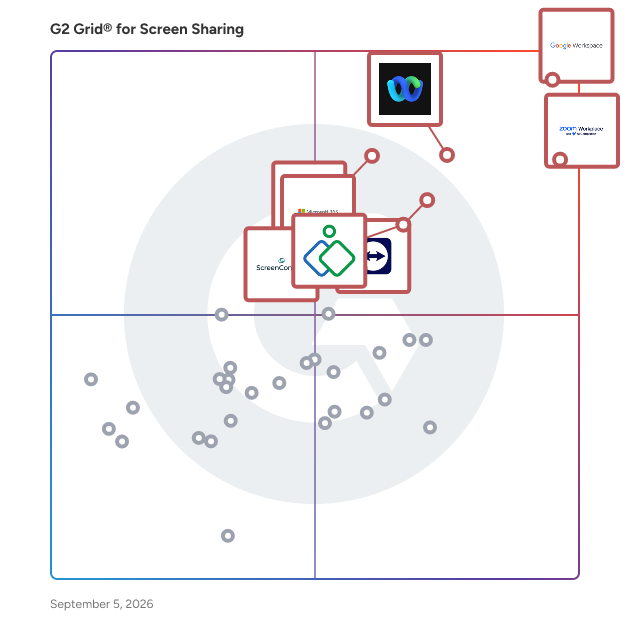
Below are the top-rated Screen Sharing Software with Switch Presenter capabilities, as verified by G2’s Research team. Real users have identified Switch Presenter as an important function of Screen Sharing Software. Compare different products that offer this feature so you can decide which is best for your business needs.
Show More
Show Less

G2 takes pride in showing unbiased reviews on user satisfaction in our ratings and reports. We do not allow paid placements in any of our ratings, rankings, or reports. Learn about our scoring methodologies.

1 filter applied
Clear All
6 Listings in Screen Sharing Available
(55,773)4.5 out of 5
Optimized for quick response
6th Easiest To Use in Screen Sharing software
View top Consulting Services for Zoom Workplace
Entry Level Price:Free
  • Overview
    Expand/Collapse Overview
  • Product Description
    How are these determined?Information
    This description is provided by the seller.

    Goodbye app overload. Hello effortless work. Work can be complicated. Your tools shouldn't be. Zoom Workplace connects all the ways you collaborate — from meetings to docs to chat and more — with bui

    Users
    • Owner
    • Software Engineer
    Industries
    • Information Technology and Services
    • Computer Software
    Market Segment
    • 51% Small-Business
    • 31% Mid-Market
    User Sentiment
    How are these determined?Information
    These insights, currently in beta, are compiled from user reviews and grouped to display a high-level overview of the software.
    • Zoom Workplace is a platform that centralizes communication, collaboration, and execution in one environment, offering features for videoconferencing, virtual meetings, webinars, and more.
    • Reviewers appreciate the simplicity and reliability of Zoom Workplace for daily meetings, highlighting the ease of joining calls, scheduling meetings, sharing screens, and the clear audio and video quality.
    • Users mentioned occasional minor connection issues or short audio delays, and noted that the platform can use a lot of system resources during long meetings.
  • Pros and Cons
    Expand/Collapse Pros and Cons
  • Zoom Workplace Pros and Cons
    How are these determined?Information
    Pros and Cons are compiled from review feedback and grouped into themes to provide an easy-to-understand summary of user reviews.
    Pros
    Ease of Use
    4,796
    Video Conferencing
    2,795
    Video Quality
    2,099
    Reliability
    2,032
    Screen Sharing
    1,685
    Cons
    Zoom Issues
    1,272
    Limited Features
    1,252
    Meeting Issues
    1,223
    Connection Issues
    867
    Video Issues
    814
  • User Satisfaction
    Expand/Collapse User Satisfaction
  • Zoom Workplace features and usability ratings that predict user satisfaction
    9.1
    Has the product been a good partner in doing business?
    Average: 9.0
    9.3
    Video Conferencing
    Average: 8.8
    9.0
    Live Preview
    Average: 8.9
    9.2
    Audio Conferencing
    Average: 8.9
  • Seller Details
    Expand/Collapse Seller Details
  • Seller Details
    Seller
    Zoom
    Company Website
    Year Founded
    2011
    HQ Location
    San Jose, CA
    Twitter
    @zoom
    1,045,944 Twitter followers
    LinkedIn® Page
    www.linkedin.com
    12,688 employees on LinkedIn®
Product Description
How are these determined?Information
This description is provided by the seller.

Goodbye app overload. Hello effortless work. Work can be complicated. Your tools shouldn't be. Zoom Workplace connects all the ways you collaborate — from meetings to docs to chat and more — with bui

Users
  • Owner
  • Software Engineer
Industries
  • Information Technology and Services
  • Computer Software
Market Segment
  • 51% Small-Business
  • 31% Mid-Market
User Sentiment
How are these determined?Information
These insights, currently in beta, are compiled from user reviews and grouped to display a high-level overview of the software.
  • Zoom Workplace is a platform that centralizes communication, collaboration, and execution in one environment, offering features for videoconferencing, virtual meetings, webinars, and more.
  • Reviewers appreciate the simplicity and reliability of Zoom Workplace for daily meetings, highlighting the ease of joining calls, scheduling meetings, sharing screens, and the clear audio and video quality.
  • Users mentioned occasional minor connection issues or short audio delays, and noted that the platform can use a lot of system resources during long meetings.
Zoom Workplace Pros and Cons
How are these determined?Information
Pros and Cons are compiled from review feedback and grouped into themes to provide an easy-to-understand summary of user reviews.
Pros
Ease of Use
4,796
Video Conferencing
2,795
Video Quality
2,099
Reliability
2,032
Screen Sharing
1,685
Cons
Zoom Issues
1,272
Limited Features
1,252
Meeting Issues
1,223
Connection Issues
867
Video Issues
814
Zoom Workplace features and usability ratings that predict user satisfaction
9.1
Has the product been a good partner in doing business?
Average: 9.0
9.3
Video Conferencing
Average: 8.8
9.0
Live Preview
Average: 8.9
9.2
Audio Conferencing
Average: 8.9
Seller Details
Seller
Zoom
Company Website
Year Founded
2011
HQ Location
San Jose, CA
Twitter
@zoom
1,045,944 Twitter followers
LinkedIn® Page
www.linkedin.com
12,688 employees on LinkedIn®
Entry Level Price:$0.00
  • Overview
    Expand/Collapse Overview
  • Product Description
    How are these determined?Information
    This description is provided by the seller.

    Webex Suite is an all-in-one, AI-powered collaboration suite built to increase productivity and maximize teamwork in today’s hybrid work. With 8 powerful individual workflows – Meetings, Messaging, Ca

    Users
    • Software Engineer
    • Senior Software Engineer
    Industries
    • Information Technology and Services
    • Computer Software
    Market Segment
    • 51% Enterprise
    • 31% Mid-Market
  • Pros and Cons
    Expand/Collapse Pros and Cons
  • Webex Suite Pros and Cons
    How are these determined?Information
    Pros and Cons are compiled from review feedback and grouped into themes to provide an easy-to-understand summary of user reviews.
    Pros
    Ease of Use
    460
    Video Conferencing
    308
    Video Quality
    282
    Reliability
    275
    Features
    260
    Cons
    Slow Loading
    121
    Limited Features
    111
    Performance Issues
    102
    Connectivity Issues
    99
    Learning Curve
    90
  • User Satisfaction
    Expand/Collapse User Satisfaction
  • Webex Suite features and usability ratings that predict user satisfaction
    8.7
    Has the product been a good partner in doing business?
    Average: 9.0
    9.0
    Video Conferencing
    Average: 8.8
    8.9
    Live Preview
    Average: 8.9
    9.0
    Audio Conferencing
    Average: 8.9
  • Seller Details
    Expand/Collapse Seller Details
  • Seller Details
    Seller
    Cisco
    Company Website
    Year Founded
    1984
    HQ Location
    San Jose, CA
    Twitter
    @Cisco
    721,592 Twitter followers
    LinkedIn® Page
    www.linkedin.com
    95,386 employees on LinkedIn®
Product Description
How are these determined?Information
This description is provided by the seller.

Webex Suite is an all-in-one, AI-powered collaboration suite built to increase productivity and maximize teamwork in today’s hybrid work. With 8 powerful individual workflows – Meetings, Messaging, Ca

Users
  • Software Engineer
  • Senior Software Engineer
Industries
  • Information Technology and Services
  • Computer Software
Market Segment
  • 51% Enterprise
  • 31% Mid-Market
Webex Suite Pros and Cons
How are these determined?Information
Pros and Cons are compiled from review feedback and grouped into themes to provide an easy-to-understand summary of user reviews.
Pros
Ease of Use
460
Video Conferencing
308
Video Quality
282
Reliability
275
Features
260
Cons
Slow Loading
121
Limited Features
111
Performance Issues
102
Connectivity Issues
99
Learning Curve
90
Webex Suite features and usability ratings that predict user satisfaction
8.7
Has the product been a good partner in doing business?
Average: 9.0
9.0
Video Conferencing
Average: 8.8
8.9
Live Preview
Average: 8.9
9.0
Audio Conferencing
Average: 8.9
Seller Details
Seller
Cisco
Company Website
Year Founded
1984
HQ Location
San Jose, CA
Twitter
@Cisco
721,592 Twitter followers
LinkedIn® Page
www.linkedin.com
95,386 employees on LinkedIn®
G2 Advertising
Sponsored
G2 Advertising
Get 2x conversion than Google Ads with G2 Advertising!
G2 Advertising places your product in premium positions on high-traffic pages and on targeted competitor pages to reach buyers at key comparison moments.
(3,759)4.5 out of 5
Optimized for quick response
5th Easiest To Use in Screen Sharing software
Entry Level Price:Starting at $24.90
  • Overview
    Expand/Collapse Overview
  • Product Description
    How are these determined?Information
    This description is provided by the seller.

    TeamViewer is a leading provider of remote connectivity software for individuals and businesses of all sizes. Our remote software enables companies across various industries to enhance their efficienc

    Users
    • Software Engineer
    • IT Manager
    Industries
    • Information Technology and Services
    • Computer Software
    Market Segment
    • 43% Small-Business
    • 36% Mid-Market
    User Sentiment
    How are these determined?Information
    These insights, currently in beta, are compiled from user reviews and grouped to display a high-level overview of the software.
    • TeamViewer is a system for remote communications, designed to facilitate the management and organization of professional projects.
    • Users frequently mention the ease of implementation, versatility with different operating systems, and the responsiveness of the customer support team.
    • Users reported issues with high pricing for small businesses or individual users, dependency on internet quality for connection speed, and limitations in the free version.
  • Pros and Cons
    Expand/Collapse Pros and Cons
  • TeamViewer Pros and Cons
    How are these determined?Information
    Pros and Cons are compiled from review feedback and grouped into themes to provide an easy-to-understand summary of user reviews.
    Pros
    Ease of Use
    474
    Remote Access
    383
    Remote Control
    304
    Easy Access
    252
    Remote Work
    249
    Cons
    Connection Issues
    166
    Connectivity Issues
    133
    Slow Performance
    128
    Expensive
    119
    Remote Access Issues
    108
  • User Satisfaction
    Expand/Collapse User Satisfaction
  • TeamViewer features and usability ratings that predict user satisfaction
    8.6
    Has the product been a good partner in doing business?
    Average: 9.0
    8.7
    Video Conferencing
    Average: 8.8
    8.9
    Live Preview
    Average: 8.9
    8.7
    Audio Conferencing
    Average: 8.9
  • Seller Details
    Expand/Collapse Seller Details
  • Seller Details
    Company Website
    Year Founded
    2005
    HQ Location
    Goppingen
    Twitter
    @TeamViewer
    48,301 Twitter followers
    LinkedIn® Page
    www.linkedin.com
    2,701 employees on LinkedIn®
Product Description
How are these determined?Information
This description is provided by the seller.

TeamViewer is a leading provider of remote connectivity software for individuals and businesses of all sizes. Our remote software enables companies across various industries to enhance their efficienc

Users
  • Software Engineer
  • IT Manager
Industries
  • Information Technology and Services
  • Computer Software
Market Segment
  • 43% Small-Business
  • 36% Mid-Market
User Sentiment
How are these determined?Information
These insights, currently in beta, are compiled from user reviews and grouped to display a high-level overview of the software.
  • TeamViewer is a system for remote communications, designed to facilitate the management and organization of professional projects.
  • Users frequently mention the ease of implementation, versatility with different operating systems, and the responsiveness of the customer support team.
  • Users reported issues with high pricing for small businesses or individual users, dependency on internet quality for connection speed, and limitations in the free version.
TeamViewer Pros and Cons
How are these determined?Information
Pros and Cons are compiled from review feedback and grouped into themes to provide an easy-to-understand summary of user reviews.
Pros
Ease of Use
474
Remote Access
383
Remote Control
304
Easy Access
252
Remote Work
249
Cons
Connection Issues
166
Connectivity Issues
133
Slow Performance
128
Expensive
119
Remote Access Issues
108
TeamViewer features and usability ratings that predict user satisfaction
8.6
Has the product been a good partner in doing business?
Average: 9.0
8.7
Video Conferencing
Average: 8.8
8.9
Live Preview
Average: 8.9
8.7
Audio Conferencing
Average: 8.9
Seller Details
Company Website
Year Founded
2005
HQ Location
Goppingen
Twitter
@TeamViewer
48,301 Twitter followers
LinkedIn® Page
www.linkedin.com
2,701 employees on LinkedIn®
Entry Level Price:$12 per month
  • Overview
    Expand/Collapse Overview
  • Product Description
    How are these determined?Information
    This description is provided by the seller.

    An industry leader in online video conferencing for companies around the world, GoTo Meeting now comes as part of GoTo Connect, the all-in-one communications software built for SMBs. The Meeting solut

    Users
    • Project Manager
    • Software Engineer
    Industries
    • Information Technology and Services
    • Computer Software
    Market Segment
    • 41% Small-Business
    • 39% Mid-Market
  • Pros and Cons
    Expand/Collapse Pros and Cons
  • GoTo Meeting Pros and Cons
    How are these determined?Information
    Pros and Cons are compiled from review feedback and grouped into themes to provide an easy-to-understand summary of user reviews.
    Pros
    Ease of Use
    76
    Easy Setup
    38
    Reliability
    29
    Intuitive
    24
    Audio Quality
    23
    Cons
    Slow Loading
    12
    Integration Issues
    11
    Poor Quality
    11
    User Interface
    11
    Customer Support
    10
  • User Satisfaction
    Expand/Collapse User Satisfaction
  • GoTo Meeting features and usability ratings that predict user satisfaction
    8.7
    Has the product been a good partner in doing business?
    Average: 9.0
    9.0
    Video Conferencing
    Average: 8.8
    8.9
    Live Preview
    Average: 8.9
    9.0
    Audio Conferencing
    Average: 8.9
  • Seller Details
    Expand/Collapse Seller Details
  • Seller Details
    Seller
    GoTo
    Year Founded
    2003
    HQ Location
    Boston, MA
    Twitter
    @goto
    41,356 Twitter followers
    LinkedIn® Page
    www.linkedin.com
    1,028 employees on LinkedIn®
Product Description
How are these determined?Information
This description is provided by the seller.

An industry leader in online video conferencing for companies around the world, GoTo Meeting now comes as part of GoTo Connect, the all-in-one communications software built for SMBs. The Meeting solut

Users
  • Project Manager
  • Software Engineer
Industries
  • Information Technology and Services
  • Computer Software
Market Segment
  • 41% Small-Business
  • 39% Mid-Market
GoTo Meeting Pros and Cons
How are these determined?Information
Pros and Cons are compiled from review feedback and grouped into themes to provide an easy-to-understand summary of user reviews.
Pros
Ease of Use
76
Easy Setup
38
Reliability
29
Intuitive
24
Audio Quality
23
Cons
Slow Loading
12
Integration Issues
11
Poor Quality
11
User Interface
11
Customer Support
10
GoTo Meeting features and usability ratings that predict user satisfaction
8.7
Has the product been a good partner in doing business?
Average: 9.0
9.0
Video Conferencing
Average: 8.8
8.9
Live Preview
Average: 8.9
9.0
Audio Conferencing
Average: 8.9
Seller Details
Seller
GoTo
Year Founded
2003
HQ Location
Boston, MA
Twitter
@goto
41,356 Twitter followers
LinkedIn® Page
www.linkedin.com
1,028 employees on LinkedIn®
  • Overview
    Expand/Collapse Overview
  • Product Description
    How are these determined?Information
    This description is provided by the seller.

    ezTalks is specialized in providing reliable web conferencing and video conferencing solutions. It offers cloud and on-premise software with powerful features such as HD video/ audio Chat, IM, screen

    Users
    No information available
    Industries
    • Information Technology and Services
    • Computer Software
    Market Segment
    • 54% Small-Business
    • 33% Mid-Market
  • Pros and Cons
    Expand/Collapse Pros and Cons
  • ezTalks Pros and Cons
    How are these determined?Information
    Pros and Cons are compiled from review feedback and grouped into themes to provide an easy-to-understand summary of user reviews.
    Pros
    Ease of Use
    34
    Features
    15
    Communication
    13
    Intuitive
    12
    Screen Sharing
    12
    Cons
    Connectivity Issues
    8
    Slow Loading
    6
    Audio Issues
    5
    Internet Dependency
    5
    Limited Features
    5
  • User Satisfaction
    Expand/Collapse User Satisfaction
  • ezTalks features and usability ratings that predict user satisfaction
    8.6
    Has the product been a good partner in doing business?
    Average: 9.0
    9.1
    Video Conferencing
    Average: 8.8
    8.9
    Live Preview
    Average: 8.9
    8.9
    Audio Conferencing
    Average: 8.9
  • Seller Details
    Expand/Collapse Seller Details
  • Seller Details
    Year Founded
    2014
    HQ Location
    Hong Kong
    Twitter
    @EZTalksoftware
    2,309 Twitter followers
    LinkedIn® Page
    www.linkedin.com
    39 employees on LinkedIn®
Product Description
How are these determined?Information
This description is provided by the seller.

ezTalks is specialized in providing reliable web conferencing and video conferencing solutions. It offers cloud and on-premise software with powerful features such as HD video/ audio Chat, IM, screen

Users
No information available
Industries
  • Information Technology and Services
  • Computer Software
Market Segment
  • 54% Small-Business
  • 33% Mid-Market
ezTalks Pros and Cons
How are these determined?Information
Pros and Cons are compiled from review feedback and grouped into themes to provide an easy-to-understand summary of user reviews.
Pros
Ease of Use
34
Features
15
Communication
13
Intuitive
12
Screen Sharing
12
Cons
Connectivity Issues
8
Slow Loading
6
Audio Issues
5
Internet Dependency
5
Limited Features
5
ezTalks features and usability ratings that predict user satisfaction
8.6
Has the product been a good partner in doing business?
Average: 9.0
9.1
Video Conferencing
Average: 8.8
8.9
Live Preview
Average: 8.9
8.9
Audio Conferencing
Average: 8.9
Seller Details
Year Founded
2014
HQ Location
Hong Kong
Twitter
@EZTalksoftware
2,309 Twitter followers
LinkedIn® Page
www.linkedin.com
39 employees on LinkedIn®
  • Overview
    Expand/Collapse Overview
  • Product Description
    How are these determined?Information
    This description is provided by the seller.

    Screenleap makes it really easy to share your computer screen.

    Users
    No information available
    Industries
    No information available
    Market Segment
    • 53% Small-Business
    • 29% Mid-Market
  • User Satisfaction
    Expand/Collapse User Satisfaction
  • Screenleap features and usability ratings that predict user satisfaction
    9.2
    Has the product been a good partner in doing business?
    Average: 9.0
    10.0
    Video Conferencing
    Average: 8.8
    8.3
    Live Preview
    Average: 8.9
    10.0
    Audio Conferencing
    Average: 8.9
  • Seller Details
    Expand/Collapse Seller Details
  • Seller Details
    Year Founded
    2012
    HQ Location
    San Carlos, CA
    Twitter
    @screenleap
    685 Twitter followers
    LinkedIn® Page
    www.linkedin.com
    1 employees on LinkedIn®
Product Description
How are these determined?Information
This description is provided by the seller.

Screenleap makes it really easy to share your computer screen.

Users
No information available
Industries
No information available
Market Segment
  • 53% Small-Business
  • 29% Mid-Market
Screenleap features and usability ratings that predict user satisfaction
9.2
Has the product been a good partner in doing business?
Average: 9.0
10.0
Video Conferencing
Average: 8.8
8.3
Live Preview
Average: 8.9
10.0
Audio Conferencing
Average: 8.9
Seller Details
Year Founded
2012
HQ Location
San Carlos, CA
Twitter
@screenleap
685 Twitter followers
LinkedIn® Page
www.linkedin.com
1 employees on LinkedIn®