  # Best Enterprise Board Management Software

  *By [Neeraja Prakash](https://research.g2.com/insights/author/neeraja-prakash)*

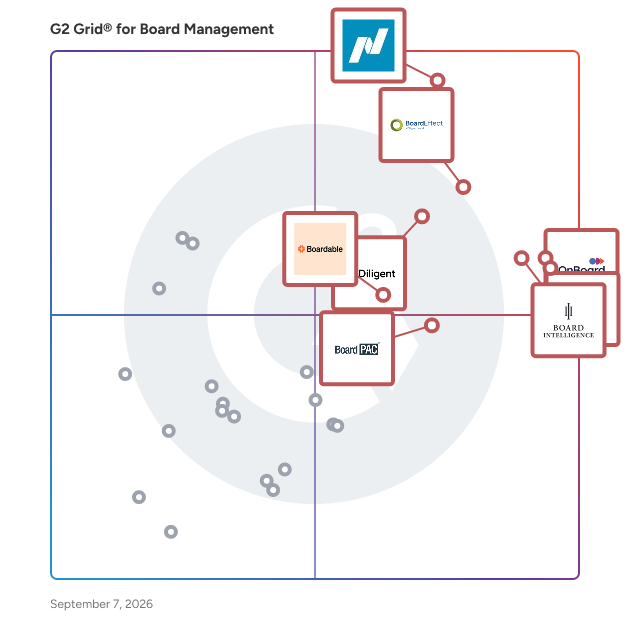
   Products classified in the overall Board Management category are similar in many regards and help companies of all sizes solve their business problems. However, enterprise business features, pricing, setup, and installation differ from businesses of other sizes, which is why we match buyers to the right Enterprise Business Board Management to fit their needs. Compare product ratings based on reviews from enterprise users or connect with one of G2&#39;s buying advisors to find the right solutions within the Enterprise Business Board Management category.

In addition to qualifying for inclusion in the Board Management Software category, to qualify for inclusion in the Enterprise Business Board Management Software category, a product must have at least 10 reviews left by a reviewer from an enterprise business.


## How Many Board Management Software Products Does G2 Track?
**Total Products under this Category:** 94

### Category Stats (May 2026)
- **Average Rating**: 4.45/5 (↓0.01 vs Apr 2026)
- **New Reviews This Quarter**: 148
- **Buyer Segments**: Mid-Market 49% │ Small-Business 35% │ Enterprise 16%
- **Top Trending Product**: Convene (+0.02)
*Last updated: May 18, 2026*

  
## How Does G2 Rank Board Management Software Products?

**Why You Can Trust G2's Software Rankings:**

- 30 Analysts and Data Experts
- 4,100+ Authentic Reviews
- 94+ Products
- Unbiased Rankings

G2's software rankings are built on verified user reviews, rigorous moderation, and a consistent research methodology maintained by a team of analysts and data experts. Each product is measured using the same transparent criteria, with no paid placement or vendor influence. While reviews reflect real user experiences, which can be subjective, they offer valuable insight into how software performs in the hands of professionals. Together, these inputs power the G2 Score, a standardized way to compare tools within every category.


  ## What Are the Top-Rated Board Management Software Products in 2026?
### 1. [Nasdaq Boardvantage](https://www.g2.com/products/nasdaq-boardvantage/reviews)
  Nasdaq Boardvantage® is a comprehensive board management platform designed to support the full lifecycle of board and committee work. Built for corporate boards, governance teams, and organizations across public, private, and nonprofit sectors, the platform streamlines how boards prepare for meetings, collaborate on materials, and make decisions. Nasdaq Boardvantage centralizes key governance workflows into a single environment, helping directors and administrators manage information efficiently while maintaining strict protection of sensitive data. Serving a wide range of industries and board structures, Nasdaq Boardvantage is designed for users of all experience levels—from seasoned directors to first time board members. Its intuitive interface simplifies complex governance tasks such as preparing agendas, distributing materials, collecting approvals, and maintaining accurate records. Organizations that manage frequent board meetings, multi committee structures, or regulatory disclosures benefit from tools that reduce manual effort and provide greater visibility across governance processes. Nasdaq Boardvantage supports end to end meeting management. Administrators can create agendas, compile board books, and update materials in real time. During meetings, directors can access and annotate documents, participate in voting, and engage in discussions from any location. After meetings, the platform assists with drafting minutes, completing follow up activities, and maintaining an auditable repository of past and current materials. AI supported features—developed in partnership with Microsoft—help users summarize lengthy documents and generate initial drafts of meeting minutes, enabling faster review and better information comprehension. Nasdaq Boardvantage also integrates with widely used productivity, collaboration, and governance tools to support seamless workflows. This includes connectivity with Microsoft 365 and Google Drive for accessing and managing files, Outlook for meeting notifications, and Teams and Zoom for conducting virtual meetings. The platform integrates with Docusign for electronic signatures aligned with regulatory standards and connects with entity management systems to help maintain accurate director and organizational data. AI capabilities developed with Microsoft and built directly into the platform assist with summarizing materials and extracting key insights, supporting faster preparation and more efficient decision-making. In addition to meeting management, Nasdaq Boardvantage is part of Nasdaq’s broader governance ecosystem. This includes support for digital compliance questionnaires, board and committee evaluations, and access to the Nasdaq Center for Board Excellence—a global community of governance leaders offering education, peer connection, and curated governance resources. These additional components allow organizations to manage board meetings, disclosures, and continuous improvement activities within a cohesive environment. Security and data protection are foundational to Nasdaq Boardvantage. The platform incorporates governance grade security practices, including SOC 2 audits, ISO 27001 certification, customizable permissions, third party penetration testing, and continuous monitoring by a global security operations center. These safeguards help ensure that sensitive board information remains protected throughout the workflow. Organizations also benefit from dedicated onboarding support, 24/7 global assistance, and ongoing training resources, helping teams adopt the platform effectively and maintain confidence in their governance processes. By combining structured workflows, collaborative tools, integrated governance solutions, and strong security measures, Nasdaq Boardvantage helps boards operate efficiently and stay aligned in an increasingly complex business environment.


  **Average Rating:** 4.6/5.0
  **Total Reviews:** 209
**How Do G2 Users Rate Nasdaq Boardvantage?**

- **Document Management:** 9.2/10 (Category avg: 8.8/10)
- **D&amp;O Questionnaires:** 7.3/10 (Category avg: 7.1/10)
- **Meeting Minutes:** 7.7/10 (Category avg: 8.2/10)
- **Quality of Support:** 9.7/10 (Category avg: 9.1/10)

**Who Is the Company Behind Nasdaq Boardvantage?**

- **Seller:** [Nasdaq](https://www.g2.com/sellers/nasdaq)
- **Company Website:** https://www.nasdaq.com/
- **Year Founded:** 1971
- **HQ Location:** New York
- **Twitter:** @Nasdaq (183,487 Twitter followers)
- **LinkedIn® Page:** https://www.linkedin.com/company/nasdaq/ (8,338 employees on LinkedIn®)

**Who Uses This Product?**
  - **Who Uses This:** Executive Assistant
  - **Top Industries:** Hospital &amp; Health Care, Banking
  - **Company Size:** 40% Enterprise, 36% Mid-Market


#### What Are Nasdaq Boardvantage's Pros and Cons?

**Pros:**

- Ease of Use (27 reviews)
- Customer Support (19 reviews)
- Document Management (14 reviews)
- Board Management (13 reviews)
- Features (8 reviews)

**Cons:**

- Document Management (5 reviews)
- Calendar Integration (4 reviews)
- App Usability (3 reviews)
- Lack of Features (3 reviews)
- Limited Functionality (3 reviews)

### 2. [Diligent Boards](https://www.g2.com/products/diligent-boards/reviews)
  Diligent Boards is the most comprehensive and secure board portal on the market, relied on by more than 700,000 directors and 25,000 organizations worldwide. It supports and enhances the full board cycle, from meeting prep and collaboration, through execution and follow-up. Effortlessly manage templatized and customizable committee evaluations, board books, voting materials and more. AI-powered capabilities and easy-to-use workflow automations ensure that leadership gets the most out of limited time. With 24/7/365 concierge customer support, Diligent Boards empowers the people, processes and technology that drive sterling governance


  **Average Rating:** 4.5/5.0
  **Total Reviews:** 496
**How Do G2 Users Rate Diligent Boards?**

- **Document Management:** 8.9/10 (Category avg: 8.8/10)
- **D&amp;O Questionnaires:** 7.4/10 (Category avg: 7.1/10)
- **Meeting Minutes:** 7.6/10 (Category avg: 8.2/10)
- **Quality of Support:** 9.0/10 (Category avg: 9.1/10)

**Who Is the Company Behind Diligent Boards?**

- **Seller:** [Diligent Corporation](https://www.g2.com/sellers/diligent-corporation-9db2bcc4-90ac-4d53-93d9-d0478f837d14)
- **Company Website:** https://www.diligent.com/
- **Year Founded:** 2001
- **HQ Location:** New York, NY
- **Twitter:** @diligenthq (4,518 Twitter followers)
- **LinkedIn® Page:** https://www.linkedin.com/company/101105/ (2,999 employees on LinkedIn®)

**Who Uses This Product?**
  - **Who Uses This:** Executive Assistant, Assistant Corporate Secretary
  - **Top Industries:** Financial Services, Banking
  - **Company Size:** 41% Mid-Market, 36% Enterprise


#### What Are Diligent Boards's Pros and Cons?

**Pros:**

- Ease of Use (122 reviews)
- Document Management (89 reviews)
- Board Management (80 reviews)
- Efficiency (57 reviews)
- Features (54 reviews)

**Cons:**

- Document Management (23 reviews)
- Navigation Difficulty (23 reviews)
- Lack of Features (22 reviews)
- Limited Functionality (19 reviews)
- Slow Performance (18 reviews)

### 3. [BoardPAC](https://www.g2.com/products/boardpac/reviews)
  BoardPAC is the leading provider of Digital Board Meeting Automation, recognized for driving simple, secure, sustainable and experiential communications for Board and Executive members. BoardPAC serves a host of Forbes Global 2000 companies across the world, with over 50,000 users across 40 countries. With its 9 Global Offices, BoardPAC is a globally award winning company which is recognized as Asia&#39;s best place to work by the global ranking entity Great Places to Work. BoardPAC provides a comprehensive solution for managing remote, hybrid, and virtual board meetings that is designed to meet the needs of board members, chairpersons, CEOs, CXOs, executive committee members, senior management members, board secretaries, company secretaries, and general counsels. The platform offers an intuitive and user-friendly interface that is accessible through a variety of devices, including iPads, iPhones, Mac devices, Windows surfaces, Android tabs and phones. BoardPAC supports both on-premise and cloud storage options across multiple platforms, including iOS, macOS, Windows and Android. By leveraging BoardPAC, your organization can benefit from: - Video-enabled virtual meetings for board and committee meetings. - Digitized and secure meeting documents, ensuring easy accessibility and efficient archiving of sensitive information. - ISO 27001 certified and AES 256 military grade encrypted data security policies that are customizable to your organization&#39;s specific needs. - Collaborative tools that enable quicker decision-making and easy feedback on meeting documents. - Real-time document viewing and updating to reduce the need for printing. BoardPAC&#39;s comprehensive solution is designed to add significant value to your organization&#39;s board meeting management and senior management processes, enabling greater efficiency, security, and flexibility in conducting meetings.


  **Average Rating:** 4.6/5.0
  **Total Reviews:** 217
**How Do G2 Users Rate BoardPAC?**

- **Document Management:** 9.1/10 (Category avg: 8.8/10)
- **D&amp;O Questionnaires:** 7.6/10 (Category avg: 7.1/10)
- **Meeting Minutes:** 7.9/10 (Category avg: 8.2/10)
- **Quality of Support:** 9.4/10 (Category avg: 9.1/10)

**Who Is the Company Behind BoardPAC?**

- **Seller:** [BoardPAC](https://www.g2.com/sellers/boardpac)
- **Year Founded:** 2016
- **HQ Location:** Austin, Texas
- **LinkedIn® Page:** https://www.linkedin.com/company/6616532/ (118 employees on LinkedIn®)

**Who Uses This Product?**
  - **Who Uses This:** Company Secretary, Assistant Company Secretary
  - **Top Industries:** Banking, Financial Services
  - **Company Size:** 42% Enterprise, 40% Mid-Market


#### What Are BoardPAC's Pros and Cons?

**Pros:**

- Ease of Use (23 reviews)
- Security (15 reviews)
- Customer Support (13 reviews)
- Simple (10 reviews)
- Document Management (9 reviews)

**Cons:**

- Board Management (4 reviews)
- Slow Performance (4 reviews)
- Technical Issues (4 reviews)
- Connectivity Issues (3 reviews)
- Document Management (3 reviews)

### 4. [Board Intelligence](https://www.g2.com/products/board-intelligence/reviews)
  Board Intelligence is a type of board technology solution designed to help organizations enhance the effectiveness and efficiency of their governance processes. This innovative platform is tailored for board members and governance teams, providing them with the tools necessary to streamline board operations and improve decision-making. By leveraging advanced AI-powered software and advisory services, Board Intelligence transforms traditional boardroom practices into a more dynamic and impactful experience. Targeted primarily at leaders within large organizations, including those in the Fortune 500, FTSE 100, and OMX 30, Board Intelligence serves a diverse audience of executives, directors, and governance professionals. The platform is particularly beneficial for those seeking to optimize their board processes, ensuring that meetings are more productive and that strategic decisions are made with greater insight. By distilling two decades of boardroom experience into its offerings, Board Intelligence addresses the unique challenges faced by governance teams in today’s fast-paced business environment. Key features of Board Intelligence include a suite of AI-driven tools that facilitate the preparation and management of board meetings, as well as comprehensive analytics that provide insights into board performance. These tools help governance teams save time by automating routine tasks, such as document distribution and agenda setting, allowing members to focus on strategic discussions. Additionally, the platform offers tailored reporting capabilities that enable boards to assess their effectiveness and identify areas for improvement, ultimately enhancing their contribution to organizational success. The benefits of using Board Intelligence extend beyond mere efficiency gains. By improving the quality of board interactions and decision-making processes, organizations can experience a significant impact on their overall performance. The platform empowers boards to operate more cohesively, fostering better communication and collaboration among members. This, in turn, leads to more informed decisions that align with the organization’s strategic goals, thereby driving long-term success. In a landscape where effective governance is paramount, Board Intelligence stands out as a comprehensive solution that combines technology with deep industry knowledge. Its focus on enhancing board effectiveness not only saves time but also elevates the role of governance teams within organizations, making them integral to achieving strategic objectives.


  **Average Rating:** 4.6/5.0
  **Total Reviews:** 216
**How Do G2 Users Rate Board Intelligence?**

- **Document Management:** 9.1/10 (Category avg: 8.8/10)
- **D&amp;O Questionnaires:** 5.9/10 (Category avg: 7.1/10)
- **Meeting Minutes:** 6.7/10 (Category avg: 8.2/10)
- **Quality of Support:** 9.6/10 (Category avg: 9.1/10)

**Who Is the Company Behind Board Intelligence?**

- **Seller:** [Board Intelligence](https://www.g2.com/sellers/board-intelligence)
- **Company Website:** https://www.boardintelligence.com
- **Year Founded:** 2002
- **HQ Location:** London, GB
- **Twitter:** @BoardIntel (2,994 Twitter followers)
- **LinkedIn® Page:** https://www.linkedin.com/company/board-intelligence/ (147 employees on LinkedIn®)

**Who Uses This Product?**
  - **Who Uses This:** Company Secretary, Executive Assistant
  - **Top Industries:** Financial Services, Education Management
  - **Company Size:** 59% Mid-Market, 20% Enterprise


#### What Are Board Intelligence's Pros and Cons?

**Pros:**

- Ease of Use (56 reviews)
- Customer Support (55 reviews)
- Document Management (20 reviews)
- Intuitive (18 reviews)
- Simple (16 reviews)

**Cons:**

- Limited Functionality (7 reviews)
- Agenda Management (6 reviews)
- Limited Formatting (6 reviews)
- Login Issues (5 reviews)
- Not Intuitive (5 reviews)

### 5. [BoardEffect](https://www.g2.com/products/boardeffect/reviews)
  BoardEffect is an AI-powered board management software designed for mission-driven organizations. It equips volunteer boards with the tools to streamline board processes, enhance communication and promote accountability. Serving more than 5,000 mission-driven organizations, we empower volunteer boards with the tools to drive positive change. Our board management software is purpose-built with the unique needs of nonprofit organizations in mind, making it easier for you to focus on your mission.


  **Average Rating:** 4.5/5.0
  **Total Reviews:** 312
**How Do G2 Users Rate BoardEffect?**

- **Document Management:** 9.0/10 (Category avg: 8.8/10)
- **D&amp;O Questionnaires:** 6.3/10 (Category avg: 7.1/10)
- **Meeting Minutes:** 6.6/10 (Category avg: 8.2/10)
- **Quality of Support:** 9.1/10 (Category avg: 9.1/10)

**Who Is the Company Behind BoardEffect?**

- **Seller:** [Diligent Corporation](https://www.g2.com/sellers/diligent-corporation-9db2bcc4-90ac-4d53-93d9-d0478f837d14)
- **Company Website:** https://www.diligent.com/
- **Year Founded:** 2001
- **HQ Location:** New York, NY
- **Twitter:** @diligenthq (4,518 Twitter followers)
- **LinkedIn® Page:** https://www.linkedin.com/company/101105/ (2,999 employees on LinkedIn®)

**Who Uses This Product?**
  - **Who Uses This:** Executive Assistant, Executive Director
  - **Top Industries:** Non-Profit Organization Management, Hospital &amp; Health Care
  - **Company Size:** 46% Mid-Market, 40% Small-Business


#### What Are BoardEffect's Pros and Cons?

**Pros:**

- Ease of Use (107 reviews)
- Document Management (55 reviews)
- Board Management (42 reviews)
- Customer Support (38 reviews)
- Agenda Management (31 reviews)

**Cons:**

- Document Management (20 reviews)
- Limited Functionality (18 reviews)
- Not Intuitive (18 reviews)
- Agenda Management (16 reviews)
- Board Management (13 reviews)

### 6. [Convene](https://www.g2.com/products/azeus-systems-convene/reviews)
  OUT NOW: Upgrade to Convene 9.0 Today Convene is a board management software designed to facilitate seamless and efficient meetings for organizations of all sizes. Developed by Azeus, a CMMI Level 5 company, Convene addresses the complexities of board meetings by providing a comprehensive platform that enhances communication, engagement, and overall productivity throughout the meeting lifecycle—from preparation to follow-up. This software is particularly beneficial for a diverse range of users, including FTSE 100 companies, Fortune 500 firms, banks, healthcare organizations, non-profits, and government entities. Convene caters to the needs of executives, board directors, and administrative staff who require a reliable tool to manage their board processes effectively. The software is designed to streamline various aspects of board management, making it an essential resource for any organization looking to improve its governance practices. Convene offers a full suite of features that support users in organizing meetings, building agendas, and facilitating discussions. The platform allows for easy voting on resolutions, tracking of action items, and secure signing of documents, ensuring that all necessary tasks are completed efficiently. The latest upgrade introduces innovative functionalities that further enhance the user experience, making it easier for boards and their teams to collaborate and make informed decisions. One of the standout aspects of Convene is its commitment to security and user privacy. The software employs advanced security measures to protect sensitive information, ensuring that users can conduct their meetings with confidence. Additionally, the intuitive interface allows for a smooth onboarding process, enabling users to quickly adapt to the platform and maximize its capabilities. By choosing Convene, organizations can expect to see improved engagement among board members, streamlined workflows, and enhanced overall meeting efficiency. The software not only simplifies the logistics of board meetings but also fosters a culture of transparency and accountability, making it a valuable asset for any organization aiming to elevate its governance standards.


  **Average Rating:** 4.8/5.0
  **Total Reviews:** 389
**How Do G2 Users Rate Convene?**

- **Document Management:** 9.6/10 (Category avg: 8.8/10)
- **D&amp;O Questionnaires:** 9.0/10 (Category avg: 7.1/10)
- **Meeting Minutes:** 9.5/10 (Category avg: 8.2/10)
- **Quality of Support:** 9.7/10 (Category avg: 9.1/10)

**Who Is the Company Behind Convene?**

- **Seller:** [Azeus Systems](https://www.g2.com/sellers/azeus-systems)
- **Company Website:** https://www.azeusconvene.com/
- **Year Founded:** 1991
- **HQ Location:** Singapore
- **Twitter:** @AzeusConvene (1,175 Twitter followers)
- **LinkedIn® Page:** https://www.linkedin.com/company/conveneglobal/ (670 employees on LinkedIn®)

**Who Uses This Product?**
  - **Who Uses This:** Executive Assistant, Board Administrator
  - **Top Industries:** Information Technology and Services, Automotive
  - **Company Size:** 56% Mid-Market, 28% Small-Business


#### What Are Convene's Pros and Cons?

**Pros:**

- Ease of Use (123 reviews)
- Document Management (68 reviews)
- Agenda Management (67 reviews)
- Features (60 reviews)
- Meeting Management (60 reviews)

**Cons:**

- Expensive (16 reviews)
- Connectivity Issues (14 reviews)
- Integration Issues (10 reviews)
- Limited Customization (8 reviews)
- Limited Functionality (7 reviews)

### 7. [OnBoard Board Management Software](https://www.g2.com/products/onboard-board-management-software/reviews)
  OnBoard unites agendas, materials, minutes, votes, approvals, and actions in one secure record. No PDFs or version sprawl, so directors prepare faster, and leaders decide with confidence. Prep time drops when everyone opens the same book, sees what changed since the last draft, and walks in ready to decide. Turn long board books into clear briefs with the AI Suite: draft minutes in minutes, summarize packets, highlight late edits, and answer questions - contained to your official record, not the open web. Directors review, annotate, and vote on any device, online or offline; chairs keep the discussion focused; committees move work forward between meetings. Publish one final board book, absorb late edits without rebuilds, and keep an audit-ready history. Executives assign actions, track approvals, and align decisions to strategy without spreadsheet gymnastics. Integrated messaging, e-signatures, surveys, Microsoft 365, and Zoom integrations cut app-switching and turn busywork into decisions. Keep sensitive work out of email with enterprise controls like SSO/MFA, role-based access, device and file permissions, and exportable audit logs. Data is hosted on Microsoft Azure with encryption in transit and at rest. Compliance frameworks include SOC 2 and ISO/IEC 27001; HIPAA-aligned controls support healthcare use cases; retention and legal hold policies protect books and records. Support how boards actually meet, whether it is mobile, remote, or hybrid, so every member stays aligned on any device. Directors who prefer PDFs stay comfortable; those who choose dashboards get a simple, organized view built for every skill level. Scale without complexity. Run multiple entities, committees, and calendars in parallel while maintaining least-privilege access and a single source of truth. Trusted by 6,000+ organizations worldwide, boards choose clarity, speed, ease of use, and defensible records in OnBoard.


  **Average Rating:** 4.7/5.0
  **Total Reviews:** 646
**How Do G2 Users Rate OnBoard Board Management Software?**

- **Document Management:** 9.2/10 (Category avg: 8.8/10)
- **D&amp;O Questionnaires:** 7.4/10 (Category avg: 7.1/10)
- **Meeting Minutes:** 8.3/10 (Category avg: 8.2/10)
- **Quality of Support:** 9.6/10 (Category avg: 9.1/10)

**Who Is the Company Behind OnBoard Board Management Software?**

- **Seller:** [OnBoard](https://www.g2.com/sellers/onboard)
- **Company Website:** https://www.onboardmeetings.com/
- **Year Founded:** 2003
- **HQ Location:** Indianapolis, IN
- **Twitter:** @onboardmeetings (1,066 Twitter followers)
- **LinkedIn® Page:** https://www.linkedin.com/company/60470/ (255 employees on LinkedIn®)

**Who Uses This Product?**
  - **Who Uses This:** Executive Assistant, Executive Director
  - **Top Industries:** Non-Profit Organization Management, Higher Education
  - **Company Size:** 47% Mid-Market, 46% Small-Business


#### What Are OnBoard Board Management Software's Pros and Cons?

**Pros:**

- Ease of Use (33 reviews)
- Board Management (21 reviews)
- Agenda Management (16 reviews)
- Customer Support (14 reviews)
- Simple (14 reviews)

**Cons:**

- Steep Learning Curve (6 reviews)
- Agenda Management (5 reviews)
- Expensive (5 reviews)
- Limited Features (5 reviews)
- Limited Functionality (5 reviews)

### 8. [Diligent Community](https://www.g2.com/products/diligent-community/reviews)
  Diligent Community is the next-generation board management and governance software designed specifically for public and elected boards, by the trusted team who brought you BoardDocs and iCompass. With Diligent Community, you can enhance transparency, improve efficiency and build trust within your community. It offers a simple drag-and-drop agenda builder, customized workflows, and easily assigned and updated approvers. With Diligent Community, public meetings can run smoothly, and participants can engage and execute meetings more efficiently. It also offers powerful search tools, live stream broadcasts, and policies, maintaining ADA accessibility standards for all published information. Diligent, the leading governance, risk and compliance SaaS company, empowers more than 1 million users and 700,000 board members and leaders to clarify risk and elevate governance. Diligent Community is part of the Diligent One Platform which helps organizations manage complex risk, stay ahead of regulatory changes and deliver impactful insights, in one consolidated view. So boards and leaders can make better decisions, faster.


  **Average Rating:** 4.1/5.0
  **Total Reviews:** 41
**How Do G2 Users Rate Diligent Community?**

- **Document Management:** 9.3/10 (Category avg: 8.8/10)
- **Meeting Minutes:** 9.2/10 (Category avg: 8.2/10)
- **Quality of Support:** 8.9/10 (Category avg: 9.1/10)

**Who Is the Company Behind Diligent Community?**

- **Seller:** [Diligent Corporation](https://www.g2.com/sellers/diligent-corporation-9db2bcc4-90ac-4d53-93d9-d0478f837d14)
- **Company Website:** https://www.diligent.com/
- **Year Founded:** 2001
- **HQ Location:** New York, NY
- **Twitter:** @diligenthq (4,518 Twitter followers)
- **LinkedIn® Page:** https://www.linkedin.com/company/101105/ (2,999 employees on LinkedIn®)

**Who Uses This Product?**
  - **Top Industries:** Education Management, Primary/Secondary Education
  - **Company Size:** 54% Mid-Market, 34% Enterprise


### 9. [Decisions AI](https://www.g2.com/products/decisions-ai/reviews)
  Decisions is an AI-driven meeting management solution built for enterprise teams that rely on Microsoft Teams and Office 365. Designed to transform the way organizations meet, Decisions brings structure, accountability, and clarity to every stage of the meeting process—before, during, and after. Whether your teams are meeting in-person, remote, or hybrid, Decisions helps ensure that every conversation leads to action and impact. Meetings are where key decisions happen, yet too often they lack direction, focus, or follow-through. Decisions solves this with intelligent tools that streamline agenda planning, time management, real-time collaboration, and post-meeting documentation—all embedded directly into your Microsoft environment. With AI features like smart agenda suggestions, instant meeting summaries, and personalized briefings, leaders save hours while staying aligned and informed—without switching tools or changing how they work. Enterprise leaders choose Decisions because it scales with complex teams and governance needs. From Fortune 500 companies to global nonprofits, our customers trust Decisions to standardize meeting processes across departments, drive cross-functional collaboration, and improve meeting culture. AI credits are included with every license, making it easy to roll out transformative capabilities across the organization quickly and cost-effectively. With Decisions, teams can build agendas collaboratively, run more focused meetings, and leave with clear decisions, tasks, and documentation—automatically synced to Microsoft Planner and To Do. Feedback tools and engagement metrics provide visibility into what’s working and where to improve, so every meeting gets smarter over time. If your organization is ready to elevate meetings from time sinks to strategic drivers, it’s time to try Decisions.


  **Average Rating:** 4.4/5.0
  **Total Reviews:** 396
**How Do G2 Users Rate Decisions AI?**

- **Document Management:** 8.1/10 (Category avg: 8.8/10)
- **D&amp;O Questionnaires:** 6.4/10 (Category avg: 7.1/10)
- **Meeting Minutes:** 8.3/10 (Category avg: 8.2/10)
- **Quality of Support:** 8.7/10 (Category avg: 9.1/10)

**Who Is the Company Behind Decisions AI?**

- **Seller:** [Decisions AI](https://www.g2.com/sellers/decisions-ai)
- **Company Website:** https://www.meetingdecisions.com/
- **Year Founded:** 2016
- **HQ Location:** Oslo, NO
- **Twitter:** @decisions (473 Twitter followers)
- **LinkedIn® Page:** https://www.linkedin.com/company/meetingdecisions/ (76 employees on LinkedIn®)

**Who Uses This Product?**
  - **Who Uses This:** Executive Assistant, Project Manager
  - **Top Industries:** Hospital &amp; Health Care, Information Technology and Services
  - **Company Size:** 39% Small-Business, 36% Mid-Market


#### What Are Decisions AI's Pros and Cons?

**Pros:**

- Ease of Use (61 reviews)
- Agenda Management (47 reviews)
- Meeting Minutes (47 reviews)
- Action Items (43 reviews)
- Efficiency (33 reviews)

**Cons:**

- Meeting Management (21 reviews)
- AI Inaccuracy (16 reviews)
- Learning Curve (15 reviews)
- Task Management (15 reviews)
- Limited Functionality (13 reviews)

### 10. [BoardDocs](https://www.g2.com/products/boarddocs/reviews)
  BoardDocs allows organizations to significantly improve the way they create and manage board packets, access information, and conduct meetings. We developed BoardDocs for the specific needs of K-12 school systems and community colleges. BoardDocs has helped over 3,500 organizations dramatically lower costs, increase transparency and reduce time-of-staff by up to 75%. Because our solutions are so easy to use, your organization will operate more effectively from day one


  **Average Rating:** 4.5/5.0
  **Total Reviews:** 50
**How Do G2 Users Rate BoardDocs?**

- **Document Management:** 8.3/10 (Category avg: 8.8/10)
- **D&amp;O Questionnaires:** 5.4/10 (Category avg: 7.1/10)
- **Meeting Minutes:** 8.5/10 (Category avg: 8.2/10)
- **Quality of Support:** 9.0/10 (Category avg: 9.1/10)

**Who Is the Company Behind BoardDocs?**

- **Seller:** [Diligent Corporation](https://www.g2.com/sellers/diligent-corporation-9db2bcc4-90ac-4d53-93d9-d0478f837d14)
- **Year Founded:** 2001
- **HQ Location:** New York, NY
- **Twitter:** @diligenthq (4,518 Twitter followers)
- **LinkedIn® Page:** https://www.linkedin.com/company/101105/ (2,999 employees on LinkedIn®)

**Who Uses This Product?**
  - **Top Industries:** Education Management, Primary/Secondary Education
  - **Company Size:** 54% Mid-Market, 26% Enterprise


#### What Are BoardDocs's Pros and Cons?

**Pros:**

- Document Management (3 reviews)
- Ease of Use (3 reviews)
- Efficiency (3 reviews)
- Access Control (2 reviews)
- Agenda Management (2 reviews)

**Cons:**

- Navigation Difficulty (2 reviews)
- Document Management (1 reviews)
- Limited Customization (1 reviews)
- Not Intuitive (1 reviews)
- Technical Issues (1 reviews)


    ## What Is Board Management Software?
  [Collaboration &amp; Productivity Software](https://www.g2.com/categories/collaboration-productivity)
  ## What Software Categories Are Similar to Board Management Software?
    - [Meeting Management Software](https://www.g2.com/categories/meeting-management)

  
---

## How Do You Choose the Right Board Management Software?

### What You Should Know About Board Management Software 

### What is Board Management Software?

Board management tools, also called board portals, are used to organize board meetings and crowdsource executive opinions and ideas on financial, directional, and product decisions within a company. Tools with survey features make it simple to gather various types of feedback without the pressure of delivering it in front of a crowd or within the timeline of the meetings. These surveys can help gather thoughts on how a meeting was run, gauge unanimity on decisions that were made, and allow employees an outlet where their input will be heard.

Board management tools simplify aspects of managerial meetings, the planning of which requires communication. Some tools will integrate with a team’s calendar, email, and contact settings to make this planning process easier. The solution can ensure those required at a meeting receive email notifications about possible meeting times and automatically send out calendar events reflecting the final decision.

Key Benefits of Board Management Software

- Spend less time working around schedules by integrating work calendars
- Conduct better-organized meetings
- Notify users of document, meeting, or agenda changes
- Send users summaries and other meeting notes
- Search through content to locate former agendas, documents, comments, etc.

### Why Use Board Management Software?

Company leadership can make or break a company. One of the most straightforward methods to achieve strong company leadership is to guarantee that the top of a company is efficient with their time and has relevant materials exactly when they need them, including content like briefings and internal data.

**Centralized Information Hub —** Searching for documents across disparate [content management systems](https://www.g2.com/categories/content-management) is frustrating for anyone. The cost of the time spent looking for shareable documents is much higher in the context of executive board meetings. Board management software offers a singular, integrated portal where directors can find all the materials they need.

**Meeting Management —** Meetings without direction waste valuable time and energy. Executives don’t have time to spare, so ensuring that meetings are efficient and informative is imperative to the success of an organization or company. Board management tools provide features available before, during, and after meetings that keep everyone on track and on topic. This can include features such as meeting agendas, note-taking, and document viewers and editors that can be accessed from one board portal.

**Remote Collaboration —** Board members cannot always be in the same place at the same time and are sometimes dispersed into locations that do not have quality internet connections. For this reason, a team of executives might prefer a board management tool that allows users to view documents, agendas, notes, and more offline. In this way, a CEO who cannot physically attend a meeting could still look at the meeting’s agenda on their tablet on an airplane.

**Preparedness —** Many board management tools allot storage space for the various documents and board materials that teams require in meetings. These meeting documents can be uploaded prior to meetings so team members are able to consult them in advance to prepare questions or comments. Many tools also offer version control for these files and documents so there’s no confusion as to the most recently updated version.

### Which is the Best Software for Managing Board Documents Efficiently?

- [Boardable](https://www.g2.com/products/boardable/reviews): Provides a clean, easy-to-navigate platform for organizing board materials, scheduling meetings, and securely sharing documents—ideal for small teams needing streamlined board collaboration.
- [Govenda](https://www.g2.com/products/govenda/reviews): Offers centralized document management, real-time board book updates, and secure access controls, helping small businesses keep board operations organized and compliant.
- [Nasdaq Boardvantage](https://www.g2.com/products/nasdaq-nasdaq-boardvantage/reviews): Delivers secure board document sharing, annotations, and meeting prep tools with a focus on governance and efficiency, well-suited for small businesses with high accountability needs.

### Who Uses Board Management Software?

As the name implies, board management tools are intended for executive boards. However, any high-level group within an organization can find use in board management tools since their base features have broad applicability to any meeting setting. This can include middle management within a company, such as managers or coordinators who meet with one another often. However, the base functions of the software will look the same regardless of what level of management is handling it.

Some board management software is intended specifically or has functions tailored for specific types of executive boards, most notably those for nonprofit organizations. Extra features could provide lists of donors and integrate with other types of [nonprofit software](https://www.g2.com/categories/nonprofit). Board meetings will look different across disciplines, and board management software can offer specialized features based on use case. It’s crucial for a board to ensure that board portal software provide all the discipline-specific features they require if they want an effective solution.

### Board Management Software Features

**Document Storage and Sharing —** Documents can be shared and stored within most board management portals. These documents can be pulled from an outside content management system or uploaded and stored in the portal itself. Documentation can then be viewed by board members in the portal or attached to agendas and meeting notes later.

**Meeting Agenda —** One of the staple features of board management software is meeting agenda creation. An agenda can be set and viewed by board members before the meeting takes place, which can help them stay on track. Documents related to meeting talking points can also be attached to an agenda for easy access.

**Meeting Notes —** It can be inconvenient to move to a separate application to take notes during a meeting, so many board management tools provide note-taking capability. Notes can either be private or shared with other members in the portal. Some board management tools will even automate the note-taking process and send meeting minutes to members once a meeting has ended.

**Surveys —** Surveys are an excellent tool to streamline decision-making during a meeting, and board management solutions will sometimes provide a survey function within their offering. Survey results can be attached to a meeting’s minutes or stored elsewhere in the portal to be referred to later.

#### Additional Board Management Features

**Comments and Annotations —** Users can record notes publicly or privately throughout the meeting to be shared with team members or attached to documents. These notes help users remember details of the meeting and can be used later for reference. These features are helpful for team members who like to have a record of their individual perception of meeting details.

**Offline Availability —** For board teams that are frequently able to gather in full, offline capabilities might not matter as much. For those that are often operating from separate corners of the globe, this feature could help keep members in the loop.

**Integrations —** Some board management solutions won’t offer some of the features listed here and instead integrate with outside software to provide them. This can actually be beneficial in the case of calendars or content management systems, since most businesses already have these in place.

### Which Board Software Has the Best Features for Executives?

- [Diligent Boards](https://www.g2.com/products/diligent-boards/reviews): Comprehensive governance platform with secure communication, real-time document sharing, and analytics for enterprise-level boards.
- [OnBoard](https://www.g2.com/products/onboard-board-management-software/reviews): Intuitive and user-friendly with agenda building, secure messaging, and AI-powered insights, ideal for executive collaboration.
- [BoardEffect](https://www.g2.com/products/boardeffect/reviews): Designed for nonprofits and healthcare, offering scheduling, document management, and performance tracking in a simple interface.
- [Convene](https://www.g2.com/products/azeus-systems-convene/reviews): Secure platform featuring real-time annotations, voting, and video conferencing, perfect for sensitive board discussions.
- [BoardPro](https://www.g2.com/products/boardpro/reviews): Affordable and easy-to-use board management for small to mid-sized organizations, with scheduling, minutes, and action tracking.

### Software and Services Related to Board Management Software

**Structured Collaboration —** Board management software has broad overlap with [structured collaboration software](https://www.g2.com/categories/structured-collaboration), in that both provide a framework which organizes and streamlines meetings. Both offer features like document sharing, polling, agenda note-taking, and meeting note-taking. However, structured collaboration tools are intended for generalized usage, whereas board management software is tailored specifically for executives and board members.

**Employee Intranet —** The online portal and document sharing components of board management software are also found in [employee intranet software](https://www.g2.com/categories/employee-intranet). Some board management tools may even provide communication features akin to those found in employee intranet solutions. Employee intranet and board management software differs in their intended use case, with the former being employed by an entire workforce and the latter only serving the highest levels of a company.


---
## What Are the Most Common Questions About Board Management Software?

### How can board management software improve meeting efficiency and collaboration?

Board management software enhances meeting efficiency and collaboration by providing centralized document storage, streamlined communication tools, and scheduling features. Users report that tools like Boardable and Diligent Boards facilitate real-time collaboration, allowing members to access materials and share feedback before meetings, which leads to more productive discussions. Additionally, features such as agenda creation and task assignments in software like OnBoard and Azeo significantly reduce meeting preparation time, ensuring that meetings are focused and actionable. Overall, these tools help organizations save time and improve decision-making processes.


### How can I assess the ROI of investing in board management software?

To assess the ROI of board management software, consider factors such as time savings, improved decision-making, and enhanced collaboration. Users report an average time savings of 30% in meeting preparation and follow-up tasks. Additionally, 85% of users noted improved board engagement and communication, leading to more effective governance. Evaluate the cost of the software against these benefits, factoring in increased productivity and reduced administrative overhead. Popular products in this category include Boardable, Diligent Boards, and OnBoard, which are noted for their user-friendly interfaces and robust feature sets that contribute to overall efficiency.


### How does user experience differ among popular board management platforms?

User experience among popular board management platforms varies significantly. For instance, Boardable users rate the platform highly for its intuitive interface and ease of use, achieving a score of 8.5/10. In contrast, Diligent Boards is praised for its robust security features and comprehensive functionality, with a user satisfaction score of 8.2/10. On the other hand, OnBoard is noted for its strong customer support and user-friendly design, receiving an 8.4/10 rating. Overall, while all platforms aim to enhance board collaboration, their strengths lie in different areas, influencing user experience.


### How do pricing models vary across different board management solutions?

Pricing models for board management solutions vary significantly. For instance, Boardable offers a subscription-based model starting at $79 per month, while Diligent provides tiered pricing based on features, with costs ranging from $3,000 to $10,000 annually depending on the organization size. On the other hand, OnBoard utilizes a per-user pricing structure, which can lead to costs between $1,000 and $5,000 annually based on the number of users. Lastly, Azeus Convene employs a flexible pricing model that includes both subscription and one-time payment options, catering to different organizational needs.


### How do user reviews reflect the effectiveness of board management tools?

User reviews indicate that board management tools are effective in enhancing communication and collaboration among board members, with an average rating of 4.5 stars across various platforms. Key features such as document sharing, meeting scheduling, and secure messaging are frequently praised, with users highlighting improved efficiency and streamlined decision-making processes. For instance, products like Boardable, OnBoard, and Diligent Boards consistently receive positive feedback for their user-friendly interfaces and robust functionality, which contribute to overall satisfaction and effectiveness in board governance.


### How scalable is board management software for growing organizations?

Board management software is generally scalable for growing organizations, with products like Boardable, Diligent, and OnBoard offering features that support increased user capacity and enhanced collaboration. Users report that these platforms can accommodate larger boards and more complex governance needs as organizations expand. For instance, Diligent is noted for its robust security and compliance features, which are crucial for larger entities, while OnBoard provides customizable workflows that adapt to varying organizational sizes. Overall, these tools are designed to grow alongside organizations, ensuring effective board management at scale.


### What are common use cases for board management software in organizations?

Common use cases for board management software include facilitating secure document sharing, streamlining meeting scheduling and agendas, enhancing communication among board members, and ensuring compliance with governance standards. Users frequently highlight features like electronic voting and real-time collaboration tools as essential for improving efficiency and transparency in board operations. Popular products in this category, such as Boardable, Diligent Boards, and OnBoard, are noted for their user-friendly interfaces and robust security measures, which support these use cases effectively.


### What are the implementation timelines for board management software?

Implementation timelines for board management software typically range from a few weeks to several months, depending on the complexity of the organization and the specific software chosen. For instance, products like Boardable and Diligent Boards often report implementation times of 1-3 months, while others like OnBoard may take longer due to additional customization needs. User reviews indicate that factors such as training, data migration, and user adoption significantly influence these timelines.


### What are the key features to look for in board management software?

Key features to look for in board management software include secure document sharing, meeting scheduling, agenda creation, and real-time collaboration tools. User reviews highlight the importance of user-friendly interfaces and mobile accessibility. Additionally, robust security features such as encryption and compliance with regulations are critical. Integration capabilities with other tools and customizable reporting options are also frequently mentioned as essential for enhancing board efficiency and communication.


### What integrations should I consider for board management software?

When considering integrations for board management software, focus on tools that enhance collaboration and productivity. Key integrations to look for include Microsoft Teams, Zoom, Google Workspace, and Slack, as these are frequently mentioned by users for improving communication. Additionally, integrations with document management systems like Dropbox and OneDrive are valued for file sharing. CRM integrations, particularly with Salesforce, are also beneficial for tracking stakeholder engagement. These integrations are commonly highlighted in user reviews as essential for streamlining board activities.


### What level of customer support is typically offered by board management software vendors?

Board management software vendors typically offer varying levels of customer support, with many providing 24/7 support options. For instance, products like Boardable and OnBoard are noted for their responsive customer service, often highlighted in user reviews. Additionally, vendors such as Diligent and Azeus Convene offer dedicated account managers and extensive onboarding assistance, which enhances user experience. Overall, the consensus among users indicates that effective customer support is a critical feature, with many vendors prioritizing accessibility and responsiveness.


### What security features should I prioritize in board management solutions?

When evaluating board management solutions, prioritize security features such as data encryption, user authentication, and access controls. Solutions like Boardable and Diligent Boards emphasize robust encryption protocols, while OnBoard and Azeus Convene offer advanced user authentication methods. Additionally, features like audit trails and compliance with standards such as GDPR and HIPAA are critical, as highlighted by user reviews. Ensuring that the platform provides secure document sharing and real-time collaboration tools is also essential for maintaining confidentiality and integrity.


