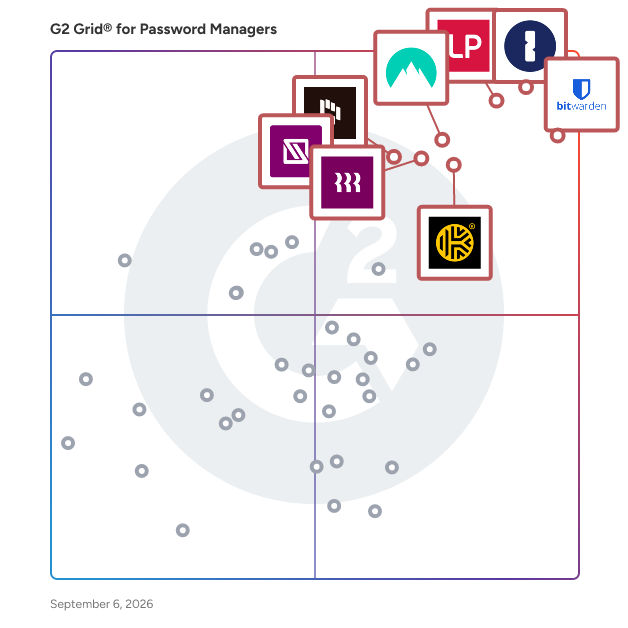
  # Best Enterprise Password Managers

  *By [Brandon Summers-Miller](https://research.g2.com/insights/author/brandon-summers-miller)*

   Products classified in the overall Password Managers category are similar in many regards and help companies of all sizes solve their business problems. However, enterprise business features, pricing, setup, and installation differ from businesses of other sizes, which is why we match buyers to the right Enterprise Business Password Managers to fit their needs. Compare product ratings based on reviews from enterprise users or connect with one of G2&#39;s buying advisors to find the right solutions within the Enterprise Business Password Managers category.

In addition to qualifying for inclusion in the Password Managers category, to qualify for inclusion in the Enterprise Business Password Managers category, a product must have at least 10 reviews left by a reviewer from an enterprise business.


  ## How Many Password Managers Products Does G2 Track?
**Total Products under this Category:** 96

  
## How Does G2 Rank Password Managers Products?

**Why You Can Trust G2's Software Rankings:**

- 30 Analysts and Data Experts
- 11,900+ Authentic Reviews
- 96+ Products
- Unbiased Rankings

G2's software rankings are built on verified user reviews, rigorous moderation, and a consistent research methodology maintained by a team of analysts and data experts. Each product is measured using the same transparent criteria, with no paid placement or vendor influence. While reviews reflect real user experiences, which can be subjective, they offer valuable insight into how software performs in the hands of professionals. Together, these inputs power the G2 Score, a standardized way to compare tools within every category.

  
## Top Password Managers at a Glance
| # | Product | Rating | Best For | What Users Say |
|---|---------|--------|----------|----------------|
| 1 | [1Password](https://www.g2.com/products/1password/reviews) | 4.6/5.0 (1,765 reviews) | Enterprise credential organization | "[1Password Delivers Peace of Mind with Strong Passwords and Seamless Syncing](https://www.g2.com/survey_responses/1password-review-12725922)" |
| 2 | [LastPass](https://www.g2.com/products/lastpass/reviews) | 4.5/5.0 (2,022 reviews) | Everyday password access across devices | "[Secure Password Management, Common security practices](https://www.g2.com/survey_responses/lastpass-review-12667857)" |
| 3 | [Bitwarden](https://www.g2.com/products/bitwarden/reviews) | 4.7/5.0 (1,221 reviews) | Value-focused secure credential sharing | "[Keeps My Work Logins, Cards and Notes Well Organized](https://www.g2.com/survey_responses/bitwarden-review-12807583)" |
| 4 | [NordPass Business](https://www.g2.com/products/nordpass-business/reviews) | 4.5/5.0 (640 reviews) | Secure team password sharing | "[Modern Interface, Robust Security, but Somewhat Tedious](https://www.g2.com/survey_responses/nordpass-business-review-12243480)" |
| 5 | [Dashlane Password Manager](https://www.g2.com/products/dashlane-password-manager/reviews) | 4.5/5.0 (622 reviews) | Autofill and password health workflows | "[Dashlane Makes Strong Passwords Effortless with Autofill, Syncing, and Security Insights](https://www.g2.com/survey_responses/dashlane-password-manager-review-12769396)" |
| 6 | [Keeper Password Manager](https://www.g2.com/products/keeper-password-manager/reviews) | 4.6/5.0 (1,187 reviews) | Enterprise vault administration | "[Secure, Smooth Password Management That Keeps My Work Accounts Organized](https://www.g2.com/survey_responses/keeper-password-manager-review-12779964)" |
| 7 | [Rippling IT](https://www.g2.com/products/rippling-it/reviews) | 4.7/5.0 (1,016 reviews) | Employee IT access management | "[Rippling IT: Benefits, Challenges, and Impact Review](https://www.g2.com/survey_responses/rippling-it-review-12348505)" |
| 8 | [IT Glue](https://www.g2.com/products/it-glue/reviews) | 4.6/5.0 (675 reviews) | IT documentation and credential linking | "[Centralized IT Documentation Made Simple](https://www.g2.com/survey_responses/it-glue-review-12725053)" |
| 9 | [Zoho Vault](https://www.g2.com/products/zoho-vault/reviews) | 4.4/5.0 (74 reviews) | Affordable centralized team vaults | "[Keeps My Login Details Organized in One Place and Makes It Easy to Manage](https://www.g2.com/survey_responses/zoho-vault-review-12733975)" |
| 10 | [RoboForm](https://www.g2.com/products/roboform/reviews) | 4.6/5.0 (741 reviews) | Form filling with password storage | "[Tremendous timesaver and brain de-clutterer](https://www.g2.com/survey_responses/roboform-review-2228018)" |


## Which Type of Password Managers Tools Are You Looking For?
  - [Password Managers](https://www.g2.com/categories/password-managers) *(current)*
  - [Single Sign-On (SSO) Solutions](https://www.g2.com/categories/single-sign-on-sso)
  - [Identity and Access Management (IAM) Software](https://www.g2.com/categories/identity-and-access-management-iam)
  - [Multi-Factor Authentication (MFA) Software](https://www.g2.com/categories/multi-factor-authentication-mfa)

  
---

**Sponsored**

### Bitwarden

Bitwarden is an open source password manager for individuals, teams, and enterprise organizations. Ranked first in Enterprise User Satisfaction on the G2 Enterprise Grid for eleven consecutive quarters, Bitwarden stores, generates, autofills, and shares credentials and passkeys using end-to-end AES-256 bit encryption. Bitwarden is a zero-knowledge encryption solution, meaning only the user can access vault data. The Bitwarden source code is publicly available on GitHub and undergoes regular third-party security audits, covering penetration testing, cryptographic analysis, and source code review. Bitwarden is SOC 2 Type II, GDPR, CCPA, HIPAA, and Data Privacy Framework (DPF) compliant. Manage passwords and passkeys - Generate and store strong, unique passwords and passkeys, saved securely across unlimited devices. - Access credentials from anywhere, on any device - Bitwarden offers multiple client options including desktop, mobile, browser, web, and command-line interface (CLI). - Autofill makes it fast and secure to seamlessly log in to websites and apps across devices. Monitor and reduce credential risk - Real-time vault health alerts surface weak, reused, or exposed passwords - Bitwarden Access Intelligence identifies shadow IT and at-risk credentials across an organization, with guided remediation workflows at scale. - Turn on multifactor authentication (MFA) for vault login using a time-based one-time password (TOTP) app or security key. The standalone Bitwarden Authenticator app also generates TOTP codes for any account or service that supports authenticator-based two-factor authentication (2FA). - Exportable event logs provide transparency into user activity around sensitive data within an organization vault. Enterprise integrations and deployment - Bitwarden deploys in both cloud-based and on-premises environments, including self-hosted options for full data sovereignty. - Directory Connector and System for Cross-domain Identity Management (SCIM) integration streamline user and group onboarding with automatic account provisioning and deprovisioning across Microsoft Entra ID, Okta, Google Workspace, and LDAP-based directories. - Bitwarden connects to existing tech stacks with single sign-on (SSO), APIs, and CLI automations, and feeds event logs directly into security operations platforms including Splunk, Microsoft Sentinel, Rapid7, and Elastic. Share encrypted information at scale - Use organization collections to share credentials securely. - Vault items are owned by the organization, not individual employees, enabling full credential lifecycle management. - Transmit encrypted information, text, and attachments to anyone via a secure, randomly generated link through Bitwarden Send.


[Visit website](https://www.g2.com/external_clickthroughs/record?secure%5Bad_program%5D=paid_promo&amp;secure%5Bad_slot%5D=category_product_list&amp;secure%5Bcategory_id%5D=593&amp;secure%5Bmedium%5D=sponsored&amp;secure%5Bprioritized%5D=false&amp;secure%5Bproduct_id%5D=41107&amp;secure%5Bresource_id%5D=593&amp;secure%5Bresource_type%5D=Category&amp;secure%5Bsource_type%5D=category_page&amp;secure%5Bsource_url%5D=https%3A%2F%2Fwww.g2.com%2Fcategories%2Fpassword-managers&amp;secure%5Btoken%5D=a470065f176436614aff19e5215bae3c465b4b1c612319435bfde0f8d5e6882e&amp;secure%5Burl%5D=https%3A%2F%2Fbitwarden.com%2Fproducts%2Fbusiness%2F&amp;secure%5Burl_type%5D=paid_promos)

---

  
## Buyer Guide: Key Questions for Choosing Password Managers Software
  ### What does Password Manager Software do?
  I describe Password Manager Software as a tool that stores, organizes, shares, and protects credentials used across business systems. G2 reviewers highlight browser extensions, autofill, password generation, encrypted storage, shared vaults, mobile access, and administrative controls as common parts of the workflow. They also associate the category with stronger security habits because teams rely less on reused passwords, scattered records, and informal sharing.


  ### Why do businesses use Password Manager Software?
  From the G2 reviewer patterns I evaluated, businesses use Password Manager Software to reduce password sprawl, protect sensitive information, and control access when employees join, change roles, or leave. Reviewers often mention the strain of remembering many credentials and the risk of sharing passwords through unsafe channels.

Key benefits include:

- Secure storage for individual, team, and client credentials.
- Faster access through autofill, browser extensions, and mobile apps.
- Easier password sharing without exposing the actual password.
- Stronger control over permissions, vaults, and user groups.
- Simplified onboarding and offboarding for administrators.
- Better visibility into weak, reused, or exposed credentials.


  ### Who uses Password Manager Software primarily?
  I found that G2 reviewer sentiment points to both everyday users and administrators. Primary users include:

- **Employees** who need frequent access to many business applications.
- **IT and security teams** that manage access, policies, and shared vaults.
- **Administrators** who control user permissions and employee transitions.
- **Managed service providers and consultants** who handle client credentials.
- **Small business owners** who need a secure place for company logins.
- **Finance, healthcare, software, marketing, and professional services teams** with sensitive records.


  ### What types of Password Manager Software should I consider?
  The G2 feedback pointed to several buyer paths:

- **Business password managers** for team vaults, sharing, access control, and admin oversight.
- **Enterprise password vaults** for privileged access, audits, compliance, and security policy needs.
- **IT documentation platforms** with credential storage for service providers and technical teams.
- **Identity and access platforms** that combine passwords with SSO, MFA, and device controls.
- **Lightweight personal or small-team tools** for simple storage, autofill, and password generation.
- **Open-source or self-hosted options** for teams that want more control over deployment.


  ### What are the core features to look for in Password Manager Software?
  When I assessed G2 reviewer sentiment, the most important features were practical and security-focused:

- Encrypted vaults with organized folders, secure notes, and structured credential management.
- Password generation, health monitoring, breach alerts, and reuse detection.
- Secure sharing with granular permissions, shared folders, and user group controls.
- Browser extensions, autofill, and mobile apps with consistent cross-device sync.
- MFA, SSO, passkeys, biometrics, and zero-knowledge architecture as core security signals.
- Admin tools covering onboarding, offboarding, account recovery, and user dashboards.
- Integrations with browsers, identity providers, and IT workflows.
- Responsive support, reliable performance, and a low-friction setup experience.


  ### What trends are shaping Password Manager Software right now?
  I found that G2 users often highlight these password manager software trends:

- **Passkeys, MFA, SSO, and biometrics** that strengthen identity and access control.
- **Better browser extensions** that improve autofill, login capture, and daily usability.
- **Shared vault governance** that helps teams manage credential access more securely.
- **Audit and compliance features** that give IT teams clearer visibility into password activity.
- **Mobile experience improvements** that support secure access across devices.


  ### How should I choose Password Manager Software?
  For me, the strongest password manager is the kind that matches the team&#39;s security needs, access model, and daily login habits. When secure storage, autofill, browser and mobile reliability, admin permissions, MFA, SSO, auditing, and onboarding controls work together, password management software becomes a dependable system for protecting access without slowing people down.


---

  ## What Are the Top-Rated Password Managers Products in 2026?
### 1. [1Password](https://www.g2.com/products/1password/reviews)
  **Average Rating:** 4.6/5.0
  **Total Reviews:** 1,765
  **Why buyers love it?:** 1Password’s G2 feedback gave me a clear picture of secure credential organization across devices, teams, and business applications. Reviewers highlight vaults, autofill, security alerts, SSO, audit logs, admin controls, and dependable sharing workflows. The product appears strongest for teams that need structured access to business credentials with administrative oversight. Its value comes through most in environments where shared access needs to stay controlled and easy to manage.


### What Do G2 Reviewers Say About 1Password?
*AI-generated summary from verified user reviews*

**Pros:**

- Users appreciate the **ease of use** of 1Password, seamlessly managing passwords and secure credentials across devices.
- Users value the **high level of security** provided by 1Password, enabling safe management of their passwords effortlessly.
- Users love the **secure and easy password management** offered by 1Password, enhancing their peace of mind daily.
- Users find the **intuitive interface** of 1Password enhances ease of use and simplifies password management.
- Users value the **easy access** of 1Password, enjoying quick logins and seamless credential management across devices.

**Cons:**

- Users wish for better **password tracking and management** features, noting complexities in updating and distinguishing accounts.
- Users find the **pricing high** for personal use, feeling it&#39;s a barrier for casual users and families.
- Users often face **login issues** , with the app failing to detect logins and complicating account management.
- Users face **autofill issues** that can lead to annoyance and risky automatic logins on shared devices.
- Users find the **high cost** of 1Password off-putting, especially with only a trial and no free plan available.

#### Key Features
  - Multi-Domain Support
  - Mobile-Push
  - Universal approach
  - Quick Login
  - Password Generator
  #### What Are Recent G2 Reviews of 1Password?

**"[One-Place Password Management with 1Password](https://www.g2.com/survey_responses/1password-review-11960967)"**

**Rating:** 4.0/5.0 stars
*— Joanna J.*

[Read full review](https://www.g2.com/survey_responses/1password-review-11960967)

---

**"[1Password Delivers Peace of Mind with Strong Passwords and Seamless Syncing](https://www.g2.com/survey_responses/1password-review-12725922)"**

**Rating:** 4.0/5.0 stars
*— Nagesh B.*

[Read full review](https://www.g2.com/survey_responses/1password-review-12725922)

---

  #### What Are G2 Users Discussing About 1Password?

- [I&#39;m struggling with 1Password&#39;s secure sharing features. Can anyone explain the best way to use them?](https://www.g2.com/discussions/i-m-struggling-with-1password-s-secure-sharing-features-can-anyone-explain-the-best-way-to-use-them) - 3 comments, 2 upvotes
- [What is 1Password used for?](https://www.g2.com/discussions/1password-what-is-1password-used-for) - 2 comments
- [Is 1password any good?](https://www.g2.com/discussions/is-1password-any-good) - 3 comments, 3 upvotes
### 2. [Bitwarden](https://www.g2.com/products/bitwarden/reviews)
  **Average Rating:** 4.7/5.0
  **Total Reviews:** 1,221
  **Why buyers love it?:** Bitwarden’s reviewer feedback pointed to secure credential storage and sharing with strong value for teams. Users highlight vaults, cross-device access, mobile apps, MFA, reliable sync, and team sharing. The product appears well suited for organizations that want affordable password management with meaningful security depth. Interface age, sorting, and setup friction also show up as parts of the experience to account for.


### What Do G2 Reviewers Say About Bitwarden?
*AI-generated summary from verified user reviews*

**Pros:**

- Users appreciate the **ease of use** of Bitwarden, enjoying its user-friendly interface and seamless integration across platforms.
- Users commend the **high security** of Bitwarden, appreciating its features like passkeys and security alerts for password protection.
- Users value the **excellent password management** features of Bitwarden, appreciating its functionality in corporate and personal settings.
- Users love the **easy setup** of Bitwarden, making it a seamless transition from other password managers.
- Users value the **cross-platform compatibility** of Bitwarden, allowing seamless access across devices for both personal and work accounts.

**Cons:**

- Users face frequent **autofill issues** with Bitwarden, especially on certain websites, complicating their user experience.
- Users find the **UI clunky and outdated** , wishing for a more modern and user-friendly design experience.
- Users find the **process complexity** of onboarding and managing Bitwarden features challenging, demanding additional support and insights.
- Users notice **missing features** in Bitwarden, particularly with autofill and the lack of TOTP storage integration.
- Users find the **learning curve steep** , struggling with feature explanations and intuitive usage as they onboard new users.

#### Key Features
  - Quick Login
  - Password Generator
  - Digital Wallet
  #### What Are Recent G2 Reviews of Bitwarden?

**"[Bitwarden Self-Hosted: Polished, Fast Sync, and Incredible Value](https://www.g2.com/survey_responses/bitwarden-review-12797910)"**

**Rating:** 5.0/5.0 stars
*— Ruben D.*

[Read full review](https://www.g2.com/survey_responses/bitwarden-review-12797910)

---

**"[Keeps My Work Logins, Cards and Notes Well Organized](https://www.g2.com/survey_responses/bitwarden-review-12807583)"**

**Rating:** 5.0/5.0 stars
*— Ishan S.*

[Read full review](https://www.g2.com/survey_responses/bitwarden-review-12807583)

---

  #### What Are G2 Users Discussing About Bitwarden?

- [What is Bitwarden used for?](https://www.g2.com/discussions/what-is-bitwarden-used-for) - 2 comments, 1 upvote
- [How does Bitwarden make money?](https://www.g2.com/discussions/how-does-bitwarden-make-money) - 1 comment
- [Does Bitwarden work with apps?](https://www.g2.com/discussions/does-bitwarden-work-with-apps) - 2 comments, 1 upvote
### 3. [Keeper Password Manager](https://www.g2.com/products/keeper-password-manager/reviews)
  **Average Rating:** 4.6/5.0
  **Total Reviews:** 1,187
  **Why buyers love it?:** Keeper Password Manager’s feedback centered on secure vault administration for teams and enterprises. Reviewers mention credential storage, controlled sharing, folders, user management, browser extensions, password creation, administrative visibility, and support. I read it as a fit for organizations that need structured password governance rather than only individual password storage. Setup organization and oversight come through as important parts of the reviewer experience.


### What Do G2 Reviewers Say About Keeper Password Manager?
*AI-generated summary from verified user reviews*

**Pros:**

- Users find Keeper Password Manager to be **extremely easy to use** , appreciating its intuitive navigation and convenient features.
- Users value the **strong security features** of Keeper, including Security Audit and BreachWatch for enhanced protection.
- Users appreciate the **secure sharing capabilities** of Keeper Password Manager, making team collaboration effortless and safe.
- Users appreciate the **secure and efficient password management** of Keeper, valuing its integration and ease of use.
- Users value Keeper Password Manager&#39;s **reliable features** , such as easy passkey saving and BreachWatch monitoring.

**Cons:**

- Users find **password management glitches** frustrating, especially with inconsistent auto-fill and popup interruptions.
- Users experience **autofill issues** with Keeper Password Manager, causing inconvenience in managing usernames and passwords smoothly.
- Users often face **login issues** with Keeper Password Manager, including cumbersome setup and frequent sign-in requirements.
- Users face **password issues** , such as difficulties in sharing and retrieving passwords, impacting usability.
- Users find the **learning curve steep** , especially with 2FA and managing team password access effectively.

#### Key Features
  - Local Access
  - Password Policy Enforcement
  - Multi-Domain Support
  - SMS-Based
  - Cental dashboard
  #### What Are Recent G2 Reviews of Keeper Password Manager?

**"[Secure, Smooth Password Management That Keeps My Work Accounts Organized](https://www.g2.com/survey_responses/keeper-password-manager-review-12779964)"**

**Rating:** 5.0/5.0 stars
*— Ishan S.*

[Read full review](https://www.g2.com/survey_responses/keeper-password-manager-review-12779964)

---

**"[The Professional Choice: Robust Vault Features with Nice Admin Oversight](https://www.g2.com/survey_responses/keeper-password-manager-review-12457273)"**

**Rating:** 4.5/5.0 stars
*— Maris B.*

[Read full review](https://www.g2.com/survey_responses/keeper-password-manager-review-12457273)

---

  #### What Are G2 Users Discussing About Keeper Password Manager?

- [What is Keeper Password Manager used for?](https://www.g2.com/discussions/what-is-keeper-password-manager-used-for) - 2 comments
- [What is a good password keeper app?](https://www.g2.com/discussions/what-is-a-good-password-keeper-app) - 1 comment, 1 upvote
- [How do I get rid of Keeper Password Manager?](https://www.g2.com/discussions/how-do-i-get-rid-of-keeper-password-manager)
### 4. [LastPass](https://www.g2.com/products/lastpass/reviews)
  **Average Rating:** 4.5/5.0
  **Total Reviews:** 2,022
  **Why buyers love it?:** LastPass showed up in reviewer feedback as a familiar tool for everyday credential access across websites and devices. Users highlight autofill, saved passwords, password sharing, mobile access, and reduced reliance on memory for large credential sets. I read the feedback as strongest for users and teams that want broad access convenience in a recognizable password manager. The core theme is simple password storage that supports frequent logins across work and personal tools.


### What Do G2 Reviewers Say About LastPass?
*AI-generated summary from verified user reviews*

**Pros:**

- Users appreciate the **ease of use** of LastPass, enabling smooth password management across multiple devices effortlessly.
- Users appreciate the **secure and easy password management** features of LastPass, simplifying their login experience.
- Users appreciate the **high security levels** of LastPass, ensuring password safety even during data breaches.
- Users value the **autofill feature** of LastPass, simplifying login processes and enhancing security for multiple accounts.
- Users appreciate the **robust password security** of LastPass, instilling confidence against potential data breaches.

**Cons:**

- Users often face **autofill issues** with LastPass, including incorrect entries and confusion between fields.
- Users find that **generated passwords can be excessively long** , and autofill may malfunction in some fields.
- Users often face **login issues** with LastPass, complicating access and raising concerns about security and functionality.
- Users find **password issues** frustrating, with frequent change prompts and unreliable copy functionality impacting their experience.
- Users often face **browser extension issues** with LastPass, including slow performance and intrusive interface elements.

#### Key Features
  - Multiple Operating system support
  - SMS-Based
  - Multiple authentication methods
  - Mobile App Usability
  - Two-Factor Authentication
  #### What Are Recent G2 Reviews of LastPass?

**"[Excellent Password Management with Smart New Password Suggestions](https://www.g2.com/survey_responses/lastpass-review-12745127)"**

**Rating:** 5.0/5.0 stars
*— Deepak A.*

[Read full review](https://www.g2.com/survey_responses/lastpass-review-12745127)

---

**"[Secure Password Management, Common security practices](https://www.g2.com/survey_responses/lastpass-review-12667857)"**

**Rating:** 4.5/5.0 stars
*— Jonathan B.*

[Read full review](https://www.g2.com/survey_responses/lastpass-review-12667857)

---

  #### What Are G2 Users Discussing About LastPass?

- [I&#39;m having trouble organizing and sharing passwords securely with LastPass. How can I do this more efficiently?](https://www.g2.com/discussions/i-m-having-trouble-organizing-and-sharing-passwords-securely-with-lastpass-how-can-i-do-this-more-efficiently)
- [What is LastPass used for?](https://www.g2.com/discussions/lastpass-what-is-lastpass-used-for) - 3 comments
- [What is LastPass used for?](https://www.g2.com/discussions/what-is-lastpass-used-for) - 3 comments, 1 upvote
### 5. [ManageEngine Password Manager Pro](https://www.g2.com/products/manageengine-password-manager-pro/reviews)
  **Average Rating:** 3.9/5.0
  **Total Reviews:** 35
  **Product Description:** Password Manager Pro offers a complete solution to control, manage, monitor, and audit the entire life-cycle of privileged access. In a single package, it offers four solutions - privileged account management, remote access management, privileged session management, and SSL certificate management. Password Manager Pro basically consolidates all your privileged accounts in a centralized vault in fully encrypted form. It enforces password management best practices and secures the privileged accounts, the keys to your kingdom. It helps mitigate security risks related to privileged access and preempt security breaches and compliance issues. Privileged Account Management: Adopt a best practice approach for effective management of privileged accounts that form the security perimeter around mission-critical data servers and other IT assets in your environment—whether they use password or key-based authentication, including those of operating systems, databases, servers, applications, cloud platforms, and networking devices. Remote Access Management: Establish centralized control on access pathways and define how users connect to target systems. Ensure ultimate security in all privileged connections with one-click login capabilities instead of sharing credentials in cleartext. Tunnel connections through an encrypted channel gateway, requiring no direct connectivity between the user device and remote host. Privileged Session Management: Stay aware of what your users are doing with their privileged access and prevent misuse. Facilitate advanced monitoring to check whether users—employees and third parties alike, stay within their provisioned scope. Readily answer questions regarding the ‘who’, ‘what’ and ‘when’ of privileged access. SSL Certificate Management: Gain complete visibility and control over your SSL environment. Stay away from risks of certificate expiration oversights, obsolete hashing algorithms and weak cipher suites that cost you your customers’ trust. Experience seamless, end-to-end management of certificate life cycles.


### What Do G2 Reviewers Say About ManageEngine Password Manager Pro?
*AI-generated summary from verified user reviews*

**Pros:**

- Users find the **deployment ease** of ManageEngine Password Manager Pro greatly enhances their privileged management experience.
- Users value the **easy integrations** of ManageEngine Password Manager Pro, enhancing security and accessibility effortlessly.
- Users praise the **efficiency** of ManageEngine Password Manager Pro, highlighting its easy deployment and robust security features.
- Users find it easy to implement **zero trust access** with ManageEngine Password Manager Pro&#39;s straightforward deployment and support.
- Users appreciate the **effective monitoring** capabilities of ManageEngine Password Manager Pro, enhancing security and access management.

  #### What Are Recent G2 Reviews of ManageEngine Password Manager Pro?

**"[An Enterpise grade PAM tool](https://www.g2.com/survey_responses/manageengine-password-manager-pro-review-10747207)"**

**Rating:** 5.0/5.0 stars
*— Sinodos A.*

[Read full review](https://www.g2.com/survey_responses/manageengine-password-manager-pro-review-10747207)

---

**"[Solid Centralized Identity Management with ManageEngine Password Manager Pro](https://www.g2.com/survey_responses/manageengine-password-manager-pro-review-12685129)"**

**Rating:** 4.0/5.0 stars
*— Jose M.*

[Read full review](https://www.g2.com/survey_responses/manageengine-password-manager-pro-review-12685129)

---

  #### What Are G2 Users Discussing About ManageEngine Password Manager Pro?

- [How much does password manager Pro cost?](https://www.g2.com/discussions/how-much-does-password-manager-pro-cost)
- [Who makes password manager Pro?](https://www.g2.com/discussions/who-makes-password-manager-pro)
- [What is a resource in password manager Pro?](https://www.g2.com/discussions/what-is-a-resource-in-password-manager-pro)
### 6. [Dashlane Password Manager](https://www.g2.com/products/dashlane-password-manager/reviews)
  **Average Rating:** 4.5/5.0
  **Total Reviews:** 622
  **Why buyers love it?:** Dashlane Password Manager came across in G2 feedback as a tool for improving password hygiene through smoother login workflows. Reviewers highlight password capture, password generation, passkeys, two-factor codes, breach visibility, and autofill. I read the strongest value around helping teams reduce manual login friction while strengthening credential habits. Pricing and shared-computer behavior appear as practical factors in the feedback.


### What Do G2 Reviewers Say About Dashlane Password Manager?
*AI-generated summary from verified user reviews*

**Pros:**

- Users highlight the **ease of use** of Dashlane, appreciating its simple navigation and beginner-friendly interface.
- Users appreciate the **security features** of Dashlane, making password storage and sharing both easy and safe.
- Users love the **easy sharing of passwords** with Dashlane, enhancing collaboration while keeping personal data secure.
- Users find Dashlane highly **intuitive** , making password management easy and fast to adopt for newcomers.
- Users appreciate Dashlane&#39;s **secure storage** features, facilitating safe password sharing and management for teams.

**Cons:**

- Users experience **autofill issues** with Dashlane, finding it overly eager and sometimes filling incorrect fields.
- Users face **password saving issues** , needing to be cautious not to save unintended entries or face auto-generate challenges.
- Users face **login issues** with Dashlane, often needing to re-sign in due to changes in the auto-login feature.
- Users experience **inaccurate password cataloguing** and occasional glitches, complicating their management and logins.
- Users find Dashlane&#39;s pricing to be **expensive** , especially with recent increases compared to similar services.

#### Key Features
  - Authentication User experience
  - Administration Console
  - Cross Browser support
  - Browser Extension
  - Password Generator
  #### What Are Recent G2 Reviews of Dashlane Password Manager?

**"[Dashlane Makes Strong Passwords Effortless with Autofill, Syncing, and Security Insights](https://www.g2.com/survey_responses/dashlane-password-manager-review-12769396)"**

**Rating:** 4.5/5.0 stars
*— Nagesh B.*

[Read full review](https://www.g2.com/survey_responses/dashlane-password-manager-review-12769396)

---

**"[A Must-Have for Agency Password Management](https://www.g2.com/survey_responses/dashlane-password-manager-review-6669879)"**

**Rating:** 5.0/5.0 stars
*— Jon R.*

[Read full review](https://www.g2.com/survey_responses/dashlane-password-manager-review-6669879)

---

### 7. [NordPass Business](https://www.g2.com/products/nordpass-business/reviews)
  **Average Rating:** 4.5/5.0
  **Total Reviews:** 640
  **Why buyers love it?:** NordPass Business came through in the G2 feedback as a password manager centered on secure team sharing. Reviewers point to shared folders, browser extensions, autofill, password generation, cross-device access, and responsive support as core strengths. I read the strongest value around helping teams build safer password habits while keeping shared credentials organized. Folder structure and browser behavior also appear in the feedback as practical parts of the experience.


### What Do G2 Reviewers Say About NordPass Business?
*AI-generated summary from verified user reviews*

**Pros:**

- Users enjoy the **ease of use** of NordPass Business, enhancing productivity and simplifying password management across devices.
- Users value the **enhanced security** of NordPass Business, enjoying organized password management and seamless team collaboration.
- Users appreciate the **secure and simple password management** of NordPass Business, enhancing team safety and productivity.
- Users appreciate the **intuitive design** of NordPass Business, enhancing organization and simplifying daily tasks effectively.
- Users appreciate the **seamless sharing features** of NordPass Business, enhancing collaboration and security for their teams.

**Cons:**

- Users experience **confusion with password management** as NordPass sometimes suggests new passwords instead of using saved ones.
- Users often face **password issues** with NordPass, including failed autofill and unexpected password creation prompts.
- Users find the **login issues** frustrating, with frequent logouts and inconsistent password filling disrupting their experience.
- Users face frequent **autofill issues** with NordPass Business, leading to unreliable password management and significant inconvenience.
- Users report **browser extension issues** with limited integrations and cumbersome search functions affecting their experience.

#### Key Features
  - Email-Based
  - Multi-Device Sync
  - Quick Login
  - Password Generator
  - Digital Wallet
  #### What Are Recent G2 Reviews of NordPass Business?

**"[Modern Interface, Robust Security, but Somewhat Tedious](https://www.g2.com/survey_responses/nordpass-business-review-12243480)"**

**Rating:** 4.5/5.0 stars
*— Angel B.*

[Read full review](https://www.g2.com/survey_responses/nordpass-business-review-12243480)

---

**"[Enhances Security with Group Sharing](https://www.g2.com/survey_responses/nordpass-business-review-10473026)"**

**Rating:** 5.0/5.0 stars
*— Curtis L.*

[Read full review](https://www.g2.com/survey_responses/nordpass-business-review-10473026)

---

### 8. [IT Glue](https://www.g2.com/products/it-glue/reviews)
  **Average Rating:** 4.6/5.0
  **Total Reviews:** 675
  **Why buyers love it?:** IT Glue’s G2 feedback positioned it as IT documentation where credential management sits inside broader operational context. Reviewers point to assets, procedures, templates, passwords, related-item linking, centralized client information, troubleshooting support, and technician onboarding. The product appears most useful for IT teams that need documentation and credentials connected. Search, mobile use, performance, and sharing controls also come through as important experience factors.


### What Do G2 Reviewers Say About IT Glue?
*AI-generated summary from verified user reviews*

**Pros:**

- Users find IT Glue exceptionally **easy to use** , thanks to its intuitive control panel and efficient global search.
- Users value the **flexibility and integration** of IT Glue for streamlined document management and password handling.
- Users value the **seamless integrations** of IT Glue, enabling effortless access to documentation without switching screens.
- Users find IT Glue&#39;s **organization capabilities** indispensable for managing assets, passwords, and documentation efficiently.
- Users value the **easy integrations** of IT Glue, enabling seamless access to crucial client information without screen switching.

**Cons:**

- Users experience **slow performance** , particularly when loading large client data sets, hindering efficiency in their workflow.
- Users desire more **sections and features** in IT Glue for improved information organization and usability on mobile.
- Users find the **search functionality lacking** , as it struggles with speed, accuracy, and document visibility.
- Users find the **learning curve challenging** , experiencing issues with search and complexity in effectively using IT Glue.
- Users find the **search limitations** of IT Glue frustrating, particularly with slow performance and inconsistency in results.

#### Key Features
  - Quick Login
  - Two-Factor Authentication
  - Digital Wallet
  - Templates
  - Integrations
  #### What Are Recent G2 Reviews of IT Glue?

**"[Centralized Documentation That Streamlines Support and Collaboration](https://www.g2.com/survey_responses/it-glue-review-12813006)"**

**Rating:** 4.5/5.0 stars
*— D S.*

[Read full review](https://www.g2.com/survey_responses/it-glue-review-12813006)

---

**"[Centralized IT Documentation Made Simple](https://www.g2.com/survey_responses/it-glue-review-12725053)"**

**Rating:** 5.0/5.0 stars
*— Justin C.*

[Read full review](https://www.g2.com/survey_responses/it-glue-review-12725053)

---

  #### What Are G2 Users Discussing About IT Glue?

- [What is IT Glue used for?](https://www.g2.com/discussions/it-glue-what-is-it-glue-used-for) - 2 comments
- [What&#39;s new with IT Glue?](https://www.g2.com/discussions/what-s-new-with-it-glue)
- [What is Glue in information technology?](https://www.g2.com/discussions/what-is-glue-in-information-technology) - 1 comment
### 9. [RoboForm](https://www.g2.com/products/roboform/reviews)
  **Average Rating:** 4.6/5.0
  **Total Reviews:** 741
  **Why buyers love it?:** RoboForm’s reviewer feedback emphasized the combination of form filling and password storage.I saw that users highlight credential capture, autofill, form fills, notes, cross-device access, and team sharing. The product reads as useful for people who want stored credentials and important notes in one secure place. Mobile fill behavior, app integrations, and interface modernization also appear in the feedback.


### What Do G2 Reviewers Say About RoboForm?
*AI-generated summary from verified user reviews*

**Pros:**

- Users find RoboForm&#39;s **ease of use** invaluable for managing credentials across devices with convenience and security.
- Users appreciate the **cross-platform compatibility** of RoboForm, enjoying secure access to passwords on any device.
- Users love the **easy setup** of RoboForm, appreciating its quick implementation for personal and team use.
- Users value the **secure storage** of RoboForm, ensuring peace of mind with protected access to personal and organizational data.
- Users appreciate the **convenience** of RoboForm&#39;s seamless access to securely stored credentials across devices and browsers.

**Cons:**

- Users find the **poor UI** of RoboForm outdated, making navigation and organization less user-friendly and intuitive.
- Users face challenges with **password management** , including issues with remembering updated passwords and managing duplicates.
- Users often face **autofill issues** , particularly with complex forms and multiple logins for the same site.
- Users experience occasional **login issues** , particularly with password resets leading to potential loss of saved data.
- Users often face **duplication issues** that complicate password management and hinder effective use of RoboForm.

#### Key Features
  - Quick Login
  - Password Generator
  - Digital Wallet
  #### What Are Recent G2 Reviews of RoboForm?

**"[Tremendous timesaver and brain de-clutterer](https://www.g2.com/survey_responses/roboform-review-2228018)"**

**Rating:** 5.0/5.0 stars
*— Ernest W.*

[Read full review](https://www.g2.com/survey_responses/roboform-review-2228018)

---

**"[Best-in-Class Form Filler with an Easy-to-Use Admin Console](https://www.g2.com/survey_responses/roboform-review-12226605)"**

**Rating:** 5.0/5.0 stars
*— Kaushik M.*

[Read full review](https://www.g2.com/survey_responses/roboform-review-12226605)

---

  #### What Are G2 Users Discussing About RoboForm?

- [What is RoboForm used for?](https://www.g2.com/discussions/what-is-roboform-used-for) - 1 comment
### 10. [Avatier Identity Anywhere](https://www.g2.com/products/avatier-identity-anywhere/reviews)
  **Average Rating:** 4.6/5.0
  **Total Reviews:** 30
  **Product Description:** Modernize your digital workforce with Avatier Identity Anywhere integrated Identity Access Governance featuring push notification workflow across all your favorite platforms, and a modern cross-platform SSO solution to connect to all your SAML, oAuth, OpenID, and webform apps. Discover unrivaled self-service IT experience enabling collaboration across the entire enterprise without compromising privacy and security. Avatier native mobile experience for iOS and Android includes real-time collaboration support with mobile push notification and improved security with mobile biometric authentication. Introducing Avatier Identity Anywhere which integrates with the leading MFA solutions in the industry to provide a true-passwordless secure Identity Governance and Administration (IGA) experience. Leverage Avatier OTP SMS/Email or phoneless MFA, Duo Security, Google Authenticator, Okta Verify, Ping Identity, Radius, RSA SecureID, Symantec VIP, and many other FIDO2 WebAuthn compliant solutions. Discover all you can do with Avatier for Microsoft Teams &amp; Outlook, ServiceNow (coming soon), Slack, Chrome Extension, iOS, Andriod, chatbot, and of course web and REST API: \* Avatier Self-Service Group Management with integrated Access Governance. Microsoft/Azure group membership is paramount as it controls your role in the company, access to files, and even cloud application access via leading SSO solutions like Avatier. Avatier allows self-service group membership requests with push notification for workflow approval and access certification campaigns. Now you can request creation, deletion, renaming, and even group ownership conveniently from any platform. \* Avatier Access Governance. Verifying workforce fine-grain user access has never been this easy. Avatier ensures access governance is continuously being met by empowering managers to approve, deny, allow an exception, return to campaign owner, or re-assign certifications to a co-worker. \* Avatier User Lifecycle Management. Turn your IT department into an IT Store allowing your workforce to request fine-grain access, roles, and even assets through a familiar shopping cart experience. Optionally, hook Avatier up to your favorite HR system and automate all of your onboarding and offboarding needs. Never panic when its time to disable or delete user access. Avatier allows you can request disabling user access now and schedule deleting the user later. \* Avatier Universal Workflow Approval. Push notification instantly alerts you to urgent matters that require your attention. Using Avatier don&#39;t ever miss an important workforce request for roles, access, assets, or even generic change control. Approve/Deny ServiceNow, Workday, SAP, and other leading apps using Avatier&#39;s Universal Workflow Platform(TM) across all of your favorite platforms like Microsoft Teams, Outlook, ServiceNow, Slack, and Chrome Extension. \* Avatier Self-Service Password Management with Strong Password Policy Enforcement. Your workforce needs self-service password reset and synchronization without requiring an expensive call the help desk. Your service desk needs a secure friendly assisted password reset form anywhere. Avatier gives your workforce the seamless ability to perform these actions wherever they are by securely authenticating with a variety of flexible authentication MFA options. Avatier&#39;s Password Policy Manager will also ensure that your password meets the enterprise password policy and maintain strong passwords across all systems. \* Avatier Single Sign-on (SSO). Modern SSO solutions need to support a diverse workforce with a choice of how and where they would like to securely gain access to their cloud apps. Avatier SSO enables access when your workforce needs it the most with Just-in-Time (JIT) cloud application user provisioning/deprovisioning. It has never been easier to onboard your workforce across all of your cloud applications. Achieve more together with Avatier. To experience Avatier Identity Anywhere in action, we are offering an exclusive FREE 14 day trial to qualified organizations. Schedule yours today: https://calendly.com/avatier-cloudtrial/avatier-kickoff-meeting


  #### What Are Recent G2 Reviews of Avatier Identity Anywhere?

**"[An awesome product!](https://www.g2.com/survey_responses/avatier-identity-anywhere-review-1886608)"**

**Rating:** 5.0/5.0 stars
*— Adam M.*

[Read full review](https://www.g2.com/survey_responses/avatier-identity-anywhere-review-1886608)

---

**"[Good support](https://www.g2.com/survey_responses/avatier-identity-anywhere-review-6626216)"**

**Rating:** 4.0/5.0 stars
*— James Z.*

[Read full review](https://www.g2.com/survey_responses/avatier-identity-anywhere-review-6626216)

---

  #### What Are G2 Users Discussing About Avatier Identity Anywhere?

- [What is Avatier Identity Anywhere used for?](https://www.g2.com/discussions/what-is-avatier-identity-anywhere-used-for)
### 11. [Akeyless Identity Security Platform](https://www.g2.com/products/akeyless-identity-security-platform/reviews)
  **Average Rating:** 4.6/5.0
  **Total Reviews:** 86
  **Why buyers love it?:** Akeyless Identity Security Platform showed up in the feedback as broader secrets management that includes password and certificate workflows. Reviewers highlight secrets storage, certificate lifecycle work, encryption-key management, role-based access, fewer misplaced secrets, consolidated security processes, support, and integrations. The product appears strongest when password management belongs inside a larger identity security and secrets-management program. API and integration details also come through as validation points in the reviews.


### What Do G2 Reviewers Say About Akeyless Identity Security Platform?
*AI-generated summary from verified user reviews*

**Pros:**

- Users find the **ease of use** in the Akeyless Identity Security Platform enhances productivity and simplifies management.
- Users value the **robust security features** of Akeyless, enhancing their infrastructure and ensuring safe storage of secrets.
- Users appreciate the **great customer support** from Akeyless, enhancing their overall experience with the platform.
- Users love the **easy integrations** with cloud services, enhancing their experience in managing secrets securely.
- Users highlight the **implementation ease** of Akeyless Identity Security Platform, noting quick onboarding and excellent support.

**Cons:**

- Users find the **poor documentation** limiting and suggest improvements for a better user experience.
- Users find the **poor UI** of Akeyless Identity Security Platform frustrating, hindering navigation and overall efficiency.
- Users find the **complex setup** challenging, often needing support to decode issues from the logs.
- Users find the **complexity of the technology** requires significant time and effort to fully integrate with existing workflows.
- Users find the **documentation lacking** , making it difficult to implement features despite excellent support provided.

#### Key Features
  - Quick Login
  - Envelope Encryption
  - Automated Provisioning
  - Service Integration
  - Audit Logging
  #### What Are Recent G2 Reviews of Akeyless Identity Security Platform?

**"[Effortless Setup, Needs Enhanced Features](https://www.g2.com/survey_responses/akeyless-identity-security-platform-review-12547656)"**

**Rating:** 4.0/5.0 stars
*— Avijit K.*

[Read full review](https://www.g2.com/survey_responses/akeyless-identity-security-platform-review-12547656)

---

**"[Effortless Security with Seamless Integration](https://www.g2.com/survey_responses/akeyless-identity-security-platform-review-12543767)"**

**Rating:** 4.5/5.0 stars
*— Sabari S.*

[Read full review](https://www.g2.com/survey_responses/akeyless-identity-security-platform-review-12543767)

---

  #### What Are G2 Users Discussing About Akeyless Identity Security Platform?

- [What is Akeyless Vault Platform used for?](https://www.g2.com/discussions/what-is-akeyless-vault-platform-used-for)
### 12. [IBM Vault (formerly HashiCorp Vault)](https://www.g2.com/products/ibm-vault-formerly-hashicorp-vault/reviews)
  **Average Rating:** 4.3/5.0
  **Total Reviews:** 46
  **Product Description:** IBM Vault (formerly HashiCorp Vault) tightly controls access to secrets and encryption keys by authenticating against trusted sources of identity such as Active Directory, LDAP, Kubernetes, CloudFoundry, and cloud platforms. Vault enables fine grained authorization of which users and applications are permitted access to secrets and keys. Some of Vault&#39;s main use cases include: - Secrets Management - Identity Brokering - Data Encryption


### What Do G2 Reviewers Say About IBM Vault (formerly HashiCorp Vault)?
*AI-generated summary from verified user reviews*

**Pros:**

- Users praise the **knowledgeable and helpful customer support** of IBM Vault, enhancing their overall experience and satisfaction.
- Users find IBM Vault to be **super easy to use** , appreciating its intuitive management and native integrations.
- Users appreciate the **easy integrations** of IBM Vault, enhancing security and allowing for custom connections with internal applications.
- Users highlight the **easy management** of IBM Vault, praising its simplicity and helpful support from the team.
- Users appreciate the **native integrations** of IBM Vault, enhancing security and enabling custom applications seamlessly.

**Cons:**

- Users find IBM Vault **expensive** for full enterprise capabilities, impacting overall value perception.
  #### What Are Recent G2 Reviews of IBM Vault (formerly HashiCorp Vault)?

**"[Effortless Integration and Security—A Developer Favorite](https://www.g2.com/survey_responses/ibm-vault-formerly-hashicorp-vault-review-11848309)"**

**Rating:** 5.0/5.0 stars
*— Jacob R.*

[Read full review](https://www.g2.com/survey_responses/ibm-vault-formerly-hashicorp-vault-review-11848309)

---

**"[Complex yet essential for saas based companies](https://www.g2.com/survey_responses/ibm-vault-formerly-hashicorp-vault-review-8651568)"**

**Rating:** 5.0/5.0 stars
*— Neil S.*

[Read full review](https://www.g2.com/survey_responses/ibm-vault-formerly-hashicorp-vault-review-8651568)

---

  #### What Are G2 Users Discussing About IBM Vault (formerly HashiCorp Vault)?

- [How do you implement HashiCorp vault?](https://www.g2.com/discussions/how-do-you-implement-hashicorp-vault)
- [How much does HashiCorp vault cost?](https://www.g2.com/discussions/how-much-does-hashicorp-vault-cost)
- [How does HashiCorp vault work?](https://www.g2.com/discussions/how-does-hashicorp-vault-work)
### 13. [KeePass](https://www.g2.com/products/keepass/reviews)
  **Average Rating:** 4.5/5.0
  **Total Reviews:** 219
  **Product Description:** KeePass is a free, open-source password manager designed to securely store and manage your passwords in an encrypted database. It supports multiple operating systems, including Windows, macOS, and Linux, and offers portability without requiring installation. KeePass employs strong encryption algorithms like AES and ChaCha20 to ensure the safety of your sensitive information. Key Features and Functionality: - Strong Security: KeePass encrypts the entire database, including usernames and notes, using robust algorithms such as AES and ChaCha20. It also utilizes SHA-256 for hashing master key components, providing protection against dictionary and guessing attacks. - Multiple User Keys: Users can secure their databases with a master password, a key file, or a combination of both. Additionally, KeePass 2.x allows locking the database to the current Windows user account for enhanced security. - Portability and Accessibility: KeePass is portable and can run directly from a USB stick without installation. It doesn&#39;t store data on the system, leaving no traces after deletion. The software also offers an optimized user interface for screen readers, enhancing accessibility. - Data Import and Export: KeePass supports importing from and exporting to various formats, including TXT, HTML, XML, and CSV, facilitating easy database transfer and integration with other applications. - Password Groups and Management: Users can organize passwords into groups, set expiration dates, and attach files to entries. KeePass also includes a strong random password generator to create secure passwords. - Auto-Type and Drag &amp; Drop: The software features auto-type functionality and global auto-type hotkeys, allowing users to input credentials into other applications seamlessly. Drag &amp; drop support further simplifies the process. - Plugin Architecture: KeePass offers a plugin architecture, enabling users to extend its functionality according to their needs. Primary Value and User Solutions: KeePass addresses the challenge of managing multiple passwords by providing a secure, centralized repository for all credentials. Its strong encryption ensures that sensitive information remains protected, while features like auto-type and password generation enhance user convenience. The portability and cross-platform support make it a versatile solution for users seeking a reliable and accessible password management tool.


### What Do G2 Reviewers Say About KeePass?
*AI-generated summary from verified user reviews*

**Pros:**

- Users find KeePass to be **very easy to use** , enjoying its straightforward setup and local password control.
- Users value KeePass for its **strong password security** , ensuring total control without cloud dependency.
- Users find the **easy setup** of KeePass allows for quick access to their password management needs.
- Users value the **free and secure nature** of KeePass, appreciating its full control over passwords without cloud reliance.
- Users find **password management effortless** with KeePass, ensuring security and easy access for numerous accounts.

**Cons:**

- Users often face **data loss challenges** with KeePass due to complex sharing and backup processes, making management difficult.
- Users find KeePass&#39;s **outdated UI** frustrating, noting challenges with beginner-friendliness and device syncing setup.
- Users face a **difficult setup** with KeePass, especially when managing multiple users and ensuring password security.
- Users find the **learning curve steep** with KeePass, especially for beginners configuring settings and syncing devices.
- Users face challenges with **password sharing** , complicating security and management, especially in larger organizations.
  #### What Are Recent G2 Reviews of KeePass?

**"[Secure, Free Password Management Without Cloud Storage!](https://www.g2.com/survey_responses/keepass-review-12723003)"**

**Rating:** 4.5/5.0 stars
*— Brad M.*

[Read full review](https://www.g2.com/survey_responses/keepass-review-12723003)

---

**"[A Simple Yet Powerful Offline Password Vault](https://www.g2.com/survey_responses/keepass-review-12104779)"**

**Rating:** 4.0/5.0 stars
*— Anish T.*

[Read full review](https://www.g2.com/survey_responses/keepass-review-12104779)

---

  #### What Are G2 Users Discussing About KeePass?

- [What is KeePass used for?](https://www.g2.com/discussions/keepass-what-is-keepass-used-for)
- [Can KeePass be hacked?](https://www.g2.com/discussions/can-keepass-be-hacked)
- [Is KeePass safe?](https://www.g2.com/discussions/is-keepass-safe) - 1 comment
### 14. [SplashID](https://www.g2.com/products/splashid/reviews)
  **Average Rating:** 3.8/5.0
  **Total Reviews:** 19
  **Product Description:** SplashID is the most trusted name in password managers with over 10 years of delivering security to over 1 million users.


  #### What Are Recent G2 Reviews of SplashID?

**"[SplashID since Palm Pilot days](https://www.g2.com/survey_responses/splashid-review-522792)"**

**Rating:** 4.0/5.0 stars
*— Verified User in Banking*

[Read full review](https://www.g2.com/survey_responses/splashid-review-522792)

---

**"[Easy Password Keeper](https://www.g2.com/survey_responses/splashid-review-543656)"**

**Rating:** 4.0/5.0 stars
*— Liz B.*

[Read full review](https://www.g2.com/survey_responses/splashid-review-543656)

---


    ## What Is Password Managers?
  [Identity Management Software](https://www.g2.com/categories/identity-management)
  ## What Software Categories Are Similar to Password Managers?
    - [Single Sign-On (SSO) Solutions](https://www.g2.com/categories/single-sign-on-sso)
    - [Identity and Access Management (IAM) Software](https://www.g2.com/categories/identity-and-access-management-iam)
    - [Multi-Factor Authentication (MFA) Software](https://www.g2.com/categories/multi-factor-authentication-mfa)

  
---

## How Do You Choose the Right Password Managers?

### What You Should Know About Password Managers

### Password Managers software buying insights at a glance

[Password Managers](https://www.g2.com/categories/password-managers) software helps organizations securely store, generate, autofill, and manage credentials across applications, devices, and teams. These **password managers** enable businesses to centralize access to sensitive logins, enforce stronger password practices, and reduce reliance on manual credential handling. As companies operate across cloud tools, shared accounts, and distributed environments, **password manager software** is becoming essential infrastructure for organizations that need both security and seamless access control. The most effective **password management tools** and **password management systems** allow teams to move quickly while maintaining strict credential governance and visibility.

Organizations typically adopt **password manager software** to reduce password reuse, simplify onboarding, and securely share credentials across teams without exposing sensitive information. Across password managers reviews, buyers frequently highlight benefits such as reliable autofill, intuitive browser extensions, and easier credential management across desktop and mobile environments. The **best password manager software** stands out when it combines strong security with ease of use, helping employees adopt better password habits without adding friction. In practice, the most effective **password managers** function as a foundational security layer, connecting credential storage, access control, and day-to-day login workflows within a single system.

Pricing varies depending on team size, administrative controls, and the level of security and reporting required. Many **password management tools** offer per-user subscription pricing with tiered plans that include features like secure sharing, audit logs, and advanced admin controls. Some **password management systems** also provide enterprise add-ons for compliance, reporting, and identity integrations. Organizations evaluating **password manager software** often consider ease of use, rollout complexity, admin overhead, and long-term adoption when estimating total cost of ownership.

### Top 5 FAQs from software buyers:

- How do password managers improve security, access control, and credential visibility across teams?
- What features should organizations evaluate when selecting the best password manager software?
- How well do password management tools support secure sharing, admin controls, and audit visibility?
- What level of usability and automation do password managers offer for autofill, password generation, and access management?
- How scalable are password management systems for businesses with distributed teams, shared accounts, and growing security needs?

G2’s top-rated Password Managers software, based on verified reviews, includes [LastPass](https://www.g2.com/products/lastpass/reviews) **,** [1Password](https://www.g2.com/products/1password/reviews) **,** [NordPass Business](https://www.g2.com/products/nordpass-business/reviews) **,** and [Bitwarden](https://www.g2.com/products/bitwarden/reviews).

### What are the top-reviewed Password Managers on G2?

[LastPass](https://www.g2.com/products/lastpass/reviews)

- Number of Reviews: 1,921
- Satisfaction: 93
- Market Score: 97
- G2 score: 95

[1Password](https://www.g2.com/products/1password/reviews)

- Number of Reviews: 1,655
- Satisfaction: 92
- Market Score: 98
- G2 score: 95

[NordPass Business](https://www.g2.com/products/nordpass-business/reviews)

- Number of Reviews: 622
- Satisfaction: 91
- Market Score: 90
- G2 score: 90

[Bitwarden](https://www.g2.com/products/bitwarden/reviews)

- Number of Reviews: 956
- Satisfaction: 95
- Market Score: 86
- G2 score: 90

[Dashlane Password Manager](https://www.g2.com/products/dashlane-password-manager/reviews)

- Number of Reviews: 609
- Satisfaction: 84
- Market Score: 85
- G2 score: 84

Satisfaction reflects user-reported ratings across various factors, including ease of use, feature fit, and quality of support. ([Source 2](https://www.g2.com/reports))

Market Presence scores are calculated based on review volume, third-party signals, and overall market visibility. ([Source 2](https://www.g2.com/reports))

G2 Score is a weighted composite of Satisfaction and Market Presence. ([Source 2](https://www.g2.com/reports))

Learn how G2 scores products. ([Source 1](https://documentation.g2.com/docs/research-scoring-methodologies?_gl=1*5vlk6s*_gcl_au*MTAwMzU5MzUxLjE3NjM0MTg0NzYuNjY0NTIxMTY0LjE3NjQ2MTc0NzcuMTc2NDYxNzQ3Nw..*_ga*NzY1MDU0NjE3LjE3NjM0NzQ3ODM.*_ga_MFZ5NDXZ5F*czE3NjYwODk1MTMkbzY3JGcxJHQxNzY2MDkyMjQyJGo1NyRsMCRoMA..))

### What I Often See in Password Managers

#### Feedback Pros: What Users Consistently Appreciate

- **Seamless autofill and secure password storage simplify daily logins**
- “_I use 1Password to store and manage my passwords securely. It helps me log in to websites easily and keeps my personal information safe. 1Password helps me remember my passwords, so I don&#39;t need to worry about forgetting them and keeps my account secure. My favorite feature is the autofill. It helps me log in quickly without remembering many passwords. The autofill feature saves time because it fills my login details automatically, making logging in faster and easier. We switched to 1Password from another password manager because it is easier to use and more secure. The initial setup of 1Password was very quick and didn&#39;t take much time, allowing our team to start using it quickly. I would recommend 1Password because it is easy to use and helps keep passwords secure._” - [Mohit N.](https://www.g2.com/products/1password/reviews/1password-review-12463037), 1Password review
- **Easy setup with seamless browser integration for frequent daily logins**
- “_What stands out to me about Lastpass is the overall ease of use and how smoothly it fits into daily browsing. The ease of implementation is impressive because setting it up on my browser and mobile device took very little time. It offers a strong number of features such as password generation, secure vault storage, autofill and security alerts. I also appreciate the responsive customer support when help is needed. Because I log into many platforms every day the frequency of use is very high and the ease of integration with different browsers and applications makes managing credentials simple and efficient.”_ - [Piyush P.](https://www.g2.com/products/lastpass/reviews/lastpass-review-12451331), LastPass review
- **Open-source transparency with flexible self-hosting for security control**
- “_It’s free and open source – and that shouldn’t be able to work together this well - but here we are. One of the things I really appreciate is that the self-hosted option is available if you choose it (which is somewhat rare) and the fact that you’re able to check the code for yourself matters if you are the type of individual who cares about that sort of thing.”_ - [Jeremy P.](https://www.g2.com/products/bitwarden/reviews/bitwarden-review-12455715), Bitwarden review

#### Cons: Where Many Platforms Fall Short

- **Frequent extension logouts and limited folder customization options**
- “_Well, sometimes the browser extension disconnects and asks for the master password too frequently, which delays certain processes. If someone loses the master password, the recovery process can be tedious. There are no custom folders and I would like to have a few more options in this regard.”_ - [Angel B.](https://www.g2.com/products/nordpass-business/reviews/nordpass-business-review-12243480), NordPass Business review
- **Inconsistent autofill across complex sites and limited field-level control**
- “_I have very few problems with Dashlane and most of them creep in because of the nature of the web. Different sites have different login flows and on occasion I&#39;ll bump into a site where Dashlane doesn&#39;t know how or what to fill in. They have made improvements on that recently by adding Dashlane to the context menu. I also occasionally have problems with Dashlane wanting to help me fill things that I don&#39;t need its help filling. Like a contact record in my CRM. I can&#39;t turn dashlane off for the site because I want help logging in, but it doesn&#39;t know what I need to put into the CRM. That said, it never really gets in the way.”_ - [Kevin R.](https://www.g2.com/products/dashlane-password-manager/reviews/dashlane-password-manager-review-7750286), Dashlane Password Manager review
- **Overactive autofill prompts on niche tools create occasional friction**
- “_Occasionally, the browser extension can be a little too aggressive with autofill prompts on less common internal tools, which creates minor friction. However, this is easily adjustable with a few clicks, and the trade-off for consistent security is well worth it.”_ - [Michael K.](https://www.g2.com/products/1password/reviews/1password-review-12392978), 1Password review

### My Expert Takeaway on Password Managers

Password manager software delivers the most value when organizations treat it as a security and access control layer rather than just a digital vault. The strongest password managers combine secure credential storage with autofill, sharing, and admin controls, allowing teams to manage access while improving day-to-day login efficiency. The best password management tools and password management systems help employees move quickly without compromising security.

Review sentiment across the category is strong. In this dataset, password manager software holds a 4.59 average star rating, with high usability scores including 6.49 for meets requirements, 6.43 for ease of use, 6.43 for ease of setup, and 6.34 for quality of support. Likelihood to recommend is also high at 9.17, showing that buyers consistently see value after adoption.

Friction tends to appear as organizations scale usage or introduce more advanced admin controls. Teams that struggle often underestimate the effort required to manage shared credentials and enforce policies across users. High-performing teams approach password managers with clear governance and consistent usage across departments.

The best password manager software balances strong security with everyday usability. Leading password managers make it easy for employees to access credentials while giving administrators visibility and control. As businesses adopt more cloud tools and support distributed teams, password management systems are becoming essential security infrastructure.

### Password Managers FAQs

#### **What are the best password managers?**

The best password managers include [LastPass](https://www.g2.com/products/lastpass/reviews) **,** [1Password](https://www.g2.com/products/1password/reviews) **,** [NordPass Business](https://www.g2.com/products/nordpass-business/reviews) **,** [Bitwarden](https://www.g2.com/products/bitwarden/reviews), and [Dashlane](https://www.g2.com/products/dashlane-password-manager/reviews). These tools combine secure vaulting, reliable autofill, and simple sharing, making them strong choices for teams that need consistent access across browsers and devices.

#### **What are the best-rated apps to manage business passwords?**

Top-rated apps to manage business passwords include [1Password](https://www.g2.com/products/1password/reviews), [Bitwarden](https://www.g2.com/products/bitwarden/reviews) **,** [Keeper Password Manager](https://www.g2.com/products/keeper-password-manager/reviews) **,** and [NordPass Business](https://www.g2.com/products/nordpass-business/reviews). Buyers rate these highly for balancing admin controls with usability, offering secure sharing, password generation, and smooth onboarding across teams.

#### **What are the leading password management solutions for office use?**

Leading office-ready password management solutions include [1Password](https://www.g2.com/products/1password/reviews) **,** [LastPass](https://www.g2.com/products/lastpass/reviews) **,** [Dashlane](https://www.g2.com/products/dashlane-password-manager/reviews) **,** and [Bitwarden](https://www.g2.com/products/bitwarden/reviews). These platforms centralize credentials, reduce password reuse, and support secure team sharing, making them well-suited for organizations managing multiple users and shared logins.

#### **Which password tool is best for business security?**

For business security, tools like [Keeper Password Manager](https://www.g2.com/products/keeper-password-manager/reviews) **,** [1Password](https://www.g2.com/products/1password/reviews) **,** and [Bitwarden](https://www.g2.com/products/bitwarden/reviews) stand out. These platforms are favored for strong encryption, admin visibility, and secure credential sharing while still maintaining usability across desktop, browser, and mobile environments.

#### **What are the best user-friendly password manager software for desktops?**

User-friendly desktop password manager softwares include [1Password](https://www.g2.com/products/1password/reviews) **,** [Dashlane](https://www.g2.com/products/dashlane-password-manager/reviews) **,** [Bitwarden](https://www.g2.com/products/bitwarden/reviews) **,** and [NordPass Business](https://www.g2.com/products/nordpass-business/reviews). These tools are known for intuitive setup, reliable browser extensions, and fast autofill, helping users manage credentials efficiently without adding friction to daily workflows.

### Sources

1. [G2 Scoring Methodologies](https://documentation.g2.com/docs/research-scoring-methodologies?_gl=1*5ky9es*_gcl_au*MTY2NDg2MDY3Ny4xNzU1MDQxMDU4*_ga*MTMwMTMzNzE1MS4xNzQ5MjMyMzg1*_ga_MFZ5NDXZ5F*czE3NTUwOTkzMjgkbzQkZzEkdDE3NTUwOTk3NzYkajU3JGwwJGgw)
2. [G2 Winter 2026 Reports](https://company.g2.com/news/g2-winter-2026-reports)

Researched By: [Brandon Summers-Miller](https://research.g2.com/insights/author/brandon-summers-miller)

**Last updated on March 17, 2026**