Best Enterprise Workflow Management Software

How Many Workflow Management Software Products Does G2 Track?

Total Products under this Category: 524

Category Stats (Aug 2026)

  • Average Rating: 4.54/5 The average rating of products in this category, based on all submitted ratings
  • Top Trending Product: Jestor (+4.5%) - Among all products in this category, Jestor recorded the largest rating increase compared to last month

Last updated: August 19, 2026

How Does G2 Rank Workflow Management Software Products?

Why You Can Trust G2's Software Rankings:

  • 30 Analysts and Data Experts
  • 145,400+ Authentic Reviews
  • 524+ Products
  • Unbiased Rankings

G2's software rankings are built on verified user reviews, rigorous moderation, and a consistent research methodology maintained by a team of analysts and data experts. Each product is measured using the same transparent criteria, with no paid placement or vendor influence. While reviews reflect real user experiences, which can be subjective, they offer valuable insight into how software performs in the hands of professionals. Together, these inputs power the G2 Score, a standardized way to compare tools within every category.

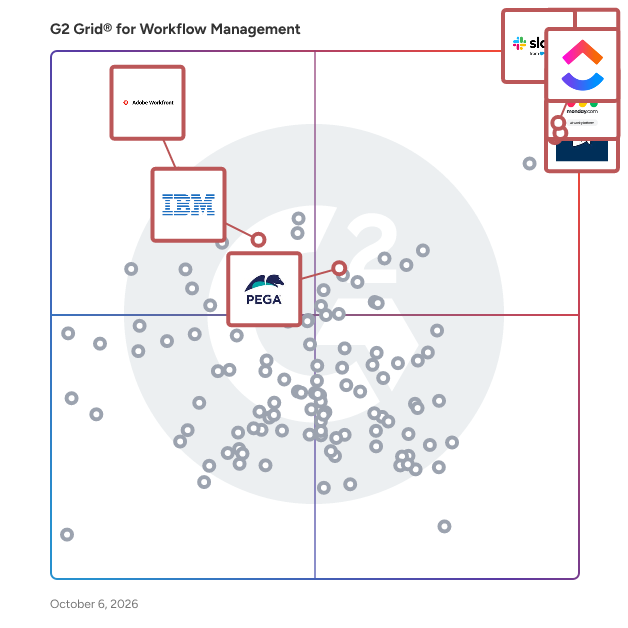
G2 Grid® for Workflow Management Software

G2 Grid® for Workflow Management Software plotting products by satisfaction and market presence

Highlighted products: Slack, Smartsheet, Asana, monday AI Work Platform, Pega Platform, ClickUp, Workfront, and IBM Cloud Pak for Business Automation.

Underlying data: [Grid® JSON](https://www.g2.com/categories/workflow-management/grids.json?focus%5B%5D=slack&focus%5B%5D=smartsheet&focus%5B%5D=asana&focus%5B%5D=monday-com&focus%5B%5D=pega-platform&focus%5B%5D=clickup&focus%5B%5D=workfront&focus%5B%5D=ibm-cloud-pak-for-business-automation&segment=enterprise)

Sponsored

Moxo

Moxo is the AI orchestration platform built for business operations teams. From manual coordination to intelligent orchestration, Moxo transforms the way organizations run complex processes. The old way relies on scattered emails and manual follow-ups; the Moxo way keeps every step clear, connected, and accountable. We put human actions and decisions at the center of workflows, while AI and automation clear the manual work behind the scenes. By connecting people, systems, and AI, Moxo drives the right actions, from the right people, at the right time —whether it’s client onboarding, multi-party approvals, or ongoing account management. Business teams can eliminate bottlenecks, reduce drop-offs, and keep critical milestones moving forward. Trusted by leading global enterprises across financial services, consulting, legal, and healthcare, Moxo is the smarter way to orchestrate mission-critical workflows with confidence.

Visit website

Slack

Slack is your single workspace that connects you with the people and tools you work with everyday, no matter where you are or what you do. With Slack you get real-time messaging through calls and chat, a searchable record of all your files and conversations, and integrations with a growing number of handy bots and apps. Now everyone can finally be on the same page and get their work done. Slack: It’s where work happens.

Average Rating: 4.5/5.0

Total Reviews: 37,530

How Do G2 Users Rate Slack?

  • Has the product been a good partner in doing business?: 9.1/10 (Category avg: 9.2/10)
  • Activities: 9.1/10 (Category avg: 8.9/10)
  • Flows: 8.9/10 (Category avg: 8.9/10)
  • Integration: 8.9/10 (Category avg: 8.4/10)

Who Is the Company Behind Slack?

  • Seller: Salesforce
  • Company Website:
  • Year Founded: 1999
  • HQ Location: San Francisco, CA
  • Twitter: @salesforce
    579,511 Twitter followers
  • LinkedIn® Page: www.linkedin.com
    83,223 employees on LinkedIn®

Who Uses This Product?

  • Who Uses This: Software Engineer, Project Manager
  • Top Industries: Computer Software, Information Technology and Services
  • Company Size: 41% Small, 41% Medium

What Do G2 Reviewers Say About Slack?

AI-generated summary from verified user reviews

Pros
  • Users find Slack to be extremely easy to use, facilitating seamless collaboration and integration across teams.
  • Users love the effective team collaboration in Slack, finding huddles and organized channels enhance communication and task management.
  • Users love Slack for its efficient communication, enabling quick responses and seamless team collaboration across time zones.
  • Users love the seamless integrations of Slack, enhancing collaboration and automating tasks effortlessly across the platform.
  • Users appreciate the ease of coordination and integrations in Slack, enhancing team communication and productivity.
Cons
  • Users often face notification issues in Slack, causing missed messages and overwhelming alerts from multiple channels.
  • Users find the missing features in Slack lead to confusion and difficulty in organizing channels efficiently.
  • Users are frustrated by Slack's limited message history and lack of intuitive organization for shared assets.
  • Users find the overwhelming experience of constant alerts and message volume to be stressful and distracting.
  • Users find the overwhelming number of channels and limited message history challenging for project tracking and communication.

What Are Recent G2 Reviews of Slack?

What Are G2 Users Discussing About Slack?

Smartsheet

Smartsheet revolutionizes how you manage projects, portfolios, and processes. The Smartsheet AI-powered platform delivers adaptability, sophisticated experiences, and enterprise-grade rigor to support work across industries — from service delivery to construction, clinical trials, and marketing campaigns. Designed to meet demanding requirements, it helps organizations drive efficiency, accelerate innovation, and stay competitive. Over 85% of Fortune 500 companies trust Smartsheet to align their resources to improve efficiency, agility, and collaboration in today’s ever-changing world of work.

Average Rating: 4.4/5.0

Total Reviews: 22,299

How Do G2 Users Rate Smartsheet?

  • Has the product been a good partner in doing business?: 8.6/10 (Category avg: 9.2/10)
  • Activities: 8.3/10 (Category avg: 8.9/10)
  • Flows: 8.5/10 (Category avg: 8.9/10)
  • Integration: 7.5/10 (Category avg: 8.4/10)

Who Is the Company Behind Smartsheet?

  • Seller: Smartsheet
  • Company Website:
  • Year Founded: 2005
  • HQ Location: Bellevue, WA
  • Twitter: @Smartsheet
    26,366 Twitter followers
  • LinkedIn® Page: www.linkedin.com
    4,034 employees on LinkedIn®

Who Uses This Product?

  • Who Uses This: Project Manager, Senior Project Manager
  • Top Industries: Information Technology and Services, Construction
  • Company Size: 41% Medium, 34% Small

What Do G2 Reviewers Say About Smartsheet?

AI-generated summary from verified user reviews

Pros
  • Users appreciate the ease of use of Smartsheet, enabling intuitive project management for all team skill levels.
  • Users value the streamlined collaboration and automation features of Smartsheet, enhancing project management efficiency and flexibility.
  • Users value the real-time collaboration features in Smartsheet, enhancing team synergy across remote locations.
  • Users value the comprehensive project tracking capabilities of Smartsheet, enhancing collaboration and project management efficiency.
  • Users appreciate the automation capabilities of Smartsheet, enhancing collaboration and streamlining project management processes.
Cons
  • Users face a steep learning curve with Smartsheet due to its limited formulas and unintuitive features.
  • Users find missing features in Smartsheet, causing challenges in tracking information and utilizing advanced functionalities.
  • Users find Smartsheet not intuitive, making navigation and mastering functions a challenging experience for many.
  • Users find that limited features hinder collaboration and escalate costs, especially for small businesses trying to scale.
  • Users experience limited functionality in Smartsheet, hindering their full utilization of the tool's capabilities.

What Are Recent G2 Reviews of Smartsheet?

What Are G2 Users Discussing About Smartsheet?

Asana

Asana is a leading work management platform for human + AI collaboration. Over 170,000 customers like Accenture, Amazon, Anthropic, and Suzuki rely on Asana to align teams and accelerate organizational impact. Whether it’s managing strategic initiatives, cross-functional programs, or company-wide goals, Asana helps organizations bring clarity to complexity—turning plans into action with AI working alongside teams every step of the way. To learn more, visit www.asana.com.

Average Rating: 4.4/5.0

Total Reviews: 13,332

How Do G2 Users Rate Asana?

  • Has the product been a good partner in doing business?: 8.7/10 (Category avg: 9.2/10)
  • Activities: 8.7/10 (Category avg: 8.9/10)
  • Flows: 8.6/10 (Category avg: 8.9/10)
  • Integration: 8.0/10 (Category avg: 8.4/10)

Who Is the Company Behind Asana?

  • Seller: Asana
  • Company Website:
  • Year Founded: 2008
  • HQ Location: San Francisco, CA
  • Twitter: @Asana
    119,913 Twitter followers
  • LinkedIn® Page: www.linkedin.com
    4,369 employees on LinkedIn®

Who Uses This Product?

  • Who Uses This: Project Manager, Owner
  • Top Industries: Marketing and Advertising, Information Technology and Services
  • Company Size: 57% Small, 31% Medium

What Do G2 Reviewers Say About Asana?

AI-generated summary from verified user reviews

Pros
  • Users find Asana to have a user-friendly interface, making it simple to manage tasks and collaborate effectively.
  • Users appreciate Asana for its effective task management, enhancing productivity and collaboration across teams and projects.
  • Users value the workflow features of Asana, enhancing teamwork and project organization with flexible task management options.
  • Users appreciate the workflow features in Asana, facilitating team connectivity and enhancing project management efficiency.
  • Users value the user-friendly task tracking in Asana, enhancing organization and efficiency in managing deliverables.
Cons
  • Users experience a lack of essential features, including time tracking and project setup capabilities, hindering usability.
  • Users struggle with the steep learning curve of Asana, finding it messy and difficult to manage tasks effectively.
  • Users note the limited features in Asana, particularly with powerful tools locked behind higher pricing tiers.
  • Users find the UI not intuitive, with a clunky design that complicates navigation and task management.
  • Users find the search functionality lacking, making it difficult to efficiently locate projects and tasks.

What Are Recent G2 Reviews of Asana?

What Are G2 Users Discussing About Asana?

monday AI Work Platform

monday.com is the AI Work Platform where people and agents operate as one team - with shared cross-department context, enterprise-grade trust, and an easy-to-use interface built for adoption at scale. With monday.com, agents work alongside teams in the same boards, workflows, and goals they already use every day, creating a new kind of teamwork where people and agents move work forward together. Beyond agents, monday.com gives every team more ways to turn AI into real business impact. With monday vibe, teams can build custom work apps for their specific needs, and with monday sidekick, every user gets a personal AI assistant to help solve business challenges, move faster, and get more done. monday.com gives organizations the visibility, permissions, human oversight, and compliance standards they need to deploy AI with confidence. AI doesn’t operate in a black box - it operates within the same trusted guardrails teams already rely on. Because monday.com is already used across departments, agents can access the broader context of how work connects across marketing, sales, product, IT, HR, operations, and more. That means smarter decisions, faster execution, and fewer silos - all in one place. Today, over 250,000 customers and more than 60% of Fortune 500 companies trust monday.com with how they run their business.

Average Rating: 4.7/5.0

Total Reviews: 16,690

How Do G2 Users Rate monday AI Work Platform?

  • Has the product been a good partner in doing business?: 9.1/10 (Category avg: 9.2/10)
  • Activities: 8.9/10 (Category avg: 8.9/10)
  • Flows: 8.9/10 (Category avg: 8.9/10)
  • Integration: 8.3/10 (Category avg: 8.4/10)

Who Is the Company Behind monday AI Work Platform?

  • Seller: monday.com
  • Company Website:
  • Year Founded: 2012
  • HQ Location: Tel Aviv
  • Twitter: @mondaydotcom
    40,761 Twitter followers
  • LinkedIn® Page: www.linkedin.com
    3,837 employees on LinkedIn®

Who Uses This Product?

  • Who Uses This: Project Manager, CEO
  • Top Industries: Marketing and Advertising, Information Technology and Services
  • Company Size: 61% Small, 30% Medium

What Do G2 Reviewers Say About monday AI Work Platform?

AI-generated summary from verified user reviews

Pros
  • Users find the ease of use of monday AI Work Platform essential for staying organized and productive.
  • Users appreciate the team collaboration features of monday AI Work Platform, enhancing project management across various business segments.
  • Users value the easy project management features of monday AI Work Platform, enhancing collaboration and workflow efficiency.
  • Users value how monday AI Work Platform enhances organization, making important information easily accessible and manageable.
  • Users appreciate the efficient task management in monday AI Work Platform, making collaboration and project tracking seamless.
Cons
  • Users note the missing features in monday AI Work Platform, expressing frustration over limitations like messaging contacts and seat requirements.
  • Users find the learning curve steep, especially when implementing across departments and managing large datasets effectively.
  • Users find the limited features of monday AI Work Platform restrict useful functionality and increase costs unnecessarily.
  • Users find the interface not intuitive, struggling with complex workflows and lacking straightforward functionality.
  • Users find the limited customization in monday AI Work Platform hampers their ability to streamline tasks effectively.

What Are Recent G2 Reviews of monday AI Work Platform?

What Are G2 Users Discussing About monday AI Work Platform?

Pega Platform

Pega is a powerful low-code platform that builds agility into the world’s leading organizations so they can adapt to change. Clients use our AI-powered decisioning and workflow automation to solve their most pressing business challenges – from personalizing engagement to automating service to streamlining operations. Since 1983, we’ve built our scalable and flexible architecture to help people focus on what matters most, so they can meet today’s customer demands while continuously transforming for tomorrow. Experience the simplicity and power of the Pega Platform today: https://www.pega.com/platform-guided-tour

Average Rating: 4.2/5.0

Total Reviews: 199

How Do G2 Users Rate Pega Platform?

  • Has the product been a good partner in doing business?: 8.3/10 (Category avg: 9.2/10)
  • Activities: 9.2/10 (Category avg: 8.9/10)
  • Flows: 8.9/10 (Category avg: 8.9/10)
  • Integration: 8.3/10 (Category avg: 8.4/10)

Who Is the Company Behind Pega Platform?

  • Seller: Pegasystems
  • Year Founded: 1983
  • HQ Location: Cambridge, MA
  • Twitter: @pega
    45,022 Twitter followers
  • LinkedIn® Page: www.linkedin.com
    5,558 employees on LinkedIn®
  • Ownership: NASDAQ:PEGA

Who Uses This Product?

  • Who Uses This: Senior Software Engineer, Consultant
  • Top Industries: Information Technology and Services, Banking
  • Company Size: 68% Large, 20% Medium

What Do G2 Reviewers Say About Pega Platform?

AI-generated summary from verified user reviews

Pros
  • Users commend robust customer support in Pega Platform, highlighting helpful onboarding and integration assistance.
  • Users value the automation of complicated processes in Pega Platform, enhancing efficiency in managing business data.
  • Users appreciate the ease of use of Pega Platform, enabling them to automate processes without coding skills.
  • Users appreciate the user-friendly interface and seamless integrations of Pega Platform, enhancing both CRM and ERP systems.
  • Users value the seamless integration capabilities of Pega Platform, enhancing connectivity with various software systems efficiently.
Cons
  • Users find the strict UI customization limitations in Pega Platform frustrating, often settling for less-than-ideal interfaces.
  • Users find the limited features of Pega Platform restrict their customization options, impacting overall user experience.
  • Users find the outdated interface of Pega Platform frustrating and challenging to customize for their needs.
  • Users find the poor interface design of the Pega Platform frustrating, hindering customization and affecting user experience.
  • Users find the poor UI of the Pega Platform frustrating, limiting customization and impacting performance efficiency.

What Are Recent G2 Reviews of Pega Platform?

What Are G2 Users Discussing About Pega Platform?

ClickUp

ClickUp is the world’s first Converged AI Workspace, bringing together all work apps, data, and workflows. ClickUp eliminates all forms of work sprawl to provide 100% context and a single place for humans and agents to work, together. Trusted by more than 20 million users worldwide, ClickUp is on a mission to maximize human productivity.

Average Rating: 4.6/5.0

Total Reviews: 13,116

How Do G2 Users Rate ClickUp?

  • Has the product been a good partner in doing business?: 9.0/10 (Category avg: 9.2/10)
  • Activities: 8.8/10 (Category avg: 8.9/10)
  • Flows: 8.8/10 (Category avg: 8.9/10)
  • Integration: 8.2/10 (Category avg: 8.4/10)

Who Is the Company Behind ClickUp?

  • Seller: ClickUp
  • Company Website:
  • Year Founded: 2017
  • HQ Location: San Diego, California
  • Twitter: @clickup
    69,539 Twitter followers
  • LinkedIn® Page: www.linkedin.com
    1,526 employees on LinkedIn®

Who Uses This Product?

  • Who Uses This: CEO, Project Manager
  • Top Industries: Marketing and Advertising, Computer Software
  • Company Size: 77% Small, 19% Medium

What Do G2 Reviewers Say About ClickUp?

AI-generated summary from verified user reviews

Pros
  • Users find ClickUp to be incredibly easy and simple to use, streamlining tasks and enhancing productivity effortlessly.
  • Users value the flexibility in task management, enabling customized workflows for personal, team, and project tasks.
  • Users appreciate the abundance of features in ClickUp, making task management seamless and efficient.
  • Users appreciate ClickUp for its streamlined management tasks, enabling better organization and efficiency in project handling.
  • Users appreciate ClickUp for its streamlined organization, making team management and project tracking efficient and effortless.
Cons
  • Users find the missing features in ClickUp frustrating, particularly the lack of basic tools like subfolders.
  • Users experience a learning curve with ClickUp, finding the plethora of features daunting at first.
  • Users note limited features in ClickUp, with missing basic options and a complex setup process hindering ease of use.
  • Users find ClickUp not intuitive, feeling overwhelmed by its many features and struggling with initial setup and performance.
  • Users experience slow loading times in ClickUp, which affects their productivity when managing multiple tasks and fields.

What Are Recent G2 Reviews of ClickUp?

What Are G2 Users Discussing About ClickUp?

Workfront

Adobe Workfront is the leader in collaborative work management and marketing work management. Workfront connects strategy to delivery, integrating people and data across the enterprise, and manages work from start to finish to help teams deliver measurable outcomes. At every stage of planning, executing, and automating work, Workfront enables the business capabilities companies need to deliver exceptional customer experiences and to connect planning processes to execution workflows.

Average Rating: 4.1/5.0

Total Reviews: 1,154

How Do G2 Users Rate Workfront?

  • Has the product been a good partner in doing business?: 8.4/10 (Category avg: 9.2/10)
  • Activities: 8.5/10 (Category avg: 8.9/10)
  • Flows: 7.9/10 (Category avg: 8.9/10)
  • Integration: 7.8/10 (Category avg: 8.4/10)

Who Is the Company Behind Workfront?

  • Seller: Adobe
  • Company Website:
  • Year Founded: 1982
  • HQ Location: San Jose, CA
  • Twitter: @Adobe
    956,842 Twitter followers
  • LinkedIn® Page: www.linkedin.com
    42,087 employees on LinkedIn®

Who Uses This Product?

  • Who Uses This: Project Manager, Senior Project Manager
  • Top Industries: Marketing and Advertising, Information Technology and Services
  • Company Size: 47% Large, 35% Medium

What Do G2 Reviewers Say About Workfront?

AI-generated summary from verified user reviews

Pros
  • Users appreciate the centralized project management of Workfront, which enhances team alignment and productivity significantly.
  • Users praise the ease of use of Workfront, appreciating its clean interface and streamlined functionality for project management.
  • Users value the seamless team collaboration in Workfront, enhancing communication and project coordination effectively.
  • Users praise Workfront for its effective task management, enhancing visibility, organization, and collaboration across teams.
  • Users value the organization and visibility Workfront provides, streamlining project management and enhancing team collaboration.
Cons
  • Users experience a steep learning curve with Workfront, often finding the interface complex and overwhelming initially.
  • Users find Workfront's interface not intuitive, causing confusion and requiring training for effective navigation and usage.
  • Users find the complexity of Workfront challenging due to a steep learning curve and a cluttered interface.
  • Users experience slow performance with Workfront, particularly when managing large datasets or extensive reports.
  • Users find the limited features of Workfront restrict functionality and can lead to confusion in task management.

What Are Recent G2 Reviews of Workfront?

What Are G2 Users Discussing About Workfront?

IBM Cloud Pak for Business Automation

IBM Cloud Pak for Business Automation is a modular set of integrated software components, built for any hybrid cloud, each designed to automate work and accelerate the growth of your business. It simplifies complex multi-step workflows, manual tasks, decision-making, data extraction, record management, document governance and compliance, and more. You can start your digital transformation journey by applying robotic process automation (RPA) to free up human employees, speed decisioning with operational intelligence, and expand to automate key types of work across core operations. Security-rich environments bring trust and transparency to multi-party workflows, all of which can be tailored and integrated with your existing investments. Using this complete intelligent automation solution, clients are transforming fragile and disparate workflows—achieving 97% straight-through processing—to stay competitive and deliver more efficient and satisfying customer and employee experiences while reducing operational costs.

Average Rating: 4.3/5.0

Total Reviews: 38

How Do G2 Users Rate IBM Cloud Pak for Business Automation?

  • Has the product been a good partner in doing business?: 8.5/10 (Category avg: 9.2/10)
  • Activities: 7.9/10 (Category avg: 8.9/10)
  • Flows: 7.6/10 (Category avg: 8.9/10)
  • Integration: 7.4/10 (Category avg: 8.4/10)

Who Is the Company Behind IBM Cloud Pak for Business Automation?

  • Seller: IBM
  • Year Founded: 1911
  • HQ Location: Armonk, New York, United States
  • Twitter: @IBMSecurity
    74,660 Twitter followers
  • LinkedIn® Page: www.linkedin.com
    328,202 employees on LinkedIn®
  • Ownership: SWX:IBM

Who Uses This Product?

  • Top Industries: Information Technology and Services, Computer Software
  • Company Size: 51% Large, 28% Medium

What Are Recent G2 Reviews of IBM Cloud Pak for Business Automation?

What Are G2 Users Discussing About IBM Cloud Pak for Business Automation?

Quixy

Quixy ist eine cloudbasierte, benutzerfreundliche Plattform, die es Nutzern ohne Programmierkenntnisse ermöglicht, Unternehmensanwendungen zehnmal schneller mit einem einfachen Drag-and-Drop-Design zu erstellen. Für das dynamische Geschäftsumfeld von heute entwickelt, erlaubt Quixy Unternehmen, Unternehmensanwendungen schnell und mühelos zu erstellen und zu verwalten, wodurch Effizienz, Transparenz und Produktivität in den Abläufen gesteigert werden. Mit einer breiten Palette vorgefertigter Lösungen für verschiedene Anwendungsfälle wie CRM, Projektmanagement, HRMS und mehr. Quixy vereinfacht die Anwendungsentwicklung und hilft Organisationen, agil zu bleiben und gleichzeitig ihre individuellen Bedürfnisse zu erfüllen. Die Plattform integriert auch eine nahtlose Cloud-Datenbank, Sicherheit auf Unternehmensniveau, regulatorische Konformität und eine skalierbare Infrastruktur zur Unterstützung globaler Geschäftsabläufe.

Average Rating: 5.0/5.0

Total Reviews: 129

How Do G2 Users Rate Quixy?

  • War the product ein guter Geschäftspartner?: 9.9/10 (Category avg: 9.2/10)
  • Aktivitäten: 9.8/10 (Category avg: 8.9/10)
  • Fließt: 9.9/10 (Category avg: 8.9/10)
  • Integration: 9.7/10 (Category avg: 8.4/10)

Who Is the Company Behind Quixy?

  • Verkäufer: Quixy
  • Gründungsjahr: 2019
  • Hauptsitz: Hyderabad, Telangana
  • LinkedIn®-Seite: www.linkedin.com
    231 Mitarbeiter*innen auf LinkedIn®

Who Uses This Product?

  • Who Uses This: Senior Software Engineer, Associate Software Engineer
  • Top Industries: Computersoftware, Informationstechnologie und Dienstleistungen
  • Company Size: 62% Medium, 23% Small

What Do G2 Reviewers Say About Quixy?

AI-generated summary from verified user reviews

Pros
  • Benutzer schätzen die einfache und schnelle Workflow-Automatisierung von Quixy, die Prozesse rationalisiert und die Produktivität erheblich steigert.
  • Benutzer schätzen die Leichtigkeit der Automatisierung mit Quixys No-Code-Plattform, die Arbeitsabläufe optimiert und wertvolle Zeit spart.
  • Benutzer lieben die Automatisierungserleichterung mit Quixys No-Code-Plattform, die Workflows effizient und effektiv transformiert.
  • Benutzer finden Quixys Automatisierungsfähigkeiten beeindruckend, da sie eine schnelle und einfache Workflow-Verwaltung ohne Programmierung ermöglichen.
  • Benutzer schätzen die Leichtigkeit der Workflow-Automatisierung mit Quixys No-Code-Plattform, was die Effizienz und Benutzererfahrung verbessert.
Cons
  • Benutzer berichten von langsamen Aktualisierungsgeschwindigkeiten und verpassten Benachrichtigungen, was ihre Gesamterfahrung mit Quixy beeinträchtigen kann.
  • Benutzer erleben Kommunikationsprobleme aufgrund langsamer Aktualisierungsgeschwindigkeiten und gelegentlich verpasster Benachrichtigungen.
  • Benutzer erleben E-Mail-Probleme mit langsamer Aktualisierungsgeschwindigkeit und verpassten Benachrichtigungen, was ihre Gesamterfahrung mit Quixy beeinträchtigt.
  • Benutzer erleben Verzögerungsprobleme mit niedriger Aktualisierungsgeschwindigkeit und verpassten Benachrichtigungen, was ihre allgemeine Benutzerfreundlichkeit beeinträchtigt.
  • Benutzer berichten von Leistungsproblemen mit Quixy, erleben langsame Aktualisierungsraten und verpasste Benachrichtigungen während der Nutzung.

What Are Recent G2 Reviews of Quixy?

What Are G2 Users Discussing About Quixy?

Wrike

Wrike ist die vertrauenswürdige Plattform für Arbeitsabwicklung, auf der KI erweitert, was Menschen erreichen können. Durch die Zentralisierung aller Arbeiten in einer verwalteten, kontextreichen Umgebung hilft Wrike Organisationen, die Zusammenarbeit, Projektplanung und Aufgabenausführung zu optimieren, während die Kontrolle und Verantwortlichkeit, die komplexe Arbeiten erfordern, aufrechterhalten werden. Wrike bedient Projektmanager, Teamleiter und Organisationen jeder Größe in den Bereichen Marketing, IT, Produktentwicklung, professionelle Dienstleistungen und darüber hinaus. Teams nutzen Wrike, um den Arbeitsfortschritt zu verfolgen, Aufgaben zuzuweisen, Fristen festzulegen und die Kommunikation zu erleichtern, wodurch Silos beseitigt und eine Kultur der Transparenz und Verantwortlichkeit gefördert wird, die für eine erfolgreiche Lieferung entscheidend ist. Zu den Hauptmerkmalen gehören KI-Agenten, Wrike Copilot, Wrike MCP Server, Workflow-Automatisierungen, anpassbare Dashboards, Echtzeit-Kollaborationstools und erweiterte Berichtsfunktionen. Teams können maßgeschneiderte Workflows erstellen und automatisieren, die ihre einzigartigen Prozesse widerspiegeln, Zeitpläne durch Gantt-Diagramme und Kanban-Boards visualisieren und nahtlos mit Tools wie Slack, Google Drive und Microsoft Teams integrieren. Der MCP-Server von Wrike erweitert dies noch weiter, indem er KI-Assistenten ermöglicht, sich direkt mit der Plattform zu verbinden, auf der die Ausführung tatsächlich stattfindet, sodass KI-gesteuerte Aktionen Teil des prüfbaren Protokolls werden, wie Arbeit erledigt wird, und nicht als getrennte Ergebnisse außerhalb des Systems existieren. Und angetrieben durch den Wrike Work Intelligence® Graph, bietet die Plattform der KI den strukturierten Kontext, den sie benötigt, um zuverlässig innerhalb derselben Rollen, Berechtigungen und Zugriffskontrollen wie Ihre Mitarbeiter zu agieren. Das Ergebnis geht weit über das Aufgabenmanagement hinaus. Wrike reduziert die Zeit, die für Verwaltungsarbeiten aufgewendet wird, skaliert mit wachsenden Organisationen und bietet Teams die verwaltete Grundlage, die sie benötigen, um KI in ihren wichtigsten Arbeitsabläufen einzusetzen, ohne die Kontrolle zu verlieren. Mit mehr als 20.000 Organisationen weltweit, darunter Siemens, Walmart, NVIDIA und The Estée Lauder Companies, die Wrike vertrauen, um ihre wichtigsten Arbeiten zu liefern, hat sich die Plattform ihren Platz als zuverlässiger Partner für Organisationen verdient, um ohne Zweifel zu liefern.

Average Rating: 4.2/5.0

Total Reviews: 4,461

How Do G2 Users Rate Wrike?

  • War the product ein guter Geschäftspartner?: 8.5/10 (Category avg: 9.2/10)
  • Aktivitäten: 8.3/10 (Category avg: 8.9/10)
  • Fließt: 8.3/10 (Category avg: 8.9/10)
  • Integration: 7.8/10 (Category avg: 8.4/10)

Who Is the Company Behind Wrike?

  • Verkäufer: Wrike, Inc.
  • Unternehmenswebsite:
  • Gründungsjahr: 2006
  • Hauptsitz: San Diego, CA
  • Twitter: @wrike
    13,574 Twitter-Follower
  • LinkedIn®-Seite: www.linkedin.com
    1,257 Mitarbeiter*innen auf LinkedIn®

Who Uses This Product?

  • Who Uses This: Projektmanager, Marketing-Manager
  • Top Industries: Marketing und Werbung, Informationstechnologie und Dienstleistungen
  • Company Size: 43% Medium, 35% Small

What Do G2 Reviewers Say About Wrike?

AI-generated summary from verified user reviews

Pros
  • Benutzer schätzen die Teamzusammenarbeit in Wrike, die einen nahtlosen Arbeitsablauf ermöglicht und die Produktivität in verschiedenen Projekten steigert.
  • Benutzer schätzen die effektiven Projektverfolgungsfähigkeiten von Wrike, die Organisation und Teamarbeit für ein erfolgreiches Projektmanagement verbessern.
  • Benutzer schätzen die anpassbaren Dashboards und die Echtzeit-Tracking-Funktionen von Wrike für verbesserte Teamzusammenarbeit und Effizienz.
  • Benutzer schätzen die Organisation und Klarheit, die Wrike bietet, was die Zusammenarbeit im Team und das Aufgabenmanagement effektiv verbessert.
  • Benutzer loben die Benutzerfreundlichkeit von Wrike, die eine effiziente Aufgabenverwaltung und eine reibungslose Zusammenarbeit im Team ermöglicht.
Cons
  • Benutzer finden die Lernkurve steil bei Wrike und kämpfen anfangs mit Komplexität und Navigationsherausforderungen.
  • Benutzer finden Wrike nicht intuitiv, was Schulung und Navigation schwierig macht, insbesondere für weniger schnelle Lerner.
  • Benutzer bemerken die begrenzten Funktionen von Wrike und finden es im Vergleich zu Wettbewerbern weniger effektiv für umfassendes Projektmanagement.
  • Benutzer bemerken einen Mangel an integrierten Vorlagen und benutzerfreundlichem Design in Wrike, was es für Neulinge herausfordernd macht.
  • Benutzer wünschen sich mehr Anpassungsoptionen für Aufgaben- und Projektvorlagen, um ihre Wrike-Erfahrung zu verbessern.

What Are Recent G2 Reviews of Wrike?

What Are G2 Users Discussing About Wrike?

IBM Business Automation Workflow (BAW)

IBM Business Automation Workflow kombiniert Geschäftsprozessmanagement und Fallmanagement-Funktionen in einer Workflow-Lösung. Es integriert die Fähigkeiten von Geschäftsprozess- und Fallmanagement in ein einziges Workflow-Angebot. Es vereint Informationen, Prozesse und Benutzer, um eine 360-Grad-Sicht auf die Arbeit zu bieten. Zusätzlich zum Prozessmanagement nutzt der Workflow erweiterte Analysen, Geschäftsregeln und Zusammenarbeit, um erfolgreichere, optimierte Geschäftsergebnisse zu erzielen. Sie können eine Bereitstellungsoption wählen, die am besten zu den Bedürfnissen Ihres Unternehmens passt. IBM Business Automation Workflow on Cloud und IBM Business Automation Workflow haben die gleichen Fähigkeiten. Ersteres ist jedoch eine einsatzbereite, cloudbasierte Umgebung, die in IBM Cloud-Rechenzentren gehostet und von IBM verwaltet wird. Wichtige Merkmale und Funktionen: -Ermöglichen Sie Geschäftsanwendern, Workflows zu verwalten -Erreichen Sie Sichtbarkeit über End-to-End-Workflows -Steigern Sie Effizienz und Konsistenz, indem Sie Prozesskomponenten über mehrere Workflows hinweg wiederverwenden. -Bieten Sie bessere Geschwindigkeit und Skalierbarkeit -Zugriff auf den Cloud-Service aus der öffentlichen Cloud oder von mobilen Geräten über das Cloud-Portal oder nutzen Sie ein separat verfügbares Virtual Private Network (VPN) zur Verbindung. -Erfüllen Sie Governance- und Compliance-Anforderungen Wert des Produkts und was es für Ihre Benutzer tun kann: -IBM Business Automation Workflow hilft, Geschäftsstrategie und Ausführung zu verbinden, um bessere Ergebnisse zu liefern -Es hilft, wettbewerbsfähigere Front- oder Back-Office-Workflows zu modellieren, zu entwerfen, zu implementieren und zu überwachen -Automatisieren Sie Operationen im großen Maßstab, um die direkte Verarbeitung und Abschlussraten von Fällen zu erhöhen -Konsolidieren Sie unterschiedliche Informationen, um einheitliche Datensätze zu erstellen, die durch Fall oder Kunde verknüpft sind -Verbessern Sie Ihre Fähigkeit, Anforderungen an die Verwaltung des Informationslebenszyklus zu erfüllen und zu verwalten, wie z.B. den Schutz von Kundendaten und die Einhaltung von Datenaufbewahrungsvorschriften

Average Rating: 4.4/5.0

Total Reviews: 75

How Do G2 Users Rate IBM Business Automation Workflow (BAW)?

  • War the product ein guter Geschäftspartner?: 8.1/10 (Category avg: 9.2/10)
  • Aktivitäten: 7.1/10 (Category avg: 8.9/10)
  • Fließt: 8.3/10 (Category avg: 8.9/10)
  • Integration: 6.7/10 (Category avg: 8.4/10)

Who Is the Company Behind IBM Business Automation Workflow (BAW)?

  • Verkäufer: IBM
  • Gründungsjahr: 1911
  • Hauptsitz: Armonk, New York, United States
  • Twitter: @IBMSecurity
    74,660 Twitter-Follower
  • LinkedIn®-Seite: www.linkedin.com
    328,202 Mitarbeiter*innen auf LinkedIn®
  • Eigentum: SWX:IBM

Who Uses This Product?

  • Who Uses This: Softwareentwickler, Berater
  • Top Industries: Informationstechnologie und Dienstleistungen, Bankwesen
  • Company Size: 49% Large, 34% Medium

What Do G2 Reviewers Say About IBM Business Automation Workflow (BAW)?

AI-generated summary from verified user reviews

Pros
  • Benutzer schätzen die Benutzerfreundlichkeit von IBM BAW, was ihre Workflow-Effizienz und Produktivität steigert.
Cons
  • Benutzer finden das Layout des Tools veraltet und wenig inspirierend, was die gesamte Benutzererfahrung beeinträchtigt.

What Are Recent G2 Reviews of IBM Business Automation Workflow (BAW)?

What Are G2 Users Discussing About IBM Business Automation Workflow (BAW)?

Jotform Workflows

Jotform Workflows ist eine leistungsstarke No-Code-Automatisierungsplattform, die es einfach macht, Ihre Geschäftsprozesse von Anfang bis Ende zu optimieren, zu verwalten und zu verbessern. Mit einem intuitiven Drag-and-Drop-Builder können Sie benutzerdefinierte Workflows entwerfen, die genau Ihren Anforderungen entsprechen – egal, ob Sie Genehmigungen weiterleiten, Zahlungen einziehen, Aufgaben zuweisen oder sich wiederholende Schritte in Ihrer Organisation automatisieren. Jotform Workflows eliminiert manuelle Arbeit, reduziert Fehler und hilft Teams, schneller zu arbeiten, indem es jeden Prozess konsistent, transparent und vollständig automatisiert hält. Mit über 200 professionell gestalteten Workflow-Vorlagen ist der Einstieg mühelos. Wählen Sie einen fertigen Workflow für HR, Finanzen, Betrieb, Kundenservice, Bildung, Gesundheitswesen oder jeden anderen Anwendungsfall und passen Sie ihn an Ihre Prozesse an. Workflows können bedingte Logik, automatisierte Benachrichtigungen, rollenbasierte Genehmigungen und dynamische Routing-Regeln enthalten, die sich an jede Formulareinreichung anpassen und sicherstellen, dass die richtigen Schritte zur richtigen Zeit erfolgen. Für Organisationen, die auf Zahlungen angewiesen sind, unterstützt Jotform Workflows die automatisierte Zahlungserfassung und -verarbeitung über mehr als 40 vertrauenswürdige Zahlungs-Gateways, darunter PayPal, Square und Stripe. Sie können Zahlungen basierend auf Benutzerauswahlen, Genehmigungsschritten oder vordefinierten Bedingungen auslösen, was Ihnen hilft, Gelder schnell und genau ohne manuelle Eingriffe zu sammeln. Nahtlose Integration steht im Mittelpunkt von Jotform Workflows. Verbinden Sie Ihre Workflows mit über 200 beliebten Apps – darunter Slack, Google Sheets, Airtable, HubSpot, Trello und mehr – um Daten automatisch zu synchronisieren, Aufgaben zu erstellen, Teammitglieder zu benachrichtigen oder externe Systeme in Echtzeit zu aktualisieren. Dies schafft ein vollständig verbundenes Ökosystem, in dem jede Einreichung die richtigen Aktionen in Ihren Tools auslöst. Jotform Workflows umfasst auch leistungsstarke Aufgabenverwaltungsfunktionen. Erstellen Sie Aufgaben, weisen Sie sie Teammitgliedern zu, verfolgen Sie den Fortschritt und automatisieren Sie Nachverfolgungen basierend auf Formularantworten oder Workflow-Bedingungen. Dies zentralisiert alle Aktivitäten in einem organisierten Arbeitsbereich und gibt Teams vollständige Transparenz darüber, was als Nächstes geschehen muss. Alle Workflow-Daten werden automatisch in Jotform Tables und Jotform Inbox gespeichert und organisiert. Sehen Sie Einreichungen als Tabellenkalkulationen, Kalender oder Karten an, verwalten Sie Berechtigungen für Teammitglieder und reagieren Sie schnell auf Genehmigungen oder Anfragen von jedem Gerät aus. Dies gewährleistet vollständige Übersicht und hilft Teams, schneller fundierte Entscheidungen zu treffen. Mit robuster Automatisierung, tiefen Integrationen, sicherer Datenverarbeitung und einem No-Code-Builder, den jeder nutzen kann, befähigt Jotform Workflows Organisationen jeder Größe, effiziente, skalierbare und vollständig automatisierte Prozesse zu erstellen – ohne auf Entwickler oder technisches Fachwissen angewiesen zu sein.

Average Rating: 4.5/5.0

Total Reviews: 579

How Do G2 Users Rate Jotform Workflows?

  • War the product ein guter Geschäftspartner?: 8.9/10 (Category avg: 9.2/10)
  • Aktivitäten: 8.6/10 (Category avg: 8.9/10)
  • Fließt: 8.7/10 (Category avg: 8.9/10)
  • Integration: 7.5/10 (Category avg: 8.4/10)

Who Is the Company Behind Jotform Workflows?

  • Verkäufer: Jotform
  • Unternehmenswebsite:
  • Gründungsjahr: 2006
  • Hauptsitz: San Francisco, California
  • Twitter: @Jotform
    39,289 Twitter-Follower
  • LinkedIn®-Seite: www.linkedin.com
    901 Mitarbeiter*innen auf LinkedIn®

Who Uses This Product?

  • Who Uses This: Eigentümer, CEO
  • Top Industries: Non-Profit-Organisationsmanagement, Krankenhaus & Gesundheitswesen
  • Company Size: 64% Small, 29% Medium

What Do G2 Reviewers Say About Jotform Workflows?

AI-generated summary from verified user reviews

Pros
  • Benutzer finden, dass Jotform Workflows benutzerfreundlich ist, mit einfacher Einrichtung und intuitiven grafischen Oberflächen für das Workflow-Management.
  • Benutzer heben die Automatisierungsfähigkeiten von Jotform Workflows hervor, die die Effizienz steigern und manuelle Aufgaben erheblich reduzieren.
  • Benutzer genießen den benutzerfreundlichen Formularerstellungsprozess in Jotform Workflows und loben seine Flexibilität und Integrationsmöglichkeiten.
  • Benutzer lieben die Prozessautomatisierung in Jotform Workflows, die Aufgaben rationalisiert und die Effizienz des Teams mühelos verbessert.
  • Benutzer schätzen die einfachen Integrationen von Jotform Workflows, die Arbeitsabläufe verbessern und eine nahtlose Zusammenarbeit mit anderen Plattformen ermöglichen.
Cons
  • Benutzer finden die anfängliche Lernkurve steil, insbesondere wenn sie versuchen, die zahlreichen Funktionen und Einstellungen von Jotform zu meistern.
  • Benutzer empfinden, dass das Fehlen eines Kommunikationskanals die Interaktion zwischen Entscheidungsträgern und Formularübermittlern behindert.
  • Benutzer finden die Komplexität der Navigation und Einrichtung kann zeitaufwändig sein, insbesondere bei E-Mail-Benachrichtigungen und bedingter Logik.
  • Benutzer berichten von Formularproblemen wie hohen Kosten für Teamerweiterungen und umständlichen Einreichungsgenehmigungen, die die Produktivität beeinträchtigen.
  • Benutzer stehen vor Integrationsproblemen mit begrenzter Anpassbarkeit und Funktionalität, was die Gesamteffektivität von Jotform Workflows beeinträchtigt.

What Are Recent G2 Reviews of Jotform Workflows?

FlowForma Process Automation

FlowForma è un tipo di soluzione di automazione dei processi progettata per aiutare gli utenti a digitalizzare, automatizzare e ottimizzare i processi aziendali di varie complessità. Questa piattaforma di livello enterprise sfrutta la tecnologia AI per fornire un ambiente senza codice, consentendo agli utenti, indipendentemente dalla loro competenza tecnica, di creare e gestire flussi di lavoro automatizzati in modo efficiente. Integrando l'automazione intelligente nelle operazioni quotidiane, FlowForma risponde alla crescente necessità delle organizzazioni di migliorare la produttività e semplificare i processi. Il pubblico di riferimento per FlowForma include leader aziendali, professionisti IT e organizzazioni di tutte le dimensioni che cercano di migliorare la loro efficienza operativa. Con la sua interfaccia user-friendly, FlowForma si rivolge sia alle piccole imprese che alle grandi aziende, rendendola una soluzione adattabile per settori diversi. Gli usi specifici vanno dall'automazione di compiti semplici, come l'inserimento dati e le approvazioni, alla gestione di flussi di lavoro complessi che richiedono decisioni intricate e collaborazione tra più stakeholder. Le caratteristiche principali di FlowForma includono le sue capacità AI agentiche, che consentono agli utenti di progettare e ottimizzare i processi con l'assistenza dell'AI come collaboratore attivo. Questa funzionalità non solo migliora l'esperienza di automazione, ma consente anche agli utenti di evolvere i loro processi in modo intelligente nel tempo. La piattaforma è costruita per essere scalabile e sicura, garantendo che le organizzazioni possano crescere e adattare le loro strategie di automazione senza compromettere l'integrità dei dati o le prestazioni del sistema. FlowForma si distingue nella categoria dell'automazione dei processi rendendo l'automazione accessibile e conveniente. Con oltre 300.000 utenti in tutto il mondo, la piattaforma ha dimostrato la sua efficacia nel fornire risultati misurabili. Gli utenti beneficiano della capacità di semplificare le operazioni, ridurre gli errori manuali e migliorare la produttività complessiva. L'aspetto senza codice di FlowForma consente agli individui di prendere il controllo delle loro esigenze di automazione senza fare affidamento eccessivo sulle risorse IT, promuovendo una cultura di innovazione e agilità all'interno delle organizzazioni. Oltre alle sue caratteristiche robuste, FlowForma offre una prova gratuita, consentendo agli utenti potenziali di sperimentare in prima persona le capacità della piattaforma. Questo periodo di prova offre l'opportunità alle organizzazioni di valutare come FlowForma possa trasformare i loro processi e guidare l'efficienza, portando infine a risultati aziendali migliorati.

Average Rating: 4.5/5.0

Total Reviews: 99

How Do G2 Users Rate FlowForma Process Automation?

  • Ritiene che the product sia stato un valido partner commerciale?: 9.3/10 (Category avg: 9.2/10)
  • Attività: 9.2/10 (Category avg: 8.9/10)
  • Flussi: 9.2/10 (Category avg: 8.9/10)
  • Integrazione: 7.9/10 (Category avg: 8.4/10)

Who Is the Company Behind FlowForma Process Automation?

  • Venditore: FlowForma
  • Sito web dell'azienda:
  • Anno di Fondazione: 2012
  • Sede centrale: Dublin
  • Twitter: @FlowForma
    493 follower su Twitter
  • Pagina LinkedIn®: www.linkedin.com
    26 dipendenti su LinkedIn®

Who Uses This Product?

  • Top Industries: Costruzioni, Tecnologia dell'informazione e servizi
  • Company Size: 64% Medium, 26% Small

What Do G2 Reviewers Say About FlowForma Process Automation?

AI-generated summary from verified user reviews

Pros
  • Gli utenti apprezzano l'interfaccia intuitiva di FlowForma, rendendo l'automazione semplice ed efficiente per tutti i coinvolti.
  • Gli utenti amano l'efficienza e l'automazione che FlowForma offre, migliorando la produttività e semplificando i processi di accesso ai servizi sanitari.
  • Gli utenti apprezzano l'efficienza di FlowForma Process Automation, che semplifica le operazioni e riduce significativamente gli sforzi manuali.
  • Gli utenti apprezzano l'efficienza dell'automazione di FlowForma, migliorando la produttività e riducendo l'elaborazione manuale nei loro flussi di lavoro.
  • Gli utenti apprezzano l'efficienza e la facilità d'uso di FlowForma, migliorando significativamente la loro produttività nell'automazione dei processi.
Cons
  • Gli utenti notano una ripida curva di apprendimento che richiede tempo e pensiero strutturato per padroneggiare efficacemente FlowForma.
  • Gli utenti trovano la curva di apprendimento difficile impegnativa, richiedendo un pensiero strutturato e una migliore navigazione per un uso efficace.
  • Gli utenti sono frustrati dalla mancanza di opzioni di personalizzazione in FlowForma, che influisce sulla coerenza visiva dei loro processi.
  • Gli utenti notano una ripida curva di apprendimento con FlowForma, che richiede tempo e impegno per navigare completamente nel sistema.
  • Gli utenti trovano la complessità dell'automazione di FlowForma impegnativa, citando il caricamento lento e la navigazione difficile nell'interfaccia.

What Are Recent G2 Reviews of FlowForma Process Automation?

What Are G2 Users Discussing About FlowForma Process Automation?

Basecamp

Basecamp is the #1 collaboration tool for hundreds of thousands of teams worldwide. Teams use Basecamp to work on projects, communicate, and get work organized every day. Whether with teammates across the room, or clients across the world, Basecamp is the best tool to get things done. Basecamp makes it easy for teams to see what everyone is working on, collaborate on documents, schedule projects, and more without meetings or emails. Not convinced? Read our thousands of reviews and sign up for free.

Average Rating: 4.1/5.0

Total Reviews: 5,358

How Do G2 Users Rate Basecamp?

  • Has the product been a good partner in doing business?: 8.7/10 (Category avg: 9.2/10)
  • Activities: 8.5/10 (Category avg: 8.9/10)
  • Flows: 8.4/10 (Category avg: 8.9/10)
  • Integration: 8.0/10 (Category avg: 8.4/10)

Who Is the Company Behind Basecamp?

  • Seller: 37signals
  • Year Founded: 1999
  • HQ Location: Chicago, IL
  • Twitter: @basecamp
    7,061 Twitter followers
  • LinkedIn® Page: www.linkedin.com
    175 employees on LinkedIn®

Who Uses This Product?

  • Who Uses This: Project Manager, Marketing Manager
  • Top Industries: Marketing and Advertising, Information Technology and Services
  • Company Size: 50% Small, 34% Medium

What Do G2 Reviewers Say About Basecamp?

AI-generated summary from verified user reviews

Pros
  • Users love the ease of use of Basecamp, facilitating smooth collaboration and project management for remote teams.
  • Users value the easy project coordination and streamlined team communication offered by Basecamp within a centralized platform.
  • Users love Basecamp's collaboration tools, promoting teamwork and streamlined project management for success.
  • Users enjoy the organization features of Basecamp, which streamline project coordination and enhance team accountability.
  • Users love how Basecamp offers intuitive task management, making it easy to organize and track multiple projects smoothly.
Cons
  • Users find Basecamp to have limited features compared to other software, wanting more options for scheduling and reporting.
  • Users find Basecamp lacking in advanced features, including reporting and scheduling tools for complex project management.
  • Users find Basecamp's limited functionality challenging for managing complex workflows and tracking project progress effectively.
  • Users find Basecamp's project management confusing, struggling with visibility and oversimplification, especially in complex scenarios.
  • Users feel that the lack of features in Basecamp limits its effectiveness compared to other software options.

What Are Recent G2 Reviews of Basecamp?

What Are G2 Users Discussing About Basecamp?

ProHance

ProHance ist der Produktivitätskontrollraum für Unternehmen, der einzige Ort, an dem die Produktivität von Mitarbeitern, Anbietern, KI-Copiloten und autonomen Agenten beobachtet, gesteuert und verbessert wird. Moderne Arbeit wird nicht mehr nur von Mitarbeitern erledigt, dennoch können die meisten Organisationen nur die Produktivität der Mitarbeiter messen und steuern. ProHance vereint alle Arbeitertypen in einem Kontrollraum: eine Ansicht, eine Governance-Schicht, eine einzige Quelle der Wahrheit. Die Module umfassen Arbeitszeit, Arbeitsleistung, Workflow-Management, erweiterte Analysen, Asset-Optimierung, KI-Adoptionsindex und einen KI-gestützten Retentionsrisiko-Index. Vertraut von über 450.000 Nutzern in mehr als 220 Unternehmen in 55 Ländern, liefert ProHance messbare Effizienzgewinne im operativen Betrieb für Banken und Finanzdienstleistungen, BPO/KPO, globale Kompetenzzentren, Gesundheitswesen RCM und IT-Dienstleistungsorganisationen, mit einer unternehmensgerechten, datenschutzorientierten Architektur.

Average Rating: 4.6/5.0

Total Reviews: 218

How Do G2 Users Rate ProHance?

  • War the product ein guter Geschäftspartner?: 9.1/10 (Category avg: 9.2/10)
  • Aktivitäten: 9.3/10 (Category avg: 8.9/10)
  • Fließt: 8.6/10 (Category avg: 8.9/10)
  • Integration: 9.0/10 (Category avg: 8.4/10)

Who Is the Company Behind ProHance?

  • Verkäufer: ProHance
  • Unternehmenswebsite:
  • Gründungsjahr: 2010
  • Hauptsitz: Bangalore, Karnataka
  • Twitter: @prohance_net
    79 Twitter-Follower
  • LinkedIn®-Seite: www.linkedin.com
    236 Mitarbeiter*innen auf LinkedIn®

Who Uses This Product?

  • Who Uses This: Stellvertretender Manager, Projektmanager
  • Top Industries: Informationstechnologie und Dienstleistungen, Krankenhaus & Gesundheitswesen
  • Company Size: 56% Medium, 38% Large

What Do G2 Reviewers Say About ProHance?

AI-generated summary from verified user reviews

Pros
  • Benutzer schätzen das effiziente Zeitmanagement von ProHance, das die Produktivitätsüberwachung für Teams und Einzelpersonen vereinfacht.
  • Benutzer heben die Effizienz von ProHance bei der Rationalisierung von Geschäftsprozessen und der nahtlosen Verbesserung der Teamproduktivität hervor.
  • Benutzer loben die benutzerfreundliche Oberfläche von ProHance, die eine effiziente Überwachung der Produktivität ohne Verwirrung ermöglicht.
  • Benutzer schätzen die zeitsparenden Funktionen von ProHance, die die Produktivität steigern und den manuellen Verfolgungsaufwand minimieren.
  • Benutzer schätzen die einfache Nachverfolgung mit ProHance, die sicherstellt, dass die Produktivität effizient und ohne Verwirrung überwacht wird.
Cons
  • Benutzer finden schwierige Navigation in ProHance frustrierend, insbesondere in unbekannten Situationen, was ihre Gesamteffizienz beeinträchtigt.
  • Benutzer empfinden die begrenzten Funktionen als hinderlich für die Anpassung und wünschen sich mehr Optionen, um ihr Erlebnis zu verbessern.
  • Benutzer haben Probleme mit Datenungenauigkeit, da Zeiteinträge aufgrund von Benutzerübersehen null anzeigen können.
  • Benutzer finden die fehlenden Anpassungsfunktionen frustrierend, was ihre Fähigkeit beeinträchtigt, Berichte effektiv zu personalisieren.
  • Benutzer finden die Benutzeroberfläche nicht intuitiv, was die Navigation erschwert und es Neulingen schwer macht, sich anzupassen.

What Are Recent G2 Reviews of ProHance?

What Are G2 Users Discussing About ProHance?