Top Free Workflow Management Software

How Many Workflow Management Software Products Does G2 Track?

Total Products under this Category: 396

Category Stats (Aug 2026)

  • Average Rating: 4.54/5 The average rating of products in this category, based on all submitted ratings
  • Top Trending Product: R2 Docuo (+0.84%) - Among all products in this category, R2 Docuo recorded the largest rating increase compared to last month

Last updated: August 04, 2026

How Does G2 Rank Workflow Management Software Products?

Why You Can Trust G2's Software Rankings:

  • 30 Analysts and Data Experts
  • 145,300+ Authentic Reviews
  • 396+ Products
  • Unbiased Rankings

G2's software rankings are built on verified user reviews, rigorous moderation, and a consistent research methodology maintained by a team of analysts and data experts. Each product is measured using the same transparent criteria, with no paid placement or vendor influence. While reviews reflect real user experiences, which can be subjective, they offer valuable insight into how software performs in the hands of professionals. Together, these inputs power the G2 Score, a standardized way to compare tools within every category.

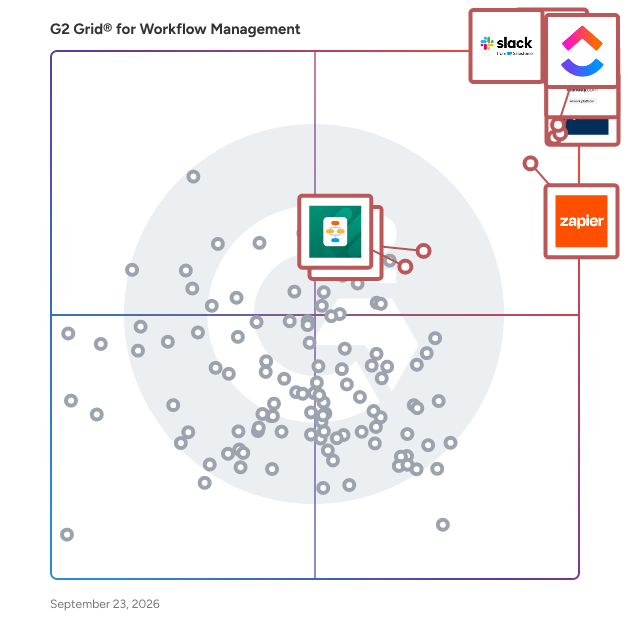
G2 Grid® for Workflow Management Software

G2 Grid® for Workflow Management Software plotting products by satisfaction and market presence

Highlighted products: Slack, Asana, Smartsheet, ClickUp, monday AI Work Platform, Zapier, Karbon, and MuleSoft Automation.

Underlying data: [Grid® JSON](https://www.g2.com/categories/workflow-management/grids.json?focus%5B%5D=slack&focus%5B%5D=asana&focus%5B%5D=smartsheet&focus%5B%5D=clickup&focus%5B%5D=monday-com&focus%5B%5D=zapier&focus%5B%5D=karbon-2025-03-03&focus%5B%5D=mulesoft-automation)

Sponsored

Wrike

Wrike is the trusted work delivery platform where AI extends what people can accomplish. By centralizing all work in one governed, context-rich environment, Wrike helps organizations streamline collaboration, project planning, and task execution while maintaining the control and accountability that complex work demands. Wrike serves project managers, team leaders, and organizations of all sizes across marketing, IT, product development, professional services, and beyond. Teams use Wrike to track work progress, assign tasks, set deadlines, and facilitate communication, eliminating silos and fostering a culture of transparency and accountability that is crucial for successful delivery. Key features include AI Agents, Wrike Copilot, Wrike MCP Server, workflow automations, customizable dashboards, real-time collaboration tools, and advanced reporting capabilities. Teams can build and automate tailored workflows that reflect their unique processes, visualize timelines through Gantt charts and Kanban boards, and integrate seamlessly with tools like Slack, Google Drive, and Microsoft Teams. Wrike's MCP server extends this further, allowing AI assistants to connect directly to the platform where execution actually happens so AI-driven actions become part of the auditable record of how work gets done, not disconnected outputs living outside the system. And powered by the Wrike Work Intelligence® Graph, the platform gives AI the structured context it needs to act reliably inside the same roles, permissions, and access controls as your people. The result goes far beyond task management. Wrike reduces time spent on administrative work, scales alongside growing organizations, and gives teams the governed foundation they need to put AI to work on their most consequential workflows without losing control. With more than 20,000 organizations worldwide, including Siemens, Walmart, NVIDIA, and The Estée Lauder Companies, trusting Wrike to deliver their most important work, the platform has earned its place as a reliable partner for organizations to deliver without doubt

Visit website

Slack

Slack is your single workspace that connects you with the people and tools you work with everyday, no matter where you are or what you do. With Slack you get real-time messaging through calls and chat, a searchable record of all your files and conversations, and integrations with a growing number of handy bots and apps. Now everyone can finally be on the same page and get their work done. Slack: It’s where work happens.

Average Rating: 4.5/5.0

Total Reviews: 37,522

How Do G2 Users Rate Slack?

  • Has the product been a good partner in doing business?: 9.1/10 (Category avg: 9.1/10)
  • Activities: 9.1/10 (Category avg: 8.9/10)
  • Flows: 8.9/10 (Category avg: 8.9/10)
  • Integration: 8.9/10 (Category avg: 8.4/10)

Who Is the Company Behind Slack?

  • Seller: Salesforce
  • Company Website:
  • Year Founded: 1999
  • HQ Location: San Francisco, CA
  • Twitter: @salesforce
    579,511 Twitter followers
  • LinkedIn® Page: www.linkedin.com
    83,223 employees on LinkedIn®

Who Uses This Product?

  • Who Uses This: Software Engineer, Project Manager
  • Top Industries: Computer Software, Information Technology and Services
  • Company Size: 41% Small, 41% Medium

What Do G2 Reviewers Say About Slack?

AI-generated summary from verified user reviews

Pros
  • Users find Slack to be extremely easy to use, facilitating seamless collaboration and integration across teams.
  • Users love the effective team collaboration in Slack, finding huddles and organized channels enhance communication and task management.
  • Users love Slack for its efficient communication, enabling quick responses and seamless team collaboration across time zones.
  • Users love the seamless integrations of Slack, enhancing collaboration and automating tasks effortlessly across the platform.
  • Users appreciate the ease of coordination and integrations in Slack, enhancing team communication and productivity.
Cons
  • Users often face notification issues in Slack, causing missed messages and overwhelming alerts from multiple channels.
  • Users find the missing features in Slack lead to confusion and difficulty in organizing channels efficiently.
  • Users are frustrated by Slack's limited message history and lack of intuitive organization for shared assets.
  • Users find the overwhelming experience of constant alerts and message volume to be stressful and distracting.
  • Users find the overwhelming number of channels and limited message history challenging for project tracking and communication.

What Are Recent G2 Reviews of Slack?

What Are G2 Users Discussing About Slack?

Asana

Asana is a leading work management platform for human + AI collaboration. Over 170,000 customers like Accenture, Amazon, Anthropic, and Suzuki rely on Asana to align teams and accelerate organizational impact. Whether it’s managing strategic initiatives, cross-functional programs, or company-wide goals, Asana helps organizations bring clarity to complexity—turning plans into action with AI working alongside teams every step of the way. To learn more, visit www.asana.com.

Average Rating: 4.4/5.0

Total Reviews: 13,312

How Do G2 Users Rate Asana?

  • Has the product been a good partner in doing business?: 8.7/10 (Category avg: 9.1/10)
  • Activities: 8.7/10 (Category avg: 8.9/10)
  • Flows: 8.6/10 (Category avg: 8.9/10)
  • Integration: 8.0/10 (Category avg: 8.4/10)

Who Is the Company Behind Asana?

  • Seller: Asana
  • Company Website:
  • Year Founded: 2008
  • HQ Location: San Francisco, CA
  • Twitter: @Asana
    119,913 Twitter followers
  • LinkedIn® Page: www.linkedin.com
    4,369 employees on LinkedIn®

Who Uses This Product?

  • Who Uses This: Project Manager, Owner
  • Top Industries: Marketing and Advertising, Information Technology and Services
  • Company Size: 57% Small, 31% Medium

What Do G2 Reviewers Say About Asana?

AI-generated summary from verified user reviews

Pros
  • Users find Asana to have a user-friendly interface, making it simple to manage tasks and collaborate effectively.
  • Users appreciate Asana for its effective task management, enhancing productivity and collaboration across teams and projects.
  • Users value the workflow features of Asana, enhancing teamwork and project organization with flexible task management options.
  • Users appreciate the workflow features in Asana, facilitating team connectivity and enhancing project management efficiency.
  • Users value the user-friendly task tracking in Asana, enhancing organization and efficiency in managing deliverables.
Cons
  • Users experience a lack of essential features, including time tracking and project setup capabilities, hindering usability.
  • Users struggle with the steep learning curve of Asana, finding it messy and difficult to manage tasks effectively.
  • Users note the limited features in Asana, particularly with powerful tools locked behind higher pricing tiers.
  • Users find the UI not intuitive, with a clunky design that complicates navigation and task management.
  • Users find the search functionality lacking, making it difficult to efficiently locate projects and tasks.

What Are Recent G2 Reviews of Asana?

What Are G2 Users Discussing About Asana?

Smartsheet

Smartsheet revolutionizes how you manage projects, portfolios, and processes. The Smartsheet AI-powered platform delivers adaptability, sophisticated experiences, and enterprise-grade rigor to support work across industries — from service delivery to construction, clinical trials, and marketing campaigns. Designed to meet demanding requirements, it helps organizations drive efficiency, accelerate innovation, and stay competitive. Over 85% of Fortune 500 companies trust Smartsheet to align their resources to improve efficiency, agility, and collaboration in today’s ever-changing world of work.

Average Rating: 4.4/5.0

Total Reviews: 22,279

How Do G2 Users Rate Smartsheet?

  • Has the product been a good partner in doing business?: 8.6/10 (Category avg: 9.1/10)
  • Activities: 8.3/10 (Category avg: 8.9/10)
  • Flows: 8.5/10 (Category avg: 8.9/10)
  • Integration: 7.5/10 (Category avg: 8.4/10)

Who Is the Company Behind Smartsheet?

  • Seller: Smartsheet
  • Company Website:
  • Year Founded: 2005
  • HQ Location: Bellevue, WA
  • Twitter: @Smartsheet
    26,366 Twitter followers
  • LinkedIn® Page: www.linkedin.com
    4,034 employees on LinkedIn®

Who Uses This Product?

  • Who Uses This: Project Manager, Senior Project Manager
  • Top Industries: Information Technology and Services, Construction
  • Company Size: 41% Medium, 34% Small

What Do G2 Reviewers Say About Smartsheet?

AI-generated summary from verified user reviews

Pros
  • Users appreciate the ease of use of Smartsheet, enabling intuitive project management for all team skill levels.
  • Users value the streamlined collaboration and automation features of Smartsheet, enhancing project management efficiency and flexibility.
  • Users value the real-time collaboration features in Smartsheet, enhancing team synergy across remote locations.
  • Users value the comprehensive project tracking capabilities of Smartsheet, enhancing collaboration and project management efficiency.
  • Users appreciate the automation capabilities of Smartsheet, enhancing collaboration and streamlining project management processes.
Cons
  • Users face a steep learning curve with Smartsheet due to its limited formulas and unintuitive features.
  • Users find missing features in Smartsheet, causing challenges in tracking information and utilizing advanced functionalities.
  • Users find Smartsheet not intuitive, making navigation and mastering functions a challenging experience for many.
  • Users find that limited features hinder collaboration and escalate costs, especially for small businesses trying to scale.
  • Users experience limited functionality in Smartsheet, hindering their full utilization of the tool's capabilities.

What Are Recent G2 Reviews of Smartsheet?

What Are G2 Users Discussing About Smartsheet?

ClickUp

ClickUp is the world’s first Converged AI Workspace, bringing together all work apps, data, and workflows. ClickUp eliminates all forms of work sprawl to provide 100% context and a single place for humans and agents to work, together. Trusted by more than 20 million users worldwide, ClickUp is on a mission to maximize human productivity.

Average Rating: 4.6/5.0

Total Reviews: 13,087

How Do G2 Users Rate ClickUp?

  • Has the product been a good partner in doing business?: 9.0/10 (Category avg: 9.1/10)
  • Activities: 8.8/10 (Category avg: 8.9/10)
  • Flows: 8.8/10 (Category avg: 8.9/10)
  • Integration: 8.2/10 (Category avg: 8.4/10)

Who Is the Company Behind ClickUp?

  • Seller: ClickUp
  • Company Website:
  • Year Founded: 2017
  • HQ Location: San Diego, California
  • Twitter: @clickup
    69,539 Twitter followers
  • LinkedIn® Page: www.linkedin.com
    1,526 employees on LinkedIn®

Who Uses This Product?

  • Who Uses This: CEO, Project Manager
  • Top Industries: Marketing and Advertising, Computer Software
  • Company Size: 77% Small, 19% Medium

What Do G2 Reviewers Say About ClickUp?

AI-generated summary from verified user reviews

Pros
  • Users find ClickUp to be incredibly easy and simple to use, streamlining tasks and enhancing productivity effortlessly.
  • Users value the flexibility in task management, enabling customized workflows for personal, team, and project tasks.
  • Users appreciate the abundance of features in ClickUp, making task management seamless and efficient.
  • Users appreciate ClickUp for its streamlined management tasks, enabling better organization and efficiency in project handling.
  • Users appreciate ClickUp for its streamlined organization, making team management and project tracking efficient and effortless.
Cons
  • Users find the missing features in ClickUp frustrating, particularly the lack of basic tools like subfolders.
  • Users experience a learning curve with ClickUp, finding the plethora of features daunting at first.
  • Users note limited features in ClickUp, with missing basic options and a complex setup process hindering ease of use.
  • Users find ClickUp not intuitive, feeling overwhelmed by its many features and struggling with initial setup and performance.
  • Users experience slow loading times in ClickUp, which affects their productivity when managing multiple tasks and fields.

What Are Recent G2 Reviews of ClickUp?

What Are G2 Users Discussing About ClickUp?

monday AI Work Platform

monday.com is the AI Work Platform where people and agents operate as one team - with shared cross-department context, enterprise-grade trust, and an easy-to-use interface built for adoption at scale. With monday.com, agents work alongside teams in the same boards, workflows, and goals they already use every day, creating a new kind of teamwork where people and agents move work forward together. Beyond agents, monday.com gives every team more ways to turn AI into real business impact. With monday vibe, teams can build custom work apps for their specific needs, and with monday sidekick, every user gets a personal AI assistant to help solve business challenges, move faster, and get more done. monday.com gives organizations the visibility, permissions, human oversight, and compliance standards they need to deploy AI with confidence. AI doesn’t operate in a black box - it operates within the same trusted guardrails teams already rely on. Because monday.com is already used across departments, agents can access the broader context of how work connects across marketing, sales, product, IT, HR, operations, and more. That means smarter decisions, faster execution, and fewer silos - all in one place. Today, over 250,000 customers and more than 60% of Fortune 500 companies trust monday.com with how they run their business.

Average Rating: 4.7/5.0

Total Reviews: 16,681

How Do G2 Users Rate monday AI Work Platform?

  • Has the product been a good partner in doing business?: 9.1/10 (Category avg: 9.1/10)
  • Activities: 8.9/10 (Category avg: 8.9/10)
  • Flows: 8.9/10 (Category avg: 8.9/10)
  • Integration: 8.3/10 (Category avg: 8.4/10)

Who Is the Company Behind monday AI Work Platform?

  • Seller: monday.com
  • Company Website:
  • Year Founded: 2012
  • HQ Location: Tel Aviv
  • Twitter: @mondaydotcom
    40,761 Twitter followers
  • LinkedIn® Page: www.linkedin.com
    3,837 employees on LinkedIn®

Who Uses This Product?

  • Who Uses This: Project Manager, CEO
  • Top Industries: Marketing and Advertising, Information Technology and Services
  • Company Size: 61% Small, 30% Medium

What Do G2 Reviewers Say About monday AI Work Platform?

AI-generated summary from verified user reviews

Pros
  • Users find the ease of use of monday AI Work Platform essential for staying organized and productive.
  • Users appreciate the team collaboration features of monday AI Work Platform, enhancing project management across various business segments.
  • Users value the easy project management features of monday AI Work Platform, enhancing collaboration and workflow efficiency.
  • Users value how monday AI Work Platform enhances organization, making important information easily accessible and manageable.
  • Users appreciate the efficient task management in monday AI Work Platform, making collaboration and project tracking seamless.
Cons
  • Users note the missing features in monday AI Work Platform, expressing frustration over limitations like messaging contacts and seat requirements.
  • Users find the learning curve steep, especially when implementing across departments and managing large datasets effectively.
  • Users find the limited features of monday AI Work Platform restrict useful functionality and increase costs unnecessarily.
  • Users find the interface not intuitive, struggling with complex workflows and lacking straightforward functionality.
  • Users find the limited customization in monday AI Work Platform hampers their ability to streamline tasks effectively.

What Are Recent G2 Reviews of monday AI Work Platform?

What Are G2 Users Discussing About monday AI Work Platform?

Zapier

Zapier is the #1 workflow automation platform for businesses that want to grow faster by maximizing the efficiency of their teams, tools, and processes without relying on development teams. With our new visual editor, free Filter and Formatter tasks for more control, and reduced task-based pricing, you're going love automating with Zapier. It's free to sign up — no credit card required — and creating your first workflow, what we call a "Zap," is just a few clicks away. Since 2011, over 2 million business have turned to Zapier for their automation needs, including: lead management, sales pipeline, marketing campaigns, customer support, data management, project management, and tickets and incidents.

Average Rating: 4.5/5.0

Total Reviews: 2,065

How Do G2 Users Rate Zapier?

  • Has the product been a good partner in doing business?: 8.8/10 (Category avg: 9.1/10)
  • Flows: 10.0/10 (Category avg: 8.9/10)
  • Integration: 10.0/10 (Category avg: 8.4/10)

Who Is the Company Behind Zapier?

  • Seller: Zapier
  • Company Website:
  • Year Founded: 2011
  • HQ Location: San Francisco, CA
  • Twitter: @zapier
    95,859 Twitter followers
  • LinkedIn® Page: www.linkedin.com
    1,473 employees on LinkedIn®

Who Uses This Product?

  • Who Uses This: Owner, CEO
  • Top Industries: Marketing and Advertising, Information Technology and Services
  • Company Size: 70% Small, 24% Medium

What Do G2 Reviewers Say About Zapier?

AI-generated summary from verified user reviews

Pros
  • Users find Zapier's ease of use remarkable, simplifying automation and app integrations without the need for technical skills.
  • Users value Zapier's seamless automation, effectively connecting apps and streamlining workflows for increased efficiency.
  • Users value the extensive integrations Zapier offers, streamlining tasks across their essential tools effortlessly.
  • Users love the easy integrations of Zapier, allowing seamless connections between tools for efficient automation.
  • Users enjoy time-saving automation with Zapier, seamlessly connecting apps and streamlining repetitive tasks efficiently.
Cons
  • Users find the cost of Zapier to be high, especially for accessing advanced features and integrations.
  • Users find the complexity of setup and feature navigation challenging, complicating their ability to test effectively.
  • Users find pricing issues with Zapier, as premium features come at a much higher cost than expected for small projects.
  • Users find the learning curve overwhelming due to the extensive integrations, making it challenging to build efficient zaps.
  • Users express frustration with Zapier's limited features, making it challenging for smaller teams and specific use cases.

What Are Recent G2 Reviews of Zapier?

What Are G2 Users Discussing About Zapier?

Karbon

Karbon is a Practice Management platform for accounting firms. It provides a truly collaborative platform to manage workflows, communicate with teams and deliver exceptional client work. By combining email, discussions, tasks and powerful workflows, Karbon aligns your team with a single place to communicate and collaborate, increasing capacity to deliver on time and budget.

Average Rating: 4.8/5.0

Total Reviews: 917

How Do G2 Users Rate Karbon?

  • Has the product been a good partner in doing business?: 9.3/10 (Category avg: 9.1/10)
  • Activities: 9.1/10 (Category avg: 8.9/10)
  • Flows: 9.0/10 (Category avg: 8.9/10)
  • Integration: 8.0/10 (Category avg: 8.4/10)

Who Is the Company Behind Karbon?

  • Seller: KarbonHQ
  • Company Website:
  • Year Founded: 2014
  • HQ Location: Sausalito, California
  • Twitter: @karbonhq
    3,663 Twitter followers
  • LinkedIn® Page: www.linkedin.com
    420 employees on LinkedIn®

Who Uses This Product?

  • Who Uses This: Accountant, Bookkeeper
  • Top Industries: Accounting, Financial Services
  • Company Size: 86% Small, 10% Medium

What Do G2 Reviewers Say About Karbon?

AI-generated summary from verified user reviews

Pros
  • Users find Karbon's ease of use exceptional, thanks to seamless integrations and efficient workflow management capabilities.
  • Users enjoy the efficient task management of Karbon, enhancing workflow and keeping everything organized in one place.
  • Users find that Karbon enhances efficiency in task management, streamlining workflow and keeping communication organized in one place.
  • Users appreciate the efficient communication in Karbon, which streamlines workflow and reduces internal email clutter.
  • Users value the efficient team collaboration features of Karbon, enhancing project tracking and communication.
Cons
  • Users face missing features in Karbon, hindering effective client management and workflow optimization.
  • Users express frustration over email issues in Karbon, desiring better search and management features for sent emails.
  • Users find the learning curve steep, especially when transitioning tools, but support resources are available for assistance.
  • Users struggle with poor usability due to frequent UI changes and inconvenient feature placements affecting their workflow.
  • Users feel the need for improved email integration, including features for better organization and text editing capabilities.

What Are Recent G2 Reviews of Karbon?

Kintone

Kintone is a no-code business application platform designed to empower non-technical users to create robust applications, workflows, and databases tailored to their teams and organizations. By utilizing a user-friendly interface that emphasizes clicks over coding, Kintone enables individuals to develop applications that streamline business processes, enhance collaboration on projects and tasks, and facilitate the reporting of complex data with ease. This platform is particularly beneficial for business users who require immediate solutions without the need for extensive programming knowledge. Kintone offers a wide array of pre-built applications that cater to various use cases, including customer relationship management (CRM), project management, inventory management, and more. These templates allow users to hit the ground running and adapt the applications to their specific needs, significantly reducing the time and effort required to implement new systems. Kintone's target audience includes small to medium-sized businesses, project managers, team leaders, and any professional looking to optimize their workflow without relying on IT departments or external developers. The no-code approach democratizes app development, allowing users from diverse backgrounds to participate in creating solutions that address their unique challenges. This inclusivity fosters a culture of innovation within organizations, as team members can contribute ideas and improvements based on their firsthand experiences. Key features of Kintone include customizable dashboards, automated workflows, and real-time collaboration tools. Users can design dashboards that provide insights into their projects and data at a glance, while automated workflows help eliminate repetitive tasks, ensuring that team members can focus on higher-value activities. The platform also supports real-time collaboration, enabling teams to work together seamlessly, share updates, and track progress on projects without the need for constant meetings or email exchanges. Kintone stands out in the no-code platform category by offering a flexible and scalable solution that grows with organizations. Its ability to integrate with other tools and services further enhances its functionality, allowing users to create a comprehensive ecosystem that meets their evolving business needs. By providing a powerful yet accessible platform for app development, Kintone empowers users to take control of their workflows and drive efficiency within their teams.

Average Rating: 4.6/5.0

Total Reviews: 263

How Do G2 Users Rate Kintone?

  • Has the product been a good partner in doing business?: 9.4/10 (Category avg: 9.1/10)
  • Activities: 9.2/10 (Category avg: 8.9/10)
  • Flows: 9.4/10 (Category avg: 8.9/10)
  • Integration: 8.8/10 (Category avg: 8.4/10)

Who Is the Company Behind Kintone?

  • Seller: Kintone
  • Company Website:
  • Year Founded: 1997
  • HQ Location: San Francisco, CA
  • Twitter: @kintone
    2,101 Twitter followers
  • LinkedIn® Page: www.linkedin.com
    83 employees on LinkedIn®

Who Uses This Product?

  • Who Uses This: CEO, Executive Director
  • Top Industries: Non-Profit Organization Management, Information Technology and Services
  • Company Size: 73% Small, 22% Medium

What Do G2 Reviewers Say About Kintone?

AI-generated summary from verified user reviews

Pros
  • Users love Kintone for its ease of use, enabling workflow creation without needing a dedicated developer.
  • Users value Kintone's outstanding customer support, noting their clear communication and quick, effective issue resolution.
  • Users value Kintone’s customization and centralized workflows, significantly improving communication and efficiency across teams.
  • Users appreciate the high degree of customization Kintone offers, allowing tailored solutions to fit unique business needs.
  • Users value Kintone's customization options that streamline workflows and enhance efficiency tailored to specific business needs.
Cons
  • Users note missing features, such as improved dropdowns and basic accounting tools, which hinder overall functionality.
  • Users find Kintone's poor interface design impacts usability, making it less friendly and attractive for everyday tasks.
  • Users find Kintone's limited customization frustrating, as it hinders effective data management and integration with other apps.
  • Users find Kintone's limited features frustrating, particularly in integration and advanced customization capabilities.
  • Users find Kintone's poor usability frustrating due to its outdated interface and lack of intuitive design.

What Are Recent G2 Reviews of Kintone?

What Are G2 Users Discussing About Kintone?

Jotform Workflows

Jotform Workflows is a powerful no-code automation platform that makes it easy to streamline, manage, and optimize your business processes from end to end. Using an intuitive drag-and-drop builder, you can design custom workflows that match your exact needs — whether you’re routing approvals, collecting payments, assigning tasks, or automating repetitive steps across your organization. Jotform Workflows eliminates manual work, reduces errors, and helps teams move faster by keeping every process consistent, transparent, and fully automated. With 200+ professionally designed workflow templates, getting started is effortless. Choose a ready-made workflow for HR, finance, operations, customer service, education, healthcare, or any other use case, and customize it to fit your processes. Workflows can include conditional logic, automated notifications, role-based approvals, and dynamic routing rules that adapt to each form submission, ensuring the right steps happen at the right time. For organizations that rely on payments, Jotform Workflows supports automated payment collection and processing through 40+ trusted payment gateways, including PayPal, Square, and Stripe. You can trigger payments based on user selections, approval steps, or predefined conditions, helping you collect funds quickly and accurately without manual intervention. Seamless integration is at the heart of Jotform Workflows. Connect your workflows to 200+ popular apps — including Slack, Google Sheets, Airtable, HubSpot, Trello, and more — to automatically sync data, create tasks, notify team members, or update external systems in real time. This creates a fully connected ecosystem where every submission triggers the right actions across your tools. Jotform Workflows also includes powerful task management capabilities. Create tasks, assign them to team members, track progress, and automate follow-ups based on form responses or workflow conditions. This centralizes all activity into one organized workspace, giving teams full visibility into what needs to happen next. All workflow data is automatically stored and organized in Jotform Tables and Jotform Inbox. View submissions as spreadsheets, calendars, or cards, manage permissions for team members, and respond to approvals or requests quickly from any device. This ensures complete oversight and helps teams make informed decisions faster. With robust automation, deep integrations, secure data handling, and a no-code builder anyone can use, Jotform Workflows empowers organizations of all sizes to create efficient, scalable, and fully automated processes — without relying on developers or technical expertise.

Average Rating: 4.5/5.0

Total Reviews: 577

How Do G2 Users Rate Jotform Workflows?

  • Has the product been a good partner in doing business?: 8.9/10 (Category avg: 9.1/10)
  • Activities: 8.6/10 (Category avg: 8.9/10)
  • Flows: 8.7/10 (Category avg: 8.9/10)
  • Integration: 7.5/10 (Category avg: 8.4/10)

Who Is the Company Behind Jotform Workflows?

  • Seller: Jotform
  • Company Website:
  • Year Founded: 2006
  • HQ Location: San Francisco, California
  • Twitter: @Jotform
    39,289 Twitter followers
  • LinkedIn® Page: www.linkedin.com
    901 employees on LinkedIn®

Who Uses This Product?

  • Who Uses This: Owner, CEO
  • Top Industries: Non-Profit Organization Management, Hospital & Health Care
  • Company Size: 64% Small, 29% Medium

What Do G2 Reviewers Say About Jotform Workflows?

AI-generated summary from verified user reviews

Pros
  • Users find Jotform Workflows offers ease of use with simple setup and intuitive graphical interfaces for workflow management.
  • Users highlight the automation capabilities of Jotform Workflows, enhancing efficiency and reducing manual tasks significantly.
  • Users enjoy the easy-to-use form creation process in Jotform Workflows, praising its flexibility and integration capabilities.
  • Users love the process automation in Jotform Workflows, streamlining tasks and improving team efficiency effortlessly.
  • Users value the easy integrations of Jotform Workflows, enhancing workflows and facilitating seamless collaboration with other platforms.
Cons
  • Users find the initial learning curve steep, particularly when trying to master Jotform's numerous features and settings.
  • Users feel the lack of a communication channel hinders interaction between decision-makers and form submitters.
  • Users find the complexity of navigation and setup can be time-consuming, particularly with email notifications and conditional logic.
  • Users report form issues such as high costs for team additions and cumbersome submission approvals, affecting productivity.
  • Users face integration issues with limited customizability and functionality, impacting the overall effectiveness of Jotform Workflows.

What Are Recent G2 Reviews of Jotform Workflows?

Quixy

Quixy is a cloud-based, user-friendly platform that empowers users without coding skills to create enterprise-grade applications ten times faster using a simple drag-and-drop design. Built for today’s dynamic business environment, Quixy allows businesses to build and manage enterprise applications quickly and effortlessly, enhancing efficiency, transparency, and productivity across operations. With a wide range of pre-built solutions for various use cases such as CRM, Project Management, HRMS, and more. Quixy simplifies application development and helps organizations stay agile while meeting their unique needs. The platform also integrates a seamless cloud database, enterprise-grade security, regulatory compliance, and a scalable infrastructure to support global business operations. Schedule a Demo at https://quixy.com/get-demo/

Average Rating: 5.0/5.0

Total Reviews: 129

How Do G2 Users Rate Quixy?

  • Has the product been a good partner in doing business?: 9.9/10 (Category avg: 9.1/10)
  • Activities: 9.8/10 (Category avg: 8.9/10)
  • Flows: 9.9/10 (Category avg: 8.9/10)
  • Integration: 9.7/10 (Category avg: 8.4/10)

Who Is the Company Behind Quixy?

  • Seller: Quixy
  • Year Founded: 2019
  • HQ Location: Hyderabad, Telangana
  • LinkedIn® Page: www.linkedin.com
    231 employees on LinkedIn®

Who Uses This Product?

  • Who Uses This: Senior Software Engineer, Associate Software Engineer
  • Top Industries: Computer Software, Information Technology and Services
  • Company Size: 62% Medium, 23% Small

What Do G2 Reviewers Say About Quixy?

AI-generated summary from verified user reviews

Pros
  • Users value the easy and fast workflow automation of Quixy, which streamlines processes and enhances productivity significantly.
  • Users value the ease of automation with Quixy's no-code platform, streamlining workflows and saving valuable time.
  • Users love the ease of automation with Quixy's no-code platform, transforming workflows efficiently and effectively.
  • Users find Quixy's automation capabilities impressive, enabling fast and easy workflow management with no coding required.
  • Users appreciate the ease of workflow automation with Quixy's no-code platform, enhancing efficiency and user experience.
Cons
  • Users report experiencing slow refresh speeds and missed notifications, which can hinder their overall experience with Quixy.
  • Users experience communication issues due to slow refresh speeds and occasional missed notifications.
  • Users experience email issues with slow refresh speed and missed notifications, affecting their overall experience with Quixy.
  • Users experience lagging issues with low refresh speed and missed notifications, impacting their overall usability.
  • Users report performance issues with Quixy, experiencing slow refresh rates and missed notifications during use.

What Are Recent G2 Reviews of Quixy?

What Are G2 Users Discussing About Quixy?

M-Files

M-Files delivers Context-First Document Management with an AI-native, metadata-driven architecture that eliminates information chaos and improves productivity across the document lifecycle. By linking documents to the people, processes, clients, and projects that give them meaning, M-Files creates a unified, connected environment that accelerates decision-making, strengthens governance, and streamlines industry-specific workflows through advanced workflow automation and AI. M-Files is also the only document management system that is native to Microsoft 365. This unified solution extends Microsoft collaboration, Copilot, and Purview capabilities to curated M-Files content, enabling stronger security, more consistent compliance, and more accurate AI outcomes grounded in trusted, contextualized information. Organizations gain a seamless, future-ready environment that maximizes ROI on their Microsoft investments while supporting smarter and more efficient work across the business. Schedule a Demo: https://bit.ly/3O1SCm0 Free Trial: https://bit.ly/4ehlAsV

Average Rating: 4.4/5.0

Total Reviews: 229

How Do G2 Users Rate M-Files?

  • Has the product been a good partner in doing business?: 8.4/10 (Category avg: 9.1/10)
  • Activities: 9.1/10 (Category avg: 8.9/10)
  • Flows: 9.0/10 (Category avg: 8.9/10)
  • Integration: 9.0/10 (Category avg: 8.4/10)

Who Is the Company Behind M-Files?

  • Seller: M-Files Corporation
  • Year Founded: 2002
  • HQ Location: Austin, Texas
  • Twitter: @M_Files
    8,609 Twitter followers
  • LinkedIn® Page: www.linkedin.com
    842 employees on LinkedIn®

Who Uses This Product?

  • Who Uses This: Project Manager, Director
  • Top Industries: Information Technology and Services, Computer Software
  • Company Size: 48% Medium, 41% Small

What Do G2 Reviewers Say About M-Files?

AI-generated summary from verified user reviews

Pros
  • Users love the user-friendly interface of M-Files, making document management simple and efficient for everyone.
  • Users value the effortless organization and collaboration capabilities of M-Files, simplifying document management and access control.
  • Users value the easy access to files anytime, benefiting from a central, secure storage and user-friendly interface.
  • Users value the efficient data management capabilities of M-Files, enhancing organization and simplifying information retrieval significantly.
  • Users value the organization capabilities of M-Files, making project management and document tracking effortless and efficient.
Cons
  • Users find the learning curve steep for M-Files, requiring significant time and training for effective use.
  • Users face initial training challenges with M-Files, requiring extra time to adapt to the platform's structure.
  • Users report slow performance with M-Files, particularly during document retrieval and complex search operations.
  • Users often experience slow loading times in M-Files, particularly during complex searches and document handling.
  • Users find the outdated UI and inconsistent features of M-Files challenging, especially for new users.

What Are Recent G2 Reviews of M-Files?

What Are G2 Users Discussing About M-Files?

Wrike

Wrike is the trusted work delivery platform where AI extends what people can accomplish. By centralizing all work in one governed, context-rich environment, Wrike helps organizations streamline collaboration, project planning, and task execution while maintaining the control and accountability that complex work demands. Wrike serves project managers, team leaders, and organizations of all sizes across marketing, IT, product development, professional services, and beyond. Teams use Wrike to track work progress, assign tasks, set deadlines, and facilitate communication, eliminating silos and fostering a culture of transparency and accountability that is crucial for successful delivery. Key features include AI Agents, Wrike Copilot, Wrike MCP Server, workflow automations, customizable dashboards, real-time collaboration tools, and advanced reporting capabilities. Teams can build and automate tailored workflows that reflect their unique processes, visualize timelines through Gantt charts and Kanban boards, and integrate seamlessly with tools like Slack, Google Drive, and Microsoft Teams. Wrike's MCP server extends this further, allowing AI assistants to connect directly to the platform where execution actually happens so AI-driven actions become part of the auditable record of how work gets done, not disconnected outputs living outside the system. And powered by the Wrike Work Intelligence® Graph, the platform gives AI the structured context it needs to act reliably inside the same roles, permissions, and access controls as your people. The result goes far beyond task management. Wrike reduces time spent on administrative work, scales alongside growing organizations, and gives teams the governed foundation they need to put AI to work on their most consequential workflows without losing control. With more than 20,000 organizations worldwide, including Siemens, Walmart, NVIDIA, and The Estée Lauder Companies, trusting Wrike to deliver their most important work, the platform has earned its place as a reliable partner for organizations to deliver without doubt

Average Rating: 4.2/5.0

Total Reviews: 4,460

How Do G2 Users Rate Wrike?

  • Has the product been a good partner in doing business?: 8.5/10 (Category avg: 9.1/10)
  • Activities: 8.3/10 (Category avg: 8.9/10)
  • Flows: 8.3/10 (Category avg: 8.9/10)
  • Integration: 7.8/10 (Category avg: 8.4/10)

Who Is the Company Behind Wrike?

  • Seller: Wrike, Inc.
  • Company Website:
  • Year Founded: 2006
  • HQ Location: San Diego, CA
  • Twitter: @wrike
    13,574 Twitter followers
  • LinkedIn® Page: www.linkedin.com
    1,257 employees on LinkedIn®

Who Uses This Product?

  • Who Uses This: Project Manager, Marketing Manager
  • Top Industries: Marketing and Advertising, Information Technology and Services
  • Company Size: 43% Medium, 35% Small

What Do G2 Reviewers Say About Wrike?

AI-generated summary from verified user reviews

Pros
  • Users value team collaboration in Wrike, facilitating seamless workflow and enhancing productivity across diverse projects.
  • Users value the effective project tracking capabilities of Wrike, enhancing organization and teamwork for successful project management.
  • Users value the customizable dashboards and real-time tracking features of Wrike for improved team collaboration and efficiency.
  • Users appreciate the organization and clarity that Wrike provides, enhancing team collaboration and task management effectively.
  • Users praise the ease of use of Wrike, enabling efficient task management and streamlined team collaboration.
Cons
  • Users find the learning curve steep with Wrike, struggling with complexity and navigation challenges initially.
  • Users find Wrike not intuitive, making training and navigation difficult, especially for less quick learners.
  • Users note the limited features of Wrike, finding it less effective for comprehensive project management compared to competitors.
  • Users note a lack of built-in templates and user-friendly design in Wrike, making it challenging for newcomers.
  • Users desire more customization options for task and project templates to enhance their Wrike experience.

What Are Recent G2 Reviews of Wrike?

What Are G2 Users Discussing About Wrike?

Hubstaff

Hubstaff is a time tracking software built for global teams. Track hours with precision, automate payments and invoicing, and gain full visibility into how work gets done — whether your team is remote, hybrid, in-office or field-based. In addition to time tracking, Hubstaff includes built-in productivity monitoring features such as activity rates, app and URL usage, and optional screenshots — helping managers understand how time is spent and where focus is lost. The platform also offers advanced workforce analytics that classify work time, detect unusual activity patterns, and highlight inefficiencies — enabling data-driven decisions that improve performance and reduce wasted hours. Available on Mac, Windows, Linux, iOS, Android, and Chrome, Hubstaff platform integrates with over 35+ tools to streamline operations and support productive, high-performing teams.

Average Rating: 4.4/5.0

Total Reviews: 2,270

How Do G2 Users Rate Hubstaff?

  • Has the product been a good partner in doing business?: 8.9/10 (Category avg: 9.1/10)
  • Activities: 9.2/10 (Category avg: 8.9/10)
  • Flows: 9.2/10 (Category avg: 8.9/10)
  • Integration: 8.9/10 (Category avg: 8.4/10)

Who Is the Company Behind Hubstaff?

  • Seller: Hubstaff
  • Company Website:
  • Year Founded: 2013
  • HQ Location: Indianapolis, IN
  • Twitter: @HubStaff
    11,558 Twitter followers
  • LinkedIn® Page: www.linkedin.com
    345 employees on LinkedIn®

Who Uses This Product?

  • Who Uses This: Owner, CEO
  • Top Industries: Information Technology and Services, Computer Software
  • Company Size: 45% Small, 26% Medium

What Do G2 Reviewers Say About Hubstaff?

AI-generated summary from verified user reviews

Pros
  • Users appreciate the ease of use of Hubstaff, benefiting from its seamless navigation and straightforward functionality.
  • Users find Hubstaff's time tracking effortless, making it easy to manage remote staff and inspect timesheets.
  • Users find tracking time effortless with Hubstaff, appreciating its user-friendly UI and efficient management of remote staff.
  • Users appreciate the effective time tracking feature of Hubstaff, which simplifies billing and enhances productivity.
  • Users appreciate the effective productivity tracking of Hubstaff, enhancing task management and time allocation.
Cons
  • Users often face inconsistent time tracking with Hubstaff, as it can stop recording work unexpectedly and has sensitivity issues.
  • Users report inaccurate tracking of work hours in Hubstaff, leading to frustrations regarding productivity assessments.
  • Users find Hubstaff's limited features frustrating, especially regarding payroll integration and reporting capabilities.
  • Users face time tracking issues with Hubstaff, as project limits hinder work and foster concerns about privacy.
  • Users experience slow loading issues with Hubstaff, particularly when syncing tasks between the website and app.

What Are Recent G2 Reviews of Hubstaff?

What Are G2 Users Discussing About Hubstaff?

Softr

Softr is the leading AI platform for building business software — including apps, databases, workflow automation, and forms — without code. Most teams are held back by fragmented systems: work is scattered across spreadsheets, docs, messages, and tools that don't connect. Softr replaces that fragmentation with a single platform for building software tailored to your exact workflows and business logic — without waiting on developers, IT, or outside help. Start with the AI app builder, then switch to visual editing anytime. Add features, adjust logic, and make changes yourself as your business evolves. No technical overhead, no tickets, no waiting. With Softr, you can build client portals, internal tools, CRMs, project trackers, dashboards, employee intranets, inventory management systems, partner portals, ERP systems, lead capture forms, and more. Key features: - All-in-one platform: Build and connect apps, databases, workflow automation, and forms in a single platform, without having to switch between tools. - Native databases and 17+ data source integrations: Store and manage data in Softr Databases, or sync in real time with external sources, including Airtable, HubSpot, Notion, monday.com, Coda, ClickUp, Google Sheets, SQL data sources, and more. - Production-ready infrastructure: User management, hosting, and security are built in from day one, making your apps ready to deploy securely. - AI-powered building: Describe what you need in plain language and get a working app, then customize visually without writing code. - Custom user groups and granular permissions: Control exactly who can see, access, and edit what across your apps. - Built to scale: Add features, make changes, and grow your software as your business evolves, all without technical debt or developer dependencies. Softr is used by operations, HR, finance, sales, customer success, and business teams at organizations of all sizes, as well as agencies and consultants who need professional, branded software without hiring a developer. Trusted by 1M+ organizations worldwide, from Fortune 500s to fast-growing startups.

Average Rating: 4.7/5.0

Total Reviews: 712

How Do G2 Users Rate Softr?

  • Has the product been a good partner in doing business?: 9.2/10 (Category avg: 9.1/10)
  • Activities: 10.0/10 (Category avg: 8.9/10)
  • Flows: 10.0/10 (Category avg: 8.9/10)
  • Integration: 10.0/10 (Category avg: 8.4/10)

Who Is the Company Behind Softr?

  • Seller: Softr
  • Company Website:
  • Year Founded: 2020
  • HQ Location: Berlin, DE
  • Twitter: @softr_io
    15,629 Twitter followers
  • LinkedIn® Page: www.linkedin.com
    77 employees on LinkedIn®

Who Uses This Product?

  • Who Uses This: Founder, CEO
  • Top Industries: Computer Software, Consulting
  • Company Size: 87% Small, 7% Medium

What Do G2 Reviewers Say About Softr?

AI-generated summary from verified user reviews

Pros
  • Users find Softr to be extremely easy to use, enabling quick project setup and seamless integration.
  • Users praise the excellent and responsive customer support from Softr, ensuring quick solutions and continuous updates.
  • Users appreciate the easy setup of Softr, allowing for quick implementation and seamless integration with other apps.
  • Users value the easy integrations with Airtable and other apps, simplifying their development process significantly.
  • Users appreciate the easy integration with various apps, making the platform straightforward and efficient to use.
Cons
  • Users feel that there is limited customization in Softr, constraining the design and layout options for a tailored experience.
  • Users find missing features in Softr, noting limitations in controls and functionality, especially for action buttons.
  • Users are concerned about the limited features of Softr, impacting app functionality and availability on app stores.
  • Users find limitations in customization and functionality with Softr, impacting their control and performance during use.
  • Users feel the pricing is prohibitive, especially as they scale and seek more advanced features.

What Are Recent G2 Reviews of Softr?

What Are G2 Users Discussing About Softr?

Pipefy

Pipefy is a global leader in business orchestration, currently serving more than 4,000 clients across 150+ countries. Pipefy ia a Business Orchestration and Automation Technology (BOAT), providing a unified control plane that coordinates humans, systems, and AI agents to eliminate process fragmentation. The platform is built on a modular architecture featuring four distinct layers: a Human Interface for fluid service delivery, a Workflow and Rules core for modeling complex logic, a Data and Analytics layer for real-time insights, and an Automation and Integration engine. A standout feature is the Pipefy Agent Studio, which allows non-developers to create specialized AI agents and also providing a Bring Your Own LLM (BYOLLM) strategy, allowing customers to choose which LLM is more appropriate for each need. The platform ensures technical oversight through its Adaptive Governance Framework, establishing safe zones for business areas to co-create agents with the IT department, and its Trust Layer, which provides end-to-end audit logs and causal lineage for every automated action. Pipefy’s primary value lies in its ability to deliver AI results in days, not months. The platform solves the existential pressure of an unsustainable development backlog and the security risks posed by uncontrolled Shadow IT and Shadow AI. It provides a sanctioned, secure environment using an Adaptive Governance Framework, for business technologists to build their own automations without creating technical debt. For Larger companies, Pipefy acts as an orchestration wrapper that modernizes rigid legacy infrastructure, without the cost and systemic risk of a replacing project. The platform specifically addresses the inefficiency of operational silos and the manual white space workflows, by creating a unified Process Fabric. This orchestration layer provides the global compliance, granular RBAC, and end-to-end auditability required to pass rigorous SOC2 and ISO 27001 audits while delivering a modern digital experience over the legacy core.

Average Rating: 4.6/5.0

Total Reviews: 213

How Do G2 Users Rate Pipefy?

  • Has the product been a good partner in doing business?: 8.9/10 (Category avg: 9.1/10)
  • Activities: 9.0/10 (Category avg: 8.9/10)
  • Flows: 9.2/10 (Category avg: 8.9/10)
  • Integration: 8.5/10 (Category avg: 8.4/10)

Who Is the Company Behind Pipefy?

  • Seller: Pipefy
  • Company Website:
  • Year Founded: 2015
  • HQ Location: San Francisco, CA
  • Twitter: @Pipefy
    2,252 Twitter followers
  • LinkedIn® Page: www.linkedin.com
    610 employees on LinkedIn®

Who Uses This Product?

  • Top Industries: Information Technology and Services, Computer Software
  • Company Size: 53% Small, 29% Medium

What Do G2 Reviewers Say About Pipefy?

AI-generated summary from verified user reviews

Pros
  • Users find Pipefy's ease of use empowering for workflow automation, accommodating varying skill levels effectively.
  • Users value the workflow automation capabilities of Pipefy, simplifying processes without requiring technical expertise.
  • Users commend Pipefy for its efficiency, streamlining workflows and enhancing team collaboration with easy customizations and automations.
  • Users appreciate the clean and intuitive user interface of Pipefy, making organization and collaboration seamless and efficient.
  • Users find Pipefy's intuitive interface enhances usability, making business process automation straightforward and efficient.
Cons
  • Users find Pipefy to be expensive, as premium features necessitate a high financial commitment which can be prohibitive.
  • Users find the learning curve steep, as new team members struggle to adapt to Pipefy's numerous features.
  • Users find the lack of sufficient integrations with essential tools like Jira, Notion, and Slack limiting their experience.
  • Users often face automation issues with Pipefy, experiencing glitches that disrupt consistent workflow management.
  • Users struggle with integration issues as Pipefy lacks connections to essential tools like Jira, Notion, and Slack.

What Are Recent G2 Reviews of Pipefy?

What Are G2 Users Discussing About Pipefy?