Best Process Mining Tools

How Many Process Mining Tools Products Does G2 Track?

Total Products under this Category: 100

Category Stats (Sep 2026)

  • Average Rating: 4.36/5 (↑0.01 vs Aug 2026) The average rating of products in this category, based on all submitted ratings
  • Top Trending Product: Kye Operations X-ray (+0.71%) - Among all products in this category, Kye Operations X-ray recorded the largest rating increase compared to last month

Last updated: September 01, 2026

How Does G2 Rank Process Mining Tools Products?

Why You Can Trust G2's Software Rankings:

  • 30 Analysts and Data Experts
  • 17,500+ Authentic Reviews
  • 100+ Products
  • Unbiased Rankings

G2's software rankings are built on verified user reviews, rigorous moderation, and a consistent research methodology maintained by a team of analysts and data experts. Each product is measured using the same transparent criteria, with no paid placement or vendor influence. While reviews reflect real user experiences, which can be subjective, they offer valuable insight into how software performs in the hands of professionals. Together, these inputs power the G2 Score, a standardized way to compare tools within every category.

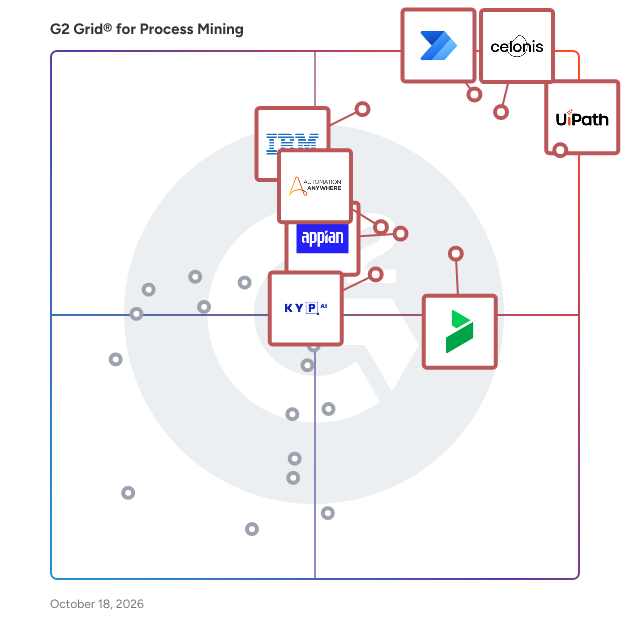
G2 Grid® for Process Mining Tools

G2 Grid® for Process Mining Tools plotting products by satisfaction and market presence

Highlighted products: Microsoft Power Automate, Celonis, UiPath Agentic Automation, IBM Process Mining, Bizagi, Appian, Automation Anywhere Agentic Process Automation, and UiPath Task Mining.

Underlying data: [Grid® JSON](https://www.g2.com/categories/process-mining-tools/grids.json?focus%5B%5D=microsoft-power-automate&focus%5B%5D=celonis&focus%5B%5D=uipath-agentic-automation&focus%5B%5D=ibm-process-mining&focus%5B%5D=bizagi&focus%5B%5D=appian&focus%5B%5D=automation-anywhere-agentic-process-automation&focus%5B%5D=uipath-task-mining)

Celonis

Celonis makes processes work — for people, companies, and the planet. Powered by process mining and AI, the Celonis Process Intelligence Platform integrates process data and business context to create a living digital twin of business operations. We enable thousands of companies worldwide to understand how their business actually runs and, together with their partners, build intelligent solutions that transform and continuously improve the way they operate — unlocking billions in value. Celonis is headquartered in Munich, Germany, and New York City, USA, with more than 20 offices worldwide. © 2026 Celonis SE. All rights reserved. Celonis and the Celonis “droplet” logo are trademarks or registered trademarks of Celonis SE in Germany and other jurisdictions. All other product and company names are trademarks or registered trademarks of their respective owners.

Average Rating: 4.5/5.0

Total Reviews: 286

How Do G2 Users Rate Celonis?

  • Ease of Use: 8.7/10 (Category avg: 8.9/10)
  • Execution Management: 8.5/10 (Category avg: 8.5/10)
  • Process Library: 8.2/10 (Category avg: 8.6/10)
  • Application Development: 8.2/10 (Category avg: 8.4/10)

Who Is the Company Behind Celonis?

  • Seller: Celonis
  • Company Website:
  • Year Founded: 2011
  • HQ Location: New York
  • Twitter: @Celonis
    17,449 Twitter followers
  • LinkedIn® Page: www.linkedin.com
    4,433 employees on LinkedIn®

Who Uses This Product?

  • Who Uses This: Senior Consultant, Analyst
  • Top Industries: Information Technology and Services, Oil & Energy
  • Company Size: 63% Large, 20% Small

What Do G2 Reviewers Say About Celonis?

AI-generated summary from verified user reviews

Pros
  • Users appreciate the ease of use with Celonis, enabling efficient analysis and intuitive insights from complex data.
  • Users appreciate the efficiency of Celonis in providing insightful analysis and improving business processes effectively.
  • Users value the powerful features of Celonis, enhancing efficiency and providing actionable insights for process management.
  • Users appreciate the user-friendly interface of Celonis, making navigation through its powerful features seamless and intuitive.
  • Users highlight Celonis for its powerful features, especially Gen-AI tools that enhance analysis and user experience.
Cons
  • Users find the learning curve steep for beginners, needing substantial training to effectively utilize Celonis' powerful features.
  • Users often find the complexity of Celonis overwhelming, with a steep learning curve and cumbersome features impacting usability.
  • Users are frustrated by missing features in Celonis, including restricted modules and unresponsive tools affecting usability.
  • Users note limited features in Celonis, particularly in the filter bar module and prompt refinement capabilities.
  • Users often experience slow performance during large dataset handling, impacting the overall efficiency of their analyses.

What Are Recent G2 Reviews of Celonis?

What Are G2 Users Discussing About Celonis?

Microsoft Power Automate

Optimize business processes across your organization with a cloud-first, comprehensive automation platform, powered by low-code and AI. Modernize and integrate operations at scale, maintain visibility and control with enterprise-grade governance, monitor and protect your data, and continuously improve with process insights.

Average Rating: 4.4/5.0

Total Reviews: 1,040

How Do G2 Users Rate Microsoft Power Automate?

  • Ease of Use: 8.3/10 (Category avg: 8.9/10)
  • Execution Management: 8.4/10 (Category avg: 8.5/10)
  • Process Library: 8.4/10 (Category avg: 8.6/10)
  • Application Development: 8.5/10 (Category avg: 8.4/10)

Who Is the Company Behind Microsoft Power Automate?

  • Seller: Microsoft
  • Company Website:
  • Year Founded: 1975
  • HQ Location: Redmond, Washington
  • Twitter: @microsoft
    13,091,739 Twitter followers
  • LinkedIn® Page: www.linkedin.com
    232,750 employees on LinkedIn®

Who Uses This Product?

  • Who Uses This: Software Engineer, RPA Developer
  • Top Industries: Information Technology and Services, Computer Software
  • Company Size: 34% Medium, 33% Large

What Do G2 Reviewers Say About Microsoft Power Automate?

AI-generated summary from verified user reviews

Pros
  • Users appreciate the ease of use of Microsoft Power Automate, making tool development simple and intuitive.
  • Users highlight the seamless integration with M365, enabling efficient workflow automation and saving significant time.
  • Users value the easy integrations with Office 365 apps, simplifying workflow design and automation of tasks.
  • Users value the seamless integrations with various applications, enhancing productivity and simplifying workflows effortlessly.
  • Users value the process automation capabilities of Power Automate, significantly saving time and reducing errors.
Cons
  • Users find the complexity of Microsoft Power Automate challenging, especially for beginners and large-scale workflows.
  • Users experience slow performance with Microsoft Power Automate, facing frustrations with loading times and lengthy workflows.
  • Users find the bugs and debugging issues in Power Automate frustrating, impacting usability and efficiency significantly.
  • Users find the high license fees of Microsoft Power Automate excessive, impacting overall value for less active users.
  • Users experience software bugs that lead to inconvenient workflow failures and slow troubleshooting processes in Power Automate.

What Are Recent G2 Reviews of Microsoft Power Automate?

What Are G2 Users Discussing About Microsoft Power Automate?

UiPath Agentic Automation

UiPath (NYSE: PATH) is a global leader in agentic automation, empowering enterprises to harness the full potential of AI agents to autonomously execute and optimize complex business processes. The UiPath Platform™ uniquely combines controlled agency, developer flexibility, and seamless integration to help organizations scale agentic automation safely and confidently. Committed to security, governance, and interoperability, UiPath supports enterprises as they transition into a future where automation delivers on the full potential of AI to transform industries. For more information, visit www.uipath.com. Agentic testing is an AI-powered approach to software quality assurance that leverages autonomous agents to generate, execute, and evolve tests across the entire testing lifecycle. By partnering intelligent agents with human testers, agentic testing dramatically increases test coverage, accelerates release cycles, improves system resilience, and enables continuous testing at enterprise scale. It empowers teams to shift from manual, reactive testing to proactive, scalable quality engineering—driving faster innovation with higher confidence.

Average Rating: 4.6/5.0

Total Reviews: 6,134

How Do G2 Users Rate UiPath Agentic Automation?

  • Ease of Use: 9.1/10 (Category avg: 8.9/10)
  • Execution Management: 9.4/10 (Category avg: 8.5/10)
  • Process Library: 9.4/10 (Category avg: 8.6/10)
  • Application Development: 9.6/10 (Category avg: 8.4/10)

Who Is the Company Behind UiPath Agentic Automation?

  • Seller: UiPath
  • Company Website:
  • Year Founded: 2005
  • HQ Location: New York
  • Twitter: @UiPath
    108,104 Twitter followers
  • LinkedIn® Page: www.linkedin.com
    5,142 employees on LinkedIn®

Who Uses This Product?

  • Who Uses This: RPA Developer, Software Engineer
  • Top Industries: Information Technology and Services, Computer Software
  • Company Size: 51% Large, 29% Medium

What Do G2 Reviewers Say About UiPath Agentic Automation?

AI-generated summary from verified user reviews

Pros
  • Users appreciate the ease of use of UiPath Agentic Automation, making it simple for developers to integrate and automate tasks.
  • Users appreciate the advanced AI capabilities of UiPath Agentic Automation, enhancing adaptability and seamless workflow integration.
  • Users value the seamless integration of AI with automation in UiPath Agentic Automation for handling complex tasks.
  • Users commend the automation ease of UiPath Agentic Automation, benefiting from its advanced AI capabilities and orchestration.
  • Users value the efficiency of UiPath Agentic Automation, enjoying streamlined automation solutions that save time and effort.
Cons
  • Users find the product expensive, with high licensing costs compared to other RPA tools, impacting overall value.
  • Users find the learning curve challenging, especially with agent training and required programming knowledge for non-tech individuals.
  • Users find the complexity of UiPath Agentic Automation overwhelming, especially when navigating advanced features and setups.
  • Users find the missing features in UiPath, such as modern folder access, hinder their overall experience.
  • Users feel that the pricing issues of UiPath Agentic Automation are too high, affecting repurchase decisions.

What Are Recent G2 Reviews of UiPath Agentic Automation?

What Are G2 Users Discussing About UiPath Agentic Automation?

IBM Process Mining

IBM Process Mining is an AI-powered solution that helps businesses of all sizes unlock value by improving visibility, efficiency, and compliance in business processes. It transforms your data into actionable insights, empowering decision-makers to optimize workflows, reduce inefficiencies, and drive strategic outcomes. IBM Process Mining creates a digital twin of your processes by analyzing data from multiple systems. This gives you a clear, real-time picture of how your processes function, helping you identify inefficiencies and bottlenecks. Powered by advanced AI and process intelligence, it delivers prescriptive recommendations that align with your goals—whether it’s cutting costs, improving compliance, or accelerating digital transformation. Why IBM Process Mining? - AI-powered process intelligence: Delivers actionable insights, pinpoints inefficiencies, identifies risks, and provides ROI-driven recommendations for smarter, data-backed decisions - 360° process visibility: Get a transparent, data-driven view of your entire operations. Eliminate guesswork with precise insights into how your processes actually function - Process simulation: Test potential process changes in a simulated environment before implementation. IBM Process Mining allows you to explore various improvement scenarios and understand their impact, helping you make risk-free decisions - Continuous KPI monitoring and alerts: Stay on top of key performance indicators with automated, customizable alerts that help you track issues before they escalate. Tailor KPIs to your industry-specific needs or align them with your internal metrics - Compliance and risk management: Stay ahead of evolving regulations with automated compliance tracking. Minimize manual efforts and reduce operational risks with a system that continuously monitors and updates your compliance status. IBM Process Mining has helped organizations worldwide streamline operations and improve outcomes. For example, Max Mara achieved a 90% reduction in customer service resolution times and reduced costs by 46% using IBM Process Mining. For teams of any skill level, IBM Process Mining is intuitive by design—delivering prescriptive recommendations and process simulations that enable faster, smarter decisions with minimal effort. IBM Process Mining is also available via the AWS Marketplace.

Average Rating: 4.7/5.0

Total Reviews: 156

How Do G2 Users Rate IBM Process Mining?

  • Ease of Use: 9.5/10 (Category avg: 8.9/10)
  • Execution Management: 9.4/10 (Category avg: 8.5/10)
  • Process Library: 9.6/10 (Category avg: 8.6/10)
  • Application Development: 9.7/10 (Category avg: 8.4/10)

Who Is the Company Behind IBM Process Mining?

  • Seller: IBM
  • Year Founded: 1911
  • HQ Location: Armonk, New York, United States
  • Twitter: @IBMSecurity
    74,660 Twitter followers
  • LinkedIn® Page: www.linkedin.com
    344,328 employees on LinkedIn®
  • Ownership: SWX:IBM

Who Uses This Product?

  • Who Uses This: Analyst, Developer
  • Top Industries: Information Technology and Services, Telecommunications
  • Company Size: 41% Small, 40% Medium

What Do G2 Reviewers Say About IBM Process Mining?

AI-generated summary from verified user reviews

Pros
  • Users appreciate the ease of use of IBM Process Mining, noting its intuitive visuals and low learning curve.
  • Users value the efficiency of IBM Process Mining, gaining quick insights that enhance workflow and operational performance.
  • Users value the ease of implementation of IBM Process Mining, facilitated by thorough documentation and smooth data connections.
  • Users praise the ease of learning with IBM Process Mining, highlighting its low learning curve for quick proficiency.
  • Users value the easy integrations of IBM Process Mining, enjoying seamless connections with existing systems for improved performance.
Cons
  • Users note a lack of features in IBM Process Mining, particularly in simulations and analytics functionality.
  • Users note the limitations of AI integration in IBM Process Mining, suggesting more functionalities are needed for improvement.

What Are Recent G2 Reviews of IBM Process Mining?

What Are G2 Users Discussing About IBM Process Mining?

Bizagi

Bizagi is an enterprise platform for business orchestration and AI automation, enabling organizations to design, automate, and run complex end-to-end processes that bring together people, AI agents, systems, and data. Unlike point AI tools, Bizagi is the operational layer where AI, processes, and enterprise systems work together: governed, auditable, and production-ready. Built on more than two decades of enterprise process expertise, Bizagi brings the depth of operational knowledge that newer AI platforms simply have not had time to develop. That foundation is what makes Bizagi's AI story credible where others are still experimental. Bizagi's native AI capabilities are built directly into the platform. AI Agents are reusable, GenAI-powered assistants configured in the AI Hub, capable of content generation, document analysis, classification, summarization, and more. They can be invoked from processes, interfaces, or other agents, and integrate via connectors and Model Context Protocol to reach internal and external systems. AI Workers automate repetitive tasks inside forms and workflows by analyzing rules, field history, and process context, operating in supervised or more autonomous modes and improving through reinforcement learning. Ask Ada, Bizagi's conversational analytics assistant, lets users query business data in natural language and receive answers, charts, and insights, all within Bizagi's role and permission model and grounded in both process data and enterprise documents through a built-in RAG knowledge layer. Governance is central, not optional. Bizagi runs on Microsoft Azure with Private OpenAI integration, keeping sensitive data within a secure perimeter. AI features require deliberate configuration and deployment. Generative AI capabilities are intentionally built into workflows rather than casually enabled, and Data Domains, Personas, and Bizagi's role model control precisely what any AI capability can access and how results can be used. Customers see results fast. Stone Coast Fund Services reduced processing time by 80% across more than 25,000 annual service requests, going live in six weeks. Bizagi's AI Ignite packages take organizations from zero to live AI Agents or AI Assistants in approximately seven weeks, combining software and professional services to de-risk early projects. With over 1,000 enterprise implementations across financial services, manufacturing, healthcare, and government, Bizagi is named in the 2025 Gartner Magic Quadrant for Business Orchestration and Automation Technologies (BOAT), Microsoft Certified for AI in Financial Services and Manufacturing, and a G2 leader across Agentic AI, AI Agents for Business Operations, BPM, and Digital Process Automation. Customers include DHL, Unilever, Caterpillar, and Old Mutual. For more information, visit bizagi.com.

Average Rating: 4.6/5.0

Total Reviews: 305

How Do G2 Users Rate Bizagi?

  • Ease of Use: 9.0/10 (Category avg: 8.9/10)
  • Execution Management: 8.8/10 (Category avg: 8.5/10)
  • Process Library: 9.1/10 (Category avg: 8.6/10)
  • Application Development: 8.3/10 (Category avg: 8.4/10)

Who Is the Company Behind Bizagi?

  • Seller: Bizagi
  • Company Website:
  • Year Founded: 1989
  • HQ Location: 1775 Tysons Blvd, 5th Floor, Tysons, VA, 22102
  • Twitter: @bizagi
    5,749 Twitter followers
  • LinkedIn® Page: www.linkedin.com
    440 employees on LinkedIn®

Who Uses This Product?

  • Who Uses This: SDET, Business Analyst
  • Top Industries: Information Technology and Services, Computer Software
  • Company Size: 45% Medium, 28% Large

What Do G2 Reviewers Say About Bizagi?

AI-generated summary from verified user reviews

Pros
  • Users appreciate the easy-to-use interface of Bizagi, enhancing their workflow with effective modeling and automation.
  • Users value the process automation features of Bizagi, significantly enhancing efficiency and customer satisfaction.
  • Users appreciate the automation capabilities of Bizagi, enhancing efficiency and delivering improved business results across processes.
  • Users value the efficiency of Bizagi, appreciating its speed and robust capabilities for process optimization and integration.
  • Users value the workflow management capabilities of Bizagi, facilitating optimization and collaboration for efficient processes.
Cons
  • Users face missing features in Bizagi, with limitations in the free version affecting their ability to collaborate effectively.
  • Users find that the performance issues with Bizagi can hinder coding efficiency, especially with larger diagrams.
  • Users experience slow performance with Bizagi, especially in complex processes and integration efforts that require excessive customization.
  • Users find the learning curve steep for advanced workflows in Bizagi, requiring more technical expertise than expected.
  • Users find the complexity of features in Bizagi can lead to confusion and challenges during upgrades.

What Are Recent G2 Reviews of Bizagi?

What Are G2 Users Discussing About Bizagi?

Appian

Appian is an enterprise AI process automation platform that helps organizations orchestrate, automate, and transform complex end-to-end workflows. The platform connects AI models, enterprise systems, data sources, digital workers, and human teams to accelerate operations, reduce operational costs, and manage enterprise risk. Built primarily for large enterprises and government entities, Appian supports mission-critical applications across core business functions like financial services, insurance, pharmaceuticals, and public sector operations. Key Features and Capabilities Deterministic Process Orchestration: Provides a structured workflow layer that coordinates AI agents, automated rules, legacy systems, and human workers to ensure predictable and reliable execution of enterprise tasks. Data Fabric Technology: Unifies enterprise data across disparate systems into a virtualized data model without needing to migrate or replicate underlying databases, delivering real-time operational context to AI agents and end users. Enterprise AI Control & Governance: Incorporates built-in guardrails, full auditability, and monitoring tools to maintain policy compliance, enforce row-level security, and eliminate unauthorized actions. Spec-Driven Development: Combines visual process modeling with AI-assisted application creation, allowing business analysts and developers to collaborate on visual plans and deploy applications with pre-configured scalability and high availability. Flexible AI Deployment: Supports a portfolio approach to digital workers by integrating native AI features, external frontier models, and traditional automation tools like business rules and Robotic Process Automation (RPA). By operating as an agility layer over existing legacy systems, the platform enables organizations to modernize operational software without undergoing disruptive core replacements. Built-in process intelligence allows teams to continually monitor performance metrics, pinpoint workflow bottlenecks, and optimize overall business efficiency.

Average Rating: 4.5/5.0

Total Reviews: 443

How Do G2 Users Rate Appian?

  • Ease of Use: 8.7/10 (Category avg: 8.9/10)
  • Execution Management: 7.2/10 (Category avg: 8.5/10)
  • Process Library: 7.7/10 (Category avg: 8.6/10)
  • Application Development: 6.9/10 (Category avg: 8.4/10)

Who Is the Company Behind Appian?

  • Seller: Appian
  • Company Website:
  • Year Founded: 1999
  • HQ Location: McLean, Virginia
  • Twitter: @Appian
    16,293 Twitter followers
  • LinkedIn® Page: www.linkedin.com
    2,652 employees on LinkedIn®

Who Uses This Product?

  • Who Uses This: Manager, Consultant
  • Top Industries: Financial Services, Banking
  • Company Size: 56% Large, 28% Medium

What Do G2 Reviewers Say About Appian?

AI-generated summary from verified user reviews

Pros
  • Users value the ease of use in Appian, allowing for seamless workflow automation without coding skills.
  • Users value the automation capabilities of Appian, allowing rapid development of workflows without coding expertise.
  • Users commend Appian for its fast application development through a comprehensive low-code platform and robust integrations.
  • Users appreciate the AI capabilities of Appian, enhancing efficiency through automation and intelligent content handling.
  • Users value the AI capabilities of Appian, enhancing efficiency through automation and improving overall user experience.
Cons
  • Users feel that Appian has limited features, especially in security enhancements and automation capabilities compared to competitors.
  • Users find Appian to be expensive compared to other low-code tools, making it challenging for small businesses.
  • Users find limited flexibility in Appian, facing restrictions on performance and dependence on database work for integrations.
  • Users find the complexity of Appian challenging, particularly in tailoring solutions and managing version control effectively.
  • Users find limited customization in Appian's interface, making it challenging to meet specific branding needs efficiently.

What Are Recent G2 Reviews of Appian?

What Are G2 Users Discussing About Appian?

Automation Anywhere Agentic Process Automation

Automation Anywhere Agentic Process Automation (APA) is an enterprise platform that orchestrates AI agents, RPA bots, APIs, documents, and human expertise as a single governed system of work. APA transforms what is possible with automation — orchestrating every instrument of work across every system, with execution grounded in process expertise, and end-to-end process governance across every agent, every step, and every decision. It turns individual capabilities into compounded business transformation. With the APA platform, you can optimize what already runs your business and expand into what has never been feasible before. What's inside the platform Process Reasoning Engine (PRE) — the decision layer. Goal-driven AI agents plan, act, adapt, and self-correct in real time as conditions change. Mozart Orchestrator — a unified composer that manages decisions, dependencies, context, and exceptions across agents, automations, documents, and APIs. AI Agent Studio — a low-code workspace for building AI agents on foundational models from Amazon Bedrock, Google Vertex AI, Azure OpenAI, OpenAI, and others. Automator AI — generative AI–powered automation development across any application, cloud or on-premises. Document Automation — processes unstructured documents at over 95% accuracy, and 5x faster with Cloud Extraction Service for large-scale extraction. Process Discovery — surfaces bottlenecks and identifies what to automate next. Automation Co-Pilot — triggers multi-step agentic workflows in natural language, inside the applications teams already use. Governance built in, not bolted on Every agent, action, and decision runs inside enterprise controls: fine-grained role-based access control (RBAC), AES-256 encryption at rest, TLS in transit, native audit logs with SIEM integration, and human-in-the-loop oversight. Automation Anywhere maintains SOC 1 Type 2, SOC 2 Type 2, ISO 27001, ISO 22301, and HITRUST certifications, and supports GDPR compliance. Proven in production 1,500+ live APA deployments, 400M+ automations run per year, and 1.8M+ unique AI agent executions across 26 global regions. Bancolombia — 1,300% ROI in the first year and a 50% increase in customer service efficiency JBS — $1M and 125,000 hours saved in IT Granite Telecom — $635,000 in monthly savings and 15,000 hours saved per month Ricoh — 500 days of operational time saved per month SoftBank Corp. — 85% reduction in recruitment hours Who it's for Enterprise operations, IT, finance, HR, customer service, and shared services teams in banking, insurance, healthcare, life sciences, manufacturing, telecommunications, and the public sector — wherever complex, cross-system work has to run reliably and be governed. Learn more at https://www.automationanywhere.com.

Average Rating: 4.5/5.0

Total Reviews: 4,094

How Do G2 Users Rate Automation Anywhere Agentic Process Automation?

  • Ease of Use: 8.9/10 (Category avg: 8.9/10)
  • Execution Management: 9.1/10 (Category avg: 8.5/10)
  • Process Library: 9.3/10 (Category avg: 8.6/10)
  • Application Development: 9.2/10 (Category avg: 8.4/10)

Who Is the Company Behind Automation Anywhere Agentic Process Automation?

  • Seller: Automation Anywhere
  • Company Website:
  • Year Founded: 2003
  • HQ Location: San Jose, CA
  • Twitter: @AutomationAnywh
    55,050 Twitter followers
  • LinkedIn® Page: www.linkedin.com
    2,327 employees on LinkedIn®

Who Uses This Product?

  • Who Uses This: RPA Developer, Software Engineer
  • Top Industries: Information Technology and Services, Computer Software
  • Company Size: 59% Large, 23% Medium

What Do G2 Reviewers Say About Automation Anywhere Agentic Process Automation?

AI-generated summary from verified user reviews

Pros
  • Users praise the ease of use in Automation Anywhere Agentic Process Automation for simplifying RPA bot creation and management.
  • Users value the ease of automating repetitive tasks with Automation Anywhere, enhancing productivity and efficiency effortlessly.
  • Users appreciate the efficiency of Automation Anywhere, highlighting its ease of use and significant impact on productivity.
  • Users value the automation ease of Automation Anywhere, enabling non-coders to effortlessly build bots and streamline tasks.
  • Users appreciate the intuitive interface of Automation Anywhere, making automation easy and enhancing overall efficiency.
Cons
  • Users find Automation Anywhere's pricing model to be expensive and complex, which can be challenging for small teams.
  • Users find the steep learning curve challenging, especially for beginners navigating advanced features and debugging workflows.
  • Users find the missing features of Automation Anywhere Agentic Process Automation frustrating, limiting their workflow capabilities.
  • Users experience software bugs causing issues like errors in automation and problems with browser extensions.
  • Users often face bot issues including complex debugging and integration challenges, affecting overall usability and performance.

What Are Recent G2 Reviews of Automation Anywhere Agentic Process Automation?

What Are G2 Users Discussing About Automation Anywhere Agentic Process Automation?

UiPath Task Mining

UiPath Task Mining enables you to analyze your employees’ desktop activities to determine the best automation and process improvement opportunities​. The product enables you to: - Capture the known: Empower your employees to capture variations of a known task and easily merge these into a comprehensive picture of the existing workflow—for end-to-end analysis and accelerated actionability ​ - Mine the unknown: Record your employees’ desktop activities and leverage AI to gain workforce insights and discover repetitive tasks that are suited for automation and process improvement​ Learn more at https://www.uipath.com/product/task-mining

Average Rating: 4.4/5.0

Total Reviews: 29

How Do G2 Users Rate UiPath Task Mining?

  • Ease of Use: 8.8/10 (Category avg: 8.9/10)
  • Execution Management: 8.6/10 (Category avg: 8.5/10)
  • Process Library: 8.2/10 (Category avg: 8.6/10)
  • Application Development: 8.8/10 (Category avg: 8.4/10)

Who Is the Company Behind UiPath Task Mining?

  • Seller: UiPath
  • Year Founded: 2005
  • HQ Location: New York
  • Twitter: @UiPath
    108,104 Twitter followers
  • LinkedIn® Page: www.linkedin.com
    5,142 employees on LinkedIn®
  • Ownership: NYSE: PATH

Who Uses This Product?

  • Top Industries: Financial Services, Information Technology and Services
  • Company Size: 50% Medium, 30% Large

What Do G2 Reviewers Say About UiPath Task Mining?

AI-generated summary from verified user reviews

Cons
  • Users face automation difficulties due to the unavailability of UiPath Task Mining on automation cloud dedicated.
  • Users find the lack of availability on automation cloud dedicated to be a significant limitation of UiPath Task Mining.

What Are Recent G2 Reviews of UiPath Task Mining?

NewgenONE Digital Transformation Platform

Transform your business with NewgenONE, an intelligent enterprise orchestration platform, featuring a suite of cutting-edge technologies—from task automation to mission-critical, content-rich applications and advanced workflow orchestration. Effortlessly integrate your existing systems and devices into a seamless ecosystem that ensures personalized, efficient experiences across the board. Build powerful applications at lightning speed with NewgenONE, a completely native low-code platform. Enjoy seamless scalability, robust security, and built-in governance and compliance, all while accelerating automation across your enterprise. Automate thousands of enterprise-wide processes and stay ahead of the competition with rapid, innovative solutions.

Average Rating: 4.5/5.0

Total Reviews: 89

How Do G2 Users Rate NewgenONE Digital Transformation Platform?

  • Ease of Use: 8.5/10 (Category avg: 8.9/10)
  • Execution Management: 10.0/10 (Category avg: 8.5/10)
  • Process Library: 10.0/10 (Category avg: 8.6/10)
  • Application Development: 10.0/10 (Category avg: 8.4/10)

Who Is the Company Behind NewgenONE Digital Transformation Platform?

  • Seller: Newgen
  • Year Founded: 1992
  • HQ Location: Mclean, VA
  • Twitter: @newgensoftware
    3,363 Twitter followers
  • LinkedIn® Page: www.linkedin.com
    5,434 employees on LinkedIn®

Who Uses This Product?

  • Top Industries: Banking, Financial Services
  • Company Size: 59% Large, 22% Medium

What Do G2 Reviewers Say About NewgenONE Digital Transformation Platform?

AI-generated summary from verified user reviews

Pros
  • Users value the end-to-end automation of NewgenONE, enabling seamless processes without extensive technical skills.
  • Users appreciate the end-to-end automation of NewgenONE, enhancing efficiency without requiring technical expertise.
  • Users value the comprehensive end-to-end automation features of NewgenONE, enhancing efficiency without requiring technical skills.
  • Users value the end-to-end automation features of NewgenONE, facilitating seamless digital transformation without requiring extensive technical knowledge.
  • Users value the easy-to-use cloud services of NewgenONE, enabling efficient automation and user management without technical skills.
Cons
  • Users face numerous bug issues that complicate setup and hinder the effectiveness of the NewgenONE platform.
  • Users frequently face numerous bugs and complicated setup processes that hinder their overall experience with NewgenONE.
  • Users find the setup process complicated, citing many bugs that hinder their experience with NewgenONE.
  • Users find the complex setup process challenging, with numerous bugs complicating the initial experience.
  • Users face difficult configuration challenges, particularly with setup and bugs that hinder smooth implementation.

What Are Recent G2 Reviews of NewgenONE Digital Transformation Platform?

What Are G2 Users Discussing About NewgenONE Digital Transformation Platform?

UiPath Process Mining

UiPath Process Mining is a Process Mining solution that transforms data from your IT systems into visual interactive dashboards, allowing you to see existing value decreases, bottlenecks, and discrepancies, as well as understanding the root-causes and possible risks.

Average Rating: 4.5/5.0

Total Reviews: 73

How Do G2 Users Rate UiPath Process Mining?

  • Ease of Use: 8.0/10 (Category avg: 8.9/10)
  • Execution Management: 8.0/10 (Category avg: 8.5/10)
  • Process Library: 8.3/10 (Category avg: 8.6/10)
  • Application Development: 7.8/10 (Category avg: 8.4/10)

Who Is the Company Behind UiPath Process Mining?

  • Seller: UiPath
  • Year Founded: 2005
  • HQ Location: New York
  • Twitter: @UiPath
    108,104 Twitter followers
  • LinkedIn® Page: www.linkedin.com
    5,142 employees on LinkedIn®
  • Ownership: NYSE: PATH

Who Uses This Product?

  • Who Uses This: RPA Developer, Senior Software Engineer
  • Top Industries: Information Technology and Services, Computer Software
  • Company Size: 40% Large, 35% Small

What Do G2 Reviewers Say About UiPath Process Mining?

AI-generated summary from verified user reviews

Pros
  • Users highlight the ease of use of UiPath Process Mining, making tasks straightforward and efficient.
  • Users value the detailed analysis on automation opportunities provided by UiPath Process Mining for improved efficiency.
  • Users praise the great customer support of UiPath Process Mining, enhancing their overall experience and satisfaction.
  • Users value the easy integrations of UiPath Process Mining, enhancing their data management capabilities seamlessly.
  • Users benefit from the easy data integration with UiPath Process Mining, enhancing their workflow efficiency.
Cons
  • Users often face complexity in setup and integration, which leads to suboptimal results in their processes.
  • Users find the complex UI confusing, indicating a need for improved features for better usability.
  • Users experience difficult setup with UiPath Process Mining, which complicates integration and usage.
  • Users find insufficient resources hinder data analysis, making the process more challenging and less efficient.
  • Users find the lack of features in UiPath Process Mining limits its usability and creates confusion.

What Are Recent G2 Reviews of UiPath Process Mining?

What Are G2 Users Discussing About UiPath Process Mining?

Tungsten TotalAgility

The Industry’s Only Low‑Code, Integrated, End‑to‑End Intelligent Automation Solution Tungsten TotalAgility is a powerful all-in-one solution that combines document and process intelligence using the industry's leading capture, OCR, and process orchestration technology. Harness the Tungsten Intelligent Automation Platform, Tungsten TotalAgility, to go beyond AI-powered RPA by unlocking document intelligence, connecting disparate systems, and orchestrating human and digital workers to execute and automate workflows across your high-value business processes. • Document Intelligence: Apply cognitive capture and artificial intelligence to unstructured data to  automate and extract information and unlock data insights. • Process Orchestration: Orchestrate digital workflows in collaboration with users, systems , and data. • Connected Systems: Bring together your critical business systems— enterprise applications, legacy systems, mobile, chatbots, and more—across internal and external business processes. :: Successful Organizations Rely on TotalAgility :: Tungsten TotalAgility® streamlines building and deploying intelligent process automation so you can expand human and digital workforce capacity. Receive, execute, route, and report on workflow tasks from a single platform. Why customers choose TotalAgility? • Industry-leading document intelligence: Our intelligent document processing technology processes documents and data with the highest accuracy and speed. • Low-code automation: Powerful tools to build, deploy and accelerate enterprise automation. • End-to-end business process handling: A central intelligent automation platform to handle dynamic tasks, trigger automated rules and deploy on-demand workforce capacity. • Mobile engagement: Deliver enhanced customer experiences across any channel and any device.

Average Rating: 4.3/5.0

Total Reviews: 42

How Do G2 Users Rate Tungsten TotalAgility?

  • Ease of Use: 8.8/10 (Category avg: 8.9/10)
  • Execution Management: 9.4/10 (Category avg: 8.5/10)
  • Process Library: 7.8/10 (Category avg: 8.6/10)
  • Application Development: 10.0/10 (Category avg: 8.4/10)

Who Is the Company Behind Tungsten TotalAgility?

  • Seller: Tungsten Automation
  • Year Founded: 1985
  • HQ Location: Denver, CO
  • Twitter: @TungstenAI
    6,445 Twitter followers
  • LinkedIn® Page: www.linkedin.com
    1,599 employees on LinkedIn®

Who Uses This Product?

  • Top Industries: Banking, Information Technology and Services
  • Company Size: 53% Large, 31% Medium

What Are Recent G2 Reviews of Tungsten TotalAgility?

What Are G2 Users Discussing About Tungsten TotalAgility?

Apromore

Apromore from Salesforce: Leading Process Intelligence and AI-Driven Business Process Improvement Cutting-Edge Technology Apromore from Salesforce is the culmination of over a decade of advanced research in process mining and intelligence, leveraging Agentic AI to deliver unparalleled insights into business processes. Developed in collaboration with The University of Melbourne and leading global research labs, Apromore boasts some of the most sophisticated process mining algorithms available today. Our platform enables organizations to seamlessly uncover inefficiencies, compliance violations, and opportunities for improvement across their entire operation. Enterprise-Grade Performance Apromore is trusted by industry leaders across sectors such as finance, healthcare, IT service management, and manufacturing. Our robust platform supports the complete spectrum of process mining functionalities, including automated process discovery, conformance checking, performance analysis, and simulation. Whether you’re in banking, insurance, or logistics, Apromore empowers you to optimize operations, reduce costs, and enhance customer experience. Intelligent Process Twin Apromore goes beyond traditional process mining by integrating AI-driven capabilities that transform business process management. Our platform introduces the concept of the Intelligent Process Twin, enabling organizations to simulate changes, monitor ongoing operations in real-time, and predict potential issues before they occur. This proactive approach helps businesses stay ahead in a rapidly changing environment. Flexible Pricing Apromore offers a simple, capacity-based pricing model that scales with your needs. With no limitations on the number of processes analyzed or user accounts created, our pricing structure is designed to support organizations of all sizes, ensuring maximum value and flexibility. No-Code, Easy to Use Our platform is designed with a no-code interface, making it accessible to users across the organization, regardless of technical expertise. Apromore’s intuitive UI ensures rapid deployment and quick time-to-value, enabling teams to focus on insights rather than the complexity of the tool. AI-Powered Insights With features like predictive and prescriptive process optimization, Apromore not only helps you understand your current processes but also provides actionable recommendations for future improvements. Our platform’s AI capabilities ensure that you’re not just reacting to issues but proactively improving your operations. For more information, visit www.apromore.com

Average Rating: 4.7/5.0

Total Reviews: 26

How Do G2 Users Rate Apromore?

  • Ease of Use: 8.6/10 (Category avg: 8.9/10)
  • Execution Management: 8.9/10 (Category avg: 8.5/10)
  • Process Library: 7.4/10 (Category avg: 8.6/10)
  • Application Development: 7.2/10 (Category avg: 8.4/10)

Who Is the Company Behind Apromore?

Who Uses This Product?

  • Company Size: 41% Large, 34% Medium

What Do G2 Reviewers Say About Apromore?

AI-generated summary from verified user reviews

Pros
  • Users appreciate the user-friendly interface of Apromore, facilitating easy navigation and quick insights for business processes.
  • Users appreciate the user-friendly interface of Apromore, facilitating easy process mining for users of all technical levels.
  • Users admire the user-friendly visualization design of Apromore, enabling easy creation and understanding of process maps.
  • Users appreciate the efficiency of Apromore, enabling quick insights and results in a user-friendly, no-code platform.
  • Users enjoy the user-friendly interface and seamless integration of Apromore, making process analysis quick and efficient.
Cons
  • Users note that Apromore is lacking features, particularly in automation and navigation, which can hinder their experience.
  • Users find the complex UI of Apromore challenging, particularly with cumbersome filter application steps.
  • Users experience a steeper learning curve for complex analyses, requiring technical knowledge despite a no-code promise.
  • Users face automation difficulties with Apromore due to limited advanced capabilities and fewer out-of-the-box integrations.
  • Users find the complex processes of Apromore frustrating due to cumbersome steps for applying filters and slow analyses.

What Are Recent G2 Reviews of Apromore?

What Are G2 Users Discussing About Apromore?

PIX RPA

PIX RPA is an intelligent automation platform that combines RPA, AI, and BPM to help businesses automate processes, improve efficiency, and scale operations. Advantages of PIX RPA Platform: - Built-in IDP for intelligent document automation; - Enterprise-ready platform with robust scalability; - PROM Framework for flexible process modeling; - Integrated AI support for smarter decision-making; - Centralized orchestration with BPM tools; - Multi-platform compatibility for diverse systems. PIX Platform Components: - PIX Studio: Tool for creating and designing software robots; - PIX Robot: Execution module that runs automated algorithms; - PIX Master (On-premise & Cloud): Administration console to manage multiple robots and processes; - PIX Runner: Application for running and operating robots on a user’s device; - PIX Converter: Tool for automated migration of UiPath projects to PIX RPA; - PIX Analytics Module: A new component that enables real-time monitoring of automation results and evaluation of PIX RPA implementation impact through advanced data visualizations and performance insights; - PIX Smart Module: Intelligent add-on that enhances automation capabilities through AI-driven decision-making, adaptive process optimization, and predictive analytics. Key Benefits: - Faster automation speed than traditional methods; - Accelerated process execution with improved quality; - Enhanced compliance and reduced operational risks; - Higher employee satisfaction through task automation; - Quick ROI with scalable and intelligent automation.

Average Rating: 4.8/5.0

Total Reviews: 233

How Do G2 Users Rate PIX RPA?

  • Ease of Use: 9.1/10 (Category avg: 8.9/10)
  • Execution Management: 8.9/10 (Category avg: 8.5/10)
  • Process Library: 8.3/10 (Category avg: 8.6/10)
  • Application Development: 9.3/10 (Category avg: 8.4/10)

Who Is the Company Behind PIX RPA?

Who Uses This Product?

  • Who Uses This: Desarrollador, Estudiante
  • Top Industries: Computer Software, Information Technology and Services
  • Company Size: 68% Small, 19% Medium

What Do G2 Reviewers Say About PIX RPA?

AI-generated summary from verified user reviews

Pros
  • Users appreciate the ease of use of PIX RPA, highlighting its intuitive interface and quick setup for bot creation.
  • Users appreciate the efficiency of automation in PIX RPA, simplifying repetitive tasks and enhancing productivity.
  • Users love the intuitive interface of PIX RPA, making bot creation fast and accessible without extensive coding.
  • Users appreciate the friendly and easy-to-use interface of PIX RPA, enhancing their overall experience and satisfaction.
  • Users appreciate the intuitive visual editor and AI features of PIX RPA, enabling quick and complex automation tasks.
Cons
  • Users note the missing features in PIX RPA, particularly in advanced AI capabilities and customization options.
  • Users note the limited integration issues with PIX RPA, particularly regarding support for various AI models.
  • Users note the limited features of PIX RPA, particularly in AI capabilities and multi-step planning integrations.
  • Users note limited features in PIX RPA, especially regarding AI capabilities and documentation for niche integrations.
  • Users find the difficult learning curve of PIX RPA challenging, especially transitioning from Python to its graphical interface.

What Are Recent G2 Reviews of PIX RPA?

ARIS

As enterprises adopt Agentic AI, they face a critical challenge: deploying autonomous systems that are both powerful and trustworthy. ARIS is the answer. ARIS is the process intelligence platform enterprises rely on to understand, deploy, and govern Agentic AI. By unifying Business Process Management and Process Mining, we give AI agents the process context they need to operate effectively: Acting within defined business processes, regulatory requirements, and enterprise guardrails, rather than guessing at how the business actually runs. AI agents alone lack the business logic to understand the companies and processes they're meant to automate. ARIS closes that gap, pairing over 30 years of process expertise with modern AI to help you unlock productivity and innovation while maintaining transparency, accountability, and operational resilience. It starts with a governed digital twin of your organization: Processes, roles, rules, controls, and systems brought together into a single trusted foundation. From there, Process Mining connects that foundation to real execution data, showing how work actually flows across systems, people, and agents, rather than how it was originally documented. That combination gives you a live, accurate picture to build on, instead of a static model that goes stale the moment operations change. From process discovery to deployment, monitoring, and governance, ARIS gives your entire organization the intelligence to transform operations, mitigate risk, and stay ahead of compliance demands. We work alongside AI and research partners to keep pushing what's possible with generative and agentic AI on top of that process foundation. Recognized by Gartner and Forrester as a leader in Process Intelligence and Process Mining, ARIS is trusted by thousands of enterprises across finance, manufacturing, energy, utilities, and beyond - helping them adopt Agentic AI with confidence rather than guesswork.

Average Rating: 4.3/5.0

Total Reviews: 163

How Do G2 Users Rate ARIS?

  • Ease of Use: 8.3/10 (Category avg: 8.9/10)
  • Execution Management: 8.1/10 (Category avg: 8.5/10)
  • Process Library: 8.0/10 (Category avg: 8.6/10)
  • Application Development: 7.7/10 (Category avg: 8.4/10)

Who Is the Company Behind ARIS?

  • Seller: ARIS
  • Company Website:
  • Year Founded: 2024
  • HQ Location: Saarbrücken, Saarland
  • LinkedIn® Page: www.linkedin.com
    424 employees on LinkedIn®

Who Uses This Product?

  • Top Industries: Information Technology and Services, Banking
  • Company Size: 53% Large, 29% Medium

What Do G2 Reviewers Say About ARIS?

AI-generated summary from verified user reviews

Pros
  • Users find the ease of learning ARIS offers greatly enhances their ability to configure and utilize the tool efficiently.
  • Users value the ease of use in ARIS, benefiting from intuitive data handling and user-friendly configuration.
  • Users value the efficiency of ARIS, noting its easy data loading and time-saving features across projects.
  • Users highlight the low code ease of ARIS, making configurations simple and accessible for non-coders.
  • Users appreciate the no-coding capabilities of ARIS, finding it easy to configure and manage their projects efficiently.
Cons
  • Users face bugs and inconsistencies in ARIS, leading to confusion and complications during data management and reporting.
  • Users find the complexity of data handling in ARIS frustrating, impacting their overall workflow and efficiency.
  • Users find the complex processes of ARIS frustrating, impacting usability and data management efficiency.
  • Users find the lack of features in ARIS limits their ability to efficiently manage processes and reports.
  • Users find the data overwriting process unintuitive, leading to challenges in managing and interlinking processes efficiently.

What Are Recent G2 Reviews of ARIS?

What Are G2 Users Discussing About ARIS?

WorkHQ Platform

SS&C Blue Prism WorkHQ unifies people, AI agents, digital workers and the systems they depend on in one governed platform, replacing disconnected automation tools with a single place to design, run and oversee enterprise work. WorkHQ succeeds the SS&C Blue Prism Intelligent Automation Platform, carrying its automation capabilities forward and adding agentic orchestration and AI governance. Core Value Proposition: WorkHQ addresses three problems that surface when enterprises scale automation and AI: work is fragmented across disconnected tools and teams, AI tools lack coordination and enterprise control, and leaders don't have an auditable view of what automated work is actually doing. WorkHQ acts as the control plane for the agentic enterprise, coordinating every kind of worker in one environment, with governance, security and compliance embedded into every workflow rather than layered on afterward. Key Capabilities: - Unified Work Orchestration: WorkHQ coordinates tasks across AI agents, digital workers, APIs and people in a single environment, routing work, managing handoffs and resolving exceptions. Teams see all work in one place instead of reconciling activity across separate automation, BPM and AI tools. - Governance Embedded in Every Workflow: Governance, security and compliance are built into the workflow layer, and the SS&C AI Gateway gives enterprises control over how AI models are accessed and used. Every action and decision is auditable, so AI operates within clear, controlled boundaries that regulated organizations can evidence. - Hybrid by Design: WorkHQ extends existing RPA and business process management investments rather than replacing them. Digital workers already in production, SS&C Blue Prism Chorus and third-party systems connect into agentic workflows, so organizations can adopt agentic automation without a rip-and-replace program. - Low-Code Design and Prebuilt Integration: A drag-and-drop designer lets teams sequence APIs, AI capabilities, digital workers and business logic without deep technical expertise, supported by hundreds of prebuilt connectors. Workflows and agents are modular and reusable, so patterns that work in one part of the business can be applied across it. WorkHQ vs. Alternatives: Standalone RPA tools automate individual tasks but do not coordinate work across agents, people and systems. AI agent frameworks provide agent building blocks but leave orchestration, governance and audit to be assembled separately. WorkHQ provides all of them natively, which removes the integration work and the gaps in oversight that hold automation programs back. It is built for complex regulated operations running on hundreds of systems, including the legacy infrastructure that is not going away. Who Should Use WorkHQ: WorkHQ serves transformation leaders, operations teams and automation centers of excellence in organizations where work spans many systems and teams. SS&C Blue Prism customers span financial services, healthcare, insurance, public sector, manufacturing, retail, transportation and logistics, telecommunications, and energy and utilities. The platform is proven in the most heavily regulated of those, where every automated action has to be governed, evidenced and audited, and the same controls apply wherever it runs. WorkHQ scales from a first agentic workflow to thousands of agents. Outcome: WorkHQ helps enterprises operationalize AI safely with full agentic workflow control, coordinating people, agents and digital workers in one place. SS&C runs the platform across its own business, with more than 4,000 digital workers and over 50 AI agents in production, processing times down by up to 95% in key workflows and more than $200 million in savings. Alberta Health Services has automated the equivalent of more than 250 years of work. Trygg-Hansa reduced the time to process fast-tracked insurance claims by 95%.

Average Rating: 4.5/5.0

Total Reviews: 347

How Do G2 Users Rate WorkHQ Platform?

  • Ease of Use: 8.9/10 (Category avg: 8.9/10)
  • Execution Management: 9.3/10 (Category avg: 8.5/10)
  • Process Library: 9.0/10 (Category avg: 8.6/10)
  • Application Development: 8.6/10 (Category avg: 8.4/10)

Who Is the Company Behind WorkHQ Platform?

  • Seller: SS&C Blue Prism
  • Year Founded: 2001
  • HQ Location: Windsor, CT
  • Twitter: @SSCTechnologies
    4,796 Twitter followers
  • LinkedIn® Page: www.linkedin.com
    1,099 employees on LinkedIn®
  • Ownership: NASDAQ: SSNC

Who Uses This Product?

  • Who Uses This: RPA Developer, Software Engineer
  • Top Industries: Information Technology and Services, Computer Software
  • Company Size: 55% Large, 27% Medium

What Do G2 Reviewers Say About WorkHQ Platform?

AI-generated summary from verified user reviews

Pros
  • Users appreciate the ease of use of SS&C Blue Prism, facilitating efficient debugging and customization.
  • Users value the easy automation capabilities of SS&C Blue Prism, enabling efficient bot creation and management.
  • Users find the automation ease of SS&C Blue Prism enhances productivity and simplifies implementation significantly.
  • Users commend the efficiency of the SS&C Blue Prism platform, enabling seamless automation and quick adaptations in business processes.
  • Users value the user-friendly interface and powerful automation capabilities of SS&C Blue Prism, enhancing efficiency and scalability.
Cons
  • Users struggle with a steep learning curve when using the SS&C Blue Prism platform, especially without prior RPA knowledge.
  • Users feel the platform lacks missing features, such as more automation examples and better application compatibility.
  • Users find learning and implementing advanced features in SS&C Blue Prism complex, impacting overall usability and efficiency.
  • Users find the cost of the SS&C Blue Prism Intelligent Automation Platform to be a significant barrier, especially for small businesses.
  • Users experience integration issues with browsers, causing delays and requiring frequent checks on bot performance.

What Are Recent G2 Reviews of WorkHQ Platform?

What Are G2 Users Discussing About WorkHQ Platform?

Bijou Barry
BB
Researched and written by Bijou Barry
Updated October 3, 2024

Learn More About Process Mining Tools

What are Process Mining Tools?

At its core, process mining tools help businesses get a grasp of their processes to better understand what they are and how they are performing. When one digs into the roots of any given business, the underlying structures will often be supported by processes or the workflows and business functions that underpin operations. Processes are the steps and tasks taken to get a job done. The best processes are easily repeatable and well-documented. However, it is not always easy to get a handle on all the processes going on, as they can be distributed across individuals, teams, and systems. This is where process mining software comes in. This software can help businesses determine how to optimize their processes through automation or by making these processes more efficient. Process mining tools analyze logs from various business systems, such as CRM, ERP, and purchasing software. From there, business leaders can make informed, data-driven decisions about their processes and workflows.

Processes can quickly get out of hand. For example, one person might input data about a customer in a CRM, another might port that data out into financial software, and yet another colleague might analyze that data to derive insights. With process mining software implemented, businesses can get visibility into how the various disparate tasks combine into processes and how well they work together.

Traditionally, process mining tools are used by mid-market and enterprise-sized companies. Larger companies tend to have more siloed departments, and when business actions need to become integrated to be efficient, process mining software is an easy solution. However, small businesses can also reap the benefits of RPA technology, as they have processes as well.

What Types of Process Mining Tools Exist?

Process discovery

Process mining software can focus on process discovery. These tools are simpler and allow for an overview of processes. Some, however, use more advanced techniques, like artificial intelligence, to discover and group together processes.

Conformance checking

Conformance checking is a process mining method used to check compliance. It compares event logs or an actual process with the existing reference model, or target model, for that process. This technique determines whether the actual process corresponds to the target process.

Process reengineering

Process reengineering involves changing the process model. It includes redesigning core business processes to dramatically improve productivity, cycle times, and quality. These tools focus on the analysis and design of workflows and processes.

What are the Common Features of Process Mining Tools?

The following are some core features within process mining solutions that can help users in many ways:

Process management: For the software to process processes, robust integration capabilities with business tools, such as CRM and ERP software, are critical. This software can allow users to access and understand different processes based on their roles. This will give users the ability to find bottlenecks and identify gaps between how things should be and how they are in reality.

Process analysis: Management is the first step, and analysis is the second. Process mining tools allow users to conduct real-time process analysis, giving them process notation capabilities and the ability to define business entities and responsibilities for given processes.

Automation: Automation is not the only goal of process mining, but it often is the result. Many of these tools integrate with RPA technology, either natively or via third-party integrations. Some of them allow customers, partners, and third-party developers to create applications on top of business processes.

What are the Benefits of Process Mining Tools?

A few benefits of process mining platforms are mentioned below:

Discovery: The proliferation of systems and applications can lead to the proliferation of confusion, but it need not be so. Process mining can help discovery processes by analyzing log data produced by applications. This software could integrate with CRM software, for example, to help one get a better sense of how efficient and effective a business’ customer relationship management is. The power of this technology is that it can integrate with a host of different types of tools and, as such, can give a bird's-eye view of all processes and how they work together.

Monitoring: Once processes have been discovered, the real work can begin. Process mining systems can provide an end-to-end view of processes across the business from a host of different applications and systems. This view can show which processes are taking up the most time and resources, whether that be financial output or human capital.

Optimization: Viewing processes is not a goal in and of itself. The point and purpose of monitoring processes is to optimize them. This can take the form of automation (through robotic process automation (RPA) software, for example) or ensuring that the humans involved can reach their full potential. 

Who Uses Process Mining Tools?

Sales leaders: Lead-to-order processes can take a long time, increasing the payback time of marketing investments. Companies can uncover the reasons behind this issue and take action to reduce sales cycle time.

IT professionals: IT systems may not provide the correct solution on their first try. Process mining tools can produce data-driven insights to increase the first-time resolution rate.

Finance officers: Mistakes and manual interventions in purchase-to-pay processes increase lead time. Process mining can help companies find compatible areas of automation.

What are the Alternatives to Process Mining Tools?

Alternatives to process mining tools can replace this type of software, either partially or completely:

Robotic process automation (RPA) software: RPA software solutions sometimes have process mining capabilities baked in. Therefore, businesses that already implement RPA bots should first check if they have process mining features.

Software Related to Process Mining Tools

Related solutions that can be used together with process mining software include:

Business process management (BPM) software: A business can implement both process mining software and business process management (BPM) software simultaneously to perform different functions of process automation. However, a business might also decide to go with one or the other. BPM software, which has been around for some time, is used to analyze processes at a very high level, while process mining tools go into more granular detail. 

Business process simulation software: Similar to process mining, business process simulation software allows businesses to assess business processes. This software provides more robust tools for simulating these processes and focuses on testing and validating what-if scenarios. It provides tools for creating models as well as visualizing the models and outcomes. It is typically used by executives, managers, and external consultants looking to get a better understanding of a company’s business processes. 

Challenges with Process Mining Tools

Software solutions can come with their own set of challenges. It must always be kept in mind that process mining, like any other digital transformation or automation-related solution, is not a magic bullet. Therefore, users must keep these pitfalls and issues in mind:

Integrations: One concern that users of process mining software should be aware of is the type of software that process mining tools can integrate with to automate processes. Often, companies will deploy process mining tools on top of ERP systems, contact center infrastructure tools, or accounting software, among many other types of software. If the software that a business is hoping to automate processes within is not compatible with the process mining tool of their choice, then there is no point in purchasing that specific product. 

Compatibility: Buyers should go as far as to ensure that the process mining solution can run on either Windows or macOS or any other operating system they may run at their business. Most process mining tools are platform agnostic and can work across many different software vendors; however, it is always best to double-check when buying the software.

Unexpected costs: Just as with any software, it is essential to consider all the potential costs involved. With process mining software, users might discover that they end up spending more than they thought they would.

Which Companies Should Buy Process Mining Tools?

Each industry can benefit in some way from process mining software and implementing an automation strategy. Here are a couple of industry examples where the benefits of process mining are paying off:

Healthcare: Shifts at the hospital can be mentally and physically draining, and the last thing a med tech needs is to stay up on repetitive, low-priority tasks. Process mining software can help healthcare leaders take account of processes and ensure that processes are optimized or automated as needed.

Telecommunications: Telecommunications companies are always looking to improve their processes and bring the best and fastest services to their customers. Process mining can help them better understand their processes.

How to Buy Process Mining Tools

Requirements Gathering (RFI/RFP) for Process Mining Software 

When looking to deploy a process mining solution, it is crucial to start from the beginning. In other words, a business should begin by conducting an overview of business processes. If a company is just starting out and looking to purchase its first process mining software, or wherever a business is in its buying process, g2.com can help select the best option. As mentioned above, buyers should also consider the related and ancillary software and services they might want to deploy alongside process mining, such as RPA or robotic process automation (RPA) consultancy services

Taking a holistic overview of the business systems and processes will help businesses identify pain points. This will help them figure out which software to buy (e.g., whether it can effectively handle the business’ processes) and develop buying criteria. 

A request for information (RFI) can be useful, especially if the deployment is large in scale and scope. By producing this, a business can be well-placed to gather information from sellers. Depending on the scope of the deployment, it might be helpful to produce an RFI, a one-page list with a few bullet points describing what is needed from process mining software.

Compare Process Mining Software Products

Create a long list

Evaluating vendors should start with a long list, which will help determine whether a given solution is a good fit. Buyers should create a broad list of tools that align with their business goals. So that there is a level playing field, it is important to ask the same set of questions to each seller.

Create a short list

Next, a whittling down should take place. Through pointed questions, demos, and trials, one can go from a long list to a short one. Although this will differ for each business and use case, three to five products is typically a good number. With this list in hand, businesses can produce a matrix to compare the features and pricing of the various solutions.

Conduct demos

To ensure a thorough comparison, the user should demo each solution on the short list using the same use case and datasets. This will allow the business to evaluate like-for-like and see how each vendor compares against the competition.

Selection of Process Mining Software 

Choose a selection team

Before getting started, it's crucial to create a winning team that will work together throughout the entire process, from identifying pain points to implementation. The software selection team should consist of organization members with the right interests, skills, and time to participate in this process. A good starting point is to aim for three to five people who fill roles such as the main decision maker, project manager, process owner, system owner, or staffing subject matter expert, as well as a technical lead, IT administrator, or security administrator. In smaller companies, the vendor selection team may be smaller, with fewer participants, multitasking, and taking on more responsibilities.

Negotiation

Just because something is written on a company’s pricing page does not mean it is final, although some companies will not budge. It is imperative to open up a conversation regarding pricing and licensing. For example, the vendor may be willing to give a discount for multi-year contracts or to recommend the product to others.

Final decision

After this stage, and before going all in, it is recommended to roll out a test run or pilot program to test adoption with a small sample size of users. If the tool is well used and well received, the buyer can be confident that the selection was correct. If not, it might be time to go back to the drawing board.

How much do Process Mining Tools cost?

Generally, process mining tools require a license (priced either annually or monthly). In addition, one often pays extra per bot, with unattended bots being more expensive than attended ones. 

Return on Investment (ROI)

Since process mining might take the place of humans’ tasks (or their jobs), one must analyze and compare the cost of automation versus having humans do the same tasks. Although the extent to which the software impacts the company’s bottom line is a key indicator of success, it should not be the only one. One must also investigate the ethical ROI, or the moral impact job displacement will have.

Implementation of Process Mining Tools

Who is Responsible for Process Mining Tool Implementation?

Although some process mining solutions require significant IT support, most can be deployed directly by business leaders. These business leaders will have the best visibility into their team’s processes. For more complex deployments, support from the IT team will likely be needed. The IT team might also be involved with security. Since process mining software can access the most sensitive information, IT might get involved to test how secure the software is.

What Does the Implementation Process Look Like for Process Mining Tool?

When one seeks to automate their processes, they must start with a deep analysis of those processes. It need not start with expensive software or an external team. It can begin with pen and paper or on a whiteboard, digital or otherwise. The company, or team, can pinpoint the most broken processes or those ripe for automation, such as the most repetitive ones. Only after this hard work can the actual automation begin.

When Should You Implement Process Mining Tool?

Many solutions provide free trials to test the technology's effectiveness. This can help a business determine whether or not the solution is right for them. If the decision has been made to deploy process mining, it is key that it does not get siloed into one department; otherwise, its very deployment may lead to further complication and confusion around processes.