2026 Best Software Awards are here!See the list

Best Enterprise Video Conferencing Software

Nana Serwah Nkrahene
NSN
Researched and written by Nana Serwah Nkrahene

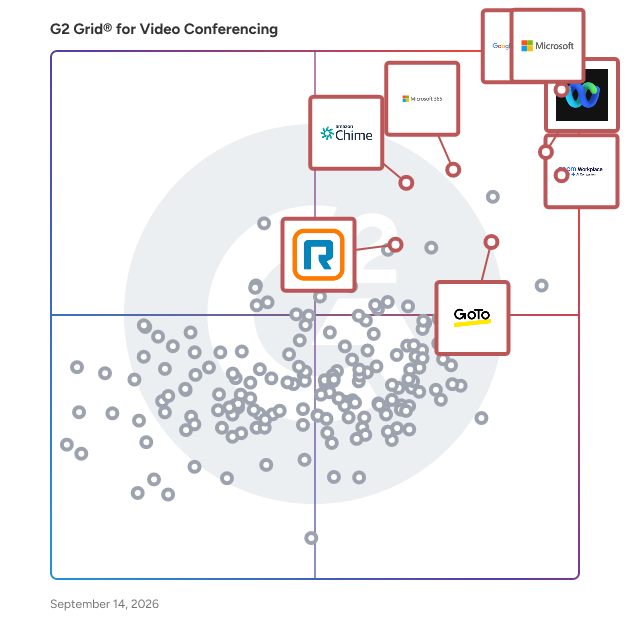
Products classified in the overall Video Conferencing category are similar in many regards and help companies of all sizes solve their business problems. However, enterprise business features, pricing, setup, and installation differ from businesses of other sizes, which is why we match buyers to the right Enterprise Business Video Conferencing to fit their needs. Compare product ratings based on reviews from enterprise users or connect with one of G2's buying advisors to find the right solutions within the Enterprise Business Video Conferencing category.

In addition to qualifying for inclusion in the Video Conferencing Software category, to qualify for inclusion in the Enterprise Business Video Conferencing Software category, a product must have at least 10 reviews left by a reviewer from an enterprise business.

Show More
Show Less

G2 takes pride in showing unbiased reviews on user satisfaction in our ratings and reports. We do not allow paid placements in any of our ratings, rankings, or reports. Learn about our scoring methodologies.

1 filter applied
Clear All

48 Listings in Enterprise Video Conferencing Software Available

(17,817)4.4 out of 5
4th Easiest To Use in Video Conferencing software
View top Consulting Services for Microsoft Teams
Save to My Lists
  • Overview
    Expand/Collapse Overview
  • Product Description
    How are these determined?Information
    This description is provided by the seller.

    Microsoft Teams is a comprehensive collaboration platform developed by Microsoft, designed to streamline communication and teamwork within organizations. It integrates chat, video conferencing, file s

    Users
    • Software Engineer
    • Project Manager
    Industries
    • Information Technology and Services
    • Computer Software
    Market Segment
    • 40% Enterprise
    • 38% Mid-Market
  • Pros and Cons
    Expand/Collapse Pros and Cons
  • Microsoft Teams Pros and Cons
    How are these determined?Information
    Pros and Cons are compiled from review feedback and grouped into themes to provide an easy-to-understand summary of user reviews.
    Pros
    Ease of Use
    914
    Team Collaboration
    837
    Communication
    643
    Easy Communication
    559
    File Sharing
    532
    Cons
    Slow Loading
    352
    Performance Issues
    242
    User Interface
    223
    Connectivity Issues
    204
    Glitches
    155
  • User Satisfaction
    Expand/Collapse User Satisfaction
  • Microsoft Teams features and usability ratings that predict user satisfaction
    8.8
    Has the product been a good partner in doing business?
    Average: 9.0
    9.1
    Presentations
    Average: 8.9
    8.8
    Participant Permissions
    Average: 8.8
    8.5
    Whiteboarding
    Average: 8.6
  • Seller Details
    Expand/Collapse Seller Details
  • Seller Details
    Seller
    Microsoft
    Year Founded
    1975
    HQ Location
    Redmond, Washington
    Twitter
    @microsoft
    13,093,068 Twitter followers
    LinkedIn® Page
    www.linkedin.com
    226,132 employees on LinkedIn®
    Ownership
    MSFT
Product Description
How are these determined?Information
This description is provided by the seller.

Microsoft Teams is a comprehensive collaboration platform developed by Microsoft, designed to streamline communication and teamwork within organizations. It integrates chat, video conferencing, file s

Users
  • Software Engineer
  • Project Manager
Industries
  • Information Technology and Services
  • Computer Software
Market Segment
  • 40% Enterprise
  • 38% Mid-Market
Microsoft Teams Pros and Cons
How are these determined?Information
Pros and Cons are compiled from review feedback and grouped into themes to provide an easy-to-understand summary of user reviews.
Pros
Ease of Use
914
Team Collaboration
837
Communication
643
Easy Communication
559
File Sharing
532
Cons
Slow Loading
352
Performance Issues
242
User Interface
223
Connectivity Issues
204
Glitches
155
Microsoft Teams features and usability ratings that predict user satisfaction
8.8
Has the product been a good partner in doing business?
Average: 9.0
9.1
Presentations
Average: 8.9
8.8
Participant Permissions
Average: 8.8
8.5
Whiteboarding
Average: 8.6
Seller Details
Seller
Microsoft
Year Founded
1975
HQ Location
Redmond, Washington
Twitter
@microsoft
13,093,068 Twitter followers
LinkedIn® Page
www.linkedin.com
226,132 employees on LinkedIn®
Ownership
MSFT
(47,493)4.6 out of 5
2nd Easiest To Use in Video Conferencing software
View top Consulting Services for Google Workspace
Save to My Lists
Entry Level Price:$6.00
  • Overview
    Expand/Collapse Overview
  • Product Description
    How are these determined?Information
    This description is provided by the seller.

    Google Workspace is a comprehensive productivity and collaboration solution designed to help users streamline their work processes by integrating essential tools such as email, chat, file storage, and

    Users
    • Student
    • Teacher
    Industries
    • Information Technology and Services
    • Education Management
    Market Segment
    • 46% Small-Business
    • 35% Mid-Market
    User Sentiment
    How are these determined?Information
    These insights, currently in beta, are compiled from user reviews and grouped to display a high-level overview of the software.
    • Google Workspace is a suite of tools integrating email, documents, storage, and meetings in one place for efficient collaboration.
    • Reviewers frequently mention the seamless integration of communication, documents, and meetings under one environment, allowing team members to collaborate on documents in real time without any issues regarding document versions.
    • Reviewers mentioned that the management of shared drives can become unstructured and the product lacks more complex workflow automation features.
  • Pros and Cons
    Expand/Collapse Pros and Cons
  • Google Workspace Pros and Cons
    How are these determined?Information
    Pros and Cons are compiled from review feedback and grouped into themes to provide an easy-to-understand summary of user reviews.
    Pros
    Ease of Use
    2,077
    Team Collaboration
    1,226
    Integrations
    1,167
    Features
    994
    Intuitive
    972
    Cons
    Missing Features
    822
    Limited Features
    768
    Lacking Features
    434
    Limited Customization
    317
    Internet Dependency
    314
  • User Satisfaction
    Expand/Collapse User Satisfaction
  • Google Workspace features and usability ratings that predict user satisfaction
    9.0
    Has the product been a good partner in doing business?
    Average: 9.0
    9.1
    Presentations
    Average: 8.9
    8.8
    Participant Permissions
    Average: 8.8
    8.3
    Whiteboarding
    Average: 8.6
  • Seller Details
    Expand/Collapse Seller Details
  • Seller Details
    Seller
    Google
    Year Founded
    1998
    HQ Location
    Mountain View, CA
    Twitter
    @google
    31,726,776 Twitter followers
    LinkedIn® Page
    www.linkedin.com
    325,935 employees on LinkedIn®
    Ownership
    NASDAQ:GOOG
Product Description
How are these determined?Information
This description is provided by the seller.

Google Workspace is a comprehensive productivity and collaboration solution designed to help users streamline their work processes by integrating essential tools such as email, chat, file storage, and

Users
  • Student
  • Teacher
Industries
  • Information Technology and Services
  • Education Management
Market Segment
  • 46% Small-Business
  • 35% Mid-Market
User Sentiment
How are these determined?Information
These insights, currently in beta, are compiled from user reviews and grouped to display a high-level overview of the software.
  • Google Workspace is a suite of tools integrating email, documents, storage, and meetings in one place for efficient collaboration.
  • Reviewers frequently mention the seamless integration of communication, documents, and meetings under one environment, allowing team members to collaborate on documents in real time without any issues regarding document versions.
  • Reviewers mentioned that the management of shared drives can become unstructured and the product lacks more complex workflow automation features.
Google Workspace Pros and Cons
How are these determined?Information
Pros and Cons are compiled from review feedback and grouped into themes to provide an easy-to-understand summary of user reviews.
Pros
Ease of Use
2,077
Team Collaboration
1,226
Integrations
1,167
Features
994
Intuitive
972
Cons
Missing Features
822
Limited Features
768
Lacking Features
434
Limited Customization
317
Internet Dependency
314
Google Workspace features and usability ratings that predict user satisfaction
9.0
Has the product been a good partner in doing business?
Average: 9.0
9.1
Presentations
Average: 8.9
8.8
Participant Permissions
Average: 8.8
8.3
Whiteboarding
Average: 8.6
Seller Details
Seller
Google
Year Founded
1998
HQ Location
Mountain View, CA
Twitter
@google
31,726,776 Twitter followers
LinkedIn® Page
www.linkedin.com
325,935 employees on LinkedIn®
Ownership
NASDAQ:GOOG
G2 Advertising
Sponsored
G2 Advertising
Get 2x conversion than Google Ads with G2 Advertising!
G2 Advertising places your product in premium positions on high-traffic pages and on targeted competitor pages to reach buyers at key comparison moments.
(55,770)4.5 out of 5
Optimized for quick response
7th Easiest To Use in Video Conferencing software
View top Consulting Services for Zoom Workplace
Save to My Lists
Entry Level Price:Free
  • Overview
    Expand/Collapse Overview
  • Product Description
    How are these determined?Information
    This description is provided by the seller.

    Goodbye app overload. Hello effortless work. Work can be complicated. Your tools shouldn't be. Zoom Workplace connects all the ways you collaborate — from meetings to docs to chat and more — with bui

    Users
    • Owner
    • Software Engineer
    Industries
    • Information Technology and Services
    • Computer Software
    Market Segment
    • 51% Small-Business
    • 31% Mid-Market
    User Sentiment
    How are these determined?Information
    These insights, currently in beta, are compiled from user reviews and grouped to display a high-level overview of the software.
    • Zoom Workplace is a platform that centralizes communication, collaboration, and execution in one environment, offering features for videoconferencing, virtual meetings, webinars, and more.
    • Reviewers appreciate the simplicity and reliability of Zoom Workplace for daily meetings, highlighting the ease of joining calls, scheduling meetings, sharing screens, and the clear audio and video quality.
    • Users mentioned occasional minor connection issues or short audio delays, and noted that the platform can use a lot of system resources during long meetings.
  • Pros and Cons
    Expand/Collapse Pros and Cons
  • Zoom Workplace Pros and Cons
    How are these determined?Information
    Pros and Cons are compiled from review feedback and grouped into themes to provide an easy-to-understand summary of user reviews.
    Pros
    Ease of Use
    4,797
    Video Conferencing
    2,796
    Video Quality
    2,100
    Reliability
    2,033
    Screen Sharing
    1,686
    Cons
    Zoom Issues
    1,272
    Limited Features
    1,252
    Meeting Issues
    1,223
    Connection Issues
    868
    Video Issues
    814
  • User Satisfaction
    Expand/Collapse User Satisfaction
  • Zoom Workplace features and usability ratings that predict user satisfaction
    9.1
    Has the product been a good partner in doing business?
    Average: 9.0
    9.3
    Presentations
    Average: 8.9
    8.9
    Participant Permissions
    Average: 8.8
    8.8
    Whiteboarding
    Average: 8.6
  • Seller Details
    Expand/Collapse Seller Details
  • Seller Details
    Seller
    Zoom
    Company Website
    Year Founded
    2011
    HQ Location
    San Jose, CA
    Twitter
    @zoom
    1,045,944 Twitter followers
    LinkedIn® Page
    www.linkedin.com
    12,688 employees on LinkedIn®
Product Description
How are these determined?Information
This description is provided by the seller.

Goodbye app overload. Hello effortless work. Work can be complicated. Your tools shouldn't be. Zoom Workplace connects all the ways you collaborate — from meetings to docs to chat and more — with bui

Users
  • Owner
  • Software Engineer
Industries
  • Information Technology and Services
  • Computer Software
Market Segment
  • 51% Small-Business
  • 31% Mid-Market
User Sentiment
How are these determined?Information
These insights, currently in beta, are compiled from user reviews and grouped to display a high-level overview of the software.
  • Zoom Workplace is a platform that centralizes communication, collaboration, and execution in one environment, offering features for videoconferencing, virtual meetings, webinars, and more.
  • Reviewers appreciate the simplicity and reliability of Zoom Workplace for daily meetings, highlighting the ease of joining calls, scheduling meetings, sharing screens, and the clear audio and video quality.
  • Users mentioned occasional minor connection issues or short audio delays, and noted that the platform can use a lot of system resources during long meetings.
Zoom Workplace Pros and Cons
How are these determined?Information
Pros and Cons are compiled from review feedback and grouped into themes to provide an easy-to-understand summary of user reviews.
Pros
Ease of Use
4,797
Video Conferencing
2,796
Video Quality
2,100
Reliability
2,033
Screen Sharing
1,686
Cons
Zoom Issues
1,272
Limited Features
1,252
Meeting Issues
1,223
Connection Issues
868
Video Issues
814
Zoom Workplace features and usability ratings that predict user satisfaction
9.1
Has the product been a good partner in doing business?
Average: 9.0
9.3
Presentations
Average: 8.9
8.9
Participant Permissions
Average: 8.8
8.8
Whiteboarding
Average: 8.6
Seller Details
Seller
Zoom
Company Website
Year Founded
2011
HQ Location
San Jose, CA
Twitter
@zoom
1,045,944 Twitter followers
LinkedIn® Page
www.linkedin.com
12,688 employees on LinkedIn®
Entry Level Price:$0.00
  • Overview
    Expand/Collapse Overview
  • Product Description
    How are these determined?Information
    This description is provided by the seller.

    Webex Suite is an all-in-one, AI-powered collaboration suite built to increase productivity and maximize teamwork in today’s hybrid work. With 8 powerful individual workflows – Meetings, Messaging, Ca

    Users
    • Software Engineer
    • Senior Software Engineer
    Industries
    • Information Technology and Services
    • Computer Software
    Market Segment
    • 51% Enterprise
    • 31% Mid-Market
  • Pros and Cons
    Expand/Collapse Pros and Cons
  • Webex Suite Pros and Cons
    How are these determined?Information
    Pros and Cons are compiled from review feedback and grouped into themes to provide an easy-to-understand summary of user reviews.
    Pros
    Ease of Use
    461
    Video Conferencing
    309
    Video Quality
    282
    Reliability
    275
    Features
    261
    Cons
    Slow Loading
    122
    Limited Features
    111
    Performance Issues
    103
    Connectivity Issues
    99
    Learning Curve
    91
  • User Satisfaction
    Expand/Collapse User Satisfaction
  • Webex Suite features and usability ratings that predict user satisfaction
    8.7
    Has the product been a good partner in doing business?
    Average: 9.0
    9.1
    Presentations
    Average: 8.9
    8.7
    Participant Permissions
    Average: 8.8
    8.8
    Whiteboarding
    Average: 8.6
  • Seller Details
    Expand/Collapse Seller Details
  • Seller Details
    Seller
    Cisco
    Company Website
    Year Founded
    1984
    HQ Location
    San Jose, CA
    Twitter
    @Cisco
    721,592 Twitter followers
    LinkedIn® Page
    www.linkedin.com
    95,386 employees on LinkedIn®
Product Description
How are these determined?Information
This description is provided by the seller.

Webex Suite is an all-in-one, AI-powered collaboration suite built to increase productivity and maximize teamwork in today’s hybrid work. With 8 powerful individual workflows – Meetings, Messaging, Ca

Users
  • Software Engineer
  • Senior Software Engineer
Industries
  • Information Technology and Services
  • Computer Software
Market Segment
  • 51% Enterprise
  • 31% Mid-Market
Webex Suite Pros and Cons
How are these determined?Information
Pros and Cons are compiled from review feedback and grouped into themes to provide an easy-to-understand summary of user reviews.
Pros
Ease of Use
461
Video Conferencing
309
Video Quality
282
Reliability
275
Features
261
Cons
Slow Loading
122
Limited Features
111
Performance Issues
103
Connectivity Issues
99
Learning Curve
91
Webex Suite features and usability ratings that predict user satisfaction
8.7
Has the product been a good partner in doing business?
Average: 9.0
9.1
Presentations
Average: 8.9
8.7
Participant Permissions
Average: 8.8
8.8
Whiteboarding
Average: 8.6
Seller Details
Seller
Cisco
Company Website
Year Founded
1984
HQ Location
San Jose, CA
Twitter
@Cisco
721,592 Twitter followers
LinkedIn® Page
www.linkedin.com
95,386 employees on LinkedIn®
(5,709)4.6 out of 5
3rd Easiest To Use in Video Conferencing software
View top Consulting Services for Microsoft 365
Save to My Lists
Entry Level Price:$6.00
  • Overview
    Expand/Collapse Overview
  • Product Description
    How are these determined?Information
    This description is provided by the seller.

    Launch and grow your business with Microsoft 365. Do more, faster, with intelligent tools to create, send, share, and store professional, branded documents with your customers and team - securely in t

    Users
    • Owner
    • Software Engineer
    Industries
    • Information Technology and Services
    • Education Management
    Market Segment
    • 37% Mid-Market
    • 35% Small-Business
    User Sentiment
    How are these determined?Information
    These insights, currently in beta, are compiled from user reviews and grouped to display a high-level overview of the software.
    • Microsoft 365 is a productivity suite that integrates tools like Word, Excel, PowerPoint, Outlook, and Teams for work and collaboration.
    • Reviewers appreciate the seamless integration across the suite, the accessibility from any device, and the automatic saving and syncing feature that enhances reliability.
    • Users experienced issues with the high subscription cost, heavy reliance on internet connectivity, and frequent updates that sometimes make the interface confusing.
  • Pros and Cons
    Expand/Collapse Pros and Cons
  • Microsoft 365 Pros and Cons
    How are these determined?Information
    Pros and Cons are compiled from review feedback and grouped into themes to provide an easy-to-understand summary of user reviews.
    Pros
    Ease of Use
    266
    Team Collaboration
    214
    Features
    204
    Integrations
    184
    Seamless Integration
    163
    Cons
    Expensive
    108
    Learning Curve
    84
    Missing Features
    84
    Limited Features
    66
    Slow Performance
    66
  • User Satisfaction
    Expand/Collapse User Satisfaction
  • Microsoft 365 features and usability ratings that predict user satisfaction
    8.8
    Has the product been a good partner in doing business?
    Average: 9.0
    9.1
    Presentations
    Average: 8.9
    9.1
    Participant Permissions
    Average: 8.8
    8.6
    Whiteboarding
    Average: 8.6
  • Seller Details
    Expand/Collapse Seller Details
  • Seller Details
    Seller
    Microsoft
    Year Founded
    1975
    HQ Location
    Redmond, Washington
    Twitter
    @microsoft
    13,093,068 Twitter followers
    LinkedIn® Page
    www.linkedin.com
    226,132 employees on LinkedIn®
    Ownership
    MSFT
Product Description
How are these determined?Information
This description is provided by the seller.

Launch and grow your business with Microsoft 365. Do more, faster, with intelligent tools to create, send, share, and store professional, branded documents with your customers and team - securely in t

Users
  • Owner
  • Software Engineer
Industries
  • Information Technology and Services
  • Education Management
Market Segment
  • 37% Mid-Market
  • 35% Small-Business
User Sentiment
How are these determined?Information
These insights, currently in beta, are compiled from user reviews and grouped to display a high-level overview of the software.
  • Microsoft 365 is a productivity suite that integrates tools like Word, Excel, PowerPoint, Outlook, and Teams for work and collaboration.
  • Reviewers appreciate the seamless integration across the suite, the accessibility from any device, and the automatic saving and syncing feature that enhances reliability.
  • Users experienced issues with the high subscription cost, heavy reliance on internet connectivity, and frequent updates that sometimes make the interface confusing.
Microsoft 365 Pros and Cons
How are these determined?Information
Pros and Cons are compiled from review feedback and grouped into themes to provide an easy-to-understand summary of user reviews.
Pros
Ease of Use
266
Team Collaboration
214
Features
204
Integrations
184
Seamless Integration
163
Cons
Expensive
108
Learning Curve
84
Missing Features
84
Limited Features
66
Slow Performance
66
Microsoft 365 features and usability ratings that predict user satisfaction
8.8
Has the product been a good partner in doing business?
Average: 9.0
9.1
Presentations
Average: 8.9
9.1
Participant Permissions
Average: 8.8
8.6
Whiteboarding
Average: 8.6
Seller Details
Seller
Microsoft
Year Founded
1975
HQ Location
Redmond, Washington
Twitter
@microsoft
13,093,068 Twitter followers
LinkedIn® Page
www.linkedin.com
226,132 employees on LinkedIn®
Ownership
MSFT
(686)4.3 out of 5
10th Easiest To Use in Video Conferencing software
View top Consulting Services for Amazon Chime
Save to My Lists
  • Overview
    Expand/Collapse Overview
  • Product Description
    How are these determined?Information
    This description is provided by the seller.

    Amazon Chime is a communications service that lets you meet, chat, and place business calls inside and outside your organization, all using a single application. With Amazon Chime, you have the flexib

    Users
    • Software Engineer
    • Student
    Industries
    • Information Technology and Services
    • Computer Software
    Market Segment
    • 35% Enterprise
    • 31% Small-Business
  • Pros and Cons
    Expand/Collapse Pros and Cons
  • Amazon Chime Pros and Cons
    How are these determined?Information
    Pros and Cons are compiled from review feedback and grouped into themes to provide an easy-to-understand summary of user reviews.
    Pros
    Ease of Use
    40
    Audio Quality
    23
    Easy Setup
    18
    High Quality
    16
    Video Quality
    15
    Cons
    User Interface
    12
    Limited Features
    11
    Missing Features
    7
    Connectivity Issues
    5
    Limited Customization
    5
  • User Satisfaction
    Expand/Collapse User Satisfaction
  • Amazon Chime features and usability ratings that predict user satisfaction
    8.6
    Has the product been a good partner in doing business?
    Average: 9.0
    8.8
    Presentations
    Average: 8.9
    8.4
    Participant Permissions
    Average: 8.8
    8.3
    Whiteboarding
    Average: 8.6
  • Seller Details
    Expand/Collapse Seller Details
  • Seller Details
    Year Founded
    2006
    HQ Location
    Seattle, WA
    Twitter
    @awscloud
    2,219,422 Twitter followers
    LinkedIn® Page
    www.linkedin.com
    152,002 employees on LinkedIn®
    Ownership
    NASDAQ: AMZN
Product Description
How are these determined?Information
This description is provided by the seller.

Amazon Chime is a communications service that lets you meet, chat, and place business calls inside and outside your organization, all using a single application. With Amazon Chime, you have the flexib

Users
  • Software Engineer
  • Student
Industries
  • Information Technology and Services
  • Computer Software
Market Segment
  • 35% Enterprise
  • 31% Small-Business
Amazon Chime Pros and Cons
How are these determined?Information
Pros and Cons are compiled from review feedback and grouped into themes to provide an easy-to-understand summary of user reviews.
Pros
Ease of Use
40
Audio Quality
23
Easy Setup
18
High Quality
16
Video Quality
15
Cons
User Interface
12
Limited Features
11
Missing Features
7
Connectivity Issues
5
Limited Customization
5
Amazon Chime features and usability ratings that predict user satisfaction
8.6
Has the product been a good partner in doing business?
Average: 9.0
8.8
Presentations
Average: 8.9
8.4
Participant Permissions
Average: 8.8
8.3
Whiteboarding
Average: 8.6
Seller Details
Year Founded
2006
HQ Location
Seattle, WA
Twitter
@awscloud
2,219,422 Twitter followers
LinkedIn® Page
www.linkedin.com
152,002 employees on LinkedIn®
Ownership
NASDAQ: AMZN
  • Overview
    Expand/Collapse Overview
  • Product Description
    How are these determined?Information
    This description is provided by the seller.

    An industry leader in online video conferencing for companies around the world, GoTo Meeting now comes as part of GoTo Connect, the all-in-one communications software built for SMBs. The Meeting solut

    Users
    • Project Manager
    • Software Engineer
    Industries
    • Information Technology and Services
    • Computer Software
    Market Segment
    • 41% Small-Business
    • 39% Mid-Market
  • Pros and Cons
    Expand/Collapse Pros and Cons
  • GoTo Meeting Pros and Cons
    How are these determined?Information
    Pros and Cons are compiled from review feedback and grouped into themes to provide an easy-to-understand summary of user reviews.
    Pros
    Ease of Use
    76
    Easy Setup
    38
    Reliability
    29
    Intuitive
    24
    Audio Quality
    23
    Cons
    Slow Loading
    12
    Integration Issues
    11
    Poor Quality
    11
    User Interface
    11
    Customer Support
    10
  • User Satisfaction
    Expand/Collapse User Satisfaction
  • GoTo Meeting features and usability ratings that predict user satisfaction
    8.7
    Has the product been a good partner in doing business?
    Average: 9.0
    9.0
    Presentations
    Average: 8.9
    8.7
    Participant Permissions
    Average: 8.8
    8.6
    Whiteboarding
    Average: 8.6
  • Seller Details
    Expand/Collapse Seller Details
  • Seller Details
    Seller
    GoTo
    Year Founded
    2003
    HQ Location
    Boston, MA
    Twitter
    @goto
    41,356 Twitter followers
    LinkedIn® Page
    www.linkedin.com
    1,029 employees on LinkedIn®
Product Description
How are these determined?Information
This description is provided by the seller.

An industry leader in online video conferencing for companies around the world, GoTo Meeting now comes as part of GoTo Connect, the all-in-one communications software built for SMBs. The Meeting solut

Users
  • Project Manager
  • Software Engineer
Industries
  • Information Technology and Services
  • Computer Software
Market Segment
  • 41% Small-Business
  • 39% Mid-Market
GoTo Meeting Pros and Cons
How are these determined?Information
Pros and Cons are compiled from review feedback and grouped into themes to provide an easy-to-understand summary of user reviews.
Pros
Ease of Use
76
Easy Setup
38
Reliability
29
Intuitive
24
Audio Quality
23
Cons
Slow Loading
12
Integration Issues
11
Poor Quality
11
User Interface
11
Customer Support
10
GoTo Meeting features and usability ratings that predict user satisfaction
8.7
Has the product been a good partner in doing business?
Average: 9.0
9.0
Presentations
Average: 8.9
8.7
Participant Permissions
Average: 8.8
8.6
Whiteboarding
Average: 8.6
Seller Details
Seller
GoTo
Year Founded
2003
HQ Location
Boston, MA
Twitter
@goto
41,356 Twitter followers
LinkedIn® Page
www.linkedin.com
1,029 employees on LinkedIn®
(4,062)4.4 out of 5
Optimized for quick response
9th Easiest To Use in Video Conferencing software
Save to My Lists
Entry Level Price:$25 Per user, per mont...
  • Overview
    Expand/Collapse Overview
  • Product Description
    How are these determined?Information
    This description is provided by the seller.

    Dialpad elevates every conversation with the leading Ai-powered customer communications platform. Tap into real-time Ai insights to enhance and streamline every interaction. With Dialpad Connect,

    Users
    • Owner
    • CEO
    Industries
    • Information Technology and Services
    • Marketing and Advertising
    Market Segment
    • 57% Small-Business
    • 32% Mid-Market
    User Sentiment
    How are these determined?Information
    These insights, currently in beta, are compiled from user reviews and grouped to display a high-level overview of the software.
    • Dialpad Connect is a communication platform that allows users to manage calls, messages, and meetings on one platform, with features such as AI-powered call transcription and voicemail.
    • Reviewers frequently mention the ease of use, flexibility of having the same business number on both desktop and mobile, and the usefulness of call transcripts for catching missed details.
    • Users reported issues with call quality dropping with weak internet connection, limitations in analytics and customization unless upgraded, and the messaging feature not being as robust as dedicated team chat tools.
  • Pros and Cons
    Expand/Collapse Pros and Cons
  • Dialpad Connect Pros and Cons
    How are these determined?Information
    Pros and Cons are compiled from review feedback and grouped into themes to provide an easy-to-understand summary of user reviews.
    Pros
    Ease of Use
    72
    Features
    35
    Call Management
    34
    Helpful
    31
    Call Recording
    30
    Cons
    Connection Issues
    28
    Call Issues
    27
    Connectivity Issues
    18
    Recording Issues
    14
    Call Disconnections
    12
  • User Satisfaction
    Expand/Collapse User Satisfaction
  • Dialpad Connect features and usability ratings that predict user satisfaction
    8.9
    Has the product been a good partner in doing business?
    Average: 9.0
    8.8
    Presentations
    Average: 8.9
    8.9
    Participant Permissions
    Average: 8.8
    9.0
    Whiteboarding
    Average: 8.6
  • Seller Details
    Expand/Collapse Seller Details
  • Seller Details
    Seller
    Dialpad
    Company Website
    Year Founded
    2011
    HQ Location
    San Ramon, California
    Twitter
    @DialpadHQ
    61 Twitter followers
    LinkedIn® Page
    www.linkedin.com
    1,457 employees on LinkedIn®
Product Description
How are these determined?Information
This description is provided by the seller.

Dialpad elevates every conversation with the leading Ai-powered customer communications platform. Tap into real-time Ai insights to enhance and streamline every interaction. With Dialpad Connect,

Users
  • Owner
  • CEO
Industries
  • Information Technology and Services
  • Marketing and Advertising
Market Segment
  • 57% Small-Business
  • 32% Mid-Market
User Sentiment
How are these determined?Information
These insights, currently in beta, are compiled from user reviews and grouped to display a high-level overview of the software.
  • Dialpad Connect is a communication platform that allows users to manage calls, messages, and meetings on one platform, with features such as AI-powered call transcription and voicemail.
  • Reviewers frequently mention the ease of use, flexibility of having the same business number on both desktop and mobile, and the usefulness of call transcripts for catching missed details.
  • Users reported issues with call quality dropping with weak internet connection, limitations in analytics and customization unless upgraded, and the messaging feature not being as robust as dedicated team chat tools.
Dialpad Connect Pros and Cons
How are these determined?Information
Pros and Cons are compiled from review feedback and grouped into themes to provide an easy-to-understand summary of user reviews.
Pros
Ease of Use
72
Features
35
Call Management
34
Helpful
31
Call Recording
30
Cons
Connection Issues
28
Call Issues
27
Connectivity Issues
18
Recording Issues
14
Call Disconnections
12
Dialpad Connect features and usability ratings that predict user satisfaction
8.9
Has the product been a good partner in doing business?
Average: 9.0
8.8
Presentations
Average: 8.9
8.9
Participant Permissions
Average: 8.8
9.0
Whiteboarding
Average: 8.6
Seller Details
Seller
Dialpad
Company Website
Year Founded
2011
HQ Location
San Ramon, California
Twitter
@DialpadHQ
61 Twitter followers
LinkedIn® Page
www.linkedin.com
1,457 employees on LinkedIn®
  • Overview
    Expand/Collapse Overview
  • Product Description
    How are these determined?Information
    This description is provided by the seller.

    Adobe Connect empowers you with the true potential of virtual technology to craft unforgettable stories. Utilize its adaptable platform to create and present exceptional virtual experiences for diver

    Users
    • Teacher
    • Instructor
    Industries
    • Higher Education
    • Primary/Secondary Education
    Market Segment
    • 37% Mid-Market
    • 33% Enterprise
  • Pros and Cons
    Expand/Collapse Pros and Cons
  • Adobe Connect Pros and Cons
    How are these determined?Information
    Pros and Cons are compiled from review feedback and grouped into themes to provide an easy-to-understand summary of user reviews.
    Pros
    Features
    11
    Ease of Use
    10
    Security
    7
    Communication
    6
    Efficiency
    6
    Cons
    Mobile App Issues
    4
    Expensive
    3
    Limited Features
    2
    Admin Control
    1
    Admin Control Issues
    1
  • User Satisfaction
    Expand/Collapse User Satisfaction
  • Adobe Connect features and usability ratings that predict user satisfaction
    7.8
    Has the product been a good partner in doing business?
    Average: 9.0
    8.9
    Presentations
    Average: 8.9
    8.6
    Participant Permissions
    Average: 8.8
    8.3
    Whiteboarding
    Average: 8.6
  • Seller Details
    Expand/Collapse Seller Details
  • Seller Details
    Seller
    Adobe
    Year Founded
    1982
    HQ Location
    San Jose, CA
    Twitter
    @Adobe
    957,510 Twitter followers
    LinkedIn® Page
    www.linkedin.com
    41,406 employees on LinkedIn®
    Ownership
    NASDAQ:ADBE
Product Description
How are these determined?Information
This description is provided by the seller.

Adobe Connect empowers you with the true potential of virtual technology to craft unforgettable stories. Utilize its adaptable platform to create and present exceptional virtual experiences for diver

Users
  • Teacher
  • Instructor
Industries
  • Higher Education
  • Primary/Secondary Education
Market Segment
  • 37% Mid-Market
  • 33% Enterprise
Adobe Connect Pros and Cons
How are these determined?Information
Pros and Cons are compiled from review feedback and grouped into themes to provide an easy-to-understand summary of user reviews.
Pros
Features
11
Ease of Use
10
Security
7
Communication
6
Efficiency
6
Cons
Mobile App Issues
4
Expensive
3
Limited Features
2
Admin Control
1
Admin Control Issues
1
Adobe Connect features and usability ratings that predict user satisfaction
7.8
Has the product been a good partner in doing business?
Average: 9.0
8.9
Presentations
Average: 8.9
8.6
Participant Permissions
Average: 8.8
8.3
Whiteboarding
Average: 8.6
Seller Details
Seller
Adobe
Year Founded
1982
HQ Location
San Jose, CA
Twitter
@Adobe
957,510 Twitter followers
LinkedIn® Page
www.linkedin.com
41,406 employees on LinkedIn®
Ownership
NASDAQ:ADBE
(825)4.2 out of 5
Optimized for quick response
12th Easiest To Use in Video Conferencing software
Save to My Lists
  • Overview
    Expand/Collapse Overview
  • Product Description
    How are these determined?Information
    This description is provided by the seller.

    8x8 Work – Business Phone System + VoIP, Video, and Messaging in One App 8x8 Work is a modern business phone system that unifies VoIP calling, video conferencing, and team messaging into one secure

    Users
    • Owner
    • Office Manager
    Industries
    • Information Technology and Services
    • Financial Services
    Market Segment
    • 57% Small-Business
    • 32% Mid-Market
  • Pros and Cons
    Expand/Collapse Pros and Cons
  • 8x8 Work Pros and Cons
    How are these determined?Information
    Pros and Cons are compiled from review feedback and grouped into themes to provide an easy-to-understand summary of user reviews.
    Pros
    Ease of Use
    108
    Easy Communication
    60
    Reliability
    53
    Customer Support
    43
    Features
    35
    Cons
    Customer Service
    24
    Customer Support
    20
    Limited Features
    19
    Poor Customer Support
    18
    Glitches
    16
  • User Satisfaction
    Expand/Collapse User Satisfaction
  • 8x8 Work features and usability ratings that predict user satisfaction
    8.5
    Has the product been a good partner in doing business?
    Average: 9.0
    8.8
    Presentations
    Average: 8.9
    8.5
    Participant Permissions
    Average: 8.8
    8.3
    Whiteboarding
    Average: 8.6
  • Seller Details
    Expand/Collapse Seller Details
  • Seller Details
    Seller
    8x8
    Company Website
    Year Founded
    1987
    HQ Location
    San Jose, CA
    Twitter
    @8x8
    11,075 Twitter followers
    LinkedIn® Page
    www.linkedin.com
    2,847 employees on LinkedIn®
Product Description
How are these determined?Information
This description is provided by the seller.

8x8 Work – Business Phone System + VoIP, Video, and Messaging in One App 8x8 Work is a modern business phone system that unifies VoIP calling, video conferencing, and team messaging into one secure

Users
  • Owner
  • Office Manager
Industries
  • Information Technology and Services
  • Financial Services
Market Segment
  • 57% Small-Business
  • 32% Mid-Market
8x8 Work Pros and Cons
How are these determined?Information
Pros and Cons are compiled from review feedback and grouped into themes to provide an easy-to-understand summary of user reviews.
Pros
Ease of Use
108
Easy Communication
60
Reliability
53
Customer Support
43
Features
35
Cons
Customer Service
24
Customer Support
20
Limited Features
19
Poor Customer Support
18
Glitches
16
8x8 Work features and usability ratings that predict user satisfaction
8.5
Has the product been a good partner in doing business?
Average: 9.0
8.8
Presentations
Average: 8.9
8.5
Participant Permissions
Average: 8.8
8.3
Whiteboarding
Average: 8.6
Seller Details
Seller
8x8
Company Website
Year Founded
1987
HQ Location
San Jose, CA
Twitter
@8x8
11,075 Twitter followers
LinkedIn® Page
www.linkedin.com
2,847 employees on LinkedIn®
(1,309)4.2 out of 5
Optimized for quick response
6th Easiest To Use in Video Conferencing software
Save to My Lists
Entry Level Price:$30.00
  • Overview
    Expand/Collapse Overview
  • Product Description
    How are these determined?Information
    This description is provided by the seller.

    RingEX is the all-in-one business communications platform that connects teams, customers, and conversations across voice, video, messaging, and SMS, all powered by AI. Designed for organizations that

    Users
    • Owner
    • Office Manager
    Industries
    • Computer Software
    • Information Technology and Services
    Market Segment
    • 56% Small-Business
    • 34% Mid-Market
  • Pros and Cons
    Expand/Collapse Pros and Cons
  • RingEX Pros and Cons
    How are these determined?Information
    Pros and Cons are compiled from review feedback and grouped into themes to provide an easy-to-understand summary of user reviews.
    Pros
    Ease of Use
    222
    Customer Support
    134
    Helpful
    116
    Reliability
    111
    Phone Calls
    102
    Cons
    Poor Customer Support
    61
    Customer Service
    55
    Customer Support
    51
    Call Issues
    45
    Complex Processes
    44
  • User Satisfaction
    Expand/Collapse User Satisfaction
  • RingEX features and usability ratings that predict user satisfaction
    8.3
    Has the product been a good partner in doing business?
    Average: 9.0
    9.1
    Presentations
    Average: 8.9
    8.9
    Participant Permissions
    Average: 8.8
    8.7
    Whiteboarding
    Average: 8.6
  • Seller Details
    Expand/Collapse Seller Details
  • Seller Details
    Company Website
    Year Founded
    1999
    HQ Location
    Belmont, CA
    Twitter
    @RingCentral
    62,253 Twitter followers
    LinkedIn® Page
    www.linkedin.com
    6,646 employees on LinkedIn®
Product Description
How are these determined?Information
This description is provided by the seller.

RingEX is the all-in-one business communications platform that connects teams, customers, and conversations across voice, video, messaging, and SMS, all powered by AI. Designed for organizations that

Users
  • Owner
  • Office Manager
Industries
  • Computer Software
  • Information Technology and Services
Market Segment
  • 56% Small-Business
  • 34% Mid-Market
RingEX Pros and Cons
How are these determined?Information
Pros and Cons are compiled from review feedback and grouped into themes to provide an easy-to-understand summary of user reviews.
Pros
Ease of Use
222
Customer Support
134
Helpful
116
Reliability
111
Phone Calls
102
Cons
Poor Customer Support
61
Customer Service
55
Customer Support
51
Call Issues
45
Complex Processes
44
RingEX features and usability ratings that predict user satisfaction
8.3
Has the product been a good partner in doing business?
Average: 9.0
9.1
Presentations
Average: 8.9
8.9
Participant Permissions
Average: 8.8
8.7
Whiteboarding
Average: 8.6
Seller Details
Company Website
Year Founded
1999
HQ Location
Belmont, CA
Twitter
@RingCentral
62,253 Twitter followers
LinkedIn® Page
www.linkedin.com
6,646 employees on LinkedIn®
Entry Level Price:Free
  • Overview
    Expand/Collapse Overview
  • Product Description
    How are these determined?Information
    This description is provided by the seller.

    Livestorm is where marketing teams run webinars: Powerful, secure, and built for events that drive pipeline. With Livestorm, unblock traditional online events silos by owning every steps of the jou

    Users
    • Marketing Manager
    • Customer Success Manager
    Industries
    • Computer Software
    • Information Technology and Services
    Market Segment
    • 48% Mid-Market
    • 45% Small-Business
    User Sentiment
    How are these determined?Information
    These insights, currently in beta, are compiled from user reviews and grouped to display a high-level overview of the software.
    • Livestorm is a browser-based platform designed for hosting webinars and online meetings, offering features such as interactive tools, analytics, and automation for event management.
    • Reviewers like Livestorm's ease of use, intuitive interface, and robust interactive tools for audience engagement, as well as its seamless integrations with other tools and automated email reminders.
    • Users mentioned occasional technical and integration issues that can impact live event reliability, limited customization options for branding, and a pricing structure that may be less cost-effective for organizations hosting large webinars.
  • Pros and Cons
    Expand/Collapse Pros and Cons
  • Livestorm Pros and Cons
    How are these determined?Information
    Pros and Cons are compiled from review feedback and grouped into themes to provide an easy-to-understand summary of user reviews.
    Pros
    Ease of Use
    85
    Webinars
    42
    Intuitive
    38
    Easy Setup
    32
    Interaction
    24
    Cons
    Missing Features
    19
    Limited Customization
    15
    Limited Features
    12
    Expensive
    11
    Integration Issues
    11
  • User Satisfaction
    Expand/Collapse User Satisfaction
  • Livestorm features and usability ratings that predict user satisfaction
    8.8
    Has the product been a good partner in doing business?
    Average: 9.0
    9.0
    Presentations
    Average: 8.9
    8.8
    Participant Permissions
    Average: 8.8
    8.6
    Whiteboarding
    Average: 8.6
  • Seller Details
    Expand/Collapse Seller Details
  • Seller Details
    Seller
    Livestorm
    Year Founded
    2016
    HQ Location
    Paris
    Twitter
    @livestormapp
    4,565 Twitter followers
    LinkedIn® Page
    www.linkedin.com
    97 employees on LinkedIn®
Product Description
How are these determined?Information
This description is provided by the seller.

Livestorm is where marketing teams run webinars: Powerful, secure, and built for events that drive pipeline. With Livestorm, unblock traditional online events silos by owning every steps of the jou

Users
  • Marketing Manager
  • Customer Success Manager
Industries
  • Computer Software
  • Information Technology and Services
Market Segment
  • 48% Mid-Market
  • 45% Small-Business
User Sentiment
How are these determined?Information
These insights, currently in beta, are compiled from user reviews and grouped to display a high-level overview of the software.
  • Livestorm is a browser-based platform designed for hosting webinars and online meetings, offering features such as interactive tools, analytics, and automation for event management.
  • Reviewers like Livestorm's ease of use, intuitive interface, and robust interactive tools for audience engagement, as well as its seamless integrations with other tools and automated email reminders.
  • Users mentioned occasional technical and integration issues that can impact live event reliability, limited customization options for branding, and a pricing structure that may be less cost-effective for organizations hosting large webinars.
Livestorm Pros and Cons
How are these determined?Information
Pros and Cons are compiled from review feedback and grouped into themes to provide an easy-to-understand summary of user reviews.
Pros
Ease of Use
85
Webinars
42
Intuitive
38
Easy Setup
32
Interaction
24
Cons
Missing Features
19
Limited Customization
15
Limited Features
12
Expensive
11
Integration Issues
11
Livestorm features and usability ratings that predict user satisfaction
8.8
Has the product been a good partner in doing business?
Average: 9.0
9.0
Presentations
Average: 8.9
8.8
Participant Permissions
Average: 8.8
8.6
Whiteboarding
Average: 8.6
Seller Details
Seller
Livestorm
Year Founded
2016
HQ Location
Paris
Twitter
@livestormapp
4,565 Twitter followers
LinkedIn® Page
www.linkedin.com
97 employees on LinkedIn®
(1,158)4.6 out of 5
15th Easiest To Use in Video Conferencing software
Save to My Lists
Entry Level Price:Free
  • Overview
    Expand/Collapse Overview
  • Product Description
    How are these determined?Information
    This description is provided by the seller.

    Whereby is a video conferencing platform and real-time video API providing easy to use, beautiful video calls. Whereby Embedded Integrate Whereby's much-loved UX into your platform, website or app

    Users
    • CEO
    • Owner
    Industries
    • Information Technology and Services
    • Computer Software
    Market Segment
    • 78% Small-Business
    • 17% Mid-Market
  • Pros and Cons
    Expand/Collapse Pros and Cons
  • Whereby Meetings Pros and Cons
    How are these determined?Information
    Pros and Cons are compiled from review feedback and grouped into themes to provide an easy-to-understand summary of user reviews.
    Pros
    Ease of Use
    60
    Video Conferencing
    34
    User Interface
    19
    Video Quality
    19
    Easy Setup
    18
    Cons
    Limited Features
    19
    Connectivity Issues
    11
    Limited Access
    9
    Participant Limitations
    9
    Video Conferencing Issues
    9
  • User Satisfaction
    Expand/Collapse User Satisfaction
  • Whereby Meetings features and usability ratings that predict user satisfaction
    9.4
    Has the product been a good partner in doing business?
    Average: 9.0
    8.9
    Presentations
    Average: 8.9
    8.7
    Participant Permissions
    Average: 8.8
    7.8
    Whiteboarding
    Average: 8.6
  • Seller Details
    Expand/Collapse Seller Details
  • Seller Details
    Seller
    Whereby
    Year Founded
    2013
    HQ Location
    Florø, Vestland, Norway
    Twitter
    @whereby
    12,056 Twitter followers
    LinkedIn® Page
    www.linkedin.com
    49 employees on LinkedIn®
Product Description
How are these determined?Information
This description is provided by the seller.

Whereby is a video conferencing platform and real-time video API providing easy to use, beautiful video calls. Whereby Embedded Integrate Whereby's much-loved UX into your platform, website or app

Users
  • CEO
  • Owner
Industries
  • Information Technology and Services
  • Computer Software
Market Segment
  • 78% Small-Business
  • 17% Mid-Market
Whereby Meetings Pros and Cons
How are these determined?Information
Pros and Cons are compiled from review feedback and grouped into themes to provide an easy-to-understand summary of user reviews.
Pros
Ease of Use
60
Video Conferencing
34
User Interface
19
Video Quality
19
Easy Setup
18
Cons
Limited Features
19
Connectivity Issues
11
Limited Access
9
Participant Limitations
9
Video Conferencing Issues
9
Whereby Meetings features and usability ratings that predict user satisfaction
9.4
Has the product been a good partner in doing business?
Average: 9.0
8.9
Presentations
Average: 8.9
8.7
Participant Permissions
Average: 8.8
7.8
Whiteboarding
Average: 8.6
Seller Details
Seller
Whereby
Year Founded
2013
HQ Location
Florø, Vestland, Norway
Twitter
@whereby
12,056 Twitter followers
LinkedIn® Page
www.linkedin.com
49 employees on LinkedIn®
  • Overview
    Expand/Collapse Overview
  • Product Description
    How are these determined?Information
    This description is provided by the seller.

    For more than a decade, Lifesize has been at the forefront of video conferencing delivering high-quality technology designed to bring people together. Our cloud conferencing solutions deliver unpara

    Users
    • Software Engineer
    • IT Manager
    Industries
    • Information Technology and Services
    • Marketing and Advertising
    Market Segment
    • 53% Mid-Market
    • 24% Enterprise
  • Pros and Cons
    Expand/Collapse Pros and Cons
  • Lifesize Pros and Cons
    How are these determined?Information
    Pros and Cons are compiled from review feedback and grouped into themes to provide an easy-to-understand summary of user reviews.
    Pros
    Audio Quality
    3
    Ease of Use
    3
    Easy Setup
    3
    High Quality
    3
    Video Quality
    3
    Cons
    Connectivity Issues
    1
    Expensive
    1
    Integration Issues
    1
    Internet Dependency
    1
    Limited Features
    1
  • User Satisfaction
    Expand/Collapse User Satisfaction
  • Lifesize features and usability ratings that predict user satisfaction
    9.4
    Has the product been a good partner in doing business?
    Average: 9.0
    9.4
    Presentations
    Average: 8.9
    9.1
    Participant Permissions
    Average: 8.8
    8.8
    Whiteboarding
    Average: 8.6
  • Seller Details
    Expand/Collapse Seller Details
  • Seller Details
    Year Founded
    1984
    HQ Location
    Markham
    Twitter
    @EnghouseInterac
    2,435 Twitter followers
    LinkedIn® Page
    www.linkedin.com
    1,311 employees on LinkedIn®
    Ownership
    ENGH (TSE)
Product Description
How are these determined?Information
This description is provided by the seller.

For more than a decade, Lifesize has been at the forefront of video conferencing delivering high-quality technology designed to bring people together. Our cloud conferencing solutions deliver unpara

Users
  • Software Engineer
  • IT Manager
Industries
  • Information Technology and Services
  • Marketing and Advertising
Market Segment
  • 53% Mid-Market
  • 24% Enterprise
Lifesize Pros and Cons
How are these determined?Information
Pros and Cons are compiled from review feedback and grouped into themes to provide an easy-to-understand summary of user reviews.
Pros
Audio Quality
3
Ease of Use
3
Easy Setup
3
High Quality
3
Video Quality
3
Cons
Connectivity Issues
1
Expensive
1
Integration Issues
1
Internet Dependency
1
Limited Features
1
Lifesize features and usability ratings that predict user satisfaction
9.4
Has the product been a good partner in doing business?
Average: 9.0
9.4
Presentations
Average: 8.9
9.1
Participant Permissions
Average: 8.8
8.8
Whiteboarding
Average: 8.6
Seller Details
Year Founded
1984
HQ Location
Markham
Twitter
@EnghouseInterac
2,435 Twitter followers
LinkedIn® Page
www.linkedin.com
1,311 employees on LinkedIn®
Ownership
ENGH (TSE)
  • Overview
    Expand/Collapse Overview
  • Product Description
    How are these determined?Information
    This description is provided by the seller.

    ClickMeeting is a feature-rich, browser-based webinar and online meeting platform, chosen and loved by thousands of marketers, salespeople, teachers, trainers, and managers worldwide. ClickMeeting i

    Users
    • Owner
    • CEO
    Industries
    • E-Learning
    • Non-Profit Organization Management
    Market Segment
    • 66% Small-Business
    • 25% Mid-Market
  • Pros and Cons
    Expand/Collapse Pros and Cons
  • ClickMeeting Pros and Cons
    How are these determined?Information
    Pros and Cons are compiled from review feedback and grouped into themes to provide an easy-to-understand summary of user reviews.
    Pros
    Ease of Use
    10
    Intuitive
    8
    Webinars
    7
    Hosting Ease
    6
    Reliability
    5
    Cons
    Limited Customization
    2
    Video Quality
    2
    Audio Issues
    1
    Connection Issues
    1
    Connectivity Issues
    1
  • User Satisfaction
    Expand/Collapse User Satisfaction
  • ClickMeeting features and usability ratings that predict user satisfaction
    8.3
    Has the product been a good partner in doing business?
    Average: 9.0
    8.8
    Presentations
    Average: 8.9
    8.8
    Participant Permissions
    Average: 8.8
    9.0
    Whiteboarding
    Average: 8.6
  • Seller Details
    Expand/Collapse Seller Details
  • Seller Details
    Year Founded
    2012
    HQ Location
    Gdansk, Poland
    Twitter
    @clickmeeting
    5,242 Twitter followers
    LinkedIn® Page
    www.linkedin.com
    77 employees on LinkedIn®
Product Description
How are these determined?Information
This description is provided by the seller.

ClickMeeting is a feature-rich, browser-based webinar and online meeting platform, chosen and loved by thousands of marketers, salespeople, teachers, trainers, and managers worldwide. ClickMeeting i

Users
  • Owner
  • CEO
Industries
  • E-Learning
  • Non-Profit Organization Management
Market Segment
  • 66% Small-Business
  • 25% Mid-Market
ClickMeeting Pros and Cons
How are these determined?Information
Pros and Cons are compiled from review feedback and grouped into themes to provide an easy-to-understand summary of user reviews.
Pros
Ease of Use
10
Intuitive
8
Webinars
7
Hosting Ease
6
Reliability
5
Cons
Limited Customization
2
Video Quality
2
Audio Issues
1
Connection Issues
1
Connectivity Issues
1
ClickMeeting features and usability ratings that predict user satisfaction
8.3
Has the product been a good partner in doing business?
Average: 9.0
8.8
Presentations
Average: 8.9
8.8
Participant Permissions
Average: 8.8
9.0
Whiteboarding
Average: 8.6
Seller Details
Year Founded
2012
HQ Location
Gdansk, Poland
Twitter
@clickmeeting
5,242 Twitter followers
LinkedIn® Page
www.linkedin.com
77 employees on LinkedIn®