Introducing G2.ai, the future of software buying.Try now

Best Screen and Video Capture Software - Page 2

Nana Serwah Nkrahene
NSN
Researched and written by Nana Serwah Nkrahene

Screen and video capture software enables users to take snapshots or record video of their computer desktop. These screen capture programs capture a screenshot of the desktop as an image file or digitally record computer desktop activity over time. Screen and video capture software is beneficial for businesses because it helps users to share what they are seeing on their own screens. Video capture software solutions can be used for demonstrations, tutorials, and troubleshooting.

To qualify for inclusion into the Screen and Video Capture category, a product must:

Capture or record any area of the computer screen (either the whole desktop or only a portion of) as an image or video file
Have (adjustable) editing and/or customization capabilities
Show More
Show Less

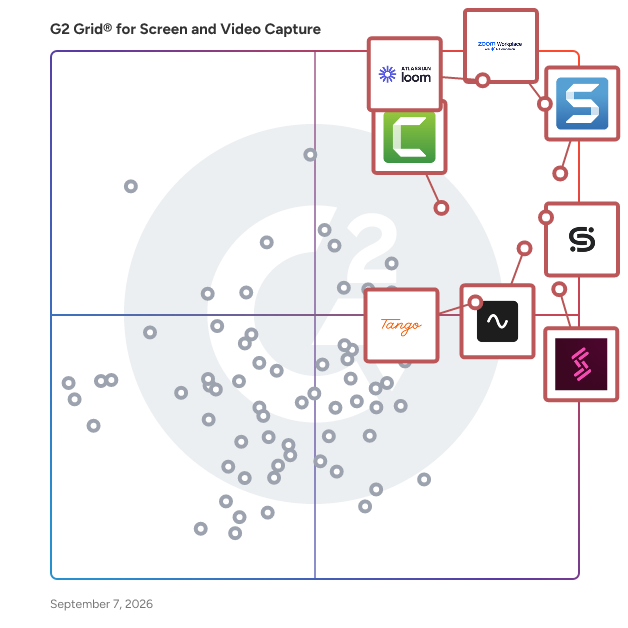
Featured Screen and Video Capture Software At A Glance

Free Plan Available:
Vyond
Sponsored
Highest Performer:
Easiest to Use:
Top Trending:
Show LessShow More
Highest Performer:
Easiest to Use:
Top Trending:

G2 takes pride in showing unbiased reviews on user satisfaction in our ratings and reports. We do not allow paid placements in any of our ratings, rankings, or reports. Learn about our scoring methodologies.

Coming Soon
Get Trending Screen and Video Capture Products in Your Inbox

A weekly snapshot of rising stars, new launches, and what everyone's buzzing about.

Sample Trending Products Newsletter
No filters applied
208 Listings in Screen and Video Capture Available
  • Overview
    Expand/Collapse Overview
  • Product Description
    How are these determined?Information
    This description is provided by the seller.

    Vyond is an all-in-one AI video platform designed to empower organizations in creating secure, compliant, and engaging business content at scale. With a history spanning over 15 years, Vyond has estab

    Users
    • Instructional Designer
    • Learning Experience Designer
    Industries
    • E-Learning
    • Hospital & Health Care
    Market Segment
    • 52% Enterprise
    • 27% Small-Business
    User Sentiment
    How are these determined?Information
    These insights, currently in beta, are compiled from user reviews and grouped to display a high-level overview of the software.
    • Vyond is a software tool that allows users to create custom animations and videos for various purposes such as training content, marketing, and more.
    • Reviewers like the ease of use, the vast assets for creating animations, the AI-based voiceover, the gradual learning curve, and the exceptional customer support that Vyond provides.
    • Users reported issues such as the website freezing up, limitations in animation styles, difficulties in creating unique animations, and inconsistencies in the text-to-speech feature.
  • Pros and Cons
    Expand/Collapse Pros and Cons
  • Vyond Pros and Cons
    How are these determined?Information
    Pros and Cons are compiled from review feedback and grouped into themes to provide an easy-to-understand summary of user reviews.
    Pros
    Ease of Use
    178
    Video Creation
    119
    Features
    103
    Easy Creation
    95
    Versatility
    87
    Cons
    Limited Customization
    37
    Limited Features
    28
    Limited Options
    28
    Learning Curve
    26
    Limited Selection
    24
  • User Satisfaction
    Expand/Collapse User Satisfaction
  • Vyond features and usability ratings that predict user satisfaction
    9.2
    Has the product been a good partner in doing business?
    Average: 9.2
    9.4
    Quality of Support
    Average: 8.7
    9.2
    Ease of Use
    Average: 9.2
    9.4
    Ease of Admin
    Average: 9.1
  • Seller Details
    Expand/Collapse Seller Details
  • Seller Details
    Seller
    Vyond
    Company Website
    Year Founded
    2007
    HQ Location
    San Mateo, California
    Twitter
    @VyondVideo
    134 Twitter followers
    LinkedIn® Page
    www.linkedin.com
    269 employees on LinkedIn®
Product Description
How are these determined?Information
This description is provided by the seller.

Vyond is an all-in-one AI video platform designed to empower organizations in creating secure, compliant, and engaging business content at scale. With a history spanning over 15 years, Vyond has estab

Users
  • Instructional Designer
  • Learning Experience Designer
Industries
  • E-Learning
  • Hospital & Health Care
Market Segment
  • 52% Enterprise
  • 27% Small-Business
User Sentiment
How are these determined?Information
These insights, currently in beta, are compiled from user reviews and grouped to display a high-level overview of the software.
  • Vyond is a software tool that allows users to create custom animations and videos for various purposes such as training content, marketing, and more.
  • Reviewers like the ease of use, the vast assets for creating animations, the AI-based voiceover, the gradual learning curve, and the exceptional customer support that Vyond provides.
  • Users reported issues such as the website freezing up, limitations in animation styles, difficulties in creating unique animations, and inconsistencies in the text-to-speech feature.
Vyond Pros and Cons
How are these determined?Information
Pros and Cons are compiled from review feedback and grouped into themes to provide an easy-to-understand summary of user reviews.
Pros
Ease of Use
178
Video Creation
119
Features
103
Easy Creation
95
Versatility
87
Cons
Limited Customization
37
Limited Features
28
Limited Options
28
Learning Curve
26
Limited Selection
24
Vyond features and usability ratings that predict user satisfaction
9.2
Has the product been a good partner in doing business?
Average: 9.2
9.4
Quality of Support
Average: 8.7
9.2
Ease of Use
Average: 9.2
9.4
Ease of Admin
Average: 9.1
Seller Details
Seller
Vyond
Company Website
Year Founded
2007
HQ Location
San Mateo, California
Twitter
@VyondVideo
134 Twitter followers
LinkedIn® Page
www.linkedin.com
269 employees on LinkedIn®
(464)4.7 out of 5
2nd Easiest To Use in Screen and Video Capture software
Save to My Lists
20% Off
  • Overview
    Expand/Collapse Overview
  • Product Description
    How are these determined?Information
    This description is provided by the seller.

    Supademo is the fastest way to create high-converting interactive product demos. Trusted by >100,000+ professionals at fast-growing companies, Supademo is used to accelerate deals, drive adopti

    Users
    • CEO
    • Founder
    Industries
    • Computer Software
    • Information Technology and Services
    Market Segment
    • 50% Small-Business
    • 14% Mid-Market
    User Sentiment
    How are these determined?Information
    These insights, currently in beta, are compiled from user reviews and grouped to display a high-level overview of the software.
    • Supademo is a tool designed to create interactive product demos and training simulations, featuring AI voiceover and customizable elements.
    • Users frequently mention the ease of use, the time-saving aspect of creating demos, and the high-quality, professional results they achieve with Supademo.
    • Reviewers noted some issues with the product, such as the redundancy of the AI language, occasional recording errors, and a desire for more customization options and specific features.
  • Pros and Cons
    Expand/Collapse Pros and Cons
  • Supademo Pros and Cons
    How are these determined?Information
    Pros and Cons are compiled from review feedback and grouped into themes to provide an easy-to-understand summary of user reviews.
    Pros
    Ease of Use
    217
    Demos
    94
    Easy Creation
    89
    Intuitive
    84
    Interactive Demos
    55
    Cons
    Missing Features
    34
    Recording Issues
    26
    Demos Management
    25
    Limited Customization
    23
    Limited Options
    21
  • User Satisfaction
    Expand/Collapse User Satisfaction
  • Supademo features and usability ratings that predict user satisfaction
    9.5
    Has the product been a good partner in doing business?
    Average: 9.2
    9.6
    Quality of Support
    Average: 8.7
    9.3
    Ease of Use
    Average: 9.2
    9.7
    Ease of Admin
    Average: 9.1
  • Seller Details
    Expand/Collapse Seller Details
  • Seller Details
    Seller
    Supademo
    Company Website
    Year Founded
    2023
    HQ Location
    New York, US
    Twitter
    @SupademoHQ
    284 Twitter followers
    LinkedIn® Page
    www.linkedin.com
    15 employees on LinkedIn®
Product Description
How are these determined?Information
This description is provided by the seller.

Supademo is the fastest way to create high-converting interactive product demos. Trusted by >100,000+ professionals at fast-growing companies, Supademo is used to accelerate deals, drive adopti

Users
  • CEO
  • Founder
Industries
  • Computer Software
  • Information Technology and Services
Market Segment
  • 50% Small-Business
  • 14% Mid-Market
User Sentiment
How are these determined?Information
These insights, currently in beta, are compiled from user reviews and grouped to display a high-level overview of the software.
  • Supademo is a tool designed to create interactive product demos and training simulations, featuring AI voiceover and customizable elements.
  • Users frequently mention the ease of use, the time-saving aspect of creating demos, and the high-quality, professional results they achieve with Supademo.
  • Reviewers noted some issues with the product, such as the redundancy of the AI language, occasional recording errors, and a desire for more customization options and specific features.
Supademo Pros and Cons
How are these determined?Information
Pros and Cons are compiled from review feedback and grouped into themes to provide an easy-to-understand summary of user reviews.
Pros
Ease of Use
217
Demos
94
Easy Creation
89
Intuitive
84
Interactive Demos
55
Cons
Missing Features
34
Recording Issues
26
Demos Management
25
Limited Customization
23
Limited Options
21
Supademo features and usability ratings that predict user satisfaction
9.5
Has the product been a good partner in doing business?
Average: 9.2
9.6
Quality of Support
Average: 8.7
9.3
Ease of Use
Average: 9.2
9.7
Ease of Admin
Average: 9.1
Seller Details
Seller
Supademo
Company Website
Year Founded
2023
HQ Location
New York, US
Twitter
@SupademoHQ
284 Twitter followers
LinkedIn® Page
www.linkedin.com
15 employees on LinkedIn®

This is how G2 Deals can help you:

  • Easily shop for curated – and trusted – software
  • Own your own software buying journey
  • Discover exclusive deals on software
  • Overview
    Expand/Collapse Overview
  • Product Description
    How are these determined?Information
    This description is provided by the seller.

    Guidde is built for everyone who wants to pass information visually - it lets anyone create how-to videos of any workflow for any software and make them look stunning & production ready for sharin

    Users
    No information available
    Industries
    • Computer Software
    • Information Technology and Services
    Market Segment
    • 46% Small-Business
    • 29% Mid-Market
  • Pros and Cons
    Expand/Collapse Pros and Cons
  • guidde Pros and Cons
    How are these determined?Information
    Pros and Cons are compiled from review feedback and grouped into themes to provide an easy-to-understand summary of user reviews.
    Pros
    Easy Creation
    18
    Ease of Use
    17
    Time-saving
    13
    Customer Support
    11
    Features
    7
    Cons
    Limited Customization
    5
    Poor File
    3
    Limited Language Support
    2
    Complex Setup
    1
    Deletion Difficulty
    1
  • User Satisfaction
    Expand/Collapse User Satisfaction
  • guidde features and usability ratings that predict user satisfaction
    9.6
    Has the product been a good partner in doing business?
    Average: 9.2
    9.7
    Quality of Support
    Average: 8.7
    9.6
    Ease of Use
    Average: 9.2
    9.7
    Ease of Admin
    Average: 9.1
  • Seller Details
    Expand/Collapse Seller Details
  • Seller Details
    Seller
    guidde
    Year Founded
    2020
    HQ Location
    Belmont, CA
    Twitter
    @GuiddeCo
    1,872 Twitter followers
    LinkedIn® Page
    www.linkedin.com
    67 employees on LinkedIn®
Product Description
How are these determined?Information
This description is provided by the seller.

Guidde is built for everyone who wants to pass information visually - it lets anyone create how-to videos of any workflow for any software and make them look stunning & production ready for sharin

Users
No information available
Industries
  • Computer Software
  • Information Technology and Services
Market Segment
  • 46% Small-Business
  • 29% Mid-Market
guidde Pros and Cons
How are these determined?Information
Pros and Cons are compiled from review feedback and grouped into themes to provide an easy-to-understand summary of user reviews.
Pros
Easy Creation
18
Ease of Use
17
Time-saving
13
Customer Support
11
Features
7
Cons
Limited Customization
5
Poor File
3
Limited Language Support
2
Complex Setup
1
Deletion Difficulty
1
guidde features and usability ratings that predict user satisfaction
9.6
Has the product been a good partner in doing business?
Average: 9.2
9.7
Quality of Support
Average: 8.7
9.6
Ease of Use
Average: 9.2
9.7
Ease of Admin
Average: 9.1
Seller Details
Seller
guidde
Year Founded
2020
HQ Location
Belmont, CA
Twitter
@GuiddeCo
1,872 Twitter followers
LinkedIn® Page
www.linkedin.com
67 employees on LinkedIn®
(1,302)4.8 out of 5
View top Consulting Services for HeyGen
Save to My Lists
Entry Level Price:Free
  • Overview
    Expand/Collapse Overview
  • Product Description
    How are these determined?Information
    This description is provided by the seller.

    HeyGen is the leading AI video generation platform designed to assist users in creating visually engaging videos effortlessly. This innovative solution caters to a wide range of users, from small busi

    Users
    • CEO
    • Owner
    Industries
    • Marketing and Advertising
    • Education Management
    Market Segment
    • 87% Small-Business
    • 9% Mid-Market
    User Sentiment
    How are these determined?Information
    These insights, currently in beta, are compiled from user reviews and grouped to display a high-level overview of the software.
    • HeyGen is a tool that allows users to create AI-generated videos in multiple languages and tailor messages to their community.
    • Reviewers like the realistic AI avatars, the ability to create videos on the go, the multilingual support, and the user-friendly interface that HeyGen offers.
    • Reviewers noted issues with video glitches counting against their monthly minutes, limitations on video size, the need for more realistic voice clones, outdated tutorials, and a confusing credit system.
  • Pros and Cons
    Expand/Collapse Pros and Cons
  • HeyGen Pros and Cons
    How are these determined?Information
    Pros and Cons are compiled from review feedback and grouped into themes to provide an easy-to-understand summary of user reviews.
    Pros
    Ease of Use
    586
    Quality
    418
    Realistic Avatars
    412
    Video Creation
    371
    Easy Creation
    284
    Cons
    Expensive
    180
    Pricing Issues
    154
    Expensive Cost
    152
    Cost Issue
    131
    Avatar Limitations
    123
  • User Satisfaction
    Expand/Collapse User Satisfaction
  • HeyGen features and usability ratings that predict user satisfaction
    9.2
    Has the product been a good partner in doing business?
    Average: 9.2
    9.0
    Quality of Support
    Average: 8.7
    9.3
    Ease of Use
    Average: 9.2
    9.1
    Ease of Admin
    Average: 9.1
  • Seller Details
    Expand/Collapse Seller Details
  • Seller Details
    Seller
    HeyGen
    Company Website
    Year Founded
    2020
    HQ Location
    Los Angeles, California
    LinkedIn® Page
    www.linkedin.com
    269 employees on LinkedIn®
Product Description
How are these determined?Information
This description is provided by the seller.

HeyGen is the leading AI video generation platform designed to assist users in creating visually engaging videos effortlessly. This innovative solution caters to a wide range of users, from small busi

Users
  • CEO
  • Owner
Industries
  • Marketing and Advertising
  • Education Management
Market Segment
  • 87% Small-Business
  • 9% Mid-Market
User Sentiment
How are these determined?Information
These insights, currently in beta, are compiled from user reviews and grouped to display a high-level overview of the software.
  • HeyGen is a tool that allows users to create AI-generated videos in multiple languages and tailor messages to their community.
  • Reviewers like the realistic AI avatars, the ability to create videos on the go, the multilingual support, and the user-friendly interface that HeyGen offers.
  • Reviewers noted issues with video glitches counting against their monthly minutes, limitations on video size, the need for more realistic voice clones, outdated tutorials, and a confusing credit system.
HeyGen Pros and Cons
How are these determined?Information
Pros and Cons are compiled from review feedback and grouped into themes to provide an easy-to-understand summary of user reviews.
Pros
Ease of Use
586
Quality
418
Realistic Avatars
412
Video Creation
371
Easy Creation
284
Cons
Expensive
180
Pricing Issues
154
Expensive Cost
152
Cost Issue
131
Avatar Limitations
123
HeyGen features and usability ratings that predict user satisfaction
9.2
Has the product been a good partner in doing business?
Average: 9.2
9.0
Quality of Support
Average: 8.7
9.3
Ease of Use
Average: 9.2
9.1
Ease of Admin
Average: 9.1
Seller Details
Seller
HeyGen
Company Website
Year Founded
2020
HQ Location
Los Angeles, California
LinkedIn® Page
www.linkedin.com
269 employees on LinkedIn®
(979)4.6 out of 5
Optimized for quick response
12th Easiest To Use in Screen and Video Capture software
Save to My Lists
Entry Level Price:Free
  • Overview
    Expand/Collapse Overview
  • Product Description
    How are these determined?Information
    This description is provided by the seller.

    Wistia is a complete video marketing platform that helps teams create, host, market, and measure their videos and webinars—all in one place. With Wistia, you can easily create professional videos, hos

    Users
    • Marketing Manager
    • Digital Marketing Manager
    Industries
    • Computer Software
    • Marketing and Advertising
    Market Segment
    • 48% Mid-Market
    • 36% Small-Business
  • Pros and Cons
    Expand/Collapse Pros and Cons
  • Wistia Pros and Cons
    How are these determined?Information
    Pros and Cons are compiled from review feedback and grouped into themes to provide an easy-to-understand summary of user reviews.
    Pros
    Ease of Use
    271
    Features
    178
    Video Quality
    117
    Video Management
    105
    Integrations
    89
    Cons
    Limited Customization
    57
    Expensive
    49
    Missing Features
    48
    Expensive Cost
    46
    Feature Limitations
    43
  • User Satisfaction
    Expand/Collapse User Satisfaction
  • Wistia features and usability ratings that predict user satisfaction
    9.3
    Has the product been a good partner in doing business?
    Average: 9.2
    9.1
    Quality of Support
    Average: 8.7
    9.3
    Ease of Use
    Average: 9.2
    9.3
    Ease of Admin
    Average: 9.1
  • Seller Details
    Expand/Collapse Seller Details
  • Seller Details
    Seller
    Wistia
    Company Website
    Year Founded
    2006
    HQ Location
    Cambridge, MA
    Twitter
    @wistia
    28,836 Twitter followers
    LinkedIn® Page
    www.linkedin.com
    206 employees on LinkedIn®
Product Description
How are these determined?Information
This description is provided by the seller.

Wistia is a complete video marketing platform that helps teams create, host, market, and measure their videos and webinars—all in one place. With Wistia, you can easily create professional videos, hos

Users
  • Marketing Manager
  • Digital Marketing Manager
Industries
  • Computer Software
  • Marketing and Advertising
Market Segment
  • 48% Mid-Market
  • 36% Small-Business
Wistia Pros and Cons
How are these determined?Information
Pros and Cons are compiled from review feedback and grouped into themes to provide an easy-to-understand summary of user reviews.
Pros
Ease of Use
271
Features
178
Video Quality
117
Video Management
105
Integrations
89
Cons
Limited Customization
57
Expensive
49
Missing Features
48
Expensive Cost
46
Feature Limitations
43
Wistia features and usability ratings that predict user satisfaction
9.3
Has the product been a good partner in doing business?
Average: 9.2
9.1
Quality of Support
Average: 8.7
9.3
Ease of Use
Average: 9.2
9.3
Ease of Admin
Average: 9.1
Seller Details
Seller
Wistia
Company Website
Year Founded
2006
HQ Location
Cambridge, MA
Twitter
@wistia
28,836 Twitter followers
LinkedIn® Page
www.linkedin.com
206 employees on LinkedIn®
(825)4.6 out of 5
6th Easiest To Use in Screen and Video Capture software
View top Consulting Services for Descript
Save to My Lists
Entry Level Price:Free
  • Overview
    Expand/Collapse Overview
  • Product Description
    How are these determined?Information
    This description is provided by the seller.

    In Descript you can make any video you want, any way you want. All you need is an idea; it helps if you know how to type. With the world’s first only AI co-editor, Underlord, you can make a video j

    Users
    • Founder
    • Owner
    Industries
    • Marketing and Advertising
    • Media Production
    Market Segment
    • 87% Small-Business
    • 8% Mid-Market
    User Sentiment
    How are these determined?Information
    These insights, currently in beta, are compiled from user reviews and grouped to display a high-level overview of the software.
    • Descript is a video editing and transcription tool that allows users to edit videos, generate transcripts, and remove filler words using AI technology.
    • Reviewers like the ease of use, the accurate transcription feature, the ability to edit directly in the transcript, and the time-saving AI features that remove filler words and silence gaps.
    • Reviewers experienced issues with video quality degradation after applying tools, difficulty in adding multiple videos together, occasional system lag with large projects, and challenges in navigating all the features due to the tool's extensive capabilities.
  • Pros and Cons
    Expand/Collapse Pros and Cons
  • Descript Pros and Cons
    How are these determined?Information
    Pros and Cons are compiled from review feedback and grouped into themes to provide an easy-to-understand summary of user reviews.
    Pros
    Easy Editing
    280
    Ease of Use
    257
    Video Editing
    196
    Editing Features
    188
    Quality
    185
    Cons
    Learning Curve
    82
    Difficulty/Complexity
    72
    Slow Performance
    71
    Learning Difficulty
    70
    Editing Issues
    59
  • User Satisfaction
    Expand/Collapse User Satisfaction
  • Descript features and usability ratings that predict user satisfaction
    8.7
    Has the product been a good partner in doing business?
    Average: 9.2
    8.4
    Quality of Support
    Average: 8.7
    8.4
    Ease of Use
    Average: 9.2
    8.5
    Ease of Admin
    Average: 9.1
  • Seller Details
    Expand/Collapse Seller Details
  • Seller Details
    Seller
    Descript
    Company Website
    Year Founded
    2017
    HQ Location
    San Francisco, CA
    Twitter
    @DescriptApp
    30,819 Twitter followers
    LinkedIn® Page
    www.linkedin.com
    182 employees on LinkedIn®
Product Description
How are these determined?Information
This description is provided by the seller.

In Descript you can make any video you want, any way you want. All you need is an idea; it helps if you know how to type. With the world’s first only AI co-editor, Underlord, you can make a video j

Users
  • Founder
  • Owner
Industries
  • Marketing and Advertising
  • Media Production
Market Segment
  • 87% Small-Business
  • 8% Mid-Market
User Sentiment
How are these determined?Information
These insights, currently in beta, are compiled from user reviews and grouped to display a high-level overview of the software.
  • Descript is a video editing and transcription tool that allows users to edit videos, generate transcripts, and remove filler words using AI technology.
  • Reviewers like the ease of use, the accurate transcription feature, the ability to edit directly in the transcript, and the time-saving AI features that remove filler words and silence gaps.
  • Reviewers experienced issues with video quality degradation after applying tools, difficulty in adding multiple videos together, occasional system lag with large projects, and challenges in navigating all the features due to the tool's extensive capabilities.
Descript Pros and Cons
How are these determined?Information
Pros and Cons are compiled from review feedback and grouped into themes to provide an easy-to-understand summary of user reviews.
Pros
Easy Editing
280
Ease of Use
257
Video Editing
196
Editing Features
188
Quality
185
Cons
Learning Curve
82
Difficulty/Complexity
72
Slow Performance
71
Learning Difficulty
70
Editing Issues
59
Descript features and usability ratings that predict user satisfaction
8.7
Has the product been a good partner in doing business?
Average: 9.2
8.4
Quality of Support
Average: 8.7
8.4
Ease of Use
Average: 9.2
8.5
Ease of Admin
Average: 9.1
Seller Details
Seller
Descript
Company Website
Year Founded
2017
HQ Location
San Francisco, CA
Twitter
@DescriptApp
30,819 Twitter followers
LinkedIn® Page
www.linkedin.com
182 employees on LinkedIn®
  • Overview
    Expand/Collapse Overview
  • Product Description
    How are these determined?Information
    This description is provided by the seller.

    Kaltura provides both live and on-demand video solutions that boost engagement, maximize ROI, and foster closer connections between brands and audiences. From virtual and hybrid events to webinars and

    Users
    No information available
    Industries
    • Higher Education
    • Education Management
    Market Segment
    • 41% Mid-Market
    • 32% Enterprise
    User Sentiment
    How are these determined?Information
    These insights, currently in beta, are compiled from user reviews and grouped to display a high-level overview of the software.
    • Kaltura Video is a software that provides video support, including screen recording, live streaming, editing workflows, and video management and distribution for communication purposes.
    • Reviewers appreciate Kaltura Video's high device compatibility, user-friendly interface, detailed engagement metrics, and its flexibility in various uses such as training and marketing.
    • Reviewers noted performance defects in Kaltura Video, particularly in uploading files and buffering during live streaming, and also mentioned that the software requires high network speed and bandwidth which may not always be available.
  • Pros and Cons
    Expand/Collapse Pros and Cons
  • Kaltura Video Cloud Pros and Cons
    How are these determined?Information
    Pros and Cons are compiled from review feedback and grouped into themes to provide an easy-to-understand summary of user reviews.
    Pros
    Ease of Use
    19
    Features
    18
    Integrations
    13
    Quality
    11
    Reliability
    11
    Cons
    Technical Issues
    9
    Integration Issues
    7
    Missing Features
    7
    Limited Features
    6
    Difficult Setup
    5
  • User Satisfaction
    Expand/Collapse User Satisfaction
  • Kaltura Video Cloud features and usability ratings that predict user satisfaction
    8.6
    Has the product been a good partner in doing business?
    Average: 9.2
    8.1
    Quality of Support
    Average: 8.7
    8.6
    Ease of Use
    Average: 9.2
    8.2
    Ease of Admin
    Average: 9.1
  • Seller Details
    Expand/Collapse Seller Details
  • Seller Details
    Seller
    Kaltura
    Company Website
    Year Founded
    2006
    HQ Location
    New York, NY
    Twitter
    @Kaltura
    9,003 Twitter followers
    LinkedIn® Page
    www.linkedin.com
    722 employees on LinkedIn®
Product Description
How are these determined?Information
This description is provided by the seller.

Kaltura provides both live and on-demand video solutions that boost engagement, maximize ROI, and foster closer connections between brands and audiences. From virtual and hybrid events to webinars and

Users
No information available
Industries
  • Higher Education
  • Education Management
Market Segment
  • 41% Mid-Market
  • 32% Enterprise
User Sentiment
How are these determined?Information
These insights, currently in beta, are compiled from user reviews and grouped to display a high-level overview of the software.
  • Kaltura Video is a software that provides video support, including screen recording, live streaming, editing workflows, and video management and distribution for communication purposes.
  • Reviewers appreciate Kaltura Video's high device compatibility, user-friendly interface, detailed engagement metrics, and its flexibility in various uses such as training and marketing.
  • Reviewers noted performance defects in Kaltura Video, particularly in uploading files and buffering during live streaming, and also mentioned that the software requires high network speed and bandwidth which may not always be available.
Kaltura Video Cloud Pros and Cons
How are these determined?Information
Pros and Cons are compiled from review feedback and grouped into themes to provide an easy-to-understand summary of user reviews.
Pros
Ease of Use
19
Features
18
Integrations
13
Quality
11
Reliability
11
Cons
Technical Issues
9
Integration Issues
7
Missing Features
7
Limited Features
6
Difficult Setup
5
Kaltura Video Cloud features and usability ratings that predict user satisfaction
8.6
Has the product been a good partner in doing business?
Average: 9.2
8.1
Quality of Support
Average: 8.7
8.6
Ease of Use
Average: 9.2
8.2
Ease of Admin
Average: 9.1
Seller Details
Seller
Kaltura
Company Website
Year Founded
2006
HQ Location
New York, NY
Twitter
@Kaltura
9,003 Twitter followers
LinkedIn® Page
www.linkedin.com
722 employees on LinkedIn®
  • Overview
    Expand/Collapse Overview
  • Product Description
    How are these determined?Information
    This description is provided by the seller.

    If you think that capturing video from your computer screen demands extra hardware or cumbersome programs, think again. Movavi Screen Recorder can capture any type of screen activity and save it to an

    Users
    No information available
    Industries
    No information available
    Market Segment
    • 76% Small-Business
    • 22% Mid-Market
  • Pros and Cons
    Expand/Collapse Pros and Cons
  • Movavi Screen Recorder Pros and Cons
    How are these determined?Information
    Pros and Cons are compiled from review feedback and grouped into themes to provide an easy-to-understand summary of user reviews.
    Pros
    Audio Quality
    1
    Video Quality
    1
    Cons
    This product has not yet received any negative sentiments.
  • User Satisfaction
    Expand/Collapse User Satisfaction
  • Movavi Screen Recorder features and usability ratings that predict user satisfaction
    9.2
    Has the product been a good partner in doing business?
    Average: 9.2
    8.7
    Quality of Support
    Average: 8.7
    9.4
    Ease of Use
    Average: 9.2
    9.6
    Ease of Admin
    Average: 9.1
  • Seller Details
    Expand/Collapse Seller Details
  • Seller Details
    Seller
    Movavi
    Year Founded
    2004
    HQ Location
    Limassol, Limassol
    Twitter
    @Movavi
    4,295 Twitter followers
    LinkedIn® Page
    www.linkedin.com
    254 employees on LinkedIn®
Product Description
How are these determined?Information
This description is provided by the seller.

If you think that capturing video from your computer screen demands extra hardware or cumbersome programs, think again. Movavi Screen Recorder can capture any type of screen activity and save it to an

Users
No information available
Industries
No information available
Market Segment
  • 76% Small-Business
  • 22% Mid-Market
Movavi Screen Recorder Pros and Cons
How are these determined?Information
Pros and Cons are compiled from review feedback and grouped into themes to provide an easy-to-understand summary of user reviews.
Pros
Audio Quality
1
Video Quality
1
Cons
This product has not yet received any negative sentiments.
Movavi Screen Recorder features and usability ratings that predict user satisfaction
9.2
Has the product been a good partner in doing business?
Average: 9.2
8.7
Quality of Support
Average: 8.7
9.4
Ease of Use
Average: 9.2
9.6
Ease of Admin
Average: 9.1
Seller Details
Seller
Movavi
Year Founded
2004
HQ Location
Limassol, Limassol
Twitter
@Movavi
4,295 Twitter followers
LinkedIn® Page
www.linkedin.com
254 employees on LinkedIn®
Entry Level Price:Free
  • Overview
    Expand/Collapse Overview
  • Product Description
    How are these determined?Information
    This description is provided by the seller.

    Zight: AI-Powered Visual Communication for Faster, Smarter Work Zight is the leading AI-powered platform that transforms the way teams collaborate and communicate. With seamless screen recording, G

    Users
    • CEO
    • Founder
    Industries
    • Computer Software
    • Information Technology and Services
    Market Segment
    • 53% Small-Business
    • 39% Mid-Market
  • Pros and Cons
    Expand/Collapse Pros and Cons
  • Zight Pros and Cons
    How are these determined?Information
    Pros and Cons are compiled from review feedback and grouped into themes to provide an easy-to-understand summary of user reviews.
    Pros
    Ease of Use
    11
    Easy Creation
    6
    Screenshot Functionality
    6
    Time-saving
    6
    Easy Recording
    5
    Cons
    Link Issues
    4
    Compatibility Issues
    3
    Limitations
    3
    Mobile Compatibility
    3
    Limited Customization
    2
  • User Satisfaction
    Expand/Collapse User Satisfaction
  • Zight features and usability ratings that predict user satisfaction
    9.2
    Has the product been a good partner in doing business?
    Average: 9.2
    8.9
    Quality of Support
    Average: 8.7
    9.2
    Ease of Use
    Average: 9.2
    9.2
    Ease of Admin
    Average: 9.1
  • Seller Details
    Expand/Collapse Seller Details
  • Seller Details
    Seller
    Zight
    Year Founded
    2016
    HQ Location
    San Francisco, California
    Twitter
    @cloudapp
    13 Twitter followers
    LinkedIn® Page
    www.linkedin.com
    33 employees on LinkedIn®
Product Description
How are these determined?Information
This description is provided by the seller.

Zight: AI-Powered Visual Communication for Faster, Smarter Work Zight is the leading AI-powered platform that transforms the way teams collaborate and communicate. With seamless screen recording, G

Users
  • CEO
  • Founder
Industries
  • Computer Software
  • Information Technology and Services
Market Segment
  • 53% Small-Business
  • 39% Mid-Market
Zight Pros and Cons
How are these determined?Information
Pros and Cons are compiled from review feedback and grouped into themes to provide an easy-to-understand summary of user reviews.
Pros
Ease of Use
11
Easy Creation
6
Screenshot Functionality
6
Time-saving
6
Easy Recording
5
Cons
Link Issues
4
Compatibility Issues
3
Limitations
3
Mobile Compatibility
3
Limited Customization
2
Zight features and usability ratings that predict user satisfaction
9.2
Has the product been a good partner in doing business?
Average: 9.2
8.9
Quality of Support
Average: 8.7
9.2
Ease of Use
Average: 9.2
9.2
Ease of Admin
Average: 9.1
Seller Details
Seller
Zight
Year Founded
2016
HQ Location
San Francisco, California
Twitter
@cloudapp
13 Twitter followers
LinkedIn® Page
www.linkedin.com
33 employees on LinkedIn®
(85)4.9 out of 5
3rd Easiest To Use in Screen and Video Capture software
Save to My Lists
  • Overview
    Expand/Collapse Overview
  • Product Description
    How are these determined?Information
    This description is provided by the seller.

    Clueso is the fastest way for SaaS companies to create software videos and help documentation for their products. Here’s how it works: Simply record/upload a rough screen recording of your produ

    Users
    No information available
    Industries
    • Computer Software
    • Information Technology and Services
    Market Segment
    • 51% Small-Business
    • 42% Mid-Market
  • Pros and Cons
    Expand/Collapse Pros and Cons
  • Clueso Pros and Cons
    How are these determined?Information
    Pros and Cons are compiled from review feedback and grouped into themes to provide an easy-to-understand summary of user reviews.
    Pros
    Video Recording
    38
    Ease of Use
    37
    Content Creation
    31
    Video Creation
    29
    Customer Support
    26
    Cons
    Editing Difficulties
    8
    Slow Rendering
    7
    Time Consumption
    6
    Video Playback Issues
    6
    AI Limitations
    5
  • User Satisfaction
    Expand/Collapse User Satisfaction
  • Clueso features and usability ratings that predict user satisfaction
    9.7
    Has the product been a good partner in doing business?
    Average: 9.2
    9.9
    Quality of Support
    Average: 8.7
    9.5
    Ease of Use
    Average: 9.2
    9.7
    Ease of Admin
    Average: 9.1
  • Seller Details
    Expand/Collapse Seller Details
  • Seller Details
    Seller
    Clueso
    Year Founded
    2023
    HQ Location
    San Francisco, US
    LinkedIn® Page
    www.linkedin.com
    18 employees on LinkedIn®
Product Description
How are these determined?Information
This description is provided by the seller.

Clueso is the fastest way for SaaS companies to create software videos and help documentation for their products. Here’s how it works: Simply record/upload a rough screen recording of your produ

Users
No information available
Industries
  • Computer Software
  • Information Technology and Services
Market Segment
  • 51% Small-Business
  • 42% Mid-Market
Clueso Pros and Cons
How are these determined?Information
Pros and Cons are compiled from review feedback and grouped into themes to provide an easy-to-understand summary of user reviews.
Pros
Video Recording
38
Ease of Use
37
Content Creation
31
Video Creation
29
Customer Support
26
Cons
Editing Difficulties
8
Slow Rendering
7
Time Consumption
6
Video Playback Issues
6
AI Limitations
5
Clueso features and usability ratings that predict user satisfaction
9.7
Has the product been a good partner in doing business?
Average: 9.2
9.9
Quality of Support
Average: 8.7
9.5
Ease of Use
Average: 9.2
9.7
Ease of Admin
Average: 9.1
Seller Details
Seller
Clueso
Year Founded
2023
HQ Location
San Francisco, US
LinkedIn® Page
www.linkedin.com
18 employees on LinkedIn®
Entry Level Price:Free
  • Overview
    Expand/Collapse Overview
  • Product Description
    How are these determined?Information
    This description is provided by the seller.

    Podcastle is designed to let long-form content creators make stunning videos and compelling podcasts and generate lifelike AI audio. It's a web-based platform that enables creators to record, edit, en

    Users
    • Founder
    Industries
    • Entertainment
    • Health, Wellness and Fitness
    Market Segment
    • 95% Small-Business
    • 3% Mid-Market
    User Sentiment
    How are these determined?Information
    These insights, currently in beta, are compiled from user reviews and grouped to display a high-level overview of the software.
    • Podcastle is a podcasting platform that allows for individual recording for each participant in a meeting and provides editing, rendering and sharing functionality.
    • Users frequently mention the ease of use, the 'Magic Dust AI' for removing background noise, the impressive editing tools, and the responsive customer service as key benefits.
    • Reviewers mentioned issues with the software crashing, difficulty in moving the slider bar during editing on a laptop, and some advanced features being limited to paid plans.
  • Pros and Cons
    Expand/Collapse Pros and Cons
  • Podcastle Pros and Cons
    How are these determined?Information
    Pros and Cons are compiled from review feedback and grouped into themes to provide an easy-to-understand summary of user reviews.
    Pros
    Ease of Use
    76
    Quality
    38
    Easy Editing
    32
    Easy Recording
    30
    Audio Quality
    26
    Cons
    Recording Issues
    15
    Expensive
    12
    Limited Features
    10
    Technical Issues
    10
    Limited Audio Features
    9
  • User Satisfaction
    Expand/Collapse User Satisfaction
  • Podcastle features and usability ratings that predict user satisfaction
    9.4
    Has the product been a good partner in doing business?
    Average: 9.2
    9.2
    Quality of Support
    Average: 8.7
    9.2
    Ease of Use
    Average: 9.2
    9.4
    Ease of Admin
    Average: 9.1
  • Seller Details
    Expand/Collapse Seller Details
  • Seller Details
    Seller
    Async
    Year Founded
    2020
    HQ Location
    Middletown, Delaware
    Twitter
    @PodcastleAI
    1,489 Twitter followers
    LinkedIn® Page
    www.linkedin.com
    82 employees on LinkedIn®
Product Description
How are these determined?Information
This description is provided by the seller.

Podcastle is designed to let long-form content creators make stunning videos and compelling podcasts and generate lifelike AI audio. It's a web-based platform that enables creators to record, edit, en

Users
  • Founder
Industries
  • Entertainment
  • Health, Wellness and Fitness
Market Segment
  • 95% Small-Business
  • 3% Mid-Market
User Sentiment
How are these determined?Information
These insights, currently in beta, are compiled from user reviews and grouped to display a high-level overview of the software.
  • Podcastle is a podcasting platform that allows for individual recording for each participant in a meeting and provides editing, rendering and sharing functionality.
  • Users frequently mention the ease of use, the 'Magic Dust AI' for removing background noise, the impressive editing tools, and the responsive customer service as key benefits.
  • Reviewers mentioned issues with the software crashing, difficulty in moving the slider bar during editing on a laptop, and some advanced features being limited to paid plans.
Podcastle Pros and Cons
How are these determined?Information
Pros and Cons are compiled from review feedback and grouped into themes to provide an easy-to-understand summary of user reviews.
Pros
Ease of Use
76
Quality
38
Easy Editing
32
Easy Recording
30
Audio Quality
26
Cons
Recording Issues
15
Expensive
12
Limited Features
10
Technical Issues
10
Limited Audio Features
9
Podcastle features and usability ratings that predict user satisfaction
9.4
Has the product been a good partner in doing business?
Average: 9.2
9.2
Quality of Support
Average: 8.7
9.2
Ease of Use
Average: 9.2
9.4
Ease of Admin
Average: 9.1
Seller Details
Seller
Async
Year Founded
2020
HQ Location
Middletown, Delaware
Twitter
@PodcastleAI
1,489 Twitter followers
LinkedIn® Page
www.linkedin.com
82 employees on LinkedIn®
Entry Level Price:Free
  • Overview
    Expand/Collapse Overview
  • Product Description
    How are these determined?Information
    This description is provided by the seller.

    Create studio-quality product videos and documentation instantly with Trupeer Trupeer is an end to end product content creation platform that lets you generate professional grade videos, guides and

    Users
    No information available
    Industries
    • Computer Software
    • Information Technology and Services
    Market Segment
    • 61% Small-Business
    • 30% Mid-Market
  • Pros and Cons
    Expand/Collapse Pros and Cons
  • Trupeer Pros and Cons
    How are these determined?Information
    Pros and Cons are compiled from review feedback and grouped into themes to provide an easy-to-understand summary of user reviews.
    Pros
    Time-saving
    24
    Ease of Use
    16
    AI Features
    13
    Easy Creation
    12
    Easy Sharing
    12
    Cons
    Limited Features
    2
    Meeting Limitations
    2
    Bug Issues
    1
    Call Issues
    1
    Complex Credit System
    1
  • User Satisfaction
    Expand/Collapse User Satisfaction
  • Trupeer features and usability ratings that predict user satisfaction
    9.5
    Has the product been a good partner in doing business?
    Average: 9.2
    9.0
    Quality of Support
    Average: 8.7
    9.7
    Ease of Use
    Average: 9.2
    9.7
    Ease of Admin
    Average: 9.1
  • Seller Details
    Expand/Collapse Seller Details
  • Seller Details
    Seller
    Trupeer
    Year Founded
    2023
    HQ Location
    Bengaluru, IN
    Twitter
    @TrupeerAI
    675 Twitter followers
    LinkedIn® Page
    www.linkedin.com
    23 employees on LinkedIn®
Product Description
How are these determined?Information
This description is provided by the seller.

Create studio-quality product videos and documentation instantly with Trupeer Trupeer is an end to end product content creation platform that lets you generate professional grade videos, guides and

Users
No information available
Industries
  • Computer Software
  • Information Technology and Services
Market Segment
  • 61% Small-Business
  • 30% Mid-Market
Trupeer Pros and Cons
How are these determined?Information
Pros and Cons are compiled from review feedback and grouped into themes to provide an easy-to-understand summary of user reviews.
Pros
Time-saving
24
Ease of Use
16
AI Features
13
Easy Creation
12
Easy Sharing
12
Cons
Limited Features
2
Meeting Limitations
2
Bug Issues
1
Call Issues
1
Complex Credit System
1
Trupeer features and usability ratings that predict user satisfaction
9.5
Has the product been a good partner in doing business?
Average: 9.2
9.0
Quality of Support
Average: 8.7
9.7
Ease of Use
Average: 9.2
9.7
Ease of Admin
Average: 9.1
Seller Details
Seller
Trupeer
Year Founded
2023
HQ Location
Bengaluru, IN
Twitter
@TrupeerAI
675 Twitter followers
LinkedIn® Page
www.linkedin.com
23 employees on LinkedIn®
(486)4.6 out of 5
Optimized for quick response
Save to My Lists
Entry Level Price:Starting at $19.00
  • Overview
    Expand/Collapse Overview
  • Product Description
    How are these determined?Information
    This description is provided by the seller.

    Colossyan is an AI video platform where anyone can easily turn text, documents, presentations and screen recordings into avatar‑narrated training videos — no editing experience required. Produce e

    Users
    • Owner
    • CEO
    Industries
    • E-Learning
    • Marketing and Advertising
    Market Segment
    • 77% Small-Business
    • 11% Mid-Market
    User Sentiment
    How are these determined?Information
    These insights, currently in beta, are compiled from user reviews and grouped to display a high-level overview of the software.
    • Colossyan is a tool that turns scripts into AI videos, ideal for training and internal content creation.
    • Users frequently mention the ease of use, realistic avatars, time-saving features, and the ability to create content in multiple languages as key benefits.
    • Reviewers noted issues with playback, limitations in video editing features, unrealistic avatar expressions, and high pricing as areas for improvement.
  • Pros and Cons
    Expand/Collapse Pros and Cons
  • Colossyan Creator Pros and Cons
    How are these determined?Information
    Pros and Cons are compiled from review feedback and grouped into themes to provide an easy-to-understand summary of user reviews.
    Pros
    Ease of Use
    215
    Realistic Avatars
    128
    Quality
    115
    Video Creation
    102
    Avatars
    84
    Cons
    Avatar Limitations
    55
    Expensive
    40
    AI Limitations
    32
    Limited Avatars
    32
    Lack of Emotion
    31
  • User Satisfaction
    Expand/Collapse User Satisfaction
  • Colossyan Creator features and usability ratings that predict user satisfaction
    9.2
    Has the product been a good partner in doing business?
    Average: 9.2
    9.0
    Quality of Support
    Average: 8.7
    9.1
    Ease of Use
    Average: 9.2
    9.2
    Ease of Admin
    Average: 9.1
  • Seller Details
    Expand/Collapse Seller Details
  • Seller Details
    Seller
    Colossyan
    Company Website
    Year Founded
    2020
    HQ Location
    New York, NY
    Twitter
    @colossyan
    491 Twitter followers
    LinkedIn® Page
    www.linkedin.com
    78 employees on LinkedIn®
Product Description
How are these determined?Information
This description is provided by the seller.

Colossyan is an AI video platform where anyone can easily turn text, documents, presentations and screen recordings into avatar‑narrated training videos — no editing experience required. Produce e

Users
  • Owner
  • CEO
Industries
  • E-Learning
  • Marketing and Advertising
Market Segment
  • 77% Small-Business
  • 11% Mid-Market
User Sentiment
How are these determined?Information
These insights, currently in beta, are compiled from user reviews and grouped to display a high-level overview of the software.
  • Colossyan is a tool that turns scripts into AI videos, ideal for training and internal content creation.
  • Users frequently mention the ease of use, realistic avatars, time-saving features, and the ability to create content in multiple languages as key benefits.
  • Reviewers noted issues with playback, limitations in video editing features, unrealistic avatar expressions, and high pricing as areas for improvement.
Colossyan Creator Pros and Cons
How are these determined?Information
Pros and Cons are compiled from review feedback and grouped into themes to provide an easy-to-understand summary of user reviews.
Pros
Ease of Use
215
Realistic Avatars
128
Quality
115
Video Creation
102
Avatars
84
Cons
Avatar Limitations
55
Expensive
40
AI Limitations
32
Limited Avatars
32
Lack of Emotion
31
Colossyan Creator features and usability ratings that predict user satisfaction
9.2
Has the product been a good partner in doing business?
Average: 9.2
9.0
Quality of Support
Average: 8.7
9.1
Ease of Use
Average: 9.2
9.2
Ease of Admin
Average: 9.1
Seller Details
Seller
Colossyan
Company Website
Year Founded
2020
HQ Location
New York, NY
Twitter
@colossyan
491 Twitter followers
LinkedIn® Page
www.linkedin.com
78 employees on LinkedIn®
Entry Level Price:Free
  • Overview
    Expand/Collapse Overview
  • Product Description
    How are these determined?Information
    This description is provided by the seller.

    dadan is an AI-powered online video creation platform that enables users to record, edit, and share high-quality videos with ease. Whether capturing a screen, webcam, or both — with audio — dadan simp

    Users
    No information available
    Industries
    • Marketing and Advertising
    • Computer Software
    Market Segment
    • 73% Small-Business
    • 20% Mid-Market
  • Pros and Cons
    Expand/Collapse Pros and Cons
  • Dadan Pros and Cons
    How are these determined?Information
    Pros and Cons are compiled from review feedback and grouped into themes to provide an easy-to-understand summary of user reviews.
    Pros
    Ease of Use
    13
    Easy Recording
    11
    Screen Recording
    11
    Features
    10
    Easy Editing
    8
    Cons
    AI Limitations
    1
    Bug Issues
    1
    Compatibility Issues
    1
    Integration Issues
    1
    Learning Curve
    1
  • User Satisfaction
    Expand/Collapse User Satisfaction
  • Dadan features and usability ratings that predict user satisfaction
    9.7
    Has the product been a good partner in doing business?
    Average: 9.2
    9.4
    Quality of Support
    Average: 8.7
    9.8
    Ease of Use
    Average: 9.2
    9.7
    Ease of Admin
    Average: 9.1
  • Seller Details
    Expand/Collapse Seller Details
  • Seller Details
    Seller
    dadan
    HQ Location
    N/A
    LinkedIn® Page
    www.linkedin.com
    13 employees on LinkedIn®
Product Description
How are these determined?Information
This description is provided by the seller.

dadan is an AI-powered online video creation platform that enables users to record, edit, and share high-quality videos with ease. Whether capturing a screen, webcam, or both — with audio — dadan simp

Users
No information available
Industries
  • Marketing and Advertising
  • Computer Software
Market Segment
  • 73% Small-Business
  • 20% Mid-Market
Dadan Pros and Cons
How are these determined?Information
Pros and Cons are compiled from review feedback and grouped into themes to provide an easy-to-understand summary of user reviews.
Pros
Ease of Use
13
Easy Recording
11
Screen Recording
11
Features
10
Easy Editing
8
Cons
AI Limitations
1
Bug Issues
1
Compatibility Issues
1
Integration Issues
1
Learning Curve
1
Dadan features and usability ratings that predict user satisfaction
9.7
Has the product been a good partner in doing business?
Average: 9.2
9.4
Quality of Support
Average: 8.7
9.8
Ease of Use
Average: 9.2
9.7
Ease of Admin
Average: 9.1
Seller Details
Seller
dadan
HQ Location
N/A
LinkedIn® Page
www.linkedin.com
13 employees on LinkedIn®
Entry Level Price:Free
  • Overview
    Expand/Collapse Overview
  • Product Description
    How are these determined?Information
    This description is provided by the seller.

    ScreenPal is your all-in-one platform for easy screen capture, video creation, and video hosting, with time saving AI features. Our cloud-based tools and native apps empower teams of any size to commu

    Users
    No information available
    Industries
    • Marketing and Advertising
    • Higher Education
    Market Segment
    • 61% Small-Business
    • 28% Mid-Market
  • Pros and Cons
    Expand/Collapse Pros and Cons
  • ScreenPal Pros and Cons
    How are these determined?Information
    Pros and Cons are compiled from review feedback and grouped into themes to provide an easy-to-understand summary of user reviews.
    Pros
    Ease of Use
    27
    Screen Recording
    20
    Easy Sharing
    15
    Easy Creation
    14
    Intuitive
    14
    Cons
    Recording Issues
    7
    Limited Features
    5
    Learning Curve
    4
    Limited Options
    4
    Poor Customer Support
    4
  • User Satisfaction
    Expand/Collapse User Satisfaction
  • ScreenPal features and usability ratings that predict user satisfaction
    9.1
    Has the product been a good partner in doing business?
    Average: 9.2
    8.8
    Quality of Support
    Average: 8.7
    9.0
    Ease of Use
    Average: 9.2
    8.8
    Ease of Admin
    Average: 9.1
  • Seller Details
    Expand/Collapse Seller Details
  • Seller Details
    Seller
    ScreenPal
    Company Website
    Year Founded
    2006
    HQ Location
    Seattle, WA
    Twitter
    @screenpalapp
    8,138 Twitter followers
    LinkedIn® Page
    www.linkedin.com
    19 employees on LinkedIn®
Product Description
How are these determined?Information
This description is provided by the seller.

ScreenPal is your all-in-one platform for easy screen capture, video creation, and video hosting, with time saving AI features. Our cloud-based tools and native apps empower teams of any size to commu

Users
No information available
Industries
  • Marketing and Advertising
  • Higher Education
Market Segment
  • 61% Small-Business
  • 28% Mid-Market
ScreenPal Pros and Cons
How are these determined?Information
Pros and Cons are compiled from review feedback and grouped into themes to provide an easy-to-understand summary of user reviews.
Pros
Ease of Use
27
Screen Recording
20
Easy Sharing
15
Easy Creation
14
Intuitive
14
Cons
Recording Issues
7
Limited Features
5
Learning Curve
4
Limited Options
4
Poor Customer Support
4
ScreenPal features and usability ratings that predict user satisfaction
9.1
Has the product been a good partner in doing business?
Average: 9.2
8.8
Quality of Support
Average: 8.7
9.0
Ease of Use
Average: 9.2
8.8
Ease of Admin
Average: 9.1
Seller Details
Seller
ScreenPal
Company Website
Year Founded
2006
HQ Location
Seattle, WA
Twitter
@screenpalapp
8,138 Twitter followers
LinkedIn® Page
www.linkedin.com
19 employees on LinkedIn®