Introducing G2.ai, the future of software buying.Try now

Best Remote Support Software for Small Business

Anindita Sengupta
AS
Researched and written by Anindita Sengupta

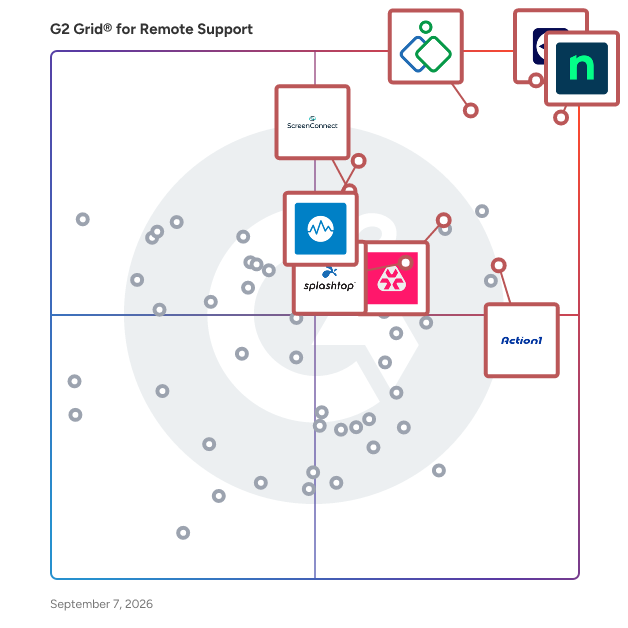
Products classified in the overall Remote Support category are similar in many regards and help companies of all sizes solve their business problems. However, small business features, pricing, setup, and installation differ from businesses of other sizes, which is why we match buyers to the right Small Business Remote Support to fit their needs. Compare product ratings based on reviews from enterprise users or connect with one of G2's buying advisors to find the right solutions within the Small Business Remote Support category.

In addition to qualifying for inclusion in the Remote Support Software category, to qualify for inclusion in the Small Business Remote Support Software category, a product must have at least 10 reviews left by a reviewer from a small business.

Show More
Show Less

G2 takes pride in showing unbiased reviews on user satisfaction in our ratings and reports. We do not allow paid placements in any of our ratings, rankings, or reports. Learn about our scoring methodologies.

Coming Soon
Get Trending Remote Support Products in Your Inbox

A weekly snapshot of rising stars, new launches, and what everyone's buzzing about.

Sample Trending Products Newsletter
1 filter applied
Clear All

43 Listings in Small Business Remote Support Available

(3,206)4.7 out of 5
Optimized for quick response
5th Easiest To Use in Remote Support software
View top Consulting Services for NinjaOne
Save to My Lists
  • Overview
    Expand/Collapse Overview
  • Product Description
    How are these determined?Information
    This description is provided by the seller.

    NinjaOne unifies IT to simplify work for 35,000+ customers in 140+ countries. The NinjaOne Unified IT Operations Platform delivers endpoint management, autonomous patching, backup, and remote acces

    Users
    • IT Manager
    • Owner
    Industries
    • Information Technology and Services
    • Computer & Network Security
    Market Segment
    • 49% Mid-Market
    • 45% Small-Business
    User Sentiment
    How are these determined?Information
    These insights, currently in beta, are compiled from user reviews and grouped to display a high-level overview of the software.
    • NinjaOne is a versatile tool that serves multiple purposes, including device management, monitoring, application management, and more.
    • Users frequently mention the ease of use, reliability, and the quality of the remote screen share, as well as the continuous updates that add new features and make patch management easier.
    • Users mentioned that certain settings and features can be unnecessarily complicated, the interface can feel cluttered due to recent updates, and the reporting feature could use some improvement.
  • Pros and Cons
    Expand/Collapse Pros and Cons
  • NinjaOne Pros and Cons
    How are these determined?Information
    Pros and Cons are compiled from review feedback and grouped into themes to provide an easy-to-understand summary of user reviews.
    Pros
    Ease of Use
    1,870
    Features
    1,211
    Remote Access
    1,092
    Automation
    1,072
    Customer Support
    995
    Cons
    Missing Features
    960
    Limited Features
    461
    Improvement Needed
    457
    Feature Issues
    441
    Needs Improvement
    428
  • User Satisfaction
    Expand/Collapse User Satisfaction
  • NinjaOne features and usability ratings that predict user satisfaction
    9.5
    Has the product been a good partner in doing business?
    Average: 9.2
    9.2
    Quality of Support
    Average: 8.9
    8.4
    Compliance
    Average: 8.8
    8.4
    Multi-Platform Support
    Average: 8.7
  • Seller Details
    Expand/Collapse Seller Details
  • Seller Details
    Seller
    NinjaOne
    Company Website
    Year Founded
    2013
    HQ Location
    Austin, Texas
    Twitter
    @NinjaOne
    3,416 Twitter followers
    LinkedIn® Page
    www.linkedin.com
    2,006 employees on LinkedIn®
Product Description
How are these determined?Information
This description is provided by the seller.

NinjaOne unifies IT to simplify work for 35,000+ customers in 140+ countries. The NinjaOne Unified IT Operations Platform delivers endpoint management, autonomous patching, backup, and remote acces

Users
  • IT Manager
  • Owner
Industries
  • Information Technology and Services
  • Computer & Network Security
Market Segment
  • 49% Mid-Market
  • 45% Small-Business
User Sentiment
How are these determined?Information
These insights, currently in beta, are compiled from user reviews and grouped to display a high-level overview of the software.
  • NinjaOne is a versatile tool that serves multiple purposes, including device management, monitoring, application management, and more.
  • Users frequently mention the ease of use, reliability, and the quality of the remote screen share, as well as the continuous updates that add new features and make patch management easier.
  • Users mentioned that certain settings and features can be unnecessarily complicated, the interface can feel cluttered due to recent updates, and the reporting feature could use some improvement.
NinjaOne Pros and Cons
How are these determined?Information
Pros and Cons are compiled from review feedback and grouped into themes to provide an easy-to-understand summary of user reviews.
Pros
Ease of Use
1,870
Features
1,211
Remote Access
1,092
Automation
1,072
Customer Support
995
Cons
Missing Features
960
Limited Features
461
Improvement Needed
457
Feature Issues
441
Needs Improvement
428
NinjaOne features and usability ratings that predict user satisfaction
9.5
Has the product been a good partner in doing business?
Average: 9.2
9.2
Quality of Support
Average: 8.9
8.4
Compliance
Average: 8.8
8.4
Multi-Platform Support
Average: 8.7
Seller Details
Seller
NinjaOne
Company Website
Year Founded
2013
HQ Location
Austin, Texas
Twitter
@NinjaOne
3,416 Twitter followers
LinkedIn® Page
www.linkedin.com
2,006 employees on LinkedIn®
(3,716)4.5 out of 5
Optimized for quick response
7th Easiest To Use in Remote Support software
Save to My Lists
Entry Level Price:Starting at $24.90
  • Overview
    Expand/Collapse Overview
  • Product Description
    How are these determined?Information
    This description is provided by the seller.

    TeamViewer is a leading provider of remote connectivity software for individuals and businesses of all sizes. Our remote software enables companies across various industries to enhance their efficienc

    Users
    • Software Engineer
    • IT Manager
    Industries
    • Information Technology and Services
    • Computer Software
    Market Segment
    • 43% Small-Business
    • 36% Mid-Market
    User Sentiment
    How are these determined?Information
    These insights, currently in beta, are compiled from user reviews and grouped to display a high-level overview of the software.
    • TeamViewer is a software for screen sharing and remote access, used for support work and communication.
    • Reviewers like TeamViewer for its reliable connection quality, strong security, ease of use, and the ability to quickly connect to remote devices, share screens, transfer files, and provide real-time support across different operating systems.
    • Users experienced occasional connection drops or performance issues on slower networks, high pricing for advanced or commercial use, and difficulties in managing a large list of clients.
  • Pros and Cons
    Expand/Collapse Pros and Cons
  • TeamViewer Pros and Cons
    How are these determined?Information
    Pros and Cons are compiled from review feedback and grouped into themes to provide an easy-to-understand summary of user reviews.
    Pros
    Ease of Use
    462
    Remote Access
    372
    Remote Control
    292
    Easy Access
    244
    Remote Work
    239
    Cons
    Connection Issues
    162
    Connectivity Issues
    133
    Slow Performance
    124
    Expensive
    117
    Remote Access Issues
    104
  • User Satisfaction
    Expand/Collapse User Satisfaction
  • TeamViewer features and usability ratings that predict user satisfaction
    8.6
    Has the product been a good partner in doing business?
    Average: 9.2
    8.7
    Quality of Support
    Average: 8.9
    9.0
    Compliance
    Average: 8.8
    9.1
    Multi-Platform Support
    Average: 8.7
  • Seller Details
    Expand/Collapse Seller Details
  • Seller Details
    Company Website
    Year Founded
    2005
    HQ Location
    Goppingen
    Twitter
    @TeamViewer
    48,369 Twitter followers
    LinkedIn® Page
    www.linkedin.com
    2,701 employees on LinkedIn®
Product Description
How are these determined?Information
This description is provided by the seller.

TeamViewer is a leading provider of remote connectivity software for individuals and businesses of all sizes. Our remote software enables companies across various industries to enhance their efficienc

Users
  • Software Engineer
  • IT Manager
Industries
  • Information Technology and Services
  • Computer Software
Market Segment
  • 43% Small-Business
  • 36% Mid-Market
User Sentiment
How are these determined?Information
These insights, currently in beta, are compiled from user reviews and grouped to display a high-level overview of the software.
  • TeamViewer is a software for screen sharing and remote access, used for support work and communication.
  • Reviewers like TeamViewer for its reliable connection quality, strong security, ease of use, and the ability to quickly connect to remote devices, share screens, transfer files, and provide real-time support across different operating systems.
  • Users experienced occasional connection drops or performance issues on slower networks, high pricing for advanced or commercial use, and difficulties in managing a large list of clients.
TeamViewer Pros and Cons
How are these determined?Information
Pros and Cons are compiled from review feedback and grouped into themes to provide an easy-to-understand summary of user reviews.
Pros
Ease of Use
462
Remote Access
372
Remote Control
292
Easy Access
244
Remote Work
239
Cons
Connection Issues
162
Connectivity Issues
133
Slow Performance
124
Expensive
117
Remote Access Issues
104
TeamViewer features and usability ratings that predict user satisfaction
8.6
Has the product been a good partner in doing business?
Average: 9.2
8.7
Quality of Support
Average: 8.9
9.0
Compliance
Average: 8.8
9.1
Multi-Platform Support
Average: 8.7
Seller Details
Company Website
Year Founded
2005
HQ Location
Goppingen
Twitter
@TeamViewer
48,369 Twitter followers
LinkedIn® Page
www.linkedin.com
2,701 employees on LinkedIn®

This is how G2 Deals can help you:

  • Easily shop for curated – and trusted – software
  • Own your own software buying journey
  • Discover exclusive deals on software
(625)4.6 out of 5
9th Easiest To Use in Remote Support software
View top Consulting Services for Zoho Assist
Save to My Lists
Entry Level Price:$15.00
  • Overview
    Expand/Collapse Overview
  • Product Description
    How are these determined?Information
    This description is provided by the seller.

    Support remote customers instantly with web-based, on-demand support sessions. Seamlessly set up and manage remote computers with unattended access ensuring complete security and reliability throughou

    Users
    • Owner
    • IT Manager
    Industries
    • Information Technology and Services
    • Computer & Network Security
    Market Segment
    • 69% Small-Business
    • 23% Mid-Market
    User Sentiment
    How are these determined?Information
    These insights, currently in beta, are compiled from user reviews and grouped to display a high-level overview of the software.
    • Zoho Assist is a remote support solution that provides features such as file transfer, multi-monitor navigation, unattended access, and session recording.
    • Reviewers like the ease of setup, user-friendly interface, and the balance between powerful features and simplicity, with many praising its reliability and cost-effectiveness.
    • Users experienced limitations in customization, difficulties in connecting through different browsers, occasional session drops, and performance issues on low bandwidth.
  • Pros and Cons
    Expand/Collapse Pros and Cons
  • Zoho Assist Pros and Cons
    How are these determined?Information
    Pros and Cons are compiled from review feedback and grouped into themes to provide an easy-to-understand summary of user reviews.
    Pros
    Ease of Use
    126
    Remote Access
    92
    Remote Support
    69
    Easy Access
    64
    Remote Control
    59
    Cons
    Remote Access Issues
    32
    Feature Limitations
    20
    Connection Issues
    16
    Not User-Friendly
    15
    Improvement Needed
    14
  • User Satisfaction
    Expand/Collapse User Satisfaction
  • Zoho Assist features and usability ratings that predict user satisfaction
    9.2
    Has the product been a good partner in doing business?
    Average: 9.2
    8.9
    Quality of Support
    Average: 8.9
    8.7
    Compliance
    Average: 8.8
    8.9
    Multi-Platform Support
    Average: 8.7
  • Seller Details
    Expand/Collapse Seller Details
  • Seller Details
    Seller
    Zoho
    Year Founded
    1996
    HQ Location
    Austin, TX
    Twitter
    @Zoho
    136,525 Twitter followers
    LinkedIn® Page
    www.linkedin.com
    29,794 employees on LinkedIn®
    Phone
    +1 (888) 900-9646
Product Description
How are these determined?Information
This description is provided by the seller.

Support remote customers instantly with web-based, on-demand support sessions. Seamlessly set up and manage remote computers with unattended access ensuring complete security and reliability throughou

Users
  • Owner
  • IT Manager
Industries
  • Information Technology and Services
  • Computer & Network Security
Market Segment
  • 69% Small-Business
  • 23% Mid-Market
User Sentiment
How are these determined?Information
These insights, currently in beta, are compiled from user reviews and grouped to display a high-level overview of the software.
  • Zoho Assist is a remote support solution that provides features such as file transfer, multi-monitor navigation, unattended access, and session recording.
  • Reviewers like the ease of setup, user-friendly interface, and the balance between powerful features and simplicity, with many praising its reliability and cost-effectiveness.
  • Users experienced limitations in customization, difficulties in connecting through different browsers, occasional session drops, and performance issues on low bandwidth.
Zoho Assist Pros and Cons
How are these determined?Information
Pros and Cons are compiled from review feedback and grouped into themes to provide an easy-to-understand summary of user reviews.
Pros
Ease of Use
126
Remote Access
92
Remote Support
69
Easy Access
64
Remote Control
59
Cons
Remote Access Issues
32
Feature Limitations
20
Connection Issues
16
Not User-Friendly
15
Improvement Needed
14
Zoho Assist features and usability ratings that predict user satisfaction
9.2
Has the product been a good partner in doing business?
Average: 9.2
8.9
Quality of Support
Average: 8.9
8.7
Compliance
Average: 8.8
8.9
Multi-Platform Support
Average: 8.7
Seller Details
Seller
Zoho
Year Founded
1996
HQ Location
Austin, TX
Twitter
@Zoho
136,525 Twitter followers
LinkedIn® Page
www.linkedin.com
29,794 employees on LinkedIn®
Phone
+1 (888) 900-9646
(724)4.5 out of 5
8th Easiest To Use in Remote Support software
View top Consulting Services for Datto RMM
Save to My Lists
  • Overview
    Expand/Collapse Overview
  • Product Description
    How are these determined?Information
    This description is provided by the seller.

    Datto RMM is a secure, cloud-based platform for IT Managed Service Providers (MSPs) to remotely monitor, manage and support endpoints across their customer base. It provides a multi-tenant view, autom

    Users
    • Owner
    • IT Technician
    Industries
    • Information Technology and Services
    • Computer & Network Security
    Market Segment
    • 62% Small-Business
    • 33% Mid-Market
    User Sentiment
    How are these determined?Information
    These insights, currently in beta, are compiled from user reviews and grouped to display a high-level overview of the software.
    • Datto RMM is a remote monitoring and management tool that allows users to manage multiple devices, automate tasks, and monitor endpoints in real-time.
    • Reviewers frequently mention the tool's ease of use, powerful automation capabilities, and its ability to provide valuable insights into device performance.
    • Users mentioned issues with the web remote feature being unreliable, difficulties with the reporting feature, and the user interface being outdated and slow.
  • Pros and Cons
    Expand/Collapse Pros and Cons
  • Datto RMM Pros and Cons
    How are these determined?Information
    Pros and Cons are compiled from review feedback and grouped into themes to provide an easy-to-understand summary of user reviews.
    Pros
    Ease of Use
    91
    Automation
    66
    Features
    59
    Remote Access
    54
    Integrations
    52
    Cons
    Remote Access Issues
    43
    Missing Features
    29
    Feature Issues
    27
    Slow Performance
    27
    Needs Improvement
    20
  • User Satisfaction
    Expand/Collapse User Satisfaction
  • Datto RMM features and usability ratings that predict user satisfaction
    9.0
    Has the product been a good partner in doing business?
    Average: 9.2
    8.5
    Quality of Support
    Average: 8.9
    8.1
    Compliance
    Average: 8.8
    7.6
    Multi-Platform Support
    Average: 8.7
  • Seller Details
    Expand/Collapse Seller Details
  • Seller Details
    Seller
    Kaseya
    Company Website
    Year Founded
    2000
    HQ Location
    Miami, FL
    Twitter
    @KaseyaCorp
    17,481 Twitter followers
    LinkedIn® Page
    www.linkedin.com
    5,388 employees on LinkedIn®
Product Description
How are these determined?Information
This description is provided by the seller.

Datto RMM is a secure, cloud-based platform for IT Managed Service Providers (MSPs) to remotely monitor, manage and support endpoints across their customer base. It provides a multi-tenant view, autom

Users
  • Owner
  • IT Technician
Industries
  • Information Technology and Services
  • Computer & Network Security
Market Segment
  • 62% Small-Business
  • 33% Mid-Market
User Sentiment
How are these determined?Information
These insights, currently in beta, are compiled from user reviews and grouped to display a high-level overview of the software.
  • Datto RMM is a remote monitoring and management tool that allows users to manage multiple devices, automate tasks, and monitor endpoints in real-time.
  • Reviewers frequently mention the tool's ease of use, powerful automation capabilities, and its ability to provide valuable insights into device performance.
  • Users mentioned issues with the web remote feature being unreliable, difficulties with the reporting feature, and the user interface being outdated and slow.
Datto RMM Pros and Cons
How are these determined?Information
Pros and Cons are compiled from review feedback and grouped into themes to provide an easy-to-understand summary of user reviews.
Pros
Ease of Use
91
Automation
66
Features
59
Remote Access
54
Integrations
52
Cons
Remote Access Issues
43
Missing Features
29
Feature Issues
27
Slow Performance
27
Needs Improvement
20
Datto RMM features and usability ratings that predict user satisfaction
9.0
Has the product been a good partner in doing business?
Average: 9.2
8.5
Quality of Support
Average: 8.9
8.1
Compliance
Average: 8.8
7.6
Multi-Platform Support
Average: 8.7
Seller Details
Seller
Kaseya
Company Website
Year Founded
2000
HQ Location
Miami, FL
Twitter
@KaseyaCorp
17,481 Twitter followers
LinkedIn® Page
www.linkedin.com
5,388 employees on LinkedIn®
(983)4.6 out of 5
Optimized for quick response
6th Easiest To Use in Remote Support software
Save to My Lists
  • Overview
    Expand/Collapse Overview
  • Product Description
    How are these determined?Information
    This description is provided by the seller.

    The first and only Agentic AI platform for IT management, offers a digital workforce of AI agents that proactively and autonomously support your entire IT operation. Atera’s all-in-one IT management

    Users
    • Owner
    • IT Manager
    Industries
    • Information Technology and Services
    • Computer & Network Security
    Market Segment
    • 61% Small-Business
    • 34% Mid-Market
    User Sentiment
    How are these determined?Information
    These insights, currently in beta, are compiled from user reviews and grouped to display a high-level overview of the software.
    • Atera is a unified platform for managing RMM, helpdesk tickets, remote access, and reporting, with additional features for inventory management, automated monitoring, and AI filtering.
    • Reviewers frequently mention the robust remote access tools, valuable visibility into device health, automated patch deployment, real-time device monitoring, and the effectiveness of the AI filtering feature in managing IT operations.
    • Reviewers noted issues with the remote agent losing its connection, slow response times during peak periods, unclear documentation for the automation script, and limitations in the mobile app's filtering and control options.
  • Pros and Cons
    Expand/Collapse Pros and Cons
  • Atera Pros and Cons
    How are these determined?Information
    Pros and Cons are compiled from review feedback and grouped into themes to provide an easy-to-understand summary of user reviews.
    Pros
    Ease of Use
    519
    Features
    339
    Automation
    286
    Remote Access
    235
    Customer Support
    229
    Cons
    Missing Features
    241
    Limited Features
    172
    Feature Issues
    125
    Improvement Needed
    108
    Needs Improvement
    84
  • User Satisfaction
    Expand/Collapse User Satisfaction
  • Atera features and usability ratings that predict user satisfaction
    9.2
    Has the product been a good partner in doing business?
    Average: 9.2
    9.0
    Quality of Support
    Average: 8.9
    8.0
    Compliance
    Average: 8.8
    8.2
    Multi-Platform Support
    Average: 8.7
  • Seller Details
    Expand/Collapse Seller Details
  • Seller Details
    Seller
    Atera
    Company Website
    Year Founded
    2011
    HQ Location
    Tel Aviv
    Twitter
    @AteraCloud
    1,672 Twitter followers
    LinkedIn® Page
    www.linkedin.com
    375 employees on LinkedIn®
Product Description
How are these determined?Information
This description is provided by the seller.

The first and only Agentic AI platform for IT management, offers a digital workforce of AI agents that proactively and autonomously support your entire IT operation. Atera’s all-in-one IT management

Users
  • Owner
  • IT Manager
Industries
  • Information Technology and Services
  • Computer & Network Security
Market Segment
  • 61% Small-Business
  • 34% Mid-Market
User Sentiment
How are these determined?Information
These insights, currently in beta, are compiled from user reviews and grouped to display a high-level overview of the software.
  • Atera is a unified platform for managing RMM, helpdesk tickets, remote access, and reporting, with additional features for inventory management, automated monitoring, and AI filtering.
  • Reviewers frequently mention the robust remote access tools, valuable visibility into device health, automated patch deployment, real-time device monitoring, and the effectiveness of the AI filtering feature in managing IT operations.
  • Reviewers noted issues with the remote agent losing its connection, slow response times during peak periods, unclear documentation for the automation script, and limitations in the mobile app's filtering and control options.
Atera Pros and Cons
How are these determined?Information
Pros and Cons are compiled from review feedback and grouped into themes to provide an easy-to-understand summary of user reviews.
Pros
Ease of Use
519
Features
339
Automation
286
Remote Access
235
Customer Support
229
Cons
Missing Features
241
Limited Features
172
Feature Issues
125
Improvement Needed
108
Needs Improvement
84
Atera features and usability ratings that predict user satisfaction
9.2
Has the product been a good partner in doing business?
Average: 9.2
9.0
Quality of Support
Average: 8.9
8.0
Compliance
Average: 8.8
8.2
Multi-Platform Support
Average: 8.7
Seller Details
Seller
Atera
Company Website
Year Founded
2011
HQ Location
Tel Aviv
Twitter
@AteraCloud
1,672 Twitter followers
LinkedIn® Page
www.linkedin.com
375 employees on LinkedIn®
(819)4.9 out of 5
2nd Easiest To Use in Remote Support software
Save to My Lists
Entry Level Price:Free
  • Overview
    Expand/Collapse Overview
  • Product Description
    How are these determined?Information
    This description is provided by the seller.

    Action1 is an autonomous endpoint management platform trusted by many Fortune 500 companies. Cloud-native, infinitely scalable, highly secure, and configurable in 5 minutes—it just works and is always

    Users
    • IT Manager
    • Systems Administrator
    Industries
    • Information Technology and Services
    • Manufacturing
    Market Segment
    • 56% Mid-Market
    • 37% Small-Business
    User Sentiment
    How are these determined?Information
    These insights, currently in beta, are compiled from user reviews and grouped to display a high-level overview of the software.
    • Action1 is a platform that offers remote updates, remote CMD and Powershell access, and the ability to install applications remotely, focusing on patch management.
    • Users like Action1's simplicity, ease of deployment, and its ability to automate patching and handling vulnerability management, especially for cloud-based solutions.
    • Users reported issues with the user interface being confusing at times, the lack of a self-hosted option for organizations with strict network policies, and difficulties with the software deployment repository.
  • Pros and Cons
    Expand/Collapse Pros and Cons
  • Action1 Pros and Cons
    How are these determined?Information
    Pros and Cons are compiled from review feedback and grouped into themes to provide an easy-to-understand summary of user reviews.
    Pros
    Ease of Use
    361
    Patch Management
    325
    Software Deployment
    211
    Automation
    202
    Easy Setup
    199
    Cons
    Missing Features
    168
    Remote Access Issues
    100
    Feature Limitations
    77
    Improvement Needed
    65
    Needs Improvement
    58
  • User Satisfaction
    Expand/Collapse User Satisfaction
  • Action1 features and usability ratings that predict user satisfaction
    9.6
    Has the product been a good partner in doing business?
    Average: 9.2
    9.3
    Quality of Support
    Average: 8.9
    8.7
    Compliance
    Average: 8.8
    7.0
    Multi-Platform Support
    Average: 8.7
  • Seller Details
    Expand/Collapse Seller Details
  • Seller Details
    Seller
    Action1
    Company Website
    Year Founded
    2018
    HQ Location
    Houston, Texas
    Twitter
    @Action1corp
    572 Twitter followers
    LinkedIn® Page
    www.linkedin.com
    102 employees on LinkedIn®
Product Description
How are these determined?Information
This description is provided by the seller.

Action1 is an autonomous endpoint management platform trusted by many Fortune 500 companies. Cloud-native, infinitely scalable, highly secure, and configurable in 5 minutes—it just works and is always

Users
  • IT Manager
  • Systems Administrator
Industries
  • Information Technology and Services
  • Manufacturing
Market Segment
  • 56% Mid-Market
  • 37% Small-Business
User Sentiment
How are these determined?Information
These insights, currently in beta, are compiled from user reviews and grouped to display a high-level overview of the software.
  • Action1 is a platform that offers remote updates, remote CMD and Powershell access, and the ability to install applications remotely, focusing on patch management.
  • Users like Action1's simplicity, ease of deployment, and its ability to automate patching and handling vulnerability management, especially for cloud-based solutions.
  • Users reported issues with the user interface being confusing at times, the lack of a self-hosted option for organizations with strict network policies, and difficulties with the software deployment repository.
Action1 Pros and Cons
How are these determined?Information
Pros and Cons are compiled from review feedback and grouped into themes to provide an easy-to-understand summary of user reviews.
Pros
Ease of Use
361
Patch Management
325
Software Deployment
211
Automation
202
Easy Setup
199
Cons
Missing Features
168
Remote Access Issues
100
Feature Limitations
77
Improvement Needed
65
Needs Improvement
58
Action1 features and usability ratings that predict user satisfaction
9.6
Has the product been a good partner in doing business?
Average: 9.2
9.3
Quality of Support
Average: 8.9
8.7
Compliance
Average: 8.8
7.0
Multi-Platform Support
Average: 8.7
Seller Details
Seller
Action1
Company Website
Year Founded
2018
HQ Location
Houston, Texas
Twitter
@Action1corp
572 Twitter followers
LinkedIn® Page
www.linkedin.com
102 employees on LinkedIn®
(488)4.8 out of 5
Optimized for quick response
3rd Easiest To Use in Remote Support software
Save to My Lists
Entry Level Price:$5.00
  • Overview
    Expand/Collapse Overview
  • Product Description
    How are these determined?Information
    This description is provided by the seller.

    Splashtop Remote Access provides secure, high-performance remote desktop connections for business professionals and teams to work from anywhere, using any device. With security and advanced productivi

    Users
    • Owner
    • President
    Industries
    • Accounting
    • Information Technology and Services
    Market Segment
    • 83% Small-Business
    • 14% Mid-Market
    User Sentiment
    How are these determined?Information
    These insights, currently in beta, are compiled from user reviews and grouped to display a high-level overview of the software.
    • Splashtop Remote Access is a product that allows users to remotely access and manage their computers from different locations.
    • Users like the ease of use, the ability to connect to multiple screens, and the seamless experience it provides, even when working with complex systems or performing tasks that require high performance.
    • Reviewers experienced issues with occasional sign-in difficulties, problems with certain graphic drivers, tedious access control processes for individual users, and dependency on a stable, high-quality internet connection.
  • Pros and Cons
    Expand/Collapse Pros and Cons
  • Splashtop Remote Access Pros and Cons
    How are these determined?Information
    Pros and Cons are compiled from review feedback and grouped into themes to provide an easy-to-understand summary of user reviews.
    Pros
    Ease of Use
    55
    Easy Setup
    31
    Easy to Access
    19
    Remote Access
    18
    Remote Support
    18
    Cons
    Remote Access Issues
    15
    Connection Issues
    11
    Feature Limitations
    7
    Slow Performance
    6
    Expensive
    5
  • User Satisfaction
    Expand/Collapse User Satisfaction
  • Splashtop Remote Access features and usability ratings that predict user satisfaction
    9.6
    Has the product been a good partner in doing business?
    Average: 9.2
    9.4
    Quality of Support
    Average: 8.9
    8.2
    Compliance
    Average: 8.8
    8.4
    Multi-Platform Support
    Average: 8.7
  • Seller Details
    Expand/Collapse Seller Details
  • Seller Details
    Company Website
    Year Founded
    2006
    HQ Location
    Cupertino, CA
    Twitter
    @splashtop
    5,229 Twitter followers
    LinkedIn® Page
    www.linkedin.com
    336 employees on LinkedIn®
Product Description
How are these determined?Information
This description is provided by the seller.

Splashtop Remote Access provides secure, high-performance remote desktop connections for business professionals and teams to work from anywhere, using any device. With security and advanced productivi

Users
  • Owner
  • President
Industries
  • Accounting
  • Information Technology and Services
Market Segment
  • 83% Small-Business
  • 14% Mid-Market
User Sentiment
How are these determined?Information
These insights, currently in beta, are compiled from user reviews and grouped to display a high-level overview of the software.
  • Splashtop Remote Access is a product that allows users to remotely access and manage their computers from different locations.
  • Users like the ease of use, the ability to connect to multiple screens, and the seamless experience it provides, even when working with complex systems or performing tasks that require high performance.
  • Reviewers experienced issues with occasional sign-in difficulties, problems with certain graphic drivers, tedious access control processes for individual users, and dependency on a stable, high-quality internet connection.
Splashtop Remote Access Pros and Cons
How are these determined?Information
Pros and Cons are compiled from review feedback and grouped into themes to provide an easy-to-understand summary of user reviews.
Pros
Ease of Use
55
Easy Setup
31
Easy to Access
19
Remote Access
18
Remote Support
18
Cons
Remote Access Issues
15
Connection Issues
11
Feature Limitations
7
Slow Performance
6
Expensive
5
Splashtop Remote Access features and usability ratings that predict user satisfaction
9.6
Has the product been a good partner in doing business?
Average: 9.2
9.4
Quality of Support
Average: 8.9
8.2
Compliance
Average: 8.8
8.4
Multi-Platform Support
Average: 8.7
Seller Details
Company Website
Year Founded
2006
HQ Location
Cupertino, CA
Twitter
@splashtop
5,229 Twitter followers
LinkedIn® Page
www.linkedin.com
336 employees on LinkedIn®
(396)4.5 out of 5
Optimized for quick response
12th Easiest To Use in Remote Support software
Save to My Lists
Entry Level Price:$129.00
  • Overview
    Expand/Collapse Overview
  • Product Description
    How are these determined?Information
    This description is provided by the seller.

    Syncro offers the first Extended Monitoring and Management (XMM) platform purpose-built for midsized MSPs and internal IT teams. The unified platform integrates RMM (endpoint management), professi

    Users
    • Owner
    • President
    Industries
    • Information Technology and Services
    • Computer & Network Security
    Market Segment
    • 85% Small-Business
    • 9% Mid-Market
    User Sentiment
    How are these determined?Information
    These insights, currently in beta, are compiled from user reviews and grouped to display a high-level overview of the software.
    • Syncro is a Remote Monitoring and Management (RMM) tool that provides support for end users, offering features such as smart ticket search, integration with M365, baseline checks, and asset overview.
    • Reviewers like the comprehensive solution Syncro provides, its user-friendly interface, the ease of initial setup, the affordable pricing model, and the continuous development and introduction of new features.
    • Reviewers noted issues with Syncro's automatic turning off of certain features, the lack of auto-update for the thumbnail on the asset overview, inconsistencies in saving items, and occasional unintuitive interface.
  • Pros and Cons
    Expand/Collapse Pros and Cons
  • Syncro Pros and Cons
    How are these determined?Information
    Pros and Cons are compiled from review feedback and grouped into themes to provide an easy-to-understand summary of user reviews.
    Pros
    Ease of Use
    151
    Features
    92
    Integrations
    82
    Customer Support
    78
    Automation
    65
    Cons
    Missing Features
    63
    Feature Limitations
    52
    Improvement Needed
    52
    Feature Issues
    45
    Needs Improvement
    33
  • User Satisfaction
    Expand/Collapse User Satisfaction
  • Syncro features and usability ratings that predict user satisfaction
    9.1
    Has the product been a good partner in doing business?
    Average: 9.2
    8.5
    Quality of Support
    Average: 8.9
    8.0
    Compliance
    Average: 8.8
    7.7
    Multi-Platform Support
    Average: 8.7
  • Seller Details
    Expand/Collapse Seller Details
  • Seller Details
    Seller
    Servably
    Company Website
    Year Founded
    2017
    HQ Location
    Fully remote, US
    Twitter
    @syncromsp
    372 Twitter followers
    LinkedIn® Page
    www.linkedin.com
    116 employees on LinkedIn®
Product Description
How are these determined?Information
This description is provided by the seller.

Syncro offers the first Extended Monitoring and Management (XMM) platform purpose-built for midsized MSPs and internal IT teams. The unified platform integrates RMM (endpoint management), professi

Users
  • Owner
  • President
Industries
  • Information Technology and Services
  • Computer & Network Security
Market Segment
  • 85% Small-Business
  • 9% Mid-Market
User Sentiment
How are these determined?Information
These insights, currently in beta, are compiled from user reviews and grouped to display a high-level overview of the software.
  • Syncro is a Remote Monitoring and Management (RMM) tool that provides support for end users, offering features such as smart ticket search, integration with M365, baseline checks, and asset overview.
  • Reviewers like the comprehensive solution Syncro provides, its user-friendly interface, the ease of initial setup, the affordable pricing model, and the continuous development and introduction of new features.
  • Reviewers noted issues with Syncro's automatic turning off of certain features, the lack of auto-update for the thumbnail on the asset overview, inconsistencies in saving items, and occasional unintuitive interface.
Syncro Pros and Cons
How are these determined?Information
Pros and Cons are compiled from review feedback and grouped into themes to provide an easy-to-understand summary of user reviews.
Pros
Ease of Use
151
Features
92
Integrations
82
Customer Support
78
Automation
65
Cons
Missing Features
63
Feature Limitations
52
Improvement Needed
52
Feature Issues
45
Needs Improvement
33
Syncro features and usability ratings that predict user satisfaction
9.1
Has the product been a good partner in doing business?
Average: 9.2
8.5
Quality of Support
Average: 8.9
8.0
Compliance
Average: 8.8
7.7
Multi-Platform Support
Average: 8.7
Seller Details
Seller
Servably
Company Website
Year Founded
2017
HQ Location
Fully remote, US
Twitter
@syncromsp
372 Twitter followers
LinkedIn® Page
www.linkedin.com
116 employees on LinkedIn®
(3,754)4.5 out of 5
Optimized for quick response
11th Easiest To Use in Remote Support software
Save to My Lists
Entry Level Price:$3.00
  • Overview
    Expand/Collapse Overview
  • Product Description
    How are these determined?Information
    This description is provided by the seller.

    JumpCloud® delivers a unified identity, device, and access management platform that makes it easy to securely manage identities, devices, and access across your organization. With JumpCloud, IT teams

    Users
    • IT Manager
    • System Administrator
    Industries
    • Information Technology and Services
    • Computer Software
    Market Segment
    • 53% Mid-Market
    • 36% Small-Business
    User Sentiment
    How are these determined?Information
    These insights, currently in beta, are compiled from user reviews and grouped to display a high-level overview of the software.
    • JumpCloud is a platform that provides Active Directory, Access Management, Endpoint management, and Password management services, centralizing access de/provisioning and managing user endpoints.
    • Reviewers frequently mention the ease of use, the user-friendly interface, the efficient management of user credentials, and the ability to integrate with many apps, which simplifies managing access and automating access requests.
    • Reviewers experienced issues with the command part needing improvement to run multiple commands on multiple devices, limitations on some new EDR software, and a lack of robustness in device management compared to other tools.
  • Pros and Cons
    Expand/Collapse Pros and Cons
  • JumpCloud Pros and Cons
    How are these determined?Information
    Pros and Cons are compiled from review feedback and grouped into themes to provide an easy-to-understand summary of user reviews.
    Pros
    Ease of Use
    899
    Device Management
    703
    Security
    524
    Integrations
    522
    User Management
    449
    Cons
    Missing Features
    356
    Improvement Needed
    284
    Limited Features
    228
    UX Improvement
    158
    Limitations
    155
  • User Satisfaction
    Expand/Collapse User Satisfaction
  • JumpCloud features and usability ratings that predict user satisfaction
    9.0
    Has the product been a good partner in doing business?
    Average: 9.2
    8.8
    Quality of Support
    Average: 8.9
    8.8
    Compliance
    Average: 8.8
    8.9
    Multi-Platform Support
    Average: 8.7
  • Seller Details
    Expand/Collapse Seller Details
  • Seller Details
    Company Website
    Year Founded
    2012
    HQ Location
    Louisville, CO
    Twitter
    @JumpCloud
    36,604 Twitter followers
    LinkedIn® Page
    www.linkedin.com
    918 employees on LinkedIn®
Product Description
How are these determined?Information
This description is provided by the seller.

JumpCloud® delivers a unified identity, device, and access management platform that makes it easy to securely manage identities, devices, and access across your organization. With JumpCloud, IT teams

Users
  • IT Manager
  • System Administrator
Industries
  • Information Technology and Services
  • Computer Software
Market Segment
  • 53% Mid-Market
  • 36% Small-Business
User Sentiment
How are these determined?Information
These insights, currently in beta, are compiled from user reviews and grouped to display a high-level overview of the software.
  • JumpCloud is a platform that provides Active Directory, Access Management, Endpoint management, and Password management services, centralizing access de/provisioning and managing user endpoints.
  • Reviewers frequently mention the ease of use, the user-friendly interface, the efficient management of user credentials, and the ability to integrate with many apps, which simplifies managing access and automating access requests.
  • Reviewers experienced issues with the command part needing improvement to run multiple commands on multiple devices, limitations on some new EDR software, and a lack of robustness in device management compared to other tools.
JumpCloud Pros and Cons
How are these determined?Information
Pros and Cons are compiled from review feedback and grouped into themes to provide an easy-to-understand summary of user reviews.
Pros
Ease of Use
899
Device Management
703
Security
524
Integrations
522
User Management
449
Cons
Missing Features
356
Improvement Needed
284
Limited Features
228
UX Improvement
158
Limitations
155
JumpCloud features and usability ratings that predict user satisfaction
9.0
Has the product been a good partner in doing business?
Average: 9.2
8.8
Quality of Support
Average: 8.9
8.8
Compliance
Average: 8.8
8.9
Multi-Platform Support
Average: 8.7
Seller Details
Company Website
Year Founded
2012
HQ Location
Louisville, CO
Twitter
@JumpCloud
36,604 Twitter followers
LinkedIn® Page
www.linkedin.com
918 employees on LinkedIn®
(366)4.9 out of 5
Optimized for quick response
1st Easiest To Use in Remote Support software
Save to My Lists
  • Overview
    Expand/Collapse Overview
  • Product Description
    How are these determined?Information
    This description is provided by the seller.

    AirDroid Business, developed by Singapore-based SandStudio, is a comprehensive mobile device management (MDM) solution designed to help businesses manage and control fleets of Android and Windows devi

    Users
    • IT Manager
    • Founder
    Industries
    • Information Technology and Services
    • Renewables & Environment
    Market Segment
    • 66% Mid-Market
    • 44% Small-Business
    User Sentiment
    How are these determined?Information
    These insights, currently in beta, are compiled from user reviews and grouped to display a high-level overview of the software.
    • AirDroid is a mobile device management solution for Android and Windows devices, offering features such as remote control, app management, and instant lock for lost devices.
    • Users like the platform's immediate usability, powerful daily drivers, and the ability to remotely reboot screens, push new media, and check whether the display is frozen, as well as the automation rules that save time.
    • Users mentioned that the dashboard requires a bit of a learning curve, the pricing could be improved with economical packages for using more services, and the license purchasing model leads to unnecessary extra costs for unused licenses.
  • Pros and Cons
    Expand/Collapse Pros and Cons
  • AirDroid Business Pros and Cons
    How are these determined?Information
    Pros and Cons are compiled from review feedback and grouped into themes to provide an easy-to-understand summary of user reviews.
    Pros
    Ease of Use
    218
    Device Management
    203
    Remote Access
    194
    Remote Control
    145
    Features
    139
    Cons
    Expensive
    31
    Limited Compatibility
    26
    Remote Access Issues
    24
    Improvement Needed
    23
    Platform Compatibility
    21
  • User Satisfaction
    Expand/Collapse User Satisfaction
  • AirDroid Business features and usability ratings that predict user satisfaction
    9.8
    Has the product been a good partner in doing business?
    Average: 9.2
    9.7
    Quality of Support
    Average: 8.9
    9.5
    Compliance
    Average: 8.8
    6.4
    Multi-Platform Support
    Average: 8.7
  • Seller Details
    Expand/Collapse Seller Details
  • Seller Details
    Company Website
    Year Founded
    2011
    HQ Location
    Singapore, SG
    Twitter
    @AirDroidB
    187 Twitter followers
    LinkedIn® Page
    www.linkedin.com
    91 employees on LinkedIn®
Product Description
How are these determined?Information
This description is provided by the seller.

AirDroid Business, developed by Singapore-based SandStudio, is a comprehensive mobile device management (MDM) solution designed to help businesses manage and control fleets of Android and Windows devi

Users
  • IT Manager
  • Founder
Industries
  • Information Technology and Services
  • Renewables & Environment
Market Segment
  • 66% Mid-Market
  • 44% Small-Business
User Sentiment
How are these determined?Information
These insights, currently in beta, are compiled from user reviews and grouped to display a high-level overview of the software.
  • AirDroid is a mobile device management solution for Android and Windows devices, offering features such as remote control, app management, and instant lock for lost devices.
  • Users like the platform's immediate usability, powerful daily drivers, and the ability to remotely reboot screens, push new media, and check whether the display is frozen, as well as the automation rules that save time.
  • Users mentioned that the dashboard requires a bit of a learning curve, the pricing could be improved with economical packages for using more services, and the license purchasing model leads to unnecessary extra costs for unused licenses.
AirDroid Business Pros and Cons
How are these determined?Information
Pros and Cons are compiled from review feedback and grouped into themes to provide an easy-to-understand summary of user reviews.
Pros
Ease of Use
218
Device Management
203
Remote Access
194
Remote Control
145
Features
139
Cons
Expensive
31
Limited Compatibility
26
Remote Access Issues
24
Improvement Needed
23
Platform Compatibility
21
AirDroid Business features and usability ratings that predict user satisfaction
9.8
Has the product been a good partner in doing business?
Average: 9.2
9.7
Quality of Support
Average: 8.9
9.5
Compliance
Average: 8.8
6.4
Multi-Platform Support
Average: 8.7
Seller Details
Company Website
Year Founded
2011
HQ Location
Singapore, SG
Twitter
@AirDroidB
187 Twitter followers
LinkedIn® Page
www.linkedin.com
91 employees on LinkedIn®
(235)4.8 out of 5
Optimized for quick response
4th Easiest To Use in Remote Support software
Save to My Lists
  • Overview
    Expand/Collapse Overview
  • Product Description
    How are these determined?Information
    This description is provided by the seller.

    Splashtop Remote Support is a comprehensive solution for helpdesks and IT teams combining remote support, endpoint management, and security. It offers multi-platform attended and unattended access, ef

    Users
    • Owner
    • President
    Industries
    • Information Technology and Services
    • Computer Software
    Market Segment
    • 61% Small-Business
    • 33% Mid-Market
    User Sentiment
    How are these determined?Information
    These insights, currently in beta, are compiled from user reviews and grouped to display a high-level overview of the software.
    • Splashtop Remote Support is a software that allows IT professionals and help desk teams to remotely connect to and manage devices.
    • Users like the software's ease of use, quick connection, stability, and the ability to view multiple monitors and share files, with many appreciating its cost-effectiveness and the ability to perform tasks without encountering problems.
    • Reviewers mentioned some issues such as difficulty in deploying on Macs, occasional connection bugs, reconnection lag when switching networks or waking a computer from sleep, and limitations in file transfer based on subscription tiers.
  • Pros and Cons
    Expand/Collapse Pros and Cons
  • Splashtop Remote Support Pros and Cons
    How are these determined?Information
    Pros and Cons are compiled from review feedback and grouped into themes to provide an easy-to-understand summary of user reviews.
    Pros
    Ease of Use
    46
    Remote Access
    39
    Remote Support
    25
    Simple
    23
    Remote Control
    21
    Cons
    Remote Access Issues
    12
    Connectivity Issues
    8
    Missing Features
    7
    Limited Functionality
    6
    Login Issues
    6
  • User Satisfaction
    Expand/Collapse User Satisfaction
  • Splashtop Remote Support features and usability ratings that predict user satisfaction
    9.6
    Has the product been a good partner in doing business?
    Average: 9.2
    9.4
    Quality of Support
    Average: 8.9
    8.5
    Compliance
    Average: 8.8
    9.1
    Multi-Platform Support
    Average: 8.7
  • Seller Details
    Expand/Collapse Seller Details
  • Seller Details
    Company Website
    Year Founded
    2006
    HQ Location
    Cupertino, CA
    Twitter
    @splashtop
    5,229 Twitter followers
    LinkedIn® Page
    www.linkedin.com
    336 employees on LinkedIn®
Product Description
How are these determined?Information
This description is provided by the seller.

Splashtop Remote Support is a comprehensive solution for helpdesks and IT teams combining remote support, endpoint management, and security. It offers multi-platform attended and unattended access, ef

Users
  • Owner
  • President
Industries
  • Information Technology and Services
  • Computer Software
Market Segment
  • 61% Small-Business
  • 33% Mid-Market
User Sentiment
How are these determined?Information
These insights, currently in beta, are compiled from user reviews and grouped to display a high-level overview of the software.
  • Splashtop Remote Support is a software that allows IT professionals and help desk teams to remotely connect to and manage devices.
  • Users like the software's ease of use, quick connection, stability, and the ability to view multiple monitors and share files, with many appreciating its cost-effectiveness and the ability to perform tasks without encountering problems.
  • Reviewers mentioned some issues such as difficulty in deploying on Macs, occasional connection bugs, reconnection lag when switching networks or waking a computer from sleep, and limitations in file transfer based on subscription tiers.
Splashtop Remote Support Pros and Cons
How are these determined?Information
Pros and Cons are compiled from review feedback and grouped into themes to provide an easy-to-understand summary of user reviews.
Pros
Ease of Use
46
Remote Access
39
Remote Support
25
Simple
23
Remote Control
21
Cons
Remote Access Issues
12
Connectivity Issues
8
Missing Features
7
Limited Functionality
6
Login Issues
6
Splashtop Remote Support features and usability ratings that predict user satisfaction
9.6
Has the product been a good partner in doing business?
Average: 9.2
9.4
Quality of Support
Average: 8.9
8.5
Compliance
Average: 8.8
9.1
Multi-Platform Support
Average: 8.7
Seller Details
Company Website
Year Founded
2006
HQ Location
Cupertino, CA
Twitter
@splashtop
5,229 Twitter followers
LinkedIn® Page
www.linkedin.com
336 employees on LinkedIn®
  • Overview
    Expand/Collapse Overview
  • Product Description
    How are these determined?Information
    This description is provided by the seller.

    ScreenConnect delivers fast, flexible, and secure remote desktop and mobile support solutions for every industry and need. With ScreenConnect, IT teams can raise the bar for remote support and re

    Users
    • Owner
    • IT Manager
    Industries
    • Information Technology and Services
    • Computer & Network Security
    Market Segment
    • 67% Small-Business
    • 31% Mid-Market
    User Sentiment
    How are these determined?Information
    These insights, currently in beta, are compiled from user reviews and grouped to display a high-level overview of the software.
    • ConnectWise Control is a remote access software that allows users to connect to and troubleshoot remote systems, transfer files securely, and provide remote support.
    • Reviewers frequently mention the software's fast and reliable connection, strong security features, and the ability to manage multiple sessions effortlessly, as well as its usefulness as a teaching tool and its unique features like Backstage and in-session chat.
    • Reviewers experienced issues with the software's complex initial setup, occasional session drops, keyboard mapping problems when connecting from Mac to Windows, and limitations on advanced features without upgrading to a higher plan.
  • Pros and Cons
    Expand/Collapse Pros and Cons
  • ScreenConnect Pros and Cons
    How are these determined?Information
    Pros and Cons are compiled from review feedback and grouped into themes to provide an easy-to-understand summary of user reviews.
    Pros
    Ease of Use
    8
    Remote Access
    6
    Easy Communication
    5
    Reliability
    5
    Remote Work
    5
    Cons
    Expensive
    4
    Remote Access Issues
    3
    Technical Issues
    3
    Internet Dependency
    2
    Security Concerns
    2
  • User Satisfaction
    Expand/Collapse User Satisfaction
  • ScreenConnect features and usability ratings that predict user satisfaction
    9.1
    Has the product been a good partner in doing business?
    Average: 9.2
    8.8
    Quality of Support
    Average: 8.9
    8.8
    Compliance
    Average: 8.8
    8.8
    Multi-Platform Support
    Average: 8.7
  • Seller Details
    Expand/Collapse Seller Details
  • Seller Details
    Company Website
    Year Founded
    1982
    HQ Location
    Tampa, FL
    Twitter
    @ConnectWise
    14,938 Twitter followers
    LinkedIn® Page
    www.linkedin.com
    3,452 employees on LinkedIn®
Product Description
How are these determined?Information
This description is provided by the seller.

ScreenConnect delivers fast, flexible, and secure remote desktop and mobile support solutions for every industry and need. With ScreenConnect, IT teams can raise the bar for remote support and re

Users
  • Owner
  • IT Manager
Industries
  • Information Technology and Services
  • Computer & Network Security
Market Segment
  • 67% Small-Business
  • 31% Mid-Market
User Sentiment
How are these determined?Information
These insights, currently in beta, are compiled from user reviews and grouped to display a high-level overview of the software.
  • ConnectWise Control is a remote access software that allows users to connect to and troubleshoot remote systems, transfer files securely, and provide remote support.
  • Reviewers frequently mention the software's fast and reliable connection, strong security features, and the ability to manage multiple sessions effortlessly, as well as its usefulness as a teaching tool and its unique features like Backstage and in-session chat.
  • Reviewers experienced issues with the software's complex initial setup, occasional session drops, keyboard mapping problems when connecting from Mac to Windows, and limitations on advanced features without upgrading to a higher plan.
ScreenConnect Pros and Cons
How are these determined?Information
Pros and Cons are compiled from review feedback and grouped into themes to provide an easy-to-understand summary of user reviews.
Pros
Ease of Use
8
Remote Access
6
Easy Communication
5
Reliability
5
Remote Work
5
Cons
Expensive
4
Remote Access Issues
3
Technical Issues
3
Internet Dependency
2
Security Concerns
2
ScreenConnect features and usability ratings that predict user satisfaction
9.1
Has the product been a good partner in doing business?
Average: 9.2
8.8
Quality of Support
Average: 8.9
8.8
Compliance
Average: 8.8
8.8
Multi-Platform Support
Average: 8.7
Seller Details
Company Website
Year Founded
1982
HQ Location
Tampa, FL
Twitter
@ConnectWise
14,938 Twitter followers
LinkedIn® Page
www.linkedin.com
3,452 employees on LinkedIn®
  • Overview
    Expand/Collapse Overview
  • Product Description
    How are these determined?Information
    This description is provided by the seller.

    LogMeIn Rescue offers simple yet powerful, enterprise-grade remote support for a frictionless world. With robust remote support features, advanced security capabilities, and ample customization option

    Users
    • Owner
    Industries
    • Information Technology and Services
    • Computer Software
    Market Segment
    • 37% Mid-Market
    • 35% Small-Business
  • Pros and Cons
    Expand/Collapse Pros and Cons
  • LogMeIn Rescue Pros and Cons
    How are these determined?Information
    Pros and Cons are compiled from review feedback and grouped into themes to provide an easy-to-understand summary of user reviews.
    Pros
    Ease of Use
    5
    Remote Access
    4
    Remote Control
    3
    Remote Support
    3
    Customer Support
    2
    Cons
    Expensive
    2
    Connection Issues
    1
    Connectivity Issues
    1
    Feature Issues
    1
    Feature Limitations
    1
  • User Satisfaction
    Expand/Collapse User Satisfaction
  • LogMeIn Rescue features and usability ratings that predict user satisfaction
    9.0
    Has the product been a good partner in doing business?
    Average: 9.2
    8.8
    Quality of Support
    Average: 8.9
    9.0
    Compliance
    Average: 8.8
    8.8
    Multi-Platform Support
    Average: 8.7
  • Seller Details
    Expand/Collapse Seller Details
  • Seller Details
    Seller
    GoTo
    Company Website
    Year Founded
    2003
    HQ Location
    Boston, MA
    Twitter
    @goto
    41,409 Twitter followers
    LinkedIn® Page
    www.linkedin.com
    1,037 employees on LinkedIn®
Product Description
How are these determined?Information
This description is provided by the seller.

LogMeIn Rescue offers simple yet powerful, enterprise-grade remote support for a frictionless world. With robust remote support features, advanced security capabilities, and ample customization option

Users
  • Owner
Industries
  • Information Technology and Services
  • Computer Software
Market Segment
  • 37% Mid-Market
  • 35% Small-Business
LogMeIn Rescue Pros and Cons
How are these determined?Information
Pros and Cons are compiled from review feedback and grouped into themes to provide an easy-to-understand summary of user reviews.
Pros
Ease of Use
5
Remote Access
4
Remote Control
3
Remote Support
3
Customer Support
2
Cons
Expensive
2
Connection Issues
1
Connectivity Issues
1
Feature Issues
1
Feature Limitations
1
LogMeIn Rescue features and usability ratings that predict user satisfaction
9.0
Has the product been a good partner in doing business?
Average: 9.2
8.8
Quality of Support
Average: 8.9
9.0
Compliance
Average: 8.8
8.8
Multi-Platform Support
Average: 8.7
Seller Details
Seller
GoTo
Company Website
Year Founded
2003
HQ Location
Boston, MA
Twitter
@goto
41,409 Twitter followers
LinkedIn® Page
www.linkedin.com
1,037 employees on LinkedIn®
(369)4.7 out of 5
15th Easiest To Use in Remote Support software
Save to My Lists
  • Overview
    Expand/Collapse Overview
  • Product Description
    How are these determined?Information
    This description is provided by the seller.

    BeyondTrust Remote Support (formerly Bomgar Remote Support) is the #1 solution for leading enterprises to accelerate and secure your service desk with centralized, efficient, and secure access for ser

    Users
    • IT Manager
    • System Administrator
    Industries
    • Information Technology and Services
    • Higher Education
    Market Segment
    • 47% Enterprise
    • 35% Mid-Market
    User Sentiment
    How are these determined?Information
    These insights, currently in beta, are compiled from user reviews and grouped to display a high-level overview of the software.
    • BeyondTrust Remote Support is a tool that provides remote access for troubleshooting and testing purposes.
    • Users like the ease of use, quick connection to user systems, the ability to access unattended devices, and the security features such as encryption and extensive logging.
    • Users reported issues with the outdated interface, slow response time when creating a support ticket, difficulty in retrieving data and video, and the high cost of the product.
  • Pros and Cons
    Expand/Collapse Pros and Cons
  • BeyondTrust Remote Support Pros and Cons
    How are these determined?Information
    Pros and Cons are compiled from review feedback and grouped into themes to provide an easy-to-understand summary of user reviews.
    Pros
    Ease of Use
    31
    Remote Access
    31
    Remote Support
    19
    Security
    19
    Security Focus
    19
    Cons
    Expensive
    16
    Pricing Issues
    8
    Remote Access Issues
    6
    Complexity
    5
    Learning Curve
    5
  • User Satisfaction
    Expand/Collapse User Satisfaction
  • BeyondTrust Remote Support features and usability ratings that predict user satisfaction
    9.4
    Has the product been a good partner in doing business?
    Average: 9.2
    9.2
    Quality of Support
    Average: 8.9
    9.1
    Compliance
    Average: 8.8
    8.8
    Multi-Platform Support
    Average: 8.7
  • Seller Details
    Expand/Collapse Seller Details
  • Seller Details
    Company Website
    Year Founded
    1985
    HQ Location
    Johns Creek, GA
    Twitter
    @BeyondTrust
    14,354 Twitter followers
    LinkedIn® Page
    www.linkedin.com
    1,696 employees on LinkedIn®
Product Description
How are these determined?Information
This description is provided by the seller.

BeyondTrust Remote Support (formerly Bomgar Remote Support) is the #1 solution for leading enterprises to accelerate and secure your service desk with centralized, efficient, and secure access for ser

Users
  • IT Manager
  • System Administrator
Industries
  • Information Technology and Services
  • Higher Education
Market Segment
  • 47% Enterprise
  • 35% Mid-Market
User Sentiment
How are these determined?Information
These insights, currently in beta, are compiled from user reviews and grouped to display a high-level overview of the software.
  • BeyondTrust Remote Support is a tool that provides remote access for troubleshooting and testing purposes.
  • Users like the ease of use, quick connection to user systems, the ability to access unattended devices, and the security features such as encryption and extensive logging.
  • Users reported issues with the outdated interface, slow response time when creating a support ticket, difficulty in retrieving data and video, and the high cost of the product.
BeyondTrust Remote Support Pros and Cons
How are these determined?Information
Pros and Cons are compiled from review feedback and grouped into themes to provide an easy-to-understand summary of user reviews.
Pros
Ease of Use
31
Remote Access
31
Remote Support
19
Security
19
Security Focus
19
Cons
Expensive
16
Pricing Issues
8
Remote Access Issues
6
Complexity
5
Learning Curve
5
BeyondTrust Remote Support features and usability ratings that predict user satisfaction
9.4
Has the product been a good partner in doing business?
Average: 9.2
9.2
Quality of Support
Average: 8.9
9.1
Compliance
Average: 8.8
8.8
Multi-Platform Support
Average: 8.7
Seller Details
Company Website
Year Founded
1985
HQ Location
Johns Creek, GA
Twitter
@BeyondTrust
14,354 Twitter followers
LinkedIn® Page
www.linkedin.com
1,696 employees on LinkedIn®
(442)4.4 out of 5
Optimized for quick response
Save to My Lists
Entry Level Price:Free
  • Overview
    Expand/Collapse Overview
  • Product Description
    How are these determined?Information
    This description is provided by the seller.

    LogMeIn Resolve is a modern unified endpoint management (UEM) platform designed for internal IT teams and managed service providers (MSPs). Built for IT professionals to centralize management and secu

    Users
    • IT Manager
    • IT Director
    Industries
    • Information Technology and Services
    • Computer Software
    Market Segment
    • 42% Mid-Market
    • 37% Small-Business
  • Pros and Cons
    Expand/Collapse Pros and Cons
  • LogMeIn Resolve Pros and Cons
    How are these determined?Information
    Pros and Cons are compiled from review feedback and grouped into themes to provide an easy-to-understand summary of user reviews.
    Pros
    Ease of Use
    53
    Remote Control
    28
    Remote Access
    25
    Remote Support
    24
    Customer Support
    22
    Cons
    Remote Access Issues
    13
    Expensive
    12
    Slow Performance
    12
    Connection Issues
    9
    Technical Issues
    9
  • User Satisfaction
    Expand/Collapse User Satisfaction
  • LogMeIn Resolve features and usability ratings that predict user satisfaction
    8.7
    Has the product been a good partner in doing business?
    Average: 9.2
    8.7
    Quality of Support
    Average: 8.9
    8.4
    Compliance
    Average: 8.8
    8.6
    Multi-Platform Support
    Average: 8.7
  • Seller Details
    Expand/Collapse Seller Details
  • Seller Details
    Seller
    GoTo
    Company Website
    Year Founded
    2003
    HQ Location
    Boston, MA
    Twitter
    @goto
    41,409 Twitter followers
    LinkedIn® Page
    www.linkedin.com
    1,037 employees on LinkedIn®
Product Description
How are these determined?Information
This description is provided by the seller.

LogMeIn Resolve is a modern unified endpoint management (UEM) platform designed for internal IT teams and managed service providers (MSPs). Built for IT professionals to centralize management and secu

Users
  • IT Manager
  • IT Director
Industries
  • Information Technology and Services
  • Computer Software
Market Segment
  • 42% Mid-Market
  • 37% Small-Business
LogMeIn Resolve Pros and Cons
How are these determined?Information
Pros and Cons are compiled from review feedback and grouped into themes to provide an easy-to-understand summary of user reviews.
Pros
Ease of Use
53
Remote Control
28
Remote Access
25
Remote Support
24
Customer Support
22
Cons
Remote Access Issues
13
Expensive
12
Slow Performance
12
Connection Issues
9
Technical Issues
9
LogMeIn Resolve features and usability ratings that predict user satisfaction
8.7
Has the product been a good partner in doing business?
Average: 9.2
8.7
Quality of Support
Average: 8.9
8.4
Compliance
Average: 8.8
8.6
Multi-Platform Support
Average: 8.7
Seller Details
Seller
GoTo
Company Website
Year Founded
2003
HQ Location
Boston, MA
Twitter
@goto
41,409 Twitter followers
LinkedIn® Page
www.linkedin.com
1,037 employees on LinkedIn®