  # Best Enterprise Application Server Software

  *By [Tian Lin](https://research.g2.com/insights/author/tian-lin)*

   Products classified in the overall Application Server category are similar in many regards and help companies of all sizes solve their business problems. However, enterprise business features, pricing, setup, and installation differ from businesses of other sizes, which is why we match buyers to the right Enterprise Business Application Server to fit their needs. Compare product ratings based on reviews from enterprise users or connect with one of G2&#39;s buying advisors to find the right solutions within the Enterprise Business Application Server category.

In addition to qualifying for inclusion in the Application Server Software category, to qualify for inclusion in the Enterprise Business Application Server Software category, a product must have at least 10 reviews left by a reviewer from an enterprise business.


  ## How Many Application Server Software Products Does G2 Track?
**Total Products under this Category:** 86

  
## How Does G2 Rank Application Server Software Products?

**Why You Can Trust G2's Software Rankings:**

- 30 Analysts and Data Experts
- 1,600+ Authentic Reviews
- 86+ Products
- Unbiased Rankings

G2's software rankings are built on verified user reviews, rigorous moderation, and a consistent research methodology maintained by a team of analysts and data experts. Each product is measured using the same transparent criteria, with no paid placement or vendor influence. While reviews reflect real user experiences, which can be subjective, they offer valuable insight into how software performs in the hands of professionals. Together, these inputs power the G2 Score, a standardized way to compare tools within every category.


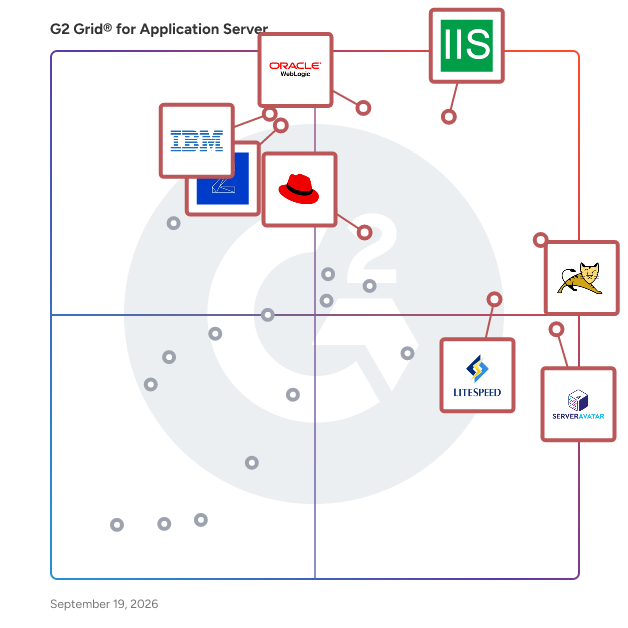
  ## What Are the Top-Rated Application Server Software Products in 2026?
### 1. [Apache Tomcat](https://www.g2.com/products/apache-tomcat/reviews)
  Apache Tomcat is an open-source implementation of the Jakarta EE platform&#39;s core specifications, including Jakarta Servlet, Jakarta Pages, Jakarta Expression Language, Jakarta WebSocket, Jakarta Annotations, and Jakarta Authentication. Developed and maintained by the Apache Software Foundation, Tomcat provides a &quot;pure Java&quot; HTTP web server environment for running Java code, making it a robust and reliable solution for deploying Java-based web applications. Key Features and Functionality: - Servlet Container (Catalina): Catalina is Tomcat&#39;s servlet container that implements the Jakarta Servlet specification, enabling the execution of Java Servlets. - JSP Engine (Jasper): Jasper is the JSP engine that compiles JavaServer Pages into servlets, facilitating dynamic web content generation. - HTTP Connector (Coyote): Coyote is the HTTP connector component that supports HTTP/1.1 and HTTP/2 protocols, allowing Tomcat to function as a standalone web server. - WebSocket Support: Tomcat provides support for the Jakarta WebSocket specification, enabling real-time, bi-directional communication between clients and servers. - Security Realms: Tomcat includes configurable security realms for user authentication and authorization, enhancing application security. Primary Value and User Solutions: Apache Tomcat offers a lightweight, efficient, and scalable platform for deploying Java-based web applications. Its adherence to Jakarta EE standards ensures compatibility and portability across different environments. Tomcat&#39;s modular architecture allows developers to integrate it seamlessly into existing infrastructures, whether as a standalone server or in conjunction with other web servers. Its open-source nature and active community support provide continuous improvements, security updates, and a wealth of resources for troubleshooting and development. By using Tomcat, organizations can deploy robust, high-performance web applications while maintaining flexibility and control over their server environments.


  **Average Rating:** 4.5/5.0
  **Total Reviews:** 124
**How Do G2 Users Rate Apache Tomcat?**

- **Security updates:** 8.5/10 (Category avg: 8.6/10)
- **Version and Profile Support:** 8.6/10 (Category avg: 8.2/10)
- **Server Management:** 9.3/10 (Category avg: 8.9/10)
- **Has the product been a good partner in doing business?:** 8.1/10 (Category avg: 8.5/10)

**Who Is the Company Behind Apache Tomcat?**

- **Seller:** [The Apache Software Foundation](https://www.g2.com/sellers/the-apache-software-foundation)
- **Year Founded:** 1999
- **HQ Location:** Wakefield, MA
- **Twitter:** @TheASF (66,154 Twitter followers)
- **LinkedIn® Page:** https://www.linkedin.com/company/215982/ (2,408 employees on LinkedIn®)

**Who Uses This Product?**
  - **Who Uses This:** Software Engineer, Senior Software Engineer
  - **Top Industries:** Computer Software, Information Technology and Services
  - **Company Size:** 46% Enterprise, 35% Mid-Market


### 2. [IBM WebSphere](https://www.g2.com/products/ibm-websphere/reviews)
  IBM WebSphere Liberty and Application Server (WAS) are part of JSphere Suite for Java, a portfolio of products including application runtimes, modernization tooling, and developer productivity IDE extensions that enable you to rapidly modernize enterprise Java applications and create new cloud-native applications, with support for on-premise and major public cloud deployments; in virtual machines, containers and Kubernetes. IBM WebSphere Liberty is a next-generation, enterprise-grade application runtime that accelerates the delivery of cloud-native applications, allowing your team to rapidly deliver differentiating innovation. Whether you&#39;re running microservices in a serverless environment or a traditional always on application, Liberty requires less infrastructure, memory, and compute resources, providing the flexibility your organization needs to deploy on any cloud in a trusted, secure and open environment. Liberty empowers your development and platform engineering teams to continuously deliver code that meets and exceeds your customers&#39; expectations. Adopt Liberty today and experience up to a 99% reduction in time to deploy code. Traditional WebSphere runtimes, include IBM WebSphere Application Server, IBM WebSphere Application Server Liberty Core, IBM WebSphere Network Deployment (WAS-ND), Reviews for any of these components can be done here.


  **Average Rating:** 4.1/5.0
  **Total Reviews:** 141
**How Do G2 Users Rate IBM WebSphere?**

- **Security updates:** 9.3/10 (Category avg: 8.6/10)
- **Version and Profile Support:** 8.8/10 (Category avg: 8.2/10)
- **Server Management:** 8.8/10 (Category avg: 8.9/10)
- **Has the product been a good partner in doing business?:** 8.6/10 (Category avg: 8.5/10)

**Who Is the Company Behind IBM WebSphere?**

- **Seller:** [IBM](https://www.g2.com/sellers/ibm)
- **Year Founded:** 1911
- **HQ Location:** Armonk, NY
- **Twitter:** @IBM (709,298 Twitter followers)
- **LinkedIn® Page:** https://www.linkedin.com/company/1009/ (324,553 employees on LinkedIn®)
- **Ownership:** SWX:IBM

**Who Uses This Product?**
  - **Top Industries:** Banking, Information Technology and Services
  - **Company Size:** 65% Enterprise, 27% Mid-Market


### 3. [Oracle WebLogic](https://www.g2.com/products/oracle-weblogic/reviews)
  Oracle WebLogic Server is a Java application server that provides a robust, mature, and scalable platform for developing, deploying, and running enterprise applications both on-premises and in the cloud. It offers a comprehensive implementation of Jakarta EE, enabling developers to build and manage applications with ease. WebLogic Server supports deployment on physical machines, virtual machines, and containerized environments, including Kubernetes clusters, ensuring flexibility and adaptability to various IT infrastructures. Key Features and Functionality: - Standards-Based Development: Supports the latest versions of Java SE and Jakarta EE APIs, ensuring compatibility and investment protection. - High Performance and Reliability: Incorporates performance optimizations and self-tuning capabilities to meet service levels with fewer servers and resources, reducing operational costs. - Comprehensive Management Tools: Offers built-in management, diagnostic, and automation tools that enhance operational efficiency. Certified to run on Docker and CRI-O containers, as well as on Kubernetes, both on-premises and in public clouds. - Clustering and High Availability: Provides clustering technology for seamless migration and failover, ensuring continuous operation for business-critical applications. - Integration Capabilities: Integrates with Oracle products and technologies, including Oracle Fusion Middleware and Oracle Applications, as well as various cloud platforms and services, facilitating optimal performance and flexibility. Primary Value and Solutions Provided: Oracle WebLogic Server addresses the need for a reliable and scalable platform for enterprise application development and deployment. By supporting industry standards and offering a rich set of APIs, it simplifies the development process, reduces application complexity, and enhances performance. Its robust management tools and support for modern deployment environments, such as Kubernetes, enable organizations to modernize their applications, achieve greater agility, and reduce time to market. Additionally, its integration with Oracle&#39;s product portfolio ensures seamless connectivity and interoperability, providing a comprehensive solution for enterprise application requirements.


  **Average Rating:** 4.2/5.0
  **Total Reviews:** 65
**How Do G2 Users Rate Oracle WebLogic?**

- **Security updates:** 9.5/10 (Category avg: 8.6/10)
- **Version and Profile Support:** 8.6/10 (Category avg: 8.2/10)
- **Server Management:** 8.3/10 (Category avg: 8.9/10)
- **Has the product been a good partner in doing business?:** 7.8/10 (Category avg: 8.5/10)

**Who Is the Company Behind Oracle WebLogic?**

- **Seller:** [Oracle](https://www.g2.com/sellers/oracle)
- **Year Founded:** 1977
- **HQ Location:** Austin, TX
- **Twitter:** @Oracle (827,981 Twitter followers)
- **LinkedIn® Page:** https://www.linkedin.com/company/1028/ (199,301 employees on LinkedIn®)
- **Ownership:** NYSE:ORCL

**Who Uses This Product?**
  - **Top Industries:** Information Technology and Services, Computer Software
  - **Company Size:** 80% Enterprise, 29% Mid-Market


### 4. [Internet Information Services (IIS) for Windows Server](https://www.g2.com/products/internet-information-services-iis-for-windows-server/reviews)
  Internet Information Services (IIS) for Windows Server is a, secure, and manageable web server platform developed by Microsoft. It enables organizations to host a wide range of web content, from static websites to dynamic web applications and media streaming services. IIS&#39;s scalable and open architecture is designed to handle demanding tasks, making it suitable for both small-scale deployments and large enterprise environments. Key Features and Functionality: - Centralized Web Farm Management: Allows deployment and management of websites and applications across large farms of web servers from a central location. - Delegated Remote Management: Enables delegation of site configuration management and publishing to remote users, facilitating collaborative administration. - Powerful Administrative Tools: Provides a rich set of command-line, UI, and programmatic APIs for configuring and managing IIS. - Scalable Web Infrastructure: Supports dynamic scaling of web farm capacity with HTTP-based load balancing and intelligent request routing. - Dynamic Caching and Compression: Enhances performance through high-speed dynamic caching and compression mechanisms. - Rich Diagnostic Tools: Offers powerful diagnostic tools to quickly identify and resolve issues. - Enhanced Server Protection: Maximizes web server security with a reduced server footprint and automatic application isolation. - Secure Content Publishing: Facilitates more secure web content publishing using standards-based protocols. - Access Protection: Protects servers from unauthorized access through robust security measures. - ASP.NET and PHP Support: Supports the development and deployment of both ASP.NET and PHP applications on the same server. - Modular and Extensible Architecture: Allows for extension and customization of IIS to meet specific requirements. - Integrated Media Platform: Delivers high-fidelity media experiences efficiently. Primary Value and Solutions Provided: IIS offers a comprehensive solution for hosting and managing web applications and services. Its integration with Windows Server infrastructure, Active Directory, and Microsoft development frameworks like ASP.NET and .NET Core simplifies authentication, security management, and deployment workflows. The intuitive graphical management interface reduces the learning curve for administrators, enabling efficient configuration and monitoring without extensive command-line expertise. By being included with Windows Server at no additional cost, IIS provides a cost-effective web server solution, eliminating separate licensing fees and offering enterprise-grade support through Microsoft&#39;s standard channels.


  **Average Rating:** 4.3/5.0
  **Total Reviews:** 59
**How Do G2 Users Rate Internet Information Services (IIS) for Windows Server?**

- **Security updates:** 8.9/10 (Category avg: 8.6/10)
- **Version and Profile Support:** 9.2/10 (Category avg: 8.2/10)
- **Server Management:** 10.0/10 (Category avg: 8.9/10)
- **Has the product been a good partner in doing business?:** 8.6/10 (Category avg: 8.5/10)

**Who Is the Company Behind Internet Information Services (IIS) for Windows Server?**

- **Seller:** [Microsoft](https://www.g2.com/sellers/microsoft)
- **Year Founded:** 1975
- **HQ Location:** Redmond, Washington
- **Twitter:** @microsoft (13,105,638 Twitter followers)
- **LinkedIn® Page:** https://www.linkedin.com/company/microsoft/ (227,697 employees on LinkedIn®)
- **Ownership:** MSFT

**Who Uses This Product?**
  - **Top Industries:** Information Technology and Services, Computer Software
  - **Company Size:** 40% Enterprise, 32% Small-Business


#### What Are Internet Information Services (IIS) for Windows Server's Pros and Cons?

**Pros:**

- Ease of Use (1 reviews)
- Easy Management (1 reviews)


### 5. [Red Hat JBoss Enterprise Application Platform](https://www.g2.com/products/red-hat-jboss-enterprise-application-platform/reviews)
  With Jboss Enterprise Middleware you can do more. Much more. For much less. Cost-effectively develop, deploy, and manage applications. Update business processes faster. And integrate more services and data. On-premise or in the cloud. Your choice.


  **Average Rating:** 4.1/5.0
  **Total Reviews:** 24
**How Do G2 Users Rate Red Hat JBoss Enterprise Application Platform?**

- **Security updates:** 8.9/10 (Category avg: 8.6/10)
- **Version and Profile Support:** 8.3/10 (Category avg: 8.2/10)
- **Server Management:** 8.1/10 (Category avg: 8.9/10)
- **Has the product been a good partner in doing business?:** 8.3/10 (Category avg: 8.5/10)

**Who Is the Company Behind Red Hat JBoss Enterprise Application Platform?**

- **Seller:** [Red Hat](https://www.g2.com/sellers/red-hat)
- **Year Founded:** 1993
- **HQ Location:** Raleigh, NC
- **Twitter:** @RedHat (300,137 Twitter followers)
- **LinkedIn® Page:** https://www.linkedin.com/company/3545/ (19,305 employees on LinkedIn®)

**Who Uses This Product?**
  - **Top Industries:** Computer Software
  - **Company Size:** 62% Enterprise, 42% Mid-Market


### 6. [Payara Server](https://www.g2.com/products/payara-server/reviews)
  Payara Server is a fully supported, developer friendly, open source Java application server originally derived from Glassfish as a drop in replacement. Payara Server’s architecture is innovative, cloud-native and optimized for production deployments. Officially compatible with Jakarta EE and Eclipse MicroProfile, the application server is developed in collaboration with an industry-leading DevOps team and the global Payara community to ensure Payara Server is the best option for production Jakarta EE (Java EE) applications today and in the future..


  **Average Rating:** 4.5/5.0
  **Total Reviews:** 84
**How Do G2 Users Rate Payara Server?**

- **Security updates:** 8.9/10 (Category avg: 8.6/10)
- **Version and Profile Support:** 8.7/10 (Category avg: 8.2/10)
- **Server Management:** 8.8/10 (Category avg: 8.9/10)
- **Has the product been a good partner in doing business?:** 8.9/10 (Category avg: 8.5/10)

**Who Is the Company Behind Payara Server?**

- **Seller:** [Payara Services Ltd](https://www.g2.com/sellers/payara-services-ltd)
- **Year Founded:** 2014
- **HQ Location:** Global, GB
- **Twitter:** @Payara_Fish (10,045 Twitter followers)
- **LinkedIn® Page:** https://www.linkedin.com/company/5349063/ (48 employees on LinkedIn®)

**Who Uses This Product?**
  - **Who Uses This:** Software Engineer
  - **Top Industries:** Computer Software, Information Technology and Services
  - **Company Size:** 49% Small-Business, 31% Mid-Market


### 7. [Parallels Remote Application Server (RAS)](https://www.g2.com/products/parallels-remote-application-server-ras/reviews)
  Parallels® Remote Application Server (RAS) is a remote work solution that provides secure virtual access to business applications and desktops on any device or OS—from anywhere. The platform offers an agile, cloud-ready foundation and end-to-end security fueled by a centralized management console with granular policies. Companies can leverage on-premises, hybrid, or public cloud deployments and integrate with existing technology like Microsoft Azure and AWS. Parallels RAS aims to give organizations the flexibility, scalability, and IT agility to adapt to changing business needs. Parallels RAS offers a single, full-featured licensing model that includes 24/7 support and access to product training. Key benefits include: - User experience: work from anywhere, on any device. - Enhanced data security and compliance: centralized management console with granular policies. - IT agility and business readiness: flexible hosting solutions to scale and adapt. - Total cost of ownership: supports BYOD and includes a simple licensing model. - Always-on support: access to 24/7 support and training at no additional cost.


  **Average Rating:** 4.2/5.0
  **Total Reviews:** 68
**How Do G2 Users Rate Parallels Remote Application Server (RAS)?**

- **Security updates:** 10.0/10 (Category avg: 8.6/10)
- **Server Management:** 10.0/10 (Category avg: 8.9/10)
- **Has the product been a good partner in doing business?:** 8.8/10 (Category avg: 8.5/10)

**Who Is the Company Behind Parallels Remote Application Server (RAS)?**

- **Seller:** [Corel Corporation](https://www.g2.com/sellers/corel-corporation-10b41cd4-0594-4f58-8f0a-212c911385c6)
- **Year Founded:** 2006
- **HQ Location:** Bellevue, WA
- **Twitter:** @corelsoftware (84 Twitter followers)
- **LinkedIn® Page:** https://www.linkedin.com/showcase/mindmanagerglobal/ (1 employees on LinkedIn®)

**Who Uses This Product?**
  - **Top Industries:** Information Technology and Services, Computer Software
  - **Company Size:** 43% Small-Business, 29% Enterprise


### 8. [Apache HTTP Server Project](https://www.g2.com/products/apache-http-server-project/reviews)
  The Apache HTTP Server, commonly known as Apache, is a free and open-source web server software that has been a cornerstone of the internet since its inception in 1995. Developed and maintained by the Apache Software Foundation, Apache is designed to provide a secure, efficient, and extensible server that adheres to current HTTP standards. Its modular architecture allows for a wide range of functionalities, making it suitable for various web hosting needs, from serving static content to handling dynamic web applications. Key Features and Functionality: - Modular Architecture: Apache&#39;s design enables the addition of modules to extend its capabilities, such as authentication, URL rewriting, and proxying. - Cross-Platform Compatibility: It operates on numerous operating systems, including UNIX-like systems and Windows, ensuring flexibility across different environments. - Support for Multiple Protocols: Apache supports HTTP/1.1 and HTTP/2 protocols, facilitating efficient communication between clients and servers. - Security Features: With modules like mod\_ssl, Apache provides robust support for TLS/SSL encryption, ensuring secure data transmission. - Virtual Hosting: This feature allows a single Apache instance to serve multiple websites, each with its own domain and configuration. - Integration with Programming Languages: Apache seamlessly integrates with languages such as PHP, Python, and Perl, enabling dynamic content generation. - Comprehensive Logging and Monitoring: It offers detailed logging capabilities, aiding in monitoring server performance and diagnosing issues. Primary Value and User Solutions: Apache&#39;s primary value lies in its reliability, flexibility, and extensive community support. It addresses the needs of web administrators and developers by providing a customizable and scalable platform for hosting websites and applications. Its open-source nature ensures continuous improvement and adaptation to emerging web technologies, making it a preferred choice for both small-scale personal projects and large-scale enterprise deployments.


  **Average Rating:** 4.3/5.0
  **Total Reviews:** 137
**How Do G2 Users Rate Apache HTTP Server Project?**

- **Security updates:** 8.8/10 (Category avg: 8.6/10)
- **Version and Profile Support:** 8.0/10 (Category avg: 8.2/10)
- **Server Management:** 9.2/10 (Category avg: 8.9/10)
- **Has the product been a good partner in doing business?:** 8.0/10 (Category avg: 8.5/10)

**Who Is the Company Behind Apache HTTP Server Project?**

- **Seller:** [The Apache Software Foundation](https://www.g2.com/sellers/the-apache-software-foundation)
- **Year Founded:** 1999
- **HQ Location:** Wakefield, MA
- **Twitter:** @TheASF (66,154 Twitter followers)
- **LinkedIn® Page:** https://www.linkedin.com/company/215982/ (2,408 employees on LinkedIn®)

**Who Uses This Product?**
  - **Who Uses This:** Software Engineer
  - **Top Industries:** Information Technology and Services, Computer Software
  - **Company Size:** 50% Small-Business, 30% Mid-Market


### 9. [Progress OpenEdge](https://www.g2.com/products/progress-progress-openedge/reviews)
  OpenEdge 12 provides the performance, availability, agility and security you need to facilitate your application evolution effort. Read about the exceptional enhancements and new features in OpenEdge 12 that will help you easily pivot to meet market demands, scale the application as your business requires, and dramatically improve performance, allowing the organization to accelerate time to market, increase efficiencies, save expenses, increase availability and continue to compete effectively.


  **Average Rating:** 4.0/5.0
  **Total Reviews:** 37
**How Do G2 Users Rate Progress OpenEdge?**

- **Security updates:** 8.3/10 (Category avg: 8.6/10)
- **Version and Profile Support:** 8.3/10 (Category avg: 8.2/10)
- **Server Management:** 8.3/10 (Category avg: 8.9/10)
- **Has the product been a good partner in doing business?:** 8.7/10 (Category avg: 8.5/10)

**Who Is the Company Behind Progress OpenEdge?**

- **Seller:** [Progress Software](https://www.g2.com/sellers/progress-software)
- **Company Website:** https://www.progress.com/
- **Year Founded:** 1981
- **HQ Location:** Burlington, MA.
- **Twitter:** @ProgressSW (48,839 Twitter followers)
- **LinkedIn® Page:** https://www.linkedin.com/company/progress-software/ (4,207 employees on LinkedIn®)

**Who Uses This Product?**
  - **Who Uses This:** Senior Software Engineer
  - **Top Industries:** Computer Software, Information Technology and Services
  - **Company Size:** 47% Enterprise, 37% Mid-Market


    ## What Is Application Server Software?
  [IT Infrastructure Software](https://www.g2.com/categories/it-infrastructure)
  ## What Software Categories Are Similar to Application Server Software?
    - [Web Server Accelerator Software](https://www.g2.com/categories/web-server-accelerator)

  
---

## How Do You Choose the Right Application Server Software?

### What You Should Know About Application Server Software

### What is an Application Server?

An application server allows users to install and host applications such as web browsers, image editors, and development and testing applications. Application servers, also known as app servers, manage an organization&#39;s backend business applications. All operations necessary to manage the numerous applications a business uses are done via an application server.

As the number of applications used increases, so does the demand for application servers to manage them. The complexity of handling applications has become increasingly complex, and app servers help alleviate these concerns. Application servers can be used across different industries and can be installed based on user requirements.

Application servers are used based on user requirements. A user might need an application for scalability or to improve managing all their web applications. An application server acts as a middleware platform or the second layer since it exists between the first layer, which can be the operating system (OS), the client end, a browser, or a web server, and the third layer, the database server itself. If a company faces high-traffic and latency issues, an application server is used to manage complex requests, monitor high-availability application services, etc.

#### What Types of Application Servers Exist?

There are primarily two different types of servers—application servers and web servers. Application servers are different from web servers since web application servers are static and serve HTTP/HTML requests from the website. Web servers do not serve dynamic or server-side content. A user uses it to pull static HTML content, including files, documents, photos, images, javascript, etc., and can only support HTTP/HTTPS/HTML protocols. These web servers are used to pull web pages for clients using an HTTP server to understand HTTP and URLs. In the case of a web server, the client is the browser where a user can type in their requirements. Application servers provide users access to business logic. In the software industry, business logic is defined as the section of the program that includes real-world business rules on managing data. This business logic works with dynamic content, i.e., transforming the data for specific functionality. Application servers and web servers usually work together. Some web application servers also have plugins from scripting languages such as ASP, PHP, Perl, and JSP.

Servlets can also be opted for, which is a part of a web server that can be run as a separate process. It is a Java programming language class that helps to extend server capabilities. Some web servers are open source, such as Apache Tomcat and JBoss. Application servers can help execute web modules such as Java Servlets and serve JavaEE apps. For example, consider shopping on an e-commerce website. Customers put their items in the cart, add payment details, and check out. However, the sequence of transactions needed falls under business logic—add to cart, add shipping details, add payment details, get OTP for securing the transaction, order confirmation message—this sequence is the business logic.

**&amp;nbsp;** There are three types of application servers:

**Active application servers:** This application server supports business logic in the form of rules or objects.

**Web information servers:** This type of application server focuses on processing web applications.

**Component servers:** This type of application server helps connect different software components.

### What are the Common Features of Application Servers?

The following are some core features within application servers that can help users in several ways:

**Data redundancy:** One of the features of the application server is data redundancy. Data redundancy is a process where data is kept in two or more separate locations. This is done to ensure business continuity in case of any unforeseen events. Application servers support data redundancy to ensure that in case any business application fails, it can be moved onto another working server and improve application runtime. This helps avoid single points of failure.

**High availability:** Systems, especially mission-critical systems and applications, must run 24/7. Imagine a system on the New York Stock Exchange crashes, or a server in NASA fails. Systems must remain available at all times. However, all systems will have some downtime (planned or unplanned). Application servers for this use case must be high availability (less downtime) to ensure there is no disruption, especially during high peak traffic hours, and able to manage the load, ensuring high performance of the application server.

**Load balancing:** Load balancing takes care of distributing several requests evenly to different application tiers. It is used to route requests to the right servers and help fulfill the request. Application servers must have an in-built load balancing feature or be able to connect with a load balancing software. Load balancers can also act as a reverse proxy to maintain the load over servers.

**Central management interface:** Applications servers include a centralized management interface that helps a user to manage numerous application servers from one platform, removing the need for many.

### What are the Benefits of Application Servers?

A few benefits of application servers include:

**Instant access to apps:** Every application being used is pulled from an application server and delivered by a web server or a web application server. Web clients make HTTP requests to access a particular app pulled from the application server.

**Traffic optimization:** Application servers are designed in such a way that they can handle high incoming traffic for the apps. They are built to handle multiple requests from web clients. In addition, the performance of heavy applications increases by using an application server.

**License management** : Installing an application multiple times on a system is tedious. This is where the application server comes in. Computers can run applications without the need to be run locally. This helps manage licenses for various applications since only the allowed number of users can use the application at a given time.

**Data integrity:** Application servers follow a centralized approach. Any security updates, patches, etc., can be done via the application server. Different users do not need to access the same application and make changes that could cause errors.

### Challenges with Application Servers

Application servers can come with its own set of challenges, as mentioned below:

**Increase in traffic:** With the boom of the internet and social media, the amount of online traffic has increased drastically. Application servers must keep up with this surge in traffic and ensure no downtime that could affect application performance.

**Network delays:** Network delays can happen due to geographical distance, and applications can take a longer time to load. Assessing the network impact on application server performance when latency increases becomes quite challenging.&amp;nbsp;

**Technical challenges:** Application servers also face technical issues such as failing to load, problems communicating with hosts, and database connections issues, among others.

### Who Uses Application Servers?

The different personas that would use application servers are:

**IT teams:** IT teams are the main users of application servers. They are in charge of installing, operating, and hosting applications based on the user requirements.

**App developers:** Application servers can be used to provide a container model for applications which makes it extremely important for application developments with Kubernetes. It can also be used to provide services for applications.&amp;nbsp;

### How to Buy Application Servers

#### Requirements Gathering (RFI/RFP) for Application Servers

Before beginning the buyer journey for an application server, there are a few things to be mindful of, which include the following:

- **Identifying and prioritization:** When choosing application servers, it&#39;s essential to identify and prioritize based on the wants and needs of the organization/user. Some important factors include scalability, reliability, development, performance, and cost-effectiveness.
- **Identification of a use case:** If the organization is large to very large, an application server is necessary. However, if a smaller organization is looking to purchase an application server, the cost might be their primary factor.
- **Application modernization:** Application servers can also be used extensively to modernize enterprise applications (JAVA applications) and develop and deliver new cloud-native applications. These applications can usually be supported on-premises, on the cloud, or hosted on containers or Kubernetes.

#### Compare Application Server Products

**Create a long list**

This step involves creating a long list of application server vendors and providers. Some key factors to consider include automation features, network latency, high availability, load-balancing, reading databases, security support, authentication, data privacy, and compliance with open standards such as JavaEE, API gateway support, and others. Keeping these essential features in mind, a long list of products can be generated.

**Create a short list**

Once the long list of application server offerings has been identified, it is time to remove software that does not meet all the business criteria. For this, it is important to use the RFI/RFP made earlier on what is to be done before choosing an application server. Using the above information, buyers can further shorten their list and only select those software vendors that meet all the business requirements.

**Conduct demos**

Once the list has been reduced to a couple of vendors, buyers may begin to request a demo of the application server. The demo on a server will give them an idea of how the software will work once the actual process begins and is an excellent way to ensure the best fit. At this step, the buyer should ask several questions to the vendor about the benefits, after-service support, staff training, and other additional features that can be provided.&amp;nbsp;

#### Selection of Application Servers

**Choose a selection team**

Choosing the right team to work together on purchasing an application server is a critical part of the process. This team will be in charge of identifying pain points to finally overseeing the entire implementation process. The team should include a mix of different personas who have the required skills, interests, and time. Some corporate roles include project manager, system owner, and decision makers. From the technical team, there should be an IT admin, application developers such as a JAVA/Selenium developer, and DevOps engineering leads.

**Final decision**

Once all the steps are complete, the final decision is made. Weighing all the factors and scenarios, the buyer can purchase the application server software.


