Introducing G2.ai, the future of software buying.Try now

Best Enterprise Online Appointment Scheduling Software

Nana Serwah Nkrahene
NSN
Researched and written by Nana Serwah Nkrahene

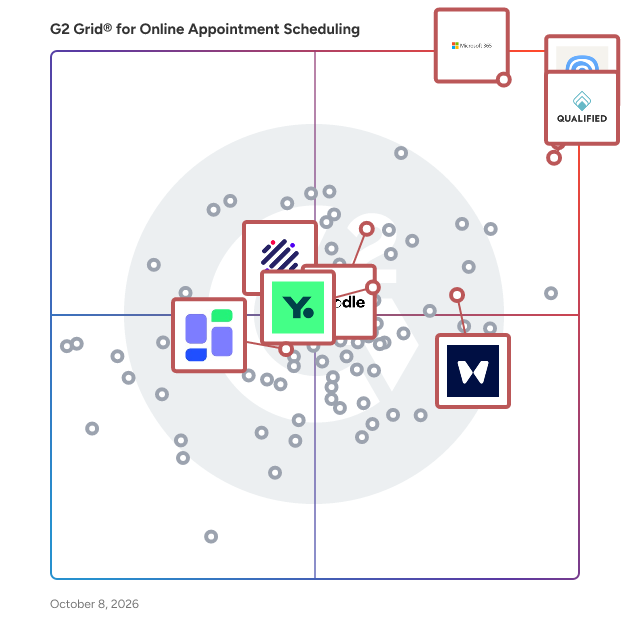
Products classified in the overall Online Appointment Scheduling category are similar in many regards and help companies of all sizes solve their business problems. However, enterprise business features, pricing, setup, and installation differ from businesses of other sizes, which is why we match buyers to the right Enterprise Business Online Appointment Scheduling to fit their needs. Compare product ratings based on reviews from enterprise users or connect with one of G2's buying advisors to find the right solutions within the Enterprise Business Online Appointment Scheduling category.

In addition to qualifying for inclusion in the Online Appointment Scheduling Software category, to qualify for inclusion in the Enterprise Business Online Appointment Scheduling Software category, a product must have at least 10 reviews left by a reviewer from an enterprise business.

Show More
Show Less

G2 takes pride in showing unbiased reviews on user satisfaction in our ratings and reports. We do not allow paid placements in any of our ratings, rankings, or reports. Learn about our scoring methodologies.

Coming Soon
Get Trending Online Appointment Scheduling Products in Your Inbox

A weekly snapshot of rising stars, new launches, and what everyone's buzzing about.

Sample Trending Products Newsletter
1 filter applied
Clear All

12 Listings in Enterprise Online Appointment Scheduling Software Available

(5,635)4.6 out of 5
2nd Easiest To Use in Online Appointment Scheduling software
View top Consulting Services for Microsoft 365
Save to My Lists
Entry Level Price:$6.00
  • Overview
    Expand/Collapse Overview
  • Product Description
    How are these determined?Information
    This description is provided by the seller.

    Launch and grow your business with Microsoft 365. Do more, faster, with intelligent tools to create, send, share, and store professional, branded documents with your customers and team - securely in t

    Users
    • Owner
    • Software Engineer
    Industries
    • Information Technology and Services
    • Education Management
    Market Segment
    • 37% Mid-Market
    • 35% Small-Business
    User Sentiment
    How are these determined?Information
    These insights, currently in beta, are compiled from user reviews and grouped to display a high-level overview of the software.
    • Microsoft 365 is a suite of productivity tools, including Word, Excel, PowerPoint, Outlook, and Teams, that allows users to create documents, share files, schedule meetings, and collaborate with teammates.
    • Reviewers appreciate the seamless integration between the various Microsoft apps, the cloud-based approach that allows access to files from anywhere, and the real-time co-authoring feature that enhances teamwork.
    • Reviewers experienced issues with frequent and sometimes disruptive updates, the need for a strong internet connection for certain features, and a confusing licensing structure.
  • Pros and Cons
    Expand/Collapse Pros and Cons
  • Microsoft 365 Pros and Cons
    How are these determined?Information
    Pros and Cons are compiled from review feedback and grouped into themes to provide an easy-to-understand summary of user reviews.
    Pros
    Ease of Use
    244
    Team Collaboration
    201
    Features
    191
    Integrations
    174
    Seamless Integration
    151
    Cons
    Expensive
    100
    Learning Curve
    77
    Missing Features
    75
    Slow Performance
    61
    Limited Features
    60
  • User Satisfaction
    Expand/Collapse User Satisfaction
  • Microsoft 365 features and usability ratings that predict user satisfaction
    8.8
    Has the product been a good partner in doing business?
    Average: 9.0
    8.8
    Communication
    Average: 8.6
    8.5
    AI Text Generation
    Average: 7.0
    8.9
    Website Integration
    Average: 8.6
  • Seller Details
    Expand/Collapse Seller Details
  • Seller Details
    Seller
    Microsoft
    Year Founded
    1975
    HQ Location
    Redmond, Washington
    Twitter
    @microsoft
    13,086,922 Twitter followers
    LinkedIn® Page
    www.linkedin.com
    220,934 employees on LinkedIn®
    Ownership
    MSFT
Product Description
How are these determined?Information
This description is provided by the seller.

Launch and grow your business with Microsoft 365. Do more, faster, with intelligent tools to create, send, share, and store professional, branded documents with your customers and team - securely in t

Users
  • Owner
  • Software Engineer
Industries
  • Information Technology and Services
  • Education Management
Market Segment
  • 37% Mid-Market
  • 35% Small-Business
User Sentiment
How are these determined?Information
These insights, currently in beta, are compiled from user reviews and grouped to display a high-level overview of the software.
  • Microsoft 365 is a suite of productivity tools, including Word, Excel, PowerPoint, Outlook, and Teams, that allows users to create documents, share files, schedule meetings, and collaborate with teammates.
  • Reviewers appreciate the seamless integration between the various Microsoft apps, the cloud-based approach that allows access to files from anywhere, and the real-time co-authoring feature that enhances teamwork.
  • Reviewers experienced issues with frequent and sometimes disruptive updates, the need for a strong internet connection for certain features, and a confusing licensing structure.
Microsoft 365 Pros and Cons
How are these determined?Information
Pros and Cons are compiled from review feedback and grouped into themes to provide an easy-to-understand summary of user reviews.
Pros
Ease of Use
244
Team Collaboration
201
Features
191
Integrations
174
Seamless Integration
151
Cons
Expensive
100
Learning Curve
77
Missing Features
75
Slow Performance
61
Limited Features
60
Microsoft 365 features and usability ratings that predict user satisfaction
8.8
Has the product been a good partner in doing business?
Average: 9.0
8.8
Communication
Average: 8.6
8.5
AI Text Generation
Average: 7.0
8.9
Website Integration
Average: 8.6
Seller Details
Seller
Microsoft
Year Founded
1975
HQ Location
Redmond, Washington
Twitter
@microsoft
13,086,922 Twitter followers
LinkedIn® Page
www.linkedin.com
220,934 employees on LinkedIn®
Ownership
MSFT
(1,343)4.9 out of 5
Optimized for quick response
4th Easiest To Use in Online Appointment Scheduling software
View top Consulting Services for Qualified
Save to My Lists
Entry Level Price:Contact Us
  • Overview
    Expand/Collapse Overview
  • Product Description
    How are these determined?Information
    This description is provided by the seller.

    Qualified is the Agentic Marketing platform for B2B companies around the world. Headquartered in San Francisco, Qualified is built to modernize and maximize inbound pipeline generation with Piper the

    Users
    • Sales Development Representative
    • Marketing Operations Manager
    Industries
    • Computer Software
    • Information Technology and Services
    Market Segment
    • 70% Mid-Market
    • 20% Enterprise
    User Sentiment
    How are these determined?Information
    These insights, currently in beta, are compiled from user reviews and grouped to display a high-level overview of the software.
    • Qualified is a chat system that supports booking meetings directly from a website and bridges the speed-to-lead gap often found with other Marketing Automation tools.
    • Users frequently mention the user-friendly interface, the ability to scale Business Development Rep workload, and the valuable insights provided by the AI chatbot.
    • Users mentioned that it takes time to learn the tool, with many settings to get used to, and setting up prompts isn’t always quick.
  • Pros and Cons
    Expand/Collapse Pros and Cons
  • Qualified Pros and Cons
    How are these determined?Information
    Pros and Cons are compiled from review feedback and grouped into themes to provide an easy-to-understand summary of user reviews.
    Pros
    Customer Support
    277
    Helpful
    248
    Customer Service
    211
    Ease of Use
    210
    Features
    208
    Cons
    Learning Curve
    84
    Missing Features
    73
    Steep Learning Curve
    49
    Limited Customization
    34
    Complexity
    32
  • User Satisfaction
    Expand/Collapse User Satisfaction
  • Qualified features and usability ratings that predict user satisfaction
    9.9
    Has the product been a good partner in doing business?
    Average: 9.0
    8.9
    Communication
    Average: 8.6
    9.0
    AI Text Generation
    Average: 7.0
    9.6
    Website Integration
    Average: 8.6
  • Seller Details
    Expand/Collapse Seller Details
  • Seller Details
    Company Website
    Year Founded
    2018
    HQ Location
    San Francisco, CA
    Twitter
    @tryqualified
    700 Twitter followers
    LinkedIn® Page
    www.linkedin.com
    286 employees on LinkedIn®
Product Description
How are these determined?Information
This description is provided by the seller.

Qualified is the Agentic Marketing platform for B2B companies around the world. Headquartered in San Francisco, Qualified is built to modernize and maximize inbound pipeline generation with Piper the

Users
  • Sales Development Representative
  • Marketing Operations Manager
Industries
  • Computer Software
  • Information Technology and Services
Market Segment
  • 70% Mid-Market
  • 20% Enterprise
User Sentiment
How are these determined?Information
These insights, currently in beta, are compiled from user reviews and grouped to display a high-level overview of the software.
  • Qualified is a chat system that supports booking meetings directly from a website and bridges the speed-to-lead gap often found with other Marketing Automation tools.
  • Users frequently mention the user-friendly interface, the ability to scale Business Development Rep workload, and the valuable insights provided by the AI chatbot.
  • Users mentioned that it takes time to learn the tool, with many settings to get used to, and setting up prompts isn’t always quick.
Qualified Pros and Cons
How are these determined?Information
Pros and Cons are compiled from review feedback and grouped into themes to provide an easy-to-understand summary of user reviews.
Pros
Customer Support
277
Helpful
248
Customer Service
211
Ease of Use
210
Features
208
Cons
Learning Curve
84
Missing Features
73
Steep Learning Curve
49
Limited Customization
34
Complexity
32
Qualified features and usability ratings that predict user satisfaction
9.9
Has the product been a good partner in doing business?
Average: 9.0
8.9
Communication
Average: 8.6
9.0
AI Text Generation
Average: 7.0
9.6
Website Integration
Average: 8.6
Seller Details
Company Website
Year Founded
2018
HQ Location
San Francisco, CA
Twitter
@tryqualified
700 Twitter followers
LinkedIn® Page
www.linkedin.com
286 employees on LinkedIn®

This is how G2 Deals can help you:

  • Easily shop for curated – and trusted – software
  • Own your own software buying journey
  • Discover exclusive deals on software
(309)4.8 out of 5
Optimized for quick response
1st Easiest To Use in Online Appointment Scheduling software
Save to My Lists
Entry Level Price:Free
  • Overview
    Expand/Collapse Overview
  • Product Description
    How are these determined?Information
    This description is provided by the seller.

    Waitwhile is a user-friendly queue management and appointment scheduling solution designed to help businesses optimize their operations and enhance customer experiences. By offering virtual waitlists

    Users
    • Cafe Ambassador
    Industries
    • Retail
    • Consumer Services
    Market Segment
    • 46% Small-Business
    • 32% Mid-Market
    User Sentiment
    How are these determined?Information
    These insights, currently in beta, are compiled from user reviews and grouped to display a high-level overview of the software.
    • Waitwhile is a software platform designed to manage and streamline tasks such as customer service, staff allocation, and record keeping in various environments including offices, hospitals, schools, and event venues.
    • Reviewers like the user-friendly interface of Waitwhile, its ability to provide a comprehensive view of statuses, its adaptability to different environments, and its features that aid in task organization, customer communication, and record keeping.
    • Reviewers noted some limitations with Waitwhile, such as a cap on the number of patients that can be seen per month, difficulty integrating with existing systems, complexity in customizing the platform for specific needs, and occasional system downtime during peak times.
  • Pros and Cons
    Expand/Collapse Pros and Cons
  • Waitwhile Pros and Cons
    How are these determined?Information
    Pros and Cons are compiled from review feedback and grouped into themes to provide an easy-to-understand summary of user reviews.
    Pros
    Ease of Use
    71
    User-Friendly
    42
    Appointment Management
    17
    Positive Experiences
    16
    Messaging Features
    15
    Cons
    Client Experience
    8
    Messaging Issues
    8
    Missing Features
    8
    Limited Customization
    6
    Learning Curve
    4
  • User Satisfaction
    Expand/Collapse User Satisfaction
  • Waitwhile features and usability ratings that predict user satisfaction
    9.7
    Has the product been a good partner in doing business?
    Average: 9.0
    9.2
    Communication
    Average: 8.6
    9.1
    AI Text Generation
    Average: 7.0
    9.2
    Website Integration
    Average: 8.6
  • Seller Details
    Expand/Collapse Seller Details
  • Seller Details
    Company Website
    Year Founded
    2017
    HQ Location
    San Francisco, California
    Twitter
    @waitwhile
    182 Twitter followers
    LinkedIn® Page
    www.linkedin.com
    29 employees on LinkedIn®
Product Description
How are these determined?Information
This description is provided by the seller.

Waitwhile is a user-friendly queue management and appointment scheduling solution designed to help businesses optimize their operations and enhance customer experiences. By offering virtual waitlists

Users
  • Cafe Ambassador
Industries
  • Retail
  • Consumer Services
Market Segment
  • 46% Small-Business
  • 32% Mid-Market
User Sentiment
How are these determined?Information
These insights, currently in beta, are compiled from user reviews and grouped to display a high-level overview of the software.
  • Waitwhile is a software platform designed to manage and streamline tasks such as customer service, staff allocation, and record keeping in various environments including offices, hospitals, schools, and event venues.
  • Reviewers like the user-friendly interface of Waitwhile, its ability to provide a comprehensive view of statuses, its adaptability to different environments, and its features that aid in task organization, customer communication, and record keeping.
  • Reviewers noted some limitations with Waitwhile, such as a cap on the number of patients that can be seen per month, difficulty integrating with existing systems, complexity in customizing the platform for specific needs, and occasional system downtime during peak times.
Waitwhile Pros and Cons
How are these determined?Information
Pros and Cons are compiled from review feedback and grouped into themes to provide an easy-to-understand summary of user reviews.
Pros
Ease of Use
71
User-Friendly
42
Appointment Management
17
Positive Experiences
16
Messaging Features
15
Cons
Client Experience
8
Messaging Issues
8
Missing Features
8
Limited Customization
6
Learning Curve
4
Waitwhile features and usability ratings that predict user satisfaction
9.7
Has the product been a good partner in doing business?
Average: 9.0
9.2
Communication
Average: 8.6
9.1
AI Text Generation
Average: 7.0
9.2
Website Integration
Average: 8.6
Seller Details
Company Website
Year Founded
2017
HQ Location
San Francisco, California
Twitter
@waitwhile
182 Twitter followers
LinkedIn® Page
www.linkedin.com
29 employees on LinkedIn®
(2,505)4.7 out of 5
Optimized for quick response
3rd Easiest To Use in Online Appointment Scheduling software
View top Consulting Services for Calendly
Save to My Lists
Entry Level Price:Free
  • Overview
    Expand/Collapse Overview
  • Product Description
    How are these determined?Information
    This description is provided by the seller.

    Calendly helps individuals, teams, and organizations automate the meeting lifecycle by removing the back and forth with scheduling. Calendly’s cloud-based platform offers a new layer of the modern dig

    Users
    • Owner
    • CEO
    Industries
    • Computer Software
    • Information Technology and Services
    Market Segment
    • 60% Small-Business
    • 28% Mid-Market
    User Sentiment
    How are these determined?Information
    These insights, currently in beta, are compiled from user reviews and grouped to display a high-level overview of the software.
    • Calendly is a scheduling tool that allows users to manage their appointments, integrate with other applications, and customize their booking pages.
    • Reviewers frequently mention the ease of use, seamless integration with other tools like Google Calendar and Zoom, and the ability to customize meeting types and messages.
    • Users mentioned issues with pricing, limited customization options in the free version, and occasional difficulties with international time zones and calendar syncing.
  • Pros and Cons
    Expand/Collapse Pros and Cons
  • Calendly Pros and Cons
    How are these determined?Information
    Pros and Cons are compiled from review feedback and grouped into themes to provide an easy-to-understand summary of user reviews.
    Pros
    Ease of Use
    159
    Scheduling
    134
    Easy Scheduling
    121
    Scheduling Ease
    88
    Calendar Integration
    80
    Cons
    Calendar Issues
    45
    Missing Features
    40
    Scheduling Issues
    37
    Integration Issues
    29
    Learning Curve
    25
  • User Satisfaction
    Expand/Collapse User Satisfaction
  • Calendly features and usability ratings that predict user satisfaction
    9.3
    Has the product been a good partner in doing business?
    Average: 9.0
    8.9
    Communication
    Average: 8.6
    7.2
    AI Text Generation
    Average: 7.0
    9.0
    Website Integration
    Average: 8.6
  • Seller Details
    Expand/Collapse Seller Details
  • Seller Details
    Seller
    Calendly
    Company Website
    Year Founded
    2013
    HQ Location
    Atlanta, Georgia
    Twitter
    @Calendly
    21,892 Twitter followers
    LinkedIn® Page
    www.linkedin.com
    534 employees on LinkedIn®
Product Description
How are these determined?Information
This description is provided by the seller.

Calendly helps individuals, teams, and organizations automate the meeting lifecycle by removing the back and forth with scheduling. Calendly’s cloud-based platform offers a new layer of the modern dig

Users
  • Owner
  • CEO
Industries
  • Computer Software
  • Information Technology and Services
Market Segment
  • 60% Small-Business
  • 28% Mid-Market
User Sentiment
How are these determined?Information
These insights, currently in beta, are compiled from user reviews and grouped to display a high-level overview of the software.
  • Calendly is a scheduling tool that allows users to manage their appointments, integrate with other applications, and customize their booking pages.
  • Reviewers frequently mention the ease of use, seamless integration with other tools like Google Calendar and Zoom, and the ability to customize meeting types and messages.
  • Users mentioned issues with pricing, limited customization options in the free version, and occasional difficulties with international time zones and calendar syncing.
Calendly Pros and Cons
How are these determined?Information
Pros and Cons are compiled from review feedback and grouped into themes to provide an easy-to-understand summary of user reviews.
Pros
Ease of Use
159
Scheduling
134
Easy Scheduling
121
Scheduling Ease
88
Calendar Integration
80
Cons
Calendar Issues
45
Missing Features
40
Scheduling Issues
37
Integration Issues
29
Learning Curve
25
Calendly features and usability ratings that predict user satisfaction
9.3
Has the product been a good partner in doing business?
Average: 9.0
8.9
Communication
Average: 8.6
7.2
AI Text Generation
Average: 7.0
9.0
Website Integration
Average: 8.6
Seller Details
Seller
Calendly
Company Website
Year Founded
2013
HQ Location
Atlanta, Georgia
Twitter
@Calendly
21,892 Twitter followers
LinkedIn® Page
www.linkedin.com
534 employees on LinkedIn®
Entry Level Price:Free
  • Overview
    Expand/Collapse Overview
  • Product Description
    How are these determined?Information
    This description is provided by the seller.

    Doodle is the easiest way to bring people together — without the endless email threads. Whether you're planning a 1:1, hosting a team sync, or coordinating a larger group, Doodle helps you find the ri

    Users
    • Student
    • Graduate Research Assistant
    Industries
    • Education Management
    • Higher Education
    Market Segment
    • 42% Small-Business
    • 30% Enterprise
  • Pros and Cons
    Expand/Collapse Pros and Cons
  • Doodle Pros and Cons
    How are these determined?Information
    Pros and Cons are compiled from review feedback and grouped into themes to provide an easy-to-understand summary of user reviews.
    Pros
    Automatic Scheduling
    1
    Booking Management
    1
    Ease of Use
    1
    Easy Scheduling
    1
    Easy Setup
    1
    Cons
    Limited Automation
    1
    Limited Customization
    1
    Notification Issues
    1
    Reminder Limitations
    1
  • User Satisfaction
    Expand/Collapse User Satisfaction
  • Doodle features and usability ratings that predict user satisfaction
    9.0
    Has the product been a good partner in doing business?
    Average: 9.0
    9.2
    Communication
    Average: 8.6
    0.0
    No information available
    9.2
    Website Integration
    Average: 8.6
  • Seller Details
    Expand/Collapse Seller Details
  • Seller Details
    Seller
    Doodle
    Year Founded
    2007
    HQ Location
    Zurich, Switzerland
    Twitter
    @doodletweet
    10,392 Twitter followers
    LinkedIn® Page
    www.linkedin.com
    111 employees on LinkedIn®
Product Description
How are these determined?Information
This description is provided by the seller.

Doodle is the easiest way to bring people together — without the endless email threads. Whether you're planning a 1:1, hosting a team sync, or coordinating a larger group, Doodle helps you find the ri

Users
  • Student
  • Graduate Research Assistant
Industries
  • Education Management
  • Higher Education
Market Segment
  • 42% Small-Business
  • 30% Enterprise
Doodle Pros and Cons
How are these determined?Information
Pros and Cons are compiled from review feedback and grouped into themes to provide an easy-to-understand summary of user reviews.
Pros
Automatic Scheduling
1
Booking Management
1
Ease of Use
1
Easy Scheduling
1
Easy Setup
1
Cons
Limited Automation
1
Limited Customization
1
Notification Issues
1
Reminder Limitations
1
Doodle features and usability ratings that predict user satisfaction
9.0
Has the product been a good partner in doing business?
Average: 9.0
9.2
Communication
Average: 8.6
0.0
No information available
9.2
Website Integration
Average: 8.6
Seller Details
Seller
Doodle
Year Founded
2007
HQ Location
Zurich, Switzerland
Twitter
@doodletweet
10,392 Twitter followers
LinkedIn® Page
www.linkedin.com
111 employees on LinkedIn®
  • Overview
    Expand/Collapse Overview
  • Product Description
    How are these determined?Information
    This description is provided by the seller.

    jrni is the in-person experience platform for enterprise brands. We help leading retailers, financial services providers, educational institutions, and more convert more of their foot traffic and d

    Users
    No information available
    Industries
    • Banking
    • Retail
    Market Segment
    • 52% Enterprise
    • 39% Mid-Market
    User Sentiment
    How are these determined?Information
    These insights, currently in beta, are compiled from user reviews and grouped to display a high-level overview of the software.
    • JRNI is a platform that streamlines queue management, optimizes staffing schedules, and enhances customer experience during peak periods through seamless booking tools and real-time scheduling capabilities.
    • Reviewers like the flexibility and customizability of JRNI, its user-friendly interface, the wide range of features it offers, and the proactive, responsive support and consultancy provided by the JRNI team.
    • Users experienced challenges with the ticket/support side, limitations in API capabilities in some versions, slow roll-out of updates and new features, and difficulties with specific technical bugs or issues.
  • Pros and Cons
    Expand/Collapse Pros and Cons
  • jrni Pros and Cons
    How are these determined?Information
    Pros and Cons are compiled from review feedback and grouped into themes to provide an easy-to-understand summary of user reviews.
    Pros
    Customer Support
    11
    Appointment Management
    7
    Customer Service
    7
    Helpful
    7
    Responsive Support
    7
    Cons
    Update Issues
    2
    Calendar Issues
    1
    Complex Settings
    1
    Email Issues
    1
    Error Handling
    1
  • User Satisfaction
    Expand/Collapse User Satisfaction
  • jrni features and usability ratings that predict user satisfaction
    9.6
    Has the product been a good partner in doing business?
    Average: 9.0
    9.4
    Communication
    Average: 8.6
    7.8
    AI Text Generation
    Average: 7.0
    9.7
    Website Integration
    Average: 8.6
  • Seller Details
    Expand/Collapse Seller Details
  • Seller Details
    Seller
    JRNI
    Company Website
    Year Founded
    2008
    HQ Location
    London, United Kingdom
    Twitter
    @JRNI_inc
    2,089 Twitter followers
    LinkedIn® Page
    www.linkedin.com
    80 employees on LinkedIn®
Product Description
How are these determined?Information
This description is provided by the seller.

jrni is the in-person experience platform for enterprise brands. We help leading retailers, financial services providers, educational institutions, and more convert more of their foot traffic and d

Users
No information available
Industries
  • Banking
  • Retail
Market Segment
  • 52% Enterprise
  • 39% Mid-Market
User Sentiment
How are these determined?Information
These insights, currently in beta, are compiled from user reviews and grouped to display a high-level overview of the software.
  • JRNI is a platform that streamlines queue management, optimizes staffing schedules, and enhances customer experience during peak periods through seamless booking tools and real-time scheduling capabilities.
  • Reviewers like the flexibility and customizability of JRNI, its user-friendly interface, the wide range of features it offers, and the proactive, responsive support and consultancy provided by the JRNI team.
  • Users experienced challenges with the ticket/support side, limitations in API capabilities in some versions, slow roll-out of updates and new features, and difficulties with specific technical bugs or issues.
jrni Pros and Cons
How are these determined?Information
Pros and Cons are compiled from review feedback and grouped into themes to provide an easy-to-understand summary of user reviews.
Pros
Customer Support
11
Appointment Management
7
Customer Service
7
Helpful
7
Responsive Support
7
Cons
Update Issues
2
Calendar Issues
1
Complex Settings
1
Email Issues
1
Error Handling
1
jrni features and usability ratings that predict user satisfaction
9.6
Has the product been a good partner in doing business?
Average: 9.0
9.4
Communication
Average: 8.6
7.8
AI Text Generation
Average: 7.0
9.7
Website Integration
Average: 8.6
Seller Details
Seller
JRNI
Company Website
Year Founded
2008
HQ Location
London, United Kingdom
Twitter
@JRNI_inc
2,089 Twitter followers
LinkedIn® Page
www.linkedin.com
80 employees on LinkedIn®
(1,928)4.7 out of 5
Optimized for quick response
9th Easiest To Use in Online Appointment Scheduling software
Save to My Lists
Entry Level Price:Free
  • Overview
    Expand/Collapse Overview
  • Product Description
    How are these determined?Information
    This description is provided by the seller.

    Give your clients a better booking experience Stand out from your competitors with a completely customized scheduling experience that simply works. Bookings are your business. YouCanBookMe lets y

    Users
    • Owner
    • Teacher
    Industries
    • Higher Education
    • Primary/Secondary Education
    Market Segment
    • 60% Small-Business
    • 31% Mid-Market
  • Pros and Cons
    Expand/Collapse Pros and Cons
  • YouCanBookMe Pros and Cons
    How are these determined?Information
    Pros and Cons are compiled from review feedback and grouped into themes to provide an easy-to-understand summary of user reviews.
    Pros
    Ease of Use
    8
    Customization
    4
    Scheduling
    4
    Customer Support
    3
    Customizability
    3
    Cons
    Calendar Integration
    4
    Calendar Issues
    4
    Poor Customer Support
    4
    Booking Issues
    3
    Email Issues
    3
  • User Satisfaction
    Expand/Collapse User Satisfaction
  • YouCanBookMe features and usability ratings that predict user satisfaction
    9.3
    Has the product been a good partner in doing business?
    Average: 9.0
    8.8
    Communication
    Average: 8.6
    8.3
    AI Text Generation
    Average: 7.0
    9.1
    Website Integration
    Average: 8.6
  • Seller Details
    Expand/Collapse Seller Details
  • Seller Details
    Company Website
    Year Founded
    2011
    HQ Location
    Bedford
    Twitter
    @YouCanBookMe
    2,149 Twitter followers
    LinkedIn® Page
    www.linkedin.com
    26 employees on LinkedIn®
Product Description
How are these determined?Information
This description is provided by the seller.

Give your clients a better booking experience Stand out from your competitors with a completely customized scheduling experience that simply works. Bookings are your business. YouCanBookMe lets y

Users
  • Owner
  • Teacher
Industries
  • Higher Education
  • Primary/Secondary Education
Market Segment
  • 60% Small-Business
  • 31% Mid-Market
YouCanBookMe Pros and Cons
How are these determined?Information
Pros and Cons are compiled from review feedback and grouped into themes to provide an easy-to-understand summary of user reviews.
Pros
Ease of Use
8
Customization
4
Scheduling
4
Customer Support
3
Customizability
3
Cons
Calendar Integration
4
Calendar Issues
4
Poor Customer Support
4
Booking Issues
3
Email Issues
3
YouCanBookMe features and usability ratings that predict user satisfaction
9.3
Has the product been a good partner in doing business?
Average: 9.0
8.8
Communication
Average: 8.6
8.3
AI Text Generation
Average: 7.0
9.1
Website Integration
Average: 8.6
Seller Details
Company Website
Year Founded
2011
HQ Location
Bedford
Twitter
@YouCanBookMe
2,149 Twitter followers
LinkedIn® Page
www.linkedin.com
26 employees on LinkedIn®
  • Overview
    Expand/Collapse Overview
  • Product Description
    How are these determined?Information
    This description is provided by the seller.

    SuperSaaS is an online booking solution which allows businesses and individuals to accept online bookings through any online device. SuperSaaS is easy to use and highly customisable software. You

    Users
    • Owner
    Industries
    • Education Management
    • Health, Wellness and Fitness
    Market Segment
    • 74% Small-Business
    • 13% Enterprise
  • User Satisfaction
    Expand/Collapse User Satisfaction
  • SuperSaaS Appointment Scheduling features and usability ratings that predict user satisfaction
    9.2
    Has the product been a good partner in doing business?
    Average: 9.0
    0.0
    No information available
    0.0
    No information available
    0.0
    No information available
  • Seller Details
    Expand/Collapse Seller Details
  • Seller Details
    Seller
    SuperSaas
    Year Founded
    2006
    HQ Location
    Amsterdam, Netherlands
    Twitter
    @SuperSaaS
    338 Twitter followers
    LinkedIn® Page
    www.linkedin.com
    8 employees on LinkedIn®
Product Description
How are these determined?Information
This description is provided by the seller.

SuperSaaS is an online booking solution which allows businesses and individuals to accept online bookings through any online device. SuperSaaS is easy to use and highly customisable software. You

Users
  • Owner
Industries
  • Education Management
  • Health, Wellness and Fitness
Market Segment
  • 74% Small-Business
  • 13% Enterprise
SuperSaaS Appointment Scheduling features and usability ratings that predict user satisfaction
9.2
Has the product been a good partner in doing business?
Average: 9.0
0.0
No information available
0.0
No information available
0.0
No information available
Seller Details
Seller
SuperSaas
Year Founded
2006
HQ Location
Amsterdam, Netherlands
Twitter
@SuperSaaS
338 Twitter followers
LinkedIn® Page
www.linkedin.com
8 employees on LinkedIn®
(77)4.7 out of 5
Optimized for quick response
15th Easiest To Use in Online Appointment Scheduling software
Save to My Lists
Entry Level Price:Starting at $250.00
  • Overview
    Expand/Collapse Overview
  • Product Description
    How are these determined?Information
    This description is provided by the seller.

    WaitWell is a comprehensive queue management and appointment scheduling platform built to elevate customer service, streamline operations, and boost overall efficiency. The system enables organization

    Users
    • Triage Specialist
    Industries
    • Higher Education
    • Government Administration
    Market Segment
    • 45% Small-Business
    • 26% Mid-Market
    User Sentiment
    How are these determined?Information
    These insights, currently in beta, are compiled from user reviews and grouped to display a high-level overview of the software.
    • WaitWell is a queuing software that allows users to send SMS messages to students, integrate with Outlook calendars, and efficiently locate students when their number is called.
    • Reviewers appreciate the ability of WaitWell to facilitate efficient communication with students, its ease of use, and the quick and responsive customer support that resolves issues promptly.
    • Reviewers experienced limitations with report customization in WaitWell, difficulties in updating settings, and challenges in tracking when a specific area closes a ticket or transferring students to the correct line.
  • Pros and Cons
    Expand/Collapse Pros and Cons
  • WaitWell Pros and Cons
    How are these determined?Information
    Pros and Cons are compiled from review feedback and grouped into themes to provide an easy-to-understand summary of user reviews.
    Pros
    Ease of Use
    32
    Customer Support
    17
    User-Friendly
    17
    Easy Setup
    15
    Convenience
    11
    Cons
    Data Inaccuracy
    5
    Limited Customization
    5
    Missing Features
    5
    Customization Difficulty
    4
    Difficult Navigation
    3
  • User Satisfaction
    Expand/Collapse User Satisfaction
  • WaitWell features and usability ratings that predict user satisfaction
    9.5
    Has the product been a good partner in doing business?
    Average: 9.0
    9.1
    Communication
    Average: 8.6
    9.4
    AI Text Generation
    Average: 7.0
    8.7
    Website Integration
    Average: 8.6
  • Seller Details
    Expand/Collapse Seller Details
  • Seller Details
    Company Website
    Year Founded
    2020
    HQ Location
    Calgary, Canada
    Twitter
    @WaitWell2
    87 Twitter followers
    LinkedIn® Page
    www.linkedin.com
    15 employees on LinkedIn®
Product Description
How are these determined?Information
This description is provided by the seller.

WaitWell is a comprehensive queue management and appointment scheduling platform built to elevate customer service, streamline operations, and boost overall efficiency. The system enables organization

Users
  • Triage Specialist
Industries
  • Higher Education
  • Government Administration
Market Segment
  • 45% Small-Business
  • 26% Mid-Market
User Sentiment
How are these determined?Information
These insights, currently in beta, are compiled from user reviews and grouped to display a high-level overview of the software.
  • WaitWell is a queuing software that allows users to send SMS messages to students, integrate with Outlook calendars, and efficiently locate students when their number is called.
  • Reviewers appreciate the ability of WaitWell to facilitate efficient communication with students, its ease of use, and the quick and responsive customer support that resolves issues promptly.
  • Reviewers experienced limitations with report customization in WaitWell, difficulties in updating settings, and challenges in tracking when a specific area closes a ticket or transferring students to the correct line.
WaitWell Pros and Cons
How are these determined?Information
Pros and Cons are compiled from review feedback and grouped into themes to provide an easy-to-understand summary of user reviews.
Pros
Ease of Use
32
Customer Support
17
User-Friendly
17
Easy Setup
15
Convenience
11
Cons
Data Inaccuracy
5
Limited Customization
5
Missing Features
5
Customization Difficulty
4
Difficult Navigation
3
WaitWell features and usability ratings that predict user satisfaction
9.5
Has the product been a good partner in doing business?
Average: 9.0
9.1
Communication
Average: 8.6
9.4
AI Text Generation
Average: 7.0
8.7
Website Integration
Average: 8.6
Seller Details
Company Website
Year Founded
2020
HQ Location
Calgary, Canada
Twitter
@WaitWell2
87 Twitter followers
LinkedIn® Page
www.linkedin.com
15 employees on LinkedIn®
(117)4.4 out of 5
Optimized for quick response
View top Consulting Services for GoodTime
Save to My Lists
  • Overview
    Expand/Collapse Overview
  • Product Description
    How are these determined?Information
    This description is provided by the seller.

    GoodTime is the leader in complex interview scheduling automation for enterprise talent teams. Built for scale, our platform handles the complexity others can’t — automating every type of interview, f

    Users
    • Recruiting Coordinator
    • Recruiter
    Industries
    • Information Technology and Services
    • Staffing and Recruiting
    Market Segment
    • 51% Enterprise
    • 36% Mid-Market
  • Pros and Cons
    Expand/Collapse Pros and Cons
  • GoodTime Pros and Cons
    How are these determined?Information
    Pros and Cons are compiled from review feedback and grouped into themes to provide an easy-to-understand summary of user reviews.
    Pros
    Scheduling
    12
    Ease of Use
    11
    Customer Support
    8
    Easy Scheduling
    8
    Scheduling Ease
    7
    Cons
    Technical Issues
    7
    App Glitches
    4
    Calendar Issues
    3
    Expensive
    2
    Learning Curve
    2
  • User Satisfaction
    Expand/Collapse User Satisfaction
  • GoodTime features and usability ratings that predict user satisfaction
    8.9
    Has the product been a good partner in doing business?
    Average: 9.0
    8.7
    Communication
    Average: 8.6
    9.6
    AI Text Generation
    Average: 7.0
    9.0
    Website Integration
    Average: 8.6
  • Seller Details
    Expand/Collapse Seller Details
  • Seller Details
    Company Website
    Year Founded
    2016
    HQ Location
    San Francisco, California, United States
    Twitter
    @goodtimeio
    249 Twitter followers
    LinkedIn® Page
    www.linkedin.com
    86 employees on LinkedIn®
Product Description
How are these determined?Information
This description is provided by the seller.

GoodTime is the leader in complex interview scheduling automation for enterprise talent teams. Built for scale, our platform handles the complexity others can’t — automating every type of interview, f

Users
  • Recruiting Coordinator
  • Recruiter
Industries
  • Information Technology and Services
  • Staffing and Recruiting
Market Segment
  • 51% Enterprise
  • 36% Mid-Market
GoodTime Pros and Cons
How are these determined?Information
Pros and Cons are compiled from review feedback and grouped into themes to provide an easy-to-understand summary of user reviews.
Pros
Scheduling
12
Ease of Use
11
Customer Support
8
Easy Scheduling
8
Scheduling Ease
7
Cons
Technical Issues
7
App Glitches
4
Calendar Issues
3
Expensive
2
Learning Curve
2
GoodTime features and usability ratings that predict user satisfaction
8.9
Has the product been a good partner in doing business?
Average: 9.0
8.7
Communication
Average: 8.6
9.6
AI Text Generation
Average: 7.0
9.0
Website Integration
Average: 8.6
Seller Details
Company Website
Year Founded
2016
HQ Location
San Francisco, California, United States
Twitter
@goodtimeio
249 Twitter followers
LinkedIn® Page
www.linkedin.com
86 employees on LinkedIn®
Entry Level Price:$28.45
  • Overview
    Expand/Collapse Overview
  • Product Description
    How are these determined?Information
    This description is provided by the seller.

    TimeTap is a powerful online scheduling tool that streamlines appointment booking for your organization and provides a client-focused approach. Book clients easily with a professional booking page,

    Users
    No information available
    Industries
    • Health, Wellness and Fitness
    • Retail
    Market Segment
    • 51% Small-Business
    • 28% Mid-Market
  • Pros and Cons
    Expand/Collapse Pros and Cons
  • TimeTap Pros and Cons
    How are these determined?Information
    Pros and Cons are compiled from review feedback and grouped into themes to provide an easy-to-understand summary of user reviews.
    Pros
    Ease of Use
    6
    Scheduling Ease
    6
    User-Friendly
    6
    Appointment Management
    5
    Easy Scheduling
    5
    Cons
    Limitations
    5
    Mobile Issues
    5
    Mobile Limitations
    5
    Integration Issues
    4
    Limited Customization
    4
  • User Satisfaction
    Expand/Collapse User Satisfaction
  • TimeTap features and usability ratings that predict user satisfaction
    9.3
    Has the product been a good partner in doing business?
    Average: 9.0
    9.7
    Communication
    Average: 8.6
    0.0
    No information available
    10.0
    Website Integration
    Average: 8.6
  • Seller Details
    Expand/Collapse Seller Details
  • Seller Details
    Seller
    TimeTap
    Year Founded
    2010
    HQ Location
    Charlotte, NC
    Twitter
    @tmtap
    3,257 Twitter followers
    LinkedIn® Page
    www.linkedin.com
    9 employees on LinkedIn®
Product Description
How are these determined?Information
This description is provided by the seller.

TimeTap is a powerful online scheduling tool that streamlines appointment booking for your organization and provides a client-focused approach. Book clients easily with a professional booking page,

Users
No information available
Industries
  • Health, Wellness and Fitness
  • Retail
Market Segment
  • 51% Small-Business
  • 28% Mid-Market
TimeTap Pros and Cons
How are these determined?Information
Pros and Cons are compiled from review feedback and grouped into themes to provide an easy-to-understand summary of user reviews.
Pros
Ease of Use
6
Scheduling Ease
6
User-Friendly
6
Appointment Management
5
Easy Scheduling
5
Cons
Limitations
5
Mobile Issues
5
Mobile Limitations
5
Integration Issues
4
Limited Customization
4
TimeTap features and usability ratings that predict user satisfaction
9.3
Has the product been a good partner in doing business?
Average: 9.0
9.7
Communication
Average: 8.6
0.0
No information available
10.0
Website Integration
Average: 8.6
Seller Details
Seller
TimeTap
Year Founded
2010
HQ Location
Charlotte, NC
Twitter
@tmtap
3,257 Twitter followers
LinkedIn® Page
www.linkedin.com
9 employees on LinkedIn®
Entry Level Price:Free
  • Overview
    Expand/Collapse Overview
  • Product Description
    How are these determined?Information
    This description is provided by the seller.

    Boomerang for Outlook is a powerful browser extension that delivers one click calendar scheduling plus powerful email management tools. Why should you use Boomerang? - #1 free meeting scheduling a

    Users
    No information available
    Industries
    • Education Management
    • Higher Education
    Market Segment
    • 48% Small-Business
    • 27% Mid-Market
  • User Satisfaction
    Expand/Collapse User Satisfaction
  • Boomerang for Outlook features and usability ratings that predict user satisfaction
    8.3
    Has the product been a good partner in doing business?
    Average: 9.0
    9.3
    Communication
    Average: 8.6
    7.3
    AI Text Generation
    Average: 7.0
    7.3
    Website Integration
    Average: 8.6
  • Seller Details
    Expand/Collapse Seller Details
  • Seller Details
    Seller
    Baydin
    Year Founded
    2010
    HQ Location
    Mountain View, California, United States
    Twitter
    @boomerang
    5,349 Twitter followers
    LinkedIn® Page
    www.linkedin.com
    19 employees on LinkedIn®
Product Description
How are these determined?Information
This description is provided by the seller.

Boomerang for Outlook is a powerful browser extension that delivers one click calendar scheduling plus powerful email management tools. Why should you use Boomerang? - #1 free meeting scheduling a

Users
No information available
Industries
  • Education Management
  • Higher Education
Market Segment
  • 48% Small-Business
  • 27% Mid-Market
Boomerang for Outlook features and usability ratings that predict user satisfaction
8.3
Has the product been a good partner in doing business?
Average: 9.0
9.3
Communication
Average: 8.6
7.3
AI Text Generation
Average: 7.0
7.3
Website Integration
Average: 8.6
Seller Details
Seller
Baydin
Year Founded
2010
HQ Location
Mountain View, California, United States
Twitter
@boomerang
5,349 Twitter followers
LinkedIn® Page
www.linkedin.com
19 employees on LinkedIn®

Frequently asked questions about Online Appointment Scheduling Software

Generated using AI