Best Conversational Support Software

How Many Conversational Support Software Products Does G2 Track?

Total Products under this Category: 260

Category Stats (Nov 2026)

  • Average Rating: 4.57/5 The average rating of products in this category, based on all submitted ratings
  • Top Trending Product: Salesmate (+0.32%) - Among all products in this category, Salesmate recorded the largest rating increase compared to last month

Last updated: November 01, 2026

How Does G2 Rank Conversational Support Software Products?

Why You Can Trust G2's Software Rankings:

  • 30 Analysts and Data Experts
  • 70,000+ Authentic Reviews
  • 260+ Products
  • Unbiased Rankings

G2's software rankings are built on verified user reviews, rigorous moderation, and a consistent research methodology maintained by a team of analysts and data experts. Each product is measured using the same transparent criteria, with no paid placement or vendor influence. While reviews reflect real user experiences, which can be subjective, they offer valuable insight into how software performs in the hands of professionals. Together, these inputs power the G2 Score, a standardized way to compare tools within every category.

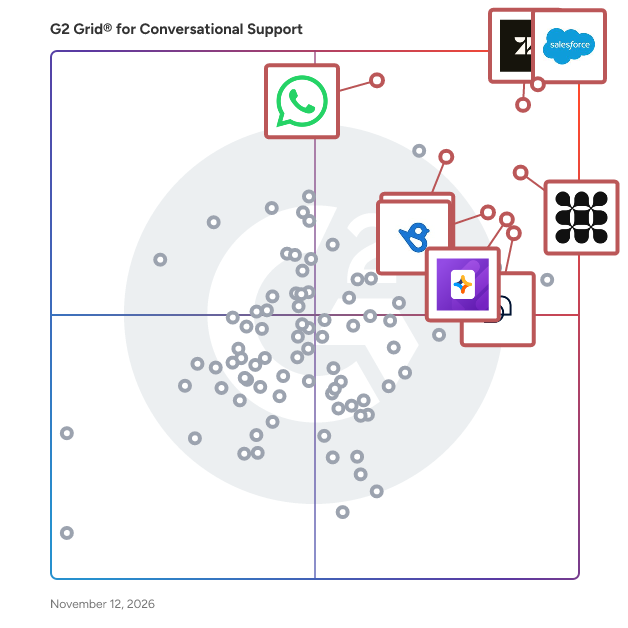
G2 Grid® for Conversational Support Software

G2 Grid® for Conversational Support Software plotting products by satisfaction and market presence

Highlighted products: Salesforce Service Cloud, Zendesk for Customer Service, Fin, WhatsApp Business Platform, Freshdesk, Jotform AI Agents, Birdeye, and Tidio.

Underlying data: [Grid® JSON](https://www.g2.com/categories/conversational-support/grids.json?focus%5B%5D=agentforce-service-formerly-salesforce-service-cloud&focus%5B%5D=zendesk-for-customer-service&focus%5B%5D=fin&focus%5B%5D=whatsapp-business-platform&focus%5B%5D=freshdesk&focus%5B%5D=jotform-ai-agents&focus%5B%5D=birdeye&focus%5B%5D=tidio)

Salesforce Service Cloud

Agentforce Service (formerly Salesforce Service Cloud) is a software designed to enable seamless collaboration between AI agents and human service teams across every channel and industry. The software provides autonomous resolution of high-volume interactions, proactive support, and 24/7 cross-channel service by leveraging Agentforce and Data Cloud built on the Salesforce Platform. It automates low-touch, high-volume customer interactions and reduces the need for human escalation except in complex, high-touch scenarios. Agentforce Service addresses productivity and customer satisfaction challenges by integrating AI directly into service workflows and surfacing data from products, assets, and services. The software supports omnichannel service delivery, agent productivity acceleration, and growth outcomes within one unified platform.

Average Rating: 4.4/5.0

Total Reviews: 8,010

How Do G2 Users Rate Salesforce Service Cloud?

  • Has the product been a good partner in doing business?: 8.7/10 (Category avg: 9.2/10)
  • Proactive Engagement: 8.3/10 (Category avg: 8.6/10)
  • Contextual Engagement: 8.1/10 (Category avg: 8.5/10)
  • Self-Serve Support: 8.0/10 (Category avg: 8.6/10)

Who Is the Company Behind Salesforce Service Cloud?

  • Seller: Salesforce
  • Company Website:
  • Year Founded: 1999
  • HQ Location: San Francisco, CA
  • LinkedIn® Page: www.linkedin.com
    89,711 employees on LinkedIn®
  • Ownership: NYSE:CRM

Who Uses This Product?

  • Who Uses This: Salesforce Administrator, Salesforce Developer
  • Top Industries: Information Technology and Services, Computer Software
  • Company Size: 42% Medium, 37% Large

What Do G2 Reviewers Say About Salesforce Service Cloud?

AI-generated summary from verified user reviews

Pros
  • Users appreciate the ease of use of Salesforce Service Cloud, benefiting from intuitive features and seamless management.
  • Users appreciate the excellent functionality of Salesforce Service Cloud, enhancing case management and customer feedback tracking seamlessly.
  • Users commend the effective case management of Salesforce Service Cloud, enhancing efficiency in handling customer issues and tasks.
  • Users value the efficiency of Salesforce Service Cloud, enhancing case management and streamlining call center operations effortlessly.
  • Users value the ease of customization in Salesforce Service Cloud, enabling effective case management and efficient customer support.
Cons
  • Users find the complexity of setup and usage challenging, particularly for new users unfamiliar with Salesforce.
  • Users find the learning curve steep, as setup and licensing can complicate the initial experience with Salesforce Service Cloud.
  • Users face a steep learning curve with Salesforce Service Cloud, requiring significant time and understanding for effective use.
  • Users find Salesforce Service Cloud expensive, especially with add-on costs making budgeting difficult.
  • Users find the missing features in Salesforce Service Cloud can clutter the interface and complicate configuration.

What Are Recent G2 Reviews of Salesforce Service Cloud?

What Are G2 Users Discussing About Salesforce Service Cloud?

Zendesk for Customer Service

Zendesk for Customer Service is a software designed to deliver AI-powered customer service that is easy to set up, use, and scale for businesses of all sizes. The software provides omnichannel case management, AI workflows, automation, and agent performance evaluation by leveraging AI trained on billions of CX interactions. It automates ticket routing and workforce scheduling and reduces resolution times across self-service, agent, and admin workflows. Zendesk for Customer Service addresses the complexity of managing customer interactions across channels by unifying personalized conversations, a marketplace of 1,800-plus apps, and quality assurance tools into one platform. The software supports global deployments across 130,000-plus brands in more than 30 languages, including integrations for social messaging, phone, and email.

Average Rating: 4.3/5.0

Total Reviews: 6,760

G2 Deal: Experience the power of Zendesk with a free trial

Start your free trial of the leading AI-powered customer experience platform chosen by 100,000+ users. Whether you’re a small business looking to streamline customer service tickets or an enterprise-grade business that needs support software designed to scale as you grow, Zendesk is your solution.

Price: ~~$19 per agent/month~~ → $0 for 14 days

View this exclusive G2 deal

How Do G2 Users Rate Zendesk for Customer Service?

  • Has the product been a good partner in doing business?: 8.4/10 (Category avg: 9.2/10)
  • Proactive Engagement: 8.2/10 (Category avg: 8.6/10)
  • Contextual Engagement: 8.2/10 (Category avg: 8.5/10)
  • Self-Serve Support: 8.1/10 (Category avg: 8.6/10)

Who Is the Company Behind Zendesk for Customer Service?

  • Seller: Zendesk
  • Company Website:
  • Year Founded: 2007
  • HQ Location: San Francisco, CA
  • LinkedIn® Page: www.linkedin.com
    7,537 employees on LinkedIn®
  • Ownership: NYSE: ZEN

Who Uses This Product?

  • Who Uses This: Customer Success Manager, CEO
  • Top Industries: Computer Software, Information Technology and Services
  • Company Size: 45% Medium, 40% Small

What Do G2 Reviewers Say About Zendesk for Customer Service?

AI-generated summary from verified user reviews

Pros
  • Users find the interface intuitive and easy to navigate, helping them handle day-to-day support work with less effort.
  • Users value organized ticket management and easy handling, which help them track customer issues from creation through resolution.
  • Users value the unified support workspace, which brings conversations from multiple channels into one place for easier customer service management.
  • Users value flexible workflow customization that adapts to their processes, from configuring views and settings to automating ticket handling.
  • Users appreciate broad integrations and easy connections to business tools, helping streamline workflows without switching between apps.
Cons
  • Users find the pricing expensive, especially for small teams, and say costs rise as they add agents, features, or scale.
  • Users find the system complex and overwhelming, with advanced features and settings requiring time and training to learn.
  • Users find reporting and analytics confusing to use and limited in flexibility, detail, and available metrics.
  • Users find initial setup and configuration complex and time-consuming, often requiring technical expertise or trial and error.
  • Users find the interface dated and visually plain, with clutter and settings that can be difficult to locate.

What Are Recent G2 Reviews of Zendesk for Customer Service?

What Are G2 Users Discussing About Zendesk for Customer Service?

Fin

Fin is a software designed to function as a single AI customer agent capable of handling sales, service, and support roles within one continuous customer experience. The software provides complex task automation, buyer engagement, and complete visibility across all channels by leveraging Fin APEX 1.0, a generative AI model combined with deterministic rules. It automates refunds, transaction disputes, and technical troubleshooting and reduces time to resolution while improving customer satisfaction. Fin addresses high query volumes and inconsistent service quality by following detailed step-by-step instructions with speed and reliability, resolving 67% of customer queries on average. The software supports deployments across any helpdesk including Salesforce, HubSpot, and Freshdesk without requiring migration, and is trusted by more than 6,000 customer service teams.

Average Rating: 4.5/5.0

Total Reviews: 3,796

How Do G2 Users Rate Fin?

  • Has the product been a good partner in doing business?: 8.8/10 (Category avg: 9.2/10)
  • Proactive Engagement: 9.0/10 (Category avg: 8.6/10)
  • Contextual Engagement: 8.7/10 (Category avg: 8.5/10)
  • Self-Serve Support: 8.8/10 (Category avg: 8.6/10)

Who Is the Company Behind Fin?

  • Seller: Fin
  • Company Website:
  • Year Founded: 2011
  • HQ Location: San Francisco, CA
  • LinkedIn® Page: www.linkedin.com
    1,238 employees on LinkedIn®

Who Uses This Product?

  • Who Uses This: Customer Success Manager, CEO
  • Top Industries: Computer Software, Information Technology and Services
  • Company Size: 56% Small, 37% Medium

What Do G2 Reviewers Say About Fin?

AI-generated summary from verified user reviews

Pros
  • Users find setup and deployment straightforward, helping teams get Fin running quickly with little technical effort.
  • Users say it saves agents time and streamlines support work, helping them focus on more complex issues.
  • Users find Fin intuitive to navigate and straightforward to manage, helping them handle everyday tasks with little effort.
  • Users value accurate, relevant answers and broad question coverage, helping customers get dependable information quickly.
  • Users value quick customer answers that reduce wait times and provide immediate help with common questions.
Cons
  • Users say answers can be inaccurate, outdated, or confidently fabricated, especially for niche or advanced questions.
  • Users say it misinterprets complex questions, misses context, and fails to ask useful clarifying questions.
  • Users find pricing steep and costs difficult to predict, especially as usage or ticket volumes grow.
  • Users find navigation and workflows confusing, with scattered features, occasional interface disruptions, and a learning curve for advanced functions.
  • Users find the initial setup and configuration complex, time-consuming, and often requiring technical expertise and trial and error.

What Are Recent G2 Reviews of Fin?

What Are G2 Users Discussing About Fin?

AI can help you find the answers. G2 helps you trust them.

Connect G2 to Claude or ChatGPT for answers grounded in G2's trusted reviews, comparisons, and pricing from real user insights.

How it works

WhatsApp Business Platform

The WhatsApp Business Platform (API) is a powerful tool that enables businesses to connect with their customers on a personal level, at scale. With over 2 billion monthly active users on WhatsApp, this API provides a unique opportunity for businesses to build meaningful relationships with their audience. Ideal For: - Businesses seeking to send marketing messages, enhance customer engagement through transactional messages, authentication messages and support messages - Enterprises looking to automate routine communication tasks - Marketers aiming to leverage WhatsApp's vast user base for targeted campaigns Benefits: - Improved Customer Experience: Provide instant support and personalized interactions - Increased Efficiency: Automate routine tasks, freeing up resources for more strategic initiatives - Enhanced Data Insights: Gain valuable insights into customer behavior Key Features: - Scalable Messaging: Send and receive messages programmatically - Multimedia Support: Share text, images, documents, and links - Personalized Interactions: Use customer data to create tailored experiences - Omnichannel Support: Integrate WhatsApp with existing channels - Robust Analytics: Track key metrics to optimize campaigns - High Uptime and Security: Enjoy 99.9% uptime and SOC2 and ISO 27001 certifications

Average Rating: 4.6/5.0

Total Reviews: 253

How Do G2 Users Rate WhatsApp Business Platform?

  • Has the product been a good partner in doing business?: 8.7/10 (Category avg: 9.2/10)

Who Is the Company Behind WhatsApp Business Platform?

  • Seller: Meta Platforms, Inc
  • Company Website:
  • Year Founded: 2008
  • HQ Location: Menlo Park, CA
  • LinkedIn® Page: www.linkedin.com
    164,238 employees on LinkedIn®
  • Ownership: NASDAQ: META

Who Uses This Product?

  • Top Industries: Information Technology and Services, Computer Software
  • Company Size: 68% Small, 24% Medium

What Do G2 Reviewers Say About WhatsApp Business Platform?

AI-generated summary from verified user reviews

Pros
  • Users appreciate the ease of use of WhatsApp Business Platform, enabling quick and efficient customer communication.
  • Users value the secure verification process of WhatsApp Business, enhancing legitimacy and professional interactions with clients.
  • Users value the automation features of WhatsApp Business Platform, enhancing communication and streamlining operations effortlessly.
  • Users love the automation features of WhatsApp Business Platform, enhancing efficiency and improving customer communication seamlessly.
  • Users love the fast and direct communication of WhatsApp Business Platform, enhancing support efficiency for freelancers.
Cons
  • Users dislike the 24-Hour Rule Limits, feeling restricted and penalized for slow responses and group chat restrictions.
  • Users face messaging issues with the 24-hour rule, lack of automation, and limited recipient capacity.
  • Users find the expensive pricing structure of WhatsApp Business Platform a challenge, especially with increasing message volumes.
  • Users find the expensive subscriptions of WhatsApp Business Platform challenging, especially with rising message volumes and costs.
  • Users find the lack of integrations in WhatsApp Business Platform limits functionality and complicates feature accessibility.

What Are Recent G2 Reviews of WhatsApp Business Platform?

FAQs About Conversational Support Software

Generated using AI

Last updated: April 27, 2026

Best tools for personalizing customer support chats

Based on G2 reviews, these products are commonly associated with personalized customer support chats.

Which conversational support tool offers AI-driven responses

Based on G2 reviews, these products are frequently mentioned for AI-driven conversational support.

Which platform is best for scaling conversational support teams

Based on G2 reviews, these products are often chosen to help teams scale support operations.

What are the most important features in conversational support software

According to verified users, the most valued features in conversational support software are centralized conversations, automation, and fast context sharing across teams. Recent reviews repeatedly mention unified inboxes for email, chat, messaging, and social channels, which reduce missed requests and duplicate replies. Buyers also prioritize automation for routing, canned responses, after-hours coverage, and repetitive question handling. Strong knowledge base support matters because it helps AI agents and human teams deliver more consistent answers. Reviewers also point to reporting, conversation history, internal notes, and collaboration tools as important for maintaining service quality. Easy setup and intuitive interfaces appear often in recent feedback, especially for teams that need to onboard quickly.

How do teams use conversational support for customer inquiries

According to verified users, teams use conversational support to handle inbound questions across website chat, email, messaging apps, and social channels from one workspace. Recent reviews show teams relying on these tools to answer FAQs, route requests, prioritize urgent issues, and keep full conversation history visible for faster follow-up. Many also use AI agents as a first line of support for repetitive questions, after-hours coverage, and lead qualification before a human steps in. Internal notes, tagging, and shared inbox workflows help support, operations, and sales teams coordinate without losing context. The result is a more organized process for resolving customer issues, reducing manual effort, and responding more quickly during busy periods.

Freshdesk

Freshdesk is a software designed to deliver enterprise-grade AI-powered customer service without the complexity typically associated with enterprise platforms. The software provides unified channel management, advanced ticketing, AI copilot assistance, and actionable insights by leveraging Freddy, a people-first AI, within the Freshdesk Command Center. It automates query resolution and workflow management and reduces time-to-resolution with AI agents that can go live in minutes for both simple and complex customer inquiries. Freshdesk addresses the challenge of scaling customer service across team sizes by consolidating channels, conversations, and automation into a single interface. The software supports omnichannel deployments with a 95% first contact resolution rate, up to 80% AI-agent resolutions, and a reported 225% ROI.

Average Rating: 4.4/5.0

Total Reviews: 3,902

How Do G2 Users Rate Freshdesk?

  • Has the product been a good partner in doing business?: 8.7/10 (Category avg: 9.2/10)
  • Proactive Engagement: 8.4/10 (Category avg: 8.6/10)
  • Contextual Engagement: 8.3/10 (Category avg: 8.5/10)
  • Self-Serve Support: 8.2/10 (Category avg: 8.6/10)

Who Is the Company Behind Freshdesk?

  • Seller: Freshworks
  • Company Website:
  • Year Founded: 2010
  • HQ Location: San Mateo, CA
  • LinkedIn® Page: www.linkedin.com
    7,783 employees on LinkedIn®
  • Ownership: NASDAQ: FRSH

Who Uses This Product?

  • Who Uses This: Manager, Owner
  • Top Industries: Information Technology and Services, Computer Software
  • Company Size: 48% Small, 40% Medium

What Do G2 Reviewers Say About Freshdesk?

AI-generated summary from verified user reviews

Pros
  • Users find the interface intuitive and easy to use, helping new team members get started quickly.
  • Users appreciate structured ticket management that organizes queries and helps agents resolve them efficiently.
  • Users like task automation that streamlines support workflows and handles routine ticket actions, reducing manual effort and saving time.
  • Users find setup straightforward and quick, with minimal configuration needed to get started.
  • Users like having customer conversations, tickets, and support information in one central place, making interactions easier to manage and share.
Cons
  • Users find reporting lacks flexibility and analytical depth, while building or customizing reports can feel complicated.
  • Users report slow loading and lag, especially during peak periods or when handling large ticket volumes.
  • Users find customization too limited for tailoring fields, ticket views, portals, and workflows.
  • Users find pricing high for small teams, with costs rising as they add agents, advanced features, or higher-tier plans.
  • Users find the interface cluttered and unintuitive, with dated design and frequent changes making it harder to navigate.

What Are Recent G2 Reviews of Freshdesk?

What Are G2 Users Discussing About Freshdesk?

Jotform AI Agents

Jotform AI Agents is a software designed to provide automated real-time customer assistance 24 hours a day by enabling businesses to train and deploy customizable AI agents without coding. The software provides multichannel support across web, chat widgets, email, phone, WhatsApp, Messenger, Gmail, and WordPress by leveraging a no-code AI builder trained on documents, FAQs, and form data. It automates inquiry handling, lead qualification, appointment scheduling, and CRM record updates and reduces wait times and agent workload across every stage of the customer journey. Jotform AI Agents addresses the challenge of scaling support without adding headcount by offering a library of more than 7,000 customizable templates that can be deployed in minutes with brand-specific instructions and workflows. The software supports voice-based interactions, omnichannel deployments, and integrations with external tools for organizations ranging from small businesses to global enterprises.

Average Rating: 4.5/5.0

Total Reviews: 737

How Do G2 Users Rate Jotform AI Agents?

  • Has the product been a good partner in doing business?: 8.7/10 (Category avg: 9.2/10)
  • Proactive Engagement: 7.8/10 (Category avg: 8.6/10)
  • Contextual Engagement: 7.7/10 (Category avg: 8.5/10)
  • Self-Serve Support: 8.5/10 (Category avg: 8.6/10)

Who Is the Company Behind Jotform AI Agents?

  • Seller: Jotform
  • Company Website:
  • Year Founded: 2006
  • HQ Location: San Francisco, California
  • LinkedIn® Page: www.linkedin.com
    925 employees on LinkedIn®

Who Uses This Product?

  • Who Uses This: Owner, Founder
  • Top Industries: Information Technology and Services, Computer Software
  • Company Size: 75% Small, 11% Medium

What Do G2 Reviewers Say About Jotform AI Agents?

AI-generated summary from verified user reviews

Pros
  • Users appreciate the ease of use of Jotform AI Agents, enjoying a seamless setup and quick results.
  • Users value the easy setup of Jotform AI Agents, enabling quick implementation and immediate benefits from day one.
  • Users love the seamless experience of Jotform AI Agents, simplifying lead generation and streamlining administrative tasks.
  • Users praise the ease of setup of Jotform AI Agents, enabling seamless chatbot deployment without coding.
  • Users praise the simple setup of Jotform AI Agents, enabling quick workflow automation and immediate value add.
Cons
  • Users feel that AI Agents have responding limitations, struggling to provide accurate information and requiring more follow-up questions.
  • Users find the AI's limited capabilities in understanding complex queries and providing accurate responses frustrating.
  • Users desire more options for customization and functionality in Jotform AI Agents for enhanced user experience.
  • Users express concerns over inadequate AI features that limit effective responses and understanding of customer needs.
  • Users face poor understanding from Jotform AI Agents, as responses can be inaccurate and lack clarification.

What Are Recent G2 Reviews of Jotform AI Agents?

Tidio

Tidio is a software designed to provide an all-in-one customer support suite combining help desk, live chat, chatbot automation, and AI agent capabilities for businesses across ecommerce, services, and tech. The software provides real-time customer engagement, FAQ automation, omnichannel conversation management, and order management for Shopify by leveraging Lyro, its conversational AI agent trained on existing help content. It automates responses to common inquiries and reduces missed chats, response times, and agent workload by resolving up to 67% of customer questions without human involvement. Tidio addresses the challenge of scaling support without overwhelming teams by combining rules-based Flows automation with intelligent AI handoff to human agents when needed. The software supports deployments across email, Messenger, Instagram, and WhatsApp within a unified dashboard, and is used by more than 300,000 businesses worldwide.

Average Rating: 4.6/5.0

Total Reviews: 2,079

G2 Deal: Get 15% off any paid plan after signing up for a 7 day free trial

Tidio combines live chat and chatbot tools to help you connect with your customers and generate more sales with outstanding instant support.

Price: ~~$25-54/month~~ → $21-46/month

View this exclusive G2 deal

How Do G2 Users Rate Tidio?

  • Has the product been a good partner in doing business?: 9.2/10 (Category avg: 9.2/10)
  • Proactive Engagement: 8.4/10 (Category avg: 8.6/10)
  • Contextual Engagement: 8.2/10 (Category avg: 8.5/10)
  • Self-Serve Support: 8.4/10 (Category avg: 8.6/10)

Who Is the Company Behind Tidio?

  • Seller: Tidio
  • Company Website:
  • Year Founded: 2013
  • HQ Location: San Francisco, California
  • LinkedIn® Page: www.linkedin.com
    182 employees on LinkedIn®

Who Uses This Product?

  • Who Uses This: Owner, CEO
  • Top Industries: Retail, Marketing and Advertising
  • Company Size: 89% Small, 9% Medium

What Do G2 Reviewers Say About Tidio?

AI-generated summary from verified user reviews

Pros
  • Users find Tidio's setup process extremely easy and intuitive, allowing quick integration on their websites.
  • Users appreciate Tidio's helpful AI chatbot and multichannel support, enhancing customer communication efficiency significantly.
  • Users love the intelligent AI chatbots of Tidio, appreciating their efficiency and ease of setup for customer support.
  • Users appreciate the easy setup of Tidio, allowing for quick installation with minimal technical knowledge required.
  • Users praise Tidio for its easy installation and intuitive setup, enabling quick deployment and efficient customer communication.
Cons
  • Users find Tidio to be overpriced, especially due to the high costs of separate packages that should be included.
  • Users note the lack of advanced features without higher pricing tiers, impacting scalability and integration options.
  • Users note the limited customization of Tidio, wishing for more flexibility and options in workflows and interfaces.
  • Users find the cost of Tidio to be excessively high and feel multiple packages should be included in one.
  • Users feel Tidio has limited features that could enhance flexibility and scalability for growing businesses.

What Are Recent G2 Reviews of Tidio?

What Are G2 Users Discussing About Tidio?

Birdeye

Birdeye is a software designed to serve as a unified marketing and customer experience platform for multi-location brands where AI agents drive real business outcomes. The software provides review management, listings, social media publishing, surveys, and marketing automation by leveraging AI agents configured with brand voice, custom triggers, and location-level rules. It automates review responses, social post publishing, and lead engagement via chat and reduces the need for fragmented point solutions across locations. Birdeye addresses the complexity of managing local presence at scale by aggregating signals from reviews, social, messaging, and CRM integrations into a single customer profile per location. The software supports enterprise-ready deployments with SSO, audit logging, HIPAA, SOC 2, and GDPR compliance across teams in the U.S., EMEA, and APAC.

Average Rating: 4.7/5.0

Total Reviews: 4,192

How Do G2 Users Rate Birdeye?

  • Has the product been a good partner in doing business?: 9.4/10 (Category avg: 9.2/10)
  • Proactive Engagement: 8.9/10 (Category avg: 8.6/10)
  • Contextual Engagement: 8.8/10 (Category avg: 8.5/10)
  • Self-Serve Support: 8.6/10 (Category avg: 8.6/10)

Who Is the Company Behind Birdeye?

  • Seller: Birdeye
  • Company Website:
  • Year Founded: 2012
  • HQ Location: Palo Alto, CA
  • LinkedIn® Page: www.linkedin.com
    1,477 employees on LinkedIn®

Who Uses This Product?

  • Who Uses This: Marketing Manager, Owner
  • Top Industries: Hospital & Health Care, Real Estate
  • Company Size: 46% Small, 34% Medium

What Do G2 Reviewers Say About Birdeye?

AI-generated summary from verified user reviews

Pros
  • Users find the interface intuitive and easy to navigate, making everyday tasks simple to learn and use.
  • Users value the responsive, helpful support team for quickly answering questions and assisting with their needs.
  • Users value straightforward messaging tools for quickly connecting with customers and keeping conversations organized.
  • Users like how automation streamlines recurring tasks and reduces manual work, saving time for their teams.
  • Users like how easy review requests help them collect more customer reviews.
Cons
  • Users find navigation unintuitive and clunky, with features and settings sometimes difficult to locate.
  • Users find the pricing high for the value, with costs limiting access for smaller teams and multi-location businesses.
  • Users report limited integrations, difficult setup, and connections that sometimes fail or break.
  • Users report platform glitches, bugs, freezes, and occasional downtime that disrupt use.
  • Users report slow support responses and difficulty reaching someone who can resolve issues.

What Are Recent G2 Reviews of Birdeye?

What Are G2 Users Discussing About Birdeye?

HubSpot Service Hub

HubSpot Service Hub is a software designed to deliver AI-powered customer service at scale by unifying customer insights, omnichannel support tools, and self-service capabilities within a single platform. The software provides ticket routing automation, knowledge base creation, customer health scoring, and trend analysis by leveraging AI features integrated with HubSpot's sales and marketing data. It automates ticket routing and knowledge base suggestions and reduces support team workload by enabling customers to find answers independently through chatbots and customer portals. HubSpot Service Hub addresses the challenges of scaling support without proportional headcount increases by connecting service, sales, and marketing data so representatives have full customer journey context. The software supports omnichannel case management, live chat, feedback collection, and service analytics within the unified HubSpot platform.

Average Rating: 4.4/5.0

Total Reviews: 2,920

G2 Deal: Get the HubSpot Growth CRM Suite - 20% off HubSpot plans for the first year, then 10% off in perpetuity

20% off HubSpot plans for the first year, then 10% off in perpetuity

View this exclusive G2 deal

How Do G2 Users Rate HubSpot Service Hub?

  • Has the product been a good partner in doing business?: 8.8/10 (Category avg: 9.2/10)
  • Proactive Engagement: 8.2/10 (Category avg: 8.6/10)
  • Contextual Engagement: 8.1/10 (Category avg: 8.5/10)
  • Self-Serve Support: 8.1/10 (Category avg: 8.6/10)

Who Is the Company Behind HubSpot Service Hub?

  • Seller: HubSpot
  • Company Website:
  • Year Founded: 2006
  • HQ Location: Cambridge, Massachusetts, United States
  • LinkedIn® Page: www.linkedin.com
    17,628 employees on LinkedIn®
  • Ownership: NYSE:HUBS

Who Uses This Product?

  • Who Uses This: Customer Success Manager, Customer Success Specialist
  • Top Industries: Computer Software, Information Technology and Services
  • Company Size: 59% Small, 37% Medium

What Do G2 Reviewers Say About HubSpot Service Hub?

AI-generated summary from verified user reviews

Pros
  • Users commend the ease of use of HubSpot Service Hub, streamlining communication and enhancing decision-making effortlessly.
  • Users love the seamless integration of features in HubSpot Service Hub, enhancing communication and accessibility of insights.
  • Users highly value the responsive customer support of HubSpot Service Hub, ensuring quick assistance for any inquiries.
  • Users appreciate the efficiency of HubSpot Service Hub, streamlining tasks and enhancing productivity effectively.
  • Users appreciate the convenient ticketing system of HubSpot Service Hub, efficiently managing all customer interactions in one place.
Cons
  • Users find missing features in HubSpot Service Hub, especially in customization and advanced functionalities requiring higher plans.
  • Users find limited customization in contacts and reporting features, hindering their ability to effectively manage multiple properties.
  • Users feel the limited features of HubSpot Service Hub hinder customization and efficiency in their workflows.
  • Users report a lack of features in HubSpot Service Hub, hindering usability and cross-team collaboration.
  • Users face limited email processing options and struggle with ticket management inefficiencies in HubSpot Service Hub.

What Are Recent G2 Reviews of HubSpot Service Hub?

What Are G2 Users Discussing About HubSpot Service Hub?

Missive

Are you double sending emails? Not knowing who's responding to what, or whether they've responded at all? Losing the thread when the person who owns it is out? What if your business could manage all your email accounts, including its shared inboxes like support@, sales@, info@, and accounting@, along with SMS, WhatsApp, Messenger, and Instagram—all in one place? Missive is inbox collaboration for teams that run on email. Every conversation gets an owner, so nobody replies twice and nothing sits unread for a week. Teammates discuss a thread in private comments right beside it instead of forwarding it around, and when someone's away, whoever picks it up gets the full history. Missive's AI assistant works inside the inbox. It reads a thread and drafts a reply in your voice, searches your email, contacts and calendar, and reads attachments. Through MCP it pulls context from tools like ClickUp, Todoist and Stripe—and the reverse, letting Claude, ChatGPT or Cursor act on your conversations, contacts and drafts from outside Missive. Bring your own Claude, OpenAI or Gemini key, or use Missive AI credits. You approve before anything sends. Used by over 6500 businesses, including accounting firms, manufacturers, property management companies, travel agencies, legal practices, and logistics teams. -- Key features • Team Inboxes: Shared addresses the whole team works from, with assignment so every conversation has a clear owner and coverage when someone's out. • Internal comments and @mentions: Discuss a thread in a private sidebar next to the actual email. The customer never sees it. • AI assistant: Drafts replies in your voice, searches your inbox, contacts and calendar, and reads attachments. Labels, events and sends happen only after you approve. • MCP in both directions: Missive AI connects out to tools like ClickUp, Todoist and Stripe, and Missive's MCP server lets Claude, ChatGPT or Cursor work on your inbox from outside. • Automated Workflows: Create customizable rules to automate repetitive tasks and use AI to get even more efficiency. Popular use cases include auto-categorization of emails, auto-follow-up emails, automatic forwarding of receipts, and out-of-office auto-responses. • Canned responses: Save time with pre-written replies to customer inquiries, sales pitches, or to include that PDF you always need to attach when signing up a new client. • Integrations: Pipedrive, HubSpot, Shopify, Airtable, ClickUp, Asana, Dialpad, Twilio, Aircall, Zapier, and a REST API for building your own.

Average Rating: 4.7/5.0

Total Reviews: 860

How Do G2 Users Rate Missive?

  • Has the product been a good partner in doing business?: 9.6/10 (Category avg: 9.2/10)

Who Is the Company Behind Missive?

  • Seller: Missive
  • Company Website:
  • Year Founded: 2015
  • HQ Location: Quebec, QC
  • LinkedIn® Page: www.linkedin.com
    12 employees on LinkedIn®

Who Uses This Product?

  • Who Uses This: CEO, Owner
  • Top Industries: Accounting, Marketing and Advertising
  • Company Size: 88% Small, 12% Medium

What Do G2 Reviewers Say About Missive?

AI-generated summary from verified user reviews

Pros
  • Users appreciate the easy team collaboration in Missive, which keeps communications organized and workflows streamlined.
  • Users appreciate the seamless team communication in Missive, which enhances collaboration and keeps information organized.
  • Users find Missive's ease of use exceptional, streamlining collaboration and email management effortlessly within teams.
  • Users appreciate the streamlined team collaboration in Missive, enhancing productivity with features like shared inboxes and real-time co-editing.
  • Users appreciate the communication ease of Missive, enhancing team collaboration and reducing email clutter.
Cons
  • Users have noted missing features, like limited search capabilities and lack of table editing options in emails.
  • Users find the learning curve steep with Missive's features, requiring time to configure settings effectively.
  • Users find the search functionality lacking, particularly struggling with filtering and locating older messages effectively.
  • Users often find the search difficulty in Missive challenging, especially for older or specific messages.
  • Users note a steep learning curve with Missive, requiring time to configure features and workflows effectively.

What Are Recent G2 Reviews of Missive?

What Are G2 Users Discussing About Missive?

respond.io

respond.io is a software designed to help B2C businesses generate more leads and maximize revenue by managing customer conversations across chat, calls, and email from one place. The software provides AI-powered automation, lead management, CRM integrations, and comprehensive reporting by leveraging a unified inbox that consolidates WhatsApp, TikTok, Instagram, and other key channels. It automates conversation routing and follow-up workflows and reduces revenue lost to fragmented, siloed communication tools. respond.io addresses the challenge of turning conversations into measurable business results by combining omnichannel messaging with AI automation and growth-focused analytics. The software supports more than 10,000 businesses with 99.999% uptime and integrations with leading CRM platforms.

Average Rating: 4.8/5.0

Total Reviews: 555

How Do G2 Users Rate respond.io?

  • Has the product been a good partner in doing business?: 9.4/10 (Category avg: 9.2/10)
  • Proactive Engagement: 9.1/10 (Category avg: 8.6/10)
  • Contextual Engagement: 8.9/10 (Category avg: 8.5/10)
  • Self-Serve Support: 8.8/10 (Category avg: 8.6/10)

Who Is the Company Behind respond.io?

  • Seller: respond.io
  • Company Website:
  • Year Founded: 2017
  • HQ Location: Kuala Lumpur, Malaysia
  • LinkedIn® Page: www.linkedin.com
    216 employees on LinkedIn®

Who Uses This Product?

  • Who Uses This: CEO, Founder
  • Top Industries: Leisure, Travel & Tourism, Information Technology and Services
  • Company Size: 63% Small, 20% Medium

What Do G2 Reviewers Say About respond.io?

AI-generated summary from verified user reviews

Pros
  • Users value the ease of use of respond.io, finding it simple and seamless to operate.
  • Users highlight the excellent customer support from respond.io, noting responsiveness and effectiveness in resolving issues quickly.
  • Users value the helpful and responsive support from respond.io, enhancing their overall experience and productivity.
  • Users find the easy setup of respond.io extremely helpful, facilitating smooth onboarding and quick implementation.
  • Users value the excellent integrations of respond.io, enhancing efficiency and streamlining customer service interactions.
Cons
  • Users feel that the lack of pipeline features in respond.io limits its potential as a comprehensive tool.
  • Users face messaging issues with respond.io, including unsent messages and difficulty managing conversations effectively.
  • Users feel that the platform is expensive, particularly due to restrictive pricing plans for growing businesses.
  • Users feel the limited chat functionality of respond.io hampers their experience and lacks essential features like pipelines.
  • Users express frustration with template issues, as agents can't create personalized replies until the opposite side responds.

What Are Recent G2 Reviews of respond.io?

What Are G2 Users Discussing About respond.io?

Podium

Podium is a software designed to help local businesses turn every conversation across text, call, and web chat into revenue by deploying AI Employees. The software provides 24/7 lead capture, conversion, and instant response capabilities by leveraging an AI-native communications platform built for local business workflows. It automates initial customer responses and reduces the response gap that causes businesses to lose prospects to faster-responding competitors. Podium addresses the challenge that 78% of customers buy from the first business to respond by enabling instant, round-the-clock engagement without requiring staff availability. The software supports a wide range of local business types including auto dealerships, HVAC services, aesthetics centers, and retailers, and is trusted by more than 100,000 businesses.

Average Rating: 4.5/5.0

Total Reviews: 2,077

How Do G2 Users Rate Podium?

  • Has the product been a good partner in doing business?: 9.1/10 (Category avg: 9.2/10)
  • Proactive Engagement: 8.5/10 (Category avg: 8.6/10)
  • Contextual Engagement: 8.3/10 (Category avg: 8.5/10)
  • Self-Serve Support: 8.1/10 (Category avg: 8.6/10)

Who Is the Company Behind Podium?

  • Seller: Podium
  • Company Website:
  • Year Founded: 2014
  • HQ Location: Lehi, UT
  • LinkedIn® Page: www.linkedin.com
    1,639 employees on LinkedIn®

Who Uses This Product?

  • Who Uses This: Owner, General Manager
  • Top Industries: Automotive, Retail
  • Company Size: 61% Small, 34% Medium

What Do G2 Reviewers Say About Podium?

AI-generated summary from verified user reviews

Pros
  • Users value the ease of use of Podium, benefiting from its straightforward interface and reliable customer support.
  • Users love the reliable features of Podium, enjoying easy access and seamless communication with customers anytime, anywhere.
  • Users love the easy communication with Podium, enabling quick customer interactions and effective follow-ups effortlessly.
  • Users appreciate the effective communication capabilities of Podium, enhancing customer interactions and service reliability.
  • Users value the convenience and reliability of Podium, enjoying seamless communication and excellent customer support.
Cons
  • Users highlight missing features in Podium, expressing frustration over limited options and unmet service promises.
  • Users experience significant messaging issues with Podium, including failed texts, poor phone quality, and unmet service expectations.
  • Users find the limited features of Podium restrict their experience, especially for smaller businesses needing more customization.
  • Users find Podium to be expensive, particularly challenging for small businesses struggling with high costs of entry.
  • Users report poor customer support from Podium, citing slow response times and a lack of follow-up on complaints.

What Are Recent G2 Reviews of Podium?

What Are G2 Users Discussing About Podium?

Talkdesk

Talkdesk is a software designed to automate the full complexity of modern customer journeys through its Customer Experience Automation platform, a category purpose-built to replace fragmented, human-coordinated workflows. The software provides autonomous multi-agent AI orchestration, real-time actionable knowledge, and industry-specialized workflows by leveraging the Talkdesk Data Cloud, which converts transcripts, call recordings, case notes, and CRM records into contextual intelligence. It automates the full CX lifecycle across a Discover, Build, Orchestrate, and Measure cycle and reduces reliance on manual coordination between human agents and back-office systems. Talkdesk addresses the challenge of modernizing enterprise customer experience without a full platform replacement by offering prebuilt AI agents and rapid time-to-value deployment. The software supports cross-industry and specialized use cases in healthcare, financial services, retail, utilities, travel, and government for global enterprise brands.

Average Rating: 4.4/5.0

Total Reviews: 2,517

How Do G2 Users Rate Talkdesk?

  • Has the product been a good partner in doing business?: 8.9/10 (Category avg: 9.2/10)
  • Proactive Engagement: 10.0/10 (Category avg: 8.6/10)
  • Contextual Engagement: 10.0/10 (Category avg: 8.5/10)
  • Self-Serve Support: 10.0/10 (Category avg: 8.6/10)

Who Is the Company Behind Talkdesk?

  • Seller: Talkdesk
  • Company Website:
  • Year Founded: 2011
  • HQ Location: Palo Alto, CA
  • LinkedIn® Page: www.linkedin.com
    1,395 employees on LinkedIn®

Who Uses This Product?

  • Who Uses This: Supervisor, Customer Service Representative
  • Top Industries: Consumer Services, Computer Software
  • Company Size: 60% Medium, 20% Small

What Do G2 Reviewers Say About Talkdesk?

AI-generated summary from verified user reviews

Pros
  • Users appreciate the ease of use of Talkdesk, highlighting its convenience for calling and scheduling.
  • Users appreciate the efficiency of Talkdesk, enhanced by new features and reliable call quality for long durations.
  • Users appreciate the value-added features of Talkdesk, enhancing convenience and efficiency in communications.
  • Users love the ease of call management with Talkdesk, enhancing customer support and simplifying workflows effectively.
  • Users value the ease of use and convenience offered by Talkdesk for managing customer support effectively.
Cons
  • Users experience call issues with Talkdesk, particularly in low network areas and when using mobile hotspots.
  • Users experience technical issues including connectivity problems and slow support response, affecting overall satisfaction with Talkdesk.
  • Users find the missing features in Talkdesk frustrating, especially the lack of Italian support and customization options.
  • Users face significant connection issues with Talkdesk, impacting audio quality and causing disruptions during calls.
  • Users experience poor connectivity with Talkdesk, noting slow performance and frustrating tech issues during peak times.

What Are Recent G2 Reviews of Talkdesk?

What Are G2 Users Discussing About Talkdesk?

Wati

Wati is a software designed to enable businesses to sell, support, and grow through conversations by observing customer intent in real time and executing the next best revenue action across channels. The software provides a unified inbox, no-code automation, and intelligent intent detection by leveraging Astra, its AI layer, across WhatsApp, Instagram, Facebook Messenger, TikTok, SMS, and more. It automates marketing, sales, and support workflows and reduces the complexity of managing multi-channel business conversations at scale. Wati addresses fragmented customer engagement by consolidating all channel interactions into a single platform with AI-driven decision-making at each step. The software supports more than 16,000 customers across 190-plus countries and operates as a Premium Partner of Meta and Google.

Average Rating: 4.6/5.0

Total Reviews: 498

How Do G2 Users Rate Wati?

  • Has the product been a good partner in doing business?: 9.0/10 (Category avg: 9.2/10)
  • Proactive Engagement: 8.8/10 (Category avg: 8.6/10)
  • Contextual Engagement: 8.3/10 (Category avg: 8.5/10)
  • Self-Serve Support: 8.6/10 (Category avg: 8.6/10)

Who Is the Company Behind Wati?

  • Seller: Wati
  • Company Website:
  • Year Founded: 2020
  • HQ Location: Hong Kong, HK
  • LinkedIn® Page: www.linkedin.com
    291 employees on LinkedIn®

Who Uses This Product?

  • Who Uses This: Founder, CEO
  • Top Industries: Education Management, Information Technology and Services
  • Company Size: 73% Small, 20% Medium

What Do G2 Reviewers Say About Wati?

AI-generated summary from verified user reviews

Pros
  • Users find Wati to have an easy-to-use interface, simplifying automation and enhancing overall productivity in conversations.
  • Users value Wati for its simple automation features, transforming lead management and enhancing sales efficiency on WhatsApp.
  • Users commend Wati's excellent customer support, enhancing their experience with timely assistance and effective communication tools.
  • Users love the easy setup of Wati, allowing swift integration and immediate productivity within 24 hours.
  • Users value the user-friendly dashboard and effective automation features of Wati for streamlined communication and engagement.
Cons
  • Users find the cost of Wati services to be expensive, particularly for messaging and higher package options.
  • Users find the cost of messaging Egyptian numbers quite high and suggest it should vary by country.
  • Users find the pricing issues of Wati to be high, affecting their overall satisfaction and campaign efficiency.
  • Users note the missing features in Wati, such as limited customization, analytics depth, and API support.
  • Users find that poor customer support hinders timely issue resolution and complicates setup processes with integrations.

What Are Recent G2 Reviews of Wati?

What Are G2 Users Discussing About Wati?

Front

Front is a software designed to help businesses prioritize and manage customer interactions through a unified workspace that consolidates all conversations and internal collaboration tools in one place. The software provides a single pane-of-glass view of customer interactions, AI-driven insights, and real-time learning capabilities by leveraging an AI that starts intelligently and continuously improves from every customer interaction. It automates response suggestions and workflow customization and reduces the need for app switching, enabling agents to deliver faster, more accurate, and personalized service. Front addresses the challenge of maintaining service quality at scale by giving businesses full control over their customer experience workflows without requiring extensive IT resources or third-party consultants. The software supports customer support ticketing, sales inquiry management, and team collaboration for more than 9,000 businesses including ClickUp, Uber Freight, and Reed and Mackay.

Average Rating: 4.7/5.0

Total Reviews: 2,475

How Do G2 Users Rate Front?

  • Has the product been a good partner in doing business?: 9.1/10 (Category avg: 9.2/10)
  • Proactive Engagement: 8.8/10 (Category avg: 8.6/10)
  • Contextual Engagement: 8.7/10 (Category avg: 8.5/10)
  • Self-Serve Support: 8.6/10 (Category avg: 8.6/10)

Who Is the Company Behind Front?

  • Seller: Front App
  • Company Website:
  • Year Founded: 2014
  • HQ Location: San Francisco, CA
  • LinkedIn® Page: www.linkedin.com
    560 employees on LinkedIn®

Who Uses This Product?

  • Who Uses This: Customer Success Manager, Account Manager
  • Top Industries: Logistics and Supply Chain, Computer Software
  • Company Size: 49% Small, 42% Medium

What Do G2 Reviewers Say About Front?

AI-generated summary from verified user reviews

Pros
  • Users value Front's ease of use, praising its intuitive setup and efficient handling of team communications.
  • Users value the streamlined communication in Front, enhancing workflow and ensuring efficient management of customer interactions.
  • Users love the team collaboration features in Front, enhancing workflow and ensuring efficient message handling.
  • Users value Front's customizable rules and organization, enhancing workflow and improving communication effectively.
  • Users appreciate the efficiency of Front's email management, benefiting from integrated replies and collaborative features.
Cons
  • Users find missing features frustrating, including API limitations, layout confusion, and calendar update issues.
  • Users report email delivery delays and complications with tag management, leading to confusion and frustration.
  • Users find the cost and occasional system issues of Front to be significant drawbacks in their experience.
  • Users experience email management issues with delays and confusing tag functionalities, affecting daily productivity.
  • Users experience email communication issues with mixed emails and minor API rough edges that hinder automation.

What Are Recent G2 Reviews of Front?

What Are G2 Users Discussing About Front?

Inia Debnath
ID
Researched and written by Inia Debnath
Updated April 9, 2026

Learn More About Conversational Support Software

Conversational support software buying insights at a glance

  • What is conversational support software? Conversational support software unifies customer conversations from email, chat, SMS and social media around one customer profile, and G2 lists around 250+ products with an average rating of 4.57 out of 5 across all submitted ratings.
  • Who uses conversational support software? Mid-market companies (42%) and small businesses (37%) write most of the 2026 reviews of the five top-reviewed products, followed by enterprises (22%), and administrators write half of the reviews that report a role.
  • What are the key features? Seamless escalation and transcripts (about 90% each), followed by personalization, proactive engagement and intelligent routing (about 89% each), are the highest-rated features in G2’s Fall 2026 Grid® Report, while generative AI features rate lowest.
  • What are the key benefits? G2 reviewers highlight fewer repetitive tickets, fewer messages slipping between channels, faster SLA handling, support capacity without extra headcount and simpler onboarding.
  • What are the common challenges? Reviewers report complex setup, uneven AI accuracy, scaling cost, collaboration and reporting gaps, and duplicate customer records.
  • What are the top-reviewed conversational support software? Zendesk for Customer Service (96), Salesforce Service Cloud (95), Fin (88), HubSpot Service Hub (83) and Birdeye (82) lead by G2 Score in the Fall 2026 Grid® Report.
  • What is the conversational support software cost? Entry per-seat plans start at $15 to $25 per user per month (HubSpot Service Hub, Zendesk for Customer Service and Salesforce Service Cloud), AI outcomes add $0.99 to $2.00 each at Fin and Zendesk, and payback runs 9 to 19 months among the top five.
  • What is the implementation time? Conversational support software takes an average of 2.3 months to go live across the five top-reviewed products, from 1.1 months for Birdeye to 4.6 months for Salesforce Service Cloud.

What is conversational support software?

Conversational support software gives each customer one profile and one running history across email, chat, SMS and social channels, so service is organized around the person instead of the ticket. It solves the problem of one customer being handled as separate cases by different agents on different channels, and unlike help desk software it also covers pre-purchase conversations. G2 lists around 250+ products in the category, with an average rating of 4.57 out of 5 across all submitted ratings. Buyers may also search for these products as conversational customer support, conversational AI customer support or conversational customer engagement software.

In 2026 G2 reviews, teams use these platforms to bring Instagram, WhatsApp and Facebook messages into the same workspace as email, let AI agents resolve routine questions and tasks such as refunds and cancellations, escalate cases against SLA timers, and merge duplicate threads under a single owner [2]. For a ranked comparison, see the top-reviewed conversational support software below.

Who uses conversational support software?

Conversational support software serves teams of every size, though mid-market and small companies write most of the 2026 reviews. The patterns below come from 2026 reviews of the five top-reviewed products that are tagged to this category.

  • By business size: 42% of reviewers come from mid-market companies (51 to 1,000 employees), 37% from small businesses (50 or fewer employees) and 22% from enterprises (more than 1,000 employees) [2]. The split varies by product: Fin (51% small business) and HubSpot Service Hub (66%) skew toward small teams, Zendesk for Customer Service skews mid-market (48%), and Salesforce Service Cloud (32%) and Birdeye (47%) carry the largest enterprise shares [2].
  • By industry: Computer software, information technology and services, financial services, consumer services, and marketing and advertising are the five most common reviewer industries across the five products [2]. Healthcare and retail also appear consistently, and Birdeye’s reviews lean toward consumer services, healthcare and other multi-location businesses [2].
  • By profession: Among reviewers who report a role, 50% identify as administrators and 33% as end users, with consultants (8%), agencies (3%), executive sponsors (3%) and internal consultants (3%) making up the remainder [2]. Zendesk for Customer Service reviewers are 64% administrators, while Fin’s reviewers split almost evenly between users (48%) and administrators (45%). Consultants cluster around Salesforce Service Cloud, which accounts for 79% of consultant reviewers [2].

What are the key features of conversational support software rated by G2 reviewers?

Conversational support software helps teams manage customer conversations through automated responses, human handoffs, personalized interactions, and routing. In G2’s Fall 2026 Grid® Report, the six features below average approximately 89%–90% across rated products, with seamless escalation and transcripts earning the highest scores [1].

  • Seamless escalation (about 90% on average): hands a conversation from a bot to a human with the context attached. 
  • Transcripts (about 90%): keeps a searchable record of each conversation that the next agent can read.
  • Personalization (about 89%): shapes replies using customer data and history, so agents and bots do not treat each contact as new.
  • Proactive engagement (about 89%): sends triggered messages based on behavior or account status before a customer writes in.
  • Intelligent routing (about 89%): assigns each conversation to the right agent or queue by rules or AI.
  • Contextual engagement (about 89%): tailors responses to the customer’s current situation and past interactions.

Self-serve support and omnichannel follow at about 89% each. Generative AI features trail the rest: AI text generation averages about 86% and AI text summarization about 85%, and the five top-reviewed products average about 81% and 82% on those two features [1]. For review themes by topic, see G2’s Conversational Support themes.

What are the key benefits of conversational support software identified by G2 reviewers?

Based on 2026 G2 reviews of the category’s top platforms (Zendesk for Customer Service, Salesforce Service Cloud, Fin, HubSpot Service Hub and Birdeye), these are the outcomes reviewers credit most: [2]

  • Cuts repetitive tickets before they reach agents. Reviewers credit automated workflows, macros, self-service help centers and AI agents with deflecting routine questions, which leaves agents free for complex cases.

“We used to spend hours manually routing tickets and answering the same repetitive questions. Zendesk solved this by allowing us to set up automated workflows, macros, and a robust self-service Help Center. As a result, we’ve successfully deflected a large portion of our incoming tier-1 tickets, freeing up our support agents to focus on more complex customer issues and reducing our operational costs.” - Arshiya F., Business specialist

  • Keeps customer messages from slipping between channels. Reviewers describe social, chat and email conversations landing in one queue, so any available agent can pick them up and the same customer is recognized across channels.

“Now Instagram, WhatsApp, and Facebook messages all land in the same Agent Workspace as regular tickets, any available agent can pick it up instead of one specific person being the bottleneck. The unified customer profile thing has helped too, someone DMs on Instagram then later emails about the same issue, and it's linked as the same person instead of looking like two separate customers.” - Alex M., Senior Property Inspector

  • Speeds up SLA handling. Reviewers say one inbox and automatic case assignment help teams meet response targets, and one Salesforce Service Cloud reviewer reports response time down by up to 40%.

“Service Hub allows for multiple inbound support channel inquiries to be handled from one central location. It speeds up our SLAs and makes the customer experience much more convenient.” - Mark M., Mid-Market

  • Adds support capacity without extra headcount. Small teams report AI taking over a growing share of tickets, which avoids or postpones another hire.

“That’s 1,271 tickets that our two-person customer support team no longer has to handle. It’s taken a huge weight off our shoulders and has been an incredible help. I genuinely don’t think we would function without Finn. On top of that, it’s saved us from having to hire a third customer support agent, which would have been around 2.5k a month. Finn costs at least half of that, if not more.” - Áine D., Customer Support Manager

  • Shortens onboarding for new agents. Reviewers point to workspaces that get new agents productive with minimal training.

“What I like most about Zendesk for customer service is its ease of use. New employees typically have very little difficulty learning the platform, navigating its features, and understanding how to complete their tasks with minimal training. This makes the transition from training to performing the job independently very quick and efficient.” - Rolando F., IT Support Tech

What are the main challenges of conversational support software identified by G2 reviewers?

Based on 2026 G2 reviews across the category, these are the most recurring challenges or limitations, along with what buyers can do about each:

1. Complex setup and a steep learning curve. Reviewers of Zendesk, HubSpot Service Hub and Salesforce Service Cloud describe feeling overwhelmed by configuration options, triggers and settings before they become productive, and one Salesforce Service Cloud reviewer reports a migration that took almost 12 months.

“While Zendesk is extremely feature-rich, the initial setup and configuration can feel complex and take a significant amount of time. For new administrators, there’s a steep learning curve—especially when trying to customize workflows and triggers—which can slow down the rollout and delay deployment.” - Arshiya F., Business specialist

  • Ask your conversational support vendor: How many admin hours does a typical rollout take? What onboarding resources or implementation partners do you provide?
  • How to tackle the challenge: Plan a phased launch that starts with one or two channels, and budget for an implementation partner if the product needs one.

2. AI accuracy is uneven. Reviewers report hallucinations, attachments the bot cannot read, AI output that needed repeated scenario checks, and months of data cleanup before AI becomes useful.

“As with any AI feature, there are going to be hallucinations and mistakes. It can be pretty frustrating when Finn hallucinates, especially when I feel I’ve worded something clearly in the procedure. I’ve found myself getting particularly frustrated when I have to keep altering the procedure just to make him understand exactly what needs to be done.” - Áine D., Customer Support Manager

  • Ask your conversational support vendor: How does the AI agent behave when it is unsure of an answer? Can we set escalation rules and test it on our own content before launch?
  • How to tackle the challenge: Pilot the bot on one narrow topic with escalation rules, and clean up the knowledge base before launch.

3. Cost climbs with seats, add-ons and AI usage. A HubSpot Service Hub reviewer says pricing has become hard to justify against alternatives, and a Zendesk reviewer calls pricing steep.

“When developing the system, I am also hindered by the need to analyze additional add-ons, costs, and the scope of access for agents. I would like it to be easier to assess what exactly we receive within the services we have.” - Andrzej P., Adminstartor

  • Ask your conversational support vendor: What does each plan tier and add-on include? How are AI resolutions, seats and channels priced as volume grows?
  • How to tackle the challenge: Model cost at expected conversation and seat volume, and list which features sit in higher tiers or add-ons before comparing quotes.

4. Collaboration and reporting have gaps. Reviewers say tagging teammates inside a conversation is limited, and one wants better out-of-the-box reporting.

“What I like least about Zendesk is that tagging or directly notifying other team members within a ticket feels somewhat limited. It can be difficult to make sure the right person is immediately aware that a particular ticket requires their attention or follow-up. A more intuitive and visible way to tag colleagues within tickets would make collaboration easier.” - Rolando F., IT Support Tech

  • Ask your conversational support vendor: Can agents tag or notify teammates inside a conversation? Which reports and dashboards are included on the plan we are evaluating?
  • How to tackle the challenge: Test internal notes and the key reports during the trial, and plan for API or BI work if out-of-the-box reporting falls short.

5. Duplicate customer records. Reviewers report duplicate profiles across channels, merges that cannot be undone, and a Fin inbox that treats a returning customer as new.

“Merging isn’t reversible, learned that the hard way when a teammate merged the wrong ticket and we lost some custom field data that didn’t carry over to the surviving ticket.” - Eleanor T., Marketing Manager

  • Ask your conversational support vendor: How does the platform match one customer across email, chat and social? Can a merge be undone?
  • How to tackle the challenge: Test identity matching across channels before signing, and add a review step before agents merge conversations.

What are the top-reviewed conversational support software on G2?

The five products below have the highest G2 Scores in G2’s Fall 2026 Grid® Report for Conversational Support, listed from highest to lowest G2 Score. The first product, Zendesk for Customer Service, is also the best conversational support software by that measure.

  1. Zendesk for Customer Service: Satisfaction 94, Market Presence 97, G2 Score 96, 74% average user adoption, 19-month payback. Reviewers value omnichannel case management, automation and routing.
  2. Salesforce Service Cloud: Satisfaction 90, Market Presence 99, G2 Score 95, 68% average user adoption, 11-month payback. It has the highest Market Presence in this group. Reviewers value case assignment, SLA escalation and the unified customer view.
  3. Fin: Satisfaction 95, Market Presence 82, G2 Score 88, 71% average user adoption, 12-month payback. It has the highest satisfaction in this group. Reviewers value AI that resolves routine queries and fast go-live.
  4. HubSpot Service Hub: Satisfaction 78, Market Presence 89, G2 Score 83, 69% average user adoption, 15-month payback. Reviewers value the single inbox and its connection to the HubSpot CRM.

  5. Birdeye: Satisfaction 90, Market Presence 73, G2 Score 82, 70% average user adoption, 9-month payback. Reviewers value SMS and web chat management and responsive support.

Satisfaction reflects how reviewers rate usability, support and likelihood to recommend. Market Presence reflects a product's footprint based on company size, adoption and growth signals. G2 Score is the average of the two and sets the category rank. Read how G2 calculates these scores.

How much does conversational support software cost?

Conversational support software is priced per seat, per AI outcome or as a flat plan. Entry per-seat plans start at $15 to $25 per user per month, HubSpot Service Hub and Jotform AI Agents offer free plans, and published top-tier prices run from $132 per seat (Intercom Expert) to $550 (Salesforce Service Cloud Max). Zendesk quotes its top tier through sales. The figures below come from the published pricing of the five top-reviewed products and Jotform AI Agents.

  • Per seat, per month: Zendesk for Customer Service lists Support Team at $19, Suite Team at $55 and Suite Professional at $115 per agent on annual billing, and Suite Enterprise + Copilot is quote-only. HubSpot Service Hub lists Starter at $15 per month including one core seat (additional core seats $75), Professional at $90 per seat and Enterprise at $150 per seat. Professional and Enterprise list a 14-day trial. Salesforce Service Cloud lists Starter Suite at $25, Pro Suite at $100 and Core at $195 per user, with Advanced at $395 and Max at $550. Core and above bill annually.
  • Per AI outcome: Fin charges $0.99 per outcome (a resolution) and bills it on top of a helpdesk. On Intercom’s own helpdesk, Essential costs $19 per seat per month for new customers ($29 list), Advanced $85, and Expert $132 per seat per month. Fin also works with an existing help desk, and startups with under $10M raised and 15 or fewer employees can apply for a year of Fin plus 93% off Intercom. Zendesk includes 5 to 10 automated resolutions per agent each month and charges $1.50 (committed) or $2.00 (pay-as-you-go) beyond that.
  • Flat plans with usage caps: Jotform AI Agents offers a free Starter plan with 100 monthly conversations, then Bronze at $34, Silver at $39, and Gold at $99 per month on annual billing, capped at 1,000, 2,500, and 10,000 monthly conversations. These are single-user plans.

Four factors drive the total: seat count, plan tier, AI outcome volume, and add-ons. Zendesk lists Copilot at $50 per agent per month on top of a plan. Features also move with the tier. Zendesk lists skills-based routing from Suite Professional [4], HubSpot lists skill-based routing and conditional SLAs on Enterprise, and Intercom lists round-robin assignments on Advanced and SLAs on Expert.

Estimated payback in G2’s Fall 2026 Grid® Report is 9 months for Birdeye, 11 for Salesforce Service Cloud, 12 for Fin, 15 for HubSpot Service Hub, and 19 for Zendesk for Customer Service, and average contract terms run 7 to 18 months.

Two tips help buyers compare options. First, model cost at the expected conversation volume: 1,000 Fin outcomes a month add $990 on top of helpdesk seats, and capped plans such as Jotform Bronze (1,000 conversations) fill up as demand grows. Second, check which tier unlocks routing, SLA, and assignment features before comparing seat prices, since the same feature can cost $55 to $150 per seat depending on the vendor.

How long does it take to implement conversational support software? 

Conversational support software takes an average of 2.3 months to implement, based on the five top-reviewed products in G2’s Fall 2026 Grid® Report. Implementation times range from 1.1 months for Birdeye to 4.6 months for Salesforce Service Cloud, depending on the platform and deployment requirements. [1]

G2’s implementation data shows notable differences across these platforms:

  • Faster implementations: Birdeye (1.1 months) and Fin (1.6 months) have the shortest reported go-live times. About 72% of Birdeye reviewers and 74% of Fin reviewers set up the product with their own team, and only 1% of each used a third-party consultant.
  • Moderate implementations: Zendesk for Customer Service and HubSpot Service Hub each average 2.2 months. In-house setup is common for both (71% and 74% of reviewers), and 5% and 4% used a consultant.
  • Longer implementations: Salesforce Service Cloud averages 4.6 months, the longest of the five. Only 53% of its reviewers set up in-house, and 23% used a third-party consultant. [1]

Implementation requirements vary with data and knowledge-base readiness, the number of channels, AI setup, integrations, user training and the number of teams involved. A Salesforce Service Cloud reviewer says data cleanup can take months before AI is useful, and another describes a migration that took almost 12 months. [2] Teams should check these requirements before choosing a platform, especially when replacing an existing help desk or coordinating a rollout across several teams.

Buyer tip: Ask vendors for an implementation timeline that covers data migration, channel setup, integrations, AI training and agent onboarding. A short go-live is useful, but the platform must also meet the team’s routing and escalation needs after launch.

What does conversational support software integrate with?

2026 reviews point to five integration groups [2].

Before buying, check whether each integration syncs data in both directions, which plan includes it, and whether an extra connector such as Zapier is required.

What are the best alternatives to conversational support software?

Conversational support software is not the right fit for every team. G2 lists adjacent categories that cover a narrower need, and the best alternative depends on the channels, volume and workflow the team has.

  • Help desk software fits teams whose work is mostly ticket-based service on email and web forms, with no need for one customer profile across channels or for pre-purchase conversations.
  • Live chat software fits teams that mainly need real-time chat on a website or in an app.
  • Chatbot software fits teams that want automated answers to routine questions before committing to a full platform.
  • Shared inbox software fits small teams that mainly share one or two email addresses, such as support@ or info@.
  • Customer self-service software fits teams whose main goal is to deflect questions with a knowledge base or help center.
  • Social customer service software fits teams whose customers mostly reach out on social channels.

Many leading products sit in more than one of these categories: G2 tags 2026 reviews of Zendesk for Customer Service to all six, as well as to Conversational Support [2].

How to choose conversational support software?

Choosing the right conversational support software starts with understanding the team’s size, channel mix, technical resources and budget. G2’s Fall 2026 Grid® Report highlights differences in customer segments, implementation times and product capabilities that buyers should weigh when comparing platforms. See G2’s Conversational Support themes for review topics by area, and compare the key selection criteria below. [1]

Key selection criteria include:

  • Match the platform to company size and support complexity: Small businesses account for 51% of Fin’s reviewers and 66% of HubSpot Service Hub’s, mid-market companies account for 48% of Zendesk for Customer Service’s, and enterprises account for 32% of Salesforce Service Cloud’s and 47% of Birdeye’s. [2] Compare these patterns with the team’s needs for channels, customization and administration, rather than choosing on features alone.
  • Test routing and escalation on real queues: Seamless escalation averages about 90% and intelligent routing about 89% in the Grid Report. [1] Run the team’s own assignment rules, SLA timers and bot-to-human handoffs during the trial, because ratings do not show how a product handles a specific setup.
  • Pilot AI on the team’s own content: Generative AI features rate lowest in the Grid Report (AI text generation about 86% on average, about 81% for the top five), and reviewers report hallucinations and unreadable attachments. [1][2] Start with one narrow topic, set escalation rules, and clean the knowledge base before a full launch.
  • Balance go-live speed with depth: Average go-live runs from 1.1 months for Birdeye to 4.6 months for Salesforce Service Cloud, and 23% of Salesforce Service Cloud reviewers used a third-party consultant. [1] Teams that need to launch quickly should review setup requirements, data migration and channel connections before choosing.
  • Compare the cost of the features actually needed: Routing, SLA and reporting features often sit in higher tiers, and Zendesk and Fin bill AI by resolution ($0.99 to $2.00 each). [4][6] Payback runs 9 to 19 months and average contracts run 7 to 18 months, so the contract length should match the payback period. [1]
  • Check identity handling and integrations across channels: Reviewers report duplicate profiles and merges that cannot be undone. [2] Confirm that the platform links one customer across email, chat and social, and check which CRM and team-chat integrations sync in both directions and on which plan.

Recommendations by buyer type:

  • Small teams (50 or fewer employees): Prioritize platforms with quick setup and manageable pricing. Fin (1.6 months to go live) and HubSpot Service Hub, with its CRM link, are worth evaluating. Teams that mainly need a shared mailbox can also browse shared inbox software.
  • Mid-market teams (51 to 1,000 employees): Look for a balance of usability, automation and reporting. Zendesk for Customer Service, where 71% of reviewers set up in-house, and Fin for AI-led support are worth comparing. Teams that only need ticketing can compare help desk software.
  • Enterprise and multi-location teams (more than 1,000 employees or many sites): Prioritize case depth, access controls and multi-site messaging. Salesforce Service Cloud and Birdeye are relevant options, though Salesforce Service Cloud’s 4.6-month go-live should be factored into planning. G2 also ranks enterprise conversational support software separately.

What are the most frequently asked questions about conversational support software?

Q1. What is the difference between conversational support software and help desk software? 

Help desk software organizes work around tickets. Conversational support software organizes it around the customer, with one profile and history across channels, and it also covers pre-purchase conversations. G2 lists several top products, including Zendesk for Customer Service, in both categories.

Q2. How do conversational support platforms centralize email, chat and social inquiries and cut response times? 

They bring each channel into one workspace and route every conversation by rules or AI. A Salesforce Service Cloud reviewer reports response time down by up to 40%, and a Fin reviewer on a two-person team says customers get an instant reply instead of waiting 2 to 5 business days. On the Omnichannel feature, Gladly (94%), Kustomer (93%) and respond.io (93%) rate highest among the leaders.

Q3. Which platforms suit small IT teams managing tickets from one dashboard? Reviewers of HubSpot Service Hub (66% small business) and Fin (51%) skew small. Fin averages 1.6 months to go live and HubSpot Service Hub 2.2, and a Service Hub reviewer says one inbox for several channels speeds up SLAs.

Q4. Which platforms route tickets automatically by region and shift? 

On Intelligent Routing, Gladly scores 92% and Kustomer and respond.io 91%; Fin and Birdeye score 89%, and Zendesk, Salesforce Service Cloud and HubSpot Service Hub 84%. Salesforce Service Cloud reviewers cite assignment rules, queues and Omni-Channel routing, and Zendesk lists Workforce Management for scheduling. Region and shift rules are configuration details, so each vendor should confirm them.

Q5. Which platforms report the highest user adoption?

Among the leaders, average user adoption is highest for Gladly (92%), Kustomer (86%), Talkdesk and LiveChat (84%) and Front (81%). The top five range from 68% (Salesforce Service Cloud) to 74% (Zendesk).

Q6. What should small support teams evaluate for automated routing and SLA tracking? Test routing and escalation rules against a real queue, check whether SLA timers and automation sit in the plan tier, confirm go-live time (1.6 months for Fin), and check how much setup the team can do in-house (74% of Fin and HubSpot Service Hub reviewers did).

Q7. Which platforms have steep learning curves? 

Reviewers of Zendesk, HubSpot Service Hub and Salesforce Service Cloud describe complex configuration. Salesforce Service Cloud averages 4.6 months to go live, and 23% of its reviewers used a third-party consultant.

Q8. Which platforms are most trusted by customer experience managers and support leads? 

By G2 Score, Zendesk for Customer Service (96), Salesforce Service Cloud (95) and Fin (88) lead, and Fin has the highest Satisfaction (95). Of 917 reviews of the top five updated in 2026, 95% are four or five stars.

Q9. How is conversational AI customer support different from a chatbot?

A chatbot is one component. G2 requires conversational support products to unify two or more channels, route conversations, keep cross-channel customer profiles and use automation, AI or chatbots. Stand-alone bots sit in G2’s separate Chatbots category.

Q10. What is conversational customer engagement software or a conversational customer engagement platform? 

The term is a common search for the products G2 lists as conversational support: tools that unify channels, route conversations, keep cross-channel customer profiles and automate replies].

Q11. Which conversational support platforms do leaders keep using instead of going back to fragmented email?

Long-running use shows up in reviews: a Zendesk reviewer has used the platform for 10 to 12 years as an archive of customer communications, and a two-person Fin team says it would not function without Fin. Payback runs 9 to 19 months among the top five and average contracts run 7 to 18 months, so these are multi-quarter commitments.

Q12. Which conversational support platforms require developer or consultant help for basic customization? 

Consultant use is highest for Salesforce Service Cloud: 23% of its reviewers used a third-party consultant, against 5% for Zendesk, 4% for HubSpot Service Hub and 1% for Fin and Birdeye. Reviewers describe the same split: a Zendesk reviewer calls customizing workflows and triggers a steep learning curve for new administrators, a Salesforce Service Cloud reviewer says flows and assignment rules become hard to manage over time, and a Fin reviewer needed Zapier to connect Slack.

Q13. How do platforms handle ticket prioritization and escalations? 

Seamless escalation averages about 90% in the Grid Report, with Fin and Birdeye at 89%, Zendesk at 85% and Salesforce Service Cloud and HubSpot Service Hub at 84%. Salesforce Service Cloud reviewers describe escalation rules and SLA milestones, and Zendesk lists SLAs from Suite Professional.

Q14. Which conversational support tools do support admins rely on after the initial rollout?

Administrators write 50% of the 2026 reviews that report a role, and 64% of those for Zendesk for Customer Service. Reviewers describe admins maintaining routing and escalation rules in Salesforce Service Cloud, Slack alerts in Zendesk, and custom tools that connect Zendesk to SharePoint and Azure DevOps.

Q15. What are the closest alternatives to Zendesk for Customer Service? 

By G2 Score, Salesforce Service Cloud (95), Fin (88), HubSpot Service Hub (83) and Birdeye (82) are next. Two Fin reviewers say they moved from Zendesk.

Sources

  1. G2 Conversational Support review data, 2026. Review findings are based on verified user reviews of Zendesk for Customer Service, Salesforce Service Cloud, Fin, HubSpot Service Hub and Birdeye that were updated in 2026 and tagged to the Conversational Support category. The review dataset is used to identify company-size, role and industry patterns, common benefits and challenges, integration experiences and customer use cases. Individual review quotations should be verified against their original G2 review records. For more details, read G2’s full scoring methodology.
  2. G2’s Fall 2026 Grid® Report for Conversational Support Software. Source for product rankings, Satisfaction, Market Presence, G2 Score, feature ratings, implementation time, user adoption, contract terms and estimated ROI payback periods.
  3. G2 Conversational Support category page, including its enterprise segment page and themes page. Source for the product count, category rating, category definition and qualification criteria, similar categories and product profile details such as Zendesk’s marketplace app count, Workforce Management and Birdeye’s multi-location positioning.
  4. Zendesk pricing, checked 2 November 2026. Source for Zendesk plan prices, AI resolution fees, the Copilot add-on and plan-tier features.
  5. Salesforce Service Cloud pricing, checked 2 November 2026. Source for Salesforce edition prices.
  6. Fin pricing: Fin pricing for the per-outcome fee and the startup program, and Intercom pricing for helpdesk seat prices and plan features, checked 2 November 2026.
  7. HubSpot Service Hub pricing, checked 2 November 2026. Source for HubSpot plan prices, trials and plan-tier features.
  8. Birdeye pricing: Birdeye does not publish prices, so the cost section uses a third-party estimate from CostBench, checked 2 November 2026.
  9. Jotform AI Agents pricing, checked 2 November 2026. Source for Jotform AI Agents plan prices and conversation limits.


Data as of November 2026.