Best Billing Software - Page 4

How Many Billing Software Products Does G2 Track?

Total Products under this Category: 875

Category Stats (Sep 2026)

  • Average Rating: 4.41/5 The average rating of products in this category, based on all submitted ratings
  • Top Trending Product: Billbooks (+16.67%) - Among all products in this category, Billbooks recorded the largest rating increase compared to last month

Last updated: September 01, 2026

How Does G2 Rank Billing Software Products?

Why You Can Trust G2's Software Rankings:

  • 30 Analysts and Data Experts
  • 33,700+ Authentic Reviews
  • 875+ Products
  • Unbiased Rankings

G2's software rankings are built on verified user reviews, rigorous moderation, and a consistent research methodology maintained by a team of analysts and data experts. Each product is measured using the same transparent criteria, with no paid placement or vendor influence. While reviews reflect real user experiences, which can be subjective, they offer valuable insight into how software performs in the hands of professionals. Together, these inputs power the G2 Score, a standardized way to compare tools within every category.

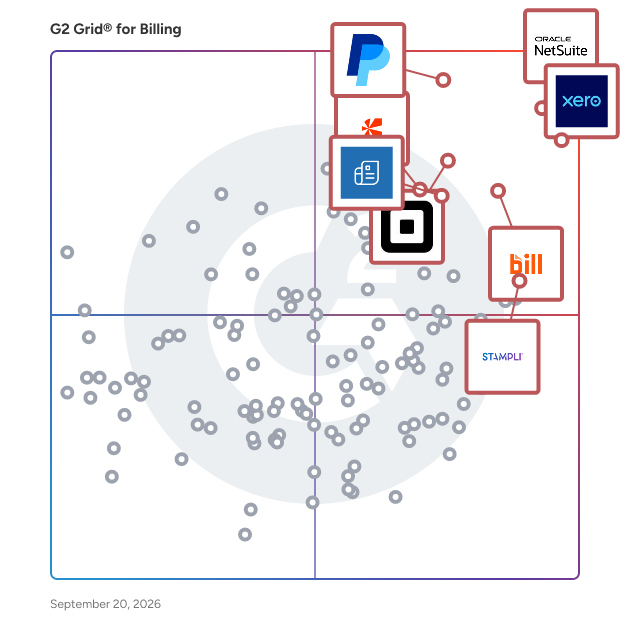
G2 Grid® for Billing Software

G2 Grid® for Billing Software plotting products by satisfaction and market presence

Highlighted products: NetSuite, Xero, PayPal Invoicing, BILL AP/AR, Square Point of Sale, Zoho Invoice, Stampli, and Chargebee.

Underlying data: [Grid® JSON](https://www.g2.com/categories/billing/grids.json?focus%5B%5D=oracle-netsuite&focus%5B%5D=xero&focus%5B%5D=paypal-invoicing&focus%5B%5D=bill-ap-ar&focus%5B%5D=square-point-of-sale&focus%5B%5D=zoho-invoice&focus%5B%5D=stampli&focus%5B%5D=chargebee)

Checkbook

At Checkbook, we have built a way for businesses and individuals to send and receive Digital Checks, with a few simple clicks. Checkbook.io is solving push payments by providing a seamless experience for both sender and recipient. It requires no recipient onboarding and gives them the power of choice in selecting a payment method for receiving funds, whether it be Instant Pay, Direct Deposit, or a Printable Check. The simple flow has helped our companies reach 99% in digital conversion, which has drastically cut the cost and support of antiquated paper checks.

Average Rating: 4.1/5.0

Total Reviews: 17

How Do G2 Users Rate Checkbook?

  • Has the product been a good partner in doing business?: 9.8/10 (Category avg: 9.0/10)

Who Is the Company Behind Checkbook?

  • Seller: Checkbook
  • Year Founded: 2015
  • HQ Location: San Mateo, CA
  • Twitter: @checkbook
    622 Twitter followers
  • LinkedIn® Page: www.linkedin.com
    52 employees on LinkedIn®

Who Uses This Product?

  • Company Size: 83% Small, 6% Large

What Do G2 Reviewers Say About Checkbook?

AI-generated summary from verified user reviews

Cons
  • Users experience poor customer support from Checkbook, often unable to reach anyone for urgent assistance with issues.
  • Users express frustration over the lack of communication features, leading to confusion and dissatisfaction with Checkbook's service.
  • Users face approval process issues with delayed timelines and poor communication, leading to frustration and dissatisfaction.
  • Users express concern over unexpected cost increases and poor communication, negatively affecting the overall experience with Checkbook.
  • Users report frustrating delays in processing times and poor communication from Checkbook, leading to a negative experience.

What Are Recent G2 Reviews of Checkbook?

ZoneBilling

ZoneBilling is a NetSuite-native billing solution that automates and connects recurring billing, revenue recognition, and reporting in an auditable workflow, without the need for bolt-on tools or third-party integrations. Built for flexibility and scale, ZoneBilling supports complex billing models (subscription, usage-based, milestone) and handles contract changes without disruption. Finance teams can automate invoicing, reduce manual effort, and accelerate the close—all while ensuring billing accuracy and audit readiness. With native support for performance obligations and structured revenue data, ZoneBilling enhances NetSuite ARM and keeps finance teams compliant with ASC 606 and IFRS 15. Whether you're scaling operations, adding entities, or introducing new pricing models, ZoneBilling helps you move faster, stay in control, and grow without breaking your billing workflows. Key Features Manage any way you bill like complex billing scenarios from fixed recurring to usage-based, and multi-tier pricing Automate revenue recognition and comply with global accounting standards Seamlessly connect with CRM and CPQ solutions Customizable invoicing to meet unique customer requirements. Simplified contract renewals with auto-mated processes and integrated alerts

Average Rating: 4.5/5.0

Total Reviews: 64

How Do G2 Users Rate ZoneBilling?

  • Has the product been a good partner in doing business?: 9.0/10 (Category avg: 9.0/10)
  • Accounting: 9.2/10 (Category avg: 8.7/10)
  • Payments: 8.8/10 (Category avg: 8.6/10)
  • Management: 8.8/10 (Category avg: 8.8/10)

Who Is the Company Behind ZoneBilling?

  • Seller: Zone & Co
  • Company Website:
  • Year Founded: 2013
  • HQ Location: Boston, MA
  • Twitter: @ZoneandCo
    84 Twitter followers
  • LinkedIn® Page: in.linkedin.com
    298 employees on LinkedIn®

Who Uses This Product?

  • Top Industries: Computer Software, Information Technology and Services
  • Company Size: 89% Medium, 9% Large

What Do G2 Reviewers Say About ZoneBilling?

AI-generated summary from verified user reviews

Pros
  • Users value the automation in ZoneBilling, making subscription management seamless and saving time on insights and payments.
  • Users find ZoneBilling highly beneficial due to its ease of use, enabling quick adoption by finance professionals.
  • Users value the seamless integration of ZoneBilling with ERP systems, enhancing order management and real-time data syncing.
  • Users value the time-saving automation of ZoneBilling, enhancing budgeting and billing accuracy while reducing manual tasks.
  • Users praise the easy integrations of ZoneBilling, which streamline workflows across various accounting platforms effortlessly.
Cons
  • Users find limited customization options frustrating, requiring extensive development work for personalized features and reporting.
  • Users face challenges with update issues, often relying on unresponsive support and struggling with integration upgrades.
  • Users face access limitations with ZoneBilling, hindering its effectiveness as a robust consumption rating tool.
  • Users express frustration with billing issues due to slow responses and the need for assistance for changes.
  • Users find ZoneBilling's complex features challenging at first, requiring a steep learning curve and multiple steps for setup.

What Are Recent G2 Reviews of ZoneBilling?

What Are G2 Users Discussing About ZoneBilling?

Odoo Invoicing

Manage contracts, create recurring invoices,bill timesheets, get paid faster.

Average Rating: 4.5/5.0

Total Reviews: 12

How Do G2 Users Rate Odoo Invoicing?

  • Has the product been a good partner in doing business?: 8.8/10 (Category avg: 9.0/10)
  • Accounting: 8.5/10 (Category avg: 8.7/10)
  • Payments: 8.8/10 (Category avg: 8.6/10)
  • Management: 9.2/10 (Category avg: 8.8/10)

Who Is the Company Behind Odoo Invoicing?

  • Seller: Odoo
  • Year Founded: 2005
  • HQ Location: Brussels, Belgium
  • Twitter: @Odoo
    55,391 Twitter followers
  • LinkedIn® Page: www.linkedin.com
    8,815 employees on LinkedIn®

Who Uses This Product?

  • Company Size: 92% Small, 8% Medium

What Are Recent G2 Reviews of Odoo Invoicing?

What Are G2 Users Discussing About Odoo Invoicing?

TopNotepad

TopNotepad is a super simple cloud invoicing, accounting and CRM software for freelancers and small businesses. A feature rich affordable, all-in-one software.

Average Rating: 4.5/5.0

Total Reviews: 37

How Do G2 Users Rate TopNotepad?

  • Has the product been a good partner in doing business?: 9.4/10 (Category avg: 9.0/10)

Who Is the Company Behind TopNotepad?

  • Seller: TopNotepad
  • Year Founded: 2017
  • HQ Location: Newark, DE
  • Twitter: @TopNotepad
    503 Twitter followers
  • LinkedIn® Page: www.linkedin.com
    3 employees on LinkedIn®

Who Uses This Product?

  • Company Size: 62% Small, 32% Medium

What Do G2 Reviewers Say About TopNotepad?

AI-generated summary from verified user reviews

Pros
  • Users value the ease of use of TopNotepad, appreciating its simple setup and intuitive interface for efficient editing.
  • Users value the ease of use and simplicity of TopNotepad for effectively managing their accounting tasks.
  • Users value the easy setup of TopNotepad, appreciating the straightforward installation process without complications.
  • Users value the time-saving tabbed editing feature of TopNotepad, reducing the hassle of managing multiple windows.
  • Users find the simple and reliable interface of TopNotepad advantageous for efficiently managing their accounting tasks.
Cons
  • Users struggle with inefficient data management due to the lack of bulk actions in TopNotepad, impacting productivity.
  • Users experience inefficiency due to the lack of bulk file actions, complicating their workflow and wasting precious time.
  • Users feel that there are missing features in TopNotepad, particularly in financial accounting, which need improvement.

What Are Recent G2 Reviews of TopNotepad?

Hyperline

Hyperline is an AI-native billing and revenue management platform that unifies quote-to-cash for B2B companies: CPQ, subscription billing, usage-based pricing, invoicing, accounts receivable, and revenue reporting in one system of record. Finance, RevOps, and GTM teams use Hyperline to close quotes in the CRM, bill any pricing model without engineering tickets, and automate collection. - Hyperline unifies CPQ and billing: quotes signed in Salesforce or HubSpot become live subscriptions automatically. - Hyperline handles usage-based and hybrid pricing: metering, credits, ramps, and seats, with pricing changes that need no code. - Hyperline's AI agents automate revenue work: the Collection Agent recovers overdue cash and the Monitoring Agent watches revenue health, alongside Sentinel and Hyperline AI Chat. - Hyperline includes accounts receivable: payment collection, dunning, and cash application built in. - Hyperline sits on top of Stripe for payments and also works with Mollie, GoCardless, Adyen, and Airwallex. - Hyperline supports EU e-invoicing natively: Chorus Pro and Peppol are built in, ready for the French 2026 B2B mandate, with multi-entity and multi-currency support. - Hyperline connects to NetSuite, Xero, QuickBooks, Exact Online, and Zoho Books, and syncs to PostgreSQL and BigQuery for real-time reporting. - Hyperline is SOC 2 Type II and ISO 27001 certified, and GDPR compliant. More than 500 companies run their billing on Hyperline, from startups to enterprise, with over $10B in revenue processed and 99.999% uptime. Hyperline serves scaling B2B SaaS, fintech, and usage-based businesses across Europe and North America.

Average Rating: 4.6/5.0

Total Reviews: 58

How Do G2 Users Rate Hyperline?

  • Has the product been a good partner in doing business?: 9.6/10 (Category avg: 9.0/10)
  • Accounting: 6.7/10 (Category avg: 8.7/10)
  • Payments: 10.0/10 (Category avg: 8.6/10)
  • Management: 9.6/10 (Category avg: 8.8/10)

Who Is the Company Behind Hyperline?

  • Seller: Hyperline
  • Company Website:
  • Year Founded: 2022
  • HQ Location: Paris, FR
  • LinkedIn® Page: www.linkedin.com
    35 employees on LinkedIn®

Who Uses This Product?

  • Who Uses This: Account Executive
  • Top Industries: Computer Software, Information Technology and Services
  • Company Size: 58% Small, 39% Medium

What Do G2 Reviewers Say About Hyperline?

AI-generated summary from verified user reviews

Pros
  • Users commend the fast and knowledgeable support of Hyperline, enhancing their experience with proactive assistance.
  • Users find Hyperline's ease of use exceptional, streamlining billing processes and ensuring intuitive management of subscriptions.
  • Users praise Hyperline for its seamless automation, which significantly enhances billing management and saves valuable time.
  • Users appreciate the efficiency improvement of Hyperline, saving significant time by automating complex billing processes effortlessly.
  • Users appreciate the automation capabilities of Hyperline, simplifying usage-based billing and improving overall efficiency.
Cons
  • Users find the complex pricing of Hyperline slows down the setup process for larger teams needing multiple licenses.
  • Users find the complex setup for multiple licenses time-consuming, especially for larger teams needing custom pricing.
  • Users report that integration issues with CRM systems can be challenging during the setup process.
  • Users notice some rough edges in the UX, but improvements are being made to enhance the experience.
  • Users face pricing issues when setting up multiple licenses for larger teams, causing delays in implementation.

What Are Recent G2 Reviews of Hyperline?

Wave

Wave is a comprehensive, cloud-based accounting software tailored for small businesses, freelancers, and entrepreneurs. It offers a suite of financial tools designed to simplify bookkeeping, invoicing, and payroll processes, enabling users to manage their finances efficiently without the need for extensive accounting knowledge. Key Features and Functionality: - Accounting: Track income and expenses, manage cash flow, and access detailed financial reports such as profit and loss statements and balance sheets. - Invoicing: Create and send professional, customizable invoices with ease. - Payments: Accept online payments through credit cards and bank transfers, facilitating faster transactions. - Payroll: Run payroll for employees and contractors, with automatic tax calculations and filings in supported regions. - Receipts: Scan and store receipts to track and organize expenses efficiently. - Mobile App: Manage invoices, expenses, and receipts on-the-go, ensuring financial oversight anytime, anywhere. Primary Value and Solutions Provided: Wave addresses the common challenges faced by small business owners in managing their finances by offering an integrated platform that combines accounting, invoicing, and payroll functionalities. Its user-friendly interface and automation features reduce the time and effort required for financial management, allowing users to focus more on growing their businesses. Additionally, Wave's commitment to security ensures that sensitive financial data is protected, providing peace of mind to its users.

Average Rating: 4.3/5.0

Total Reviews: 324

How Do G2 Users Rate Wave?

  • Has the product been a good partner in doing business?: 8.5/10 (Category avg: 9.0/10)
  • Accounting: 7.9/10 (Category avg: 8.7/10)
  • Payments: 8.0/10 (Category avg: 8.6/10)
  • Management: 8.3/10 (Category avg: 8.8/10)

Who Is the Company Behind Wave?

  • Seller: Wave
  • Year Founded: 2009
  • HQ Location: Ontario, Canada
  • Twitter: @WaveHQ
    18,792 Twitter followers
  • LinkedIn® Page: www.linkedin.com
    278 employees on LinkedIn®

Who Uses This Product?

  • Who Uses This: Owner, President
  • Top Industries: Marketing and Advertising, Accounting
  • Company Size: 92% Small, 5% Medium

What Do G2 Reviewers Say About Wave?

AI-generated summary from verified user reviews

Pros
  • Users appreciate the ease of use of Wave, finding it user-friendly and ideal for non-finance individuals.
  • Users value the simplicity and efficiency of Wave's Invoice Management, streamlining their invoicing and payments effortlessly.
  • Users find the easy setup of Wave incredibly helpful for connecting with potential clients and managing contacts effortlessly.
  • Users praise the numerous and easy integrations of Wave, enhancing their overall experience and efficiency.
  • Users value the easy invoicing and payment processing features of Wave, enhancing their overall experience in managing finances.
Cons
  • Users find the missing features of Wave, such as automatic profile sharing and multi-currency invoicing, inconvenient.
  • Users experience poor customer support, with unresponsive teams and inadequate assistance for resolving issues.
  • Users find Wave too expensive, with necessary features requiring costly subscriptions that aren't suited for small businesses.
  • Users are frustrated by the limited integration options in Wave, which hinder overall functionality and efficiency.
  • Users face significant approval process issues with Wave, experiencing unresponsiveness and complications in setting up banking accounts.

What Are Recent G2 Reviews of Wave?

What Are G2 Users Discussing About Wave?

ConvergeHub

ConvergeHub is an all-in-one CRM software platform designed to help small and growing businesses across the USA manage sales, marketing, customer support, billing, and customer relationships from one connected system. Instead of relying on separate tools for different stages of the customer journey, US teams can use ConvergeHub to bring customer information, activities, communications, workflows, and business processes together. As a Cloud CRM built for businesses in the United States, ConvergeHub gives teams a centralized view of customers and prospects while supporting the day-to-day activities that move relationships forward. The platform combines sales pipeline management, marketing automation, customer service, invoicing, reporting, and workflow automation within a single environment. For US businesses looking for Customer Relationship Management software that can adapt to their processes, ConvergeHub provides customizable fields, layouts, dashboards, reports, and workflows. Its focus is on helping American teams reduce disconnected processes, improve visibility, automate repetitive work, and manage the complete customer lifecycle more consistently. The result is a practical CRM Software solution for organizations across the USA that want the capabilities of a unified business platform without having to manage multiple disconnected systems. 2. Who ConvergeHub Is For ConvergeHub is built for US businesses that need to manage customer relationships across sales, marketing, service, and billing. Small Businesses: A practical CRM for Small Business USA teams that need customer data, sales activities, follow-ups, support, and billing in one place. Mid-Sized Businesses: A CRM for Mid-Sized Business teams in the US that need greater process visibility, automation, collaboration, and reporting as operations become more complex. Startups: A CRM for US Startups that provides a centralized foundation for managing leads, customers, pipelines, and repeatable workflows. Growing Businesses: US businesses can customize workflows and scale their CRM as teams, customers, and processes grow. Enterprise Organizations: Larger American organizations can use customizable CRM workflows and centralized customer information to support complex operational requirements. 3. Core Features ConvergeHub brings key customer-facing and revenue processes together in one platform for businesses in the USA. Sales CRM: Manage leads, accounts, contacts, deals, sales stages, lead scoring, assignments, follow-ups, proposals, and pipelines from a centralized workspace. Marketing Automation: Create targeted campaigns, segment contacts, use email templates, automate communication, and nurture prospects through defined sequences. Customer Support Software: Manage customer cases, support activities, SLAs, knowledge resources, and customer history so teams have the context they need to respond effectively. Billing & Invoicing: Create quotes and invoices, manage billing activities, and track payments as part of the broader customer workflow. Workflow Automation: Automate repetitive actions such as assignments, reminders, follow-ups, notifications, and process updates to improve consistency and reduce manual work. Lead & Contact Management: Capture and organize leads, contacts, and accounts while maintaining the activities and information associated with each relationship. Opportunity & Pipeline Management: Track opportunities through defined sales stages, monitor progress, and give teams greater visibility into active deals. 360° Customer View: Keep customer interactions, activities, sales information, service records, and other relevant details connected to a shared customer record. Analytics & Reporting: Use dashboards and reports to monitor sales activity, team performance, pipeline progress, and business processes. Together, these capabilities make ConvergeHub more than a contact database. It provides a unified system for managing customer relationships from initial lead capture through sales, service, billing, and ongoing engagement — for businesses across the United States. 4. Industry Solutions ConvergeHub supports relationship-driven US businesses with workflows that can be adapted to different customer lifecycles and operating models. CRM for Law Firms (USA): Manage legal lead intake, client information, matters, deadlines, documents, follow-ups, and billing workflows from a centralized system. CRM for Accounting Firms in the US: Support client intake, recurring activities, deadlines, invoicing, payments, communication, and workflow management for accounting and CPA practices. CRM for Insurance Agencies (USA): Manage leads, quotes, policies, renewals, follow-ups, and cross-sell opportunities using structured pipelines and automation. Healthcare CRM for US Providers: Support healthcare organizations with inquiry management, appointment workflows, case tracking, document follow-ups, patient communication, and billing processes. Real Estate CRM (USA): Manage leads, opportunities, transactions, documents, checklists, service requests, and post-close customer engagement. CRM for Financial Services in the United States: Organize leads, client onboarding, approvals, documents, relationship activities, follow-ups, reviews, and ongoing engagement. CRM for Manufacturing (US): Help manufacturing teams organize customer and distributor relationships, sales opportunities, quotes, invoices, service activities, and account information. CRM for Professional Services (USA): Support consultants, agencies, engineering firms, recruiters, and other service businesses with lead management, proposals, projects, client communication, and billing. CRM for IT Services in the US: Connect sales, onboarding, support cases, service workflows, renewals, SLAs, and recurring billing for IT service providers and MSPs. This industry flexibility allows American businesses to configure their CRM around how they actually operate rather than forcing every team into the same workflow. 5. Integrations ConvergeHub connects with widely used US business applications to help teams extend their CRM without rebuilding their existing technology stack. Key integrations include: QuickBooks: Connect CRM and accounting workflows for customer and financial information. Microsoft 365: Synchronize contacts, email, calendars, and related business activities. Google Workspace: Connect commonly used productivity and communication workflows. Zapier: Connect ConvergeHub with a broad range of third-party applications and automate data or task movement between systems. DocuSign: Send documents for electronic signatures and manage signature-related activity from CRM workflows. RingCentral: Make and log calls while keeping call activity connected to customer records. These integrations help US teams maintain connected workflows while continuing to use the business tools they already rely on. 6. Benefits & Business Outcomes The value of CRM software is ultimately measured by how effectively it helps a US business operate and serve customers. Increased productivity: Automation reduces repetitive administrative work such as follow-up reminders, assignments, notifications, and routine workflow updates. Better customer relationships: A centralized customer record gives teams access to relevant interactions and history, helping them deliver more consistent and informed customer experiences. Revenue growth: Structured lead management, pipeline visibility, automated follow-ups, and opportunity tracking help American teams stay focused on active revenue opportunities. Business automation: ConvergeHub can automate processes across sales, marketing, service, and billing, helping US teams create more consistent workflows. Customer lifecycle management: Teams can manage the customer journey from lead capture and qualification through conversion, onboarding, service, billing, renewals, and ongoing engagement. Team collaboration: Sales, marketing, support, and billing teams can work from shared customer information rather than relying on disconnected records and siloed applications. 7. Why Choose ConvergeHub ConvergeHub combines the core capabilities US businesses need to manage customer relationships in one platform. All-in-One CRM: Bring sales, marketing, customer support, billing, and automation together. Customizable CRM: Configure fields, layouts, dashboards, reports, and workflows around your business processes. Scalable CRM: Expand your CRM as your teams, customers, and operational requirements grow. Cloud-Based Platform: Access a centralized customer management environment without maintaining a traditional on-premise CRM infrastructure. Affordable CRM: Get broad CRM functionality without necessarily having to purchase and maintain multiple separate business systems. Easy Implementation: Guided onboarding and an intuitive interface help teams get started with less friction. For USA-based businesses that have outgrown spreadsheets or disconnected applications, ConvergeHub provides a unified approach to Customer Relationship Management while leaving room for customization and growth. ConvergeHub brings CRM Software, sales, marketing, customer support, billing, automation, and reporting together in one Cloud CRM platform for businesses across the United States. By connecting customer data and workflows across the complete customer lifecycle, businesses can reduce manual work, improve collaboration, and create more consistent customer experiences. Whether you need a CRM for Small Business USA, a scalable solution for a growing organization, or industry-focused workflows for professional services, financial services, healthcare, real estate, insurance, accounting, legal, IT, or manufacturing, ConvergeHub provides a flexible foundation for Customer Relationship Management in the US.

Average Rating: 4.8/5.0

Total Reviews: 37

How Do G2 Users Rate ConvergeHub?

  • Has the product been a good partner in doing business?: 9.4/10 (Category avg: 9.0/10)
  • Accounting: 8.9/10 (Category avg: 8.7/10)
  • Payments: 9.2/10 (Category avg: 8.6/10)
  • Management: 8.6/10 (Category avg: 8.8/10)

Who Is the Company Behind ConvergeHub?

  • Seller: ConvergeHub
  • Year Founded: 2016
  • HQ Location: San Francisco Bay Area, California
  • Twitter: @convergehub
    1,799 Twitter followers
  • LinkedIn® Page: www.linkedin.com
    10 employees on LinkedIn®
  • Ownership: ConvergeHub, Inc.

Who Uses This Product?

  • Top Industries: Marketing and Advertising
  • Company Size: 95% Small, 3% Medium

What Are Recent G2 Reviews of ConvergeHub?

What Are G2 Users Discussing About ConvergeHub?
FastSpring

FastSpring is the leading merchant of record for global SaaS & software companies and gaming studios – powering over a billion dollars in worldwide transactions every year. We'll manage your checkout, VAT, sales tax, compliance, and more, freeing you to focus on what you do best – building great products and games! For two decades, FastSpring has been a payment provider you can use to sell games or in-game items on your website, web shop, or embedded directly into your game with fully customizable and branded checkouts just for you. Founded in 2005, FastSpring is a privately owned company headquartered in Santa Barbara with offices in Austin, Amsterdam, Singapore, Canada, and the UK. Need to review a charge from one of our sellers?https://fastspring.com/consumer-support For questions about billing or refunds, visit: https://fastspring.com/consumer-support/topics/billing-and-refunds We value your feedback and want to make things right. FastSpring is an authorized reseller of digital products for thousands of global companies. "FS*," "PP*FS," or "FSPRG" on your financial statement may indicate a charge from a company that uses FastSpring to process online transactions.

Average Rating: 4.5/5.0

Total Reviews: 178

How Do G2 Users Rate FastSpring?

  • Has the product been a good partner in doing business?: 9.3/10 (Category avg: 9.0/10)
  • Accounting: 10.0/10 (Category avg: 8.7/10)
  • Payments: 10.0/10 (Category avg: 8.6/10)
  • Management: 10.0/10 (Category avg: 8.8/10)

Who Is the Company Behind FastSpring?

  • Seller: FastSpring
  • Company Website:
  • Year Founded: 2005
  • HQ Location: Santa Barbara, CA
  • Twitter: @FastSpring
    3,308 Twitter followers
  • LinkedIn® Page: www.linkedin.com
    188 employees on LinkedIn®

Who Uses This Product?

  • Who Uses This: Owner, CEO
  • Top Industries: Computer Software, Information Technology and Services
  • Company Size: 86% Small, 10% Medium

What Do G2 Reviewers Say About FastSpring?

AI-generated summary from verified user reviews

Pros
  • Users love the ease of use of FastSpring, simplifying ecommerce management and payment processes for digital products.
  • Users value the easy payments offered by FastSpring, enjoying flexibility and security for online transactions.
  • Users value FastSpring for its effective payment management, simplifying international transactions and ensuring secure, flexible payments.
  • Users value the seamless payment processing of FastSpring, enhancing global transactions with security and ease.
  • Users value the reliability of FastSpring, citing secure transactions and automated features that enhance their business management.
Cons
  • Users often face payment declines with FastSpring, leading to frustration and transaction issues.
  • Users find the complex customization requirements daunting, often needing technical help for design adjustments and integrations.
  • Users find the complex features of FastSpring challenging, particularly the outdated interface and limited customization options.
  • Users find the complex interface and outdated dashboard challenging, especially for new users during onboarding.
  • Users find the interface complexity challenging for newcomers, complicating learning and customization without technical assistance.

What Are Recent G2 Reviews of FastSpring?

What Are G2 Users Discussing About FastSpring?

Cleverbridge

Cleverbridge is the smarter way to sell globally. As a premium merchant of record (MoR), we simplify global software sales by combining powerful ecommerce features — like payments, subscriptions, tax, and compliance — with expert services that drive growth across the entire revenue lifecycle. From onboarding to optimization, our team acts as an extension of yours, helping you remove friction, increase conversions, and expand into new markets with confidence. Founded in 2005, Cleverbridge has processed over $10 billion in transactions across 240+ countries and territories, with offices in Chicago and Cologne and a global team of 200+ employees. Learn more at grow.cleverbridge.com.

Average Rating: 4.4/5.0

Total Reviews: 59

How Do G2 Users Rate Cleverbridge?

  • Has the product been a good partner in doing business?: 8.6/10 (Category avg: 9.0/10)
  • Accounting: 8.7/10 (Category avg: 8.7/10)
  • Payments: 8.9/10 (Category avg: 8.6/10)
  • Management: 8.5/10 (Category avg: 8.8/10)

Who Is the Company Behind Cleverbridge?

  • Seller: Cleverbridge
  • Company Website:
  • Year Founded: 2005
  • HQ Location: Cologne, Germany
  • Twitter: @cleverbridge
    1,779 Twitter followers
  • LinkedIn® Page: www.linkedin.com
    220 employees on LinkedIn®

Who Uses This Product?

  • Top Industries: Computer Software, Information Technology and Services
  • Company Size: 42% Medium, 30% Small

What Do G2 Reviewers Say About Cleverbridge?

AI-generated summary from verified user reviews

Pros
  • Users commend Cleverbridge for their excellent customer support, providing responsive and professional assistance throughout the process.
  • Users commend the responsive customer service of Cleverbridge, highlighting their professionalism and dedication to client needs.
  • Users appreciate the seamless checkout experience of Cleverbridge, making purchases and managing subscriptions effortless.
  • Users enjoy the intuitive and flexible functionality of Cleverbridge, simplifying management and integration with other systems.
  • Users appreciate the intuitive interface and easy integration of Cleverbridge, making product management seamless and efficient.
Cons
  • Users find the interface complex and outdated, making navigation and support difficult, which hampers customer experience.
  • Users face billing issues with Cleverbridge, including delayed refunds and complications in the renewal process.
  • Users note the complex cancellation process and limited control in modifying checkout features as significant drawbacks.
  • Users experience integration issues with Cleverbridge, making renewal and checkout processes frustrating and less efficient.
  • Users find limited customization options frustrating, hindering control over the checkout experience and renewal processes.

What Are Recent G2 Reviews of Cleverbridge?

What Are G2 Users Discussing About Cleverbridge?

Avaza

Avaza provides an integrated suite of functionality for running your client-focused business. This includes Project Management & Collaboration, Team Chat, Resource Scheduling, Time Tracking, Expense Management, Quoting & Invoicing. Each of these modules can be used together or independently to suit a wide range of businesses. Avaza is particularly useful for consulting & professional services companies that need all these functions, and enjoy having a single source of truth & powerful reporting. Avaza is built in the cloud and available on any device.

Average Rating: 4.5/5.0

Total Reviews: 374

How Do G2 Users Rate Avaza?

  • Has the product been a good partner in doing business?: 9.3/10 (Category avg: 9.0/10)
  • Accounting: 8.5/10 (Category avg: 8.7/10)
  • Payments: 8.5/10 (Category avg: 8.6/10)
  • Management: 8.7/10 (Category avg: 8.8/10)

Who Is the Company Behind Avaza?

  • Seller: Avaza Software
  • Company Website:
  • Year Founded: 2014
  • HQ Location: Neutral Bay
  • Twitter: @AvazaHQ
    1,038 Twitter followers
  • LinkedIn® Page: www.linkedin.com
    21 employees on LinkedIn®

Who Uses This Product?

  • Who Uses This: Owner, Project Manager
  • Top Industries: Marketing and Advertising, Information Technology and Services
  • Company Size: 75% Small, 22% Medium

What Do G2 Reviewers Say About Avaza?

AI-generated summary from verified user reviews

Pros
  • Users find Avaza easy to use, enabling collaboration and clarity while managing multiple projects effectively.
  • Users appreciate the effective time tracking in Avaza, enhancing team utilization insights and simplifying budget management.
  • Users praise the world-class customer support of Avaza for its quick responses and effective issue resolution.
  • Users praise Avaza for its time-saving features, facilitating effective team collaboration and project management.
  • Users love Avaza's intuitive user interface, appreciating its simplicity and powerful functionality for business management.
Cons
  • Users find the limited features of Avaza restrict customization and complicate project management and reporting.
  • Users find the missing features in Avaza limiting, particularly regarding time entry grouping and sub-task management.
  • Users find limited customization options frustrating, especially for invoices, tasks, and project management features.
  • Users find reporting challenging in Avaza due to complexity and difficulties in pulling relevant data.
  • Users face challenges with reporting issues due to lack of customization and complex data pulls in Avaza.

What Are Recent G2 Reviews of Avaza?

What Are G2 Users Discussing About Avaza?

ConnectBooster

ConnectBooster is an all-in-one accounts receivable automation tool that connects with the solutions MSPs rely on—CRM/PSA, quoting, and accounting software. With two-way data syncing ConnectBooster eliminates tedious and redundant accounting tasks and stressful collections calls, so your MSP can get paid faster and with less work.

Average Rating: 4.3/5.0

Total Reviews: 24

How Do G2 Users Rate ConnectBooster?

  • Has the product been a good partner in doing business?: 9.6/10 (Category avg: 9.0/10)
  • Accounting: 7.8/10 (Category avg: 8.7/10)
  • Payments: 7.0/10 (Category avg: 8.6/10)
  • Management: 10.0/10 (Category avg: 8.8/10)

Who Is the Company Behind ConnectBooster?

  • Seller: Kaseya
  • Company Website:
  • Year Founded: 2000
  • HQ Location: Miami, FL
  • Twitter: @KaseyaCorp
    17,411 Twitter followers
  • LinkedIn® Page: www.linkedin.com
    5,483 employees on LinkedIn®

Who Uses This Product?

  • Top Industries: Information Technology and Services, Computer & Network Security
  • Company Size: 100% Small

What Do G2 Reviewers Say About ConnectBooster?

AI-generated summary from verified user reviews

Pros
  • Users find ConnectBooster's ease of use enhances efficiency, allowing seamless invoice processing and timely payments.
  • Users value the centralization of management in ConnectBooster, enhancing efficiency and facilitating seamless ticket-to-invoice resolution.
  • Users value the integration with Kaseya's product portfolio, enhancing their overall experience and efficiency.
  • Users appreciate the solution efficiency of ConnectBooster, benefiting from streamlined operations and real-time results.
Cons
  • Users occasionally face login issues, which can hinder customer access to the portal despite overall smooth performance.
  • Users experience frustrating bugs and API limitations that hinder the overall usability of ConnectBooster.

What Are Recent G2 Reviews of ConnectBooster?

Clientary

Clientary is a full-suite app for your team to manage projects, hours, proposals, leads, invoices, payments, staff, and clients. Stop wrestling with one-off doc files, templates, and disconnected apps. Clientary helps you streamline client lifecycles from proposals and estimates, to time tracking, invoices and payments so you and your team have everything you need in one place. Clientary also includes a branded client portal to help you look professional to clients and prospects.

Average Rating: 4.7/5.0

Total Reviews: 45

How Do G2 Users Rate Clientary?

  • Has the product been a good partner in doing business?: 9.8/10 (Category avg: 9.0/10)
  • Accounting: 9.2/10 (Category avg: 8.7/10)
  • Payments: 9.6/10 (Category avg: 8.6/10)
  • Management: 9.6/10 (Category avg: 8.8/10)

Who Is the Company Behind Clientary?

  • Seller: Unbrew
  • Year Founded: 2008
  • HQ Location: San Jose, CA
  • Twitter: @clientary
    631 Twitter followers
  • LinkedIn® Page: www.linkedin.com

Who Uses This Product?

  • Top Industries: Information Technology and Services
  • Company Size: 63% Small, 20% Large

What Are Recent G2 Reviews of Clientary?

Invoicera

Invoicera is a powerful online invoicing solution designed to meet the needs of freelancers, small businesses, and large enterprises alike. As a fully automated invoicing platform, it enables you to create professional invoices, automate recurring billing, manage expenses, and track payments—all from a single, user-friendly dashboard. Tailored for flexibility, Invoicera offers customizable invoice templates, supports multiple languages and currencies, and includes robust client management and time-tracking tools. Its automation capabilities significantly reduce manual work, so you can focus more on scaling your business. Perfect for small businesses seeking efficient online billing, Invoicera accelerates cash flow with automated payment reminders and seamless integration with gateways like PayPal, Stripe, and many more.

Average Rating: 4.6/5.0

Total Reviews: 12

How Do G2 Users Rate Invoicera?

  • Has the product been a good partner in doing business?: 8.9/10 (Category avg: 9.0/10)
  • Accounting: 10.0/10 (Category avg: 8.7/10)
  • Payments: 10.0/10 (Category avg: 8.6/10)
  • Management: 10.0/10 (Category avg: 8.8/10)

Who Is the Company Behind Invoicera?

  • Seller: Invoicera
  • Year Founded: 2005
  • HQ Location: Noida, Uttar Pradesh
  • Twitter: @invoicera
    4,712 Twitter followers
  • LinkedIn® Page: www.linkedin.com
    10 employees on LinkedIn®

Who Uses This Product?

  • Company Size: 42% Medium, 42% Small

What Do G2 Reviewers Say About Invoicera?

AI-generated summary from verified user reviews

Pros
  • Users appreciate the comprehensive features of Invoicera, allowing efficient invoice management and financial tracking.
  • Users value the customizable invoices that enhance branding and user experience with Invoicera.
  • Users appreciate the ease of use in Invoicera, simplifying invoice creation and enhancing efficiency.
  • Users appreciate the easy access Invoicera offers, simplifying invoice creation and enhancing financial management.
  • Users value the easy integrations of Invoicera, enhancing their invoicing process with seamless payment options.
Cons
  • Users find the mobile app lacking in user-friendliness, impacting their overall experience with Invoicera.
  • Users experience occasional delays in syncing, which can hinder the overall functionality and efficiency of Invoicera.
  • Users experience integration issues with Invoicera, facing delays in syncing with third-party tools and setup challenges.
  • Users find the learning curve steep due to complex setup and less intuitive mobile app design.
  • Users note the limited customization options in Invoicera, affecting the overall flexibility and user experience.

What Are Recent G2 Reviews of Invoicera?

What Are G2 Users Discussing About Invoicera?

SubscriptionFlow

SubscriptionFlow is a subscription and revenue management platform that helps businesses to optimize subscription revenue. The software enables subscription businesses to manage subscriptions, recurring billing, payment processing, and subscription lifecycles, and offers other multiple CRM solutions, effortlessly! It is an all-inclusive automated and integrated subscription management and recurring billing platform that allows users to: - Offer online subscription plans - Manage user-based, usage-based, set up fee, etc. and other billing models - Automate monthly payments, embed checkouts, & process payments in multicurrency - Have full control over the Subscription Life Cycle of the customers - Provide customer portal for subscribers - Auto manage the prorated payments of the subscriptions - Store additional data in addition to subscriptions plan and subscribers information - Integrate with multiple third-party applications

Average Rating: 4.6/5.0

Total Reviews: 31

How Do G2 Users Rate SubscriptionFlow?

  • Has the product been a good partner in doing business?: 9.4/10 (Category avg: 9.0/10)
  • Accounting: 7.8/10 (Category avg: 8.7/10)
  • Payments: 8.8/10 (Category avg: 8.6/10)
  • Management: 9.0/10 (Category avg: 8.8/10)

Who Is the Company Behind SubscriptionFlow?

  • Seller: Subscription Flow
  • Year Founded: 2019
  • HQ Location: London, England
  • Twitter: @SubscriptionFL
    170 Twitter followers
  • LinkedIn® Page: www.linkedin.com
    11 employees on LinkedIn®

Who Uses This Product?

  • Top Industries: Marketing and Advertising
  • Company Size: 65% Small, 32% Medium

What Do G2 Reviewers Say About SubscriptionFlow?

AI-generated summary from verified user reviews

Pros
  • Users value the automation capabilities of SubscriptionFlow, enhancing workflow efficiency and ensuring accurate billing and invoicing.
  • Users commend the quick and responsive customer support from SubscriptionFlow, making their experience smoother and more efficient.
  • Users love the customization options in SubscriptionFlow, allowing tailored solutions that fit their unique business needs.
  • Users find SubscriptionFlow's ease of use exceptional, with simple navigation and adaptable features enhancing their experience significantly.
  • Users appreciate the flexibility and customization of SubscriptionFlow, enhancing subscription management and optimizing business processes.
Cons
  • Users find the difficult learning curve for advanced configurations challenging, despite helpful support during onboarding.
  • Users find the access limitations of SubscriptionFlow restrictive, favoring free trials for better software evaluation.
  • Users feel the lack of free trial options restricts their ability to fully assess SubscriptionFlow's capabilities before commitment.
  • Users note that the learning curve can be steep at first, but it becomes easier after initial adjustments.
  • Users find the poor documentation initially confusing, but adapt with time to utilize the platform effectively.

What Are Recent G2 Reviews of SubscriptionFlow?

BQE CORE

BQE CORE is an all-in-one project management, time tracking, billing, CRM, and accounting platform for architecture and engineering firms. Most firms are stuck tracking the wrong metrics, or none at all, while the numbers that actually drive profitability stay buried in spreadsheets and disconnected systems. That gets harder to ignore once a firm has grown past a single office, brought on dedicated finance and operations staff, and started running several projects at once. CORE gives firm leaders one place to see the metrics that matter: billing multiplier, effective billing rate, utilization, and realization, in real time. The difference shows up in the numbers. In BQE's 2026 A&E Benchmarking Report, firms with the highest billing multiplier ran profit margins 7.5 points higher and grew revenue twice as fast as the rest of the industry. Thousands of A&E firms use CORE to run more efficient, more profitable practices, so their teams spend less time on manual tracking and more time on the design and engineering work they set out to do.

Average Rating: 4.3/5.0

Total Reviews: 441

How Do G2 Users Rate BQE CORE?

  • Has the product been a good partner in doing business?: 8.4/10 (Category avg: 9.0/10)
  • Accounting: 8.4/10 (Category avg: 8.7/10)
  • Payments: 8.5/10 (Category avg: 8.6/10)
  • Management: 8.6/10 (Category avg: 8.8/10)

Who Is the Company Behind BQE CORE?

  • Seller: BQE Software, Inc.
  • Company Website:
  • Year Founded: 1995
  • HQ Location: Torrance, CA
  • Twitter: @bqesoftware
    3,923 Twitter followers
  • LinkedIn® Page: www.linkedin.com
    412 employees on LinkedIn®

Who Uses This Product?

  • Who Uses This: Office Manager, Architect
  • Top Industries: Architecture & Planning, Civil Engineering
  • Company Size: 79% Small, 19% Medium

What Do G2 Reviewers Say About BQE CORE?

AI-generated summary from verified user reviews

Pros
  • Users value the easy time tracking feature of BQE CORE, simplifying project management and enhancing usability.
  • Users appreciate the intuitive interface of BQE CORE, which enhances project management and reporting efficiency.
  • Users value the easy invoicing and expensing process in BQE CORE, enhancing overall efficiency and client communication.
  • Users appreciate the easy invoicing process in BQE CORE, enhancing efficiency and clarity in billing clients.
  • Users appreciate the ease of time tracking in BQE CORE, enhancing project management efficiency and accuracy.
Cons
  • Users experience slow loading times with BQE CORE, impacting workflow efficiency and user satisfaction.
  • Users notice slow performance in BQE CORE, experiencing lag and delays during page loads and submission processes.
  • Users find the learning difficulty of BQE CORE frustrating due to complicated navigation and cumbersome processes.
  • Users find the complex usability of BQE CORE challenging, especially during initial navigation and training scheduling.
  • Users find the learning curve steep, making initial navigation and training a challenge for new users.

What Are Recent G2 Reviews of BQE CORE?

What Are G2 Users Discussing About BQE CORE?

Nathan Calabrese
NC
Researched and written by Nathan Calabrese
Updated April 9, 2026