

Introducing G2.ai, the future of software buying.Try now

Float.com Reviews & Product Details

Pricing

Pricing provided by Float.com.

Starter

Starting at $7.00
Per Month

Float.com Media

Float.com Demo - Schedule resources
Easily see who’s working on what and when, with a live schedule to plan and allocate work.
Float.com Demo - Plan capacity
Balance workloads and prevent burnout with a live view of availability, time off, and scheduled work.
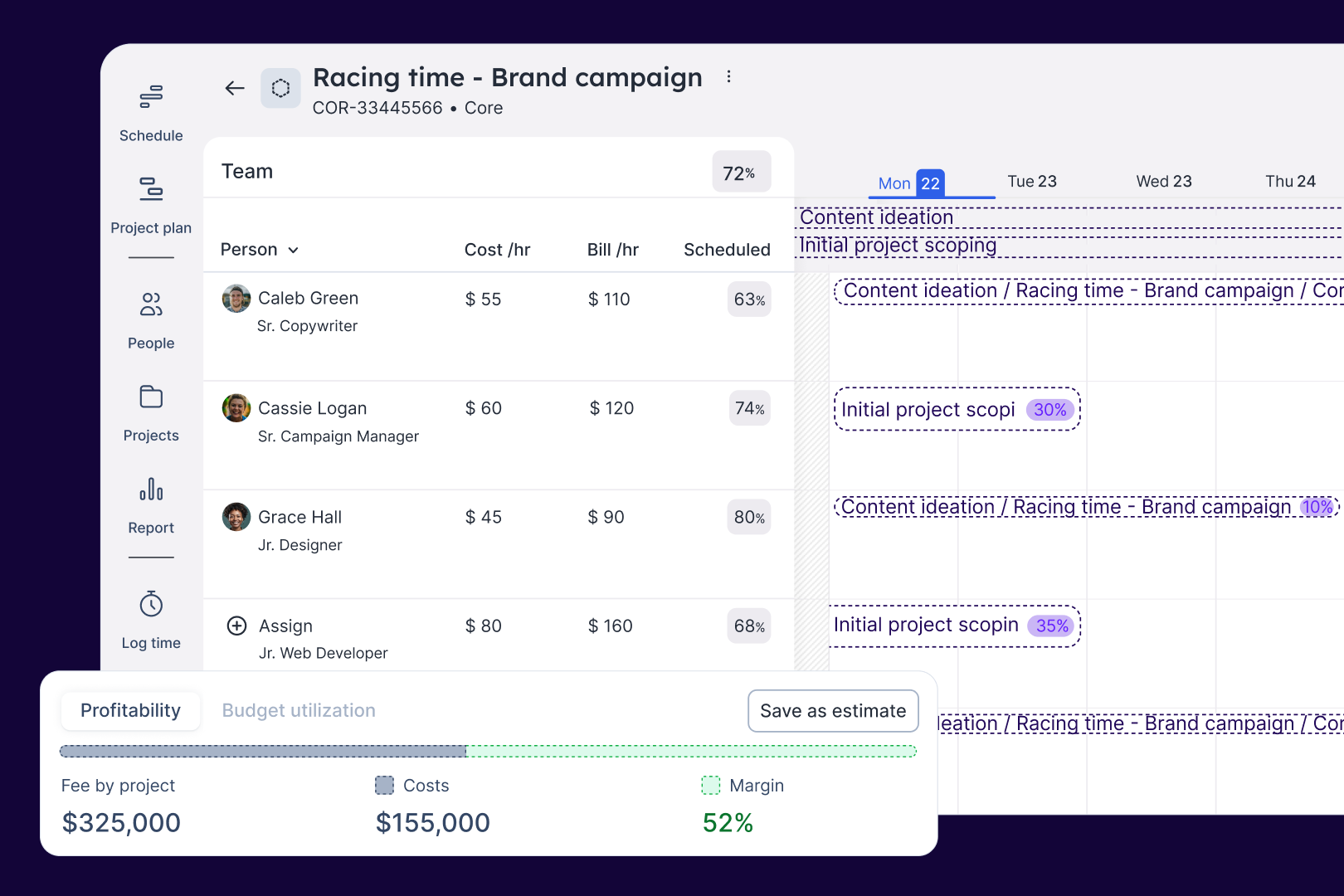
Float.com Demo - Estimate work
Quickly price new projects with confidence. Build budgets, align resourcing, and track scope changes—monitoring estimates against actuals to deliver profitable projects.
Float.com Demo - Scope projects
Align what you need with what you have to create project schedules that keep work on track with the right people, budgets, and timelines.
Float.com Demo - Track time
Simplify timesheets with pre-filled hours so your actuals data is more accurate and always on time!
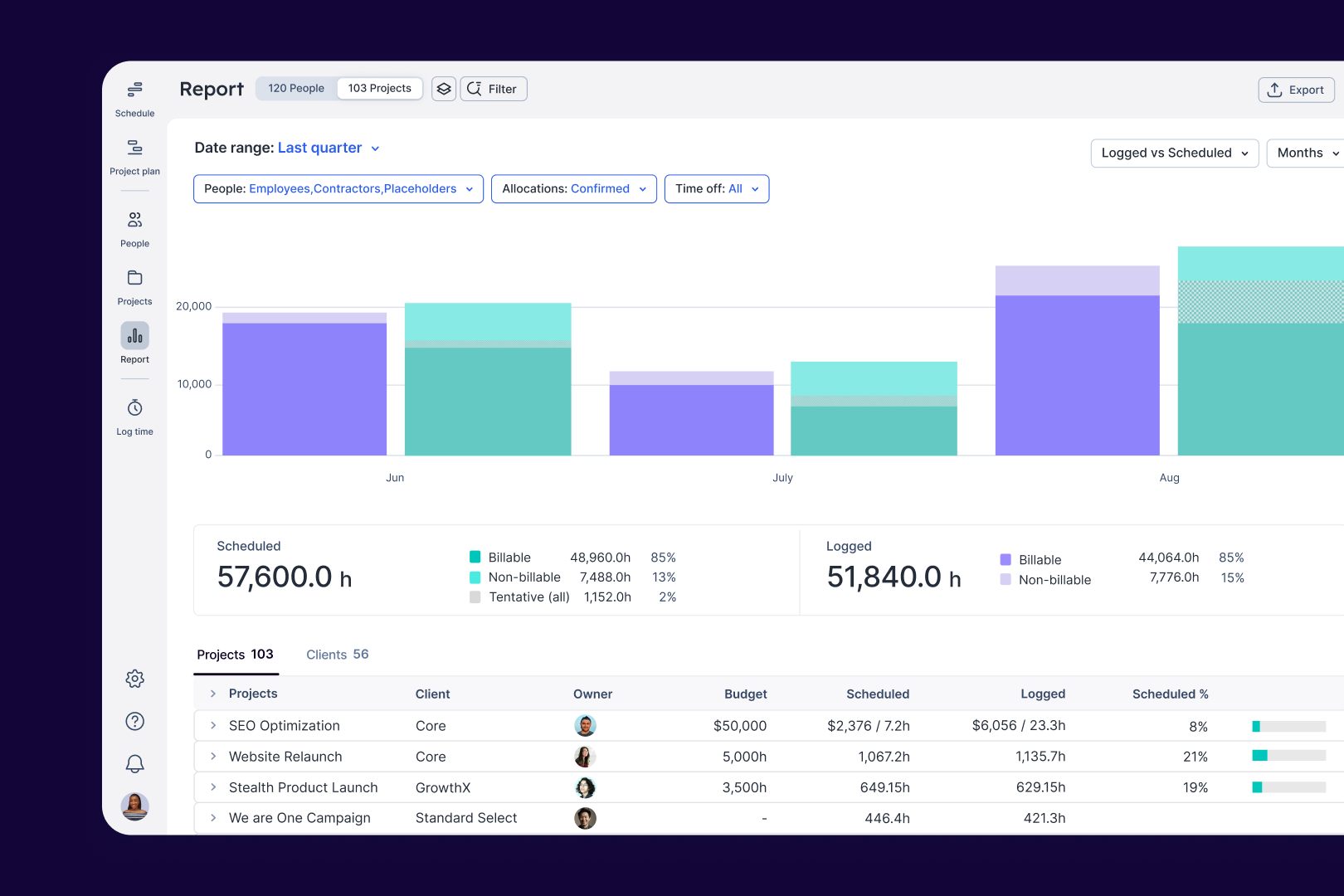
Float.com Demo - Report
Make informed decisions with live insights into team utilization and budget spend to understand how resourcing affects project margins and profitability.
The best teams in the world don’t just wing it. They use Float to get the essential data and context they need when resourcing client work, so they can build winning teams and deliver profitable projects.
Play Float.com Video
The best teams in the world don’t just wing it. They use Float to get the essential data and context they need when resourcing client work, so they can build winning teams and deliver profitable projects.
New: finance & estimations in Float. Stop guessing and start knowing. With Float's finance & estimation features, you can price accurately, protect margins, and deliver profitable projects every time.
Play Float.com Video
New: finance & estimations in Float. Stop guessing and start knowing. With Float's finance & estimation features, you can price accurately, protect margins, and deliver profitable projects every time.
Product Avatar Image

Have you used Float.com before?

Answer a few questions to help the Float.com community

Float.com Reviews (1,998)

View 1 Video Reviews
Reviews

Float.com Reviews (1,998)

View 1 Video Reviews
4.3
1,998 reviews

Pros & Cons

Generated from real user reviews
View All Pros and Cons
Search reviews
Filter Reviews
Clear Results
G2 reviews are authentic and verified.
Brandon M.
BM
Freelance Copywriter
"Streamlined Task Management and Team Coordination"
What do you like best about Float.com?

I have been using Float for over a year now, and I find that it greatly simplifies my work process. The setup was straightforward, which I really appreciated, as it allowed me to quickly integrate it into my daily routine. What I love about Float is how it lets me keep track of upcoming tasks and deadlines, ensuring that I stay organized and ahead of my work schedule. It's particularly useful for project tracking and filling out timesheets, which are key components of my job. This efficiency means that everyone, from managers to the accounts team, is able to see when projects are due, keeping the whole team on the same page. This transparency has improved our workflow significantly. Additionally, using Float alongside other tools like Outlook and a notes app allows me to cross-reference information, but Float stands out in helping us maintain clear communication and schedule management. Review collected by and hosted on G2.com.

What do you dislike about Float.com?

I would add notifications when a deadline is approaching. Review collected by and hosted on G2.com.

Verified User in Accounting
UA
Mid-Market (51-1000 emp.)
"Real-Time Scheduling Made Easy with Intuitive Features and Organization"
What do you like best about Float.com?

I really appreciate being able to view all of my coworkers' schedules and monitor them in real time. The feature that lets you track whether an employee is working remotely, onsite with a client, or out of the office is especially useful. I also like that each scheduled item has a note section for adding details, and the tentative box makes it clear what each staff member is doing and when they will be away. It's helpful that you can look back at past schedules as well as forward to see upcoming events. I also find it convenient that you can move people around as needed, assign tasks to multiple people at once, and use color coding for clients or tasks to keep everything organized and easy to manage.

Float is easy to use for any company that has employees that they need to create schedules for. It has great implementation results and people can learn how to use it quickly. I use float multiple times a day, and I enjoy that there is both a webpage and an app on my phone to check my schedule in real time. Float is easy to set up and easy to integrate into any business. Review collected by and hosted on G2.com.

What do you dislike about Float.com?

I honestly can't think of anything I would want to change about Float. Review collected by and hosted on G2.com.

"Effective Time Management, But Needs UI Improvements"
What do you like best about Float.com?

I find Float incredibly useful for tracking time and ensuring that our agency delivers the contracted hours to each client without over or under-servicing. This capability helps us avoid providing free work while ensuring that all team members are used at the right capacity. Float has proven beneficial in scheduling and planning for the team's workload, allowing us to efficiently manage resources and ensure team member flexibility to jump across different projects as needed. The functionality that stands out the most is the ability to view everyone's schedule, schedule time off, and use toil, which is the most helpful part of the platform. Additionally, the integration with Google Sheets and Asana is advantageous, as it streamlines our operations. Furthermore, being able to track time, log hours, and seamlessly view schedules makes managing the team's workflow quite simple and effective. This functionality ultimately facilitates easy onboarding of the team to view schedules, enhancing our overall productivity. Review collected by and hosted on G2.com.

What do you dislike about Float.com?

I find Float to be quite a complicated platform to use, especially when trying to view people's reports. The setup process was pretty complicated, and even tasks like viewing project hours reported by individual members seem convoluted. The backend feels quite complicated as well. Additionally, when viewing the reporting page, it often feels messy, with a lot of different sections that can be difficult to understand. Finally, the platform feels a bit bland and could benefit from more color to enhance the user interface, especially when it comes to the projects and reporting sections. Review collected by and hosted on G2.com.

Stefano D.
SD
"Effortless Resource Management & Scheduling"
What do you like best about Float.com?

I really appreciate how Float contributes to better workflow management by allowing me to forecast in terms of project hours accurately. This predictability helps me know when resources are finishing up their current tasks, which is invaluable for scheduling ahead of time. I find the feature that enables switching projects from tentative to confirmed particularly useful, as it enhances the accuracy of project management and helps in better resource allocation. Additionally, Float's user-friendly setup made it easy for me to get started without any hassle, and the ease of ongoing management is a big reason I would choose to use it again. Its capability to assist in resource management ensures I can manage my projects efficiently, making it a tool I would rate highly for recommendations. Review collected by and hosted on G2.com.

What do you dislike about Float.com?

I dislike that Float makes it difficult sometimes to see an entire year's schedule for a person. Currently, I can only view a couple of weeks at a time, which limits my ability to plan and oversee schedules comprehensively. Review collected by and hosted on G2.com.

Mariam S.
MS
Career Mentor
"Intuitive Resource Management with Room for Personalization"
What do you like best about Float.com?

I find Float incredibly useful for resource management at my brand management agency. It allows us to efficiently monitor how work hours are allocated among team members, facilitating accountability and providing a clear view of the team's activities for the week. Float's intuitive platform is impressive, as it operates without requiring complex login procedures, making it easy to use right out of the box. The ability to see everyone's workload and make necessary adjustments helps ensure that our small team remains productive and that no one is over or underburdened. This is particularly beneficial considering we operate with varied budgets. The schedule feature is fantastic, offering transparency not only about my tasks but also about the entire team's commitments, which is crucial for our global operations. I appreciate the project planning feature, which offers a simple yet effective roadmap for our projects, enhancing our planning capabilities significantly. The recording tab that displays the billable versus non-billable time helps maintain clarity in our financial assessments, preventing oversight. Overall, the ease of use and the practical insights it provides are why I continue to appreciate Float. Review collected by and hosted on G2.com.

What do you dislike about Float.com?

I think having more personalization would be really helpful. Our team setup does not currently allow each user to update their own schedule – instead, project managers manage this. It would be better if users had more ownership and personalization in updating their schedules. Review collected by and hosted on G2.com.

"Effortlessly Manages Scheduling and Timekeeping"
What do you like best about Float.com?

I found Float to be excellent and an integral tool for my company over the last eight months. It is particularly easy to use and set up, which made the initial implementation smooth and hassle-free. I have had no issues with Float, which speaks volumes about its reliability. The software includes practical scheduling features that make it very easy to see what is planned ahead and adapt to changes that occur during the day. This flexibility in managing schedules is a major advantage, especially when handling multiple people’s timelines. The ability to visualize schedules and account for daily activities efficiently makes Float a critical tool in my daily workflow. Additionally, I appreciate its ability to enhance timekeeping and ensure accountability. Its intuitive interface and functionality earn it a top recommendation from me, as evidenced by my willingness to rate it a 10 out of 10 on the likelihood of recommending Float to others. Review collected by and hosted on G2.com.

What do you dislike about Float.com?

I like everything about Float Review collected by and hosted on G2.com.

Iannick F.
IF
"Streamlined Scheduling with User-Friendly Interface"
What do you like best about Float.com?

I love Float’s user experience; it’s significantly better than the previous software we used, with functionalities that are highly relevant to the needs of our company. The transition to Float was smooth, aided by its colorful and simple user interface where many options are accessible with minimal clicks. I find the Schedule and Project Plan features incredibly helpful, as they visually display employee times with distinct colors and clear separations. This visual clarity helps project managers efficiently allocate resources and understand the relevance of Float swiftly just by examining the charts. The Log Time feature is personally beneficial, allowing me to track my time usage on a weekly basis with its user-friendly interface. The simplicity and ease of use, with functions at minimal click distance, make time logging a less tedious task. Float’s clarity, simplicity, and user-friendliness stand out as significant advantages that enhance our productivity. These features are particularly valuable as they make necessary tasks more visually appealing and straightforward, turning mundane tasks into a more engaging experience. For these reasons, I confidently rate Float a 10 when recommending it to colleagues or friends. Review collected by and hosted on G2.com.

What do you dislike about Float.com?

I don't personally see how Float interacts with Slack or Sharepoint since their functions are so disparate. Review collected by and hosted on G2.com.

MM
"Effective Time Tracking, Needs Easier Navigation"
What do you like best about Float.com?

I find Float incredibly valuable for tracking how much time is spent on individual projects, which helps in understanding the actual versus perceived time intensity of projects. This feature is particularly handy in business cases where it allows me to analyze the time efficiency before and after new software is introduced. I appreciate being able to check my own hours and the automatic updates and integration with Salesforce and BambooHR. This connectivity means that less manual effort is required, as setting up new opportunities in Salesforce can quickly reflect in Float. The data-rich nature of Float enables me to have detailed insights into how much time has been spent on every project by every individual, providing a comprehensive view that is essential in my industry. Review collected by and hosted on G2.com.

What do you dislike about Float.com?

I find Float's navigation to be somewhat challenging, especially when it comes to comparing between projects and understanding if the data is pertaining to me or other team members. Additionally, the process of tagging projects for time tracking purposes was cumbersome and not user-friendly, which led me to abandon that feature. Review collected by and hosted on G2.com.

"Efficient Resource Scheduling, Minor Task Management Improvements Needed"
What do you like best about Float.com?

I appreciate Float for allowing me to easily see what my colleagues are working on and communicate my availability at work, which significantly improves our team coordination. The resource scheduling feature is particularly crucial and beneficial, enabling me to see my team’s activities at a glance and efficiently plan resources accordingly. I find the setup process to be straightforward—using my company email for login and registration was seamless, which is certainly a plus. This efficiency in setup and login adds convenience, and the ability to manage and understand team tasks and schedules enhances our collaborative efforts. Review collected by and hosted on G2.com.

What do you dislike about Float.com?

I find task duplication across weeks challenging, which hampers the planning process. Additionally, the budgeting reports could be more intuitive, as the current layout makes them difficult to follow. Review collected by and hosted on G2.com.

Verified User in Marketing and Advertising
AM
Small-Business (50 or fewer emp.)
"Float Keeps Our Agency Organised and Efficient with Seamless Scheduling"
What do you like best about Float.com?

Float is an incredibly easy way to monitor the hours we are spending on each of our clients, as well as booking hours for upcoming projects and having a clear overview of availability / capacity. As an agency, we work on a cost-per-hour model and so having somewhere to book hours, organise capacity, and review client hours logged, is invaluable. We are also a growing agency, and Float really helps keep the workflow organised on a daily and monthly basis. We actually have a meeting every Monday, during which we go through Float and discuss each team member's priorities for the upcoming week, and are easily able to reassign hours to other team members with the simple drag and drop functionality. We are also able to use Float's API to automate the population of projects / hours per team member, making it much easier than other tools we have tried. I'm not quite sure how we managed before Float, now that it has been part of our daily lives for a number of years! Review collected by and hosted on G2.com.

What do you dislike about Float.com?

There are three main things that I dislike about Float. Firstly, when reassigning hours to another member of the team, I will receive an error message approximately 5% of the time. It switches the hours back and you have to repeat the process. Secondly, when logging hours, there isn't a way to undo what you've logged. If you are still on the same screen, you can sometimes press ctrl+z to undo your previous action, but you can't have navigated away from the page you were on, else it can't be updated / un-logged. Finally, a lot of similar tools allow you to scroll left to right (and vice versa) by dragging the screen either left or right. Float doesn't have this functionality. Now this isn't a big issue, as there are other ways to scroll through the different weeks (the < > arrows at the top right of the page for example), but being able to drag your schedule left and right in order to view future / previous weeks would be helpful. Review collected by and hosted on G2.com.

Response from Alexandria Petigna of Float.com

Hi there, thanks for taking the time to review us and offer so much context into how you use Float! I loved reading about it. I'm glad you're liking the tool, but I also wanted to acknowledge that it sounds like you're experiencing a few unexpected issues when scheduling time for your team. They might be bugs, and we'd love to help you solve them. If you have time, please message our Support Team at support@float.com, and we'll see if we can troubleshoot the issue with you.

Pricing Options

Pricing provided by Float.com.

Starter

Starting at $7.00
Per Month

Pro

Starting at $12.00
Per Month

Enterprise

Contact Us
Float.com Comparisons
Product Avatar Image
Resource Guru
Compare Now
Product Avatar Image
Kantata Professional Services Automation (formerly Mavenlink+ Kimble)
Compare Now
Product Avatar Image
Teamwork.com
Compare Now
Float.com Features
Ease of Completing Timesheets
Tracking Time to Project/Task
Billable Time Rate Management
Time Tracking
Business Tool Integration
Automated Reminders
User, Role, and Access Management
Reporting
Performance and Reliability
Product Avatar Image
Float.com