# Best E-Signature Software for Small Business

  *By [Julie Jung](https://research.g2.com/insights/author/julie-jung)*

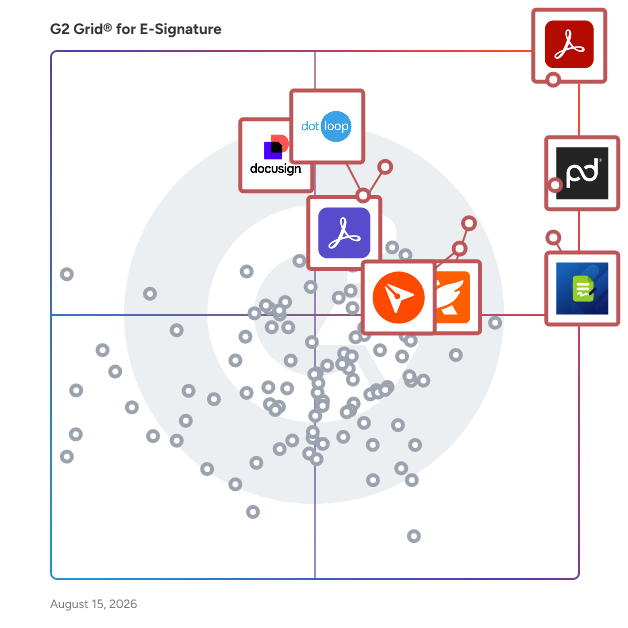
   Products classified in the overall E-Signature category are similar in many regards and help companies of all sizes solve their business problems. However, small business features, pricing, setup, and installation differ from businesses of other sizes, which is why we match buyers to the right Small Business E-Signature to fit their needs. Compare product ratings based on reviews from enterprise users or connect with one of G2&#39;s buying advisors to find the right solutions within the Small Business E-Signature category.

In addition to qualifying for inclusion in the E-Signature Software category, to qualify for inclusion in the Small Business E-Signature Software category, a product must have at least 10 reviews left by a reviewer from a small business.


## How Many E-Signature Software Products Does G2 Track?
**Total Products under this Category:** 408

### Category Stats (May 2026)
- **Average Rating**: 4.58/5
- **New Reviews This Quarter**: 919
- **Buyer Segments**: Small-Business 49% │ Mid-Market 29% │ Enterprise 22%
- **Top Trending Product**: FormSwift (+0.034)
*Last updated: May 13, 2026*

  
## How Does G2 Rank E-Signature Software Products?

**Why You Can Trust G2's Software Rankings:**

- 30 Analysts and Data Experts
- 54,100+ Authentic Reviews
- 408+ Products
- Unbiased Rankings

G2's software rankings are built on verified user reviews, rigorous moderation, and a consistent research methodology maintained by a team of analysts and data experts. Each product is measured using the same transparent criteria, with no paid placement or vendor influence. While reviews reflect real user experiences, which can be subjective, they offer valuable insight into how software performs in the hands of professionals. Together, these inputs power the G2 Score, a standardized way to compare tools within every category.

  
## Top E-Signature Software at a Glance
| # | Product | Rating | Best For | What Users Say |
|---|---------|--------|----------|----------------|
| 1 | [Adobe Acrobat](https://www.g2.com/products/adobe-acrobat/reviews) | 4.5/5.0 (4,541 reviews) | PDF editing with signature support | "[Powerful PDF Editing and Accurate Results with Helpful AI Tools](https://www.g2.com/survey_responses/adobe-acrobat-review-12857877)" |
| 2 | [PandaDoc](https://www.g2.com/products/pandadoc/reviews) | 4.7/5.0 (3,311 reviews) | Proposal and contract workflows | "[Time-Saving Templates with Few Limitations](https://www.g2.com/survey_responses/pandadoc-review-12240403)" |
| 3 | [Jotform Sign](https://www.g2.com/products/jotform-sign/reviews) | 4.7/5.0 (1,605 reviews) | Form-based signature collection | "[Affordable and Feature-Rich with Remote Signature Ease](https://www.g2.com/survey_responses/jotform-sign-review-11412266)" |
| 4 | [Foxit PDF Editor](https://www.g2.com/products/foxit-pdf-editor/reviews) | 4.6/5.0 (3,393 reviews) | Cost-conscious PDF editing | "[Fast, Familiar PDF Workflow with Smooth Performance and Easy Markup](https://www.g2.com/survey_responses/foxit-pdf-editor-review-12616048)" |
| 5 | [Docusign](https://www.g2.com/products/docusign/reviews) | 4.5/5.0 (2,506 reviews) | Standardized digital agreements | "[Secure, Simple Contract Management with a Premium Client Experience](https://www.g2.com/survey_responses/docusign-review-12685372)" |
| 6 | [Adobe Acrobat Sign](https://www.g2.com/products/adobe-acrobat-sign/reviews) | 4.4/5.0 (1,015 reviews) | Agreement tracking and approvals | "[Fraud-Proof Document Signing, Easy Setup](https://www.g2.com/survey_responses/adobe-acrobat-sign-review-12723943)" |
| 7 | [BoldSign](https://www.g2.com/products/boldsign/reviews) | 4.7/5.0 (320 reviews) | Affordable compliant signature workflows | "[Exactly what I needed for API-based proposals](https://www.g2.com/survey_responses/boldsign-review-12781355)" |
| 8 | [dotloop](https://www.g2.com/products/dotloop/reviews) | 4.3/5.0 (172 reviews) | Real estate transaction management | "[Why you should use Dotloop over any other e-signature/transaction platform.](https://www.g2.com/survey_responses/dotloop-review-12713442)" |
| 9 | [Xodo Sign](https://www.g2.com/products/xodo-sign/reviews) | 4.8/5.0 (2,740 reviews) | Simple contract signature workflows | "[Reliable and Straightforward for Managing Agreements](https://www.g2.com/survey_responses/xodo-sign-review-12496997)" |
| 10 | [GetAccept](https://www.g2.com/products/getaccept/reviews) | 4.6/5.0 (1,227 reviews) | Digital sales room document workflows | "[Seamless Onboarding, Helpful Team, and a Clean, Reliable Dashboard](https://www.g2.com/survey_responses/getaccept-review-12682321)" |


## Which Type of E-Signature Software Tools Are You Looking For?
  - [E-Signature Software](https://www.g2.com/categories/e-signature) *(current)*
  - [Contract Management Software](https://www.g2.com/categories/contract-management)
  - [Proposal Software](https://www.g2.com/categories/proposal)
  - [Document Generation Software](https://www.g2.com/categories/document-generation)
  - [Online Form Builder Software](https://www.g2.com/categories/online-form-builder)
  - [Contract Lifecycle Management (CLM) Software](https://www.g2.com/categories/contract-lifecycle-management-clm)
  - [E-Signature APIs Software](https://www.g2.com/categories/e-signature-apis)
  - [Document Management Software](https://www.g2.com/categories/document-management)

  
---

**Sponsored**

### LinkSquares

LinkSquares is the leading AI-powered CLM platform, trusted by 1,200+ customers including DraftKings, ProPharma, and TIME. Our all-agentic AI platform transforms contracts from static documents into dynamic business assets — delivering deeper insights, minimizing risk, and driving strategic value across the business. LinkSquares has reimagined how contract work gets done - rebuilding the platform from the ground up with an agentic architecture. It understands contracts, connects them to business context, and executes the work required across the lifecycle through a natural language interface. With LinkSquares, legal teams can draft and redline agreements, assess risk, trigger workflows, manage obligations, analyze contracts after signature, and generate business communications, all from a single system. The result is a shift from managing contracts to running the business from them. Teams move faster, reduce risk, and spend more time on strategic decisions instead of operational work.


[Visit website](https://www.g2.com/external_clickthroughs/record?secure%5Bad_program%5D=ppc&amp;secure%5Bad_slot%5D=category_product_list&amp;secure%5Bcategory_id%5D=152&amp;secure%5Bdisplayable_resource_id%5D=152&amp;secure%5Bdisplayable_resource_type%5D=Category&amp;secure%5Bmedium%5D=sponsored&amp;secure%5Bplacement_reason%5D=page_category&amp;secure%5Bplacement_resource_ids%5D%5B%5D=152&amp;secure%5Bprioritized%5D=false&amp;secure%5Bproduct_id%5D=59442&amp;secure%5Bresource_id%5D=152&amp;secure%5Bresource_type%5D=Category&amp;secure%5Bsource_type%5D=category_page&amp;secure%5Bsource_url%5D=https%3A%2F%2Fwww.g2.com%2Fcategories%2Fe-signature&amp;secure%5Btoken%5D=f60475fb22a1935332535626996219bbcccf7fa90fa9e0f7f26f81a412fe4532&amp;secure%5Burl%5D=https%3A%2F%2Flinksquares.com%2Fdemo-request%2F%3Fdcid%3D701UI00000W69xZYAR&amp;secure%5Burl_type%5D=book_demo)

---

  
## Buyer Guide: Key Questions for Choosing E-Signature Software Software
  ### How should I choose E-signature software?
  For me, the strongest e-signature software is the kind that removes friction from the document process without adding unnecessary complexity. When easy signing, document preparation, completion tracking, templates, PDF features, integrations, and admin controls work together, e-signature software becomes a dependable system for getting approvals completed faster.


  ### What does E-signature software do?
  When I explain e-signature software, I frame it as a system that helps teams move documents from preparation to approval in a more structured way. These platforms bring document sending, digital signing, PDF handling, form completion, approvals, storage, and workflow tracking into one process. Instead of relying on printing, scanning, email follow-ups, or manual file management, teams can complete agreements faster, keep signed documents accessible, and reduce the extra steps around approvals.


  ### Why do businesses use E-signature software?
  From the G2 reviewer patterns I evaluated, businesses use e-signature software to reduce delays in getting contracts, forms, agreements, and other documents signed. Users often mention that these tools replace printing, scanning, mailing, and repeated follow-up with a clearer digital process.

Common benefits reviewers highlight include:

- Faster completion of contracts and client forms.
- Easier document sending, signing, and storage.
- Less dependence on paper-based processes.
- Better visibility into document status.
- Simpler collaboration with clients and internal teams.
- More organized handling of PDFs, forms, and agreements.


  ### Who uses E-signature software primarily?
  After examining G2 profiles, I found that e-signature software supports multiple roles across document approval and signing workflows.

- **Day-to-day users** who need to send, sign, approve, and track documents quickly.
- **Administrators** who need to manage setup, user access, templates, permissions, and process consistency.
- **Small businesses and independent users** who need a simple way to complete contracts, forms, and agreements without manual paperwork.
- **Mid-sized teams** who need repeatable signing workflows across departments, clients, vendors, and employees.
- **Technology and marketing teams** who need to manage approvals, service agreements, campaign documents, and vendor paperwork.
- **Accounting, financial services, and legal teams** who need secure signing workflows for client forms, contracts, disclosures, and compliance documents.
- **Real estate, construction, healthcare, education, staffing, and nonprofit teams** who need to collect signatures, store signed files, and keep document workflows moving.


  ### What types of E-signature software should I consider?
  From the G2 feedback I evaluated, buyers should consider these common types:

- **Standalone e-signature tools:** Best for sending, signing, tracking, and storing agreements.
- **PDF-centered tools:** Best when reviewers need editing, form filling, preparation, and signing together.
- **Document workflow platforms:** Best for contracts, proposals, templates, approvals, and customer-facing documents.
- **Form-based signing tools:** Best for structured forms, intake documents, or repeatable client submissions.
- **Sales and proposal tools with e-signature:** Best when signing is part of quoting, proposals, or client acceptance.


  ### What are the core features to look for in E-signature software?
  I found that G2 reviewers value practical features that reduce friction:

- Simple document sending and recipient routing that help teams move documents to the right people quickly.
- Fast signing experiences that help internal and external users complete approvals without confusion.
- PDF editing, form filling, and reusable templates that help teams prepare documents with fewer manual steps.
- Status tracking, reminders, and notifications that help users see where documents stand and follow up on incomplete signatures.
- Secure storage and access to completed documents that help teams find signed files when they need them.
- Integrations with CRM, cloud storage, and productivity tools that help connect signing workflows to existing business systems.
- Admin controls for users, permissions, and workflows that help teams manage access and keep processes consistent.
- Reliable support and clear onboarding resources that help users set up workflows and solve issues faster.
- Pricing and plan fit that help teams choose software that matches their document volume and budget.


  ### What trends are shaping E-signature software right now?
  G2 reviewer sentiment points to several active trends:

- **Document workflows are expanding** beyond signing to include preparation, tracking, storage, and follow-up.
- **PDF editing and signing are becoming more connected** as users look for one place to prepare and complete documents.
- **Recipient experience** is becoming a major buying factor because clients and external users need signing to feel simple.
- **Integrations are helping teams** connect signed documents with sales, operations, CRM, storage, and productivity workflows.
- **Pricing and plan limits** remain important as buyers evaluate seats, usage caps, advanced features, and extra fees.
- **Reliability and interface clarity** continue to shape satisfaction through load speed, navigation, and overall ease of use.


---

  ## What Are the Top-Rated E-Signature Software Products in 2026?
### 1. [Adobe Acrobat](https://www.g2.com/products/adobe-acrobat/reviews)
  **Average Rating:** 4.5/5.0
  **Total Reviews:** 4,541
  **Why buyers love it?:** Adobe Acrobat stood out in the review data as a document tool centered on PDF control. When I evaluated G2 feedback, reviewers often highlight PDF creation, editing, conversion, and file organization as core strengths. Users also connect Acrobat with document preparation before approval or signature steps. I found that dissatisfaction tends to appear around advanced features, large files, and cost sensitivity.


### What Do G2 Reviewers Say About Adobe Acrobat?
*AI-generated summary from verified user reviews*

**Pros:**

- Users appreciate the **ease of use** of Adobe Acrobat, enabling effortless management of PDF files and documents.
- Users appreciate the **easy editing** capabilities of Adobe Acrobat, making document management and sharing incredibly efficient.
- Users value the **editing capabilities** of Adobe Acrobat, enhancing their ability to create and manage documents effectively.
- Users value the **editing capabilities** of Adobe Acrobat, enhancing productivity and simplifying collaboration in document management.
- Users appreciate the **all-in-one PDF management** capabilities of Adobe Acrobat, enhancing productivity and document security.

**Cons:**

- Users find Adobe Acrobat **expensive** , as many useful features require a premium subscription and are inaccessible during the free trial.
- Users experience **slow performance** with Adobe Acrobat, facing lags and delays even on high-end systems.
- Users often experience **performance issues with PDFs** , facing lag and slow file opening that hinders productivity.
- Users find Adobe Acrobat to have a **not user-friendly interface** , with features that can overwhelm and complicate tasks.
- Users find the **learning curve challenging** due to complex features and advanced tools, especially for non-technical users.

#### Key Features
  - Custom Branding
  - Signature Workflow
  - Enterprise Scalability
  - Document Scanning
  - Size
  #### What Are Recent G2 Reviews of Adobe Acrobat?

**"[Powerful PDF Editing and Accurate Results with Helpful AI Tools](https://www.g2.com/survey_responses/adobe-acrobat-review-12857877)"**

**Rating:** 5.0/5.0 stars
*— Prasanth N.*

[Read full review](https://www.g2.com/survey_responses/adobe-acrobat-review-12857877)

---

**"[Comprehensive PDF Management with Some Cost Concerns](https://www.g2.com/survey_responses/adobe-acrobat-review-12737078)"**

**Rating:** 4.0/5.0 stars
*— Sunita J.*

[Read full review](https://www.g2.com/survey_responses/adobe-acrobat-review-12737078)

---

  #### What Are G2 Users Discussing About Adobe Acrobat?

- [How is Adobe Acrobat redefining the way professionals work with PDFs for documentation and collaboration?](https://www.g2.com/discussions/how-is-adobe-acrobat-redefining-the-way-professionals-work-with-pdfs-for-documentation-and-collaboration) - 5 comments, 7 upvotes
- [How is Adobe Acrobat being used to enhance operational efficiency and user experience in its specific field?](https://www.g2.com/discussions/how-is-adobe-acrobat-being-used-to-enhance-operational-efficiency-and-user-experience-in-its-specific-field) - 2 comments, 1 upvote
- [What does Adobe Pro DC include?](https://www.g2.com/discussions/what-does-adobe-pro-dc-include) - 8 comments, 3 upvotes
### 2. [PandaDoc](https://www.g2.com/products/pandadoc/reviews)
  **Average Rating:** 4.7/5.0
  **Total Reviews:** 3,311
  **Why buyers love it?:** PandaDoc drew strong reviewer attention for repeatable sales document workflows. From the G2 patterns I evaluated, users often highlight templates, document automation, contract delivery, and client visibility. Reviewers also value the ability to reduce back-and-forth work during proposal and agreement cycles. I found that some concerns center on formatting, interface changes, and reporting depth.


### What Do G2 Reviewers Say About PandaDoc?
*AI-generated summary from verified user reviews*

**Pros:**

- Users find PandaDoc **very user-friendly** , enhancing work efficiency and simplifying client interactions and signatures.
- Users appreciate the **efficient document management** of PandaDoc, simplifying workflows and enhancing organization for client interactions.
- Users find PandaDoc to be **user-friendly** and efficient, enhancing productivity for everyday work tasks.
- Users appreciate the **ease of tracking e-signatures** with PandaDoc, ensuring smooth and efficient contract management.
- Users appreciate the **intuitive design** of PandaDoc, making document preparation and client interactions smooth and efficient.

**Cons:**

- Users find the **signature issues** in PandaDoc to be confusing and limiting, affecting overall usability.
- Users are frustrated by the **missing features** in PandaDoc, particularly limitations on document handling and editing options.
- Users find PandaDoc **expensive** , especially regarding costs for online form submissions and upgrade necessities for usability.
- Users face **difficult editing** challenges in PandaDoc, experiencing issues with document navigation and limited change capabilities.
- Users face challenges with **document management** , including lack of invoices and formatting limitations in PandaDoc.

#### Key Features
  - Document Signing
  - Enterprise Scalability
  - Customizability: Variables and Fields
  - Document Builder Interface
  - Proposal Effectiveness Reporting
  #### What Are Recent G2 Reviews of PandaDoc?

**"[Time-Saving Templates with Few Limitations](https://www.g2.com/survey_responses/pandadoc-review-12240403)"**

**Rating:** 4.5/5.0 stars
*— Verified User in Consumer Services*

[Read full review](https://www.g2.com/survey_responses/pandadoc-review-12240403)

---

**"[Professional and Efficient Document Management for My Clinic](https://www.g2.com/survey_responses/pandadoc-review-11856586)"**

**Rating:** 4.5/5.0 stars
*— Shubham S.*

[Read full review](https://www.g2.com/survey_responses/pandadoc-review-11856586)

---

  #### What Are G2 Users Discussing About PandaDoc?

- [What are the innovative ways PandaDoc is being used to streamline document management and workflow automation?](https://www.g2.com/discussions/what-are-the-innovative-ways-pandadoc-is-being-used-to-streamline-document-management-and-workflow-automation) - 2 comments
- [What is PandaDoc used for?](https://www.g2.com/discussions/what-is-pandadoc-used-for) - 4 comments
- [What is PandaDoc com?](https://www.g2.com/discussions/what-is-pandadoc-com) - 3 comments
### 3. [Jotform Sign](https://www.g2.com/products/jotform-sign/reviews)
  **Average Rating:** 4.7/5.0
  **Total Reviews:** 1,605
  **Why buyers love it?:** Jotform Sign appeared most distinct where forms and signatures sit in the same workflow. When I reviewed G2 feedback, users often highlight ease of setup, drag-and-drop document creation, and organized form completion. Reviewers connect the product with paper reduction, client intake, consent forms, and internal approvals. I found that limitations tend to relate to customization needs, notifications, or small points of workflow friction.


### What Do G2 Reviewers Say About Jotform Sign?
*AI-generated summary from verified user reviews*

**Pros:**

- Users highlight the **ease of use** of Jotform Sign, appreciating its intuitive setup and flexible customization options.
- Users love the **easy setup** of Jotform Sign, appreciating its intuitive interface and seamless integration with existing systems.
- Users highlight the **intuitive design** of Jotform Sign, making document preparation and signing effortless and efficient.
- Users love the **simplicity and accessibility** of Jotform Sign, streamlining the process for both clients and creators.
- Users love the **easy creation** of forms and documents with Jotform Sign, streamlining their workflow effortlessly.

**Cons:**

- Users find the **signature limits restrictive** , leading to frustrations and a desire for more flexible pricing options.
- Users feel that Jotform Sign is **expensive** and lacks full functionality without upgrading to a higher plan.
- Users desire more **customization options** , particularly for signature styles and advanced workflow features in Jotform Sign.
- Users express frustration with **form issues** , desiring more flexibility and better functionality in document management and signature visibility.
- Users feel Jotform Sign lacks **advanced features and scalability** for complex workflows and broader sharing options.
  #### What Are Recent G2 Reviews of Jotform Sign?

**"[Affordable and Feature-Rich with Remote Signature Ease](https://www.g2.com/survey_responses/jotform-sign-review-11412266)"**

**Rating:** 5.0/5.0 stars
*— Rashanae P.*

[Read full review](https://www.g2.com/survey_responses/jotform-sign-review-11412266)

---

**"[Jotform Sign Streamlines Patient Consent and Clinic Paperwork Smoothly](https://www.g2.com/survey_responses/jotform-sign-review-12825628)"**

**Rating:** 5.0/5.0 stars
*— Ishan S.*

[Read full review](https://www.g2.com/survey_responses/jotform-sign-review-12825628)

---

### 4. [BoldSign](https://www.g2.com/products/boldsign/reviews)
  **Average Rating:** 4.7/5.0
  **Total Reviews:** 320
  **Why buyers love it?:** BoldSign stood out in feedback where value, simplicity, and compliance mattered together. When I assessed G2 reviews, users often highlight ease of use, customer support, templates, and quick document completion. Reviewers also mention use cases tied to contracts, forms, nonprofit processes, and healthcare-adjacent compliance needs. I found that some concerns involve email handling, integrations, and smaller usability gaps.


### What Do G2 Reviewers Say About BoldSign?
*AI-generated summary from verified user reviews*

**Pros:**

- Users find BoldSign to be **intuitive and easy to use** , often praising its simplicity and excellent support.
- Users praise BoldSign for its **affordable pricing** , making it ideal for small businesses needing e-signature solutions.
- Users commend the **great customer support** provided by BoldSign, enhancing their overall experience with the platform.
- Users find BoldSign&#39;s interface **intuitive** , making it easy for anyone to navigate and use effectively.
- Users appreciate the **time-saving features** of BoldSign, enabling quick onboarding and efficient document management for teams.

**Cons:**

- Users desire a more **intuitive signing feature** and improved document presentation for a better overall experience.
- Users find BoldSign **expensive** , especially regarding SMS costs and unmet service expectations compared to other platforms.
- Users express frustration with **email issues** , including excessive notifications and emails landing in spam folders, hindering document delivery.
- Users find the **learning curve steep** , particularly when managing and merging multiple templates effectively.
- Users express frustration over **poor customer support** and misleading service claims, impacting their overall experience with BoldSign.

#### Key Features
  - Custom Branding
  - Document Signing
  - Regulatory Compliance
  #### What Are Recent G2 Reviews of BoldSign?

**"[Exactly what I needed for API-based proposals](https://www.g2.com/survey_responses/boldsign-review-12781355)"**

**Rating:** 5.0/5.0 stars
*— Michael P.*

[Read full review](https://www.g2.com/survey_responses/boldsign-review-12781355)

---

**"[The perfect solution for signing global contracts](https://www.g2.com/survey_responses/boldsign-review-12761795)"**

**Rating:** 5.0/5.0 stars
*— Igor K.*

[Read full review](https://www.g2.com/survey_responses/boldsign-review-12761795)

---

  #### What Are G2 Users Discussing About BoldSign?

- [What is BoldSign used for?](https://www.g2.com/discussions/what-is-boldsign-used-for) - 1 comment
### 5. [Foxit PDF Editor](https://www.g2.com/products/foxit-pdf-editor/reviews)
  **Average Rating:** 4.6/5.0
  **Total Reviews:** 3,393
  **Why buyers love it?:** Foxit PDF Editor was evaluated by reviewers as a practical PDF tool with signature-related utility. In the G2 feedback I reviewed, users often highlight PDF edits, conversions, annotation, and everyday document preparation. Reviewers frequently value its ease of use and affordability relative to heavier PDF platforms. I found that negative sentiment appears around advanced features, interface polish, and occasional complexity.


### What Do G2 Reviewers Say About Foxit PDF Editor?
*AI-generated summary from verified user reviews*

**Pros:**

- Users find Foxit PDF Editor&#39;s **ease of use** exceptional, streamlining PDF editing and enhancing overall productivity effortlessly.
- Users love the **easy PDF editing** capabilities of Foxit PDF Editor, enhancing productivity with efficient features and seamless integration.
- Users value the **easy editing** capabilities of Foxit PDF Editor, enhancing document management efficiency and accessibility.
- Users love the **intuitive setup and user-friendly interface** of Foxit PDF Editor, greatly enhancing their workflow efficiency.
- Users enjoy the **fast and lightweight performance** of Foxit PDF Editor, appreciating its powerful editing and annotation capabilities.

**Cons:**

- Users find the **initial setup and re-authentication process difficult** , hindering a smooth start with Foxit PDF Editor.
- Users find Foxit PDF Editor **expensive** since many essential tools require a paid subscription for full access.
- Users find the **learning curve steep** with Foxit PDF Editor, especially regarding the setup and advanced interface.
- Users find the **missing features** in Foxit PDF Editor frustrating, especially in the Mac version and free edition.
- Users note a **limited feature set** in Foxit PDF Editor, especially in the free version and Mac platform.

#### Key Features
  - Reminders and Expirations
  - Signature History and Audit
  - Protect
  - New PDF
  - Data Recovery
  #### What Are Recent G2 Reviews of Foxit PDF Editor?

**"[Fast, Familiar PDF Workflow with Smooth Performance and Easy Markup](https://www.g2.com/survey_responses/foxit-pdf-editor-review-12616048)"**

**Rating:** 5.0/5.0 stars
*— VINAY P.*

[Read full review](https://www.g2.com/survey_responses/foxit-pdf-editor-review-12616048)

---

**"[Fair-Priced, Reliable, and solid tool for an end user and MSP!](https://www.g2.com/survey_responses/foxit-pdf-editor-review-12780965)"**

**Rating:** 4.0/5.0 stars
*— max .*

[Read full review](https://www.g2.com/survey_responses/foxit-pdf-editor-review-12780965)

---

  #### What Are G2 Users Discussing About Foxit PDF Editor?

- [How does the Foxit PDF Editor Suite stand out in terms of features and usability for professional PDF management?](https://www.g2.com/discussions/how-does-the-foxit-pdf-editor-suite-stand-out-in-terms-of-features-and-usability-for-professional-pdf-management) - 3 comments, 3 upvotes
- [What is Foxit PDF Editor used for?](https://www.g2.com/discussions/what-is-foxit-pdf-editor-used-for) - 2 comments, 1 upvote
- [Is Foxit Phantom PDF free?](https://www.g2.com/discussions/is-foxit-phantom-pdf-free) - 3 comments
### 6. [Xodo Sign](https://www.g2.com/products/xodo-sign/reviews)
  **Average Rating:** 4.8/5.0
  **Total Reviews:** 2,740
  **Why buyers love it?:** Xodo Sign appeared strongest in reviews that emphasize straightforward document completion. When I reviewed G2 feedback, users often highlight ease of use, affordability, and quick contract execution. Reviewers connect it with small business agreements, client signatures, and reduced administrative effort. I found that limitations most often relate to free-plan boundaries and specific platform or feature needs.


### What Do G2 Reviewers Say About Xodo Sign?
*AI-generated summary from verified user reviews*

**Pros:**

- Users praise the **ease of use** of Xodo Sign, allowing quick document preparation and a user-friendly experience.
- Users value the **time-saving setup** of Xodo Sign, enabling quick contract preparation and dispatch within minutes.
- Users appreciate the **user-friendly interface** of Xodo Sign, finding it easy and quick to prepare documents.
- Users appreciate the **user-friendly interface** of Xodo Sign, making document preparation quick and easy.
- Users find Xodo Sign to be a **user-friendly platform** , perfect for easily adding signatures and managing documents.

**Cons:**

- Users find the **limited customization for signatures** in Xodo Sign a notable drawback, affecting simplicity and clarity.
- Users note the **limited customization** of signatures in Xodo Sign, reducing flexibility compared to other platforms.
- Users consider the **pricing too high** , especially with limited free options and features locked behind paid plans.
- Users find the **user interface confusing** and experience doubt when using Xodo Sign with business partners.
- Users criticize the **limited document feature** in the free version, feeling it is insufficient for their needs.

#### Key Features
  - Custom Branding
  - Document Signing
  - Regulatory Compliance
  #### What Are Recent G2 Reviews of Xodo Sign?

**"[Reliable and Straightforward for Managing Agreements](https://www.g2.com/survey_responses/xodo-sign-review-12496997)"**

**Rating:** 4.0/5.0 stars
*— Chris v.*

[Read full review](https://www.g2.com/survey_responses/xodo-sign-review-12496997)

---

**"[Easy, Affordable, and Feature-Rich for Small Business](https://www.g2.com/survey_responses/xodo-sign-review-12263338)"**

**Rating:** 4.0/5.0 stars
*— Hope H.*

[Read full review](https://www.g2.com/survey_responses/xodo-sign-review-12263338)

---

  #### What Are G2 Users Discussing About Xodo Sign?

- [How is Xodo Sign catering to the growing needs of digital document signing and management?](https://www.g2.com/discussions/xodo-sign-how-is-xodo-sign-catering-to-the-growing-needs-of-digital-document-signing-and-management) - 1 comment, 1 upvote
- [How is Xodo Sign catering to the growing needs of digital document signing and management?](https://www.g2.com/discussions/how-is-xodo-sign-catering-to-the-growing-needs-of-digital-document-signing-and-management)
- [Does Eversign have an app?](https://www.g2.com/discussions/does-eversign-have-an-app)
### 7. [Dropbox Sign (formerly HelloSign)](https://www.g2.com/products/dropbox-sign-formerly-hellosign/reviews)
  **Average Rating:** 4.7/5.0
  **Total Reviews:** 2,212
  **Why buyers love it?:** Dropbox Sign appeared in the data as a lightweight choice for secure signature requests. In the G2 feedback I evaluated, reviewers highlight ease of use, fast document turnaround, and connection with cloud storage workflows. Users connect it with consent forms, authorizations, onboarding documents, and simple client approvals. I found that concerns tend to involve email delivery, follow-up visibility, and limited workflow depth.


### What Do G2 Reviewers Say About Dropbox Sign (formerly HelloSign)?
*AI-generated summary from verified user reviews*

**Pros:**

- Users appreciate the **ease of use** of Dropbox Sign, enabling efficient document management without technical hassles.
- Users value the **time-saving efficiency** of Dropbox Sign, streamlining document management and simplifying signing processes.
- Users appreciate the **tracking features** of Dropbox Sign, which enhance clarity and organization in the signing process.
- Users appreciate the **easy integration** of Dropbox Sign, enhancing their development work and streamlining document handling.
- Users appreciate the **easy sharing** of documents with Dropbox Sign, enhancing collaboration in a secure environment.

**Cons:**

- Users struggle with **document management** in Dropbox Sign due to limited features and unclear retrieval processes.
- Users experience **email delivery issues** , often finding signatures in spam, causing frustration and delays in the signing process.
- Users find Dropbox Sign offers **limited customization** , especially for managing multiple documents and advanced document handling.
- Users find **signature tracking cumbersome** due to unclear visibility and delays in notifications, complicating the follow-up process.
- Users find it **difficult to track signatures** due to lack of clear overview, complicating follow-ups and progress tracking.

#### Key Features
  - Custom Branding
  - Document Signing
  - Regulatory Compliance
  #### What Are Recent G2 Reviews of Dropbox Sign (formerly HelloSign)?

**"[Saves Time and Minimizes Contract Friction](https://www.g2.com/survey_responses/dropbox-sign-formerly-hellosign-review-12670310)"**

**Rating:** 5.0/5.0 stars
*— Mark W.*

[Read full review](https://www.g2.com/survey_responses/dropbox-sign-formerly-hellosign-review-12670310)

---

**"[Fast, Great Value E-Signature Tool that&#39;s Easy to Use](https://www.g2.com/survey_responses/dropbox-sign-formerly-hellosign-review-12722029)"**

**Rating:** 5.0/5.0 stars
*— Nick T.*

[Read full review](https://www.g2.com/survey_responses/dropbox-sign-formerly-hellosign-review-12722029)

---

  #### What Are G2 Users Discussing About Dropbox Sign (formerly HelloSign)?

- [What advantages does Dropbox Sign offer in the realm of digital signature and document workflow?](https://www.g2.com/discussions/what-advantages-does-dropbox-sign-offer-in-the-realm-of-digital-signature-and-document-workflow) - 1 comment
- [Is HelloSign secure?](https://www.g2.com/discussions/is-hellosign-secure)
- [Who uses HelloSign?](https://www.g2.com/discussions/who-uses-hellosign) - 4 comments
### 8. [dotloop](https://www.g2.com/products/dotloop/reviews)
  **Average Rating:** 4.3/5.0
  **Total Reviews:** 172
  **Why buyers love it?:** dotloop appeared in the review data as a real estate-specific transaction tool. From the G2 feedback I evaluated, reviewers connect it with contracts, forms, transaction management, and document completion for property workflows. Users value having real estate paperwork organized and ready for signature-related steps. I found that the available feedback also points to usability changes and workflow updates as important to satisfaction.


### What Do G2 Reviewers Say About dotloop?
*AI-generated summary from verified user reviews*

**Pros:**

- Users appreciate the **ease of use** with Dotloop, finding it straightforward and efficient for real estate contracts.
- Users find the **ease of use and great features** of dotloop make writing contracts incredibly straightforward.
- Users appreciate the **rapid customer support** from dotloop, consistently receiving quick responses that effectively resolve issues.
- Users find **easy navigation** in Dotloop enhances their experience when writing real estate contracts efficiently.
- Users find dotloop&#39;s **easy sharing** functionality invaluable for quick and efficient document signing and collaboration.

**Cons:**

- Users often face **app functionality issues** , such as losing work while typing, which disrupts their workflow.
- Users often face **app glitches** that erase their typed content, leading to frustration and disrupted workflows.
- Users often face **integration difficulties** with dotloop, making collaboration with others challenging.
- Users often face **integration issues** when adding other users, impacting the overall usability of dotloop.
- Users experience frustrating **saving issues** with dotloop, as it occasionally erases their work unexpectedly.

#### Key Features
  - User, Role, and Access Management
  - Document Signing
  - E-Signature Capabilities
  - Transaction Management
  #### What Are Recent G2 Reviews of dotloop?

**"[Why you should use Dotloop over any other e-signature/transaction platform.](https://www.g2.com/survey_responses/dotloop-review-12713442)"**

**Rating:** 5.0/5.0 stars
*— Andy H.*

[Read full review](https://www.g2.com/survey_responses/dotloop-review-12713442)

---

**"[Streamlined Transactions and Fast E-Signatures All in One Place](https://www.g2.com/survey_responses/dotloop-review-12639907)"**

**Rating:** 4.5/5.0 stars
*— Cayman N.*

[Read full review](https://www.g2.com/survey_responses/dotloop-review-12639907)

---

  #### What Are G2 Users Discussing About dotloop?

- [What is dotloop used for?](https://www.g2.com/discussions/what-is-dotloop-used-for)
### 9. [DocuSeal](https://www.g2.com/products/docuseal/reviews)
  **Average Rating:** 4.9/5.0
  **Total Reviews:** 222
  **Why buyers love it?:** DocuSeal stood apart in reviewer feedback because users frequently cite open-source flexibility. When I evaluated G2 sentiment, reviewers highlight control, affordability, templates, and simple document setup. Users also connect the product with self-hosted or cost-conscious signature workflows. I found that improvement requests often focus on customization options and more advanced feature depth.


### What Do G2 Reviewers Say About DocuSeal?
*AI-generated summary from verified user reviews*

**Pros:**

- Users value the **ease of use** of DocuSeal, finding it intuitive and efficient for managing legal documents.
- Users love the **intuitive interface** of DocuSeal, enabling effortless document signing and form creation for everyone.
- Users value the **time-saving** benefits of DocuSeal, enjoying quick and effortless document signing and management.
- Users appreciate the **simplicity and reliability** of DocuSeal, enabling quick and efficient document management.
- Users love the **user-friendly interface** of DocuSeal, making document management simple and efficient for their businesses.

**Cons:**

- Users note the **limited customization** options in DocuSeal, wishing for more flexibility in templates and notifications.
- Users report issues with **email delivery** for signatures, causing concerns over notification and reliability.
- Users find DocuSeal has **limited features** , lacking advanced capabilities and facing paywalls for more options.
- Users feel that the **interface usability** of DocuSeal could benefit from a more modern and refined design.
- Users express a need for more **customization options in emails** , along with concerns about delivery and spam issues.

#### Key Features
  - Custom Branding
  - Document Signing
  - Regulatory Compliance
  #### What Are Recent G2 Reviews of DocuSeal?

**"[Easy to use and with flexible options to collect signatures](https://www.g2.com/survey_responses/docuseal-review-12681216)"**

**Rating:** 4.0/5.0 stars
*— Fernando A.*

[Read full review](https://www.g2.com/survey_responses/docuseal-review-12681216)

---

**"[Super Easy API Integrations, Highly Customizable Signatures, Low-cost Choice](https://www.g2.com/survey_responses/docuseal-review-12666729)"**

**Rating:** 5.0/5.0 stars
*— Reagan H.*

[Read full review](https://www.g2.com/survey_responses/docuseal-review-12666729)

---

### 10. [pdfFiller](https://www.g2.com/products/pdffiller/reviews)
  **Average Rating:** 4.6/5.0
  **Total Reviews:** 869
  **Why buyers love it?:** pdfFiller appeared most useful where reviewers need to edit, complete, and send PDFs. From the G2 feedback I reviewed, users often highlight fillable forms, PDF edits, text changes, and reduced print-scan work. Reviewers connect it with document cleanup, form completion, and client-ready paperwork. I found that concerns show up around paid-plan limits, large files, and interface friction.


### What Do G2 Reviewers Say About pdfFiller?
*AI-generated summary from verified user reviews*

**Pros:**

- Users appreciate the **ease of use** of pdfFiller, finding it intuitive and straightforward for quick PDF editing.
- Users appreciate the **easy editing** features of pdfFiller, enabling quick modifications and convenient document management from anywhere.
- Users value the **cloud-based access** of pdfFiller, enabling convenient and efficient document management from anywhere.
- Users value the **easy PDF editing** capabilities of pdfFiller, enhancing productivity with intuitive features and cloud access.
- Users love the **efficient e-signing features** of pdfFiller, enhancing document processing speed and productivity seamlessly.

**Cons:**

- Users find the **absence of essential features** frustrating, limiting customization and ease of use for signatures and templates.
- Users express concerns about the **high cost** of pdfFiller, especially for those needing frequent access to advanced features.
- Users find the interface **not user-friendly** , especially for first-timers and when navigating complex tools.
- Users find **feature limitations** frustrating, especially regarding customization and the need for paid plans for advanced tools.
- Users experience **PDF issues** with slow performance on large documents and limited copy-paste functionality between MS apps.

#### Key Features
  - User, Role, and Access Management
  - Document Signing
  - Regulatory Compliance
  - Protect
  - Edit Fields
  #### What Are Recent G2 Reviews of pdfFiller?

**"[Streamlining Secured PDFs and Document Workflows in One Place](https://www.g2.com/survey_responses/pdffiller-review-12678568)"**

**Rating:** 5.0/5.0 stars
*— Rodney L.*

[Read full review](https://www.g2.com/survey_responses/pdffiller-review-12678568)

---

**"[Revolutionized Document Handling in Real Estate](https://www.g2.com/survey_responses/pdffiller-review-12664792)"**

**Rating:** 5.0/5.0 stars
*— Chris  H.*

[Read full review](https://www.g2.com/survey_responses/pdffiller-review-12664792)

---

  #### What Are G2 Users Discussing About pdfFiller?

- [What is pdfFiller by airSlate used for?](https://www.g2.com/discussions/what-is-pdffiller-by-airslate-used-for) - 1 comment
- [How do I use pdfFiller for free?](https://www.g2.com/discussions/how-do-i-use-pdffiller-for-free) - 2 comments
- [How much does pdfFiller cost?](https://www.g2.com/discussions/how-much-does-pdffiller-cost) - 2 comments
### 11. [SignWell](https://www.g2.com/products/signwell/reviews)
  **Average Rating:** 4.8/5.0
  **Total Reviews:** 372
  **Why buyers love it?:** SignWell showed a clear pattern around simple, accessible signature workflows. When I reviewed G2 sentiment, users often highlight clean design, ease of setup, legally binding documents, and reduced print-scan-email steps. Reviewers connect it with client contracts, small business paperwork, and straightforward approval processes. I found that concerns mainly relate to free-plan limits and requests for more advanced options.


### What Do G2 Reviewers Say About SignWell?
*AI-generated summary from verified user reviews*

**Pros:**

- Users praise the **ease of use** of SignWell, enabling quick and efficient document signing for all parties.
- Users love SignWell for its **intuitive interface** , making the setup and signing process straightforward and efficient.
- Users commend SignWell for its **time-saving capabilities** , enabling quick, easy, and efficient e-signing processes.
- Users appreciate the **user-friendly interface** of SignWell, enjoying its simplicity and intuitive design for efficient e-signing.
- Users find the **easy setup** of SignWell enhances their experience, making document signing quick and efficient.

**Cons:**

- Users desire more **customization options** for signatures in SignWell, feeling limited by current availability.
- Users find SignWell **expensive** due to fees for heavy usage and limitations of the free plan pushing for upgrades.
- Users find **email issues** with SignWell, noting missed notifications and emails going to junk folders as concerns.
- Users find the **limited customization** options for signature fields somewhat restrictive, impacting their overall experience.
- Users feel that the **basic plan&#39;s limited features** restrict their usage, prompting frustration with necessary upgrades.

#### Key Features
  - Custom Branding
  - Reminders and Expirations
  - Enterprise Scalability
  - Autonomous Task Execution
  #### What Are Recent G2 Reviews of SignWell?

**"[Effortless E-Signatures with an Intuitive, Clutter-Free UI](https://www.g2.com/survey_responses/signwell-review-12164169)"**

**Rating:** 5.0/5.0 stars
*— Art Q.*

[Read full review](https://www.g2.com/survey_responses/signwell-review-12164169)

---

**"[Digital Signature Without Complications, Excellent Price](https://www.g2.com/survey_responses/signwell-review-12254330)"**

**Rating:** 5.0/5.0 stars
*— Adriana A.*

[Read full review](https://www.g2.com/survey_responses/signwell-review-12254330)

---

  #### What Are G2 Users Discussing About SignWell?

- [Is Docsketch Hipaa compliant?](https://www.g2.com/discussions/signwell-is-docsketch-hipaa-compliant)
- [Is Docsketch Hipaa compliant?](https://www.g2.com/discussions/is-docsketch-hipaa-compliant)
- [Is Docsketch safe?](https://www.g2.com/discussions/signwell-is-docsketch-safe)
### 12. [Adobe Acrobat Sign](https://www.g2.com/products/adobe-acrobat-sign/reviews)
  **Average Rating:** 4.4/5.0
  **Total Reviews:** 1,015
  **Why buyers love it?:** Adobe Acrobat Sign surfaced as a tool reviewers associate with formal approval workflows. When I assessed G2 sentiment, users often highlight status tracking, audit trails, document routing, and reduced manual paperwork. Reviewers connect it with contracts, client approvals, and signatures that need clear visibility. I found that concerns tend to involve setup complexity, mobile experience, and fit for smaller teams.


### What Do G2 Reviewers Say About Adobe Acrobat Sign?
*AI-generated summary from verified user reviews*

**Pros:**

- Users appreciate the **ease of use** of Adobe Acrobat Sign for quick, secure document signing and organization.
- Users appreciate the **integration with other Adobe software** , streamlining document management and signature processes seamlessly.
- Users appreciate the **easy setup** of Adobe Acrobat Sign, enhancing their document management experience seamlessly.
- Users value the **fast and easy document management** in Adobe Acrobat Sign, enhancing professionalism and efficiency in workflows.
- Users love the **effortless signing process** of Adobe Acrobat Sign, streamlining document management efficiently and securely.

**Cons:**

- Users criticize the **expensive subscription model** of Adobe Acrobat Sign, making it difficult for budget-conscious individuals and businesses.
- Users face a **steep learning curve** with Adobe Acrobat Sign, particularly when navigating advanced features and integrations.
- Users find the **signature feature limitations** in Adobe Acrobat Sign frustrating, impacting overall efficiency and functionality.
- Users experience **not intuitive** navigation with Adobe Acrobat Sign, encountering complexities that hinder efficiency and smoothness.
- Users find Adobe Acrobat Sign to be **not user-friendly** , with challenges in navigation and complex processes for document handling.

#### Key Features
  - Performance and Reliability
  - Document Signing
  - Regulatory Compliance
  - Contract Creation
  - Documents
  #### What Are Recent G2 Reviews of Adobe Acrobat Sign?

**"[Clean UI, Smooth Signing, and Seamless PDF Workflow Integration](https://www.g2.com/survey_responses/adobe-acrobat-sign-review-12770100)"**

**Rating:** 4.5/5.0 stars
*— Praveen M.*

[Read full review](https://www.g2.com/survey_responses/adobe-acrobat-sign-review-12770100)

---

**"[Fraud-Proof Document Signing, Easy Setup](https://www.g2.com/survey_responses/adobe-acrobat-sign-review-12723943)"**

**Rating:** 5.0/5.0 stars
*— Verified User in Legal Services*

[Read full review](https://www.g2.com/survey_responses/adobe-acrobat-sign-review-12723943)

---

  #### What Are G2 Users Discussing About Adobe Acrobat Sign?

- [What is Adobe Acrobat Sign used for?](https://www.g2.com/discussions/what-is-adobe-acrobat-sign-used-for) - 2 comments, 1 upvote
- [How do I electronically sign a document in Adobe?](https://www.g2.com/discussions/how-do-i-electronically-sign-a-document-in-adobe)
- [Is Adobe sign free?](https://www.g2.com/discussions/is-adobe-sign-free) - 2 comments, 1 upvote
### 13. [Box](https://www.g2.com/products/box/reviews)
  **Average Rating:** 4.2/5.0
  **Total Reviews:** 5,019
  **Product Description:** Box: The leader in Intelligent Content Management — Store, secure, and automate content on an AI-powered platform Box helps businesses of every size get more value from their documents and files with stringent security controls, intelligent workflow automation, and AI agents that extract critical insight. ✓ Box AI — Summarize documents, extract insights, ask questions in natural language, and deploy and create intelligent AI agents that automate repetitive work ✓ Intelligent workflow automation — Streamline reviews, contract approvals, and onboarding with AI-powered workflows ✓ Security and compliance — Protect sensitive information with granular access controls, intelligent threat detection, and AI governance that meet HIPAA, FINRA, FedRAMP, and GDPR standards ✓ Integrations and extensibility — Connect Box with 1,500+ popular apps or extend functionality with APIs and SDKs ✓ Industry solutions — Trusted by leading finance, technology, government, and life sciences organizations for secure collaboration and AI-enhanced productivity


### What Do G2 Reviewers Say About Box?
*AI-generated summary from verified user reviews*

**Pros:**

- Users find Box to have **intuitive ease of use** , requiring little training for effective file management and collaboration.
- Users value Box for its **rock solid security** and reliable access permissions, ensuring safe document management and collaboration.
- Users value the **effective sharing capabilities** of Box, enhancing collaboration and productivity among team members.
- Users enjoy **easy sharing** with Box, appreciating secure collaboration and efficient file management across teams and departments.
- Users value the **seamless integration** of Box, enhancing productivity with efficient file management and collaboration tools.

**Cons:**

- Users experience **slow performance** with Box, particularly when uploading or syncing large files and folders.
- Users consider Box&#39;s pricing model to be **quite expensive** , particularly challenging for smaller teams needing advanced features.
- Users find the **storage limitations** of Box frustrating, especially the restricted free space and the need for paid upgrades.
- Users are frustrated by **performance issues** , including slow upload/download speeds and sync delays that hinder productivity.
- Users experience **connectivity issues** with Box, affecting syncing and file accessibility across different platforms.
  #### What Are Recent G2 Reviews of Box?

**"[Simple, Organized, and Reliable File Storage with Box](https://www.g2.com/survey_responses/box-review-12823311)"**

**Rating:** 5.0/5.0 stars
*— Muzammil M.*

[Read full review](https://www.g2.com/survey_responses/box-review-12823311)

---

**"[Easy File Sharing and Version Control with Box](https://www.g2.com/survey_responses/box-review-12772335)"**

**Rating:** 4.5/5.0 stars
*— Nijat I.*

[Read full review](https://www.g2.com/survey_responses/box-review-12772335)

---

  #### What Are G2 Users Discussing About Box?

- [How does Box facilitate secure and efficient cloud-based collaboration for teams?](https://www.g2.com/discussions/how-does-box-facilitate-secure-and-efficient-cloud-based-collaboration-for-teams) - 1 comment
- [How is Box being used to enhance operational efficiency and user experience in its specific field?](https://www.g2.com/discussions/how-is-box-being-used-to-enhance-operational-efficiency-and-user-experience-in-its-specific-field) - 1 comment
- [What is Box used for?](https://www.g2.com/discussions/what-is-box-used-for) - 1 comment
### 14. [Foxit eSign](https://www.g2.com/products/foxit-esign/reviews)
  **Average Rating:** 4.6/5.0
  **Total Reviews:** 1,432
  **Why buyers love it?:** Foxit eSign was described by reviewers as a simple way to move documents through signature steps. When I assessed G2 feedback, users often highlight ease of setup, organized records, reminders, and reduced manual paperwork. Reviewers connect it with contracts, forms, and approvals that need reliable completion. I found that concerns tend to involve support, third-party coordination, and areas where users want more guidance.


### What Do G2 Reviewers Say About Foxit eSign?
*AI-generated summary from verified user reviews*

**Pros:**

- Users find Foxit eSign to be an **exceptionally simple tool** , seamlessly integrating with their existing PDF tasks for convenience.
- Users appreciate the **easy-to-use eSignature functionality** of Foxit eSign, simplifying authorization and saving costs significantly.
- Users appreciate the **ease of use** of Foxit eSign, simplifying authorization and streamlining document workflows.
- Users love the **easy signing process** of Foxit eSign, allowing quick and efficient document completion without technical hassles.
- Users highlight the **easy setup** of Foxit eSign, making authorization processes hassle-free and efficient.

**Cons:**

- Users find **limited customization** in Foxit eSign restricts complex document preparations and hinders efficient workflow.
- Users find Foxit eSign has **limited features** , impacting flexibility and advanced functionality compared to larger e-signature platforms.
- Users find **signature issues** with Foxit eSign, particularly concerning account creation prompts and affordability for multiple users.
- Users experience **poor customer support** with Foxit eSign, facing delays and frequent issues that hinder timely assistance.
- Users face challenges with **E-signature issues** , struggling to navigate features and manage signatures effectively.

#### Key Features
  - User, Role, and Access Management
  - Document Signing
  - Regulatory Compliance
  - Ease Of Integration
  #### What Are Recent G2 Reviews of Foxit eSign?

**"[It Helps Keep My Daily Document Signing Workflow More Organized &amp; Professional](https://www.g2.com/survey_responses/foxit-esign-review-12826586)"**

**Rating:** 5.0/5.0 stars
*— Ishan S.*

[Read full review](https://www.g2.com/survey_responses/foxit-esign-review-12826586)

---

**"[MADE FOR COMPLIANCE TAILORED FOR ANY CUSTOMER](https://www.g2.com/survey_responses/foxit-esign-review-6961324)"**

**Rating:** 5.0/5.0 stars
*— Alejandro M.*

[Read full review](https://www.g2.com/survey_responses/foxit-esign-review-6961324)

---

  #### What Are G2 Users Discussing About Foxit eSign?

- [What is Foxit eSign used for?](https://www.g2.com/discussions/what-is-foxit-esign-used-for) - 1 comment
- [How do I digitally sign in Foxit?](https://www.g2.com/discussions/how-do-i-digitally-sign-in-foxit) - 2 comments
- [How do I use Foxit sign?](https://www.g2.com/discussions/how-do-i-use-foxit-sign) - 3 comments
### 15. [SignNow](https://www.g2.com/products/signnow/reviews)
  **Average Rating:** 4.6/5.0
  **Total Reviews:** 1,728
  **Product Description:** signNow is an electronic signature that enables business to be conducted anywhere, anytime and on any device. signNow offers the best ROI for SBM and mid-market thanks to its intuitive UI, transparent pricing, flexible configuration and the ease of API integrations. All paid plans of airSlate SignNow include unlimited number of users.


### What Do G2 Reviewers Say About SignNow?
*AI-generated summary from verified user reviews*

**Pros:**

- Users find SignNow **very user-friendly** , facilitating easy document management and streamlined signing processes.
- Users appreciate the **intuitive design** of SignNow, finding it easy even for those less tech-savvy.
- Users value the **ease of e-signatures** with SignNow, enabling quick document signing and reduced paper waste.
- Users find SignNow to be a **user-friendly and efficient tool** for obtaining signatures without in-person contact.
- Users find SignNow&#39;s **time-saving templates** highly efficient, allowing for quick and easy document management.

**Cons:**

- Users express frustration over the **inability to edit saved documents** and lack of synchronization between devices.
- Users find SignNow **expensive** , feeling it&#39;s a useful tool but wish it were more affordable.
- Users find the **learning curve** for Advanced Field Settings a challenge, particularly for new team members.
- Users find **signature issues** frustrating, with complexities in UI and confusion over account creation during signing.
- Users find **difficult navigation** due to deep menus and UI changes, creating a learning challenge for new users.
  #### What Are Recent G2 Reviews of SignNow?

**"[Paperless, Organized Clinic Documentation with Smooth Remote Signing](https://www.g2.com/survey_responses/signnow-review-12296232)"**

**Rating:** 4.5/5.0 stars
*— Ishan S.*

[Read full review](https://www.g2.com/survey_responses/signnow-review-12296232)

---

**"[Precision and Speed, Scaling Our Legal Workflows with SignNow Advanced Document Automation](https://www.g2.com/survey_responses/signnow-review-12314256)"**

**Rating:** 4.5/5.0 stars
*— Verified User in Information Technology and Services*

[Read full review](https://www.g2.com/survey_responses/signnow-review-12314256)

---

  #### What Are G2 Users Discussing About SignNow?

- [What are the most efficient workflows in signNow by airSlate for handling bulk document signing?](https://www.g2.com/discussions/what-are-the-most-efficient-workflows-in-signnow-by-airslate-for-handling-bulk-document-signing) - 1 comment
- [What is signNow by airSlate used for?](https://www.g2.com/discussions/what-is-signnow-by-airslate-used-for) - 1 comment
- [What is sign now app?](https://www.g2.com/discussions/what-is-sign-now-app) - 2 comments, 1 upvote
### 16. [Docusign](https://www.g2.com/products/docusign/reviews)
  **Average Rating:** 4.5/5.0
  **Total Reviews:** 2,506
  **Why buyers love it?:** Docusign registered as a familiar option for structured agreement completion. From the reviewer feedback I evaluated, users often highlight ease of use, fast document turnaround, and reduced need for print-scan-mail processes. Reviewers connect it with contracts, real estate paperwork, approvals, and client-facing signatures. I found that some users raise concerns about advanced features, cost, and support experiences.


### What Do G2 Reviewers Say About Docusign?
*AI-generated summary from verified user reviews*

**Pros:**

- Users find DocuSign **super user-friendly** , enjoying its convenience for sending and signing documents effortlessly.
- Users find **DocuSign&#39;s electronic signing** highly efficient and user-friendly for managing signature processes easily.
- Users appreciate the **user-friendly electronic signatures** of DocuSign, making signature management efficient and accessible.
- Users love the **seamless and reliable signing process** of Docusign, appreciating its user-friendliness and efficiency.
- Users appreciate the **time-saving benefits** of Docusign, making document signing quick and hassle-free.

**Cons:**

- Users are frustrated by DocuSign&#39;s **expensive pricing model** that complicates access to essential features and services.
- Users report **pricing issues** with Docusign, facing high costs and inflexible subscription terms leading to unsatisfactory experiences.
- Users express frustration with **poor customer support** , highlighting difficulties in navigation and rigid subscription policies.
- Users find **limited customization** options frustrating, leading to confusion with the product and insufficient support when needed.
- Users are frustrated by **missing features** in Docusign, leading to issues with system support and lost documents.

#### Key Features
  - Custom Branding
  - Reminders and Expirations
  - Signature History and Audit
  - Autonomous Task Execution
  #### What Are Recent G2 Reviews of Docusign?

**"[Secure, Simple Contract Management with a Premium Client Experience](https://www.g2.com/survey_responses/docusign-review-12685372)"**

**Rating:** 4.0/5.0 stars
*— Rishabh J.*

[Read full review](https://www.g2.com/survey_responses/docusign-review-12685372)

---

**"[Convenient, User-Friendly Document Signing and Collaboration](https://www.g2.com/survey_responses/docusign-review-8424951)"**

**Rating:** 4.5/5.0 stars
*— Julia V.*

[Read full review](https://www.g2.com/survey_responses/docusign-review-8424951)

---

  #### What Are G2 Users Discussing About Docusign?

- [What are the key benefits of using DocuSign for businesses and individuals in managing electronic agreements?](https://www.g2.com/discussions/what-are-the-key-benefits-of-using-docusign-for-businesses-and-individuals-in-managing-electronic-agreements) - 1 comment, 1 upvote
- [What is DocuSign used for?](https://www.g2.com/discussions/docusign-what-is-docusign-used-for) - 2 comments
- [What is DocuSign Contract Analytics used for?](https://www.g2.com/discussions/what-is-docusign-contract-analytics-used-for) - 1 comment
### 17. [Signaturely](https://www.g2.com/products/signaturely/reviews)
  **Average Rating:** 4.8/5.0
  **Total Reviews:** 564
  **Product Description:** Signaturely is a free electronic signature software to get documents signed online. Work smarter &amp; faster by moving into the digital age with esignatures. Signing documents by hand, scanning them, and emailing them is a headache, wouldn’t you agree? Signaturely eliminates the headache and moves you into the digital age.


### What Do G2 Reviewers Say About Signaturely?
*AI-generated summary from verified user reviews*

**Pros:**

- Users appreciate the **ease of use** with Signaturely, highlighting its drag-and-drop features and smooth workflow.
- Users love the **ease of use** and functionality of Signaturely for digital signatures and document management.
- Users appreciate the **ease of use** of Signaturely, making document signing quick and hassle-free.
- Users appreciate the **time-saving benefits** of Signaturely, allowing them to gather signatures quickly and efficiently.
- Users praise Signaturely&#39;s **user-friendly interface** , finding it intuitive and easy to navigate for document signing.

**Cons:**

- Users note a **decrease in free tier signatures** , and desire a more streamlined field addition process in documents.
- Users find the **difficult editing process** in Signaturely frustrating, often leading to unintentional complications and inefficiencies.
- Users find Signaturely **expensive** at $25/month for limited signed documents, impacting its perceived value.
- Users feel frustrated with the **limited customization** of Signaturely, impacting the user experience and document handling.
- Users note the **limited features** of Signaturely, especially the lack of mobile and desktop applications.
  #### What Are Recent G2 Reviews of Signaturely?

**"[Seamless and Reliable: Signaturely Simplifies Document Signing](https://www.g2.com/survey_responses/signaturely-review-8139354)"**

**Rating:** 5.0/5.0 stars
*— Phil G.*

[Read full review](https://www.g2.com/survey_responses/signaturely-review-8139354)

---

**"[Facilitate Document Signing with Efficiency and Savings](https://www.g2.com/survey_responses/signaturely-review-8599227)"**

**Rating:** 4.5/5.0 stars
*— Nathalia R.*

[Read full review](https://www.g2.com/survey_responses/signaturely-review-8599227)

---

  #### What Are G2 Users Discussing About Signaturely?

- [What is DocuSign used for?](https://www.g2.com/discussions/what-is-docusign-used-for)
- [Is Signaturely safe?](https://www.g2.com/discussions/is-signaturely-safe) - 4 comments, 3 upvotes
- [How does Signaturely work?](https://www.g2.com/discussions/how-does-signaturely-work)
### 18. [GetAccept](https://www.g2.com/products/getaccept/reviews)
  **Average Rating:** 4.6/5.0
  **Total Reviews:** 1,227
  **Why buyers love it?:** GetAccept was most clearly tied to sales-led document experiences in the review data. From the G2 sentiment I evaluated, reviewers highlight digital sales rooms, proposal delivery, follow-ups, and customer-facing deal materials. Users also cite Salesforce connection, customer support, and document customization as useful parts of the workflow. I found that friction appears around editing, contract fields, and post-approval document changes.


### What Do G2 Reviewers Say About GetAccept?
*AI-generated summary from verified user reviews*

**Pros:**

- Users love the **ease of use** of GetAccept for creating and sending contracts quickly and efficiently.
- Users commend the **responsive customer support** from GetAccept, which greatly enhances their overall experience and efficiency.
- Users appreciate the **responsive customer support** from GetAccept, enhancing their overall experience and simplifying workflow.
- Users find GetAccept **intuitive and user-friendly** , streamlining processes and enhancing engagement throughout the sales journey.
- Users appreciate the **time-saving features** of GetAccept, significantly improving workflow efficiency and document management.

**Cons:**

- Users often experience **missing features** in GetAccept, including vague error messages and limitations in templates.
- Users find the **limited customization** options frustrating, making it hard to tailor GetAccept to their specific needs.
- Users note the **limited features** of GetAccept, which complicate processes and create internal frustration during usage.
- Users find **difficult editing** in GetAccept frustrating, wishing for greater flexibility in template customization and document management.
- Users report **poor integration** with SF and Dynamics 365, leading to time-consuming troubleshooting and error challenges.
  #### What Are Recent G2 Reviews of GetAccept?

**"[Seamless Onboarding, Helpful Team, and a Clean, Reliable Dashboard](https://www.g2.com/survey_responses/getaccept-review-12682321)"**

**Rating:** 5.0/5.0 stars
*— Joseph M.*

[Read full review](https://www.g2.com/survey_responses/getaccept-review-12682321)

---

**"[Easy and efficient document signing platform](https://www.g2.com/survey_responses/getaccept-review-12654643)"**

**Rating:** 5.0/5.0 stars
*— Niki .*

[Read full review](https://www.g2.com/survey_responses/getaccept-review-12654643)

---

### 19. [DottedSign](https://www.g2.com/products/dottedsign/reviews)
  **Average Rating:** 4.7/5.0
  **Total Reviews:** 235
  **Product Description:** DottedSign is a trusted, seamless, and flexible eSignature solution designed to enhance operational effectiveness for organizations. Offering accessible SaaS, API, and self-hosted deployment , DottedSign enables secure online signing, ensuring regulatory compliance. Try out DottedSign Business Plan FREE for 14-days: https://www.dottedsign.com/ Review DottedSign to get US$20 now: https://reurl.cc/1bnD0G KEY FEATURES GET SIGNATURE FROM MULTIPLE SIGNERS ● Invite signers by adding them straight from your contact list or entering their emails (Google Contact supported) ● Remote signing - Assign signature, initial, date and text fields to signers in a designated order. Advanced field settings are available including checkbox, radio button, image and hyperlink fields. ● Bulk send - Send a single document to multiple groups of signers ● Public form - Create an on-demand, self-service document signing link on your website ● Front desk signing - For face-to-face signing scenarios ● Color-coded fields to navigate your signers where to fill in ● Save tasks as reusable templates, or create standardized document templates ● Modify documents - Merge, replace, add, or remove documents in tasks or templates ● Field conditional rule - Dynamic field filling setup for signers&#39; smooth signing completion ● Assign editors to handle the signing process, simplifying it for the sender ● Set document viewing permissions for each recipient SIGN DOCUMENTS YOURSELF &amp; PERSONALIZE YOUR SIGNATURES ● Add your eSignature by hand, by the mobile panel, or by typing ● Click signature - Add your last-used signature by clicking the field, and it will apply automatically ● Make stamps by using your camera or photos ● Pre-fill your personal information and drag and drop it to the document ● Add signatures, initials, texts, and dates to documents ● Adjust the font size and text alignment to your liking ● Remove backgrounds for signature stamps MANAGE SIGNATURE TASKS ● Visual progress bar - Monitor signature tasks by intuitively checking all signers’ status ● Timeline of Personal Activities - Display and record activities of all your personal tasks ● Void signature requests - Cancel signature tasks with one tap ● Search - Find your documents easily by searching with signer names, documents, or field search key ● Custom message - Leave messages to all recipients before and after completion ● Auto reminder &amp; expiry date setting - Automatically send reminders to notify anyone who has not signed documents yet ● Change signer – Replace a recipient of a sent document with another one; recipient can send change requests to the sender ● Decline to sign or edit recipient permissions– Sender can manage the recipient’s permission to decline the request in case the document requires further amendment EXPAND YOUR TEAM CAPACITY WITH ADVANCED SECURITY AND CONTROLS ● Create your Admin Console and invite team members ● Template sharing across the team ● Team management reporting - Show insights based on the team performance ● Set up your logo, profile and name when sending the signature request email ● Member permission control across files and relevant data access under the Admin Console IMPORT, EXPORT AND SHARE DOCUMENTS WITH EASE ● Get documents from camera, photos, the iOS file app, email attachments and the web ● Import documents from cloud services, including Google Drive, OneDrive, Dropbox and KDAN Cloud ● Export completed documents to cloud services, including Google Drive and OneDrive ● Share the document via a file link to open the file directly on the web browser SECURITY AND LEGALITY ● Digital audit trails - Record every change made to the document for evidence ● Protected signing process - Ensure confidentiality of paperless signing, encrypted by TLS/SSL, AES-256 and RSA-2048 ● Email &amp; SMS secure password to identify signer identity before accessing the task OR before completing the task ● Digital certificates issued by Adobe Approved Trust List (AATL) certified CA INTEGRATIONS ● Top-tier integrations - Google Drive, Gmail, Salesforce, Microsoft Teams, Zapier, and more ● DottedSign API - Automate the signing flow in your system ● Embedded signing - Quickly integrate eSignature into your web applications


### What Do G2 Reviewers Say About DottedSign?
*AI-generated summary from verified user reviews*

**Pros:**

- Users love the **ease of use** of DottedSign, finding it clean, intuitive, and simple to manage documents quickly.
- Users value the **time-saving capabilities** of DottedSign, enabling quick and efficient completion of tasks.
- Users find DottedSign to be **intuitive** , enabling quick and easy completion of documents with minimal effort.
- Users find DottedSign&#39;s **signature guidance** extremely helpful, streamlining the signing process for contracts and leases.
- Users value the **tracking features** of DottedSign, ensuring clarity on document views and signatures throughout the process.

**Cons:**

- Users find the **limited customization** options in DottedSign hinder their branding and document personalization needs.
- Users find the **signature requirement for recipients** unnecessarily cumbersome and the interface less intuitive for adjustments.
- Users experience **slow performance** on DottedSign, often requiring multiple refreshes to view files and load documents properly.
- Users find DottedSign to be **too expensive** , particularly with the significant price increase for multiple accounts and services.
- Users feel that DottedSign has **limited bulk document handling and minimal branding customization** , hindering their overall experience.
  #### What Are Recent G2 Reviews of DottedSign?

**"[Smooth &amp; Secure Signing Experience!](https://www.g2.com/survey_responses/dottedsign-review-11507854)"**

**Rating:** 4.5/5.0 stars
*— Jalissa P.*

[Read full review](https://www.g2.com/survey_responses/dottedsign-review-11507854)

---

**"[Effortless Document Signing for Solo Creatives](https://www.g2.com/survey_responses/dottedsign-review-12175965)"**

**Rating:** 5.0/5.0 stars
*— Kayla K.*

[Read full review](https://www.g2.com/survey_responses/dottedsign-review-12175965)

---

### 20. [Zoho Sign](https://www.g2.com/products/zoho-sign/reviews)
  **Average Rating:** 4.4/5.0
  **Total Reviews:** 61
  **Product Description:** Zoho Sign is a digital signing service that lets you execute contracts quickly without the hassles of transporting paper documents while ensuring security and legality. It works completely on cloud and integrates readily with your everyday apps for a completely seamless signing experience. Zoho Sign is perfect for anyone who needs to sign business documents but widely used for HR, legal, finance, and sales functions. - Sign documents on the go - Send documents to multiple signers across the world - Integrate with everyday applications: Zoho Docs, Box, Google Drive, Dropbox, Gmail, and OneDrive - Sign and send, secure and legally binding documents Documents that can be signed: - NDAs - Invoices - Sales contracts - Business proposals - Purchase orders - Lease agreements - Partnership agreements - Employment offers and more. KEY FEATURES: General - Create, send and sign documents within minutes - Supported document types include pdf, jpeg, doc, png and more - Create customizable templates once and save them for future use - Set an order for signing the document using the &quot;Send in Order&quot; feature - Upload documents directly from daily applications: Zoho Docs, Box, Google Drive, Dropbox, Gmail, and OneDrive - Import files from other applications using the Cloud Picker - Send timely reminders to sign documents that are in progress - Add re-sizable signature, text, initial, name, company, checkbox and date fields to the document - Initiate signing of documents directly from your inbox - Preview and make changes to the document using the document viewer - Assign someone else to sign the document - Receive real-time push notifications whenever any action is performed on a document Support URL: https://www.zoho.com/contactus.html


### What Do G2 Reviewers Say About Zoho Sign?
*AI-generated summary from verified user reviews*

**Pros:**

- Users appreciate the **ease of use** of Zoho Sign, finding it simple and dependable for all their signing needs.
- Users value Zoho Sign&#39;s **affordable pricing** , coupled with its simplicity and reliability for document signing tasks.
- Users value the **simplicity and ease of use** of Zoho Sign, ensuring a stress-free and reliable experience.
- Users appreciate the **impressive customizability** of Zoho Sign, allowing tailored forms with various styles and features.
- Users value the **impressive customization options** in Zoho Sign for tailored and visually appealing forms.

**Cons:**

- Users find the **difficult editing** process frustrating, wishing for more intuitive options to enhance workflow efficiency.
- Users find the **editing limitations** of Zoho Sign challenging, wishing for a more intuitive and agile process.
- Users find **email issues** in Zoho Sign frustrating, with key features missing and limited UI adjustments.
- Users find **limited features** in Zoho Sign, noting a lack of customization and essential functionalities.
  #### What Are Recent G2 Reviews of Zoho Sign?

**"[Great for Document Signing](https://www.g2.com/survey_responses/zoho-sign-review-12564221)"**

**Rating:** 4.5/5.0 stars
*— Verified User in Information Technology and Services*

[Read full review](https://www.g2.com/survey_responses/zoho-sign-review-12564221)

---

**"[Effortless Document Signing, Simple and Free](https://www.g2.com/survey_responses/zoho-sign-review-12181726)"**

**Rating:** 5.0/5.0 stars
*— Robyn-Lee S.*

[Read full review](https://www.g2.com/survey_responses/zoho-sign-review-12181726)

---

  #### What Are G2 Users Discussing About Zoho Sign?

- [What is Zoho Sign used for?](https://www.g2.com/discussions/what-is-zoho-sign-used-for)
- [Is Zoho sign safe?](https://www.g2.com/discussions/is-zoho-sign-safe)
- [How do I use Zoho signature?](https://www.g2.com/discussions/how-do-i-use-zoho-signature)
### 21. [Ignition](https://www.g2.com/products/ignition/reviews)
  **Average Rating:** 4.7/5.0
  **Total Reviews:** 121
  **Product Description:** From lead to cash, Ignition transforms your sales, billing and payments process with seamless automation. Over 8,500 service-based businesses, including accounting, agencies, consulting and financial services, trust Ignition to sell, bill and get paid. ✓ Capture leads and manage your sales pipeline ✓ Fast track revenue with branded online proposals ✓ Get paid on time with automated invoicing and payments ✓ Reduce business risk with templated contracts ✓ Automate data collection with online forms ✓ Centralize and manage client billing in one place ✓ Keep track of projected revenue and cash flow ✓ Seamlessly increase pricing and renew proposals in bulk ✓ Connect apps to automate workflows


### What Do G2 Reviewers Say About Ignition?
*AI-generated summary from verified user reviews*

**Pros:**

- Users find Ignition to be **extremely easy to use** , benefiting from excellent support and seamless integration features.
- Users commend the **exceptional customer support** of Ignition, noting helpfulness and quick responses to issues.
- Users commend the **easy setup** of Ignition, appreciating the helpful support staff throughout the onboarding process.
- Users value Ignition for its **time-saving capabilities** , streamlining processes from proposals to payments all in one platform.
- Users love the **efficiency** of Ignition, making tasks seamless and greatly enhancing client engagement and service delivery.

**Cons:**

- Users find the **pricing quite expensive** , making it challenging to fully utilize Ignition&#39;s services.
- Users experience a **considerable learning curve** with Ignition, making it challenging to master the platform&#39;s full capabilities.
- Users find **limited customization options** frustrating, particularly after approvals, impacting their ability to tailor the platform effectively.
- Users feel the **missing features** hinder their ability to manage agreements and proposals effectively within Ignition.
- Users find the **payment issues** concerning pricing and processing fees limit the usability of Ignition.
  #### What Are Recent G2 Reviews of Ignition?

**"[All-in-One System That Simplifies Proposals, Engagement Letters, and Invoicing](https://www.g2.com/survey_responses/ignition-review-12759341)"**

**Rating:** 4.5/5.0 stars
*— Angela K.*

[Read full review](https://www.g2.com/survey_responses/ignition-review-12759341)

---

**"[Streamlined Client Onboarding with Professional Ease](https://www.g2.com/survey_responses/ignition-review-12240231)"**

**Rating:** 4.0/5.0 stars
*— Steven R.*

[Read full review](https://www.g2.com/survey_responses/ignition-review-12240231)

---

  #### What Are G2 Users Discussing About Ignition?

- [What is Ignition used for?](https://www.g2.com/discussions/what-is-ignition-used-for)
### 22. [Signeasy](https://www.g2.com/products/signeasy/reviews)
  **Average Rating:** 4.7/5.0
  **Total Reviews:** 725
  **Product Description:** Signeasy is an intelligent contract management platform for every team that works with contracts. Finance, HR, Sales, Operations, IT, Legal Ops, and Supply Chain teams across 48,000+ businesses in 100+ countries use Signeasy to keep contracts moving, without the overhead of an enterprise CLM. One platform with everything your team needs to manage contracts end to end: - eSignatures - secure contract repository - AI-powered contract insights and summary - Key term extraction - Automated renewal reminders - Downloadable reports - Shared workspaces with Role-based access control - Search that lets you go deep into your contracts Unlike enterprise CLMs built exclusively for legal teams, Signeasy works for every team that touches contracts, at a fraction of the cost. Signeasy easily integrates with the tools your team already uses: Google Workspace, Microsoft 365, HubSpot, SharePoint, Salesforce, and more. With over 100 million contracts processed, every feature is built to ensure your contracts are secure and compliant with SOC 2, GDPR, HIPAA, 21 CFR Part 11 and eIDAS — with audit trails, 2FA, SSO, and tamper-proof trust seals built in. Signeasy focuses on user experience and is a Google recommended App and is designed for a mobile workforce in the SMB and mid-market segment. Known for its ease of use, more value for money, and customer satisfaction, hear it directly from our customers: https://signeasy.com/case-study


### What Do G2 Reviewers Say About Signeasy?
*AI-generated summary from verified user reviews*

**Pros:**

- Users appreciate the **ease of use** of Signeasy, finding navigation and document handling straightforward and efficient.
- Users love the **simplicity and convenience** of Signeasy for signing documents on any device effortlessly.
- Users appreciate the **easy document transfer** and quick E-sign features, enhancing collaboration and efficiency.
- Users appreciate the **user-friendly interface** of Signeasy, which simplifies document signing and management across devices.
- Users appreciate the **intuitive design** of Signeasy, which ensures easy navigation and simplifies document signing.

**Cons:**

- Users feel that Signeasy is **expensive** , suggesting more affordable pricing options for small businesses and solo entrepreneurs.
- Users feel that the **limited customization options** restrict functionality and would improve with broader feature access.
- Users find the **document filling process confusing** , with navigation issues and template options difficult to locate.
- Users find the **limited features** of Signeasy may not meet the needs of all businesses effectively.
- Users find Signeasy somewhat **lacking in features** , as it may be too simple for certain business needs.
  #### What Are Recent G2 Reviews of Signeasy?

**"[Effortless Contract Signatures, Just Needs Spellcheck in Messaging](https://www.g2.com/survey_responses/signeasy-review-11872948)"**

**Rating:** 5.0/5.0 stars
*— Lisa F.*

[Read full review](https://www.g2.com/survey_responses/signeasy-review-11872948)

---

**"[Effortless and Reliable Document Signing](https://www.g2.com/survey_responses/signeasy-review-10640126)"**

**Rating:** 4.0/5.0 stars
*— Verified User in Information Technology and Services*

[Read full review](https://www.g2.com/survey_responses/signeasy-review-10640126)

---

  #### What Are G2 Users Discussing About Signeasy?

- [What is Signeasy used for?](https://www.g2.com/discussions/what-is-signeasy-used-for) - 1 comment
- [Is Sign Easy free?](https://www.g2.com/discussions/is-sign-easy-free) - 1 upvote
- [Is Sign Easy safe?](https://www.g2.com/discussions/is-sign-easy-safe) - 1 comment, 1 upvote
### 23. [DocHub](https://www.g2.com/products/dochub/reviews)
  **Average Rating:** 4.6/5.0
  **Total Reviews:** 231
  **Product Description:** DocHub offers a comprehensive online solution to streamline and enhance your document workflows. With DocHub, you can effortlessly edit, sign, fill out, and share documents or forms from anywhere, making it perfect for work, school, or everyday tasks. With seamless Google integrations, you can manage your documents directly from your favorite apps—no hassle, no downloads, just productivity.


### What Do G2 Reviewers Say About DocHub?
*AI-generated summary from verified user reviews*

**Pros:**

- Users value the **ease of use** of DocHub, finding it straightforward for document handling and client interactions.
- Users love the **signature functionality** of DocHub, enabling effortless signing and editing of PDFs with ease.
- Users appreciate the **simplicity and straightforwardness** of DocHub, finding it easy to edit and sign documents.
- Users love the **signature features** of DocHub, finding it intuitive and reliable for managing documents effortlessly.
- Users praise DocHub for its **intuitive interface** , making PDF editing and signing exceptionally seamless and efficient.

**Cons:**

- Users find **signature issues** in DocHub, as edits can&#39;t be made once a document is sent for signing.
- Users find the **missing advanced editing features** limiting for complex tasks, impacting overall document management.
- Users find DocHub **not user-friendly** , especially on handheld devices, making tasks cumbersome and time-consuming.
- Users find **difficult editing** limitations frustrating, especially for complex changes and document management in DocHub.
- Users find DocHub **not user-friendly** , especially on mobile, with a confusing interface and limited editing capabilities.
  #### What Are Recent G2 Reviews of DocHub?

**"[Efficient, Affordable, and User-Friendly Document Management](https://www.g2.com/survey_responses/dochub-review-9341787)"**

**Rating:** 5.0/5.0 stars
*— Shari L.*

[Read full review](https://www.g2.com/survey_responses/dochub-review-9341787)

---

**"[Effortless Remote Document Management](https://www.g2.com/survey_responses/dochub-review-9332986)"**

**Rating:** 5.0/5.0 stars
*— Lydia C.*

[Read full review](https://www.g2.com/survey_responses/dochub-review-9332986)

---

  #### What Are G2 Users Discussing About DocHub?

- [What is DocHub used for?](https://www.g2.com/discussions/what-is-dochub-used-for) - 3 comments
- [What is DocHub PDF Sign and edit?](https://www.g2.com/discussions/what-is-dochub-pdf-sign-and-edit) - 1 comment
- [How do you sign with DocHub?](https://www.g2.com/discussions/how-do-you-sign-with-dochub) - 1 comment
### 24. [DocSend](https://www.g2.com/products/dropbox-docsend/reviews)
  **Average Rating:** 4.6/5.0
  **Total Reviews:** 559
  **Product Description:** Dropbox DocSend helps business professionals like you to securely share and control the content that drives your business forward. Dropbox DocSend&#39;s powerful link-based system makes it easy to set security preferences for each stakeholder, receive notifications each time someone views your file, analyze content performance on a page-by-page basis, and create modern virtual deal rooms. With DocSend, business can offload administrative burdens and securely share the most impactful proprietary information faster. DocSend’s Virtual Data Rooms manage sensitive documents securely and gets team real-time deal insights, simplying the entire deal process from initial pitch to final signature. Join over 34,000 companies that rely on Dropbox DocSend to share and manage sensitive information.


### What Do G2 Reviewers Say About DocSend?
*AI-generated summary from verified user reviews*

**Pros:**

- Users highlight DocSend&#39;s **ease of use** , praising its straightforward setup and efficient document sharing capabilities.
- Users appreciate the **effective document management** of DocSend, enjoying secure sharing and insightful engagement tracking.
- Users appreciate the **real-time analytics and ease of use** in DocSend, enhancing document sharing and tracking efficiency.
- Users value the **real-time tracking features** of DocSend, enabling efficient document sharing and engagement analysis.
- Users value the **strong security measures** of DocSend, ensuring professional content is shared safely and efficiently.

**Cons:**

- Users find DocSend&#39;s pricing structure **expensive** , particularly for startups, with no free plan available.
- Users are frustrated with the **limited app functionality** , particularly regarding connectivity and file type support.
- Users are frustrated by the **lack of essential features** , hindering effective use and increasing costs for upgrades.
- Users find the **limited features** of DocSend inadequate for its high pricing, impacting overall value and usability.
- Users experience **slow loading and integration issues** with DocSend, impacting usability and flexibility for smaller teams.
  #### What Are Recent G2 Reviews of DocSend?

**"[Effortless Controlled Document Sharing with One Always-Up-to-Date Link](https://www.g2.com/survey_responses/docsend-review-12503276)"**

**Rating:** 4.0/5.0 stars
*— Vikram A.*

[Read full review](https://www.g2.com/survey_responses/docsend-review-12503276)

---

**"[Easy Onboarding and User-Friendly E‑Signing That Streamlines Contracts](https://www.g2.com/survey_responses/docsend-review-12740184)"**

**Rating:** 4.5/5.0 stars
*— Konjengbam  M.*

[Read full review](https://www.g2.com/survey_responses/docsend-review-12740184)

---

  #### What Are G2 Users Discussing About DocSend?

- [Is DocSend safe?](https://www.g2.com/discussions/is-docsend-safe)
- [How do I use DocSend?](https://www.g2.com/discussions/how-do-i-use-docsend)
- [What is DocSend?](https://www.g2.com/discussions/what-is-docsend)
### 25. [Yoti Sign](https://www.g2.com/products/yoti-sign/reviews)
  **Average Rating:** 4.9/5.0
  **Total Reviews:** 24
  **Product Description:** We are a tech company disrupting the e-signing market with competitive pricing, biometric verification and a user-friendly product. Many businesses are making the switch to Yoti, saving them money and making the process of sending, signing and managing documents so much easier. Thanks to the advanced encryption used, it is the safest way to get any contract or agreement signed from anywhere in the world and on any device. Our team has analysed the market and products available and developed an e-signing platform that is seamless for users. Features like templates, check boxes, editable text fields and signing order allow you to adjust documents to your needs. Embedded in the platform, biometric verification is the powerful option to carry out client onboarding, KYC or authenticate a signee. Our e-signing platform is a tool for both small and large businesses that are looking to speed up their sales processes and improve customer service. We have onboarded a significant number of customers across many sectors such as tech, property, legal, financial and recruitment. Our clients have reviewed us with an average score of 9.6/10, with a particular emphasis towards the customer service and integration support the team are offering.


  #### What Are Recent G2 Reviews of Yoti Sign?

**"[Fantastic eSigning tool and team at Yoti Sign](https://www.g2.com/survey_responses/yoti-sign-review-4852209)"**

**Rating:** 5.0/5.0 stars
*— Paul J.*

[Read full review](https://www.g2.com/survey_responses/yoti-sign-review-4852209)

---

**"[Review of Yoti Sign](https://www.g2.com/survey_responses/yoti-sign-review-4654512)"**

**Rating:** 5.0/5.0 stars
*— Simon A.*

[Read full review](https://www.g2.com/survey_responses/yoti-sign-review-4654512)

---

  #### What Are G2 Users Discussing About Yoti Sign?

- [How do I sign up for YOTI?](https://www.g2.com/discussions/how-do-i-sign-up-for-yoti)
- [Is the YOTI app safe?](https://www.g2.com/discussions/is-the-yoti-app-safe)
- [What is Yoti Sign?](https://www.g2.com/discussions/what-is-yoti-sign)

    ## What Is E-Signature Software?
  [Sales Tools](https://www.g2.com/categories/sales-tools)
  ## What Software Categories Are Similar to E-Signature Software?
    - [Contract Management Software](https://www.g2.com/categories/contract-management)
    - [Proposal Software](https://www.g2.com/categories/proposal)
    - [Document Generation Software](https://www.g2.com/categories/document-generation)
    - [Online Form Builder Software](https://www.g2.com/categories/online-form-builder)
    - [Contract Lifecycle Management (CLM) Software](https://www.g2.com/categories/contract-lifecycle-management-clm)
    - [E-Signature APIs Software](https://www.g2.com/categories/e-signature-apis)
    - [Document Management Software](https://www.g2.com/categories/document-management)

  
---

## How Do You Choose the Right E-Signature Software?

### What You Should Know About E-Signature Software

### E-signature software overview&amp;nbsp;

E-signature software allows users to receive, sign, and send documents virtually, eliminating the need for physical distribution. Sending a contract or another document requiring electronic signatures becomes even more convenient when one can ensure that those documents are shared and stored securely.&amp;nbsp;

Aside from the paperless work environment that e-signature software helps create, the tool also alleviates the burden of waiting for the recipient to sign and send the contract without confirming if the document has been received or sent.&amp;nbsp;

According to the[](https://esignrecords.org/who-we-are/)[Electronic Signature &amp; Records Association](https://esignrecords.org/who-we-are/), it can be a sound, symbol, or process. E-signatures can be captured on a computer, tablet, or mobile device. They verify and validate the intentions of the signer while also providing records retention.&amp;nbsp;

Since signing and tracking documents on the go can be convenient or perhaps a necessity, e-signature providers continue to add greater functionality to their products through native iOS, Windows, Android apps, or mobile browsers.&amp;nbsp;

E-signature software provides users with an efficient alternative to the traditional methods of preparing, sending, signing, and verifying documents, agreements, and contracts. It provides an enhanced customer experience, improved workflow efficiencies, and an effective method to stand up to legal muster.&amp;nbsp;

Nevertheless, due to the sensitivity of the documents exchanged and signed with an electronic signature solution, most products adhere to strict industry standards for authenticity, security, and encryption.&amp;nbsp;

Some e-signature solutions come equipped (or facilitate the integration) with solutions that offer e-notary functionality. While both solutions support the data integrity of sensitive documents, electronic notarization goes beyond encrypting and securing electronic signatures. Both solutions support sharing and storing documents, but document generation further allows users to create complex document types, including text-based and graphics.&amp;nbsp;

Additionally, many e-signature products offer out-of-the-box integration with popular[](https://www.g2.com/categories/crm)[CRM](https://www.g2.com/categories/crm) or document management tools. Integrating an e-signature product with the user&#39;s CRM software or[](https://www.g2.com/categories/content-management)[content management system](https://www.g2.com/categories/content-management) can make the contract signing process more efficient and easier to manage.

### Who uses e-signature software?&amp;nbsp;

Given the vast applicability e-signatures offer to businesses, a wide variety of stakeholder groups leverage this software. Below are a few examples:

- **Sales teams:** E-signature software assists sales teams in quickly sending sales agreements, purchase orders, or contracts to vendors and increases the efficiency of the signing process. Sales professionals are tasked daily with communicating with prospective clients and sharing sensitive sales contract documents.&amp;nbsp;
- **HR teams:** E-signature software allows human resource professionals to efficiently interact with potential employees by sharing, reviewing, and receiving employment offers and other HR documents directly with the prospect. HR professionals can easily send documentation to potential employees with e-signature platforms and track where potential employees are in the signing process.
- **Legal teams:** Legal professionals constantly send and receive legal documents. E-signature software allows legal teams to effectively access the plethora of documents they regularly require to take action and tailor them accordingly.&amp;nbsp;&amp;nbsp;
- **Property management professionals:** Real estate and property management professionals are tasked with sending, reviewing, and receiving several different types of documents daily to perform their duties. This software allows property management workers to quickly send lease agreements, among other industry-relevant documents, to current or future tenants and track the tenant’s progress in signing documents.&amp;nbsp;
- **Procurement and supply chain teams:** Among their responsibilities, supply chain professionals are consistently tasked with reviewing and signing documents such as contracts, licenses, and purchase agreements. E-signature solutions enable supply chain professionals to streamline their contract management processes and consolidate all document signing activities to one location.&amp;nbsp;
- **Insurance professionals:** Insurance professionals are constantly tasked with providing customers with applications, insurance claims, and renewals, among other documents, which can be inconvenient to deliver and receive in physical forms. E-signature software enables insurance workers to quickly provide their customers with digital copies to expedite the document signing process and ensure that customers are adequately protected.&amp;nbsp;
- **Financial services:** In the financial services sector, workers are required to review agreements or financial documents regularly. These tools allow finance workers to easily review and sign documents in a remote setting, including on a mobile device, which helps them streamline the process for what can be complex financial deals. Financial services professionals must adhere to various industry regulations, and e-signature software seamlessly ensures compliance, saving workers time and resources.&amp;nbsp;

### What are the types of e-signature software?

There are three main types of e-signature software. They are:&amp;nbsp;

- **Simple electronic signatures (SES):** SESs are the most basic type of [e-signature](https://www.g2.com/articles/e-signature). They include a scanned image of a handwritten signature, a checkbox, or a typed name at the end of an electronic document. They are often considered less secure compared to the other types since they don’t provide a strong level of authentication or verification of the signer’s identity. SESs are not legally binding as they provide little to no protection against fraud. However, they may be used across various low-security signing scenarios.&amp;nbsp;
- **Advanced electronic signatures (AES):** AESs are more secure than simple e-signatures and have additional features to enhance the authentication and integrity of the signed electronic document. They incorporate cryptographic techniques that help secure the signer’s identity and may use digital certificates, biometrics, or other advanced authentication methods. Many countries recognize them as legally binding.&amp;nbsp;
- **Qualified electronic signatures (QES):** QESs are the highest level of e-signature in terms of security and legal standing. They meet the regulatory requirements and standards set by authorities in various jurisdictions. QESs typically involve stringent authentication procedures and may even require the use of secure signature creation devices (SSCDs) such as USB tokens or smart cards. They are widely recognized as an equivalent to handwritten signatures and are used for transactions that require a high level of trust and security.&amp;nbsp;

### Which e-signature platform is best for contract signing?

If you are looking for the best e-signature platform for contract signing, here is a list of e-signature software to make contract signing fast and convenient for you:

- [**DocuSign**](https://www.g2.com/products/docusign/reviews): Offers excellent third-party app compatibility and is ideal for businesses managing numerous documents and signees.
- [airSlate](https://www.g2.com/products/airslate-signnow/reviews)[SignNow](https://www.g2.com/products/airslate-signnow/reviews): Offers a user-friendly interface with features like bulk sending, in-person signing, and document tracking.
- [**HelloSign (also known as, Dropbox Sign)**](https://www.g2.com/products/dropbox-sign-formerly-hellosign/reviews): Known for its simplicity and ease of use. It&#39;s suitable for teams seeking a straightforward solution for document signing.

### Which e-signature app is best for legal documents?

Compliance and Security features are important when it comes to looking for the best e-signature app for legal documents. Here are a few options for you:

- [**Secure Signing**](https://www.g2.com/products/secured-signing/reviews) - Stands out for its top-notch security and authentication features
- [**Adobe Acrobat Sign**](https://www.g2.com/products/adobe-acrobat-sign/reviews) - Known for its high compliance with legal standards and rich feature set.
- [**PandaDoc**](https://www.g2.com/products/pandadoc/reviews) - Known for its strong security measures and ease of use.

### Benefits of e-signature software&amp;nbsp;

E-signature software can have its own set of benefits, as mentioned below.

- **Increase workflow efficiencies:** E-signature solutions allow users to create and share documents digitally with the signer, enabling the workforce to focus on more strenuous tasks. E-signature tools enable users to leverage already created templates, send documents virtually through cloud-based solutions, and get notified when documents have been seen, signed, and returned, saving time and manual effort.
- **Improve customer experience:** Rather than constantly checking physical mailboxes, meeting with the signatory, and ensuring receipt of the agreement, these automation solutions enable the signer to virtually receive, review, and sign the document, providing a better user experience to all parties involved.&amp;nbsp;
- **Provide audit trail and compliance:** E-signature tools provide businesses with an easy method for tracking the movement of their documents and detecting changes or edits made to documents and agreements. These tools provide an audit trail where companies can see who signed the document, when it was signed, where it was signed, and who it was shared with.&amp;nbsp;
- **Increase cost efficiency:** E-signature solutions eliminate the paper trail of contracts, which reduces printing and physical file storage needs. This reduces the environmental impact businesses have and allows businesses to save on office and administrative expenses such as paper, printers, fax machines, and pens.&amp;nbsp;
- **Improve productivity:** Another key benefit of electronic signature software is improving productivity by allocating less time to sign, send, and process contracts or agreements in person. In addition to the reduced time needed to sign and process documents, e-signature platforms help businesses cut administrative expenses and allow employees to focus on high business priorities rather than shipping and receiving contracts.
- **Allow ease of scalability:** E-signature software allows businesses to easily scale up software usage to additional users, teams, or the entire enterprise due to its ease of use. Because signing documents electronically is relatively easy to train users on, compared to more in-depth software, businesses can scale up their software usage to increase productivity in other business areas.&amp;nbsp;

### What are the features of E-signature software?

The following are some core features within e-signature platforms that can help users make the most of them:

- **Document signing:** The tool lets the signer easily and intuitively sign documents virtually. This feature enables businesses to focus on higher-priority tasks rather than obtaining, reviewing, signing, and sending documents. E-signature solutions are user-friendly and expedite the signing process.&amp;nbsp;
- **Progress tracking:** This technology allows interested parties to track documents and identify if the document has been received, opened, and signed in real-time. This feature provides businesses greater visibility into the signer’s activities and allows them to understand when agreements will be signed and delivered more accurately.&amp;nbsp;
- **Regulatory compliance:** Signatures often adhere to strict regulations, permissions, and legal standards. E-signature software allows signers to focus on work tasks rather than worry about regulatory compliance of an agreement, as these tools typically have regulatory compliance embedded within the software.
- **Document creation and templates:** Agreements and documents often have nuanced differences and vary depending on their use case. However, e-signature solutions allow users to use premade templates or create templates to customize agreements for the individual signer quickly.
- [Mobile accessibility](https://www.g2.com/categories/e-signature/f/mobile-signatures) **:** Users can easily send, review, and sign documents on mobile devices or mobile apps. This allows users to freely review and sign agreements independently, rather than being physically present in front of the interested parties or on a computer.&amp;nbsp;
- [Bulk digital signatures](https://www.g2.com/categories/e-signature/f/bulk-digital-signatures) **:** Users can send documents and agreements requiring thousands of signers simultaneously. E-signature platforms enable businesses to send documents in bulk to various parties, increasing the efficiency of the signing process and enhancing document management processes. This feature saves companies countless hours of sending, receiving, and tracking the status of documents.
- **Document repository:** Another key feature of e-signature tools is retaining all documents or agreements and storing them within the solution or on a third-party platform. Businesses can enhance their document management capabilities by having a solution that stores all documents securely and is accessible for future use cases such as contract negotiations, renewals, or legal matters.&amp;nbsp;
- **Signature creation:** A core feature of e-signature software is creating and customizing signature blocks and initials for signers to use. Signature creation can occur on all required electronic document types or forms and can be individualized for the user. This allows businesses to sign documents electronically and create an authentic signature at any point in the document workflow.&amp;nbsp;
- **Custom branding:** Many e-signature solutions allow businesses to implement custom branding in the various types of documents that will be shared, signed, and stored. This feature enables businesses to leverage their brand in documents or agreements and have consistent brand marketing throughout their documents.&amp;nbsp;
- **File sharing:** Besides signing documents, e-signature tools enable businesses to quickly share files with multiple parties in real-time. This allows companies to efficiently share and send any type of document to interested parties without physically moving.&amp;nbsp;&amp;nbsp;
- **API integrations:** E-signature software can also leverage API integrations to enable users to create and update documents, forms, or templates and integrate them into other business processes or workflows by leveraging an all-in-one e-signature system. API integrations provide businesses with an effective way to seamlessly integrate the document signing process into any other core aspect of their business.&amp;nbsp;
- **Reminders and expirations:** Another feature offered within e-signature solutions is the ability to remind signers of documents or agreements waiting to be signed and notify them of expiration dates for digital documents. Users can be notified through various mediums, including SMS and email. This feature assists in progressing the document signing process, increases turnaround time, and ensures interested parties do not miss contract renewals or offer period expirations.&amp;nbsp;

### E-signature software pricing

E-signature software is often priced in tiers, with lower-tier options providing a limited number of users and, in some cases, limited documents and restricted access to all the features encompassed within the tool.&amp;nbsp;

The tiers are typically structured, with the lowest tier offering a single-user license and the ability to sign and upload a specific volume of documents. As the tiers increase, businesses are typically offered additional licenses and features to leverage, such as additional templates, integration options, or custom branding.&amp;nbsp;

The ongoing cost is the subscription cost to use the e-signature software. These tools usually run on a subscription model, meaning users will pay a monthly or annual rate. Furthermore, some vendors charge for additional per–usage features, such as API document capabilities (charged per document) or bulk document signings.&amp;nbsp;

Additionally, when considering implementing e-signature software, businesses should take advantage of the free trials offered by vendors to access the features provided by each e-signature software solution before making a purchasing decision.

Pricing for e-signature software ranges based on the number of users and desired features. Still, some providers offer a free plan with limited functionality, while others provide a basic plan that can be charged as low as $10 per month per user.&amp;nbsp;

As the tiered plans increase in functionality and number of users, so does the pricing, with plans going upwards of $80-$140 a month with the potential to further increase based on a business’ needs or the number of users. Businesses should consider the number of users that intend to use the e-signature solution, as this may be a good negotiating strategy when discussing pricing plans.&amp;nbsp;

### How to choose the best e-signature software

#### Requirements gathering (RFI/RFP) for e-signature software

Requirements gathering for an e-signature solution is critical to ensure the business is leveraging a product that meets its needs. To do so, companies must evaluate the software based on their critical needs, as given below.

#### Compare e-signature software products

**Create a long list**

Long lists are created by eliminating software options that do not provide critical functionality. To make a long list for an e-signature vendor, a buyer should look at the essential functionalities and determine which products provide the necessary functionality. Common functionalities provided by e-signature software include document creation and templatizing, the ability to integrate with existing software, mobile accessibility, scalability, customization, and reporting.&amp;nbsp;

A typical long list should not contain more than 10 products unless there are many similar options. In this case, buyers can use additional details, such as the geographical presence or industry regulations and standards, to eliminate vendors.&amp;nbsp;

**Create a shortlist**

From the long list of vendors, it is helpful to narrow down the list and develop a shorter list of contenders, preferably no more than three to five. With this list in hand, businesses can produce a matrix to compare the features and pricing of the various solutions.&amp;nbsp;

**Conduct demos.**

To ensure the comparison is thorough, the user should demo, or free trial where applicable, each solution on the shortlist with the same use case and datasets. This will allow the business to evaluate like for like and see how each vendor stacks up against the competition.&amp;nbsp;

#### Selection of e-signature software

**Choose a selection team**

E-signature software can be widely used across an organization, from the HR department to sales, marketing, and legal teams. It is important to consider input from a member of each employee group that intends to leverage the software, as each group may have differing needs and applications for the software.&amp;nbsp;

The selection team for the e-signature tool should include a senior member from each department that will leverage the software, such as a senior sales member, a legal representative, an HR employee, and an IT professional to ensure software compatibility. This selection team will ensure that all use cases and potential applications of the software can be assessed and ensure the compliance of a potential e-signature solution.&amp;nbsp;

**Negotiation**

When negotiating a software contract, it is crucial to minimize risk in terms of performance or security and accurately assess the business needs relating to this software. As most solutions are priced based on the number of licenses, with the potential for additional charges based on desired features, businesses need to estimate the number of licenses they may require. If the company has cash flow, it may behoove them to ask for a discount in return for an annual upfront payment rather than a monthly fee.&amp;nbsp;

Buyers should also determine if they need assistance implementing or integrating the e-signature software with another system. Lastly, businesses should also decide how long they will need this software to better negotiate with longer-term contracts.&amp;nbsp;

**Final decision**

The final decision should be made based on all the information gathered previously. Businesses should seek to prioritize needs and select the tool that meets most of, if not all of, their requirements. Companies should remember that there is likely no perfect software, but there is likely one that best meets the needs of their business.

### E-signature software trends&amp;nbsp;&amp;nbsp;

#### Increased focus on security and compliance&amp;nbsp;

To promote acceptance of e-signature technology, many vendors strive to meet or exceed industry security standards such as the[](https://nvlpubs.nist.gov/nistpubs/FIPS/NIST.FIPS.186-4.pdf)[Digital Signature Algorithm (DSA)](https://nvlpubs.nist.gov/nistpubs/FIPS/NIST.FIPS.186-4.pdf), a Federal Information Processing Standard for digital signatures adopted in 1993. Measures such as these ensure guidelines for the secure transferral and signature of contracts using modern encryption technologies.

Companies using e-signature software are subject to a variety of compliance requirements. Per the E-SIGN Act, financial institutions must maintain accessible electronic records of documents for a period of time. HR departments also must ensure that their use of electronic signatures for employee onboarding is compliant with the[](https://www.cms.gov/regulations-and-guidance/administrative-simplification/hipaa-aca)[Health Insurance Portability and Accountability Act (HIPAA)](https://www.cms.gov/regulations-and-guidance/administrative-simplification/hipaa-aca) of 1996.&amp;nbsp;

Most e-signature products offer detailed information about their security standards and technology. If security features are the primary concern when choosing an e-signature solution, the buyer should select a product that provides advanced document encryption capabilities and secure access and authentication features.&amp;nbsp;

#### Artificial intelligence and integration of apps

Many e-signature software vendors have begun to leverage innovative technologies such as artificial intelligence to provide analytics into the document signing process. As businesses continue to aggregate data on the document signing experience, they can begin to analyze their customers’ experience and dissect what areas of the document may be most scrutinized or reviewed the longest.&amp;nbsp;

The use of this technology is further evidenced by the countless applications that can be integrated with e-signature solutions, which further streamlines the process and helps centralize management. Integrating e-signature software with other business applications may lead to enhanced customer insights, as businesses can analyze which deals were signed the fastest and cross reference that with the customer’s experience through the sales process.&amp;nbsp;

#### Enhanced authentication

As the world grows increasingly concerned with security and the potential for breaches, e-signature software is also exploring methods to secure the process further and prevent unauthentic signatures. Vendors have begun exploring and leveraging biometric electronic signatures to help prevent a user from faking someone’s signature.&amp;nbsp;

One form of biometric e-signature is handwritten, meaning a user would manually draw their signature on a touch screen or using a stylus device. Another form becoming more popular is fingerprint-based, in which a reader would use a fingerprint reader to confirm their identity and sign the documents. Unfortunately, these biometric authentication factors still have flaws, like the availability of touch screens or fingerprint scanning devices when the signing process occurs.&amp;nbsp;

Additionally, the most accessible fingerprint device, a smartphone’s fingerprint reader, leverages a 2D print scan, which is relatively easy to fabricate, leading to concerns about reusable signatures with this technology. More sophisticated fingerprint-reading devices use a 3D scanning process. However, these are less likely to be available during the signing process as they are less commonly used. Nevertheless, as technology continues to advance and the threat of security breaches remains, e-signature software vendors may explore advanced authentication practices to improve security and verify the signing of digital documents.

_Reviewed and edited by_ [_Jigmee Bhutia_](https://www.linkedin.com/in/jigmeebhutia1408/)