# Best E-Signature Software for Small Business

## How Many E-Signature Software Products Does G2 Track?

**Total Products under this Category:** 552

### Category Stats (Aug 2026)

- **Average Rating:** 4.59/5 (↑0.01 vs Jul 2026) The average rating of products in this category, based on all submitted ratings
- **Top Trending Product:** PDF Architect (+0.37%) - Among all products in this category, PDF Architect recorded the largest rating increase compared to last month

_Last updated: August 31, 2026_

## How Does G2 Rank E-Signature Software Products?

**Why You Can Trust G2's Software Rankings:**

- 30 Analysts and Data Experts
- 56,700+ Authentic Reviews
- 552+ Products
- Unbiased Rankings

G2's software rankings are built on verified user reviews, rigorous moderation, and a consistent research methodology maintained by a team of analysts and data experts. Each product is measured using the same transparent criteria, with no paid placement or vendor influence. While reviews reflect real user experiences, which can be subjective, they offer valuable insight into how software performs in the hands of professionals. Together, these inputs power the G2 Score, a standardized way to compare tools within every category.

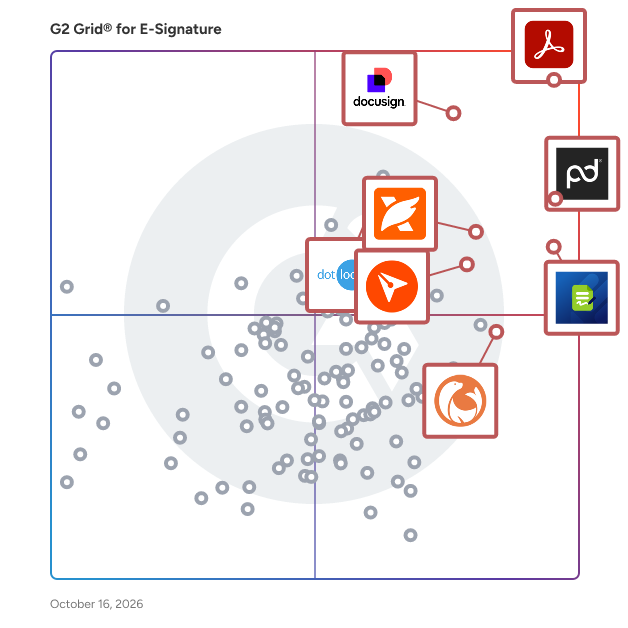
## G2 Grid® for E-Signature Software
 ![G2 Grid® for E-Signature Software plotting products by satisfaction and market presence](https://www.g2.com/categories/e-signature/grids.png?focus%5B%5D=1531&focus%5B%5D=4036&focus%5B%5D=1214785&focus%5B%5D=158589&focus%5B%5D=10856&focus%5B%5D=1326160&focus%5B%5D=2829&focus%5B%5D=27119)

Highlighted products: Adobe Acrobat, PandaDoc, Jotform Sign, BoldSign, Foxit PDF Editor, DocuSeal, dotloop, and Xodo Sign.

Underlying data: [Grid® JSON](https://www.g2.com/categories/e-signature/grids.json?focus%5B%5D=adobe-acrobat&focus%5B%5D=pandadoc&focus%5B%5D=jotform-sign&focus%5B%5D=boldsign&focus%5B%5D=foxit-pdf-editor&focus%5B%5D=docuseal&focus%5B%5D=dotloop&focus%5B%5D=xodo-sign&segment=small-business)

**Sponsored**

### PandaDoc

PandaDoc is an all-in-one document management platform trusted by 68,000+ sales, legal, and operations teams to create, send, e-sign, and manage documents faster and with less manual work. Teams using PandaDoc close deals 30% faster and cut document turnaround time by up to 50%. Customers like Autodesk, Rakuten, and Sysco use PandaDoc to streamline their entire document process, from proposal to signed contract, and everything in between. PandaDoc helps your team: - Build and send professional proposals, contracts, and agreements using customizable templates and a drag-and-drop editor - Collect legally binding e-signatures from any device, anywhere, with no printing, scanning, or delays - Collaborate in real time with internal stakeholders and external signers simultaneously - Automate repetitive document tasks so reps and ops teams spend less time on admin and more time closing - Track document performance with analytics that show how recipients engage with every page PandaDoc integrates natively with the tools your team already uses, including Salesforce, HubSpot, Pipedrive, Stripe, and 30+ other CRM and payment platforms — keeping document processes inside your existing stack without adding friction or extra logins. Whether you're in sales, legal, HR, or finance, PandaDoc is especially popular with growing businesses that need enterprise-grade document processes without the added complexity or price tag. From first draft to final approval, PandaDoc centralizes the full document lifecycle with the compliance, security, and audit trail your team needs to operate with confidence. PandaDoc also supports notarization, payment collection, and document analytics in a single platform, reducing the need to manage multiple tools across your document process.

[Visit website](https://www.g2.com/external_clickthroughs/record?secure%5Bad_program%5D=ppc&secure%5Bad_slot%5D=category_product_list_llm&secure%5Bcategory_id%5D=152&secure%5Bchosen_at%5D=2026-09-01T00%3A46%3A21Z&secure%5Bdisplayable_resource_id%5D=152&secure%5Bdisplayable_resource_type%5D=Category&secure%5Bmedium%5D=sponsored&secure%5Bplacement_reason%5D=page_category&secure%5Bplacement_resource_ids%5D%5B%5D=152&secure%5Bprioritized%5D=false&secure%5Bproduct_id%5D=4036&secure%5Bresource_id%5D=152&secure%5Bresource_type%5D=Category&secure%5Bsource_type%5D=category_page&secure%5Bsource_url%5D=https%3A%2F%2Fwww.g2.com%2Fcategories%2Fe-signature%2Fsmall-business&secure%5Btoken%5D=d6d39c7db964a6b79dd6fa63a5becdb593dc71ddcab8a82cf320dbafe17fb3ec&secure%5Burl%5D=https%3A%2F%2Fwww.pandadoc.com%2Flp%2Felectronic-signature-software-demo%2F%3Futm_source%3Dg2%26utm_medium%3Dreview_sites%26utm_campaign%3Dg2-clicks-esignature&secure%5Burl_type%5D=custom_url)

### [Adobe Acrobat](https://www.g2.com/products/adobe-acrobat/reviews)

Acrobat: Trusted for documents. Now built for how work really happens. For more than 30 years, Acrobat has been the trusted name in document workflow — helping businesses create, sign, and share with confidence. As one of the leading enterprise document platforms that scales for global teams, Acrobat has evolved beyond the PDF. Now with Acrobat Studio, it has been reimagined for how modern teams work: smarter, more collaborative, and powered by AI. Acrobat Studio builds on everything professionals know from Acrobat Pro — powerful PDF editing, signing, and reviewing — and expands it into a connected workspace where teams can create, collaborate, and communicate in entirely new ways. While Acrobat Pro focuses on the PDF itself, Acrobat Studio connects the full document journey, from insight to action. With PDF Spaces, teams can bring related documents together, chat with AI Assistants that summarize content or surface key takeaways, and keep everyone aligned without endless versions or email threads. Express Premium tools make it easy to remix or reuse that same content into branded presentations, visuals, or reports — helping teams communicate ideas faster and more confidently. Security remains a constant. Acrobat follows Adobe's Secure Product Lifecycle to safeguard data at every stage, with encryption, access controls, and enterprise-grade compliance. For organizations evaluating document automation tools suitable for multi-region, multi-team deployments, Acrobat Studio delivers the scale, security, and integrations to support it. From small teams to large enterprises, it turns everyday PDFs into powerful, intelligent workspaces — helping people move ideas forward and communicate with greater clarity and impact.

**Average Rating:** 4.5/5.0

**Total Reviews:** 4,678

#### How Do G2 Users Rate Adobe Acrobat?

- **Has the product been a good partner in doing business?:** 8.9/10 (Category avg: 9.2/10)
- **Performance and Reliability:** 8.9/10 (Category avg: 9.0/10)
- **Enterprise Scalability:** 8.7/10 (Category avg: 8.9/10)
- **Signature Document Creation:** 9.0/10 (Category avg: 9.1/10)

#### Who Is the Company Behind Adobe Acrobat?

- **Seller:** [Adobe](https://www.g2.com/sellers/adobe)
- **Company Website:** adobe.com
- **Year Founded:** 1982
- **HQ Location:** San Jose, CA
- **Twitter:** @Adobe  
956,842 Twitter followers
- **LinkedIn® Page:** [www.linkedin.com](https://www.g2.com/external_clickthroughs/record?secure%5Bsource_type%5D=product_profile&secure%5Btoken%5D=4bd838466d461c6fe81e09c861e82adaaf56d5a567f856b855f9808677f90560&secure%5Burl%5D=https%3A%2F%2Fwww.linkedin.com%2Fcompany%2F1480%2F&secure%5Burl_type%5D=linkedin_company_website)  
42,087 employees on LinkedIn®

#### Who Uses This Product?

- **Who Uses This:** Graphic Designer, Software Engineer
- **Top Industries:** Information Technology and Services, Computer Software
- **Company Size:** 42% Small, 31% Medium

#### What Do G2 Reviewers Say About Adobe Acrobat?

_AI-generated summary from verified user reviews_

##### Pros

- Users appreciate the **ease of use** of Adobe Acrobat, simplifying PDF management and enhancing productivity seamlessly.
- Users appreciate the **easy editing** features of Adobe Acrobat, which streamline PDF handling and enhance productivity.
- Users value the **versatile PDF editing capabilities** of Adobe Acrobat, making document management seamless and efficient.
- Users appreciate the **editing versatility** of Adobe Acrobat, allowing seamless document management and security across devices.
- Users value the **centralized management of PDFs** in Adobe Acrobat, appreciating its all-in-one platform for various tasks.

##### Cons

- Users feel that Adobe Acrobat is **expensive** , particularly due to limited free features and a restrictive subscription model.
- Users experience **slow performance** with Adobe Acrobat, noting lag and loading issues despite having high-end systems.
- Users often face **PDF issues** with Acrobat, including difficulty compressing, slow performance, and challenging editing experiences.
- Users find Adobe Acrobat **not user friendly** , especially when trying to navigate its complex features and tools.
- Users find the **learning curve steep** , with advanced tools often overwhelming and hidden, causing initial difficulties in usage.

#### What Are Recent G2 Reviews of Adobe Acrobat?

**["Convenient All-in-One PDF Management with Adobe Acrobat"](https://www.g2.com/survey_responses/adobe-acrobat-review-13338182)**

**Rating:** 5.0/5.0 stars

_— Kaushik G._

[Read full review](https://www.g2.com/survey_responses/adobe-acrobat-review-13338182)

**["Time-Saving E‑Sign and Reliable File Conversion PDF Viewer"](https://www.g2.com/survey_responses/adobe-acrobat-review-13325318)**

**Rating:** 4.5/5.0 stars

_— Ansab S._

[Read full review](https://www.g2.com/survey_responses/adobe-acrobat-review-13325318)

#### What Are G2 Users Discussing About Adobe Acrobat?

- [How is Adobe Acrobat redefining the way professionals work with PDFs for documentation and collaboration?](https://www.g2.com/discussions/how-is-adobe-acrobat-redefining-the-way-professionals-work-with-pdfs-for-documentation-and-collaboration) - 5 comments, 8 upvotes
- [How is Adobe Acrobat being used to enhance operational efficiency and user experience in its specific field?](https://www.g2.com/discussions/how-is-adobe-acrobat-being-used-to-enhance-operational-efficiency-and-user-experience-in-its-specific-field) - 3 comments, 1 upvote
- [What does Adobe Pro DC include?](https://www.g2.com/discussions/what-does-adobe-pro-dc-include) - 8 comments, 3 upvotes
- [What is the difference between Adobe Acrobat DC and Adobe Acrobat Reader DC?](https://www.g2.com/discussions/what-is-the-difference-between-adobe-acrobat-dc-and-adobe-acrobat-reader-dc) - 4 comments, 4 upvotes
- [What can Adobe Acrobat DC do?](https://www.g2.com/discussions/what-can-adobe-acrobat-dc-do) - 4 comments, 3 upvotes

### [PandaDoc](https://www.g2.com/de/products/pandadoc/reviews)

PandaDoc ist eine All-in-One-Dokumentenmanagement-Plattform, der über 68.000 Vertriebs-, Rechts- und Operationsteams vertrauen, um Dokumente schneller und mit weniger manueller Arbeit zu erstellen, zu versenden, elektronisch zu unterschreiben und zu verwalten. Teams, die PandaDoc nutzen, schließen Geschäfte 30 % schneller ab und reduzieren die Dokumentenbearbeitungszeit um bis zu 50 %. Kunden wie Autodesk, Rakuten und Sysco nutzen PandaDoc, um ihren gesamten Dokumentenprozess zu optimieren, von Vorschlägen bis hin zu unterzeichneten Verträgen und allem dazwischen. PandaDoc hilft Ihrem Team: - Erstellen und versenden Sie professionelle Vorschläge, Verträge und Vereinbarungen mit anpassbaren Vorlagen und einem Drag-and-Drop-Editor - Sammeln Sie rechtsverbindliche elektronische Unterschriften von jedem Gerät, überall, ohne Drucken, Scannen oder Verzögerungen - Arbeiten Sie in Echtzeit mit internen Stakeholdern und externen Unterzeichnern gleichzeitig zusammen - Automatisieren Sie sich wiederholende Dokumentenaufgaben, damit Vertriebs- und Operationsteams weniger Zeit mit Verwaltung und mehr Zeit mit dem Abschluss von Geschäften verbringen - Verfolgen Sie die Dokumentenleistung mit Analysen, die zeigen, wie Empfänger mit jeder Seite interagieren PandaDoc integriert sich nativ mit den Tools, die Ihr Team bereits verwendet, einschließlich Salesforce, HubSpot, Pipedrive, Stripe und über 30 anderen CRM- und Zahlungsplattformen — und hält die Dokumentenprozesse innerhalb Ihres bestehenden Stacks, ohne Reibung oder zusätzliche Anmeldungen hinzuzufügen. Egal, ob Sie im Vertrieb, im Rechtswesen, im Personalwesen oder im Finanzwesen tätig sind, PandaDoc ist besonders beliebt bei wachsenden Unternehmen, die Unternehmensdokumentenprozesse ohne zusätzliche Komplexität oder Preisschild benötigen. Von der ersten Entwurf bis zur endgültigen Genehmigung zentralisiert PandaDoc den gesamten Dokumentenlebenszyklus mit der Compliance, Sicherheit und dem Prüfpfad, den Ihr Team benötigt, um mit Vertrauen zu arbeiten. PandaDoc unterstützt auch Notarisierung, Zahlungserfassung und Dokumentenanalyse in einer einzigen Plattform, wodurch die Notwendigkeit entfällt, mehrere Tools in Ihrem Dokumentenprozess zu verwalten.

**Average Rating:** 4.7/5.0

**Total Reviews:** 3,563

#### How Do G2 Users Rate PandaDoc?

- **War the product ein guter Geschäftspartner?:** 9.3/10 (Category avg: 9.2/10)
- **Leistung und Zuverlässigkeit:** 9.2/10 (Category avg: 9.0/10)
- **Skalierbarkeit für Unternehmen:** 9.0/10 (Category avg: 8.9/10)
- **Erstellung von Signaturdokumenten:** 9.3/10 (Category avg: 9.1/10)

#### Who Is the Company Behind PandaDoc?

- **Verkäufer:** [PandaDoc](https://www.g2.com/de/sellers/pandadoc)
- **Unternehmenswebsite:** www.pandadoc.com
- **Gründungsjahr:** 2011
- **Hauptsitz:** San Francisco, CA
- **Twitter:** @pandadoc  
18,428 Twitter-Follower
- **LinkedIn®-Seite:** [www.linkedin.com](https://www.g2.com/de/external_clickthroughs/record?secure%5Bsource_type%5D=product_profile&secure%5Btoken%5D=40ca5f565283ec365ee9960a9ae5dd31d786fbaa6c410fe3d86b23a96392cfce&secure%5Burl%5D=https%3A%2F%2Fwww.linkedin.com%2Fcompany%2F2211704%2F&secure%5Burl_type%5D=linkedin_company_website)  
883 Mitarbeiter\*innen auf LinkedIn®

#### Who Uses This Product?

- **Who Uses This:** CEO, Eigentümer
- **Top Industries:** Computersoftware, Marketing und Werbung
- **Company Size:** 68% Small, 26% Medium

#### What Do G2 Reviewers Say About PandaDoc?

_AI-generated summary from verified user reviews_

##### Pros

- Benutzer loben die **Benutzerfreundlichkeit** von PandaDoc und heben die Navigation und den nahtlosen Signaturprozess hervor.
- Benutzer schätzen das **intuitive Dokumentenmanagement** von PandaDoc, das die Effizienz des Workflows mit sicheren und nahtlosen Genehmigungen verbessert.
- Benutzer schätzen die **intuitiven Bearbeitungstools** von PandaDoc, die die Effizienz des Workflows verbessern und das Dokumentenmanagement vereinfachen.
- Benutzer finden PandaDoc **äußerst benutzerfreundlich** , was die Effizienz bei der Verwaltung von Dokumenten und dem Einholen von Unterschriften erhöht.
- Benutzer lieben die **Einfachheit von E-Signaturen** in PandaDoc, was das Unterzeichnen von Dokumenten für beide Parteien unkompliziert macht.

##### Cons

- Benutzer finden die **fehlenden Funktionen** wie die Kontrolle des Dokumentablaufs und die Einschränkungen beim Zusammenführen von Zellen in PandaDoc frustrierend.
- Benutzer finden PandaDoc **teuer** , insbesondere in Bezug auf die Kosten für Online-Formularübermittlungen, was seine Praktikabilität für kleine Teams einschränkt.
- Benutzer finden die **Signaturprobleme** herausfordernd und heben Schwierigkeiten mit persönlichen Signaturen und anderen Formatierungsbeschränkungen hervor.
- Benutzer haben Schwierigkeiten mit **schwieriger Bearbeitung** und stehen vor Problemen wie dem Überspringen von Abschnitten und Einschränkungen bei Echtzeitänderungen während der Zusammenarbeit.
- Benutzer finden **Bearbeitungsschwierigkeiten** in PandaDoc, mit Herausforderungen bei der Tabellenformatierung und Anpassungen in Live-Dokumenten.

#### What Are Recent G2 Reviews of PandaDoc?

**["Makes proposals and contracts so EASY"](https://www.g2.com/de/survey_responses/pandadoc-review-13353633)**

**Rating:** 4.5/5.0 stars

_— Aneela S._

[Read full review](https://www.g2.com/de/survey_responses/pandadoc-review-13353633)

**["Flexibility and Features Make PandaDoc a Winner"](https://www.g2.com/de/survey_responses/pandadoc-review-12933766)**

**Rating:** 5.0/5.0 stars

_— Ibrahim R._

[Read full review](https://www.g2.com/de/survey_responses/pandadoc-review-12933766)

#### What Are G2 Users Discussing About PandaDoc?

- [Welche innovativen Methoden werden bei PandaDoc eingesetzt, um das Dokumentenmanagement und die Workflow-Automatisierung zu optimieren?](https://www.g2.com/de/discussions/what-are-the-innovative-ways-pandadoc-is-being-used-to-streamline-document-management-and-workflow-automation) - 2 comments
- [Wofür wird PandaDoc verwendet?](https://www.g2.com/de/discussions/what-is-pandadoc-used-for) - 4 comments
- [Was ist PandaDoc com?](https://www.g2.com/de/discussions/what-is-pandadoc-com) - 3 comments
- [Wie viel kostet PandaDoc?](https://www.g2.com/de/discussions/how-much-does-pandadoc-cost) - 2 comments
- [Ist PandaDoc wirklich kostenlos?](https://www.g2.com/de/discussions/is-pandadoc-really-free) - 3 comments

### [Jotform Sign](https://www.g2.com/products/jotform-sign/reviews)

Jotform Sign is a powerful e-signature platform that combines digital signatures with built-in automation to streamline document workflows. Easily create, share, and collect legally binding e-signatures on any device — without writing a single line of code. Upload an existing PDF, choose from 800+ professionally designed templates, or build a custom document from scratch using Jotform’s intuitive drag-and-drop document builder. Designed for maximum flexibility, Jotform Sign is ideal for waivers, consent forms, lease agreements, sales contracts, onboarding documents, and any workflow that requires secure signatures. Customize every part of your document to match your brand by uploading your logo, selecting fonts and colors, and adjusting layout elements. You can also add multiple signers, define a step-by-step automated signing order, set access permissions, and personalize your email notifications. These automation tools help reduce manual tasks, prevent bottlenecks, and accelerate approval cycles. Jotform Sign works seamlessly across devices, so recipients can review and sign documents from their phone, tablet, or laptop with a smooth, user-friendly experience. Each document includes a detailed audit trail, ensuring compliance, transparency, and trustworthy record-keeping. Whether you’re handling waivers, agreements, contracts, consent forms, or internal approvals, Jotform Sign automates repetitive tasks and eliminates the slow, outdated steps of paper-based processes. All signed documents are securely stored and can be easily exported, organized, shared, or integrated with your existing workflows. By combining digital signatures with automation, Jotform Sign helps businesses reduce turnaround times, improve accuracy, and enhance the signing experience for clients, employees, and partners. Say goodbye to scanning, printing, and manual follow-ups — and manage your entire signature workflow online with a fast, modern, and reliable e-signature platform.

**Average Rating:** 4.7/5.0

**Total Reviews:** 1,705

#### How Do G2 Users Rate Jotform Sign?

- **Has the product been a good partner in doing business?:** 9.2/10 (Category avg: 9.2/10)
- **Performance and Reliability:** 9.1/10 (Category avg: 9.0/10)
- **Enterprise Scalability:** 8.7/10 (Category avg: 8.9/10)
- **Signature Document Creation:** 9.0/10 (Category avg: 9.1/10)

#### Who Is the Company Behind Jotform Sign?

- **Seller:** [Jotform](https://www.g2.com/sellers/jotform)
- **Company Website:** www.jotform.com
- **Year Founded:** 2006
- **HQ Location:** San Francisco, California
- **Twitter:** @Jotform  
39,289 Twitter followers
- **LinkedIn® Page:** [www.linkedin.com](https://www.g2.com/external_clickthroughs/record?secure%5Bsource_type%5D=product_profile&secure%5Btoken%5D=8baa6a5c796d62ca5df3355392c638c519f99283c496ed24278490484f9fcca1&secure%5Burl%5D=https%3A%2F%2Fwww.linkedin.com%2Fcompany%2F3541463%2F&secure%5Burl_type%5D=linkedin_company_website)  
901 employees on LinkedIn®

#### Who Uses This Product?

- **Who Uses This:** Owner, CEO
- **Top Industries:** Non-Profit Organization Management, Health, Wellness and Fitness
- **Company Size:** 73% Small, 16% Medium

#### What Do G2 Reviewers Say About Jotform Sign?

_AI-generated summary from verified user reviews_

##### Pros

- Users love the **frictionless ease of use** with Jotform Sign, enhancing efficiency and speeding up the signing process.
- Users find the **easy setup** of Jotform Sign allows for a seamless and efficient document management experience.
- Users find Jotform Sign to be **easy and intuitive** , simplifying document management with a seamless user experience.
- Users appreciate the **frictionless document-signing process** of Jotform Sign, enhancing speed and efficiency in workflow management.
- Users love the **easy creation** of Jotform Sign, enabling quick form setup and streamlined performance reviews with minimal effort.

##### Cons

- Users express concerns over **cost and submission limits** , particularly for sporadic usage of signature services.
- Users find Jotform Sign to be **expensive** , especially when needing advanced features that require a paid upgrade.
- Users find the **limited customization options** in Jotform Sign a drawback that affects their overall experience.
- Users experience **form issues** such as delays and limited options, making access and management less convenient.
- Users find Jotform Sign lacks **flexibility and essential features** , limiting their order form customization and scalability.

#### What Are Recent G2 Reviews of Jotform Sign?

**["Easy Form Creation and Smooth SharePoint Integration with Helpful Support"](https://www.g2.com/survey_responses/jotform-sign-review-13370673)**

**Rating:** 5.0/5.0 stars

_— Deborah L._

[Read full review](https://www.g2.com/survey_responses/jotform-sign-review-13370673)

**["Easy Forms, UI, Great Support make up for Terrible AI"](https://www.g2.com/survey_responses/jotform-sign-review-13387176)**

**Rating:** 4.5/5.0 stars

_— J.D. B._

[Read full review](https://www.g2.com/survey_responses/jotform-sign-review-13387176)

### [BoldSign](https://www.g2.com/products/boldsign/reviews)

BoldSign® by Syncfusion® is an easy-to-use and secure electronic signature solution. With BoldSign you can quickly sign documents or send them out for signature, complete contracts, fill out forms, approve invoices, confirm service appointments, onboard new employees, and more. Its easy set-up, user-friendly interface, and intuitive auto-reminder settings smooth the way for the quick turnarounds you're looking for. BoldSign is a top alternative to DocuSign, offering flexible month-to-month plans and budget-friendly pricing options tailored to your needs. Key features: - Use a solution that meets U.S. ESIGN and EU eIDAS eSignature standards, is SOC 2® Type 2 certified, and fully compliant with HIPAA and GDPR. - No hidden document limits, feature restrictions, or surprise overage fees. - Intuitive, easy-to-use web interface. - Comprehensive, highly responsive API available, to easily embed the entire eSignature process within your apps. - Create reusable templates to streamline recurring document workflows. - Request signatures via both email and SMS. - Add your company’s branding to eSignature requests. - Effortlessly send documents to multiple recipients using bulk sending and bulk links. - Instantly generate signing links for easy sharing and faster completion. - Ensure signer authenticity with identity verification options. - Embed sending and signing directly into your applications. - Get real-time document status updates through webhooks. - Enjoy dedicated customer care, even for free-plan users in email, chat, and the ticketing system. - Securely store and retrieve documents with automatic cloud backups. Syncfusion, the company behind BoldSign, has been helping developers worldwide to build powerful line-of-business software for over 20 years. Syncfusion serves a wide spectrum of customers, empowering individual developers and Fortune 500 companies alike to build high-impact line-of-business software.

**Average Rating:** 4.7/5.0

**Total Reviews:** 385

#### How Do G2 Users Rate BoldSign?

- **Has the product been a good partner in doing business?:** 9.4/10 (Category avg: 9.2/10)
- **Performance and Reliability:** 9.2/10 (Category avg: 9.0/10)
- **Enterprise Scalability:** 8.8/10 (Category avg: 8.9/10)
- **Signature Document Creation:** 9.4/10 (Category avg: 9.1/10)

#### Who Is the Company Behind BoldSign?

- **Seller:** [Syncfusion](https://www.g2.com/sellers/syncfusion)
- **Company Website:** www.syncfusion.com
- **Year Founded:** 2001
- **HQ Location:** Morrisville, North Carolina
- **Twitter:** @Syncfusion  
11,907 Twitter followers
- **LinkedIn® Page:** [www.linkedin.com](https://www.g2.com/external_clickthroughs/record?secure%5Bsource_type%5D=product_profile&secure%5Btoken%5D=819bbd3d7046da28d101a1e5cf5794e766a9f74c4edf4d097116f83e77cc93b3&secure%5Burl%5D=https%3A%2F%2Fwww.linkedin.com%2Fcompany%2F123064%2F&secure%5Burl_type%5D=linkedin_company_website)  
2,709 employees on LinkedIn®

#### Who Uses This Product?

- **Who Uses This:** CEO, Owner
- **Top Industries:** Computer Software, Accounting
- **Company Size:** 81% Small, 17% Medium

#### What Do G2 Reviewers Say About BoldSign?

_AI-generated summary from verified user reviews_

##### Pros

- Users appreciate the **intuitive and user-friendly experience** of BoldSign, making document management effortless and enjoyable.
- Users highlight the **affordability** of BoldSign, making it a preferred choice for businesses seeking cost-effective solutions.
- Users commend the **excellent customer support** of BoldSign, highlighting quick responses and helpful follow-ups on inquiries.
- Users find BoldSign to be **very intuitive** , appreciating its straightforward UI and easy navigation for signing documents.
- Users value the **time-saving features** of BoldSign, enabling quick e-signing and efficient document management.

##### Cons

- Users find the **local signing feature unintuitive** and face occasional site downtime affecting document signing.
- Users find BoldSign to be **expensive** , often feeling misled by advertised features and dissatisfied with customer support.
- Users face challenges with **email issues** , such as excessive notifications and limited recipient visibility in documents.
- Users experience a **steep learning curve** with BoldSign, but support staff are available to assist.
- Users express frustration with **poor customer support** , highlighting issues like misinformation and slow, unhelpful responses.

#### What Are Recent G2 Reviews of BoldSign?

**["Intuitive, Secure E-Signing with Pricing That Fits Everyone"](https://www.g2.com/survey_responses/boldsign-review-13262639)**

**Rating:** 5.0/5.0 stars

_— Gregory B._

[Read full review](https://www.g2.com/survey_responses/boldsign-review-13262639)

**["Boldsign: Easy Templates, Bulk Send, and Fast Support That Saves Us Time"](https://www.g2.com/survey_responses/boldsign-review-13149378)**

**Rating:** 5.0/5.0 stars

_— Darren F._

[Read full review](https://www.g2.com/survey_responses/boldsign-review-13149378)

#### What Are G2 Users Discussing About BoldSign?

- [What is BoldSign used for?](https://www.g2.com/discussions/what-is-boldsign-used-for) - 1 comment

### [Foxit PDF Editor](https://www.g2.com/de/products/foxit-pdf-editor/reviews)

Gegründet im Jahr 2001, ist Foxit ein führender Anbieter von innovativen PDF- und eSignature-Produkten und -Dienstleistungen, die Wissensarbeitern helfen, die Produktivität zu steigern und mehr mit Dokumenten zu erreichen. Foxit kombiniert benutzerfreundliche Desktop-Software, mobile Apps und Cloud-Dienste in einer leistungsstarken Lösung: Der Foxit PDF Editor. Diese intelligente Dokumentenlösung ermöglicht es Benutzern, Dokumente zu erstellen, zu bearbeiten, auszufüllen und zu unterschreiben – überall und auf jedem Gerät – durch ihre integrierten PDF-Editor- und eSign-Angebote. Die meisten Bearbeitungstools konzentrieren sich nur auf das Erstellen und Ändern von Dokumenten und überlassen die Speicherung, Organisation und Kontrolle anderen Systemen. Das Foxit Document Management System (DMS) ist im Foxit PDF Editor enthalten, sodass jedes Dokument sicher gespeichert, organisiert, verwaltet und verbunden wird, sobald es bearbeitet wird. Als erster Anbieter auf dem Markt mit KI-gestützten PDF-Bearbeitungslösungen steigert Foxit die Produktivität mit intelligenter Dokumentenbearbeitung und Workflow-Automatisierung. Als Gewinner zahlreicher Auszeichnungen hat Foxit über 700 Millionen Nutzer und hat an über 528.000 Kunden verkauft, die von kleinen und mittleren Unternehmen bis hin zu globalen Konzernen weltweit reichen. Foxit-Produkte sind ISO 32000-1/PDF 1.7 standardkonform und daher mit Ihren bestehenden PDF-Dokumenten und Formularen kompatibel.

**Average Rating:** 4.6/5.0

**Total Reviews:** 3,502

#### G2 Deal: Foxit PDF Editor - Offer for G2 Users

Cost-effective, easy-to-use, and integrated PDF and eSign solution. Perfect for knowledge workers who work independently. Sign up now to get 20% off your first year when you purchase 10-30 licenses.

**Price:** ~~Starting at $1399.90/year~~ → 10-30 Licenses: starting at $1119.92/year

[View this exclusive G2 deal](https://www.g2.com/de/deals/offers/ff330652-41ae-469d-bf5a-0815c59291ed?source=categories)

#### How Do G2 Users Rate Foxit PDF Editor?

- **War the product ein guter Geschäftspartner?:** 9.0/10 (Category avg: 9.2/10)
- **Leistung und Zuverlässigkeit:** 8.9/10 (Category avg: 9.0/10)
- **Skalierbarkeit für Unternehmen:** 8.4/10 (Category avg: 8.9/10)
- **Erstellung von Signaturdokumenten:** 8.8/10 (Category avg: 9.1/10)

#### Who Is the Company Behind Foxit PDF Editor?

- **Verkäufer:** [Foxit](https://www.g2.com/de/sellers/foxit)
- **Unternehmenswebsite:** www.foxit.com
- **Gründungsjahr:** 2001
- **Hauptsitz:** Fremont, CA
- **Twitter:** @foxitsoftware  
6,226 Twitter-Follower
- **LinkedIn®-Seite:** [www.linkedin.com](https://www.g2.com/de/external_clickthroughs/record?secure%5Bsource_type%5D=product_profile&secure%5Btoken%5D=610d6941f2244e95329cdaa84eafed4ffb9648ec08f60f59ad84b7a5e1c18fe0&secure%5Burl%5D=https%3A%2F%2Fwww.linkedin.com%2Fcompany%2Ffoxit-corporation%2F&secure%5Burl_type%5D=linkedin_company_website)  
569 Mitarbeiter\*innen auf LinkedIn®

#### Who Uses This Product?

- **Who Uses This:** Eigentümer, Präsident
- **Top Industries:** Bauwesen, Buchhaltung
- **Company Size:** 63% Small, 24% Medium

#### What Do G2 Reviewers Say About Foxit PDF Editor?

_AI-generated summary from verified user reviews_

##### Pros

- Benutzer schätzen die **Benutzerfreundlichkeit** des Foxit PDF Editors und heben seine intuitive Benutzeroberfläche und den schnellen Einrichtungsprozess hervor.
- Benutzer schätzen die **intuitive und benutzerfreundliche Oberfläche** des Foxit PDF Editors, die ihre Bearbeitungserfahrung erheblich verbessert.
- Benutzer lieben die **einfachen Bearbeitungsfunktionen** des Foxit PDF Editors, die ihren Arbeitsablauf mit intuitiven und effizienten Werkzeugen verbessern.
- Benutzer loben den Foxit PDF Editor für seine **schnelle, leichte und benutzerfreundliche Oberfläche** , die die Produktivität bei der PDF-Verwaltung steigert.
- Benutzer schätzen die **benutzerfreundliche Oberfläche** des Foxit PDF Editors, die ihr Bearbeitungserlebnis mit leistungsstarken Werkzeugen und Benutzerfreundlichkeit verbessert.

##### Cons

- Benutzer finden die **Lernkurve steil** , insbesondere für Neulinge, da fortgeschrittene Funktionen schwer zu entdecken sind.
- Benutzer finden die **Schwierigkeit, erweiterte Funktionen zu entdecken** , und die anfängliche Einrichtung frustrierend, was ihre Gesamterfahrung beeinträchtigt.
- Benutzer empfinden die **Preisanliegen** des Foxit PDF Editors als erheblichen Nachteil, insbesondere für Anfänger.
- Benutzer finden **fehlende Funktionen** im Foxit PDF Editor, insbesondere in der kostenlosen Version und der Mac-Kompatibilität.
- Benutzer finden, dass die **begrenzten Funktionen** des Foxit PDF Editors seine Nutzbarkeit ohne ein kostenpflichtiges Abonnement einschränken.

#### What Are Recent G2 Reviews of Foxit PDF Editor?

**["Essential for Efficient Engineering Document Management"](https://www.g2.com/de/survey_responses/foxit-pdf-editor-review-13386050)**

**Rating:** 4.5/5.0 stars

_— sulaimon s._

[Read full review](https://www.g2.com/de/survey_responses/foxit-pdf-editor-review-13386050)

**["Foxit PDF Editor Streamlines Engineering Plan Reviews with Powerful Markup Tools"](https://www.g2.com/de/survey_responses/foxit-pdf-editor-review-13388663)**

**Rating:** 5.0/5.0 stars

_— engineer S._

[Read full review](https://www.g2.com/de/survey_responses/foxit-pdf-editor-review-13388663)

#### What Are G2 Users Discussing About Foxit PDF Editor?

- [Wie hebt sich die Foxit PDF Editor Suite in Bezug auf Funktionen und Benutzerfreundlichkeit für das professionelle PDF-Management ab?](https://www.g2.com/de/discussions/how-does-the-foxit-pdf-editor-suite-stand-out-in-terms-of-features-and-usability-for-professional-pdf-management) - 3 comments, 3 upvotes
- [Wofür wird der Foxit PDF Editor verwendet?](https://www.g2.com/de/discussions/what-is-foxit-pdf-editor-used-for) - 2 comments, 1 upvote
- [Ist Foxit Phantom PDF kostenlos?](https://www.g2.com/de/discussions/is-foxit-phantom-pdf-free) - 3 comments
- [How do I use Foxit PhantomPDF?](https://www.g2.com/de/discussions/how-do-i-use-foxit-phantompdf) - 1 comment
- [Was ist Foxit PhantomPDF Standard?](https://www.g2.com/de/discussions/what-is-foxit-phantompdf-standard) - 2 comments

### [dotloop](https://www.g2.com/products/dotloop/reviews)

On average, every month, over 150 real estate brokerages and teams switch to dotloop's transaction management software. Currently supporting more than 10,000 brokerages and teams across the U.S. and Canada, dotloop touches more than 50% of all U.S. real estate transactions and has earned a near-perfect 98% Retention Rate. Not to mention a top-rated mobile app - 4.8/5 stars with over 45,000 reviews.

**Average Rating:** 4.3/5.0

**Total Reviews:** 173

#### How Do G2 Users Rate dotloop?

- **Has the product been a good partner in doing business?:** 8.0/10 (Category avg: 9.2/10)
- **Performance and Reliability:** 8.9/10 (Category avg: 9.0/10)
- **Enterprise Scalability:** 9.0/10 (Category avg: 8.9/10)
- **Signature Document Creation:** 8.6/10 (Category avg: 9.1/10)

#### Who Is the Company Behind dotloop?

- **Seller:** [Zillow](https://www.g2.com/sellers/zillow)
- **Year Founded:** 2006
- **HQ Location:** Seattle, WA
- **Twitter:** @zillow  
346,354 Twitter followers
- **LinkedIn® Page:** [www.linkedin.com](https://www.g2.com/external_clickthroughs/record?secure%5Bsource_type%5D=product_profile&secure%5Btoken%5D=f47c13de11218ae0a5e9e7d52137fddc537e4d723d475bf226c9c59e4b83af7a&secure%5Burl%5D=https%3A%2F%2Fwww.linkedin.com%2Fcompany%2F13990%2F&secure%5Burl_type%5D=linkedin_company_website)  
10,254 employees on LinkedIn®
- **Ownership:** NASDAQ

#### Who Uses This Product?

- **Who Uses This:** Realtor, Real Estate Agent
- **Top Industries:** Real Estate
- **Company Size:** 46% Small, 32% Medium

#### What Do G2 Reviewers Say About dotloop?

_AI-generated summary from verified user reviews_

##### Pros

- Users find Dotloop's **ease of use** and intuitive interface simplifies real estate contract management and sharing.
- Users enjoy the **user-friendly interface and comprehensive features** of dotloop, making contract writing incredibly straightforward.
- Users appreciate the **responsive customer support** of dotloop, consistently resolving issues quickly and effectively.
- Users find the **easy navigation** of dotloop enhances their experience while managing real estate contracts effortlessly.
- Users value the **easy sharing** features of dotloop, facilitating quick and efficient signature collection.

##### Cons

- Users experience **app functionality issues** where typing may unexpectedly erase previous work, creating frustration and setbacks.
- Users often face **app glitches** that result in lost work, impacting their overall experience with dotloop.
- Users often face **client difficulties** when integrating other users, leading to frustration and a challenging experience.
- Users often face **integration issues** with dotloop, making it challenging to connect with other users effectively.
- Users experience **saving issues** , where inputs can be lost unexpectedly, leading to frustration and disruptions.

#### What Are Recent G2 Reviews of dotloop?

**["Streamlined Transactions and Fast E-Signatures All in One Place"](https://www.g2.com/survey_responses/dotloop-review-12639907)**

**Rating:** 4.5/5.0 stars

_— Cayman N._

[Read full review](https://www.g2.com/survey_responses/dotloop-review-12639907)

**["Dotloop Keeps Real Estate Transaction Documents Organized and Easy to Track"](https://www.g2.com/survey_responses/dotloop-review-13321433)**

**Rating:** 5.0/5.0 stars

_— Irvin B._

[Read full review](https://www.g2.com/survey_responses/dotloop-review-13321433)

#### What Are G2 Users Discussing About dotloop?

- [What is dotloop used for?](https://www.g2.com/discussions/what-is-dotloop-used-for)

### [DocuSeal](https://www.g2.com/products/docuseal/reviews)

DocuSeal is an open source platform that provides secure and efficient digital document signing and processing. Convert documents into fillable PDF forms. Fields can be easily added to the document using the user-friendly form builder. Two or more parties can review, fill, and sign the documents. Each of them will receive their own copy of filled and signed files. All documents are automatically signed with a digital industry-standard PDF eSignature. Signed files can be verified through the platform for authenticity. Review and sign digital documents online from any device. DocuSeal document forms are optimized for screens of all sizes. Invite your team members into the platform to create, share, and manage documents with ease and for free. DocuSeal is developer-friendly and provides an API and JavaScript widgets to seamlessly integrate the document signing and processing workflows into your web and mobile apps. Features: - PDF Form Builder: A powerful WYSIWYG builder allows to create complex fillable PDF forms. 10 field types are available, such as Checkbox, Image, Date, Multi-select, and Cells. - Multiple Submitters: Two or more parties can review, fill, and sign the documents. Each of them will receive their own copy of filled and signed files. - Automated Emails: Send and receive automated emails from the platform with an invitation to sign the documents or with a copy of signed documents. - Automatic eSignature: All documents are automatically signed with a digital industry-standard PDF eSignature. Signed files can be verified through the platform for authenticity. - Mobile Optimized: Review and sign digital documents online from any device. DocuSeal document forms are optimized for screens of all sizes. - Users Management: Invite your team members into the platform to create, share, and manage documents with ease. - Robust File Storage: Files can be stored locally on disk or on your private AWS S3, Google Cloud Storage, or Azure Storage. - Secure: Host it on your hardware under a VPN to ensure that important documents can be accesses only within your organization. - Easy to Start: Run on your own host using Docker container, or deploy on your favorite managed PaaS with a single click.

**Average Rating:** 4.9/5.0

**Total Reviews:** 258

#### How Do G2 Users Rate DocuSeal?

- **Has the product been a good partner in doing business?:** 9.8/10 (Category avg: 9.2/10)
- **Performance and Reliability:** 9.6/10 (Category avg: 9.0/10)
- **Enterprise Scalability:** 9.0/10 (Category avg: 8.9/10)
- **Signature Document Creation:** 9.6/10 (Category avg: 9.1/10)

#### Who Is the Company Behind DocuSeal?

- **Seller:** [DocuSeal](https://www.g2.com/sellers/docuseal)
- **Year Founded:** 2023
- **HQ Location:** Chicago
- **LinkedIn® Page:** [www.linkedin.com](https://www.g2.com/external_clickthroughs/record?secure%5Bsource_type%5D=product_profile&secure%5Btoken%5D=c00ee19acb11695a96cf57f156db235a8b2e37a4332c14fb7e20f3d5a166a087&secure%5Burl%5D=https%3A%2F%2Fwww.linkedin.com%2Fcompany%2Fdocuseal%2F&secure%5Burl_type%5D=linkedin_company_website)  
2 employees on LinkedIn®

#### Who Uses This Product?

- **Who Uses This:** CEO, Founder
- **Top Industries:** Computer Software, Real Estate
- **Company Size:** 92% Small, 7% Medium

#### What Do G2 Reviewers Say About DocuSeal?

_AI-generated summary from verified user reviews_

##### Pros

- Users love the **ease of use** of DocuSeal, finding it intuitive and essential for managing documents efficiently.
- Users appreciate the **intuitive design** of DocuSeal, enjoying its simplicity and seamless document workflow.
- Users value the **time-saving features** of DocuSeal, making document signing quick and effortless in any environment.
- Users love the **ease of use** of DocuSeal, making document management simple and efficient for everyone.
- Users appreciate the **user-friendly interface** of DocuSeal, making it easy for anyone to use and enjoy.

##### Cons

- Users find the **limited customization** in DocuSeal's templates challenging for their unique needs and branding.
- Users find **signature positioning challenging** , requiring multiple attempts to achieve perfect placement on documents.
- Users note the **limited features** of DocuSeal, especially compared to other established products in the market.
- Users feel the **interface usability** of DocuSeal needs improvement, particularly regarding design and user-friendliness.
- Users struggle with **email issues** , including lack of customization and problems with spam filters in DocuSeal.

#### What Are Recent G2 Reviews of DocuSeal?

**["Seamless Embedded Signing with DocuSeal—Easy API, Fair Pricing for Small Businesses"](https://www.g2.com/survey_responses/docuseal-review-13078218)**

**Rating:** 5.0/5.0 stars

_— Christian T._

[Read full review](https://www.g2.com/survey_responses/docuseal-review-13078218)

**["Easy, Accessible eSignatures - Better Than Paid Alternatives"](https://www.g2.com/survey_responses/docuseal-review-13376949)**

**Rating:** 5.0/5.0 stars

_— Chloe B._

[Read full review](https://www.g2.com/survey_responses/docuseal-review-13376949)

### [Xodo Sign](https://www.g2.com/de/products/xodo-sign/reviews)

Xodo Sign, früher bekannt als eversign, ist eine sichere und kostengünstige elektronische Signaturlösung, die sowohl kleine Unternehmen als auch Unternehmenskunden bei der Verwaltung von Verträgen, Vereinbarungen und Genehmigungen online unterstützt. Angetrieben von Apryse-Technologie bietet es leistungsstarke Funktionen wie rechtsverbindliche und konforme E-Signaturen, fortschrittliche PDF-Bearbeitung, Echtzeit-Audit-Trails, Team-Kollaborationstools, wiederverwendbare Vorlagen und nahtlose Integration mit beliebten Business-Apps. Probieren Sie Xodo Sign noch heute aus, um Geschäfte schneller abzuschließen, Betriebskosten zu senken und die Dokumentenbearbeitung und das E-Signing zu optimieren, alles innerhalb einer sicheren Plattform. Für Teams und Entwickler bietet Xodo Sign auch eine flexible eSignature-API, um digitales Signieren direkt in bestehende Systeme und Workflows einzubetten.

**Average Rating:** 4.8/5.0

**Total Reviews:** 2,739

#### How Do G2 Users Rate Xodo Sign?

- **War the product ein guter Geschäftspartner?:** 9.6/10 (Category avg: 9.2/10)
- **Leistung und Zuverlässigkeit:** 9.5/10 (Category avg: 9.0/10)
- **Skalierbarkeit für Unternehmen:** 9.4/10 (Category avg: 8.9/10)
- **Erstellung von Signaturdokumenten:** 9.3/10 (Category avg: 9.1/10)

#### Who Is the Company Behind Xodo Sign?

- **Verkäufer:** [Apryse](https://www.g2.com/de/sellers/apryse)
- **Unternehmenswebsite:** apryse.com
- **Gründungsjahr:** 1998
- **Hauptsitz:** Denver, CO
- **Twitter:** @aprysesolutions  
381 Twitter-Follower
- **LinkedIn®-Seite:** [www.linkedin.com](https://www.g2.com/de/external_clickthroughs/record?secure%5Bsource_type%5D=product_profile&secure%5Btoken%5D=27dacf265550e33c71354b716ff0f38fd1ded8ad7bcbec06cfde8961ba0c3b3f&secure%5Burl%5D=https%3A%2F%2Fwww.linkedin.com%2Fcompany%2Faprysesolutions%2F&secure%5Burl_type%5D=linkedin_company_website)  
552 Mitarbeiter\*innen auf LinkedIn®

#### Who Uses This Product?

- **Who Uses This:** Eigentümer, CEO
- **Top Industries:** Marketing und Werbung, Immobilien
- **Company Size:** 90% Small, 6% Medium

#### What Do G2 Reviewers Say About Xodo Sign?

_AI-generated summary from verified user reviews_

##### Pros

- Benutzer loben die **Benutzerfreundlichkeit** von Xodo Sign, die eine schnelle Dokumentenvorbereitung und eine großartige Benutzeroberfläche ermöglicht.
- Benutzer schätzen das **zeitsparende Setup** von Xodo Sign, das eine schnelle Vertragsverwaltung und effiziente Dokumentenverarbeitung ermöglicht.
- Benutzer schätzen die **benutzerfreundliche Oberfläche** von Xodo Sign, die das Dokumentenmanagement schnell und effizient macht.
- Benutzer schätzen die **benutzerfreundliche Oberfläche** von Xodo Sign, die die Dokumentenvorbereitung schnell und einfach macht.
- Benutzer finden Xodo Sign **extrem einfach zu bedienen** und schätzen seine intuitiven Funktionen zum Signieren und Versenden von Dokumenten.

##### Cons

- Benutzer finden die **Signaturanpassung eingeschränkt** in Xodo Sign, was zu einem weniger unkomplizierten Signaturprozess führt.
- Benutzer bemerken die **begrenzten Anpassungsoptionen** für Signaturen in Xodo Sign, was die allgemeine Benutzererfahrung beeinträchtigt.
- Benutzer finden das Tool **teuer** , insbesondere da in der kostenlosen Version weniger Dokumente verfügbar sind als ursprünglich versprochen.
- Benutzer finden die **anfängliche Benutzeroberfläche verwirrend** , was ihre Erfahrung mit Xodo Sign erschwert.
- Benutzer sind von den **begrenzten Funktionen** der kostenlosen Version enttäuscht und finden die Begrenzung auf nur drei Dokumente einschränkend.

#### What Are Recent G2 Reviews of Xodo Sign?

**["Zuverlässig und unkompliziert für die Verwaltung von Vereinbarungen"](https://www.g2.com/de/survey_responses/xodo-sign-review-12496997)**

**Rating:** 4.0/5.0 stars

_— Chris v._

[Read full review](https://www.g2.com/de/survey_responses/xodo-sign-review-12496997)

**["Xodo Sign macht das Sammeln von Unterschriften schnell und mühelos"](https://www.g2.com/de/survey_responses/xodo-sign-review-13156159)**

**Rating:** 4.0/5.0 stars

_— Muzammil M._

[Read full review](https://www.g2.com/de/survey_responses/xodo-sign-review-13156159)

#### What Are G2 Users Discussing About Xodo Sign?

- [Wie kommt Xodo Sign den wachsenden Anforderungen an die digitale Dokumentenunterzeichnung und -verwaltung nach?](https://www.g2.com/de/discussions/xodo-sign-how-is-xodo-sign-catering-to-the-growing-needs-of-digital-document-signing-and-management) - 1 comment, 1 upvote
- [Wie kommt Xodo Sign den wachsenden Anforderungen an die digitale Dokumentenunterzeichnung und -verwaltung nach?](https://www.g2.com/de/discussions/how-is-xodo-sign-catering-to-the-growing-needs-of-digital-document-signing-and-management)
- [Does Eversign have an app?](https://www.g2.com/de/discussions/does-eversign-have-an-app)
- [Ist Eversign seriös?](https://www.g2.com/de/discussions/is-eversign-legit) - 3 comments
- [How do you use Eversign?](https://www.g2.com/de/discussions/how-do-you-use-eversign) - 1 comment

### [SignWell](https://www.g2.com/products/signwell/reviews)

SignWell is a secure electronic signature and document workflow platform trusted by tens of thousands of businesses worldwide. We help teams sign documents online, automate approvals, and reduce paperwork with legally binding eSignatures, SOC 2 Type II compliance, and support for GDPR, HIPAA, and NOM-151 requirements. With an easy-to-use interface, a powerful eSignature API, and best-in-class customer support included on every plan, SignWell makes it simple to sign PDFs, manage agreements, and move business forward—without the enterprise price tag.

**Average Rating:** 4.8/5.0

**Total Reviews:** 426

#### How Do G2 Users Rate SignWell?

- **Has the product been a good partner in doing business?:** 9.6/10 (Category avg: 9.2/10)
- **Performance and Reliability:** 9.5/10 (Category avg: 9.0/10)
- **Enterprise Scalability:** 8.5/10 (Category avg: 8.9/10)
- **Signature Document Creation:** 9.4/10 (Category avg: 9.1/10)

#### Who Is the Company Behind SignWell?

- **Seller:** [SignWell](https://www.g2.com/sellers/signwell)
- **Year Founded:** 2010
- **HQ Location:** Portland, OR
- **Twitter:** @SignWellApp  
300 Twitter followers
- **LinkedIn® Page:** [www.linkedin.com](https://www.g2.com/external_clickthroughs/record?secure%5Bsource_type%5D=product_profile&secure%5Btoken%5D=54bfa251a30d9833dabd9f00a848553d308fb9b65776636698882e52083ea7b2&secure%5Burl%5D=https%3A%2F%2Fwww.linkedin.com%2Fcompany%2Fsignwellapp%2F&secure%5Burl_type%5D=linkedin_company_website)  
17 employees on LinkedIn®

#### Who Uses This Product?

- **Who Uses This:** CEO, Founder
- **Top Industries:** Real Estate, Marketing and Advertising
- **Company Size:** 88% Small, 4% Medium

#### What Do G2 Reviewers Say About SignWell?

_AI-generated summary from verified user reviews_

##### Pros

- Users enjoy the **ease of use** of SignWell, enabling fast and straightforward document signing and setups.
- Users value the **time-saving features** of SignWell, allowing quick contract signing and streamlined workflows with ease.
- Users find SignWell's **intuitive interface** easy to navigate, enabling a smooth and efficient signing process.
- Users find SignWell to have a **user-friendly interface** , making document management and e-signatures straightforward and efficient.
- Users value the **easy setup** of SignWell, allowing quick access to features and seamless integration with other tools.

##### Cons

- Users often face **signature issues** that hinder progress and limit functionality during the signing process.
- Users feel the **pricing is too high** , wishing for better value despite finding the features useful.
- Users encounter **email notification issues** that can lead to missed updates and complications in communication.
- Users find the **limited customization options** for signature fields somewhat restrictive in their experience with SignWell.
- Users find the **limited features** of SignWell frustrating, especially with free plan restrictions on document sending.

#### What Are Recent G2 Reviews of SignWell?

**["Efficient, User-Friendly E-Signing Platform"](https://www.g2.com/survey_responses/signwell-review-13364724)**

**Rating:** 5.0/5.0 stars

_— Thomas M._

[Read full review](https://www.g2.com/survey_responses/signwell-review-13364724)

**["Clean, Easy-to-Use E-Signatures for Small Businesses"](https://www.g2.com/survey_responses/signwell-review-13091295)**

**Rating:** 5.0/5.0 stars

_— Sean E._

[Read full review](https://www.g2.com/survey_responses/signwell-review-13091295)

#### What Are G2 Users Discussing About SignWell?

- [Is Docsketch Hipaa compliant?](https://www.g2.com/discussions/signwell-is-docsketch-hipaa-compliant)
- [Is Docsketch Hipaa compliant?](https://www.g2.com/discussions/is-docsketch-hipaa-compliant)
- [Is Docsketch safe?](https://www.g2.com/discussions/signwell-is-docsketch-safe)
- [Is Docsketch safe?](https://www.g2.com/discussions/is-docsketch-safe)
- [Is Docsketch legit?](https://www.g2.com/discussions/signwell-is-docsketch-legit)

### [pdfFiller](https://www.g2.com/products/pdffiller/reviews)

pdfFiller is a cloud-native document management platform that unifies editing, e-signing, storage, and collaboration. Purpose-built for small and mid-sized businesses, it eliminates the need for multiple subscriptions and constant app-switching, delivering enterprise-grade functionality without enterprise-grade complexity. pdfFiller is engineered for value-driven small businesses, enabling teams to work confidently from wherever they choose. Documents are securely stored in the cloud, giving teams reliable anytime-anywhere access with zero risk of data loss. Recognized internationally as a leading PDF solution across industries and sectors of various sizes, pdfFiller is trusted by organizations seeking to modernize their document workflows and scale operational efficiency. Across sectors, pdfFiller has become a go-to solution for a wide range of business-critical workflows. Real estate professionals rely on the platform for fast, secure contract signing, while healthcare providers and patients use its HIPAA-compliant e-signature capabilities to manage medical forms with confidence. Insurance professionals turn to pdfFiller for editable, fillable application forms, and HR teams — from lean startups to large enterprises — use it to streamline employee onboarding. Educators leverage the platform to quickly create worksheets and instructional materials, nonprofit organizations and researchers apply it for scalable online data collection. Finance professionals, bookkeepers, and accountants value its intuitive, low-friction approach to everyday document handling. Beyond its core editing and signing capabilities, pdfFiller offers a robust set of value-added tools designed to support evolving business needs, including document resizing and cropping, AI-powered summarization and translation, and AI-assisted document generation and template creation. Together, these capabilities position pdfFiller as more than a document tool — it's a platform built to keep pace with the demands of modern, fast-moving organizations. Integrating pdfFiller into daily operations delivers measurable business impact, strengthening cross-departmental collaboration, boosting organizational productivity, and elevating the overall customer experience. The results speak for themselves: businesses using pdfFiller report saving over 40 hours of employee work time per week, achieving a 70% reduction in document preparation errors, and realizing contract turnaround times up to 24 times faster than traditional methods, a clear testament to the platform's impact on operational excellence.

**Average Rating:** 4.6/5.0

**Total Reviews:** 877

#### How Do G2 Users Rate pdfFiller?

- **Has the product been a good partner in doing business?:** 9.5/10 (Category avg: 9.2/10)
- **Performance and Reliability:** 9.3/10 (Category avg: 9.0/10)
- **Enterprise Scalability:** 9.4/10 (Category avg: 8.9/10)
- **Signature Document Creation:** 9.3/10 (Category avg: 9.1/10)

#### Who Is the Company Behind pdfFiller?

- **Seller:** [airSlate](https://www.g2.com/sellers/airslate)
- **Company Website:** www.airslate.com
- **Year Founded:** 2006
- **HQ Location:** Brookline, Massachusetts
- **Twitter:** @airSlate  
1,234 Twitter followers
- **LinkedIn® Page:** [www.linkedin.com](https://www.g2.com/external_clickthroughs/record?secure%5Bsource_type%5D=product_profile&secure%5Btoken%5D=a387d416c91f548c7ca2da354b11b960ce5fed9453c45cce8a37df86af1daf78&secure%5Burl%5D=https%3A%2F%2Fwww.linkedin.com%2Fcompany%2Fairslate%2F&secure%5Burl_type%5D=linkedin_company_website)  
798 employees on LinkedIn®

#### Who Uses This Product?

- **Who Uses This:** Owner, President
- **Top Industries:** Real Estate, Insurance
- **Company Size:** 82% Small, 13% Medium

#### What Do G2 Reviewers Say About pdfFiller?

_AI-generated summary from verified user reviews_

##### Pros

- Users appreciate the **ease of use** of pdfFiller, enjoying its user-friendly interface and quick accessibility.
- Users value the **easy editing** capabilities of pdfFiller, enabling fast modifications and seamless document management from anywhere.
- Users value the **cloud-based access** of pdfFiller, enabling work flexibility and efficient document management from anywhere.
- Users value the **easy editing** of PDF files with pdfFiller, enhancing productivity and streamlining document management.
- Users value the **e-signing features** of pdfFiller, enhancing document approvals and boosting workplace efficiency.

##### Cons

- Users note the **missing features** in pdfFiller, including limitations with signatures and template customization.
- Users find the **high pricing** of pdfFiller to be a barrier, especially with limited free features available.
- Users find pdfFiller **not user friendly** , particularly for newcomers struggling with its overwhelming interface and complex features.
- Users find **feature limitations** frustrating, particularly with customization and slow loading for complex documents.
- Users face **PDF issues** like slow performance with large documents and limited copy-paste functions, causing frustration.

#### What Are Recent G2 Reviews of pdfFiller?

**["pdfFiller lets us update forms without rebuilding the whole workflow"](https://www.g2.com/survey_responses/pdffiller-review-13156175)**

**Rating:** 4.5/5.0 stars

_— Yurii L._

[Read full review](https://www.g2.com/survey_responses/pdffiller-review-13156175)

**["Easy PDF Editing and Templates That Keep Document Work Fast and Consistent"](https://www.g2.com/survey_responses/pdffiller-review-13119845)**

**Rating:** 5.0/5.0 stars

_— Muzammil M._

[Read full review](https://www.g2.com/survey_responses/pdffiller-review-13119845)

#### What Are G2 Users Discussing About pdfFiller?

- [What is pdfFiller by airSlate used for?](https://www.g2.com/discussions/what-is-pdffiller-by-airslate-used-for) - 1 comment
- [How do I use pdfFiller for free?](https://www.g2.com/discussions/how-do-i-use-pdffiller-for-free) - 2 comments
- [How much does pdfFiller cost?](https://www.g2.com/discussions/how-much-does-pdffiller-cost) - 2 comments
- [What does PDF Filler do?](https://www.g2.com/discussions/what-does-pdf-filler-do) - 1 comment
- [What is pdfFiller software?](https://www.g2.com/discussions/what-is-pdffiller-software) - 2 comments

### [Dropbox Sign (formerly HelloSign)](https://www.g2.com/products/dropbox-sign-formerly-hellosign/reviews)

Dropbox Sign (formerly HelloSign) helps teams send, sign, and manage agreements where their work already lives. Most teams introduce unnecessary friction the moment a document needs a signature—separate systems, extra handoffs, and chasing approvals across disconnected workflows. Dropbox Sign keeps the process connected, moving from draft to signed with fewer steps. Why teams choose Dropbox Sign - Recognized by G2 for Ease of Use and User Adoption - Unlimited signature requests on per-seat plans - Procurement approvals reduced from two days to 30 minutes - Document execution effort reduced by 70% One connected workflow Send documents for signature directly from Dropbox and the tools your team already uses, including Google Drive, OneDrive, Salesforce, HubSpot, and Microsoft Dynamics. Completed agreements automatically save back right where you work. Simple to start. Built to scale. Designed for fast adoption without disrupting existing workflows. Start sending documents in minutes—from sales contracts and offer letters to NDAs and vendor agreements. Predictable pricing for growing teams Unlimited signature requests on per-seat plans help teams avoid tracking usage limits or unexpected overages while scaling their signing workflows with confidence. Secure from the first send Sensitive agreements are protected with encryption in transit and at rest, detailed audit trails, signer verification options, and compliance certifications including SOC 2 Type II, ISO 27001, HIPAA, GDPR, and eIDAS. Need embedded eSignature? Dropbox Sign offers a flexible API enabling businesses to build secure signing experiences directly into their applications, websites, and workflows.

**Average Rating:** 4.7/5.0

**Total Reviews:** 2,222

#### How Do G2 Users Rate Dropbox Sign (formerly HelloSign)?

- **Has the product been a good partner in doing business?:** 9.4/10 (Category avg: 9.2/10)
- **Performance and Reliability:** 9.3/10 (Category avg: 9.0/10)
- **Enterprise Scalability:** 9.1/10 (Category avg: 8.9/10)
- **Signature Document Creation:** 9.1/10 (Category avg: 9.1/10)

#### Who Is the Company Behind Dropbox Sign (formerly HelloSign)?

- **Seller:** [Dropbox](https://www.g2.com/sellers/dropbox)
- **Company Website:** www.dropbox.com
- **Year Founded:** 2007
- **HQ Location:** San Francisco, California
- **Twitter:** @Dropbox  
3,279,477 Twitter followers
- **LinkedIn® Page:** [www.linkedin.com](https://www.g2.com/external_clickthroughs/record?secure%5Bsource_type%5D=product_profile&secure%5Btoken%5D=e7505e3c975e91739221f62ad8db1b74e68595cd1fc87ef0554b6ed9b60fce9f&secure%5Burl%5D=https%3A%2F%2Fwww.linkedin.com%2Fcompany%2F167251%2F&secure%5Burl_type%5D=linkedin_company_website)  
4,149 employees on LinkedIn®

#### Who Uses This Product?

- **Who Uses This:** Owner, CEO
- **Top Industries:** Marketing and Advertising, Computer Software
- **Company Size:** 80% Small, 17% Medium

#### What Do G2 Reviewers Say About Dropbox Sign (formerly HelloSign)?

_AI-generated summary from verified user reviews_

##### Pros

- Users appreciate the **ease of use** of Dropbox Sign, enabling quick document management without technical hassles.
- Users appreciate the **time-saving benefits** of Dropbox Sign, simplifying document management without the hassle of printing or scanning.
- Users appreciate the **tracking features** of Dropbox Sign, which provide clarity on document status and signer engagement.
- Users appreciate the **easy integration** of Dropbox Sign, facilitating seamless deployment and enhancing productivity in their workflows.
- Users love the **easy sharing** capabilities of Dropbox Sign, enabling secure and efficient collaboration on confidential documents.

##### Cons

- Users find **document management challenging** due to unclear retrieval steps and limited customization options for advanced needs.
- Users experience **email delivery issues** with delays and spam misplacement, complicating the signing process significantly.
- Users find Dropbox Sign has **limited customization** , making it challenging to manage multiple documents efficiently.
- Users find it challenging to track **signature status** , complicating follow-ups and progress monitoring within Dropbox Sign.
- Users find it **difficult to track signatures** , lacking clear visibility and easy data export options for progress monitoring.

#### What Are Recent G2 Reviews of Dropbox Sign (formerly HelloSign)?

**["Seamless Remote Collaboration with Secure Access"](https://www.g2.com/survey_responses/dropbox-sign-formerly-hellosign-review-12097868)**

**Rating:** 4.0/5.0 stars

_— Dave M._

[Read full review](https://www.g2.com/survey_responses/dropbox-sign-formerly-hellosign-review-12097868)

**["Effortless Signatures with Seamless Dropbox Integration"](https://www.g2.com/survey_responses/dropbox-sign-formerly-hellosign-review-13133710)**

**Rating:** 4.5/5.0 stars

_— Pankaj B._

[Read full review](https://www.g2.com/survey_responses/dropbox-sign-formerly-hellosign-review-13133710)

#### What Are G2 Users Discussing About Dropbox Sign (formerly HelloSign)?

- [What advantages does Dropbox Sign offer in the realm of digital signature and document workflow?](https://www.g2.com/discussions/what-advantages-does-dropbox-sign-offer-in-the-realm-of-digital-signature-and-document-workflow) - 1 comment
- [Is HelloSign secure?](https://www.g2.com/discussions/is-hellosign-secure)
- [Who uses HelloSign?](https://www.g2.com/discussions/who-uses-hellosign) - 4 comments
- [Is HelloSign free?](https://www.g2.com/discussions/is-hellosign-free) - 3 comments
- [What is HelloSign?](https://www.g2.com/discussions/what-is-hellosign) - 13 comments

### [Box](https://www.g2.com/de/products/box/reviews)

Box: Der führende Anbieter im Bereich Intelligentes Content-Management — Speichern, sichern und automatisieren Sie Inhalte auf einer KI-gestützten Plattform Box hilft Unternehmen jeder Größe, mehr Wert aus ihren Dokumenten und Dateien zu ziehen, mit strengen Sicherheitskontrollen, intelligenter Workflow-Automatisierung und KI-Agenten, die kritische Einblicke extrahieren. ✓ Box AI — Dokumente zusammenfassen, Einblicke extrahieren, Fragen in natürlicher Sprache stellen und intelligente KI-Agenten bereitstellen und erstellen, die sich wiederholende Arbeiten automatisieren ✓ Intelligente Workflow-Automatisierung — Überprüfungen, Vertragsgenehmigungen und Onboarding mit KI-gestützten Workflows optimieren ✓ Sicherheit und Compliance — Schützen Sie sensible Informationen mit granularen Zugriffskontrollen, intelligenter Bedrohungserkennung und KI-Governance, die den Standards von HIPAA, FINRA, FedRAMP und GDPR entsprechen ✓ Integrationen und Erweiterbarkeit — Verbinden Sie Box mit über 1.500 beliebten Apps oder erweitern Sie die Funktionalität mit APIs und SDKs ✓ Branchenlösungen — Vertraut von führenden Unternehmen aus den Bereichen Finanzen, Technologie, Regierung und Life Sciences für sichere Zusammenarbeit und KI-gestützte Produktivität

**Average Rating:** 4.2/5.0

**Total Reviews:** 5,037

#### How Do G2 Users Rate Box?

- **War the product ein guter Geschäftspartner?:** 8.7/10 (Category avg: 9.2/10)
- **Leistung und Zuverlässigkeit:** 9.3/10 (Category avg: 9.0/10)
- **Skalierbarkeit für Unternehmen:** 9.2/10 (Category avg: 8.9/10)
- **Erstellung von Signaturdokumenten:** 9.3/10 (Category avg: 9.1/10)

#### Who Is the Company Behind Box?

- **Verkäufer:** [Box](https://www.g2.com/de/sellers/box)
- **Unternehmenswebsite:** cloud.app.box.com
- **Gründungsjahr:** 1998
- **Hauptsitz:** Redwood City, CA
- **Twitter:** @Box  
78,537 Twitter-Follower
- **LinkedIn®-Seite:** [www.linkedin.com](https://www.g2.com/de/external_clickthroughs/record?secure%5Bsource_type%5D=product_profile&secure%5Btoken%5D=33b73f1928b030b5ee1a0294c3c427817ec2c067bc6330d1ec29cbcc41106e31&secure%5Burl%5D=https%3A%2F%2Fwww.linkedin.com%2Fcompany%2Fbox%2F&secure%5Burl_type%5D=linkedin_company_website)  
4,311 Mitarbeiter\*innen auf LinkedIn®

#### Who Uses This Product?

- **Who Uses This:** Projektmanager, Berater
- **Top Industries:** Höhere Bildung, Informationstechnologie und Dienstleistungen
- **Company Size:** 41% Large, 32% Medium

#### What Do G2 Reviewers Say About Box?

_AI-generated summary from verified user reviews_

##### Pros

- Benutzer schätzen die **Benutzerfreundlichkeit** von Box und loben das intuitive Design, das nur minimaler Schulung bedarf.
- Benutzer schätzen die **robusten Sicherheitsfunktionen** von Box, die eine sichere Zusammenarbeit und ein beruhigendes Gefühl bei der Dokumentenverwaltung gewährleisten.
- Benutzer lieben die **einfache Freigabe** und die Kollaborationsfunktionen von Box, die Produktivität und Seelenfrieden verbessern.
- Benutzer schätzen die **einfache Freigabe** von Box, die die Zusammenarbeit verbessert und sicheren Zugriff auf Dateien von überall ermöglicht.
- Benutzer schwärmen von der **nahtlosen Integration** von Box, die das Teilen von Dateien und die organisatorische Effizienz über Teams hinweg verbessert.

##### Cons

- Benutzer erleben **langsame Leistung** mit Box, insbesondere während der Synchronisierung und beim Umgang mit großen Dateien.
- Benutzer empfinden die Preisgestaltung von Box als **teuer** , insbesondere für kleinere Teams im Vergleich zu anderen Speicherlösungen.
- Benutzer finden **Speicherbeschränkungen** frustrierend aufgrund höherer Kosten und begrenzter Möglichkeiten zur effektiven Organisation von Dateien.
- Benutzer kritisieren Box für den **Mangel an wesentlichen Funktionen** in den niedrigeren Tarifstufen, was die Benutzererfahrung und Zusammenarbeit erschwert.
- Benutzer erleben **Leistungsprobleme** mit langsamen Uploads und Downloads, was sich negativ auf die Produktivität und die Benutzerzufriedenheit auswirkt.

#### What Are Recent G2 Reviews of Box?

**["Immer noch die eine Cloud-Synchronisationslösung, auf die ich zurückgreife"](https://www.g2.com/de/survey_responses/box-review-2390524)**

**Rating:** 5.0/5.0 stars

_— Diego N._

[Read full review](https://www.g2.com/de/survey_responses/box-review-2390524)

**["Box ist großartig"](https://www.g2.com/de/survey_responses/box-review-884035)**

**Rating:** 5.0/5.0 stars

_— Isaac S._

[Read full review](https://www.g2.com/de/survey_responses/box-review-884035)

#### What Are G2 Users Discussing About Box?

- [Wie erleichtert Box die sichere und effiziente cloudbasierte Zusammenarbeit für Teams?](https://www.g2.com/de/discussions/how-does-box-facilitate-secure-and-efficient-cloud-based-collaboration-for-teams) - 1 comment
- [Wie wird Box eingesetzt, um die betriebliche Effizienz und das Benutzererlebnis in seinem spezifischen Bereich zu verbessern?](https://www.g2.com/de/discussions/how-is-box-being-used-to-enhance-operational-efficiency-and-user-experience-in-its-specific-field) - 1 comment
- [Wofür wird Box verwendet?](https://www.g2.com/de/discussions/what-is-box-used-for) - 1 comment
- [Ist Box ein Dokumentenmanagementsystem?](https://www.g2.com/de/discussions/is-box-a-document-management-system) - 1 comment, 2 upvotes
- [Ist Box A SaaS?](https://www.g2.com/de/discussions/is-box-a-saas) - 2 comments

### [Adobe Acrobat Sign](https://www.g2.com/products/adobe-acrobat-sign/reviews)

At Adobe, we believe that documents are more than just a collection of information and proof. They are foundational to connecting people and ideas, pushing business forward. Adobe Acrobat Sign helps your business move faster. Acrobat Sign is the only intuitive e-signature solution that combines simple and secure e-signatures with the power of Adobe Acrobat. With Acrobat Sign, you can create, sign, send for signature, manage, and track documents – all from one Adobe platform. You can create delightful signing experiences for your customers and teams by enabling them to sign documents on any device or browser – anytime, anywhere. No additional software download or accounts are needed. As Microsoft’s preferred e-signature solution, Acrobat Sign seamlessly integrates with your favorite Microsoft apps. Save time by signing and requesting signatures – all right from Microsoft 365, Teams, Outlook, and more. Plus, you can access smart integrations for Salesforce, Workday, and many more apps you use every day. Minimize legal and compliance risks by choosing Acrobat Sign, designed to be globally compliant and legally-binding in nearly every country in the world.

**Average Rating:** 4.4/5.0

**Total Reviews:** 1,017

#### How Do G2 Users Rate Adobe Acrobat Sign?

- **Has the product been a good partner in doing business?:** 8.1/10 (Category avg: 9.2/10)
- **Performance and Reliability:** 8.7/10 (Category avg: 9.0/10)
- **Enterprise Scalability:** 8.8/10 (Category avg: 8.9/10)
- **Signature Document Creation:** 8.6/10 (Category avg: 9.1/10)

#### Who Is the Company Behind Adobe Acrobat Sign?

- **Seller:** [Adobe](https://www.g2.com/sellers/adobe)
- **Year Founded:** 1982
- **HQ Location:** San Jose, CA
- **Twitter:** @Adobe  
956,842 Twitter followers
- **LinkedIn® Page:** [www.linkedin.com](https://www.g2.com/external_clickthroughs/record?secure%5Bsource_type%5D=product_profile&secure%5Btoken%5D=4bd838466d461c6fe81e09c861e82adaaf56d5a567f856b855f9808677f90560&secure%5Burl%5D=https%3A%2F%2Fwww.linkedin.com%2Fcompany%2F1480%2F&secure%5Burl_type%5D=linkedin_company_website)  
42,087 employees on LinkedIn®
- **Ownership:** NASDAQ:ADBE

#### Who Uses This Product?

- **Who Uses This:** Owner, President
- **Top Industries:** Information Technology and Services, Computer Software
- **Company Size:** 40% Small, 38% Medium

#### What Do G2 Reviewers Say About Adobe Acrobat Sign?

_AI-generated summary from verified user reviews_

##### Pros

- Users appreciate the **ease of use** of Adobe Acrobat Sign, enabling quick and organized document signing from anywhere.
- Users value the **integration with other Adobe software** , enabling a seamless document workflow and efficient signature management.
- Users rave about the **easy setup** of Adobe Acrobat Sign, which allows for quick document signing and tracking.
- Users appreciate the **easy document tracking and streamlined signing process** with Adobe Acrobat Sign, enhancing workflow efficiency.
- Users appreciate the **ease of tracking signatures** with Adobe Acrobat Sign, streamlining the signing process significantly.

##### Cons

- Users find the pricing for Adobe Acrobat Sign to be **too high** , especially for smaller teams needing more features.
- Users report a **steep learning curve** for advanced features and complex setup, affecting usability and productivity.
- Users face **signature process challenges** , including difficulties in reaccessing documents and confusion with the 'Continue' step.
- Users find the Adobe Acrobat Sign's interface to be **not intuitive** , leading to a cumbersome experience, especially on mobile.
- Users find Adobe Acrobat Sign **not user-friendly** , leading to confusion and complications during the signing process.

#### What Are Recent G2 Reviews of Adobe Acrobat Sign?

**["Incredibly Easy E-Signatures That Save Our Team Time"](https://www.g2.com/survey_responses/adobe-acrobat-sign-review-12894291)**

**Rating:** 5.0/5.0 stars

_— Alexis V._

[Read full review](https://www.g2.com/survey_responses/adobe-acrobat-sign-review-12894291)

**["Secure, Streamlined E-Signatures with Full Audit Trails and Powerful Integrations"](https://www.g2.com/survey_responses/adobe-acrobat-sign-review-13107675)**

**Rating:** 4.5/5.0 stars

_— Ravindra N._

[Read full review](https://www.g2.com/survey_responses/adobe-acrobat-sign-review-13107675)

#### What Are G2 Users Discussing About Adobe Acrobat Sign?

- [What is Adobe Acrobat Sign used for?](https://www.g2.com/discussions/what-is-adobe-acrobat-sign-used-for) - 2 comments, 1 upvote
- [How do I electronically sign a document in Adobe?](https://www.g2.com/discussions/how-do-i-electronically-sign-a-document-in-adobe)
- [Is Adobe sign free?](https://www.g2.com/discussions/is-adobe-sign-free) - 2 comments, 1 upvote
- [What is Adobe sign used for?](https://www.g2.com/discussions/what-is-adobe-sign-used-for) - 2 comments

### [Foxit eSign](https://www.g2.com/products/foxit-esign/reviews)

Over 650 million users use Foxit, and it has sold to over 425,000 customers, ranging from SMBs to global enterprises, located in more than 200 countries worldwide. Foxit eSign allows you to grow your business based on your needs, not everyone else’s. Break away from cookie-cutter eSignature solutions that put you in a plan with features you don’t need. Foxit empowers organizations of all sizes and individuals to get documents signed and move on with their day. Our flexible solution comes in two plans. Simple eSigning and payment collection tools are yours with the Foxit eSign Essentials plan. Or empower teams with template sharing, custom branding, and user management tools with Foxit eSign for Business. Need more compliance, access to integrations, or advanced workflow management? You can get all that and more by adding whichever modules you need to your Foxit eSign Business plan anytime. Work is hard enough. Let’s keep eSigning simple. Just a few of the helpful features available with Foxit eSign software include: • Reusable templates to save time • Bulk signing and sending • Audit trails and Certificates of Completion • Attach photos, driver's license, etc. directly to documents • In-person signing • Generate in-email document links for easy access and signing • Online form/embedding code available to integrate eSignatures directly into websites • Use eSign Genie REST APIs to integrate with your website or application • Easily integrate with Google Drive, Dropbox, and more • Excel reporting • Email bounce notifications • Signing in 11 different languages Most eSignature tools stop at the signature. Foxit Document Management System (DMS) and Foxit eSign work as one, signing, storing, organizing, and governing every document in a single connected workflow.

**Average Rating:** 4.6/5.0

**Total Reviews:** 1,433

#### How Do G2 Users Rate Foxit eSign?

- **Has the product been a good partner in doing business?:** 9.3/10 (Category avg: 9.2/10)
- **Performance and Reliability:** 9.1/10 (Category avg: 9.0/10)
- **Enterprise Scalability:** 8.9/10 (Category avg: 8.9/10)
- **Signature Document Creation:** 9.0/10 (Category avg: 9.1/10)

#### Who Is the Company Behind Foxit eSign?

- **Seller:** [Foxit](https://www.g2.com/sellers/foxit)
- **Company Website:** www.foxit.com
- **Year Founded:** 2001
- **HQ Location:** Fremont, CA
- **Twitter:** @foxitsoftware  
6,226 Twitter followers
- **LinkedIn® Page:** [www.linkedin.com](https://www.g2.com/external_clickthroughs/record?secure%5Bsource_type%5D=product_profile&secure%5Btoken%5D=610d6941f2244e95329cdaa84eafed4ffb9648ec08f60f59ad84b7a5e1c18fe0&secure%5Burl%5D=https%3A%2F%2Fwww.linkedin.com%2Fcompany%2Ffoxit-corporation%2F&secure%5Burl_type%5D=linkedin_company_website)  
569 employees on LinkedIn®

#### Who Uses This Product?

- **Who Uses This:** Owner, CEO
- **Top Industries:** Higher Education, Information Technology and Services
- **Company Size:** 68% Small, 22% Medium

#### What Do G2 Reviewers Say About Foxit eSign?

_AI-generated summary from verified user reviews_

##### Pros

- Users value the **ease of use** of Foxit eSign, seamlessly integrating into their existing PDF workflows for efficiency.
- Users value the **eSign functionality** of Foxit eSign for its ease and efficiency in obtaining signatures.
- Users commend the **quick and easy document signing** process of Foxit eSign, enhancing their overall experience.
- Users appreciate the **easy setup** of Foxit eSign, finding it quick and efficient for their teams.
- Users love the **quick and easy document signing** process of Foxit eSign, enhancing productivity and efficiency.

##### Cons

- Users note the **limited features** of Foxit eSign, hindering customization and deeper integration with internal systems.
- Users find **limited customization** options in Foxit eSign restrict their ability to personalize document layouts effectively.
- Users struggle with **signature issues** , finding the process confusing and needing external help to navigate features.
- Users experience **e-signature issues** with Foxit eSign, finding features difficult to navigate and lacking flexibility.
- Users find it challenging due to **missing features** like easy template sending and complex document personalization.

#### What Are Recent G2 Reviews of Foxit eSign?

**["It Helps Keep My Daily Document Signing Workflow More Organized & Professional"](https://www.g2.com/survey_responses/foxit-esign-review-12826586)**

**Rating:** 5.0/5.0 stars

_— Ishan S._

[Read full review](https://www.g2.com/survey_responses/foxit-esign-review-12826586)

**["Love the flexibility!"](https://www.g2.com/survey_responses/foxit-esign-review-13111652)**

**Rating:** 5.0/5.0 stars

_— Kris H._

[Read full review](https://www.g2.com/survey_responses/foxit-esign-review-13111652)

#### What Are G2 Users Discussing About Foxit eSign?

- [What is Foxit eSign used for?](https://www.g2.com/discussions/what-is-foxit-esign-used-for) - 1 comment
- [How do I digitally sign in Foxit?](https://www.g2.com/discussions/how-do-i-digitally-sign-in-foxit) - 2 comments
- [How do I use Foxit sign?](https://www.g2.com/discussions/how-do-i-use-foxit-sign) - 3 comments
- [What does Foxit software do?](https://www.g2.com/discussions/what-does-foxit-software-do) - 4 comments
- [What are the features of Foxit?](https://www.g2.com/discussions/what-are-the-features-of-foxit) - 3 comments

### [Zoho Sign](https://www.g2.com/products/zoho-sign/reviews)

Zoho Sign is a digital signing service that lets you execute contracts quickly without the hassles of handling paper documents while ensuring security and legality. It works completely on cloud and integrates readily with your everyday apps for a completely seamless signing experience. Zoho Sign is built on PKI technology with AES-256 encryption, it ensures every signature is tamper-proof. Configure sequential or parallel signing workflows, authenticate signers using OTP or government-issued IDs, without a line of code. Track document status in real time, automate reminders, and maintain complete audit trails. Zoho Sign supports qualified electronic signatures through certified trust service providers, making it ideal for regulated industries along with APIs, webhooks, and SDKs that make it flexible. Documents that can be signed: - NDAs - Invoices - Sales contracts - Business proposals - Purchase orders - Lease agreements - Partnership agreements - Employment offers and more. Key features: - Sign workflows via email, SMS, and WhatsApp - Reusable and shareable document templates - Bulk send, bulk sign, and in-person signing - Conditional and formula-based signer fields - Public form-based signing via SignForms - Signer authentication via OTP and trust services - Automatic cloud backup - Qualified and advanced electronic signatures - Custom branding and white labeling - Trusted document timestamping - REST APIs, webhooks, mobile and web SDKs - Control module for Life Sciences and Healthcare - Custom user groups, controls, and permissions - AI-powered workflows - Blockchain-based timestamping Support URL: https://www.zoho.com/sign/contact.html?src=G2

**Average Rating:** 4.4/5.0

**Total Reviews:** 62

#### How Do G2 Users Rate Zoho Sign?

- **Has the product been a good partner in doing business?:** 9.5/10 (Category avg: 9.2/10)
- **Performance and Reliability:** 9.1/10 (Category avg: 9.0/10)
- **Enterprise Scalability:** 8.2/10 (Category avg: 8.9/10)
- **Signature Document Creation:** 8.3/10 (Category avg: 9.1/10)

#### Who Is the Company Behind Zoho Sign?

- **Seller:** [Zoho](https://www.g2.com/sellers/zoho-b00ca9d5-bca8-41b5-a8ad-275480841704)
- **Year Founded:** 1996
- **HQ Location:** Austin, TX
- **Twitter:** @Zoho  
137,880 Twitter followers
- **LinkedIn® Page:** [www.linkedin.com](https://www.g2.com/external_clickthroughs/record?secure%5Bsource_type%5D=product_profile&secure%5Btoken%5D=9c8e45ddb296c32c6c5597ef9ba945c94562c57624f7bd1dcf1a9e9931f71578&secure%5Burl%5D=https%3A%2F%2Fwww.linkedin.com%2Fcompany%2F38373%2F&secure%5Burl_type%5D=linkedin_company_website)  
30,766 employees on LinkedIn®
- **Phone:** +1 (888) 900-9646 

#### Who Uses This Product?

- **Top Industries:** Information Technology and Services, Computer Software
- **Company Size:** 59% Small, 30% Medium

#### What Do G2 Reviewers Say About Zoho Sign?

_AI-generated summary from verified user reviews_

##### Pros

- Users appreciate the **ease of use** of Zoho Sign, making document signing a seamless and stress-free experience.
- Users value Zoho Sign for its **affordability** and appreciate its simple, dependable, and easy-to-use interface.
- Users appreciate the **simplicity and affordability** of Zoho Sign, finding it easy to use and reliable.
- Users appreciate the **impressive customization options** in Zoho Sign, enhancing the signing process with tailored forms.
- Users appreciate the **impressive customization options** in Zoho Sign, enhancing the signing experience with personalized elements.

##### Cons

- Users find the **difficult editing** process of Zoho Sign templates not intuitive, limiting their efficiency and experience.
- Users find the **editing process for templates unintuitive** and wish for more options to enhance efficiency.
- Users often experience **email issues** with Zoho Sign, finding the functionality lacking and unresponsive.
- Users find the **limited features** of Zoho Sign hinder their ability to customize and fully utilize the platform.

#### What Are Recent G2 Reviews of Zoho Sign?

**["Effortless Document Signing, Simple and Free"](https://www.g2.com/survey_responses/zoho-sign-review-12181726)**

**Rating:** 5.0/5.0 stars

_— Robyn-Lee S._

[Read full review](https://www.g2.com/survey_responses/zoho-sign-review-12181726)

**["Cost-Effective, Comprehensive Digital Signing Solution"](https://www.g2.com/survey_responses/zoho-sign-review-12728982)**

**Rating:** 4.5/5.0 stars

_— Rishabh J._

[Read full review](https://www.g2.com/survey_responses/zoho-sign-review-12728982)

#### What Are G2 Users Discussing About Zoho Sign?

- [What is Zoho Sign used for?](https://www.g2.com/discussions/what-is-zoho-sign-used-for)
- [Is Zoho sign safe?](https://www.g2.com/discussions/is-zoho-sign-safe)
- [How do I use Zoho signature?](https://www.g2.com/discussions/how-do-i-use-zoho-signature)
- [Is Zoho sign free?](https://www.g2.com/discussions/is-zoho-sign-free)
- [What is Zoho sign?](https://www.g2.com/discussions/what-is-zoho-sign)

- &lsaquo; Prev ‹ Prev
- 1
- [2](/categories/e-signature/small-business?order=g2_score&page=2#product-list)
- [3](/categories/e-signature/small-business?order=g2_score&page=3#product-list)
- [4](/categories/e-signature/small-business?order=g2_score&page=4#product-list)
- [5](/categories/e-signature/small-business?order=g2_score&page=5#product-list)
- [6](/categories/e-signature/small-business?order=g2_score&page=6#product-list)
- [Next &rsaquo; Next ›](/categories/e-signature/small-business?order=g2_score&page=2#product-list)

Spotlight Categories

[Sales Tax and VAT Compliance Software](https://www.g2.com/categories/sales-tax-and-vat-compliance)

[Retail POS Systems](https://www.g2.com/categories/retail-pos)

[Managed Detection and Response (MDR) Software](https://www.g2.com/categories/managed-detection-and-response-mdr)

[Cloud Content Collaboration Software](https://www.g2.com/categories/cloud-content-collaboration)

[Field Service Management Software](https://www.g2.com/categories/field-service-management)

Similar Categories

- [CRM](/categories/crm)
- [Sales Compensation](/categories/sales-compensation)
- [AI Sales Assistant](/categories/ai-sales-assistant)
- [Auto Dialer](/categories/auto-dialer)
- [Contract Analytics](/categories/contract-analytics)

- [Contract Lifecycle Management (CLM)](/categories/contract-lifecycle-management-clm)
- [Contract Management](/categories/contract-management)
- [Customer Revenue Optimization](/categories/customer-revenue-optimization)
- [Field Sales](/categories/field-sales)
- [Other Sales](/categories/other-sales)

- [Partnerships Management](/categories/partnerships-management)
- [PreSales](/categories/presales)
- [Quote Management](/categories/quote-management)
- [Revenue AI Platforms](/categories/revenue-ai-platforms)
- [Revenue Operations & Intelligence (RO&I)](/categories/revenue-operations-intelligence-ro-i)

[Browse E-Signature Themes](/categories/e-signature/themes)