Introducing G2.ai, the future of software buying.Try now

Best Visitor Management Software - Page 2

Nana Serwah Nkrahene
NSN
Researched and written by Nana Serwah Nkrahene

Visitor management software electronically monitors and records information about visitors and employees of a business, school, or public building. These tools help visitors check in and out after their visit.

As a part of the check-in process, an employee typically scans the visitor’s ID and issues a physical badge to approved visitors. Visitor information then gets stored in a database and can be accessed for various use cases, including audits, in the case of an emergency, or to check on anomalies. Hosts can often opt to receive notifications about visitors, such as when they arrive, when they leave, if they’ve completed screening, whether they’re on restricted visitor lists, and more.

The best visitor management tools help make facilities more secure and aid in maintaining compliance with internal and external requirements. They also make the visitor sign-in process more efficient, accurate, and consistent by documenting information about an on-site visitor’s time stamps and access type.

These platforms can be installed on a self-service kiosk, computer, mobile phone, or tablet. Administrators of the visitor management software are typically health and security professionals, HR professionals, front desk receptionists, and building security personnel.

Depending on the visitor management software, there are options for more specific functionalities that can be tailored to the business. For instance, visitor pre-registration to help with pre-screening, document signing, and training can be useful and help reduce bottlenecks for check-in. Certain visitor management solutions include the functionality to screen visitors against watch lists, which further increases building security and protects employees.

Certain visitor management tools can provide the ability to incorporate NDAs, document signing, training materials, videos, and safety checks into the sign-in process. This would be specifically helpful at manufacturing and industrial facilities, schools, legal offices, and other highly regulated industries. There can also be the ability to integrate multi-lingual support so any visitor speaking their native language can be assisted when checking into a building.

Visitor management software typically integrates with identity and access management (IAM) software to enhance security and ensure centralized physical access control and compliance for a company. If a company would like a scheduling system to go with their visitor check-in process, using online appointment scheduling software can help track arrivals based on appointment time. At times, it can be beneficial to have push notification software integrated into the visitor management system to notify guests directly of important information. Post COVID-19, there has also been a rise in integrations with vaccine tracking software to ensure safety in buildings.

To qualify for inclusion in the Visitor Management category, a product must:

Deploy on either a personal computer (PC), tablet, mobile phone, or self-service kiosk
Scan face or ID, store photos, and issue visitor badges
Automate on-site verification and visitor check-in
Provide real-time visibility into which visitors are on site
Create databases with reports for company visitor information
Show More
Show Less

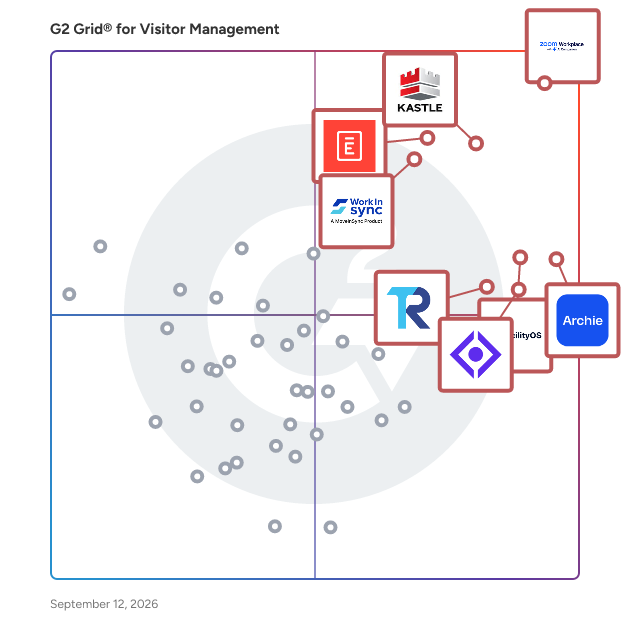
Featured Visitor Management Software At A Glance

Free Plan Available:
Envoy Visitors
Sponsored
Highest Performer:
Easiest to Use:
Top Trending:
Show LessShow More
Highest Performer:
Easiest to Use:
Top Trending:

G2 takes pride in showing unbiased reviews on user satisfaction in our ratings and reports. We do not allow paid placements in any of our ratings, rankings, or reports. Learn about our scoring methodologies.

No filters applied
200 Listings in Visitor Management Available
  • Overview
    Expand/Collapse Overview
  • Product Description
    How are these determined?Information
    This description is provided by the seller.

    VeriScan is the only AI-powered ID scanning, age verification, and visitor management platform. With a proprietary library that continuously optimizes as new IDs are scanned, the VeriScan platform off

    Users
    • General Manager
    • Manager
    Industries
    • Retail
    • Alternative Medicine
    Market Segment
    • 65% Small-Business
    • 31% Mid-Market
    User Sentiment
    How are these determined?Information
    These insights, currently in beta, are compiled from user reviews and grouped to display a high-level overview of the software.
    • VeriScan is a device and software system that assists in verifying IDs and preventing fraud.
    • Users like VeriScan's accuracy in ID verification, its ability to detect fake IDs, its durability, and its usefulness in providing demographic information and proof of due diligence in age verification.
    • Reviewers experienced issues with the device's user-friendliness, its need for good lighting for scanning, occasional slow performance, and some confusion during initial setup and software updates.
  • Pros and Cons
    Expand/Collapse Pros and Cons
  • VeriScan Pros and Cons
    How are these determined?Information
    Pros and Cons are compiled from review feedback and grouped into themes to provide an easy-to-understand summary of user reviews.
    Pros
    Ease of Use
    25
    Verification Efficiency
    11
    Customer Support
    9
    Helpful
    8
    Time-saving
    8
    Cons
    System Errors
    9
    Update Issues
    8
    Poor Customer Support
    5
    Complexity
    4
    Slow Performance
    4
  • User Satisfaction
    Expand/Collapse User Satisfaction
  • VeriScan features and usability ratings that predict user satisfaction
    9.1
    Has the product been a good partner in doing business?
    Average: 9.2
    8.4
    Dashboard
    Average: 8.7
    7.9
    Integration
    Average: 8.6
    7.0
    Automation
    Average: 8.6
  • Seller Details
    Expand/Collapse Seller Details
  • Seller Details
    Year Founded
    2003
    HQ Location
    New Orleans, LA
    Twitter
    @IDscan_net
    834 Twitter followers
    LinkedIn® Page
    www.linkedin.com
    68 employees on LinkedIn®
Product Description
How are these determined?Information
This description is provided by the seller.

VeriScan is the only AI-powered ID scanning, age verification, and visitor management platform. With a proprietary library that continuously optimizes as new IDs are scanned, the VeriScan platform off

Users
  • General Manager
  • Manager
Industries
  • Retail
  • Alternative Medicine
Market Segment
  • 65% Small-Business
  • 31% Mid-Market
User Sentiment
How are these determined?Information
These insights, currently in beta, are compiled from user reviews and grouped to display a high-level overview of the software.
  • VeriScan is a device and software system that assists in verifying IDs and preventing fraud.
  • Users like VeriScan's accuracy in ID verification, its ability to detect fake IDs, its durability, and its usefulness in providing demographic information and proof of due diligence in age verification.
  • Reviewers experienced issues with the device's user-friendliness, its need for good lighting for scanning, occasional slow performance, and some confusion during initial setup and software updates.
VeriScan Pros and Cons
How are these determined?Information
Pros and Cons are compiled from review feedback and grouped into themes to provide an easy-to-understand summary of user reviews.
Pros
Ease of Use
25
Verification Efficiency
11
Customer Support
9
Helpful
8
Time-saving
8
Cons
System Errors
9
Update Issues
8
Poor Customer Support
5
Complexity
4
Slow Performance
4
VeriScan features and usability ratings that predict user satisfaction
9.1
Has the product been a good partner in doing business?
Average: 9.2
8.4
Dashboard
Average: 8.7
7.9
Integration
Average: 8.6
7.0
Automation
Average: 8.6
Seller Details
Year Founded
2003
HQ Location
New Orleans, LA
Twitter
@IDscan_net
834 Twitter followers
LinkedIn® Page
www.linkedin.com
68 employees on LinkedIn®
(33)4.5 out of 5
15th Easiest To Use in Visitor Management software
Save to My Lists
Entry Level Price:Contact Us
  • Overview
    Expand/Collapse Overview
  • Product Description
    How are these determined?Information
    This description is provided by the seller.

    www.getkisi.com Kisi is the industry-leading physical security system for modern facilities. Arming your team members with a keyless entry system does more than eliminate keys—it builds a vibrant off

    Users
    No information available
    Industries
    No information available
    Market Segment
    • 55% Mid-Market
    • 33% Small-Business
  • Pros and Cons
    Expand/Collapse Pros and Cons
  • Kisi Pros and Cons
    How are these determined?Information
    Pros and Cons are compiled from review feedback and grouped into themes to provide an easy-to-understand summary of user reviews.
    Pros
    Customer Support
    1
    Ease of Use
    1
    Helpful
    1
    Simple
    1
    Staff Professionalism
    1
    Cons
    Expensive
    1
    Poor Customer Support
    1
  • User Satisfaction
    Expand/Collapse User Satisfaction
  • Kisi features and usability ratings that predict user satisfaction
    9.4
    Has the product been a good partner in doing business?
    Average: 9.2
    8.1
    Dashboard
    Average: 8.7
    8.1
    Integration
    Average: 8.6
    9.0
    Automation
    Average: 8.6
  • Seller Details
    Expand/Collapse Seller Details
  • Seller Details
    Seller
    KISI
    Year Founded
    2012
    HQ Location
    Brooklyn, US
    Twitter
    @KISI
    3,483 Twitter followers
    LinkedIn® Page
    www.linkedin.com
    185 employees on LinkedIn®
Product Description
How are these determined?Information
This description is provided by the seller.

www.getkisi.com Kisi is the industry-leading physical security system for modern facilities. Arming your team members with a keyless entry system does more than eliminate keys—it builds a vibrant off

Users
No information available
Industries
No information available
Market Segment
  • 55% Mid-Market
  • 33% Small-Business
Kisi Pros and Cons
How are these determined?Information
Pros and Cons are compiled from review feedback and grouped into themes to provide an easy-to-understand summary of user reviews.
Pros
Customer Support
1
Ease of Use
1
Helpful
1
Simple
1
Staff Professionalism
1
Cons
Expensive
1
Poor Customer Support
1
Kisi features and usability ratings that predict user satisfaction
9.4
Has the product been a good partner in doing business?
Average: 9.2
8.1
Dashboard
Average: 8.7
8.1
Integration
Average: 8.6
9.0
Automation
Average: 8.6
Seller Details
Seller
KISI
Year Founded
2012
HQ Location
Brooklyn, US
Twitter
@KISI
3,483 Twitter followers
LinkedIn® Page
www.linkedin.com
185 employees on LinkedIn®

This is how G2 Deals can help you:

  • Easily shop for curated – and trusted – software
  • Own your own software buying journey
  • Discover exclusive deals on software
Entry Level Price:$55.00
  • Overview
    Expand/Collapse Overview
  • Product Description
    How are these determined?Information
    This description is provided by the seller.

    The world's easiest-to-use workplace sign in system. SwipedOn helps you manage visitors, staff, and workplace resources on both Apple and Android devices. Meet your compliance and safety requiremen

    Users
    • IT Manager
    Industries
    • Construction
    • Education Management
    Market Segment
    • 60% Mid-Market
    • 32% Small-Business
  • Pros and Cons
    Expand/Collapse Pros and Cons
  • SwipedOn Pros and Cons
    How are these determined?Information
    Pros and Cons are compiled from review feedback and grouped into themes to provide an easy-to-understand summary of user reviews.
    Pros
    Ease of Use
    2
    Intuitive
    2
    User Interface
    2
    Connectivity
    1
    Convenience
    1
    Cons
    Cancellation Issues
    2
    Expensive
    2
    Inadequate Reporting
    1
    Limited Customization
    1
    Poor Reporting
    1
  • User Satisfaction
    Expand/Collapse User Satisfaction
  • SwipedOn features and usability ratings that predict user satisfaction
    9.7
    Has the product been a good partner in doing business?
    Average: 9.2
    9.2
    Dashboard
    Average: 8.7
    8.5
    Integration
    Average: 8.6
    9.0
    Automation
    Average: 8.6
  • Seller Details
    Expand/Collapse Seller Details
  • Seller Details
    Year Founded
    2015
    HQ Location
    St. Petersburg, Florida & Northampton, United Kingdom
    Twitter
    @signinapp
    458 Twitter followers
    LinkedIn® Page
    www.linkedin.com
    64 employees on LinkedIn®
Product Description
How are these determined?Information
This description is provided by the seller.

The world's easiest-to-use workplace sign in system. SwipedOn helps you manage visitors, staff, and workplace resources on both Apple and Android devices. Meet your compliance and safety requiremen

Users
  • IT Manager
Industries
  • Construction
  • Education Management
Market Segment
  • 60% Mid-Market
  • 32% Small-Business
SwipedOn Pros and Cons
How are these determined?Information
Pros and Cons are compiled from review feedback and grouped into themes to provide an easy-to-understand summary of user reviews.
Pros
Ease of Use
2
Intuitive
2
User Interface
2
Connectivity
1
Convenience
1
Cons
Cancellation Issues
2
Expensive
2
Inadequate Reporting
1
Limited Customization
1
Poor Reporting
1
SwipedOn features and usability ratings that predict user satisfaction
9.7
Has the product been a good partner in doing business?
Average: 9.2
9.2
Dashboard
Average: 8.7
8.5
Integration
Average: 8.6
9.0
Automation
Average: 8.6
Seller Details
Year Founded
2015
HQ Location
St. Petersburg, Florida & Northampton, United Kingdom
Twitter
@signinapp
458 Twitter followers
LinkedIn® Page
www.linkedin.com
64 employees on LinkedIn®
  • Overview
    Expand/Collapse Overview
  • Product Description
    How are these determined?Information
    This description is provided by the seller.

    VAMS is the World’s largest Visitor Management Platform that manages over 100+mn annual check-ins. It is a fit-for-purpose solution in public buildings—chiefly, commercial and corporate institutes. We

    Users
    • Reception
    • Receptionist
    Industries
    • Information Technology and Services
    • Pharmaceuticals
    Market Segment
    • 51% Mid-Market
    • 26% Small-Business
  • Pros and Cons
    Expand/Collapse Pros and Cons
  • VAMS Pros and Cons
    How are these determined?Information
    Pros and Cons are compiled from review feedback and grouped into themes to provide an easy-to-understand summary of user reviews.
    Pros
    Ease of Use
    2
    Simple
    2
    Access
    1
    Easy Setup
    1
    Cons
    Slow Loading
    2
    Booking Issues
    1
  • User Satisfaction
    Expand/Collapse User Satisfaction
  • VAMS features and usability ratings that predict user satisfaction
    9.4
    Has the product been a good partner in doing business?
    Average: 9.2
    9.4
    Dashboard
    Average: 8.7
    9.1
    Integration
    Average: 8.6
    9.3
    Automation
    Average: 8.6
  • Seller Details
    Expand/Collapse Seller Details
  • Seller Details
    Year Founded
    2010
    HQ Location
    New York
    Twitter
    @vams_global
    6 Twitter followers
    LinkedIn® Page
    www.linkedin.com
    75 employees on LinkedIn®
Product Description
How are these determined?Information
This description is provided by the seller.

VAMS is the World’s largest Visitor Management Platform that manages over 100+mn annual check-ins. It is a fit-for-purpose solution in public buildings—chiefly, commercial and corporate institutes. We

Users
  • Reception
  • Receptionist
Industries
  • Information Technology and Services
  • Pharmaceuticals
Market Segment
  • 51% Mid-Market
  • 26% Small-Business
VAMS Pros and Cons
How are these determined?Information
Pros and Cons are compiled from review feedback and grouped into themes to provide an easy-to-understand summary of user reviews.
Pros
Ease of Use
2
Simple
2
Access
1
Easy Setup
1
Cons
Slow Loading
2
Booking Issues
1
VAMS features and usability ratings that predict user satisfaction
9.4
Has the product been a good partner in doing business?
Average: 9.2
9.4
Dashboard
Average: 8.7
9.1
Integration
Average: 8.6
9.3
Automation
Average: 8.6
Seller Details
Year Founded
2010
HQ Location
New York
Twitter
@vams_global
6 Twitter followers
LinkedIn® Page
www.linkedin.com
75 employees on LinkedIn®
  • Overview
    Expand/Collapse Overview
  • Product Description
    How are these determined?Information
    This description is provided by the seller.

    Nexudus is a comprehensive software solution designed for coworking and flexible workspace operators to enhance operational efficiency, drive revenue, and offer a tailored online experience for their

    Users
    No information available
    Industries
    • Commercial Real Estate
    • Hospitality
    Market Segment
    • 68% Small-Business
    • 30% Mid-Market
    User Sentiment
    How are these determined?Information
    These insights, currently in beta, are compiled from user reviews and grouped to display a high-level overview of the software.
    • Nexudus is a platform that offers navigation, a user interface, and customer support for managing coworking operations, bookings, invoicing, and member management.
    • Reviewers appreciate the user-friendly navigation, customizable features, efficient customer support, and the ability to automate various aspects of their business, which they find helpful in their daily operations.
    • Reviewers noted issues with limited financial reporting, occasional glitches and bugs, frequent sign-outs, unexpected releases, and an aesthetically unpleasing client interface.
  • Pros and Cons
    Expand/Collapse Pros and Cons
  • Nexudus Pros and Cons
    How are these determined?Information
    Pros and Cons are compiled from review feedback and grouped into themes to provide an easy-to-understand summary of user reviews.
    Pros
    Customer Support
    9
    Helpful
    9
    Ease of Use
    8
    Daily Use
    7
    Features
    6
    Cons
    Difficult Learning
    4
    Software Bugs
    4
    Poor Interface Design
    3
    User Interface Issues
    3
    Complexity
    2
  • User Satisfaction
    Expand/Collapse User Satisfaction
  • Nexudus features and usability ratings that predict user satisfaction
    9.2
    Has the product been a good partner in doing business?
    Average: 9.2
    9.5
    Dashboard
    Average: 8.7
    9.4
    Integration
    Average: 8.6
    8.8
    Automation
    Average: 8.6
  • Seller Details
    Expand/Collapse Seller Details
  • Seller Details
    Seller
    Nexudus
    Company Website
    Year Founded
    2012
    HQ Location
    London
    Twitter
    @Nexudus
    2,049 Twitter followers
    LinkedIn® Page
    www.linkedin.com
    57 employees on LinkedIn®
Product Description
How are these determined?Information
This description is provided by the seller.

Nexudus is a comprehensive software solution designed for coworking and flexible workspace operators to enhance operational efficiency, drive revenue, and offer a tailored online experience for their

Users
No information available
Industries
  • Commercial Real Estate
  • Hospitality
Market Segment
  • 68% Small-Business
  • 30% Mid-Market
User Sentiment
How are these determined?Information
These insights, currently in beta, are compiled from user reviews and grouped to display a high-level overview of the software.
  • Nexudus is a platform that offers navigation, a user interface, and customer support for managing coworking operations, bookings, invoicing, and member management.
  • Reviewers appreciate the user-friendly navigation, customizable features, efficient customer support, and the ability to automate various aspects of their business, which they find helpful in their daily operations.
  • Reviewers noted issues with limited financial reporting, occasional glitches and bugs, frequent sign-outs, unexpected releases, and an aesthetically unpleasing client interface.
Nexudus Pros and Cons
How are these determined?Information
Pros and Cons are compiled from review feedback and grouped into themes to provide an easy-to-understand summary of user reviews.
Pros
Customer Support
9
Helpful
9
Ease of Use
8
Daily Use
7
Features
6
Cons
Difficult Learning
4
Software Bugs
4
Poor Interface Design
3
User Interface Issues
3
Complexity
2
Nexudus features and usability ratings that predict user satisfaction
9.2
Has the product been a good partner in doing business?
Average: 9.2
9.5
Dashboard
Average: 8.7
9.4
Integration
Average: 8.6
8.8
Automation
Average: 8.6
Seller Details
Seller
Nexudus
Company Website
Year Founded
2012
HQ Location
London
Twitter
@Nexudus
2,049 Twitter followers
LinkedIn® Page
www.linkedin.com
57 employees on LinkedIn®
  • Overview
    Expand/Collapse Overview
  • Product Description
    How are these determined?Information
    This description is provided by the seller.

    Honeywell Forge Visitor and Contractor Management (Formally Sine) is a modern visitor management system enabling a streamlined, secure check-in experience for visitors, contractors, and staff. Visit

    Users
    No information available
    Industries
    • Facilities Services
    • Food & Beverages
    Market Segment
    • 57% Mid-Market
    • 30% Small-Business
  • Pros and Cons
    Expand/Collapse Pros and Cons
  • Honeywell Forge Visitor Management Pros and Cons
    How are these determined?Information
    Pros and Cons are compiled from review feedback and grouped into themes to provide an easy-to-understand summary of user reviews.
    Pros
    Ease of Use
    3
    Customer Support
    2
    Daily Use
    2
    Reliability
    2
    Easy Setup
    1
    Cons
    Limited Options
    1
    Poor Customer Support
    1
  • User Satisfaction
    Expand/Collapse User Satisfaction
  • Honeywell Forge Visitor Management features and usability ratings that predict user satisfaction
    9.0
    Has the product been a good partner in doing business?
    Average: 9.2
    8.8
    Dashboard
    Average: 8.7
    7.6
    Integration
    Average: 8.6
    8.5
    Automation
    Average: 8.6
  • Seller Details
    Expand/Collapse Seller Details
  • Seller Details
    Seller
    Honeywell
    HQ Location
    Charlotte, North Carolina
    Twitter
    @HoneywellNow
    2,777 Twitter followers
    LinkedIn® Page
    www.linkedin.com
    124,847 employees on LinkedIn®
    Ownership
    HON
    Total Revenue (USD mm)
    $32,637
Product Description
How are these determined?Information
This description is provided by the seller.

Honeywell Forge Visitor and Contractor Management (Formally Sine) is a modern visitor management system enabling a streamlined, secure check-in experience for visitors, contractors, and staff. Visit

Users
No information available
Industries
  • Facilities Services
  • Food & Beverages
Market Segment
  • 57% Mid-Market
  • 30% Small-Business
Honeywell Forge Visitor Management Pros and Cons
How are these determined?Information
Pros and Cons are compiled from review feedback and grouped into themes to provide an easy-to-understand summary of user reviews.
Pros
Ease of Use
3
Customer Support
2
Daily Use
2
Reliability
2
Easy Setup
1
Cons
Limited Options
1
Poor Customer Support
1
Honeywell Forge Visitor Management features and usability ratings that predict user satisfaction
9.0
Has the product been a good partner in doing business?
Average: 9.2
8.8
Dashboard
Average: 8.7
7.6
Integration
Average: 8.6
8.5
Automation
Average: 8.6
Seller Details
Seller
Honeywell
HQ Location
Charlotte, North Carolina
Twitter
@HoneywellNow
2,777 Twitter followers
LinkedIn® Page
www.linkedin.com
124,847 employees on LinkedIn®
Ownership
HON
Total Revenue (USD mm)
$32,637
  • Overview
    Expand/Collapse Overview
  • Product Description
    How are these determined?Information
    This description is provided by the seller.

    Sign In App is the smart and safe way to manage visitors, staff and workplace resources. Built for the modern workplace, Sign In App’s cloud-based solution delivers a seamless visitor experience, enha

    Users
    • Owner
    Industries
    • Health, Wellness and Fitness
    • Education Management
    Market Segment
    • 84% Small-Business
    • 13% Mid-Market
  • Pros and Cons
    Expand/Collapse Pros and Cons
  • Sign In App Pros and Cons
    How are these determined?Information
    Pros and Cons are compiled from review feedback and grouped into themes to provide an easy-to-understand summary of user reviews.
    Pros
    Ease of Use
    24
    Booking Management
    12
    Appointment Management
    10
    Reminders Feature
    9
    Easy Scheduling
    8
    Cons
    Booking Issues
    8
    Calendar Issues
    5
    Appointment Management
    4
    Messaging Issues
    4
    Technical Issues
    4
  • User Satisfaction
    Expand/Collapse User Satisfaction
  • Sign In App features and usability ratings that predict user satisfaction
    9.4
    Has the product been a good partner in doing business?
    Average: 9.2
    10.0
    Dashboard
    Average: 8.7
    8.3
    Integration
    Average: 8.6
    9.4
    Automation
    Average: 8.6
  • Seller Details
    Expand/Collapse Seller Details
  • Seller Details
    Company Website
    Year Founded
    2015
    HQ Location
    St. Petersburg, Florida & Northampton, United Kingdom
    Twitter
    @signinapp
    458 Twitter followers
    LinkedIn® Page
    www.linkedin.com
    64 employees on LinkedIn®
Product Description
How are these determined?Information
This description is provided by the seller.

Sign In App is the smart and safe way to manage visitors, staff and workplace resources. Built for the modern workplace, Sign In App’s cloud-based solution delivers a seamless visitor experience, enha

Users
  • Owner
Industries
  • Health, Wellness and Fitness
  • Education Management
Market Segment
  • 84% Small-Business
  • 13% Mid-Market
Sign In App Pros and Cons
How are these determined?Information
Pros and Cons are compiled from review feedback and grouped into themes to provide an easy-to-understand summary of user reviews.
Pros
Ease of Use
24
Booking Management
12
Appointment Management
10
Reminders Feature
9
Easy Scheduling
8
Cons
Booking Issues
8
Calendar Issues
5
Appointment Management
4
Messaging Issues
4
Technical Issues
4
Sign In App features and usability ratings that predict user satisfaction
9.4
Has the product been a good partner in doing business?
Average: 9.2
10.0
Dashboard
Average: 8.7
8.3
Integration
Average: 8.6
9.4
Automation
Average: 8.6
Seller Details
Company Website
Year Founded
2015
HQ Location
St. Petersburg, Florida & Northampton, United Kingdom
Twitter
@signinapp
458 Twitter followers
LinkedIn® Page
www.linkedin.com
64 employees on LinkedIn®
(77)4.7 out of 5
Optimized for quick response
Save to My Lists
Entry Level Price:Starting at $250.00
  • Overview
    Expand/Collapse Overview
  • Product Description
    How are these determined?Information
    This description is provided by the seller.

    WaitWell is a comprehensive queue management and appointment scheduling platform built to elevate customer service, streamline operations, and boost overall efficiency. The system enables organization

    Users
    • Triage Specialist
    Industries
    • Higher Education
    • Government Administration
    Market Segment
    • 45% Small-Business
    • 26% Mid-Market
    User Sentiment
    How are these determined?Information
    These insights, currently in beta, are compiled from user reviews and grouped to display a high-level overview of the software.
    • WaitWell is a queuing software that allows users to send SMS messages to students, integrate with Outlook calendars, and troubleshoot technical and logistical issues.
    • Users frequently mention the ease of use, the ability to communicate with students via text, and the quick interaction with students as significant benefits of using WaitWell.
    • Reviewers mentioned the limited report customization, the inability to create categories and subcategories in sales force, and the difficulty in updating the settings as some of the drawbacks of the software.
  • Pros and Cons
    Expand/Collapse Pros and Cons
  • WaitWell Pros and Cons
    How are these determined?Information
    Pros and Cons are compiled from review feedback and grouped into themes to provide an easy-to-understand summary of user reviews.
    Pros
    Ease of Use
    32
    Customer Support
    17
    User-Friendly
    17
    Easy Setup
    15
    Convenience
    11
    Cons
    Data Inaccuracy
    5
    Limited Customization
    5
    Missing Features
    5
    Customization Difficulty
    4
    Difficult Navigation
    3
  • User Satisfaction
    Expand/Collapse User Satisfaction
  • WaitWell features and usability ratings that predict user satisfaction
    9.5
    Has the product been a good partner in doing business?
    Average: 9.2
    9.5
    Dashboard
    Average: 8.7
    9.0
    Integration
    Average: 8.6
    9.2
    Automation
    Average: 8.6
  • Seller Details
    Expand/Collapse Seller Details
  • Seller Details
    Company Website
    Year Founded
    2020
    HQ Location
    Calgary, Canada
    Twitter
    @WaitWell2
    89 Twitter followers
    LinkedIn® Page
    www.linkedin.com
    15 employees on LinkedIn®
Product Description
How are these determined?Information
This description is provided by the seller.

WaitWell is a comprehensive queue management and appointment scheduling platform built to elevate customer service, streamline operations, and boost overall efficiency. The system enables organization

Users
  • Triage Specialist
Industries
  • Higher Education
  • Government Administration
Market Segment
  • 45% Small-Business
  • 26% Mid-Market
User Sentiment
How are these determined?Information
These insights, currently in beta, are compiled from user reviews and grouped to display a high-level overview of the software.
  • WaitWell is a queuing software that allows users to send SMS messages to students, integrate with Outlook calendars, and troubleshoot technical and logistical issues.
  • Users frequently mention the ease of use, the ability to communicate with students via text, and the quick interaction with students as significant benefits of using WaitWell.
  • Reviewers mentioned the limited report customization, the inability to create categories and subcategories in sales force, and the difficulty in updating the settings as some of the drawbacks of the software.
WaitWell Pros and Cons
How are these determined?Information
Pros and Cons are compiled from review feedback and grouped into themes to provide an easy-to-understand summary of user reviews.
Pros
Ease of Use
32
Customer Support
17
User-Friendly
17
Easy Setup
15
Convenience
11
Cons
Data Inaccuracy
5
Limited Customization
5
Missing Features
5
Customization Difficulty
4
Difficult Navigation
3
WaitWell features and usability ratings that predict user satisfaction
9.5
Has the product been a good partner in doing business?
Average: 9.2
9.5
Dashboard
Average: 8.7
9.0
Integration
Average: 8.6
9.2
Automation
Average: 8.6
Seller Details
Company Website
Year Founded
2020
HQ Location
Calgary, Canada
Twitter
@WaitWell2
89 Twitter followers
LinkedIn® Page
www.linkedin.com
15 employees on LinkedIn®
  • Overview
    Expand/Collapse Overview
  • Product Description
    How are these determined?Information
    This description is provided by the seller.

    Rapid Global is the AI-powered platform transforming workplace safety and compliance. Trusted by leading global companies, Rapid brings together more than 20 years of industry experience to deliver a

    Users
    No information available
    Industries
    • Construction
    Market Segment
    • 36% Mid-Market
    • 16% Enterprise
    User Sentiment
    How are these determined?Information
    These insights, currently in beta, are compiled from user reviews and grouped to display a high-level overview of the software.
    • Rapid Global is a visitor sign-in system that allows new visitors to register and returning visitors to sign in quickly, and serves as a central location for all contractor documents, permits, and site sign-on information.
    • Users frequently mention the ease of use, the ability to upload induction and training packages, the user-friendly interface, and the efficient customer support as positive aspects of Rapid Global.
    • Reviewers experienced issues with the system being slow to navigate on the back end, difficulties in updating visitor photos, challenges for contractors using the platform for the first time, and problems with the integration of Rapid Global with their systems.
  • Pros and Cons
    Expand/Collapse Pros and Cons
  • Rapid Global Pros and Cons
    How are these determined?Information
    Pros and Cons are compiled from review feedback and grouped into themes to provide an easy-to-understand summary of user reviews.
    Pros
    Ease of Use
    57
    Efficiency
    21
    Simple
    18
    Easy Setup
    16
    Efficiency Improvement
    16
    Cons
    Difficult Learning
    14
    Access Issues
    12
    Poor Interface Design
    12
    Difficult Adjustments
    11
    Insufficient Information
    9
  • User Satisfaction
    Expand/Collapse User Satisfaction
  • Rapid Global features and usability ratings that predict user satisfaction
    8.5
    Has the product been a good partner in doing business?
    Average: 9.2
    8.0
    Dashboard
    Average: 8.7
    6.7
    Integration
    Average: 8.6
    8.3
    Automation
    Average: 8.6
  • Seller Details
    Expand/Collapse Seller Details
  • Seller Details
    Company Website
    Year Founded
    2001
    HQ Location
    Sydney, AU
    Twitter
    @RapidGlobal
    147 Twitter followers
    LinkedIn® Page
    www.linkedin.com
    125 employees on LinkedIn®
Product Description
How are these determined?Information
This description is provided by the seller.

Rapid Global is the AI-powered platform transforming workplace safety and compliance. Trusted by leading global companies, Rapid brings together more than 20 years of industry experience to deliver a

Users
No information available
Industries
  • Construction
Market Segment
  • 36% Mid-Market
  • 16% Enterprise
User Sentiment
How are these determined?Information
These insights, currently in beta, are compiled from user reviews and grouped to display a high-level overview of the software.
  • Rapid Global is a visitor sign-in system that allows new visitors to register and returning visitors to sign in quickly, and serves as a central location for all contractor documents, permits, and site sign-on information.
  • Users frequently mention the ease of use, the ability to upload induction and training packages, the user-friendly interface, and the efficient customer support as positive aspects of Rapid Global.
  • Reviewers experienced issues with the system being slow to navigate on the back end, difficulties in updating visitor photos, challenges for contractors using the platform for the first time, and problems with the integration of Rapid Global with their systems.
Rapid Global Pros and Cons
How are these determined?Information
Pros and Cons are compiled from review feedback and grouped into themes to provide an easy-to-understand summary of user reviews.
Pros
Ease of Use
57
Efficiency
21
Simple
18
Easy Setup
16
Efficiency Improvement
16
Cons
Difficult Learning
14
Access Issues
12
Poor Interface Design
12
Difficult Adjustments
11
Insufficient Information
9
Rapid Global features and usability ratings that predict user satisfaction
8.5
Has the product been a good partner in doing business?
Average: 9.2
8.0
Dashboard
Average: 8.7
6.7
Integration
Average: 8.6
8.3
Automation
Average: 8.6
Seller Details
Company Website
Year Founded
2001
HQ Location
Sydney, AU
Twitter
@RapidGlobal
147 Twitter followers
LinkedIn® Page
www.linkedin.com
125 employees on LinkedIn®
(94)4.4 out of 5
Optimized for quick response
Save to My Lists
  • Overview
    Expand/Collapse Overview
  • Product Description
    How are these determined?Information
    This description is provided by the seller.

    Genea Security is a cloud-native access control solution designed to provide IT and security teams with comprehensive oversight of access activities across global enterprises or building portfolios. T

    Users
    No information available
    Industries
    • Computer Software
    • Information Technology and Services
    Market Segment
    • 60% Mid-Market
    • 21% Small-Business
    User Sentiment
    How are these determined?Information
    These insights, currently in beta, are compiled from user reviews and grouped to display a high-level overview of the software.
    • Genea is an access control solution that simplifies management and monitoring through a cloud-based platform.
    • Users frequently mention the ease of use, the ability to control mobile access from a computer, the user-friendly interface, and the efficient chat support that helps overcome initial installation hurdles.
    • Users mentioned issues with the software design when setting up holidays, the need to pay extra for Apple Watch key use, the loss of elevator control during transition, and the inability to edit the date and time when programming doors.
  • Pros and Cons
    Expand/Collapse Pros and Cons
  • Genea Security Pros and Cons
    How are these determined?Information
    Pros and Cons are compiled from review feedback and grouped into themes to provide an easy-to-understand summary of user reviews.
    Pros
    Ease of Use
    6
    Remote Access
    4
    Access
    3
    Simple
    3
    Access Control
    2
    Cons
    Performance Issues
    6
    Limited Features
    3
    Poor Customer Support
    2
    Access Issues
    1
    Communication Issues
    1
  • User Satisfaction
    Expand/Collapse User Satisfaction
  • Genea Security features and usability ratings that predict user satisfaction
    9.2
    Has the product been a good partner in doing business?
    Average: 9.2
    9.0
    Dashboard
    Average: 8.7
    8.5
    Integration
    Average: 8.6
    8.7
    Automation
    Average: 8.6
  • Seller Details
    Expand/Collapse Seller Details
  • Seller Details
    Seller
    Genea
    Company Website
    Year Founded
    2006
    HQ Location
    Irvine, CA
    Twitter
    @GetGenea
    783 Twitter followers
    LinkedIn® Page
    www.linkedin.com
    186 employees on LinkedIn®
Product Description
How are these determined?Information
This description is provided by the seller.

Genea Security is a cloud-native access control solution designed to provide IT and security teams with comprehensive oversight of access activities across global enterprises or building portfolios. T

Users
No information available
Industries
  • Computer Software
  • Information Technology and Services
Market Segment
  • 60% Mid-Market
  • 21% Small-Business
User Sentiment
How are these determined?Information
These insights, currently in beta, are compiled from user reviews and grouped to display a high-level overview of the software.
  • Genea is an access control solution that simplifies management and monitoring through a cloud-based platform.
  • Users frequently mention the ease of use, the ability to control mobile access from a computer, the user-friendly interface, and the efficient chat support that helps overcome initial installation hurdles.
  • Users mentioned issues with the software design when setting up holidays, the need to pay extra for Apple Watch key use, the loss of elevator control during transition, and the inability to edit the date and time when programming doors.
Genea Security Pros and Cons
How are these determined?Information
Pros and Cons are compiled from review feedback and grouped into themes to provide an easy-to-understand summary of user reviews.
Pros
Ease of Use
6
Remote Access
4
Access
3
Simple
3
Access Control
2
Cons
Performance Issues
6
Limited Features
3
Poor Customer Support
2
Access Issues
1
Communication Issues
1
Genea Security features and usability ratings that predict user satisfaction
9.2
Has the product been a good partner in doing business?
Average: 9.2
9.0
Dashboard
Average: 8.7
8.5
Integration
Average: 8.6
8.7
Automation
Average: 8.6
Seller Details
Seller
Genea
Company Website
Year Founded
2006
HQ Location
Irvine, CA
Twitter
@GetGenea
783 Twitter followers
LinkedIn® Page
www.linkedin.com
186 employees on LinkedIn®
  • Overview
    Expand/Collapse Overview
  • Product Description
    How are these determined?Information
    This description is provided by the seller.

    Veris Welcome is your one-stop solution for efficient and secure visitor management. Designed to create a safe and welcoming environment for both your employees and guests, ensuring a smooth visitor e

    Users
    No information available
    Industries
    • Information Technology and Services
    • Real Estate
    Market Segment
    • 49% Mid-Market
    • 34% Enterprise
  • User Satisfaction
    Expand/Collapse User Satisfaction
  • Veris Welcome features and usability ratings that predict user satisfaction
    9.4
    Has the product been a good partner in doing business?
    Average: 9.2
    9.3
    Dashboard
    Average: 8.7
    8.9
    Integration
    Average: 8.6
    9.3
    Automation
    Average: 8.6
  • Seller Details
    Expand/Collapse Seller Details
  • Seller Details
    Year Founded
    2016
    HQ Location
    Gurugram, IN
    LinkedIn® Page
    www.linkedin.com
    62 employees on LinkedIn®
Product Description
How are these determined?Information
This description is provided by the seller.

Veris Welcome is your one-stop solution for efficient and secure visitor management. Designed to create a safe and welcoming environment for both your employees and guests, ensuring a smooth visitor e

Users
No information available
Industries
  • Information Technology and Services
  • Real Estate
Market Segment
  • 49% Mid-Market
  • 34% Enterprise
Veris Welcome features and usability ratings that predict user satisfaction
9.4
Has the product been a good partner in doing business?
Average: 9.2
9.3
Dashboard
Average: 8.7
8.9
Integration
Average: 8.6
9.3
Automation
Average: 8.6
Seller Details
Year Founded
2016
HQ Location
Gurugram, IN
LinkedIn® Page
www.linkedin.com
62 employees on LinkedIn®
  • Overview
    Expand/Collapse Overview
  • Product Description
    How are these determined?Information
    This description is provided by the seller.

    Eptura Workplace is a comprehensive workplace management solution designed to optimize office environments and enhance employee experiences. It offers tools for space planning, desk and room booking,

    Users
    No information available
    Industries
    • Computer Software
    • Internet
    Market Segment
    • 65% Mid-Market
    • 24% Enterprise
  • Pros and Cons
    Expand/Collapse Pros and Cons
  • Eptura Workplace Pros and Cons
    How are these determined?Information
    Pros and Cons are compiled from review feedback and grouped into themes to provide an easy-to-understand summary of user reviews.
    Pros
    Customer Support
    2
    Ease of Use
    2
    Helpful
    1
    Navigation Ease
    1
    Simple
    1
    Cons
    Complexity
    1
    Editing Issues
    1
    Insufficient Information
    1
    Limited Customization
    1
    Missing Features
    1
  • User Satisfaction
    Expand/Collapse User Satisfaction
  • Eptura Workplace features and usability ratings that predict user satisfaction
    8.8
    Has the product been a good partner in doing business?
    Average: 9.2
    8.3
    Dashboard
    Average: 8.7
    9.5
    Integration
    Average: 8.6
    9.0
    Automation
    Average: 8.6
  • Seller Details
    Expand/Collapse Seller Details
  • Seller Details
    Seller
    Eptura
    Year Founded
    2002
    HQ Location
    Atlanta, US
    Twitter
    @Epturawork
    290 Twitter followers
    LinkedIn® Page
    www.linkedin.com
    763 employees on LinkedIn®
Product Description
How are these determined?Information
This description is provided by the seller.

Eptura Workplace is a comprehensive workplace management solution designed to optimize office environments and enhance employee experiences. It offers tools for space planning, desk and room booking,

Users
No information available
Industries
  • Computer Software
  • Internet
Market Segment
  • 65% Mid-Market
  • 24% Enterprise
Eptura Workplace Pros and Cons
How are these determined?Information
Pros and Cons are compiled from review feedback and grouped into themes to provide an easy-to-understand summary of user reviews.
Pros
Customer Support
2
Ease of Use
2
Helpful
1
Navigation Ease
1
Simple
1
Cons
Complexity
1
Editing Issues
1
Insufficient Information
1
Limited Customization
1
Missing Features
1
Eptura Workplace features and usability ratings that predict user satisfaction
8.8
Has the product been a good partner in doing business?
Average: 9.2
8.3
Dashboard
Average: 8.7
9.5
Integration
Average: 8.6
9.0
Automation
Average: 8.6
Seller Details
Seller
Eptura
Year Founded
2002
HQ Location
Atlanta, US
Twitter
@Epturawork
290 Twitter followers
LinkedIn® Page
www.linkedin.com
763 employees on LinkedIn®
  • Overview
    Expand/Collapse Overview
  • Pros and Cons
    Expand/Collapse Pros and Cons
  • User Satisfaction
    Expand/Collapse User Satisfaction
  • Seller Details
    Expand/Collapse Seller Details
(23)3.9 out of 5
Optimized for quick response
Save to My Lists
  • Overview
    Expand/Collapse Overview
  • Product Description
    How are these determined?Information
    This description is provided by the seller.

    Qmatic is a global leader in queue management and appointment scheduling solutions for enterprise organizations. Our suite of solutions enables you to efficiently manage queues and appointments, reduc

    Users
    No information available
    Industries
    • Government Administration
    Market Segment
    • 35% Mid-Market
    • 35% Enterprise
  • Pros and Cons
    Expand/Collapse Pros and Cons
  • Qmatic Pros and Cons
    How are these determined?Information
    Pros and Cons are compiled from review feedback and grouped into themes to provide an easy-to-understand summary of user reviews.
    Pros
    Ease of Use
    8
    User Interface
    4
    Customer Service
    3
    Customization
    3
    Helpful
    3
    Cons
    Poor Customer Support
    3
    Setup Difficulties
    3
    Connection Issues
    2
    Difficult Navigation
    2
    Integration Issues
    2
  • User Satisfaction
    Expand/Collapse User Satisfaction
  • Qmatic features and usability ratings that predict user satisfaction
    6.1
    Has the product been a good partner in doing business?
    Average: 9.2
    6.5
    Dashboard
    Average: 8.7
    7.0
    Integration
    Average: 8.6
    7.2
    Automation
    Average: 8.6
  • Seller Details
    Expand/Collapse Seller Details
  • Seller Details
    Seller
    Qmatic
    Company Website
    Year Founded
    1981
    HQ Location
    Mölndal, SE
    Twitter
    @qmatic
    5,296 Twitter followers
    LinkedIn® Page
    www.linkedin.com
    241 employees on LinkedIn®
Product Description
How are these determined?Information
This description is provided by the seller.

Qmatic is a global leader in queue management and appointment scheduling solutions for enterprise organizations. Our suite of solutions enables you to efficiently manage queues and appointments, reduc

Users
No information available
Industries
  • Government Administration
Market Segment
  • 35% Mid-Market
  • 35% Enterprise
Qmatic Pros and Cons
How are these determined?Information
Pros and Cons are compiled from review feedback and grouped into themes to provide an easy-to-understand summary of user reviews.
Pros
Ease of Use
8
User Interface
4
Customer Service
3
Customization
3
Helpful
3
Cons
Poor Customer Support
3
Setup Difficulties
3
Connection Issues
2
Difficult Navigation
2
Integration Issues
2
Qmatic features and usability ratings that predict user satisfaction
6.1
Has the product been a good partner in doing business?
Average: 9.2
6.5
Dashboard
Average: 8.7
7.0
Integration
Average: 8.6
7.2
Automation
Average: 8.6
Seller Details
Seller
Qmatic
Company Website
Year Founded
1981
HQ Location
Mölndal, SE
Twitter
@qmatic
5,296 Twitter followers
LinkedIn® Page
www.linkedin.com
241 employees on LinkedIn®
Entry Level Price:$49.00
  • Overview
    Expand/Collapse Overview
  • Product Description
    How are these determined?Information
    This description is provided by the seller.

    Visitly is a cloud-based visitor and contractor management system that helps businesses of all sizes manage their visitors more effectively. It offers a variety of features, including: Contactless

    Users
    No information available
    Industries
    No information available
    Market Segment
    • 59% Mid-Market
    • 34% Small-Business
  • Pros and Cons
    Expand/Collapse Pros and Cons
  • Visitly Pros and Cons
    How are these determined?Information
    Pros and Cons are compiled from review feedback and grouped into themes to provide an easy-to-understand summary of user reviews.
    Pros
    Ease of Use
    6
    User Interface
    5
    Features
    3
    Simple
    3
    Customer Support
    2
    Cons
    Limited Options
    2
    Complexity
    1
    Expensive
    1
    Lack of Customization
    1
    Limited Customization
    1
  • User Satisfaction
    Expand/Collapse User Satisfaction
  • Visitly features and usability ratings that predict user satisfaction
    8.8
    Has the product been a good partner in doing business?
    Average: 9.2
    8.4
    Dashboard
    Average: 8.7
    8.3
    Integration
    Average: 8.6
    8.5
    Automation
    Average: 8.6
  • Seller Details
    Expand/Collapse Seller Details
  • Seller Details
    Seller
    Visitly
    Company Website
    Year Founded
    2018
    HQ Location
    San Francisco, California
    Twitter
    @visitlyio
    5 Twitter followers
    LinkedIn® Page
    www.linkedin.com
    14 employees on LinkedIn®
Product Description
How are these determined?Information
This description is provided by the seller.

Visitly is a cloud-based visitor and contractor management system that helps businesses of all sizes manage their visitors more effectively. It offers a variety of features, including: Contactless

Users
No information available
Industries
No information available
Market Segment
  • 59% Mid-Market
  • 34% Small-Business
Visitly Pros and Cons
How are these determined?Information
Pros and Cons are compiled from review feedback and grouped into themes to provide an easy-to-understand summary of user reviews.
Pros
Ease of Use
6
User Interface
5
Features
3
Simple
3
Customer Support
2
Cons
Limited Options
2
Complexity
1
Expensive
1
Lack of Customization
1
Limited Customization
1
Visitly features and usability ratings that predict user satisfaction
8.8
Has the product been a good partner in doing business?
Average: 9.2
8.4
Dashboard
Average: 8.7
8.3
Integration
Average: 8.6
8.5
Automation
Average: 8.6
Seller Details
Seller
Visitly
Company Website
Year Founded
2018
HQ Location
San Francisco, California
Twitter
@visitlyio
5 Twitter followers
LinkedIn® Page
www.linkedin.com
14 employees on LinkedIn®