  # Best Incident Management Software - Page 3

  *By [Tian Lin](https://research.g2.com/insights/author/tian-lin)*

   IT and DevOps incident management software is an end-to-end solution that responds to, reports on, and investigates digital incidents, alerting IT staff, generating problem reports, and automating resolution workflows to reduce downtime, bring critical information to the right people instantly, and enable faster response times.

### Core Capabilities of Incident Management Software

To qualify for inclusion in the IT/DevOps Incident Management category, a product must:

- Monitor and alert staff of incidents or critical errors
- Integrate with team collaboration tools to notify responsible parties
- Create a standardized workflow for handling incidents
- Respond to, report, and investigate IT errors

### Common Use Cases for Incident Management Software

IT professionals and DevOps teams use incident management software to minimize the impact of system disruptions and maintain service reliability. Common use cases include:

- Detecting and escalating critical incidents to on-call teams through automated alerts
- Coordinating cross-team incident response via integrated collaboration and notification workflows
- Documenting and analyzing incidents post-resolution to identify root causes and prevent recurrence

### How Incident Management Software Differs from Other Tools

Incident management software is often used as part of a broader [IT management](https://www.g2.com/categories/enterprise-it-management) strategy, working alongside [service desk](https://www.g2.com/categories/service-desk), [mobile device management (MDM)](https://www.g2.com/categories/mobile-device-management-mdm), and [identity management](https://www.g2.com/categories/identity-management) solutions to unify projects, automate tasks, and increase [team collaboration](https://www.g2.com/categories/team-collaboration). Unlike general IT monitoring tools, incident management platforms focus specifically on the structured workflow of detection, escalation, and resolution.

### Insights from G2 on Incident Management Software

Based on category trends on G2, automated alerting and standardized escalation workflows stand out as top strengths. These platforms deliver reductions in mean time to resolution and improved on-call coordination as primary benefits of adoption.


## How Many Incident Management Software Products Does G2 Track?
**Total Products under this Category:** 124

### Category Stats (May 2026)
- **Average Rating**: 4.42/5
- **New Reviews This Quarter**: 646
- **Buyer Segments**: Enterprise 51% │ Mid-Market 28% │ Small-Business 21%
- **Top Trending Product**: SimpleRisk (+0.042)
*Last updated: May 18, 2026*

  
## How Does G2 Rank Incident Management Software Products?

**Why You Can Trust G2's Software Rankings:**

- 30 Analysts and Data Experts
- 16,300+ Authentic Reviews
- 124+ Products
- Unbiased Rankings

G2's software rankings are built on verified user reviews, rigorous moderation, and a consistent research methodology maintained by a team of analysts and data experts. Each product is measured using the same transparent criteria, with no paid placement or vendor influence. While reviews reflect real user experiences, which can be subjective, they offer valuable insight into how software performs in the hands of professionals. Together, these inputs power the G2 Score, a standardized way to compare tools within every category.

  
## Which Incident Management Software Is Best for Your Use Case?

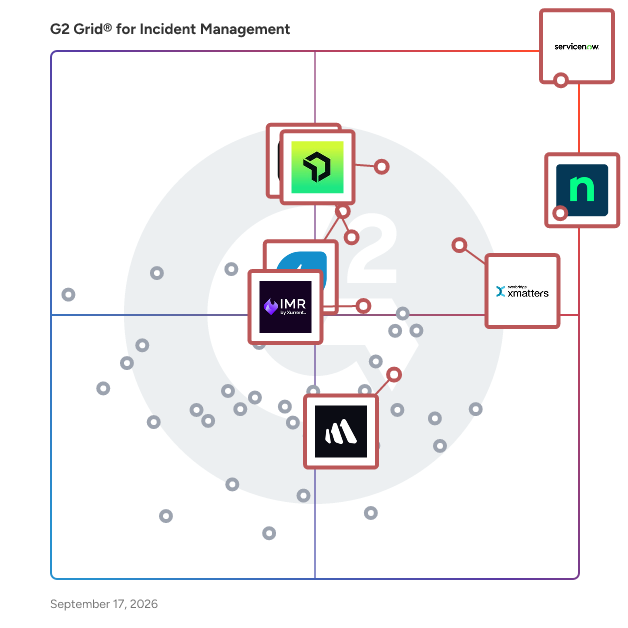
- **Leader:** [ServiceNow IT Service Management](https://www.g2.com/products/servicenow-it-service-management/reviews)
- **Highest Performer:** [incident.io](https://www.g2.com/products/incident-io/reviews)
- **Easiest to Use:** [NinjaOne](https://www.g2.com/products/ninjaone/reviews)
- **Top Trending:** [NinjaOne](https://www.g2.com/products/ninjaone/reviews)
- **Best Free Software:** [Freshservice](https://www.g2.com/products/freshservice/reviews)

  
---

**Sponsored**

### Freshservice

Freshservice by Freshworks is an AI-powered ServiceOps platform built for modern enterprises that need to move fast without sacrificing control. By unifying ITSM, ITOM, IT asset management, and enterprise service management on a single platform with a shared data layer, Freshservice eliminates the tool sprawl and visibility gaps that slow teams down - creating one source of truth across services, assets, and infrastructure. IT teams get full visibility into their environment: automated discovery, a robust CMDB for impact analysis and root cause resolution, and streamlined incident, problem, change, and major incident management. Beyond IT, Freshservice extends seamlessly to HR, finance, and facilities - giving every business team the same consistent, efficient service experience without the complexity of separate tools. Freshservice comes with a natively embedded AI layer called Freddy AI, that helps agents resolve issues faster, automates employee service requests, and gives leaders the insights they need to make better decisions. The result isn&#39;t just faster service; it&#39;s a fundamentally more proactive operation that surfaces and resolves issues before they impact employees.


[Visit website](https://www.g2.com/external_clickthroughs/record?secure%5Bad_program%5D=ppc&amp;secure%5Bad_slot%5D=category_product_list&amp;secure%5Bcategory_id%5D=1040&amp;secure%5Bdisplayable_resource_id%5D=1040&amp;secure%5Bdisplayable_resource_type%5D=Category&amp;secure%5Bmedium%5D=sponsored&amp;secure%5Bplacement_reason%5D=page_category&amp;secure%5Bplacement_resource_ids%5D%5B%5D=1040&amp;secure%5Bprioritized%5D=false&amp;secure%5Bproduct_id%5D=2864&amp;secure%5Bresource_id%5D=1040&amp;secure%5Bresource_type%5D=Category&amp;secure%5Bsource_type%5D=category_page&amp;secure%5Bsource_url%5D=https%3A%2F%2Fwww.g2.com%2Fcategories%2Fincident-management%2Fsmall-business&amp;secure%5Btoken%5D=7c018da3f39f3b25ced4ecf67a294d200475218db54845211a0a94e185bdd114&amp;secure%5Burl%5D=https%3A%2F%2Fwww.freshworks.com%2Ffreshservice%2Flp%2Fmarketplace%2Fitsm%2F%3Futm_source%3Dg2%26utm_medium%3Dg2&amp;secure%5Burl_type%5D=custom_url)

---

  ## What Are the Top-Rated Incident Management Software Products in 2026?
### 1. [Grok](https://www.g2.com/products/grok/reviews)
  Grok is an AI operations (AIOps) platform that proactively resolves IT incidents using machine intelligence and automation.


  **Average Rating:** 4.4/5.0
  **Total Reviews:** 18
**How Do G2 Users Rate Grok?**

- **Has the product been a good partner in doing business?:** 9.2/10 (Category avg: 9.1/10)
- **Lifecycle Visualization:** 5.6/10 (Category avg: 8.8/10)
- **Constant Monitoring:** 9.4/10 (Category avg: 8.9/10)
- **AI Text Generation:** 8.1/10 (Category avg: 7.2/10)

**Who Is the Company Behind Grok?**

- **Seller:** [Avik Partners](https://www.g2.com/sellers/avik-partners)
- **Year Founded:** 2014
- **HQ Location:** Dallas, US
- **LinkedIn® Page:** http://www.linkedin.com/company/grokstream (32 employees on LinkedIn®)

**Who Uses This Product?**
  - **Company Size:** 44% Small-Business, 11% Mid-Market


#### What Are Grok's Pros and Cons?

**Pros:**

- Artificial Intelligence (10 reviews)
- Ease of Use (9 reviews)
- Easy Setup (9 reviews)
- Setup Ease (8 reviews)
- Innovation (7 reviews)

**Cons:**

- Alert Issues (6 reviews)
- Insufficient Information (6 reviews)
- Data Inaccuracy (4 reviews)
- Limited Features (3 reviews)
- Missing Features (3 reviews)

### 2. [Parny](https://www.g2.com/products/parny/reviews)
  Parny is an AIOps platform that helps engineering and operations teams understand, correlate, and respond to incidents across complex infrastructure environments. Parny ingests signals from existing monitoring tools and automatically discovers services and infrastructure components through built-in service discovery. It continuously maps real-time dependencies using its Domain Tree and Infrastructure Visibility capabilities, allowing teams to see how systems connect, where failures propagate, and what impact they create. Rather than treating alerts as isolated events, Parny correlates signals and transforms them into contextualized incidents. Alert and incident management workflows ensure that the right alert reaches the right responder with the correct operational context, reducing noise and accelerating resolution. By combining topology awareness, dependency intelligence, and response automation, Parny enables teams to move beyond reactive monitoring toward operational clarity. It supports modern distributed environments including microservices, containers, and hybrid cloud infrastructure without requiring replacement of existing observability investments. This approach helps organizations improve reliability, reduce alert fatigue, strengthen ownership visibility, and maintain service health at scale.


  **Average Rating:** 5.0/5.0
  **Total Reviews:** 11
**How Do G2 Users Rate Parny?**

- **Has the product been a good partner in doing business?:** 10.0/10 (Category avg: 9.1/10)
- **Lifecycle Visualization:** 10.0/10 (Category avg: 8.8/10)
- **Constant Monitoring:** 10.0/10 (Category avg: 8.9/10)
- **AI Text Generation:** 8.6/10 (Category avg: 7.2/10)

**Who Is the Company Behind Parny?**

- **Seller:** [Parny](https://www.g2.com/sellers/parny)
- **Company Website:** https://parny.io/
- **Year Founded:** 2022
- **HQ Location:** Istanbul, TR
- **Twitter:** @Parnyio (13 Twitter followers)
- **LinkedIn® Page:** https://www.linkedin.com/company/parny-io/ (5 employees on LinkedIn®)

**Who Uses This Product?**
  - **Top Industries:** Information Technology and Services
  - **Company Size:** 58% Mid-Market, 25% Small-Business


#### What Are Parny's Pros and Cons?

**Pros:**

- Alert Management (8 reviews)
- Ease of Use (8 reviews)
- Alerting System (6 reviews)
- Team Collaboration (5 reviews)
- Artificial Intelligence (4 reviews)

**Cons:**

- Limited Features (2 reviews)
- Limited Mobile Functionality (2 reviews)
- App Quality (1 reviews)
- Integration Issues (1 reviews)
- Missing Features (1 reviews)

### 3. [ServiceTeam ITSM](https://www.g2.com/products/serviceteam-itsm/reviews)
  The ServiceTeam ITSM Power App delivers modern and cost-effective ITSM for Microsoft Customers. Native to the Microsoft ecosystem, ServiceTeam ITSM provides ITIL-aligned ITSM capabilities, directly taking advantage of the Power Platform, Dynamics 365, Microsoft 365, Azure, Power BI and Teams to maximize investments in Microsoft technologies and deliver a highly secure, scalable, and flexible ITSM solution. ServiceTeam ITSM is comprised of two editions, Professional and Enterprise, plus a ServiceTeam ITAM add on. “ServiceTeam ITSM offers a robust set of ITSM capabilities for the cost, which is enhanced further with the optional ITAM capabilities. The use of the Microsoft Power Platform and it’s capabilities fits well with the growing industry trend for low code and AI and exploiting enterprise service management opportunities through wider ITSM tool use and bespoke applications.” – Stephen Mann, Principal Analyst &amp; Content Director at ITSM.tools ServiceTeam ITSM lets you leverage Power BI for management reporting, configure automated workflows with Power Automate, deploy Power Virtual Agent chatbots, capitalize on existing Microsoft technology skillsets, and so much more. Check out Provance.com for detailed description of the ServiceTeam ITSM capabilities. With ServiceTeam ITSM, you can achieve excellent customer service—supporting business growth with a ‘best-of-platform’ solution. “ServiceTeam ITSM is a capability-rich ITSM solution aimed at organizations of all sizes across all verticals. An existing or new investment in the Microsoft ecosystem is required, but this also offers access to a wealth of Microsoft technologies—such as business intelligence and machine learning—that can be applied to ITSM operations.” – Stephen Mann, Principal Analyst &amp; Content Director at ITSM.tools Get a copy of the independent review of ServiceTeam ITSM conducted by Stephen Mann of ITSM.tools by visiting the Official Downloads section of this profile.


  **Average Rating:** 3.9/5.0
  **Total Reviews:** 18
**How Do G2 Users Rate ServiceTeam ITSM?**

- **Has the product been a good partner in doing business?:** 8.5/10 (Category avg: 9.1/10)
- **Lifecycle Visualization:** 6.4/10 (Category avg: 8.8/10)
- **Constant Monitoring:** 8.1/10 (Category avg: 8.9/10)
- **AI Text Generation:** 7.2/10 (Category avg: 7.2/10)

**Who Is the Company Behind ServiceTeam ITSM?**

- **Seller:** [Provance Technologies](https://www.g2.com/sellers/provance-technologies)
- **Company Website:** https://www.provance.com/
- **Year Founded:** 1997
- **HQ Location:** Ottawa, Ontario Canada
- **LinkedIn® Page:** http://www.linkedin.com/company/provance-technologies (80 employees on LinkedIn®)

**Who Uses This Product?**
  - **Top Industries:** Computer Software, Information Technology and Services
  - **Company Size:** 44% Mid-Market, 28% Small-Business


#### What Are ServiceTeam ITSM's Pros and Cons?

**Pros:**

- Features (5 reviews)
- Customer Support (4 reviews)
- Ease of Use (4 reviews)
- User Interface (4 reviews)
- Incident Management (3 reviews)

**Cons:**

- Complex Setup (2 reviews)
- Learning Curve (2 reviews)
- Limited Customization (2 reviews)
- Poor Customer Support (2 reviews)
- Clunky Interface (1 reviews)

### 4. [HaloITSM](https://www.g2.com/products/haloitsm/reviews)
  HaloITSM provides ITIL aligned help desk software that can be installed on premise or in the cloud. With over 25 years of experience, HaloITSM has been developed to offer a feature rich application whilst maintaining a simple to use interface. Features include: Incident Management, Problem Management, Change Management, Asset Management, Service Catalogue, Telephony Integration, as well as the best of breed mobile apps. Five Key Differentiators: 1. Software tailored to the user&#39;s business (Customizable) 2. Value (All-Inclusive Service Desk Solution) 3. Suitable for organisations of all sizes and from any industry 4. Customer centric 5. Seamless migration process


  **Average Rating:** 4.8/5.0
  **Total Reviews:** 21
**How Do G2 Users Rate HaloITSM?**

- **Has the product been a good partner in doing business?:** 9.9/10 (Category avg: 9.1/10)

**Who Is the Company Behind HaloITSM?**

- **Seller:** [Halo Service Solutions](https://www.g2.com/sellers/halo-service-solutions)
- **Year Founded:** 1994
- **HQ Location:** Stowmarket, England
- **LinkedIn® Page:** https://www.linkedin.com/company/2083634/ (287 employees on LinkedIn®)

**Who Uses This Product?**
  - **Company Size:** 50% Mid-Market, 36% Enterprise


#### What Are HaloITSM's Pros and Cons?

**Pros:**

- Ease of Use (1 reviews)
- Easy Setup (1 reviews)
- Efficiency (1 reviews)
- Setup Ease (1 reviews)
- Simple (1 reviews)

**Cons:**

- Limited Customization (1 reviews)
- Ticketing Issues (1 reviews)

### 5. [Issuetrak](https://www.g2.com/products/issuetrak/reviews)
  At Issuetrak, we’re dedicated to helping organizations achieve greater customer success with ticket tracking. If you’ve struggled to keep important user requests from slipping through the cracks, Issuetrak is here to help. We specialize in help desk, issue tracking, workflow, customer support, and complaint management. And with easy onboarding, custom configuration, and ongoing 99% rated support, your teams will be sure to knock out support requests and master workflow success. Our customizable software is a fit for hundreds of different industries and usages, from customer support to compliance to change management. Issuetrak helps businesses like yours track tickets, issues, and requests from submission to resolution and make sure no request gets lost or misplaced. Streamline your day-to-day processes and operations with workflow and reporting tools that bring visibility and accountability to your team. With Issuetrak you’ll cut down on wasted time and money, improve customer service, and increase communication among team members. Automation, Reporting, Custom Forms, Alerts, Workflows, and More: Automation that helps your team work faster and smarter Easy, omnichannel issue submission via email, mobile, web portal, or webform At-a-glance dashboard metrics plus detailed, customizable reporting Custom forms and user-defined fields to fit your unique organization Task management and workflow branching to keep everyone on track Add-on modules to meet specific needs: Asset Management for storing and reviewing information on your team’s assets Active Directory integration for improved organization and security Billing module for generating invoices, inputting billable time, and more Surveys module to gather and implement customer feedback and improve customer success!


  **Average Rating:** 4.1/5.0
  **Total Reviews:** 63
**How Do G2 Users Rate Issuetrak?**

- **Has the product been a good partner in doing business?:** 9.3/10 (Category avg: 9.1/10)

**Who Is the Company Behind Issuetrak?**

- **Seller:** [Issuetrak](https://www.g2.com/sellers/issuetrak)
- **Year Founded:** 1992
- **HQ Location:** Virginia Beach, Virginia
- **Twitter:** @Issuetrak (3,740 Twitter followers)
- **LinkedIn® Page:** https://www.linkedin.com/company/389461/ (41 employees on LinkedIn®)
- **Phone:** +1 (866) 477-8387

**Who Uses This Product?**
  - **Top Industries:** Information Technology and Services, Hospital &amp; Health Care
  - **Company Size:** 37% Mid-Market, 32% Enterprise


### 6. [PhaseWare](https://www.g2.com/products/phaseware/reviews)
  The PhaseWare Tracker product suite is a configurable B2B customer support software designed for and loved by technology and software companies. PhaseWare&#39;s fully configurable customer service and support solutions will help your B2B company manage, monitor, and measure critical customer service interactions. Quickly and completely resolve pressing customer issues, while delivering a consistent and engaging customer experience. Configure everything from your self-service portal, reporting dashboards, app-screens, terminology, and automated processes to fulfill your service goals. Invest in a product that works exactly the way you do.


  **Average Rating:** 3.2/5.0
  **Total Reviews:** 6
**How Do G2 Users Rate PhaseWare?**

- **Has the product been a good partner in doing business?:** 10.0/10 (Category avg: 9.1/10)

**Who Is the Company Behind PhaseWare?**

- **Seller:** [Phaseware](https://www.g2.com/sellers/phaseware)
- **Year Founded:** 2005
- **HQ Location:** McKinney, US
- **Twitter:** @PhaseWare (730 Twitter followers)
- **LinkedIn® Page:** https://www.linkedin.com/company/phaseware-inc./ (8 employees on LinkedIn®)

**Who Uses This Product?**
  - **Company Size:** 67% Mid-Market, 33% Enterprise


### 7. [Temperstack](https://www.g2.com/products/temperstack/reviews)
  Temperstack is an advanced AI-powered Site Reliability Engineering (SRE) platform that revolutionizes how organizations manage their infrastructure and application reliability. It integrates with your existing monitoring tools to provide comprehensive visibility and automated response capabilities across your entire technology stack. The platform goes beyond traditional monitoring by combining artificial intelligence with SRE best practices to proactively identify, prevent, and resolve potential service degradation and downtime before they impact end users. Through its intelligent automation and AI-driven insights, Temperstack helps organizations maintain optimal service levels while reducing operational overhead and alert fatigue. Features : Automated Discovery Engine: Automatically identifies all infrastructure and application components requiring monitoring Alert Comprehensiveness (ALCOM) Score: Measures and tracks monitoring coverage from 0-100 Automated Alert Setup: Programmatically deploys missing alerts based on best practices Continuous Monitoring Maintenance: Daily scans detect disabled alerts and new resources Alert Optimization: AI-driven threshold adjustment to reduce false positives while maintaining coverage Service Mapping: Auto-discovers and groups related infrastructure and applications Team Schedule Management: Manages rotation schedules and shift policies across time zones Multi-Channel Integration: Routes alerts through email, Slack, Microsoft Teams, and WhatsApp Escalation Management: Configures and enforces escalation rules for unresponsive scenarios Context Enrichment: Provides troubleshooting guidelines and system context with each alert Dynamic Runbooks: Auto-generates and updates resolution guides based on system changes Root Cause Analysis (RCA) tool: Standardises RCA capture &amp; tracks resultant actions to completion Knowledge Base: Codifies tribal knowledge and learns from successful resolutions Pattern Recognition for accelerated root cause identification: Suggests probable root causes based on historical incidents


  **Average Rating:** 4.3/5.0
  **Total Reviews:** 5
**How Do G2 Users Rate Temperstack?**

- **Has the product been a good partner in doing business?:** 8.9/10 (Category avg: 9.1/10)
- **Lifecycle Visualization:** 6.7/10 (Category avg: 8.8/10)
- **Constant Monitoring:** 10.0/10 (Category avg: 8.9/10)
- **AI Text Generation:** 8.3/10 (Category avg: 7.2/10)

**Who Is the Company Behind Temperstack?**

- **Seller:** [Temperstack](https://www.g2.com/sellers/temperstack)
- **Year Founded:** 2023
- **HQ Location:** San Francisco, US
- **LinkedIn® Page:** https://www.linkedin.com/company/temperstack (7 employees on LinkedIn®)

**Who Uses This Product?**
  - **Company Size:** 40% Mid-Market, 40% Enterprise


#### What Are Temperstack's Pros and Cons?

**Pros:**

- Alert Management (3 reviews)
- Alerting System (2 reviews)
- Alerting Systems (2 reviews)
- Automation (2 reviews)
- Configuration Ease (2 reviews)

**Cons:**

- Alert System (2 reviews)
- Inefficient Alert System (2 reviews)
- Limitations (2 reviews)
- Limited Customization (2 reviews)
- Limited Features (2 reviews)

### 8. [ilert](https://www.g2.com/products/ilert/reviews)
  ilert is an AI-first incident management platform designed from the ground up to cover the entire incident response lifecycle covering: - Reliable &amp; actionable alerting: Alerting that wakes you up. Via SMS, push, voice call and more Frictionless acknowledgement, on all channels. No need to log-in anywhere. - On-call management: Maximize accountability and transparency with on-call schedules, ilert makes being on-call easy. Distribute on-call duty while ensuring 24x7 coverage. - ChatOps: ChatOps for Incident Management to collaborate on incidents in Slack or Microsoft Teams and create AI-assisted postmortems in no time. - Terraform provider: Manage your incident response through code and automate the setup and management of your alert sources, escalation policies, and on-call schedules directly within your Terraform infrastructure code. Add-ons include: - Call routing: Hotline for on-call teams to reach the right on-call responder immediately by calling a phone number. - Status pages: Built for operations teams as public, private, and audience-specific status pages. Build trust and communicate incidents in seconds with status pages that are connected with your infrastructure. Learn about our pricing here: https://www.ilert.com/pricing ilert integrates with your everyday tools, including monitoring, observability, ticketing, ITSM, automation, chat and collaboration tools, etc. Use cases include: - DevOps &amp; SRE - IT Operations - Managed Service Providers - Security Incident Response - Industrial Operations &amp; IoT - Customer Support &amp; ITSM Featured case studies include: - IKEA: https://www.ilert.com/case-studies/ikea - REWE digital: https://www.ilert.com/case-studies/rewe-digital - Adesso: https://www.ilert.com/case-studies/adesso - Sheego: https://www.ilert.com/case-studies/sheego - Bechtle: https://www.ilert.com/case-studies/bechtle - Fulfillmenttools: https://www.ilert.com/case-studies/fulfillmenttools Signup for free: https://app.ilert.com/signup Or request a demo: https://www.ilert.com/get-demo


  **Average Rating:** 4.2/5.0
  **Total Reviews:** 10
**How Do G2 Users Rate ilert?**

- **Has the product been a good partner in doing business?:** 8.1/10 (Category avg: 9.1/10)
- **AI Text Generation:** 5.8/10 (Category avg: 7.2/10)

**Who Is the Company Behind ilert?**

- **Seller:** [iLert](https://www.g2.com/sellers/ilert)
- **Year Founded:** 2011
- **HQ Location:** Cologne, North Rhine-Westphalia
- **Twitter:** @ilerthq (157 Twitter followers)
- **LinkedIn® Page:** https://www.linkedin.com/company/ilert-alerting/ (18 employees on LinkedIn®)

**Who Uses This Product?**
  - **Company Size:** 40% Mid-Market, 40% Small-Business


#### What Are ilert's Pros and Cons?

**Pros:**

- Integrations (3 reviews)
- Alerting System (2 reviews)
- Alert Management (2 reviews)
- Ease of Use (2 reviews)
- Flexibility (2 reviews)

**Cons:**

- Complex Setup (2 reviews)
- Notification Issues (2 reviews)
- Call Issues (1 reviews)
- Difficult Setup (1 reviews)
- Expensive (1 reviews)

### 9. [SAS Visual Investigator](https://www.g2.com/products/sas-visual-investigator/reviews)
  SAS Visual Investigator is a cloud-ready investigation and incident management solution that combines large, disparate, structured and unstructured data sources. Users can define, create, triage and manage alerts; perform detailed investigations; and customize the platform to meet their individual and organizational needs.


  **Average Rating:** 4.0/5.0
  **Total Reviews:** 4
**How Do G2 Users Rate SAS Visual Investigator?**

- **Has the product been a good partner in doing business?:** 8.3/10 (Category avg: 9.1/10)
- **Lifecycle Visualization:** 8.3/10 (Category avg: 8.8/10)
- **Constant Monitoring:** 5.0/10 (Category avg: 8.9/10)
- **AI Text Generation:** 0.0/10 (Category avg: 7.2/10)

**Who Is the Company Behind SAS Visual Investigator?**

- **Seller:** [SAS Institute Inc.](https://www.g2.com/sellers/sas-institute-inc-df6dde22-a5e5-4913-8b21-4fa0c6c5c7c2)
- **Year Founded:** 1976
- **HQ Location:** Cary, NC
- **Twitter:** @SASsoftware (60,959 Twitter followers)
- **LinkedIn® Page:** https://www.linkedin.com/company/1491/ (18,519 employees on LinkedIn®)
- **Phone:** 1-800-727-0025

**Who Uses This Product?**
  - **Company Size:** 100% Small-Business


### 10. [SimpleRisk](https://www.g2.com/products/simplerisk/reviews)
  SimpleRisk is an Integrated Risk Management (IRM) and Governance, Risk, and Compliance (GRC) platform built for organizations that need enterprise-class capabilities without enterprise-class price tags or implementation timelines. Founded by security practitioners and rooted in open source, SimpleRisk gives risk, compliance, and security teams a single system of record for managing the full lifecycle of risks, controls, policies, vendors, audits, and incidents; with the flexibility to adapt to how your program actually operates. What SimpleRisk Helps You Do Identify, assess, prioritize, and track risks from initial discovery through mitigation and closure. Map controls to industry frameworks and continuously demonstrate compliance. Centralize policies with version control, approval workflows, and user attestations. Manage third-party risk through structured vendor assessments. Document and respond to incidents. Plan, execute, and report on audits. Bring your asset inventory, documents, and evidence into one place so audit prep stops being a fire drill. Core Capabilities \* Risk Management: Configurable risk register with multiple scoring methodologies (Classic, CVSS, DREAD, and more), customizable risk fields, mitigation tracking, residual risk calculation, and full risk lifecycle workflows. \* Compliance &amp; Audit Management: Map controls to common frameworks, run control tests, manage findings, and centralize audit evidence in one place. \* Policy Management: Author, review, approve, publish, and track attestations on policies and procedures with full version history. \* Vendor / Third-Party Risk Management: Send and score vendor questionnaires, track vendor risk over time, and tie vendor risk into your enterprise risk register. \* Incident Management: Capture, classify, and respond to security and operational incidents with structured workflows and reporting. \* Asset Management: Maintain an asset inventory tied to risks, controls, and vendors so you can see exposure in context. \* Document Management: Centralize and version-control supporting documentation, evidence, and artifacts. \* Reporting &amp; Dashboards: Out-of-the-box reports plus custom views to communicate risk posture to executives, auditors, and the board. \* Customization Without Code: Add custom fields and forms to fit your program without engaging a developer or a six-figure professional services engagement. Frameworks and Standards SimpleRisk supports the frameworks that mid-market and regulated organizations actually use, including ISO 27001/27002, SOC 1 and SOC 2, NIST Cybersecurity Framework, NIST 800-53, NIST 800-171, HIPAA, PCI DSS, GDPR, CCPA, CMMC, and the CIS Controls, plus the ability to import or build your own custom control sets. Integrations SimpleRisk integrates with leading vulnerability scanners (including Tenable, Rapid7 and Qualys), single sign-on via SAML, LDAP/Active Directory for user provisioning, and exposes a REST API for connecting to ticketing systems, SIEM, and the rest of your security and IT stack. Deployment Options \* SimpleRisk Core (Free &amp; Open Source): A fully functional risk management platform under an open source license. Self-host on your own infrastructure with no vendor lock-in. \* SimpleRisk On-Premise (Commercial): Self-hosted with the full Enterprise Extras (custom fields, advanced reporting, compliance management, vendor management, and more) plus commercial support. \* SimpleRisk Hosted (SaaS): Fully managed cloud deployment with the same capabilities as On-Premise, available in US and EU regions. Who SimpleRisk Is For SimpleRisk is built for mid-market and growth-stage organizations that have outgrown spreadsheets but find platforms like RSA Archer, ServiceNow GRC, MetricStream, and OneTrust over-engineered, over-priced, or too slow to deploy. Common use cases include: \* Building a defensible risk management program from scratch \* Preparing for SOC 2, ISO 27001, or HIPAA audits \* Centralizing vendor risk across procurement and security \* Replacing risk and compliance spreadsheets with a single system of record \* Demonstrating cyber risk posture to leadership, customers, and regulators Why Customers Choose SimpleRisk \* Affordable and transparent pricing: Clear tiers, no surprise add-ons, and a free open source option. \* Fast time to value: Most customers are up and running in days, not months. \* Open source heritage: Inspect the code, extend the platform, and avoid black-box vendor lock-in. \* Practitioner-built: Designed by security professionals who actually run risk programs. \* Responsive support: Direct access to engineers and risk practitioners, not Tier 1 ticket triage. Whether you&#39;re starting your first formal risk program or replacing legacy GRC tooling that no longer fits, SimpleRisk gives you the structure of enterprise GRC with the agility your team actually needs. Try SimpleRisk Core for free, or contact us to see the full platform in action.


  **Average Rating:** 4.5/5.0
  **Total Reviews:** 13
**How Do G2 Users Rate SimpleRisk?**

- **Has the product been a good partner in doing business?:** 10.0/10 (Category avg: 9.1/10)
- **Lifecycle Visualization:** 9.4/10 (Category avg: 8.8/10)
- **Constant Monitoring:** 10.0/10 (Category avg: 8.9/10)

**Who Is the Company Behind SimpleRisk?**

- **Seller:** [SimpleRisk](https://www.g2.com/sellers/simplerisk)
- **Year Founded:** 2013
- **HQ Location:** Texas 78681, US
- **LinkedIn® Page:** http://www.linkedin.com/company/simplerisk (10 employees on LinkedIn®)

**Who Uses This Product?**
  - **Company Size:** 36% Enterprise, 36% Small-Business


#### What Are SimpleRisk's Pros and Cons?

**Pros:**

- Ease of Use (3 reviews)
- Risk Management (3 reviews)
- Features (2 reviews)
- Functionality (2 reviews)
- Simple (2 reviews)

**Cons:**

- Slow Performance (2 reviews)
- Bugs (1 reviews)
- Complexity (1 reviews)
- Distracting Design (1 reviews)
- Inaccuracy Issues (1 reviews)

### 11. [SquaredUp](https://www.g2.com/products/squaredup-squaredup/reviews)
  SquaredUp is a unified observability portal. Say goodbye to blind spots and data silos. Using data mesh and cutting-edge data visualization, SquaredUp gives IT and engineering teams one place to see everything that matters. Bring together data from across your tech stack without the headache of moving the data. Unlike other monitoring and observability tools that rely on a data warehouse, SquaredUp leaves your data where it is, plugging directly into each data source to index and stitch the data together using a data mesh. Teams have one place to go where they can search, visualize, and analyze data across all their tools. Take control of infrastructure, application, and product performance with unified visibility. Learn more at squaredup.com What you get: \&gt; Cutting-edge data visualization \&gt; Access to 100+ data sources \&gt; Any custom data source via Web API \&gt; Multi-cloud observability \&gt; Cost monitoring \&gt; Unlimited dashboards \&gt; Unlimited monitors Key features: \&gt; Out-of-box dashboards \&gt; Simple, flexible dashboard designer \&gt; Real-time monitoring \&gt; High-level roll-up views \&gt; Object drill downs \&gt; Notifications (Slack, Teams, email, etc.) \&gt; SQL analytics Free for up to 3 users. Head over to SquaredUp - The Unified Observability Portal to learn more \&gt;\&gt;\&gt; https://squaredup.com/ We also have a dedicated SCOM product, Dashboard Server for SCOM. See our product page to learn how we help to transform SCOM with end-to-end visibility \&gt;\&gt;\&gt; https://ds.squaredup.com/ To find out what plan is best for you, go to \&gt;\&gt;\&gt; https://squaredup.com/pricing/


  **Average Rating:** 4.9/5.0
  **Total Reviews:** 15
**How Do G2 Users Rate SquaredUp?**

- **Has the product been a good partner in doing business?:** 10.0/10 (Category avg: 9.1/10)

**Who Is the Company Behind SquaredUp?**

- **Seller:** [SquaredUp](https://www.g2.com/sellers/squaredup-a3718528-f219-4047-b8f5-3a20303868d1)
- **Year Founded:** 2011
- **HQ Location:** Maidenhead, GB
- **Twitter:** @squared_up (1,170 Twitter followers)
- **LinkedIn® Page:** https://www.linkedin.com/company/squared-up-limited/ (94 employees on LinkedIn®)

**Who Uses This Product?**
  - **Company Size:** 60% Enterprise, 33% Mid-Market


#### What Are SquaredUp's Pros and Cons?

**Pros:**

- Dashboard Customization (1 reviews)
- Dashboard Design (1 reviews)
- Dashboard Quality (1 reviews)
- Dashboards (1 reviews)
- Dashboard Usability (1 reviews)

**Cons:**

- Complexity (1 reviews)
- Complex Setup (1 reviews)
- Configuration Difficulty (1 reviews)
- Difficult Configuration (1 reviews)
- Difficult Learning (1 reviews)

### 12. [ALVAO Asset Management](https://www.g2.com/products/alvao-asset-management/reviews)
  ALVAO IT Asset Management (ITAM) gives organizations full lifecycle visibility and control of IT hardware and software, cutting down manual work with an intuitive tree-structured interface. With real‑time discovery via network monitoring systems, Agent, SNMP, Intune, and SCCM integration, it simplifies audits, optimizes licenses (including Microsoft 365), and supports compliance with Cyber Essentials, NIST, NIS2, and DORA. A visual CMDB maps dependencies for faster incident resolution and change planning, helping IT teams stay efficient, compliant, and cost-effective. For more information visit www.alvao.com


  **Average Rating:** 4.7/5.0
  **Total Reviews:** 48
**How Do G2 Users Rate ALVAO Asset Management?**

- **Has the product been a good partner in doing business?:** 9.4/10 (Category avg: 9.1/10)
- **Lifecycle Visualization:** 9.2/10 (Category avg: 8.8/10)
- **Constant Monitoring:** 9.2/10 (Category avg: 8.9/10)
- **AI Text Generation:** 9.2/10 (Category avg: 7.2/10)

**Who Is the Company Behind ALVAO Asset Management?**

- **Seller:** [ALVAO](https://www.g2.com/sellers/alvao)
- **Year Founded:** 1999
- **HQ Location:** Brno, CZ
- **LinkedIn® Page:** https://www.linkedin.com/company/alvao/ (53 employees on LinkedIn®)

**Who Uses This Product?**
  - **Company Size:** 65% Mid-Market, 31% Enterprise


#### What Are ALVAO Asset Management's Pros and Cons?

**Pros:**

- Asset Management (7 reviews)
- Ease of Use (7 reviews)
- User Interface (6 reviews)
- Automation (4 reviews)
- Customizability (3 reviews)

**Cons:**

- Missing Features (3 reviews)
- Poor Interface Design (2 reviews)
- Access Control (1 reviews)
- Access Management (1 reviews)
- App Quality (1 reviews)

### 13. [Conclude](https://www.g2.com/products/conclude/reviews)
  Conclude unifies collaboration and chats across Slack, Microsoft Teams, Jira, and Zendesk, with AI features that speed up ticket summarization. Internal and external teams work together more effectively by connecting Slack and Microsoft Teams. Whether it’s customer support or an internal help desk that’s needed, Conclude’s no-code apps can be installed in selected channels, and offer a lightweight ticketing solution. Additionally, you can connect Slack and Teams to collaborate with colleagues on projects or chat with external customers in dedicated, linked channels. 👉 Conclude Connect integrates Slack and Microsoft Teams, facilitating bidirectional communication between both programs and ensuring that messages, files, reactions, and more work together seamlessly. Work from your preferred messaging platform, share and sync files, edit and delete messages, @mention colleagues, and automatically translate conversations in 60 languages. Conclude Connect enables both internal and external collaboration functionality. 👉 Conclude Apps are no-code apps for managing issues, incidents, support tickets, and more from Slack and Microsoft Teams. From Slack, Conclude offers an optional Jira and Zendesk integration for external support tickets.


  **Average Rating:** 4.8/5.0
  **Total Reviews:** 6
**How Do G2 Users Rate Conclude?**

- **Has the product been a good partner in doing business?:** 10.0/10 (Category avg: 9.1/10)

**Who Is the Company Behind Conclude?**

- **Seller:** [Conclude](https://www.g2.com/sellers/conclude)
- **Year Founded:** 2019
- **HQ Location:** Oslo, NO
- **LinkedIn® Page:** https://www.linkedin.com/company/conclude/ (11 employees on LinkedIn®)

**Who Uses This Product?**
  - **Company Size:** 67% Mid-Market, 33% Enterprise


### 14. [IFS assyst](https://www.g2.com/products/ifs-assyst/reviews)
  IFS assyst is an Enterprise Service Management (ESM) and IT Service Management (ITSM) solution provided by IFS. It’s designed to help organizations automate workflows, enhance service and support quality, and boost customer satisfaction across various industries. We deliver frictionless customer and employee experiences, one intelligent workflow at a time. Our modern service management technology lets you automate service delivery and support so your customers get what they need fast, and you can focus on building the future of your organization. IFS assyst is uniquely easy to buy, set up, use, and upgrade. Whether you’re in IT, HR, Facilities, Finance, or any other team that provides services to customers and employees, IFS assyst puts service management technology within your reach. Our process automation takes the boring out of everyday tasks, allowing you to focus on work that matters. Global brands trust IFS assyst to automate complex business processes easily without fuss. Everyday we assyst!


  **Average Rating:** 3.5/5.0
  **Total Reviews:** 14
**How Do G2 Users Rate IFS assyst?**

- **Has the product been a good partner in doing business?:** 7.9/10 (Category avg: 9.1/10)

**Who Is the Company Behind IFS assyst?**

- **Seller:** [IFS](https://www.g2.com/sellers/ifs)
- **Year Founded:** 1983
- **HQ Location:** Linkoping , Sweden
- **Twitter:** @ifs (18,005 Twitter followers)
- **LinkedIn® Page:** https://www.linkedin.com/company/164301/ (9,278 employees on LinkedIn®)
- **Ownership:** STO: IFS

**Who Uses This Product?**
  - **Top Industries:** Information Technology and Services
  - **Company Size:** 79% Enterprise, 29% Mid-Market


### 15. [Infraon Infinity](https://www.g2.com/products/infraon-infinity/reviews)
  Infraon Infinity is a powerful ITSM and AIOps Platform that supports Incident Management, Change Management, Problem Management, Request Management, SLA, Knowledge Base, Hardware Asset Management ( HAM ), IT Asset Management ( ITAM ), Software asset management ( SAM ), Network Management System ( NMS ), IT Infrastructure Management that helps you track, manage, and control all of your customer, employees and assets efficiently. Infraon Infinity is designed under ITIL V4 standards to help organizations to manage their IT Services and assets efficiently. IT Asset Management module supports both Agent and discovery, which helps the IT team to manage both office network and remote devices in the current hybrid work culture. An inbuilt ticketing system with workflow automation helps exceptional service delivery and employee satisfaction. Infraon Infinity has an intuitive UI, is effortlessly configurable and customizable to meet your exact requirements, and is easily integrated with other business and IT systems. The rich custom dashboards and reports help you make well-informed business decisions and manage your expenses, employee/customer/asset lifecycle. Infraon Infinity Platform is an All-in-one IT operations platform from Infraon Corp, whose sub-products includes Infraon Assets - IT Asset Management Platform, Infraon ITSM- IT service desk, Infraon Helpdesk - Customer Support Software, Infraon NMS- Network Management System, Infraon ITIM - Data centre Management System, and Infraon Infinity An All-in-one IT operations platform, etc. with more than 10000+ user world wide. Start a free trial now!


  **Average Rating:** 4.7/5.0
  **Total Reviews:** 19
**How Do G2 Users Rate Infraon Infinity?**

- **Has the product been a good partner in doing business?:** 9.2/10 (Category avg: 9.1/10)
- **Lifecycle Visualization:** 9.2/10 (Category avg: 8.8/10)
- **Constant Monitoring:** 9.2/10 (Category avg: 8.9/10)
- **AI Text Generation:** 9.2/10 (Category avg: 7.2/10)

**Who Is the Company Behind Infraon Infinity?**

- **Seller:** [Infraon](https://www.g2.com/sellers/infraon)
- **Year Founded:** 2021
- **HQ Location:** San Francisco, CA
- **Twitter:** @infraoncorp (94 Twitter followers)
- **LinkedIn® Page:** https://www.linkedin.com/company/infraon/ (18 employees on LinkedIn®)

**Who Uses This Product?**
  - **Top Industries:** Information Technology and Services
  - **Company Size:** 95% Mid-Market, 5% Small-Business


#### What Are Infraon Infinity's Pros and Cons?

**Pros:**

- Centralization (2 reviews)
- All-in-one Solution (1 reviews)
- All-in-One Solution (1 reviews)
- Asset Management (1 reviews)
- Centralized Management (1 reviews)

**Cons:**

- Delay Issues (1 reviews)
- Delays (1 reviews)
- Limited Customization (1 reviews)
- Missing Features (1 reviews)
- Scheduling Issues (1 reviews)

### 16. [Splunk IT Service Intelligence‎ (ITSI)](https://www.g2.com/products/splunk-it-service-intelligence-itsi/reviews)
  Splunk IT Service Intelligence (ITSI) is an AIOps and event management solution that correlates and applies machine learning to all data for real-time, predictive performance monitoring and integrated IT management workflows. This enables teams to prevent incidents before they impact the business, and detect, respond and resolve incidents all from one place.


  **Average Rating:** 4.9/5.0
  **Total Reviews:** 5
**How Do G2 Users Rate Splunk IT Service Intelligence‎ (ITSI)?**

- **Has the product been a good partner in doing business?:** 6.7/10 (Category avg: 9.1/10)
- **Lifecycle Visualization:** 10.0/10 (Category avg: 8.8/10)

**Who Is the Company Behind Splunk IT Service Intelligence‎ (ITSI)?**

- **Seller:** [Cisco](https://www.g2.com/sellers/cisco)
- **Year Founded:** 1984
- **HQ Location:** San Jose, CA
- **Twitter:** @Cisco (721,440 Twitter followers)
- **LinkedIn® Page:** https://www.linkedin.com/company/cisco/ (95,742 employees on LinkedIn®)
- **Ownership:** NASDAQ:CSCO

**Who Uses This Product?**
  - **Company Size:** 80% Enterprise, 20% Small-Business


### 17. [CloudFabrix](https://www.g2.com/products/cloudfabrix/reviews)
  Data-centric AIOps Platform for Hybrid Deployments Powered by Robotic Data Automation Fabric (RDAF) Enabling the Autonomous Enterprise! - CloudFabrix was founded on a deep desire to enable Autonomous Enterprises. As we interviewed several big and small enterprises, one thing became very apparent. As Digital businesses were becoming more complex and abstract, it was impossible for traditional data management disciplines and frameworks to meet these requirements. As we dug deeper, 3 building blocks emerged as key pillars for embarking on a autonomous enterprise journey – the enterprise needed to adopt 1) Data-First 2) AI-First and 3) Automate Everywhere strategy. CloudFabrix AIOps platform provides the following services. 1) Alert Noise Reduction 2) Incident Management 3) Predictive Analytics &amp; Anomaly Detection 4) FinOps/Asset Intelligence &amp; Analytics 5) Log Intelligence. CloudFabrix Platform powered by RDAF has six differentiating pillars. 1) Data fabric for data integration &amp; automation 2) Low Code/No Code Observability Pipelines to aggregate, transform, enrich correlate and route 3) Continuous Learning for explainable AI/ML models &amp; transformers 4) AIOps as a service for multi-tenant, distributed hybrid consumption 5) Observability Dashboards for full stack observability insights 6) Full Stack Mappings for dependency and impact data model and maps CloudFabrix empowers IT leaders and operations personnel with actionable intelligence to make faster and better decisions. CloudFabrix is headquartered in Pleasanton, CA with branch offices in India and the United Kingdom.


  **Average Rating:** 4.8/5.0
  **Total Reviews:** 10
**How Do G2 Users Rate CloudFabrix?**

- **Has the product been a good partner in doing business?:** 10.0/10 (Category avg: 9.1/10)

**Who Is the Company Behind CloudFabrix?**

- **Seller:** [CloudFabrix Software](https://www.g2.com/sellers/cloudfabrix-software)
- **Year Founded:** 2015
- **HQ Location:** Pleasanton, California
- **Twitter:** @CloudFabrix (4 Twitter followers)
- **LinkedIn® Page:** https://www.linkedin.com/company/fabrix.ai (114 employees on LinkedIn®)

**Who Uses This Product?**
  - **Top Industries:** Computer Software
  - **Company Size:** 50% Mid-Market, 30% Small-Business


### 18. [OneUptime](https://www.g2.com/products/oneuptime/reviews)
  OneUptime is a complete open source observibility platform. We give you a beautiful status page for your business, monitors your web apps, and alerts your team when downtime happens.


  **Average Rating:** 3.7/5.0
  **Total Reviews:** 5
**How Do G2 Users Rate OneUptime?**

- **Has the product been a good partner in doing business?:** 6.7/10 (Category avg: 9.1/10)
- **Lifecycle Visualization:** 8.3/10 (Category avg: 8.8/10)
- **Constant Monitoring:** 10.0/10 (Category avg: 8.9/10)
- **AI Text Generation:** 9.2/10 (Category avg: 7.2/10)

**Who Is the Company Behind OneUptime?**

- **Seller:** [OneUptime](https://www.g2.com/sellers/oneuptime)
- **Year Founded:** 2015
- **HQ Location:** New York, US
- **Twitter:** @OneUptimeHQ (375 Twitter followers)
- **LinkedIn® Page:** https://www.linkedin.com/company/oneuptime (2 employees on LinkedIn®)

**Who Uses This Product?**
  - **Company Size:** 60% Small-Business, 40% Mid-Market


#### What Are OneUptime's Pros and Cons?


**Cons:**

- Poor Customer Support (1 reviews)
- Poor Mobile Experience (1 reviews)
- Poor Reporting (1 reviews)
- Slow Performance (1 reviews)
- Task Management (1 reviews)

### 19. [Request Tracker](https://www.g2.com/products/request-tracker/reviews)
  Request Tracker (RT) gives teams a powerful, customizable, and affordable alternative to enterprise help desk tools like ServiceNow and Zendesk, with full control over workflows, automation, and data ownership. RT helps organizations track, manage, and resolve any type of request—whether IT incidents, customer support tickets, HR inquiries, or internal business operations. Its flexible design allows teams to create custom queues, automate repetitive tasks, and integrate seamlessly with email, APIs, and third-party systems. Built for teams that need reliability without complexity, RT delivers enterprise-grade functionality—ticketing, SLA tracking, approvals, dashboards, reporting, and workflow automation—without per-user pricing or vendor lock-in. Thousands of organizations worldwide rely on RT to streamline communication, improve accountability, and simplify request management across every department.


  **Average Rating:** 3.8/5.0
  **Total Reviews:** 9
**How Do G2 Users Rate Request Tracker?**

- **Has the product been a good partner in doing business?:** 8.3/10 (Category avg: 9.1/10)

**Who Is the Company Behind Request Tracker?**

- **Seller:** [Best Practical](https://www.g2.com/sellers/best-practical)
- **Year Founded:** 2001
- **HQ Location:** United States
- **Twitter:** @bestpractical (498 Twitter followers)
- **LinkedIn® Page:** https://www.linkedin.com/company/137776 (11 employees on LinkedIn®)

**Who Uses This Product?**
  - **Company Size:** 40% Enterprise, 30% Mid-Market


### 20. [Sentinel](https://www.g2.com/products/yudu-sentinel/reviews)
  Sentinel keeps you communicating and informed in crisis and emergency situations. Helping you improve crisis response, communication, and resolution efforts. It&#39;s a suite of independent app, cloud, and telephony tools designed to always be accessible, available, and secure. Supporting crisis response teams and key stakeholders across for communication, collaboration, and critical document sharing. Key features include: - Multi-channel mass notification - Two-way communications - Secure instant messaging groups - Secure instant teleconferencing - A telephone hotline with automated answering and voicemail management - Document hosting, management and distribution - Enterprise branded app - Access through any device - Independent cloud hosted platform Sentinel is designed for emergency notification, critical event management &amp; crisis response. Used extensively in financial, legal, healthcare, entertainment, retail and engineering sectors.


  **Average Rating:** 4.3/5.0
  **Total Reviews:** 3
**How Do G2 Users Rate Sentinel?**

- **Has the product been a good partner in doing business?:** 8.3/10 (Category avg: 9.1/10)
- **Lifecycle Visualization:** 10.0/10 (Category avg: 8.8/10)
- **Constant Monitoring:** 8.3/10 (Category avg: 8.9/10)
- **AI Text Generation:** 8.3/10 (Category avg: 7.2/10)

**Who Is the Company Behind Sentinel?**

- **Seller:** [YUDU](https://www.g2.com/sellers/yudu)
- **Year Founded:** 2007
- **HQ Location:** London, GB
- **Twitter:** @yudu (3,303 Twitter followers)
- **LinkedIn® Page:** https://www.linkedin.com/company/yudu-media/ (38 employees on LinkedIn®)

**Who Uses This Product?**
  - **Company Size:** 100% Mid-Market


#### What Are Sentinel's Pros and Cons?

**Pros:**

- Affordable (1 reviews)
- Alerting System (1 reviews)
- Alert Management (1 reviews)
- Alerts Management (1 reviews)
- Cloud Services (1 reviews)

**Cons:**

- Inefficiency (1 reviews)
- Technical Issues (1 reviews)

### 21. [StatusHub](https://www.g2.com/products/statushub/reviews)
  StatusHub is a flexible IT Incident &amp; Disruption Communication Tool that helps you keep your impacted staff and end users updated effectively. It helps organizations of all sizes establish a clear and flexible incident communication process and build trust. StatusHub’s features make it easy to keep your customers and team informed during any downtime: - Create incidents manually or through integrations; - Create and use templates for incidents and maintenance events; - Create and schedule maintenance events; - Update the incidents or maintenance events; - Use Connected Hubs: Operate multiple status pages in a way to achieve more relevant communication with end-users; - Update end-users by Multiple Notification Channels; - Create Public and Private Status Pages.


  **Average Rating:** 5.0/5.0
  **Total Reviews:** 2
**How Do G2 Users Rate StatusHub?**

- **Has the product been a good partner in doing business?:** 10.0/10 (Category avg: 9.1/10)

**Who Is the Company Behind StatusHub?**

- **Seller:** [StatusHub](https://www.g2.com/sellers/statushub)
- **HQ Location:** Dublin, IE
- **Twitter:** @StatusHubIO (83 Twitter followers)
- **LinkedIn® Page:** https://www.linkedin.com/company/statushub/ (6 employees on LinkedIn®)

**Who Uses This Product?**
  - **Company Size:** 50% Enterprise, 50% Mid-Market


### 22. [All Quiet](https://www.g2.com/products/all-quiet/reviews)
  All Quiet is a modern IT incident management platform offering apps for iOS and Android. All Quiet provides a user-friendly experience that enhances collaboration between software engineers, product managers and dev-ops. It offers solutions for small start-up teams and large enterprise organizations at the same time. Use the tools you know and love: Utilize our cutting-edge incident mapping engine to seamlessly integrate nearly any contemporary observability tool within minutes. Consolidate data from diverse sources, acquire a comprehensive overview of incidents, and troubleshoot effectively for faster resolutions. Don’t lose alerts: Select between various channels. Get informed via Push Notifications, SMS, Emails or Phone Calls depending on the alert’s severity or other customisable criteria. Integrate your favourite collaboration tools like Slack or Discord allowing you to further enhance your alerting framework. On-call and Scheduling Management: Enjoy top-tier rotation and scheduling functionalities with All Quiet. Easily craft schedules, oversee rotations, and facilitate seamless handovers, guaranteeing incidents are allocated to the appropriate team members promptly and efficiently. Escalation Management customised to your needs: Tailor escalation rules, automate notifications, and smartly route incidents based on team Availability. Let your team enjoy the weekends. We only notify those who are part of the current escalation level. Collaborate : Cultivate real-time collaboration among team members using All Quiet. Share incident updates, communicate effectively, and harness collective expertise to accelerate resolution and reduce downtime. Secure: You can trust that your data is safeguarded with stringent security measures and data protection protocols in place. No risk! You can cancel or change your subscription daily. 30 day free trial. The pricing model is transparent and simple, starting at just $ 4.99 per user per month.


  **Average Rating:** 5.0/5.0
  **Total Reviews:** 1

**Who Is the Company Behind All Quiet?**

- **Seller:** [All Quiet](https://www.g2.com/sellers/all-quiet)
- **HQ Location:** Berlin, DE
- **LinkedIn® Page:** https://www.linkedin.com/company/all-quiet/ (3 employees on LinkedIn®)

**Who Uses This Product?**
  - **Company Size:** 100% Small-Business


### 23. [Atomicwork](https://www.g2.com/products/atomicwork-atomicwork/reviews)
  Atomicwork is a modern service management platform powered by AI. Atomicwork empowers enterprises to deliver fast and scalable internal support for their employees on modern collaboration platforms like Microsoft Teams and Slack. Atomicwork connects employees, internal processes, and business systems, enhancing efficiency in support, service, and operations.


  **Average Rating:** 4.0/5.0
  **Total Reviews:** 1

**Who Is the Company Behind Atomicwork?**

- **Seller:** [Atomicwork](https://www.g2.com/sellers/atomicwork-03795238-1856-404d-a711-e4fbea2ba82c)
- **Year Founded:** 2022
- **HQ Location:** Palo Alto, California, United States
- **Twitter:** @atomicworkhq (2,040 Twitter followers)
- **LinkedIn® Page:** https://www.linkedin.com/company/atomicworkhq/ (120 employees on LinkedIn®)

**Who Uses This Product?**
  - **Company Size:** 100% Enterprise


#### What Are Atomicwork's Pros and Cons?

**Pros:**

- AI Integration (1 reviews)
- Automation (1 reviews)
- Automation Efficiency (1 reviews)
- Customer Satisfaction (1 reviews)
- Customer Support (1 reviews)

**Cons:**

- Integration Issues (1 reviews)
- Limited Customization (1 reviews)

### 24. [BAG•Tower](https://www.g2.com/products/bag-tower/reviews)
  BAG•Tower is a web-based incident management tool. Users may access to incident reporting, equipment monitoring, and data tracking. Also they may manage teams, access authorization restrictions, form groups, decode errors, and do much more with its assistance. With BAG-Tower, you can create alerts and incidents and assign each one to the category you want. You can also integrate BAG-Tower to your ecosystem using our APIs and webhooks.


  **Average Rating:** 5.0/5.0
  **Total Reviews:** 1
**How Do G2 Users Rate BAG•Tower?**

- **Lifecycle Visualization:** 10.0/10 (Category avg: 8.8/10)
- **Constant Monitoring:** 10.0/10 (Category avg: 8.9/10)

**Who Is the Company Behind BAG•Tower?**

- **Seller:** [BAG-ERA](https://www.g2.com/sellers/bag-era)
- **HQ Location:** N/A
- **LinkedIn® Page:** https://www.linkedin.com/company/No-Linkedin-Presence-Added-Intentionally-By-DataOps (1 employees on LinkedIn®)

**Who Uses This Product?**
  - **Company Size:** 100% Small-Business


### 25. [Complaints Pro](https://www.g2.com/products/complaints-pro/reviews)
  Complaints Pro is a cloud software that helps you handle every customer complaint timely and efficiently, then it aggregates customer insights empowering you to improve your products and processes.


  **Average Rating:** 4.3/5.0
  **Total Reviews:** 12
**How Do G2 Users Rate Complaints Pro?**

- **Has the product been a good partner in doing business?:** 9.2/10 (Category avg: 9.1/10)

**Who Is the Company Behind Complaints Pro?**

- **Seller:** [Coretec Solutions](https://www.g2.com/sellers/coretec-solutions)
- **Year Founded:** 2002
- **HQ Location:** Nairobi, Kenya
- **LinkedIn® Page:** https://www.linkedin.com/company/2250948 (1 employees on LinkedIn®)

**Who Uses This Product?**
  - **Company Size:** 50% Small-Business, 50% Mid-Market


#### What Are Complaints Pro's Pros and Cons?

**Pros:**

- Automation (2 reviews)
- Efficiency (2 reviews)
- Tracking (2 reviews)
- Automated Responses (1 reviews)
- Email Management (1 reviews)

**Cons:**

- Email Issues (1 reviews)
- Expensive (1 reviews)
- Missing Features (1 reviews)
- Reply Issues (1 reviews)
- Technical Issues (1 reviews)


    ## What Is Incident Management Software?
  [IT Management Software](https://www.g2.com/categories/it-management)
  ## What Software Categories Are Similar to Incident Management Software?
    - [Service Desk Software](https://www.g2.com/categories/service-desk)
    - [IT Alerting Software](https://www.g2.com/categories/it-alerting)
    - [IT Service Management Tools](https://www.g2.com/categories/it-service-management-itsm-tools)

  
---

## How Do You Choose the Right Incident Management Software?

### What You Should Know About Incident Management Software

### What is Incident Management Software?

Incident management software helps businesses preserve the uptime of their digital assets. IT teams use incident management systems to alert them to major problems or downtime, generate reports surrounding the outage or issue, and guide a plan of action in addressing the problem. These service management functionalities can be especially beneficial in situations where companies have numerous assets to monitor at once or a few mission-critical assets to monitor in real time. Regardless of which scenarios, IT service management automation is the key to fast incident response time. This type of software automatically assigns the tasks to the appropriate teams, provides insights into the cases, and generates actionable reports to optimize the IT incidents handling process. For example, a good incident management system will determine if a case should alert the [DevOps](https://www.g2.com/categories/devops) team or the [IT service management (ITSM)](https://www.g2.com/categories/it-service-management-itsm-tools) teams based on the type of the problem or prioritization.&amp;nbsp;

Incident management solutions ensure critical IT infrastructures have as much uptime as possible. Once an incident is spotted by monitoring software or an end-user report, the tool automates [notifications](https://www.g2.com/categories/incident-management/f/notifications) to all relevant team members or personnel via email, text, call, or communication software. By notifying the exact people or teams needed to address an issue and preparing an immediate report of the issue, incident management software helps the IT teams find root causes and deal with them quickly.

### What are the Common Features of Incident Management Software?

The following are some core features within incident management tools that can help users maintain their IT system’s uptime:

**Self-service portal:** Before a ticket is submitted, incident management software should provide a knowledge base to answer common problems of employees. This saves the ITSM team time and streamlines repetitive problems.

[**Incident assignment**](https://www.g2.com/categories/incident-management/f/ticket-assignment) **:** Designate the reported incident to the right team according to the types of problems. Without this feature, the IT team will need to identify the type of the problems first, which slows down the SLA time.&amp;nbsp;

**ITIL management:** Most incident management software will come with an ITIL, which is a library of volumes describing a framework of best practices for delivering IT services. The software can guide the IT team to follow this framework in their ITSM operation.

**Immediate alerting:** With incident management systems, users can mail, text, call, or integrate with team communication software to notify all relevant personnel, notifying them of an issue’s occurrence and any pertinent details surrounding it.

**Incident tracking:** The software helps set different SLA policies to track deadlines based on elapsed time and types of problems. This can be further [customized by priority](https://www.g2.com/categories/incident-management/f/ticket-prioritization) so that the ITSM team can allocate appropriate time for every incident. The software should also automatically notify the support team of unsolved incidents before their SLA breaches.

[**Standardized workflow**](https://www.g2.com/categories/incident-management/f/standardization) **:** Note what failed and potential troubleshooting steps towards service restoration. Some incident management solutions integrate with monitoring and log analytics software to suggest the root cause of the issue.

**Mobile app** : Some incident management software offer a mobile app so that cases can be reported and handled on mobile devices.

**Reports and analytics:** Incident reports detail how on-call workloads are distributed and handled. Some software also have customer satisfaction reports to better understand customer feedback and improve service quality. This is necessary to optimize the ITSM team’s work to prepare for future cases.&amp;nbsp;

Other features of incident management software: [Ticket Creation](https://www.g2.com/categories/incident-management/f/ticket-creation), [Ticket Designation](https://www.g2.com/categories/incident-management/f/ticket-designation).

### What are the Benefits of Incident Management Software?

Incident management tools can have a variety of benefits, here are a few:

**Save costs:** Downtime can quickly cost businesses money and clients (both potential and current). Incident management solutions help businesses get back to a full capacity more quickly, minimizing losses from downtime. While incident management tools cost money, a manual incident resolution will decrease customer satisfaction and hurt revenue generation in the long run. For example, without the alerting feature from the incident reporting capability, the help desk could miss a case buried in emails and breach SLA.&amp;nbsp;

**Increase productivity:** The IT team can follow the ITIL protocols to handle the problem in the best practices. They can also collaborate with other teams depending on the type of the problems. This takes the guesswork out of the ITSM process by knowing what to do and who to work with.&amp;nbsp;

**Unify visibility:** Both incident reporters and IT managers gain significant visibility to the ITSM process. The incident reporters can track what’s happening to their tickets and when they will be solved. This will keep the end users informed and happy. For IT managers, they can identify what assets are causing the problem (software bugs or hardware malfunction) and fix them appropriately. They can also acknowledge the ITSM team’s performance based on customer satisfaction scores and SLA metrics. This allows them to take action where needed.

### Who Uses Incident Management Software?

**IT teams:** Business’ IT teams will be the strongest users of incident management tools. Since the software is specifically designed for reporting any disturbances to proper workflow, incident management can be used to great effect by anyone from dedicated support teams to digital asset teams (databases, virtual servers, applications, etc.) and beyond. These teams can use incident management software in conjunction with other monitoring tools, service desk tools, and more.

**Employees:** When employees are having technical difficulties, they can report the problem on the incident management software. Many external IT problems are also spotted by employees before the customers, so it is important to fix them quickly.

**Customers:** Customers can report IT problems and track when they will be solved. Incident management is the key to customer satisfaction and revenue generation.&amp;nbsp;

#### Software Related to Incident Management Software

Related solutions that can be used together with incident management software include:

[Video conferencing](https://www.g2.com/categories/video-conferencing) **and** [audio conferencing software](https://www.g2.com/categories/audio-conferencing) **:** Video conferencing and audio conferencing software help drive troubleshooting efforts by providing an immediate avenue to communicate with all relevant parties. Since incidents tend to require immediate action to maximize uptime, it’s best to begin troubleshooting efforts as soon as possible.&amp;nbsp;

[Log analysis software](https://www.g2.com/categories/log-analysis) **:** When something fails, the first place to check for a potential failure explanation is in logging. Application logs, server logs, and other logs are great leads to finding the solutions. Log analysis software assists in sorting through those logs, making it easier to find failure points and restore service.

[Service desk software](https://www.g2.com/categories/service-desk) **:** Internal transparency is critical to incident management, not only because of auditing but also because it is essential to not repeat troubleshooting steps. Repeating the same (failed) steps means extra time spent not fixing an issue. Service desk tools help with transparency by providing a ticketing system where issues and attempted fixes can be tracked.

### Challenges with Incident Management Software

Software solutions can come with their own set of challenges.&amp;nbsp;

**Minor incident detection:** Not all major incidents are going to display an immediate sign that something is wrong. In situations like that, it can be difficult to hit that one &quot;key&quot; factor that’s going to set off an incident alert. For potential issues like those that a company could potentially come across, it’s important to consider setting up some warning alerts for signs of a possible incoming major incident.

**Links to known issues:** In IT and development, issues that have occurred before or frequently are called known issues. While some of these might be well known among relevant teams, others might be obscure or even previously considered one-off issues. As a result, knowledge surrounding how to address the issue might be difficult to come by at first. Users can pair an incident management solution with knowledge management software to assist their teams in addressing issues more quickly.

**ITIL compliant:** There is no standard or governance for ITIL. Adopting the ITSM processes that worked elsewhere doesn’t mean the company is complying with ITIL. The best practice is that IT teams should regularly review customer feedback and adjust their processes accordingly. After all, ITIL is all about efficiency and performance rather than compliance. Following ITIL blindly will make the ITSM process inflexible and unfit for others.

### How to Buy Incident Management Software

#### Requirements Gathering (RFI/RFP) for Incident Management Software

Whether a company is looking for its first incident management software or trying to replace an existing one, g2.com can help find the best solution.

The company’s needs when searching for incident management software often relate to specifically desired data and metrics. For example, the user may be most interested in analyzing SLA breaches. Buyers should make a ranked list of the features that most directly address the problems they’re trying to solve, then reference G2 reviews to find the right fit.

Prioritizing the desired feature set can help narrow down the potential pool of incident management solutions, allowing teams to then apply further considerations for budget, ease of integration with other systems, security requirements, and more. This holistic approach empowers buyers to move forward with a focused checklist, which can be used in conjunction with G2 scoring to select the best incident management tool for the business.

#### Compare Incident Management Software

**Create a long list**

When searching for incident management software, companies need to identify compatibility requirements for existing communication tools, monitoring software, and knowledge management software. Buyers should make a list of important existing software that needs to be integrated, then filter out the incident management tools that can’t be integrated. For example, many incident management software are SaaS solutions that only work with other SaaS solutions on the cloud. If the company&#39;s IT operations and incident management process are on-premises, then the company should seriously check if its legacy IT infrastructure fits the incident management software.&amp;nbsp;

**Create a short list**

It helps to cross-reference the results of initial vendor evaluations with G2 reviews from other buyers, the combination of which will help to narrow in on a short three to five product list. From there, buyers can compare pricing and features to determine the best fit. Some vendors don’t charge implementation costs while some do.&amp;nbsp;

**Conduct demos**

As a rule of thumb, companies should make sure to demo all of the products that end up on their short list. During demos, buyers should ask specific questions related to the functionalities they care most about; for example, one might ask to be walked through what actionable insights are generated from an SLA breach report.&amp;nbsp;

#### Selection of Incident Management Software

**Choose a selection team**

Regardless of a company’s size, it’s important to involve the most relevant personas when beginning the incident management software selection process. Larger companies may include the ITSM teams, procurement teams, IT managers, and engineers who will be working with the software most closely. Smaller companies with fewer employees might just need IT managers to fill the role.

**Negotiation**

Many vendors offer full software license platforms that go beyond incident management (on-premises) to include knowledge management and observability platforms. While some companies will not budge on the configurations of their packages, buyers looking to trim costs should try to negotiate down to the specific functions that matter to them to get the best price. For example, a vendor’s pricing page where incident management functionality is only included with a robust all-in-one monitoring package, whereas a sales conversation may prove otherwise.&amp;nbsp;

**Final decision**

After this stage, it is important to perform a trial run if possible with a small selection of IT professionals or developers. This will help to ensure that the incident management software of choice integrates well with an ITSM specialist’s systems setup or an engineer’s day-to-day work. If the incident management tool is well liked and well utilized, the buyer can take that as a sign that their selection is the right one. If not, looking back at the other options may be necessary.


