  # Best Business Instant Messaging Software - Page 7

  *By [Nana Serwah Nkrahene](https://research.g2.com/insights/author/nana-nkrahene)*

   Business instant messaging (BIM) software is a real-time, text-based internal messaging platform for businesses. It typically enables users to create small group chats for team collaboration, as well as larger channels for dispersing company-wide information.

The rapid nature of these instant messaging products provides an internal space to quickly address coworkers without using informal means such as texting from a personal phone number. This enables teams to share information faster and more efficiently, which can help enhance productivity across the enterprise. Regardless of the device used, BIM platforms provide security features via encrypted messages and channel access control. Similar to [email software](https://www.g2.com/categories/email), BIM software enables users to share files, thread messages, archive conversations, and search internally within chats.

A growing number of these products now have artificial intelligence (AI) capabilities, which enable smart replies and auto-responses when activated, as well as sentiment analysis for mood detection with responses.

BIM platforms often have integrations with [AI chatbots software](https://www.g2.com/categories/ai-chatbots) and virtual assistant software to amplify productivity, especially in strengthening search capabilities and real-time language translation. AI also reinforces such platforms’ security features by continually monitoring communication channels and detecting threats to the platform.

Businesses of all types and sizes use BIM solutions with other products, either alongside them or via integrations. This type of communication software allows for customization based on the company’s needs. It can often be integrated with [productivity bots software](https://www.g2.com/categories/productivity-bots), [video conferencing software](https://www.g2.com/categories/best-video-conferencing-software), [screen sharing software](https://www.g2.com/categories/screen-sharing), [project management tools](https://www.g2.com/categories/project-management-tools) and more. Business instant messaging tools can also be integrated with software such as [employee intranet software](https://www.g2.com/categories/employee-intranet) or [employee engagement software](https://www.g2.com/categories/employee-engagement) as ways to strengthen the employee experience. However, there are standalone BIM solutions available that can integrate other productivity software natively. This allows for further personalization based on the needs of the enterprise.

To qualify for inclusion in the Business Instant Messaging (BIM) category, a product must:

- Allow users to engage in peer-to-peer conversations, group chats, or channels in an instant messaging format
- Provide secure file sharing capabilities
- Enable users to search within the channels and chat histories
- Track conversation history
- Integrate with chatbots, employee intranet, video conferencing or productivity apps


  ## How Many Business Instant Messaging Software Products Does G2 Track?
**Total Products under this Category:** 112

  
## How Does G2 Rank Business Instant Messaging Software Products?

**Why You Can Trust G2's Software Rankings:**

- 30 Analysts and Data Experts
- 212,000+ Authentic Reviews
- 112+ Products
- Unbiased Rankings

G2's software rankings are built on verified user reviews, rigorous moderation, and a consistent research methodology maintained by a team of analysts and data experts. Each product is measured using the same transparent criteria, with no paid placement or vendor influence. While reviews reflect real user experiences, which can be subjective, they offer valuable insight into how software performs in the hands of professionals. Together, these inputs power the G2 Score, a standardized way to compare tools within every category.

  
## Which Business Instant Messaging Software Is Best for Your Use Case?

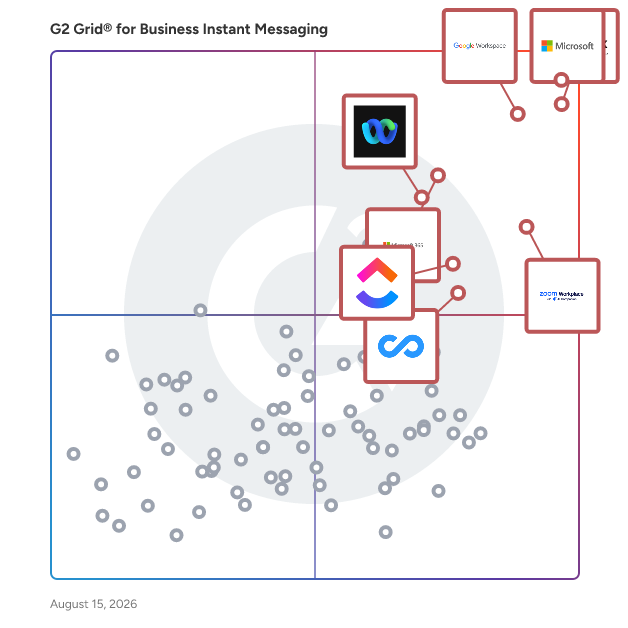
- **Leader:** [Microsoft Teams](https://www.g2.com/products/microsoft-teams/reviews)
- **Highest Performer:** [Missive](https://www.g2.com/products/missive/reviews)
- **Easiest to Use:** [morningmate](https://www.g2.com/products/morningmate/reviews)
- **Top Trending:** [Google Workspace](https://www.g2.com/products/google-workspace/reviews)
- **Best Free Software:** [Slack](https://www.g2.com/products/slack/reviews)

  
---

**Sponsored**

### Hive

Hive is a type of project management software solution designed to help teams streamline their workflows and enhance collaboration. This platform provides a comprehensive suite of tools that cater to various project management needs, enabling users to manage tasks, track progress, and communicate effectively within their teams. Hive&#39;s flexibility allows organizations to tailor their project management experience to fit their unique requirements, ensuring that teams can work in a way that suits them best. Targeted at businesses of all sizes, Hive is particularly beneficial for teams that require a high level of customization in their project management processes. Whether it&#39;s a marketing team coordinating campaigns, a product development team managing timelines, or a remote team collaborating on deliverables, Hive offers the versatility needed to adapt to different workflows. The platform is designed to accommodate diverse use cases, making it a valuable asset for organizations looking to improve efficiency and productivity. One of the key features of Hive is its flexible project views, which allow users to visualize their work in a manner that aligns with their preferences. Users can choose from various layouts, such as Kanban boards, Gantt charts, or list views, providing multiple ways to manage tasks and deadlines. This adaptability ensures that teams can find the most effective way to organize their projects, leading to increased clarity and focus. Additionally, Hive offers extensive customization options, enabling users to create workflows that reflect their specific processes. This includes the ability to set custom fields, automate repetitive tasks, and integrate with other tools that teams may already be using. Such features not only save time but also enhance the overall project management experience by allowing teams to work more efficiently and effectively. Another standout aspect of Hive is its commitment to user success. The platform is designed with the understanding that every team has unique needs, and Hive is willing to build additional tools or features to meet those needs. This level of support ensures that organizations can fully leverage the capabilities of the software, ultimately leading to improved project outcomes and faster execution of tasks. By adopting Hive, teams can expect to enhance their project management processes and foster a more collaborative work environment.


[Visit website](https://www.g2.com/external_clickthroughs/record?secure%5Bad_program%5D=ppc&amp;secure%5Bad_slot%5D=category_product_list&amp;secure%5Bcategory_id%5D=2174&amp;secure%5Bdisplayable_resource_id%5D=2174&amp;secure%5Bdisplayable_resource_type%5D=Category&amp;secure%5Bmedium%5D=sponsored&amp;secure%5Bplacement_reason%5D=page_category&amp;secure%5Bplacement_resource_ids%5D%5B%5D=2174&amp;secure%5Bprioritized%5D=false&amp;secure%5Bproduct_id%5D=27036&amp;secure%5Bresource_id%5D=2174&amp;secure%5Bresource_type%5D=Category&amp;secure%5Bsource_type%5D=category_page&amp;secure%5Bsource_url%5D=https%3A%2F%2Fwww.g2.com%2Fcategories%2Fbusiness-instant-messaging&amp;secure%5Btoken%5D=d198d4eebcc43a4fcb60a43bd9ffb7cb7db8ccb0cc4e1996d7280c87d2ed0b20&amp;secure%5Burl%5D=https%3A%2F%2Fhive.com%2F&amp;secure%5Burl_type%5D=company_website)

---

  
    ## What Is Business Instant Messaging Software?
  [Internal Communications Software](https://www.g2.com/categories/internal-communications)
  ## What Software Categories Are Similar to Business Instant Messaging Software?
    - [Video Conferencing Software](https://www.g2.com/categories/video-conferencing)
    - [Employee Intranet Software](https://www.g2.com/categories/employee-intranet)
    - [Project Collaboration Software](https://www.g2.com/categories/project-collaboration)

  
---

## How Do You Choose the Right Business Instant Messaging Software?

### What You Should Know About Business Instant Messaging Software

### What is Business Instant Messaging Software?

Business instant messaging software provide users with instant messaging platforms that allow direct and group messaging capabilities within an organization. These tools aim to facilitate quick conversations between team members. Business messaging tools make communicating with coworkers as easy as chatting with friends on social media or via text. Most business instant messaging options include emoji and GIF capability to promote authentic and natural conversation within the workplace.

Key Benefits of Business Instant Messaging Software

- Offer instant communication capability between team members
- Allow teams to connect regardless of location
- Make messages easily searchable
- Provide a less formal virtual space for team communication
- Connect an organization horizontally and vertically

### Why Use Business Instant Messaging Software?

Most modern businesses leverage some type of business instant messaging software. They provide a cornucopia of benefits, making them a mainstay of the modern software stack.

**Rapid —** Business messaging tools support employees by bringing instant messaging to a workforce. Teams can rapidly communicate with one another, facilitating collaboration between remote employees, across teams, or across offices.

**Informal —** Email etiquette is notoriously difficult to master and can feel unnecessarily formal for simple questions. Business messaging tools allow teams to toss out overly professional decorum and focus on content over etiquette.

**Mobile —** All competitive business instant messaging products tout a robust, intuitive mobile application to pair with their desktop offering. Today, business requires people to reachable to support their peers at all times. Business instant messaging platforms are easy to use at work and on the go.

**Adoptable —** Instant messaging feels natural for most users at this point. Millennials now constitute the bulk of the workforce, and business instant messaging software is a natural step for this generation. Adoption rates are high since business messengers feel familiar.

### Who Uses Business Instant Messaging Software?

Organizations across industries use business instant messengers to connect their employees. The software equips users with a quick, streamlined method of communicating with peers for all topics These platforms provide a time-effective alternative to passive mediums such as email or intrusive in-person meetings. The benefits provided by business instant messaging software are useful to businesses of any size—from three people to 3,000 people. Whether coordinating shifts in a university’s psychology lab or meetings in a Fortune 500 company, efficient communication is paramount.

### Kinds of Business Instant Messaging Software

**Stand-alone —** Many business instant messengers are stand-alone products integrations. Dedicated business instant messaging tools sometimes provide additional features like video conferencing, limited VoIP capability, and employee directories to create a comprehensive communication hub.

**Embedded —** Instant messaging might come as an additional feature in other types of software or larger collaboration suites. Business instant messaging functionality is often found in [employee intranet software](https://www.g2.com/categories/employee-intranet), [employee engagement software](https://www.g2.com/categories/employee-engagement), or virtual workspaces. Other types of communication software, like [video conferencing software](https://www.g2.com/categories/video-conferencing), can also provide instant messaging.

**Industry-specific —** Some business instant messengers are built for specific industries with their unique needs in mind. For example, business instant messaging tools for manufacturing and field service will often include [push-to-talk (PTT) software](https://www.g2.com/categories/push-to-talk-ptt) built in so remote employees have multiple instant communication channels. There are also [clinical communication and collaboration platforms](https://www.g2.com/categories/clinical-communication-and-collaboration) and [HIPAA compliant messaging software](https://www.g2.com/categories/hipaa-compliant-messaging) built specifically for health care organizations. These platforms take patient confidentiality into consideration. Some popular, generalized business messengers have started to create industry-specific solutions or build compliance into their product so they’re available for specific industries.

### Business Instant Messaging Software Features

Business instant messaging software share a few basic features across all products. As the space continues to become more competitive, some vendors have added additional communication and productivity features to help their product stand out.

**Instant messaging —** Instant, direct messaging is the main feature of business messenger applications. Users can instantly send direct or group messages. Depending on the administrator’s permissions, additional groups can be made by users or administrators.

**Status updates —** Users can leave a status attached to their profile to indicate their availability.

**Activity feed —** An activity feed is available to update users on new direct messages sent to them or new messages in groups. The feed will sometimes present replies to posts made by the user.

**Notifications —** Business messaging tools provide notifications when a user receives a direct message or a message is posted in a group. Additionally, users can turn notifications off or set certain permissions for notifications.

**Emojis —** Business messaging apps will often come loaded with emojis. Some applications even allow users to create their own.

**Search —** A search bar enables users to use keywords to easily find old messages.

**File sharing —** One of the main benefits of business messaging is the ability to easily and quickly share files and documents. Users can send links to documents hosted in the cloud or attach files saved on a desktop. Some tools even integrate with file repositories for streamlined file sharing.

**Surveys and polls —** Business messengers often provide simple survey and polling features allowing users to rapidly make decisions within the app.

#### Additional Business Instant Messaging Features

**Conferencing —** There has been increased effort to include audio and video conferencing functionality within business instant messaging products. When users can quickly move between text-based and audio-based communications, problems are resolved and questions are answered more efficiently.

**Knowledge base integration —** Some knowledge management tools serve as connectors between business instant messaging apps and knowledge bases. This type of integration attaches questions to answers then sends both to a searchable knowledge base.

**Automatic translation —** Some business messaging applications can automatically translate messages from one language into another via [machine translation software](https://www.g2.com/categories/machine-translation).

**Screen sharing —** Business messengers with video conferencing capability often allow screen sharing between conference participants.

**AI assistants —** AI assistants are sometimes included in business messaging apps. They guide users to behaviors based on the messages they’ve sent. For example, if a user types to another that they need to meet at a certain date or time, an embedded AI assistant can open a prompt for the user to add an event to their calendar.

### Trends Related to Business Instant Messaging Software

**Addition of conferencing features —** Traditionally, businesses relied on one tool for instant messaging and another for video and audio conferencing. This was beneficial since conferencing often includes external entities without access to internal tools. However, more businesses are recognizing the benefits of video conferencing and VoIP for internal use cases. It’s inconvenient for users having a conversation in one application to move to another, even if it would be a more fruitful exchange if they did so.

Subsequently, more businesses are looking for instant messaging tools that provide avenues for voice and video conferencing. More business messengers include video conferencing and VoIP capability in their offering, albeit not the best of breed since they’re not the main feature of the product. This may change as more vendors prioritize audio and video conferencing within their products.

### Potential Issues with Business Instant Messaging Software

**Contextual inappropriateness —** The convenience of instant messaging in the workplace is often a boon. As useful as business instant messaging software is, it is not always the most efficient or appropriate channel for certain situations. Problems can arise when individuals haven’t created clear distinctions for when it is appropriate to use a business messenger over email or another communication channel. While one-line emails could easily be relayed in an instant messenger, long-form messages with potential external participants aren’t appropriate on a business instant messaging platform.

This potential problem can be avoided with the implementation of clear guidelines identifying which communication channels should be used in a given situation. Businesses and organizations should include these guidelines in their onboarding and training process and make them available in a knowledge base for reference. Individuals who don’t use the appropriate channels should be gently reminded to break these habits.

### Software and Services Related to Business Instant Messaging Software

[**Productivity bots**](https://www.g2.com/categories/productivity-bots) **—** There are productivity bots built for specific instant messaging software to extend their functionality. Productivity bots can serve as AI assistants if a product doesn’t have one embedded, or provide helpful features that aren’t otherwise available to users on the native platform. For example, productivity bots can add polls or surveys to products that don’t offer them natively, or connect the app to other tools.

[**Employee intranet**](https://www.g2.com/categories/employee-intranet) **—** Some employee intranet solutions provide a business instant messaging tool within their product. If one isn’t provided, products often integrate with other popular business messaging options to fill this gap. Users benefit from having instant messaging tools deployed within their intranet since the intranet can serve as a consolidated collaboration and communication suite.


---
## What Are the Most Common Questions About Business Instant Messaging Software?

### How can I measure the ROI of a Business Instant Messaging tool?

To measure the ROI of a Business Instant Messaging tool, consider factors such as increased productivity, reduced email volume, and improved team collaboration. For instance, tools like Slack and Microsoft Teams are noted for enhancing communication efficiency, with users reporting time savings of up to 30%. Additionally, assess the cost savings from reduced travel and meeting times, as well as the impact on employee satisfaction and retention. Tracking these metrics against the total cost of ownership will provide a clearer picture of ROI.


### How does user experience differ among popular Business Instant Messaging tools?

User experience among popular Business Instant Messaging tools varies significantly. Slack is highly rated for its user-friendly interface and extensive integrations, scoring an average of 4.7/5. Microsoft Teams, while also favored for its collaboration features, has a slightly lower rating of 4.5/5, with users noting a steeper learning curve. Zoom Chat is appreciated for its simplicity and video integration, achieving a score of 4.6/5. Discord, primarily used by gaming communities, has a unique appeal with a rating of 4.4/5, focusing on community engagement rather than traditional business features.


### How do pricing models vary across different Business Instant Messaging platforms?

Pricing models for Business Instant Messaging platforms vary significantly. For instance, Slack offers a freemium model with paid plans starting at $6.67 per user per month, while Microsoft Teams is included with Microsoft 365 subscriptions, which start at $5 per user per month. Zoom Chat provides a free tier, with paid plans beginning at $14.99 per user per month. Discord is free for basic use, with a premium subscription at $9.99 per month. These variations reflect different strategies, catering to diverse user needs and organizational sizes.


### How do user reviews reflect the reliability of Business Instant Messaging solutions?

User reviews indicate that reliability in Business Instant Messaging solutions is often assessed through uptime ratings and user satisfaction scores. For instance, Slack has a high reliability rating of 92%, with users praising its consistent performance and minimal downtime. Microsoft Teams follows closely with an 89% reliability score, noted for its integration capabilities and stability. Zoom Chat, while slightly lower at 85%, is recognized for its quick response times and effective troubleshooting. Overall, these ratings reflect users&#39; confidence in the reliability of these platforms.


### How scalable are Business Instant Messaging tools for growing teams?

Business Instant Messaging tools are generally highly scalable for growing teams, with many products offering features that support large user bases and integrations with other tools. For instance, Slack is noted for its ability to handle thousands of users and channels, while Microsoft Teams provides robust scalability with its integration into the Office 365 ecosystem. Other tools like Discord and Mattermost also emphasize scalability, allowing for extensive user management and customization. User reviews highlight that these platforms maintain performance and usability even as team sizes increase.


### How secure are Business Instant Messaging platforms in protecting sensitive information?

Business Instant Messaging platforms generally prioritize security, with many offering end-to-end encryption, two-factor authentication, and compliance with industry standards such as GDPR and HIPAA. For instance, Slack and Microsoft Teams are noted for their robust security features, including data encryption in transit and at rest, while Zoom Chat emphasizes secure messaging with advanced encryption protocols. User reviews highlight that platforms like Mattermost and Rocket.Chat provide customizable security settings, allowing organizations to tailor their security measures to specific needs. Overall, users express confidence in the ability of these platforms to protect sensitive information.


### What are common use cases for Business Instant Messaging in organizations?

Common use cases for Business Instant Messaging in organizations include real-time team collaboration, where tools like Slack and Microsoft Teams facilitate instant communication and file sharing. These platforms are also utilized for project management, enabling teams to track progress and updates efficiently. Additionally, they serve as a means for remote work support, allowing employees to stay connected regardless of location. Enhanced customer support is another use case, with tools like Discord and Flock enabling quick responses to client inquiries.


### What are the best practices for onboarding teams to a new Business Instant Messaging platform?

To effectively onboard teams to a new Business Instant Messaging platform, prioritize clear communication of the platform&#39;s features and benefits, provide comprehensive training sessions, and encourage team collaboration through initial group chats. Utilize user-friendly interfaces and integration capabilities to ease the transition. Regular feedback loops can help address concerns and improve user adoption. Platforms like Slack, Microsoft Teams, and Discord are noted for their intuitive onboarding processes, with users highlighting the importance of support resources and community engagement in facilitating smooth transitions.


### What are the key features to look for in a Business Instant Messaging tool?

Key features to look for in a Business Instant Messaging tool include real-time messaging capabilities, file sharing options, integration with other software, user-friendly interface, and robust security measures. High user ratings highlight the importance of mobile accessibility and customizable notifications. Additionally, features like video conferencing and team collaboration tools are increasingly valued, as they enhance communication efficiency. Tools such as Slack, Microsoft Teams, and Discord consistently receive positive feedback for these functionalities, making them strong contenders in this category.


### What are the most common challenges when implementing a Business Instant Messaging solution?

Common challenges when implementing a Business Instant Messaging solution include user adoption resistance, integration with existing tools, and ensuring data security. Many users report difficulties in getting team members to switch from traditional communication methods, which can hinder overall effectiveness. Integration issues arise when the messaging platform does not seamlessly connect with other software, leading to workflow disruptions. Additionally, concerns about data privacy and compliance are prevalent, as organizations seek to protect sensitive information shared through these platforms.


### What integrations should I consider for my Business Instant Messaging solution?

When selecting a Business Instant Messaging solution, consider integrations with tools like Slack, Microsoft Teams, and Zoom, which are frequently highlighted for enhancing collaboration. Additionally, integrations with project management software such as Trello and Asana are valued for streamlining workflows. CRM integrations, particularly with Salesforce and HubSpot, are also essential for maintaining customer relationships. These integrations are commonly mentioned in user reviews, emphasizing their importance in creating a cohesive work environment.


### What level of customer support is typically offered by Business Instant Messaging providers?

Business Instant Messaging providers typically offer varying levels of customer support, with many users highlighting the importance of responsiveness and availability. For instance, Slack users often appreciate the 24/7 support and extensive online resources, while Microsoft Teams users note the integration of support within the Microsoft ecosystem, which includes a robust help center. Zoom Chat users frequently mention the effectiveness of live chat support during business hours. Overall, customer support quality can range from basic email support to comprehensive 24/7 assistance, depending on the provider.